
Elastic Security Labs published one of the more useful desktop intrusion case studies of 2026 on April 14. The report did not describe a tampered Obsidian installer, a malicious update from Obsidian, or a secretly backdoored Shell Commands release. It described something more uncomfortable and more relevant to modern security operations: a targeted social engineering campaign that used a legitimate note-taking app, a legitimate plugin ecosystem, a legitimate sync feature, and a legitimate command-execution plugin to deliver a cross-platform malware chain. Elastic tracks the activity as REF6598 and says the campaign targeted individuals in finance and cryptocurrency through LinkedIn and Telegram. (Elastic)
That distinction matters. Security teams still tend to classify incidents too quickly into familiar buckets such as “zero-day,” “supply-chain compromise,” or “malicious plugin.” Publicly available evidence does not support those labels here. Elastic reported that the Obsidian parent process was the legitimate signed binary, not an impostor, and that their investigation found no malicious .asar planting or JavaScript modification in the application. Instead, the execution path came from attacker-controlled vault content and plugin configuration, delivered only after the victim was persuaded to cross specific trust boundaries. (Elastic)
Obsidian’s own documentation makes clear that those boundaries exist for a reason. Community plugins are disabled by default through Restricted Mode, and the vendor warns that community plugins inherit Obsidian’s access level because the application cannot reliably confine them to fine-grained permissions. The documentation explicitly lists what that means in practice: community plugins can access files on the computer, connect to the internet, and install additional programs. That is not evidence of negligence. It is an honest statement about how much trust a desktop extension model really implies. (Obsidian)
The Shell Commands plugin makes that trust boundary even easier to see. Its official documentation and repository are candid about the feature set: the plugin exists so users can execute system shell or terminal commands from Obsidian, whether through the command palette, hotkeys, URI calls, or automatic events such as application startup and shutdown. The maintainer’s README warns users not to paste commands they do not fully understand and notes that the plugin uses Node’s child_process, which is why it is desktop-only. In other words, the capability that attackers abused was not hidden behavior. It was the whole point of the plugin. (Obsidian)
That is why this case matters well beyond Obsidian. It shows what happens when a trusted desktop tool sits at the intersection of shared content, sync, third-party extensions, local filesystem access, shell execution, and user workflows that are easy to social-engineer. Once those pieces are composable, “open this shared workspace” is no longer a harmless collaboration request. It can become the first step in a host-level intrusion path.
Obsidian Shell Commands malware was not an Obsidian zero-day
The easiest way to misunderstand this campaign is to imagine that opening a shared vault was enough to trigger code execution automatically. Elastic’s testing does not support that view, and neither do Obsidian’s official Sync docs. In their reproduction, Elastic showed that a secondary machine connecting to the same synced vault did receive base configuration files, but not the community plugin directory or the plugin manifest by default. Obsidian’s Sync documentation separately states that syncing community plugins requires users to manually enable the relevant vault configuration sync options, and that Sync settings are configured separately on each device. (Elastic)
That point is more than trivia. It changes the threat model. The campaign was not “attacker sends link, Obsidian instantly compromises host.” It was “attacker builds trust, hands the victim credentials, persuades the victim to treat an attacker-controlled vault as a legitimate shared workspace, and then convinces the victim to enable the exact sync behavior that carries plugin state and plugin data.” Elastic states plainly that an attacker cannot remotely force installation or enablement of a community plugin through vault sync alone. The victim has to enable that boundary crossing first. (Elastic)
The official docs align with that reading. Obsidian says the default vault configuration sync set includes items such as main settings, appearance, themes, hotkeys, and core plugin state. Community plugins are not part of that default set. To sync them, users must manually enable the relevant community plugin sync options. Obsidian also notes that the .obsidian configuration folder is the one hidden directory that does sync, while sync settings themselves remain device-specific. Together, those details explain why the campaign depended on a guided sequence of user actions rather than a purely remote exploit. (Obsidian)
Calling this a zero-day therefore muddies the real lesson. The more accurate interpretation is that the attackers made the victim opt into executable trust. They did not defeat a sandbox so much as recruit the user into disabling the safe defaults that separate shared notes from synchronized executable behavior. That is a different class of risk, and it is one many organizations still underestimate.
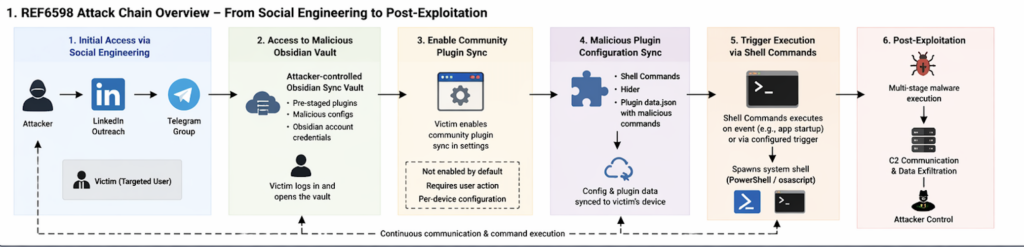
How the REF6598 Obsidian attack chain worked
Elastic’s campaign summary reads like a case study in staged credibility. The operators reportedly contacted targets through LinkedIn while posing as a venture capital firm. After the first exchange, the conversation moved to a Telegram group containing multiple supposed partners, creating the impression of a real business process rather than a single cold outreach message. The conversation centered on cryptocurrency liquidity and related financial services, which gave the attackers a plausible reason to invite targets into a shared information environment. (Elastic)
The next move was the one that reframed the victim’s expectations. The target was told to use Obsidian as the firm’s “management database” and was given account credentials for a cloud-hosted vault controlled by the attacker. That vault was not just a lure document repository. It was the initial access vector. Once the victim connected to it and enabled community plugin sync, the pre-positioned plugin configuration and data could land locally and trigger execution. (Elastic)
Elastic reports that the attacker combined the Shell Commands plugin with the Hider plugin. Shell Commands provided the ability to execute platform-specific system commands on configured events. Hider, a legitimate interface-cleanup plugin, was configured to conceal interface elements such as status, tabs, scroll, tooltips, sidebar buttons, and file navigation buttons. That combination is important because it shows the operation was not only about code execution. It also cared about reducing user friction and visual anomalies that might trigger suspicion. (Elastic)
The attack chain is easier to reason about when broken into trust transitions instead of malware stages. The initial phishing-like contact was not a file delivery step. It was a credibility-building step. The Telegram group was not the infection mechanism. It was a social proof mechanism. The shared vault was not malicious because notes are executable. It became dangerous only when combined with per-device sync choices and high-trust community plugins that can run local commands. That sequence is what makes the campaign worth studying: every individual step can look like normal work unless someone understands how the pieces combine. (Elastic)
The following table condenses the publicly documented chain into the parts defenders actually need to think about. (Elastic)
| Stage | What the attacker presented | What the victim did | Trust boundary crossed | Why it mattered |
|---|---|---|---|---|
| Initial contact | Venture capital outreach on LinkedIn | Replied to a seemingly relevant business request | Social trust | Opened the door to later requests that would otherwise look suspicious |
| Group migration | Telegram chat with multiple fake partners | Continued the conversation in a higher-pressure setting | Social proof | Reduced suspicion by simulating a team context |
| Workspace invitation | Obsidian described as an internal database | Logged into an attacker-controlled Obsidian account or vault | Workspace trust | Reframed the attacker’s content as legitimate internal collaboration |
| Sync guidance | Instructions to enable community plugin sync | Turned on plugin-related sync settings locally | Execution trust | Allowed community plugin state and data to move to the victim device |
| Plugin delivery | Shell Commands and Hider already staged | Opened the vault after sync changes | Local execution boundary | Enabled command triggers and UI concealment under a trusted parent process |
| Malware handoff | Obsidian spawned shell interpreters | System shells pulled staged payloads | Host trust | Turned a note-taking app into the visible parent of malicious execution |
Why the real execution boundary lived in
Obsidian’s storage model is central to understanding this incident. The product documentation says that each vault contains a hidden .obsidian configuration folder at the vault root. That folder stores vault-specific preferences including hotkeys, themes, and community plugin settings. Once a team understands that the trust boundary is not “Markdown files versus binaries,” but rather “content plus configuration plus extension state,” the attack becomes much less mysterious. The dangerous object is not the note. It is the synced configuration surface that determines what the application will do locally. (Obsidian)
Elastic’s reproduction turned that architectural point into an operational one. The researchers located the relevant Shell Commands data under .obsidian/plugins/obsidian-shellcommands/data.json and concluded that the configuration matched the suspicious PowerShell behavior they had already observed. Their write-up emphasizes that the payload logic lived in JSON configuration inside the vault and that this is part of what makes the technique notable: the execution intent is carried by files that do not look like traditional malware and are launched by a signed Electron application that users already trust. (Elastic)
This is why simplistic advice such as “only open text files from people you trust” is no longer sufficient. In a tool like Obsidian, the thing being imported into your environment is not only text. It can also include plugin manifests, plugin settings, appearance choices, hotkeys, and other behavior-shaping configuration inside the vault configuration tree. Obsidian’s documentation even notes that community plugins often require reload to apply new settings and that the configuration folder is a first-class sync target. The system is behaving as designed. The risk appears when users treat synced configuration as if it were mere note content. (Obsidian)
The Shell Commands documentation makes the execution boundary explicit. The plugin can run commands from the command palette, via hotkeys, via URI, and automatically on events such as Obsidian startup or exit. Its GitHub README is equally explicit that this power comes with danger and that users should never run commands they do not understand. The campaign did not subvert those warnings. It placed the victim in a context where the warnings no longer felt relevant because the commands appeared to belong to a trusted shared workspace. (Obsidian)
Obsidian plugin security already assumed a high-trust model
There is a temptation after incidents like this to ask whether the vendor “forgot” about plugin risk. In Obsidian’s case, the public docs show the opposite. The plugin security page states that Restricted Mode is on by default to prevent third-party code execution. It further states that Obsidian cannot reliably restrict community plugins to fine-grained permissions and therefore plugins inherit Obsidian’s access level. The docs then spell out examples that many consumer users still do not fully internalize: community plugins can access local files, connect to the internet, and install additional programs. (Obsidian)
The same documentation also describes the limits of store review. Community plugins get an initial review when submitted to the plugin store, but the Obsidian team says it is too small to manually review every new release. That is a realistic statement, not a scandal. It means plugin security in this ecosystem is a combination of default-off behavior, user consent, community review, and post-publication governance rather than a capability sandbox. If a security team assumes “reviewed plugin” means “safe under any configuration and any social context,” that team is importing the wrong threat model. (Obsidian)
Obsidian’s team security guidance adds another useful nuance. The company recommends that organizations thoroughly evaluate community plugins, themes, Sync, and Publish before using them in the workplace. It also notes that the app fetches a plugin deprecations file from GitHub to remotely disable known-bad plugin versions and that enabled plugins may generate traffic outside Obsidian and GitHub’s control. This shows there is some governance and kill-switch capability in the ecosystem, but it also shows the limits of that capability. A legitimate plugin being used in a malicious workflow is not the same problem as a malicious plugin package. (Obsidian)
That distinction is the heart of this case. Review pipelines, deprecation files, and store moderation can help when the risk is “this extension version is bad.” They help much less when the risk is “this extension is doing exactly what it was built to do, but the surrounding trust assumptions are malicious.” The relevant defense then shifts toward safe defaults, sync scoping, parent-child process monitoring, and user workflow controls.
Windows execution chain, from vault open to PHANTOMPULSE
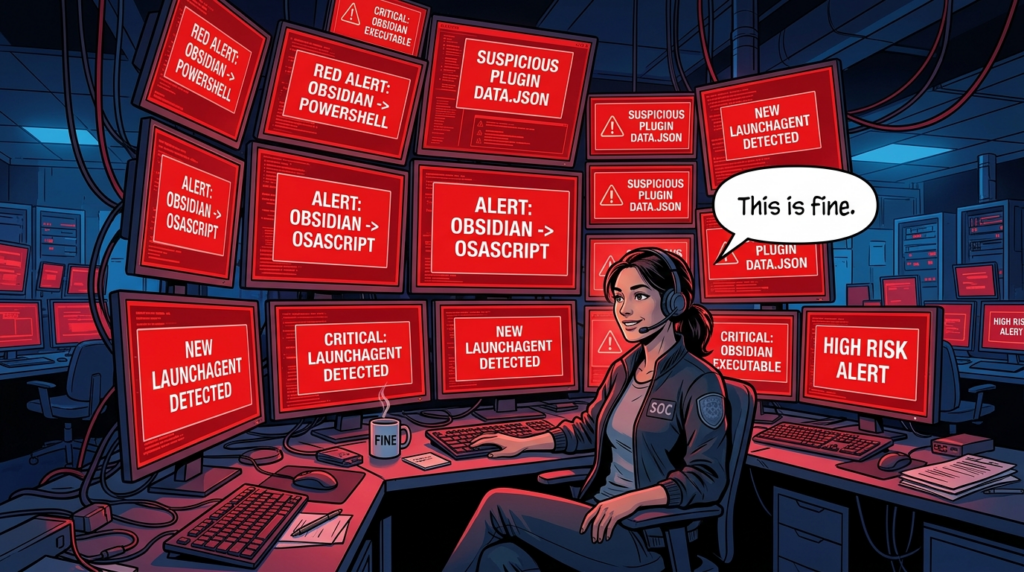
Elastic’s Windows analysis is valuable because it shows how little of the chain depended on something visibly broken in the host application. The suspicious behavior that first triggered investigation was PowerShell spawning with Obsidian as the parent process. That is already a useful detection lesson: when a knowledge-work desktop app suddenly becomes the parent of a shell interpreter, analysts should treat it as an execution event, not a harmless automation artifact, until proven otherwise. (Elastic)
From there, Elastic observed a staged chain. A Shell Commands configuration launched PowerShell that pulled a second-stage script. That script then retrieved a loader, reported execution status to operator infrastructure, and advanced the infection path. Elastic named the intermediate loader PHANTOMPULL. Their write-up describes it as a 64-bit PE that decrypted an encrypted resource, reflectively loaded the next stage into memory, and used timer queue callbacks and runtime API resolution to complicate analysis and detection. (Elastic)
The next stage culminated in a previously undocumented RAT Elastic calls PHANTOMPULSE. The report says PHANTOMPULSE used WinHTTP for command and control, gathered detailed telemetry, and implemented capabilities including injection, file drop and execution, screenshots, keylogging, uninstall, and privilege-related actions. Elastic also states that the malware used blockchain-based C2 resolution and that the researchers identified a design weakness: because the malware did not verify the sender of the transaction containing the latest C2 pointer, responders could potentially redirect infected hosts to a sinkhole by publishing a newer transaction. (Elastic)
For defenders, the most important point is not the family name or the specific loader mechanics. It is the chain geometry. The earliest meaningful host-level signal was not “new unsigned malware file appears.” It was “trusted Electron application launches shell interpreter,” followed by “shell interpreter reaches out for second stage,” followed by “later stages minimize disk artifacts and lean into memory loading.” Elastic explicitly notes that the JSON-based configuration payload and signed parent process are part of what make traditional signature-first detection weaker here. (Elastic)
The following table summarizes the Windows side from a defender’s point of view rather than a reverse engineer’s notebook. (Elastic)
| Windows stage | Publicly documented behavior | Why defenders should care | Most practical detection lens |
|---|---|---|---|
| Obsidian startup or vault-open trigger | Shell Commands event launches PowerShell from Obsidian | Legitimate parent process masks malicious intent | Parent-child process monitoring |
| Stage-two retrieval | PowerShell downloads additional script and loader | Early network and script telemetry may still be visible | Script block logging, EDR behavior, outbound connections |
| Intermediate loader | In-memory decrypt and reflective loading | Later payload may avoid obvious on-disk signatures | Memory-focused EDR and behavior analytics |
| RAT deployment | Telemetry, command retrieval, screenshot and keylog capability | Host compromise has already moved beyond note app scope | C2 patterns, persistence artifacts, post-exploitation telemetry |
| Blockchain-based C2 lookup | C2 pointer retrieved through explorer APIs and wallet data | Static IOC blocking alone becomes brittle | Behavioral correlation and sinkholing strategy |
macOS execution chain, from osascript to LaunchAgent persistence
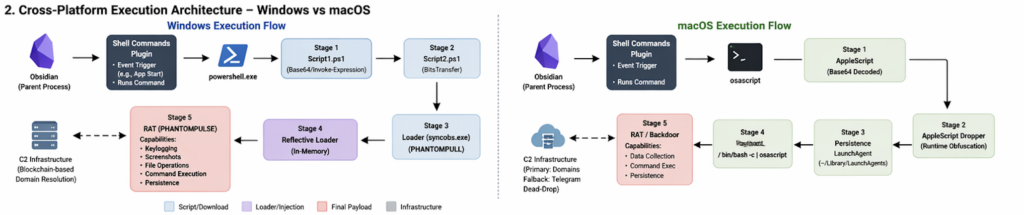
The macOS side is not just a footnote to prove “cross-platform” in a headline. Elastic describes a distinct chain that starts with Shell Commands executing a Base64-encoded payload through osascript. The decoded logic, according to the report, establishes persistence by writing a LaunchAgent plist into the user’s ~/Library/LaunchAgents directory with KeepAlive and RunAtLoad configured, then launches a second-stage AppleScript through /bin/bash -c piped into osascript. (Elastic)
Elastic further says that the AppleScript dropper relied on multiple evasive techniques, including runtime string construction through AppleScript character and string ID calls, plus decoy variables and fragmented concatenation. More interesting operationally, the macOS chain used a layered C2 resolution method. The primary logic checked a hardcoded domain list, while the fallback path scraped a public Telegram channel to obtain a backup domain. Elastic characterizes that as a dead-drop technique that lets operators rotate infrastructure without relying on a single static indicator. (Elastic)
That changes the defensive emphasis on macOS. Analysts should not only watch for Obsidian spawning osascript or shell interpreters. They should also check user LaunchAgents for newly written entries and investigate why a note-taking application would participate in persistence creation at all. The campaign is useful because it reminds defenders that collaboration and productivity apps are now part of the endpoint persistence conversation, not just part of the social engineering conversation. (Elastic)
It is also a reminder that cross-platform adversary tradecraft does not always mean identical malware. In this case, the initial access story stayed coherent across platforms, but the on-host implementation adapted to native interpreters, persistence mechanisms, and infrastructure fallback patterns. That is exactly what mature operators do when they have found a good initial trust boundary to abuse.
Obsidian Shell Commands malware is really a lesson about trusted tools
Security people often say “content is code” when they want to warn about templates, renderers, or injection. This campaign suggests a more precise variant for modern desktop software: shared workspace state is code-adjacent whenever it can drive extensions, settings, or local automation. That is the condition that turned an Obsidian vault from collaborative context into an execution channel. (Obsidian)
The broader pattern is now familiar across other product classes. An IDE repository can carry tasks, workspace settings, and extension recommendations. A desktop AI app can ingest retrieved content, render it with permissive Electron settings, and hand it dangerous capabilities. A workflow engine can evaluate expressions in ways that collapse data and execution. A note-taking tool can sync a configuration tree whose plugins can launch system commands. These are not all the same vulnerability class. They are manifestations of the same system design problem: too much privilege packed too close to user-trusted content and automation surfaces. (GitHub)
The Obsidian case is particularly instructive because nothing in the public reporting suggests a spectacular software engineering failure. The application disclosed the plugin trust model. Restricted Mode existed. Community plugin sync had to be enabled manually. The plugin itself warned users about running unknown commands. And yet the chain still worked because the decisive control was social: attackers got the victim to reinterpret a hostile workspace as legitimate collaboration. (Obsidian)
That is why defenders should stop modeling these cases only as phishing or only as malware. The campaign sat in the seam between the two. It began as social engineering, crossed into workspace trust, then became endpoint execution. If a security program has one team that owns email and social lures, another that owns endpoint telemetry, and nobody that owns “trusted desktop tools with extension ecosystems,” there is a real chance that this class of attack will fall between the cracks.
Related CVEs show the same execution-boundary failure
This campaign is easier to place in context when viewed next to recent CVEs that turn rendering, automation, and desktop integration boundaries into execution paths. The details differ, but the structural lesson is the same: software that appears to be “just reading,” “just rendering,” or “just evaluating” can become a host-level execution surface when content and privilege are too tightly coupled. (nvd.nist.gov)
The following CVEs are especially useful in that light. (nvd.nist.gov)
| CVE | Affected product | Why it belongs in this conversation | Exploitation condition | Fix or mitigation focus |
|---|---|---|---|---|
| CVE-2026-20841 | Windows Notepad | Markdown content crossed into protocol handling and command execution | User opens a malicious .md file in Notepad and clicks a crafted link | Patch Notepad, monitor suspicious protocol usage from Markdown files, treat rendered text features as execution-adjacent |
| CVE-2025-68613 | n8n | Workflow expressions crossed into host execution | Authenticated user with workflow editing ability abuses insufficiently isolated expression evaluation | Upgrade to patched versions, restrict who can edit workflows, harden host privileges and network reach |
| CVE-2026-27577 | n8n | Follow-on expression flaws showed boundary fixes were incomplete | Authenticated user with workflow modification rights triggers command execution through crafted expressions | Patch again, assume workflow engines need repeated regression testing around expression boundaries |
| CVE-2026-32626 | AnythingLLM Desktop | LLM response rendering crossed into Electron host RCE | Malicious prompt-injected content or upstream source is rendered in streaming chat path | Patch to 1.11.2+, sanitize rendering, disable insecure Electron patterns |
CVE-2026-20841 is a good comparison because it shows how a plain-text-looking workflow can become an execution issue once a renderer and protocol handler enter the path. NVD records the issue as command injection in the Windows Notepad app, and ZDI’s analysis explains the underlying mechanism in more detail: when Notepad renders Markdown links, insufficient filtering before ShellExecuteExW can allow crafted protocols such as file:// and ms-appinstaller://, turning a document interaction into code execution in the context of the victim account. User interaction is still required, but the important lesson is that “it is just a text editor” is no longer a reliable security assumption when rendering behavior gets richer. (nvd.nist.gov)
CVE-2025-68613 and CVE-2026-27577 are useful for a different reason. They show how workflow systems repeatedly struggle with the line between data and executable logic. GitHub’s advisory for CVE-2025-68613 says n8n’s expression evaluation system could let an authenticated user execute arbitrary code with the privileges of the n8n process, and NVD notes that administrators should restrict workflow creation and editing to fully trusted users if they cannot patch immediately. The follow-on CVE-2026-27577 then documented additional expression-evaluation exploits after the first major fix, which is exactly what defenders should expect when an execution boundary is conceptually weak rather than only implementation-buggy. (GitHub)
CVE-2026-32626 in AnythingLLM Desktop brings the desktop and AI angle even closer to the Obsidian case. GitHub’s advisory says the issue was a streaming-phase XSS in the chat rendering pipeline that escalated to host RCE because of insecure Electron configuration, and that it worked with default settings and no unusual user interaction beyond normal chat use. The advisory further explains that attacker-controlled model output or retrieval content could reach the vulnerable renderer. This is a near-perfect illustration of the larger theme in the Obsidian incident: content that feels passive to the user becomes active when paired with permissive host capabilities and a desktop runtime that can touch the operating system. (GitHub)
Taken together, these CVEs do not prove that all note apps, workflow tools, or AI desktops are equally risky. They prove something more useful: once a product crosses from static content handling into rendering, protocol dispatch, expression evaluation, local automation, or shell execution, it needs to be threat-modeled like an execution surface. Obsidian plus Shell Commands is one expression of that truth. Notepad Markdown links, n8n expressions, and AnythingLLM desktop rendering are others.
What defenders should monitor in Obsidian and similar tools

The fastest way to miss this class of intrusion is to monitor the wrong layer. If a security team looks only for malicious binaries landing on disk, it may miss the earliest phase entirely. Elastic’s own guidance is blunt: once enabled, the payload logic can live in JSON configuration files and execution is passed off by a trusted signed Electron application, which makes parent-process-based detection the critical layer. (Elastic)
That observation suggests a practical hierarchy of detection priorities. First, watch for trusted collaboration or desktop knowledge tools launching shells or script interpreters they do not normally need to launch. In Elastic’s KQL examples, the core rule is straightforward: look for Obsidian as the parent of powershell.exe, cmd.exe, sh, bash, zsh, or related interpreters. Second, watch for file activity involving known execution-capable plugin paths, especially under .obsidian/plugins/. Third, on macOS, monitor for suspicious osascript execution and new LaunchAgent entries whose parent lineage points back to user-facing desktop software rather than installer or admin workflows. (Elastic)
A simple starting point is to adapt the public Elastic process logic directly into endpoint queries. (Elastic)
event.category : process and event.type : start and
process.parent.name : (Obsidian.exe or Obsidian) and
process.name : (powershell.exe or cmd.exe or bash or zsh or sh or osascript)
A companion file-oriented rule can help identify execution-capable plugin directories and settings churn in the same timeframe. Elastic published a minimal file-event pattern that keys on the Shell Commands plugin path. That should not be the only rule, but it is a sensible first indicator while an organization builds broader logic for trusted desktop tools that should not normally spawn shells. (Elastic)
event.category : file and process.name : (Obsidian or Obsidian.exe) and
file.path : *obsidian-shellcommands*
For host-based self-audit on Windows, start by looking at what exists in the .obsidian tree and whether obvious execution primitives appear in plugin data. The goal is not to prove compromise from strings alone. It is to identify whether the vault contains execution-related plugin state that deserves deeper review. (Obsidian)
$vault = "$HOME\Documents\YourVault"

Get-ChildItem -Force "$vault\.obsidian\plugins" -Recurse |
  Select-Object FullName

Get-ChildItem -Force "$vault\.obsidian" -Recurse -Filter *.json |
  Select-String -Pattern 'obsidian-shellcommands|powershell|cmd.exe|bash|sh|osascript|curl|wget|Invoke-Expression' |
  Select-Object Path, LineNumber, Line
On macOS and Linux, the same principle applies. Review the .obsidian configuration tree for execution-related plugin data, then inspect login persistence locations if you have reason to suspect abuse of local interpreters. Elastic’s published macOS chain specifically involved osascript and LaunchAgent persistence, so those are not speculative places to look. (Elastic)
VAULT="$HOME/Documents/YourVault"

find "$VAULT/.obsidian" -type f \( -name "*.json" -o -name "*.md" \) -print
grep -RInE 'obsidian-shellcommands|powershell|cmd\.exe|bash|zsh|sh|osascript|curl|wget' "$VAULT/.obsidian"

ls -la ~/Library/LaunchAgents 2>/dev/null
grep -RInE 'osascript|bash -c|curl|Obsidian' ~/Library/LaunchAgents 2>/dev/null
The limitation of local string review should be obvious. A benign power user can legitimately use Shell Commands. A malicious configuration can also hide intent behind encoding, obfuscation, or externalized scripts. That is why endpoint lineage matters more than static content alone. If a knowledge app starts launching shells, reaches outward, or creates persistence artifacts, the question is no longer whether the underlying plugin can do that. The question is why it is doing it now.
How to validate exposure without turning the app into the incident
Individual users and enterprise defenders need different playbooks, but they share the same starting point: stop treating “productivity app” as a category that automatically sits outside of security review. Obsidian’s official docs already tell you that community plugins can access files, reach the network, and install programs. Once those facts are accepted, the app belongs in the same trust conversation as browsers with extensions, IDEs with workspace settings, and AI desktop tools with file and shell access. (Obsidian)
For individual users, the most practical review sequence is short. Check whether you enabled community plugins at all. Check whether you enabled community plugin sync on the current device. Review installed community plugins and remove any you do not actively use. Inspect the .obsidian/plugins/ directory and plugin data files for execution-capable plugins. Then review whether the app has ever spawned shell interpreters, download utilities, or script engines. This is not a guarantee of cleanliness, but it is far better than assuming a note vault can only contain notes. (Obsidian)
For security teams, the discipline should be broader. Start with asset inventory. Which desktop knowledge and AI tools are present? Which of them support third-party plugins, synced settings, shell execution, or external automation hooks? Then add lineage rules to EDR for those processes. Finally, separate two questions that often get collapsed into one: “Is the application allowed?” and “Are all optional high-trust capabilities inside that application allowed?” The Obsidian case shows that approving the base app says very little about the risk of approving synced execution-capable extensions. (Obsidian)
There is also a testing lesson here for engineering and AppSec teams. This class of issue is easy to describe and surprisingly hard to validate consistently because the dangerous behavior often emerges only after a specific combination of sync choices, plugin state, local OS behavior, and user workflow steps. That is one reason controlled, evidence-first validation matters. Teams already using AI-assisted verification workflows can treat “trusted desktop tool can spawn shells or create persistence after synced configuration changes” as a regression scenario, not just as a news item. Penligent’s public material and related technical writing frame AI-driven pentesting around repeatable evidence capture, host-level validation, and testing systems that sit across application, orchestration, and action boundaries. That makes it a natural fit for continuously rechecking whether a newly introduced plugin, agent, or helper tool has widened the execution boundary more than intended. (penligent.ai)
The same mindset is increasingly necessary for AI-connected desktops and agents. Penligent’s writing on agentic security and tool misuse makes the same point from a different angle: once a runtime can read files, call tools, or execute commands, the problem is no longer “can the model be tricked into odd text.” It becomes “can content or workflow state cause unauthorized action.” That is also the right frame for this Obsidian incident. The product name changes. The boundary problem does not. (penligent.ai)
Hardening Obsidian and similar plugin-driven desktop tools
The strongest hardening move is also the simplest: do not accept shared vaults, workspaces, or app accounts from people you do not already trust through a separate channel. In the REF6598 case, the malicious action chain began long before any shell launched. It began when the victim accepted the attacker’s framing of a shared workspace as routine business infrastructure. Security awareness for this class of threat therefore needs to talk about “collaboration invitations with executable side effects,” not only about attachments and links. (Elastic)
The next move is to preserve safe defaults. Keep Restricted Mode on unless there is a real need for community plugins. If community plugins are necessary, be explicit about which plugins are allowed and why. More specifically, treat execution-capable plugins differently from convenience or appearance plugins. A plugin that shells out to the OS, runs scripts, opens custom URIs, or automates on events deserves a separate approval standard from a plugin that merely adds a panel or changes formatting. Obsidian’s docs already tell you the permission implications; most teams just have not translated that into internal policy. (Obsidian)
Sync policy matters just as much as plugin approval. Obsidian’s official guidance says community plugin sync is manually enabled and device-specific. Use that fact to your advantage. A reasonable team stance is that content sync may be allowed where business needs justify it, while community plugin sync remains disabled except on tightly controlled devices. The same idea applies to similar tools beyond Obsidian: settings that carry behavior should not be treated as equivalent to settings that carry appearance. (Obsidian)
Application control can reduce blast radius when policy fails. If a note-taking or documentation app has no business launching PowerShell, cmd, osascript, or shell interpreters in your environment, say that explicitly in endpoint policy. Parent-child rules are especially effective in cases like this because they do not need to know the exact malware family. They only need to know that a knowledge app spawning a shell is abnormal. On macOS, similar logic should cover LaunchAgent creation paths when the parent lineage points back to user-space collaboration software rather than an installer or management agent. (Elastic)
The final piece is governance, not just blocking. Obsidian already has an initial plugin review process and a plugin deprecations mechanism for remotely disabling specific problematic versions, but the company is also explicit that it cannot manually review every release and that plugins remain high-trust code. Mature customers should read that as an invitation to build local control layers rather than as a promise that the ecosystem is self-securing. In practical terms, that means plugin inventories, exception handling for high-risk plugins, endpoint detections keyed to trusted desktop tools, and periodic review of what configuration sync is actually allowed to move between devices. (Obsidian)
The table below summarizes the hardening moves that matter most in this category. (Obsidian)
| Hardening move | Risk reduced | Operational cost | Best fit |
|---|---|---|---|
| Keep Restricted Mode on by default | Prevents arbitrary community plugin execution | Low | Everyone |
| Disable community plugin sync unless explicitly needed | Stops shared vaults from carrying execution-capable plugin state to new devices | Low to medium | Everyone, especially enterprises |
| Require separate approval for shell-capable plugins | Reduces abuse of automation plugins as local execution channels | Medium | Power users and enterprises |
| Alert on knowledge apps spawning shells or script engines | Detects abuse even when the plugin and app are both legitimate | Medium | Security teams |
Review .obsidian and equivalent config trees as executable trust surfaces | Catches risky configuration drift | Medium | Security teams and power users |
| Run high-risk desktop tools in more isolated environments where practical | Limits blast radius of extension misuse and social engineering | Medium to high | Enterprises, sensitive roles |
| Treat shared workspaces from unknown parties as untrusted content plus configuration | Reduces the social-engineering success rate at the earliest stage | Low | Everyone |
Obsidian plugin security deserved a better question than “Is the app compromised”
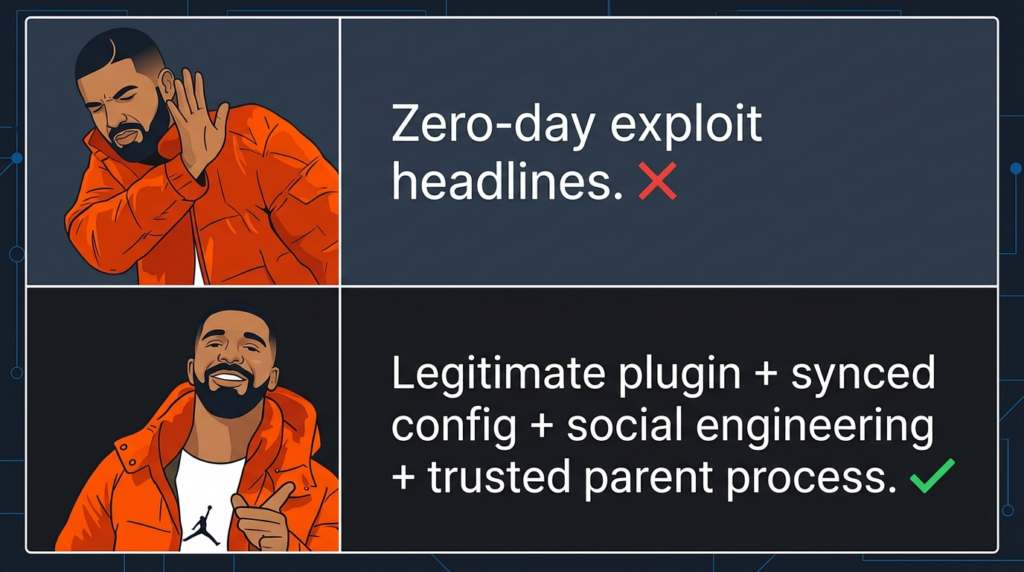
A lot of post-incident debate around products like Obsidian gets stuck on the wrong binary. Either the app is secure or it is insecure. Either the plugin author is malicious or innocent. Either the store review worked or failed. The public record here suggests a more useful question: what happens when a legitimate, high-trust plugin model meets a user workflow that attackers can manipulate? (Obsidian)
On that question, the answer is uncomfortable but clear. A product can have honest documentation, safe defaults, a plugin review process, and still become part of a real intrusion if users can be persuaded to reinterpret hostile state as legitimate collaboration. This is not unique to Obsidian. It is the same structural issue that keeps resurfacing in Electron desktops, AI agents, workflow engines, renderers, and extension ecosystems. Every time a system narrows the gap between content and action, the security burden shifts upward from “block obviously bad code” to “police trust transitions and execution boundaries.” (GitHub)
That shift has implications for product design as well. Safer defaults matter. Granular sync scoping matters. Enterprise controls that distinguish content sync from execution-capable sync matter. Better warnings for execution-class plugins matter. Auditable logs for configuration changes matter. But just as important, users and defenders need a vocabulary for these attacks that is more precise than “phishing” and more honest than “just a plugin issue.” What happened here was a trust-boundary failure across social context, synchronized configuration, and local execution.
The bigger lesson from the Obsidian Shell Commands attack
The future blind spot is not only malware that looks malicious. It is trusted software that can be persuaded to behave like malware. The REF6598 campaign is worth studying because it captures that reality in a form that is easy to explain and hard to dismiss. A note-taking app did not become dangerous because it was secretly evil. It became dangerous because a hostile actor found a path through social trust, shared workspace trust, sync trust, extension trust, and finally operating-system trust. (Elastic)
If you defend endpoints, that means parent-child lineage from trusted desktop tools deserves more attention than it usually gets. If you build products, that means configuration and plugin sync are security features whether you intended them to be or not. If you use AI desktops, knowledge tools, or workflow apps, that means the old mental model of “documents are passive, settings are boring, extensions are optional” no longer survives contact with the way modern software actually works. (Obsidian)
The right response is not panic and not simplistic blame. It is better boundary design, sharper endpoint detections, and a more realistic understanding of how collaboration software becomes an execution surface. Attackers will keep looking for places where users are willing to say, “This seems like normal work.” Security teams need to get better at asking what that “normal work” is allowed to do on the host.
Further reading and references
Elastic Security Labs, Phantom in the vault: Obsidian abused to deliver PhantomPulse RAT. This is the primary public technical analysis of REF6598 and the foundation for the attack-chain details discussed above. (Elastic)
Obsidian Help, Plugin security. This is the key vendor document for Restricted Mode, plugin capabilities, and the limits of plugin permission confinement. (Obsidian)
Obsidian Help, Sync settings and selective syncing. This is the key vendor document for understanding what syncs by default, what must be manually enabled, and why community plugin sync is a separate boundary. (Obsidian)
Obsidian Help, How Obsidian stores data and Security considerations for teams. These documents explain the role of the .obsidian folder, the workplace implications of plugins and sync, and the plugin deprecations control path. (Obsidian)
Shell Commands documentation and repository. These are the most direct sources for what the plugin is intended to do, including command execution through events, hotkeys, URI, and the maintainer’s warning not to run commands you do not understand. (Obsidian)
NVD and ZDI on CVE-2026-20841, the Windows Notepad Markdown execution issue. These sources are useful for understanding how text-rendering and protocol handling can become an execution boundary. (nvd.nist.gov)
GitHub Advisory and NVD on CVE-2025-68613 and NVD on CVE-2026-27577 for n8n. These are useful case studies in workflow-expression boundaries turning into host command execution. (GitHub)
GitHub Advisory and NVD on CVE-2026-32626 for AnythingLLM Desktop. This is one of the clearest recent examples of model or retrieval output crossing a rendering boundary and ending as host RCE in an Electron desktop app. (GitHub)
Penligent, Agentic AI Security in Production — MCP Security, Memory Poisoning, Tool Misuse, and the New Execution Boundary. This is the most relevant internal reading if you want a broader frame for how trusted tools, memory, and execution-capable runtimes create new security boundaries. (penligent.ai)
Penligent, The OpenClaw Prompt Injection Problem — Persistence, Tool Hijack, and the Security Boundary That Doesn’t Exist. This is useful for readers who want to connect the Obsidian case to the larger class of tool-hijack and unauthorized-action problems in agentic systems. (penligent.ai)
Penligent, Pentest AI, What Actually Matters in 2026, plus the Penligent homepage. These are the most relevant internal pages for the continuous-validation angle discussed above. (penligent.ai)

 English
  German
  French
  Spanish
  Portuguese
  Japanese
  Korean
  Hindi
Hindi  Arabic
  Turkish
  Hebrew