
CVE-2026-91403 puts a practical question in front of Java developers: which certificate policy does the JVM serving your application actually use? Updating a browser, a host package, or a JDK elsewhere on the machine does not answer that question. Start with the deployed runtime and follow its trust configuration to the component you must repair.
For a standalone JDK, follow the runtime vendor’s security update. For a distribution-provided OpenJDK, check the operating system’s certificate update guidance. For an application with a custom truststore or trust manager, review that configuration separately. These routes can coexist in one deployment; a containerized Java service and the host running it may need different work.
Do not close the October Java CPU on the certificate fix alone
The October 2026 Oracle Java SE risk matrix contains 55 new security patches, including 49 vulnerabilities described as remotely exploitable without authentication. CVE-2026-91403 is one entry, not the complete update. Other rows cover different components and have their own affected releases and prerequisites. Oracle’s notes distinguish applications loading untrusted code from applications processing untrusted data through affected APIs. A network vector does not mean every ordinary Java server exposes every issue.
Use the actual JDK distributor’s release notice to select the replacement build. Oracle Java SE, Oracle JavaFX and GraalVM have distinct entries in the matrix; another distributor may use a different package identity or backport schedule. The affected-version column is not a recommended download list. Do not copy a version out of that column into a remediation ticket as the fixed version.
| Review | Evidence needed | Insufficient shortcut |
|---|---|---|
| Certificate distrust | The deployed JVM’s intended trust decision | A browser handshake |
| Other CPU entries | Component, affected branch, prerequisites and distributor fix | Closing every CVE from one certificate test |
| Rollout | Replacement runtime serving each application | A newer JDK installed beside the old one |
| Compatibility | Required application flows under the repaired runtime | A successful installer exit |
Keep a certificate-specific acceptance test in the deployment record, but attach it to the wider CPU change rather than substituting it for that change. If the application packages its own runtime, inventory that copy explicitly. The useful completion statement identifies the application, its active runtime build and the tested behavior; it avoids implying that a workstation update repaired an unrelated service.
What CVE-2026-91403 changes for Java operators
The OpenJDK advisory of October 21, 2026 connects CVE-2026-91403 to eight compromised intermediate CA certificates. Its advice distinguishes standalone runtimes from operating-system packages. That distinction matters more to remediation than a generic instruction to update Java.
Oracle’s October 21 security alert assigns a CVSS 3.1 score of 9.1 to the JSSE issue, with network access, no authentication, and high confidentiality and integrity impact. Its availability impact is none. This is a certificate trust issue; the cited alert does not establish a Java remote code execution chain.
The threat concerns trusting a fraudulent identity, rather than only whether your own website bought a certificate from a particular issuer. A Java client connecting to an API, artifact repository, identity service, or other TLS peer deserves review when its trust path can accept the compromised CA material. Prioritize processes that handle credentials or sensitive responses and can reach untrusted networks. This is an operational prioritization recommendation, not evidence that any particular application has been intercepted.
| Official listing | Affected versions reported | How to use the listing |
|---|---|---|
| Oracle Java SE | 8u511, 8u511-perf, 11.0.33, 17.0.21, 21.0.13, 25.0.5, 27.0.1 | These are affected versions. Obtain patch availability from Oracle. |
| Oracle GraalVM for JDK | 17.0.21, 21.0.13 | Check the matching product’s update instructions. |
| Oracle GraalVM Enterprise Edition | 21.3.20 | Use the Enterprise Edition patch guidance. |
| OpenJDK source advisory | 27.0.1, 25.0.5, 21.0.13, 17.0.21, 11.0.33, 8u512 and earlier | Match the distribution and its security response, not only the feature release. |
The Oracle rows come from its affected-product table; the OpenJDK row comes from the source advisory. Their Java 8 version notation differs. Do not turn either affected-version list into a fixed-version recommendation. A downstream package may carry a backport; verify the vendor build and security notice.
The eMudhra incident reaches beyond the JVM
The researchers’ incident resource describes incorrectly generated intermediate-CA keys recoverable from the published certificates. This differs from establishing that an intruder stole keys from a CA server. Its analysis distinguishes browser protections from clients that do not consume the same revocation information. A repaired browser cannot stand in for a Java application, a bundled command-line tool or another independent verifier.
The researchers report no Certificate Transparency entries for the affected intermediates during the relevant period and explain the significance for CT-enforcing clients. They do not establish that non-CT clients were never targeted. Keep three records separate: what trust material the application accepted, what it rejects after remediation, and whether retained traffic evidence supports a historical interception claim.
For a mixed-language service, assign the trust update to each actual verifier: JVM, sidecar, outbound proxy, build tool and separately bundled client. Record the vendor’s security notice and deployed artifact for each. An operating-system certificate update may cover one row while leaving a bundled store untouched. Prefer maintained vendor updates; removing a familiar issuer by name across every store is not a substitute for its supported distrust policy.
Follow the application’s trust source before changing files
For the default SunJSSE trust-manager setup, the JSSE reference guide describes an explicit javax.net.ssl.trustStore setting, followed by jssecacerts and then cacerts under the runtime’s security directory when the property is absent. An application can supply a different SSLContext or trust manager, so this default selection is not a universal description of every HTTP client.
| Deployment you actually run | First repair authority | Evidence to retain |
|---|---|---|
| Standalone JDK archive or bundled application runtime | JDK or application vendor; OpenJDK emergency guidance when applicable | Runtime location, full build identity, update provenance, trust configuration |
| Distribution-provided OpenJDK | Distribution security notice and certificate package policy | Installed package versions and proof the app uses that package’s trust material |
| Homebrew or FreeBSD OpenJDK | Direct Java package update, as distinguished in the OpenJDK advisory | Package update record and actual runtime selected by the service |
| Application-defined truststore or trust manager | Application owner plus runtime/provider guidance | Configured file or provider, reviewed trust policy, application-level tests |
| Container or embedded runtime | Image/application maintainer and runtime vendor | New image digest, deployed revision, restarted process and trust-source evidence |
OpenJDK says common Linux distribution packages generally use operating-system certificates, while FreeBSD and Homebrew need direct Java updates. Treat that guidance as a route to verify for the installed package. A separately downloaded JDK inside an Ubuntu container does not become a distribution-managed runtime simply because the container uses Ubuntu.
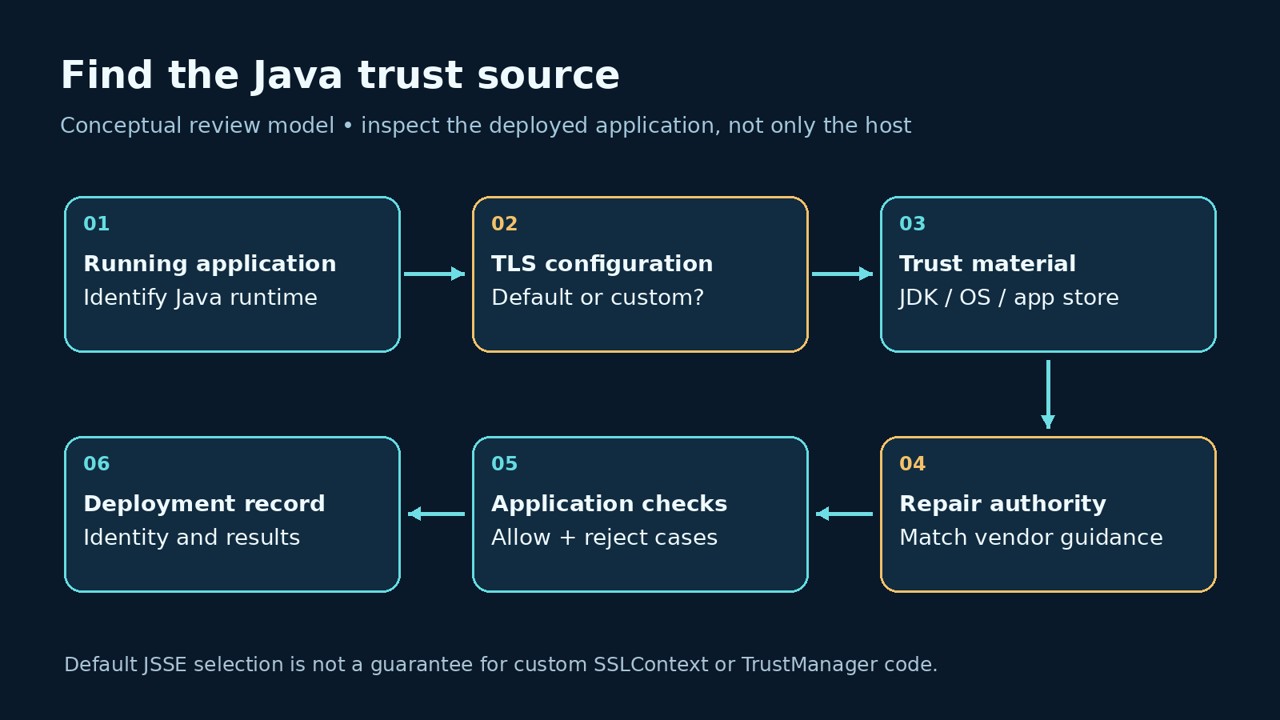
A useful deployment record names the process, the executable or image that started it, and the owner of its trust configuration. Ask the application owner whether an SDK, framework setting, or outbound proxy changes the TLS path. Record the answer beside the release, so the next engineer does not have to reconstruct it from a shell history.
A local check that exposes a misleading success signal
You can inspect a small set of JVM properties without sending traffic or dumping every system property. The following Python standard-library experiment launches the Java executable on PATH twice. The second launch supplies a deliberately nonexistent truststore path. It checks whether the JVM reports that setting; it does not initialize TLS or test CVE exploitation.
import pathlib
import shutil
import subprocess
import tempfile

java = shutil.which("java")
if java is None:
    raise SystemExit("java is not on PATH")

keys = ("java.home", "java.version", "java.vendor", "javax.net.ssl.trustStore")

def settings(extra):
    result = subprocess.run(
        [java, *extra, "-XshowSettings:properties", "-version"],
        capture_output=True, text=True, timeout=15, check=True,
    )
    values = {}
    for line in (result.stdout + result.stderr).splitlines():
        key, sep, value = line.strip().partition(" = ")
        if sep and key in keys:
            values[key] = value
    return values

with tempfile.TemporaryDirectory(prefix="java-trust-check-") as directory:
    missing = pathlib.Path(directory) / "does-not-exist.p12"
    assert not missing.exists()
    baseline = settings([])
    override = settings([f"-Djavax.net.ssl.trustStore={missing}"])
    print("java.version=" + baseline.get("java.version", "<missing>"))
    print("java.vendor=" + baseline.get("java.vendor", "<missing>"))
    print("java.home=" + baseline.get("java.home", "<missing>"))
    print("baseline.property.present=" + str("javax.net.ssl.trustStore" in baseline).lower())
    print("override.property.matches=" + str(override.get("javax.net.ssl.trustStore") == str(missing)).lower())
    print("override.file.exists=" + str(missing.exists()).lower())
    assert override.get("javax.net.ssl.trustStore") == str(missing)

# No SSLContext, certificate validation, or network connection is created.
We ran this exact fixture on Ubuntu OpenJDK 17.0.20. The observed output was:
java.version=17.0.20
java.vendor=Ubuntu
java.home=/usr/lib/jvm/java-17-openjdk-amd64
baseline.property.present=false
override.property.matches=true
override.file.exists=false
The property matched while the file did not exist. That is the result the experiment establishes. It does not show that this runtime is repaired, that a certificate was blocked, or that a production service uses the same executable. No remote endpoint, compromised certificate, or exploit was used.
The distinction has a real troubleshooting consequence. A startup flag can look correct in a deployment manifest while referring to an absent mount. The JSSE documentation says an explicitly configured missing truststore gives the default trust manager an empty keystore. A failed request in that situation is not proof that the intended distrust policy was applied.
Run the inspection in a controlled environment matching the application. If the service starts from an absolute Java path, adapt the script’s java variable to that executable. If it starts in a container, inspect the deployed image rather than the host’s interactive shell. Keep truststore passwords, tokens, full environment dumps, and unrelated JVM properties out of the report.
Apply the official remedy to every runtime in scope
For standalone OpenJDK installations, the official emergency guidance prioritizes updating the runtime. It also provides OS-specific blocked.certs files as an immediate alternative: the Windows file and the file for other operating systems. Follow the advisory’s installation instructions, including preserving custom entries. It specifies blacklisted.certs for JDK 8 rather than blocked.certs. Repeat the selected remedy for each standalone installation.
Avoid a blind download-and-overwrite one-liner. First identify the active runtime, review the applicable vendor instructions, back up the current policy, and account for locally added entries. An unattended replacement that drops a previous block can create a different trust regression. Record the approved replacement’s origin and digest before rolling it out through the normal deployment process.
The advisory also gives TLS revocation checking as an alternative, using these JVM options. We have not tested that mitigation against the compromised CA material in this article:
-Dcom.sun.net.ssl.checkRevocation=true
-Dcom.sun.security.enableCRLDP=true
Validate this choice against your application’s provider and network policy. Treat a setting on a launch command as configuration evidence; test the application’s actual certificate behavior separately. If revocation services are part of the chosen response, include their availability and the resulting failure behavior in the rollout review.
For system-managed certificate trust, use the distribution’s notice. Canonical’s eMudhra update guidance, published October 20, lists repaired ca-certificates packages and explains that removing cross-signing roots can also affect legitimate chains. Apply the matching release’s package update; do not copy a package version from another Ubuntu release. This system-store action does not by itself establish the state of an independently bundled JDK or application truststore.
Make the repaired deployment produce reviewable evidence
A practical release gate needs a positive case and a negative case. The positive case is a required, authorized staging dependency that should continue working. The negative case is an approved certificate-policy test that should be rejected by the actual application client. Define both expectations before testing. A generic connection failure does not establish the negative case: DNS, routing, timeouts, missing files, and hostname errors can all prevent a connection for unrelated reasons.
| Question | Evidence worth collecting | What it does not prove |
|---|---|---|
| Did the intended update reach the workload? | Vendor/package security record, artifact or image digest, running revision | A host package update alone does not identify a bundled runtime. |
| Which trust policy was selected? | Runtime identity, reviewed app configuration, mounted-file identity | A printed property does not prove the file was loaded. |
| Does the allowed dependency still work? | Application-level result with hostname, route, time and expected response | A successful valid chain does not establish rejection of the compromised CA. |
| Was the intended policy rejection exercised? | Controlled fixture identity and a failure attributed to certificate validation | A timeout or wrong hostname is inconclusive for that policy. |
| Can the next release undo the repair? | Updated base image, pinned artifact and rollback plan reviewed together | A one-time manual file change does not protect future deployments. |
For a small app team, one record per deployed service is enough to start: runtime owner, trust owner, update action, deployment revision, allowed-path result, rejection-test result, and unresolved dependency. If a certificate fixture has not been approved or independently identified, mark that test incomplete. That is more useful than relabeling a normal HTTPS success as a CVE verification.
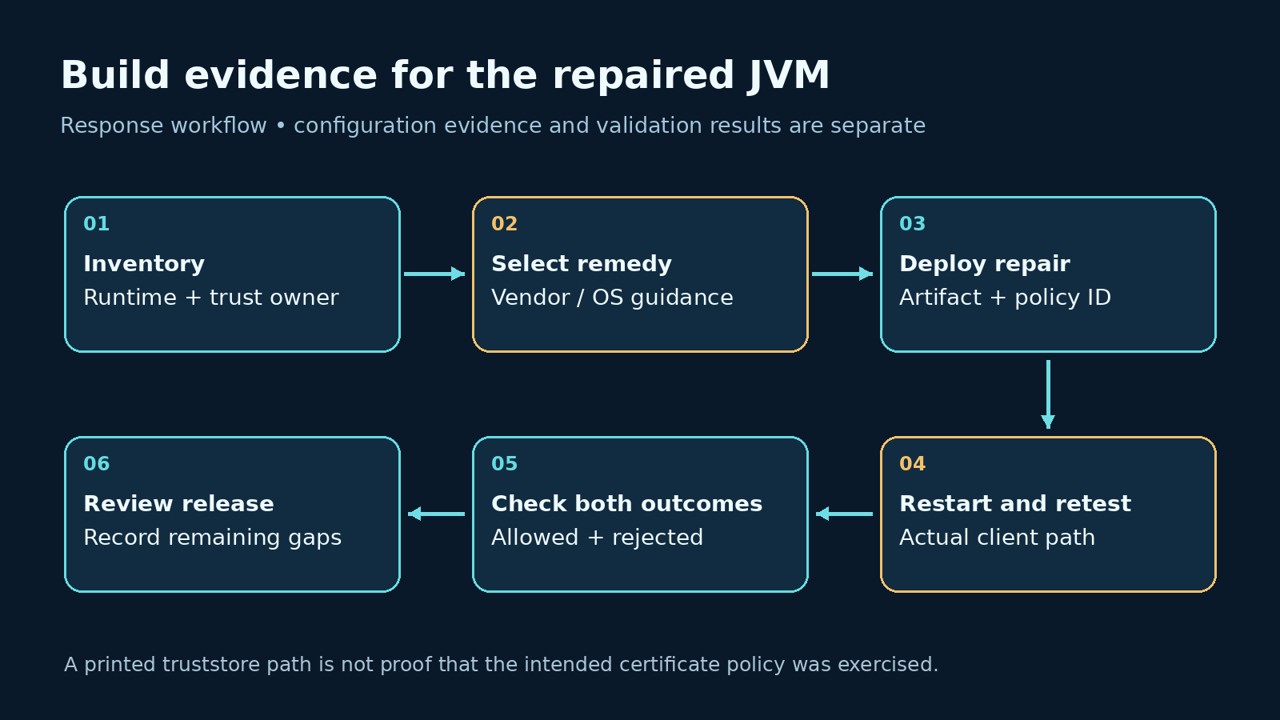
After changing a runtime or trust policy, redeploy or restart the affected application under its normal operational procedure, then repeat the application-level checks. This recommendation avoids relying on an old process or cached client configuration. Keep the before-and-after revisions together and confirm that a rollback would not silently restore the vulnerable artifact.
If you evaluate Penligent for an authorized application test, ask what access the workflow actually has and what evidence you can inspect afterward. A remote test should not be assumed to inventory a container’s JDK or prove its private truststore contents. Treat application testing as a separate evidence source alongside the owner’s runtime and deployment records.
When the update breaks a connection
Preserve the failed application result before changing anything else. Record the intended hostname, time, deployed revision, Java error, route or proxy, and relevant public chain details. Compare the same application path before and after the repair. A browser result may help isolate the difference, but it cannot substitute for the Java client’s result.
Then separate three questions: did the application load the intended trust configuration; did the peer deliver the expected chain; and did the verifier reject that chain for the reason under investigation? Fixing a missing mount is different from replacing a peer’s certificate chain. If the service provider changes the chain, test what the application receives afterward rather than relying on a certificate issuance confirmation.
Do not recover availability with an accept-all trust manager or disabled hostname verification. Keep the authentication contract intact and resolve the runtime, trust configuration, or peer-chain problem responsible. Make the exception owner explicit if a dependency cannot immediately be restored; an unresolved dependency should remain visible in the release decision.
Current rejection behavior also cannot establish what happened to historical traffic. If interception is suspected, preserve relevant application, proxy, DNS and egress records under your incident process. A compromised CA key is a reason to investigate the applicable paths; it is not evidence that every connection from your application was intercepted.
Questions Java developers are asking
Does CVE-2026-91403 mean Java remote code execution?
- The cited Oracle alert describes a JSSE issue with confidentiality and integrity impact. The OpenJDK advisory concerns compromised CA certificates. Neither establishes an RCE exploit chain for your application.
Are 17.0.21 and 21.0.13 the fixed Java versions?
- They appear in the official affected-version listings. Use your runtime vendor’s security update or package notice to identify the repaired build and applicable mitigation.
Is updating Ubuntu ca-certificates enough?
- It can be the relevant fix for a distribution-managed OpenJDK using system trust, as the official advisories describe. Check standalone runtimes, container images and custom application trust settings separately.
Can I prove remediation by printing javax.net.ssl.trustStore?
- No. Our offline fixture reports a deliberately missing file path successfully. Check the real application’s selected trust configuration and perform controlled certificate-validation tests.
Does a working browser mean my JVM is protected?
- No. Establish the runtime and policy used by the Java application itself. A browser observation and an application-client observation are separate pieces of evidence.
For a broader authorized application-testing workflow, the video below provides Penligent context. It is not a CVE-2026-91403 exploit demonstration or a verification of your runtime’s certificate policy.
Close the change when the deployed Java process, its trust source, and the test evidence agree. A version string or a green browser check is a useful clue; the release decision needs a traceable connection between the repair and the application that handles your data.


 English
  German
  French
  Spanish
  Portuguese
  Japanese
  Korean
  Hindi
Hindi  Arabic
  Turkish
  Hebrew