
CVE-2026-24294 is a Windows SMB Server elevation-of-privilege vulnerability disclosed in Microsoft’s March 2026 security updates. The official vulnerability description is short: improper authentication in Windows SMB Server allows an authorized attacker to elevate privileges locally. The CVE is mapped to CWE-287, carries a CVSS 3.1 score of 7.8 High, and uses the vector AV:L/AC:L/PR:L/UI:N/S:U/C:H/I:H/A:H. That means the attacker needs local access and low privileges, does not need user interaction, and successful exploitation can affect confidentiality, integrity, and availability at a high level. (NVD)
The risk changed in late June 2026. The NVD record now includes a public GitHub proof-of-concept reference, and the CISA-ADP SSVC enrichment changed the exploitation signal to PoC while keeping automatable as no and technical impact as total. Microsoft had already patched the issue in March, and Rapid7’s March Patch Tuesday analysis listed CVE-2026-24294 as “Exploitation More Likely” while noting it was not publicly disclosed at release. The practical defender takeaway is simple: this should no longer be treated as an ordinary March backlog item on Windows servers. It is a patched Windows privilege-escalation bug with public exploit research now available. (NVD)
The vulnerability is not the same class of bug as EternalBlue. It is not described by Microsoft as a remote unauthenticated SMB worm. It is a local privilege-escalation flaw. That distinction matters, but it does not make the issue low risk. Local privilege escalation is exactly what attackers need after they land through phishing, stolen RDP credentials, a vulnerable web service, a misconfigured remote-management tool, or a third-party agent. A low-privilege foothold that becomes SYSTEM changes the entire incident. SYSTEM can access local secrets, interact with security controls at a level ordinary users cannot, stage persistence, and prepare lateral movement.
The most useful way to read CVE-2026-24294 is not “Can someone reach TCP 445 from the internet?” The better question is “Which Windows systems in my environment still rely on SMB and NTLM behaviors that would make a local post-exploitation step easier after initial access?” That question pulls in patch status, SMB signing, NTLM auditing, file-server roles, domain controller exposure, jump boxes, VDI hosts, developer workstations, and server builds that often stay unpatched longer than dashboards imply.
Confirmed facts
| الحقل | Current defender-relevant detail |
|---|---|
| مكافحة التطرف العنيف | CVE-2026-24294 |
| المكوّن | Windows SMB Server |
| نوع الضعف | رفع الامتيازات |
| الضعف | CWE-287, Improper Authentication |
| Official description | Improper authentication in Windows SMB Server allows an authorized attacker to elevate privileges locally |
| CVSS 3.1 | 7.8 High |
| المتجهات | AV:L/AC:L/PR:L/UI:N/S:U/C:H/I:H/A:H |
| User interaction | لا يوجد |
| Privileges required | منخفضة |
| Initial Microsoft disclosure | March 10, 2026 |
| March 2026 exploitability signal | Rapid7 listed Microsoft’s assessment as Exploitation More Likely and public disclosure as No |
| Later public exploit signal | NVD added a GitHub PoC reference, and CISA-ADP SSVC moved exploitation to PoC |
| Most important remediation | Install the applicable Microsoft security update or a later superseding cumulative update, then verify build and configuration evidence |
The public record has two layers. The first layer is the vendor-confirmed vulnerability: Windows SMB Server, improper authentication, local privilege escalation, patched in Microsoft’s March 2026 security update cycle. The second layer is later public research claiming a workable route involving NTLM reflection, SMB alternative ports, and Windows Server 2025 default behavior. Defensive teams should use both layers, but they should not confuse them. Vendor data tells you what Microsoft says is affected and fixed. Public PoC material tells you how one exploit path may work in a specific configuration. (NVD)
Why local privilege escalation still deserves fast action
The word “local” often causes patch fatigue. Many organizations prioritize remotely exploitable RCEs first, then internet-facing VPNs, then browsers, then everything else. That ordering makes sense when resources are scarce, but it can create a blind spot. Local privilege escalation vulnerabilities often become the second step in a real intrusion.
A typical attack path looks like this:
- The attacker obtains a weak initial foothold through a phished user, exposed remote access, a browser exploit, a vulnerable service account, or a compromised software agent.
- The attacker discovers they do not have the permissions needed to dump credentials, disable monitoring, access protected shares, or persist cleanly.
- A local privilege-escalation exploit converts the foothold into SYSTEM or another high-privilege context.
- The attacker uses the elevated context to collect credentials, inspect local configuration, access files, tamper with defenses, or pivot.
- Lateral movement follows, often through SMB, remote service creation, scheduled tasks, WMI, WinRM, RDP, or credential replay.
CVE-2026-24294 fits into step three, not step one. That is exactly why it matters. Security teams often model initial access separately from privilege escalation, but attackers chain them. The exploit does not need to be internet-wormable to be valuable. It only needs to be reliable enough after initial access.
The impact also depends heavily on the host role. A low-privilege shell on a kiosk may be annoying. A low-privilege shell on a file server, domain controller, backup server, virtualization host, jump server, developer build host, or endpoint-management server can become a major incident if it turns into SYSTEM. For Windows environments, the host’s role often matters more than the CVSS label.
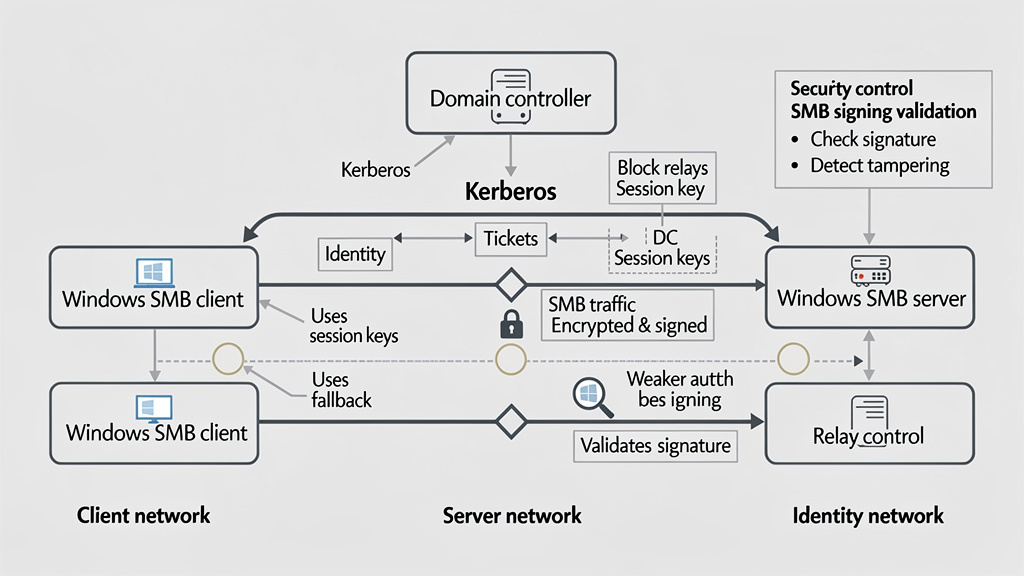
SMB is an identity boundary, not just a file-sharing protocol
Server Message Block is usually introduced as a file-sharing protocol, but that is too shallow for this vulnerability. SMB is also a Windows authentication and authorization boundary. SMB sessions carry user identity, negotiate dialects, derive session keys, enforce share permissions, enforce file-system access control, and optionally require signing or encryption.
Microsoft’s SMB signing documentation explains that signing uses the session key and cipher suite to add a signature to messages crossing an SMB connection. If a message is tampered with, the receiver can detect that the data no longer matches the signature. Microsoft also describes SMB signing as a defense against relay and spoofing attacks, which is why signing becomes central to understanding this issue. (مايكروسوفت تعلم)
The security model is subtle because SMB has both client and server roles. A Windows machine can act as an SMB client when it connects to a share and as an SMB server when it hosts shares or accepts SMB traffic. A local attack can involve both roles on the same system. It can also involve loopback behavior, local services, and authentication mechanisms that behave differently depending on whether a connection uses a hostname, an IP address, a CNAME, a local endpoint, Kerberos, or NTLM.
Microsoft’s SMB signing guidance explicitly recommends using Kerberos instead of NTLMv2, avoiding IP-address connections to shares, and avoiding DNS CNAME records in favor of proper computer-name aliases. Those recommendations are not cosmetic. Kerberos gives stronger mutual authentication properties in normal domain scenarios. NTLM is historically more relay-prone because it does not provide the same server-authentication guarantees. (مايكروسوفت تعلم)
This is where CVE-2026-24294 becomes more than a patch identifier. It is part of a long-running Windows authentication theme: SMB, NTLM, signing defaults, relay mitigations, legacy compatibility, and the difficulty of changing old identity behavior without breaking enterprises.
What the public PoC claims, without turning it into an exploit recipe
A public GitHub repository published in late June 2026 describes CVE-2026-24294 as “Local NTLM Reflection LPE via SMB Arbitrary Port.” The repository claims local privilege escalation on Windows Server 2025 by abusing an SMB client feature introduced in Windows 11 24H2 and Windows Server 2025 that allows SMB connections to alternative ports. It also claims that Windows 11 24H2 blocks the demonstrated relay path because SMB signing is enforced, while Windows Server 2025 default configuration is affected in the PoC’s stated scenario. (جيثب)
That wording is important. The public PoC is not the same thing as Microsoft’s root-cause advisory. Microsoft’s CVE description remains short and generic. The PoC author’s description adds a specific theory and implementation route: NTLM reflection, SMB arbitrary ports, session multiplexing, service authentication coercion, and relay back to the real SMB service. Defensive teams should treat that as actionable public exploit intelligence, but still separate it from official vendor confirmation.
Microsoft’s own documentation confirms the adjacent SMB feature: Windows 11 version 24H2 or later and Windows Server 2025 or later support SMB client connections to alternative TCP, QUIC, and RDMA ports, provided the server side is configured to listen appropriately. Microsoft’s same page also notes that deployments can block alternative port configuration or restrict it to certain servers. (مايكروسوفت تعلم)
The public PoC’s security significance is not that “alternative ports are bad.” Alternative ports have legitimate operational uses. The significance is that a new protocol capability can change the shape of old authentication attacks. When a feature modifies how clients connect, how sessions are multiplexed, or how local and remote identities are handled, old relay assumptions deserve retesting.
A safe defender summary is:
| Topic | What is confirmed | What should be treated carefully |
|---|---|---|
| Vulnerability existence | Microsoft, CVE, and NVD confirm CVE-2026-24294 as Windows SMB Server local EoP | Microsoft’s public description does not fully document exploit internals |
| Weakness type | CWE-287 improper authentication | Exact root-cause mechanics may require Microsoft internal patch diffing or trusted research |
| Public exploit signal | NVD now references a public GitHub PoC | Do not assume every environment is exploitable exactly as the PoC describes |
| PoC target claim | The repository claims Windows Server 2025 default config is affected | Validate against your own patched and unpatched lab images only |
| Windows 11 24H2 claim | The repository claims SMB signing blocks the demonstrated relay path | Do not generalize that to every Windows 11 configuration without checking policy |
| Defensive priority | Patch and verify | Do not run PoC code on production systems |
Public PoCs compress defender timelines. Before a PoC, a local EoP may sit behind normal patch cadences. After a PoC, red teams, malware authors, and opportunistic operators can start testing reliability. Even if weaponization is not automated at scale, an available PoC can reduce the skill and time needed to turn a foothold into SYSTEM.
Affected software, patch evidence, and the build-number problem
The NVD record for CVE-2026-24294 has been updated after enrichment and includes a broad Microsoft affected-product record. The visible NVD change history includes Windows 10, Windows 11, Windows Server 2012, Windows Server 2012 R2, Windows Server 2016, Windows Server 2019, Windows Server 2022, Windows Server 2025, Azure Stack HCI, and newer Windows 11 release lines with specific less-than build thresholds. (NVD)
That breadth creates a common mistake: teams read a PoC focused on Windows Server 2025 and assume only that platform matters. Do not do that. The official affected record is broader than the public PoC’s highlighted configuration. The correct enterprise distinction is not “affected or unaffected because the PoC worked on one build.” The correct distinction is:
| الفئة | المعنى | Defender action |
|---|---|---|
| Officially affected | Microsoft or NVD lists the OS family and vulnerable build range | Patch or confirm a later superseding cumulative update |
| PoC-demonstrated | Public exploit code claims a working path on a specific configuration | Reproduce only in an isolated authorized lab, if necessary |
| Mitigated by configuration | A control such as SMB signing may block one known path | Treat as risk reduction, not a replacement for the security update |
| Not currently exposed | Host role or configuration makes exploitation less likely | Keep patching; do not remove from remediation unless vendor data confirms not affected |
| Verified remediated | Build, KB, scanner, and configuration evidence agree | Record evidence and include in regression checks |
Tenable’s plugin list for CVE-2026-24294 maps the March 2026 update family across multiple Windows versions, including KB5078740 for Windows Server 2025, KB5079473 for Windows 11 24H2 and 25H2, KB5078766 for Windows Server 2022 and Azure Stack HCI 22H2, KB5078885 for Windows 10 21H2 and 22H2, KB5078752 for Windows 10 1809 and Windows Server 2019, KB5078938 for Windows 10 1607 and Windows Server 2016, and additional KBs for Windows Server 2012, Windows Server 2012 R2, Windows 11 23H2, Windows 11 26H1, and Windows Server version 23H2. (Tenable®)
Those KBs are useful for triage, but cumulative update supersedence complicates simple checks. A machine may not show the original March KB because it has a later cumulative update. Another machine may show an update installed but still be pending reboot, rolled back, blocked by servicing stack issues, or excluded by ring policy. For this CVE, evidence should include OS build, update history, vulnerability scanner output, reboot status, and, for high-value servers, SMB configuration checks.
A practical patch-evidence table should look like this:
| Evidence type | Good evidence | Weak evidence |
|---|---|---|
| OS build | Build is at or above the Microsoft fixed threshold for that branch | “Patch dashboard says compliant” with no build |
| Update record | March 2026 KB or later superseding cumulative update is installed | Old KB name missing without checking later updates |
| Reboot state | No pending reboot after cumulative update | Update installed but host not rebooted |
| Scanner result | Authenticated scan sees fixed build and installed update | Unauthenticated network scan guesses based on banners |
| SMB configuration | Signing and NTLM settings captured | “SMB port closed externally” only |
| Change evidence | WSUS, Intune, SCCM, Defender VM, or equivalent record tied to host | Spreadsheet copied from another asset group |
Safe Windows checks for patch and SMB posture
The following commands are for defensive verification on systems you administer. They do not reproduce the vulnerability. They help collect evidence about OS version, installed updates, SMB signing, SMBv1, firewall exposure, and NTLM audit logs.
Start with OS build and hotfix history:
$os = Get-ComputerInfo | Select-Object `
  OsName,
  OsVersion,
  OsBuildNumber,
  WindowsVersion,
  WindowsBuildLabEx

$hotfixes = Get-CimInstance Win32_QuickFixEngineering |
  Sort-Object InstalledOn -Descending |
  Select-Object HotFixID, InstalledOn, Description

$os
$hotfixes | Select-Object -First 20
Interpretation:
| Output | المعنى |
|---|---|
| OS build is equal to or higher than the fixed threshold for its release branch | Strong patch evidence, especially when paired with update history |
| March 2026 KB or a later cumulative update appears | Useful, but still check reboot and build |
| No relevant KB appears | Not definitive if a later cumulative update superseded it |
| Build is below the fixed threshold | Treat as vulnerable until proven otherwise |
| Update installed but reboot pending | Treat as incomplete remediation for high-value hosts |
Check SMB server and client signing configuration:
Get-SmbServerConfiguration |
  Select-Object `
    EnableSMB1Protocol,
    RequireSecuritySignature,
    EncryptData,
    RejectUnencryptedAccess,
    AuditClientDoesNotSupportSigning,
    AuditClientDoesNotSupportEncryption

Get-SmbClientConfiguration |
  Select-Object `
    RequireSecuritySignature,
    EnableSecuritySignature,
    EnableInsecureGuestLogons,
    AuditServerDoesNotSupportSigning,
    AuditServerDoesNotSupportEncryption
Microsoft’s current SMB signing behavior page says Windows 11 version 24H2 Enterprise, Pro, and Education require both outbound and inbound SMB signing, while Windows Server 2025 requires outbound SMB signing only. Microsoft’s broader SMB hardening material also describes newer Windows 11 and Windows Server 2025 signing changes in more general terms. The safest operational approach is to query the actual host configuration instead of relying on memory, release marketing, or assumptions about edition defaults. (مايكروسوفت تعلم)
If policy allows, require SMB signing on both client and server sides for high-value Windows systems:
Set-SmbClientConfiguration -RequireSecuritySignature $true -Force
Set-SmbServerConfiguration -RequireSecuritySignature $true -Force

Get-SmbClientConfiguration | Select-Object RequireSecuritySignature
Get-SmbServerConfiguration | Select-Object RequireSecuritySignature
Do not blindly run those commands across production without compatibility testing. Microsoft warns that some third-party SMB servers or guest-access scenarios may fail when signing is required, but Microsoft also explicitly says disabling SMB signing is not recommended as a workaround. (مايكروسوفت تعلم)
Check whether SMBv1 is enabled:
Get-SmbServerConfiguration | Select-Object EnableSMB1Protocol
Get-WindowsOptionalFeature -Online -FeatureName SMB1Protocol |
  Select-Object FeatureName, State
CVE-2026-24294 is not an SMBv1-only issue based on the public record, so disabling SMBv1 is not the fix for this CVE. Still, SMBv1 should remain disabled in modern environments because SMBv1 has a long history of severe vulnerabilities, including MS17-010 and CVE-2017-0144. Microsoft’s MS17-010 bulletin described the most severe SMBv1 issue as allowing remote code execution through specially crafted messages to an SMBv1 server. (مايكروسوفت تعلم)
Inspect firewall rules and exposure:
Get-NetFirewallRule |
  Where-Object { $_.DisplayName -match 'SMB|File and Printer Sharing' } |
  Select-Object DisplayName, Direction, Action, Enabled, Profile

Get-NetTCPConnection -LocalPort 445 -State Listen -ErrorAction SilentlyContinue |
  Select-Object LocalAddress, LocalPort, State, OwningProcess
Do not overinterpret this check. CVE-2026-24294 has a local attack vector, so “TCP 445 is not exposed to the internet” does not prove the host is safe. It only answers an external exposure question. You still need patch evidence and local configuration evidence.
NTLM audit should be part of the response
CVE-2026-24294 is not merely a patch-management item because the public exploit discussion points toward NTLM reflection and relay-style thinking. That makes NTLM visibility important even after patching. Microsoft’s policy documentation for “Network security: Restrict NTLM: Audit incoming NTLM traffic” says the setting lets organizations audit incoming NTLM traffic without blocking it, and events are recorded under Applications and Services Log\Microsoft\Windows\NTLM\Operational. Microsoft recommends auditing first so teams can understand authentication traffic before moving to blocking policies. (مايكروسوفت تعلم)
A safe query for recent NTLM operational events:
Get-WinEvent -LogName 'Microsoft-Windows-NTLM/Operational' -MaxEvents 200 |
  Select-Object TimeCreated, Id, ProviderName, Message |
  Format-List
If your SIEM collects Windows events, start by looking for NTLM operational event IDs and nearby successful network logons. Microsoft’s Defender for Identity documentation notes that Windows event 8004 can enrich NTLM authentication activity with server-accessed data when parsed by Defender for Identity. (مايكروسوفت تعلم)
A Microsoft Sentinel-style triage query can look like this:
WindowsEvent
| where TimeGenerated > ago(7d)
| where EventLog in ("Microsoft-Windows-NTLM/Operational", "Security")
| where EventID in (8001, 8002, 8003, 8004, 4624)
| extend RawMessage = tostring(EventData)
| project TimeGenerated, Computer, EventLog, EventID, RawMessage
| order by TimeGenerated desc
This is not an exploit detector. It is a visibility query. The goal is to find where NTLM still appears, which hosts receive network logons, which servers are sensitive, and where authentication behavior changes after patching or policy changes.
For Security event 4624, Microsoft documents that the event is generated when a logon session is created on the destination machine. The logon type field indicates the kind of logon, with type 3 representing network logon in normal Windows event interpretation. That makes 4624 useful for context, but it is noisy and should not be treated as a high-confidence signal by itself. (مايكروسوفت تعلم)
A more focused query for network logons:
Get-WinEvent -FilterHashtable @{
  LogName = 'Security'
  Id      = 4624
  StartTime = (Get-Date).AddDays(-3)
} | ForEach-Object {
  $xml = [xml]$_.ToXml()
  $data = @{}
  foreach ($d in $xml.Event.EventData.Data) {
    $data[$d.Name] = $d.'#text'
  }

  [pscustomobject]@{
    TimeCreated       = $_.TimeCreated
    Computer          = $_.MachineName
    LogonType         = $data['LogonType']
    TargetUserName    = $data['TargetUserName']
    TargetDomainName  = $data['TargetDomainName']
    IpAddress         = $data['IpAddress']
    WorkstationName   = $data['WorkstationName']
    AuthenticationPkg = $data['AuthenticationPackageName']
    ProcessName       = $data['ProcessName']
  }
} | Where-Object { $_.LogonType -eq '3' } |
  Sort-Object TimeCreated -Descending |
  Select-Object -First 100
Look for patterns, not single events:
| الإشارة | ما أهمية ذلك | False-positive risk |
|---|---|---|
| NTLM events on servers expected to use Kerberos | May indicate fallback, IP-based access, CNAME usage, legacy applications, or relay-relevant dependency | High in older environments |
| New type 3 logons from local or loopback addresses | Can support investigation of local SMB authentication behavior | Many Windows services create network logons |
| SMB signing disabled on a file server | Weakens relay resistance and increases exposure to tampering and spoofing | Some third-party devices cause compatibility pressure |
| Insecure guest logons enabled | Undermines authentication expectations | Common with old NAS devices |
| Sudden SMB policy changes before or after suspicious activity | Could indicate attacker tampering or emergency admin workaround | Change windows and helpdesk activity can explain it |
| High-value server remains below fixed build | Primary remediation issue | Low false positive if build inventory is accurate |
SMB signing is a control, not a substitute for the patch
SMB signing is one of the most important hardening controls around this issue, but it should not be sold internally as “the fix.” The fix is Microsoft’s security update or a later cumulative update that includes it. SMB signing reduces relay and tampering risks. It may block specific exploit paths, including the public PoC’s claimed behavior on Windows 11 24H2. It does not remove the vulnerable code path from an unpatched host.
Microsoft’s SMB signing overview says SMB2 and SMB3 signing relies on session keys, validates packet signatures, confirms sender and receiver identities, and prevents relay attacks. The same page recommends Kerberos over NTLMv2 and warns against connecting to shares by IP address or CNAME because those patterns can cause NTLM use instead of Kerberos. (مايكروسوفت تعلم)
That creates three practical priorities:
- Patch the OS.
- Require SMB signing where operationally possible.
- Reduce NTLM fallback by fixing name, DNS, SPN, and legacy authentication patterns.
The third item is often the hardest. Many enterprises still use IP addresses in scripts, backup jobs, admin shortcuts, scanner credentials, old service configurations, and file-transfer workflows. These shortcuts can silently push Windows away from Kerberos and toward NTLM. CVE-2026-24294 is a good forcing function to clean up those patterns.
Why NTLM remains a recurring Windows risk
NTLM is not a single vulnerability. It is a legacy authentication protocol family that keeps appearing in relay, coercion, and post-exploitation paths. Microsoft has publicly described a future direction that reduces NTLM dependency through enhanced auditing, Kerberos improvements, IAKerb, and LocalKDC. Microsoft’s June 2026 Windows IT Pro material describes IAKerb and LocalKDC as complementary features meant to reduce NTLM fallback across enterprise and local identity scenarios. (TECHCOMMUNITY.MICROSOFT.COM)
For defenders, the lesson is not “disable NTLM everywhere tomorrow.” That will break real systems in many environments. The lesson is “make NTLM measurable.” You cannot migrate away from what you cannot see.
A reasonable NTLM reduction plan:
| المرحلة | الإجراء | الأدلة |
|---|---|---|
| Visibility | Enable NTLM auditing in a controlled scope | NTLM operational logs collected |
| Inventory | Identify servers, applications, scripts, and devices still using NTLM | Owner and business purpose mapped |
| Fix names | Replace IP and CNAME access patterns where Kerberos should be used | SPNs and DNS naming validated |
| Test blocking | Apply deny policies to a lab or low-risk OU | Breakage documented and exceptions justified |
| Production hardening | Move high-value systems first | Exceptions reviewed with expiration dates |
| Regression | Monitor for NTLM reintroduction | SIEM alerting and periodic reports |
CVE-2026-24294 should accelerate this work, especially on Windows Server 2025 file servers and systems where SMB is part of administrative workflows. But it should not trigger a reckless NTLM shutdown without application discovery.
Related Windows authentication and SMB cases
CVE-2026-24294 sits in a family of Windows security lessons. The exact bug is new, but the pattern is not: authentication boundaries, SMB behavior, legacy protocol compatibility, and privilege escalation have produced major incidents for years.
| Case | Why it is relevant | Key difference from CVE-2026-24294 | درس المدافع |
|---|---|---|---|
| CVE-2017-0144, EternalBlue | It showed how SMB flaws can become catastrophic when exposed and unpatched | EternalBlue was SMBv1 remote code execution, not local EoP | Disable SMBv1, patch, and verify rather than trusting old dashboards |
| Microsoft MS17-010 | Microsoft’s bulletin covered multiple SMBv1 vulnerabilities, with the most severe allowing RCE via crafted SMBv1 messages | Different SMB generation and exploit class | SMB patching requires exact CVE and KB mapping |
| PetitPotam and KB5005413 | Microsoft described PetitPotam as a classic NTLM relay attack that could target domain controllers or other Windows servers | It is an NTLM relay technique and mitigation advisory, not the same CVE | NTLM relay resistance requires EPA, signing, certificate-service hardening, and protocol reduction |
| CVE-2020-1472, Zerologon | It involved Windows authentication trust and Netlogon secure channel abuse against domain controllers | Netlogon EoP over MS-NRPC, not SMB Server local EoP | Identity infrastructure bugs can turn quickly into domain compromise |
| CVE-2026-26128 | Another Windows SMB Server elevation-of-privilege issue in the March 2026 cycle | Rapid7 listed it as Exploitation Less Likely, while CVE-2026-24294 was More Likely | Similar component does not mean same risk priority |
Microsoft’s MS17-010 bulletin described the most severe SMBv1 vulnerabilities as remote code execution issues triggered by specially crafted messages sent to SMBv1. NVD’s CVE-2017-0144 entry likewise describes SMBv1 server RCE via crafted packets. Those facts matter because many defenders still use “SMB vulnerability” as a single mental bucket. CVE-2026-24294 is not EternalBlue, but EternalBlue remains the reason SMB patch verification should be evidence-based. (مايكروسوفت تعلم)
PetitPotam is closer in spirit because it revolves around NTLM relay. Microsoft’s KB5005413 says PetitPotam can potentially be used to attack Windows domain controllers or other Windows servers and describes it as a classic NTLM relay attack. That is highly relevant to CVE-2026-24294 because the public PoC discussion also centers on NTLM reflection and relay-like behavior, even though the affected component and exploit mechanics differ. (Microsoft Support)
Zerologon, CVE-2020-1472, is another useful comparison because it shows how Windows authentication flaws can become domain-level incidents. NVD describes it as an elevation-of-privilege vulnerability where an attacker establishes a vulnerable Netlogon secure channel connection to a domain controller using MS-NRPC. CVE-2026-24294 is not Zerologon, but both remind defenders that Windows authentication boundaries deserve more scrutiny than ordinary application bugs. (NVD)
Prioritization by asset role
Not every Windows asset has the same urgency, even if many are affected. Prioritize based on the host’s role, exposure to low-privilege users, ability to store or process credentials, and position in lateral-movement paths.
| الأولوية | Asset type | ما أهمية ذلك | الإجراء الموصى به |
|---|---|---|---|
| الحرجة | Domain controllers | High-value authentication infrastructure, often target of credential and relay attacks | Patch immediately, verify build, audit NTLM, require signing where compatible |
| الحرجة | File servers | SMB-heavy role, broad user access, sensitive files, service-account activity | Patch immediately, verify SMB signing, review share permissions |
| الحرجة | Jump servers and admin workstations | High-value credentials and privileged tooling | Patch immediately, restrict local admin, monitor type 3 logons |
| عالية | Backup servers | Often hold broad read access and privileged credentials | Patch, isolate, review SMB and service-account use |
| عالية | VDI and RDS hosts | Many low-privilege users share infrastructure | Patch quickly, monitor local privilege escalation indicators |
| عالية | Build servers | Source, signing keys, deployment credentials | Patch quickly, monitor process execution and SMB access |
| متوسط | Standard workstations | Initial access commonly lands here, but role varies | Patch through normal accelerated endpoint rings |
| متوسط | Legacy servers | Often fragile, hard to patch, and full of exceptions | Create compensating controls and migration plan |
| Lower but not ignored | Isolated lab systems | Lower business impact unless connected to domain | Patch before reconnecting to production networks |
The priority order should change if you have evidence of compromise. If a host shows suspicious NTLM events, unexplained SMB signing changes, unknown local admin creation, credential dumping attempts, or unusual type 3 logons, treat it as an incident triage target, not just a patch target.
A safe lab validation model
There are legitimate reasons for a security team to validate CVE-2026-24294 in a lab: to understand exploitability, test detection logic, verify compensating controls, and prove that patching works. The lab must be isolated, authorized, and disposable. Do not run public PoC code on production servers, shared corporate networks, or domain controllers.
A safe validation plan should use this structure:
| الخطوة | الهدف | Evidence to collect |
|---|---|---|
| Build baseline | Create a clean VM matching the target OS and role | OS version, build number, SMB config |
| Confirm vulnerable state | Verify the VM is below the fixed build in an isolated lab | Build and update state |
| Capture controls | Record SMB signing, NTLM audit, firewall, SMBv1, user privilege | PowerShell outputs |
| Test detection | Generate benign SMB and NTLM audit events, not exploit activity, to test collection | Event IDs, SIEM ingestion |
| Apply patch | Install March 2026 or later cumulative update | KB and build evidence |
| Recheck controls | Confirm signing and audit policy did not regress | PowerShell outputs |
| Produce report | Document vulnerable state, fixed state, and remaining configuration risks | Evidence bundle |
If exploit reproduction is required for an authorized red-team or purple-team engagement, separate the exploit test from production validation. Run it only in an isolated environment, use non-production credentials, avoid real domain trust paths, and document exactly what was tested. Most enterprises do not need to reproduce the exploit to justify patching. Microsoft’s advisory, the CVSS vector, Rapid7’s exploitability summary, and the public PoC signal are enough to justify remediation. (NVD)
For teams building evidence-driven validation workflows, AI-assisted penetration testing can help organize the non-exploit parts of the process: asset scoping, command generation for configuration checks, authenticated evidence capture, regression retesting, and report drafting. In an authorized setting, a platform such as Penligent can be used to keep those tasks tied to scope, evidence, and human approval rather than scattered across ad hoc scripts and screenshots. Penligent’s own SMB-focused EternalBlue verification article is also a useful example of why Windows SMB work should end with proof of patch and configuration state, not assumptions from old dashboards. (بنليجنت)
Detection logic that will not drown your SOC
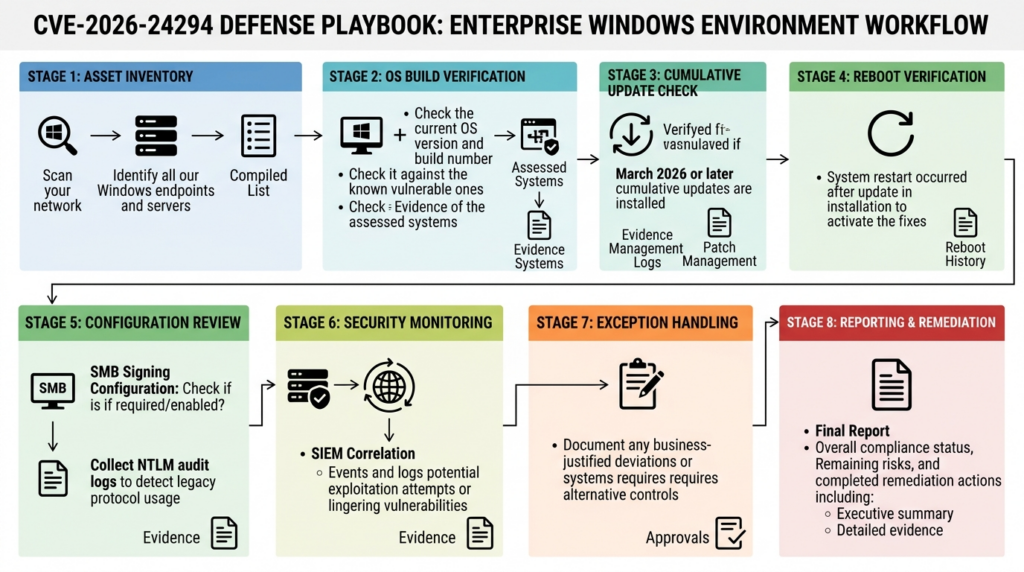
There is no single public Windows event that says “CVE-2026-24294 exploited.” Detection must be built from context. That means patch state, host role, SMB configuration, NTLM events, network logons, process activity, and suspicious post-exploitation behavior.
A better detection model uses layers:
| الطبقة | Data source | What to look for |
|---|---|---|
| Exposure | Asset inventory and vulnerability scanner | Hosts below fixed build, especially servers |
| Configuration | PowerShell, GPO, MDM, CIS benchmark checks | SMB signing disabled, insecure guest logons enabled |
| المصادقة | NTLM operational log, Defender for Identity, DC logs | Unexpected NTLM, especially on high-value systems |
| Logon activity | Security event 4624 and related events | Type 3 logons, local or unusual source patterns |
| Process behavior | EDR process telemetry | Suspicious SMB mapping commands, unusual tools, unexpected service behavior |
| Post-exploitation | EDR and Windows security logs | LSASS access, credential dumping, local admin creation, service install, scheduled tasks |
| Change control | GPO and registry monitoring | SMB signing or NTLM policies changed outside approved windows |
A starter Sentinel-style query for vulnerable-host triage might join asset vulnerability data with event activity. The schema names vary by environment, but the logic is:
let HighValueHosts = dynamic(["DC", "FILE", "JUMP", "BACKUP", "BUILD"]);
WindowsEvent
| where TimeGenerated > ago(7d)
| where EventID in (4624, 8001, 8002, 8003, 8004)
| extend HostUpper = toupper(Computer)
| extend IsHighValue = HostUpper has_any (HighValueHosts)
| project TimeGenerated, Computer, EventLog, EventID, IsHighValue, EventData
| order by IsHighValue desc, TimeGenerated desc
This is not enough by itself. A domain controller will naturally produce many authentication events. A file server will naturally produce SMB activity. The signal emerges when you combine events with unexpected source hosts, unusual account names, new processes, unsigned SMB settings, unpatched builds, and a timeline near suspicious initial access.
Useful investigation questions include:
| سؤال | ما أهمية ذلك |
|---|---|
| Is the host below the fixed build? | Patch state determines primary exposure |
| Is the host a server, file server, domain controller, or admin jump box? | Role changes business impact |
| Is SMB signing required on both sides where expected? | Signing affects relay resistance |
| Is NTLM appearing where Kerberos should be used? | NTLM may indicate fallback or legacy exposure |
| Are users connecting by IP address or CNAME? | Microsoft warns these patterns can cause NTLM use instead of Kerberos |
| Did SMB or NTLM policy change recently? | Could indicate workaround or tampering |
| Is there evidence of credential access after suspicious logons? | Confirms privilege escalation may have enabled follow-on behavior |
Hardening beyond the patch
Patching CVE-2026-24294 removes the known vulnerability. Hardening reduces the chance that the next authentication-edge bug becomes an incident. SMB and NTLM hardening should be practical, staged, and measured.
Start with high-value systems:
$targets = @(
  "Require SMB signing on file servers",
  "Disable SMBv1",
  "Enable NTLM auditing",
  "Remove IP-based SMB shortcuts",
  "Review CNAME-based file access",
  "Block guest SMB access",
  "Restrict local admin rights",
  "Monitor 4624 type 3 and NTLM events",
  "Patch and reboot March 2026 or later cumulative updates"
)

$targets | ForEach-Object { [pscustomobject]@{ Control = $_; Status = "Review" } }
Then translate that checklist into actual controls:
| التحكم | ما أهمية ذلك | Caution |
|---|---|---|
| Install the relevant cumulative update | Primary remediation | Confirm reboot and build |
| Require SMB signing | Reduces relay and tampering risk | Test legacy NAS and third-party SMB |
| Prefer Kerberos | Reduces NTLM relay exposure | Requires correct DNS, SPNs, and naming |
| Avoid IP-based SMB access | IP access can force NTLM where Kerberos would be available | Replace scripts and admin habits |
| Avoid DNS CNAME shortcuts for SMB | Microsoft recommends alternate computer names instead | Requires planning in shared-file environments |
| Disable SMBv1 | Reduces legacy SMB attack surface | Some old devices may break |
| Audit NTLM before blocking | Prevents blind outages | Audit data must be collected and reviewed |
| Limit local admin rights | Reduces impact of post-exploitation | Requires endpoint management discipline |
| Monitor high-value hosts | Improves detection of chained attacks | Needs tuned queries to reduce noise |
SMB over QUIC also deserves review in modern environments. Microsoft’s SMB over QUIC documentation warns not to use IP addresses for SMB over QUIC certificate subject alternative names because IP addresses require NTLM even if Kerberos is otherwise available. That is a small line with large operational meaning: naming decisions can affect authentication protocol selection. (مايكروسوفت تعلم)
Common mistakes
The first mistake is treating CVE-2026-24294 as unimportant because it is local. That misses the post-exploitation role of local privilege escalation. Attackers rarely stop at the first shell. They need elevation.
The second mistake is treating SMB signing as a complete fix. Signing is a powerful mitigation against relay and tampering, and it may block known paths. It is not a substitute for Microsoft’s patch.
The third mistake is relying only on unauthenticated scans. SMB and Windows build detection often require authenticated evidence. Without it, scanners may infer from banners, fail to see cumulative update state, or miss reboot status.
The fourth mistake is disabling SMB signing to restore access to old devices without documenting the risk. Microsoft explicitly does not recommend disabling SMB signing as a workaround for third-party servers. If a business exception is unavoidable, scope it, time-limit it, monitor it, and replace the incompatible system. (مايكروسوفت تعلم)
The fifth mistake is ignoring NTLM until the next incident. Microsoft’s current direction is to reduce NTLM dependency, not because every NTLM use is malicious, but because NTLM remains a recurring relay and credential-theft risk. Auditing is the safe first step. (TECHCOMMUNITY.MICROSOFT.COM)
The sixth mistake is testing public PoCs on production systems. Public exploit code may crash services, leave artifacts, trigger security tooling, alter state, or create legal and operational issues. A patch-verification report does not need production exploitation.
The seventh mistake is assuming every Windows release has the same SMB signing defaults. Microsoft’s documentation has edition-specific and role-specific nuance. Query the actual settings.
The eighth mistake is fixing only servers. Workstations, VDI hosts, and admin endpoints often hold credentials that matter. If a low-privilege user can become SYSTEM on an admin workstation, the business impact can exceed a file server compromise.
A practical remediation playbook
A strong CVE-2026-24294 response can be completed without panic if the workflow is disciplined.
First, identify Windows assets by OS family, build, role, and owner. Group them into domain controllers, file servers, jump boxes, backup servers, build systems, application servers, VDI/RDS hosts, and standard endpoints.
Second, map patch state to the Microsoft March 2026 security update family or later cumulative updates. Use authenticated scanning and OS build verification. For high-value systems, collect direct PowerShell evidence.
Third, patch high-value servers first. Domain controllers, file servers, jump boxes, backup infrastructure, and build servers should not wait behind normal endpoint rings if they remain below fixed builds.
Fourth, verify reboot completion. Cumulative updates that are installed but not active are a common source of false confidence.
Fifth, check SMB signing on both client and server sides. Where signing is disabled, identify whether the cause is policy, legacy device compatibility, or an undocumented exception.
Sixth, enable or expand NTLM auditing. Do not jump straight to blocking unless you already have a dependency inventory. Collect operational events and map them to application owners.
Seventh, fix naming paths that cause NTLM fallback. Replace IP-based SMB shortcuts. Review CNAME use. Validate SPNs. Move administrative habits toward Kerberos-friendly naming.
Eighth, monitor for post-exploitation activity on systems that were vulnerable before patching. Look for credential access, local admin changes, service creation, scheduled tasks, suspicious network logons, and security-tool tampering.
Ninth, write down exceptions. Every exception should have an owner, business reason, compensating control, expiration date, and monitoring requirement.
Tenth, retest. A good remediation program does not stop at “patched.” It proves that the affected system is on a fixed build, required controls are active, and logs show no obvious abuse.
الأسئلة الشائعة
What is CVE-2026-24294?
- CVE-2026-24294 is a Windows SMB Server elevation-of-privilege vulnerability.
- Microsoft and NVD describe it as improper authentication in Windows SMB Server.
- A successful attacker needs local access and low privileges.
- The CVSS 3.1 score is 7.8 High.
- The weakness is mapped to CWE-287, Improper Authentication. (NVD)
Is CVE-2026-24294 a remote SMB worm like EternalBlue?
- No, Microsoft’s public description identifies it as a local elevation-of-privilege vulnerability.
- EternalBlue, tracked mainly as CVE-2017-0144, was an SMBv1 remote code execution issue.
- CVE-2026-24294 is still serious because local privilege escalation is often used after initial access.
- Defenders should patch it quickly on high-value Windows servers, but should not describe it as an unauthenticated internet worm unless new authoritative evidence appears. (NVD)
Which systems should be patched first?
- Patch domain controllers, file servers, jump boxes, backup servers, build servers, and VDI/RDS hosts first.
- Prioritize Windows Server 2025 systems because the public PoC specifically claims exploitability on Windows Server 2025 default configuration.
- Do not ignore other affected Windows versions, because the official affected-product record is broader than the PoC’s highlighted target.
- Standard endpoints should move through an accelerated endpoint patch ring if they are below the fixed build. (NVD)
How can I safely verify whether a host is remediated?
- Check OS build with
Get-ComputerInfo. - Check installed cumulative updates with
Get-CimInstance Win32_QuickFixEngineering. - Confirm the host has rebooted after patching.
- Use authenticated vulnerability scanning where possible.
- Check SMB signing with
Get-SmbClientConfigurationوGet-SmbServerConfiguration. - Do not run public PoC code on production systems.
Does SMB signing prevent CVE-2026-24294 exploitation?
- SMB signing helps protect against relay, spoofing, and tampering.
- The public PoC claims Windows 11 24H2 blocks the demonstrated relay route because SMB signing is enforced.
- That does not mean SMB signing replaces the Microsoft patch.
- Treat signing as a hardening control and the cumulative update as the remediation. (مايكروسوفت تعلم)
Should I disable NTLM immediately?
- Do not disable NTLM everywhere without auditing first.
- Microsoft provides audit policies that record NTLM activity without blocking it.
- Start by enabling NTLM auditing, collecting events, and identifying business dependencies.
- Move high-value systems toward Kerberos-friendly naming, proper SPNs, SMB signing, and staged NTLM restrictions.
- Blocking without inventory can break legacy applications, old devices, scripts, and administrative workflows. (مايكروسوفت تعلم)
What logs should I review?
- المراجعة
Microsoft-Windows-NTLM/Operationalfor NTLM audit events. - Review Security event 4624 for successful logons, especially Logon Type 3 network logons.
- Correlate logons with process telemetry, SMB configuration, patch state, host role, and suspicious post-exploitation behavior.
- Do not treat any single 4624 or NTLM event as proof of exploitation.
- Build detections around patterns and host context. (مايكروسوفت تعلم)
Is a vulnerability scanner enough?
- A scanner is useful, but authenticated scanning is much better than unauthenticated inference.
- For high-value servers, collect direct evidence: OS build, cumulative update state, reboot status, SMB signing, and NTLM audit configuration.
- Scanner output should be part of the evidence package, not the entire package.
- If scan results conflict with local build data, investigate before closing the finding.
Closing assessment
CVE-2026-24294 is best handled as a Windows authentication-boundary issue, not just another line item in a March patch spreadsheet. The confirmed vulnerability is a Windows SMB Server local privilege escalation caused by improper authentication. The newer risk signal is the public PoC discussion around NTLM reflection, SMB alternative ports, and Windows Server 2025 behavior. The defensive answer is not dramatic: patch, reboot, verify build, require SMB signing where possible, audit NTLM, reduce NTLM fallback, and preserve evidence.
The organizations that handle this well will not be the ones that merely mark the CVE as closed in a dashboard. They will be the ones that can prove which systems were affected, which updates fixed them, which SMB and NTLM settings remain risky, which exceptions still exist, and which controls will catch the next authentication-edge bug before it becomes a domain-wide incident.

 Arabic
  English
  German
  French
  Spanish
  Portuguese
  Japanese
  Korean
  Hindi
Hindi  Turkish
  Hebrew