
The OVHcloud CLI supply-chain attack changed downloadable release files, not the project’s source history. According to OVHcloud’s incident advisory, a compromised developer account replaced assets for versions 0.11.0–0.15.0 on October 19, 2026, between 12:47 and 14:21 UTC. If you downloaded and ran an affected build, replacing the tool is only the first part of recovery: credentials exposed on that machine need attention too.
Reviewed October 22, 2026. This guide separates the vendor’s findings from a response workflow you can adapt to your own workstation or CI runner. We did not run the malicious binaries. The only executed example below uses harmless local text files to demonstrate why a checksum fetched alongside a replacement package is a weak trust anchor.

Was my OVHcloud CLI installation affected?
Start with the file you actually downloaded and the host that could have executed it. A release label alone is not enough to classify a particular copy. Preserve download, package-cache and CI records before replacing evidence. Do not execute a suspect binary to ask it for its version; the vendor explicitly recommends inspecting it without running it.
| What you know | Working classification | Next action |
|---|---|---|
| Downloaded and ran a confirmed affected binary | Execution exposure | Contain the host; identify and revoke exposed credentials from a trusted device |
| Downloaded a suspect asset; execution unknown | Unresolved | Preserve the file and investigate execution history |
| Downloaded but can establish it was never executed | File exposure without established execution | Quarantine the artifact and check dependent automation |
| No matching file or historical records | Insufficient evidence | Check CI caches, old runners and installation records |
| Clean replacement installed | Delivery step completed | Confirm incident and credential recovery separately |
These are investigation categories, not automatic forensic verdicts. For example, finding a cached archive proves possession of bytes, while a CI log may establish that a job invoked the extracted executable. A missing history entry does not prove that a short-lived runner never ran it. Keep the difference between observed, inferred and unknown in the incident record.
The vendor lists 0.16.0 as the clean replacement and says source code and the build chain were unaffected. Its response includes release immutability and a signed tag. Those statements narrow this incident; they are not evidence that every unrelated dependency or machine in your environment is clean. Follow the vendor’s updated advisory for affected-file indicators and recovery instructions.
How an unchanged version acquired different bytes
The original GitHub issue reporting the substituted assets describes a CI SHA-256 pin failing when an existing release download changed. The reporter also observed checksums.txt replacements and build metadata inconsistent with the older release tag. Maintainers subsequently removed the malicious files and announced 0.16.0. That sequence explains why a source review alone would miss the delivery problem.
A source tag answers which repository snapshot a name identifies. A downloadable executable is a separate object. If an account can replace that object without changing the tag, the download URL can remain familiar while its contents change. Your installation may therefore follow a version-pinned URL and still receive different bytes. The version pin constrains a name; a digest constrains content.
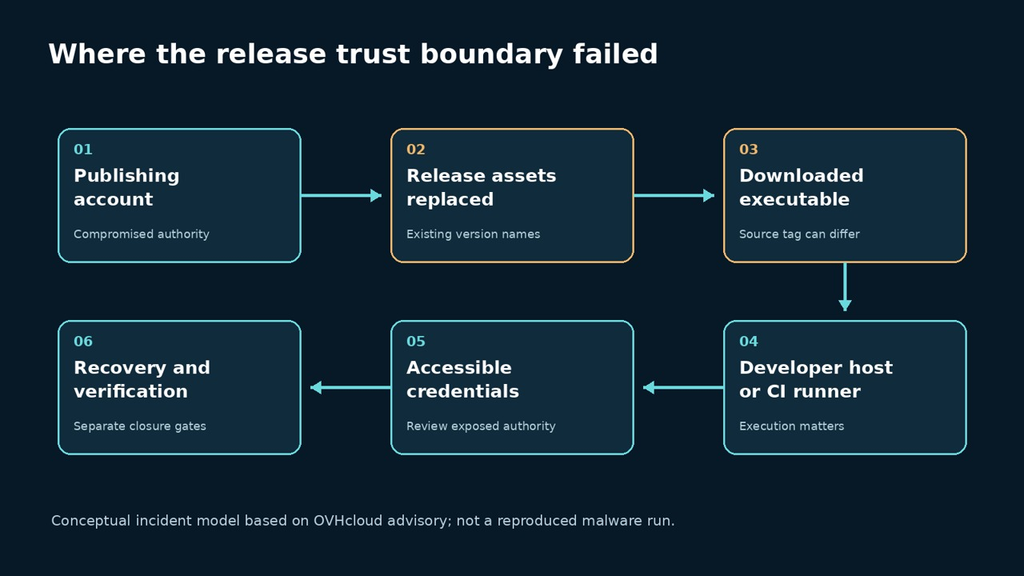
There is a second trust problem when the checksum file sits beside the executable under the same publishing authority. An attacker able to replace both can make them agree. Verification needs an expectation with an independent reason to trust it: a previously approved digest, verified release attestation, or another approved provenance mechanism. Agreement between two newly fetched files is not that independent reason.
| التحكم | What it can establish | Important limit |
|---|---|---|
| Version in the URL | Which release label was requested | The object behind the URL may be mutable |
| Previously approved SHA-256 | Whether the new bytes match the approved object | Does not establish that the approved object was benign |
| New checksum beside the asset | Whether two downloaded objects agree | Both may share the same compromised publisher |
| Signed source tag | Identity and integrity of the tagged source reference | Does not by itself bind every uploaded executable |
| Verified immutable release asset | Match with the release’s attested asset | Not a behavioral audit of the program |
Inspect a suspect file without executing it
Use a preserved copy and record its exact path, collection time and download context. The following macOS and Linux examples read the file to calculate SHA-256. Replace the placeholder with the evidence copy you own. They do not start the CLI, contact OVHcloud, revoke anything or prove that the host is clean. Do not paste a private path or the contents of a credential file into public support channels.
# macOS
shasum -a 256 /PATH/TO/PRESERVED/ovhcloud

# Linux
sha256sum /PATH/TO/PRESERVED/ovhcloud
Record the output with its provenance. A mismatch against an approved historical digest is sufficient to reject that artifact for deployment, but it is not sufficient to attribute the replacement to a particular attacker. Conversely, a nonmatch against one published bad hash is not proof that a file is safe. Different architectures, archives and extracted binaries are different objects; compare like with like.
OVHcloud’s advisory lists platform-specific malicious-file MD5 values and temporary envchecker directories, and identifies cloud credentials, SSH material, developer-tool data and AI-assistant stores among the targets. Consult the original indicator list rather than guessing which files a workstation exposed. Treat collected directories as sensitive evidence, not as convenient material to upload to an online scanner.
A reproducible checksum experiment using harmless files
This standard-library Python example creates a temporary text file, approves its digest, replaces its contents with another harmless string, and compares two verification strategies. It does not download a package, execute either fixture, read credentials or make network requests. Python’s hashlib documentation describes the digest interface used here.
import hashlib
import json
from pathlib import Path
from tempfile import TemporaryDirectory

def digest(data):
    return hashlib.sha256(data).hexdigest()

def verify(path, expected):
    actual = digest(path.read_bytes())
    return actual == expected

with TemporaryDirectory() as directory:
    asset = Path(directory) / 'demo-package.txt'
    original = b'benign original fixture\n'
    replacement = b'benign replacement fixture\n'
    trusted_digest = digest(original)
    asset.write_bytes(original)
    results = {'original_matches_pin': verify(asset, trusted_digest)}
    asset.write_bytes(replacement)
    results['replacement_matches_pin'] = verify(asset, trusted_digest)
    replacement_manifest = digest(replacement)
    results['replacement_matches_replaced_manifest'] = verify(asset, replacement_manifest)
    assert results == {
        'original_matches_pin': True,
        'replacement_matches_pin': False,
        'replacement_matches_replaced_manifest': True,
    }
    print(json.dumps(results, indent=2))
We executed this exact script in an isolated workspace on October 22, 2026, using only the synthetic text fixtures shown in the code. All three assertions passed. The output was:
{
  "original_matches_pin": true,
  "replacement_matches_pin": false,
  "replacement_matches_replaced_manifest": true
}
The result does not reproduce the OVHcloud malware. It demonstrates a narrower invariant: a preserved content expectation detects a change, while a replacement expectation accepts the replacement. If the experiment is reused in an engineering review, ask where the trusted expectation comes from and who can change it. Hashing is easy; maintaining an independent approval boundary is the security work.
The example deliberately uses text rather than a fake malware executable. No malicious behavior is needed to understand this failure. It also avoids hard-coding a published sample hash into a script that might silently compare an archive with an extracted binary. For incident identification, use the vendor’s current platform and artifact definitions.
Recover credentials from a trusted environment
An incident response should track the machine, the artifact and the accessible credentials as related but separate objects. Disconnect a suspect runner from sensitive work through your established response process. Preserve the evidence needed for investigation, then use a known-trusted device and authenticated service controls for revocation and replacement. Generating fresh credentials on a host you still distrust can expose the replacements.
Start with credentials that can publish code, deploy infrastructure, administer cloud resources or mint more credentials. For each one, record the issuing service, owner, scope, revocation action and replacement destination. Include short-lived sessions when the service supports invalidating them; changing a local configuration file is not the same as disabling a credential at its issuer. Avoid reproducing live values in the tracking sheet.
| Recovery track | Concrete closure evidence | What remains separate |
|---|---|---|
| Cloud and deployment access | Old authority revoked; replacement delivered to an approved workload | Whether prior actions were malicious |
| Source/package publishing | Relevant tokens or keys invalidated; release permissions reviewed | Integrity of previously distributed artifacts |
| Workstation or runner | Known-trusted recovery completed under the incident process | Restoration of each external account |
| CI caches and artifacts | Suspect copies quarantined; approved artifacts pinned | Whether earlier jobs already executed them |
| Application impact | Affected services reviewed with their owners | A clean CLI download alone cannot answer this |
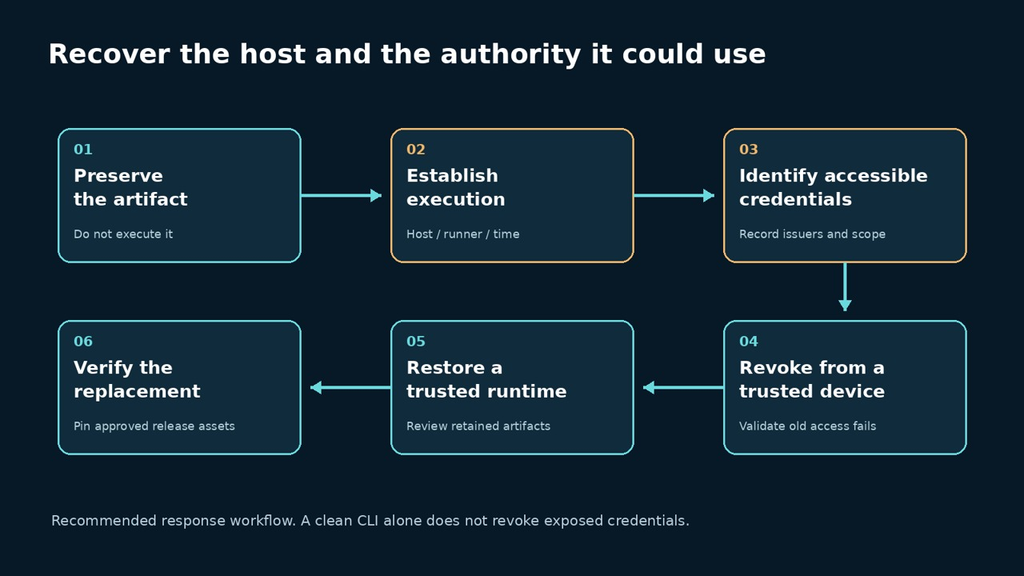
For ephemeral CI, ask what secrets the job could access at the moment of execution and what outputs it produced. Destroying the runner may remove a local copy while leaving reusable credentials valid and artifacts available to downstream jobs. Review both paths. Conversely, do not declare every customer environment breached simply because a cloud vendor’s public CLI had an incident; establish your own download and execution chain.
Keep a separate timeline for artifact availability, local download, local execution, containment and revocation. The vendor’s window is not your execution window: a file downloaded during that interval could be executed later from a cache. This distinction matters when choosing log ranges and identifying which short-lived credentials were present.
Make future release verification a deployment gate
GitHub documents immutable releases as locking release assets and the associated tag after publication, with a release attestation linking the release material. Its verification instructions distinguish checking a release from checking a local asset. These controls address identity and substitution; they do not promise that a correctly published program is free from malicious behavior or vulnerabilities.
For the vendor’s replacement release, an operator can review the release page and use a sufficiently current GitHub CLI to verify the release and the exact local asset. The commands below are documented verification examples; we did not execute them against an OVHcloud download for this article. Keep the suspect artifact separate from the clean replacement you select for installation.
gh release verify v0.16.0 --repo ovh/ovhcloud-cli
gh release verify-asset v0.16.0 /PATH/TO/LOCAL/RELEASE-ASSET \
  --repo ovh/ovhcloud-cli
The GitHub instructions exclude automatically generated source archives from this asset-verification command. Do not interpret an unsupported archive check as a malware verdict. In a release gate, failed or unavailable verification should stop promotion and produce an actionable reason, rather than silently falling back to whichever URL is reachable.
For a small team, begin with one controlled installation record: repository, version, asset filename, expected digest, verification method and approving owner. Put those expectations in reviewed configuration. If a dependency must change, approve the new identity explicitly. This creates a useful failure when an old release URL starts serving new bytes, instead of turning every build into a fresh implicit trust decision.
Building from source is another delivery path, not an automatic cure. The Go module reference describes module authentication and checksums; these concern module content rather than arbitrary prebuilt files attached to a release. A source-build process still needs a reviewed revision, dependency controls and a trustworthy builder. Do not conflate Go module verification with verification of a separately uploaded executable.
Where application testing helps after recovery
Once trusted access is restored, test the application boundaries that the exposed credentials could affect: which role can change a resource, which environment a deployment token reaches, and whether an old credential is actually rejected. Use owned staging systems and purpose-created accounts. Penligent can be evaluated for the application-testing part of that workflow; this article does not establish that it detects this malware or performs endpoint forensics.
Keep acceptance evidence small and reproducible. A useful result names the identity, intended permission, action and observed response. A broad scan report cannot replace a record showing that the specific revoked authority no longer works. Nor should a pentest be used to postpone issuer-side revocation after a confirmed credential exposure.
OVHcloud CLI incident questions
Does owning an OVHcloud server mean I am affected?
That alone does not establish exposure to this CLI incident. Reconstruct whether an affected release artifact was downloaded and executed on a machine or runner you use.
Should I run ovhcloud –version to check?
Do not execute a suspect file. Preserve and inspect it using a trusted evidence process, and compare the correct artifact type with the vendor’s indicators.
Does installing 0.16.0 finish recovery?
It replaces the tool. If an affected executable ran, credential revocation, host recovery and investigation remain separate tasks.
Why could a checksum check still pass?
A file can match a maliciously replaced checksum list. Compare against an independently trusted expectation, not just a second object fetched through the same compromised authority.
Does a signed tag prove the downloaded executable is safe?
A tag signature concerns the source reference. Verify how the particular executable is bound to a release, then keep behavioral and vulnerability review separate from integrity verification.
The immediate response is to establish which bytes ran and which authority they could access. The lasting engineering improvement is to make an unexpected artifact change stop deployment. Neither task is completed by recognizing a familiar repository name.


 Arabic
  English
  German
  French
  Spanish
  Portuguese
  Japanese
  Korean
  Hindi
Hindi  Turkish
  Hebrew