
An autonomous security agent finding 21 zero-days in FFmpeg is not just another vulnerability headline. It is a warning about the new shape of software security work: discovery is getting cheaper, proof is getting easier to generate, and the operational burden is moving toward triage, patch distribution, dependency tracking, exploitability validation, and retesting.
The important correction comes first. The FFmpeg bugs were reported by depthfirst, which said its autonomous security agent found 21 previously unknown vulnerabilities in FFmpeg and produced reproducible proof-of-concept inputs. In the same week, Google shipped Chrome 149 with 429 security fixes, but Google did not say those Chrome bugs were found by AI. The link between the two events is pressure, not authorship: AI is increasing the volume and speed of vulnerability discovery, while maintainers and defenders still have to perform the human-heavy work of confirming impact, landing fixes, and getting updates deployed. (أخبار القراصنة)
FFmpeg is a useful place to see this pressure clearly. It is a massive C codebase used to record, convert, stream, encode, decode, mux, demux, and transform media across platforms. The project describes itself as “a complete, cross-platform solution to record, convert and stream audio and video,” and its official download page shows multiple actively maintained release branches, including FFmpeg 8.1.1 as the latest stable release from the 8.1 branch at the time of publication. (ffmpeg.org)
That deployment footprint is exactly why the 21 FFmpeg zero-days matter. FFmpeg often runs behind upload forms, transcoding APIs, livestream ingest systems, camera integrations, ad-tech pipelines, video moderation queues, browser-adjacent tooling, desktop apps, CI jobs, Python wheels, container images, and embedded devices. A single parsing bug in a media format is rarely confined to one binary on one server. It can appear inside a vendor appliance, a Docker layer, a machine-learning preprocessing job, a mobile app build chain, or an old desktop application that bundled FFmpeg years ago and never updated it.
The hard question is no longer “can AI find real bugs?” It can. The better question is whether security teams can absorb the new rate of discovery without drowning in false positives, stale version data, incomplete SBOMs, half-patched containers, and reports that lack enough proof for engineers to act.
What depthfirst reported
Depthfirst’s research says its production autonomous security agent analyzed roughly 1.5 million lines of FFmpeg C code and found 21 zero-days at a run cost of about 1,000 dollars. The company says the findings span components from the TS demuxer to the VP9 decoder and that each finding came with concrete, reproducible proof-of-concept input rather than a vague static-analysis warning. Nine of the issues were listed with CVE identifiers, CVE-2026-39210 through CVE-2026-39218, while the remaining issues were described by internal tracking IDs pending CVE assignment. (depthfirst.com)
The disclosed classes are exactly the kinds of bugs that keep media parsers dangerous: heap buffer overflows, stack buffer overflows, integer overflows, heap underflows, negative index paths, unbounded length calculations, and parser state inconsistencies. Some bugs came from recent regressions, while others were tied to code introduced many years ago. Depthfirst says one SDT stack buffer overflow traces back to an implementation from 2003, which would make it a 23-year-old latent bug in the project’s code history. (depthfirst.com)
The following table condenses the public disclosure into the defensive questions that matter most. It should not be read as an exploitability guarantee for every listed item. Some bugs may be denial-of-service only in practical deployments; others may be more serious depending on allocator behavior, sandboxing, reachable input paths, build flags, and whether the vulnerable code is enabled.
| Public identifier | Component or path | Bug class | Why it matters to defenders | Practical triage question |
|---|---|---|---|---|
| CVE-2026-39210 | TS demuxer | Heap buffer overflow | Transport streams are common in broadcast, IPTV, and media pipelines | Do you process untrusted MPEG-TS or uploaded transport streams? |
| CVE-2026-39211 | swscale | Integer overflow | Scaling paths sit near image/video transformations and can be reached by normal conversion workflows | Can user-controlled dimensions reach scaling code? |
| CVE-2026-39212 | ffmpeg_opt.c preset handling | Stack overflow | Option parsing bugs can affect CLI-driven automation and internal wrappers | Can users influence preset files or command templates? |
| CVE-2026-39213 | yuv4mpegenc rawvideo path | Heap buffer overflow | Raw video formats are often used in internal pipelines and test harnesses | Are dimensions validated before raw video processing? |
| CVE-2026-39214 | SDT handling | Stack buffer overflow | Service metadata parsing can hide old assumptions in demuxer code | Do media ingestion paths accept broadcast metadata from untrusted streams? |
| CVE-2026-39215 | update_mb_info() | Heap buffer overflow | Decoder-side memory corruption can be reachable from crafted video content | Are untrusted video files decoded in privileged services? |
| CVE-2026-39216 | img2enc.c | Heap buffer overflow | Image sequence paths are common in automation and content pipelines | Do image-to-video jobs accept attacker-controlled dimensions or file sets? |
| CVE-2026-39217 | VP9 decoder | Heap buffer overflow | VP9 is a mainstream video codec, and decoder bugs can be exposed by normal playback or transcoding | Where is VP9 decoding enabled, and is it sandboxed? |
| CVE-2026-39218 | DASH demuxer | Heap buffer overflow via negative duration handling | DASH playlists are network-delivered and common in streaming workflows | Can untrusted manifests reach FFmpeg directly? |
| DFVULN-127 | RTP AV1 depacketizer | Heap buffer overflow | Network-reachable RTSP and AV1-over-RTP paths can expose services to remote input | Does any service fetch attacker-influenced RTSP URLs? |
| DFVULN-125 | RTP JPEG depacketizer | Stack buffer overflow | RTP JPEG paths matter in camera, surveillance, and streaming systems | Are remote camera feeds treated as trusted? |
| DFVULN-123 | RTP LATM depacketizer | Integer overflow | Audio stream packetization bugs can appear in live ingest stacks | Are RTP audio streams accepted from external sources? |
| DFVULN-122 | RTP MPEG-4 depacketizer | Heap buffer overflow | Long-lived RTP support can contain old unchecked assumptions | Are legacy RTP media formats exposed? |
| DFVULN-121 | CAF demuxer seek path | Heap underflow | File-format bugs can be reachable through upload, indexing, or preview jobs | Are crafted audio containers processed automatically? |
| DFVULN-118 | RTSP server path | Heap buffer overflow | FFmpeg can be used in server-like protocol paths, not only as a client | Is FFmpeg exposed to remote RTSP ANNOUNCE traffic? |
| DFVULN-117 | RTMP client | Heap buffer overflow | RTMP is still present in streaming infrastructure | Do workers connect to user-supplied RTMP endpoints? |
| DFVULN-116 | RTSP SDP parsing | Pre-buffer read | SDP parsing sits on the boundary between network metadata and media handling | Can remote SDP metadata reach FFmpeg without sanitization? |
The most important pattern in that table is not the CVE count. It is the variety of input surfaces. FFmpeg is not one parser. It is a dense collection of parsers, packetizers, depacketizers, decoders, encoders, filters, metadata handlers, protocol handlers, and glue logic. A team that only asks “do we have the ffmpeg command installed on the server?” will miss much of the real exposure.
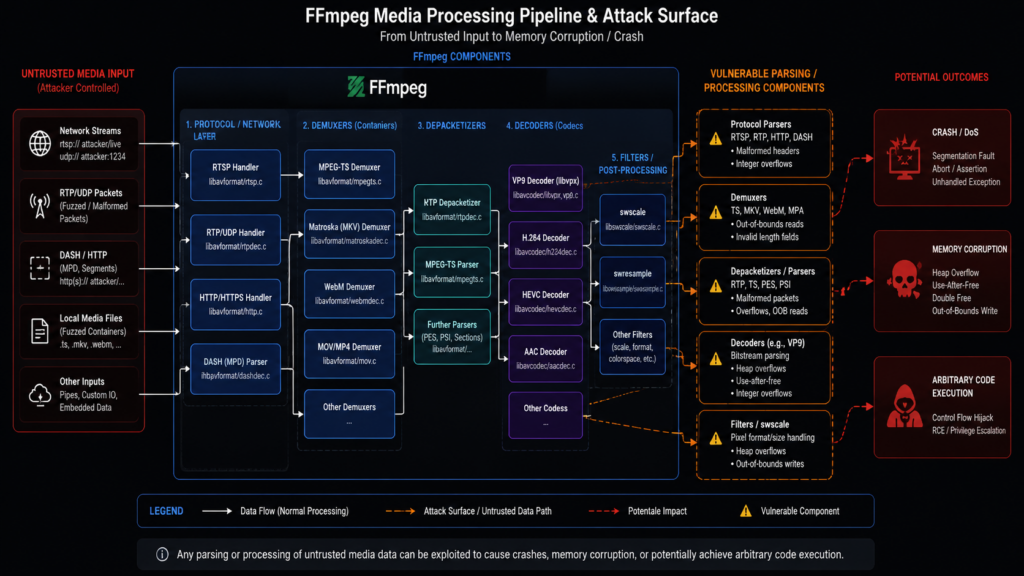
Why FFmpeg keeps producing high-value security bugs
Media parsing is hostile territory. A modern media file or stream can contain container metadata, timestamps, fragmented samples, codec-specific state, subtitle tracks, encryption metadata, service descriptions, pixel dimensions, color formats, packetization headers, tile structures, quantization tables, and nested optional fields. Many of those fields are length-prefixed. Many interact with integer arithmetic. Many are old. Many were added for compatibility with formats that real users still need even if most engineers rarely think about them.
C is fast and gives FFmpeg the control it needs for high-performance media handling, but it also puts boundary management directly in the hands of developers. A single mistaken assumption about whether a length was already validated, whether a value can be negative, whether a timestamp search returned -1, whether a dimension can overflow a multiplication, or whether a cursor still matches the allocated buffer can become memory corruption.
FFmpeg has been heavily fuzzed and audited for years. That does not mean it is “done.” It means the remaining bugs are often subtle, format-specific, state-dependent, or stuck behind rare combinations of fields. Anthropic’s Mythos Preview writeup made this point with a 16-year-old FFmpeg H.264 issue involving a mismatch between a 32-bit slice counter and a 16-bit ownership table initialized with a sentinel value. Anthropic described FFmpeg as one of the most thoroughly tested software projects in the world, yet said Mythos found important FFmpeg bugs after repeated runs over the repository. (red.anthropic.com)
Traditional fuzzing is still valuable. In fact, it is one of the reasons FFmpeg is as hardened as it is. But fuzzing and semantic reasoning catch different failure modes. A fuzzer is excellent at exploring executable behavior when it has good harnesses, good coverage, and enough time. A human auditor is excellent at understanding architectural intent, weird invariants, and security context. An AI security agent can help bridge those modes when it can read code, form hypotheses, generate harnesses, run experiments, classify crashes, and preserve reproducible artifacts. The risk is that a poorly built agent can also generate noise at machine speed.
The AV1 RTP depacketizer case shows why reachability matters
Depthfirst’s most detailed public case study focused on a heap buffer overflow in FFmpeg’s AV1 RTP depacketizer, libavformat/rtpdec_av1.c. According to the writeup, the bug is reachable when a victim points FFmpeg at an attacker-controlled RTSP stream, and the vulnerable behavior happens during ordinary RTSP playback rather than through a strange command-line flag. Depthfirst says a single small RTP packet can lead to a controlled memory corruption primitive in its proof-of-concept environment. (depthfirst.com)
The root cause is a parser state invariant failure. In simplified terms, the depacketizer builds an output packet and tracks where the next bytes should be written. For ordinary output, the code grows the packet buffer before writing. The Temporal Delimiter OBU path is special: the spec says the depacketizer should ignore and remove that marker. Depthfirst says FFmpeg’s handling advanced the output cursor by an attacker-declared OBU size but did not allocate corresponding output space. Worse, the input pointer was not advanced in the same way, so later parsing could reinterpret attacker-controlled bytes and write them at a cursor position that had run ahead of the actual allocation. (depthfirst.com)
A simplified defensive version of the mistake looks like this:
// Simplified illustration, not FFmpeg source and not exploit code.
if (obu_type == TEMPORAL_DELIMITER) {
    output_pos += declared_obu_size;   // cursor moves forward
    remaining -= declared_obu_size;
    continue;                          // no matching grow or input advance
}

grow_output_buffer(output_size);
memcpy(output + output_pos, input, payload_size);
The bug is not “there was a big copy.” The bug is that the code lost synchronization between three facts that must stay aligned: how much input has been consumed, how much output has been allocated, and where the next output write begins. Once that invariant breaks, a later write can be both attacker-influenced and out of bounds.
For defenders, the lesson is simple: do not triage media-parser bugs only by file extension or codec popularity. Triage by reachability. A vulnerable AV1 RTP depacketizer matters much more in a system that pulls user-supplied RTSP URLs than in a batch process that only transcodes internally generated MP4 files from trusted storage. A VP9 decoder bug matters more in a public upload pipeline that decodes arbitrary videos than in a backend job that only processes pre-screened assets. A DASH demuxer bug matters more when the service accepts remote manifests than when DASH handling is never enabled.
Reachability drives priority.
Chrome 149 is a separate signal, not proof that AI found everything
Chrome 149 adds another piece of context. Google’s official Chrome Releases post says Chrome 149.0.7827.53 for Linux and 149.0.7827.53/54 for Windows and Mac included 429 security fixes. The same post lists externally reported issues, including CVE-2026-10881, a critical out-of-bounds read and write in ANGLE reported on April 2, 2026, with a 97,000 dollar reward. (Chrome Releases)
That is a huge patch volume, but it should not be misread. The public Chrome release note does not say the 429 fixes were found by AI. The Hacker News explicitly drew the same boundary: only the FFmpeg bugs in this story were attributed to AI; the Chrome case shows the pressure created by higher report volume and Google’s bug bounty process adapting to AI-generated submissions. (أخبار القراصنة)
This distinction matters because sloppy retellings can mislead security teams. “AI found 21 FFmpeg zero-days” is a specific claim tied to a specific research disclosure. “Chrome patched 429 bugs” is a separate official release fact. Combining them into “AI found hundreds of browser bugs” would be inaccurate unless the vendor says so.
The defensible conclusion is narrower and more useful: AI-assisted vulnerability discovery is increasing the amount of security work that reaches maintainers and product security teams. Whether an individual bug was found by a model, a fuzzer, a human researcher, an internal audit, or a hybrid workflow, the downstream burden is similar. Someone must confirm the issue, judge exploitability, write or review the patch, decide whether to backport, ship the update, and verify that users actually receive it.
Big Sleep and Mythos put FFmpeg in a larger pattern
The FFmpeg disclosure does not stand alone. Google said in 2025 that Big Sleep, an AI agent developed by Google DeepMind and Project Zero, was actively searching for unknown software vulnerabilities. Google later said Big Sleep discovered SQLite CVE-2025-6965 based on threat intelligence indicating that the flaw was known to threat actors and at risk of exploitation, and Google described this as an AI agent helping foil attempted exploitation before it happened. (blog.google)
Anthropic’s Mythos Preview materials pushed the discussion further. Anthropic said Mythos Preview autonomously identified a 16-year-old FFmpeg H.264 vulnerability and other FFmpeg bugs, with three fixed in FFmpeg 8.1 and more undergoing responsible disclosure. The same public post discussed a FreeBSD remote code execution vulnerability, CVE-2026-4747, and framed exploit generation as a triage tool because it can change a finding from “interesting crash” to “critical impact” when a working exploit exists. (red.anthropic.com)
Those claims should be treated carefully, especially where details are limited by responsible disclosure. But they are directionally consistent with the depthfirst FFmpeg results: modern language-model systems are starting to perform meaningful parts of vulnerability research when they are embedded in a scaffold that gives them code access, execution feedback, harnesses, memory-safety tooling, and a clear objective.
The scaffold is the point. A model alone is not a security program. A model inside a controlled loop can become much more powerful.
A security agent is not just a coding agent with a darker prompt
Depthfirst’s writeup draws a useful distinction between ordinary coding agents and security agents. A coding agent usually tries to satisfy a developer request by writing or modifying useful code. A security agent has a different objective: model the attack surface, identify attacker-controlled input, follow data flow into dangerous operations, test reachability, and prove the issue with a concrete reproducer. (depthfirst.com)
That difference changes everything. A useful security agent needs to be skeptical. It must ask whether the attacker controls the field in question, whether the vulnerable path is reachable in a real configuration, whether the input must pass earlier validation, whether the crash is security-relevant, whether the finding duplicates a known issue, and whether a maintainer can reproduce it. It must also avoid a failure mode that maintainers now know too well: confident, AI-written reports that describe plausible bugs that are not real.
FFmpeg’s own security page now warns about a spike in AI-generated false positives and says automated submissions are not accepted. It asks reporters to provide human verification, a reproducible testcase, command line, source identifier, stack traces with line numbers, analysis, introduced commit if known, a script generating input if available, and a proposed patch if available. (ffmpeg.org)
That list is a practical standard for the entire industry. A security finding without reproduction is a lead, not a confirmed vulnerability. A crash without reachability is a debugging artifact, not necessarily a security issue. A version match without behavior validation is exposure evidence, not exploitability proof.
| النهج | Best at | الضعف | What good output looks like |
|---|---|---|---|
| SAST | Pattern detection, known dangerous APIs, scalable code scanning | High false-positive rate on complex reachability and context | File, line, data-flow explanation, confidence level, remediation hint |
| التشويش | Finding crashes and memory-safety faults in executable paths | Needs harness quality, coverage, seed design, and time | Minimized crashing input, sanitizer trace, coverage data |
| Manual audit | Understanding architecture, trust boundaries, exploitability, business impact | Expensive and hard to scale | Root cause, attack path, patch guidance, risk narrative |
| AI security agent | Hypothesis generation, code navigation, harness generation, triage assistance, report drafting | Can hallucinate, overclaim, or miss environment constraints | Reproducible proof, reachability analysis, minimized artifact, patch or mitigation proposal |
| Hybrid workflow | Combining machine scale with human judgment | Requires process discipline | Evidence-backed finding with review history and retest plan |
The best results will come from hybrids, not from worshiping one technique.
Why the 1,000 dollar number matters, and why it can mislead
Depthfirst’s approximate 1,000 dollar cost figure is attention-grabbing because it suggests a dramatic drop in the cost of serious vulnerability discovery. That figure is meaningful, but it should not be treated as a universal price tag for zero-days. A successful run cost is not the same thing as guaranteed cost per future critical vulnerability. Search processes have variance. Agent scaffolds require engineering. Human validation still costs money. Coordinated disclosure takes time. Some repositories will be harder than others. Some findings will turn out to be duplicates, hard-to-reach crashes, or low-impact denial-of-service bugs.
The right takeaway is not “every company can now buy 21 zero-days for 1,000 dollars.” The right takeaway is that the marginal cost of generating credible vulnerability candidates is falling, especially in large codebases with rich parsers and good ways to execute tests. That changes the defender’s time horizon. When discovery is cheaper, attackers and researchers can explore more code. When exploit generation becomes more automated, the interval between public patch metadata and working N-day exploit attempts can shrink. When report volume rises, maintainers need stricter evidence requirements, better deduplication, and faster triage.
The risk moves from scarcity to overload.
The FFmpeg supply-chain problem is bigger than package upgrades
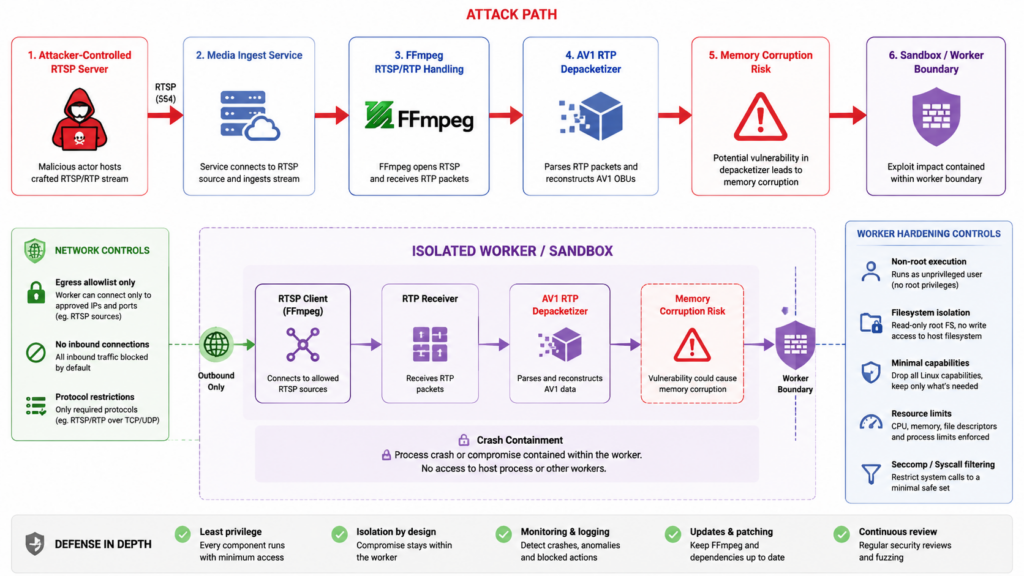
The immediate response to a vulnerable FFmpeg is to upgrade. That is necessary, but it is not sufficient for many organizations. FFmpeg is often bundled, copied, statically linked, vendored, or hidden inside higher-level packages.
A system package inventory might say the host has no vulnerable FFmpeg package while an application directory contains its own ffmpeg binary. A container image might install FFmpeg in a build stage and copy it into a runtime layer. A Python package might ship wheels that bundle FFmpeg libraries. An Electron app might include FFmpeg in its resources. A vendor appliance might run an old FFmpeg build that never appears in your normal endpoint package manager. A media service might use a sidecar container whose image is managed by a different team.
Start by finding every copy.
# Linux host inventory
command -v ffmpeg || true
which -a ffmpeg || true
ffmpeg -version 2>/dev/null | head -20 || true

# Debian or Ubuntu package evidence
dpkg -l | grep -Ei 'ffmpeg|libavcodec|libavformat|libavutil|libswscale' || true
apt-cache policy ffmpeg libavcodec* libavformat* 2>/dev/null | head -80 || true

# RHEL, Fedora, Amazon Linux style package evidence
rpm -qa | grep -Ei 'ffmpeg|libavcodec|libavformat|libavutil|libswscale' || true
dnf info ffmpeg 2>/dev/null | sed -n '1,80p' || true

# Find bundled binaries in application paths
find /opt /srv /usr/local /var/www -type f -name 'ffmpeg' -o -name 'ffprobe' 2>/dev/null

# Inspect a found binary
/path/to/ffmpeg -version | head -30
ldd /path/to/ffmpeg 2>/dev/null | grep -Ei 'avcodec|avformat|avutil|swscale' || true
On macOS, dynamic library inspection is different:
which -a ffmpeg || true
ffmpeg -version 2>/dev/null | head -20 || true
brew list --versions ffmpeg 2>/dev/null || true

# Inspect linked FFmpeg libraries
otool -L "$(which ffmpeg)" 2>/dev/null | grep -Ei 'avcodec|avformat|avutil|swscale' || true
For containers, inspect both the image and the running workload. Teams often patch a base image but leave old deployed images running in Kubernetes, ECS, Nomad, CI runners, or serverless container platforms.
# List images on a host
docker images --digests | head

# Check a specific image
docker run --rm IMAGE_NAME:TAG sh -lc 'which ffmpeg; ffmpeg -version | head -20' 2>/dev/null

# Generate an SBOM with Syft, if available
syft IMAGE_NAME:TAG -o table | grep -Ei 'ffmpeg|libavcodec|libavformat|libavutil|libswscale' || true

# Scan a filesystem or image with Trivy, if available
trivy image --scanners vuln IMAGE_NAME:TAG
trivy fs --scanners vuln /path/to/application
For Python environments, do not assume pip freeze tells the whole story. Some packages include compiled native libraries or download binaries separately. PyAV, image/video processing stacks, machine-learning preprocessing pipelines, and test fixtures can all create hidden FFmpeg exposure. One PyAV issue opened shortly after the depthfirst disclosure, for example, raised concern that PyPI wheels were bundling FFmpeg 8.0.1 while the project’s main branch had moved to a newer FFmpeg baseline. That is a downstream packaging example, not proof that every PyAV deployment is vulnerable, but it illustrates why bundled media dependencies require separate review. (جيثب)
python - <<'PY'
import sys, site, pathlib
roots = set(site.getsitepackages() + [site.getusersitepackages()])
for root in roots:
    p = pathlib.Path(root)
    if not p.exists():
        continue
    for candidate in p.rglob("*ffmpeg*"):
        print(candidate)
PY

pip freeze | grep -Ei 'av|ffmpeg|moviepy|opencv|imageio|mediapipe' || true
The point is not that every package name in that grep is vulnerable. The point is that media processing dependencies tend to be layered. Inventory must start broad, then narrow based on actual binaries, linked libraries, versions, and reachable input paths.
Version strings are not enough
Version checks are useful, but they can lie by omission. Linux distributions often backport security patches without changing to the upstream version that a scanner expects. Vendors sometimes apply private patches. Containers can include multiple copies. A wrapper service can call a bundled binary while the host package is fully patched. A static binary may report a version but hide the exact commit. A service can expose only a subset of FFmpeg functionality, which changes risk.
Good validation combines at least six pieces of evidence:
| Evidence type | ما أهمية ذلك | خطأ شائع |
|---|---|---|
| Upstream FFmpeg version | Establishes broad baseline | Treating version alone as exploitability proof |
| Distribution package metadata | Shows vendor patch status and backports | Assuming upstream version comparison applies to distro packages |
| Build configuration | Shows enabled codecs, demuxers, protocols, and libraries | Ignoring --disable-* or custom builds |
| Binary location | Distinguishes system package from bundled app copy | Patching /usr/bin/ffmpeg while app uses /opt/vendor/bin/ffmpeg |
| Runtime input path | Determines whether untrusted data reaches vulnerable code | Treating unused codec support as reachable exposure |
| Isolation controls | Determines blast radius if parsing fails | Ignoring container privilege, egress, filesystem, and worker identity |
A safe validation workflow looks like this:
# Capture version and build flags
ffmpeg -hide_banner -version > ffmpeg-version.txt

# Show protocols and formats that may matter to reachability
ffmpeg -hide_banner -protocols > ffmpeg-protocols.txt
ffmpeg -hide_banner -formats > ffmpeg-formats.txt
ffmpeg -hide_banner -codecs > ffmpeg-codecs.txt

# Store package evidence
dpkg -s ffmpeg libavcodec* libavformat* 2>/dev/null > package-evidence.txt || true
rpm -qi ffmpeg 2>/dev/null > package-evidence-rpm.txt || true

# Capture runtime identity and containment
id > runtime-identity.txt
cat /proc/1/status 2>/dev/null | head -80 > process-status.txt || true
For public-facing services, add application-level evidence:
# Review whether users can submit URLs that FFmpeg fetches directly
grep -R "ffmpeg" -n ./app ./services ./workers 2>/dev/null | head -100
grep -R "rtsp://\|rtmp://\|http://\|https://" -n ./app ./services ./workers 2>/dev/null | head -100
Do not run untrusted proof-of-concept files against production systems. If a maintainer, vendor, or researcher provides a reproducer, use an isolated lab with no secrets, no internal network reachability, a non-root user, memory-safety tooling if you are building from source, and a disposable filesystem. The goal of defensive reproduction is to confirm exposure and patch effectiveness, not to develop a weaponized exploit.
How to prioritize FFmpeg exposure
Not every FFmpeg deployment deserves the same urgency. Prioritize based on who controls the input, whether the vulnerable parser is reachable, what privileges FFmpeg has, and what an attacker gains from a crash or memory corruption.
| Exposure scenario | Risk level | لماذا |
|---|---|---|
| Public service accepts user-uploaded videos and decodes them automatically | عالية | Untrusted media reaches parser code at scale |
| Service fetches user-supplied RTSP, RTMP, DASH, HLS, or remote media URLs | عالية | FFmpeg becomes a network client to attacker-controlled endpoints |
| CCTV or surveillance platform pulls third-party RTSP camera streams | عالية | Remote packet streams can reach protocol and depacketizer code |
| Multi-tenant SaaS uses FFmpeg workers with broad internal network egress | عالية | Parser compromise may lead to lateral movement or data access |
| Internal trusted media batch jobs only process files generated by the same pipeline | متوسط | Lower attacker control, but supply-chain and insider paths remain |
| Developer laptop has FFmpeg installed for manual use | Medium to low | User interaction is usually required, but malicious files still matter |
| Static site build pipeline uses FFmpeg only on repository-owned assets | Low to medium | Risk depends on who can contribute assets or trigger builds |
| Old appliance bundles FFmpeg but does not expose media processing to users | Unknown | Needs vendor confirmation and input-path review |
For the depthfirst AV1 RTP depacketizer case, the top priority is any service that points FFmpeg at attacker-influenced RTSP URLs or remote media streams. Depthfirst specifically called out media ingest pipelines, surveillance and CCTV systems, and transcoding services processing remote AV1-over-RTP sources as serious exposure scenarios. (depthfirst.com)
For the DASH demuxer issue, prioritize systems that ingest remote manifests or user-provided streaming URLs. For decoder bugs, prioritize upload, preview, thumbnailing, transcoding, moderation, and indexing systems that automatically decode untrusted media. For option parsing or preset-related bugs, inspect wrappers that let users influence FFmpeg command-line arguments, presets, or job templates.
Safer FFmpeg architecture for untrusted media
Treat FFmpeg like a browser engine or document parser: powerful, necessary, and dangerous when fed attacker-controlled input. The right architecture assumes parser compromise is possible and limits blast radius.
A hardened media-processing pipeline should have these properties:
| التحكم | Defensive value | Implementation notes |
|---|---|---|
| Dedicated worker pool | Keeps parser risk away from app servers | Run media jobs in separate containers, VMs, or sandboxed workers |
| Non-root execution | Reduces immediate privilege impact | Use a dedicated UID with no shell, no sudo, and minimal file permissions |
| Read-only root filesystem | Limits persistence and tampering | Mount only specific input/output directories as writable |
| No secrets in worker environment | Prevents credential theft after compromise | Do not inject database credentials, cloud keys, or signing keys into workers |
| Network egress restrictions | Limits SSRF and callback paths | Block internal metadata services and private networks unless required |
| Protocol allowlist | Prevents unexpected fetch behavior | Avoid allowing arbitrary URL schemes in user-controlled jobs |
| Resource limits | Reduces denial-of-service impact | Set CPU, memory, file size, duration, process count, and timeout limits |
| Queue isolation | Prevents one tenant’s file from affecting others | Use per-tenant or risk-tier queues for high-risk inputs |
| Crash collection | Supports detection and patch validation | Store core dumps or sanitizer traces only in safe internal systems |
| Retest workflow | Confirms fixes and avoids regression | Re-run safe reproducers in lab after patching |
If your application accepts remote URLs, do not pass them directly to FFmpeg unless that behavior is explicitly required and tightly controlled. A safer pattern is to fetch remote media through a controlled downloader that enforces DNS policy, blocks private IP ranges, limits redirects, caps size and duration, strips credentials, stores the object in quarantine, and then passes a local file path to FFmpeg.
When FFmpeg must fetch network resources, restrict protocols where possible. The exact command depends on your workflow, but the security idea is to avoid “any protocol from any user input.”
# Example pattern: allow only local file processing in a job that should not fetch remote URLs.
ffmpeg -protocol_whitelist file,pipe -i /sandbox/input/video.mp4 -f null -

# Example pattern: if HTTP fetch is genuinely required, keep the allowlist narrow.
ffmpeg -protocol_whitelist file,http,https,tcp,tls -i "$CONTROLLED_URL" -f null -
Do not treat command-line allowlists as your only control. They should sit behind application-level validation, network egress policy, sandboxing, and a clear rule about whether users are allowed to submit remote media URLs at all.
In containers, a safer baseline looks like this:
docker run --rm \
  --user 10001:10001 \
  --read-only \
  --cap-drop ALL \
  --security-opt no-new-privileges \
  --memory 512m \
  --cpus 1 \
  --network none \
  -v "$PWD/input:/input:ro" \
  -v "$PWD/output:/output:rw" \
  media-worker:patched \
  ffmpeg -i /input/sample.mp4 /output/result.mp4
That example is intentionally restrictive. Real services may need network access, GPU devices, or larger memory. The point is to make each permission explicit instead of letting a parser process inherit broad application privileges.
Detection signals defenders should monitor
Most FFmpeg exploitation attempts will not announce themselves as CVE traffic. They may look like strange media job failures, segmentation faults, worker restarts, malformed streams, odd URL schemes, or unusual outbound connections from a media processing container.
Useful detection starts with the job layer:
| الإشارة | ما أهمية ذلك | What to collect |
|---|---|---|
| Sudden spike in failed media jobs | Could indicate fuzzing, probing, or exploit attempts | Input source, tenant, file hash, protocol, error code |
| Segmentation fault or abort in FFmpeg | Strong signal of parser fault or malformed input | Core dump, stack trace, FFmpeg version, input hash |
| Container restarts in media worker pool | May hide crashes if orchestration auto-restarts | Pod/container ID, image digest, exit code, logs |
| Unusual RTSP, RTMP, DASH, or remote URL submissions | Matches high-risk protocol exposure | Submitted URL, resolved IP, redirect chain, tenant |
| FFmpeg egress to private IP ranges | Could indicate SSRF or malicious URL processing | Destination IP, port, protocol, job ID |
| Repeated malformed media uploads from one account | Could indicate bug hunting or attack preparation | Account ID, request metadata, file hashes |
| Core dumps containing media parser frames | Useful for triage and deduplication | Stack frames, binary build ID, sanitizer output |
| High CPU or memory exhaustion during parsing | DoS attempts may not trigger memory corruption | Resource metrics, input size, timeout reason |
If you build FFmpeg from source for internal testing, AddressSanitizer and UndefinedBehaviorSanitizer are useful in lab environments. They are not usually production defaults for performance reasons, but they can help confirm whether a suspicious crash is memory-safety relevant.
# Defensive lab build pattern, not a production recommendation.
git clone https://git.ffmpeg.org/ffmpeg.git ffmpeg-lab
cd ffmpeg-lab

./configure \
  --disable-stripping \
  --extra-cflags="-fsanitize=address,undefined -fno-omit-frame-pointer" \
  --extra-ldflags="-fsanitize=address,undefined"

make -j"$(nproc)"
Use lab builds to reproduce a crash, confirm the patched build no longer crashes, and produce evidence for internal remediation. Do not expose sanitizer builds to untrusted production traffic unless you have deliberately designed for the performance and information-disclosure tradeoffs.
The CVE-2026-40962 lesson, integer bugs in media containers
CVE-2026-40962 is not one of depthfirst’s newly disclosed 21 FFmpeg findings, but it is highly relevant to the same defensive theme. NVD describes CVE-2026-40962 as an integer overflow and resultant out-of-bounds write in FFmpeg before 8.1 involving CENC, Common Encryption, subsample data in libavformat/mov.c. NVD’s page also shows an important scoring discrepancy: NVD lists a 9.8 critical CVSS 3.1 score, while the CNA-provided vector shown on the same page is 4.9 medium with local attack complexity. (NVD)
That disagreement is a useful reminder. Security teams should not blindly rank media parser issues by one number. They should ask:
- Is the vulnerable code reachable from untrusted media files or streams?
- Does the deployment process encrypted MP4 or fragmented media with CENC metadata?
- Is FFmpeg running inside a sandboxed worker or inside a privileged service?
- Can an attacker trigger the path remotely, or does it require local file access?
- Has the distribution backported the patch even if the upstream version appears older?
- Is the affected library bundled inside another product?
CVE-2026-40962 also reinforces a common root cause: arithmetic around attacker-controlled media metadata. Integer overflow is not an abstract weakness. In media parsers, it often means a buffer is allocated based on a wrapped size and later written based on the original logical size. That is how a “math bug” becomes memory corruption.
What FFmpeg maintainers now require from vulnerability reports
The FFmpeg security page is unusually direct about the current reporting environment. It warns about AI-generated false positives, asks reporters to carefully verify issues, says automated submissions are not accepted, and requests easy-to-use testcases, command lines, commit identifiers, stack traces, analysis, introduced commit if known, input-generation scripts if available, patches if available, and CVE identifiers if available. (ffmpeg.org)
That is not maintainers being hostile to security research. It is maintainers trying to survive volume. A vague report that says “AI found an overflow in parser X” creates work without reducing risk. A good report lets the maintainer reproduce the crash, understand the vulnerable invariant, judge whether the issue is exploitable, patch the root cause, add a regression test, and backport where needed.
Security teams should apply the same standard internally. A finding should not enter the “critical remediation” queue just because an AI agent says so. It should carry evidence:
| Report element | Good evidence |
|---|---|
| Affected asset | Host, container image digest, binary path, package metadata, owner |
| Affected version | Upstream version plus distro package or commit evidence |
| Reachability | Exact application path by which untrusted input reaches FFmpeg |
| Trigger class | File upload, remote URL fetch, RTSP stream, batch job, API request |
| التأثير | Crash, memory corruption, data exposure, possible code execution, service disruption |
| Reproducer | Safe lab-only command and input hash, not production weaponization |
| Logs | Stack trace, sanitizer output, container restart, worker logs |
| Fix | Upstream upgrade, distro patch, vendor patch, containment change |
| Retest | Evidence that the same safe input no longer triggers the fault |
NIST SP 800-115 remains a useful anchor here because it frames security testing as planning, conducting tests, analyzing findings, and developing mitigation strategies, not merely finding signals. AI can accelerate parts of that loop, but it does not remove the loop. (csrc.nist.gov)
Patch strategy for FFmpeg deployments
The cleanest fix is to update to an FFmpeg release or distribution package that contains the relevant fixes. FFmpeg’s official developer documentation says security fixes are valid candidates for point releases and that release preparation includes ensuring relevant security fixes have been backported. The public download page shows multiple maintained branches, which matters for organizations that cannot immediately jump to the newest major branch. (ffmpeg.org)
A practical patch plan should move in layers:
- Patch internet-exposed media services first.
- Patch systems that process user uploads or user-supplied remote URLs.
- Patch worker images and rebuild dependent services.
- Patch developer and CI environments that process untrusted test assets.
- Request vendor advisories for appliances and desktop applications that bundle FFmpeg.
- Retire unsupported or unpatchable FFmpeg builds.
- Add containment controls so the next parser bug has less impact.
When a distribution backports the fix, document the vendor advisory or changelog rather than forcing an upstream version match. When an application bundles FFmpeg, demand a new application build or vendor statement. When a container image is patched, redeploy it and confirm the running digest changed. When a serverless layer is patched, confirm functions are actually using the new layer version.
A patch that exists in a registry is not a patch that protects production.
Reducing attack surface before the next media parser bug
Even after patching, assume more FFmpeg bugs will arrive. The depthfirst disclosure, Big Sleep, Mythos, and the steady flow of FFmpeg CVEs all point in the same direction: complex parser code will keep producing findings as search improves.
Attack-surface reduction gives you defense that does not depend on knowing every CVE.
Disable features you do not need at build time when you maintain your own FFmpeg build. If you only process local MP4 files, you may not need broad network protocol support. If you never process subtitles, obscure legacy formats, or live network streams, do not expose them casually. Custom builds can be operationally expensive, but for high-risk services they may be worth it.
At the application layer, validate inputs before they reach FFmpeg. Reject remote URLs unless they are explicitly part of the product. If remote fetch is required, use an allowlist of schemes and domains, block private address ranges, resolve DNS safely, cap redirects, enforce content length, and log final destination IPs. Never let users provide arbitrary command-line arguments.
At the infrastructure layer, isolate. A media parser does not need cloud admin credentials. It does not need database write access. It does not need access to the internal metadata service. It does not need to run as root. It does not need to share a network namespace with application servers. It should produce output through a narrow, audited channel.
At the monitoring layer, treat parser crashes as security events until proven otherwise. Many organizations silently auto-restart media workers. That is good for availability and bad for security visibility. Preserve enough crash evidence to distinguish malformed user content from active probing.
Safe validation without turning defense into exploit development
Security teams often ask whether they should reproduce newly disclosed bugs. The answer depends on the environment, the quality of the available reproducer, and the risk of running it.
For a high-risk public media service, validating exposure is reasonable if done safely. But validation should not mean running public exploit code on production. It should mean building an isolated lab that mirrors the relevant FFmpeg version, configuration, and input path, then using a vendor-provided or internally approved test artifact to confirm whether the vulnerable build crashes and whether the patched build does not.
A defensive reproduction environment should have:
- No production secrets.
- No internal network access.
- No write access except to a disposable output directory.
- A non-root user.
- Strict CPU, memory, and time limits.
- Full logging.
- A known FFmpeg build ID.
- A hash of every test input.
- A written retest result.
A minimal lab wrapper can enforce time and memory limits:
#!/usr/bin/env bash
set -euo pipefail

INPUT="${1:?usage: ./ffmpeg-lab-run.sh input-file}"
OUTDIR="${OUTDIR:-./lab-output}"
mkdir -p "$OUTDIR"

sha256sum "$INPUT" | tee "$OUTDIR/input.sha256"

timeout 20s \
  prlimit --as=$((1024 * 1024 * 1024)) --cpu=10 --nofile=64 \
  ffmpeg -hide_banner -nostdin -v error \
  -i "$INPUT" \
  -f null - \
  >"$OUTDIR/stdout.log" 2>"$OUTDIR/stderr.log" || {
    code=$?
    echo "ffmpeg exited with code $code" | tee "$OUTDIR/result.txt"
    exit "$code"
  }

echo "ffmpeg completed without crash" | tee "$OUTDIR/result.txt"
This wrapper is not magic. It does not make malicious files safe. It simply creates a more disciplined defensive test than double-clicking a file or running a reproducer on a shared server.
What AI changes for pentesters and bug bounty hunters
For pentesters and bug bounty hunters, the FFmpeg disclosure changes expectations. It does not change authorization. You still need permission to test targets. You still need to avoid destructive actions. You still need to respect program scope. You still need evidence that a finding is real. What changes is the amount of assistance available for code navigation, hypothesis generation, harness creation, report drafting, and patch retesting.
The highest-value human skill becomes judgment. Which input path is real? Which crash matters? Which suspected bug is a duplicate? Which service is actually exposed? Which mitigation reduces impact without breaking business workflows? Which report gives maintainers enough proof without dumping exploit details publicly?
AI can help with repetitive work, but it can also produce convincing nonsense. A bounty report written by a model but lacking reachability proof is not stronger than a human report with the same gap. A pentest finding generated by an agent but missing raw requests, command output, version evidence, and retest steps is not audit-ready. A scanner result labeled “critical” because a version string matched is still a weak finding if the package is backported or the vulnerable code path is unreachable.
In authorized security testing, a controlled agentic workflow is useful when it preserves scope, evidence, and review gates instead of trying to replace them. Penligent, for example, positions its product around controlled agentic workflows, scope locking, tool execution, evidence capture, and reporting for authorized security testing; its own writing on AI pentesting after Mythos emphasizes that reliable offensive evaluation requires a bounded system that can find the right place to look, separate noise from signal, prove the condition, preserve artifacts, and communicate results another engineer can trust. (بنليجنت)
That framing is the right one for this moment. The winning workflow is not “let an agent roam.” It is “use automation to move faster inside a disciplined process.”
What maintainers and vendors should change
Open-source maintainers should not be expected to absorb infinite AI-generated bug reports for free. Vendors that depend on open-source media libraries have a responsibility to help with validation, patches, funding, and downstream distribution.
For maintainers, the immediate needs are clear evidence standards, deduplication, crash minimization, regression tests, and disclosure queues that prioritize reachable, high-impact bugs. FFmpeg’s public security page already makes this direction explicit by rejecting automated submissions and asking for human verification and reproducible testcases. (ffmpeg.org)
For vendors, the responsibility is broader. If your product bundles FFmpeg, you own the customer-facing remediation path. Your users should not have to reverse engineer which FFmpeg commit is inside your appliance. Publish affected versions. Provide patched builds. State whether you are using upstream FFmpeg, distro packages, or custom forks. If you are not affected because the vulnerable code path is disabled, explain the evidence.
For enterprises, procurement should ask vendors better questions:
- Do you bundle FFmpeg or link against FFmpeg libraries?
- Which versions and build configurations are used?
- How quickly do you ingest upstream FFmpeg security fixes?
- Do you produce SBOMs that include native media libraries?
- Can customers verify the bundled FFmpeg version?
- Do media parsers run in a sandbox?
- Are remote media URLs allowed?
- What is your process for emergency parser-library updates?
These questions are no longer niche. Any product that handles video, audio, images, thumbnails, streams, recordings, surveillance feeds, or uploaded media should be able to answer them.
Common mistakes during FFmpeg incident response
The most common mistakes are not exotic. They are basic operational blind spots.
| Mistake | Why it is dangerous | Better approach |
|---|---|---|
| Patching only the OS package | Bundled binaries and containers remain vulnerable | Search application directories, images, wheels, and vendor packages |
| Trusting version strings alone | Backports and custom builds can confuse scanners | Collect package changelogs, build flags, commit evidence, and runtime paths |
| Ignoring remote URL ingestion | FFmpeg can act as a network client to attacker-controlled endpoints | Restrict schemes, resolve safely, block private IPs, and prefer local quarantine processing |
| Running media workers with secrets | Parser compromise can become credential theft | Remove secrets from worker environment and use narrow service identities |
| Treating crashes as reliability noise | Crashes may be exploit attempts or vulnerability probes | Preserve crash evidence and correlate with user input |
| No retest after patching | Teams may patch the wrong binary or image | Re-run safe validation against the actual deployed artifact |
| Assuming low-risk because “it is only DoS” | DoS in media pipelines can become outage, queue poisoning, or exploit chain material | Evaluate privilege, tenant isolation, and operational impact |
| Letting users control FFmpeg arguments | Argument injection can expose protocols, filters, files, and unsafe behavior | Use server-side templates and strict allowlists |
The difference between a clean response and a messy one is usually evidence discipline.
الأسئلة الشائعة
Did an AI agent really find 21 zero-days in FFmpeg?
- Depthfirst says its autonomous security agent found 21 previously unknown FFmpeg vulnerabilities and produced reproducible proof-of-concept inputs.
- The public writeup lists nine CVE identifiers, CVE-2026-39210 through CVE-2026-39218, and describes the remaining issues by internal tracking IDs.
- The findings include heap buffer overflows, stack buffer overflows, integer overflows, and related memory-safety issues across demuxers, decoders, protocol handlers, and parsing logic.
- Treat the disclosure as credible but still operationally specific: your risk depends on whether your FFmpeg builds include the affected code and whether untrusted input reaches it.
Were the 429 Chrome 149 vulnerabilities also found by AI?
- No public Google release note says that.
- Google’s Chrome 149 release notes state that the update includes 429 security fixes and list externally reported issues such as CVE-2026-10881 in ANGLE.
- The connection to AI is about vulnerability-report volume and triage pressure, not a claim that AI authored all Chrome findings.
- Do not merge the FFmpeg and Chrome facts into a single unsupported claim.
Which FFmpeg deployments are most exposed?
- Public upload, preview, thumbnailing, transcoding, moderation, and indexing services that process arbitrary user media are high priority.
- Services that fetch user-supplied RTSP, RTMP, DASH, HLS, or remote media URLs are especially sensitive because FFmpeg may parse attacker-controlled streams directly.
- CCTV, surveillance, livestream ingest, and camera aggregation platforms should review RTSP and RTP exposure carefully.
- Internal-only workflows are lower risk only if the inputs are truly trusted and the worker environment is isolated.
Is upgrading the system FFmpeg package enough?
- Sometimes, but not always.
- Many applications bundle their own FFmpeg binary or link FFmpeg libraries inside containers, desktop apps, Python wheels, Electron apps, vendor appliances, or CI images.
- You need to inventory system packages, container images, application directories, static binaries, and vendor-shipped components.
- Confirm the binary actually used at runtime, not just the one installed by the OS package manager.
How should a team safely validate whether it is affected?
- Start with inventory: version, build configuration, binary path, linked libraries, package metadata, and container image digest.
- Map reachability: identify whether untrusted files, streams, URLs, manifests, or protocol metadata can reach FFmpeg.
- Use isolated lab reproduction only with approved test artifacts and no production secrets or internal network access.
- Retest after patching against the actual deployed artifact, not only a local developer build.
Should teams disable RTSP or remote media URLs?
- Disable them if the product does not require them.
- If remote media fetching is required, avoid passing arbitrary user URLs directly to FFmpeg.
- Use a controlled fetcher with DNS protections, private-IP blocking, redirect limits, size limits, content-type checks, and quarantine storage.
- Restrict FFmpeg protocols and run media processing inside a sandboxed worker with limited network egress.
Does AI make fuzzing obsolete?
- No.
- Fuzzing remains one of the best ways to find parser crashes and memory-safety bugs in executable paths.
- AI agents can complement fuzzing by improving code navigation, harness generation, semantic reasoning, crash triage, and report writing.
- The strongest workflow combines fuzzing, manual review, AI-assisted reasoning, sanitizer builds, and human validation.
What should security leaders take away from this event?
- Discovery is accelerating, but remediation remains the bottleneck.
- The urgent work is asset inventory, dependency visibility, reachability analysis, patch distribution, sandboxing, and retesting.
- Open-source maintainers need high-quality reports, not AI-generated noise.
- Enterprises should treat media parsers as high-risk components and demand better SBOMs, vendor transparency, and isolation controls.
The 21 FFmpeg zero-days are not a reason to panic over every media file. They are a reason to stop treating media processing as a harmless utility function.
FFmpeg sits on a dangerous boundary: untrusted, complex input on one side; high-performance C parsing and decoding on the other. AI agents are making that boundary easier to inspect at scale. Attackers, researchers, vendors, and maintainers will all feel the change. The teams that handle it well will not be the ones that repeat the biggest vulnerability count. They will be the ones that can quickly answer five practical questions: where is FFmpeg running, what version and build is it, who controls its input, how isolated is it, and how do we prove the fix landed?
 Arabic
  English
  German
  French
  Spanish
  Portuguese
  Japanese
  Korean
  Hindi
Hindi  Turkish
  Hebrew