
CVE-2018-0171 is not merely an old Cisco advisory that can be closed because the publication date begins with “2018.” It is a critical flaw in the Smart Install client functionality of Cisco IOS and IOS XE that can allow an unauthenticated remote attacker to crash an affected switch or execute arbitrary code by sending a crafted message to TCP port 4786.
Cisco published fixes in March 2018. It later documented attempted exploitation observed in 2021 and updated the advisory again in August 2025 because exploitation was continuing. In July 2026, a joint cybersecurity advisory issued by the NSA, CISA, FBI, DC3, and international partners again identified CVE-2018-0171 among vulnerabilities used by Russian FSB Center 16 actors targeting poorly configured and vulnerable network devices. (Cisco)
That history changes how defenders should treat the vulnerability. CVE-2018-0171 is not an academic memory-corruption case. It is an example of how unsupported switches, forgotten deployment services, exposed management ports, reusable device configurations, and weak network-device monitoring can preserve an attack path for years after a patch becomes available.
The most useful response is not to download a public exploit and fire it at production switches. A responsible response separates five questions:
- Is the device running Cisco IOS or IOS XE?
- Is the Smart Install client enabled?
- Is the installed software release affected?
- Can an untrusted system reach TCP port 4786?
- Is there evidence that the device was probed, exploited, or modified?
Each question requires different evidence. An open port does not prove remote code execution. A patched version does not prove the device was never compromised. Disabling a feature does not erase malicious configuration changes that may already exist. A clean vulnerability scan does not establish firmware integrity.
CVE-2018-0171 at a Glance
| الحقل | Defender-relevant detail |
|---|---|
| الضعف | Cisco IOS and IOS XE Smart Install client remote code execution vulnerability |
| مكافحة التطرف العنيف | CVE-2018-0171 |
| Original disclosure | March 28, 2018 |
| Primary service | Cisco Smart Install |
| Network transport | TCP port 4786 |
| Authentication required | None before reaching the vulnerable message handler |
| السبب الجذري | Improper validation of Smart Install packet data |
| Confirmed outcomes | Device reload, watchdog-triggered crash, or arbitrary code execution |
| Affected role | Smart Install clients running vulnerable IOS or IOS XE releases |
| Director affected by this CVE | لا يوجد |
| CVSS | 9.8 under the NVD CVSS 3.1 assessment |
| CISA KEV status | Added November 3, 2021 |
| Durable correction | Upgrade to a fixed release and remove unnecessary Smart Install exposure |
Cisco classifies the issue as critical and maps it to CWE-787, an out-of-bounds write category. NVD assigns a 9.8 CVSS 3.1 base score with network access, low attack complexity, no required privileges, and no user interaction. CISA’s Known Exploited Vulnerabilities status means defenders should treat it as a vulnerability with confirmed exploitation rather than a theoretical possibility. (Cisco)
The table still leaves out an essential distinction: a device is not automatically vulnerable merely because it is made by Cisco, runs IOS, or responds on TCP 4786. The affected condition depends on both software and feature state. Cisco states that the flaw affects devices running a vulnerable IOS or IOS XE release with the Smart Install client feature enabled. Only client switches are affected by this particular vulnerability; devices acting as Smart Install directors are not affected by CVE-2018-0171. (Cisco)
What Cisco Smart Install Was Designed to Do
Smart Install was developed as a zero-touch deployment and image-management system for Cisco switches. Its purpose was operational: allow a new switch to be shipped to a branch or access location, connected to the network, powered on, and provisioned without an engineer performing a full local configuration.
A Smart Install environment contains a director and one or more clients. The director acts as the management point. It can identify a newly connected client, determine the appropriate IOS image and configuration, and deliver those resources. Cisco’s documentation also describes the director assigning an address and hostname to a new client. A client does not have to sit directly beside the director; Cisco says it can be several network hops away. (Cisco)
The architecture can be represented as follows:
Approved deployment network

        Management administrator
                  |
                  v
        Smart Install director
          |       |       |
          | TCP 4786      |
          v       v       v
       Client A Client B Client C
          |
          +---- image and configuration deployment
The security problem begins with the trust model. Cisco states that Smart Install incorporates no authentication by design. That choice is understandable only in the context of a tightly controlled provisioning network where the director and clients are expected to trust each other. It becomes dangerous when the same high-privilege deployment interface is reachable from an ordinary user VLAN, an untrusted partner segment, a compromised workstation, or the public internet. (Cisco)
This distinction matters because two related but different security problems exist:
- Smart Install’s unauthenticated design can permit dangerous protocol misuse.
- CVE-2018-0171 adds a memory-safety vulnerability to the Smart Install client implementation.
A patched Smart Install service may no longer be vulnerable to this specific buffer overflow, but the protocol should still not be indiscriminately exposed. Conversely, disabling or filtering TCP 4786 can remove an immediate network path, but it does not replace software updates where the feature could later be re-enabled or reached through another interface.
What CVE-2018-0171 Actually Does
Cisco describes the flaw as improper validation of packet data processed by the Smart Install feature. A remote attacker who can connect to the affected client on TCP port 4786 can send a crafted Smart Install message. Processing that message can cause a buffer overflow. The documented outcomes include a device reload, arbitrary code execution, or an indefinite loop that eventually produces a watchdog crash. (Cisco)
The public advisory does not provide every implementation detail needed to reconstruct the vulnerable parser. Defenders should therefore avoid inventing unsupported specifics such as the exact internal function, destination buffer length, processor register state, or universal exploit offsets. Those details may vary by device family and software build.
The high-level failure pattern is nevertheless clear:
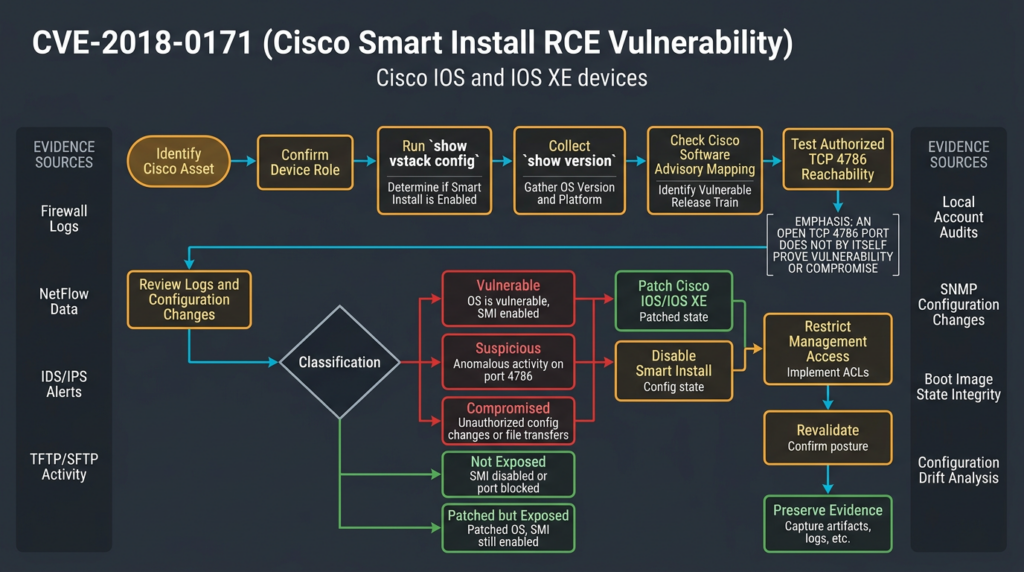
A buffer overflow does not guarantee that every malformed message produces reliable code execution. Memory corruption often has multiple observable outcomes. A poorly constructed input may simply crash the process or device. A carefully engineered exploit may achieve instruction-pointer control on a specific software build. Different hardware platforms, memory layouts, compiler behavior, protections, and IOS release trains can affect reliability.
From a defender’s perspective, that uncertainty does not make the vulnerability less serious. Availability loss on a distribution or access switch may interrupt business operations. Reliable arbitrary code execution can give an attacker control over a trusted network device. Even an unstable exploitation attempt may create repeated reloads that obscure the original cause or force emergency maintenance.
CVE Exploitation and Protocol Misuse Are Not the Same Thing
CVE-2018-0171 is frequently discussed alongside Smart Install protocol misuse. The topics overlap, but treating them as synonyms can lead to weak detection and incomplete remediation.
| Issue | Underlying condition | Typical capability | Does patching CVE-2018-0171 remove it |
|---|---|---|---|
| CVE-2018-0171 | Improper validation of crafted packet data | Memory corruption, reload, watchdog crash, possible arbitrary code execution | Yes, for this specific implementation flaw |
| Smart Install protocol misuse | Unauthenticated management and deployment functionality reachable by an attacker | Configuration extraction or modification, image operations, account or command changes | Not necessarily |
| TCP 4786 exposure | Network path to the Smart Install listener | Enables probing or interaction but does not prove vulnerability | لا يوجد |
| Compromised configuration | Prior unauthorized changes to accounts, AAA, TFTP, routes, ACLs, or other settings | Persistent or repeatable access | لا يوجد |
Cisco and Talos had warned about Smart Install misuse before CVE-2018-0171 was disclosed. Talos explained that abuse of the protocol could be used to change TFTP settings, extract configuration files, alter configurations, replace IOS images, and establish accounts or commands. Talos explicitly described that behavior as protocol misuse rather than a conventional software vulnerability. (مدونة Cisco Talos Blog)
The NSA likewise warned that malicious Smart Install interactions could expose startup configurations, force reloads, load altered images, or execute privileged CLI operations. Its guidance recommended disabling the auto-loading function, reviewing switch configurations for unauthorized deviation, and denying unnecessary TCP 4786 and TFTP access at network boundaries.
This leads to an important operational rule:
Patching CVE-2018-0171 is necessary, but it does not make unauthenticated Smart Install exposure a good design.
Where Smart Install is no longer needed, the defensible state is to patch the software, disable the function, restrict the management plane, and verify the result from both the device and the network.
Affected Products and Preconditions
Cisco’s advisory defines the affected condition using feature state rather than a simple product-name list. A device is within scope when it:
- Runs Cisco IOS or IOS XE.
- Runs a release affected by CVE-2018-0171.
- Acts as a Smart Install client.
- Has the client function enabled.
- Is reachable by the attacker over TCP 4786.
Cisco confirms that IOS XR and NX-OS are not affected by this vulnerability. It also states that Smart Install directors are not affected by CVE-2018-0171, although directors and surrounding deployment infrastructure still require secure configuration. (Cisco)
Cisco noted an additional release nuance. Switches running releases before IOS 12.2(52)SE cannot run Smart Install in the same way as newer supported releases, but some can still operate as Smart Install clients if they support the relevant software archive download functionality. This is one reason simplistic rules such as “all releases below version X are vulnerable” are unreliable. (Cisco)
Cisco also documented that Smart Install client functionality was enabled by default on certain releases that had not incorporated a separate behavior change tracked as Cisco bug CSCvd36820. That default state contributed to forgotten exposure: an administrator might not remember explicitly enabling a service that arrived active in the installed software. (Cisco)
Use the Cisco software checker rather than a copied version table
IOS and IOS XE release structures contain multiple trains, rebuilds, device families, and support states. A static table copied into a blog can become incomplete or misleading. Cisco directs customers to the Cisco IOS Software Checker, which can parse show version output or evaluate a specified software release against the advisory and identify the first fixed release. (Cisco)
A sound version-validation record should capture:
Device identifier:
Asset owner:
Model:
Serial number:
Installed image:
IOS or IOS XE release:
Smart Install role:
Smart Install operational state:
TCP 4786 listening:
Cisco advisory result:
First fixed release:
Current lifecycle status:
Date checked:
Evidence collector:
The installed release should be evaluated against the current vendor data, not against an old spreadsheet whose source and date are unknown.
TCP Port 4786 Exposure: What It Proves and What It Does Not
TCP port 4786 is the normal listener associated with Smart Install. Seeing the port open is a serious signal, especially on an internet-facing address, but it is not a complete vulnerability determination.
| Observation | What it supports | What it does not prove |
|---|---|---|
| TCP handshake succeeds on port 4786 | A service is reachable on that port | That the service is Smart Install |
| Smart Install protocol is identified | The Cisco deployment service is responding | That the installed release is vulnerable |
show vstack config reports an enabled client | The affected feature state exists | That an attacker can reach it |
| Version maps to an affected release | The software contains the defect | That the feature is enabled |
| IDS records crafted Smart Install traffic | Suspicious or exploit-like interaction occurred | That exploitation succeeded |
| Unexpected account or configuration change appears | Possible compromise | The exact initial-access mechanism |
| Open port disappears after filtering | The tested path is blocked | That every internal or alternate path is blocked |
A vulnerability scanner may report CVE-2018-0171 after observing TCP 4786 and identifying a Cisco service. That is useful for triage, but the result should be verified against local feature state and installed software.
False positives can occur when:
- A different service uses the port.
- A patched Smart Install client remains enabled.
- A firewall or load-balancing device answers on behalf of the target.
- A scanner infers the device version from an inaccurate banner.
- The product is a director rather than an affected client.
False negatives can occur when:
- An ACL allows the service only from selected sources.
- The scanner runs from the wrong network zone.
- The listener is reachable only through an internal interface.
- Network address translation obscures the actual device.
- The scanner avoids active protocol interaction.
- Temporary control-plane filtering drops the probe.
The Splunk Security Content project published an updated detection in May 2026 that looks for traffic to TCP 4786 and explicitly warns that legitimate Smart Install activity can create false positives. Its recommended interpretation depends on whether the organization still has approved Smart Install use and whether the source belongs to an authorized management system. (Splunk Security Content)
A limited, authorized reachability check
A defender can perform a simple TCP check against a single owned lab or production asset after obtaining authorization:
# Replace 192.0.2.20 with an explicitly authorized asset.
# 192.0.2.0/24 is reserved for documentation and is used here as a placeholder.

nmap -sT -Pn -p 4786 --reason 192.0.2.20
A lower-impact alternative is:
nc -vz -w 3 192.0.2.20 4786
These commands test TCP reachability. They do not send a Smart Install exploit, verify the software release, or establish compromise. Do not convert the example into an internet-wide scan. An external exposure review should use an approved asset inventory and a documented scope.
Why an Eight-Year-Old Vulnerability Still Matters
Old network-device vulnerabilities remain useful to attackers because infrastructure replacement cycles are long and visibility is often weak. A switch may continue forwarding traffic reliably for years, creating the impression that it requires little attention. The same stability can hide outdated software, unnecessary services, weak local credentials, and configuration drift.
Cisco’s 2025 reporting on Static Tundra described the group targeting unpatched and often end-of-life Cisco devices. Talos assessed that the actor used CVE-2018-0171 as part of operations focused on obtaining configuration data and maintaining access to strategically relevant networks. (مدونة Cisco Talos Blog)
The FBI reported in August 2025 that Russian FSB actors had collected configuration files from thousands of network devices associated with U.S. organizations across critical-infrastructure sectors. The FBI also stated that some configurations were modified to enable unauthorized access and that the resulting access was used for reconnaissance involving protocols and applications associated with industrial control systems. (ic3.gov)
The July 2026 joint advisory broadened the defensive context. It described FSB Center 16 actors primarily scanning for poorly configured network devices and weak SNMP configurations, while also identifying prior exploitation of CVE-2018-0171 and Smart Install functionality. The advisory recommended disabling Smart Install, restricting management protocols, blocking unnecessary TCP 4786, updating firmware, and replacing end-of-life equipment.
This history also prevents a common analytical mistake: not every recent router intrusion involving these actors began with CVE-2018-0171. The 2026 advisory says their primary discovery and exploitation method involved poorly secured SNMP. Smart Install and known Cisco vulnerabilities formed part of a broader toolkit. A defender should therefore investigate the entire management plane rather than hunt only for one exploit signature.
Why Configuration Files Are High-Value Intelligence
A switch configuration is not merely a backup of interface names. Depending on the platform and deployment, it may reveal:
- Internal subnets and VLAN structure.
- Routing relationships and next hops.
- Access-control rules.
- Management server addresses.
- AAA and TACACS+ configuration.
- RADIUS systems.
- SNMP community strings or SNMPv3 settings.
- VPN parameters.
- Local usernames and password representations.
- Logging destinations.
- NTP servers.
- TFTP, FTP, SCP, or archive destinations.
- Trust relationships with neighboring infrastructure.
- Interface descriptions that identify business systems.
- Out-of-band management paths.
The 2025 Talos analysis described a post-compromise sequence in which an attacker could enable a local TFTP function and retrieve startup configuration data. Talos warned that extracted configurations might expose credentials or SNMP community strings that could support more direct access. (مدونة Cisco Talos Blog)
The 2026 joint advisory similarly described actors using SNMP operations to copy configurations into files and transfer them through TFTP to actor-controlled or compromised infrastructure. It mapped configuration collection to credential-access, collection, command-and-control, and exfiltration behaviors.
The incident impact therefore depends on more than whether arbitrary code executed. An unauthorized configuration read may expose enough information to support later intrusion. An unauthorized configuration modification can create persistence without a conventional filesystem implant. A malicious image replacement raises a deeper integrity problem because the operating system itself may no longer be trustworthy.
A Defender-Safe Validation Workflow
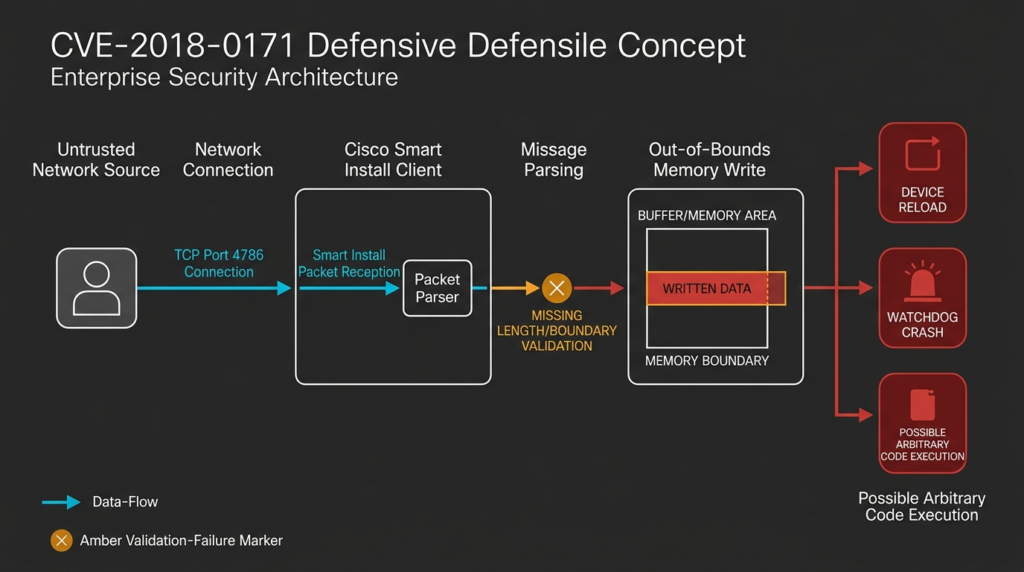
A useful assessment should produce a reproducible evidence chain rather than a single “vulnerable” label.
| المرحلة | سؤال | Preferred evidence | خطأ شائع |
|---|---|---|---|
| Authorization | Are these devices and network paths approved for testing | Scope document and asset owner | Scanning an address range without ownership confirmation |
| Inventory | Which Cisco devices exist and who owns them | CMDB, controller inventory, purchase records | Relying only on externally visible hosts |
| Feature state | Is Smart Install client functionality enabled | show vstack config output | Treating port state as feature state |
| Software state | Is the installed release affected | show version plus Cisco Software Checker | Using a generic version threshold |
| Reachability | Can untrusted sources access TCP 4786 | Firewall policy, flow logs, limited port test | Testing from only one internal segment |
| Compromise review | Is there evidence of unauthorized change | Config diff, accounts, AAA, TFTP, logs, image state | Assuming patching answers the compromise question |
| المعالجة | Was software fixed and exposure removed | Change record and post-change output | Executing no vstack without verifying persistence |
| Regression | Can the condition return | Continuous configuration and exposure monitoring | Closing the ticket after a one-time scan |
Step 1: Confirm ownership and criticality
Identify the business owner, network role, maintenance constraints, redundancy design, and availability requirements. A lab access switch, a production distribution switch, and an industrial network edge device do not carry the same operational risk.
Step 2: Collect device identity and lifecycle status
Record the model, serial number, installed image, software release, uptime, boot variables, support status, and replacement plan. End-of-life status affects the remediation decision even when a temporary network control can reduce exposure.
Step 3: Determine Smart Install state locally
Use device-local commands where possible. Local configuration is stronger evidence than remote fingerprinting because it shows the feature’s actual role and operational state.
Step 4: Map the exact release through Cisco
Submit the show version data to the current Cisco Software Checker or evaluate the release through Cisco’s advisory workflow. Save the result and date because vendor information can evolve.
Step 5: Evaluate every relevant access path
Test from:
- The public internet where applicable.
- User VLANs.
- Partner or guest segments.
- Server networks.
- Network-management zones.
- Remote-access VPN pools.
- Cloud-connected networks.
- Branch links.
A service blocked from the internet may still be reachable by a compromised endpoint inside the organization.
Step 6: Investigate historical exposure
Review firewall, flow, IDS, and device logs for prior TCP 4786 activity. If retention is limited, document the uncertainty rather than declaring the device uncompromised.
Step 7: Remediate and preserve evidence
Patch the software. Disable Smart Install when it is not required. Restrict management access. Save pre-change and post-change evidence. If compromise is suspected, preserve volatile information before reload or reimaging.
Step 8: Revalidate from both sides
Confirm on the device that Smart Install is disabled or patched, and confirm from the relevant network zones that TCP 4786 is no longer accessible except where explicitly authorized.
Device-Local Checks
Cisco’s advisory identifies show vstack config as the primary command for determining whether the Smart Install client is enabled. Output indicating a client role and enabled operational mode confirms the relevant feature state. (Cisco)
A defensive collection sequence may look like this:
show vstack config
show tcp brief all
show version
show running-config
show startup-config
show logging
show users
show aaa servers
show boot
The exact command set and pipe syntax vary across models and releases. Avoid assuming that a filter accepted on one IOS train is supported on every other train.
Interpreting show vstack config
An affected feature state may resemble:
Role: Client
Oper Mode: Enabled
or:
Role: Client (SmartInstall enabled)
This confirms that the device operates as a Smart Install client. It does not establish that the installed release is vulnerable or that exploitation occurred.
Checking the listener
The NSA recommends examining show tcp brief all for a listener associated with *:4786. That confirms the feature is listening locally, but the NSA explicitly notes that feature enablement is not proof of compromise.
A reviewer might use:
show tcp brief all
and inspect the output for port 4786.
Capturing the software release
Cisco recommends show version to identify the software image and release. Preserve the complete output rather than copying only a truncated version string. The image name, release train, rebuild identifier, hardware platform, and boot information can all matter during vendor mapping. (Cisco)
Configuration review targets
Search the configuration and logs for changes involving:
vstack
tftp-server
boot system
username
aaa
tacacs
radius
snmp-server
transport input
transport output
access-list
ip route
archive
logging host
ntp server
A match is not automatically malicious. The objective is to compare the current state with an approved baseline and the organization’s change records.
Safe PoC: Understanding the Validation Failure Without Targeting Cisco
The following demonstration is intentionally not an implementation of Smart Install. It contains no Cisco packet format, exploit payload, memory address, network connection, or device interaction. It runs locally and models one general failure pattern: a parser trusts a length declared by an untrusted message without confirming that the value matches the available data and an acceptable maximum.
That boundary is important. A real CVE-2018-0171 exploit could disrupt or take control of production network equipment. The toy example exists only to explain why strict message validation matters.
from __future__ import annotations

MAX_PAYLOAD_SIZE = 64


class ParseError(ValueError):
    """Raised when a toy message fails defensive validation."""


def build_toy_frame(payload: bytes, declared_length: int | None = None) -> bytes:
    """
    Build a local toy frame.

    Format:
      bytes 0-1: declared payload length, unsigned big-endian
      bytes 2..: payload

    This is NOT the Cisco Smart Install message format.
    """
    if declared_length is None:
        declared_length = len(payload)

    if not 0 <= declared_length <= 65535:
        raise ValueError("declared_length must fit in two bytes")

    return declared_length.to_bytes(2, "big") + payload


def unsafe_toy_parse(frame: bytes) -> bytes:
    """
    Demonstrates a dangerous design decision:
    trust the declared length before validating the full frame.

    Python prevents a native buffer overflow here, so this function
    illustrates the logic error rather than reproducing memory corruption.
    """
    if len(frame) < 2:
        raise ParseError("frame is too short")

    declared_length = int.from_bytes(frame[:2], "big")
    return frame[2 : 2 + declared_length]


def safe_toy_parse(frame: bytes) -> bytes:
    """
    Defensively validate structural consistency and an explicit size limit.
    """
    if len(frame) < 2:
        raise ParseError("frame is too short to contain a length field")

    declared_length = int.from_bytes(frame[:2], "big")
    actual_payload = frame[2:]

    if declared_length != len(actual_payload):
        raise ParseError(
            f"length mismatch: declared={declared_length}, "
            f"actual={len(actual_payload)}"
        )

    if declared_length > MAX_PAYLOAD_SIZE:
        raise ParseError(
            f"payload exceeds maximum: {declared_length} > {MAX_PAYLOAD_SIZE}"
        )

    return actual_payload


def demonstrate() -> None:
    cases = {
        "valid": build_toy_frame(b"approved-config"),
        "truncated": build_toy_frame(b"short", declared_length=40),
        "oversized": build_toy_frame(b"A" * 80),
    }

    for name, frame in cases.items():
        print(f"\n{name}")

        try:
            result = unsafe_toy_parse(frame)
            print(f"  unsafe parser accepted {len(result)} bytes")
        except ParseError as exc:
            print(f"  unsafe parser rejected frame: {exc}")

        try:
            result = safe_toy_parse(frame)
            print(f"  safe parser accepted {len(result)} bytes")
        except ParseError as exc:
            print(f"  safe parser rejected frame: {exc}")


if __name__ == "__main__":
    demonstrate()
Expected behavior:
valid
  unsafe parser accepted 15 bytes
  safe parser accepted 15 bytes

truncated
  unsafe parser accepted 5 bytes
  safe parser rejected frame: length mismatch

oversized
  unsafe parser accepted 80 bytes
  safe parser rejected frame: payload exceeds maximum
The example communicates four defensive principles:
- A length supplied by a network peer is untrusted.
- The declared size must be compared with the available bytes.
- The parser should enforce a protocol-specific maximum.
- Failure should stop processing before a copy or state change occurs.
The demonstration cannot identify a vulnerable Cisco release. It cannot test TCP 4786. It cannot prove exploitability. Those tasks require vendor version mapping and authorized device inspection.
Network Detection for TCP 4786
Detection should start with exposure and behavior rather than attempting to reverse-engineer a weaponized payload.
Firewall and flow telemetry
At minimum, record:
- Source address.
- Destination device.
- Destination port.
- Connection result.
- Byte and packet counts.
- First and last timestamps.
- Ingress zone.
- Egress zone.
- Whether the source is an approved management host.
A single unsuccessful connection may be routine internet scanning. Repeated connections from an unknown source, successful sessions, or internal access from a user workstation deserve more attention.
Splunk example
The following query is an original defensive example for environments that normalize traffic into Splunk’s Network Traffic data model:
| tstats count
    values(All_Traffic.src_ip) as source_ips
    values(All_Traffic.src_port) as source_ports
    earliest(_time) as first_seen
    latest(_time) as last_seen
  from datamodel=Network_Traffic
  where All_Traffic.transport="tcp"
    All_Traffic.dest_port=4786
  by All_Traffic.dest_ip All_Traffic.action
| convert ctime(first_seen) ctime(last_seen)
| sort - last_seen
The result should be enriched with:
- Device inventory.
- Approved Smart Install directors.
- Maintenance windows.
- Management VLANs.
- Internet-facing status.
- Software version.
- Smart Install feature state.
Splunk’s own 2026 detection content notes that legitimate Smart Install use can produce traffic to TCP 4786. It recommends baselining expected management systems and filtering known authorized activity rather than treating every connection as confirmed exploitation. (Splunk Security Content)
Suricata connection-level alert
A generic rule can identify unexpected inbound sessions without inspecting or reproducing exploit content:
alert tcp $EXTERNAL_NET any -> $HOME_NET 4786 (
    msg:"POLICY Unexpected inbound Cisco Smart Install TCP 4786";
    flow:to_server;
    flags:S;
    threshold:type both, track by_src, count 3, seconds 60;
    classtype:attempted-recon;
    sid:10004786;
    rev:1;
)
This rule detects repeated SYN packets. It does not determine whether the destination is vulnerable or whether a crafted Smart Install message was sent. Tune the source and destination variables, threshold, and approved management exceptions for the environment.
Cisco’s advisory also points customers to Snort rules associated with the vulnerability, including SIDs 46096, 46097, and 46468. Signature availability and subscription requirements should be checked in the organization’s current Cisco security tooling. (Cisco)
Device logs
Talos noted that sufficiently detailed device logging may reveal TFTP writes, command execution, or reload activity associated with Smart Install misuse. The exact messages depend on platform, release, and logging configuration. (مدونة Cisco Talos Blog)
Useful correlations include:
Inbound TCP 4786 session
        +
Configuration write or archive event
        +
Outbound TFTP connection
        +
New account, AAA change, or reload
No single event is conclusive, but several events in close succession can raise confidence substantially.
Exposure Is Not the Same as Compromise
Defenders should assign findings to separate states.
State 1: No relevant feature detected
Evidence:
- Smart Install client disabled.
- No TCP 4786 listener.
- No external or internal network path.
- Software state recorded.
الإجراء:
- Preserve evidence.
- Continue configuration monitoring.
- Confirm the feature cannot be reintroduced by templates or automation.
State 2: Service exposed but software fixed
Evidence:
- Smart Install client active.
- TCP 4786 reachable.
- Installed release maps to a fixed version.
الإجراء:
- Determine whether the service is genuinely required.
- Restrict it to approved management hosts.
- Disable it when unnecessary.
- Review for protocol misuse because patching the buffer overflow does not authenticate Smart Install.
State 3: Vulnerable condition confirmed
Evidence:
- Smart Install client enabled.
- Affected release confirmed through Cisco.
- Attacker-relevant network reachability exists.
الإجراء:
- Block untrusted access immediately.
- Preserve logs and configuration.
- Patch or disable.
- Investigate historical traffic and configuration changes.
- Retest from every relevant network zone.
State 4: Suspicious interaction observed
Evidence:
- TCP 4786 sessions from unauthorized systems.
- IDS exploit alerts.
- Unexplained reloads.
- TFTP or configuration operations near the same timestamp.
الإجراء:
- Escalate to incident response.
- Preserve volatile evidence.
- Review all management-plane changes.
- Avoid rebooting before evidence collection unless availability or safety requires it.
State 5: Compromise likely or confirmed
Evidence:
- Unauthorized account.
- Unauthorized configuration modification.
- Unexpected TFTP service.
- Altered boot image or boot variable.
- Unapproved routes, ACLs, tunnels, or management destinations.
- Known malicious infrastructure in logs.
- Firmware integrity cannot be established.
الإجراء:
- Isolate the device through a controlled procedure.
- Treat exposed credentials as compromised.
- Rebuild from a trusted image or replace the device.
- Validate neighboring infrastructure.
- Review downstream and upstream traffic.
- Perform a broader incident investigation.
Incident Response for a Suspected Cisco Switch Compromise
Network devices require a different response sequence from ordinary servers. Reloading too early may destroy volatile evidence. Disconnecting a central switch without a redundancy plan may cause a major outage. Leaving it online without containment may permit continuing access.
Preserve before changing
Where operationally safe, collect:
show clock
show version
show inventory
show running-config
show startup-config
show vstack config
show tcp brief all
show users
show logging
show processes cpu
show processes memory
show boot
show ip route
show access-lists
show interfaces
show snmp
Command availability varies. Use vendor-supported forensic guidance for the exact platform.
Record:
- Who collected the data.
- Collection time and device clock.
- Access method.
- Whether commands changed state.
- Hashes of exported configuration files.
- Ticket and incident identifiers.
Compare running and startup configurations
An attacker may change only the running configuration, save changes to startup configuration, or manipulate both. Compare:
- Local users.
- Privilege levels.
- AAA methods.
- TACACS+ and RADIUS servers.
- SNMP communities and users.
- VTY access.
- SSH keys.
- HTTP services.
- TFTP functions.
- Static routes.
- ACLs.
- NAT.
- Tunnel interfaces.
- Logging destinations.
- NTP.
- Archive jobs.
- Boot images.
A difference is not automatically malicious. Compare it with approved changes, automation runs, and maintenance records.
Investigate configuration exfiltration
Look for:
- Newly enabled TFTP server functionality.
- Outbound TFTP to unknown addresses.
- Configuration-copy events.
- Files with unexpected backup names.
- Connections to newly observed external infrastructure.
- SNMP write operations.
- Changes that make local credentials or services available.
The 2025 FBI and Talos reporting shows why configuration review is central. The observed activity included collecting large numbers of device configurations and, in some cases, modifying configurations to enable unauthorized access. (ic3.gov)
Treat exposed secrets as compromised
A configuration may contain or reveal credentials for:
- Local device accounts.
- SNMP.
- TACACS+.
- RADIUS.
- VPNs.
- Neighboring devices.
- Automation systems.
- Backup repositories.
- Monitoring platforms.
Do not rotate only the switch’s local password. Identify where each secret is reused and whether the attacker could use it against other infrastructure.
Decide whether trust can be restored
Patching is enough for a vulnerable but unexploited device. It may not be enough for a compromised device.
Reimage or replace the device when:
- The boot image may have been altered.
- Unauthorized privileged access is confirmed.
- Configuration history is incomplete.
- Logs are insufficient to determine the extent of change.
- The device is unsupported.
- The organization cannot validate firmware and configuration integrity.
- The attacker had enough control to modify evidence.
Remediation Priorities
Cisco released fixed software for CVE-2018-0171 and states that no workaround addresses the vulnerability for customers who must continue using Smart Install. For customers that do not require the feature, Cisco recommends disabling it with no vstack. This wording is important: disabling an unused feature removes the reachable vulnerable path, but customers who need the function should not treat an ACL as a substitute for installing fixed software. (Cisco)
| المعالجة | Security value | التقييد | Required verification |
|---|---|---|---|
| Upgrade to Cisco fixed software | Removes CVE-2018-0171 defect | May require maintenance and hardware compatibility review | Confirm installed release through show version and Cisco checker |
| Disable Smart Install | Removes unnecessary service | Does not investigate earlier compromise | Confirm show vstack config and listener state |
| Restrict TCP 4786 with ACL | Reduces reachable sources | Does not repair vulnerable code | Test from approved and unapproved zones |
| Block TCP 4786 at perimeter | Stops direct internet access | Internal paths may remain | External and internal validation |
| Segment management plane | Reduces lateral access | Requires architecture and operational discipline | Route, firewall, and flow review |
| Monitor configuration drift | Detects later unauthorized changes | Depends on trusted baseline | Test alerting with approved change |
| Replace EOL equipment | Restores vendor support and modern controls | Procurement and migration effort | Decommission evidence and new-device validation |
Upgrade first
Use Cisco’s current software checker to select a fixed release compatible with the hardware and release train. Confirm image authenticity and follow established change-control procedures.
After the upgrade:
show version
show boot
show vstack config
show tcp brief all
Save the output as evidence.
Disable Smart Install where it is unnecessary
The relevant configuration command is:
configure terminal
 no vstack
end
write memory
Exact persistence commands and operational behavior may differ by release and organizational standard. Verify after the change and again after a controlled reload during an approved maintenance window.
The 2026 joint advisory explicitly recommends disabling Cisco Smart Install on all devices as part of its router-hardening guidance.
Restrict the service when temporary operation is unavoidable
Use an ACL that permits only the required director or management system.
The following example uses documentation addresses and must be adapted to the exact topology:
ip access-list extended SMI-MANAGEMENT-ONLY
 permit tcp host 192.0.2.10 host 192.0.2.20 eq 4786
 deny   tcp any host 192.0.2.20 eq 4786 log
 permit ip any any
Before applying an ACL:
- Confirm the correct interface.
- Confirm inbound or outbound direction.
- Confirm the actual director and client addresses.
- Use out-of-band access.
- Review implicit deny behavior.
- Test failback.
- Check platform capacity and logging impact.
Talos’s 2018 guidance similarly recommended limiting Smart Install access to an approved host and denying other traffic to TCP 4786 when the feature could not immediately be removed. (مدونة Cisco Talos Blog)
Apply control-plane protection carefully
Control Plane Policing can help restrict or rate-limit management traffic, but CoPP syntax, class maps, hardware behavior, and safe rates vary significantly. A generic template can overload the control plane or block legitimate routing and management protocols.
Design CoPP using:
- The exact platform guide.
- Measured normal traffic.
- Redundancy testing.
- Out-of-band recovery.
- Staged deployment.
- Monitoring for drops.
Block unnecessary management protocols at network boundaries
The 2026 joint advisory recommends denying unnecessary external communication to TCP 4786, TFTP on UDP 69, and SNMP ports. It also recommends allowing management protocols only from approved management devices, preferably through an out-of-band network.
The aim is not merely to close a port. Management interfaces should exist in a controlled trust zone with explicit paths, strong authentication, logging, and no direct exposure to arbitrary endpoints.
Legacy Devices Need a Replacement Decision
An ACL can buy time. It cannot turn unsupported software into supported software.
End-of-life network equipment creates several connected risks:
- No future security patches.
- Limited modern cryptography.
- Weak password storage options.
- Older SNMP implementations.
- Incomplete telemetry.
- Configuration syntax that complicates automation.
- Hardware constraints that prevent newer software.
- Greater difficulty validating firmware integrity.
- Operational fear of upgrades because replacement parts or expertise are scarce.
Cisco Talos repeatedly connected CVE-2018-0171 exploitation with unpatched and end-of-life devices. The 2026 joint advisory also tells organizations to update device software and replace end-of-life equipment with supported products. (مدونة Cisco Talos Blog)
A practical lifecycle classification is:
| الفئة | Condition | Decision |
|---|---|---|
| Supported and patchable | Fixed image available and hardware supported | Patch promptly |
| Supported but operationally constrained | Patch exists but maintenance requires planning | Isolate immediately, schedule emergency change |
| EOL with a compatible fixed image already available | Current device can run a fixed release but receives no normal support | Patch as an interim control and plan replacement |
| EOL and cannot run a fixed image | Vulnerability cannot be removed through supported software | Isolate and replace |
| Integrity uncertain after suspected compromise | Patch state may be corrected but trust cannot be established | Reimage through trusted process or replace |
“Compensating control” should have an owner, expiration date, test procedure, and replacement milestone. Otherwise, temporary isolation tends to become permanent technical debt.
Detection Beyond TCP 4786
A mature hunt should include adjacent management-plane activity because real adversaries do not limit themselves to one protocol.
SNMP
The 2026 joint advisory describes FSB Center 16 actors scanning for SNMP agents that accept common or default community strings and using SNMP Set-Requests to direct configuration-copy operations. It recommends disabling SNMPv1 and SNMPv2 where possible, using SNMPv3 with authentication and privacy, restricting access through ACLs, and monitoring sensitive OIDs.
مراجعة:
- Read-write community strings.
- Default or common strings.
- SNMP access from unapproved hosts.
- Set operations.
- Configuration-copy MIB activity.
- New SNMP users.
- Downgrades from SNMPv3.
- Outbound transfer following an SNMP request.
TFTP
TFTP is operationally useful in some legacy environments but provides little inherent security. Investigate:
- Outbound UDP 69 to the internet.
- New TFTP destinations.
- Transfers outside maintenance windows.
- Configuration filenames.
- Device-initiated transfers not tied to a ticket.
- TFTP server enablement on the switch.
Local accounts and AAA
Alert when:
- A local account appears outside approved naming standards.
- A privilege level changes.
- Centralized AAA is bypassed.
- Authentication servers change.
- VTY lines permit Telnet.
- A local account is used during normal availability of centralized authentication.
The 2026 advisory specifically recommends monitoring unusual credentials and local-account logins, while preferring centralized authentication with multifactor support where feasible.
Configuration drift
Maintain a cryptographically hashed, access-controlled baseline. Compare approved snapshots after every change.
A simplified local workflow might be:
sha256sum switch-running-config.txt
diff -u approved-running-config.txt switch-running-config.txt
Before diffing, consider normalizing volatile lines such as timestamps or automatically generated counters. Do not remove security-relevant differences merely to reduce alert volume.
Building an Evidence Packet
A closed vulnerability ticket should contain more than a screenshot of a scanner.
A defensible evidence packet includes:
1. Asset identity
   - hostname
   - management address
   - serial number
   - model
   - owner

2. Pre-remediation state
   - complete show version output
   - show vstack config
   - TCP listener evidence
   - relevant firewall or flow evidence
   - lifecycle status

3. Vendor mapping
   - advisory identifier
   - checker result
   - affected or fixed determination
   - date of verification

4. Compromise review
   - account review
   - configuration diff
   - TFTP and SNMP findings
   - boot image review
   - log-retention limitations

5. Change record
   - approved action
   - operator
   - time
   - image installed
   - configuration change

6. Post-remediation validation
   - new show version output
   - Smart Install state
   - TCP 4786 reachability results
   - monitoring confirmation

7. Residual risk
   - internal exposure
   - EOL status
   - replacement date
   - unresolved forensic uncertainty
For large estates, this workflow can be automated without turning validation into exploitation. An authorized platform such as بنليجنت can help coordinate asset checks, approved tool execution, evidence collection, and retesting, but the system should still defer to Cisco’s release mapping and require human review before disruptive network changes. A related Cisco IOS XE compromise analysis illustrates the same operational principle: proving that an exposure is closed and proving that a device was never compromised are different tasks.
Related Smart Install Vulnerabilities
CVE-2018-0171 sits within a longer history of Smart Install security problems.
| مكافحة التطرف العنيف | Published | Impact summarized by Cisco | Affected Smart Install role | Defender takeaway |
|---|---|---|---|---|
| CVE-2018-0171 | 2018 | Reload, DoS, arbitrary code execution | Client | Patch immediately and remove exposure |
| CVE-2018-0156 | 2018 | Reload and denial of service | Client | Malformed protocol traffic can affect availability |
| CVE-2016-6385 | 2016 | Memory leak leading to eventual DoS | Client | Low-rate resource faults may be operationally disruptive |
| CVE-2016-1349 | 2016 | Denial of service | Client | Feature state remains central to exposure |
| CVE-2013-1146 | 2013 | Denial of service | Client | Old Smart Install clients have accumulated risk |
| CVE-2012-0385 | 2012 | Malformed message causes reload | Client and director | Earlier flaws affected both roles |
| CVE-2011-3271 | 2011 | Remote code execution | Client and director | Smart Install RCE risk predates CVE-2018-0171 |
Cisco’s Smart Install vulnerability history lists these issues and recommends disabling the feature when it is not needed, restricting TCP 4786 when it must remain active, and applying available software updates. (Cisco)
The table supports a broader conclusion. CVE-2018-0171 should not be treated as an isolated exception in an otherwise harmless legacy service. Smart Install has repeatedly appeared in denial-of-service, memory, remote-code-execution, and protocol-misuse advisories. Eliminating unnecessary deployment functionality is more durable than maintaining a growing list of signatures around it.
Common Validation and Remediation Mistakes
Declaring remote code execution from an open port
TCP 4786 exposure is an attack-surface finding. Confirm feature role and software status before assigning CVE-2018-0171.
Treating no vstack as historical compromise remediation
Disabling the service closes a path. It does not remove an unauthorized account, restore a modified configuration, rotate exposed credentials, or establish image integrity.
Patching without checking whether the device was exposed
A patched device can still contain changes made before patching. Review logs and configuration when prior exposure existed.
Rebooting before collecting evidence
A reload may remove volatile indicators and reset useful state. Preserve evidence first unless immediate safety or availability concerns require emergency action.
Checking only the internet perimeter
A compromised endpoint, remote-access user, partner connection, or management workstation may reach TCP 4786 internally. Validate segmentation from several trust zones.
Trusting a scanner’s inferred version
Use complete show version output and Cisco’s current checker.
Ignoring the director because it is not vulnerable to this CVE
The director may not be affected by CVE-2018-0171, but it remains a privileged provisioning system. Protect its credentials, access paths, images, and configuration repository.
Leaving Smart Install enabled because an ACL exists
The ACL can be changed, applied in the wrong direction, bypassed through another path, or made obsolete by topology changes. Disable unused functionality.
Running a public exploit in production
A proof-of-concept for a network-device buffer overflow can crash the switch, interrupt traffic, or create an incident that is difficult to distinguish from a hostile attack. Use version-based validation and a controlled lab.
A Phased Response Plan
First four hours
- Identify all Cisco IOS and IOS XE switches in scope.
- Determine whether any internet-facing address exposes TCP 4786.
- Block untrusted external access.
- Collect
show version,show vstack config, listener state, configurations, and logs. - Notify the network owner and incident-response lead.
- Identify EOL assets and critical network roles.
- Preserve firewall and IDS data.
Within 24 hours
- Map each release through Cisco’s current software checker.
- Review local accounts, AAA, SNMP, VTY, TFTP, routes, ACLs, archive jobs, and boot configuration.
- Search historical network telemetry for TCP 4786.
- Correlate configuration changes with tickets.
- Identify secrets exposed through device configurations.
- Decide whether each device is vulnerable, exposed, suspicious, or compromised.
- Establish emergency maintenance windows.
Within 72 hours
- Upgrade supported devices to fixed releases.
- Disable Smart Install where unnecessary.
- Restrict remaining management paths to approved systems.
- Rebuild or replace devices whose integrity cannot be established.
- Rotate exposed local, SNMP, AAA, VPN, and automation credentials.
- Validate controls from external and internal network zones.
- Enable configuration-drift and management-plane monitoring.
Within 30 days
- Replace EOL equipment that cannot be durably secured.
- Remove direct internet access to device-management services.
- Migrate legacy SNMP deployments.
- Create a maintained inventory of network-device software.
- Test restoration from trusted configuration backups.
- Build alerting for TCP 4786, TFTP, SNMP write activity, and unusual local accounts.
- Add CVE-2018-0171 exposure checks to recurring security validation.
الأسئلة الشائعة
What is CVE-2018-0171?
- It is a critical vulnerability in the Smart Install client feature of Cisco IOS and IOS XE.
- An unauthenticated remote attacker can send crafted data to TCP port 4786.
- Successful exploitation may reload the device, trigger a watchdog crash, or execute arbitrary code.
- Cisco released fixed software in 2018, but later reporting confirmed continuing exploitation. (Cisco)
Does an open TCP port 4786 prove that a switch is vulnerable?
- No. It proves only that a service is reachable on that port.
- Confirm that the service is Smart Install.
- Confirm that the device is a Smart Install client.
- Confirm that the feature is enabled.
- Map the exact IOS or IOS XE release through Cisco’s current checker.
- Investigate compromise separately from vulnerability status.
Is running no vstack enough?
- It is an appropriate way to disable Smart Install when the feature is not required.
- It removes the service path but does not patch the underlying software.
- It does not prove that the device was never exploited.
- Preserve evidence, review the configuration, patch the software, and verify the listener is gone.
- Cisco states that customers who must continue using Smart Install need fixed software because no workaround repairs the vulnerability while retaining the feature. (Cisco)
Are Smart Install directors vulnerable to CVE-2018-0171?
- Cisco says this specific CVE affects Smart Install client switches.
- Devices configured as directors are not affected by CVE-2018-0171.
- Directors still require protection because they manage images and configurations for clients.
- Other historical Smart Install vulnerabilities have affected directors, so role alone is not a reason to ignore patching. (Cisco)
How should I determine whether an IOS release is affected?
- Collect complete
show versionoutput. - Use Cisco’s IOS Software Checker or the current advisory workflow.
- Do not rely on a generic version threshold copied from an old article.
- Record the model, image name, release train, checker result, and verification date.
- Confirm the post-upgrade version after remediation. (Cisco)
Can CVE-2018-0171 be checked safely without an exploit?
- نعم.
- Validate software through Cisco’s release data.
- Check Smart Install state with
show vstack config. - Check the local listener with
show tcp brief all. - Perform a limited TCP reachability test from authorized network zones.
- Avoid sending malformed Smart Install messages to production equipment.
What should I do if the device was exposed but logs are unavailable?
- Do not state that the device is uncompromised.
- Review current and historical configurations against known-good backups.
- Audit accounts, AAA, SNMP, TFTP, routes, ACLs, boot variables, and image state.
- Rotate secrets that may have appeared in the configuration.
- Rebuild or replace the device when integrity cannot be established.
- Document the log-retention gap as residual risk.
Should an end-of-life switch be patched, isolated, or replaced?
- Patch it if a compatible fixed image is available, but treat that as an interim measure.
- Isolate management protocols immediately.
- Disable Smart Install.
- Block untrusted TCP 4786 and unnecessary TFTP or SNMP access.
- Replace the device when it cannot receive supported fixes or meet current security requirements.
- Do not leave an EOL device indefinitely behind an ACL and call the risk resolved.
Closing Assessment
CVE-2018-0171 remains dangerous because it combines a high-impact memory-safety flaw with a privileged, unauthenticated deployment service and a population of long-lived network devices. The most recent government and vendor reporting shows that attackers continue to benefit from unpatched software, weakly controlled management protocols, exposed configurations, and equipment that has outlived normal support. (مدونة Cisco Talos Blog)
The correct priority is determined by four facts: whether Smart Install is enabled, whether the software is vulnerable, whether TCP 4786 is reachable from an untrusted source, and whether evidence suggests prior compromise.
Patch the software. Disable Smart Install when it is not required. Restrict the management plane. Review configurations and credentials when exposure existed. Replace devices that cannot be brought into a supported state. Then preserve enough evidence to prove that each control was applied and remains effective.

 Arabic
  English
  German
  French
  Spanish
  Portuguese
  Japanese
  Korean
  Hindi
Hindi  Turkish
  Hebrew