
CVE-2025-54821 concerns a trusted-host restriction bypass through SSH by an already authenticated administrator. That prerequisite changes the response: verify the firmware and the administrative access policy, rather than treating a search spike as proof of an unauthenticated internet takeover. Fortinet’s staff-authored remediation note rates the issue Low and identifies FortiOS fixes. Reviewed October 23, 2026; no bypass or appliance upgrade was performed for this article.
For a FortiGate owner, the immediate decision is whether the running build has the correction and whether the management policy still behaves as intended after maintenance. A configuration that looks restrictive is not evidence that every implementation path enforces it. Conversely, an open SSH listener is not evidence that an unauthenticated visitor can exploit this particular issue.
What the advisory establishes—and what it does not
Fortinet identifies the issue as improper privilege management, CWE-269, affecting FortiOS, FortiProxy and FortiPAM. Its technical note describes specially crafted CLI commands used by an authenticated administrator. The PSIRT reference is FG-IR-25-545. The public material used here does not provide a command sequence that we have independently validated, and this article does not reconstruct one.
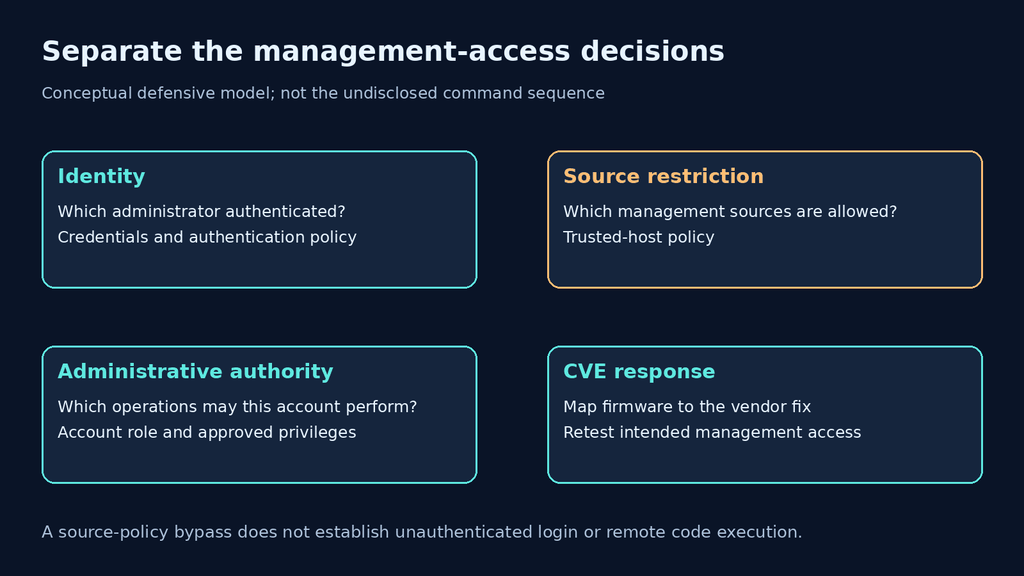
Authentication, administrative authority and source restrictions are distinct decisions. Authentication establishes which account is acting. A role limits the operations assigned to it. A trusted-host policy constrains where administrative access is expected to originate. A defect in one boundary should be assessed on its own terms; it does not establish that the other boundaries disappear.
This distinction matters for incident language. “A trusted-host policy can be bypassed” and “anyone can log in without credentials” are different claims. The first matches the vendor’s description. The second would require additional evidence. Likewise, the cited description does not establish remote code execution, a compromised fleet or an active exploitation campaign.
FortiOS fixes: keep the branch and the evidence together
The Fortinet staff note identifies 7.4.12 و 7.6.4 or later as remediation choices and associates verification with Bug ID 1179021. Its June 5 publication is earlier than today’s renewed search interest. This is an older vulnerability receiving attention, not a newly disclosed October zero-day.
| Installation | Evidence-backed starting point | Decision still required |
|---|---|---|
| FortiOS 7.4 | Fortinet staff guidance identifies 7.4.12 | Select a currently appropriate supported target and model-specific route |
| FortiOS 7.6 | Fortinet staff guidance identifies 7.6.4 or later | Confirm the selected release, model compatibility and other advisories |
| Other FortiOS branch | No universal target supplied by this table | Use the current product-specific PSIRT matrix and support guidance |
| FortiProxy or FortiPAM | Named products in the vulnerability description | Obtain their own version mapping; do not apply a FortiOS number |
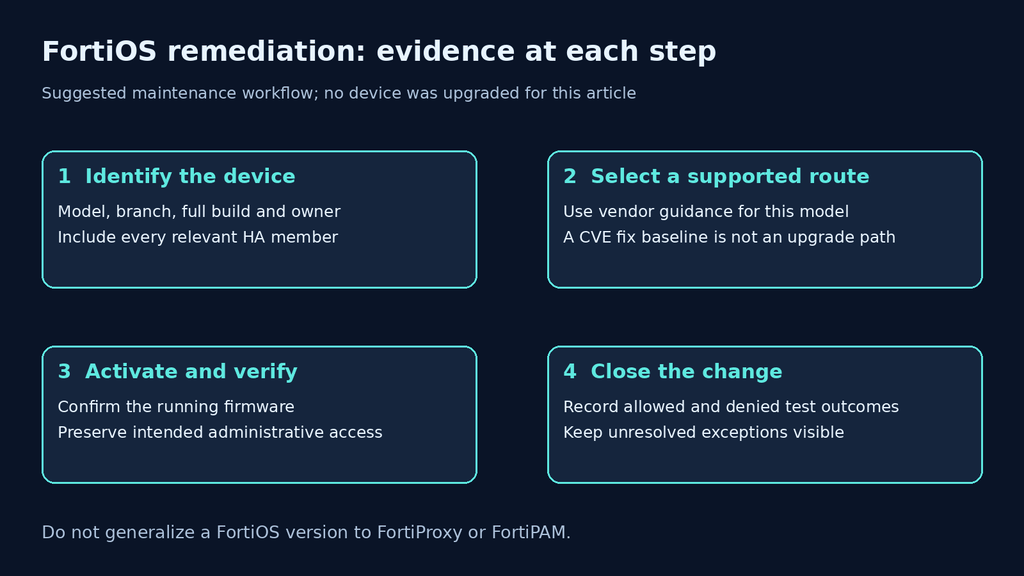
A fixed baseline is not an instruction to install that exact historical build today, nor permission to skip intermediate firmware. The best maintenance target must also fit the device model, supported upgrade route and current security requirements. Keep the vulnerability correction and the wider firmware decision in the same record without confusing them.
Fortinet’s note originally cautioned that the 7.4.12 release notes might not explicitly name the CVE. That makes the provenance of the version decision important: retain the vendor guidance rather than closing the change solely because a text search found—or failed to find—the number. The linked release-note pages were not fully retrievable during this review, so this article does not claim a fresh independent audit of every product branch.
Build an inventory that a second operator can verify
Start with the actual appliance, not a saved screenshot from a previous maintenance window. Record the model, full running version and build, management owner and administrative entry point. Include relevant high-availability members individually. One successful login to the primary does not identify the software running everywhere else.
Fortinet’s FortiOS release introduction identifies the following CLI command for checking build information. Run it only through your existing authorized administrative session. This is an inventory example, not an exploit check; no device output has been fabricated here.
Keep the full output restricted to the operators who need it; redact serial numbers and infrastructure details before sharing evidence outside that group. A version observation should be paired with collection time and device identity. It says what was running when observed, not whether an earlier account was misused.
Test the intended policy without inventing a CVE reproduction
Before maintenance, define the authorized management sources and the administrator identities used for acceptance testing. Use dedicated test identities where possible and retain an approved recovery route. Avoid changing trusted hosts, authentication and firmware simultaneously unless the change plan explicitly accounts for those dependencies; otherwise a failed login can be difficult to attribute.
| Acceptance check | Useful observation | Limit |
|---|---|---|
| Approved source and identity | The intended administrator can complete the permitted operation | Does not prove every bypass path was exercised |
| Disallowed source | Access is denied under the intended policy using an approved test | A timeout alone may be routing or filtering |
| Role boundary | A limited account remains limited | An authentication success is not an authorization test |
| Firmware activation | Each relevant device reports the intended build | The downloaded image alone is insufficient |
| Recovery readiness | The owner can follow the approved recovery procedure | Do not create a permanent unrestricted fallback |
Use benign administrative observations, not a guessed sequence of specially crafted commands. Record source, destination, account role, expected result and actual result for each case. A source restriction test is only interpretable if the network path and identity are known. If traffic never reaches the management boundary, a denial may be useful network evidence while remaining inconclusive about the appliance policy.
These checks are a proposed acceptance plan, not a claim that the vulnerability was reproduced or that a negative result proves its absence. Software remediation should be established through the vendor’s version mapping and the running device. Functional testing asks whether the intended policy survived the deployment.
What to investigate if an administrator account may have been misused
Preserve relevant administrative authentication and change records under the organization’s incident process. Compare them with approved maintenance and access sources. Investigate unexpected identities, unfamiliar management paths and unexplained policy changes in context; this article does not supply a unique indicator that proves exploitation of CVE-2025-54821.
A firmware update cannot retrospectively establish that no unauthorized action occurred. Keep patch status and historical investigation as separate outcomes. Where account misuse is supported by evidence, let the incident owner decide credential containment and recovery scope. Do not report every failed SSH attempt as a successful bypass, or treat missing logs as proof that nothing happened.
Questions that change the remediation decision
Is this an unauthenticated Fortinet RCE? The vendor description used here requires an authenticated administrator and concerns trusted-host restrictions. It does not establish unauthenticated RCE.
Can FortiOS 7.6.4 be used as the fix for FortiProxy? No. Product names and firmware numbering are not interchangeable. Obtain the current mapping for the product you operate.
Should SSH exposure alone determine priority? Use actual firmware, management reachability, account privileges and business context. Exposure review informs the maintenance decision; it does not replace the documented software correction.
Does a normal denied login prove the fix? It proves only the tested access result. Pair it with version evidence and keep the untested bypass conditions explicit.
Keep application testing separate from appliance remediation
After the management-plane change, a broader authorized application assessment may still be useful for the services your team operates. Evaluate Penligent for that separate workflow, with a written scope and reviewable evidence. This article does not establish a dedicated Penligent detector for CVE-2025-54821 or claim that an application scan proves Fortinet firmware is repaired.
The product walkthrough below provides that application-testing context; it is not a demonstration of this bypass.


 Arabic
  English
  German
  French
  Spanish
  Portuguese
  Japanese
  Korean
  Hindi
Hindi  Turkish
  Hebrew