
Burp Suite alternatives solve different problems for an individual pentester. If you want to intercept and replay requests yourself, evaluate another manual toolkit such as Caido or a programmable proxy such as mitmproxy. If you want a maintained scanning workflow, evaluate ZAP with realistic authentication. If you want an AI-assisted assessment workflow, evaluate Penligent on an owned application and inspect the evidence it produces. These routes overlap, but they are not interchangeable purchases.
Before replacing Burp, identify the part you actually need to replace: the proxy, request replay, automated discovery, scanning, project persistence, or the work of assembling a supported finding. You may need a different tool, a paid edition of the tool you already know, or a complementary workflow. Buying an AI subscription does not automatically replace a request-level workbench.
This comparison is written for solo testers, developers testing their own applications, and researchers working within an authorized program. Public product descriptions were checked on October 19, 2026. It is published by Penligent and includes Penligent; the comparisons describe documented capabilities and proposed evaluation tasks, not results of an independent performance benchmark.
Burp Suite alternatives at a glance
Start with the job you need to perform. The useful distinction is who selects and interprets the test, what the tool needs as input, and which part of the result you can independently inspect. A free download, a free plan, an open-source license, and an AI workflow are different properties.
| Tool or edition | Documented role | Free or paid boundary to check | Useful first evaluation |
|---|---|---|---|
| Burp Community | Manual proxy, history, and core tools including Repeater | Free manual toolkit; Pro adds capabilities such as project files and scanner | Capture and replay one local request |
| Burp Professional | Manual and automated web-testing toolkit | Public page displays a $499 buy price; verify applicable license term at checkout | Measure the work saved on a representative investigation |
| Caido | HTTP testing tools and configurable workflows | Basic is free with 2 projects and 7 workflows; Individual expands limits and includes an AI Assistant | Inspect, filter, and repeat the same synthetic request |
| ZAP | Free, open-source web application scanner with automation options | Budget configuration and review even when the software is free | Confirm authenticated access and detect loss of that access |
| mitmproxy | Free, open-source interactive HTTPS proxy with scripting | Budget script maintenance and evidence interpretation | Capture a local request and inspect a controlled replay |
| Penligent | AI pentesting workflow with evidence and report exports | Check included credits, plan entitlement, and billing period | Complete one scoped assessment and review a supported result |
The feature boundaries above come from the official product sources discussed below. They do not imply equal scanning depth, identical HTTP support, or equivalent behavior across editions. The first evaluation should establish what the selected route actually does in the environment you intend to use.
For a person paying out of pocket, a small interpretable task is a better starting point than a large scan. If you cannot explain why a result is meaningful, additional automation can increase the volume of uncertainty. Choose a workflow that helps you connect a request, an identity, an application state, and an observed outcome.
Burp Community may already cover your immediate task
PortSwigger’s Community comparison lists an HTTP and WebSockets proxy with history, Repeater, Decoder, Sequencer, Comparer, and a demonstration version of Intruder. It lists project files, a web vulnerability scanner, full Intruder, and other capabilities under Professional. A beginner seeking request inspection should therefore distinguish a missing capability from a feature they have not yet learned to use.
If your task is to understand a browser request, inspect its response, and repeat a small controlled change, first evaluate that task with the manual tools available to you. The question is whether the workflow is understandable and sufficient. You do not need to abandon a familiar interface merely because an alternative uses a newer label.
A limitation can still justify a change. Repeatedly losing work, needing a supported automation feature, or spending significant time on a task outside your edition’s scope are concrete reasons to evaluate another option. Name the limitation and test whether the candidate resolves it without creating another dependency you cannot maintain.
Do not compare a free manual edition with an entire paid platform as if their promises were identical. A manual toolkit supplies control to a tester. A scanner requires configuration and interpretation. An agent may select actions but still needs a valid target context and reviewable evidence. Each shifts work rather than making every part of an assessment disappear.
The best initial decision may be to keep the free toolkit and add a narrowly chosen workflow. That preserves familiar request inspection while allowing a separate evaluation of discovery or validation. Only pay for overlap when the additional capability demonstrably improves the work you perform.
Professional licensing and AI are separate questions
Burp Suite Professional’s current product page presents both manual and automated testing and displays a $499 purchase button. Check the applicable license period, taxes, currency, and AI terms before comparing that figure with another product’s monthly plan. A visible purchase amount alone does not establish an apples-to-apples annual operating cost.
Avoid the assumption that Burp is purely manual while every alternative is autonomous. The product family and editions matter, and suppliers continue to add features. A fair evaluation names the actual edition, configuration, and workflow being tested instead of assigning a fixed architecture to a brand.
A solo tester should ask which recurring task justifies the commitment. If a capability saves meaningful investigation or documentation time every week, its value differs from a feature used once in a training exercise. Record your own frequency and effort rather than borrow an unsupported productivity claim from a comparison article.
A trial, when available under the supplier’s current terms, is useful for answering that question. Use the task you actually perform and retain the resulting evidence. A convenient demonstration can establish that a button works without establishing that the feature improves your ordinary workload.
Treat AI usage as another entitlement to verify. Is it included, metered, separately purchased, or dependent on another service? What information does the feature process? Which actions remain under your control? These are questions for the chosen offer, not reasons to assume that an AI-branded feature has a particular cost or data boundary.
Caido is a route for people who want to keep inspecting HTTP
Caido’s pricing and plan comparison describes a free Basic plan with two projects, seven workflows, core HTTP tools, and HTTPQL filtering. Its Individual plan lists unlimited projects and workflows and an AI Assistant. Caido also states that it is not open source. A free plan and an open-source project should not be conflated.
This route belongs in a manual-workbench evaluation. Give yourself a representative investigation: identify a specific request, filter out unrelated traffic, repeat the request under controlled conditions, and preserve the useful observation. Evaluate the process you would use every day rather than the appearance of the interface alone.
Check the limits against your working habits. A person who maintains a small number of active lab projects may have a different requirement from a tester switching among many authorized engagements. The relevant question is whether the current plan supports your real project lifecycle, including storage and recovery requirements.
Do not guess the paid amount from an old review or a different plan name. Confirm the currently offered billing option and entitlement in the supplier’s interface. A careful comparison can identify a free entry boundary even when it has not independently verified every paid price.
An AI Assistant inside a toolkit should also be evaluated as a particular feature. Ask what input it receives, what it produces, and whether it can act or only advise in the selected workflow. Do not assume that the presence of an assistant makes the complete toolkit equivalent to a separately operated autonomous assessment service.
ZAP fits a configured scanning workflow
ZAP’s official site describes a free, open-source web application scanner and provides both introductory and automation routes. For an individual developer, that makes it a candidate for learning and maintaining a repeatable scan. It does not remove the need to define scope, establish authentication, and review the output.
Start with an application you own or a local lab whose behavior you understand. Confirm which pages and API operations the workflow reaches. A scanner that completes against public routes may still leave the important authenticated application untouched. Evaluate the reachable surface before judging the finding count.
Configuration is work worth recording. Initial setup, changes to login behavior, updates to an application definition, and review of alerts can all consume time. If the goal is to reduce your workload, include those activities in the comparison instead of describing a no-license-fee route as a zero-effort route.
A repeatable setup can become valuable once it is maintained. The personal decision is whether you want to own that configuration and whether you can recognize when it stops representing the application. A workflow you understand and can repair may be preferable to one that appears more automatic but leaves failures opaque.
Keep manual investigation available for ambiguous results. A scan can identify an observation that requires application context. The tool should help you reach a supported conclusion, while you retain responsibility for the claim you submit or act upon.
mitmproxy fits programmable traffic inspection
mitmproxy’s official overview describes a free, open-source interactive HTTPS proxy that can inspect, modify, and replay traffic. It also describes the mitmweb interface and Python scripting through mitmdump. That is a different starting point from buying an automated vulnerability assessment: you receive programmable control over traffic and decide what the observations mean.
This route is useful to evaluate when the same traffic-processing task occurs repeatedly. Before writing an add-on, describe the transformation or measurement precisely. A narrow script that records a harmless response property is easier to inspect and maintain than a growing bundle of unrelated request modifications.
Begin with synthetic local traffic. Establish the direct response, route the same request through the proxy, and confirm the expected observation. Only then add a deliberate transformation. Changing the application, client, proxy rules, and session simultaneously makes a mismatch difficult to diagnose.
A script is part of the testing system. Review what it can read, where it writes, and whether it could affect traffic beyond the intended scope. Keep secrets out of diagnostic output and make the matching condition explicit. An add-on that accidentally applies to every request can change the meaning of an entire test session.
Programmability can reduce repetitive work, but it can also create a maintenance obligation. Include debugging and updates in your decision. The right reason to choose this route is that you benefit from controlling that logic, not merely that a small example can be written in a few lines.
An AI workflow changes who selects the next action
Penligent’s public pricing page describes an end-to-end AI pentesting workflow and PDF or Markdown exports with evidence and reproduction steps. It displays Free access and Pro at $39.92 per month billed annually with 6,000 monthly credits. These are public offer descriptions, not an independent finding-rate benchmark or a claim that the displayed annual equivalent is a cancelable monthly price.
Evaluate this route when you want assistance moving through an assessment rather than only a different way to edit a request. Use one owned application, dedicated test accounts, and a defined question. Inspect the evidence for a result before increasing scope or usage. A longer task tree is not, by itself, proof of a more useful assessment.
The relevant comparison with a proxy is the work performed. A proxy gives you a direct place to inspect and repeat an HTTP exchange. An AI workflow may help select and coordinate tests, but the output still needs to connect the application state to an observed boundary. Treat those capabilities as complementary when your work benefits from both.
Do not assume an agent can supply application knowledge that nobody provided. A business rule such as which collaborator may export a document needs an expected policy. The assessment can test behavior against that policy; it should not invent the organization’s intended permissions from a role name.
For a first paid decision, identify the next useful increment: another authorized workflow, a role comparison, or a retest after a correction. Upgrade based on that defined work and the applicable plan, rather than buy more usage because a demonstration produced dramatic prose.
Choose by the task you do when working alone
A student learning HTTP needs visible cause and effect. The goal is to understand the request, the relevant identity, the state of the application, and the reason an observation matters. A tool that hides those relationships can make the exercise faster while leaving the student unable to reproduce or explain it.
A developer testing an owned application needs a manageable starting scope. Select one feature with a meaningful permission boundary, such as reading a synthetic document or changing a test preference. Establish what should happen before running broader automation. That makes both a finding and an absence of findings easier to interpret.
A bug bounty researcher needs a workflow compatible with the program’s current rules. The existence of a public application does not establish permission for every test method. Check the target scope, automation restrictions, accounts, rate expectations, and submission requirements before running an assessment. A tool subscription is not authorization and does not guarantee a bounty.
A freelance tester preparing a customer report needs evidence another person can follow. That includes the relevant environment, role, action, observation, and limitations. A scanner export or generated narrative may contribute to that result, but the deliverable should accurately describe the work performed and the review applied.
These roles can overlap in one person. You may use a manual toolkit to learn a workflow, a scanner to repeat a stable set of checks, and an AI-assisted route to investigate another question. Give each tool a defined responsibility. Otherwise overlap can increase cost while making it less clear which result you trust.
Understand the client, proxy, and application path
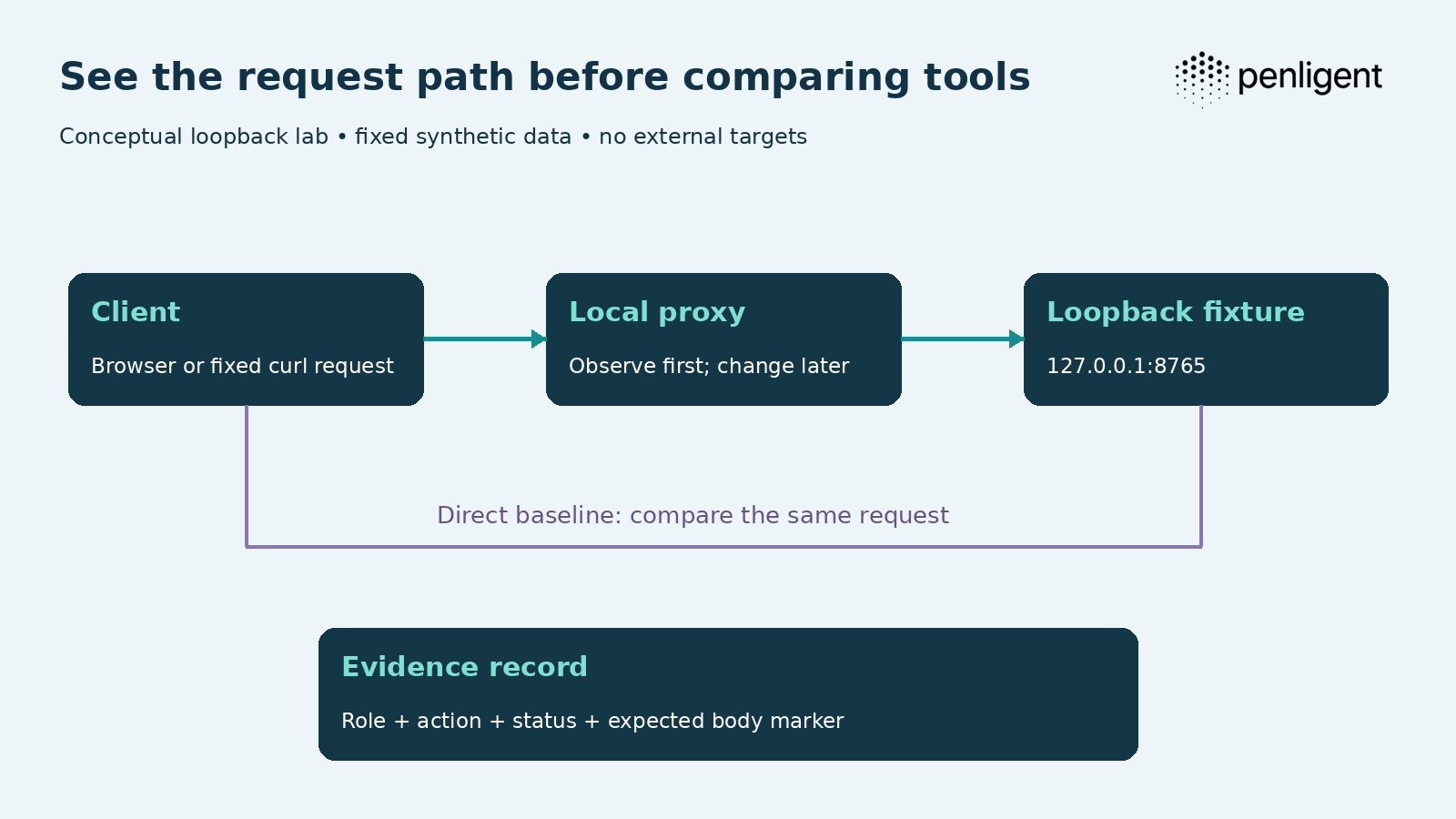
An intercepting proxy sits in a communication path. The client sends a request, the proxy observes or changes the exchange according to its configuration, and the application returns a response. Before evaluating a finding, establish which path the request actually followed. A configured proxy that the client bypasses provides no evidence about that request.
Separate observation from modification. In the first pass, the proxy should help you see the same application behavior as the direct baseline. In a later controlled pass, you can change one harmless property and explain the resulting difference. If you begin with several active rewrite rules, you may mistake a proxy-created artifact for an application behavior.
Keep the application destination visible. A request line, host value, redirect destination, and resolved network destination can describe different stages of the exchange. The scope needs to cover the action you intend to perform, not simply the first URL you typed. Do not follow a dependency into testing an unrelated service without the relevant permission.
For a local comparison, HTTP is sufficient to understand the path and avoids introducing certificate configuration into the first exercise. HTTPS adds another trust relationship that deserves separate attention. Proving that a local HTTP request passed through a proxy does not prove that a browser’s HTTPS traffic is configured correctly.
Do not use product activity as a substitute for observation. An interface can display requests from one browser while the sensitive action occurred in another profile or command-line client. Identify the client and test context. That discipline prevents a great deal of confusion when comparing two tools that appear to produce different results.
Use a loopback fixture before testing a real application
The following lab is an original teaching fixture. It binds only to 127.0.0.1, serves fixed synthetic JSON, performs no outbound requests, and contains no exploit payload. Its header-based roles are deliberately simplified labels for the exercise, not a real authentication mechanism or a design to deploy in production.
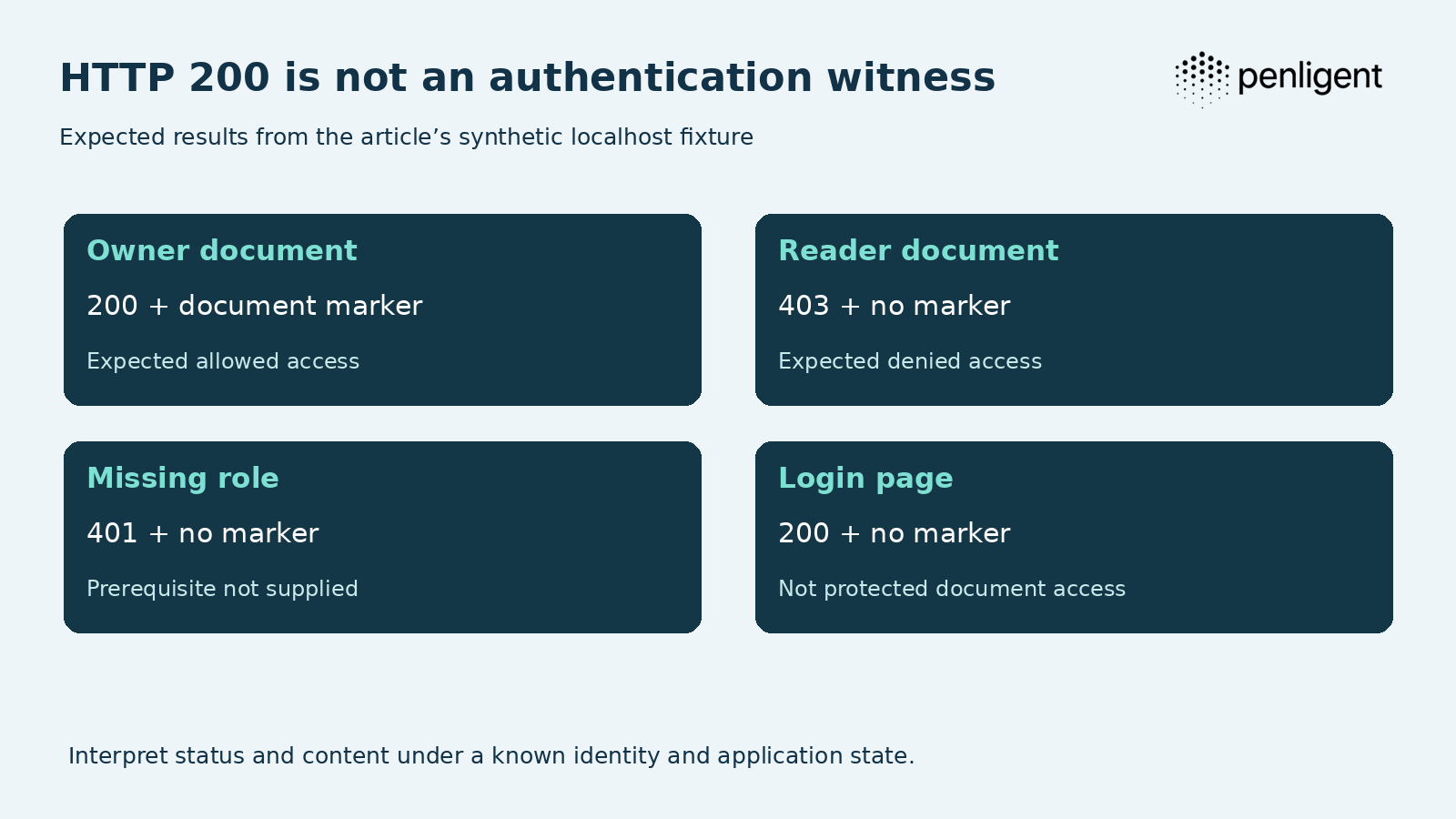
The owner receives a synthetic document marker. A reader is denied, a request without a role receives an authentication-related error, and the login page returns a successful HTTP status while explicitly remaining unauthenticated. Those four outcomes let you practice interpreting a response without touching customer information.
Save the server as lab.py and run python3 lab.py in a terminal. Keep it running while you perform the checks in another terminal. If port 8765 is already occupied, stop and resolve that conflict rather than accidentally test a different service. Stop the fixture with Control-C when finished.
"""Local HTTP observation fixture; header roles are not real authentication."""
from http.server import BaseHTTPRequestHandler, HTTPServer
import json

class Handler(BaseHTTPRequestHandler):
    def do_GET(self):
        if self.path == '/login':
            self.reply(200, {'page': 'login', 'authenticated': False})
        elif self.path == '/document':
            role = self.headers.get('X-Lab-Role', '')
            if role == 'owner':
                self.reply(200, {'marker': 'SYNTHETIC-DOC-A', 'role': role})
            elif role == 'reader':
                self.reply(403, {'error': 'not permitted'})
            else:
                self.reply(401, {'error': 'lab role required'})
        else:
            self.reply(404, {'error': 'fixture not found'})

    def reply(self, status, value):
        body = json.dumps(value).encode()
        self.send_response(status)
        self.send_header('Content-Type', 'application/json')
        self.send_header('Cache-Control', 'no-store')
        self.send_header('Content-Length', str(len(body)))
        self.end_headers()
        self.wfile.write(body)

    def log_message(self, *_):
        pass

if __name__ == '__main__':
    print('Synthetic fixture on http://127.0.0.1:8765', flush=True)
    HTTPServer(('127.0.0.1', 8765), Handler).serve_forever()
Establish the direct baseline with these fixed requests. The explicit no-proxy option keeps an environment proxy from changing the baseline. They target only the loopback fixture and should not be repurposed as a list of checks against arbitrary systems.
curl --noproxy '*' -i -H 'X-Lab-Role: owner' http://127.0.0.1:8765/document
curl --noproxy '*' -i -H 'X-Lab-Role: reader' http://127.0.0.1:8765/document
curl --noproxy '*' -i http://127.0.0.1:8765/document
curl --noproxy '*' -i http://127.0.0.1:8765/login| Request | Expected status | Expected body property | Interpretation |
|---|---|---|---|
| Owner requests document | 200 | Synthetic document marker present | Expected allowed access in this fixture |
| Reader requests document | 403 | Error and no document marker | Expected denied access |
| Missing role requests document | 401 | Error and no document marker | Prerequisite not supplied |
| Client requests login page | 200 | Authenticated is false; no document marker | Successful page response, not authenticated document access |
The last row is the point of the exercise. A 200 status is not evidence that an assessment remained logged in or reached a protected feature. You need the expected content and identity context. The fixture’s simple JSON makes that difference obvious; a real application’s login page or error wrapper may be less convenient to recognize.
Repeat the same request through your selected proxy
Configure the chosen proxy’s supported listener on 127.0.0.1 and a port you control, then replace the placeholder port below with that listener’s actual port. Do not assume every product uses the same default. The target remains the synthetic local server, and this command makes one request rather than initiating a scan.
# Example only: use 8080 if that is your configured local proxy listener.
curl --noproxy '' --proxy http://127.0.0.1:8080 -i \
  -H 'X-Lab-Role: owner' http://127.0.0.1:8765/document
The empty no-proxy value matters when your environment would normally bypass a proxy for loopback traffic. Confirm the request appears in the selected tool’s history. If it does not, inspect the client route, listener configuration, and proxy state before drawing any conclusion about the application.
Compare the response with the direct baseline. It should still contain the expected marker when no transformation is enabled. Record the method, destination, role label, status, and relevant body. Then repeat the reader request and verify the expected denial. You are checking that the observation path preserves the experiment’s conditions.
If interception is enabled, the client may wait until you release the request. That wait is not necessarily a server failure. Learn how your selected tool represents a queued or intercepted message, and distinguish it from a request that reached the server but received no response. Otherwise elapsed-time comparisons can measure your own interaction rather than tool performance.
Do not describe this exercise as testing every feature of the proxy. It establishes one controlled request path and a basic evidence workflow. It does not establish TLS behavior, browser integration, WebSocket handling, scanner accuracy, or the performance of a large project. Add another test only when it answers a requirement you actually have.
Verify the fixture with code instead of relying on a screenshot
The following verifier checks the same four local observations. It deliberately ignores environment proxies so it remains a direct baseline. Save it as verify.py beside the server and run python3 verify.py while the fixture is running. It makes exactly four fixed loopback requests and raises an assertion if the observed status and marker differ from the expected pair.
"""Four fixed localhost checks; no target discovery or remote testing."""
import json
from urllib.request import Request, ProxyHandler, build_opener
from urllib.error import HTTPError

opener = build_opener(ProxyHandler({}))  # Direct baseline, ignoring env proxies.
cases = [
    ('owner-document', '/document', 'owner', 200, True),
    ('reader-document', '/document', 'reader', 403, False),
    ('missing-role', '/document', '', 401, False),
    ('login-page', '/login', '', 200, False),
]
for name, path, role, wanted_status, wanted_marker in cases:
    headers = {'X-Lab-Role': role} if role else {}
    request = Request('http://127.0.0.1:8765' + path, headers=headers)
    try:
        response = opener.open(request, timeout=2)
    except HTTPError as error:
        response = error
    with response:
        status = response.code
        body = json.loads(response.read())
    marker = body.get('marker') == 'SYNTHETIC-DOC-A'
    assert (status, marker) == (wanted_status, wanted_marker), name
    print(f'{name}: status={status}, document_marker={marker}')
Expected output:
owner-document: status=200, document_marker=True
reader-document: status=403, document_marker=False
missing-role: status=401, document_marker=False
login-page: status=200, document_marker=False
A screenshot can show what the interface displayed, while this small check records the specific response conditions. Neither proves a real application’s security. The purpose is to establish a habit: name the expected behavior, observe it under known conditions, and preserve enough evidence to recognize a changed result.
The code also keeps failures visible. An unreachable server, invalid JSON, or unexpected response does not become a clean test result. In a real assessment, the correct outcome may be incomplete rather than vulnerable or secure. A tool evaluation should examine how that state reaches the report.
For an AI workflow, ask it to explain the four fixture outcomes and show the supporting observations through its supported interface. Do not invent a command-line syntax for a product that has not documented one. An accurate explanation of the 200 login response is a useful introductory check of evidence interpretation, not a broad benchmark of the agent’s reasoning ability.
Replay is sensitive to identity, state, and time
A replayed request is not automatically the same experiment. Its token may have expired, the underlying object may have changed, or the previous request may have consumed a one-time operation. The method and URL can remain identical while the meaning of the test changes substantially.
mitmproxy’s feature documentation notes that client replay serializes requests that may originally have run concurrently. It also distinguishes server replay, which can return saved responses, from a fresh interaction with the live application. Those mechanics matter when interpreting what a replay demonstrates; a recorded response is not new evidence that the current server still behaves the same way.
For a simple read-only fixture, repeatability is easy because the server returns fixed data. A real sharing workflow may require an object to be created, shared, revoked, and inspected in a particular order. Preserve that preparation sequence and reset the synthetic object when comparing candidates. Otherwise the first tool can change the conditions for the second.
Record the effective identity at the moment of the observation. A request copied from one browser tab can retain a different account’s session. A visible role selector elsewhere in the interface does not establish which identity the replay used. The evidence should connect the actual request to the intended test account.
Make time part of the record when it affects the rule. A share may expire, a session may refresh, or a queued operation may complete later. If the expected policy depends on those transitions, state the observation window. Do not simplify an asynchronous application into an immediate result merely because the tool makes replay convenient.
Authentication needs a witness that can fail
ZAP’s authentication guidance distinguishes context, session management, authentication method, user credentials, and verification. That separation is useful beyond one product: logging in is a process, while remaining authenticated is a condition that needs an observable witness.
The lab’s document marker is such a witness in a deliberately simple setting. A successful page response without that marker does not establish protected access. In your application, choose a harmless account-specific observation that the intended role should be able to make and a reliable indication that authentication has been lost.
Test the witness negatively in an authorized environment. Invalidate a dedicated session using the application’s supported controls and observe how the workflow responds. Does it reauthenticate, pause, or continue with reduced access? The result should preserve the changed condition rather than mark inaccessible features as clean.
Keep the witness proportional to the work. You do not need to copy an entire account profile into every log to establish session state. Prefer the minimum synthetic or low-sensitivity observation that demonstrates the prerequisite. Avoid turning authentication verification into unnecessary collection of private data.
A scanner, a manual tester, and an AI agent can all lose context. Evaluate how you detect and recover from that loss, not whether a product advertises authenticated testing in general. The most useful route for an individual may be the one whose failure you can recognize and fix without an extended support exchange.
Browser setup is part of the operating cost
A browser-based workflow includes its profile, proxy settings, extensions, cookies, and certificate trust. Keep a dedicated testing profile so ordinary browsing is easier to distinguish from the authorized assessment. The point is operational clarity: you should know which session and configuration produced an observation.
HTTPS interception typically requires a deliberate trust configuration appropriate to the selected tool and client. Follow that product’s current instructions and use the narrowest suitable testing context. Do not solve a local configuration problem by globally suppressing certificate verification or leaving an unnecessary trust change in everyday browsing.
The HTTP lab intentionally does not teach certificate installation. That keeps the first exercise focused on the request path. Once you understand the baseline, evaluate HTTPS separately with the selected product’s documented setup and an application you are permitted to test. Treat a failed trust handshake as a setup failure, not evidence about application authorization.
Document changes you make to the client environment. A profile-specific setting is easier to reverse and explain than a collection of forgotten system-wide changes. At the end of a trial, remove unnecessary configuration according to the product’s supported procedure and retain only what you intend to operate.
This setup time belongs in the personal comparison. A tool that is comfortable after an afternoon of configuration may be a good long-term choice, but the initial effort should not be hidden. Conversely, a simpler start does not establish that the tool will handle the more complex workflow you need next month.
Keep scope separate from what a tool can technically reach
A browser can load resources from several domains while using one application. Some are necessary dependencies, while others are separate services the application owner does not control. A test plan should distinguish ordinary use of those dependencies from permission to direct assessment activity at them.
For a bug bounty program, read the current scope and permitted methods before configuring the tool. A wildcard, an excluded path, or a restriction on automation can change which workflow is eligible. Retain the relevant scope record for your session and revisit it when the program changes. Do not infer authorization from a tool’s ability to send a request.
For an owned application, define the environment and sensitive operations. A staging account with synthetic objects makes a first trial easier to interpret. Operations that send mail, create paid resources, delete accounts, or affect third parties may need separate controls even when the application itself belongs to you.
Test boundaries with harmless fixtures you control. The local server demonstrates how to start without scanning anything external. In a broader pilot, use agreed synthetic destinations or actions rather than probe an unrelated production service to see whether the tool will stop.
A prompt describing scope is useful context for an AI workflow, but you should also understand the supported enforcement and operator controls. A manual tool requires disciplined scope selection as well. The comparison should identify how you prevent and recognize an unintended action in the chosen route.
Compare everyday work rather than feature counts
Give each candidate the same small job and record the work needed to finish it. For a manual proxy, that might mean finding the request, understanding its context, repeating it, and preserving an observation. For an AI workflow, it might mean supplying the scope and account, reviewing its selected test, and tracing the reported result to evidence.
The mechanics need not be identical for the comparison to be useful. What needs to remain comparable is the question and permitted action. If one route receives a prepared request and another must discover the entire workflow, record that input difference. It may reflect how you genuinely intend to use the product, but it should not be hidden inside a claim about accuracy.
| Evaluation task | Observation to retain | A result that remains incomplete |
|---|---|---|
| Reach the selected feature | Intended role and synthetic object visible | Only public or login pages reached |
| Inspect a request | Destination, method, relevant identity context | Request belongs to a different session |
| Repeat the observation | Same preparation and meaningful response | Expired token or changed object |
| Explain a candidate issue | Expected rule, observed behavior, supporting artifact | Fluent explanation without supporting observation |
| Verify a correction | Comparable prerequisites and expected behavior | Original condition cannot be reached |
| Deliver the result | Export another person can interpret | Links or context only the operator understands |
Time each stage separately. A tool can reduce execution effort while increasing the time needed to understand its output. Another may require configuration initially but become efficient for repeated work. A single elapsed-time figure hides those differences and can make the wrong option look cheaper.
Keep one rejected candidate in your evaluation notes. The reason it was rejected reveals whether the workflow helps you distinguish an actual boundary failure from an invalid assumption or fixture. This can be more informative than watching another successful demonstration against an intentionally vulnerable application.
Evidence should make sense outside your screen
A useful finding connects a claim to conditions another qualified person can follow. Record the environment, relevant role, action, expected rule, observed result, and the minimum supporting artifact. The format can vary, but the relationship should be clear without requiring the recipient to watch a recording of your entire session.
For the local fixture, a status and marker pair is enough to understand the expected behavior. A real application may need a request and response, a screenshot of the corresponding state, and a short description of the account relationships. Capture only what supports the claim; collecting more data does not necessarily make the evidence better.
Redact sensitive material in copies intended for sharing while preserving a controlled original if your engagement requires it. Authentication secrets, private customer records, and unrelated traffic should not become incidental attachments to a tool comparison. Use synthetic objects during evaluation to reduce that problem from the start.
Inspect the export itself. Does it identify the tested application and conditions? Are relevant artifacts present or only referenced through a temporary link? Can the person responsible for the fix understand the observation? A polished PDF or Markdown file is useful only when its content accurately reflects the work.
Do not make a broader impact claim than the evidence supports. Demonstrating unexpected access to a synthetic object can establish a real boundary failure without proving that every object is exposed. Explain the observed condition and the reasoning behind any broader consequence. That discipline improves both remediation discussions and responsible submissions.
Resolve disagreement with the application owner
A tool may report a boundary failure while the developer says the behavior is intentional. Start by separating the observed exchange from the expected rule. Both parties may agree about what the server returned and disagree about who should have been allowed to receive it. Additional automated requests will not resolve an undefined permission policy.
Use a synthetic object and write the disputed condition in one sentence: this test identity, in this state, performed this action on this object. Ask the owner to confirm the intended permission and any exception. Record whether the behavior depends on a share, group membership, cached entitlement, or a delayed transition. Do not quietly change the expected rule after seeing the outcome.
Then reproduce the smallest relevant observation with the agreed preparation. If the result depends on an expired account or a different object, repair the fixture before discussing severity. If the agreed rule prohibits the observed access, retain that rule alongside the evidence so the remediation owner understands the missing control.
This exercise is useful when comparing tools because it exposes the quality of their explanations. Can you narrow the claim, correct the context, and preserve the original observation without regenerating a misleading report? A useful workbench or AI workflow should support your investigation rather than pressure you to accept its first interpretation. The final conclusion remains yours to substantiate.
Plugins and scripts add another trust decision
A testing tool’s extension can read or modify sensitive traffic within the authority the tool grants it. Treat installing an extension as a decision about code and access, not merely a convenient way to add a menu item. Review its source or provenance where available, requested behavior, update path, and the data it may send elsewhere.
Use a minimal extension set during a comparison. If two candidates run with different hidden rewrite rules or helper scripts, the output may reflect those additions more than the base tools. Record the enabled components and versions so a surprising observation can be investigated.
For your own scripts, prefer a narrow purpose and an explicit match condition. An add-on intended to inspect a fixture should not transform unrelated traffic. Make logging destinations visible and keep synthetic markers separate from real credentials. Avoid writing entire request bodies to a shared location merely because it is easy to debug that way.
Test the absence of a match. A script can appear correct when the expected fixture is present but act unexpectedly on an unrelated request. A harmless negative case helps establish that the logic is bounded. This is a general review recommendation, not a claim that a particular product isolates every extension automatically.
The maintenance burden belongs in the tool’s practical cost. If a plugin is essential to your workflow, consider what happens when it stops receiving updates or conflicts with a new release. An alternative that requires fewer custom components may be worth evaluating, while a stable custom script may still be the right choice for a specialized task.
Model a personal budget with visible assumptions
An individual buyer needs to distinguish cash paid from the value of time spent. Both matter, but they are not interchangeable. A free route can be the right choice when cash is constrained and learning the setup is itself useful. A paid route can make sense when it reliably reduces a recurring task you already perform.
Use a small fictional monthly workload to compare the options. Suppose you perform four representative assessment tasks. Route A has no access fee, $10 of other usage, and requires eight hours of your time. Route B has a hypothetical $50 access fee, $10 of usage, and requires four hours. These are invented planning inputs, not prices or measured productivity for any named product.
| Fictional monthly model | Route A | Route B |
|---|---|---|
| Access fee | $0 | $50 |
| Other usage | $10 | $10 |
| Operating and review time | 8 hours | 4 hours |
| Cash outlay | $10 | $60 |
| Total using a $15 hourly planning rate | $130 | $120 |
| Total using a $30 hourly planning rate | $250 | $180 |
Route A needs less cash. Route B has a lower modeled total at the example planning rates because it is assumed to save four hours. That assumption must come from your own trial before it guides a purchase. A vendor label, agent count, or longer report does not establish the time saving.
The break-even planning rate is $12.50 per hour: the extra $50 divided by four assumed hours saved. Below that rate, Route A has the lower modeled total; above it, Route B does. This arithmetic is a way to inspect your assumptions, not a claim that everyone should monetize learning time or choose a subscription.
Keep unpredictable usage visible. If a workflow can consume additional credits, model calls, or infrastructure, establish a supported limit or review point before starting a large task. A small successful trial can justify the next bounded task without justifying unlimited consumption.
Separate monthly affordability from annual commitment
A price displayed per month can describe a monthly subscription or an annual payment divided into twelve. Those are different cash commitments. Read the billing period and applicable cancellation terms before comparing offers, and keep any taxes or currency differences visible.
An annual plan can be reasonable when you already know the workflow is useful and expect sustained use. It is a weaker basis for a first experiment when the main unanswered question is whether the product can handle your application. A discount does not resolve a capability mismatch.
Do not translate credits into a fixed number of targets without the offer’s actual conditions. A target can contain different amounts of discovery, authentication, state, and review work. Use the first representative task to observe consumption and retain the context that explains it. A simple brochure site is not a dependable budget model for a stateful application.
The decision to upgrade should identify what changes. More usage, project persistence, a required feature, or a different operating arrangement are concrete reasons. Paying because a trial ended is not the same as establishing value. Write down the next useful task and the plan condition that enables it.
If you are testing for a customer, separate the tool purchase from your service promise. A subscription does not guarantee that a recipient will accept the report or that every required methodology is covered. Agree the deliverable, then select and operate tools that support it.
A beginner should buy understanding before buying volume
Start by completing the loopback exercise and explaining each outcome in your own words. Identify where the role label is sent, why the reader is denied, and why the login response is not evidence of protected document access. If that explanation is unclear, additional automated requests are unlikely to improve the underlying understanding.
Next, repeat the task through one tool and retain the observation. Learn to distinguish interception waits, network failures, an invalid prerequisite, and an application response. These distinctions make later vulnerability work more reliable because you are less likely to treat an environment problem as a security conclusion.
Only then add a representative workflow in an owned application. Choose something small and reversible with synthetic data. Define the expected permissions and a harmless success condition. Keep the first run short enough that you can inspect the important evidence rather than skim an overwhelming archive.
A useful paid feature should improve a named part of that process. It might reduce repetitive setup, preserve projects, coordinate a test, or make a supported result easier to produce. Ask whether it helps you understand and finish the task. A feature that generates more output without reducing uncertainty may not be the right next purchase.
Learning and earning are different goals. A lab result can teach you something important without representing a valid bounty submission or a completed customer assessment. Keep those standards separate so a tool’s educational value does not become an unsupported commercial promise.
Migrate one workflow before migrating your entire workbench
Keep the existing tool available during a small replacement trial. Select one representative project or fixture and reproduce the work through the candidate. Compare the evidence, effort, and limitations before deciding which parts of your workflow should move.
Do not assume settings and extensions map one-to-one. A filter, scope rule, session helper, or saved request may have different semantics in another tool. Recreate the intended behavior and verify it rather than simply copy a label. Preserve the configuration that produced the accepted result.
Plan for stored work. Before ending a paid arrangement or removing a project, confirm that you have the reports and evidence you need under the applicable terms. Test the export while the original environment is still available, so missing context can be repaired before the source disappears.
Avoid paying indefinitely for several tools that perform the same unused role. Overlap is justified when each has a clear purpose, such as manual investigation and a separate repeatable assessment workflow. If you cannot name the additional work a subscription enables, review whether it still belongs in your personal budget.
A failed replacement trial does not necessarily mean the candidate is poor software. It may mean the operating model differs from your habits, the setup needs work, or a required feature is not in the selected offer. Record the reason and decide whether correction is worthwhile. The outcome should improve your workflow, not validate a predetermined brand preference.
Questions individual testers ask about Burp alternatives
What is the closest free alternative to Burp Suite?
- First identify the feature you need. ZAP is a free, open-source scanning route, mitmproxy is a programmable proxy route, and Caido offers a free Basic plan. Burp Community itself remains an option for essential manual work. These are different starting points rather than identical substitutes.
Can an AI pentesting tool replace Burp Repeater?
- An AI assessment workflow and direct request replay serve different purposes. Evaluate whether the product supports the specific inspection and reproduction work you require. Keeping a manual workbench alongside an AI workflow can be appropriate when each performs a defined task.
Is Caido’s free plan open source?
- No. Caido states that it is not open source. Its free Basic plan and its licensing model are separate properties; confirm the current plan’s limits before depending on it for your project workflow.
Is a successful login page response proof of authenticated coverage?
- No. The local fixture returns 200 for its login page while remaining unauthenticated. A useful assessment needs a valid identity context and evidence that the intended protected feature was reached.
Which route should a beginner try first?
- Use a local lab and a workflow that exposes the request and evidence. Complete a small, explainable task before purchasing more volume. Choose the next feature based on a real limitation you encountered rather than a general claim of autonomy.
Can I run these tools on a bug bounty target?
- Only within the program’s current scope and permitted methods. Check automation restrictions and submission requirements first. A public target, a tool license, or a generated finding does not establish permission or guarantee payment.
How should I compare subscription and usage costs?
- Separate cash commitment, included usage, additional services, setup, and review time. Use the same representative workload and the actual billing period. Replace fictional assumptions with your own measured trial before treating a cost model as a purchasing result.
Does the local lab establish which product is best?
- No. It teaches request routing and response interpretation using fixed synthetic behavior. It does not measure real vulnerability detection, scanner coverage, production safety, or performance across applications.
Choose the work you want your next tool to do
Write down one task your current setup handles poorly. Reproduce it with synthetic data, define the evidence that would show an improvement, and try the candidate in the configuration you would actually use. Review both the accepted observation and the work that remains incomplete.
A good Burp Suite alternative is the one that improves that task at a cost and level of control you can sustain. Keep the comparison grounded in requests, state, evidence, and your own operating effort. The next purchase should enable useful work you understand.
 English
  German
  French
  Spanish
  Portuguese
  Japanese
  Korean
  Hindi
Hindi  Arabic
  Turkish
  Hebrew