
CVE-2020-13379 is an unauthenticated server-side request forgery vulnerability in Grafana’s avatar feature. A remote client that can reach a vulnerable Grafana instance may cause the server to issue HTTP requests to an attacker-influenced destination and relay the resulting content through the Grafana response.
That distinction matters. The outgoing request does not originate from the attacker’s workstation. It originates from the Grafana server, container, or pod and therefore inherits the network reachability of that workload. An internet user who cannot directly connect to an internal HTTP service may still be able to interact with it indirectly if Grafana can reach it.
The flaw affected Grafana releases from 3.0.1 through 7.0.1. Grafana fixed the issue in versions 6.7.4 and 7.0.2. The vendor also documented a denial-of-service condition in which malformed URL objects could trigger a segmentation fault. Grafana initially associated the vulnerability with remote code execution, then corrected the advisory to state that the flaw itself creates HTTP requests but does not directly execute code. (Grafana Labs)
CVE-2020-13379 should therefore be understood as two related risks:
- An unauthenticated, response-reading SSRF primitive that may expose services reachable from the Grafana host.
- A malformed-request condition that may crash the Grafana process and reduce availability.
Neither impact should be evaluated solely from the public URL of the Grafana dashboard. The decisive question is what the Grafana workload can reach from its own network position.
Key Facts About CVE-2020-13379
| Item | Verified detail |
|---|---|
| Product | Grafana |
| Vulnerability | Unauthenticated server-side request forgery in the avatar feature |
| Secondary impact | Segmentation fault and denial of service for certain invalid URL objects |
| Affected versions | Grafana 3.0.1 through 7.0.1 |
| More precise ranges | Versions from 3.0.1 before 6.7.4, and versions from 7.0.0 before 7.0.2 |
| Minimum fixed releases | Grafana 6.7.4 and 7.0.2 |
| Authentication required | No |
| User interaction required | No |
| Primary security effect | Grafana can be induced to make an HTTP request and return the response |
| Direct remote code execution | No, according to Grafana’s corrected advisory |
| NVD CVSS v3.1 score | 8.2 High |
| Official temporary mitigation | Block access to /avatar/* at a WAF, load balancer, or reverse proxy, or restrict access to Grafana |
| Public disclosure | June 3, 2020 |
| Operational priority | Immediate upgrade for any remaining vulnerable deployment, especially one exposed to untrusted users or connected to sensitive internal networks |
NVD currently characterizes the issue as a network-accessible vulnerability requiring low attack complexity, no privileges, and no user interaction, with low confidentiality impact and high availability impact. Its CVSS v3.1 base score is 8.2. (NVD)
The confidentiality score in a generic CVSS vector should not be treated as a precise description of every environment. A Grafana server with tightly restricted egress may reveal little. A Grafana server that can reach unauthenticated internal control interfaces, metadata services, debugging endpoints, or internal APIs may expose substantially more useful information. CVSS provides a standardized baseline, while the real blast radius depends on deployment architecture.
Affected Versions and the Meaning of the Fix Boundary
Grafana’s security advisory identifies versions 3.0.1 through 7.0.1 as affected. The corresponding GitHub advisory expresses the vulnerable ranges more precisely as:
- Grafana 3.0.1 or later and earlier than 6.7.4.
- Grafana 7.0.0 or later and earlier than 7.0.2.
The first fixed versions were 6.7.4 and 7.0.2. (Grafana Labs)
Those versions are historical patch boundaries, not sensible upgrade destinations for a production system in 2026. A team that discovers Grafana 6.x or 7.x should not merely move to the first build that addressed CVE-2020-13379. It should plan an upgrade to a currently supported release, evaluate breaking changes, review plugins, test data sources, and validate authentication and reverse-proxy behavior. Grafana’s current documentation recommends regular upgrades and provides release-specific upgrade guidance. (Grafana Labs)
Version identification is not always straightforward. Common sources of error include:
- A container image tag that does not match the binary inside the image.
- An internal registry that reuses mutable tags.
- A Linux distribution package that backports a security patch without changing the upstream-looking version as expected.
- A custom enterprise build.
- A reverse proxy that removes the version from headers and error pages.
- Several Grafana installations in different Kubernetes namespaces, cloud accounts, or business units.
- A disaster-recovery environment that remains powered off during routine scanning and returns later with an old image.
- A Helm chart that has been upgraded while its
image.tagvalue remains pinned to a vulnerable release.
For an authoritative inventory, correlate at least two independent signals: the running binary version and the package, container digest, or software bill of materials used to deploy it.
Disclosure Timeline and the Correction of the RCE Claim
The official timeline shows a relatively short interval between report, validation, patch development, and public release:
| Date | Event |
|---|---|
| May 14, 2020 | Justin Gardner reported the vulnerability |
| May 15, 2020 | Grafana confirmed the report |
| May 19, 2020 | Work on the fix began |
| May 22, 2020 | CVE-2020-13379 was reserved |
| May 27, 2020 | Fixed builds were created |
| May 28, 2020 | Grafana Cloud was patched and enterprise customers received fixed binaries under embargo |
| June 3, 2020 | Grafana 6.7.4 and 7.0.2 were publicly released |
| June 4, 2020 | Grafana corrected the initial remote-code-execution wording |
| June 9, 2020 | Grafana added information about the segmentation-fault denial of service |
Grafana’s advisory states that its hosted cloud service was patched before public disclosure and that enterprise customers received the corrected binaries under embargo. The vendor subsequently clarified that the exploit did not directly execute code; it caused Grafana to make an HTTP request. (Grafana Labs)
This correction remains important because vulnerability databases, scanner templates, old blog posts, and cached descriptions do not always update in sync. Some third-party records have continued to repeat the early RCE characterization. A defender should separate three statements that are often conflated:
- CVE-2020-13379 directly provides SSRF and possible denial of service.
- An SSRF request might reach an internal application that has its own dangerous functionality.
- A complete attack chain might eventually result in code execution in a particular environment.
Only the first statement describes the inherent behavior of the CVE. The second and third depend on additional services, permissions, configurations, and vulnerabilities.
The distinction is not an attempt to minimize the issue. A full-read SSRF can be serious even without direct code execution. It can reveal topology, retrieve sensitive endpoints, disclose application data, interact with privileged internal services, or serve as one step in a larger intrusion. Accurate classification makes detection and remediation more effective because teams know which evidence to seek.
How the Grafana Avatar Request Path Worked
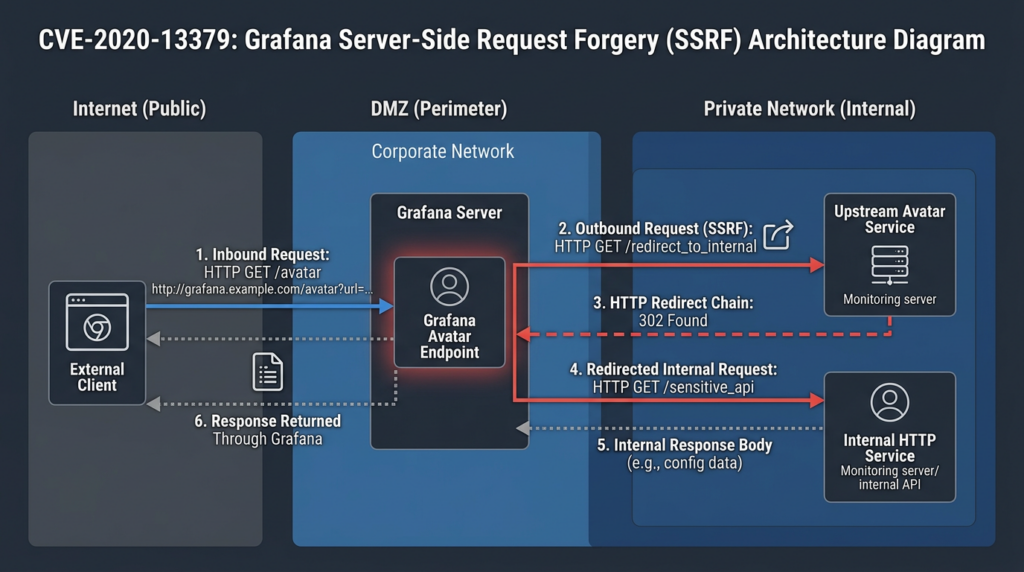
Grafana used an avatar route that accepted a value identified as a hash. Conceptually, a normal request looked like this:
Browser
  |
  | GET /avatar/<avatar-hash>
  v
Grafana avatar handler
  |
  | Build an upstream Gravatar URL
  v
External avatar service
  |
  | Return image bytes
  v
Grafana
  |
  | Relay bytes as an image response
  v
Browser
An avatar hash is not supposed to be an arbitrary URL. It is supposed to be a constrained identifier. In the corrected implementation, Grafana requires exactly 32 hexadecimal characters. That format does not contain slashes, question marks, fragments, at signs, colons, backslashes, percent-encoded delimiters, or other characters that can alter URL structure.
Before the fix, the route parameter was not constrained tightly enough. Researcher Justin Gardner documented that the decoded parameter could influence the URL Grafana sent to the avatar service. The attack path involved URL parameter manipulation and a redirect chain that ultimately allowed the server to retrieve an attacker-selected destination. Grafana then returned the fetched content to the client. (RhynoRater)
The important design failure was not merely “a bad regular expression.” It was a mismatch between what the parameter was intended to represent and what the application allowed it to become.
The application expected a digest-like identifier. The handler treated the value with enough flexibility that it could participate in URL parsing. Once untrusted data can influence a server-side URL, several distinct layers become relevant:
- Route decoding performed by the web framework.
- Percent decoding.
- URL construction.
- Query-string parsing.
- Host interpretation.
- Redirect handling.
- DNS resolution.
- IP-address selection.
- Proxy behavior.
- Response forwarding.
A validation check at only one layer may not constrain what another layer ultimately requests.
Root Cause and the Security Value of the Fix
Grafana’s fix commit is unusually instructive because it shows a narrow and effective correction. The patch added a regular expression equivalent to:
^[a-fA-F0-9]{32}$
The handler also checked the length. If the route parameter was not exactly 32 characters or included anything other than hexadecimal characters, Grafana returned a 404 response instead of constructing the upstream avatar request. (GitHub)
The security model after the patch is therefore:
Untrusted route value
        |
        v
Must be exactly 32 characters
        |
        v
Every character must be hexadecimal
        |
        v
Only then may the server construct the fixed avatar URL
This is stronger than attempting to block a collection of dangerous substrings. A deny-list might reject http://, https://, 127.0.0.1, or a question mark, yet still fail against:
- Alternate encodings.
- Mixed case.
- IPv6 literals.
- Integer or hexadecimal IP representations.
- User-information syntax.
- Backslashes interpreted differently by parsers.
- Double decoding.
- Redirects.
- DNS records that change between validation and connection.
- Internationalized domain-name edge cases.
- URL parser disagreements between the validation library and HTTP client.
A strict allowlist avoids most of those questions because a 32-character hexadecimal digest has no meaningful URL syntax. The application does not need to decide whether an arbitrary destination is safe; it refuses to accept a destination in the first place.
This design principle applies well beyond Grafana. When an application needs an avatar, document, package, webhook configuration, image, or profile identifier, the client should normally submit an opaque ID rather than a complete URL. The server can map that ID to an approved destination using server-controlled logic.
The Redirect Chain Was a Critical Part of the Attack Surface
SSRF defenses frequently validate an initial URL but ignore redirects. That approach assumes the destination checked by the application is the destination eventually reached by the HTTP client.
It may not be.
A simplified redirect sequence can look like this:
Application validates host A
        |
        v
HTTP client requests host A
        |
        | 302 Location: https://host-b.example/path
        v
HTTP client follows host B
        |
        | 302 Location: http://private-service.internal/
        v
HTTP client connects to an internal address
If the application validates only host A, the final connection can escape the intended policy.
The public research on CVE-2020-13379 described a redirect chain involving the expected avatar infrastructure and another image-fetching service. The chain ultimately enabled an attacker-controlled target to influence where Grafana connected. The exact historical payload is unnecessary for defensive validation and should not be reused against production systems. The lasting lesson is that redirect behavior is part of destination validation, not a separate convenience feature. (RhynoRater)
A secure HTTP-fetching component should adopt one of two models:
- Disable redirects and treat them as errors.
- Validate every redirect destination after URL normalization and DNS resolution, before connecting.
The second model is harder than it appears. The validator must consider both IPv4 and IPv6, all resolved addresses, DNS changes, proxy configuration, link-local ranges, private ranges, loopback, reserved networks, and destination changes during connection reuse. For many avatar and image-fetching features, disabling redirects is the safer default.
OWASP’s SSRF prevention guidance similarly emphasizes strict input validation, allowlisting where practical, redirect control, DNS-aware validation, and network-layer restrictions. It also warns that a simple deny-list of known internal addresses is difficult to make complete. (OWASP Cheat Sheet Series)
Why CVE-2020-13379 Was More Than Blind SSRF
SSRF findings vary significantly in practical impact.
A blind SSRF may only reveal whether a request was sent. The attacker might infer success from timing, an out-of-band DNS query, or a callback to an external server. A full-read SSRF returns the destination’s response content to the attacker.
CVE-2020-13379 had response-reading characteristics. Grafana fetched content and returned the bytes through its avatar endpoint. That behavior could let an attacker observe data from an HTTP service reachable by Grafana, subject to the behavior of the destination, redirects, timeouts, and response handling. (RhynoRater)
The fact that Grafana labeled the response as an image did not make arbitrary response bytes safe. An HTTP Content-Type header tells a client how content should be interpreted. It does not encrypt, sanitize, or remove the bytes.
For example, suppose an internal service returned:
{
  "environment": "production",
  "service": "build-controller",
  "version": "4.8.2",
  "debug": true
}
If Grafana relayed those bytes while setting:
Content-Type: image/jpeg
a browser might fail to render the response as an image, but the body would still contain the JSON. A client could save it, inspect it in developer tools, or parse it outside the browser.
The same principle applies to:
- HTML administration pages.
- Plain-text status pages.
- JSON APIs.
- XML documents.
- Error messages.
- Prometheus metrics.
- Debug traces.
- Service banners.
- Configuration fragments.
Content-type confusion may change presentation. It does not eliminate disclosure.
What an Attacker Could Potentially Reach
The vulnerability did not grant a universal ability to access every internal resource. It granted the ability to make requests from the Grafana workload, constrained by the network, DNS, proxy, HTTP-client behavior, and target service.
Potentially relevant destinations include:
Loopback services
A process on the same host may listen only on 127.0.0.1 because administrators assume it cannot be reached remotely. Examples include local administration consoles, profiling endpoints, metrics exporters, development servers, or helper daemons.
An SSRF-capable application running on that host may still connect to loopback.
Private network services
RFC 1918 networks often contain management applications, internal APIs, artifact repositories, CI systems, configuration services, and legacy web interfaces. Some use network location as a substitute for authentication.
That assumption fails when an externally reachable server can proxy requests into the private network.
Kubernetes services
A Grafana pod may be able to reach:
- ClusterIP services.
- Namespace-local service names.
- Pod IP addresses.
- Internal ingress controllers.
- Metrics endpoints.
- Service-mesh administration ports.
- Applications not exposed outside the cluster.
Whether those destinations are reachable depends on NetworkPolicy enforcement, namespace design, service-mesh policy, and the pod’s DNS configuration.
Cloud metadata services
Cloud instance metadata is a common SSRF concern because it can expose information about an instance and, depending on the platform and configuration, temporary identity credentials.
AWS IMDSv2 adds a session-oriented token obtained with an HTTP PUT request and was designed as defense in depth against SSRF, open reverse proxies, misconfigured WAFs, and related network paths. Requiring IMDSv2 substantially reduces the usefulness of SSRF primitives that can issue only simple requests, although it does not replace application patching or egress control. (Amazon Web Services, Inc.)
Teams should not test metadata exposure by sending exploit traffic to a production metadata endpoint. They should inspect configuration directly and verify that legacy metadata access is disabled or appropriately restricted.
Internal observability systems
Grafana is commonly deployed near monitoring data sources. Its network location may provide access to time-series databases, log platforms, tracing systems, exporters, alert managers, and custom telemetry gateways.
Many such systems contain operationally sensitive information even when they do not store customer records. Metrics and labels can reveal:
- Internal hostnames.
- Service names.
- Environment names.
- Deployment regions.
- Software versions.
- Database identifiers.
- Queue names.
- Error conditions.
- Maintenance activity.
- Capacity and scaling behavior.
Internal control planes
The greatest risk arises when Grafana can reach a service that both trusts the internal network and exposes state-changing actions without strong authentication.
CVE-2020-13379 does not itself create those unsafe internal interfaces. It may, however, provide a route to them. Any assessment should therefore examine both the SSRF primitive and the security posture of reachable services.
For a deeper treatment of why private addresses do not automatically form a security boundary, the Penligent analysis of private IP addresses and SSRF risks provides additional architectural context. The primary remediation for CVE-2020-13379 remains the official Grafana patch.
Deployment Risk Matrix
| Deployment pattern | Attacker reachability | Likely SSRF value | Important questions | Priority |
|---|---|---|---|---|
| Internet-facing Grafana with no authentication at the edge | High | Potentially high | Can Grafana reach private networks, metadata, or internal APIs | Critical |
| Internet-facing Grafana with Grafana login enabled | Still high for this CVE because the affected route was unauthenticated | Potentially high | Does the reverse proxy apply separate access controls to all routes | Critical |
| VPN-only Grafana | Lower but not zero | Moderate to high for a compromised VPN account or internal attacker | Are contractors, shared devices, or broad user groups on the VPN | High |
| Kubernetes Grafana with unrestricted pod egress | Depends on ingress exposure | High inside a flat cluster | Which ClusterIP services and pod ranges are reachable | High |
| Cloud VM with legacy metadata access and broad instance role | Depends on Grafana exposure | Potentially high | Is tokenless metadata access allowed and what can the role do | Critical |
Grafana behind a reverse proxy that blocks /avatar/ | Reduced | Low for this path if the rule is complete | Does the rule cover subpaths, alternate hosts, and direct backend access | Medium until upgraded |
| Grafana with strict egress allowlisting | Reduced | Lower, but denial of service may remain | Can it still reach loopback or approved services with sensitive data | High until upgraded |
| Isolated offline monitoring network | Low external exposure | Environment-dependent | Can an internal user reach Grafana and what legacy services share the segment | Medium to high |
| Vulnerable version that is powered off but retained as an image | No current runtime exposure | Future reintroduction risk | Can automation redeploy it during recovery or scaling | High remediation priority |
Authentication at the Grafana login page should not be treated as a complete compensating control. The vendor described the vulnerable avatar path as accessible to an unauthenticated client. A reverse proxy that requires authentication before any request reaches Grafana may reduce exposure, but teams must verify that it applies consistently to the avatar route, alternate virtual hosts, direct service addresses, and subpath deployments. (Grafana Labs)
CVE-2020-13379 Did Not Directly Provide RCE
The early RCE wording has caused years of confusion.
The corrected Grafana advisory states that the vulnerability does not directly cause code execution. It creates an HTTP request. (Grafana Labs)
A useful way to model the distinction is:
CVE-2020-13379
        |
        v
Attacker influences a server-side HTTP request
        |
        v
Grafana reaches an internal or external HTTP service
        |
        v
Possible information disclosure or interaction
        |
        v
Additional weakness may or may not exist
        |
        v
Possible larger attack chain
The final step is conditional. For code execution to occur, the reachable service would need additional dangerous behavior, such as:
- An unauthenticated command endpoint.
- A separate command-injection vulnerability.
- An exposed deployment API with excessive permissions.
- A management interface protected only by network location.
- A credential disclosure that enables later authenticated access.
- A vulnerable internal application that accepts a state-changing request.
Those are environmental conditions, not guaranteed properties of the Grafana flaw.
This distinction affects incident response. A responder should not search only for shell execution on the Grafana host. More relevant evidence may include:
- Outbound HTTP connections from Grafana.
- DNS queries for unusual names.
- Requests to internal services.
- Access to metadata addresses.
- Internal API logs showing Grafana’s source address.
- Sensitive response sizes relayed through
/avatar/. - Subsequent use of credentials or information obtained from an internal endpoint.
The Segmentation-Fault Denial of Service
Grafana also documented that malformed URL objects could cause a segmentation fault. A segmentation fault normally terminates the affected process. If Grafana is supervised by systemd, Docker, Kubernetes, or another orchestrator, the process may restart automatically. (Grafana Labs)
Automatic restart reduces downtime but does not remove the vulnerability. Repeated triggering may produce:
- Intermittent dashboard unavailability.
- Failed alert evaluation.
- Broken API requests.
- Crash loops.
- Increased restart counts.
- Delayed monitoring data.
- Resource pressure during repeated initialization.
- Loss of short-lived in-memory state.
- Noise that obscures other incidents.
A restart is not proof of exploitation. Grafana can restart for many reasons, including deployment rollouts, out-of-memory termination, administrator action, node maintenance, plugin failure, configuration errors, or unrelated crashes.
A stronger finding correlates several signals:
Suspicious /avatar/ request
        +
Grafana error or crash at the same time
        +
Container or service restart
        +
Matching reverse-proxy source and request ID
Where possible, retain core-dump metadata, service-manager logs, container termination reasons, and reverse-proxy logs. Even when a full core dump is unavailable, the timestamp and termination signal may distinguish an application crash from a planned restart.
Finding Vulnerable Grafana Instances
A reliable inventory starts with local evidence rather than an intrusive network probe.
Check the installed binary
On a host where the Grafana binary is available:
grafana-server -v
Depending on the installation and version, the command may print the release number, commit, and build information.
Check Debian or Ubuntu packages
dpkg-query -W -f='${Package}\t${Version}\n' \
  grafana grafana-enterprise 2>/dev/null
Also examine available package updates:
apt-cache policy grafana grafana-enterprise
Check RPM-based installations
rpm -q grafana grafana-enterprise
More detailed package information can be retrieved with:
rpm -qi grafana 2>/dev/null
rpm -qi grafana-enterprise 2>/dev/null
Check Docker workloads
List running containers whose image or name references Grafana:
docker ps \
  --format '{{.ID}}\t{{.Image}}\t{{.Names}}' |
  grep -i grafana
Inspect the immutable image reference where available:
docker inspect \
  --format '{{.Config.Image}} {{.Image}}' \
  <container-name-or-id>
Do not rely only on a mutable tag such as latest, stable, or an internal alias. Record the image digest and compare it with the registry manifest or SBOM.
Check Kubernetes clusters
The following command lists images used by pods across namespaces and filters for Grafana-related names:
kubectl get pods --all-namespaces -o json |
jq -r '
  .items[]
  | .metadata.namespace as $ns
  | .metadata.name as $pod
  | .spec.containers[]
  | select(.image | test("grafana"; "i"))
  | [$ns, $pod, .name, .image]
  | @tsv
'
Also inspect init containers:
kubectl get pods --all-namespaces -o json |
jq -r '
  .items[]
  | .metadata.namespace as $ns
  | .metadata.name as $pod
  | (.spec.initContainers // [])[]
  | select(.image | test("grafana"; "i"))
  | [$ns, $pod, .name, .image]
  | @tsv
'
Search controllers rather than only currently running pods. A scaled-to-zero deployment or suspended environment can still reintroduce a vulnerable image:
kubectl get deployments,statefulsets,daemonsets \
  --all-namespaces -o json |
jq -r '
  .items[]
  | .metadata.namespace as $ns
  | .kind as $kind
  | .metadata.name as $name
  | .spec.template.spec.containers[]
  | select(.image | test("grafana"; "i"))
  | [$ns, $kind, $name, .image]
  | @tsv
'
Review deployment sources
Runtime inventory should be reconciled with:
- Helm values.
- Terraform.
- Kubernetes manifests.
- Docker Compose files.
- Packer templates.
- Ansible roles.
- GitOps repositories.
- Cloud marketplace images.
- Golden-image pipelines.
- Disaster-recovery automation.
- Development environment templates.
A patched runtime can be downgraded later if the source configuration remains pinned to a vulnerable build.
Avoiding Version-Detection Errors
A scanner may identify a vulnerable version from a page body, response header, JavaScript asset, or API response. Each method has limitations.
Hidden version information
Administrators often remove version headers or place Grafana behind a proxy. The absence of a version string is not evidence of safety.
Cached frontend assets
A CDN or browser cache may retain an old JavaScript bundle after the backend has been upgraded. Conversely, a custom frontend may display an updated version string while an old backend remains active.
Vendor backports
A Linux vendor may patch the vulnerable code without adopting the same upstream version number. In that case, the upstream range alone can create a false positive. Check the package vendor’s advisory and changelog.
Custom images
An internal image may be named grafana:7.0.2-fixed while containing a different binary. The name is metadata, not proof.
Proxy-level mitigation
A reverse proxy may return 404 for malformed avatar paths even when the backend remains vulnerable. That control is useful but does not prove the application has been patched. Direct access from another network path could still reach the backend.
Application-level rejection
A patched Grafana instance also returns 404 for an invalid avatar hash. The same status code can therefore indicate several different controls.
The result must be interpreted alongside headers, request routing, logs, package evidence, and network architecture.
A Safe Validation Workflow
Testing CVE-2020-13379 does not require retrieving cloud credentials, probing third-party systems, or sending the historical exploit chain to an internet-facing instance.
A defensible validation sequence is:
Confirm authorization
Document:
- The exact Grafana hostnames and IP addresses in scope.
- Approved testing times.
- Whether denial-of-service testing is prohibited.
- Which internal callback service may be used.
- Who will monitor Grafana availability.
- What evidence may be retained.
Because the vulnerability can crash a process, production validation should avoid malformed inputs known or suspected to exercise the crash path.
Establish version evidence
Record:
- Grafana binary version.
- Package version.
- Container digest.
- Deployment manifest.
- Vendor backport status.
- Reverse-proxy configuration.
If the installed version is clearly within an affected upstream range and has no vendor backport, there is usually no need to reproduce the SSRF in production.
Test harmless input rejection
On a system you own or are explicitly authorized to assess, a low-risk request can check how an invalid avatar identifier is handled:
curl --silent --show-error \
  --dump-header - \
  --output /tmp/grafana-avatar-response.bin \
  'http://127.0.0.1:3000/avatar/not-a-valid-avatar-hash'
Replace 127.0.0.1:3000 only with an approved local or laboratory endpoint.
A patched Grafana handler should reject a value that is not exactly 32 hexadecimal characters. However, a 404 response alone is not conclusive because a WAF, reverse proxy, custom route, or authentication layer may have generated it.
Record:
- HTTP status.
- Server and proxy headers.
- Response size.
- Grafana application logs.
- Reverse-proxy logs.
- Whether the request reached the Grafana process.
Use a controlled callback only in an isolated lab
If behavioral confirmation is required, deploy a callback server under the assessment team’s control on an isolated network. The callback should:
- Return fixed non-sensitive content.
- Log a unique random test identifier.
- Accept traffic only from the laboratory Grafana instance.
- Avoid redirects.
- Avoid cloud metadata addresses.
- Avoid private services outside the test environment.
- Avoid port scanning.
- Stop after a single request.
The historical exploit payload is not necessary for routine remediation validation.
Retest after remediation
Perform separate checks for:
- Application patching — malformed hashes are rejected by the Grafana handler.
- Ingress mitigation —
/avatar/is blocked at the proxy if the temporary rule remains. - Egress restriction — the Grafana workload cannot reach unapproved destinations.
- Metadata hardening — legacy tokenless metadata access is disabled.
- Monitoring — suspicious avatar paths and unexpected egress generate usable telemetry.
Treating those controls separately prevents a team from mistaking one layer for complete remediation.
Safe Local PoC for Understanding the SSRF Boundary
The following toy program demonstrates the security concept without reproducing the Grafana exploit.
It has strict safety boundaries:
- Both services bind only to
127.0.0.1. - The simulated fetcher can connect only to
127.0.0.1:9101. - It cannot scan ports.
- It cannot reach cloud metadata.
- It cannot reach another device.
- It does not follow redirects.
- It contains no Grafana payload.
- The internal response contains fake data.
The purpose is to show why a response-reading SSRF is dangerous: an external-facing component can retrieve content from a service that the client cannot directly access through that component’s intended interface.
Save the following as local_ssrf_lab.py:
#!/usr/bin/env python3

from __future__ import annotations

import json
import threading
import urllib.error
import urllib.parse
import urllib.request
from http.server import BaseHTTPRequestHandler, ThreadingHTTPServer

FRONTEND_HOST = "127.0.0.1"
FRONTEND_PORT = 9100
INTERNAL_HOST = "127.0.0.1"
INTERNAL_PORT = 9101


class NoRedirectHandler(urllib.request.HTTPRedirectHandler):
    def redirect_request(
        self,
        req,
        fp,
        code,
        msg,
        headers,
        newurl,
    ):
        raise urllib.error.HTTPError(
            newurl,
            code,
            "Redirects are disabled in this lab",
            headers,
            fp,
        )


class InternalServiceHandler(BaseHTTPRequestHandler):
    def do_GET(self) -> None:
        if self.path != "/private-status":
            self.send_error(404, "Not found")
            return

        fake_data = {
            "service": "local-demo-service",
            "environment": "isolated-lab",
            "secret": "FAKE-DEMO-VALUE",
            "warning": "This is synthetic data",
        }

        body = json.dumps(fake_data, indent=2).encode("utf-8")

        self.send_response(200)
        self.send_header("Content-Type", "application/json")
        self.send_header("Content-Length", str(len(body)))
        self.end_headers()
        self.wfile.write(body)

    def log_message(self, message: str, *args: object) -> None:
        print(f"[internal] {self.address_string()} {message % args}")


class VulnerableFetcherHandler(BaseHTTPRequestHandler):
    opener = urllib.request.build_opener(NoRedirectHandler())

    def do_GET(self) -> None:
        parsed_request = urllib.parse.urlparse(self.path)

        if parsed_request.path != "/fetch":
            self.send_error(404, "Not found")
            return

        parameters = urllib.parse.parse_qs(parsed_request.query)
        target_values = parameters.get("target")

        if not target_values:
            self.send_error(400, "Missing target parameter")
            return

        target = target_values[0]
        parsed_target = urllib.parse.urlparse(target)

        # Safety guard for this educational lab.
        # The intentionally unsafe concept is that the frontend returns
        # a server-fetched response, but the destination is constrained
        # to one local synthetic service.
        if (
            parsed_target.scheme != "http"
            or parsed_target.hostname != INTERNAL_HOST
            or parsed_target.port != INTERNAL_PORT
            or parsed_target.path != "/private-status"
            or parsed_target.username is not None
            or parsed_target.password is not None
        ):
            self.send_error(
                403,
                "This lab permits only the fixed local demo endpoint",
            )
            return

        request = urllib.request.Request(
            target,
            method="GET",
            headers={"User-Agent": "Local-SSRF-Lab/1.0"},
        )

        try:
            with self.opener.open(request, timeout=2.0) as response:
                body = response.read(16_384)
        except (urllib.error.URLError, TimeoutError) as error:
            self.send_error(502, f"Local fetch failed: {error}")
            return

        # This intentionally misleading content type illustrates that
        # response labeling does not remove the underlying bytes.
        self.send_response(200)
        self.send_header("Content-Type", "image/jpeg")
        self.send_header("Content-Length", str(len(body)))
        self.end_headers()
        self.wfile.write(body)

    def log_message(self, message: str, *args: object) -> None:
        print(f"[frontend] {self.address_string()} {message % args}")


def serve(
    host: str,
    port: int,
    handler: type[BaseHTTPRequestHandler],
) -> ThreadingHTTPServer:
    server = ThreadingHTTPServer((host, port), handler)
    thread = threading.Thread(target=server.serve_forever, daemon=True)
    thread.start()
    return server


def main() -> None:
    internal_server = serve(
        INTERNAL_HOST,
        INTERNAL_PORT,
        InternalServiceHandler,
    )
    frontend_server = serve(
        FRONTEND_HOST,
        FRONTEND_PORT,
        VulnerableFetcherHandler,
    )

    print(
        f"Internal demo service: "
        f"http://{INTERNAL_HOST}:{INTERNAL_PORT}/private-status"
    )
    print(
        f"Frontend demo service: "
        f"http://{FRONTEND_HOST}:{FRONTEND_PORT}/fetch"
    )
    print("Press Ctrl+C to stop.")

    try:
        threading.Event().wait()
    except KeyboardInterrupt:
        print("\nStopping local lab.")
    finally:
        frontend_server.shutdown()
        internal_server.shutdown()


if __name__ == "__main__":
    main()
Run it:
python3 local_ssrf_lab.py
In another terminal, request the local frontend:
curl --get \
  --data-urlencode \
  'target=http://127.0.0.1:9101/private-status' \
  'http://127.0.0.1:9100/fetch'
The response body contains synthetic JSON even though the frontend labels it as image/jpeg.
The demonstration teaches four points:
- The HTTP request to port 9101 is made by the frontend service, not directly by the original client.
- The frontend can reach a service that is not part of its intended public interface.
- Relaying the response turns the behavior into a response-reading SSRF.
- An image content type does not remove the response bytes.
The secure design is not to accept a client-supplied URL at all. For an avatar system, accept a constrained identifier and build the destination from server-controlled components:
import re

AVATAR_ID = re.compile(r"^[A-Fa-f0-9]{32}$")


def build_avatar_url(avatar_id: str) -> str:
    if not AVATAR_ID.fullmatch(avatar_id):
        raise ValueError("Invalid avatar identifier")

    return f"https://approved-avatar.example/avatar/{avatar_id}"
Additional controls should include redirect blocking, response-size limits, short timeouts, restricted DNS and egress, and observability for every server-side fetch.
Detecting Attempted Exploitation
Historical exploitation attempts may no longer be visible unless access logs, DNS logs, flow records, and service logs have been retained. For active or recently upgraded systems, defenders can search for several useful patterns.
Malformed avatar identifiers
The corrected handler accepts exactly 32 hexadecimal characters. Requests with other path forms deserve review, especially when they contain:
- Percent-encoded delimiters.
- Question marks or fragments inside the route component.
- Slashes after decoding.
- Backslashes.
- At signs.
- Colons.
- Very long path values.
- Repeated encoding.
- Host-like strings.
- Private IP literals.
- Link-local addresses.
- Large volumes of distinct malformed identifiers.
A defensive regular-expression concept for identifying suspicious values is:
^/avatar/(?![A-Fa-f0-9]{32}(?:\?.*)?$)
Production log formats vary, and URL decoding may occur before or after logging. Search both raw and normalized URI fields where available.
Splunk example
The following query identifies avatar paths whose final component is not a 32-character hexadecimal value. Field names must be adapted to the organization’s proxy schema.
index=reverse_proxy uri_path="*/avatar/*"
| eval avatar_value=replace(uri_path, "^.*/avatar/", "")
| where len(avatar_value)!=32
    OR NOT match(avatar_value, "^[A-Fa-f0-9]{32}$")
| stats
    count
    min(_time) as first_seen
    max(_time) as last_seen
    values(status) as statuses
    values(response_bytes) as response_sizes
    by src_ip, host, uri_path
| convert ctime(first_seen) ctime(last_seen)
| sort -count
Useful enhancements include:
- Grouping by user agent.
- Identifying source IPs that target several Grafana instances.
- Comparing requests with Grafana restarts.
- Flagging unusually large avatar responses.
- Looking for percent-encoded URL syntax.
- Correlating with outbound connections from the Grafana workload.
Nginx access-log review
A basic investigation can begin with:
grep -E '"(GET|HEAD) .*/avatar/' \
  /var/log/nginx/access.log
Search for encoded delimiters without decoding or replaying them:
grep -Ei \
  '/avatar/.*(%2f|%3a|%3f|%23|%40|%5c|%25)' \
  /var/log/nginx/access.log
This pattern is intentionally broad. It can produce false positives from scanners, malformed clients, or benign encoded values. Review the raw request, status, response length, upstream status, request duration, user agent, and source.
Grafana service crashes
For systemd-managed Grafana:
journalctl \
  --unit grafana-server \
  --since "30 days ago" |
grep -Ei \
  'segfault|segmentation fault|signal|core dump|fatal|panic|restarted'
Also review service transitions:
journalctl \
  --unit grafana-server \
  --since "30 days ago" \
  --output short-iso
A suspicious sequence might include:
Reverse proxy receives malformed /avatar/ request
Grafana logs an error or abruptly stops
systemd records a signal-based termination
service restarts within seconds
Kubernetes restarts
List Grafana pod restart counts:
kubectl get pods --all-namespaces \
  -l app.kubernetes.io/name=grafana \
  -o custom-columns='NAMESPACE:.metadata.namespace,NAME:.metadata.name,RESTARTS:.status.containerStatuses[*].restartCount,STARTED:.status.startTime'
Read the previous container’s logs after a restart:
kubectl logs \
  --namespace <namespace> \
  <grafana-pod> \
  --previous
Inspect termination details:
kubectl get pod \
  --namespace <namespace> \
  <grafana-pod> \
  -o json |
jq '
  .status.containerStatuses[]
  | {
      name,
      restartCount,
      lastState
    }
'
A SIGSEGV or exit code associated with a segmentation fault is more relevant than a normal termination, but it still requires timeline correlation.
Outbound network telemetry
The most valuable evidence for SSRF is often outside the application log.
Review:
- VPC or cloud flow logs.
- Host firewall logs.
- Kubernetes network-flow telemetry.
- Service-mesh access logs.
- Egress proxy logs.
- DNS resolver logs.
- Endpoint detection telemetry.
- Internal service access logs.
Look for Grafana connecting to:
- Loopback services not normally used by Grafana.
- RFC 1918 addresses outside approved data-source ranges.
- Link-local addresses.
- Kubernetes services unrelated to observability.
- New domains.
- Rare ports.
- HTTP endpoints that Grafana has never contacted before.
- An unusual burst of short connections following
/avatar/requests.
Flow logs normally do not contain HTTP paths or response bodies. Their value comes from correlation:
12:00:01 reverse proxy receives suspicious /avatar/ request
12:00:01 Grafana pod resolves unexpected internal hostname
12:00:02 Grafana pod opens TCP connection to internal service
12:00:02 internal service returns data
12:00:02 reverse proxy sends unusually large avatar response
Detection Signal Matrix
| Signal | Why it matters | Common false positives | Confidence improvement |
|---|---|---|---|
| Non-hexadecimal avatar value | Patched Grafana expects a 32-character hexadecimal identifier | Internet scanners, broken clients | Confirm request reached Grafana and correlate with egress |
| Percent-encoded URL delimiters | May indicate an attempt to alter URL parsing | Generic web scanning | Decode safely for analysis and compare with known attack patterns |
Very long /avatar/ URI | May exercise parser or crash behavior | Fuzzing and monitoring tools | Correlate with process exit or latency |
| Large avatar response | Could represent relayed non-image content | Legitimate large images | Review content signature and upstream timing |
| Grafana connection to private address | Direct evidence of internal reachability | Approved data sources | Compare destination with an allowlist |
| Request to link-local metadata range | High-risk SSRF indicator | Legitimate metadata agents, though uncommon for Grafana | Check process identity and cloud audit activity |
| Grafana process segmentation fault | Matches documented DoS behavior | Unrelated software defect | Correlate with malformed avatar request |
| Pod restart spike | May indicate repeated crashes | Deployments, OOM, node maintenance | Inspect termination reason and previous logs |
| New DNS query from Grafana | May show attacker-selected destination | Plugin update or new data source | Compare deployment changes and request timeline |
| Repeated avatar errors from one source | Common scanning behavior | Health checks or broken UI | Group by source, user agent, encoding, and target count |
Understanding False Positives
An alert should not automatically be treated as successful exploitation.
Security scanners frequently request malformed paths to identify vulnerable products. A scan may generate:
- An invalid avatar route.
- A request containing an encoded delimiter.
- A 404 response.
- No outbound request.
- No crash.
- No sensitive response.
That is an attempted probe, not proof of SSRF.
Conversely, a lack of obvious application errors does not prove safety. A successful server-side request may appear normal to Grafana, and an internal destination may return a small response without causing an exception.
Confidence should be expressed in levels:
Vulnerable by version
The installed build is within the affected range and no backport is documented.
Exploitation attempted
Logs show a request structurally consistent with exploitation.
Server-side request confirmed
Network, DNS, callback, or internal-service logs show Grafana contacting an attacker-influenced destination.
Sensitive response exposure confirmed
Evidence shows that sensitive content was returned through Grafana or otherwise disclosed.
Follow-on compromise confirmed
Cloud, identity, endpoint, or internal application logs show subsequent unauthorized activity attributable to the exposure.
Maintaining those distinctions prevents both underreaction and unsupported breach claims.
Remediation Starts With Upgrading Grafana
The primary remediation is to install a supported Grafana release that includes the fix.
Grafana 6.7.4 and 7.0.2 were the original corrected versions, but organizations should now move to a maintained version rather than preserving an obsolete branch. (Grafana Labs)
A production upgrade plan should include:
- Database backup.
- Configuration backup.
- Plugin inventory.
- Plugin signature and compatibility review.
- Authentication testing.
- Data-source connectivity testing.
- Alerting validation.
- Dashboard rendering tests.
- Reverse-proxy path tests.
- API-client tests.
- Rollback criteria.
- Verification of the running binary after deployment.
Do not close the vulnerability based only on a change to an image tag or package manifest. Confirm that every runtime instance was replaced and that no vulnerable pod, VM, container, or recovery image remains.
Vendor-Recommended Temporary Mitigation
Grafana advised organizations that could not upgrade immediately to block /avatar/* at a WAF, load balancer, or reverse proxy, or to restrict access to the Grafana deployment. (Grafana Labs)
An Nginx rule for a root-path deployment can look like this:
server {
    listen 443 ssl;
    server_name grafana.example.com;

    location ^~ /avatar/ {
        access_log /var/log/nginx/grafana-avatar-block.log combined;
        return 404;
    }

    location / {
        proxy_set_header Host $host;
        proxy_set_header X-Real-IP $remote_addr;
        proxy_set_header X-Forwarded-For $proxy_add_x_forwarded_for;
        proxy_set_header X-Forwarded-Proto $scheme;

        proxy_pass http://127.0.0.1:3000;
    }
}
For a Grafana installation served below /grafana/, the rule must match that prefix:
location ^~ /grafana/avatar/ {
    access_log /var/log/nginx/grafana-avatar-block.log combined;
    return 404;
}

location /grafana/ {
    proxy_set_header Host $host;
    proxy_set_header X-Real-IP $remote_addr;
    proxy_set_header X-Forwarded-For $proxy_add_x_forwarded_for;
    proxy_set_header X-Forwarded-Proto $scheme;

    proxy_pass http://127.0.0.1:3000/;
}
Validate the rule against:
- Every hostname.
- HTTP and HTTPS listeners.
- Alternate load balancer routes.
- Grafana subpaths.
- Direct backend ports.
- Internal service names.
- IPv4 and IPv6 listeners.
- Health-check bypass routes.
- Administrative networks.
A block applied only to the public hostname is incomplete if an attacker can reach the Grafana service directly through another route.
Do Not Treat disable_gravatar as a Substitute for the Patch
Grafana configurations have included an option to disable Gravatar-backed profile images. Disabling an unnecessary external-avatar feature can reduce attack surface and privacy exposure. However, the official CVE-2020-13379 advisory specifically recommended upgrading or blocking /avatar/*; it did not present the configuration option as a complete substitute for the security fix. (Grafana Labs)
Behavior can differ across versions and deployment customizations. A team using the setting should verify:
- Whether the
/avatar/route remains registered. - Whether requests reach the vulnerable handler.
- Whether cached or fallback behavior still performs an outbound request.
- Whether all instances received the configuration.
- Whether the process was restarted after the change.
Use the option as defense in depth, not as justification for leaving an unsupported vulnerable build in service.
Restrict Grafana Egress
Patching removes the known avatar flaw. Egress control limits the impact of future SSRF vulnerabilities in Grafana, plugins, data-source integrations, or adjacent services.
An effective policy begins with an inventory of legitimate destinations:
- Approved database endpoints.
- Prometheus servers.
- Log and tracing backends.
- Identity providers.
- SMTP or notification gateways.
- Plugin repositories if runtime access is truly required.
- DNS resolvers.
- Time services.
- Explicit update or license endpoints.
Then deny destinations Grafana does not need.
Network controls should be designed carefully because Grafana’s purpose is to connect to data sources. A blanket rule applied without inventory can break dashboards, alerting, authentication, plugins, and reporting.
Kubernetes NetworkPolicy example
The following example illustrates a default-restricted egress model. It must be adapted to the cluster’s labels, CNI implementation, DNS deployment, data-source namespaces, and ports.
apiVersion: networking.k8s.io/v1
kind: NetworkPolicy
metadata:
  name: grafana-restricted-egress
  namespace: observability
spec:
  podSelector:
    matchLabels:
      app.kubernetes.io/name: grafana

  policyTypes:
    - Egress

  egress:
    - to:
        - namespaceSelector:
            matchLabels:
              kubernetes.io/metadata.name: kube-system
          podSelector:
            matchLabels:
              k8s-app: kube-dns
      ports:
        - protocol: UDP
          port: 53
        - protocol: TCP
          port: 53

    - to:
        - namespaceSelector:
            matchLabels:
              security-zone: approved-observability-data
      ports:
        - protocol: TCP
          port: 9090
        - protocol: TCP
          port: 3100
        - protocol: TCP
          port: 4317
Important limitations include:
- NetworkPolicy has no effect unless the CNI enforces it.
- Standard NetworkPolicy objects do not provide domain-name allowlisting.
- DNS labels differ across Kubernetes distributions.
- A service may use multiple ports or external addresses.
- Node-local DNS may require a separate rule.
- Plugins and authentication providers may need additional destinations.
- An allowed destination can still redirect or proxy to another target.
For sensitive environments, consider an egress gateway or proxy that can enforce application-aware destination policy and generate detailed logs.
OWASP recommends combining application validation with network-layer controls so that a validation bypass does not automatically become internal network access. (OWASP Cheat Sheet Series)
Protect Cloud Metadata
For AWS workloads, require IMDSv2 unless a documented compatibility requirement prevents it. An EC2 Terraform resource can enforce token use:
resource "aws_instance" "grafana" {
  ami           = var.ami_id
  instance_type = var.instance_type

  metadata_options {
    http_endpoint               = "enabled"
    http_tokens                 = "required"
    http_put_response_hop_limit = 1
  }
}
Containerized workloads may require a different hop-limit design, so test the setting rather than copying it without context. The security goals are:
- Do not allow tokenless metadata requests.
- Minimize the permissions of the instance role.
- Avoid placing long-lived credentials in instance user data.
- Monitor unusual role use.
- Prefer workload identity designs that provide narrowly scoped credentials.
- Restrict which processes or network namespaces can reach metadata where the platform supports it.
IMDSv2 uses a session token retrieved through a PUT request and was designed to add defense in depth against SSRF and open proxy conditions. (Amazon Web Services, Inc.)
Metadata hardening does not fix CVE-2020-13379. It reduces one valuable class of SSRF target.
Apply Least Privilege to Grafana’s Network and Identity Context
Grafana should not gain broad privileges merely because it is an observability component.
Review:
- Cloud instance roles.
- Kubernetes service accounts.
- Database credentials.
- Data-source API tokens.
- Mounted secrets.
- Files readable by the Grafana process.
- Service-mesh identities.
- Outbound proxy credentials.
- TLS client certificates.
- Plugin permissions.
Data-source credentials should have only the permissions required for queries. Avoid administrative accounts when read-only access is sufficient.
A separate risk exists when Grafana’s data-source proxy can make authenticated requests on behalf of users. That functionality is not the same as CVE-2020-13379, but broad destination and credential access can increase the consequences of a future server-side request flaw.
Incident Response for Suspected Exploitation
When a vulnerable Grafana instance was exposed to untrusted traffic, incident response should answer four questions:
- Was the vulnerable route reachable?
- Was an exploit-like request received?
- Did Grafana connect to an unintended destination?
- Was sensitive data or authority exposed?
Establish the exposure window
Identify:
- The date the vulnerable version entered service.
- The date the patch or effective proxy block was applied.
- Periods when the instance was publicly or internally reachable.
- Changes to load balancers, DNS, VPN, firewall, and ingress policy.
- Dates when logging was enabled or unavailable.
Do not use the public disclosure date as the beginning of the only possible risk window. The software flaw existed before public disclosure, although evidence of widespread exploitation should not be assumed without telemetry.
Preserve relevant evidence
Collect and protect:
- Reverse-proxy access and error logs.
- Load balancer logs.
- WAF logs.
- Grafana application logs.
- systemd journal or container logs.
- Kubernetes events.
- Pod termination details.
- DNS resolver logs.
- Egress proxy logs.
- VPC or network flow logs.
- Internal service logs.
- Cloud audit logs.
- Identity-provider logs.
- Deployment history.
- Package and image metadata.
Record time-zone information and clock drift so events can be correlated accurately.
Identify suspicious avatar requests
Search for:
- Non-hexadecimal route parameters.
- Encoded URL syntax.
- Very long paths.
- Repeated malformed requests.
- Requests followed by large responses.
- Requests with long durations.
- Requests near Grafana crashes.
- One source targeting multiple Grafana hosts.
- User agents associated with automated scanning.
Do not replay unknown strings against production while investigating them.
Map Grafana’s reachable network
Reconstruct what the Grafana workload could access during the exposure window.
Sources include:
- Firewall rules.
- Security groups.
- Network ACLs.
- Kubernetes NetworkPolicy.
- Service-mesh authorization.
- Routing tables.
- Proxy configuration.
- DNS zones.
- Historical flow logs.
- Data-source configuration.
- Cloud network topology.
Classify reachable HTTP services by:
- Authentication requirements.
- Data sensitivity.
- State-changing capability.
- Credential exposure.
- Logging coverage.
- Historical patch status.
Review internal destination logs
An internal service may record the Grafana host or pod as the source. Search for unusual requests from Grafana’s IP addresses or workload identity.
Relevant indicators include:
- Requests to endpoints Grafana does not normally use.
- Requests without an expected authorization header.
- Access at times matching suspicious avatar traffic.
- Enumeration of common status or configuration paths.
- Unusual response sizes.
- Requests to metadata or control services.
- Repeated 404 or 500 responses suggesting discovery attempts.
Evaluate cloud identity exposure
If the instance could reach cloud metadata, inspect:
- Whether tokenless metadata access was enabled.
- Which role was attached.
- The role’s permissions during the window.
- Cloud audit events attributed to the role.
- Source IPs and user agents for those events.
- Unusual API calls after suspicious Grafana traffic.
- Creation of access keys, tokens, users, roles, policies, or network changes.
- Data access inconsistent with Grafana’s normal behavior.
Temporary role credentials cannot always be rotated like a static password. Depending on the platform and incident severity, responders may need to revoke sessions, modify role permissions, replace the instance profile, isolate the workload, or rebuild the host.
Rotate only what was plausibly exposed
Credential rotation is appropriate when evidence or architecture shows a plausible disclosure path. Rotate or revoke:
- Long-lived secrets returned by an internal endpoint.
- API tokens exposed through configuration or debugging services.
- Credentials with confirmed unauthorized use.
- Secrets stored in a reachable unauthenticated service.
- Credentials present in captured response evidence.
Do not declare every credential in the environment compromised solely because a vulnerable Grafana version existed. Equally, do not dismiss the possibility merely because no shell was executed on the Grafana server.
Patch, contain, and retest
Complete the response by:
- Upgrading Grafana.
- Removing direct backend exposure.
- Applying egress restrictions.
- Hardening metadata access.
- Reducing identity permissions.
- Fixing unsafe internal services.
- Adding detection rules.
- Repeating the approved non-destructive validation.
- Recording evidence of closure.
Common Scanner and Validation Mistakes
Repeating the obsolete RCE description
Some vulnerability records and templates preserve the early wording. The current Grafana advisory is clear that the vulnerability itself sends an HTTP request and does not directly execute code. (Grafana Labs)
A finding should describe the verified primitive first. Any possible escalation should be documented as an environment-dependent scenario.
Copying an incorrect fixed version
Third-party templates can contain outdated or erroneous remediation metadata. The authoritative original fixed releases are Grafana 6.7.4 and 7.0.2. (Grafana Labs)
Modern remediation should target a supported branch, not merely those historical minimums.
Treating one status code as proof
A 404 may come from:
- Patched Grafana.
- Nginx.
- A WAF.
- An authentication gateway.
- A custom route.
- A nonexistent deployment path.
A 200 response may be a generic application page rather than evidence of SSRF.
Validation needs context, logs, version evidence, and routing evidence.
Using a real metadata endpoint as a test target
Production metadata access can expose credentials or alter incident scope. Verify metadata configuration through cloud control-plane settings and use an isolated synthetic service for behavioral testing.
Sending weaponized requests across the internet
Bulk exploitation is not required for asset management. Use software inventories, authenticated scanners, SBOMs, image registries, package data, and approved low-risk checks.
Ignoring redirects
A scanner that checks only whether the first hostname is allowed can miss the central failure mode. Redirect destinations and their resolved addresses must be part of the security model.
Ignoring the denial-of-service risk
A malformed request can affect availability. Testing plans must prohibit crash-inducing payloads unless a dedicated isolated environment and explicit approval exist.
Failing to preserve evidence
A scanner output that says “vulnerable” without retaining version data, request metadata, routing context, and remediation evidence is difficult to audit or retest.
Authorized security teams using automated or AI-assisted validation should keep scope restrictions, non-destructive test policies, evidence capture, and post-patch verification as separate controls. Platforms such as Penligent may be used within an approved testing program to organize repeatable validation work, but automation should not replace version verification, vendor guidance, or human review of network impact.
Related Grafana Vulnerabilities
CVE-2020-13379 is not the only example of a seemingly narrow Grafana route creating unauthenticated risk.
| CVE | Component and weakness | Authentication | Primary impact | Affected or fixed range | Relevance |
|---|---|---|---|---|---|
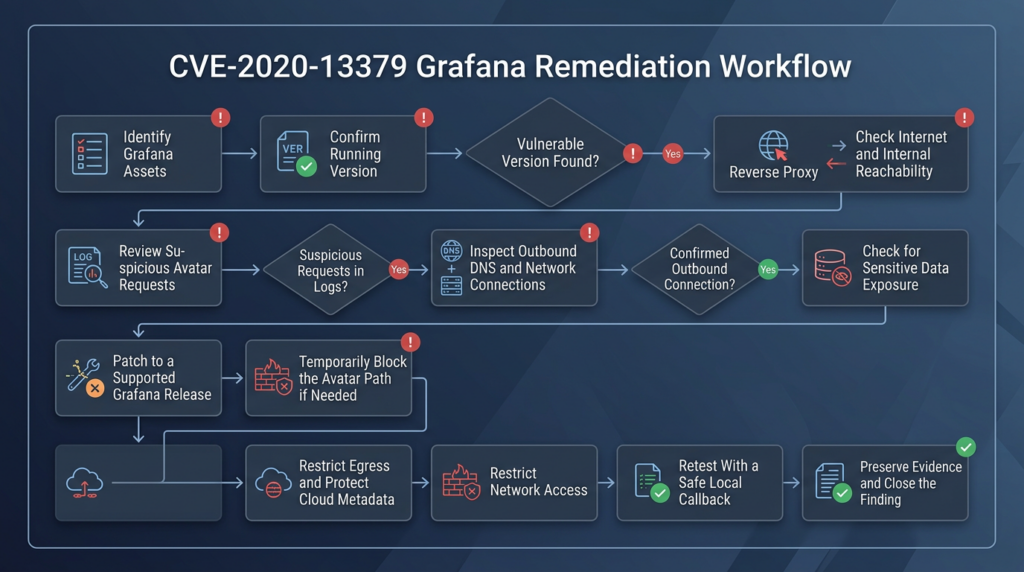
| CVE-2020-13379 | Avatar handler SSRF and malformed-URL crash | Not required | Internal HTTP access, response disclosure, denial of service | Affected 3.0.1 through 7.0.1, fixed in 6.7.4 and 7.0.2 | Demonstrates the danger of server-side fetching and insufficient identifier validation |
| CVE-2021-43798 | Plugin static-file path traversal | Not required in affected default deployments | Local file read | Affected from 8.0.0-beta1 through 8.3.0, with fixes in 8.0.7, 8.1.8, 8.2.7, and 8.3.1 | Shows how unauthenticated resource paths can expose sensitive server-side data |
| CVE-2026-21720 | Avatar cache requests can leave goroutines running after timeout | Not required | Resource exhaustion and denial of service | Fixed in security releases across maintained branches, including 11.6.9+security-01 and later branch-specific builds | Shows that the avatar subsystem remained security-sensitive for availability even though the root cause differs from SSRF |
CVE-2021-43798
CVE-2021-43798 was an unauthenticated directory-traversal vulnerability in Grafana’s plugin static-resource handling. An attacker could read files accessible to the Grafana process by traversing outside the intended plugin directory.
Grafana identified affected versions from 8.0.0-beta1 through 8.3.0 and released fixes in 8.0.7, 8.1.8, 8.2.7, and 8.3.1. The vulnerability was publicly exploited as a zero-day, and Grafana also documented reverse-proxy path normalization as a temporary mitigation. (Grafana Labs)
Its relationship to CVE-2020-13379 is architectural rather than causal:
- Both affected unauthenticated resource paths.
- Both could expose server-side information.
- Both demonstrated that routes serving images or static assets deserve the same review as administration APIs.
- Both had impact shaped by the Grafana process’s access to surrounding resources.
CVE-2026-21720
CVE-2026-21720 is a different avatar-related flaw disclosed in 2026. Grafana reported that avatar cache requests could continue running after a timeout because a goroutine was not terminated. Repeated unauthenticated requests could accumulate resources and cause denial of service.
Grafana assigned it High severity with a CVSS score of 7.5 and released branch-specific security builds. (Grafana Labs)
It is not an SSRF equivalent to CVE-2020-13379. Its value as a comparison is that both issues arose in avatar-processing behavior that might otherwise be treated as cosmetic.
The larger engineering lesson is straightforward: low-privilege, unauthenticated presentation features can still initiate network requests, read files, allocate resources, parse complex input, and cross security boundaries.
Secure Design Rules for Server-Side Fetching
The most durable value of CVE-2020-13379 is the set of design rules it reinforces.
Accept identifiers, not URLs
Prefer:
{
  "avatar_id": "0123456789abcdef0123456789abcdef"
}
Avoid:
{
  "avatar_url": "https://any-destination.example/image"
}
When the server controls the destination template, the client cannot directly choose a protocol, host, port, path hierarchy, or redirect target.
Validate after canonicalization
Validation must operate on the same semantic value used by the network client.
Potential transformation differences include:
- Percent decoding.
- Unicode normalization.
- Hostname case normalization.
- Internationalized domain conversion.
- Backslash handling.
- Dot-segment removal.
- IPv6 compression.
- Embedded credentials.
- Default-port insertion.
- Double decoding by proxies and frameworks.
The safest format is one whose allowed characters cannot become URL syntax after transformation.
Constrain both syntax and meaning
A value can be syntactically valid yet semantically unsafe.
For a destination URL, validation may need to confirm:
- Approved scheme.
- Approved hostname.
- Approved port.
- Approved path prefix.
- No username or password.
- No fragment.
- No unexpected query parameters.
- Resolved IP address belongs to an approved range.
- Every redirect remains approved.
- The connection actually uses the validated address.
That is a substantial amount of complexity. Avoiding arbitrary URLs is usually preferable.
Disable redirects by default
An image service rarely needs an unlimited redirect chain. If redirects are necessary:
- Set a small maximum hop count.
- Resolve and validate every destination.
- Reject scheme changes.
- Reject redirects to private, loopback, link-local, multicast, and reserved ranges.
- Revalidate after DNS resolution.
- Record every hop.
- Avoid forwarding sensitive headers.
- Do not carry credentials across host boundaries.
Defend against DNS rebinding
A hostname can resolve to a public address during validation and a private address during connection.
Mitigations include:
- Resolve once and connect to the validated address.
- Validate all returned addresses.
- Reject any disallowed address in the set.
- Use trusted DNS.
- Apply short and carefully considered cache behavior.
- Revalidate on redirects and retries.
- Enforce egress rules independently of hostname validation.
Cover IPv6
Blocking only familiar IPv4 ranges is incomplete. Security controls must account for:
- IPv6 loopback.
- IPv4-mapped IPv6 addresses.
- Link-local IPv6.
- Unique local addresses.
- Transition and translation formats.
- Parser normalization of bracketed literals.
Set strict resource limits
A server-side fetcher should have:
- Short connection timeout.
- Short read timeout.
- Total request deadline.
- Maximum redirect count.
- Maximum response size.
- Maximum header size.
- Restricted decompression ratio.
- Limited concurrent requests.
- Backpressure.
- Cancellation that terminates underlying work.
Those controls reduce both SSRF impact and denial-of-service risk.
Do not forward ambient credentials
The fetcher should not automatically attach:
- Internal bearer tokens.
- Session cookies.
- Cloud credentials.
- Proxy authorization.
- Client certificates.
- User-controlled authorization headers.
Credentials should be bound to a specific approved destination and removed when the host changes.
Log server-side fetches
Useful fields include:
- Requesting user or client.
- Feature that initiated the fetch.
- Original identifier.
- Normalized destination.
- Resolved IP.
- Redirect chain.
- Response status.
- Response size.
- Duration.
- Policy decision.
- Error category.
- Correlation ID.
Sensitive URLs and response bodies should be protected or redacted, but enough context must remain for incident response.
Enforce network policy
Application validation will eventually encounter an edge case. Network policy should prevent a single parsing mistake from becoming unrestricted access to the internal environment.
OWASP recommends defense in depth rather than relying on URL validation alone. (OWASP Cheat Sheet Series)
Remediation Priority by Control
| Control | Stops the known CVE path | Reduces future SSRF impact | Reduces denial-of-service risk | Recommended role |
|---|---|---|---|---|
| Upgrade to a supported fixed Grafana version | Yes | Partially | Yes for the documented flaw | Required primary remediation |
Block /avatar/* at the reverse proxy | Yes for traffic passing through that proxy | No | Yes for that route | Temporary compensating control |
| Restrict Grafana to trusted networks | Reduces reachable attackers | No | Reduces exposure | Additional containment |
| Disable unnecessary avatar integration | May reduce exposure depending on version and behavior | Limited | Limited | Defense in depth after verification |
| Default-deny egress | Does not remove vulnerable code | Yes | Usually no | Strong secondary control |
| Require IMDSv2 | Protects a specific metadata target | Yes for many simple SSRF paths | No | Cloud hardening |
| Least-privilege instance role | Does not block SSRF | Limits cloud impact | No | Identity containment |
| WAF signature | May block known request forms | Weak against variants | May reduce obvious crash attempts | Detection and temporary filtering |
| Monitoring and alerting | No | No | No | Necessary for detection and response |
| Patch verification | Confirms closure | No | No | Required operational step |
No single compensating control is equivalent to patching. The strongest posture combines a supported Grafana release with strict ingress, constrained egress, metadata protection, least privilege, and usable telemetry.
Frequently Asked Questions
What is CVE-2020-13379?
- It is an unauthenticated SSRF vulnerability in Grafana’s avatar handling.
- A remote client could influence a server-side HTTP request made by Grafana.
- Grafana could return the fetched response bytes to the client.
- Certain malformed URL objects could also cause a segmentation fault and denial of service.
- Grafana corrected early wording that described the issue as direct remote code execution. (Grafana Labs)
Which Grafana versions are affected?
- Grafana identifies versions 3.0.1 through 7.0.1 as affected.
- The first fixed releases were 6.7.4 and 7.0.2.
- Versions from 3.0.1 before 6.7.4 and from 7.0.0 before 7.0.2 should be treated as vulnerable unless a package vendor documents a backported fix.
- Those fixed versions are now historical minimums.
- Production environments should upgrade to a currently supported Grafana branch rather than stopping at 6.7.4 or 7.0.2. (Grafana Labs)
Does CVE-2020-13379 provide remote code execution?
- Not directly.
- Grafana’s corrected advisory states that the vulnerability causes an HTTP request but does not itself execute code.
- Code execution would require another unsafe internal service, exposed credential, or separate vulnerability.
- Findings should describe SSRF and denial of service as the verified impacts.
- Any RCE scenario should be presented as an environment-dependent attack chain, not a guaranteed outcome. (Grafana Labs)
How can I verify the vulnerability without exploiting an internal service?
- Start with binary, package, container, and deployment version evidence.
- Check whether a package vendor backported the fix.
- Review whether a proxy blocks
/avatar/*. - In an authorized lab, send a harmless invalid avatar identifier and verify that the patched handler rejects it.
- Use a synthetic callback service that contains no real data if behavioral confirmation is required.
- Do not target cloud metadata, third-party services, or unrelated private systems.
- Avoid malformed inputs that may trigger the documented crash condition.
- Retest both the application patch and any network controls after remediation.
Is blocking the Grafana avatar endpoint enough?
- It is an official temporary mitigation when upgrading cannot be completed immediately.
- It protects only traffic that passes through the blocking proxy, WAF, or load balancer.
- Direct backend access, alternate hostnames, internal service addresses, and subpath deployments may bypass an incomplete rule.
- It does not remove the vulnerable code.
- It does not protect against other Grafana vulnerabilities.
- Upgrade remains the required permanent remediation. (Grafana Labs)
Does disable_gravatar = true fix CVE-2020-13379?
- Disabling an unnecessary avatar integration can reduce attack surface.
- The official advisory did not identify that setting as the primary fix.
- Grafana recommended upgrading or blocking
/avatar/*. - Behavior may differ across releases and custom deployments.
- Verify whether the route remains active and whether requests still reach the handler.
- Do not leave an unsupported vulnerable version in service based only on the configuration setting.
What evidence should be reviewed after suspected exploitation?
- Reverse-proxy, load balancer, and WAF logs for malformed
/avatar/requests. - Grafana logs and service-manager records for crashes or segmentation faults.
- Kubernetes restart counts, previous container logs, and termination reasons.
- DNS and outbound network records for unexpected destinations.
- Internal service logs showing requests from the Grafana host or pod.
- Cloud metadata configuration and audit activity for the workload’s role.
- Response sizes and durations that may indicate returned internal content.
- Subsequent identity, cloud, or internal application activity that could reflect follow-on use.
Closing Assessment
CVE-2020-13379 is a strong example of why server-side image and avatar features deserve the same security scrutiny as administrative APIs.
The route was unauthenticated. The Grafana server performed the network request. The response could be relayed to the requester. Malformed values could also affect availability. The application’s trusted network position, rather than the apparent simplicity of the avatar feature, determined the potential damage.
The correct response is to identify every remaining vulnerable deployment, upgrade it to a supported release, verify the running code, and review the network paths available to the Grafana workload. Where immediate upgrading is impossible, block the avatar route exactly as the vendor recommended and restrict access to the service. Then add egress controls, metadata protection, least-privilege identities, and monitoring so that the next server-side request flaw cannot freely traverse the internal environment.
The lasting lesson is not a particular payload or redirect chain. It is that a value intended to be a fixed identifier must never be allowed to become a destination.

 English
  German
  French
  Spanish
  Portuguese
  Japanese
  Korean
  Hindi
Hindi  Arabic
  Turkish
  Hebrew