
A slow database query is not just a performance bug when an attacker can trigger it on demand. It becomes a cost amplifier. One cheap HTTP request can force the backend to scan millions of rows, sort a large result set, hold locks, consume worker threads, occupy a database connection, and delay legitimate traffic. If the same query is built from unsafe dynamic SQL, the problem is worse: the endpoint may be both a denial-of-service entry point and a SQL injection boundary failure.
That is the security side of database optimization. Faster queries matter, but speed alone is not the point. The real objective is to stop untrusted users from deciding how much work the database must perform.
MITRE’s CWE-400 entry explicitly calls out long-running database queries as good denial-of-service targets because the attacker can make the product do much more work than the attacker spends to initiate the request. OWASP’s API Security Top 10 describes unrestricted resource consumption as a risk when APIs fail to limit resources such as CPU, memory, storage, bandwidth, or external service usage. OWASP’s Top 10:2025 keeps Injection as a major application security risk and describes injection as untrusted input reaching an interpreter such as a database, command line, or browser. These are usually taught as separate topics, but in real systems they often meet at the same place: a flexible query endpoint with weak input boundaries. (CWE)
Database optimization is part of the attack surface
Most database optimization work starts with a complaint: a page is slow, a dashboard times out, a report takes too long, or the database CPU is high. The normal engineering response is to inspect indexes, query plans, caching, table design, join order, memory settings, and application access patterns. Those are necessary. They are not enough.
A security review asks a different question: who can trigger the expensive path, how often, with what parameters, and at what cost to the system?
A query that takes eight seconds in an admin-only analytics dashboard may be annoying. The same query behind a public API, unauthenticated search page, tenant-controlled report builder, GraphQL resolver, or AI-to-SQL assistant can become an application-layer DoS primitive. The attacker does not need raw database credentials. The application becomes the query launcher.
The dangerous pattern is asymmetric cost. The request is cheap to send, but expensive to serve. The attacker controls one or more values that influence row selection, sorting, grouping, joins, recursion, text matching, time functions, or result size. The database spends real CPU, memory, I/O, lock time, and connection time to answer a question the application should never have allowed in that shape.
A slow query becomes a security issue when at least one of these conditions is true:
| Zustand | Warum das wichtig ist | Beispiel |
|---|---|---|
| The endpoint is public or exposed to many users | The expensive path is reachable without trusted operator intent | Product search, login-adjacent lookup, public directory |
| User input changes query cost | The attacker can search, sort, filter, page, or join in expensive ways | sort=created_at, q=%term%, page=900000 |
| Query execution has no budget | The database keeps working even after the application has stopped caring | Missing timeout, no row cap, no cancellation |
| Results are unbounded | The database and application both pay for huge output | CSV export, limit=1000000, SELECT * |
| The SQL structure is dynamic | Injection risk and performance risk share the same root | Unsicher ORDER BY, raw WHERE, dynamic table name |
| Observability is weak | The team cannot map slow database work back to a request and user | No query fingerprint, no request ID, no slow log review |
The key shift is simple: database optimization should not only optimize trusted workloads. It should constrain hostile workloads.
How slow queries become denial of service
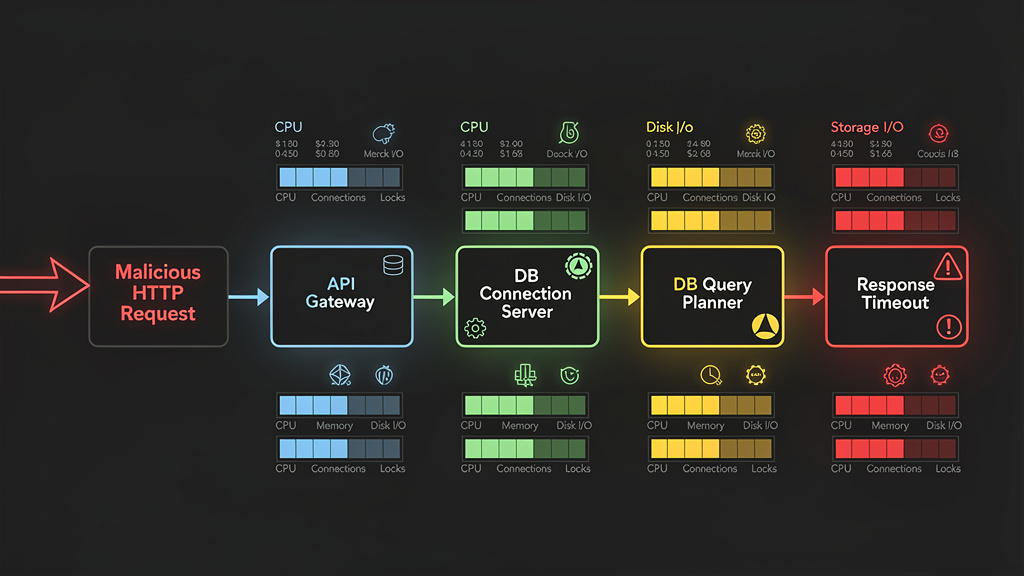
A database-backed DoS attack does not always look like a flood. Sometimes it looks like a small number of carefully chosen requests. A single user repeatedly triggers a search endpoint with a wide date range. A bot requests deep pages through offset pagination. A tenant exports all activity logs every few seconds. A GraphQL client asks for nested relationships that produce a large resolver fan-out. A blind SQL injection probe uses timing behavior to force database sleeps or expensive conditions. The HTTP traffic volume can look modest while the database is under heavy strain.
The affected resource is not just the database server. Slow queries consume the entire request path:
| Ebene | Resource consumed | Failure mode |
|---|---|---|
| CDN or edge | Cache bypass, request fan-out | Traffic reaches origin instead of cache |
| Web server | Worker threads, request buffers | More requests queue or time out |
| Application runtime | Event loop time, thread pool, memory | Healthy endpoints slow down |
| Connection pool | Database connections held by slow requests | Normal requests wait for connections |
| Database planner and executor | CPU, memory, buffers, disk I/O | Query latency spikes |
| Lagerung | Random reads, temp files, spill to disk | I/O saturation |
| Lock manager | Row locks, table locks, metadata locks | unrelated writes/readers block |
| Observability pipeline | Log volume, metrics cardinality | noisy or expensive monitoring |
This is why database optimization is a security control. A bad query plan is not only a local inefficiency. It can occupy scarce shared resources long enough to degrade the whole service.
MITRE’s CWE-400 frames the general weakness as failure to control the size or amount of resources requested by an actor. OWASP API4:2023 reaches the same operational conclusion for APIs: if resource limits are missing or inappropriate, clients can consume backend resources in ways the system was not designed to absorb. (CWE)
Common slow-query patterns attackers can abuse
Not every slow query is exploitable. A nightly batch job may be slow but unreachable. An internal-only migration query may be risky operationally but not attacker-triggerable. The highest-risk patterns are query shapes exposed through application inputs.
| Query pattern | Why it becomes expensive | Attacker-controlled condition | Security impact | Better control |
|---|---|---|---|---|
| Unbounded search | Scans many rows, especially with %term% matching | q is long, broad, or wildcard-heavy | CPU and I/O exhaustion | Minimum length, indexed search strategy, result cap |
| Deep offset pagination | Database scans and discards many rows before returning a page | page oder offset is arbitrary | I/O waste and slow responses | Keyset pagination, max page depth |
| Dynamic sorting | Sorting on unindexed or high-cardinality columns is expensive | sort und direction are user-controlled | Memory pressure, temp files | Allowlisted sort fields with matching indexes |
| Wide date range | Query scans historical partitions or large indexes | von und zu are unbounded | Slow reports and lock pressure | Max range, async export, partition pruning |
| Synchronous export | Large result set is built in request path | User requests full CSV/JSON | Connection exhaustion | Background job, row budget, staged files |
| N+1 resolver | One request triggers many database queries | Nested object expansion | Query storm | batching, preloading, query complexity limit |
| Complex join filter | Query planner chooses costly join path | Many optional filters combine freely | CPU and buffer churn | Fixed query templates, plan review |
| Recursive query | Recursion grows with graph depth | Depth or root node is user-controlled | runaway execution | recursion cap, graph-specific controls |
| Time-based function | Query intentionally waits or performs costly work | Predicate invokes delay function or heavy expression | blind SQLi signal, DoS | parameterization, deny dangerous SQL structure |
| Text or regex search | Pattern engine or full scan becomes costly | Regex or pattern is user-controlled | CPU spikes | safe pattern limits, search service, timeout |
The security lesson is not “never build flexible query features.” The lesson is that flexibility must be designed as a constrained product surface. Users can choose from safe query shapes; they should not be able to create arbitrary database work.
The overlap between slow queries and SQL injection
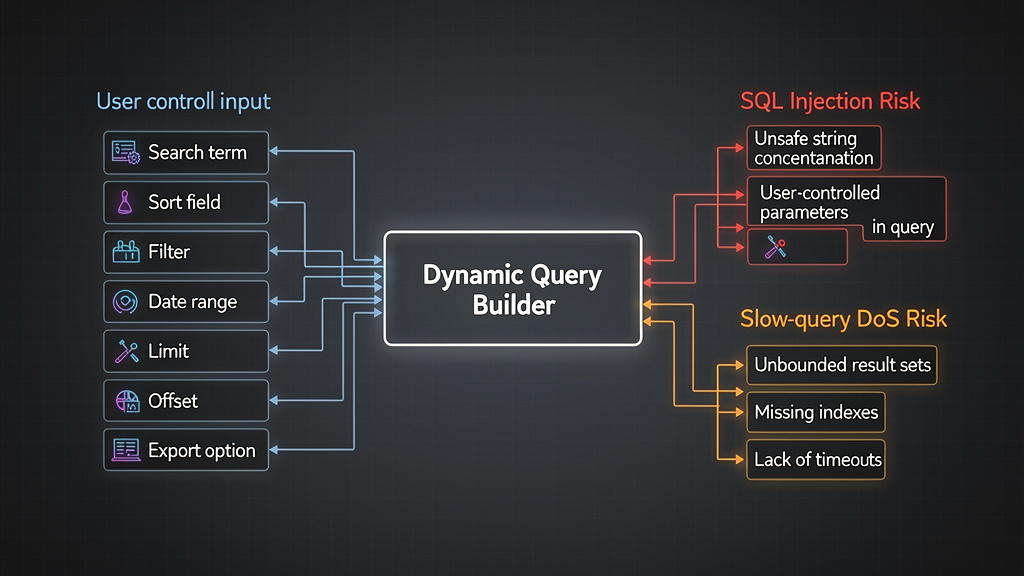
SQL injection is often explained as a string-concatenation bug. That is true but incomplete. In production systems, injection often appears around “flexible” query features: admin search, custom reports, filter builders, sort parameters, export tools, tenant dashboards, analytics endpoints, and internal support panels. These are also the places where database optimization problems concentrate.
OWASP’s SQL Injection Prevention Cheat Sheet recommends prepared statements, properly constructed stored procedures, allow-list input validation, and escaping only as a last resort. OWASP’s Query Parameterization Cheat Sheet states the same core principle: SQL injection is best prevented through parameterized queries. But OWASP’s Injection guidance also warns that SQL structures such as table names and column names are dangerous when user-supplied, because they cannot be handled like normal parameter values. (OWASP-Spickzettel-Serie)
That detail matters for database optimization. Many performance-sensitive features are not just filtering by values. They let the user influence SQL structure:
ORDER BY created_at DESC
ORDER BY price ASC
WHERE status IN (...)
WHERE created_at BETWEEN ... AND ...
GROUP BY tenant_id
JOIN ...
LIMIT ...
OFFSET ...
Values can be parameterized. Identifiers and SQL keywords need a different pattern. A prepared statement can safely bind status = $1; it cannot safely bind an arbitrary column name into ORDER BY $1 in the way many developers expect. The safe approach is to map user-visible options to server-side constants.
Unsafe dynamic query construction is therefore a double problem. It can let an attacker change query meaning, and it can let an attacker choose an expensive plan.
A vulnerable dynamic query that creates both risks
Consider a common Express endpoint for an order list. The product requirement is normal: search orders, sort columns, paginate results, and filter by status.
app.get("/api/orders", async (req, res) => {
  const search = req.query.search || "";
  const status = req.query.status || "paid";
  const sort = req.query.sort || "created_at";
  const direction = req.query.direction || "desc";
  const limit = req.query.limit || "50";
  const offset = req.query.offset || "0";

  const sql = `
    SELECT id, customer_email, status, total, created_at
    FROM orders
    WHERE status = '${status}'
      AND customer_email LIKE '%${search}%'
    ORDER BY ${sort} ${direction}
    LIMIT ${limit}
    OFFSET ${offset}
  `;

  const result = await db.query(sql);
  res.json(result.rows);
});
This endpoint has obvious injection risk because untrusted input is concatenated into SQL. It also has serious database optimization risk:
Die search parameter can force inefficient pattern matching, especially when the leading wildcard prevents a normal B-tree index from helping. The sort parameter can force sorting on an unindexed column. The direction parameter can inject structure. The limit can request a large result set. The offset can force the database to walk and discard many rows. The endpoint has no timeout, no maximum page depth, no fixed query shape, and no logging discipline.
A safer version treats query design as both a security and performance boundary.
const SORT_COLUMNS = {
  created_at: "created_at",
  total: "total",
  id: "id"
};

const SORT_DIRECTIONS = {
  asc: "ASC",
  desc: "DESC"
};

app.get("/api/orders", async (req, res) => {
  const search = String(req.query.search || "").trim();
  const status = String(req.query.status || "paid");

  const sortKey = String(req.query.sort || "created_at");
  const directionKey = String(req.query.direction || "desc").toLowerCase();

  const sortColumn = SORT_COLUMNS[sortKey] || SORT_COLUMNS.created_at;
  const sortDirection = SORT_DIRECTIONS[directionKey] || SORT_DIRECTIONS.desc;

  const limit = Math.min(Math.max(Number(req.query.limit || 50), 1), 100);
  const offset = Math.min(Math.max(Number(req.query.offset || 0), 0), 5000);

  if (search.length > 100) {
    return res.status(400).json({ error: "Search term too long" });
  }

  const values = [status, `%${search}%`, limit, offset];

  const sql = `
    SELECT id, customer_email, status, total, created_at
    FROM orders
    WHERE status = $1
      AND customer_email ILIKE $2
    ORDER BY ${sortColumn} ${sortDirection}
    LIMIT $3
    OFFSET $4
  `;

  const result = await db.query({
    text: sql,
    values,
    statement_timeout: 3000
  });

  res.json(result.rows);
});
This is safer, but it is not perfect. The values are parameterized. The sort fields are allowlisted. The limit and offset are capped. The statement has a timeout. But the search path may still need an index strategy, such as trigram indexing in PostgreSQL, full-text search, or a dedicated search service depending on data size and query behavior. Database optimization does not end at parameterization.
Parameterization prevents injection, not expensive intent
Prepared statements separate data from SQL structure. That is the right foundation for SQL injection prevention. It does not mean every prepared query is cheap or safe from resource abuse.
A parameterized query can still scan a large table:
SELECT *
FROM audit_events
WHERE message ILIKE '%' || $1 || '%'
ORDER BY created_at DESC
LIMIT $2 OFFSET $3;
A parameterized query can still return too many rows:
SELECT *
FROM invoices
WHERE tenant_id = $1
LIMIT $2;
A parameterized query can still create a bad plan when the data distribution is skewed, statistics are stale, or optional filters produce unstable execution paths:
SELECT *
FROM orders
WHERE tenant_id = $1
  AND ($2::text IS NULL OR status = $2)
  AND ($3::timestamp IS NULL OR created_at >= $3)
  AND ($4::timestamp IS NULL OR created_at <= $4);
The security control is therefore layered:
| Kontrolle | Injection protection | DoS protection | Caveat |
|---|---|---|---|
| Vorbereitete Erklärungen | Strong for values | Begrenzt | Does not restrict query cost |
| Allowlisted identifiers | Strong for structure | Strong | Must be maintained with schema changes |
| Query templates | Strong | Strong | Less flexible than arbitrary query builders |
Maximum limit | None by itself | Strong | Must pair with pagination design |
| Keyset pagination | None by itself | Strong | Requires stable sort key |
| Statement timeout | None by itself | Strong backstop | Does not replace indexing |
| Rate limiting | None by itself | Strong | Can punish legitimate heavy users if crude |
| Least-privilege DB roles | Begrenzt den Explosionsradius | Einige | Does not prevent availability abuse |
| Slow query logging | Erkennung | Erkennung | Logs may contain sensitive values |
| Query plan review | Indirect | Strong | Needs representative data |
The important distinction is this: SQL injection prevention protects query meaning. Database optimization and resource controls protect query cost. A secure system needs both.
Reading query cost like a security engineer
Security teams do not need to become full-time DBAs, but they should understand which database metrics indicate exploitable cost. Average query latency is not enough. Attackers live in the tail.
A query should be reviewed when it shows one or more of these signals:
| Signal | Warum das wichtig ist |
|---|---|
| High p95 or p99 latency | Rare paths may be attacker-triggerable |
| High rows examined, low rows returned | The database does too much work for little output |
| Full table scan on exposed endpoint | Public input may trigger expensive reads |
| Sort spill or temporary files | Sorting exceeds memory and hits disk |
| Lock wait time | Read or write contention can spread beyond one endpoint |
| Unstable execution plan | Small input changes produce large cost changes |
| Large response size | Application and network cost add to database cost |
| Connection pool wait | Slow queries are blocking other work |
| Frequent cancellations or timeouts | The system is already hitting query budgets |
| Same user causing many query fingerprints | Possible abuse or broken automation |
PostgreSQL and MySQL both provide native tools for finding slow and expensive SQL. MySQL’s slow query log records statements that exceed long_query_time and can also consider examined-row thresholds; MySQL documents mysqldumpslow as a way to summarize long slow-query logs. PostgreSQL documents EXPLAIN as the standard way to inspect query plans, and EXPLAIN ANALYZE adds actual run-time statistics because it executes the statement. (MySQL Developer Zone)
That last detail matters. EXPLAIN ANALYZE is powerful, but it runs the query. Use it carefully against production-sized data, and be especially careful with writes, locks, and functions that have side effects.
PostgreSQL controls for slow-query security
PostgreSQL gives defenders several practical controls that connect database optimization to security.
Find expensive statements
A common first step is to log statements that exceed a threshold. On a managed service, the exact configuration path depends on the provider, but the underlying PostgreSQL setting is log_min_duration_statement. AWS’s RDS documentation describes it as logging SQL statements that run at least as long as the configured threshold, and PostgreSQL’s own runtime logging documentation covers related logging settings. (AWS Documentation)
Example session-level setting for investigation:
SET log_min_duration_statement = 500;
In environments with pg_stat_statements enabled, teams can examine query fingerprints instead of chasing individual raw query strings:
SELECT
  queryid,
  calls,
  total_exec_time,
  mean_exec_time,
  rows,
  shared_blks_hit,
  shared_blks_read,
  temp_blks_written,
  query
FROM pg_stat_statements
ORDER BY total_exec_time DESC
LIMIT 20;
This is useful for security because it helps identify which query shapes consume the most total time, which ones write temporary blocks, and which ones return suspiciously large row counts. A query with moderate average latency but millions of calls may matter more than a rare query with one dramatic execution.
Inspect the plan
A basic plan review starts with EXPLAIN:
EXPLAIN
SELECT id, customer_email, created_at
FROM orders
WHERE tenant_id = 42
  AND customer_email ILIKE '%example%'
ORDER BY created_at DESC
LIMIT 50;
Then use EXPLAIN ANALYZE in a safe environment with realistic data:
EXPLAIN (ANALYZE, BUFFERS)
SELECT id, customer_email, created_at
FROM orders
WHERE tenant_id = 42
  AND customer_email ILIKE '%example%'
ORDER BY created_at DESC
LIMIT 50;
Plan reading is part science, part experience. PostgreSQL’s documentation is clear that the planner chooses a plan for each query and that selecting the right plan is critical for performance. For security review, the most important question is whether untrusted input can push the planner into a plan that consumes far more resources than the endpoint should allow. (PostgreSQL)
Use statement timeouts as a backstop
PostgreSQL’s statement_timeout aborts statements that run longer than the configured time. PostgreSQL also documents lock_timeout, which applies while waiting for locks, and notes that setting lock_timeout equal to or higher than statement_timeout is usually pointless because the statement timeout would fire first. (PostgreSQL)
A common pattern is to set conservative timeouts for application roles:
ALTER ROLE app_readonly SET statement_timeout = '3s';
ALTER ROLE app_readonly SET lock_timeout = '500ms';
For high-value internal jobs, use a separate role or session with a different budget rather than giving every public request a long timeout. The timeout is not the optimization; it is the guardrail that prevents worst-case cost from running forever.
Enforce least privilege and row boundaries
Performance controls reduce availability risk. Least privilege reduces data exposure if SQL injection happens anyway.
A typical application should not connect as a database owner. Separate roles by function:
CREATE ROLE app_readonly LOGIN PASSWORD 'replace-with-secret';
CREATE ROLE app_writer LOGIN PASSWORD 'replace-with-secret';

GRANT CONNECT ON DATABASE appdb TO app_readonly, app_writer;
GRANT USAGE ON SCHEMA public TO app_readonly, app_writer;

GRANT SELECT ON orders, customers TO app_readonly;
GRANT SELECT, INSERT, UPDATE ON orders TO app_writer;
For multi-tenant systems, PostgreSQL Row-Level Security can enforce per-row access rules in addition to application checks. PostgreSQL documents Row Security Policies as a way to restrict which rows can be returned, inserted, updated, or deleted on a per-user basis. RLS is not a replacement for safe query construction, but it is a valuable second boundary when applications serve multiple tenants from shared tables. (PostgreSQL)
MySQL controls for slow-query security
MySQL has a different feature set, but the same security goals apply: find expensive query shapes, constrain execution, limit accounts, and patch database engine vulnerabilities.
Enable and review the slow query log
MySQL’s slow query log captures SQL statements that exceed long_query_time and can be configured with min_examined_row_limit so teams focus on statements that examine enough rows to matter. The MySQL manual also points to mysqldumpslow for summarizing large slow logs. (MySQL Developer Zone)
Example configuration:
SET GLOBAL slow_query_log = 'ON';
SET GLOBAL long_query_time = 1;
SET GLOBAL min_examined_row_limit = 1000;
For persistent configuration, use the appropriate MySQL configuration file or managed-service parameter group.
Slow logs are security-sensitive. They may contain table names, business logic, user identifiers, emails, search terms, or tokens accidentally passed into queries. Treat them as operational secrets, not harmless performance artifacts.
Inspect query plans
Verwenden Sie EXPLAIN to inspect whether a query uses indexes, scans too many rows, or performs expensive sorting:
EXPLAIN FORMAT=JSON
SELECT id, customer_email, created_at
FROM orders
WHERE tenant_id = 42
  AND customer_email LIKE '%example%'
ORDER BY created_at DESC
LIMIT 50;
Plan review should be tied to endpoint review. A full table scan in a migration script is different from a full table scan behind a public search endpoint.
Limit execution time where appropriate
MySQL supports execution-time optimizer hints for SELECT statements. The MySQL manual states that MAX_EXECUTION_TIME(N) sets a statement execution timeout in milliseconds, and the hint applies to the statement where it appears. MySQL’s documentation on Common Table Expressions also notes that max_execution_time can enforce an execution timeout for SELECT statements in the current session and that the optimizer hint can enforce a per-query timeout. (MySQL Developer Zone)
Beispiel:
SELECT /*+ MAX_EXECUTION_TIME(1000) */
  id, customer_email, created_at
FROM orders
WHERE tenant_id = ?
ORDER BY created_at DESC
LIMIT 50;
This is a backstop, not a cure. If an endpoint frequently hits execution timeouts, the system is not secure just because the query eventually dies. The query shape still needs indexing, input constraints, pagination redesign, or workload isolation.
Limit database account resource usage
MySQL supports account-level resource controls. Its documentation describes options for restricting client resource use, including limiting simultaneous connections for accounts. This does not solve every query-cost problem, but it can reduce the blast radius when one application user, service, or tenant path behaves badly. (MySQL Developer Zone)
A practical architecture separates accounts:
| Account | Intended workload | Controls |
|---|---|---|
app_read | Public read endpoints | SELECT only, short timeouts, limited connections |
app_write | Normal writes | Least required DML, transaction timeout discipline |
report_worker | Async exports | Isolated pool, longer timeout, row budget |
migration | Schema changes | No public app access, controlled use |
admin_breakglass | Emergency operations | MFA, audit logging, limited holders |
If every path uses the same privileged account, every SQL injection and slow-query issue has a larger blast radius.
Real CVE lesson, SQL injection can become database compromise
CVE-2023-34362 in Progress MOVEit Transfer is a useful reminder that SQL injection is not an academic bug class. NVD describes it as a SQL injection vulnerability in the MOVEit Transfer web application that could allow an unauthenticated attacker to gain access to the MOVEit Transfer database in affected versions before the patched releases. Progress’s advisory described a vulnerability that could lead to escalated privileges and potential unauthorized access, and CISA later published a joint advisory about CL0P ransomware actors exploiting the MOVEit Transfer SQL injection vulnerability. (NVD)
The important database optimization lesson is not that every slow query looks like MOVEit. It does not. The lesson is that database access boundaries are high-value. If an application endpoint lets untrusted input shape SQL semantics, the database becomes reachable through the web application’s trust boundary. Once that happens, performance controls, least privilege, logging, and patch discipline all matter.
For defenders, the remediation path for a vendor CVE is different from fixing a custom query bug. You patch the affected product according to the vendor advisory, restrict network exposure where possible, review logs and indicators, rotate secrets if exposure is plausible, and validate that unsupported versions are not still running. For internal code, the path is source-level: remove dynamic SQL concatenation, parameterize values, allowlist structure, reduce privileges, and add regression tests that prove unsafe query shapes no longer execute.
Real CVE lesson, optimizer flaws can be availability vulnerabilities
SQL injection is not the only way database query handling becomes a security issue. CVE-2026-22009 is a MySQL Server vulnerability in the Optimizer component. NVD describes affected supported versions as MySQL Server 8.0.0 through 8.0.45, 8.4.0 through 8.4.8, and 9.0.0 through 9.6.0. It also states that a low-privileged attacker with network access through multiple protocols could cause a hang or frequently repeatable crash, resulting in complete denial of service. Oracle included the issue in its April 2026 Critical Patch Update. (NVD)
This is different from an application slow query. An index will not fix a database engine vulnerability. A query timeout may reduce some operational symptoms but should not be treated as the patch. The correct response is to upgrade or apply the vendor security update, then review exposure and account privileges.
The reason this CVE belongs in a database optimization and security discussion is that the optimizer is part of the trust boundary. Teams often assume query planning is an internal implementation detail. In practice, users influence query text through applications, applications submit SQL to the database, and the database optimizer decides how to execute it. When the optimizer or executor contains an availability flaw, low-privileged database access may be enough to threaten service availability.
Designing query features that do not expose arbitrary database work
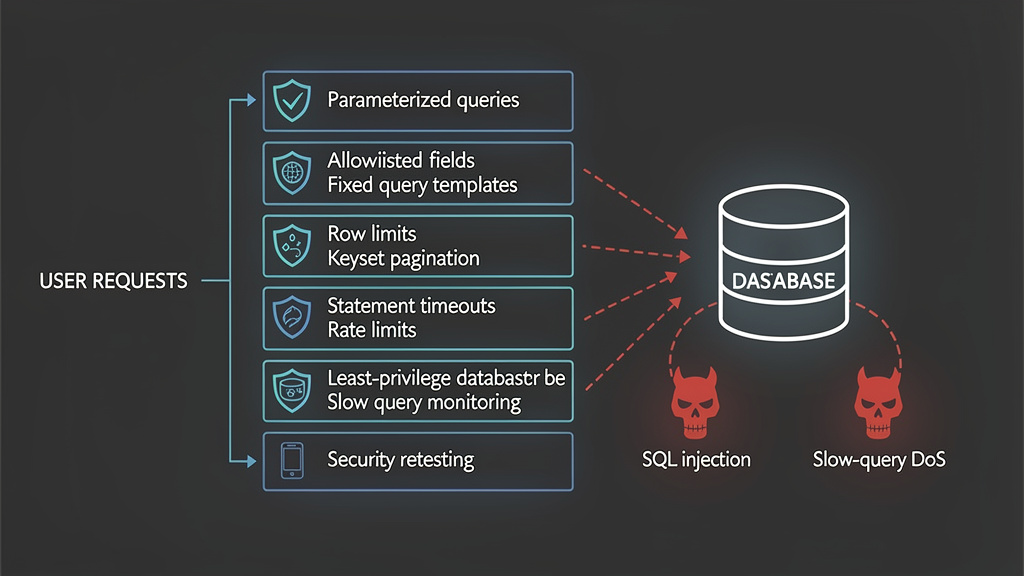
The safest query interfaces do not let users compose SQL. They let users choose among predefined, tested query shapes. This applies to REST APIs, GraphQL APIs, admin panels, dashboards, natural-language database tools, and internal support consoles.
A good query feature has these properties:
| Design property | Security value | Performance value |
|---|---|---|
| Fixed query templates | Prevents arbitrary SQL structure | Stable plans can be tested |
| Parameterized values | Prevents data becoming commands | Allows plan reuse |
| Allowlisted fields | Prevents unsafe identifiers | Ensures indexes match options |
| Max row limit | Limits data exposure | Limits memory and network cost |
| Keyset pagination | Reduces deep-page waste | Stable latency at scale |
| Max date range | Prevents historical full scans | Enables partition pruning |
| Async exports | Removes large jobs from request path | Isolates heavy workloads |
| Query timeout | Caps worst-case execution | Protects shared resources |
| Tenant quotas | Limits abuse by one tenant | Protects multi-tenant fairness |
| Read-only roles | Reduces injection blast radius | Separates workload classes |
The hard part is not writing a single safe SQL statement. The hard part is keeping a growing product from slowly turning into an arbitrary query execution platform.
Safer filtering and sorting
A common API mistake is to accept user-facing field names and splice them into SQL. The secure pattern is to translate user choices into server-controlled SQL fragments.
SORT_FIELDS = {
    "created_at": "created_at",
    "total": "total",
    "id": "id",
}

DIRECTIONS = {
    "asc": "ASC",
    "desc": "DESC",
}

def build_order_clause(sort_key: str, direction_key: str) -> str:
    sort_column = SORT_FIELDS.get(sort_key, "created_at")
    direction = DIRECTIONS.get(direction_key.lower(), "DESC")
    return f"ORDER BY {sort_column} {direction}"
This function is intentionally boring. It does not escape arbitrary identifiers. It refuses to accept them. That is the difference between validation and sanitization. Sanitization tries to clean dangerous input. Allowlisting prevents dangerous input from becoming part of the query structure in the first place.
For values, use driver-supported binding:
def find_orders(conn, tenant_id, status, limit):
    limit = min(max(int(limit), 1), 100)

    with conn.cursor() as cur:
        cur.execute(
            """
            SELECT id, status, total, created_at
            FROM orders
            WHERE tenant_id = %s
              AND status = %s
            ORDER BY created_at DESC
            LIMIT %s
            """,
            (tenant_id, status, limit),
        )
        return cur.fetchall()
This protects value boundaries. You still need the right index, such as:
CREATE INDEX CONCURRENTLY idx_orders_tenant_status_created
ON orders (tenant_id, status, created_at DESC);
The security control and the database optimization control work together. The application restricts query shape; the database has an index for that shape.
Safer pagination, stop using deep offset for exposed endpoints
Offset pagination is easy to implement and easy to abuse. The deeper the offset, the more rows the database may need to scan or sort before returning the requested page.
SELECT id, title, created_at
FROM posts
WHERE tenant_id = $1
ORDER BY created_at DESC
LIMIT 50 OFFSET 500000;
Even if the query returns only 50 rows, the database may do substantial work to reach them. For public or high-volume endpoints, keyset pagination is usually safer.
SELECT id, title, created_at
FROM posts
WHERE tenant_id = $1
  AND (created_at, id) < ($2, $3)
ORDER BY created_at DESC, id DESC
LIMIT 50;
With a matching index:
CREATE INDEX CONCURRENTLY idx_posts_tenant_created_id
ON posts (tenant_id, created_at DESC, id DESC);
Keyset pagination does not solve every product requirement. It is less convenient for “jump to page 9000.” That inconvenience is often a feature. Arbitrary deep jumps are rarely worth exposing to untrusted clients if they create unbounded backend work.
Safer search, avoid turning LIKE into a full-scan weapon
Search boxes are one of the most common bridges between database optimization and security. A naive search endpoint often starts like this:
SELECT id, email, name
FROM customers
WHERE tenant_id = $1
  AND (email ILIKE '%' || $2 || '%' OR name ILIKE '%' || $2 || '%')
ORDER BY created_at DESC
LIMIT 50;
This may be acceptable for tiny tables. It is dangerous on large tables when exposed widely. Attackers can submit broad terms, wildcard-like values, long strings, or repeated requests that defeat caching and force scans.
Better controls include:
| Kontrolle | Why it helps |
|---|---|
| Minimum search length | Blocks one-character broad scans |
| Maximum search length | Prevents oversized patterns |
| Field-specific search | Avoids OR across many columns |
| Prefix search where possible | Makes normal indexes more useful |
| Full-text or trigram index | Matches intended search behavior |
| Separate search service | Moves text search out of OLTP path |
| Per-user rate limit | Reduces repeated expensive searches |
| Result cap | Prevents large response cost |
| Timeout | Caps worst-case execution |
In PostgreSQL, a trigram index may be appropriate for substring search depending on workload and extension availability. In other systems, full-text indexing or a dedicated search engine may be better. The secure design question is not “which index is fashionable?” It is “what search behavior are we willing to expose, and what is the maximum database cost per request?”
Report builders are high-risk query generators
Report builders are often built for trusted internal users, then gradually exposed to customer admins, partners, support teams, or API clients. They are high-risk because they naturally want dynamic filters, grouping, sorting, date ranges, and exports.
A safe report system should not execute arbitrary report SQL directly in the request path. It should define report templates:
reports:
  monthly_revenue:
    base_query: revenue_by_month
    max_date_range_days: 370
    max_rows: 50000
    allowed_filters:
      - tenant_id
      - region
      - plan
    allowed_group_by:
      - month
      - region
      - plan
    async_only: true
The application then compiles this safe configuration into SQL using known fields, known joins, known indexes, and known row budgets. Large reports should run as background jobs with dedicated worker pools, separate database roles, and observable job IDs.
A synchronous export endpoint with no row cap is often a DoS bug waiting to be found.
GraphQL and resolver-driven database load
GraphQL is not SQL injection by default, but it can expose database work in a highly flexible form. Nested fields can trigger resolver fan-out. Without batching, limits, or query complexity controls, one request can become many database queries.
A simplified resolver problem:
const resolvers = {
  User: {
    orders: (user) => db.query(
      "SELECT * FROM orders WHERE user_id = $1 ORDER BY created_at DESC",
[user.id]
) } };
If a query returns 100 users and then resolves orders for each user, the API may issue 101 queries. Attackers can amplify this with nesting and broad filters.
Defenses include:
| Kontrolle | Zweck |
|---|---|
| Query depth limit | Blocks deeply nested requests |
| Complexity scoring | Prices expensive fields |
| Resolver batching | Reduces N+1 queries |
| Mandatory pagination | Prevents unbounded child lists |
| Field-level authorization | Avoids accidental data exposure |
| Per-request database budget | Stops one request from issuing unlimited queries |
| Query allowlisting for sensitive APIs | Reduces arbitrary query shapes |
The database optimization principle is the same: never let the client silently multiply backend work beyond an intentional budget.
AI-to-SQL makes old risks feel new
Natural-language database interfaces and AI-assisted analytics tools often translate user prompts into SQL. This can be useful, but it reopens old problems under a new interface. The risk is not only prompt injection. The risk is that the generated SQL may be unsafe, overbroad, too expensive, or outside the user’s authorization boundary.
A safe AI-to-SQL workflow should not give the model a privileged database connection and hope the prompt is well behaved. It should use:
| Ebene | Kontrolle |
|---|---|
| Schema exposure | Provide only approved tables and columns |
| SQL generation | Prefer fixed templates or constrained AST generation |
| Static checks | Reject writes, DDL, comments, multiple statements, unsafe functions |
| Execution role | Use read-only, least-privilege database accounts |
| Row limit | Add hard maximum result size |
| Timeout | Apply short statement timeout |
| Überprüfung | Require approval for sensitive queries |
| Logging | Store prompt, generated SQL fingerprint, user, and result size |
| Tenant boundary | Enforce tenant filter outside the model’s discretion |
Recent research has also examined LLM-mediated SQL injection and adversarial SQL injection generation, which reinforces a practical point: AI does not remove the need for parameterization, allowlists, query budgets, and database permissions. It increases the need for those controls when natural language becomes another path to query construction. (arXiv)
Detection, finding when slow queries are becoming attacks
A database optimization program often finds “top slow queries.” A security-oriented program asks whether those queries correlate with users, endpoints, tenants, IP ranges, payload shapes, or abnormal request patterns.
Useful detection signals include:
| Signal | Possible meaning |
|---|---|
| One user causes many slow query fingerprints | Abuse, scraping, automation, broken client |
| Same endpoint produces many query shapes | Unsafe dynamic query builder |
| High rows examined with low rows returned | Filter/index mismatch, possible cost abuse |
| Increasing timeout/cancel count | Attackers or clients hitting query budgets |
| Spike in temp files or sort spills | Sorting/grouping abuse |
| Deep offset values | Pagination abuse |
| Long search strings or unusual wildcard patterns | Search abuse or SQLi probing |
| SQL errors near public endpoints | Injection probing or unsafe raw SQL |
| Lock waits from application role | Transaction misuse or hostile workload |
| Connection pool wait time | Slow queries starving normal traffic |
A practical logging pattern is to tie each database query fingerprint to application context:
{
  "request_id": "req_8f2c1",
  "user_id": "user_123",
  "tenant_id": "tenant_456",
  "endpoint": "GET /api/orders",
  "query_fingerprint": "orders_search_v3",
  "duration_ms": 842,
  "rows_returned": 50,
  "rows_examined": 182000,
  "timeout": false
}
Raw SQL logs alone are not enough. Application logs alone are not enough. The security value comes from joining them.
PostgreSQL query fingerprint triage
A useful triage query with pg_stat_statements looks at total time, mean time, temporary writes, and rows:
SELECT
  calls,
  ROUND(total_exec_time::numeric, 2) AS total_ms,
  ROUND(mean_exec_time::numeric, 2) AS mean_ms,
  rows,
  temp_blks_written,
  shared_blks_read,
  LEFT(query, 240) AS query_sample
FROM pg_stat_statements
WHERE calls > 10
ORDER BY total_exec_time DESC
LIMIT 25;
Security review questions:
Does this query map to a public endpoint?
Can one user or tenant trigger it repeatedly?
Does the query return few rows while reading many blocks?
Can input change sort order, date range, wildcard behavior, or filter count?
Does the application cancel the query when the HTTP client disconnects?
Does the database role have more privilege than required?
If the answer to the first two questions is yes, treat the query as attack surface.
MySQL slow-query triage
For MySQL, slow-query review should focus on fingerprints, examined rows, lock time, and endpoint mapping. A slow log entry is more useful when application code adds comments that identify safe, non-sensitive query labels:
SELECT /* app=api endpoint=orders_search query=orders_search_v3 */
  id, customer_email, status, total, created_at
FROM orders
WHERE tenant_id = ?
  AND status = ?
ORDER BY created_at DESC
LIMIT ?;
Avoid putting user-controlled values in comments. The goal is to correlate query classes, not leak request data into logs.
The MySQL slow query log gives the database side. Application telemetry should provide the user, endpoint, tenant, and request rate. When the same endpoint and same tenant produce repeated slow entries, the issue is no longer just optimization. It is abuse resistance.
Testing slow-query DoS safely
Security testing for database optimization problems must be careful. A real DoS test against production can harm users and violate scope. The goal is to prove risk with minimal load.
A safe authorized workflow:
- Confirm scope and environment.
- Identify query-bearing endpoints.
- Establish a baseline using normal parameters.
- Change one variable at a time, such as date range, sort field, page depth, or search length.
- Measure response time, database duration, rows examined, and errors.
- Stop when a single request proves disproportionate cost.
- Do not run concurrency unless explicitly authorized.
- Provide evidence using query fingerprints, timings, plans, and screenshots or logs.
- Retest after the fix with the same controlled inputs.
For SQL injection testing, the evidence threshold is different. A proper SQL injection test should show that user-controlled input reaches a SQL interpreter, changes query semantics, and produces an observable effect such as response difference, error behavior, timing behavior, or out-of-band signal. Penligent’s SQL injection testing workflow describes this distinction clearly, and in authorized testing environments, tools that preserve scope, payloads, timing evidence, and retest results can help teams avoid scanner-only conclusions. (Sträflich)
For teams running structured validation across web applications and APIs, Penligent provides an authorized security testing platform that can help organize black-box testing, evidence collection, and reportable findings without replacing manual review of database plans, code paths, and remediation quality. (Sträflich)
A practical verification checklist
Use this checklist for any endpoint that reads from a database and accepts user-controlled filters, search terms, sorting, pagination, or export parameters.
| Siehe | Evidence to collect | Risk if failed |
|---|---|---|
| Values are parameterized | Code snippet or query builder proof | SQL-Einschleusung |
| SQL identifiers are allowlisted | Mapping table for sort/filter fields | SQL injection and plan abuse |
| Limit has a maximum | Test limit=999999 | Large response DoS |
| Offset has a maximum or keyset is used | Test deep page request | I/O waste |
| Date range is capped | Test broad historical range | partition/table scan |
| Search has length and pattern limits | Test broad and long terms | full scan CPU |
| Query has timeout | DB/session role config | runaway execution |
| Endpoint has rate limit | Gateway/app config | repeated cost abuse |
| DB role is least privilege | Grants for app role | data exposure |
| Slow query is observable | Query fingerprint and request ID | weak incident response |
| Index supports allowed query shapes | EXPLAIN output | unstable performance |
| Export is async for large data | Job queue proof | request-path DoS |
This checklist intentionally mixes security and database optimization evidence. That is the point. The vulnerable state is usually a combination of missing boundaries.
Defensive coding pattern, fixed query shape with safe variability
Here is a more complete Python example that combines parameterization, allowlisted sorting, maximum limits, keyset pagination, and a statement timeout.
from psycopg.rows import dict_row

SORT_COLUMNS = {
    "created_at": "created_at",
    "id": "id",
    "total": "total"
}

SORT_DIRECTIONS = {
    "asc": "ASC",
    "desc": "DESC"
}

def clamp_int(value, default, minimum, maximum):
    try:
        parsed = int(value)
    except (TypeError, ValueError):
        return default
    return max(minimum, min(parsed, maximum))

def list_orders(conn, tenant_id, status, sort, direction, limit, cursor_created_at=None, cursor_id=None):
    sort_column = SORT_COLUMNS.get(sort, "created_at")
    sort_direction = SORT_DIRECTIONS.get(str(direction).lower(), "DESC")
    safe_limit = clamp_int(limit, default=50, minimum=1, maximum=100)

    where = [
        "tenant_id = %(tenant_id)s",
        "status = %(status)s"
    ]

    params = {
        "tenant_id": tenant_id,
        "status": status,
        "limit": safe_limit
    }

    if cursor_created_at is not None and cursor_id is not None and sort_column == "created_at":
        where.append("(created_at, id) < (%(cursor_created_at)s, %(cursor_id)s)")
        params["cursor_created_at"] = cursor_created_at
        params["cursor_id"] = cursor_id

    sql = f"""
        SELECT id, status, total, created_at
        FROM orders
        WHERE {" AND ".join(where)}
        ORDER BY {sort_column} {sort_direction}, id DESC
        LIMIT %(limit)s
    """

    with conn.cursor(row_factory=dict_row) as cur:
        cur.execute("SET LOCAL statement_timeout = '2s'")
        cur.execute(sql, params)
        return cur.fetchall()
The code still uses string interpolation for ORDER BY, but only after mapping user input to server-owned constants. That is the safe distinction. Values are bound as parameters. SQL structure is selected from a closed set.
Indexes should match allowed query shapes
An index is not a magic speed button. It is a contract between expected access patterns and physical data layout. If the application allows only specific query shapes, indexing becomes much more reliable.
For the previous order endpoint, a useful PostgreSQL index might be:
CREATE INDEX CONCURRENTLY idx_orders_tenant_status_created_id
ON orders (tenant_id, status, created_at DESC, id DESC);
If the API also allows sorting by total, make that an explicit product decision and add a matching index only if the workload justifies it:
CREATE INDEX CONCURRENTLY idx_orders_tenant_status_total_id
ON orders (tenant_id, status, total DESC, id DESC);
Do not expose sort=anything and then chase index requests forever. That is not database optimization. That is letting clients define your storage strategy.
Timeouts, limits, and cancellation
Timeouts are often treated as operational settings, but they are security boundaries. They define the maximum time a query can occupy shared execution resources.
A good timeout strategy uses multiple layers:
| Ebene | Beispiel | Zweck |
|---|---|---|
| HTTP request timeout | 5 seconds for public reads | Avoid tying up app workers |
| Application query timeout | 2 to 3 seconds for normal reads | Cancel slow database calls |
| Database statement timeout | Role-level or session-level | Stop runaway execution |
| Lock timeout | Shorter than request timeout | Avoid waiting behind blocked writes |
| Job timeout | Longer for async reports | Isolate heavy work from users |
| Queue timeout | Drop stale jobs | Avoid backlog collapse |
Timeouts should be paired with cancellation. If the client disconnects but the database query continues, the attacker can create orphaned work. Application frameworks and drivers differ in how they handle cancellation, so test it explicitly.
Rate limits must account for query cost
A request rate limit that treats every endpoint equally misses the point. Ten cheap cache hits are not equivalent to ten report exports. Security-sensitive database optimization uses cost-aware limits.
Beispiel:
| Endpoint | Cost unit | Limit idea |
|---|---|---|
GET /api/products?q= | Search request | Per IP and per account burst limit |
GET /api/orders | Query fingerprint plus tenant | Max slow queries per minute |
POST /api/reports/export | Export job | Daily tenant quota and queue limit |
| GraphQL endpoint | Complexity score | Max complexity per request and per minute |
| AI-to-SQL endpoint | Approved query execution | Human approval for high-cost query |
Do not rely only on edge rate limiting. Some abuse is authenticated, tenant-local, and looks legitimate at the HTTP layer. The database cost must feed back into abuse detection.
Least privilege changes the outcome of injection
A SQL injection in a read-only account is still serious. It can expose sensitive data, and confidentiality impact alone may be critical. But a SQL injection in a database owner account is far worse. It may allow data modification, destructive operations, privilege changes, or access to tables the application should never touch.
MITRE’s CWE-89 describes SQL injection as improper neutralization of special elements used in an SQL command. The practical consequence is that the database executes unintended SQL semantics. Least privilege cannot make unsafe query construction safe, but it can reduce what unintended SQL is allowed to do. (CWE)
A sensible permission model:
-- Public API reader
GRANT SELECT ON orders, products TO app_public_read;

-- No direct access to user password hashes or secrets
REVOKE ALL ON user_credentials FROM app_public_read;

-- Writer can update specific business tables but not schema
GRANT SELECT, INSERT, UPDATE ON orders TO app_order_write;
REVOKE CREATE ON SCHEMA public FROM app_order_write;
For MySQL, the same principle applies through grants:
GRANT SELECT ON appdb.orders TO 'app_read'@'%';
GRANT SELECT ON appdb.products TO 'app_read'@'%';

GRANT SELECT, INSERT, UPDATE ON appdb.orders TO 'app_write'@'%';

REVOKE ALL PRIVILEGES, GRANT OPTION FROM 'app_read'@'%';
Privileges should match application behavior, not developer convenience.
WAFs are useful, but they do not fix query design
A Web Application Firewall can block common SQL injection payloads and some abusive request patterns. It should not be the primary boundary for database optimization or SQL injection prevention.
Reasons:
A WAF cannot reliably understand all application-specific query semantics.
A WAF does not know whether sort=total is safe but sort=random_expression is unsafe unless you encode that rule.
A WAF cannot add missing indexes.
A WAF cannot enforce database least privilege.
A WAF may miss blind injection, encoded payloads, or business-logic query abuse.
A WAF may block legitimate requests if used as a substitute for clear API design.
Use WAF rules as an outer layer. Fix the query construction and database controls behind it.
Common mistakes that keep slow-query risks alive
The recurring mistakes are predictable.
Adding an index without limiting the input
An index can make the common case faster while leaving the worst case exposed. If limit, offset, date range, search pattern, and sort field remain unbounded, attackers can still find expensive paths.
Assuming ORM means safe SQL
ORMs help, but most mature applications eventually use raw SQL, custom filters, dynamic ordering, JSON queries, or report builders. OWASP’s Top 10:2025 explicitly notes that unsanitized data used in ORM search parameters can extract additional sensitive records, and it lists ORM injection among common injection forms. (OWASP-Stiftung)
Letting users control ORDER BY
Sorting is a query-structure decision. Treat it like code, not data. Allowlist fields and directions.
Keeping export synchronous
Large exports should not occupy public request workers and normal database pools. Put them in a queue with quotas, separate roles, and clear status.
Reviewing only average latency
Average latency hides attackable tails. Look at p95, p99, rows examined, temp files, and per-user concentration.
Logging slow queries but never assigning ownership
A slow query log without ownership is a graveyard. Every recurring slow query behind a user-controlled endpoint should have an owner, a risk rating, and a fix path.
Giving every service the same database account
Shared credentials make blast radius impossible to reason about. Separate accounts by workload.
Treating timeouts as proof of safety
A timeout means the database already spent too much time. It prevents endless execution, but it does not prove the endpoint is well designed.
Fix prioritization, what to repair first
Not every slow query deserves emergency treatment. Prioritize by exposure and blast radius.
| Priorität | Zustand | Empfohlene Maßnahmen |
|---|---|---|
| Kritisch | Public endpoint, unsafe SQL construction, sensitive tables | Patch query construction immediately, rotate secrets if needed, review logs |
| Hoch | Public endpoint, bounded injection unlikely, but expensive query can be triggered cheaply | Add limits, timeouts, rate limits, indexes, and monitoring |
| Hoch | Vendor database or app CVE with DoS or SQLi impact | Apply vendor patch, restrict exposure, validate versions |
| Mittel | Authenticated tenant endpoint with expensive query | Add tenant quota, keyset pagination, async jobs |
| Mittel | Internal admin feature using unsafe dynamic SQL | Fix before wider exposure, restrict role privileges |
| Niedrig | Trusted batch query with known cost | Optimize operationally, isolate schedule |
A query’s business importance can raise priority. A slow query behind login, checkout, billing, customer data export, or admin authentication deserves more attention than a slow query in a rarely used internal report.
FAQ
Is database optimization really a security issue?
Yes, when users can influence query cost.
- A slow query can become a denial-of-service path if a public or authenticated user can trigger it repeatedly.
- Database optimization reduces the amount of CPU, memory, I/O, lock time, and connection time consumed per request.
- Security-focused database optimization also adds limits, timeouts, allowlists, least-privilege roles, and monitoring.
- The goal is not only faster queries. The goal is controlled query cost under hostile or unexpected input.
Can a slow SQL query cause denial of service?
Yes.
- A single expensive query can occupy a database connection, consume CPU, scan large tables, write temporary files, or hold locks.
- Repeated expensive queries can exhaust the application connection pool and make unrelated endpoints slow.
- The attack may use low HTTP volume, so it can bypass defenses that only look for traffic floods.
- MITRE CWE-400 explicitly recognizes long-running database queries as good DoS targets when resource consumption is not controlled. (CWE)
Does parameterized SQL prevent slow-query DoS?
No.
- Parameterized SQL is essential for preventing SQL injection in values.
- It does not automatically make a query efficient.
- A parameterized query can still scan millions of rows, sort on an unindexed column, return too much data, or run without a timeout.
- Combine parameterization with query limits, allowlisted fields, indexes, pagination controls, and execution budgets.
What is the safest way to support dynamic sorting and filtering?
Use constrained query shapes.
- Map user-facing sort fields to server-side allowlisted columns.
- Bind filter values with prepared statements.
- Set maximum limits for result size, date range, and page depth.
- Avoid exposing raw
WHERE,ORDER BY, table names, column names, or SQL snippets. - Review execution plans for every allowed query shape.
How should teams test database optimization issues safely?
Test with minimal load and clear authorization.
- Use staging or a production-safe test window when possible.
- Establish a baseline with normal parameters.
- Change one input at a time, such as sort field, date range, search length, or pagination depth.
- Capture query duration, rows examined, plan output, and application response time.
- Stop once a single request proves disproportionate cost.
- Do not run concurrency or stress tests unless explicitly authorized.
Which database metrics matter most for security?
Prioritize metrics that show cost and concentration.
- p95 and p99 query latency.
- Rows examined versus rows returned.
- Temporary files or sort spills.
- Lock wait time.
- Connection pool wait time.
- Statement timeout and cancellation counts.
- Query fingerprints grouped by endpoint, user, tenant, and IP.
- Sensitive SQL errors exposed through application responses.
Should WAF rules be used for SQL injection defense?
Yes, but only as an outer layer.
- WAFs can block common payloads and obvious probing.
- They cannot reliably fix unsafe query construction.
- They cannot enforce least-privilege database roles or add missing indexes.
- They may miss blind injection, business-logic query abuse, or application-specific unsafe fields.
- The primary fix remains parameterized queries, allowlisted SQL structure, safe API design, and database permissions.
How should teams prioritize fixes?
Start with exposed, controllable, high-cost paths.
- Fix unsafe dynamic SQL on public or sensitive endpoints first.
- Patch vendor CVEs affecting SQL injection or database availability.
- Add timeouts and row limits to public read paths.
- Replace deep offset pagination with keyset pagination where possible.
- Move large exports to async jobs with quotas.
- Reduce database privileges for application accounts.
- Add regression tests so unsafe query shapes do not return later.
Closing thoughts
Database optimization is often treated as cleanup work after features ship. That mindset misses the security boundary. A database-backed application is not only answering business questions; it is deciding how much computation each user is allowed to buy with a request.
The most reliable fix is not one index, one WAF rule, one timeout, or one scanner result. It is a system of constraints: parameterized values, allowlisted SQL structure, bounded result sets, stable pagination, tested query plans, short execution budgets, least-privilege roles, slow-query visibility, and safe validation workflows.
A query is not safe just because it usually runs fast. It is safe when untrusted input cannot turn it into arbitrary database work.


 German
  English
  French
  Spanish
  Portuguese
  Japanese
  Korean
  Hindi
Hindi  Arabic
  Turkish
  Hebrew