
CVE-2026-4800 is a code injection vulnerability in Lodash’s _.template function. The short version is precise but easy to misread: an application becomes exposed when attacker-controlled data can influence the key names inside options.imports, or when prototype pollution elsewhere can cause inherited properties to be copied into the imports object that _.template later compiles. It is not the same as saying that every application with Lodash installed is automatically remotely exploitable.
The vulnerability matters because _.template is not a harmless string formatter. Lodash’s own documentation says the function creates a compiled template function that can interpolate data, escape HTML, and execute JavaScript in evaluation delimiters; the same documentation now carries a security warning that _.template is insecure, should not be used, and will be removed in Lodash v5. The options.imports object is documented as a way to import values into the template as free variables, which is exactly why unsafe key handling becomes dangerous in this bug. (Lodash)
The official GitHub advisory for CVE-2026-4800 says the issue affects lodash, lodash-amdund lodash-es versions >=4.0.0, <=4.17.23und lodash.template versions >=4.0.0, <4.18.0; it lists patched versions as >=4.18.0. The same advisory explains the root cause: the 2021 fix for CVE-2021-23337 validated the variable option but did not apply equivalent validation to options.imports key names, even though both paths flow into the same Funktion() constructor sink. (GitHub)
For production upgrades, the safer recommendation is to move to Lodash 4.18.1 or later when your package ecosystem allows it. The reason is not that the CVE was unfixed in 4.18.0. The Lodash 4.18.0 release notes explicitly say _.template was fixed for code injection through imports keys, while the 4.18.1 release notes say 4.18.1 fixed a ReferenceError issue in lodash, lodash-es, lodash-amdund lodash.template modular builds involving template und fromPairs. Snyk’s advisory also recommends upgrading lodash und lodash.template to 4.18.1 or higher and notes that 4.18.0 was intended to fix the vulnerability but was deprecated because of a breaking functionality issue. (GitHub) (VulnGuide) (VulnGuide)
What CVE-2026-4800 means in one table
| Bereich | Practical reading |
|---|---|
| Schwachstelle | Code injection in Lodash _.template through unsafe options.imports key names |
| Primary affected packages | lodash, lodash-es, lodash-amd, lodash.template |
| Affected range | GitHub lists lodash, lodash-esund lodash-amd als >=4.0.0, <=4.17.23und lodash.template als >=4.0.0, <4.18.0 |
| Official patched version | GitHub advisory lists >=4.18.0 as patched |
| Operational upgrade target | Prefer 4.18.1 or later because 4.18.1 fixed a post-4.18.0 modular build ReferenceError affecting template und fromPairs |
| Weakness category | CWE-94, improper control of code generation |
| Main exploit precondition | Attacker-controlled data reaches options.imports key names, or prototype pollution elsewhere makes inherited keys visible to Lodash’s imports merge path |
| Not enough by itself | Merely having Lodash in paket-lock.json does not prove exploitability |
| Highest-risk runtime | Server-side Node.js template compilation where user, tenant, plugin, theme, workflow, or report configuration controls template options |
| Main fix | Upgrade, remove unsafe _.template usage, and treat imports key names as developer-controlled static identifiers only |
| Short-term workaround | Do not pass untrusted input as options.imports key names; enforce strict allowlists and own-property enumeration |
A key detail is the scoring disagreement. NVD shows a CVSS 3.1 base score of 9.8 Critical under its own assessment, while the CNA score from OpenJS and the Red Hat ADP score are both 8.1 High with AV:N/AC:H/PR:N/UI:N/S:U/C:H/I:H/A:H. That difference is mostly about attack complexity, not about whether the underlying bug exists. The CNA view treats exploitation as requiring a more specific application pattern, while NVD’s own vector uses low attack complexity. (NVD)
For defenders, the CNA-style interpretation is usually closer to the day-one triage question: “Can untrusted data reach the dangerous _.template option in our application?” The NVD-style score is still useful because once that path is reachable in a server-side process, code execution during template compilation can have high confidentiality, integrity, and availability impact.
Warum _.template is a dangerous place for dynamic data
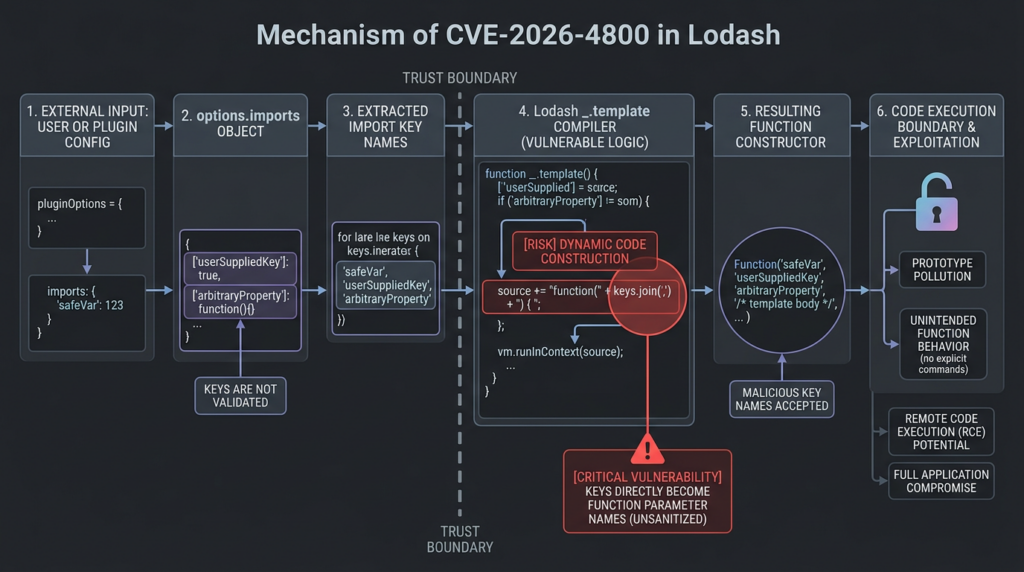
Lodash’s _.template is a mini template compiler. It accepts a string, parses template delimiters, and returns a JavaScript function. That compiled function can interpolate values, escape values, and run JavaScript blocks depending on the delimiter syntax and settings. The important security point is that template compilation constructs executable JavaScript.
Die options.imports feature exists for a legitimate reason. A developer may want a helper function or a library object available inside the compiled template. Lodash documentation gives an example where jQuery is imported into a template under the free variable name jq. In safe usage, jq is a developer-chosen identifier, not user input. (Lodash)
The vulnerability appears when an application treats those import key names as data instead of code-adjacent identifiers. A key in a normal JavaScript object often feels harmless. Developers are used to validating values and forgetting that property names can also cross security boundaries. But in a template compiler, an import key can become part of a generated function’s parameter list. Once that happens, the boundary changes. The key name is no longer just metadata. It has syntax-level meaning.
That is why this bug is classified as CWE-94. MITRE’s CWE-94 guidance describes code injection as a failure to properly control code generation and recommends strict allowlists when software dynamically constructs code. It also warns that simple alphanumeric checks may be insufficient when generated code can reference dangerous behavior. (CWE)
The JavaScript Funktion() constructor is central here. MDN describes it as a way to create functions dynamically and notes that calling it directly has security and performance issues similar to eval; unlike eval, functions created through the constructor run in the global scope rather than the local scope. That global-scope distinction does not make it safe. In a Node.js service, generated code running in the process can still be a serious boundary failure. (MDN-Webdokumente)
The incomplete fix behind the bug
CVE-2026-4800 is easiest to understand if you start with CVE-2021-23337. That older Lodash advisory concerned command injection through the template function. GitHub’s advisory for CVE-2021-23337 says Lodash versions before 4.17.21 were vulnerable via the template function and that 4.17.21 patched lodash und lodash-es. (GitHub)
The original Lodash fix added a regex named reForbiddenIdentifierChars to validate the variable option. The commit message for the older fix says it prevented command injection through _.template's variable option, and the diff shows forbidden characters such as ()=,{}[]/ and whitespace being rejected because they could change the meaning of a function argument definition. (GitHub)
That fix was directionally correct but incomplete. The variable option was not the only user-influenced string that could end up in the generated function boundary. Import key names followed a related path. CVE-2026-4800 closes that gap by validating importsKeys against the same forbidden identifier character pattern and by changing imports merging from assignInWith zu assignWith, so inherited properties are not enumerated into imports. The CVE-2026-4800 patch commit states both changes directly. (GitHub)
| Input path | What it controls | Warum das wichtig ist | Fix history |
|---|---|---|---|
options.variable | The name used to reference the template data object | Can alter generated function parameter syntax if not validated | Addressed by the CVE-2021-23337 fix |
options.imports key names | Free variable names imported into the compiled template | Can become generated function parameters and reach the same Funktion() constructor sink | Addressed by CVE-2026-4800 |
| Inherited import properties | Properties inherited from polluted prototypes | Could be copied into imports when inherited keys are enumerated | CVE-2026-4800 replaces inherited-property merging with own-property merging |
The second patch matters as much as the first. If Lodash only rejected obviously malicious direct key names but continued to copy inherited properties from polluted prototypes, an application with a separate prototype pollution bug could still end up feeding unexpected keys into _.template. The advisory explicitly calls out this inherited-property path: if Objekt.prototyp has already been polluted by another vector, polluted keys can be copied into the imports object and passed to Funktion(). (GitHub)
Affected packages and why transitive dependencies matter
The direct package names are straightforward, but real inventories rarely are. GitHub lists four affected npm packages: lodash, lodash-amd, lodash-esund lodash.template. For the first three, affected versions are >=4.0.0, <=4.17.23; for lodash.template, affected versions are >=4.0.0, <4.18.0. (GitHub)
Most application teams do not write require("lodash.template") by hand. They may still ship it indirectly. Build tools, old frontend plugins, documentation generators, email template systems, report builders, admin console frameworks, low-code tools, and monorepo packages can all drag Lodash into the tree. Some of those uses are build-time only. Others execute in production. That difference matters.
A dependency inventory should answer four separate questions:
| Frage | Warum das wichtig ist |
|---|---|
| Is a vulnerable package present in the dependency tree? | This tells you whether the component exists, not whether the vulnerable path runs |
| Is the vulnerable package bundled into production code? | Dev-only build-time exposure is different from a runtime service exposure |
Ist _.template oder lodash.template reachable? | Many Lodash users never call the template compiler |
Can untrusted input affect options.imports key names or inherited properties? | This is the exploitability question |
Start with package visibility:
npm ls lodash lodash-es lodash-amd lodash.template

pnpm why lodash
pnpm why lodash-es
pnpm why lodash.template

yarn why lodash
yarn why lodash-es
yarn why lodash.template
Then check the lockfile directly, especially in monorepos where package manager output can hide multiple installed versions:
grep -R "\"lodash\"" package-lock.json pnpm-lock.yaml yarn.lock 2>/dev/null
grep -R "\"lodash.template\"" package-lock.json pnpm-lock.yaml yarn.lock 2>/dev/null
grep -R "lodash.template" . --exclude-dir=node_modules --exclude-dir=.git
npm audit is useful but should not be treated as exploit proof. npm’s own documentation says the audit command submits a description of configured dependencies to the registry and asks for a report of known vulnerabilities; if vulnerabilities are found, impact and remediation are calculated, and npm audit fix can apply remediations to the package tree. That is component-level dependency intelligence, not application reachability analysis. (npm Docs)
GitHub Dependabot has the same broad shape. GitHub says Dependabot alerts are generated for vulnerable dependencies identified in the dependency graph, while security updates are triggered for dependencies specified in a manifest or lock file. This is valuable automation, but it still does not answer whether attacker input reaches _.template options in your code. (GitHub-Dokumente)
The real exploit condition
CVE-2026-4800 becomes serious when a real application gives attackers influence over template compilation options. The dangerous pattern looks like this at a high level:
- The application compiles Lodash templates at runtime.
- The application accepts template settings, helper names, plugin configuration, report definitions, tenant customizations, or workflow metadata from an untrusted or semi-trusted source.
- That data is used to build
options.imports. - The key names of
options.imports, not only the values, are attacker-controlled or affected by inherited polluted properties. - The compilation happens in a sensitive JavaScript runtime, often server-side Node.js.
The key distinction is between attacker-controlled template data and attacker-controlled template options. Passing user data into an already compiled template is common. It can still create XSS or output encoding problems depending on the template, but it is not the same as controlling options.imports key names. The CVE-2026-4800 path is narrower and more dangerous: it concerns the code-generation boundary at compile time.
High-risk examples include SaaS products that let tenants define custom report helpers, CMS plugins that register helpers from JSON metadata, workflow tools that compile user-defined notification templates, admin panels that import template settings from uploaded configuration, and server-side rendering services that accept template options through internal APIs. In each case, the vulnerable condition is not “Lodash exists.” It is “untrusted structure controls what identifiers the compiler imports.”
A safer pattern is static imports:
const compiled = _.template(templateText, {
  imports: {
    formatDate,
    escapeLabel,
    currency
  }
});
A risky pattern is dynamic imports built from user-controlled names:
const imports = {};

for (const helper of request.body.helpers) {
  imports[helper.name] = helperRegistry[helper.name];
}

const compiled = _.template(request.body.template, { imports });
The second example is not automatically exploitable in every version and every environment, but it is exactly the kind of pattern that deserves immediate review. The developer may validate helperRegistry[helper.name] as a value and forget that helper.name is also a generated-code identifier.
Safe local PoC, why import key names can become code
The following demonstration is intentionally not a Lodash exploit and does not target any real application. It is a minimal local toy compiler that shows why untrusted key names are dangerous when they are passed into Funktion() as parameter names. It does not execute commands, read files, open sockets, scan targets, bypass authentication, or provide a production payload. Its only side effect is setting a marker on globalThis inside an isolated local process so defenders can understand the compile-time boundary.
Run it only in a throwaway local directory.
// poc-template-import-key-boundary.js
// Safe local toy example: demonstrates why key names are dangerous
// when they are used as generated Function parameters.

function unsafeCompile(imports) {
  const importKeys = Object.keys(imports);
  const importValues = Object.values(imports);

  // Toy sink: real template engines may generate much more complex source.
  // The important point is that importKeys become Function parameter names.
  const fn = Function(...importKeys, "return 'compiled';");

  return fn(...importValues);
}

globalThis.__template_poc_marker__ = false;

const attackerControlledImports = {
  // This is intentionally harmless. It sets a local marker only.
  // It demonstrates default-parameter expression evaluation at function creation/call boundary.
  "safeName = (globalThis.__template_poc_marker__ = true)": 1
};

try {
  unsafeCompile(attackerControlledImports);
} catch (err) {
  console.log("The toy compiler threw:", err.message);
}

console.log("Marker changed:", globalThis.__template_poc_marker__);
Now compare a safer version that rejects key names that are not plain JavaScript identifiers from a strict allowlist perspective:
// safe-template-import-key-validation.js

const IDENTIFIER = /^[A-Za-z_$][0-9A-Za-z_$]*$/;

function validateImportKeys(imports) {
  for (const key of Object.keys(imports)) {
    if (!IDENTIFIER.test(key)) {
      throw new Error(`Invalid import key: ${JSON.stringify(key)}`);
    }
  }
}

function saferCompile(imports) {
  validateImportKeys(imports);

  const importKeys = Object.keys(imports);
  const importValues = Object.values(imports);

  const fn = Function(...importKeys, "return 'compiled';");
  return fn(...importValues);
}

const developerControlledImports = {
  formatDate: value => String(value),
  escapeLabel: value => String(value)
};

console.log(saferCompile(developerControlledImports));

try {
  saferCompile({
    "safeName = (globalThis.__template_poc_marker__ = true)": 1
  });
} catch (err) {
  console.log("Blocked unsafe key:", err.message);
}
This toy example helps defenders understand three things.
First, key names can be code-adjacent. They are not always inert metadata. If an engine uses them as generated function parameters, they need syntax-level validation.
Second, the dangerous moment is compilation or function construction. In CVE-2026-4800, the advisory specifically says arbitrary code can execute at template compilation time when untrusted input reaches options.imports key names. (GitHub)
Third, allowlisting beats filtering after the fact. In your own application code, the safest imports keys are static developer-controlled names. If you must build them dynamically, reject anything that is not an expected identifier from a known registry. Do not try to “sanitize” arbitrary strings into function parameter names.
The prototype pollution side path
CVE-2026-4800 is primarily a code injection issue, but the advisory also calls out prototype pollution as a supporting path. This is not accidental. JavaScript object inheritance means a property can appear on an object even when it is not an own property. If code enumerates inherited properties and treats them as trusted configuration, polluted prototypes can become invisible inputs.
MDN describes prototype pollution as a vulnerability where an attacker can add or modify properties on an object’s prototype, causing malicious values to appear unexpectedly on objects in the application. MDN also frames exploitation in two phases: pollution, followed by original application code accessing polluted properties and behaving differently than intended. (MDN-Webdokumente)
In the Lodash bug, the dangerous merge behavior was that _.template used assignInWith for imports merging. The advisory says that assignInWith enumerates inherited properties via for..in; if Objekt.prototyp has already been polluted by another vector, polluted keys can be copied into the imports object and passed to Funktion(). The fix changed this behavior so only own properties are enumerated. (GitHub)
This means defenders should ask two separate questions:
| Frage | Example evidence | Warum das wichtig ist |
|---|---|---|
Can attackers directly control options.imports key names? | Request JSON, tenant settings, plugin manifest, report schema, workflow config | Direct path to the CVE |
Can attackers pollute prototypes before _.template compiles? | Unsafe merge, path assignment, query parser behavior, vulnerable dependency | Indirect path through inherited properties |
Prototype pollution is often dismissed as “just weird JavaScript behavior.” That is a mistake. Research on Node.js prototype pollution has repeatedly shown that pollution becomes dangerous when a gadget reads the polluted value. The USENIX Security paper “Silent Spring” studied prototype pollution leading to RCE in Node.js and reported universal gadgets in Node.js APIs as well as manually exploited RCE vulnerabilities in applications including NPM CLI, Parse Server, and Rocket.Chat. (USENIX)
CVE-2026-4800 is not identical to those research examples, but the lesson is the same: the dangerous part is the connection between a polluted or attacker-controlled property and a sensitive sink. In this case, the sensitive sink is dynamic function generation during template compilation.
High-risk application patterns
The following table is useful for triage because it separates “dependency exists” from “attacker can reach the bad path.”
| Pattern | Risk level | What to verify |
|---|---|---|
Lodash installed, no use of _.template | Low for this CVE | Confirm no bundled or transitive code calls template |
Build-time use of _.template with static files only | Usually lower | Confirm attackers cannot modify build templates or options |
| Runtime email/report templates with static imports | Mittel | Review whether template text or data creates other risks |
| Runtime templates with user-configurable helper names | Hoch | Check whether helper names become options.imports keys |
| Plugin or theme system registering helper names from JSON | Hoch | Validate manifest schema and own-property handling |
| Workflow automation compiling tenant-provided templates | Hoch | Check tenant boundary, permissions, and server-side runtime impact |
| Known prototype pollution elsewhere in the same process | Hoch | Check whether polluted properties can reach imports merging |
| Admin-only template customization | Context-dependent | Admin-only does not remove risk if admin accounts are phishable or tenant-scoped |
One common mistake is treating admin-only access as a full mitigation. It may reduce likelihood, but it does not erase the bug. Many SaaS systems use “admin” to mean tenant administrator, not infrastructure administrator. A tenant admin who can customize notification templates should not be able to execute code in the provider’s Node.js process. Similarly, an internal-only template builder can become externally reachable if another bug allows account takeover, SSRF into an internal API, poisoned plugin installation, or malicious import of configuration.
Another mistake is looking only for _.template( in first-party source. Build tools or dependencies may call the modular lodash.template package directly. Search for both direct and indirect patterns:
rg "_.template|lodash\.template|templateSettings\.imports|imports\s*:" \
  --glob '!node_modules' \
  --glob '!dist' \
  --glob '!build' \
  .
For packaged applications, inspect generated bundles and server artifacts too. A source repository can look clean while the production image still contains vulnerable transitive code.
find . -name "package-lock.json" -o -name "pnpm-lock.yaml" -o -name "yarn.lock"

find . -type f \( -name "*.js" -o -name "*.mjs" -o -name "*.cjs" \) \
  -not -path "*/node_modules/*" \
  -print0 | xargs -0 grep -n "lodash.template\|_.template\|templateSettings"
In containerized services, check the image, not only the repo:
docker run --rm your-image:tag node -e "try { console.log(require('lodash/package.json').version) } catch (e) { console.error('lodash not found') }"
That command is safe for your own image. Do not run it against systems you do not own or administer.
Dependency detection is not reachability analysis
SCA tools are necessary for CVE-2026-4800, but they are not sufficient. OWASP Dependency-Check describes itself as a software composition analysis tool that identifies project dependencies and checks whether publicly disclosed vulnerabilities are associated with those dependencies. That is the right first layer. It is not the same as proving exploitability in a running application. (OWASP-Stiftung)
For this CVE, a strong triage process has seven stages.
| Bühne | Frage | Beweise |
|---|---|---|
| Inventory | Which Lodash packages and versions are present? | Lockfiles, SBOM, package manager output, container image inspection |
| Runtime role | Is the vulnerable package shipped to production or only used during build? | Bundle analysis, Docker layers, deployment artifact |
| Reachable API | Does any code call _.template oder lodash.template? | Static search, dependency call graph, runtime tracing |
| Dangerous option | Are options.imports key names dynamic? | Code review, schema review, data-flow analysis |
| Attacker control | Can an untrusted user influence those keys? | Request traces, plugin config, tenant settings, admin UI permissions |
| Prototype path | Can inherited polluted properties enter imports? | Prototype pollution review, unsafe merge/path assignment audit |
| Patch proof | Does the patched version reject unsafe imports keys and avoid inherited enumeration? | Unit tests, integration tests, version checks |
A clean SCA report after upgrading is still not the end. You should add regression tests around your own template compilation wrapper, especially if your application supports custom templates or plugins. The patch fixes Lodash’s internal behavior, but your own code may still create unsafe helper registries, use other template engines dangerously, or compile untrusted template source with evaluation enabled.
Code audit checklist for CVE-2026-4800
Start from every call site that compiles a template. You are looking for a source-to-sink path.
The sink is any use of Lodash template compilation:
_.template(templateText, options)
template(templateText, options)
lodashTemplate(templateText, options)
The dangerous option is imports:
_.template(templateText, {
  imports: someObject
});
The source is any data that can cross a trust boundary:
req.body
req.query
req.params
JSON.parse(userControlledString)
tenant.settings
plugin.manifest
theme.config
workflow.step.config
reportDefinition.helpers
adminUploadedConfig
The highest-risk code often hides behind helper abstractions:
function compileTenantTemplate(tenantId, templateText, helperConfig) {
  return _.template(templateText, {
    imports: buildImportsFromConfig(helperConfig)
  });
}
Now inspect buildImportsFromConfig. The safe version maps only known helper names:
const HELPER_REGISTRY = Object.freeze({
  formatDate,
  currency,
  upper,
  lower
});

function buildImportsFromConfig(config) {
  const imports = Object.create(null);

  for (const name of config.enabledHelpers) {
    if (!Object.hasOwn(HELPER_REGISTRY, name)) {
      throw new Error(`Unsupported helper: ${name}`);
    }
    imports[name] = HELPER_REGISTRY[name];
  }

  return imports;
}
The risky version copies arbitrary keys:
function buildImportsFromConfig(config) {
  return {
    ...config.imports
  };
}
The very risky version uses inherited enumeration:
function buildImportsFromConfig(config) {
  const imports = {};

  for (const key in config.imports) {
    imports[key] = helperRegistry[key];
  }

  return imports;
}
That last pattern is dangerous even outside Lodash because for...in walks enumerable inherited properties. If the input object or a prototype upstream is polluted, your application may copy properties the developer never saw in the JSON body.
Use own-property enumeration:
for (const key of Object.keys(config.imports)) {
  // validate key strictly before use
}
Use prototype-less objects when the object is a dictionary:
const imports = Object.create(null);
Verwenden Sie Object.hasOwn for registry checks:
if (!Object.hasOwn(helperRegistry, key)) {
  throw new Error("Unknown helper");
}
Node.js security guidance recommends several related prototype pollution defenses: avoid insecure recursive merges, validate external requests with JSON Schema, create objects without prototypes using Object.create(null), disable Object.prototype.__proto__ with the --disable-proto flag, and check whether a property exists directly on the object rather than on the prototype. (Node.js)
Those controls are not substitutes for upgrading Lodash. They are defense-in-depth controls that reduce the chance that another bug becomes the missing first half of the CVE-2026-4800 chain.
Patch guidance for npm, pnpm, and Yarn
The best fix is to upgrade every affected Lodash package to 4.18.1 or later, test the application, and ship the result through your normal release path.
For npm:
npm install lodash@^4.18.1 lodash-es@^4.18.1 lodash.template@^4.18.1
npm dedupe
npm test
npm audit
If the vulnerable package is transitive and the parent has not released an update, use overrides in paket.json after testing compatibility:
{
  "overrides": {
    "lodash": "^4.18.1",
    "lodash-es": "^4.18.1",
    "lodash.template": "^4.18.1"
  }
}
For pnpm:
{
  "pnpm": {
    "overrides": {
      "lodash": "^4.18.1",
      "lodash-es": "^4.18.1",
      "lodash.template": "^4.18.1"
    }
  }
}
For Yarn classic:
{
  "resolutions": {
    "lodash": "^4.18.1",
    "lodash-es": "^4.18.1",
    "lodash.template": "^4.18.1"
  }
}
After applying overrides or resolutions, verify the actual installed version:
npm ls lodash lodash-es lodash.template
pnpm why lodash
yarn why lodash
Do not assume paket.json tells the whole truth. The lockfile decides what is installed. In workspaces, each package can have its own dependency path. In Docker builds, cached layers can keep old artifacts alive even after the source tree changes. In frontend builds, an old bundled copy may still exist in a CDN artifact even after the server package is upgraded.
A good patch PR for CVE-2026-4800 should include:
| PR item | Warum das wichtig ist |
|---|---|
| Lockfile update | Proves the installed package changed |
| Version verification output | Helps reviewers confirm no old copy remains |
| Template compilation tests | Prevents regressions in custom template features |
| Security regression test | Confirms unsafe import key names are rejected by your wrapper |
| Bundle or image rebuild | Prevents stale production artifacts |
| Release notes | Tells operations what runtime behavior changed |
Short-term mitigations when you cannot upgrade immediately
Sometimes a direct upgrade is blocked by a parent dependency, a frozen vendor product, or a release train. In that case, reduce exploitability while you prepare the real fix.
The official workaround is direct: do not pass untrusted input as key names in options.imports; use only developer-controlled static key names. (GitHub)
Practical mitigations include:
| Milderung | Useful when | Limit |
|---|---|---|
| Static helper registry | You need a small set of known template helpers | Does not fix vulnerable Lodash globally |
| Strict key allowlist | Helper names are configurable but must be known | Must reject unknown names, not sanitize them |
| Remove runtime template compilation | Templates can be precompiled at build time | May require architecture change |
| Disable user-controlled helpers | Templates are needed, imports are not | May break customization features |
JSON schema with additionalProperties: false | Template config enters through JSON APIs | Must be applied before object merging |
| Own-property enumeration | You process object dictionaries | Does not block direct malicious own keys unless validated |
| Prototype-less dictionaries | You create config maps internally | Does not sanitize incoming objects by itself |
Node --disable-proto | You want prototype pollution hardening | Defense-in-depth only; constructor-based paths can remain |
A useful emergency wrapper looks like this:
const ALLOWED_IMPORTS = Object.freeze({
  formatDate,
  currency,
  truncate,
  escapeLabel
});

function safeTemplate(templateText, requestedHelpers = []) {
  const imports = Object.create(null);

  for (const name of requestedHelpers) {
    if (!Object.hasOwn(ALLOWED_IMPORTS, name)) {
      throw new Error(`Unsupported template helper: ${name}`);
    }
    imports[name] = ALLOWED_IMPORTS[name];
  }

  return _.template(templateText, { imports });
}
This wrapper does two important things. It prevents arbitrary key names from entering imports, and it keeps the imports object prototype-less. It does not make old Lodash safe in all circumstances, but it narrows the dangerous path while you schedule the dependency update.
Avoid this kind of “fix”:
function sanitizeKey(key) {
  return key.replace(/[^\w$]/g, "");
}
That approach can create collisions, hide malicious intent, and produce unexpected helper names. Reject invalid names. Do not transform them into new names.
Browser-side and server-side impact are different
If vulnerable _.template usage exists only in a browser bundle, the impact depends heavily on where the template source and options come from, whether an attacker can reach them, and whether Content Security Policy allows string-to-code execution. Lodash’s template compiler depends on dynamic function generation, so strict CSP without unsafe evaluation can block some browser execution paths.
Do not let that browser-side nuance weaken server-side triage. In Node.js, template compilation happens inside the service process. If a reachable server-side code path lets an attacker control imports key names, the risk can become process-level code execution. The practical impact then depends on the process privileges, container isolation, secrets available in environment variables, outbound network access, filesystem permissions, and whether the service can reach internal systems.
For server-side services, containment matters:
| Kontrolle | Why it helps |
|---|---|
| Run as a non-root user | Limits damage after process compromise |
| Drop Linux capabilities | Reduces host-level attack surface |
| Use read-only filesystems where possible | Limits file modification |
| Restrict outbound egress | Reduces secret exfiltration and internal pivoting |
| Store secrets outside long-lived environment variables when possible | Reduces value of process compromise |
| Segment internal services | Prevents one Node.js service from becoming a network beachhead |
| Add runtime alerts for unexpected child processes | Helps catch exploitation of code execution bugs |
These controls do not repair CVE-2026-4800. They reduce blast radius if a code-generation bug becomes exploitable in a real service.
Related Lodash CVEs and why they matter
CVE-2026-4800 sits inside a longer Lodash security history. The value of comparing related CVEs is not to create fear around every Lodash function. It is to show the recurring pattern: flexible object manipulation plus dynamic JavaScript behavior can create unexpected trust-boundary failures.
| CVE | Lodash area | Why it is related | Fix or mitigation |
|---|---|---|---|
| CVE-2021-23337 | _.template variable option | Earlier command injection issue in the same template compiler family | Upgrade to 4.17.21 or later for that older issue |
| CVE-2026-4800 | _.template options.imports key names | Incomplete coverage of the earlier variable fix; imports keys reached the same Funktion() Waschbecken | Upgrade, preferably to 4.18.1 or later |
| CVE-2025-13465 | _.unset und _.omit | Prototype pollution through crafted paths that could delete methods from global prototypes | Patched in 4.17.23 |
| CVE-2026-2950 | _.unset und _.omit | Incomplete prototype pollution fix bypassed through array-wrapped path segments | Patched in 4.18.0, with 4.18.1 preferred operationally |
| CVE-2018-3721 | defaultsDeep, zusammenführen, mergeWith | Prototype pollution through __proto__ in older Lodash versions | Upgrade to 4.17.5 or later |
| CVE-2019-10744 | defaultsDeep | Prototype pollution through constructor payloads in versions below 4.17.12 | Upgrade to 4.17.12 or later |
NVD describes CVE-2018-3721 as a Lodash vulnerability before 4.17.5 involving defaultsDeep, zusammenführenund mergeWith, allowing modification of Objekt’s prototype through __proto__. NVD describes CVE-2019-10744 as prototype pollution in Lodash versions lower than 4.17.12 through defaultsDeep and a constructor payload. (NVD) (NVD)
The 2026 Lodash prototype pollution issues are even more directly connected. CVE-2025-13465 affected Lodash 4.0.0 through 4.17.22 in _.unset und _.omit, allowing crafted paths to delete methods from global prototypes; CVE-2026-2950 then addressed a bypass in versions 4.17.23 and earlier where array-wrapped path segments could bypass the earlier guard. (NVD) (NVD)
The lesson is not “never use utility libraries.” The lesson is that utility libraries often sit close to dangerous language features: merging, path traversal, object construction, template compilation, and dynamic evaluation. Those areas deserve more careful threat modeling than ordinary array or string helpers.
Vendor and product impact
Enterprise products can be affected even when customers never call Lodash directly. IBM published a security bulletin for IBM Maximo Application Suite Visual Inspection stating that the component used lodash-4.17.23.tgz and was vulnerable to CVE-2026-2950 and CVE-2026-4800. The bulletin listed affected Visual Inspection component versions across 8.9.x, 9.0.x, and 9.1.x streams and provided remediated versions 8.9.21, 9.0.19, and 9.1.12. (IBM)
That example is useful because it shows how the vulnerability moves through real software supply chains. A customer may not have a paket.json at all. They may run a vendor appliance, a container image, or an application suite. The correct remediation path in that case is the vendor fix, not manually editing bundled JavaScript.
For commercial software and internal platforms, the response should include:
| Asset type | What to check |
|---|---|
| First-party Node.js services | Package version, reachable _.template, dynamic imports options |
| Frontend applications | Bundled Lodash version, CSP, attacker-controlled template paths |
| Vendor products | Vendor bulletins and fixed product versions |
| Docker images | Installed packages inside image, stale layers, embedded bundles |
| Serverless functions | Deployment artifacts and lockfiles used during build |
| CI/CD tooling | Build-time templates, plugins, generated reports |
| Electron apps | Main-process versus renderer-process Lodash usage |
| Internal low-code tools | User-configurable helpers, workflow templates, plugin manifests |
SBOMs help here, but only if they are generated from the actual artifact. A repository-level SBOM can miss vendored files, generated bundles, or Docker-layer packages. A runtime artifact SBOM is more valuable for product impact.
Logging and detection ideas
There is no universal network signature for CVE-2026-4800. The exploit path is application-specific because the attacker must reach whatever endpoint or configuration channel controls template imports. Detection should focus on the places where your application accepts template configuration, helper names, plugin manifests, or workflow definitions.
Useful signals include:
| Signal | Warum das wichtig ist | False-positive risk |
|---|---|---|
| Unexpected template compilation from user-facing requests | Runtime template compilation should usually be rare and intentional | Medium in low-code products |
| Helper names containing syntax characters | Import names should usually look like identifiers | Niedrig |
Template config keys containing =, parentheses, brackets, braces, slash, comma, or whitespace | These characters are suspicious in function parameter names | Niedrig |
Use of for...in over request-derived objects | Can pull inherited polluted properties | Mittel |
Requests containing __proto__, Konstrukteur, oder Prototyp in nested object keys | Prototype pollution probing | Mittel |
| New child process from a web service | Possible code execution impact | Low to medium depending on app |
| Sudden template compilation errors after malicious-looking config | Failed exploit or probing | Mittel |
A simple application-level guard can log suspicious helper names before rejecting them:
const IDENTIFIER = /^[A-Za-z_$][0-9A-Za-z_$]*$/;

function assertSafeHelperName(name, context) {
  if (!IDENTIFIER.test(name)) {
    logger.warn({
      event: "unsafe_template_helper_name",
      helperName: name,
      tenantId: context.tenantId,
      userId: context.userId,
      route: context.route
    });
    throw new Error("Invalid template helper name");
  }
}
Be careful not to log secrets or full template bodies. Template content may contain customer data, API tokens, or proprietary logic. Log the rejected key name and context needed for investigation, not the entire payload.
For prototype pollution probes, normalize logging around structured keys. Many attacks use nested JSON, query string parsers, or form bodies. Your logs should preserve enough structure for detection without storing sensitive request bodies.
Testing after the patch
A good post-patch test does not stop at “npm audit is green.” It verifies behavior.
Create regression tests for your template wrapper:
import assert from "node:assert/strict";
import _ from "lodash";

const IDENTIFIER = /^[A-Za-z_$][0-9A-Za-z_$]*$/;

function compileWithHelpers(text, helpers) {
  for (const key of Object.keys(helpers)) {
    if (!IDENTIFIER.test(key)) {
      throw new Error("Invalid helper name");
    }
  }

  return _.template(text, { imports: helpers });
}

assert.doesNotThrow(() => {
  const compiled = compileWithHelpers("<%= upper(user) %>", {
    upper: value => String(value).toUpperCase()
  });

  assert.equal(compiled({ user: "fred" }), "FRED");
});

assert.throws(() => {
  compileWithHelpers("hello", {
    "x = globalThis.__bad = true": () => {}
  });
}, /Invalid helper name/);
Then verify that your installed Lodash version is actually new enough:
const lodashVersion = require("lodash/package.json").version;
console.log(lodashVersion);
For modular package users:
const templateVersion = require("lodash.template/package.json").version;
console.log(templateVersion);
In CI, fail the build if vulnerable versions remain:
node - <<'NODE'
const semver = require('semver');

function check(pkg, min) {
  try {
    const version = require(`${pkg}/package.json`).version;
    if (semver.lt(version, min)) {
      throw new Error(`${pkg}@${version} is below ${min}`);
    }
    console.log(`${pkg}@${version} OK`);
  } catch (err) {
    if (err.code === 'MODULE_NOT_FOUND') {
      console.log(`${pkg} not installed`);
      return;
    }
    throw err;
  }
}

check('lodash', '4.18.1');
check('lodash-es', '4.18.1');
check('lodash.template', '4.18.1');
NODE
If you do not want to add semver just for CI, parse lockfiles with your SCA tool or package manager instead. The main point is to make the version check repeatable.
Safe validation workflow for security teams
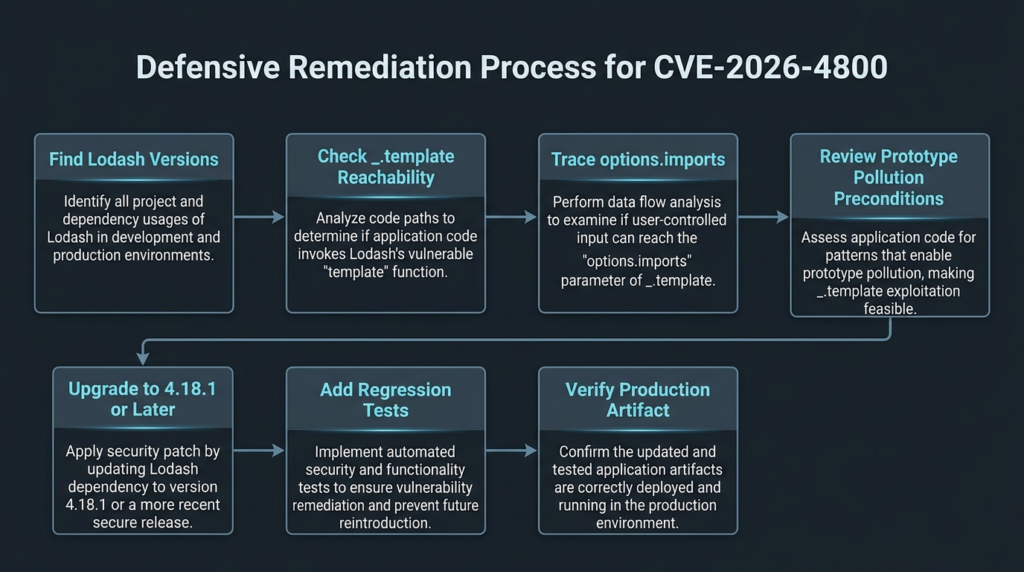
Security teams should avoid jumping from advisory text to exploit attempts. A disciplined workflow is safer and more useful.
First, confirm component presence. Use package manager output, lockfiles, SBOMs, and deployed artifacts. Record exact package names and versions.
Second, determine runtime exposure. Is the package in production, or only in a build step? Does the affected code run in a server, browser, CLI, CI job, or desktop app?
Third, identify _.template call sites. If no call site exists in your code, check transitive code and generated artifacts. Do not assume absence from first-party source is absence from runtime.
Fourth, trace imports construction. If imports are always static developer-controlled keys, the CVE is less likely to be exploitable in your application. If imports are built from request data, tenant settings, plugin metadata, or uploaded JSON, prioritize remediation.
Fifth, check prototype pollution preconditions. Look for unsafe recursive merge, path assignment, parsers that allow prototype keys, and known vulnerable dependencies. CVE-2026-4800 becomes more interesting when another bug can pollute prototypes before template compilation.
Sixth, patch and retest. Upgrade to 4.18.1 or later, remove unsafe dynamic imports, and add regression tests.
Seventh, preserve evidence. For internal risk acceptance or customer communication, record the package version, code path decision, patch commit, test result, and deployment artifact. Evidence matters because this CVE’s severity depends on reachability.
For authorized testing of live applications, AI-assisted workflows can help convert broad dependency alerts into scoped validation tasks, but they must remain bounded by permission, environment safety, and evidence quality. A platform such as Penligent’s AI pentesting workflow emphasizes attack surface mapping, independent validation, and evidence-backed reporting for authorized black-box testing, which is the right kind of framing for CVE triage: prove the reachable condition, avoid unbounded exploitation, and keep a reproducible record of what was verified. (Sträflich)
Common mistakes during remediation
The first mistake is downgrading to an older vulnerable version because 4.18.0 caused a build problem. Some teams hit the 4.18.0 ReferenceError issue and pinned back to 4.17.x. That can restore functionality while reopening the security issue. The better path is to test 4.18.1 or later, because 4.18.1 specifically fixed the modular build issue. (GitHub)
The second mistake is patching only direct dependencies. A monorepo may have one package on 4.18.1 and another still resolving 4.17.23. A single old copy can remain in a nested dependency path.
The third mistake is assuming frontend-only exposure is harmless. It may be lower impact than server-side Node.js, but browser template compilation can still matter in admin consoles, browser extensions, Electron renderers, or applications with weak CSP.
The fourth mistake is focusing only on template strings. In CVE-2026-4800, the key issue is not merely whether users can control template text. It is whether users can control import key names or polluted inherited properties that become import key names.
The fifth mistake is relying on blacklist sanitization. A validator for generated-code identifiers should be strict and boring. Allow known helper names. Reject everything else.
The sixth mistake is ignoring vendor products. If you run packaged software that embeds Lodash, wait for and apply the vendor’s fixed release. Do not assume you can safely replace a bundled JavaScript file unless the vendor explicitly supports that path.
FAQ
Is CVE-2026-4800 remotely exploitable in every Lodash application?
- No. The vulnerable package must be present, but exploitability also depends on whether
_.templateoderlodash.templateis reachable. - The highest-risk condition is attacker-controlled data reaching
options.importskey names during template compilation. - A second important condition is whether prototype pollution elsewhere can introduce inherited properties that flow into imports.
- Applications that use Lodash only for ordinary collection, array, or object helpers may still need to patch, but the CVE-specific exploit path may not be reachable.
- Server-side runtime exposure is more serious than purely build-time exposure.
Should I upgrade to Lodash 4.18.0 or 4.18.1?
- The official GitHub advisory lists 4.18.0 as the patched version for CVE-2026-4800.
- Lodash 4.18.1 fixed a
ReferenceErrorissue in modular builds involvingtemplateundfromPairs. - Snyk recommends 4.18.1 or higher for both
lodashundlodash.template. - In practice, upgrade to 4.18.1 or later unless your environment has a specific, tested reason to do otherwise.
- Avoid pinning back to 4.17.x as a workaround for 4.18.0 breakage, because that can preserve the vulnerable code path.
Does npm audit prove my app is exploitable?
- No.
npm auditidentifies known vulnerable dependencies in your dependency tree. - It does not prove that your application calls the affected function.
- It does not prove that untrusted input reaches
options.imports. - Treat audit output as the start of triage, not the end.
- Pair SCA results with code search, runtime artifact inspection, and source-to-sink review.
What does options.imports do in _.template?
- It makes selected values available inside the compiled Lodash template as free variables.
- Safe usage uses static developer-controlled names such as
formatDateodercurrency. - Unsafe usage lets users, tenants, plugins, uploaded config, or workflow definitions choose import key names.
- CVE-2026-4800 exists because unsafe import key names could reach the generated
Funktion()constructor boundary. - If you do not need imports, remove them from runtime template compilation.
How is CVE-2026-4800 different from prototype pollution?
- CVE-2026-4800 is classified as code injection because unsafe import key names can affect generated code.
- Prototype pollution is a related secondary path when polluted inherited properties are copied into imports.
- A direct exploit path can exist without prototype pollution if attackers control imports key names.
- A prototype pollution bug elsewhere can make CVE-2026-4800 easier to reach if Lodash copies inherited keys.
- The patch addresses both by validating import keys and changing imports merging to own-property behavior.
Can CSP or sandboxing fix CVE-2026-4800?
- CSP can reduce some browser-side string execution paths, especially when unsafe evaluation is not allowed.
- CSP does not fix server-side Node.js template compilation.
- Sandboxing can reduce blast radius, but it should not be treated as the primary patch.
- Upgrade Lodash and remove unsafe dynamic imports first.
- Use process isolation, non-root execution, egress controls, and secret minimization as defense-in-depth.
What should I verify after patching?
- Confirm no installed
lodash,lodash-es,lodash-amd, oderlodash.templateversion remains in the vulnerable range. - Confirm production artifacts, containers, and bundles were rebuilt.
- Confirm
_.templatecall sites do not use untrusted imports key names. - Add regression tests that reject unsafe helper names.
- Review nearby prototype pollution risks, especially unsafe merges and
for...inover request-derived objects. - Document the patch, test evidence, and deployment version for future audits.
Abschließende Bewertung
CVE-2026-4800 deserves fast remediation, but it also deserves precise triage. The vulnerable primitive is narrow enough that dependency presence alone does not prove exploitability, yet dangerous enough that a reachable server-side path can become process-level code execution. The right response is not panic and not dismissal. Upgrade to 4.18.1 or later, verify every deployed artifact, find every _.template call site, reject dynamic imports key names, and treat prototype pollution in the same process as a serious supporting condition.
The most important engineering lesson is broader than Lodash. Whenever application data becomes generated code, identifiers are not just strings. Object keys are not just metadata. Template options are not just configuration. They are part of the execution boundary, and they need the same level of control as any other code-generation input.

 German
  English
  French
  Spanish
  Portuguese
  Japanese
  Korean
  Hindi
Hindi  Arabic
  Turkish
  Hebrew