
CVE-2026-55040 is a critical authentication bypass in Microsoft SharePoint Server that can allow a remote, unauthenticated attacker to act as a selected SharePoint user. If the attacker identifies an account with administrative rights, the same weakness can expose administrator-level SharePoint operations without the attacker first obtaining that user’s password or session.
Microsoft describes the vulnerability as weak authentication that allows an unauthorized attacker to bypass a security feature over a network. Rapid7 Labs, which discovered and privately reported the issue, provides the more specific technical context: the flaw involves several problems in SharePoint’s JSON Web Token validation pipeline and can be used to assume the identity of a SharePoint site user or administrator. (Schnell7)
The vulnerability received a CVSS v3.1 score of 9.1 Critical with the vector:
CVSS:3.1/AV:N/AC:L/PR:N/UI:N/S:U/C:H/I:H/A:N
That vector reflects a network-reachable, low-complexity attack that requires no prior privileges and no user interaction. Microsoft assigned the issue to CWE-1390, Weak Authentication. The direct base-score impact is high for confidentiality and integrity, while availability is marked as none. That does not mean an attacker could never disrupt a SharePoint deployment. It means the authentication bypass by itself was scored without direct availability impact; a later exploit stage could produce a different result. (NVD)
Rapid7 has already demonstrated that CVE-2026-55040 can be chained with a second SharePoint vulnerability to achieve unauthenticated remote code execution. The second vulnerability had not been publicly described or patched when CVE-2026-55040 was disclosed on July 14, 2026. Microsoft is expected to address that RCE component in its August 2026 update cycle. Installing the July fix for CVE-2026-55040 breaks Rapid7’s demonstrated chain before the second fix arrives. (Schnell7)
That chain is the clearest reason to treat CVE-2026-55040 as an urgent remediation item. An authentication bypass does not need to execute code by itself to become the decisive stage of an intrusion. Its strategic value is that it converts an authenticated attack surface into an unauthenticated one.
CVE-2026-55040 at a Glance
| Feld | Confirmed information |
|---|---|
| CVE | CVE-2026-55040 |
| Affected platform | Microsoft SharePoint Server |
| Klasse der Anfälligkeit | Security feature bypass through weak authentication |
| Technical area | JWT token validation pipeline |
| CWE | CWE-1390, Weak Authentication |
| CVSS v3.1 | 9.1 Critical |
| Angriffsvektor | Netzwerk |
| Attack complexity | Niedrig |
| Privileges required | Keine |
| User interaction | Keine |
| Direct result | Impersonation of a selected SharePoint site user |
| Administrator impact | An attacker may act as a SharePoint administrator if the selected identity has that role |
| Identity prerequisite | The attacker must know or identify the target user, such as by SID or UPN |
| Public full exploit details | Not available at the time of disclosure |
| Confirmed active exploitation | No, as of July 15, 2026 |
| Microsoft exploitability assessment | Exploitation more likely |
| Patch release | July 14, 2026 |
| Researcher | Stephen Fewer of Rapid7 Labs |
| Known chain | Authentication bypass plus a separate, not-yet-public RCE vulnerability |
| Expected second-stage patch | August 2026 update cycle |
CISA has explicitly distinguished CVE-2026-55040 from the SharePoint vulnerabilities that were already under active exploitation in July 2026. Its public communication identified CVE-2026-32201, CVE-2026-45659, and CVE-2026-56164 as exploited, while stating that CVE-2026-55040 and CVE-2026-58644 posed potential risk if left unpatched but were not known to have been exploited. (LinkedIn)
“No known exploitation” should not be translated into “safe to defer.” Microsoft assessed exploitation of CVE-2026-55040 as more likely, the vulnerability requires no authentication, and the discoverer has already proven that it can serve as the first stage of an unauthenticated RCE chain. The relevant question is not whether mass exploitation has been publicly confirmed. It is whether an exposed, unpatched server provides an unnecessary path across a critical identity boundary.
Affected SharePoint Versions and Fixed Builds
The published CVE data identifies three affected SharePoint Server product lines:
| Produkt | Affected builds | Fixed build or later | July 2026 update |
|---|---|---|---|
| Microsoft SharePoint Enterprise Server 2016 | Earlier than 16.0.5561.1001 | 16.0.5561.1001 | KB5002891, with KB5002892 included in the full July servicing set |
| Microsoft SharePoint Server 2019 | Earlier than 16.0.10417.20175 | 16.0.10417.20175 | KB5002883, with KB5002885 included in the full July servicing set |
| Microsoft SharePoint Server Subscription Edition | Earlier than 16.0.19725.20434 | 16.0.19725.20434 | KB5002882 |
These thresholds come from the Microsoft-supplied CVE record. Microsoft’s SharePoint update history maps them to the July 14, 2026 security updates. (NVD)
For SharePoint Server 2019, Microsoft lists KB5002883 as the language-independent STS update and KB5002885 as the language-dependent WSSLOC update. Microsoft’s update guidance states that both update types are required to fully update the farm, including English-only installations, although a language-dependent package is not necessarily released every month. The CVE itself is listed in the KB5002883 security update. (Microsoft Lernen)
SharePoint Server 2016 follows the same broader servicing model. KB5002891 contains the SharePoint security fixes that include CVE-2026-55040, while KB5002892 is the corresponding language-dependent package in the July update set. Administrators should validate both the installed package state and farm-wide configuration status rather than assuming that one successful installer run proves complete remediation. (Microsoft Lernen)
For SharePoint Server Subscription Edition, Microsoft identifies KB5002882 and build 16.0.19725.20434 as the July 2026 update that addresses CVE-2026-55040 and numerous other SharePoint vulnerabilities. (Microsoft Support)
The public CVE record lists only the on-premises SharePoint Server editions. SharePoint Online is not included in the affected product list. Defenders should still avoid making a conclusion from a product name alone: verify whether an organization operates any on-premises SharePoint farms, hybrid components, reverse proxies, legacy collaboration servers, or separately managed SharePoint environments that may not be visible in the Microsoft 365 administration inventory. (NVD)
The Support Deadline Makes the Patch More Important
July 14, 2026 was not only the disclosure and patch date for CVE-2026-55040. It was also the extended support end date for SharePoint Server 2016 and SharePoint Server 2019.
Microsoft’s lifecycle records show that both products reached the end of extended support on that date. SharePoint Server Subscription Edition remains the supported on-premises branch for organizations that are not moving to SharePoint Online or another platform. (Microsoft Lernen)
That creates two separate obligations for organizations still running SharePoint 2016 or 2019:
- Install and verify the final July security updates, including the fix for CVE-2026-55040.
- Move the workload to a supported platform rather than treating the July patch as a permanent risk solution.
A server does not stop working when support ends. It stops receiving the normal stream of security fixes, non-security updates, assisted support, and technical maintenance that defenders rely on when the next vulnerability is discovered. Microsoft’s lifecycle guidance states that products reaching end of support no longer receive new security and non-security updates under the standard support lifecycle. (Microsoft Lernen)
A vulnerable SharePoint farm is difficult enough to operate while fixes are available. An unsupported, internet-reachable collaboration platform with privileged identity integrations is a much harder risk to defend.
What SharePoint JWT Authentication Is Protecting
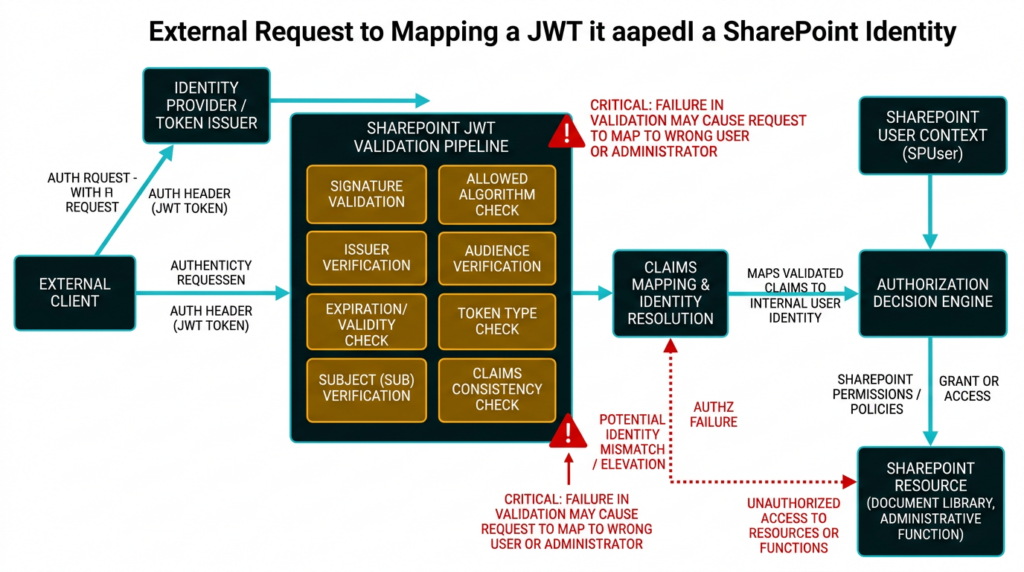
The risk becomes easier to understand when authentication is separated into three questions:
- Who issued the token?
- For which service and security context was it issued?
- Which identity and permissions should the application derive from it?
SharePoint Server uses claims-based authentication. Microsoft documents support for Windows, forms-based, SAML, and OpenID Connect authentication modes, with SharePoint’s Security Token Service producing claims-based security tokens that represent authenticated identities. (Microsoft Lernen)
SharePoint also supports server-to-server, application, hybrid, and add-in trust relationships in which signed tokens can represent applications, users, or delegated combinations of the two. Microsoft’s documentation for high-trust SharePoint add-ins, for example, describes an actor token that identifies an add-in, delegates user authentication and authorization, and is signed with an X.509 certificate trusted by a SharePoint farm administrator. (Microsoft Lernen)
A JWT typically contains three conceptual parts:
header.payload.signature
The header identifies properties such as the token type and signing algorithm. The payload contains claims. The signature protects the encoded header and payload from unauthorized modification, assuming the verifier uses the correct algorithm and key.
Security does not end with signature verification. A token can be cryptographically valid and still be invalid for the receiving application.
Common claims include:
| Claim | Security meaning |
|---|---|
Ausgabe | The issuer that created the token |
unter | The subject or represented identity |
aud | The intended recipient or audience |
exp | The expiration time |
nbf | The time before which the token must not be accepted |
iat | The token issuance time |
| Role or permission claims | The application-level privileges associated with the identity |
| Application or actor claims | The calling application or delegated service identity |
RFC 7519 states that the aud claim identifies the intended recipients of a JWT. When an audience claim is present, a service processing the token must identify itself as an intended audience or reject the token. (IETF Datatracker)
RFC 8725, the JWT Best Current Practices document, goes further. It calls for explicit algorithm verification, complete cryptographic validation, issuer and subject validation, audience validation, and mutually exclusive validation rules for different types of JWTs. It also describes substitution attacks and cross-JWT confusion, in which a token valid in one context is accepted in another context where it should not carry authority. (RFC-Editor)
Those standards explain why a “JWT validation pipeline” is more than a single signature check. A secure pipeline must establish that the token:
- Uses an explicitly permitted algorithm.
- Has a valid signature under the correct trusted key.
- Comes from an expected issuer.
- Is intended for the receiving SharePoint resource or application.
- Is within its valid time window.
- Represents a valid subject in the expected identity namespace.
- Is the correct token type for the code path processing it.
- Has claims that are internally consistent.
- Has not crossed from one trust model into another without authorization.
- Maps to permissions only after all preceding checks succeed.
Rapid7 has not said which exact checks failed in CVE-2026-55040. Its current disclosure says only that several issues exist in the JWT token validation pipeline. It would therefore be inaccurate to label the vulnerability solely as an audience-check failure, an algorithm-confusion bug, an issuer-validation flaw, a signature bypass, or a token-type confusion issue. Any of those descriptions would go beyond the public evidence. (Schnell7)
The safe conclusion is narrower: SharePoint accepted attacker-controlled authentication material through a flawed token validation path and consequently associated the request with an identity chosen by the attacker.
What Is Confirmed and What Remains Private
Rapid7 has delayed the full technical analysis and proof-of-concept details for coordinated disclosure reasons. The company stated that it intended to publish complete technical details within 30 days of the July 14 disclosure, subject to earlier publication if exploitation or third-party disclosure changed the risk. (Schnell7)
That leaves a significant difference between what defenders can state confidently and what remains unknown.
| Confirmed | Not publicly confirmed |
|---|---|
| The vulnerability affects the JWT token validation pipeline | The precise vulnerable endpoint |
| Several validation issues are involved | The exact JWT header values |
| Exploitation is remote and unauthenticated | The exact claim combination required |
| The attacker must know the intended user identity | Whether a specific authentication provider must be enabled |
| A SID or UPN can identify the target user | Whether all identity formats work in every configuration |
| A site user or administrator can be impersonated | The exact signature, certificate, issuer, or audience weakness |
| The bypass can be chained with another RCE vulnerability | The identity of the second CVE, if one has been assigned |
| The July patch breaks the demonstrated chain | The exact code changes made by Microsoft |
| The RCE component is expected to be patched in August | Reliable CVE-specific network signatures |
| Rapid7 developed an internal PoC | A safe, vendor-approved public production test |
The distinction matters because newly disclosed vulnerabilities attract a large amount of speculative content. A screenshot of an internal research tool does not make its requests, token structure, or enumeration logic public. A reference to SID enumeration does not prove that every SharePoint deployment exposes an identical enumeration path. A Microsoft property name containing the word “audience” does not prove that audience validation is the sole root cause.
Until detailed research is available, defenders should prioritize patch verification, exposure reduction, identity anomaly hunting, and post-remediation validation over exploit reproduction.
How Administrator Impersonation Changes the Risk
Rapid7 states that a successful attacker can assume the identity of any SharePoint site user when the attacker knows the identity to target. The target can be represented through information such as an Active Directory Security Identifier or User Principal Name. A UPN commonly resembles an email address, making it substantially easier to obtain than a password or session secret in many organizations. (Schnell7)
The attacker’s effective permissions remain tied to the impersonated identity. That creates a range of outcomes rather than one universal result.
| Impersonated identity | Potential SharePoint impact |
|---|---|
| Read-only user | Access to documents, lists, metadata, search results, or internal information visible to that user |
| Contributor or member | Creation, modification, upload, deletion, or workflow interaction within granted sites |
| Site owner | Permission changes, membership administration, content control, and configuration changes within the site |
| Site collection administrator | Broad control over a site collection, including content and user access |
| Service or integration account | Access to automated workflows, application integrations, APIs, or cross-system data paths associated with that account |
| Farm administrator | High-impact SharePoint farm administration, subject to how the environment separates SharePoint and operating-system privileges |
| Windows or domain administrator | Not granted automatically by this CVE; these are separate privilege boundaries |
The word “administrator” requires care. A SharePoint site administrator is not automatically a Windows local administrator, SQL Server administrator, domain administrator, or SYSTEM. Different SharePoint administrative roles also carry different scopes.
That distinction does not make administrator impersonation minor. SharePoint often stores internal documents, legal records, technical documentation, credentials embedded in files, operational procedures, incident reports, source packages, customer data, and business workflows. A SharePoint administrator may also control permissions, trusted applications, content types, site features, automation, or custom components.
Even when the initial identity has no operating-system privileges, an authenticated SharePoint session can expose a much larger attack surface than an anonymous request. Internal APIs, upload functions, administrative pages, custom Web Parts, workflow endpoints, legacy components, and server-side processing paths may all be gated by authentication rather than by a strong privilege boundary.
This is why authentication bypasses frequently serve as exploit-chain multipliers. They do not need to contain the final memory corruption, deserialization bug, command injection, or unsafe file operation. They only need to provide the identity required to reach it.
The Identity Prerequisite Is a Constraint, Not a Strong Mitigation
CVE-2026-55040 does not appear to provide a magical “become administrator” button without context. Rapid7 says the attacker must know in advance which user to impersonate.
That condition should be included in every accurate risk assessment. It should not be overstated as a meaningful defense.
UPNs are frequently exposed through:
- Corporate email addresses.
- Public staff directories.
- Meeting invitations.
- Document metadata.
- Previous data breaches.
- Help-desk systems.
- Microsoft 365 collaboration.
- Source repositories.
- Public presentations.
- Predictable account naming conventions.
SIDs are less human-readable, but identity discovery and SID enumeration are established parts of Windows and Active Directory reconnaissance. Rapid7’s internal proof of concept reportedly discovered potential SharePoint users through SID enumeration before using the authentication bypass to assume a selected identity. The company did not publish enough implementation detail to reproduce that process safely, but the result demonstrates that the identity prerequisite did not prevent its researchers from reaching a site administrator account in the test environment. (Schnell7)
A useful defensive question is therefore not, “Would an attacker already know our administrator’s SID?”
It is:
Could an attacker identify at least one valuable SharePoint user through public information, prior compromise, predictable naming, directory exposure, application behavior, or ordinary enterprise reconnaissance?
For many organizations, the answer is yes.
A Defensive Model of the Attack Path
Full exploit mechanics are not public, but the high-level trust transition is sufficiently clear for threat modeling.
Internet or reachable network
        |
        v
Unpatched SharePoint Server
        |
        v
Attacker supplies authentication material to a vulnerable JWT validation path
        |
        v
SharePoint incorrectly accepts the token context
        |
        v
Request is associated with a selected SharePoint identity
        |
        v
Attacker exercises that identity's SharePoint permissions
        |
        +--------------------------+
        |                          |
        v                          v
Data access or permission       Authenticated attack
manipulation                    surface becomes reachable
                                   |
                                   v
                        Separate vulnerability may
                        produce code execution
The defensive model has several prerequisites:
| Zustand | Required for CVE-2026-55040 | Defensive significance |
|---|---|---|
| Network access to SharePoint | Ja | Restricting reachability reduces who can attempt exploitation |
| Affected SharePoint build | Ja | Version and patch verification are decisive |
| Prior authenticated account | Nein | Anonymous attackers may reach the vulnerable path |
| User interaction | Nein | Phishing or document opening is not required |
| Knowledge of a target identity | Ja | Identity exposure and naming conventions matter |
| Administrator identity | Only for administrator-level impact | Any useful user may still expose sensitive data or authenticated functions |
| Separate RCE vulnerability | Only for the demonstrated RCE chain | The authentication bypass remains serious without it |
| Public exploit code | Not currently required to justify patching | Internal research has already proven practical exploitability |
This model deliberately omits endpoints, token fields, payloads, and request syntax. Those details are not public and are unnecessary for deciding whether an affected server must be patched.
Why the Unpatched RCE Component Matters Now
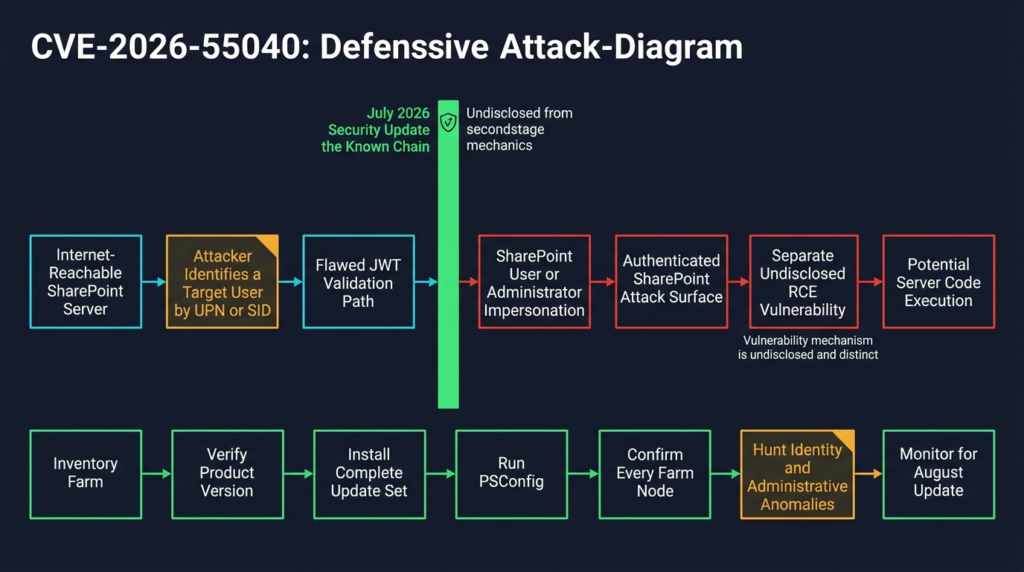
Rapid7 privately reported a two-vulnerability SharePoint chain to Microsoft on May 18, 2026. Microsoft confirmed the findings on May 20 and planned to address the authentication bypass in July and the RCE component in August. The coordinated timeline allowed Microsoft to break the chain in two stages rather than waiting until both fixes were ready. (Schnell7)
That creates an unusual but defensible patch state:
- The publicly disclosed authentication bypass is fixed.
- The second RCE vulnerability remains unpatched and undisclosed.
- The complete chain no longer works against a correctly patched server because its first stage has been removed.
- An unpatched server still exposes the stage that turns the undisclosed authenticated RCE path into an unauthenticated path.
This is not a reason to panic about an unknowable zero-day. It is a reason to install the available patch that already removes the required entry condition.
It would be inaccurate to identify the second vulnerability as CVE-2026-45659, CVE-2026-50522, CVE-2026-58644, or another July SharePoint issue unless Rapid7 or Microsoft makes that association. Multiple SharePoint RCE vulnerabilities can exist in the same product and update period without being the same bug or chain.
The practical conclusion does not depend on knowing the second CVE. Rapid7 has proven that the bypass reaches a code-execution-capable authenticated surface. Defenders can close that route now.
Safe Local PoC, Understanding JWT Context Validation
The following demonstration is not a SharePoint exploit and cannot test CVE-2026-55040. It does not contain a Microsoft endpoint, SharePoint request, SID-enumeration routine, production payload, real certificate, or bypass technique.
It models one general JWT validation failure: a service verifies that a token was signed by a trusted issuer but fails to verify that the token was issued for that service.
This example helps defenders understand why a valid signature is not enough. It must not be interpreted as a claim that CVE-2026-55040 is specifically an audience-validation bug.
Lab boundary
Run the example only on a local development machine. It creates two imaginary services:
reporting-servicedocument-service
A token intended for the reporting service carries a fictional administrator role. The intentionally weak document-service validator checks the signature but disables audience validation. The secure validator requires the correct issuer, audience, and algorithm.
Install the local dependency:
python3 -m venv jwt-lab
source jwt-lab/bin/activate
python3 -m pip install "PyJWT==2.10.1"
Save the following as jwt_context_demo.py:
from __future__ import annotations

import datetime as dt
from typing import Any

import jwt
from jwt import InvalidTokenError


LAB_SECRET = "local-demo-secret-not-for-production"
TRUSTED_ISSUER = "https://identity.lab.local"
EXPECTED_AUDIENCE = "document-service"


def issue_reporting_token() -> str:
    """
    Create a token for an imaginary reporting service.

    The administrator role is deliberately fictional. No SharePoint,
    Microsoft, Active Directory, or production identity is involved.
    """
    now = dt.datetime.now(dt.timezone.utc)

    claims: dict[str, Any] = {
        "iss": TRUSTED_ISSUER,
        "sub": "alice@example.invalid",
        "aud": "reporting-service",
        "role": "administrator",
        "iat": now,
        "nbf": now,
        "exp": now + dt.timedelta(minutes=5),
    }

    return jwt.encode(claims, LAB_SECRET, algorithm="HS256")


def vulnerable_document_service_validator(token: str) -> dict[str, Any]:
    """
    Intentionally unsafe toy validator.

    It verifies the signature and time claims but does not verify that
    document-service is an intended audience.
    """
    return jwt.decode(
        token,
        LAB_SECRET,
        algorithms=["HS256"],
        issuer=TRUSTED_ISSUER,
        options={"verify_aud": False},
    )


def secure_document_service_validator(token: str) -> dict[str, Any]:
    """
    Safer toy validator.

    It fixes the allowed algorithm and verifies issuer and audience.
    """
    return jwt.decode(
        token,
        LAB_SECRET,
        algorithms=["HS256"],
        issuer=TRUSTED_ISSUER,
        audience=EXPECTED_AUDIENCE,
        options={
            "require": ["exp", "iat", "nbf", "iss", "sub", "aud"],
        },
    )


def main() -> None:
    token = issue_reporting_token()

    print("Token was issued for: reporting-service")
    print()

    weak_result = vulnerable_document_service_validator(token)
    print("[UNSAFE] document-service accepted the token")
    print(f"[UNSAFE] subject: {weak_result['sub']}")
    print(f"[UNSAFE] role: {weak_result['role']}")
    print()

    try:
        secure_document_service_validator(token)
    except InvalidTokenError as exc:
        print("[SAFE] document-service rejected the token")
        print(f"[SAFE] reason: {exc}")


if __name__ == "__main__":
    main()
Run it:
python3 jwt_context_demo.py
The expected result is conceptually similar to:
Token was issued for: reporting-service

[UNSAFE] document-service accepted the token
[UNSAFE] subject: alice@example.invalid
[UNSAFE] role: administrator

[SAFE] document-service rejected the token
[SAFE] reason: Audience doesn't match
Nothing in the token was cryptographically forged. The signature was valid. The issuer was trusted. The expiration time was valid.
The security failure occurred because the weak service accepted a token whose authority belonged to another context. It then treated the token’s subject and role claims as locally meaningful.
That is the broader lesson of JWT pipeline vulnerabilities: cryptographic validity and application authorization are related but different properties.
A production validator should normally enforce at least:
Allowed algorithm
Trusted key
Expected issuer
Expected audience
Expected token type
Required claims
Time validity
Subject validity
Application-specific authorization
RFC 8725 recommends explicit algorithm verification, validation of all cryptographic operations, issuer and subject validation, audience validation, and separate validation rules for tokens used in different contexts. (RFC-Editor)
The real CVE-2026-55040 reportedly involves several issues rather than the single omitted check shown here. The example is intentionally incomplete because its purpose is education, not reproduction.
How to Verify Exposure Without Sending an Exploit
The safest and most reliable first test is version-based verification.
Step 1, Identify every SharePoint farm
Do not limit the inventory to systems named “SharePoint.” Search configuration-management databases, DNS, load balancers, TLS certificate inventories, reverse proxies, cloud inventories, vulnerability scanners, backup systems, Windows Server inventories, and application-owner records.
Look for:
- SharePoint Server 2016.
- SharePoint Server 2019.
- SharePoint Server Subscription Edition.
- Internet-facing Web Front Ends.
- Internal-only farms.
- Disaster-recovery farms.
- Staging and test environments.
- Legacy farms retained for archives.
- Hybrid SharePoint infrastructure.
- Servers behind third-party publishing products.
- Farm nodes that are temporarily offline and may later return.
An offline node that misses the update can reintroduce an inconsistent or vulnerable component when it rejoins the farm.
Step 2, Query the farm build
From the SharePoint Management Shell:
$ErrorActionPreference = "Stop"

$farm = Get-SPFarm

[pscustomobject]@{
    FarmName     = $farm.Name
    BuildVersion = $farm.BuildVersion.ToString()
}
You can also enumerate SharePoint servers:
Get-SPServer |
    Select-Object Address, Role, Status |
    Sort-Object Address
And list Web applications:
Get-SPWebApplication |
    Select-Object DisplayName, Url, ApplicationPool |
    Sort-Object Url
These commands are useful for inventory and evidence collection. They are not sufficient by themselves to prove complete patch installation.
SharePoint patching can involve language-independent and language-dependent components, binaries on multiple servers, and configuration-database upgrades. Microsoft’s update history explicitly states that both STS and WSSLOC packages are required when both are published. (Microsoft Lernen)
Step 3, Compare against the fixed threshold
A simple local comparison can flag obviously old farm build values:
$fixedBuilds = @{
    "SharePoint 2016" = [version]"16.0.5561.1001"
    "SharePoint 2019" = [version]"16.0.10417.20175"
    "Subscription Edition" = [version]"16.0.19725.20434"
}

$observed = (Get-SPFarm).BuildVersion

$fixedBuilds.GetEnumerator() |
    ForEach-Object {
        [pscustomobject]@{
            ProductReference = $_.Key
            ObservedBuild    = $observed
            FixedThreshold   = $_.Value
            MeetsThreshold   = ($observed -ge $_.Value)
        }
    }
This script intentionally does not try to auto-detect the installed SharePoint edition. Automatic edition detection can be unreliable across custom deployments and should be validated through installation records, licensing information, Central Administration, and asset ownership data.
A “true” result is a useful indicator, not final proof.
Step 4, Check product and patch installation status
Use SharePoint Central Administration to review the product and patch installation status for every farm server. Confirm that no server is missing a required component and that the expected July packages appear consistently.
A farm can contain:
- Patched Web Front Ends.
- An unpatched application server.
- A server that received the binary update but did not complete configuration.
- A failed or pending update.
- Language components at a different level.
- A node that was powered off during deployment.
Any of those conditions can invalidate a simple “the farm is patched” statement.
Step 5, Complete PSConfig
Installing the package updates binaries. SharePoint’s configuration process must also complete successfully.
Use the organization’s established SharePoint maintenance procedure and Microsoft’s supported update instructions. Record:
- Package installation results.
- Reboot status.
- PSConfig execution.
- PSConfig exit status.
- Upgrade logs.
- Central Administration patch status.
- Farm health.
- Service health.
- Content database upgrade state.
- Authentication and workflow regression tests.
Microsoft’s software-update guidance treats binary installation and farm upgrade as parts of the SharePoint update process, not interchangeable steps. (Microsoft Lernen)
Step 6, Test normal authentication and authorization
After patching, test with controlled accounts representing relevant privilege levels:
- Read-only user.
- Contributor.
- Site owner.
- Site collection administrator.
- Approved service or integration account.
Confirm that:
- Expected logins still work.
- Unauthorized users remain denied.
- Site permissions behave normally.
- Search respects access control.
- Workflows still run.
- Integrated applications still authenticate.
- Administrative functions remain limited to authorized administrators.
- No temporary troubleshooting change weakened authentication.
The goal is not to recreate the vulnerability. It is to show that the supported fix is installed and that the legitimate trust paths still operate correctly.
The Subscription Edition Audience-Validation Setting
The July 2026 SharePoint Server Subscription Edition update contains an important known-issue instruction.
Microsoft states that after running PSConfig for KB5002882, administrators should run:
$farm = Get-SPFarm
$farm.DisableActorTokenAudienceValidation = $true
$farm.Update()
Microsoft explains that this setting disables a defense-in-depth validation feature that was still under development and could cause a regression. The support article specifically says that existing actor token validation checks remain in place. (Microsoft Support)
This instruction can look alarming next to a critical JWT authentication bypass, but it should not be reinterpreted beyond Microsoft’s wording.
It does not establish that:
- The CVE-2026-55040 fix is disabled.
- Audience validation is the complete root cause of the CVE.
- All actor-token audience checks are removed.
- The command should be applied to SharePoint 2016 or 2019.
- Administrators should create equivalent properties in other environments.
- Audience validation is unnecessary in JWT systems.
It establishes only that Microsoft identified a regression risk in an additional defense-in-depth check and instructed Subscription Edition customers to disable that specific developing feature while preserving the existing validation checks.
Follow the instructions for the applicable KB and product version exactly. Record the command as part of the change ticket so that future administrators understand why the property was set.
Do not “improve” the remediation by improvising token settings, deleting trusted issuers, changing certificates, or modifying unsupported SharePoint internals unless Microsoft support or a validated incident-response process requires it.
Detection Is a Behavioral Problem Until More Details Arrive
No reliable public network signature or CVE-specific indicator set was available when CVE-2026-55040 was disclosed. Rapid7 had not yet released the request format or technical proof of concept.
That limits deterministic detection. It does not prevent useful threat hunting.
A strong hunt should correlate identity, HTTP, SharePoint, administrative, and endpoint signals.
Relevant evidence sources
| Evidence source | What it can show |
|---|---|
| IIS logs | Source IP, request path, method, response status, user agent, timing, and authenticated user fields |
| Reverse-proxy logs | External source, TLS details, routing, headers, rate patterns, blocked requests, and geographic context |
| WAF logs | Token-bearing requests, malformed input, anomalies, and policy matches |
| SharePoint ULS logs | Authentication processing, claims resolution, permission failures, application errors, and internal correlation data |
| Windows event logs | Account activity, service changes, PowerShell, process creation, and authentication events |
| Administrative Actions Logging | High-value SharePoint administrative changes |
| Identity-provider logs | Expected sign-in events, token issuance, source locations, device context, and conditional-access results |
| EDR telemetry | Worker-process child processes, suspicious file writes, script execution, credential access, and outbound connections |
| SharePoint audit data | Document access, permission changes, downloads, list operations, and administrative activity |
| SQL telemetry | Unusual SharePoint database access or changes outside expected application behavior |
Microsoft documents Administrative Actions Logging for SharePoint Server 2016 and later, while CISA’s July 2026 SharePoint guidance recommends tailored logging, intrusion hunting, reduced internet exposure, and restricted access to Central Administration. (Microsoft Lernen)
Hunt for identity without the expected authentication trail
An authentication bypass may create a mismatch between the identity SharePoint accepts and the authentication events defenders expect to precede that identity’s activity.
Beispiele hierfür sind:
- A privileged SharePoint identity performs actions without a corresponding normal sign-in event.
- The identity appears from an IP address or device never associated with it.
- A site administrator account becomes active outside its normal maintenance window.
- SharePoint records activity for a user whose identity-provider account is disabled.
- A service account appears in interactive or browser-like activity.
- A user accesses site collections outside their normal scope.
- A single source performs operations as several unrelated users in a short period.
- SharePoint activity continues after the expected token or session should have expired.
- Administrative operations follow a series of anonymous authentication errors.
These are hypotheses, not CVE-specific indicators. Identity architecture differs across Windows authentication, SAML, OIDC, hybrid, add-in, and custom configurations.
Hunt for privileged SharePoint operations
Review high-impact changes around the period of possible exposure:
- New site collection administrators.
- New farm administrators.
- New trusted identity providers.
- New trusted security token issuers.
- Certificate changes.
- Application-principal registrations.
- Permission grants to add-ins or service principals.
- Changes to Web application authentication.
- New alternate access mappings.
- Changes to proxy, hybrid, or server-to-server trust.
- Disabled auditing or shortened log retention.
- New scheduled jobs.
- Unexpected solution deployment.
- New or modified Web Parts.
- Permission inheritance changes.
- Large document downloads.
- Unusual export or synchronization activity.
The objective is to identify what an impersonated user could have changed, not merely whether a suspicious login string exists.
Hunt for a second-stage exploit
Because Rapid7 demonstrated an RCE chain, identity anomalies should be correlated with server-side execution evidence.
Watch for:
w3wp.exeor SharePoint-related worker processes spawning command interpreters.- PowerShell launched by an unexpected SharePoint process.
- New files in Web-accessible or application directories.
- Unexpected assemblies, scripts, ASPX files, or configuration changes.
- New services, scheduled tasks, autoruns, or local users.
- Outbound connections from SharePoint servers to unfamiliar destinations.
- Archive utilities, credential tools, or reconnaissance commands.
- Access to machine-key material, certificates, secrets, or service-account credentials.
- Defender or AMSI detections associated with SharePoint requests.
- Security controls being disabled shortly after anomalous SharePoint activity.
These signals are not proof of CVE-2026-55040 exploitation. They indicate that an investigation may have moved beyond attempted identity abuse into server compromise.
A Conservative IIS Hunting Example
The following PowerShell example reads local IIS W3C logs and summarizes successful requests that include a bearer-style authorization marker. Field availability depends on the configured IIS logging schema, proxies, and privacy controls.
It is not a CVE signature. The actual exploit format is not public, and legitimate SharePoint integrations may use token-based requests.
param(
    [Parameter(Mandatory = $false)]
    [string]$LogDirectory = "C:\inetpub\logs\LogFiles",

    [Parameter(Mandatory = $false)]
    [int]$LookbackDays = 7
)

$ErrorActionPreference = "Stop"
$cutoff = (Get-Date).AddDays(-$LookbackDays)

$logFiles = Get-ChildItem -Path $LogDirectory -Filter "*.log" -Recurse |
    Where-Object { $_.LastWriteTime -ge $cutoff }

$findings = foreach ($file in $logFiles) {
    $fields = $null

    foreach ($line in Get-Content -Path $file.FullName) {
        if ($line.StartsWith("#Fields:")) {
            $fields = $line.Substring(8).Trim().Split(" ")
            continue
        }

        if ($line.StartsWith("#") -or -not $fields) {
            continue
        }

        $values = $line.Split(" ")

        if ($values.Count -ne $fields.Count) {
            continue
        }

        $record = [ordered]@{}

        for ($i = 0; $i -lt $fields.Count; $i++) {
            $record[$fields[$i]] = $values[$i]
        }

        $authorization = $record["cs(Authorization)"]
        $status = $record["sc-status"]

        if ($authorization -match "^Bearer" -and $status -eq "200") {
            [pscustomobject]@{
                File       = $file.FullName
                Date       = $record["date"]
                Time       = $record["time"]
                SourceIP   = $record["c-ip"]
                Method     = $record["cs-method"]
                UriStem    = $record["cs-uri-stem"]
                Status     = $status
                User       = $record["cs-username"]
                UserAgent  = $record["cs(User-Agent)"]
            }
        }
    }
}

$findings |
    Group-Object SourceIP, User |
    Sort-Object Count -Descending |
    Select-Object Count, Name
Use this only as an exploratory query.
A result may be benign because:
- A trusted integration uses bearer tokens.
- A reverse proxy changes the logged source IP.
- The authorization header is redacted or not logged.
- The user field reflects application mapping rather than the original token subject.
- Health checks or automated jobs create repeated requests.
- The exploit does not use a header visible to this query.
A lack of results is not evidence that exploitation did not occur.
Remediation Runbook
1. Confirm the product edition
Record whether each farm runs:
- SharePoint Server 2016.
- SharePoint Server 2019.
- SharePoint Server Subscription Edition.
Do not rely on hostname, operating-system version, or a CMDB label that has not been validated recently.
2. Record the pre-update state
Erfassen:
- Farm topology.
- Server roles.
- Installed SharePoint packages.
- Central Administration patch status.
- Farm build information.
- Content database status.
- Workflow dependencies.
- Custom solutions.
- Authentication providers.
- Trusted issuers.
- Certificates.
- Reverse-proxy and load-balancer configuration.
- Current health alerts.
- Current backups and restore readiness.
This evidence supports rollback, troubleshooting, and incident response.
3. Install the July 2026 updates
Use the applicable Microsoft packages:
SharePoint Server 2016
KB5002891
KB5002892 as part of the complete July servicing set

SharePoint Server 2019
KB5002883
KB5002885 as part of the complete July servicing set

SharePoint Server Subscription Edition
KB5002882
Microsoft’s SharePoint update history states that updates are cumulative and that the latest applicable STS and WSSLOC updates include previously released security fixes. (Microsoft Lernen)
4. Follow workflow prerequisites
The July support articles include prerequisites for environments using SharePoint Workflow Manager or the classic Workflow Manager. Administrators should review the exact Microsoft support article for their product before deployment rather than applying a generic patch script across all farms. (Microsoft Support)
5. Complete the farm configuration upgrade
Run the supported SharePoint configuration process on all required servers. Review the resulting logs and do not close the remediation ticket solely because Windows Update reports success.
6. Apply the documented Subscription Edition known-issue setting
For KB5002882, follow Microsoft’s actor-token audience-validation instruction after PSConfig. Do not apply that property to other SharePoint editions unless their official documentation directs it. (Microsoft Support)
7. Verify every server
Confirm that:
- All intended packages are installed.
- All farm servers report the expected patch state.
- PSConfig completed.
- No database upgrade is pending.
- No server remains offline at an older level.
- Load balancers have returned only fully updated nodes to service.
- Authentication functions correctly.
- Workflows and custom solutions pass regression tests.
- Monitoring is active.
8. Preserve evidence
A useful remediation record should include:
- Product and edition.
- Farm name.
- Server list.
- Old build evidence.
- Installed KBs.
- Package hashes where required.
- Installation timestamps.
- PSConfig result.
- Central Administration patch-status evidence.
- Post-update build evidence.
- Authentication test results.
- Application-owner approval.
- Exceptions and compensating controls.
That record is more defensible than a scanner screenshot or a ticket that says only “patched.”
Hardening SharePoint Beyond the CVE Fix
Patching removes the known vulnerable condition. Hardening reduces the chance that the next SharePoint flaw becomes an immediate external compromise.
Remove unnecessary internet exposure
CISA’s July 2026 SharePoint guidance recommends avoiding direct internet exposure where possible and using a proxy service when external access is necessary. It also recommends blocking external access to SharePoint Central Administration and restricting farm and database communications to required systems. (LinkedIn)
A safer exposure model is:
Internet
   |
Managed access gateway or reverse proxy
   |
Authentication and access policy
   |
Restricted SharePoint publishing tier
   |
Internal SharePoint services
   |
Restricted SQL communication
Central Administration should not be treated as an ordinary public Web application. Administrative access should come from controlled management networks, hardened jump hosts, or similarly restricted paths.
Use firewalls between SharePoint roles and networks
Microsoft’s SharePoint hardening guidance recommends placing a firewall between the farm and external requests and limiting communication according to server roles. (Microsoft Lernen)
At minimum, review:
- Internet-to-proxy rules.
- Proxy-to-Web-Front-End rules.
- Web-Front-End-to-application-server rules.
- SharePoint-to-SQL rules.
- Management access.
- Backup-system access.
- Monitoring and EDR communication.
- Outbound internet access from SharePoint servers.
- Administrative workstation access.
A SharePoint server usually does not need unrestricted outbound internet connectivity.
Enable and verify AMSI
Microsoft supports Antimalware Scan Interface integration in SharePoint Server. CISA and Microsoft have repeatedly recommended AMSI as part of SharePoint defense, including Full Mode where supported and operationally feasible. (Microsoft Lernen)
Do not stop at enabling a checkbox. Microsoft also documents a SharePoint health condition in which AMSI appears enabled but the server does not receive the expected response from the antimalware engine. Review health reports and verify that the protection path is functioning on every relevant server. (Microsoft Lernen)
Separate administrative identities
A SharePoint administrator should not use the same account for email, Web browsing, daily productivity, server administration, and farm administration.
Use:
- Dedicated administrative accounts.
- Least-privilege role assignment.
- Controlled administrator workstations.
- Strong multifactor authentication where supported in the authentication architecture.
- Time-limited privileged access.
- Regular review of site collection and farm administrators.
- Alerts for new administrator assignment.
- Separate service accounts for integrations.
- Managed service-account practices where applicable.
- No shared administrator credentials.
CVE-2026-55040 bypasses the normal authentication boundary, but reducing the number and scope of privileged identities still reduces the value of any identity an attacker can select.
Audit token trust
Inventory:
- Trusted security token issuers.
- Trusted identity providers.
- Signing certificates.
- Certificate expiration dates.
- Server-to-server trusts.
- Hybrid identity configuration.
- Add-in principals.
- Application permissions.
- OAuth-related configuration.
- Custom claims providers.
- Reverse-proxy identity headers.
- Legacy authentication providers.
Remove stale trust objects only through supported procedures and after confirming that no production integration depends on them.
Retain useful logs
Increase retention for:
- IIS logs.
- ULS logs.
- Windows event logs.
- EDR telemetry.
- Proxy and WAF logs.
- SharePoint audit records.
- Identity-provider sign-in and token logs.
- Administrative actions.
- SQL audit data where appropriate.
Retention should be long enough to investigate activity that occurred before a monthly patch cycle. A vulnerability discovered in May and patched in July can create a disclosure window much longer than a seven-day log-retention policy.
Incident Response, Patch or Investigate
Not every vulnerable server should automatically be treated as confirmed compromised. Not every patched server should automatically be treated as clean.
Use exposure and evidence to choose the response level.
| Situation | Recommended response |
|---|---|
| Internal-only server, promptly patched, no anomalies | Verify complete patching, preserve evidence, monitor |
| Internet-facing server patched shortly after disclosure | Patch, perform focused identity and administrative hunting |
| Internet-facing server exposed for an extended period | Patch, conduct broader log and endpoint review |
| Missing logs or incomplete telemetry | Increase caution because absence of evidence is less meaningful |
| Suspicious impersonated-user activity | Escalate to incident response |
| Unexpected administrator changes | Investigate identity, content, trust, and server effects |
| SharePoint process spawning scripts or commands | Isolate and investigate as possible server compromise |
| Evidence of secret or certificate access | Assess credential and key rotation |
| Web shell, persistence, or malware found | Full containment, eradication, recovery, and enterprise scoping |
Preserve evidence before destructive changes
When compromise is suspected, collect:
- IIS logs.
- ULS logs.
- Windows event logs.
- EDR timeline.
- Running processes.
- Active network connections.
- Scheduled tasks.
- Services.
- Autoruns.
- File-system metadata.
- Recent Web-root and application-directory changes.
- SharePoint configuration.
- Trusted issuer configuration.
- Farm administrator membership.
- Site collection administrator membership.
- Relevant database and audit records.
- Reverse-proxy and identity logs.
Do not erase evidence by immediately rebuilding or broadly deleting files unless containment needs require it.
Review identity and authorization changes
An attacker who successfully impersonates an administrator may attempt to create a more durable access path.
Rückblick:
- New administrative users.
- New site owners.
- New application principals.
- Permission grants.
- New trusted issuers.
- Modified certificates.
- Authentication-provider changes.
- New custom solutions.
- New scheduled jobs.
- Audit configuration changes.
- Content or workflow modifications.
- External sharing or synchronization changes.
Decide whether to rotate secrets from evidence
The 2025 ToolShell incident made machine-key theft an important SharePoint response concern. Microsoft’s response to those actively exploited deserialization vulnerabilities included patching, AMSI, Defender, machine-key rotation, and IIS restart because attackers were stealing cryptographic material and could retain access after a server was patched. (Microsoft)
CVE-2026-55040 should not automatically inherit every ToolShell response step without evidence. The current Rapid7 disclosure does not state that exploitation steals machine keys.
Rotate keys, certificates, service-account passwords, or other secrets when:
- Microsoft directs customers to do so.
- Investigation shows those materials were accessed.
- A related exploit chain is confirmed to expose them.
- The server is considered compromised.
- Incident-response policy requires rotation after administrative takeover.
Key rotation can disrupt a SharePoint farm and connected applications. It should be planned, recorded, and validated rather than performed as an unexamined ritual.
Related SharePoint CVEs That Change the Operational Context
CVE-2026-55040 does not exist in isolation. SharePoint Server has been repeatedly targeted through vulnerabilities that cross authentication, authorization, deserialization, and server-execution boundaries.
The related CVEs below are useful because they show how attackers combine modest-looking prerequisites with high-impact second stages.
CVE-2025-53770 and CVE-2025-53771
CVE-2025-53770 was an unauthenticated SharePoint Server remote code execution vulnerability involving deserialization of untrusted data. It was actively exploited against on-premises SharePoint servers in the ToolShell campaign. CVE-2025-53771 was associated with the same broader incident and patch-bypass response. (NVD)
The incident demonstrated several durable lessons:
- Internet-facing SharePoint servers are high-value initial-access targets.
- Attackers can move from a Web vulnerability to server-level compromise.
- Cryptographic material may be stolen.
- Applying a patch after compromise does not necessarily remove attacker access.
- Authentication, application, and operating-system evidence must be investigated together.
- A SharePoint incident can affect documents, credentials, connected services, and the wider enterprise.
CVE-2026-55040 is not ToolShell, and ToolShell indicators should not be presented as signatures for this JWT bypass. The earlier incident remains relevant because it shows the consequences of treating SharePoint patching as a routine application-maintenance task rather than a security boundary.
CVE-2026-45659
CVE-2026-45659 is a SharePoint Server deserialization vulnerability that allows an authorized, low-privileged attacker to execute code over a network. Its CVSS vector requires low privileges but no user interaction. CISA identified it among the SharePoint vulnerabilities under active exploitation in July 2026. (NVD)
There is no public confirmation that CVE-2026-55040 has been chained with CVE-2026-45659. The relevance is architectural.
CVE-2026-45659 shows that an authenticated SharePoint user can sometimes reach a server-side code execution vulnerability. CVE-2026-55040 shows why an authentication requirement cannot always be treated as a durable barrier. When an unauthenticated attacker can assume a SharePoint identity, vulnerabilities marked PR:L may become reachable without stolen credentials.
A more detailed discussion of the authenticated-RCE risk and safe verification model is available in Penligent’s analysis of CVE-2026-45659 and SharePoint deserialization risk. That related analysis does not establish the identity of Rapid7’s undisclosed second-stage vulnerability; it provides context for why the authenticated SharePoint attack surface deserves defensive validation.
CVE-2026-56164
CVE-2026-56164 is a SharePoint Server elevation-of-privilege vulnerability that Microsoft and CISA identified as exploited in the wild in the July 2026 update cycle. It was one of the SharePoint vulnerabilities specifically separated from the newly disclosed but not-yet-exploited CVE-2026-55040. (Schnell7)
Its presence in the same monthly release changes patch operations. A team should not create an update plan that addresses only CVE-2026-55040 while leaving the rest of the July SharePoint security fixes unapplied. Microsoft’s cumulative servicing model and the active exploitation of another SharePoint vulnerability support a farm-level response.
CVE-2026-58644
CISA identified CVE-2026-58644 together with CVE-2026-55040 as a newly disclosed SharePoint issue that posed potential risk if unpatched but was not known to have been exploited at the time of the alert. (LinkedIn)
Do not assume that CVE-2026-58644 is Rapid7’s embargoed RCE component. Public sources have not established that relationship. The correct operational response is simpler: install the complete July update set, monitor the August release, and avoid building detection or risk statements on an unverified CVE mapping.
Prioritization by Real Exposure
A CVSS score is a starting point. It does not know where the server is deployed, which users exist, or what data the farm contains.
Use the following factors to prioritize affected systems:
| Factor | Higher-risk condition |
|---|---|
| Reachability | Directly internet-facing or reachable through a broadly accessible proxy |
| Product state | Build below the fixed July threshold |
| Support state | SharePoint Server 2016 or 2019 after end of support |
| User population | Large or externally discoverable directory |
| Privileged identities | Predictable administrator UPNs or widely used service accounts |
| Data sensitivity | Legal, financial, source-code, customer, credential, or regulated content |
| Integration | Connected workflows, APIs, hybrid services, or service accounts |
| Logging | Short retention, incomplete IIS fields, limited ULS collection, or no EDR |
| Customization | Custom Web Parts, legacy solutions, or third-party extensions |
| Exposure duration | Long period between disclosure and verified remediation |
| Existing anomalies | Suspicious identity, administrative, file, or process activity |
| Recovery readiness | Weak backups, untested restore, or undocumented farm dependencies |
A small internal farm containing sensitive merger documents may deserve more urgency than a larger public farm with low-value content. An internet-facing SharePoint 2019 instance at end of support may deserve both immediate patching and accelerated replacement.
Common Remediation Mistakes
Mistake 1, Treating the CVSS availability metric as proof that RCE is impossible
The CVSS base vector scores the direct vulnerability. Rapid7 separately demonstrated that the bypass can be chained with another vulnerability for unauthenticated RCE. (Schnell7)
Mistake 2, Calling the vulnerability actively exploited
As of July 15, 2026, CISA said CVE-2026-55040 was not known to have been exploited. Other SharePoint vulnerabilities were actively exploited during the same period, which can easily produce inaccurate headlines. (LinkedIn)
Mistake 3, Delaying because exploitation is not confirmed
Microsoft assessed exploitation as more likely, and Rapid7 has already validated an attack chain. Patching does not require waiting for a public weaponized exploit.
Mistake 4, Equating SharePoint administrator with domain administrator
The impersonated user’s actual permissions determine the immediate impact. SharePoint, Windows, SQL Server, and Active Directory privileges are separate boundaries.
Mistake 5, Checking only one farm server
A load-balanced farm can contain several Web Front Ends and application servers. Every relevant node must be updated and configured.
Mistake 6, Checking only Windows Update history
A successfully installed package does not prove that SharePoint configuration completed or that every component is at the expected level.
Mistake 7, Trusting only (Get-SPFarm).BuildVersion
The farm build is useful evidence but does not replace Central Administration patch-status checks, per-server validation, package review, and PSConfig verification.
Mistake 8, Running an unofficial exploit against production
The available facts are sufficient to justify remediation. An exploit test could expose data, alter permissions, trigger a second vulnerability, or create an incident that did not previously exist.
Mistake 9, Reusing ToolShell indicators as CVE-2026-55040 signatures
The vulnerabilities and technical paths are different. ToolShell indicators may still be valuable for broader SharePoint hunting, but they cannot prove or disprove exploitation of this JWT bypass.
Mistake 10, Inferring the root cause from a PowerShell property name
The Subscription Edition known-issue instruction references actor-token audience validation. Microsoft and Rapid7 have not stated that audience validation alone is the CVE’s root cause.
Mistake 11, Patching without reviewing administrator activity
A late-patched, exposed server deserves at least a focused review of identities, permissions, trusted issuers, applications, content access, and endpoint telemetry.
Mistake 12, Keeping SharePoint 2016 or 2019 indefinitely
Both products reached the end of extended support on July 14, 2026. The July update addresses the current CVE; it does not create a new long-term support lifecycle. (Microsoft Lernen)
Building a Repeatable Verification Workflow
A mature CVE-2026-55040 response should produce a chain of evidence rather than a single scan result.
The workflow can be expressed as:
Asset inventory
    |
Product and edition confirmation
    |
Farm topology collection
    |
Build and package comparison
    |
Patch deployment
    |
PSConfig and database upgrade verification
    |
Authentication regression testing
    |
Identity and administrative threat hunting
    |
Post-remediation scan
    |
Evidence package and exception tracking
Automation is valuable when it strengthens that evidence chain.
Useful automation includes:
- Pulling SharePoint assets from several inventories.
- Comparing observed builds with Microsoft’s fixed thresholds.
- Detecting farm nodes with inconsistent patch states.
- Collecting update and PSConfig logs.
- Mapping internet exposure.
- Checking whether Central Administration is externally reachable.
- Enumerating authentication providers and trusted issuers.
- Comparing administrator membership before and after remediation.
- Correlating suspicious SharePoint identities with sign-in data.
- Preserving commands, results, timestamps, and analyst conclusions.
- Repeating the same checks after the change window.
It should not automatically generate or send a production authentication-bypass payload.
Plattformen wie Sträflich can support authorized AI-assisted validation by organizing asset evidence, invoking approved diagnostic tools, correlating results, and recording a reproducible remediation trail. For a vulnerability whose full exploit details remain embargoed, the useful automation is evidence-driven exposure verification and controlled retesting, not speculative exploitation.
The difference is operationally important. A scanner may report that a package appears installed. A defensible validation workflow shows which farm was tested, which servers were present, which builds and KBs were observed, whether PSConfig completed, whether authentication still worked, whether suspicious activity was reviewed, and whether the fixed state persisted after the maintenance window.
FAQ
Is CVE-2026-55040 being actively exploited?
- CISA stated on July 14, 2026 that CVE-2026-55040 was not known to have been exploited.
- Microsoft assessed exploitation as more likely.
- Rapid7 has already developed a working internal proof of concept and combined the bypass with a separate RCE vulnerability.
- Organizations should patch now rather than waiting for confirmed mass exploitation. (LinkedIn)
Can CVE-2026-55040 give an attacker SharePoint administrator access?
- Yes, if the attacker identifies and impersonates a SharePoint user who has administrative rights.
- Rapid7 states that the vulnerability can be used to assume the identity of a site user or administrator.
- The attacker must know or discover the target identity, such as its UPN or SID.
- SharePoint administrative access does not automatically equal Windows, SQL Server, or domain-administrator access.
- The real impact depends on the permissions and integrations attached to the impersonated account. (Schnell7)
Does CVE-2026-55040 affect SharePoint Online?
- The public CVE record lists SharePoint Enterprise Server 2016, SharePoint Server 2019, and SharePoint Server Subscription Edition.
- SharePoint Online is not listed as an affected product.
- Organizations should still inventory hybrid and on-premises components rather than assuming that Microsoft 365 usage means no SharePoint Server exists. (NVD)
How can I verify that my SharePoint farm is patched?
- Confirm the exact SharePoint edition.
- Compare against the fixed build for that edition.
- Review installed July 2026 KBs on every farm server.
- Check Central Administration’s product and patch installation status.
- Confirm that both applicable STS and WSSLOC updates are installed.
- Verify that PSConfig completed successfully.
- Confirm that no offline or load-balanced node remains at an older patch level.
- Test normal authentication, workflows, and administrative functions after the update. (Microsoft Lernen)
Is there a public PoC for CVE-2026-55040?
- Rapid7 has shown that it developed an internal proof of concept.
- Full technical details and exploit logic were not public at the time of disclosure.
- Rapid7 said it expected to release technical details within 30 days.
- Unverified scripts claiming to reproduce the CVE should not be run against production systems.
- Version and patch verification are sufficient to determine whether remediation is required. (Schnell7)
Does the July patch also fix the second RCE vulnerability?
- No. Rapid7 said the separate RCE component was expected to be patched in the August 2026 update cycle.
- The July patch fixes CVE-2026-55040 and removes the authentication-bypass stage required by Rapid7’s demonstrated chain.
- A correctly patched server should therefore no longer be vulnerable to that complete unauthenticated chain through CVE-2026-55040.
- Organizations should still install the August SharePoint updates when Microsoft releases the second-stage fix. (Schnell7)
Should we rotate SharePoint machine keys after installing the update?
- Microsoft’s public CVE-2026-55040 guidance does not establish machine-key rotation as a universal remediation requirement.
- Machine-key rotation was critical in the 2025 ToolShell response because attackers stole cryptographic material during confirmed compromise.
- Rotate keys when Microsoft directs it, when investigation shows possible key access, or when the server is treated as compromised.
- Plan rotation carefully because it can affect the farm, sessions, authentication, and connected applications.
- Patching and completing PSConfig remain the primary confirmed remediation for CVE-2026-55040.
Final Assessment
CVE-2026-55040 crosses one of SharePoint’s most important boundaries: the point where externally supplied authentication material becomes an internal user identity.
The vulnerability does not require an existing account, password, session cookie, or user interaction. It does require the attacker to select an identity, and the immediate permissions remain those of that identity. Those constraints should be stated accurately, but neither makes the vulnerability routine. Usernames and UPNs are often discoverable, administrator identities are frequently predictable, and any successful impersonation opens the authenticated SharePoint attack surface.
Rapid7 has already shown the consequence of that transition by chaining the bypass with a second vulnerability for unauthenticated RCE. The second fix is expected in August, but defenders do not need to wait. The July update removes the authentication-bypass stage and breaks the demonstrated chain.
The immediate priorities are clear:
- Find every on-premises SharePoint Server farm.
- Install the complete July 2026 update set.
- Complete PSConfig.
- Verify every farm node and component.
- Review identity and administrator activity on exposed systems.
- Reduce internet and management-plane exposure.
- Keep IIS, ULS, identity, administrative, and EDR telemetry.
- Watch for Microsoft’s August patch and Rapid7’s detailed technical disclosure.
- Move SharePoint Server 2016 and 2019 workloads to a supported platform.
The most dangerous outcome is not merely an old build number. It is an organization believing the identity boundary is still intact when the server has never been fully patched, configured, or investigated.


 German
  English
  French
  Spanish
  Portuguese
  Japanese
  Korean
  Hindi
Hindi  Arabic
  Turkish
  Hebrew