
FortiOS 7.4.13 is the 7.4-branch target in Fortinet’s October security-hardening release. Die October 21 vendor notice lists coordinated October 22 updates for FortiOS, FortiManager and FortiAnalyzer, including Critical and High fixes. Detailed advisories are scheduled for November 10. Reviewed October 23, 2026; this guide provides a change-review workflow, not an appliance test or an exploit demonstration.
The useful question is whether each deployed appliance has reached its applicable target through a supported upgrade path. A downloaded firmware image, a successful management-server job and a working login are different pieces of evidence. Keep them separate until the running device state and the required services have been checked.
The October version targets differ by product
The table transcribes the relevant product rows from Fortinet’s release matrix. Values are branch-specific minimums for this notice, not a recommendation to jump branches or a declaration that every security issue in a product is resolved. Confirm the currently available image for the exact model before scheduling a change.
| Produkt | Listed affected range | Listed fixed target or newer |
|---|---|---|
| FortiOS 7.4 | 7.4.0–7.4.12 | 7.4.13 |
| FortiOS 7.6 | 7.6.0–7.6.7 | 7.6.8 |
| FortiOS 7.2 | 7.2.0–7.2.13 | 7.2.14 |
| FortiOS 8.0 | 8.0.0–8.0.1 | 8.0.2 |
| FortiManager / FortiAnalyzer 7.4 | 7.4.0–7.4.11 | 7.4.12 |
| FortiManager / FortiAnalyzer 7.6 | 7.6.0–7.6.7 | 7.6.8 |
| FortiManager / FortiAnalyzer 7.2 | 7.2.0–7.2.12 | 7.2.13 |
| FortiManager / FortiAnalyzer 8.0 | 8.0.0–8.0.1 | 8.0.2 |
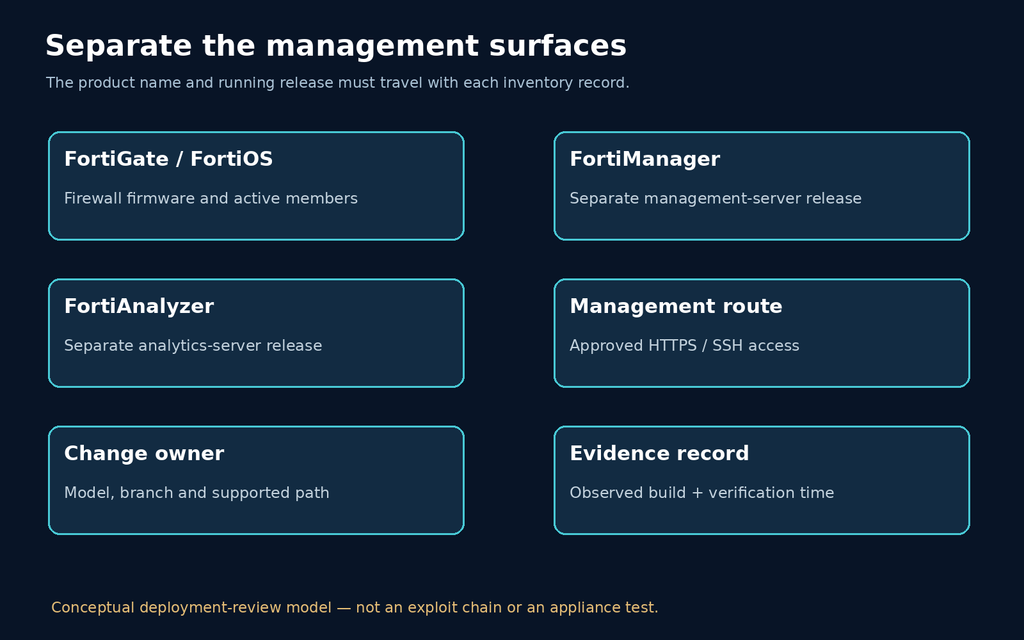
A FortiGate running FortiOS and the server that manages it are separate inventory records. The 7.4 target differs between them, so a single “Fortinet 7.4 updated” ticket is ambiguous. Record the product, model, current firmware and build, intended image, owner and management route for each system. This also gives the change reviewer enough information to challenge an incorrect image before deployment.
The notice also discusses other products and cloud delivery. Follow each product’s own guidance; do not transfer the FortiOS number to FortiMail or FortiAuthenticator. For cloud-managed systems, obtain confirmation of the applicable update state rather than inferring it from a local firewall version.
What is known before the detailed advisories arrive
The vendor notice establishes a coordinated security update, but it does not provide the individual vulnerability mechanisms needed to reconstruct an exploit chain. Do not assign a nearby trending CVE to this release merely because the product name matches. Keep CVE-2025-54821 and other separately documented issues attached to their own advisories and remediation records.
That distinction matters when approving a change. You can prioritize a vendor-requested security update without inventing a vulnerable endpoint, an authentication requirement or a claim of active compromise. Conversely, incomplete disclosure does not justify treating an unsupported exploit repository as a reliable exposure check. Until detailed advisories are published, the defensible evidence is the applicable vendor guidance, deployment inventory and verified upgrade state.
Choose the upgrade path before the maintenance window
Fortinet’s firmware-upgrade guide directs operators to verify the supported sequence with the Upgrade Path Tool. The source is a versioned workflow reference; use the release notes and model-specific instructions for the installed and destination builds. A target version in a security table is not permission to skip intermediate releases.
Before changing the device, identify the management path you will use if the ordinary route fails. Store a configuration backup securely, record the current build and agree on a recovery decision with the owner. Treat backups as sensitive infrastructure data. A backup that nobody can locate or restore is a weak recovery plan, even when the upgrade interface reports that a copy was created.
Fortinet’s 7.4.4 administration guide documents an individual-device upgrade workflow and warns that bypassing the upgrade path can lose configuration. Its menu labels are not asserted here as the interface of 7.4.13. On an HA deployment, use the applicable HA procedure and account for member state and service continuity; this article does not prescribe a universal node order.
Reduce management exposure while the upgrade is pending
Fortinet’s interim guidance prioritizes internet-facing devices, configuration backups and monitoring unusual administrative access or configuration changes. It recommends restricting HTTPS/SSH administration, keeping FortiManager administration off the public internet, and using strong administrator credentials and MFA. These controls reduce exposure; they do not replace upgrading.
Apply restrictions through an approved management route and verify continued access before ending the session. The practical objective is to narrow who can reach the administrative service without locking out the people responsible for recovery. Document any temporary exception with its owner and removal condition. Do not run a broad scan or try an unverified exploit against production to decide whether a vendor-listed update matters.
Inspect the running version without changing configuration
For an authorized FortiGate administrator, get system status is a documented version-inspection command in the firmware-upgrade workflow. Capture the relevant firmware/build identity before and after the change. Review the output before sharing it: operational identifiers need not be included in a public ticket.
# Run inside the authorized FortiGate CLI, not a local Bash shell.
get system status
A version string is evidence about that device at that moment. It does not establish that another cluster member, a management server or an offline replacement has the same state. Where your environment uses several administration contexts, identify which system returned each record and reconcile it with the inventory.
Use an offline inventory check to catch missed devices
The following example reads a local CSV and compares three-component version numbers against the branch minimums above. It connects to no appliance and changes no configuration. A “meets listed minimum” result is only a version comparison; it does not prove the image is active everywhere, the upgrade path was supported or the appliance is uncompromised. Unknown products, branches or version formats require manual review.
asset,product,version
edge-a,FortiOS,7.4.12
edge-b,FortiOS,7.4.13
manager-a,FortiManager,7.4.11
analyzer-a,FortiAnalyzer,7.4.12
legacy-review,FortiOS,7.0.18
# Save as inventory_check.py beside inventory.csv; run: python inventory_check.py
import csv
import re
from pathlib import Path
minimums = {
"FortiOS": {(7, 4): 13, (7, 6): 8, (7, 2): 14, (8, 0): 2},
"FortiManager": {(7, 4): 12, (7, 6): 8, (7, 2): 13, (8, 0): 2},
"FortiAnalyzer": {(7, 4): 12, (7, 6): 8, (7, 2): 13, (8, 0): 2},
}
def classify(product, value):
if not re.fullmatch(r"[0-9]+\.[0-9]+\.[0-9]+", value):
return "MANUAL REVIEW"
major, minor, patch = map(int, value.split("."))
target = minimums.get(product, {}).get((major, minor))
if target is None:
return "MANUAL REVIEW"
return "BELOW LISTED MINIMUM" if patch < target else "MEETS LISTED MINIMUM"
with Path("inventory.csv").open(newline="", encoding="utf-8") as handle:
reader = csv.DictReader(handle)
if not {"asset", "product", "version"}.issubset(reader.fieldnames or []):
raise ValueError("Required columns: asset, product, version")
for row in reader:
product, version = row["product"].strip(), row["version"].strip()
print(row["asset"], classify(product, version), sep="\t")The supplied synthetic CSV was run during preparation: two records fell below the listed minimum, two met it, and one required manual review. This is a check of the helper’s example behavior, not a discovery of five real devices. Review inventory exports for completeness, duplicate records, stale timestamps and missing members before using them to close a change.
Close the change with evidence from the active deployment
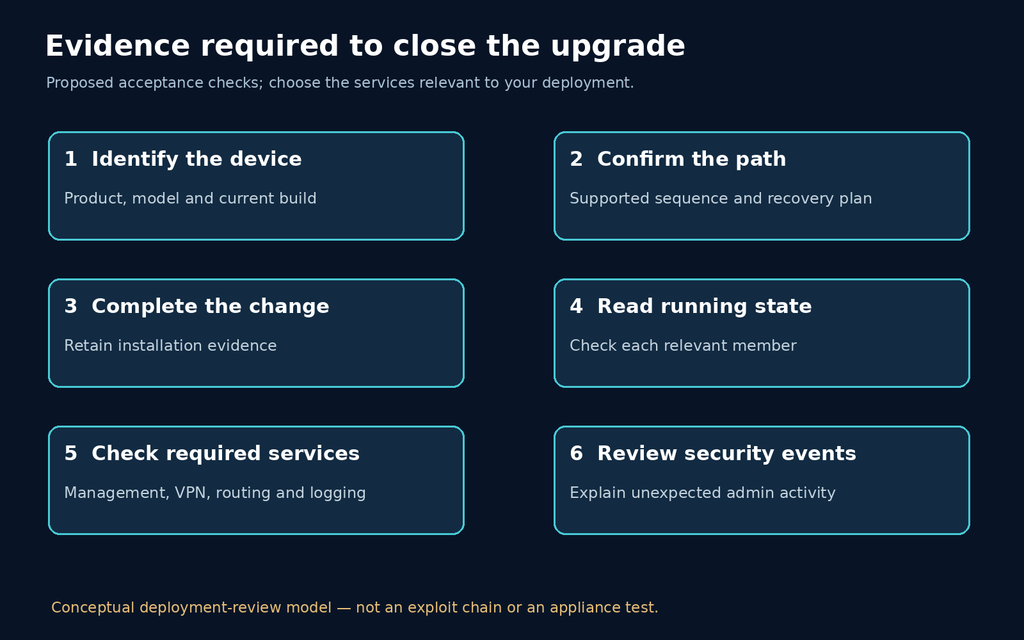
| Review item | Evidence to retain | Why a green job alone is insufficient |
|---|---|---|
| Device identity | Product, model, firmware/build and observation time | A controller can report success while a different device is being inspected. |
| Upgrade sequence | Approved path and completed steps | A destination version does not document how configuration crossed releases. |
| Active members | A version record for each relevant member or instance | One upgraded member does not establish the whole deployment state. |
| Management access | Expected allowed access and blocked unapproved access | A working administrator session says little about who else can connect. |
| Required services | Owner-approved checks of routing, VPN and logging functions actually used | A successful boot does not establish service continuity. |
| Security review | Relevant administrative events and unexpected configuration changes | Firmware remediation does not explain activity that occurred before it. |
Choose service checks from the system’s real role. For a firewall carrying a site-to-site VPN, record the expected tunnel and a permitted application flow. For a management server, check intended device connectivity and the approved management route. These are proposed acceptance criteria, not a claim that every deployment needs identical commands or that any one functional check proves security.
If administrative activity or configuration changes cannot be explained, preserve evidence and involve the incident-response owner. Treat “the installed version meets the target” and “the deployment is trustworthy” as separate decisions. Do not erase useful records simply to complete a routine upgrade ticket.
A short workflow demonstration
The video below introduces Penligent’s authorized AI-pentesting workflow. It is not a FortiGate firmware-upgrade tutorial and does not demonstrate a detector for these undisclosed Fortinet flaws. Firmware installation and support decisions remain with the appliance administrator and vendor guidance.
FortiOS 7.4.13 questions
Does this notice identify a new FortiOS CVE?
It provides coordinated security-update guidance; detailed advisories are scheduled separately. Do not infer a CVE mapping from the firmware number.
Can I upgrade directly to 7.4.13?
Determine the supported path for the exact model and starting build. The release target does not establish that a direct jump is supported.
Is FortiManager 7.4.12 the same target as FortiOS 7.4.13?
No. They are separate products with different 7.4 targets in this notice. Inventory and verify each one.
Does the Python helper test the vulnerability?
No. It reads a local inventory file and compares version components. It sends no requests and makes no exploitability assessment.
Can management restrictions replace the update?
Use them to reduce exposure while the upgrade is pending. They are not evidence that the firmware defect is repaired.
Does upgrading rule out an earlier compromise?
No. Investigate unexplained administrative access or configuration changes separately and preserve the relevant evidence.
Finish with a device-level record: the applicable release target, the supported path, the observed running build and the checks required by that system’s owner. Revisit the public advisories when they are released, because they may add vulnerability-specific exposure and investigation guidance that this initial notice cannot supply.
 German
  English
  French
  Spanish
  Portuguese
  Japanese
  Korean
  Hindi
Hindi  Arabic
  Turkish
  Hebrew