
CVE-2026-0073 is not a normal Android app bug, not a browser bug, and not a command-injection issue hiding behind a scary headline. It is a trust failure inside adbd, the Android Debug Bridge daemon, where wireless ADB mutual authentication can be bypassed because certificate public keys are compared with a logic error. When the vulnerable conditions line up, an attacker with adjacent network reachability can become an unauthorized ADB host and open a remote shell as Android’s Shell user without a tap, prompt, password, or app install. Google’s May 2026 Android Security Bulletin lists the issue as a Critical remote code execution vulnerability in the System component, affecting Android 14, Android 15, Android 16, and Android 16-qpr2, with the adbd subcomponent included under Google Play system updates. (Android Open Source Project)
That sentence needs precision. “Zero-click remote shell” is a fair shorthand only if the reader understands the network boundary. The official wording is “remote proximal/adjacent code execution as the shell user,” not internet-wide exploitation of every Android handset on the planet. NVD records the same root description and shows a CISA-ADP CVSS v3.1 vector of AV:A/AC:L/PR:N/UI:N/S:U/C:H/I:H/A:H, wobei AV:A means the attack is adjacent-network, PR:N means no prior privileges are required, and UI:N means no user interaction is required. (NVD)
The bug matters because ADB is not a minor convenience feature. It is the operating system’s debugging bridge. Android’s own developer documentation describes ADB as a command-line tool that can communicate with a device, install and debug apps, and provide access to a Unix shell. It also explains that modern wireless debugging requires pairing a device to a workstation with a QR code or pairing code on the same wireless network. (Android Developers) CVE-2026-0073 attacks the trust boundary that is supposed to keep that wireless debugging channel limited to previously authorized hosts.
What CVE-2026-0073 officially is
The most defensible description is short: CVE-2026-0073 is a logic error in adbd_tls_verify_cert in auth.cpp that can bypass wireless ADB mutual authentication and lead to adjacent-network remote code execution as the Android Shell user. Google classifies it as Critical in the May 2026 Android bulletin, and NVD maps it to CWE-303, Incorrect Implementation of Authentication Algorithm. (Android Open Source Project)
| Feld | Verified detail |
|---|---|
| CVE | CVE-2026-0073 |
| Betroffene Komponente | Android System |
| Affected subcomponent | adbd, Android Debug Bridge daemon |
| Vulnerable function | adbd_tls_verify_cert in auth.cpp |
| Klasse der Anfälligkeit | Wireless ADB mutual authentication bypass |
| Official impact | Remote proximal or adjacent code execution as the Shell user |
| User interaction | Not required |
| Attacker privileges | Not required |
| Google severity | Kritisch |
| CISA-ADP CVSS v3.1 | 8.8 High, AV:A/AC:L/PR:N/UI:N/S:U/C:H/I:H/A:H |
| NVD CWE | CWE-303, Incorrect Implementation of Authentication Algorithm |
| Affected Android versions in Google bulletin | Android 14, 15, 16, 16-qpr2 |
| Patch baseline | Android security patch level 2026-05-01 or later |
| Mainline context | adbd is listed as the affected Project Mainline subcomponent |
The apparent difference between Google’s “Critical” severity and the CVSS 8.8 “High” score is not a contradiction. Google’s Android bulletin severity is based on the effect exploitation could have on an affected device in Android’s platform context, while the CVSS vector preserves the important adjacent-network limitation. Both signals can be true at once: the bug is not globally reachable like a normal internet-facing server RCE, yet it is severe because the endpoint it compromises is the device’s debugging interface. (Android Open Source Project)
The patching answer is also specific. Google says security patch levels of 2026-05-01 or later address the issues associated with that bulletin, and the bulletin lists CVE-2026-0073 in the 2026-05-01 security patch level. Devices with Android 10 and later may receive security updates as well as Google Play system updates, which matters because the May bulletin places adbd under Project Mainline components. (Android Open Source Project) Google’s Android Help documentation says users can find the Android version, Android security update status, and Google Play system update status in the Settings app. (support.google.com)
Why adbd is a sensitive target
adbd is the device-side daemon for Android Debug Bridge. On a developer workstation, a user runs adb; on the Android device, adbd receives the connection and brokers debugging capabilities. Android’s Mainline documentation says the adbd module manages command-line ADB and IDE debugging sessions, is updatable, and exists as the com.android.adbd APEX module on Android 11 or higher. (Android Open Source Project)
That design is normal and useful. Developers need to install builds, collect logs, debug apps, run shell commands, forward ports, and automate test devices. QA labs need device farms. OEMs and SoC vendors need board bring-up. Security researchers need controlled access to test devices. The same design becomes dangerous when the debug channel is reachable by an untrusted network peer.
Die Shell user is not root. CVE-2026-0073 does not automatically grant kernel execution, hardware key extraction, or universal access to every private app directory. That distinction matters because overstating the impact makes defenders less precise. But the Shell user is also not a normal untrusted Android app. A remote peer that reaches ADB shell has crossed from the app sandbox world into a privileged debugging context. Barghest’s technical analysis notes that the demonstrated result is execution as uid=2000(shell) im u:r:shell:s0 SELinux context, and that shell access can expose system properties, logs, package state, process state, device configuration, shell-accessible system services, and follow-on exploitation opportunities. (Barghest)
That is why this vulnerability deserves operational attention even though it is not a direct root exploit. ADB shell is often enough to change the investigation from “someone scanned a port” to “someone obtained a meaningful operating-system foothold.”
Wireless ADB was designed to require pairing
Android 11 and later support deploying and debugging apps wirelessly from a workstation using ADB. Google’s developer documentation says the workstation and device must be on the same wireless network, and wireless debugging requires pairing with a QR code or pairing code. It also says the paired workstation can later be forgotten from the Wireless debugging screen. (Android Developers)
The security purpose is simple. A phone, tablet, TV device, or Android-based appliance should not accept ADB commands from any laptop on the same Wi-Fi. It should accept them only from a workstation the user intentionally paired or authorized. The user-facing flow hides a deeper trust model:
- A host is paired or authorized.
- The device stores a trusted ADB host key.
- A later wireless ADB connection must prove that the peer owns the corresponding private key.
adbdverifies the presented TLS client certificate against its authorized key material.- Only then should the session become an authorized ADB connection.
CVE-2026-0073 breaks step four. It does not need to trick the user into approving a prompt. It does not need the legitimate workstation’s private key. It abuses a key-comparison logic bug so that a certificate that should fail can be treated as if it matched an authorized host.
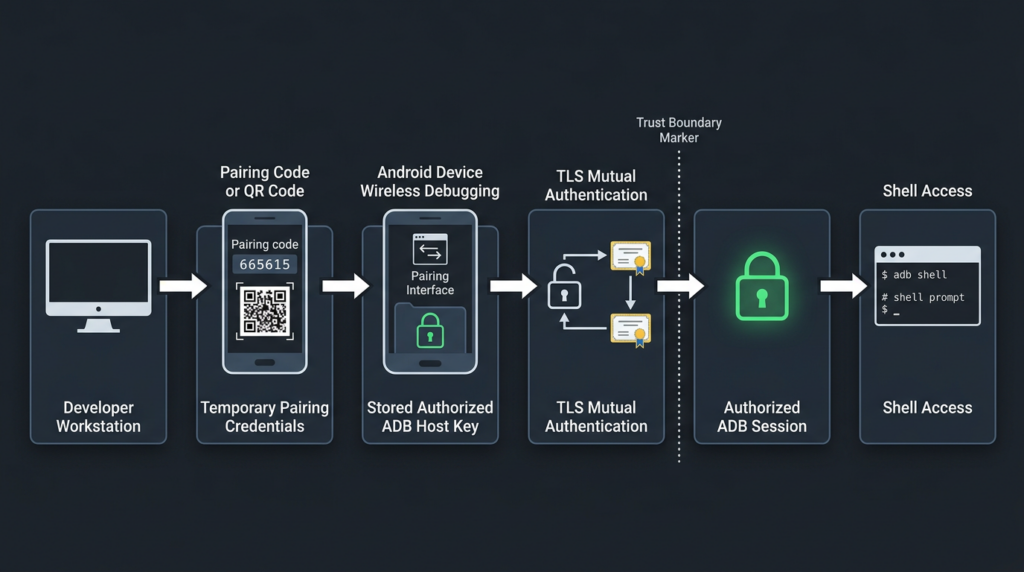
The protocol shape behind the bug
Modern wireless debugging is not just “ADB on TCP port 5555.” That older phrase is still useful for asset discovery because many ADB exposures appear on TCP 5555, but the Android 11-plus wireless debugging path adds a more structured protocol boundary. Barghest’s analysis describes the vulnerable path as an ADB-over-TCP flow that negotiates STLS, upgrades the connection to TLS, presents a client certificate, and then continues normal ADB framing inside the TLS tunnel if authentication succeeds. (Barghest)
At a safe conceptual level, the flow looks like this:
Host on network
    |
    | TCP connection to exposed wireless ADB endpoint
    v
adbd receives ADB transport prelude
    |
    | STLS negotiation
    v
TLS handshake with client certificate
    |
    | adbd_tls_verify_cert compares presented cert key
    | against authorized ADB host keys
    v
If accepted, ADB logical streams continue
    |
    v
shell service can be opened as Android shell user
The authentication decision is the critical point. The TLS channel is not enough by itself. TLS must be bound to a previously trusted ADB host identity. If the certificate-verification function accepts the wrong key, the rest of ADB behaves as if the peer is authorized.
That is why calling CVE-2026-0073 an “RCE” is both accurate and easy to misunderstand. The vulnerable statement is not executing attacker-controlled shell text. The vulnerable statement is incorrectly deciding that an attacker-controlled TLS client certificate belongs to a trusted host. The RCE happens because successful authentication unlocks ADB shell.
The root cause, a nonzero return value became authentication success
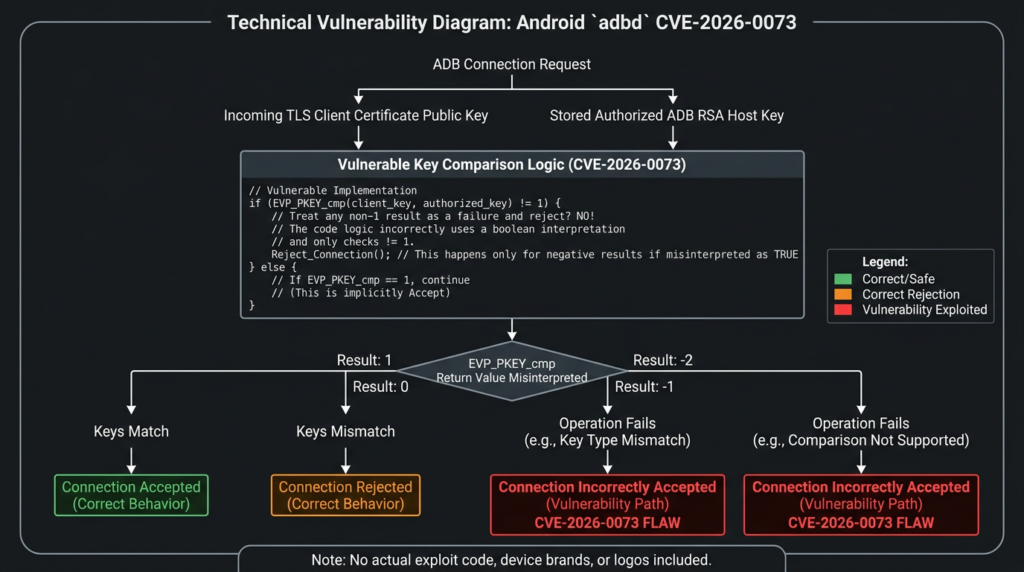
The key bug is small enough to be teachable. Public AOSP code for adbd_tls_verify_cert shows adbd extracting the public key from the X.509 certificate, creating an EVP_PKEY object for each known ADB RSA public key, and then calling EVP_PKEY_cmp. The vulnerable pattern is that the result is used directly as a C++ boolean condition. (Android Git Repositories)
if (EVP_PKEY_cmp(known_evp.get(), evp_pkey.get())) {
    verified = true;
}
That pattern would be safe only if the function returned exactly 1 for match and 0 for every kind of failure. It does not. OpenSSL documentation for the relevant EVP_PKEY_cmp, EVP_PKEY_eq, and parameter comparison functions says they return 1 if inputs match, 0 if they do not match, -1 if key types are different, and -2 if the operation is not supported. (OpenSSL Documentation)
C and C++ treat any nonzero integer as true in an wenn statement. That turns the authentication logic inside out for negative return values.
| Return value | API meaning | Correct authentication decision | Vulnerable boolean decision |
|---|---|---|---|
1 | Keys match | Accept | Accept |
0 | Keys do not match | Reject | Reject |
-1 | Key types are different | Reject | Accept |
-2 | Operation unsupported or cannot be completed | Reject | Accept |
The same-type mismatch case can make the bug look less obvious during casual testing. If a random RSA certificate is compared with a stored RSA ADB host key, the comparison may return 0, and the code rejects it. That behavior can fool a developer or tester into thinking the check is sound. The bypass appears when the presented certificate uses a different public-key algorithm than the stored ADB RSA key. In that cross-algorithm case, the API can return a negative nonzero value, and the vulnerable caller treats it as success. Barghest’s analysis describes this as a cross-algorithm comparison case where a non-RSA certificate, such as EC P-256 or Ed25519, can cause a nonzero “different key types” result that adbd promotes into a successful host-key match. (Barghest)
The safer pattern is boring and explicit:
int cmp = EVP_PKEY_cmp(known_evp.get(), evp_pkey.get());

if (cmp == 1) {
    verified = true;
} else {
    verified = false;
}
Even better, security-sensitive code should treat every value except the documented success value as failure and log negative values separately for diagnostics. Authentication code should not let “unsupported,” “unknown,” “different type,” or “internal comparison failure” collapse into success.
int cmp = EVP_PKEY_cmp(known_evp.get(), evp_pkey.get());

switch (cmp) {
case 1:
    verified = true;
    break;
case 0:
case -1:
case -2:
default:
    verified = false;
    break;
}
The broader lesson is not “never use OpenSSL-style APIs.” The lesson is that cryptographic comparison functions often have multi-value contracts. Treating them like ordinary boolean predicates is dangerous when the code path decides identity, authorization, or trust.
Why this is an authentication bypass that becomes RCE
Many vulnerability headlines flatten the bug into “Android zero-click RCE.” That phrase is not wrong, but it skips the important mechanism. CVE-2026-0073 is best understood in two layers:
| Ebene | What fails | Warum das wichtig ist |
|---|---|---|
| Authentication layer | adbd incorrectly accepts a TLS client certificate as matching an authorized ADB host key | An unauthorized network peer becomes trusted |
| ADB service layer | A trusted ADB peer can open shell and other debugging services | The authentication bypass becomes shell-level code execution |
The bug is therefore not comparable to a media parser memory corruption flaw that triggers when a file is processed, or a web RCE that executes a command because an input string reaches a shell. The attacker does not win because a command string is injected into adbd_tls_verify_cert. The attacker wins because adbd_tls_verify_cert answers the wrong yes-or-no question.
That distinction is useful for defenders. If the risk were a payload parser reachable from normal phone network traffic, the exposure model would be much broader. Here, the exposure model is about ADB reachability and debug-state management. A device with wireless debugging disabled, no ADB-over-TCP exposure, and no reachable adbd endpoint is in a very different risk posture from a lab device advertising wireless ADB on a shared network.
Exploitation prerequisites
The public facts point to a specific set of prerequisites. Barghest lists the affected configuration as developer options enabled, ADB-over-TCP enabled through Wireless debugging or another exposure of the platform adbd TCP service, at least one previously paired RSA ADB host key in /data/misc/adb/adb_keys, and attacker reachability to the device’s ADB TCP port. (Barghest)
| Anforderung | Warum das wichtig ist | Defensive check |
|---|---|---|
| Android version and patch level are affected | Google lists Android 14, 15, 16, and 16-qpr2 in the bulletin for CVE-2026-0073 | Verify Android security patch level is 2026-05-01 or later |
| Wireless debugging or ADB-over-TCP is enabled | The vulnerable path is reached through a network-exposed ADB service | Check Developer options and network exposure |
| The device has paired ADB host trust state | The bypass compares a presented certificate against stored authorized host keys | Review paired debugging hosts and revoke unknown entries |
| Attacker has adjacent network reachability | CVSS records AV:A, and Google says remote proximal or adjacent | Isolate development devices from untrusted Wi-Fi and shared networks |
adbd follows the vulnerable mutual-authentication path | The logic flaw is inside adbd_tls_verify_cert | Patch the adbd Mainline component or OS security level |
The practical conclusion is not “every Android phone is equally exposed.” The practical conclusion is that every organization with Android development devices, QA pools, Android TV fleets, kiosks, POS systems, ruggedized Android devices, vehicle head units, lab tablets, or mobile forensic workstations should treat wireless ADB as a real attack surface.
What an attacker gets as shell
Die Shell user sits in a dangerous middle ground. It does not own the entire device, but it sees and touches far more than an ordinary app. Barghest’s impact analysis notes that ADB shell access can inspect system properties, logs, package state, process state, device configuration, shell-readable data, and shell-accessible system services, and can be used as a staging context for follow-on exploitation. It also notes that ADB does not automatically grant all private app data and remains constrained by Android permissions and SELinux. (Barghest)
A realistic impact assessment should separate what is plausible from what is not.
| Capability from ADB shell | Risiko |
|---|---|
| Read system properties and build information | Device fingerprinting, patch assessment, targeting follow-on vulnerabilities |
| Enumerate installed packages and permissions | Mapping valuable apps and management agents |
| Read some logs and debugging output | Potential exposure of tokens, URLs, identifiers, crash details, or operational metadata |
Verwenden Sie pm, am, cmd, settings, and related shell-accessible tools | Device reconfiguration within shell-accessible limits |
Verwenden Sie run-as for debuggable applications | Access to debuggable app data and testing artifacts |
| Interact with shared storage where permitted | Data exposure depending on Android version and storage policy |
| Stage local privilege escalation attempts | A better starting point for chaining than a normal app sandbox |
| Capability not automatically granted | Why not |
|---|---|
| Kernel-level execution | CVE-2026-0073 is not a kernel bug by itself |
| Root access | Shell is not Wurzel |
| Universal private app data access | Android sandboxing and SELinux still apply |
| Hardware-backed key extraction | Hardware-backed secrets are not automatically exposed to ADB shell |
| Remote compromise without ADB reachability | The attack requires a reachable ADB endpoint |
That balanced interpretation is important for enterprise risk. A vulnerable test phone on an isolated developer VLAN is not the same as an Android TV device exposing ADB on a guest Wi-Fi network. A consumer phone with wireless debugging off is not the same as a device farm where wireless debugging is part of automation. The CVE is the same, but the operational risk changes with configuration.
Why Android-based appliances can be more exposed than phones
Most ordinary phone users never enable Developer options, never pair wireless debugging, and never expose ADB over TCP. Many security problems live in the gap between “ordinary user defaults” and “real operational practice.” Android is no longer just phones. It is TV hardware, set-top boxes, kiosks, scanners, point-of-sale devices, tablets in warehouses, automotive systems, conference-room controllers, signage, medical-adjacent tablets, lab hardware, and engineering fixtures.
Those environments often have reasons to keep ADB reachable:
| Umwelt | Why ADB may be enabled |
|---|---|
| Mobile app QA lab | Fast log collection, installation, test automation |
| Android device farm | CI orchestration and remote debugging |
| Android TV or set-top box testing | UI automation and troubleshooting |
| OEM or SoC bring-up | Board debugging and factory configuration |
| Kiosk and POS staging | Provisioning, diagnostics, and support |
| Security research lab | Controlled testing and instrumentation |
| Forensics lab | Device handling workflows and repeatable collection |
The risk multiplier is that these devices are often treated as engineering tools rather than production endpoints. They may sit on flat networks, share Wi-Fi with laptops, reuse old images, or remain outside normal MDM baselines. A bug like CVE-2026-0073 punishes that gap because it turns an exposed debug interface into a shell foothold.
For authorized security teams, the useful workflow is not simply to scan for a port and declare victory. It is to prove the device class, patch level, ADB exposure path, network boundary, and business owner, then preserve evidence in a report the engineering team can act on. In that kind of controlled validation workflow, Penligent can be used as part of a broader agent-assisted testing process to organize asset discovery, command evidence, retest notes, and remediation reporting for authorized targets. The important constraint is scope: ADB exposure testing should be limited to owned devices, approved networks, and written rules of engagement.
Safe discovery for defenders
The fastest defensive win is inventory. Teams cannot patch or isolate devices they cannot see. Discovery should start with known device lists from MDM, EMM, device farms, DHCP, Wi-Fi controllers, NAC, asset inventory, and vulnerability management platforms. Network scanning can supplement that list, but it should be scoped and authorized.
A basic internal check for classic ADB exposure often starts with TCP 5555 because many ADB-over-TCP configurations use that port. This is not a complete detector for modern wireless debugging, where ports can vary, but it remains useful for finding risky legacy or appliance-style exposure.
# Authorized internal network discovery only
nmap -Pn -p 5555 --open 10.10.20.0/24
If the environment has known Android testing VLANs, scope the scan to those ranges first:
# Example scoped scan of known lab networks
nmap -Pn -p 5555,37000-47000 --open 10.30.0.0/16 -oA android-adb-lab-scan
The high port range above is not a universal signature. It is a practical example for controlled environments where wireless debugging service ports may not be fixed. Do not treat an empty scan as proof that no wireless ADB exists. Use MDM state, device settings, mDNS discovery where supported, and local device inspection.
On already authorized devices, collect patch state:
adb shell getprop ro.build.version.release
adb shell getprop ro.build.version.sdk
adb shell getprop ro.build.version.security_patch
adb shell getprop ro.build.fingerprint
A device affected by the May bulletin should be brought to a security patch level of 2026-05-01 or later. Google’s Android Help page explains that users can find Android version, Android security update, Google Play system update, and build number under the device Settings app. (support.google.com)
For device-farm administrators, a simple CSV collection script can make patch gaps visible:
#!/usr/bin/env bash
set -euo pipefail

echo "serial,model,android_release,security_patch"

adb devices | awk 'NR > 1 && $2 == "device" {print $1}' | while read -r serial; do
  model=$(adb -s "$serial" shell getprop ro.product.model | tr -d '\r')
  release=$(adb -s "$serial" shell getprop ro.build.version.release | tr -d '\r')
  patch=$(adb -s "$serial" shell getprop ro.build.version.security_patch | tr -d '\r')
  echo "$serial,$model,$release,$patch"
done
That script does not test exploitation. It does something more useful for most teams: it produces evidence of which authorized devices are below the patch baseline.
How to triage exposed ADB findings
A raw ADB port finding is not enough. The triage question is whether the endpoint is an Android adbd service, whether it is reachable from an untrusted segment, whether it follows the affected wireless authentication path, and whether the device is patched.
A good finding should contain these fields:
| Beweise | Warum das wichtig ist |
|---|---|
| IP address and network segment | Shows who can reach the endpoint |
| Port and discovery method | Distinguishes classic 5555 exposure from other service ports |
| Device owner or asset tag | Makes remediation assignable |
| Android version and security patch level | Determines vulnerability exposure |
| Google Play system update date where available | Important for Mainline-delivered fixes |
| Wireless debugging state | Confirms whether the risky feature is enabled |
| Paired debugging hosts | Identifies unknown or stale trust relationships |
| Business reason for ADB exposure | Separates intentional lab use from accidental exposure |
| Ausgleichende Kontrollen | Shows segmentation, firewalling, or NAC restrictions |
| Retest evidence | Proves the issue was fixed |
A poor finding says, “Port 5555 open, Android RCE.” A defensible finding says, “Android test device on QA Wi-Fi exposes ADB-over-TCP to the shared office VLAN, reports security patch level 2026-04-05, has Wireless debugging enabled, and has paired debugging hosts. CVE-2026-0073 is fixed at 2026-05-01 or later, so this device should be patched or isolated and unknown paired hosts revoked.”
That difference matters because the second version gives an engineer a path to close the issue.
Network and log signals
Detection for CVE-2026-0073 is not as clean as matching a single HTTP path or exploit string. The protocol is binary, the ports may vary, and successful exploitation resembles an ADB session after authentication has been bypassed. Defenders should combine several signals.
| Signal | Quelle | Interpretation |
|---|---|---|
| TCP 5555 open on Android-like asset | Network scan or asset inventory | Classic ADB-over-TCP exposure or appliance-style debug service |
| High-numbered ADB wireless debugging service | mDNS, device state, local network observation | Potential Android 11-plus wireless debugging exposure |
| Unexpected connections to ADB ports | Firewall, Wi-Fi controller, NAC, Zeek, flow logs | Possible unauthorized ADB interaction |
| Unknown paired debugging host | Device settings or management tooling | Stale or suspicious trust relationship |
| Developer options enabled on managed device | MDM or local inspection | Increased attack surface |
| Security patch level before 2026-05-01 | MDM, ADB authorized collection, inventory | Device may lack CVE-2026-0073 fix |
| New ADB shell activity on lab device | Device logs, EDR, local process monitoring where available | Possible misuse or unauthorized debugging |
Android local logging varies by device, build type, permissions, and enterprise tooling. Do not assume that every phone will provide perfect forensic visibility after the fact. Treat network segmentation and configuration control as primary defenses, and logs as supporting evidence.
Remediation and hardening
The primary fix is patching. Google’s May 2026 bulletin says the 2026-05-01 security patch level addresses the listed issue, and it specifically lists CVE-2026-0073 under System and adbd. (Android Open Source Project) Because adbd is a Mainline module on modern Android, teams should check both the Android security update and Google Play system update status where applicable. Google’s Android Help page documents where users can find both values in Settings. (support.google.com)
Hardening should not stop at patching.
| Kontrolle | Empfehlung |
|---|---|
| Android patch level | Bring affected devices to 2026-05-01 or later |
| Google Play system update | Check status on supported devices and update where available |
| Wireless debugging | Disable when not actively in use |
| Developer options | Disable on production and managed user devices |
| Paired hosts | Forget unknown or stale paired debugging hosts |
| ADB-over-TCP | Do not expose beyond trusted engineering networks |
| Segmentierung des Netzes | Put lab and device-farm hardware in restricted VLANs |
| Firewall policy | Block TCP 5555 and unnecessary ADB service exposure across segments |
| Wi-Fi policy | Do not allow wireless debugging on guest or shared office Wi-Fi |
| Device procurement | Avoid Android appliances that ship with open ADB in production |
| Exception handling | Track every device that cannot patch and isolate it |
For developers, the rule is simple: turn Wireless debugging off after the session. Android’s developer documentation even notes that wireless debugging can be quickly toggled using Developer Options quick settings tiles. (Android Developers) Convenience should not become a persistent listening service.
For enterprises, the rule is stricter: production Android devices should not expose ADB at all unless there is a documented operational need, a restricted network path, and an owner responsible for patching. Debug access is an administrative interface. Treat it like SSH, RDP, WinRM, Kubernetes API access, or a database admin port.
Defensive validation workflow
A clean validation workflow for CVE-2026-0073 should avoid exploit code and still prove risk well enough for remediation.
1. Identify Android assets.
2. Enrich each asset with owner, model, OS version, patch level, and network zone.
3. Detect ADB or wireless debugging exposure.
4. Confirm whether the exposure is reachable from untrusted or semi-trusted networks.
5. Check whether patch level is 2026-05-01 or later.
6. Review whether Developer options and Wireless debugging are enabled.
7. Revoke stale paired hosts.
8. Patch or isolate vulnerable devices.
9. Retest network exposure and patch state.
10. Store evidence for engineering and audit follow-up.
For a small lab, the evidence might be a spreadsheet. For a larger organization, it should feed into vulnerability management or asset inventory.
asset_id,ip,model,android_version,security_patch,adb_exposed,wireless_debugging,network_zone,owner,action
lab-tv-014,10.30.8.14,Android TV,14,2026-04-05,true,true,qa-lab,mobile-qa,patch_or_isolate
qa-phone-022,10.30.9.22,Pixel,15,2026-05-01,false,false,qa-lab,mobile-qa,no_action
kiosk-007,10.44.2.7,Android Kiosk,14,2026-03-05,true,unknown,retail-staging,platform-eng,isolate_and_patch
In an authorized assessment, Penligent can fit naturally into this kind of evidence-driven workflow by helping an operator structure discovery, scope control, command output, retest artifacts, and reporting across multiple targets. It should not replace patch management or MDM, and it should not be used outside authorized scope. Its value in this scenario is turning scattered validation steps into repeatable evidence for engineering teams.
What not to do
CVE-2026-0073 is serious enough that shortcuts are tempting. Several common responses make the situation worse.
Do not treat “ADB open” as automatically equivalent to “CVE-2026-0073 exploited.” Open ADB is bad, but a useful report should still identify device version, patch level, reachability, and whether the device follows the affected path.
Do not assume “not a phone” means “not Android.” Many Android-derived devices do not look like phones to asset owners. TV boxes, scanners, kiosks, and appliance boards may have weaker patch discipline than employee handsets.
Do not assume “inside the Wi-Fi” means safe. Adjacent-network vulnerabilities are often exactly about shared Wi-Fi, guest networks, contractor laptops, compromised developer machines, and flat lab segments.
Do not leave Wireless debugging on for convenience. The feature exists for development sessions, not as a permanent management plane.
Do not rely only on user education. The people most likely to enable ADB are technical users who have a reason. Give them safer networks, policy guardrails, and documented workflows.
Do not publish or run exploit code against networks you do not own. Defensive validation does not require weaponizing the certificate bypass. Asset exposure, patch state, and configuration state are enough to drive remediation.
The software engineering lesson
CVE-2026-0073 is a security engineering case study in fail-open authentication. The risky code pattern is easy to recognize after the fact: a function with a multi-value return contract was used as a boolean. The dangerous part is that the happy path and one negative path still behaved correctly. A matching key returned 1 and was accepted. A same-type mismatch returned 0 and was rejected. Only the less common negative return values caused the bypass.
That is exactly the sort of bug that slips past narrow tests.
Security-sensitive code should follow stricter rules:
| Rule | Beispiel |
|---|---|
| Compare against documented success values | if (cmp == 1) rather than if (cmp) |
| Fail closed on unknown or unsupported states | Behandeln Sie -1, -2, and unexpected values as reject |
| Test cross-type negative cases | RSA known key versus EC or Ed25519 presented key |
| Log diagnostic errors without changing authorization | Negative return values can help debugging but must not grant trust |
| Wrap dangerous APIs | Provide a local keys_equal_strict() function with a boolean contract |
| Review authentication code for truthiness | Search for if (verify()) patterns where the API does not return true or false |
| Add regression tests around bug classes | Preserve tests for unsupported algorithms and type mismatch |
A minimal wrapper makes the intended contract harder to misuse:
bool adb_public_keys_match_strict(EVP_PKEY* trusted, EVP_PKEY* presented) {
    int result = EVP_PKEY_cmp(trusted, presented);

    if (result == 1) {
        return true;
    }

    // 0 means mismatch.
    // -1 means different key types.
    // -2 means unsupported comparison.
    // Any future or unexpected value must fail closed.
    return false;
}
That wrapper is not magic. It is a way to move the API contract into a name that matches the security decision.
This bug class has happened before
CVE-2026-0073 is not the first time EVP_PKEY_cmp return semantics have created an authentication bypass. OpenIKED’s security page states that all OpenIKED versions in OpenBSD through 6.7 were vulnerable to an authentication bypass due to incorrect use of EVP_PKEY_cmp. NVD records CVE-2020-16088 as an OpenIKED authentication bypass caused by wrong logic for checking whether a public key matches. (OpenIKED) OpenBSD’s 6.7 errata also lists security fixes for incorrect use of EVP_PKEY_cmp in both iked und rpki-client. (OpenBSD)
That history makes CVE-2026-0073 more than a one-off Android mistake. It shows a recurring failure pattern:
A security decision depends on public-key equality.
The code calls a cryptographic comparison API.
The API returns more than true or false.
The caller treats all nonzero values as success.
A mismatch or unsupported comparison becomes authentication success.
Authentication code should be paranoid about return-value contracts because attackers live in the edge cases. A same-type mismatch is the test most developers think to write. A cross-type mismatch is the test that catches this class of bug.
Related Android and mobile CVEs
CVE-2026-0073 sits in a broader mobile risk pattern: Android patch windows increasingly combine platform bugs, vendor-component bugs, and device-management complexity. A useful comparison is CVE-2026-21385, a Qualcomm Android memory-corruption issue from the March 2026 Android bulletin that Google said had indications of limited, targeted exploitation. A Penligent analysis of that vulnerability emphasizes the operational challenge around Android fleet visibility, chipset supply-chain dependency, OEM patch latency, and sparse public exploitation detail. (Sträflich)
The two CVEs are different in mechanics. CVE-2026-21385 is a Qualcomm component memory-corruption issue with targeted-exploitation concern. CVE-2026-0073 is an adbd authentication bypass in a debug interface. The connection is operational: both punish weak mobile asset visibility. If a team cannot answer which Android devices are below a specific patch baseline, which devices expose risky services, and who owns exceptions, it will struggle with both classes of vulnerability.
| CVE | Why it is relevant | Exploitation conditions | Milderung |
|---|---|---|---|
| CVE-2026-0073 | Debug interface authentication bypass leading to ADB shell as Shell user | Adjacent network reachability to affected wireless ADB or ADB-over-TCP path, vulnerable patch level, paired key state | Patch to 2026-05-01 or later, disable Wireless debugging, isolate ADB |
| CVE-2020-16088 | Earlier authentication bypass caused by incorrect use of EVP_PKEY_cmp | OpenIKED affected versions through OpenBSD 6.7 | Apply OpenBSD/OpenIKED fixes, audit public-key comparison logic |
| CVE-2026-21385 | Android vendor-component risk and patch-latency example | Local vector and low privileges according to public records, with targeted exploitation signal reported in Android context | Patch March 2026 Android baseline, track OEM and chipset update paths |
The right response is not panic. It is precision. Know the affected code path, know the exposure condition, know the patch level, and know the owner.
Guidance for red teams and pentesters
For authorized red teams, CVE-2026-0073 is a reminder that debug interfaces are high-signal findings. But the most valuable work is not spraying exploit attempts. It is mapping where a real organization has accidentally left powerful maintenance channels reachable.
A strong assessment should answer:
Can an untrusted or semi-trusted network segment reach ADB?
Which devices expose ADB?
Are those devices production, staging, lab, or personal?
What Android versions and patch levels are they running?
Is Wireless debugging enabled?
Are stale paired hosts present?
Can the exposure be removed?
If it cannot be removed, can it be isolated?
Who owns the exception?
A high-quality report should avoid vague labels. “Android zero-click RCE” may get attention, but “ADB-over-TCP reachable from guest Wi-Fi on unpatched Android 14 test tablets below 2026-05-01” gets fixed.
Guidance for Android developers
Developers are often the people most likely to have the risky state enabled. They are also the people most able to fix it quickly.
Use a short checklist:
Update the device to the latest Android security patch.
Check Google Play system update status.
Turn off Wireless debugging after each session.
Forget stale paired workstations.
Avoid wireless debugging on public, guest, hotel, conference, or shared office Wi-Fi.
Use USB debugging when possible for sensitive devices.
Keep SDK Platform Tools current.
Do not use production phones as persistent debug endpoints.
Google’s ADB documentation states that wireless debugging requires pairing and that the workstation and device must be on the same wireless network. It also documents the option to forget a paired workstation from the Wireless debugging screen. (Android Developers) Those controls are there for a reason. Use them.
Guidance for enterprise mobile security teams
Enterprise teams should convert CVE-2026-0073 into policy. The policy does not need to be complicated:
- Managed production Android devices must not have Developer options or Wireless debugging enabled unless explicitly approved.
- Android devices below the 2026-05-01 security patch level require patching, isolation, or a documented exception.
- ADB-over-TCP must be blocked between user, guest, contractor, and production segments.
- Android lab networks must be segmented and monitored.
- Device owners must review paired debugging hosts after incidents, employee offboarding, or lab reuse.
- Android-based appliances must be included in vulnerability management, not left to facilities or engineering alone.
MDM data should be reconciled against network reality. If MDM says a device is compliant but the network sees ADB exposed from a noncompliant segment, investigate the discrepancy. If a scanner finds ADB but no owner exists, the asset inventory is incomplete.
Guidance for product teams shipping Android-based devices
The hardest environments are products built on Android but managed like appliances. These devices may not have the same update expectations as phones, yet they can expose the same adbd surface.
Product teams should build safer defaults:
| Product control | Safer default |
|---|---|
| Production image | ADB disabled |
| Developer image | ADB allowed only on isolated networks |
| Remote support | Use authenticated support channels, not exposed ADB |
| Factory provisioning | Remove debug exposure before shipment |
| Documentation | Warn customers not to expose ADB |
| Update process | Make Mainline and security patch status visible |
| Überwachung | Alert if ADB becomes reachable in production |
| Acceptance testing | Fail release if production image exposes debug services |
If ADB is required for support, treat it like an administrative backdoor that needs explicit enablement, short session duration, network restriction, logging, and revocation. Do not let it become a permanent listener.
The practical risk statement
A concise executive summary should avoid both understatement and hype:
CVE-2026-0073 is a Critical Android adbd vulnerability fixed in the May 2026 Android security update. It can let an adjacent-network attacker bypass wireless ADB mutual authentication and obtain ADB shell access as the Android shell user without user interaction, if the device exposes the affected wireless ADB or ADB-over-TCP path and is not patched to the 2026-05-01 security patch level or later. The highest-risk assets are developer devices, test fleets, Android-based appliances, and any device with persistent wireless debugging or exposed ADB.
That language gives leadership the real risk: not “all phones instantly owned,” and not “only developers should care.” The risk lives where debug access meets weak network boundaries.
Final takeaways
CVE-2026-0073 is dangerous because it breaks a small but critical trust decision. ADB wireless debugging depends on the idea that only a paired workstation can authenticate as a trusted host. adbd_tls_verify_cert was supposed to enforce that boundary. By treating a multi-value key-comparison return as a boolean, vulnerable Android builds could turn “different key type” into “authenticated host.”
The fix is patching, but the lesson is broader. Debug interfaces need the same discipline as production admin interfaces. Adjacent network does not mean safe. “Shell user” does not mean harmless. Mainline updateability does not remove the need for asset visibility. And authentication code should never accept anything except explicit success.
For most organizations, the fastest path is clear: find Android assets, identify ADB exposure, verify patch level, disable Wireless debugging where it is not needed, isolate lab devices, revoke stale paired hosts, and retest. The teams that already have those controls will treat CVE-2026-0073 as a patch event. The teams that do not will discover that their Android debug surface has been unmanaged for years.
References and further reading
Android Security Bulletin, May 2026 — official Android advisory listing CVE-2026-0073 as a Critical System RCE and adbd as the affected Mainline subcomponent. (Android Open Source Project)
NVD entry for CVE-2026-0073 — official vulnerability record with description, CISA-ADP CVSS vector, CWE-303 mapping, affected Android CPEs, and Android advisory reference. (NVD)
Android Debug Bridge documentation — official Android developer documentation for ADB, USB debugging, wireless debugging, pairing, and command-line connection behavior. (Android Developers)
Android Mainline documentation — official AOSP documentation explaining Mainline modular updates and listing adbd as an APEX module introduced for Android 11. (Android Open Source Project)
OpenSSL EVP_PKEY documentation — return-value semantics for EVP_PKEY_cmp, EVP_PKEY_eq, and related comparison functions. (OpenSSL Documentation)
Barghest technical analysis of CVE-2026-0073 — detailed public analysis of the ADB-over-TCP authentication bypass, protocol shape, affected configuration, and shell impact. (Barghest)
OpenIKED security note for CVE-2020-16088 — prior authentication bypass caused by incorrect use of EVP_PKEY_cmp, useful for understanding the recurring bug class. (OpenIKED)
Penligent Hacking Labs, CVE-2026-21385 and Android patch-risk analysis — related Android vulnerability management reading focused on exploited mobile CVEs, patch baselines, and operational response. (Sträflich)
Penligent Hacking Labs, NIST CVE Prioritization as AI Speeds Up Vulnerability Discovery — related reading on CVE prioritization, AI-assisted vulnerability discovery, and evidence-driven security workflows. (Sträflich)
Penligent homepage — product information for authorized AI-assisted penetration testing and evidence-driven security validation workflows. (Sträflich)


 German
  English
  French
  Spanish
  Portuguese
  Japanese
  Korean
  Hindi
Hindi  Arabic
  Turkish
  Hebrew