
If a Windows endpoint is still running Microsoft Malware Protection Engine 1.1.26030.3008 or an earlier affected build, treat the CVE-2026-41091 patch as an exploited-vulnerability remediation task, not as a routine antivirus update. The official record is compact but serious: CVE-2026-41091 is an improper link resolution before file access issue in Microsoft Defender that allows an authorized local attacker to elevate privileges. NVD lists the CVSS 3.1 vector as AV:L/AC:L/PR:L/UI:N/S:U/C:H/I:H/A:H, maps the weakness to CWE-59, and places the issue in CISA’s Known Exploited Vulnerabilities catalog with a June 3, 2026 remediation due date for U.S. federal civilian agencies.(NVD)
The fix is also clear. Microsoft’s Defender release notes identify Windows Antivirus Platform 4.18.26040.7 and Engine 1.1.26040.8 as the April 2026 release line that fixes three Defender vulnerabilities: CVE-2026-41091, CVE-2026-45498, and CVE-2026-45584. For CVE-2026-41091 specifically, the patched component is the Microsoft Defender Antivirus Engine, and the target version is Engine 1.1.26040.8 or later.(Microsoft Lernen)
That sounds simple until an enterprise has to prove it across laptops, servers, VDI pools, golden images, disconnected networks, stale WSUS approvals, Intune rings, passive-mode Defender deployments, and endpoints that only check in occasionally. The risk is not that Microsoft failed to publish a patch. The risk is that teams assume “Defender updates automatically” means every host has already crossed the fixed version boundary.
The short version defenders need first
CVE-2026-41091 is a Microsoft Defender elevation-of-privilege vulnerability. It does not describe unauthenticated remote code execution from the internet. It describes a local privilege escalation path in which an attacker who already has local code execution or an authorized local foothold can gain elevated privileges. The practical impact is still severe because successful exploitation can move an operator from low privilege to SYSTEM, which changes what they can dump, modify, disable, persist through, or hide behind. NVD’s impact metrics show high confidentiality, integrity, and availability impact after exploitation.(NVD)
The affected software configuration listed by NVD is Microsoft Malware Protection Engine versions from 1.1.26030.3008 up to but excluding 1.1.26040.8. That version range matters more than the marketing name of the security product on the endpoint. A scanner result saying “Microsoft Defender issue” is not enough. The defender’s job is to confirm the actual engine version on the host.(NVD)
The CVE-2026-41091 patch should be verified alongside two related Defender fixes from the same release line. CVE-2026-45498 is a Microsoft Defender denial-of-service vulnerability fixed in Platform 4.18.26040.7. CVE-2026-45584 is a Microsoft Defender remote code execution vulnerability caused by a heap-based buffer overflow and fixed in Engine 1.1.26040.8. The three issues are not the same bug, but the operational remediation overlaps because the April 2026 Defender platform and engine versions are the clean fixed baseline.(Microsoft Lernen)
| Artikel | Practical answer |
|---|---|
| Primary bug | CVE-2026-41091, Microsoft Defender elevation of privilege |
| Weakness class | CWE-59, improper link resolution before file access |
| Main affected component | Microsoft Malware Protection Engine |
| Last affected version in NVD configuration | Versions before 1.1.26040.8, including 1.1.26030.3008 |
| Fixed engine version | 1.1.26040.8 or later |
| Related platform fix | Platform 4.18.26040.7 for CVE-2026-45498 |
| Status der Ausbeutung | Listed by NVD as present in CISA KEV |
| Operational priority | Patch and verify as an exploited local privilege escalation issue |
Why a Defender link-following bug deserves more attention than a normal local EoP
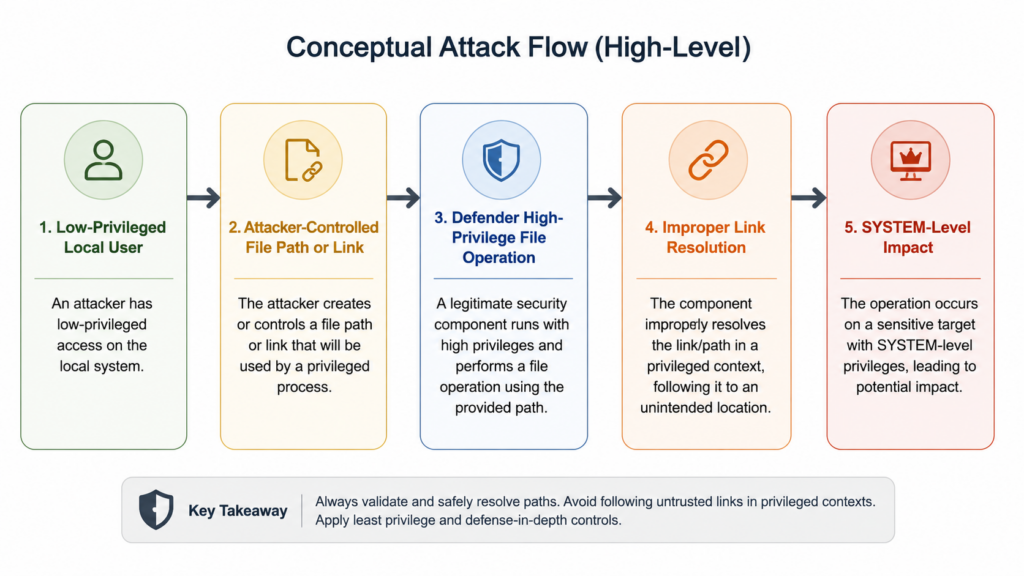
Security teams often downgrade local privilege escalation bugs in their heads. The argument is familiar: the attacker already needs a foothold, so patching can wait behind internet-facing RCEs, VPN bugs, identity provider issues, and browser zero-days. That logic is understandable, but it is too shallow for CVE-2026-41091.
A local privilege escalation against a security product changes the post-compromise balance. Attackers rarely land on a machine with the exact rights they need. They get a low-privileged shell through phishing, stolen credentials, remote monitoring and management abuse, a malicious developer tool, a browser exploit, or a compromised VPN account. After that, the next question is whether the endpoint can stop them before they dump credentials, disable controls, move laterally, or install a durable implant. A local bug that turns that early foothold into SYSTEM can be the difference between a contained workstation event and a domain-impacting incident.
CVE-2026-41091 is also notable because the vulnerable component is not some forgotten third-party helper running with bad permissions. It is Microsoft Defender, a deeply integrated security component that performs high-privilege file operations by design. Defender scans files, handles remediation, updates engines and signatures, touches quarantine state, and participates in trusted workflows that many organizations assume are safe because they are “security product behavior.” That assumption is exactly what makes this class of issue dangerous.
The weakness class is the key. MITRE describes CWE-59 as a condition where a product accesses a file based on a filename but fails to prevent that filename from identifying a link or shortcut that resolves to an unintended resource. In plain English: the program thinks it is opening one thing, but the filesystem resolves the path to something else. When the program is privileged, the consequence can be privileged read, write, delete, restore, or metadata manipulation in a place the attacker could not normally reach.(CWE)
On Windows, link-following issues can involve symbolic links, hard links, junctions, mount points, reparse points, object manager links, or path confusion between different namespaces. Not every link primitive is available to every standard user in every configuration, and not every link-following bug is exploitable. The defender’s takeaway is narrower and more useful: any high-privilege service that accepts, scans, remediates, copies, restores, or deletes attacker-influenced paths must be treated as a privilege boundary candidate.
What Microsoft actually fixed
Microsoft’s public Defender release notes provide the most useful fixed-version anchor. The Windows Antivirus April 2026 release lists Platform 4.18.26040.7, Engine 1.1.26040.8, and Security intelligence 1.451.6.0. In the “Fixed three CVEs” section, Microsoft lists CVE-2026-41091 as an elevation-of-privilege vulnerability caused by improper link resolution before file access and notes that it is fixed in Engine 1.1.26040.8. The same release notes list CVE-2026-45498 as fixed in Platform 4.18.26040.7 and CVE-2026-45584 as fixed in Engine 1.1.26040.8.(Microsoft Lernen)
That distinction matters during patch validation. Teams sometimes collapse “Defender version” into one number, but Microsoft Defender has multiple moving parts. You may see a platform version, engine version, security intelligence version, product version, service version, and signature version. For CVE-2026-41091 patch verification, the core question is whether the engine is at least 1.1.26040.8. For the related CVE-2026-45498 denial-of-service issue, the platform must be at least 4.18.26040.7. For CVE-2026-45584, the engine baseline again matters.
Microsoft’s Defender update documentation says engine updates are included with security intelligence updates and are released monthly, while Defender Antivirus requires monthly platform updates known as KB4052623. It also lists common update distribution paths: Windows Update, WSUS, Microsoft Configuration Manager, normal Windows update deployment methods, and UNC file share.(Microsoft Lernen)
That is why “we patch Windows every month” is not a complete answer. Defender engine and platform versions should be validated directly. A cumulative Windows update dashboard may not tell you whether Defender’s engine update path succeeded, whether a disconnected endpoint missed security intelligence, whether WSUS withheld a package, or whether a platform update was delayed because another protection feature was monitoring running processes.
A patch table that actually maps to operator action
| CVE | Komponente | Public impact | Fixed version | What to verify |
|---|---|---|---|---|
| CVE-2026-41091 | Microsoft Malware Protection Engine | Local elevation of privilege through improper link resolution before file access | Engine 1.1.26040.8 | AMEngineVersion is 1.1.26040.8 or later |
| CVE-2026-45498 | Microsoft Defender Antimalware Platform | Denial of service against Defender | Platform 4.18.26040.7 | AMProductVersion or platform directory shows 4.18.26040.7 or later |
| CVE-2026-45584 | Microsoft Malware Protection Engine | Remote code execution through heap-based buffer overflow | Engine 1.1.26040.8 | AMEngineVersion is 1.1.26040.8 or later |
| CVE-2026-33825 | Microsoft Defender, earlier BlueHammer issue | Local privilege escalation | April 2026 Microsoft fix | Treat as related historical context for Defender file-handling risk, not the same CVE |
CVE-2026-45584 deserves a separate note. NVD describes it as a heap-based buffer overflow in Microsoft Defender that allows an unauthorized attacker to execute code over a network. Its CVSS vector is network-based, high complexity, no privileges required, no user interaction, and high impact across confidentiality, integrity, and availability. That is a different risk shape from CVE-2026-41091, but it shares the same fixed engine version.(NVD)
CVE-2026-45498 also matters because an endpoint protection denial-of-service can be valuable even when it does not directly grant SYSTEM. If an attacker can degrade Defender while pursuing a separate privilege escalation or payload execution path, the DoS can become an enabling step. NVD describes CVE-2026-45498 as a Microsoft Defender denial-of-service vulnerability and gives it a high CVSS 3.x score in the NVD entry, while Microsoft’s release notes label it fixed in Platform 4.18.26040.7.(NVD) (Microsoft Lernen)
The technical core, link following without exploit instructions
A link-following vulnerability is not magic. It is a mismatch between what a privileged program intends to access and what the operating system resolves at the moment of access. The attack shape usually involves three ingredients.
The first ingredient is attacker influence over a path. That does not always mean the attacker controls the final protected file. More often, the attacker controls a directory, placeholder, temporary file, scan target, quarantine candidate, restore target, update staging path, or another filesystem object that a privileged process will later touch.
The second ingredient is a privileged actor. A normal user following a malicious link into another normal user’s file may be a bug, but it is rarely a full system compromise. A service running as SYSTEM following a link into C:\Windows\System32, a registry hive location, a service binary path, a driver staging directory, or a protected security product location is a different situation.
The third ingredient is a missing or unstable validation boundary. Secure file handling usually requires more than checking a string. The program must account for reparse points, object identity, final path resolution, race windows, file handles, permissions, canonicalization, and the possibility that the filesystem object changes between validation and use. That last problem is where TOCTOU bugs often enter the conversation: the program checks one object, then uses another because the object changed in the gap.
For defenders, the point is not to memorize every Windows namespace primitive. The point is to ask better questions about privileged security workflows:
Does the service ever act on a path supplied or influenced by a low-privileged user?
Does it check the final resolved target, or only the input string?
Does it hold a safe file handle from validation through use, or does it reopen the path later?
Does it allow reparse points, junctions, mount points, or placeholder files in directories it treats as trusted?
Does it perform cleanup, quarantine, restore, or overwrite actions as SYSTEM?
Can an attacker create timing pressure with locks, file changes, or scan triggers?
Those questions apply beyond Microsoft Defender. Backup agents, EDR sensors, DLP agents, software updaters, package managers, sync clients, log collectors, browser updaters, decompression tools, and installers all perform high-privilege file operations. CVE-2026-41091 is useful because it reminds defenders that security software belongs on that list.
Why CISA KEV changes the patch priority
The CISA Known Exploited Vulnerabilities catalog is not a theoretical severity list. A CVE enters KEV when there is evidence of active exploitation and a clear remediation action. NVD’s CVE-2026-41091 page shows the CVE in CISA KEV, with the vulnerability name “Microsoft Defender Link Following Vulnerability,” a date added of May 20, 2026, a due date of June 3, 2026, and the required action to apply vendor mitigations, follow applicable BOD 22-01 guidance for cloud services, or discontinue use if mitigations are unavailable.(NVD)
Even if an organization is not a U.S. federal civilian agency, KEV status is a strong operational signal. It tells vulnerability management teams that the patch should move out of normal SLA queues and into exploited-vulnerability handling. The right question is not “What is the CVSS score?” The better question is “Where do we have affected Defender engines, and can we prove they have crossed the fixed version boundary?”
The CVSS score of 7.8 is meaningful, but it does not fully capture enterprise reality. In many breaches, attackers already have low-privileged code execution somewhere. They do not need every endpoint to be remotely exploitable. They need one foothold, one weak identity path, one exposed management plane, one phishing success, or one third-party remote access path. A reliable local escalation on a security component can then become a force multiplier.
Huntress’ April 2026 reporting around Nightmare-Eclipse tooling shows why this matters in real operations. In a live intrusion investigation, Huntress observed BlueHammer, RedSun, and UnDefend activity tied to likely compromised FortiGate SSL VPN access, suspicious binaries staged in user-writable directories, hands-on-keyboard reconnaissance such as whoami /priv, cmdkey /listund net group, and follow-on tunneling behavior. Huntress also stated that the observed tool executions did not appear to succeed in that incident, which is an important detail: attempted exploitation still tells defenders where attackers are looking.(Jägerin)
What to check before you declare the CVE-2026-41091 patch done
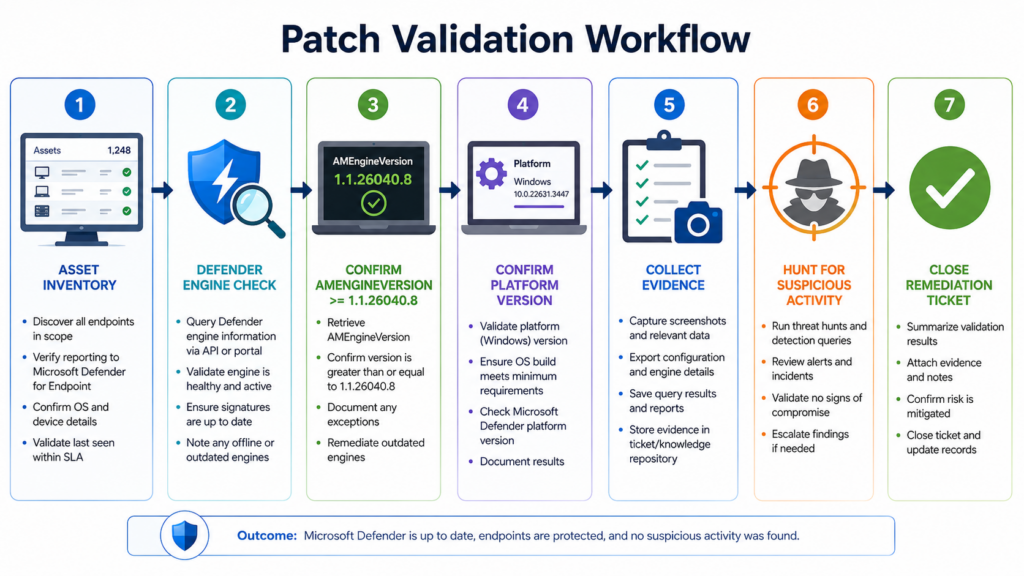
The fastest safe validation path is host-level version confirmation. Microsoft documents Get-MpComputerStatus as the Defender PowerShell cmdlet that gets the status of antimalware software installed on the computer. Its example output includes fields such as AMEngineVersion, AMProductVersion, AMServiceEnabled, AntivirusEnabled, AntivirusSignatureLastUpdated, BehaviorMonitorEnabledund RealTimeProtectionEnabled.(Microsoft Lernen)
Run this on a single Windows endpoint:
$status = Get-MpComputerStatus

$status | Select-Object `
    AMEngineVersion,
    AMProductVersion,
    AMServiceVersion,
    AMRunningMode,
    AMServiceEnabled,
    AntivirusEnabled,
    RealTimeProtectionEnabled,
    AntivirusSignatureLastUpdated,
    AntivirusSignatureVersion
Interpret the output this way:
AMEngineVersion should be 1.1.26040.8 or later for the CVE-2026-41091 patch.
AMProductVersion or the installed platform directory should show 4.18.26040.7 or later for the related CVE-2026-45498 platform fix.
AMRunningMode helps distinguish normal, passive, or other operational modes.
AMServiceEnabled, AntivirusEnabledund RealTimeProtectionEnabled tell you whether Defender is actually participating in protection.
AntivirusSignatureLastUpdated helps identify stale endpoints that may not be receiving current updates.
A simple local compliance check can turn those fields into a pass or fail result:
$requiredEngine  = [version]"1.1.26040.8"
$requiredProduct = [version]"4.18.26040.7"

$status = Get-MpComputerStatus

$result = [pscustomobject]@{
    ComputerName                = $env:COMPUTERNAME
    AMEngineVersion             = $status.AMEngineVersion
    AMProductVersion            = $status.AMProductVersion
    AMRunningMode               = $status.AMRunningMode
    AMServiceEnabled            = $status.AMServiceEnabled
    AntivirusEnabled            = $status.AntivirusEnabled
    RealTimeProtectionEnabled   = $status.RealTimeProtectionEnabled
    AntivirusSignatureUpdated   = $status.AntivirusSignatureLastUpdated
    EngineMeetsCVE202641091Fix  = ([version]$status.AMEngineVersion -ge $requiredEngine)
    PlatformMeetsRelatedFix     = ([version]$status.AMProductVersion -ge $requiredProduct)
}

$result | Format-List
This code does not prove the endpoint was never attacked. It proves whether the Defender engine and platform versions meet the patch baseline. That is the first gate. Incident review comes after.
For a small domain environment where PowerShell remoting is enabled and authorized, a remote check can collect the same fields:
$computers = Get-Content .\windows_endpoints.txt
$requiredEngine  = [version]"1.1.26040.8"
$requiredProduct = [version]"4.18.26040.7"

$results = Invoke-Command -ComputerName $computers -ScriptBlock {
    $status = Get-MpComputerStatus

    [pscustomobject]@{
        ComputerName              = $env:COMPUTERNAME
        AMEngineVersion           = $status.AMEngineVersion
        AMProductVersion          = $status.AMProductVersion
        AMRunningMode             = $status.AMRunningMode
        AMServiceEnabled          = $status.AMServiceEnabled
        AntivirusEnabled          = $status.AntivirusEnabled
        RealTimeProtectionEnabled = $status.RealTimeProtectionEnabled
        SignatureLastUpdated      = $status.AntivirusSignatureLastUpdated
    }
}

$results |
    Select-Object *,
        @{Name="EngineFixed";Expression={ [version]$_.AMEngineVersion -ge [version]"1.1.26040.8" }},
        @{Name="PlatformFixed";Expression={ [version]$_.AMProductVersion -ge [version]"4.18.26040.7" }} |
    Export-Csv .\defender_cve_2026_41091_patch_status.csv -NoTypeInformation
Do not run remote collection scripts outside your administrative scope. Do not use this as a substitute for endpoint management telemetry. It is a direct validation pattern for authorized administrators who need a second source of truth.
Microsoft also documents a GUI verification flow for Malware Protection Engine updates: open Windows Security, go to Virus & threat protection, select Check for updates under Virus & threat protection updates, check again, then go to Settings and About, and examine the Engine Version number. Microsoft says the update is successfully installed if the Malware Protection Engine version or signature package version matches or exceeds the version you are trying to verify.(Microsoft Support)
Enterprise patch paths that commonly fail
The CVE-2026-41091 patch can appear deceptively easy because Defender normally updates itself. In unmanaged consumer systems, that is often enough. In enterprise environments, the update path is rarely that clean.
WSUS can be the first failure point. Defender platform and engine updates may require category approval, sync health, product selection, and correct downstream server behavior. If WSUS is used as the authoritative source but does not have the relevant Defender updates approved, endpoints may remain stale even while the Windows cumulative update dashboard looks healthy.
Microsoft Configuration Manager can introduce a second layer of delay. Software Update Point configuration, deployment rings, maintenance windows, client health, boundary groups, and content distribution issues can all delay the point at which an endpoint receives the Defender update. A Configuration Manager report that says a monthly deployment is broadly successful does not necessarily prove every Defender engine crossed 1.1.26040.8.
Intune and Windows Update for Business rings can also create uneven rollout. Deferral settings, device check-in gaps, user behavior, reboot constraints, and network policies can produce pockets of stale endpoints. Mobile workstations are especially prone to appearing compliant in broad dashboards while being stale at the host level.
Disconnected or partially disconnected environments need special care. Microsoft’s Defender documentation lists UNC file share as one update path, and it documents command-line update methods through MpCmdRun.exe. The operational lesson is that offline update workflows must be tested, not assumed.(Microsoft Lernen)
Golden images and VDI templates are another common blind spot. If the template has an old Defender engine, every newly created machine can start stale. Even if it updates shortly after boot, there may be a vulnerability window during provisioning, onboarding, or first user login. Update the image, not just the running fleet.
Servers deserve their own review. Some server workloads run Defender in passive mode because another endpoint product is primary. Microsoft’s Defender update documentation still says to update antivirus protection even if Defender Antivirus is running in passive mode.(Microsoft Lernen) Passive does not mean irrelevant, especially when shared components, platform packages, or management assumptions remain in play.
| Umwelt | Häufige Fehlerart | What to verify |
|---|---|---|
| WSUS-managed endpoints | Defender updates not approved or not synced | Engine and platform version from host telemetry |
| Configuration Manager | Deployment succeeded for Windows updates but Defender package lagged | AMEngineVersion, AMProductVersion, client health |
| Intune-managed laptops | Delayed check-in or ring deferral | Fresh device status plus local PowerShell spot checks |
| Offline networks | Security intelligence path exists but engine package is stale | Offline package workflow and version after update |
| VDI and golden images | New machines boot from stale template | Image version before clone and first-boot update behavior |
| Passive-mode Defender | Team assumes another AV makes Defender irrelevant | Defender version, mode, and whether components remain installed |
| Long-idle endpoints | Asset appears in inventory but has not updated recently | Last signature update, last check-in, network reachability |
How to force an update safely
Microsoft’s Defender update documentation lists several supported installation methods, including Windows Update, WSUS, Software Update Point, file server, Windows Security app, and MpCmdRun.exe. For security intelligence and antivirus engine updates, Microsoft documents MpCmdRun.exe -SignatureUpdate, with options for UNC share or Microsoft Malware Protection Center source. For platform updates, Microsoft lists Windows Update, WSUS, SUP, Windows Security app, and Microsoft Update Catalog.(Microsoft Lernen)
A local elevated command prompt can use Microsoft’s documented command pattern:
(set "_done=" & if exist "%ProgramData%\Microsoft\Windows Defender\Platform\" (for /f "delims=" %d in ('dir "%ProgramData%\Microsoft\Windows Defender\Platform" /ad /b /o:-n 2^>nul') do if not defined _done (cd /d "%ProgramData%\Microsoft\Windows Defender\Platform\%d" & set _done=1)) else (cd /d "%ProgramFiles%\Windows Defender")) >nul 2>&1

MpCmdRun.exe -SignatureUpdate
A simpler PowerShell-driven update attempt is also commonly used by administrators:
Update-MpSignature
Get-MpComputerStatus |
    Select-Object AMEngineVersion, AMProductVersion, AntivirusSignatureLastUpdated
The important part is not the command itself. The important part is the second check. Never mark the asset remediated because an update command ran. Mark it remediated when the installed version meets or exceeds the fixed baseline.
For hosts that cannot reach Microsoft update services, use your approved enterprise update source. Do not improvise by copying random Defender binaries from another machine. Use Microsoft-supported update channels, validated packages, and auditable deployment records.
Detection after patching, what to hunt for
Patching CVE-2026-41091 closes the known fixed version gap. It does not answer whether exploitation was attempted before the patch arrived. After updating, teams should review telemetry for signs that an attacker interacted with Defender-related exploitation tooling, staged binaries from user-writable directories, or attempted to manipulate endpoint protection behavior.
The most useful hunting frame is behavioral. Names, hashes, and public PoC filenames are fragile. Attackers can recompile, rename, pack, or minimally edit tools. Behavior is harder to erase.
Useful signals include:
Execution from unusual user-writable paths, especially short subdirectories under Downloads, Pictures, Temp, AppData, or other low-noise user folders.
Low-privileged processes spawning unusual SYSTEM-level child processes.
Recent use of reconnaissance commands such as whoami /priv, cmdkey /list, net group, net localgroup, nltest, quser, oder whoami /groups before privilege-sensitive activity.
Defender service instability, unusual update failures, unexpected platform or engine rollback, or repeated scan remediation errors.
Suspicious creation or manipulation of filesystem links, junctions, mount points, or reparse points in paths later touched by privileged services.
Unexpected writes into protected directories after execution from user-writable paths.
Security product degradation followed by credential access, tunneling, persistence, or lateral movement.
Huntress’ observed intrusion details are useful here because they show what real operators did around the tooling: staging in user-writable directories, manual reconnaissance, likely VPN-based access, and follow-on tunneling. The attempted exploit did not need to succeed for the surrounding behavior to be incident-worthy.(Jägerin)
A basic Microsoft Defender XDR hunting query can start with user-writable execution and privilege context. Treat this as a starting point, not an official detection:
DeviceProcessEvents
| where Timestamp > ago(14d)
| where FolderPath has_any (
    @"\Users\", @"\Downloads\", @"\Pictures\", @"\AppData\Local\Temp\"
)
| where FileName in~ (
    "cmd.exe", "powershell.exe", "pwsh.exe", "wscript.exe", "cscript.exe",
    "rundll32.exe", "reg.exe", "net.exe", "whoami.exe", "cmdkey.exe"
)
| project Timestamp, DeviceName, AccountName, FileName, ProcessCommandLine,
          InitiatingProcessFileName, InitiatingProcessCommandLine, FolderPath
| order by Timestamp desc
A query for suspicious Defender health changes can look for service state, update, and protection changes. The exact tables available vary by tenant and licensing, so adapt field names to your environment:
DeviceEvents
| where Timestamp > ago(14d)
| where ActionType has_any (
    "Antivirus", "Defender", "Tamper", "Service", "Security"
)
| project Timestamp, DeviceName, ActionType, AccountName,
          InitiatingProcessFileName, InitiatingProcessCommandLine,
          AdditionalFields
| order by Timestamp desc
A process sequence query can look for reconnaissance before suspicious execution:
let Recon =
DeviceProcessEvents
| where Timestamp > ago(14d)
| where FileName in~ ("whoami.exe", "cmdkey.exe", "net.exe", "nltest.exe", "quser.exe")
| project DeviceId, DeviceName, ReconTime=Timestamp, AccountName, ReconCommand=ProcessCommandLine;

let SuspiciousExec =
DeviceProcessEvents
| where Timestamp > ago(14d)
| where FolderPath has_any (@"\Downloads\", @"\Pictures\", @"\AppData\Local\Temp\")
| project DeviceId, DeviceName, ExecTime=Timestamp, AccountName, FileName, ProcessCommandLine, FolderPath;

Recon
| join kind=inner SuspiciousExec on DeviceId, AccountName
| where ExecTime between (ReconTime .. ReconTime + 2h)
| project DeviceName, AccountName, ReconTime, ReconCommand, ExecTime, FileName, ProcessCommandLine, FolderPath
| order by ExecTime desc
These queries are deliberately conservative. They do not claim to detect CVE-2026-41091 exploitation by themselves. They help analysts find endpoint behavior that should be reviewed after an exploited Defender privilege escalation issue enters the remediation cycle.
Host triage commands for suspicious systems
When a host fails the version check or shows suspicious activity around the patch window, collect triage data before cleaning aggressively. Do not destroy evidence by deleting every suspicious file immediately. Preserve filenames, paths, hashes, timestamps, parent processes, command lines, network connections, and Defender event history.
Start with Defender status:
Get-MpComputerStatus |
    Select-Object AMEngineVersion,
                  AMProductVersion,
                  AMRunningMode,
                  AMServiceEnabled,
                  AntivirusEnabled,
                  RealTimeProtectionEnabled,
                  BehaviorMonitorEnabled,
                  IoavProtectionEnabled,
                  AntivirusSignatureLastUpdated,
                  FullScanEndTime,
                  QuickScanEndTime
Check recent detections:
Get-MpThreatDetection |
    Select-Object InitialDetectionTime,
                  LastThreatStatusChangeTime,
                  ThreatID,
                  ThreatStatusID,
                  Resources,
                  ProcessName,
                  DomainUser |
    Sort-Object InitialDetectionTime -Descending |
    Select-Object -First 50
Review Defender operational events:
Get-WinEvent -LogName "Microsoft-Windows-Windows Defender/Operational" -MaxEvents 200 |
    Select-Object TimeCreated, Id, ProviderName, Message |
    Format-List
Look for unusual recent executables in user-writable directories:
$paths = @(
    "$env:SystemDrive\Users\*\Downloads",
    "$env:SystemDrive\Users\*\Pictures",
    "$env:SystemDrive\Users\*\AppData\Local\Temp"
)

Get-ChildItem -Path $paths -Recurse -File -ErrorAction SilentlyContinue |
    Where-Object { $_.Extension -in ".exe", ".dll", ".ps1", ".bat", ".cmd", ".scr" } |
    Sort-Object LastWriteTime -Descending |
    Select-Object FullName, Length, CreationTime, LastWriteTime |
    Select-Object -First 100
Hash suspicious files before moving them:
Get-FileHash "C:\Path\To\Suspicious\File.exe" -Algorithm SHA256
For production investigations, centralize collection through your EDR, SIEM, or forensic tooling. Local commands are useful for fast validation, but they are easy to run inconsistently under pressure.
Why “Defender is disabled” is not a strategy
Some coverage noted Microsoft’s statement that systems with Microsoft Defender disabled are not susceptible to the Defender vulnerabilities. That statement should not become a lazy mitigation plan. If Defender is disabled because a supported third-party endpoint product is installed and the organization has a deliberate security architecture, that is different from disabling Defender to avoid patching.
The wrong conclusion is “turn Defender off.” Disabling a built-in endpoint protection component can remove telemetry, reduce defense in depth, break assumptions in Microsoft Defender for Endpoint, create compliance exceptions, and produce a worse security posture. The better conclusion is: know whether Defender is active, passive, or disabled, and keep installed security components current.
Passive mode still deserves version review. Microsoft’s Defender update documentation says to update antivirus protection even if Defender Antivirus is running in passive mode.(Microsoft Lernen) In many environments, passive mode exists because another security product is primary, but Defender components may still exist, update, report health, or participate in Microsoft’s broader endpoint stack. The safe operational habit is to patch installed components unless the vendor explicitly states they are not present or not affected in that deployment state.
The RedSun and BlueHammer context, useful but easy to overstate
CVE-2026-41091 did not appear in a vacuum. The Microsoft Defender attack surface had already been under unusual attention because of public Nightmare-Eclipse tooling, including BlueHammer, RedSun, and UnDefend. BlueHammer was later tracked as CVE-2026-33825. Public reporting and research described a broader pattern of Defender-related local privilege escalation and protection degradation techniques.
The Hacker News reported that Microsoft had not formally confirmed whether CVE-2026-41091 and CVE-2026-45498 map directly to RedSun and UnDefend, but that the vulnerability descriptions overlap with those two previously disclosed Defender zero-days. It also reported that Huntress observed exploitation activity involving both vulnerabilities alongside BlueHammer. That wording matters. A serious technical article should not say “CVE-2026-41091 is definitely RedSun” unless Microsoft or another authoritative source has confirmed the mapping. The accurate statement is narrower: the public descriptions overlap, and multiple security reports discuss them in the same Defender exploitation ecosystem.(Die Hacker-Nachrichten)
Penligent’s earlier technical analysis of BlueHammer and RedSun framed Defender as a high-privilege actor inside the filesystem rather than merely a scanner. That is the right mental model for CVE-2026-41091 patch validation as well: the asset to validate is not just a binary version, but a privileged file-handling workflow that attackers have been actively studying.(Sträflich)
CVE-2026-33825 is especially useful as context because it shows the difference between official CVE language and operational exploit behavior. NVD described CVE-2026-33825 as insufficient granularity of access control in Microsoft Defender that allows local privilege escalation. Public analysis around BlueHammer discussed Defender update behavior, Volume Shadow Copy Service, Cloud Files interactions, opportunistic locks, and path manipulation. Those public details are not automatically transferable to CVE-2026-41091, but they help defenders think correctly about the category: trusted Windows security workflows can become attack surfaces when low-privileged users can influence paths, timing, or file resolution.
What not to do with public PoC material
Do not run public proof-of-concept exploit code on production endpoints to “confirm exposure.” That is a bad test for CVE-2026-41091 and for Defender-related privilege escalation generally. It can destabilize endpoints, trigger security controls, alter evidence, violate policy, and create legal risk. It may also test a public artifact rather than the underlying issue.
A better validation path is layered:
Confirm installed Defender engine and platform versions.
Confirm update source health.
Confirm Defender operational mode.
Review telemetry for suspicious activity before patching.
Reproduce only in an isolated lab that mirrors the relevant versions and is explicitly authorized.
Use behavior-focused detection engineering rather than filename-only indicators.
Document evidence for auditors and incident responders.
If a team needs repeatable authorized validation, the workflow should be scoped to version checks, telemetry review, safe configuration validation, and evidence capture. Penligent’s product positioning around verified findings, reproducible evidence, controlled agentic workflows, and reporting aligns naturally with that kind of authorized validation workflow, especially when teams need to turn patch verification and post-fix evidence into repeatable security operations rather than one-off screenshots.(Sträflich)
Building a reliable CVE-2026-41091 patch workflow
A good CVE-2026-41091 patch workflow has five stages: inventory, update, verify, hunt, and document.
Inventory starts with identifying Windows assets where Microsoft Defender or Microsoft Malware Protection Engine is installed. Include endpoints, servers, VDI images, lab machines, jump boxes, kiosks, build agents, developer workstations, and disconnected systems. Do not restrict the search to machines where Defender is the primary antivirus.
Update means getting the engine to 1.1.26040.8 or later and the platform to 4.18.26040.7 or later where applicable. Use supported Microsoft update paths. Align WSUS, Configuration Manager, Intune, Windows Update for Business, or offline distribution with your environment’s normal control plane.
Verify means collecting host-level version evidence. Get-MpComputerStatus is a good direct check. The Windows Security app About page is acceptable for a spot check. Enterprise telemetry is better for scale, but only if the fields reflect the actual engine and platform versions.
Hunt means reviewing behavior around the exposure window. Focus on suspicious staging, low-privileged execution, Defender health changes, reconnaissance, SYSTEM transitions, and follow-on activity. Do not wait for a perfect vendor detection name.
Document means preserving the evidence that matters: asset list, before and after versions, update source, update time, exceptions, failed endpoints, manual remediation, hunting results, and residual risk. For regulated environments, that evidence is as important as the patch itself.
A useful remediation record can be simple:
| Feld | Beispielwert | Warum das wichtig ist |
|---|---|---|
| Asset ID | WIN-LAPTOP-0421 | Ties evidence to inventory |
| User or owner | Finance user, EMEA | Helps prioritize business risk |
| Previous engine | 1.1.26030.3008 | Shows exposure |
| Current engine | 1.1.26040.8 | Shows CVE-2026-41091 patch baseline |
| Current platform | 4.18.26040.7 | Shows related platform fix |
| Update source | Intune ring, WSUS, manual offline package | Explains remediation path |
| Verification method | Get-MpComputerStatus collected by EDR live response | Supports auditability |
| Hunt status | No suspicious user-writable execution in 14-day window | Separates patching from incident review |
| Exception | Offline lab subnet pending manual package | Prevents silent gaps |
Prioritization, which assets first
Not every endpoint has the same risk. CVE-2026-41091 is local, so prioritize based on where low-privileged code execution is most plausible and where SYSTEM compromise would hurt most.
Start with internet-exposed or remote-access-adjacent systems. VPN jump hosts, RDP-accessible servers, remote support endpoints, and machines used by administrators should move first. Even though the CVE is local, these systems are often where attackers land after credential theft or remote access abuse.
Next, patch developer workstations and build infrastructure. Developer endpoints often run unsigned tools, package managers, test binaries, local servers, and scripts. If a developer workstation becomes SYSTEM, the attacker may pivot into repositories, tokens, signing workflows, CI secrets, or artifact publishing.
Then patch privileged user workstations. Help desk, IT administration, security engineering, finance operations, identity administrators, and cloud administrators often hold cached credentials, browser sessions, management consoles, and privileged tokens. SYSTEM on those boxes can become identity compromise.
Patch servers where Defender is installed, even if another tool is primary. Server compromise often has higher blast radius, and stale Defender components can be overlooked because server teams focus on OS cumulative updates rather than Defender engine versions.
Finally, clean up stale and intermittent assets. Laptops that rarely connect, lab machines, conference room devices, kiosks, and archived VDI pools are easy to miss. Attackers like forgotten systems because defenders do not.
| Priorität | Asset type | Reason |
|---|---|---|
| 1 | Admin workstations and jump hosts | SYSTEM can expose high-value credentials and tools |
| 2 | VPN-adjacent or remote-access systems | Local exploit can follow initial access |
| 3 | Developer workstations and build agents | Strong path to supply chain and secrets |
| 4 | Servers with Defender installed | Higher operational impact and often slower update validation |
| 5 | VDI templates and golden images | Stale image can recreate exposure repeatedly |
| 6 | Intermittent laptops and lab hosts | Common source of hidden stale versions |
Common mistakes that keep this vulnerability alive
The first mistake is checking only Windows Update history. Defender engine and platform state should be verified directly. Windows Update history is useful, but it is not the same as AMEngineVersion.
The second mistake is assuming automatic updates worked everywhere. Microsoft’s default configuration can keep Defender updated in many cases, but enterprise controls can delay, redirect, or break update paths. Validation beats intention.
The third mistake is ignoring passive-mode systems. Passive mode may reduce exploitability in some scenarios, but it does not justify stale security components. If the component exists, track it.
The fourth mistake is relying only on scanner plugins. Vulnerability scanners are useful, but many plugins rely on self-reported version numbers or periodic credentialed checks. A stale scan, failed credentialed check, or partial asset inventory can create false comfort. Use scanners as one signal, not the only signal.
The fifth mistake is treating CVE-2026-41091 as isolated from CVE-2026-45498 and CVE-2026-45584. They are different vulnerabilities, but the same Defender release line fixed all three. A patch plan that only checks one field may miss a related platform issue.
The sixth mistake is overfitting detections to public names. Public tool names like BlueHammer, RedSun, and UnDefend are useful for communication. They are poor long-term detection logic. Hunt behavior: user-writable staging, reconnaissance, suspicious Defender health changes, link manipulation, abnormal SYSTEM transitions, and follow-on tunneling.
The seventh mistake is running PoCs in production. Patch verification should not require exploit execution. If proof is needed, build an isolated lab and define written rules of engagement.
Incident response if exploitation is suspected
If exploitation is suspected, do not treat the host as “fixed” just because the engine was updated after the fact. A successful local privilege escalation may have allowed credential dumping, persistence, security control changes, lateral movement, or file tampering before the patch landed.
Start by isolating the endpoint if current compromise is plausible. Preserve volatile evidence where possible. Collect process history, command lines, network connections, recent service creation events, scheduled tasks, autoruns, Defender operational logs, PowerShell logs, security logs, and EDR telemetry. Capture suspicious binaries and hashes before removal.
Review identity impact. A local SYSTEM compromise can expose local secrets, cached domain credentials, browser tokens, service account material, RDP history, VPN profiles, SSH keys, developer tokens, and cloud credentials. If the user was privileged, assume the identity blast radius may be larger than the endpoint.
Review lateral movement. Look for SMB, RDP, WinRM, WMI, PsExec-like behavior, remote scheduled tasks, remote service creation, and authentication anomalies after the suspected exploitation window.
Review security control state. Confirm Defender settings, tamper protection, exclusions, update history, platform and engine versions, EDR sensor health, firewall rules, and third-party security agents. A local privilege escalation is often followed by defense weakening.
Rebuild if trust is lost. If there is credible evidence of SYSTEM-level attacker activity and you cannot establish a clean timeline, reimaging may be safer than cleaning. Patch the image before redeployment.
Defender update evidence for auditors and executives
Executives do not need a lecture on symlinks. Auditors do not need a dramatic exploit narrative. Both need evidence that the organization knew the risk, identified affected systems, remediated them, and handled exceptions.
A concise executive summary can say:
CVE-2026-41091 is an exploited Microsoft Defender local privilege escalation vulnerability affecting Microsoft Malware Protection Engine versions before 1.1.26040.8. The organization validated Defender engine and platform versions across managed Windows assets, remediated hosts below the fixed baseline, reviewed telemetry for suspicious activity during the exposure window, and documented exceptions for offline or unreachable systems.
The technical appendix should include:
The authoritative CVE record and fixed version.
The inventory query or data source.
The number of assets checked.
The number of vulnerable assets found.
The number remediated.
The exceptions and owners.
The hunting logic or telemetry reviewed.
The date and time of final validation.
The residual risk statement.
That evidence is more useful than a generic “patched” ticket. It lets security leadership understand whether the remediation was complete, partial, or blocked by known constraints.
The broader lesson for security product attack surfaces
CVE-2026-41091 sits in a pattern that defenders should not ignore. Endpoint protection tools, backup agents, updaters, and management agents operate with high privileges because they need to. They also parse untrusted input, scan user-controlled files, download updates, write logs, quarantine content, restore files, and coordinate with kernel drivers and cloud services. That combination creates attack surface.
The lesson is not that Defender is uniquely unsafe. The lesson is that trusted security software is still software. It can have path resolution bugs, race conditions, update workflow weaknesses, parser bugs, unsafe defaults, and configuration drift. The more deeply a tool integrates with the OS, the more carefully defenders should validate its privileged operations.
For product security teams, CVE-2026-41091 reinforces basic secure file-operation rules:
Avoid acting on attacker-controlled paths as a privileged user without final target validation.
Prefer safe handles over repeated path opens.
Reject or carefully constrain reparse points in privileged workflows.
Validate object identity after open, not only before open.
Design cleanup, quarantine, and restore paths as privilege boundaries.
Treat update and rollback logic as attacker-reachable code.
Test with filesystem race, link, junction, mount point, and placeholder scenarios.
Log enough detail for defenders to reconstruct what the privileged service did.
For detection engineers, the lesson is to monitor security product behavior without assuming the product is always trustworthy. A security tool can be both a defender and an attack surface. Telemetry should make that visible.
FAQ
Is CVE-2026-41091 remotely exploitable?
- CVE-2026-41091 is described as a local elevation-of-privilege vulnerability, not an unauthenticated internet-facing RCE.
- The CVSS vector uses
AV:L, meaning local attack vector, andPR:L, meaning low privileges are required. - The risk is still serious because attackers commonly obtain low-privileged local execution through phishing, stolen credentials, VPN abuse, remote access tools, or malware.
- Once local execution exists, successful exploitation can move the attacker toward SYSTEM-level control.
What version fixes CVE-2026-41091?
- The key fixed version is Microsoft Malware Protection Engine 1.1.26040.8 or later.
- NVD lists affected Microsoft Malware Protection Engine versions from 1.1.26030.3008 up to but excluding 1.1.26040.8.
- Microsoft’s Defender release notes list CVE-2026-41091 as fixed in Engine 1.1.26040.8.
- In enterprise environments, verify the engine version directly on the endpoint rather than relying only on patch deployment dashboards.
How do I check whether the CVE-2026-41091 patch is installed?
- ausführen.
Get-MpComputerStatusin PowerShell and checkAMEngineVersion. AMEngineVersionshould be1.1.26040.8or later.- Also check
AMProductVersion;4.18.26040.7or later addresses the related Defender platform fix for CVE-2026-45498. - In the Windows Security app, go to Virus & threat protection, Protection updates, Check for updates, then Settings and About to review the engine version.
- For fleet validation, collect the same fields through EDR, Intune, Configuration Manager, PowerShell Remoting, or another approved management channel.
Why is CVE-2026-41091 in CISA KEV?
- NVD shows CVE-2026-41091 in CISA’s Known Exploited Vulnerabilities catalog.
- KEV status means defenders should prioritize it as an exploited vulnerability, not only as a CVSS 7.8 issue.
- For U.S. federal civilian agencies, the listed due date is June 3, 2026.
- Other organizations can use KEV status as a strong signal for accelerated remediation.
What is the difference between CVE-2026-41091 and CVE-2026-45498?
- CVE-2026-41091 is an elevation-of-privilege issue tied to improper link resolution before file access in Microsoft Defender.
- CVE-2026-45498 is a Microsoft Defender denial-of-service vulnerability.
- CVE-2026-41091 is fixed in Engine 1.1.26040.8.
- CVE-2026-45498 is fixed in Platform 4.18.26040.7.
- Both should be checked during the same Defender remediation cycle because they were addressed in the same Windows Antivirus release line.
Should I run a public exploit to confirm whether my endpoint is vulnerable?
- No, not on production systems.
- Public exploit code can destabilize hosts, trigger controls, destroy evidence, or violate policy.
- Safer validation is version-based: confirm Engine 1.1.26040.8 or later and Platform 4.18.26040.7 or later.
- If exploit reproduction is required, use an isolated lab with explicit authorization and written rules of engagement.
- Production validation should focus on patch evidence, Defender health, and telemetry review.
Does CVE-2026-41091 matter if my organization uses another antivirus?
- It can still matter if Microsoft Defender or Microsoft Malware Protection Engine components remain installed.
- Defender may run in passive mode, coexist with another product, or remain part of the Microsoft endpoint stack.
- Microsoft’s Defender update documentation says antivirus protection should be updated even when Defender Antivirus is running in passive mode.
- Confirm actual component presence and version instead of assuming the third-party antivirus removes the exposure.
What should I hunt for after applying the patch?
- Look for suspicious execution from user-writable paths such as Downloads, Pictures, Temp, and AppData.
- Review reconnaissance commands such as
whoami /priv,cmdkey /list,net group, and similar enumeration activity. - Check Defender health changes, update failures, service instability, and unexpected configuration changes.
- Look for abnormal SYSTEM-level processes spawned after low-privileged activity.
- Review lateral movement, credential access, tunneling, persistence, and security control degradation after the exposure window.
Closing judgment
The CVE-2026-41091 patch is not hard to name: get Microsoft Defender Engine to 1.1.26040.8 or later. The hard part is proving that every relevant Windows asset actually reached that state, especially in managed enterprise environments where update paths differ by device class, network zone, and control plane.
Do not let the phrase “local privilege escalation” make the bug sound minor. Local privilege escalation is what turns an initial foothold into control. When the affected component is the endpoint protection stack itself, the operational risk is higher than the CVSS headline alone suggests.
Patch the engine. Verify the platform. Review the exposure window. Keep the evidence. Then carry the larger lesson forward: privileged security workflows are attack surfaces, and they deserve the same adversarial scrutiny defenders already apply to kernels, identity systems, and exposed network services.
 German
  English
  French
  Spanish
  Portuguese
  Japanese
  Korean
  Hindi
Hindi  Arabic
  Turkish
  Hebrew