
TVM-2026-0001 is the kind of vulnerability-management signal that creates immediate confusion. It looks official enough to require action, but it does not behave like a normal CVE entry. Security teams may see the identifier in Microsoft Defender, search for a public advisory, and find only sparse references, community discussion, or GreatXML-related reporting. The right response is neither panic nor dismissal. Treat it as a Microsoft Defender Vulnerability Management signal that needs structured validation.
The most important point is that TVM-2026-0001 is not currently a public CVE identifier. Microsoft’s own Defender Vulnerability Management documentation says that when a zero-day vulnerability has no assigned CVE-ID, the Defender portal may show the zero-day label under an internal temporary name that looks like TVM-XXXX-XXXX, and that name can later be updated when an official CVE-ID is assigned. (Microsoft Lernen)
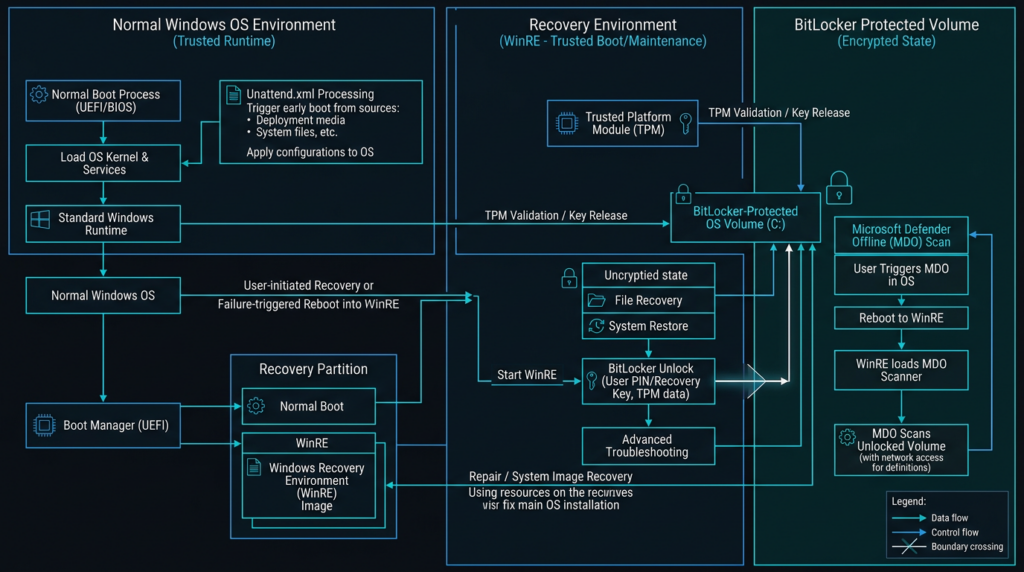
Public reporting and security analysis have associated the GreatXML issue with a BitLocker bypass path involving Windows Recovery Environment, Microsoft Defender Offline Scan state, and unattended setup behavior. SecurityWeek reported that GreatXML is a Windows BitLocker bypass exploit targeting Microsoft Defender’s offline scan functionality, while Hive Security described it more cautiously as a public BitLocker-bypass PoC claim involving WinRE, Defender Offline Scan state, and unattend.xml. (SecurityWeek)
That distinction matters. GreatXML should not be described as proof that BitLocker’s encryption algorithm has been broken. The more accurate framing is that recovery environments, offline security workflows, and disk-encryption trust boundaries can overlap in ways that may undermine the protection users expect from BitLocker on lost, stolen, repaired, or physically accessed Windows devices.
What TVM-2026-0001 likely means in Microsoft Defender
Microsoft Defender Vulnerability Management is designed to provide asset visibility, vulnerability assessment, prioritization, and remediation guidance across Windows, macOS, Linux, Android, iOS, and network devices. Microsoft describes the product as using threat intelligence, business context, device assessments, and remediation workflows to help teams prioritize vulnerabilities on critical assets. (Microsoft Lernen)
Inside that product context, a TVM-style identifier is not the same thing as a CVE. A CVE is a public identifier used across vendor advisories, NVD, scanners, patch dashboards, SBOM workflows, and security reporting. A TVM identifier is a Microsoft Defender Vulnerability Management record. Microsoft’s zero-day documentation explicitly says that when a vulnerability has no CVE-ID, Defender may display an internal temporary name in the TVM-XXXX-XXXX format. (Microsoft Lernen)
For defenders, the operational conclusion is simple: do not ignore TVM-2026-0001 because it lacks a CVE, but also do not assume that every affected device is exposed to a universally confirmed exploit chain. Treat the identifier as a real exposure-management signal, then validate the local conditions that would make the risk meaningful.
| Signal | Was es bedeutet | What it does not prove | First defensive action |
|---|---|---|---|
| TVM-2026-0001 appears in Defender | Defender Vulnerability Management has surfaced a non-CVE weakness record | Microsoft has not necessarily published a public CVE under that name | Export affected devices and preserve the portal details |
| The record is associated with GreatXML or a BitLocker bypass | The issue may relate to public GreatXML reporting | Every listed device is automatically exploitable | Confirm BitLocker, WinRE, Defender Offline Scan, and device role |
| The device uses BitLocker with TPM-only unlock | Physical-access risk becomes more important | BitLocker cryptography is broken | Prioritize traveling, privileged, and high-value laptops |
| WinRE is enabled | A recovery-environment attack surface exists | WinRE should always be disabled | Check business need, recovery policy, and mitigation options |
| Defender Offline Scan was run | GreatXML-related public claims become more relevant | The device is definitely compromised | Look for recovery partition changes and unusual recovery boot events |
| No public CVE exists | Public metadata is incomplete | The issue is harmless | Document uncertainty and use configuration-based validation |
The useful mental model is exposure first, exploitability second, remediation third. A TVM record tells you that Microsoft Defender sees something worth surfacing. It does not by itself prove exploitability in your fleet.
Why GreatXML became the center of the conversation
GreatXML became important because public reporting ties it to a recovery-mode BitLocker bypass claim. SecurityWeek reported that the PoC abuses Microsoft Defender Offline Scan to spawn a SYSTEM shell when rebooting into Recovery Mode. The Hacker News similarly reported that GreatXML can bypass BitLocker on Windows systems where Defender Offline Scan was used, exposing encrypted drive data. (SecurityWeek)
Hive Security’s analysis is more careful, and that caution is useful for a production security team. It describes GreatXML as a public BitLocker-bypass PoC claim involving WinRE, Defender Offline Scan state, and unattend.xml, while warning that defenders should avoid claiming universal exploitation until Microsoft or independent researchers publish deeper validation. (Hive Security)
Microsoft’s own documentation confirms the legitimacy of the underlying components. Microsoft Defender Offline Scan runs outside the normal Windows operating environment, starts from C:\ProgramData\Microsoft\Windows Defender\Offline Scanner, and prompts the user to save work before continuing. (Microsoft Lernen) Microsoft also documents the Start-MpWDOScan PowerShell cmdlet as a command that starts a Windows Defender offline scan and causes the computer to start in Windows Defender Offline. (Microsoft Lernen)
Windows Recovery Environment is also a documented Windows component. Microsoft describes REAgentC.exe as the tool used to configure a Windows Recovery Environment boot image and administer recovery options and customizations. (Microsoft Lernen)
The GreatXML concern is not that unattend.xml is inherently malicious. Unattended setup files are a legitimate Windows deployment mechanism. The concern is context. If setup automation behavior is honored inside a recovery or offline scan path that interacts with a BitLocker-protected operating system volume, then the recovery environment becomes part of the effective disk-encryption boundary.
That is why TVM-2026-0001 should be handled as a recovery-boundary issue rather than merely as a Defender dashboard item. It touches endpoint management, disk encryption, recovery design, local administrator control, physical custody, and vulnerability-management evidence.
What is confirmed, what is probable, and what remains unknown
TVM-2026-0001 is useful only if teams separate confirmed facts from public claims.
| Claim | Current confidence | Warum das wichtig ist |
|---|---|---|
| Defender may use TVM-style names for zero-days without CVE IDs | Hoch | Microsoft documents the TVM-XXXX-XXXX temporary naming pattern |
| TVM-2026-0001 is not currently a public CVE identifier | Hoch | No public CVE record under that identifier is available |
| GreatXML public reporting describes a BitLocker bypass path | Hoch | Multiple security outlets and analyses describe the same general claim |
| GreatXML involves WinRE and Defender Offline Scan state | Medium to high | Hive Security and public reporting describe this path, but official Microsoft confirmation remains limited |
| Every BitLocker-protected Windows device is exploitable | Unconfirmed | Public reports do not establish universal exploitability across all builds and configurations |
| BitLocker cryptography is broken | Nein | The concern is recovery-environment trust behavior, not a public break of the encryption algorithm |
| Defensive validation is justified | Hoch | Recovery-boundary issues have real operational impact even when public details are incomplete |
This table is the foundation for responsible reporting. A SOC analyst can say: “We have a Microsoft Defender Vulnerability Management record. It appears publicly associated with GreatXML-style BitLocker recovery-boundary risk. Public metadata is incomplete. We are validating affected devices through configuration, version, WinRE, BitLocker, and Defender evidence.” That is more useful than either “BitLocker is broken” or “there is no CVE, so ignore it.”
The BitLocker boundary is larger than BitLocker
BitLocker is often discussed as if it were only disk encryption. In practice, its security outcome depends on firmware, TPM behavior, Secure Boot, boot manager state, Windows Recovery Environment, recovery keys, device management policy, pre-boot authentication, local administrator control, and the physical custody model of the device.
That is why many BitLocker bypasses do not look like cryptographic attacks. They look like trust-chain attacks.
CVE-2022-41099 is an older but highly relevant example. Microsoft published KB5025175 to help administrators automate updates to the Windows Recovery Environment partition on deployed Windows 10 and Windows 11 devices to address CVE-2022-41099. The operational lesson is that applying ordinary OS patches may not be enough when the vulnerable component depends on a recovery image or recovery partition. (Microsoft Support)
YellowKey, tracked as CVE-2026-45585, pushed the same lesson into 2026. NVD describes YellowKey as a Windows security feature bypass vulnerability for which Microsoft issued a CVE to provide mitigation guidance until a security update became available. NVD also records the CVSS 3.1 vector as AV:P/AC:L/PR:N/UI:N/S:U/C:H/I:H/A:H, which makes the physical-access nature explicit. (NVD)
NVD’s CVE-2026-45585 record also states that Microsoft’s mitigation FAQ says TPM+PIN makes the vulnerability not exploitable. That is important for TVM-2026-0001 triage because it shows how pre-boot authentication can materially change the risk profile of a recovery-boundary BitLocker bypass. (NVD)
A Penligent analysis of YellowKey uses the right framing for this class of issue: the core risk is not that BitLocker’s encryption algorithm has been publicly broken, but that a physical attacker may abuse Windows Recovery Environment behavior to reach data that BitLocker was expected to protect at rest. That framing is also useful for TVM-2026-0001 and GreatXML because the shared concern is the recovery boundary, not the cipher. (Sträflich)
Attack conditions that matter for TVM-2026-0001 triage
A TVM-2026-0001 response should start with attacker prerequisites. Without prerequisites, teams overreact or underreact.
The public GreatXML claim is not best treated as a remote exploit. It is much closer to a local or physical-access recovery-environment abuse path. SecurityWeek reported that the GreatXML PoC targets Microsoft Defender Offline Scan functionality and can spawn a SYSTEM command prompt in Recovery Mode, while Hive Security emphasizes that the no-prior-scan path and broad affected-version claims should be treated cautiously until deeper validation is available. (SecurityWeek)
That creates several practical triage questions.
| Frage | Warum das wichtig ist |
|---|---|
| Is the device portable, privileged, or exposed to theft or repair-chain access? | Physical-access risk is most important for laptops, admin workstations, executives, developers, and field devices |
| Is BitLocker enabled on the operating system volume? | TVM-2026-0001 becomes more relevant when the device relies on BitLocker for at-rest protection |
| What key protector is used? | TPM-only configurations usually have a different physical-access risk profile than TPM+PIN |
| Is WinRE enabled? | GreatXML and YellowKey-style issues focus on recovery environment behavior |
| Has Defender Offline Scan been run? | Public GreatXML reporting gives special importance to offline scan state |
| Can standard users or local admins write to sensitive recovery locations? | Recovery partition write paths shape exploitability |
| Is the Defender engine and platform current? | Related Defender CVEs may remain exploitable even if the OS cumulative update looks current |
| Does the device have reliable recovery-key escrow? | Hardening steps can trigger recovery events, and recovery keys must be available before changes |
| Is the device covered by EDR and MDE telemetry? | Detection and post-event investigation depend on telemetry quality |
Production validation should be evidence-driven and non-destructive. Do not run public proof-of-concept code on production machines. Do not trigger Defender Offline Scan solely to see whether a machine becomes vulnerable. Do not mount or modify recovery partitions without a rollback plan and a written change record.
Safe endpoint checks
The following checks are defensive. They gather version, encryption, and recovery-state evidence. They do not reproduce GreatXML.
Check Microsoft Defender engine, platform, and signature state:
Get-MpComputerStatus |
  Select-Object `
    AMProductVersion,
    AMEngineVersion,
    AMServiceVersion,
    AntivirusSignatureVersion,
    AntivirusSignatureLastUpdated,
    RealTimeProtectionEnabled,
    IoavProtectionEnabled,
    NISEnabled,
    IsTamperProtected
Version precision matters for Defender-related vulnerabilities. Microsoft’s Defender for Endpoint release notes list Windows Antivirus April 2026 Platform 4.18.26040.7 and Engine 1.1.26040.8; the same release notes state that CVE-2026-41091 was fixed in Engine 1.1.26040.8, CVE-2026-45498 was fixed in Platform 4.18.26040.7, and CVE-2026-45584 was fixed in Engine 1.1.26040.8. (Microsoft Lernen)
Check BitLocker status using PowerShell:
Get-BitLockerVolume |
  Select-Object `
    MountPoint,
    VolumeStatus,
    ProtectionStatus,
    EncryptionMethod,
    KeyProtector
Check BitLocker status using manage-bde:
manage-bde -status
manage-bde -protectors -get C:
Microsoft documents manage-bde as the command-line tool for BitLocker operations, and its status command provides information about drives whether or not they are BitLocker-protected. Microsoft also documents manage-bde protectors as the command group for managing the protection methods used for the BitLocker encryption key. (Microsoft Lernen)
Check Windows Recovery Environment state:
reagentc /info
Microsoft documents REAgentC.exe as the tool used to configure Windows Recovery Environment boot images and recovery options. For TVM-2026-0001 triage, the important outputs are whether Windows RE is enabled and where the recovery image is configured. (Microsoft Lernen)
Check for Defender Offline Scan artifacts without starting a scan:
$offlineScannerPath = "C:\ProgramData\Microsoft\Windows Defender\Offline Scanner"

if (Test-Path $offlineScannerPath) {
  Get-ChildItem -Path $offlineScannerPath -Force -Recurse -ErrorAction SilentlyContinue |
    Select-Object FullName, Length, LastWriteTime
} else {
  Write-Output "No Defender Offline Scanner directory found at the documented path."
}
Do not run Start-MpWDOScan as a production test. Microsoft documents that the cmdlet starts Windows Defender Offline Scan and causes the computer to start in Windows Defender Offline. (Microsoft Lernen)
Check for recent system recovery and Defender-related events:
Get-WinEvent -LogName "Microsoft-Windows-Windows Defender/Operational" -MaxEvents 200 |
  Select-Object TimeCreated, Id, ProviderName, Message

Get-WinEvent -LogName "System" -MaxEvents 500 |
  Where-Object {
    $_.Message -match "recovery|WinRE|BitLocker|Defender|restart"
  } |
  Select-Object TimeCreated, Id, ProviderName, Message
The exact event IDs and messages vary across Windows builds and enterprise configurations. The first pass should discover local evidence rather than assume a universal event list. Once your environment has a confirmed event pattern, convert it into a standard detection or compliance check.
Safe Advanced Hunting queries
Microsoft’s DeviceTvmSoftwareVulnerabilities table contains the Microsoft Defender Vulnerability Management list of vulnerabilities in installed software products. Microsoft’s documentation says the table includes operating system information, CVE IDs, vulnerability severity, and recommended security update fields. (Microsoft Lernen)
One important limitation is easy to miss: Microsoft states that this TVM table is not ingested into Microsoft Sentinel. It may be exposed in Sentinel for schema visibility, such as autocomplete and query validation, but queries there return no results unless a custom ingestion path exists. Run TVM queries in Defender XDR Advanced Hunting where the data is available. (Microsoft Lernen)
Start with column discovery:
DeviceTvmSoftwareVulnerabilities
| take 20
Then search for the TVM identifier across likely identifier or description fields:
DeviceTvmSoftwareVulnerabilities
| where tostring(CveId) =~ "TVM-2026-0001"
   or tostring(VulnerabilityId) =~ "TVM-2026-0001"
   or tostring(VulnerabilityDescription) has "TVM-2026-0001"
| project DeviceName, DeviceId, OSPlatform, OSVersion, CveId,
          VulnerabilitySeverityLevel, SoftwareName, SoftwareVersion,
          RecommendedSecurityUpdate
If your tenant schema does not expose VulnerabilityId oder VulnerabilityDescription, remove those fields after running the discovery query. Defender portal experiences and schema fields can vary, and non-CVE records may not always appear exactly like CVE-backed records.
Join vulnerability exposure to device inventory:
let tvmWeakness =
DeviceTvmSoftwareVulnerabilities
| where tostring(CveId) =~ "TVM-2026-0001"
   or tostring(VulnerabilityId) =~ "TVM-2026-0001"
   or tostring(VulnerabilityDescription) has "TVM-2026-0001"
| project DeviceId, DeviceName, OSPlatform, OSVersion,
          VulnerabilitySeverityLevel, SoftwareName, SoftwareVersion;

tvmWeakness
| join kind=leftouter (
    DeviceInfo
    | summarize arg_max(Timestamp, *) by DeviceId
    | project DeviceId, ExposureLevel, OnboardingStatus, MachineGroup, LoggedOnUsers
) on DeviceId
| order by VulnerabilitySeverityLevel desc, DeviceName asc
Look for suspicious recovery-related file writes:
DeviceFileEvents
| where Timestamp > ago(14d)
| where FolderPath has_any (
    @"\Recovery\WindowsRE",
    @"\Recovery\",
    @"\Windows\System32\Recovery"
)
or FileName in~ ("unattend.xml", "winpeshl.ini")
| project Timestamp, DeviceName, InitiatingProcessAccountName,
          InitiatingProcessFileName, InitiatingProcessCommandLine,
          FileName, FolderPath, SHA256, ActionType
| order by Timestamp desc
Look for processes that may indicate recovery, BitLocker, or Defender offline activity from the normal OS side:
DeviceProcessEvents
| where Timestamp > ago(14d)
| where FileName in~ ("reagentc.exe", "manage-bde.exe", "MpCmdRun.exe", "powershell.exe", "cmd.exe")
| where ProcessCommandLine has_any ("reagentc", "manage-bde", "Start-MpWDOScan", "Offline", "BitLocker", "Recovery")
| project Timestamp, DeviceName, AccountName, FileName,
          ProcessCommandLine, InitiatingProcessFileName,
          InitiatingProcessCommandLine
| order by Timestamp desc
These queries should be treated as starting points, not drop-in detections. Recovery tooling is used legitimately during Windows servicing, imaging, OEM repair, Autopilot provisioning, and help desk recovery. A good detection should include device group, change window, initiating account, parent process, signer, and asset criticality.
Defender vulnerabilities that shape the priority
TVM-2026-0001 should not be analyzed in isolation. It appeared in a broader period of public attention around Defender, WinRE, and BitLocker boundaries. Related CVEs do not prove that TVM-2026-0001 has the same root cause, but they explain why defenders should take the class of issue seriously.
| Kennung | Komponente | Why it is relevant | Practical response |
|---|---|---|---|
| CVE-2022-41099 | Windows Recovery Environment and BitLocker | Shows that WinRE can require separate remediation handling | Verify WinRE state and update process, not only OS patch level |
| CVE-2026-45585 YellowKey | Windows BitLocker and WinRE | Shows a 2026 BitLocker security feature bypass involving physical access and recovery behavior | Prioritize high-risk laptops and evaluate TPM+PIN |
| CVE-2026-41091 | Microsoft Defender | NVD describes improper link resolution before file access allowing local privilege escalation | Verify Defender engine version and monitor path-redirection abuse |
| CVE-2026-45498 | Microsoft Defender | NVD shows this Defender denial-of-service vulnerability is in CISA KEV | Verify platform version and Defender health |
| CVE-2026-45584 | Microsoft Defender | Microsoft release notes list a Defender heap-based buffer overflow fixed in Engine 1.1.26040.8 | Keep Defender engine current |
| CVE-2026-50656 RoguePlanet | Microsoft Malware Protection Engine | NVD describes a Defender elevation-of-privilege issue publicly referred to as RoguePlanet | Track Microsoft update status and treat as local post-compromise risk |
CVE-2026-41091 is especially useful as a comparison point because NVD describes it as improper link resolution before file access in Microsoft Defender that allows an authorized attacker to elevate privileges locally. (NVD)
CVE-2026-45498 is useful for a different reason. NVD records it as a Microsoft Defender denial-of-service vulnerability and shows it is in CISA’s Known Exploited Vulnerabilities Catalog, with a required action to apply vendor mitigations or discontinue use if mitigations are unavailable. (NVD)
CVE-2026-50656, publicly referred to as RoguePlanet, is another Defender-centered issue from the same broader disclosure period. NVD states that Microsoft is aware of an elevation-of-privilege vulnerability in the Microsoft Malware Protection Engine in Microsoft Defender and is working to provide a security update. (NVD)
The common thread is not one researcher or one exploit name. The common thread is that security controls can become attack surface. Defender scans files with high privilege. WinRE repairs systems with broad authority. BitLocker unlocks volumes when the platform state is trusted. Recovery tooling, antivirus tooling, and encryption tooling all need privileged access to do their jobs. That privilege is exactly why bugs in these areas matter.
How to prioritize affected devices
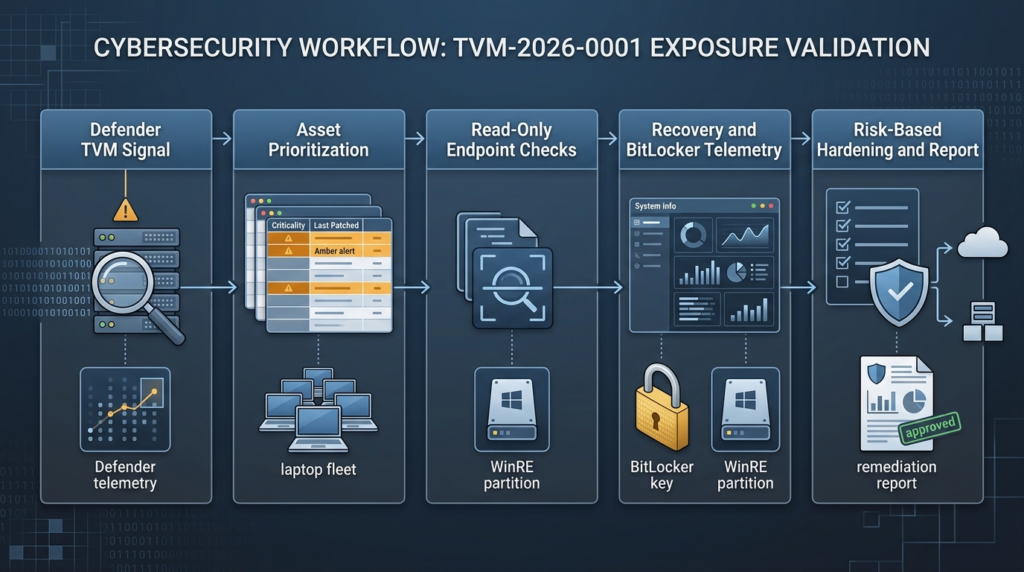
A flat list of affected devices is not enough. TVM-2026-0001 needs risk-based triage.
Highest priority devices:
| Device type | Why it is high priority |
|---|---|
| Laptops used by executives, administrators, developers, finance, legal, and security teams | Physical theft or short-term access can expose high-value data and credentials |
| Devices that travel frequently | Hotels, airports, conferences, repair shops, and shared workspaces increase physical-access risk |
| Privileged access workstations | A disk bypass can expose scripts, tokens, SSH keys, VPN profiles, and admin tooling |
| Devices with TPM-only BitLocker | No pre-boot PIN means the platform and recovery trust model carries more weight |
| Devices with WinRE enabled and weak local admin controls | Recovery boundary and local modification paths become more relevant |
| Devices with stale Defender engine or platform versions | Related Defender CVEs may remain exposed even when Windows Update looks current |
| Devices without reliable recovery-key escrow | Hardening changes can create operational lockout risk |
Lower priority devices:
| Device type | Why it may be lower priority |
|---|---|
| Non-portable desktops in controlled facilities | Physical-access likelihood is lower, though not zero |
| Lab machines with no sensitive data and no privileged credentials | Business impact is lower |
| Devices using stronger pre-boot authentication and current Defender components | Exposure may still exist, but exploitation conditions become less favorable |
| Systems where BitLocker is not used for at-rest protection | The BitLocker-specific impact is reduced |
Priority should not be based only on CVSS. A medium-severity physical-access BitLocker bypass can be critical for a traveling domain administrator’s laptop. A high-severity local privilege escalation may be less urgent on a disposable kiosk. Exposure management exists to make those distinctions.
What to validate before changing anything
Before disabling WinRE, changing BitLocker protectors, or rolling out emergency configuration changes, collect baseline evidence.
| Beweise | Command or source | Warum das wichtig ist |
|---|---|---|
| Defender TVM record details | Defender portal Weaknesses or Vulnerabilities page | Confirms the exact weakness name, severity, references, and affected devices |
| Defender engine and platform | Get-MpComputerStatus | Confirms relevant Defender component versions |
| BitLocker status | Get-BitLockerVolume oder manage-bde -status | Confirms whether OS volume protection is active |
| Key protector type | manage-bde -protectors -get C: | Identifies TPM-only, TPM+PIN, recovery key, and other protectors |
| WinRE state | reagentc /info | Confirms whether the recovery environment is enabled and where it points |
| Recovery-key escrow | Entra ID, AD DS, MDM, or key-management system | Prevents lockout during hardening |
| Offline scan history | Defender operational logs and offline scanner directory metadata | Helps assess GreatXML relevance |
| Recovery partition changes | EDR file telemetry or forensic collection | Helps identify suspicious pre-boot manipulation |
| Device role | Asset inventory and user mapping | Determines business impact |
Do not start with exploitation. Start with evidence. Exploit reproduction belongs in an isolated lab with written authorization, a controlled image, recovery media, known-good backups, and no production credentials.
Hardening choices and trade-offs
There is no one-click fix that is correct for every organization, especially while public details around TVM-2026-0001 remain sparse. The best response is layered.
Keep Defender components current
For Defender-related CVEs, engine and platform versions matter. Microsoft’s Defender release notes list Windows Antivirus April 2026 Platform 4.18.26040.7 and Engine 1.1.26040.8, and state that this release fixed CVE-2026-41091, CVE-2026-45498, and CVE-2026-45584. The May 2026 Windows Antivirus release then moved to Platform 4.18.26050.15 and Engine 1.1.26050.11. (Microsoft Lernen)
A common mistake is to ask only whether the Windows cumulative update was installed. That is not enough. Defender security intelligence, engine, and platform updates have their own versioning. In an incident review, record the actual values returned by Get-MpComputerStatus.
Confirm recovery keys before changing BitLocker
Before moving high-risk devices from TPM-only to TPM+PIN, disabling WinRE, or altering boot and recovery settings, verify recovery-key escrow. A security change that strands executives, developers, or field users at a recovery screen can become a business outage. The recovery-key process must be tested before broad rollout.
Evaluate TPM+PIN for high-risk devices
TPM-only is convenient, but it places more weight on the device’s platform trust and recovery behavior. NVD’s YellowKey record states that Microsoft’s mitigation FAQ says TPM+PIN makes that vulnerability not exploitable. TVM-2026-0001 is not automatically YellowKey, but the same defensive principle is relevant: pre-boot authentication can reduce the blast radius of physical-access BitLocker bypass paths. (NVD)
Do not disable WinRE blindly
Disabling WinRE may reduce some recovery-environment attack paths, but it can also remove repair and recovery capabilities that IT teams rely on. Microsoft documents WinRE management through REAgentC, which is used to configure recovery images and administer recovery options. Treat WinRE as a managed security boundary, not as a simple on/off superstition. (Microsoft Lernen)
Monitor recovery partition changes
Unexpected writes to recovery-related paths should be rare. That makes them good detection candidates. Monitor for changes involving unattend.xml, winpeshl.ini, Recovery\WindowsRE, and unusual command-line use of reagentc.exe. False positives can occur during OEM updates, Windows feature updates, recovery image servicing, and legitimate IT repair operations, so detections should include signer, parent process, user, device group, and change window context.
Restrict local administrator rights
Many recovery-boundary abuse paths become easier when attackers already have local administrative control. Local admin reduction will not eliminate every physical attack, but it narrows the set of users and malware that can prepare a machine for recovery manipulation.
Treat repair and custody as security events
BitLocker risk is not limited to theft. Repair shops, loaner-device swaps, legal holds, travel inspections, decommissioning, and conference travel can all create physical access windows. Devices flagged with TVM-2026-0001 deserve stricter custody handling until exposure and mitigation are validated.
Detection logic for recovery-boundary abuse
Detection for GreatXML-like behavior is difficult because the most interesting activity may happen around boot, recovery, or offline states where normal EDR visibility is incomplete. That does not mean defenders are blind. It means detection must combine weak signals.
| Signal | Warum das wichtig ist | Common benign causes |
|---|---|---|
reagentc.exe executed outside IT change windows | Recovery configuration change | OEM servicing, help desk repair, OS upgrade |
manage-bde.exe protector changes | BitLocker configuration change | Encryption rollout, recovery-key rotation, compliance remediation |
| Defender Offline Scan initiated | Public GreatXML reporting focuses on offline scan state | Malware removal, user-initiated scan, support action |
| Recovery-related file writes | GreatXML-style reporting focuses on recovery partition content | Windows update, recovery image servicing |
Unexpected unattend.xml creation | Unattended setup logic can execute commands in deployment contexts | Imaging, Autopilot, OEM provisioning |
| WinRE boot followed by unusual access | Possible recovery-boundary event | Startup repair, failed update, user recovery |
| Defender engine or platform rollback | May reintroduce exposure | Troubleshooting, failed update, unsupported OS |
A stronger analytic chains these signals:
- Defender portal shows TVM-2026-0001 on a device.
- The device has BitLocker enabled with TPM-only protector.
- WinRE is enabled.
- The device recently ran Defender Offline Scan or shows offline scanner artifacts.
- There are recovery-related file writes or
reagentc.exeactivity outside a change window. - The device belongs to a high-risk user or group.
That chain is more actionable than a generic “BitLocker bypass possible” alert.
A practical remediation workflow
A strong remediation workflow is short enough to execute and detailed enough to audit.
Step 1, preserve the Defender record
Export the TVM-2026-0001 weakness details from Defender. Preserve the affected device list, timestamps, severity, references, recommended actions, and any vendor or external links shown in the portal. Microsoft’s Defender zero-day documentation says records may appear with an internal TVM-XXXX-XXXX name before a CVE is assigned, so preserving the original record matters for later mapping. (Microsoft Lernen)
Step 2, group affected devices
Group by device class, owner, business role, operating system, BitLocker state, WinRE state, Defender version, and physical exposure. Prioritize laptops and privileged users first.
Step 3, run read-only checks
Verwenden Sie Get-MpComputerStatus, Get-BitLockerVolume, manage-bde -status, manage-bde -protectors -get C:und reagentc /info. These commands gather status and configuration evidence; they should not reproduce exploitation. Microsoft documents both BitLocker manage-bde operations and REAgentC recovery-environment administration. (Microsoft Lernen)
Step 4, verify Defender component versions
Confirm that relevant Defender fixes are present. Use actual engine and platform versions, not only Windows build numbers. Microsoft’s April 2026 release notes tie specific CVE fixes to specific Defender engine and platform versions. (Microsoft Lernen)
Step 5, review recovery and offline scan telemetry
Search for reagentc.exe, manage-bde.exe, Defender Offline Scan activity, recovery-related file writes, and unusual unattend.xml placement. Microsoft documents Defender Offline Scan behavior and its offline scanner path, which gives defenders a legitimate baseline for investigation. (Microsoft Lernen)
Step 6, apply risk-based hardening
For high-risk devices, consider TPM+PIN, stricter local admin policy, application control, recovery key validation, and tighter WinRE management. For lower-risk devices, current Defender components and monitoring may be enough until Microsoft provides clearer guidance.
Step 7, document residual risk
If TVM-2026-0001 lacks a public CVE or full vendor advisory, document that public metadata is incomplete. Write down the validation evidence used, the devices prioritized, and the compensating controls selected.
Step 8, retest without exploiting
Retest by confirming configuration and version state. Keep exploit reproduction limited to an isolated lab and only when authorized by policy.
How to explain the risk to leadership
The executive version should be precise:
TVM-2026-0001 is a Microsoft Defender Vulnerability Management weakness identifier, not a public CVE. Microsoft documents that Defender may use internal TVM-XXXX-XXXX names for zero-day vulnerabilities without assigned CVE IDs. Public reporting associates the GreatXML issue with a BitLocker bypass path involving Windows Recovery Environment and Microsoft Defender Offline Scan state. The concern is not that BitLocker encryption has been broken. The concern is that recovery-environment behavior may allow access to protected data under certain local or physical-access conditions. (Microsoft Lernen)
That explanation avoids exaggeration and still communicates urgency. It tells leadership why the signal matters, what is known, what is not known, and how the team is reducing risk without running public exploit code on production machines.
For security teams that already use AI-assisted validation workflows, the useful role of automation is evidence handling, not uncontrolled exploitation. Penligent describes its platform as supporting vulnerability discovery, finding verification, exploit execution under user control, evidence-first results, and one-click reports aligned with SOC 2 and ISO 27001. In a TVM-2026-0001 workflow, that kind of authorized testing system is most useful for collecting approved read-only checks, preserving command output, separating confirmed exposure from uncertainty, and producing a remediation-ready report. (Sträflich)
Common mistakes
Mistake 1, calling TVM-2026-0001 a CVE
It is not a CVE unless and until an official CVE record exists. Microsoft’s documentation supports the opposite interpretation: a TVM-XXXX-XXXX name may be used when no CVE-ID is assigned. (Microsoft Lernen)
Mistake 2, saying BitLocker is broken
The stronger and more accurate phrase is: “A recovery-environment or security-feature bypass may undermine BitLocker’s expected protection under certain physical or local conditions.” YellowKey’s NVD record and GreatXML reporting both support this recovery-boundary framing more than a cryptographic-break framing. (NVD)
Mistake 3, validating with public PoC code on production devices
That can damage devices, trigger recovery events, expose credentials, violate policy, and destroy evidence. Use lab reproduction only.
Mistake 4, checking only Windows Update
Defender engine and platform versions can be the relevant fix level. Microsoft’s Defender release notes explicitly tie CVE fixes to engine and platform versions, including Engine 1.1.26040.8 and Platform 4.18.26040.7. (Microsoft Lernen)
Mistake 5, disabling WinRE everywhere without a support plan
WinRE is a legitimate recovery environment administered through Microsoft-documented tooling. Disabling it without a recovery plan can create support and availability problems. (Microsoft Lernen)
Mistake 6, assuming Sentinel queries prove absence
Microsoft states that the DeviceTvmSoftwareVulnerabilities table is not ingested into Microsoft Sentinel and is exposed there only for schema visibility. TVM queries should be run in Defender XDR Advanced Hunting unless the organization has built a custom ingestion path. (Microsoft Lernen)
Mistake 7, forgetting recovery-key escrow
BitLocker hardening without recovery-key readiness can become an outage. Before changing protectors, confirm recovery-key availability through Entra ID, AD DS, MDM, or the organization’s key-management system.
Mistake 8, treating physical access as low risk for everyone
Physical access is not theoretical for traveling employees, executives, developers, administrators, journalists, lawyers, consultants, field engineers, and incident responders. NVD’s YellowKey vector explicitly uses physical attack vector AV:P, which is exactly the kind of risk that matters for lost, stolen, repaired, or briefly accessed devices. (NVD)
A defensible production checklist
Use this checklist as a practical starting point.
| Control area | Siehe | Evidence to keep |
|---|---|---|
| Defender portal | TVM-2026-0001 details exported | Weakness export, affected devices, timestamps |
| Defender version | Engine and platform current | Get-MpComputerStatus output |
| BitLocker | OS volume protected | Get-BitLockerVolume oder manage-bde -status |
| Protector type | TPM-only or TPM+PIN identified | manage-bde -protectors -get C: |
| WinRE | Enabled state and location known | reagentc /info |
| Recovery key | Escrow confirmed | Entra ID, AD DS, MDM, or key vault record |
| Offline scan | Recent use reviewed | Defender logs, offline scanner directory metadata |
| Recovery partition | Unexpected changes investigated | EDR file events, forensic collection if needed |
| Local admin | Local admin membership reviewed | IAM or endpoint management report |
| High-risk users | Privileged and traveling devices prioritized | Asset owner and group mapping |
| Erkennung | Recovery and BitLocker events monitored | KQL query results and detection rules |
| Change control | Hardening changes approved | Ticket, rollback plan, user communication |
| Retest | Non-destructive validation completed | Before and after evidence |
The goal is not paperwork. The goal is to ensure that a sparse TVM record becomes a concrete remediation object.
FAQ
What is TVM-2026-0001 in Microsoft Defender?
- TVM-2026-0001 appears to be a Microsoft Defender Vulnerability Management weakness identifier.
- Microsoft documents that Defender may use an internal temporary
TVM-XXXX-XXXXname when a zero-day vulnerability has no CVE-ID. - Treat it as a Defender exposure-management record, not as a public CVE.
- Preserve the original portal record because Microsoft says internal TVM names may later be updated when an official CVE-ID is assigned. (Microsoft Lernen)
Is TVM-2026-0001 the same as a CVE?
- No, not based on the public information available as of July 2, 2026.
- A CVE is a public vulnerability identifier used across vendors, scanners, advisories, and databases.
- A TVM identifier is a Microsoft Defender Vulnerability Management naming pattern used when no official CVE-ID is assigned.
- If Microsoft later maps TVM-2026-0001 to a CVE, update internal tickets, dashboards, and customer-facing reports.
Is TVM-2026-0001 confirmed to be GreatXML?
- Public reporting and security analysis associate the broader issue with GreatXML-style BitLocker bypass behavior.
- Hive Security describes GreatXML as a public BitLocker-bypass PoC claim involving WinRE, Defender Offline Scan state, and
unattend.xml. - Microsoft has not published a full public advisory specifically confirming TVM-2026-0001 as GreatXML in the sources used here.
- The safer wording is “publicly associated with GreatXML,” not “officially confirmed as GreatXML.” (Hive Security)
Does GreatXML mean BitLocker encryption is broken?
- No public evidence shows that BitLocker’s encryption algorithm has been broken.
- The concern is recovery-environment trust behavior, especially around WinRE, Defender Offline Scan state, and setup automation.
- YellowKey’s NVD record is a useful parallel because it describes a Windows security feature bypass with physical attack vector, not a cryptographic break.
- Communicate this as a recovery-boundary or security-feature bypass risk. (NVD)
How should I validate affected devices safely?
- Export the TVM-2026-0001 device list from Defender.
- Run read-only checks for Defender version, BitLocker state, key protectors, WinRE state, and recovery-key escrow.
- Review logs for Defender Offline Scan,
reagentc.exe,manage-bde.exe, and recovery-related file writes. - Do not run public exploit code on production devices.
- Use an isolated lab for any authorized reproduction work.
Should I disable WinRE?
- Not automatically.
- Disabling WinRE may reduce some recovery-environment attack paths, but it can also remove repair and reset capabilities.
- Microsoft documents REAgentC as the tool used to configure Windows RE boot images and recovery options, which means WinRE should be managed deliberately rather than disabled reflexively.
- Consider stricter WinRE handling for privileged or high-risk laptops first. (Microsoft Lernen)
What should I do if the Defender portal gives almost no details?
- Preserve the sparse record exactly as shown.
- Check whether the entry has references, affected software names, severity, exposed devices, or remediation text.
- Search your environment for correlated signs: BitLocker TPM-only, WinRE enabled, Defender Offline Scan usage, stale Defender engine or platform versions, and recovery partition changes.
- File a Microsoft support case if the business impact is significant or the portal recommendation is ambiguous.
- Document uncertainty instead of filling gaps with assumptions.
How should I report TVM-2026-0001 to auditors or customers?
- State that it is a Microsoft Defender Vulnerability Management weakness identifier, not a public CVE at the time of reporting.
- Include affected device counts, device classes, BitLocker state, WinRE state, Defender version evidence, and remediation actions.
- Avoid claiming active exploitation unless you have direct evidence.
- Avoid saying BitLocker encryption is broken.
- Use evidence-based language: “We validated configuration exposure and applied risk-based hardening.”
Closing judgment
TVM-2026-0001 is a small identifier attached to a large boundary problem. The important boundary is not only Defender. It is not only BitLocker. It is the place where endpoint security tools, recovery environments, setup automation, physical access, and disk encryption meet.
That boundary has become a serious research target. CVE-2022-41099 showed that WinRE remediation can require special handling. YellowKey showed that BitLocker security-feature bypasses can live in recovery behavior. Defender CVEs such as CVE-2026-41091, CVE-2026-45498, and CVE-2026-50656 show that security components themselves need careful vulnerability management. (Microsoft Support)
The right response is disciplined validation: confirm the Defender record, identify exposed devices, check Defender versions, inspect BitLocker and WinRE state, prioritize physical-access risk, monitor recovery changes, harden high-value laptops, and document what is known versus unknown. Do not ignore the signal because it lacks a CVE. Do not inflate it into a universal BitLocker break. Treat it as what it is: a sparse but meaningful Defender exposure signal pointing at one of the most sensitive trust boundaries on Windows endpoints.


 German
  English
  French
  Spanish
  Portuguese
  Japanese
  Korean
  Hindi
Hindi  Arabic
  Turkish
  Hebrew