
The PyTorch Lightning supply chain attack was not a typo-squatting scare, a fake package trick, or a theoretical package hygiene problem. Public reporting and the project’s own security advisory describe a compromise of released PyPI package versions associated with PyTorch Lightning, with malicious code designed to harvest credentials from developer machines, CI runners, and cloud-connected environments. The affected versions publicly identified across the strongest sources are 2.6.2 y 2.6.3; the project’s advisory asks users to delete those versions, assume affected environments may be compromised, rotate exposed credentials, rebuild from a known clean state, and pin to 2.6.1. The same advisory lists the severity as Critical and states that there is no known CVE at the time of publication. (GitHub)
That last point matters. A missing CVE is not a sign of low risk. In modern software supply chain incidents, the danger often comes from malicious code entering a trusted release channel rather than from a conventional parser bug, memory corruption flaw, or web application vulnerability. The PyTorch Lightning incident sits in that category: a trusted AI and machine learning dependency became a delivery path into environments that often hold GitHub tokens, cloud credentials, package registry publishing tokens, model infrastructure secrets, and CI/CD deployment access. Semgrep reported that the PyPI package lightning versions 2.6.2 y 2.6.3 contained Mini Shai-Hulud themed malicious code that executes credential-stealing malware on import, while Socket, Snyk, Aikido, and Sonatype published overlapping technical findings around the same affected versions. (Semgrep)
The short operational rule is simple: if lightning==2.6.2 o lightning==2.6.3 was installed and imported in a workstation, notebook, container, build job, training runner, or CI pipeline, treat that environment as compromised until proven otherwise. Do not treat this as a normal dependency upgrade issue. Do not simply uninstall the package and move on. The reported malware behavior targets secrets and attempts persistence and propagation, which means the right response is credential rotation, environment rebuild, repository audit, CI/CD log review, and a careful check of package publishing paths.
What happened to PyTorch Lightning
The public record points to a malicious release event on April 30, 2026. Semgrep described the affected package as the PyPI package lightning, a widely used deep learning framework that can appear in AI project dependency trees for image classification, LLM fine-tuning, diffusion model work, and time-series forecasting. Its report states that affected versions 2.6.2 y 2.6.3 included a hidden _runtime directory and an obfuscated JavaScript payload that executes when the module is imported. (Semgrep)
The official GitHub Security Advisory is intentionally narrower and more cautious. It says that one or more released versions of the package were compromised and introduced functionality consistent with credential harvesting. It also states that the root cause and full behavior were still under investigation when the advisory was published. The advisory lists affected versions as 2.6.2 y 2.6.3, recommends pinning PyTorch Lightning to 2.6.1, and says the project had quarantined malicious versions from PyPI and rotated internal credentials associated with its release process. (GitHub)
Snyk’s analysis adds useful package-identity context. It describes the affected lightning package as the deep learning framework formerly distributed as pytorch-lightning, identifies 2.6.1 as the last clean release, and notes that the legacy pytorch-lightning package remained independently installable at 2.6.1 in its assessment. Snyk also reported that PyPI had quarantined the project at the time of its write-up. (Snyk)
There is one detail readers should keep straight: public sources use slightly different package naming depending on whether they are discussing the PyPI distribution, the project, or the GitHub advisory. The practical investigation target is the installed Python distribution in your environment, especially lightning versions 2.6.2 y 2.6.3, plus any related dependency lock entries, build caches, or container layers that pulled those versions during the exposure window.
| Question | Current answer from public sources |
|---|---|
| Which versions are the main concern | 2.6.2 y 2.6.3 |
| What is the recommended pin | 2.6.1 |
| Is there an official CVE | The official advisory says “No known CVE” |
| What triggers the malicious behavior | Public reports describe execution on package import |
| What kind of malware behavior is reported | Credential harvesting, cloud secret access, repository poisoning, and attempted propagation |
| Is this a fake package | No, public reports describe compromised releases of a legitimate package path |
| Should affected systems be treated as compromised | Yes, if a bad version was installed and imported |
Why this incident hits AI and ML environments differently
A normal application dependency compromise is already serious. An AI framework compromise can be worse because AI and ML environments often blend development, research, cloud infrastructure, data access, model publishing, and automation inside the same workspace.
A developer training a model may have a GitHub token configured for pushing notebooks, a Hugging Face token or internal model registry token for pulling weights, AWS or GCP credentials for object storage, Docker credentials for container builds, SSH keys for GPU hosts, and notebook environment variables for experiment tracking. A CI job running model tests may have package publishing tokens, cloud role credentials, repository write access, and cache access. A shared training server may have multiple users’ shell histories, .env files, Python virtual environments, and long-lived credentials left behind from earlier experiments.
That is exactly the environment a credential stealer wants. The attacker does not need to exploit the model. The attacker does not need to break PyTorch. The attacker does not need to compromise a Kubernetes cluster directly. A malicious dependency imported by a trusted Python process can reach the authority already present on the machine or runner.
This is why the PyTorch Lightning incident should be understood as an AI engineering trust-boundary event, not merely a Python package incident. The affected package sits near code that trains, ships, and supports AI systems. The secrets around that code are often more valuable than the code itself.
The attack chain, from import to credential theft
Public technical write-ups converge on the same broad execution chain: malicious Python package code starts a hidden runtime component, a Bun-based JavaScript payload performs credential harvesting and repository operations, and the payload attempts to use stolen tokens to spread or persist.
Aikido reported that the attack was injected into __init__.py, spawning a background thread before legitimate Lightning code loaded. That thread executed _runtime/start.py, which detected the host platform, downloaded Bun runtime version 1.3.13, and ran router_runtime.js, described as the main obfuscated payload. (Aikido)
Snyk described the same pattern as a Python-wrapped JavaScript stealer: the compromised wheel preserved the legitimate library files, while malicious additions lived in a hidden _runtime directory. According to Snyk, start.py acted as a small Python downloader for Bun and then executed the stealer under that runtime. (Snyk)
Socket’s analysis describes router_runtime.js as a single-line obfuscated JavaScript bundle using string-array rotation, a secondary decryption layer, gzip-compressed base64 blobs, and Bun-specific APIs such as Bun.gunzipSync, Bun.writey Bun.file. Socket also identified token regexes and cloud credential checks inside the credential-harvesting stage. (Socket)
There is a minor public-reporting discrepancy around payload size. Socket and Aikido describe an approximately 11 MB JavaScript payload, while Semgrep’s IOC section refers to a 14.8 MB Bun runtime payload. That difference should not be smoothed over into a false precision. In practice, defenders should search for the filenames, hashes where available, directory structure, suspicious Bun download behavior, and repository artifacts rather than relying on one exact file size. (Socket)
| Escenario | ¿Qué ocurre? | Why it matters for defenders |
|---|---|---|
| Package install | Affected version enters a virtualenv, container image, notebook, or CI job | Dependency locks, build caches, and image layers become evidence |
| Module import | Malicious loader starts in the background | A job can be compromised even if no obvious command was run |
| Bun bootstrap | Python loader runs or downloads Bun | Network logs may show unexpected Bun release downloads |
| JavaScript payload | Obfuscated JS executes under Bun | Static Python-only scanning may miss the real payload |
| Credential harvesting | Tokens, env vars, cloud secrets, and CI context are inspected | Secrets in scope must be rotated, not merely scanned |
| Repository poisoning | Valid GitHub tokens may be used to push files | Git history and workflow changes must be audited |
| Cross-ecosystem propagation | npm package artifacts may be modified | Python teams must inspect Node and package-publish surfaces too |
| Persistencia | Developer tool hooks and workflow files may be planted | .claude, .vscodey .github/workflows become incident-response targets |
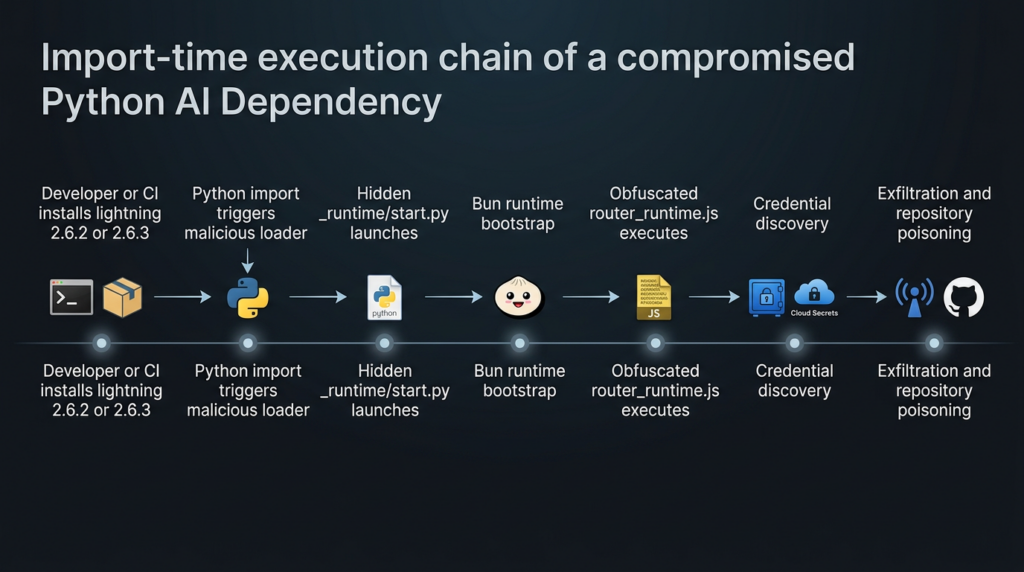
Import-Time Execution Chain in the PyTorch Lightning Compromise
What the malware was designed to steal
The core of the incident is credential theft. Semgrep reported that the malware targeted local files, environment variables, CI/CD pipelines, GitHub, AWS, Azure, and GCP. Its write-up says the payload scans credential file paths for GitHub and npm tokens, runs gh auth token, dumps environment variables, attempts GitHub Actions secret extraction on Linux runners, checks GitHub token scopes, enumerates GitHub Actions organization secrets, queries AWS credentials and metadata endpoints, and attempts access to Azure Key Vault and GCP Secret Manager. (Semgrep)
Socket’s technical analysis similarly identifies GitHub token patterns, npm token patterns, GitHub App token patterns, AWS metadata endpoints, AWS environment variables, Azure token locations, Google Cloud OAuth token checks, and CI platform detection across GitHub Actions, CircleCI, CodeBuild, Vercel, and other environments. Socket also notes that discovered GitHub and npm tokens are validated against their respective APIs before further use. (Socket)
Aikido’s public summary lists a wider set of targeted local materials, including SSH keys, shell histories, .env files, Git credentials, cloud credentials, Kubernetes and Helm configs, Docker credentials, npm tokens, MCP configs, cryptocurrency wallets, VPN credentials, and messaging session data. Treat that as a broad threat-hunting list rather than a promise that every artifact was stolen from every affected system. (Aikido)
| Credential or artifact | Common location | Why attackers want it | Defensive action |
|---|---|---|---|
| GitHub PAT or fine-grained token | gh CLI config, env vars, CI secrets | Repository read/write, workflow tampering, package release access | Revoke and recreate from a clean machine |
| GitHub App token | CI runner memory, GitHub Actions context | Short-lived but powerful automation authority | Review workflow logs and app installation scope |
| npm token | .npmrc, env vars, release jobs | Publish malicious package versions | Revoke, rotate, audit recent publishes |
| AWS key or role credential | Env vars, ~/.aws/credentials, IMDS | Cloud resource access, secret retrieval, lateral movement | Rotate keys, review CloudTrail, restrict metadata access |
| Azure credential | Azure CLI cache, env vars, managed identity | Key Vault and subscription access | Rotate secrets, review sign-ins and Key Vault access |
| GCP credential | ADC files, env vars, service account keys | Secret Manager, storage, compute access | Rotate service account keys, review audit logs |
| SSH key | ~/.ssh | Git access, server login, lateral movement | Replace keys and review authorized keys |
.env archivo | Project root, notebooks, CI cache | Concentrated secrets in plaintext | Remove from repos, rotate values, enforce secret scanning |
| Docker or registry token | Docker config, CI env | Image pull or push access | Rotate and review recent image publishes |
| Kubernetes config | ~/.kube/config, CI secrets | Cluster access | Rotate credentials and review cluster audit logs |
| MCP or agent config | Tool directories, project config | Agent tool access and downstream execution | Review tool permissions and remove unknown endpoints |
The important lesson is that the malware did not need a single perfect credential source. It looked across many places where modern developer and CI environments accidentally accumulate authority. That is why containment must be broad.
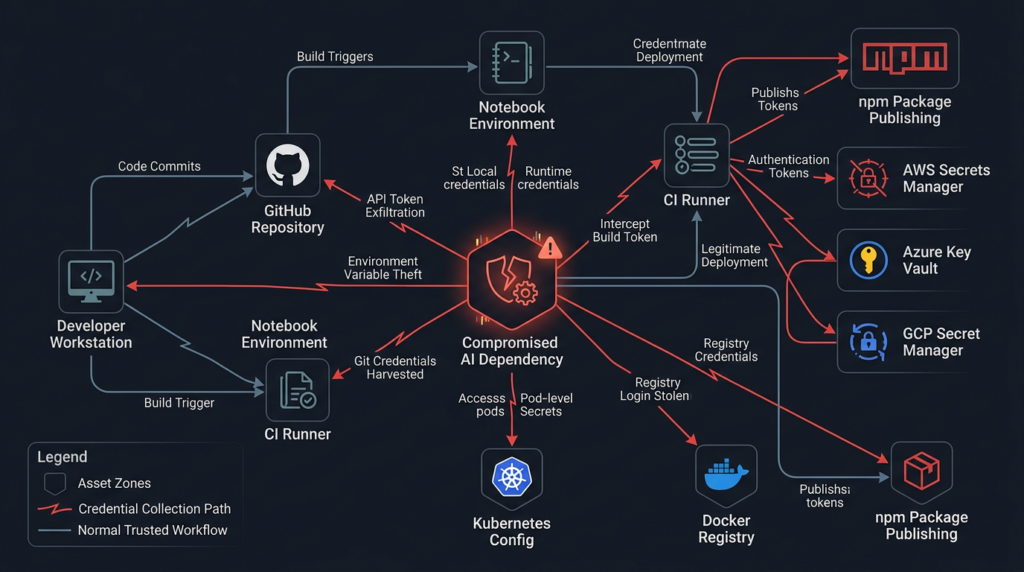
Why import-time execution changes the response
Some package attacks rely on installation hooks, such as setup.py, postinstall, or build backends. Those are dangerous, but many teams have controls around install-time behavior. The PyTorch Lightning incident is more difficult because multiple reports describe execution when the package is imported.
Socket states that the malicious package execution chain runs automatically when the lightning module is imported, requiring no additional user action after installation and import. Snyk makes the same point in its recommended actions: import alone is enough to trigger the payload. (Socket)
That means a harmless-looking smoke test can become an execution event:
python - <<'PY'
import lightning
print("lightning imported")
PY
In a safe version, that kind of test is normal. In an affected version, public reports say import is the trigger point. For incident response, the question is not only “Was the package installed?” but also “Was it imported by any Python process in this environment?”
That includes notebooks, unit tests, model training scripts, CI validation jobs, Docker build test commands, import scanners, Python REPL sessions, and dependency compatibility checks. If an affected version existed in a virtual environment but was never imported, the risk may be lower, but you should be careful before relying on that assumption. Build logs, shell histories, notebook execution history, and CI job traces can help answer the import question.
Immediate triage commands
The following commands are defensive checks. Run them from a trusted shell where possible. If you have reason to believe the machine executed the malware, do not use that machine to rotate credentials.
Check installed package versions in active Python environments:
python -m pip show lightning pytorch-lightning 2>/dev/null || true
python -m pip freeze | grep -E '^(lightning|pytorch-lightning)=='
Search common dependency files:
grep -RInE '(^|[=><~ ])lightning[=><~ ]*(2\.6\.2|2\.6\.3)|pytorch-lightning[=><~ ]*(2\.6\.2|2\.6\.3)' \
  requirements*.txt pyproject.toml poetry.lock pdm.lock uv.lock Pipfile.lock conda*.yml environment*.yml 2>/dev/null
Search a repository for reported artifact names:
find . -type f \( \
  -path '*/_runtime/start.py' -o \
  -name 'router_runtime.js' -o \
  -path '*/.claude/settings.json' -o \
  -path '*/.claude/setup.mjs' -o \
  -path '*/.vscode/tasks.json' -o \
  -path '*/.vscode/setup.mjs' -o \
  -path '*/.github/workflows/format-check.yml' \
\) -print
Search Git history for suspicious identities or filenames:
git log --all --date=iso --name-status \
  --author='claude@users.noreply.github.com' \
  -- .claude .vscode .github/workflows 2>/dev/null

git log --all --date=iso --name-status -- \
  .claude/router_runtime.js \
  .claude/settings.json \
  .claude/setup.mjs \
  .vscode/tasks.json \
  .vscode/setup.mjs \
  .github/workflows/format-check.yml 2>/dev/null
Search local files for campaign strings reported by public research:
grep -RInE 'EveryBoiWeBuildIsAWormyBoi|A Mini Shai-Hulud has Appeared|router_runtime\.js|format-results' \
  . 2>/dev/null
These commands are not a complete forensic process. They help find known artifacts. A determined attacker can rename files, alter hashes, change commit identities, and clean up obvious traces. If a bad version ran with access to secrets, rotation and rebuild remain necessary even if these searches find nothing.
Repository poisoning and the Claude-shaped trust problem
The most striking part of the public analysis is not only that credentials were stolen. It is that stolen authority may be used to make poisoned repositories look like normal developer automation.
Socket reported that validated GitHub tokens are passed into a repository backdoor component using the GitHub GraphQL API. The payload fetches branches, commits files into targeted branches, silently overwrites files where applicable, and uses a hardcoded committer identity designed to impersonate Claude Code: claude <claude@users.noreply.github.com>. Socket also reported injected files such as .vscode/tasks.json, .claude/router_runtime.js, .claude/settings.json, .claude/setup.mjs, .vscode/setup.mjsy .github/workflows/format-check.yml. (Socket)
Semgrep reported a similar persistence angle. Its write-up says the malware plants Claude Code and VS Code hooks: a Claude Code SessionStart hook in .claude/settings.json, a VS Code folderOpen task in .vscode/tasks.json, a setup.mjs dropper, and a malicious GitHub Actions workflow named Formatter that can dump repository secrets to an artifact if the malware holds a GitHub token with write access. (Semgrep)
This is the part of the attack that security teams should study carefully. AI coding tools and developer automation now create a new camouflage layer. A commit authored as claude may not immediately look suspicious to a team that uses AI coding assistants. A .claude/settings.json file may look expected in repositories where Claude Code is used. A VS Code task may be dismissed as developer convenience. A workflow named formatter or format-check may blend into normal engineering hygiene.
That is how developer tooling becomes persistence. The attacker does not need kernel-level persistence if a repository hook causes the payload to run the next time a developer opens the project.
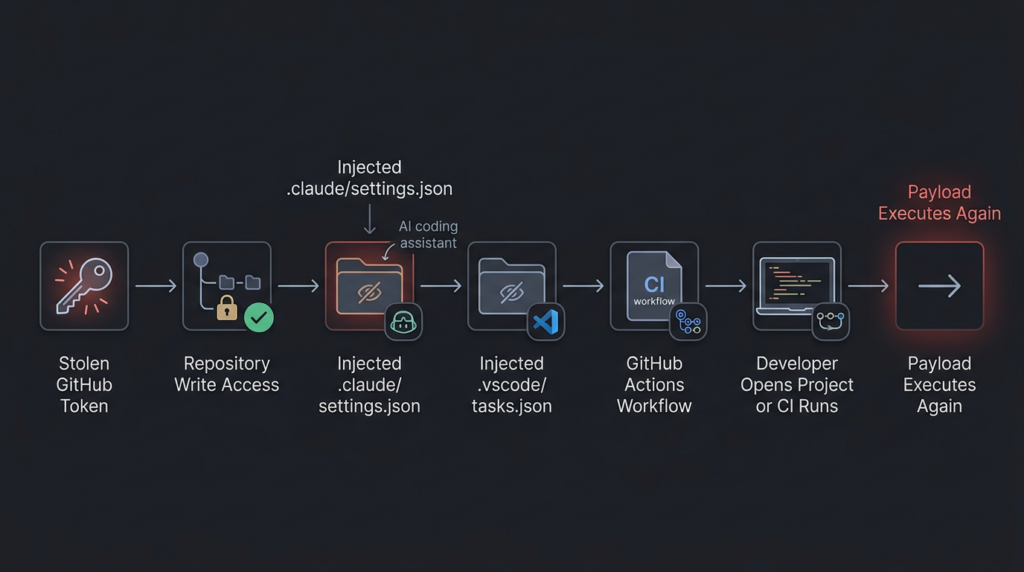
How to audit GitHub after exposure
Start with the token owner, not only the repository. If a developer machine or CI runner imported an affected version, identify every GitHub identity, app installation, deploy key, and automation token that could have been reachable from that environment.
For each identity, check:
# Repositories recently pushed by the authenticated identity
gh api user/events --paginate \
  --jq '.[] | select(.type=="PushEvent") | {created_at, repo: .repo.name, commits: [.payload.commits[].message]}'

# Repositories where suspicious workflow names exist
gh search code 'format-check.yml path:.github/workflows' --owner YOUR_ORG

# Repositories with suspicious Claude or VS Code payload paths
gh search code 'router_runtime.js path:.claude' --owner YOUR_ORG
gh search code 'setup.mjs path:.vscode' --owner YOUR_ORG
If you do not use the GitHub CLI, use GitHub’s web search and audit logs. In enterprise environments, export audit logs and search for:
repo.create
repo.config.update
git.push
workflow.create
workflow.update
oauth_authorization.create
personal_access_token
actions_secret.access
actions_secret.update
Review commits around April 30, 2026 and later. Pay special attention to commits that add hidden folders, editor tasks, AI tool settings, or new GitHub Actions workflows. A malicious commit does not need to change application code to be dangerous. A single workflow file can expose secrets. A single folder-open task can reinfect workstations.
A good review checklist looks like this:
| Zona | What to inspect |
|---|---|
| Branches | Unexpected branch creation, short random branch names, Dependabot-like branch names that do not match normal automation |
| Commit author | claude@users.noreply.github.com or other unexpected automation identities |
| Hidden folders | .claude, .vscode, .github, unusual setup scripts |
| Workflow files | New or changed workflows that upload artifacts, dump secrets, or run on broad triggers |
| Repository settings | New deploy keys, new Actions permissions, new webhooks |
| Organization settings | New tokens, changed app permissions, altered secret access |
| Release history | New package releases, patch version bumps, unexpected tags |
| Public repos | Repositories with strange Dune-themed names or suspicious descriptions |
Semgrep also listed IOCs including commit messages prefixed with EveryBoiWeBuildIsAWormyBoi and repositories with the description A Mini Shai-Hulud has Appeared. Those strings are useful search anchors, but they should not be treated as exhaustive. (Semgrep)
CI and cloud environments need separate treatment
A developer laptop compromise is bad. A CI runner compromise can be worse because CI often has access to secrets that humans do not keep locally. That includes package publishing tokens, signing keys, deployment credentials, cloud roles, and repository-scoped tokens.
Socket reported that the payload checks for CI-platform environment variables and validates discovered GitHub and npm tokens before downstream use. Semgrep reported that the malware targets GitHub Actions, cloud provider credentials, AWS metadata services, Azure Key Vault, and GCP Secret Manager. (Socket)
If a CI job imported lightning==2.6.2 o lightning==2.6.3, respond as if the job’s available secrets were exposed. That includes masked secrets. Masking prevents accidental display in logs; it does not prevent malicious code running inside the job from reading values passed into the environment.
For GitHub Actions, check:
grep -RInE 'lightning==2\.6\.(2|3)|pip install .*lightning|uv pip install .*lightning|poetry add lightning' \
  .github/workflows scripts Makefile pyproject.toml requirements*.txt 2>/dev/null
Then inspect workflow runs during the exposure window and after. Look for jobs that imported Lightning in tests, model training, package validation, notebook execution, or Docker build verification.
For cloud environments, check for suspicious metadata access from build hosts and training nodes. In AWS, metadata access to 169.254.169.254 may be normal on EC2, but it should still be reviewed when it comes from unexpected Python, Bun, Node, or CI processes. Socket specifically called out AWS IMDS and ECS credential endpoint probes, while Semgrep described AWS, Azure, and GCP secret enumeration attempts. (Socket)
A practical cloud review should include:
| Cloud surface | Review focus |
|---|---|
| AWS CloudTrail | GetCallerIdentity, secretsmanager:GetSecretValue, ssm:GetParameter, unusual access from CI roles |
| AWS VPC flow logs | Unexpected metadata endpoint access from build or training hosts |
| Azure sign-in logs | Service principal or managed identity activity from unusual hosts |
| Azure Key Vault logs | Secret listing and secret retrieval around the exposure window |
| GCP Audit Logs | Secret Manager access, service account token use, unusual API calls |
| Kubernetes audit logs | New secrets reads, service account abuse, unexpected pod exec |
| Container registry logs | Unexpected image pushes or tag changes |
| Package registry logs | npm, PyPI, or internal package publish events after exposure |
The npm propagation angle
The PyTorch Lightning incident is especially important because it crosses ecosystem boundaries. The entry point is Python. The payload is JavaScript. The runtime is Bun. The propagation logic includes npm package modification.
Semgrep reported that the malware payload remains JavaScript even though the entry point is PyPI, and that worm propagation happens through npm if npm publish credentials are found. Its report says the malware can inject setup.mjs y router_runtime.js into packages the token can publish to, set scripts.preinstall, bump the patch version, and republish. (Semgrep)
Socket described a related local npm tarball mutation stage: the payload locates .tgz packages, unpacks them, injects setup.mjs, rewrites paquete.json to add a postinstall hook, bumps the patch version, and repacks the tarball so a later publish looks like a normal patch release. (Socket)
This is a critical defender lesson. A Python compromise can become a JavaScript package compromise if the developer environment holds npm authority. Many AI projects include Node-based tooling even when the core model code is Python: documentation sites, web demos, SDKs, MCP servers, notebook extensions, internal dashboards, Electron tools, or frontend packages. Treating the investigation as “Python only” will miss part of the risk.
Check local npm artifacts and package manifests:
find . -name '*.tgz' -type f -print

grep -RInE '"(preinstall|postinstall)"[[:space:]]*:[[:space:]]*"node setup\.mjs"|setup\.mjs|router_runtime\.js' \
  package.json package-lock.json pnpm-lock.yaml yarn.lock . 2>/dev/null
Review registry activity:
npm whoami 2>/dev/null || true
npm token list 2>/dev/null || true
npm view YOUR_PACKAGE_NAME versions --json
Do not run package publish or install commands from a suspected-compromised machine. Revoke npm tokens from a clean workstation, inspect recent publishes, and verify that any new package versions were intentionally released.
Why 2.6.3 should not be assumed safe
A common mistake during fast-moving package compromises is assuming the highest version number is the fix. In this case, that assumption is dangerous. Multiple sources identify both 2.6.2 y 2.6.3 as malicious or affected. Sonatype specifically notes that 2.6.3 was not a fix and retained malicious functionality while modifying metadata and loader behavior. (Sonatype)
The official advisory recommends pinning to 2.6.1no 2.6.3. (GitHub)
The safe pattern is:
Bad assumption: latest patch version must be safer
Better assumption: latest trusted version must be confirmed by maintainers and independent evidence
Current public recommendation: remove 2.6.2 and 2.6.3, pin 2.6.1 unless maintainers publish later confirmed-clean guidance
For internal package mirrors, block the bad versions explicitly:
deny:
  - name: lightning
    versions:
      - "2.6.2"
      - "2.6.3"
reason: "PyTorch Lightning supply chain compromise, credential harvesting behavior reported"
expires: "manual review required"
If your organization uses an internal registry proxy or artifact manager, quarantine cached copies. Do not assume public deletion or PyPI quarantine removes copies from internal mirrors, Docker layers, notebook images, or build caches.
A defensive YARA-style file triage rule
The following rule is intended for local file triage. It is not a guarantee of compromise and should not be your only detection method. It focuses on reported artifact names and campaign strings rather than the full payload.
rule PyTorch_Lightning_Supply_Chain_Artifacts_Triage
{
    meta:
        description = "Triage for reported PyTorch Lightning supply chain attack artifacts"
        purpose = "Defensive file search only"
        date = "2026-05-01"

    strings:
        $s1 = "router_runtime.js" ascii
        $s2 = "EveryBoiWeBuildIsAWormyBoi" ascii
        $s3 = "A Mini Shai-Hulud has Appeared" ascii
        $s4 = "format-results" ascii
        $s5 = "claude@users.noreply.github.com" ascii
        $p1 = ".claude/settings.json" ascii
        $p2 = ".vscode/tasks.json" ascii
        $p3 = ".github/workflows/format-check.yml" ascii

    condition:
        any of ($s*) or any of ($p*)
}
Use this kind of rule for triage, not exoneration. Public IOCs age quickly. If attackers alter strings, hashes, and filenames, a rule like this will miss variants. The strongest containment actions remain version blocking, credential rotation, environment rebuild, and repository audit.
A safer incident response sequence
The right response depends on whether the package was merely present or actually imported. When in doubt, choose the safer branch.
First, identify all systems that installed or cached the affected versions. Include laptops, virtual environments, Docker images, notebooks, CI runners, self-hosted build agents, GPU nodes, dev containers, package mirrors, and artifact caches.
Second, determine whether import happened. Search shell history, CI logs, notebook execution logs, test logs, and training job logs. Any job that ran import lightning with the affected package should be treated as execution.
Third, rotate credentials from a clean machine. Do not rotate from the suspected host. Prioritize tokens with write or publish authority: GitHub PATs, GitHub App credentials, npm tokens, PyPI tokens, cloud service account keys, Docker registry tokens, SSH keys, package signing keys, and deployment credentials.
Fourth, rebuild affected environments. Uninstalling the package is not enough if the payload ran. Reimage or rebuild developer containers and CI runners from trusted sources. Clear caches that may contain the malicious wheel or modified npm tarballs.
Fifth, audit repositories for poisoned commits. Search all branches, not only principal. Inspect .claude, .vscodey .github/workflows changes. Review commit authors, branch creation events, unexpected workflow artifacts, and repository settings changes.
Sixth, audit package registry activity. Check npm publish history, PyPI publish history for internal packages, container registry pushes, and release tags. Look for patch bumps that do not match source control.
Seventh, review cloud logs. Focus on secret access, metadata credential use, role assumption, service account key use, and unusual access from runner IPs.
Eighth, document the trust failure. Which dependency policy allowed the bad version? Was there no release cooling period? Did CI allow unpinned latest versions? Did static cloud credentials exist where OIDC could have been used? Were self-hosted runners persistent? Were GitHub Actions permissions broader than necessary?
The last step matters because supply chain incidents often repeat when teams only clean the infection and never fix the path that admitted it.
Common mistakes during cleanup
The first mistake is treating uninstall as remediation. If malicious code ran and accessed secrets, removing the package does not invalidate stolen credentials.
The second mistake is rotating only GitHub tokens. Public analysis points to npm, AWS, Azure, GCP, SSH, Docker, Kubernetes, and local config files as possible targets. The exact scope depends on what was available in the affected environment, but the investigation must look beyond GitHub.
The third mistake is checking only requirements.txt. Modern Python projects may lock dependencies in poetry.lock, uv.lock, pdm.lock, Pipfile.lock, Dockerfiles, notebooks, cached wheels, internal registry metadata, and base images.
The fourth mistake is ignoring CI. A developer laptop may have limited cloud access. A CI runner may have deployment authority. If the package ran in CI, treat CI secrets as exposed.
The fifth mistake is trusting absence of a CVE. The official advisory says there is no known CVE, but it also marks the issue Critical and recommends credential rotation, rebuild, and pinning. (GitHub)
The sixth mistake is assuming AI tool config files are harmless. In this incident, public reporting specifically identifies .claude y .vscode persistence paths. If those directories appear unexpectedly, review them like executable code. (Semgrep)
The seventh mistake is checking only current branch state. A poisoned commit may have landed on a non-default branch, been reverted, or been overwritten while still having triggered workflows or been pulled by a developer.
Related CVEs that clarify the risk
The PyTorch Lightning incident does not need a CVE to be severe. Still, two recent CVEs help frame why this class of attack is dangerous.
| Incident | Why it is relevant | Exploitation condition | Real-world risk | Remediation pattern |
|---|---|---|---|---|
| PyTorch Lightning package compromise | Trusted AI dependency became a credential-stealing delivery path | Installing and importing affected versions | Developer, CI, cloud, and package registry secrets exposed | Remove bad versions, pin clean version, rotate secrets, rebuild systems |
| CVE-2024-3094, XZ Utils backdoor | Trusted upstream release artifacts contained malicious code | Affected XZ versions 5.6.0 or 5.6.1 in vulnerable build or distro paths | Backdoored system library path with potential SSH impact | Downgrade or replace affected versions, verify artifacts, review supply chain |
| CVE-2025-30066, tj-actions changed-files | Compromised GitHub Action tags exposed CI secrets | Workflows using affected tags during March 14 to 15, 2025 | CI/CD secrets exposed through workflow logs | Upgrade to safe version, rotate secrets, inspect logs, pin Actions |
CVE-2024-3094 is relevant because it shows how malicious code in trusted upstream release artifacts can have system-level consequences. NVD describes malicious code in XZ upstream tarballs starting with version 5.6.0, using complex obfuscation in the build process to modify liblzma. CISA also responded to reports of malicious code embedded in XZ Utils versions 5.6.0 and 5.6.1. (NVD)
The connection is not mechanical. PyTorch Lightning is not XZ Utils, and this incident does not imply an SSH backdoor. The common lesson is trust-path compromise. If attackers can place malicious behavior into a trusted release artifact, downstream environments execute the attacker’s code inside trusted contexts.
CVE-2025-30066 is relevant because it maps directly to CI/CD secret exposure. NVD describes tj-actions/changed-files before version 46 allowing remote attackers to discover secrets by reading Actions logs, after tags v1 through v45.0.7 were modified by a threat actor to point at a malicious commit. GitHub’s advisory says the supply chain attack impacted over 23,000 repositories and exposed CI/CD secrets in workflow logs. (NVD)
The connection to PyTorch Lightning is direct at the control level: both incidents punish over-trusted automation. If a CI job runs third-party code with broad secrets, a compromised dependency or Action can turn a routine pipeline into a credential exposure event.
What strong long-term defenses look like
The PyTorch Lightning compromise is not solved by telling developers to be more careful. Developers should not have to manually reverse-engineer every package release before running tests. The defense has to be engineered into package intake, CI design, credential architecture, and repository governance.
Start with dependency intake. Use lockfiles, but do not treat lockfiles as magic. Lockfiles tell you what entered the build; they do not tell you whether it was safe. Add release cooling periods for new versions of high-risk dependencies. A version published minutes ago should not automatically enter production CI. Socket reported that its scanner flagged 2.6.2 y 2.6.3 quickly after publication, but even fast detection can lose to automated dependency updates if your pipeline pulls immediately. (Socket)
Use internal mirrors with deny rules. If a package is declared malicious, your internal package manager should block it even if it remains in a cache. Quarantine known-bad versions and require a human exception for overrides.
Prefer short-lived identity over static secrets. In cloud CI, use OIDC federation where possible instead of long-lived cloud keys stored as repository secrets. Scope identities tightly. A model test job should not have package publishing authority. A lint job should not have cloud secret manager read access. A documentation build should not have deployment credentials.
Harden GitHub Actions. Pin third-party Actions to full commit SHAs where practical. Set default GITHUB_TOKEN permissions to read-only and elevate only per job. Use CODEOWNERS for workflow changes. Require review for changes under .github/workflows, .claude, .vscode, package publishing scripts, and release automation.
Isolate runners. Ephemeral runners are safer than long-lived self-hosted runners because they reduce persistence and credential residue. If you must use persistent GPU runners, rebuild frequently, restrict outbound network access, and monitor process activity.
Limit egress. A training job generally does not need arbitrary outbound access to GitHub releases, unknown C2 infrastructure, public paste sites, or package registries after dependencies are installed. Egress allowlists will not stop every attack, but they raise the cost and create detection points.
Treat developer tool configuration as code. .vscode/tasks.json, .claude/settings.json, MCP configs, editor extension settings, and agent skill definitions can become execution surfaces. Review them with the same seriousness as build scripts.
Add secret scanning before and after incidents. Secret scanning cannot prevent all runtime theft, but it can detect accidental repository exposure and suspicious commits. Pair it with audit log review, token inventory, and automatic revocation where possible.
Run adversarial validation. In authorized environments, security teams can use agent-assisted workflows to map attack surfaces, replay safe detection logic, and verify that controls actually work. Penligent’s work around agentic AI security and automated security validation is relevant to this operational layer when teams need to turn findings into repeatable checks, evidence, and retesting workflows without making the article’s core lesson dependent on any single product. Penligent has also published technical writing on agent supply-chain poisoning and AI agent security boundaries, which aligns with the developer-tool persistence angle seen in this incident. (penligent.ai)
Developer tool persistence is now part of supply chain defense
One of the broader lessons from this incident is that the supply chain no longer stops at package managers. It includes IDE tasks, AI coding assistant hooks, local agent configs, MCP servers, notebook extensions, CI workflows, and release scripts.
Penligent’s analysis of OpenClaw and ClawHub poisoning makes a similar point in a different ecosystem: a Markdown or skill file can become an installer when users or agents follow its instructions, and agent skills can operate with the agent’s privileges. That is conceptually close to the PyTorch Lightning persistence story, where configuration surfaces such as .claude/settings.json y .vscode/tasks.json become part of the execution path. (penligent.ai)
This is not only an AI-agent issue. VS Code tasks have existed for years. GitHub Actions workflows are ordinary CI files. npm install hooks are normal package behavior. The difference is that modern developer environments combine these features with AI assistants, automated code changes, repository write tokens, and cloud-connected build systems. That makes “developer convenience” a security boundary.
A mature policy should answer these questions:
| Control question | Por qué es importante |
|---|---|
| Can any dependency add a workflow file that runs with secrets | Prevents package-to-CI escalation |
| Can AI tool config be committed without review | Prevents hidden agent or editor persistence |
| Can a developer token write to all repositories | Limits blast radius after workstation compromise |
| Can CI secrets be accessed by pull requests or broad jobs | Reduces exposure from compromised dependencies |
| Can package releases occur from developer laptops | Limits npm or PyPI propagation after local compromise |
| Can a job reach cloud metadata endpoints | Prevents easy role credential harvesting |
| Can new package versions enter CI immediately after publication | Creates time for detection and quarantine |
A practical hardening baseline for AI teams
For AI teams, the hardening baseline should be concrete. The following controls give security teams a starting point.
Use deterministic dependency installation:
# Example with pip-tools generated lock files
python -m pip install --require-hashes -r requirements.lock
Use constraints to block known-bad versions:
# constraints.txt
lightning!=2.6.2
lightning!=2.6.3
lightning==2.6.1
Apply the constraint in CI:
python -m pip install -c constraints.txt -r requirements.txt
Use repository rules for high-risk paths:
Require approval for changes under:
.github/workflows/**
.claude/**
.vscode/**
scripts/release/**
pyproject.toml
requirements*.txt
poetry.lock
uv.lock
package.json
package-lock.json
pnpm-lock.yaml
Dockerfile
Reduce GitHub Actions token permissions:
permissions:
  contents: read

jobs:
  test:
    permissions:
      contents: read
    runs-on: ubuntu-latest
    steps:
      - uses: actions/checkout@<full-commit-sha>
      - run: python -m pytest
Avoid broad secrets in general-purpose jobs:
jobs:
  unit-tests:
    runs-on: ubuntu-latest
    permissions:
      contents: read
    steps:
      - uses: actions/checkout@<full-commit-sha>
      - run: python -m pytest

  publish:
    runs-on: ubuntu-latest
    if: startsWith(github.ref, 'refs/tags/')
    environment: release
    permissions:
      contents: read
      id-token: write
    steps:
      - uses: actions/checkout@<full-commit-sha>
      - run: ./scripts/publish.sh
Separate training from publishing. A model training workflow should not have npm publishing tokens. A documentation workflow should not have cloud admin credentials. A package publish workflow should not run untrusted model notebooks. The more secrets you put into one runner, the more valuable any dependency compromise becomes.
What to do if you find a bad version in a lockfile
A lockfile hit is not automatically proof of execution, but it is enough to start triage.
First, preserve evidence. Copy the lockfile, CI logs, package cache metadata, image digest, and virtualenv metadata. Do not wipe the environment before you know what secrets were in scope.
Second, find the execution path. Did a job install dependencies and then run tests? Did a notebook import Lightning? Did a Docker build run a Python import check? Did a model training script start? Did an internal scanner import all packages?
Third, list secrets in scope. For each affected environment, enumerate what credentials were accessible. Include secrets from environment variables, mounted files, service accounts, instance metadata, GitHub Actions secrets, package manager config, and cloud identities.
Fourth, rotate by priority. Start with credentials that can write, publish, deploy, or read secrets. Rotate GitHub, cloud, npm, PyPI, SSH, registry, and signing credentials from a known-clean workstation.
Fifth, invalidate sessions and tokens where possible. Some stolen tokens may remain valid even after password changes. Revoke tokens directly.
Sixth, audit for downstream changes. Look at repository pushes, workflow changes, cloud secret reads, package publishes, container pushes, and unusual authentication events after the suspected import time.
Seventh, rebuild. If the host ran the payload, prefer rebuild over cleanup. Persistent hooks in repositories and developer tools mean cleanup on the same host can miss reinfection paths.
What security buyers and engineering leaders should take from this
This incident is a useful test of whether a security program protects the path code actually takes into production. Many teams have vulnerability scanners. Fewer have strong controls around freshly published dependency versions, release provenance, CI token scope, developer workstation secrets, AI tool configuration, and package publishing authority.
The PyTorch Lightning compromise also shows why AI engineering environments need security treatment comparable to production systems. Training boxes, notebooks, and CI runners may not serve customer traffic, but they often hold the keys to source code, cloud resources, model artifacts, and deployment systems. A compromise there can become a production incident through credentials rather than through an application exploit.
Security teams should be able to answer:
Which projects used lightning 2.6.2 or 2.6.3?
Which environments imported it?
Which secrets were available in those environments?
Which repositories could those tokens write to?
Which package registries could those tokens publish to?
Which cloud secrets could those identities read?
Which workflow files changed after exposure?
Which developer tool configs changed after exposure?
Which controls now prevent a repeat?
If answering those questions takes days of manual searching, the organization’s real issue is not only this package. It is lack of supply-chain observability.
The deeper pattern, trusted tools as attack delivery
The PyTorch Lightning incident belongs to a broader pattern where trusted software delivery paths become more attractive than direct exploitation. Sonatype emphasized that this was a compromised legitimate package rather than a fake package, making it more dangerous because developers trust the name and automated systems may allow it by default. (Sonatype)
CVE-2024-3094 showed how an upstream compression library release path could be abused. CVE-2025-30066 showed how mutable GitHub Action tags could expose CI secrets. The PyTorch Lightning incident shows how an AI training dependency can become a credential-harvesting bridge across Python, Bun, GitHub, npm, cloud providers, and developer tools.
The defensive answer is not panic. It is disciplined distrust of execution paths. Every dependency, Action, tool hook, editor task, agent skill, and release script is a potential way for untrusted code to run with trusted authority.
The strongest teams will not be the ones with the longest IOC lists. They will be the ones that can quickly answer what ran, where it ran, what it could access, what it changed, and how to revoke that access.
Final checklist
Use this checklist to drive response and hardening.
| Task | Prioridad |
|---|---|
Block lightning==2.6.2 y lightning==2.6.3 in package managers and internal mirrors | Immediate |
Pin to 2.6.1 unless maintainers publish later confirmed-clean guidance | Immediate |
| Identify all environments where affected versions were installed | Immediate |
| Determine whether affected versions were imported | Immediate |
| Rotate GitHub, npm, PyPI, cloud, SSH, Docker, Kubernetes, and CI secrets in scope | Immediate |
| Rebuild affected developer, CI, notebook, and training environments | Immediate |
Search repositories for .claude, .vscode, router_runtime.js, setup.mjs, and suspicious workflows | Immediate |
| Review GitHub pushes, workflow changes, branch creation, and release activity | Immediate |
| Review cloud secret access and metadata credential usage | Alta |
| Audit npm and internal package publishes after exposure | Alta |
| Add release cooling periods for high-risk dependencies | Alta |
| Restrict CI secrets and default token permissions | Alta |
| Pin GitHub Actions to full SHAs where practical | Alta |
| Require review for workflow, editor task, AI tool, and release-script changes | Alta |
| Move from long-lived static cloud keys to short-lived OIDC where possible | Alta |
| Add egress monitoring for runners and training hosts | Medio |
| Document lessons and convert them into enforceable policy | Medio |
Referencias y lecturas complementarias
Official PyTorch Lightning GitHub Security Advisory, Compromise of PyTorch Lightning PyPi Package Versions. (GitHub)
Semgrep, Shai-Hulud Themed Malware Found in the PyTorch Lightning AI Training Library. (Semgrep)
Socket, lightning PyPI Package Compromised in Supply Chain Attack. (Socket)
Snyk, lightning PyPI Compromise, A Bun-Based Credential Stealer in Python. (Snyk)
Aikido, Popular PyTorch Lightning Package Compromised by Mini Shai-Hulud. (Aikido)
Sonatype, Malicious PyTorch Lightning Packages Found on PyPI. (Sonatype)
NVD, CVE-2024-3094, XZ Utils backdoor. (NVD)
CISA, Reported Supply Chain Compromise Affecting XZ Utils Data Compression Library, CVE-2024-3094. (cisa.gov)
NVD, CVE-2025-30066, tj-actions changed-files. (NVD)
GitHub Advisory Database, GHSA-mrrh-fwg8-r2c3, tj-actions changed-files supply chain attack. (GitHub)
Penligent, When SKILL.md Becomes an Installer, The OpenClaw ClawHub Poisoning Playbook. (penligent.ai)
Penligent, CVE-2026-33634 and the Trivy supply chain compromise. (penligent.ai)
Penligent, Securing AI SRE Agents With Credential Proxies and Sandboxes. (penligent.ai)
Penligent, AI Agent Security After the Goalposts Moved. (penligent.ai)

 Spanish
  English
  German
  French
  Portuguese
  Japanese
  Korean
  Hindi
Hindi  Arabic
  Turkish
  Hebrew