
CVE-2026-50656 is a Microsoft Defender elevation-of-privilege vulnerability in the Microsoft Malware Protection Engine, publicly referred to as RoguePlanet. Microsoft’s published description says the company is aware of the issue and is working to provide a security update, while NVD lists the affected product as Microsoft Malware Protection Engine and associates the weakness with improper link resolution before file access, CWE-59. The important practical detail is simple: this is not a browser bug, not a web app bug, and not a remote service exposed on the edge. It is a local privilege escalation issue in a trusted security component that often runs with high privileges on Windows endpoints. (NVD)
That distinction matters. A local elevation-of-privilege vulnerability usually does not give an attacker the first foothold. It becomes dangerous after malware, a malicious document chain, a phished user session, a dropped binary, a stolen developer workstation, or a low-privileged interactive account already exists. At that point, the difference between a standard user and SYSTEM can decide whether the attacker can dump credentials, disable defenses, tamper with logs, persist below normal visibility, access protected files, or move laterally.
The public record for CVE-2026-50656 is also not as clean as a single CVSS score suggests. NVD scores the flaw as 7.0 High with high attack complexity, while the Microsoft CNA score shown by NVD is 7.8 High with low attack complexity. Both vectors agree on the most operationally important parts: attack vector is local, low privileges are required, user interaction is not required, scope is unchanged, and confidentiality, integrity, and availability impacts are high. CISA-ADP’s SSVC enrichment marks exploitation as public proof of concept, automatable as no, and technical impact as total. Those signals point to a serious post-compromise risk, but they do not by themselves prove active exploitation in the wild. (NVD)
Public proof-of-concept material claims successful reproduction on fully patched Windows 10 and Windows 11 systems with June 2026 updates installed. The same public repository says the exploit is race-dependent and may hit or miss, and it notes a Windows Server limitation around ISO mounting for standard users. That is enough to justify urgent defensive validation on Windows client fleets, but it is not enough to make unsupported claims about every Windows Server deployment. (GitHub)
The risk is not that every endpoint instantly becomes compromised. The risk is that any endpoint where an attacker already has low-privileged code execution may have a path to SYSTEM through the machine’s own antimalware engine. That makes CVE-2026-50656 a privilege escalation accelerant, not a standalone breach narrative.
What is confirmed about CVE-2026-50656
The confirmed public facts are narrower than many fast-moving vulnerability writeups make them sound.
CVE-2026-50656 is assigned to Microsoft Malware Protection Engine. Microsoft describes it as an elevation-of-privilege vulnerability in Microsoft Defender and says it is working to provide a security update. NVD lists the weakness as CWE-59, improper link resolution before file access, and its CPE entry points to Microsoft Malware Protection Engine rather than to a single standalone Windows application. (NVD)
The vulnerability has a public name, RoguePlanet. Public analysis describes it as a race condition that can allow a low-privileged local attacker to obtain SYSTEM-level execution under certain conditions. Public PoC material claims testing on Windows 10 and Windows 11 after June 2026 updates. Third-party reproductions also describe the issue as affecting fully patched Windows client systems and spawning a SYSTEM shell when the race succeeds. (BleepingComputer)
The patch status needs precise wording. At the time reflected in the public sources available on June 19, 2026, Microsoft had acknowledged the vulnerability and said it was working on an update. NVD and third-party security coverage did not provide a fixed engine version for CVE-2026-50656. That means defenders should not assume that having the latest daily security intelligence package automatically remediates the flaw unless Microsoft explicitly ties a specific engine or platform version to the CVE fix. Microsoft documents that Defender security intelligence can update multiple times per day, while platform and engine updates follow a different cadence. (Microsoft)
The exploitation status should also be stated carefully. CISA-ADP’s SSVC data records public proof-of-concept exploitation, not active exploitation. Some third-party pages used stronger language in headlines, but at least one security report noted that Microsoft had not detected exploitation in the wild as of its publication. For defenders, the correct conclusion is not “ignore it until exploitation is confirmed.” The correct conclusion is “treat public PoC availability as enough reason to hunt, harden, and prepare for a vendor fix.” (NVD)
Why a Defender elevation bug changes the risk calculation
A local privilege escalation in an obscure desktop utility may be important, but it usually affects a narrower set of machines. A local privilege escalation in Microsoft Defender is different because Defender sits close to the operating system’s security boundary on many Windows endpoints.
Microsoft Defender’s engine scans files, inspects content, performs remediation, and operates with privileges that ordinary user processes do not have. Those privileges are necessary for antimalware work. A security product cannot reliably remove malicious files, inspect protected locations, or enforce policy if it only has the same authority as the user who downloaded the malware. The tradeoff is that a parsing, remediation, path handling, or race bug in that component can become a privileged file-system primitive.
That is the core pattern behind many security-product vulnerabilities. Security tools intentionally touch untrusted inputs. They inspect archives, disk images, documents, scripts, executables, memory content, browser caches, email attachments, developer build artifacts, and files arriving from network shares. They often do it automatically, in the background, and with high privileges. Attackers know this. They try to turn scanning and remediation workflows into the attack surface.
CVE-2026-50656 should be read through that lens. The public materials do not describe a web-facing vulnerability that anyone can trigger from the internet against a listening service. They describe a post-foothold local privilege escalation where Defender’s own high-privilege behavior becomes part of the chain. On an endpoint with no attacker code execution, it is not an immediate compromise. On an endpoint where an attacker can execute as a standard user, it may become a route to SYSTEM.
That route matters because SYSTEM access changes what the attacker can touch. A standard user may be contained by file permissions, local security policy, application allowlisting, credential isolation, and EDR controls. SYSTEM can interfere with many of those controls, access more machine-level secrets, install services, tamper with local persistence mechanisms, and run tooling with far greater authority. Even if a modern EDR still detects the behavior, the response window shrinks.
The right mental model is therefore not “Defender is broken, so all hosts are lost.” It is “Defender is a privileged component, and a public PoC exists for a local race condition affecting that component. Any host where low-privileged execution is plausible now needs stronger controls around code execution, link redirection primitives, disk-image handling, outbound SMB, and parent-child process anomalies.”
The vulnerability class behind RoguePlanet
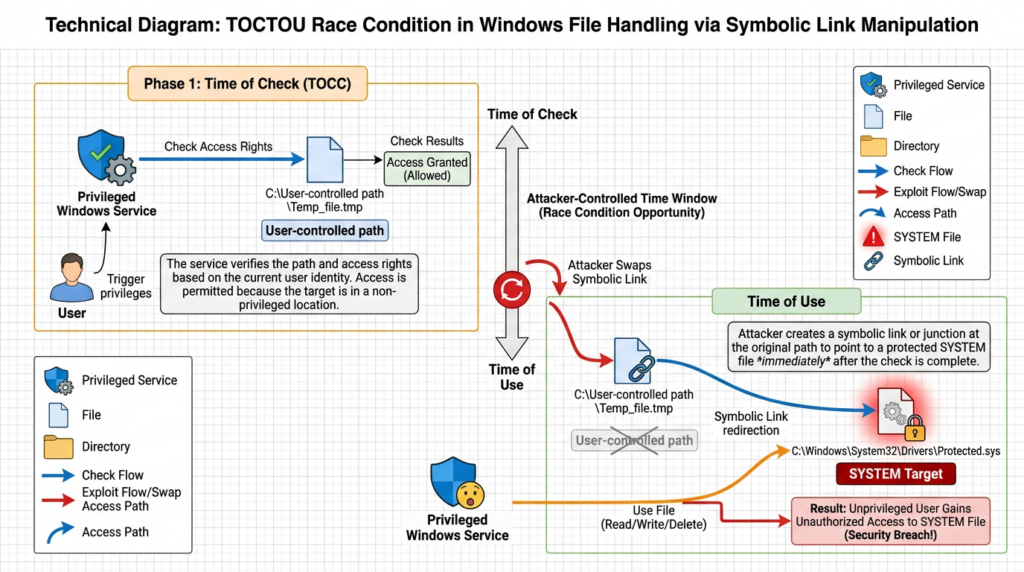
NVD maps CVE-2026-50656 to CWE-59, improper link resolution before file access. That classification is more useful than it may look at first glance. CWE-59 describes a common problem where software intends to operate on one file or directory but can be tricked into following a link, shortcut, junction, mount point, or other redirection mechanism to another target. In privileged code, that mistake can become a write, delete, move, replace, scan, or execute action against a location the low-privileged attacker could not directly modify. (NVD)
A related concept is a TOCTOU race, short for time of check to time of use. In a TOCTOU bug, a program checks an object under one condition, then later uses the object after the condition has changed. The program may check that a path appears safe, that a file belongs to a temporary directory, that a target is not a protected system file, or that a directory is user-writable. If an attacker can swap, redirect, relink, or replace the object between the check and the use, the privileged program may act on a different object than the one it validated.
On Windows, several legitimate filesystem features can become dangerous when privileged services do not handle them carefully. NTFS junctions can redirect directory traversal. Symbolic links can point one path to another. Reparse points allow filesystem filters and special path handling. Mount points and virtual disk images can expose different namespaces. Oplocks can influence timing by allowing a process to hold or delay file access. None of those mechanisms is inherently malicious. They are normal operating system features. The vulnerability emerges when a high-privilege component trusts a path or object identity across a window where a lower-privilege attacker can change what the path means.
Public technical analysis of RoguePlanet describes the vulnerability in this general family: a race involving Defender file handling, path redirection behavior, and privileged action by the engine. Picus summarized the issue as a path validation and use problem where Defender’s high-privilege file access can be redirected through NTFS junctions or symbolic links, and it noted that Microsoft had previously hardened some mpengine!SysIO* paths in May, closing an earlier route while the public RoguePlanet local privilege escalation path remained relevant. (picussecurity.com)
The defender takeaway is not to memorize one PoC. The specific exploit can change. The durable lesson is to look for privileged security processes performing unusual child-process creation, file replacement, remediation, WER interaction, virtual disk handling, or reparse-point-heavy activity near user-writable locations.
How RoguePlanet appears to work at a safe technical level
Public RoguePlanet materials describe a race condition that can produce a SYSTEM shell when the attacker wins the timing window. The PoC repository warns that the exploit may hit or miss because it depends on a race, and third-party coverage describes successful reproduction on Windows 10 and Windows 11 systems with current June 2026 patches. SecurityWeek also reported that the researcher said the public PoC could work whether real-time protection was enabled or disabled, though that statement should be treated as a claim from public research rather than a complete enterprise-wide guarantee. (GitHub)
Some public analysis also discusses an earlier remote-flavored research path involving Defender handling of remote SMB-hosted files and disk image formats such as VHD or VHDX. According to BleepingComputer and Picus summaries, Microsoft hardened certain engine paths in mid-May, disrupting parts of that earlier remote route, while the currently public issue should be treated primarily as a local privilege escalation. That distinction is critical. Calling CVE-2026-50656 a confirmed general-purpose remote code execution vulnerability would overstate the evidence. (BleepingComputer)
ThreatLocker’s analysis describes a chain involving Defender remediation behavior, Windows Error Reporting, file-system timing, and a SYSTEM-context result. Those details are useful for defenders because they point to telemetry sources: Defender engine lineage, WER-related execution, shell creation, suspicious temporary file activity, and replacement-like behavior near protected paths. They should not be turned into a production exploit checklist. (threatlocker.com)
For defensive analysis, the chain can be reduced to four concepts.
First, the attacker needs local execution. That may come from phishing, a malicious download, an initial access broker, a compromised developer tool, a trojanized script, or a low-privileged account on a shared workstation.
Second, the attacker tries to trigger a Defender workflow that performs privileged file operations. The exact public PoC implementation is not the important control point. The control point is that Defender’s trusted engine becomes involved in handling attacker-influenced files.
Third, the attacker uses timing and redirection to influence what Defender acts on. This is where the race condition and link-resolution weakness matter. The attacker’s goal is not simply to run a file. The goal is to make a privileged component perform an action the attacker could not perform directly.
Fourth, successful exploitation results in privileged execution. Public reproductions describe a SYSTEM shell. From an incident response perspective, any endpoint showing a suspicious path from Defender engine activity to SYSTEM-level shell or script execution should be treated as high severity until proven benign.
What systems should be prioritized
CVE-2026-50656 should first be assessed across Windows 10 and Windows 11 client fleets, especially where Microsoft Defender is active or present as a core protection layer. Public PoC and third-party reproduction references focus on Windows client systems. The public PoC repository discusses Windows Server but also notes a practical limitation involving ISO mounting by standard users, so server exposure should be tested and reasoned about separately instead of inferred automatically from client behavior. (GitHub)
Asset priority should not be based only on operating system version. A standard employee laptop and a privileged admin workstation may both be technically exposed, but their business risk is different. The machines that deserve first attention are the machines where a local privilege escalation would unlock meaningful lateral movement or credential access.
A useful priority order looks like this.
| Asset group | Por qué es importante | CVE-2026-50656 priority |
|---|---|---|
| Administrator workstations | Often hold privileged sessions, remote management tools, VPN access, cloud consoles, and cached credentials | Más alto |
| Developer workstations | May contain source code, build secrets, package tokens, SSH keys, signing material, or CI access | Más alto |
| SOC and IT operations machines | Often interact with many hosts and security consoles | Más alto |
| Jump boxes and privileged access workstations | Designed as control points for sensitive environments | Más alto |
| Executive and finance endpoints | High phishing value and sensitive data access | Alta |
| VDI pools with broad internal access | Useful for lateral movement after initial compromise | Alta |
| Ordinary user endpoints | Initial foothold risk, especially if application control is weak | Medium to high |
| Windows Server hosts | Requires separate validation because public client-focused PoC behavior may not translate directly | Case-by-case |
The most dangerous hosts are not necessarily the ones with the most internet exposure. A fully internal admin workstation can be more important than a public-facing kiosk if SYSTEM on that workstation gives access to domain administration tools, cloud control planes, production secrets, or EDR management consoles.
How to interpret the CVSS disagreement
The NVD and Microsoft CNA CVSS vectors differ in attack complexity. NVD lists CVE-2026-50656 as 7.0 High with AC:H; the Microsoft CNA score shown by NVD lists it as 7.8 High with AC:L. Both agree that the attack is local, requires low privileges, requires no user interaction, has unchanged scope, and can have high impact across confidentiality, integrity, and availability. (NVD)
That disagreement is not unusual in early vulnerability records, especially when exploitation depends on a race. One scorer may view the race as making exploitation less reliable and therefore higher complexity. Another may emphasize that a public PoC exists and that exploitation is operationally practical for a low-privileged local attacker, making the complexity lower.
Security teams should not let the difference between 7.0 and 7.8 drive the entire response. In practice, the score is less important than these questions:
| Question | Por qué es importante |
|---|---|
| Can an attacker realistically execute low-privileged code on this endpoint? | The flaw appears to require local execution. Initial access likelihood matters. |
| Does the endpoint store privileged credentials or tokens? | SYSTEM access has much higher consequence on admin and developer machines. |
| Is application control enforced or only audited? | Public coverage indicates application allowlisting can block exploit execution paths. |
| Are outbound SMB and disk-image handling restricted? | Earlier research paths and related detection guidance point to SMB and VHD or ISO handling as useful control surfaces. |
| Can the SOC detect MsMpEng.exe launching unusual child processes? | Parent-child lineage is one of the clearest behavioral signals. |
| Is there a clean way to verify Defender engine and platform versions? | Patch confirmation will depend on accurate inventory after Microsoft ships a fix. |
A race-dependent exploit can still be dangerous. Reliability is not binary. Attackers can retry races, tune timing, select quieter hosts, and automate attempts after they already have a foothold. Public proof-of-concept availability reduces the skill required to study the vulnerability even if real-world exploitation still requires adaptation.
Detection strategy for CVE-2026-50656
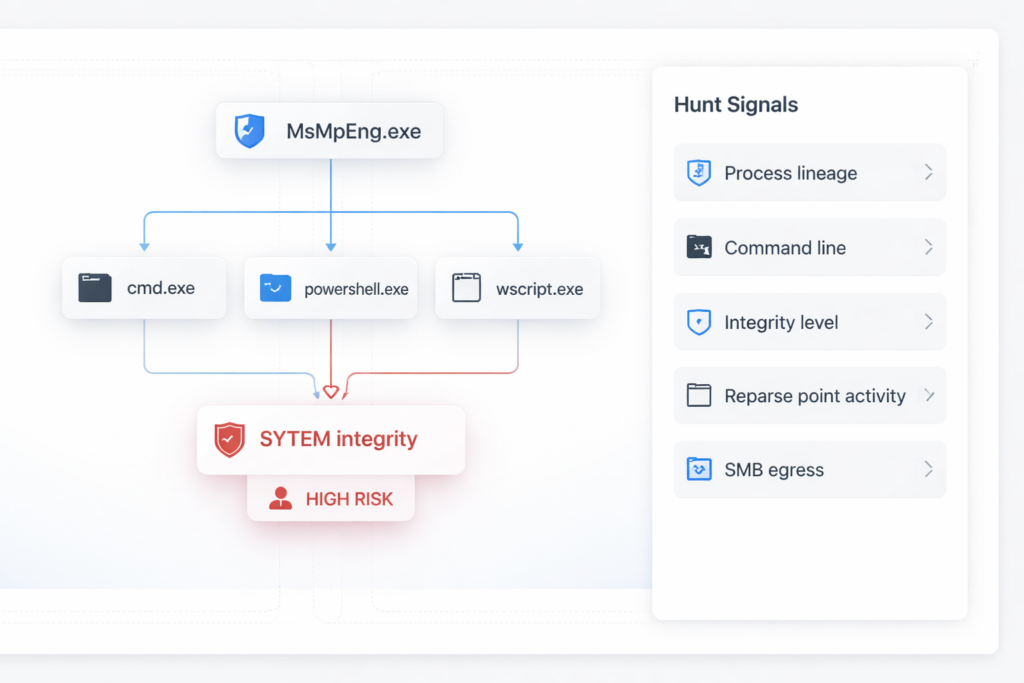
The most valuable detection logic starts with behavior, not hashes. PoC binaries can be renamed, recompiled, packed, or modified. A hash rule may catch one sample and miss the next trivial variant. Behavioral hunting should instead focus on the unusual relationship between a high-privilege security process and child processes or system changes that should not normally occur.
Picus identifies one primary detection signal: an interactive shell or script interpreter running at System integrity with MsMpEng.exe as the initiating process. That is a strong signal because Microsoft Defender’s antimalware engine should not normally be the parent of an interactive command shell, PowerShell session, Windows Script Host process, or suspicious console process in a normal user workflow. (picussecurity.com)
A Microsoft Defender for Endpoint KQL query can start with that lineage.
DeviceProcessEvents
| where InitiatingProcessFileName =~ "MsMpEng.exe"
| where FileName in~ (
    "cmd.exe",
    "powershell.exe",
    "pwsh.exe",
    "conhost.exe",
    "cscript.exe",
    "wscript.exe",
    "rundll32.exe",
    "regsvr32.exe",
    "mshta.exe"
)
| where ProcessIntegrityLevel == "System"
| project
    Timestamp,
    DeviceName,
    AccountName,
    FileName,
    ProcessCommandLine,
    ProcessIntegrityLevel,
    InitiatingProcessFileName,
    InitiatingProcessCommandLine,
    InitiatingProcessParentFileName,
    ReportId
| order by Timestamp desc
This query should be treated as a starting point. Some environments may not populate ProcessIntegrityLevel consistently across every event source, and some benign security operations may create surprising process trees. The triage process should inspect the command line, user context, preceding file events, image path, hash reputation, WER activity, scheduled task activity, and whether the host recently mounted disk images or accessed unusual SMB paths.
A second query can search for Defender lineage without relying on a fixed child process list.
DeviceProcessEvents
| where InitiatingProcessFileName =~ "MsMpEng.exe"
| where FileName !in~ (
    "MpCmdRun.exe",
    "NisSrv.exe",
    "SenseIR.exe",
    "WerFault.exe"
)
| project
    Timestamp,
    DeviceName,
    AccountName,
    FileName,
    FolderPath,
    ProcessCommandLine,
    ProcessIntegrityLevel,
    InitiatingProcessCommandLine,
    InitiatingProcessParentFileName
| order by Timestamp desc
This broader query will produce more noise, but it may catch modified chains that avoid obvious shells. Teams can tune allowlists after reviewing normal Defender-related child processes in their own environment.
Sysmon and EDR users can express the same idea as a lineage rule. A simplified Sigma-style rule might look like this.
title: Suspicious Shell or Script Spawned by Microsoft Defender Engine
id: 5a55a6e6-rogueplanet-hunt
status: experimental
description: Detects shell, script, or LOLBin child processes launched by MsMpEng.exe at high integrity.
logsource:
  product: windows
  category: process_creation
detection:
  selection_parent:
    ParentImage|endswith: '\MsMpEng.exe'
  selection_child:
    Image|endswith:
      - '\cmd.exe'
      - '\powershell.exe'
      - '\pwsh.exe'
      - '\cscript.exe'
      - '\wscript.exe'
      - '\mshta.exe'
      - '\rundll32.exe'
      - '\regsvr32.exe'
  condition: selection_parent and selection_child
fields:
  - UtcTime
  - Computer
  - User
  - ParentImage
  - ParentCommandLine
  - Image
  - CommandLine
  - IntegrityLevel
falsepositives:
  - Rare administrative troubleshooting
  - Security product integration testing
level: high
This is not a perfect CVE-specific detector. It is a high-value suspicious behavior detector. That is exactly what defenders need before a vendor patch lands and before exploit variants settle into predictable shapes.
Secondary signals worth hunting
RoguePlanet detection should not rely on one parent-child relationship. Attackers may modify the public approach, chain it with other tooling, or avoid obvious shells. Secondary signals help catch preparation, failed attempts, and adjacent abuse.
| Señal | Por qué es importante | Example telemetry |
|---|---|---|
| Reparse point, junction, or symlink activity in user-writable paths | CWE-59 and TOCTOU-style exploitation often depends on path redirection | Sysmon file create events, EDR file metadata, command-line usage of mklink, PowerShell filesystem APIs |
| Defender engine activity followed by unexpected file replacement | Public analysis centers on privileged file handling and remediation behavior | File modification, rename, delete, or create events near protected paths |
| WER-related execution near suspicious Defender events | Third-party analysis describes Windows Error Reporting involvement in exploit chains | Process creation, scheduled task events, WerFault.exe, WER queue activity |
| VHD, VHDX, or ISO mount activity by standard users | Public PoC and earlier research paths discuss virtual disk handling | Mount events, PowerShell Mount-DiskImage, ShellExperienceHost activity, storage logs |
| Outbound SMB from workstations | Earlier remote research paths and mitigation guidance point to SMB as a useful control surface | Firewall logs, proxy logs if applicable, Defender network events |
| Repeated failed shell spawns or crash-like behavior | Race-dependent attempts may fail before succeeding | Process creation bursts, error reporting, Defender operational logs |
| SYSTEM process launched from unusual user-controlled path | Privileged execution often leaves abnormal image paths | EDR process path, code signing, file reputation |
Picus recommends watching not only for MsMpEng.exe launching shells, but also for reparse or junction activity, suspicious disk-image mounts, and outbound SMB traffic on ports 445 or 139. Microsoft also recommends blocking outbound SMB traffic to the internet at the corporate firewall in most environments, with exceptions only where business services require it. (picussecurity.com)
A practical SMB hunt can start with endpoints making direct outbound connections to TCP 445 outside known internal ranges.
DeviceNetworkEvents
| where RemotePort == 445
| where ActionType in ("ConnectionSuccess", "ConnectionRequest")
| where not(ipv4_is_private(RemoteIP))
| project
    Timestamp,
    DeviceName,
    InitiatingProcessFileName,
    InitiatingProcessCommandLine,
    RemoteIP,
    RemoteUrl,
    LocalIP,
    ReportId
| order by Timestamp desc
This query is not specific to CVE-2026-50656, but it is valuable because SMB egress is rarely necessary from ordinary workstations to the public internet. It also helps reduce exposure to other attack paths that abuse remote file parsing, NTLM leakage, or malicious network shares.
For disk-image hunting, defenders can look for common mount commands and user-driven image handling.
DeviceProcessEvents
| where FileName in~ ("powershell.exe", "pwsh.exe", "cmd.exe")
| where ProcessCommandLine has_any ("Mount-DiskImage", ".vhd", ".vhdx", ".iso")
| project
    Timestamp,
    DeviceName,
    AccountName,
    FileName,
    ProcessCommandLine,
    InitiatingProcessFileName,
    InitiatingProcessCommandLine
| order by Timestamp desc
This is intentionally broader than one exploit. Developers, IT staff, and forensic teams may mount disk images legitimately. Ordinary finance, HR, sales, or executive endpoints doing so should raise a stronger question.
Defender status and fleet inventory
Before a patch is released, version inventory still matters. After a patch is released, it becomes mandatory. Microsoft documents Get-MpComputerStatus as the PowerShell cmdlet for retrieving Microsoft Defender Antivirus status, and Microsoft’s Defender update documentation shows how to inspect fields such as AMEngineVersion. (Microsoft Aprende)
A safe inventory command for a single host is:
Get-MpComputerStatus |
  Select-Object `
    AMRunningMode,
    AMEngineVersion,
    AMProductVersion,
    AMServiceVersion,
    AntispywareSignatureVersion,
    AntivirusSignatureVersion,
    RealTimeProtectionEnabled,
    IsTamperProtected,
    DefenderSignaturesOutOfDate,
    FullScanAge,
    QuickScanAge
For a fleet, collect those fields through an endpoint management platform, EDR advanced hunting, Intune, Configuration Manager, PowerShell Remoting where appropriate, or an existing asset inventory system. The goal is to create a time-stamped view of which machines have which Defender engine, platform, and signature versions.
Do not confuse signature freshness with vulnerability remediation. Microsoft’s security intelligence updates can ship frequently, while engine and platform updates are separate update components. A host can have a fresh security intelligence version and still require a future engine or platform update if Microsoft fixes CVE-2026-50656 in one of those components. (Microsoft)
A fleet inventory table should include these fields.
| Campo | Por qué es importante |
|---|---|
| Hostname and asset owner | Required for remediation tracking |
| OS version and build | Helps separate Windows 10, Windows 11, and Server populations |
| Defender running mode | Shows whether Defender is active, passive, or disabled |
| AMEngineVersion | Likely important for fix verification after Microsoft publishes a fixed engine |
| AMProductVersion and AMServiceVersion | Useful when the fix involves platform or service changes |
| Signature versions | Shows update health but should not be treated as proof of remediation by itself |
| RealTimeProtectionEnabled | Useful context, but public claims suggest the PoC may not depend only on this setting |
| Tamper protection | Helps assess whether malware can modify Defender settings |
| Application control status | Strong compensating control if enforced |
| SMB egress policy | Useful because SMB egress is a common abuse surface |
| Disk-image mount policy | Helps identify machines where VHD, VHDX, or ISO handling is allowed |
For local troubleshooting, Microsoft’s command-line tool MpCmdRun.exe can trigger updates and scans. Use it for health and operational checks, not for exploit testing.
$mpCmd = "$env:ProgramFiles\Windows Defender\MpCmdRun.exe"

& $mpCmd -SignatureUpdate
& $mpCmd -Scan -ScanType 1
Run administrative commands only through approved management channels. Avoid ad hoc local changes during an incident unless they are captured in the case timeline.
Safe validation without running a public PoC in production
The public PoC for RoguePlanet exists, but that does not mean production testing should begin by running it on employee laptops. Race-condition privilege escalation PoCs can crash services, alter files, trigger security tools, create artifacts that look like a real compromise, or behave differently across builds. They can also be modified by third parties before defenders download them. Treat public exploit code as hostile until proven otherwise.
A safe validation program has three layers.
The first layer is exposure inventory. Identify Windows hosts running Microsoft Defender, collect engine and platform versions, determine running mode, and identify whether application control, SMB egress blocking, symlink restrictions, and disk-image controls are in place.
The second layer is control validation. Confirm whether low-privileged users can run unsigned binaries or scripts, create symbolic links, mount ISO or VHD files, access outbound SMB, or write into directories used by security tooling and remediation workflows. These checks can be done without running the exploit.
The third layer is lab reproduction, if the organization has a legitimate need. Use an isolated virtual machine, no corporate credentials, no production network access, a clean snapshot, known-good installers, and controlled telemetry collection. The objective should be to validate detection and mitigation, not to “prove” the exploit on production machines.
A safe exposure checklist can be written as a repeatable script that does not attempt exploitation.
$defender = Get-MpComputerStatus

[PSCustomObject]@{
    ComputerName                  = $env:COMPUTERNAME
    UserName                      = $env:USERNAME
    OSVersion                     = (Get-CimInstance Win32_OperatingSystem).Version
    OSBuild                       = (Get-CimInstance Win32_OperatingSystem).BuildNumber
    AMRunningMode                 = $defender.AMRunningMode
    AMEngineVersion               = $defender.AMEngineVersion
    AMProductVersion              = $defender.AMProductVersion
    AMServiceVersion              = $defender.AMServiceVersion
    RealTimeProtectionEnabled     = $defender.RealTimeProtectionEnabled
    IsTamperProtected             = $defender.IsTamperProtected
    DefenderSignaturesOutOfDate   = $defender.DefenderSignaturesOutOfDate
    AntivirusSignatureVersion     = $defender.AntivirusSignatureVersion
    AntispywareSignatureVersion   = $defender.AntispywareSignatureVersion
}
To check symbolic link evaluation settings, use fsutil through an administrative shell.
fsutil behavior query SymlinkEvaluation
Microsoft’s security guidance warns against granting the “Create symbolic links” user right to standard users and recommends restricting it to trusted administrators. That does not eliminate every reparse-point issue, but it reduces one class of low-privileged redirection primitive. (Microsoft Aprende)
To inspect outbound SMB exposure from a Windows endpoint, look for firewall rules and central network controls. A local check can help during triage, but enterprise enforcement should happen at host firewall, network firewall, and egress filtering layers.
Get-NetFirewallRule |
  Where-Object { $_.DisplayName -match "SMB|445" } |
  Select-Object DisplayName, Direction, Action, Enabled, Profile
A production-safe validation report should answer these questions:
| Validation question | Good evidence |
|---|---|
| Which endpoints run Defender and which mode is active? | Get-MpComputerStatus output collected centrally |
| Which engine and platform versions are installed? | Time-stamped inventory export |
| Is application control enforced? | WDAC or AppLocker policy state, not only a policy file name |
| Are unsigned user binaries blocked? | Test result from approved benign binary in a controlled path |
| Is outbound SMB blocked? | Firewall policy plus connection test to controlled destination |
| Can standard users mount disk images? | Policy and test on a non-production endpoint |
| Are symlink privileges restricted? | Local security policy and fsutil output |
| Can the SOC detect Defender-to-shell lineage? | KQL or EDR rule test with a benign simulation, not exploit code |
| Is there a patch verification plan? | Known target version once Microsoft publishes it |
Teams using agentic security testing workflows should treat CVE-2026-50656 as a case where proof collection matters as much as discovery. A tool can say a host is “potentially affected,” but a security team still needs evidence showing Defender version, running mode, application control status, SMB policy, detection coverage, compensating controls, and retest results after Microsoft ships a fix. Penligent’s agentic AI pentesting workflow is relevant in that narrow operational sense: it is designed around target setup, tool execution, evidence collection, verification, and reproducible reporting rather than a single scanner verdict. (Penligente)
That same evidence-first pattern is useful for related Microsoft Defender issues as well. Penligent’s writeup on CVE-2026-41091 focuses on checking Defender engine and platform versions after Microsoft shipped fixes for earlier Defender flaws, which is a practical companion habit for RoguePlanet: do not stop at “the patch was released”; verify the actual engine or platform state on the endpoint and preserve the proof. (Penligente)
Mitigation before a Microsoft fix
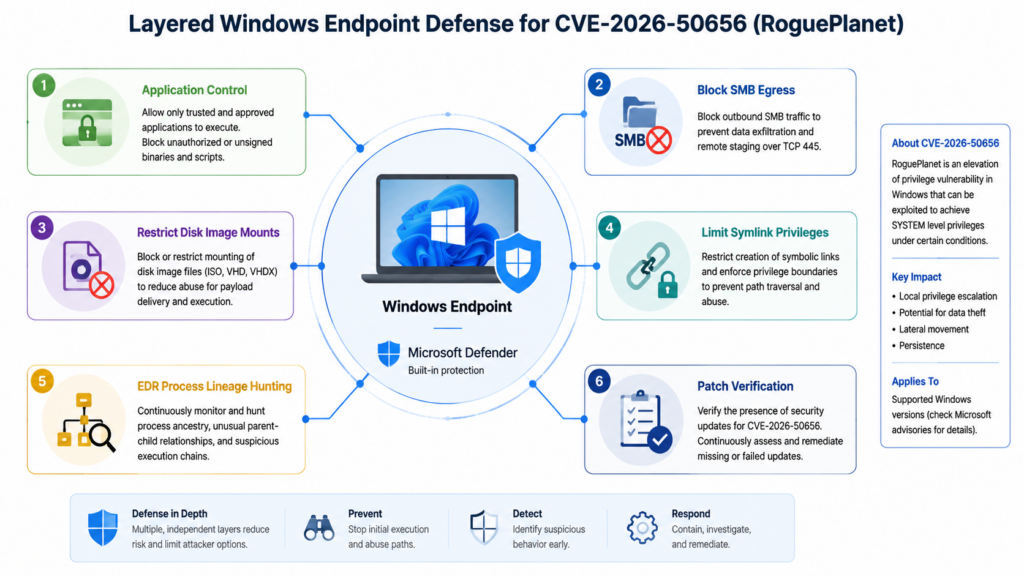
When a vendor patch is not yet available or not yet fully deployed, mitigation must reduce the exploitability of the chain around the vulnerability. For CVE-2026-50656, that means reducing low-privileged code execution, limiting filesystem redirection primitives, monitoring Defender behavior, and hardening endpoint egress.
Application control is the strongest compensating control mentioned across public coverage. ThreatLocker and BleepingComputer both describe application allowlisting as a way to prevent exploit execution, and Microsoft’s own Application Control documentation describes how Windows can restrict which applications and code can run, including executables, scripts, installers, and PowerShell-related content. (BleepingComputer)
The operational catch is that application control must be enforced, not merely planned. Microsoft recommends beginning with audit mode for policy validation, but an audit-only policy does not block an attacker. A mature rollout usually starts with audit mode, collects violations, adjusts rules, and then moves high-value asset groups into enforcement. (Microsoft Aprende)
A practical staged plan:
| Escenario | Acción | Risk reduction |
|---|---|---|
| Immediate | Enforce application control on privileged access workstations, admin laptops, SOC machines, and jump boxes | Reduces attacker ability to run arbitrary exploit code |
| Short term | Add rules for user-writable directories, script interpreters, and unsigned binaries | Blocks common local execution paths |
| Short term | Review PowerShell, Windows Script Host, MSI, and LOLBin usage | Limits post-foothold tooling |
| Medium term | Expand WDAC or AppLocker from high-value endpoints to broader workstation groups | Turns a single CVE response into durable endpoint hardening |
| Continuous | Monitor blocked events and attempted bypasses | Converts prevention into detection intelligence |
SMB egress control is another important mitigation. Microsoft recommends blocking outbound TCP 445 to the internet at the corporate firewall in most environments, with limited exceptions for specific services. That control is valuable beyond RoguePlanet because outbound SMB is frequently abused for NTLM exposure, remote file parsing, malicious shares, and lateral movement staging. (Microsoft Aprende)
Disk-image handling should also be reviewed. If ordinary users do not need to mount ISO, VHD, or VHDX files, restrict that capability. Where disk images are required for developers, IT, or forensic workflows, allow them only on managed machines with logging and application control. Treat disk-image mounts from email downloads, browser caches, temporary directories, and chat applications as suspicious.
Symlink and junction handling deserves a policy review. Restrict the “Create symbolic links” right to trusted administrators, inspect symlink evaluation settings, and monitor reparse-point creation in user-writable paths. This does not solve every CWE-59 vulnerability, because some reparse mechanisms do not require the classic symlink privilege, but it reduces attacker flexibility.
Least privilege still matters. If every user is a local administrator, a local privilege escalation CVE becomes less interesting, but the environment is already in poor shape. If users are standard users, CVE-2026-50656 becomes more important because it may give attackers a way around that boundary. The answer is not to abandon least privilege. The answer is to keep least privilege and add application control, egress filtering, and behavior-based detection.
Incident response triage for suspicious RoguePlanet-like activity
If a detection fires for MsMpEng.exe spawning a shell or script interpreter as SYSTEM, treat it as a high-severity endpoint event. Even if the event later turns out to be a false positive, the combination of Defender lineage and SYSTEM execution is unusual enough to justify immediate triage.
A first-hour response should do the following.
| Paso | Propósito |
|---|---|
| Isolate the host if business impact allows | Prevent lateral movement while preserving evidence |
| Capture process tree and command lines | Establish whether Defender lineage led to a shell, script, or suspicious binary |
| Preserve relevant binaries and hashes | Identify PoC, malware, or modified tooling |
| Export Defender, Sysmon, Security, PowerShell, and Task Scheduler logs | Reconstruct the local timeline |
| Check recent disk-image mounts and SMB connections | Identify preparation or remote file triggers |
| Review reparse point and junction activity | Look for filesystem redirection primitives |
| Identify logged-in users and tokens | Determine whether privileged credentials may be exposed |
| Rotate credentials if admin sessions were present | Reduce post-exploitation value |
| Hunt peer hosts for the same behavior | Identify repeat attempts or spread |
A PowerShell triage collector can gather basic Defender and process context. It should not modify system state.
$Out = "C:\ProgramData\IR-CVE-2026-50656"
New-Item -ItemType Directory -Force -Path $Out | Out-Null

Get-MpComputerStatus |
  Select-Object * |
  Out-File "$Out\defender-status.txt"

Get-Process |
  Select-Object Id, ProcessName, Path, StartTime |
  Sort-Object StartTime -Descending |
  Out-File "$Out\processes.txt"

Get-WinEvent -LogName "Microsoft-Windows-Windows Defender/Operational" -MaxEvents 500 |
  Export-Clixml "$Out\defender-operational.xml"

Get-WinEvent -LogName "Microsoft-Windows-TaskScheduler/Operational" -MaxEvents 500 |
  Export-Clixml "$Out\taskscheduler-operational.xml"

Get-WinEvent -LogName "Windows PowerShell" -MaxEvents 500 |
  Export-Clixml "$Out\powershell.xml"
Forensic collection should follow the organization’s evidence handling policy. If the endpoint may be part of a broader intrusion, memory capture, EDR live response, full disk imaging, and identity telemetry may be necessary. The local privilege escalation event may be only the middle of the attack, not the beginning.
Common mistakes defenders should avoid
The first mistake is treating CVE-2026-50656 as only a patch management issue. Patch management is necessary, but before a fix is available and during rollout gaps, detection and compensating controls matter. Even after a patch, attackers may still target unpatched machines, disconnected laptops, unmanaged endpoints, lab systems, or virtual machines.
The second mistake is treating public PoC availability as equal to confirmed widespread exploitation. That overstatement can damage credibility and produce poor prioritization. The better statement is sharper: public PoC exists, the target component is privileged and widely deployed, and official exploitation metadata indicates PoC-level exploitation. That is enough to act.
The third mistake is relying on signatures for one PoC binary. Public coverage notes that the exploit can be modified, and race-condition exploit logic is not naturally tied to one stable hash. Behavioral rules, application control, and lineage-based detections are more durable.
The fourth mistake is assuming real-time protection state fully determines exposure. Public reporting includes claims that the PoC can work whether real-time protection is enabled or disabled. Whether that holds across every enterprise build is not the point. The point is that defenders should collect actual Defender state and not assume a single toggle is a mitigation. (SecurityWeek)
The fifth mistake is ignoring “boring” controls. Blocking outbound SMB, enforcing application control, limiting disk-image mounts, and restricting symlink privileges are not glamorous. They are also exactly the kind of controls that make post-foothold exploitation harder.
The sixth mistake is failing to preserve proof. A vulnerability response that ends with “we think we updated Defender” is weak. A strong response has before-and-after evidence: affected hosts, versions, controls, detections, exceptions, patch deployment status, and retest results.
Related Microsoft Defender vulnerabilities that help frame the risk
CVE-2026-50656 did not appear in isolation. Several recent Microsoft Defender issues show why defenders should treat security-engine attack surfaces as serious, even when the initial CVSS number is not the highest number on the board.
| CVE | Component and class | Why it is relevant | Practical response |
|---|---|---|---|
| CVE-2026-50656 | Microsoft Malware Protection Engine elevation of privilege, RoguePlanet | Current issue, public PoC, local path to SYSTEM under certain conditions | Hunt Defender-to-SYSTEM-shell lineage, enforce application control, prepare for Microsoft fix |
| CVE-2026-41091 | Microsoft Defender improper link resolution before file access | Same broad weakness family, CWE-59, local privilege escalation | Verify engine/platform fixes, watch path redirection abuse |
| CVE-2026-33825 | Microsoft Defender insufficient granularity of access control | Another Defender local privilege escalation with high impact | Treat remediation and privileged Defender operations as attack surface |
| CVE-2026-45498 | Microsoft Defender denial of service | CISA KEV lists it as known exploited, showing Defender bugs can become operationally relevant | Confirm remediation, monitor Defender health and tamper events |
| CVE-2026-45584 | Microsoft Defender heap-based buffer overflow | Demonstrates that Defender engine parsing bugs can reach code execution risk, not only local EoP | Keep engine updated, reduce untrusted content exposure, monitor vendor advisories |
NVD records CVE-2026-41091 as an improper link resolution before file access issue in Microsoft Defender that allows local privilege escalation, which makes it a close conceptual neighbor to CVE-2026-50656. NVD also records CVE-2026-33825 as an access-control granularity issue in Microsoft Defender with local elevation impact. CISA lists CVE-2026-45498 in the Known Exploited Vulnerabilities catalog as a Microsoft Defender denial-of-service vulnerability. CVE.org describes CVE-2026-45584 as a heap-based buffer overflow in Microsoft Defender that can allow network code execution. (NVD)
The broader lesson is not “Defender is uniquely bad.” The lesson is that security engines are high-value attack surfaces. They parse dangerous inputs, run with elevated privileges, and are trusted by the operating environment. That combination deserves the same engineering scrutiny defenders already apply to browsers, VPN appliances, identity systems, and endpoint agents.
A 24-hour, 72-hour, and 7-day action plan
For the first 24 hours, focus on visibility and high-value controls. Confirm which Windows endpoints run Microsoft Defender. Pull Defender engine, platform, service, and signature versions. Deploy or test the MsMpEng.exe suspicious child-process hunt. Review application control status for privileged endpoints. Check whether outbound SMB to the internet is blocked. Identify whether ordinary users can mount disk images or create symbolic links. Notify incident response teams that Defender-to-SYSTEM-shell lineage should be treated as high severity.
For the first 72 hours, move from visibility to enforcement on the most important assets. Enforce application control on administrator workstations, jump boxes, SOC machines, and developer machines where feasible. Add monitoring for VHD, VHDX, ISO, WER, reparse-point, and suspicious scheduled-task activity. Validate that EDR telemetry captures parent process, integrity level, command line, and file path. Build an exception list for business-critical disk-image and SMB workflows so that blocking policies do not break known operations.
Within seven days, make the response repeatable. Create a dashboard showing Defender version coverage, detection hits, application control enforcement, SMB egress status, and policy exceptions. Prepare a patch validation workflow for the moment Microsoft publishes a fix. Write a retest plan that does not depend on running public PoC code in production. Map the affected asset groups to identity risk: local admins, cached domain admins, cloud admin sessions, developer tokens, SSH keys, and secrets stored on disk.
When Microsoft releases the fix, the seven-day plan should turn into a verification plan. Do not stop at deployment status from a patch tool. Confirm the actual Defender engine or platform version on endpoints, compare it to Microsoft’s fixed version, rerun hunts for suspicious activity during the exposure window, and close the incident only after high-value exceptions are resolved.
Lista de comprobación práctica
| Controlar | Recommended state | Why it helps |
|---|---|---|
| Microsoft Defender engine and platform updates | Track and apply Microsoft’s official fix once available | Removes the vulnerable code path when patched |
| Defender security intelligence | Keep current, but do not treat it alone as proof of CVE remediation | Maintains detection quality but may not equal engine fix |
| Application control | Enforced on high-value endpoints, moving toward broader deployment | Blocks arbitrary local exploit code and many variants |
| PowerShell and script control | Constrained, logged, and limited for standard users | Reduces post-foothold execution flexibility |
| Outbound SMB | Block TCP 445 to the internet unless explicitly required | Reduces remote share abuse and related exposure |
| Disk-image mounting | Restricted for ordinary users, logged for approved groups | Reduces attack surface around VHD, VHDX, and ISO handling |
| Symlink and reparse-point controls | Restrict symlink rights and monitor user-writable reparse activity | Reduces CWE-59-style redirection options |
| EDR process lineage | Capture parent process, command line, integrity level, and user | Enables Defender-to-shell detection |
| WER and scheduled task logging | Enabled and retained | Helps reconstruct public chain variants |
| Privileged workstation isolation | Stronger controls than ordinary endpoints | Reduces consequence of SYSTEM compromise |
| Credential protection | Credential Guard, LSASS protection, and admin hygiene | Limits value of local SYSTEM access |
| Incident evidence workflow | Preserve version, telemetry, controls, and retest proof | Supports audit, executive reporting, and real remediation |
The checklist is intentionally broader than one CVE. A single local privilege escalation is rarely the only weakness in an attack path. The attacker needs execution, timing, file-system primitives, and a useful post-exploitation objective. Every control that interrupts one of those stages reduces practical risk.
PREGUNTAS FRECUENTES
What is CVE-2026-50656 RoguePlanet?
- CVE-2026-50656 is a Microsoft Defender elevation-of-privilege vulnerability in Microsoft Malware Protection Engine.
- The public name associated with the vulnerability is RoguePlanet.
- NVD maps the flaw to CWE-59, improper link resolution before file access.
- Public PoC material describes a race condition that can produce SYSTEM-level execution on Windows client systems under certain conditions.
- Microsoft has acknowledged the issue and said it is working to provide a security update. (NVD)
Is CVE-2026-50656 being exploited in the wild?
- The official public signals available in the cited records indicate public proof-of-concept availability.
- CISA-ADP’s SSVC enrichment marks exploitation as PoC, not active exploitation.
- Some third-party coverage has used stronger wording, but at least one report stated that Microsoft had not detected exploitation in the wild at the time of publication.
- Defenders should still act quickly because public PoC code lowers the barrier for testing and adaptation. (NVD)
Is RoguePlanet a remote code execution vulnerability?
- The currently public CVE description is elevation of privilege, not a confirmed general-purpose remote code execution issue.
- Public reporting discusses earlier research paths involving SMB-hosted files and virtual disk formats, but those paths were reportedly affected by Microsoft hardening in May.
- The public RoguePlanet issue should be handled primarily as a local privilege escalation risk.
- That still matters because attackers often combine initial access with local EoP to obtain SYSTEM.
Does disabling Defender real-time protection reduce the risk?
- Do not rely on that as a mitigation.
- Public reporting includes claims that the PoC can work whether real-time protection is enabled or disabled.
- Disabling real-time protection may reduce security visibility and create other risks.
- Safer mitigations include application control, SMB egress blocking, disk-image restrictions, symlink privilege restrictions, and behavior-based detection.
What should defenders hunt for first?
MsMpEng.exedesovecmd.exe,powershell.exe,pwsh.exe,cscript.exe,wscript.exe, or other unusual child processes.- SYSTEM-integrity shells or scripts with Defender engine lineage.
- Reparse point, junction, symlink, or suspicious file replacement activity in user-writable paths.
- Unexpected VHD, VHDX, or ISO mount activity by standard users.
- Outbound SMB connections from workstations to untrusted or internet destinations.
- WER or scheduled-task activity occurring near suspicious Defender events.
Can scanners reliably detect CVE-2026-50656?
- A scanner may identify potentially affected hosts once reliable version and patch metadata are available.
- Before Microsoft publishes a fixed version, scanners may only provide exposure indicators, not definitive remediation proof.
- Behavioral detection is still needed because exploitation depends on runtime activity.
- A strong validation workflow should combine version inventory, control state, EDR telemetry, and post-fix retesting.
What systems should be checked first?
- Administrator workstations, privileged access workstations, jump boxes, and SOC machines.
- Developer endpoints with source code, signing keys, package tokens, CI access, SSH keys, or cloud credentials.
- Windows 10 and Windows 11 client systems where low-privileged code execution is plausible.
- VDI environments with broad internal access.
- Windows Server systems should be evaluated separately because public PoC behavior may not translate directly to server configurations.
What should teams do before Microsoft ships a fix?
- Deploy hunts for Defender-to-shell and SYSTEM child-process behavior.
- Enforce application control on high-value endpoints.
- Block unnecessary outbound SMB, especially TCP 445 to the internet.
- Restrict ordinary user access to disk-image mounting where possible.
- Review symlink and reparse-point controls.
- Preserve Defender engine, platform, and policy inventory.
- Prepare a patch verification workflow that checks actual endpoint versions after Microsoft releases the update.
Closing judgment
CVE-2026-50656 is serious because it targets a privileged security engine, has public PoC material, and can turn local execution into SYSTEM-level control under the right conditions. It should not be inflated into an unsupported claim of universal remote compromise, and it should not be minimized as “just another local bug.” The right response sits between those extremes.
Treat RoguePlanet as a post-compromise accelerator. Reduce the chance that attackers can execute unapproved code in the first place. Limit filesystem redirection and disk-image abuse. Block unnecessary SMB egress. Hunt for MsMpEng.exe leading to SYSTEM shells or scripts. Preserve version and control evidence. When Microsoft ships the fix, verify the actual Defender engine or platform state on endpoints instead of trusting patch intent alone.
 Spanish
  English
  German
  French
  Portuguese
  Japanese
  Korean
  Hindi
Hindi  Arabic
  Turkish
  Hebrew