
A critical vulnerability in the Forminator Forms WordPress plugin can allow an unauthenticated attacker to bypass file-upload restrictions and place potentially executable files on a vulnerable server. Tracked as CVE-2026-15748, the issue affects Forminator Forms versions 1.56.1 and earlier and carries a CVSS 3.1 score of 9.8 Critical, with the vector CVSS:3.1/AV:N/AC:L/PR:N/UI:N/S:U/C:H/I:H/A:H. Forminator 1.56.2 contains the security fix. (NVD)
The vulnerability deserves immediate attention, but its impact needs to be described precisely. CVE-2026-15748 is fundamentally an unauthenticated arbitrary file upload vulnerability classified as CWE-434. Remote code execution is a possible consequence when several additional conditions line up; it is not accurate to assume that every WordPress installation running an affected Forminator version can automatically be compromised by requesting a single PHP payload. (NVD)
The most important exploitation prerequisite identified by Wordfence is that the targeted site must expose a Forminator form containing both a File Upload field and a Select field. The vulnerability chains weaknesses in how Forminator converts submitted form data into internal field structures with weaknesses in the plugin’s file-type filtering. On some configurations, particularly those using a custom upload storage root without effective script-execution protection, the resulting arbitrary upload can progress to execution of attacker-controlled PHP and potentially complete WordPress compromise. (Wordfence)
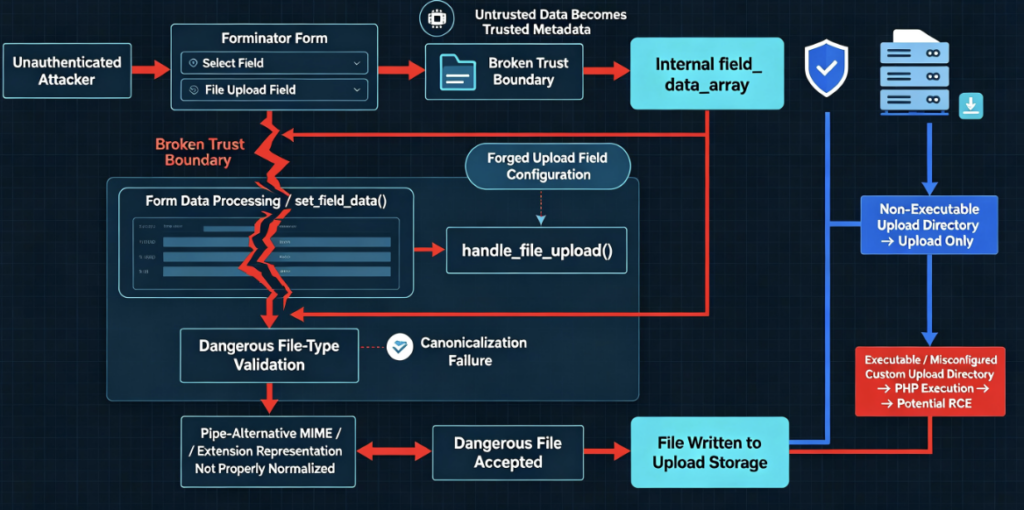
That distinction makes CVE-2026-15748 more technically interesting than a conventional extension-filter bypass. The attacker is not simply renaming a PHP file to defeat a superficial filename check. The flaw crosses an important trust boundary inside the Forminator form-processing pipeline: attacker-controlled form data can influence internal upload-field configuration that later code treats as trusted.
CVE-2026-15748 at a Glance
| Artículo | Detalles |
|---|---|
| CVE | CVE-2026-15748 |
| Producto | Forminator Forms for WordPress |
| Clase de vulnerabilidad | Unrestricted Upload of File with Dangerous Type |
| CWE | CWE-434 |
| Authentication required | No |
| Interacción con el usuario | No |
| CVSS 3.1 | 9.8 Critical |
| Versiones afectadas | Forminator ≤ 1.56.1 |
| Versión parcheada | 1.56.2 |
| Key form prerequisite | A published form containing both File Upload and Select fields |
| Impacto primario | Arbitrary upload of potentially executable files |
| Potential consequence | Remote code execution and site compromise under exploitable storage/server conditions |
| Researcher | daroo |
| Public disclosure | August 17, 2026 |
These version and severity details come directly from the Wordfence vulnerability record and the NVD entry. Wordfence publicly disclosed the issue on August 17, 2026, while NVD incorporated the CVE into its dataset on August 18. (Wordfence)
WordPress.org currently lists Forminator at version 1.57.1 with more than 600,000 active installations, so administrators should normally move to the latest supported release rather than deliberately stopping at 1.56.2. Version 1.56.2 is important because it represents the first release identified as fully patched for CVE-2026-15748. (WordPress.org)
Why CVE-2026-15748 Is Critical
Arbitrary file upload vulnerabilities are dangerous because they can collapse the boundary between user-supplied content and executable server-side code.
A secure upload mechanism should treat filenames, extensions, MIME information, file contents, storage location, and execution permissions as separate security decisions. OWASP specifically recommends using an allowlist of required extensions, validating file types independently rather than trusting the supplied Tipo de contenido, generating server-controlled filenames, limiting file size, and preferably storing uploaded files outside the web root or on a separate system. (Serie de hojas de trucos de OWASP)
CVE-2026-15748 demonstrates why several layers are necessary.
Forminator did have filtering logic intended to reject dangerous extensions. The problem was that the vulnerable processing chain allowed attacker-controlled configuration to reach that logic in an unexpected representation. A security check that works correctly for a normal extension key can fail when the same logical information is encoded inside a more complex pipe-separated value.
The vulnerability therefore combines two problems:
First, an internal trust-boundary failure. Forminator could accept attacker-controlled nested data from a public Select field and allow it to influence a structure later interpreted as an upload-field record.
Second, an incomplete file-type validation strategy. The dangerous-extension check expected exact keys and did not safely normalize all possible representations before evaluating them.
The consequence was a route from an ordinary unauthenticated form submission to an attacker-influenced file-upload configuration. (Wordfence)
How the Forminator Vulnerability Works
Understanding CVE-2026-15748 requires following Forminator’s form-processing pipeline rather than looking at the upload function in isolation.
According to Wordfence’s technical analysis, Forminator processes submitted fields through set_field_data() en el Forminator_CForm_Front_Action class. Certain complex form fields, including Select fields, can carry nested structures that receive additional field-specific processing later in the request. (Wordfence)
The security problem arose because a submitted structure containing a particular internal return indicator could cause additional attacker-controlled properties to be inserted into Forminator’s internal field_data_array.
Conceptually, the vulnerable trust transition looked like this:
Public form submission
        ↓
Attacker-controlled Select field data
        ↓
Generic request processing
        ↓
Internal field_data_array
        ↓
Record interpreted as upload field
        ↓
Attacker-influenced upload configuration
        ↓
handle_file_upload()
The Select field itself does not need to be logically associated with the File Upload field from the site administrator’s perspective. Wordfence specifically notes that the Select field is important because its data structure can reach the vulnerable nested-array handling path. (Wordfence)
Once the attacker-controlled record reaches the internal field array, another part of the upload-processing logic checks the claimed field type. If that field is considered an upload record, Forminator can process the associated upload using configuration originating from the attacker-controlled structure rather than exclusively from the trusted form definition.
That is the critical architectural mistake.
The application is effectively crossing from:
USER-CONTROLLED FORM DATA
a:
TRUSTED INTERNAL FIELD CONFIGURATION
without reconstructing the configuration from an authoritative server-side source.
This distinction is important because security validation should normally be based on the server’s definition of a form field. The browser should be allowed to supply a field’s value, but it should not be able to redefine the server’s understanding of what the field es.
The File-Type Validation Bypass
The second half of CVE-2026-15748 involves Forminator’s dangerous-file filtering.
The CVE description published through Wordfence and NVD states that handle_file_upload() used a dangerous-extension blocklist based on exact-key matching. The check could be defeated when MIME-type configuration used pipe-alternative keys that were not normalized before comparison. (NVD)
At a simplified conceptual level, a vulnerable check might resemble:
$dangerous_extensions = [
    'dangerous_type_1',
    'dangerous_type_2'
];

if ( isset( $dangerous_extensions[ $configured_type ] ) ) {
    reject_upload();
}
The security assumption is that $configured_type will always contain one normalized extension.
But if configuration supports compound representations such as:
extension | mime-type
then checking the entire compound value against a dictionary of individual dangerous extensions can produce the wrong answer.
The correct security pattern is conceptually closer to:
$types = normalize_and_split( $configured_types );

foreach ( $types as $type ) {
    if ( is_dangerous( $type ) ) {
        reject_upload();
    }
}
The important lesson is not the exact PHP syntax. It is that security checks must operate on canonicalized values.
If one part of the application understands a string as multiple alternatives while the security layer understands it as one opaque string, attackers can search for representation differences that exist between the validation layer and the execution layer.
Why a Select Field Matters
The Select requirement can initially sound strange. Why would a dropdown menu affect arbitrary file upload?
The answer is that CVE-2026-15748 is not really about a dropdown selecting an unsafe file type.
Instead, the Select field provides a route through Forminator’s generic field-processing architecture that accepts a nested data structure in a form that later processing can mistake for internal upload metadata.
Wordfence explicitly states that the Select field has no necessary functional relationship with the File Upload field. Its importance is structural: its input reaches the nested-data path required to inject the forged internal record. (Wordfence)
This means administrators assessing exposure should not merely search for forms where a Select field controls an upload field.
A form can potentially meet the disclosed prerequisite simply by containing both field types.
That makes configuration inventory an important part of incident response.
Arbitrary File Upload Does Not Automatically Mean RCE
One of the most important aspects of CVE-2026-15748 is the difference between successfully storing an attacker-controlled file and successfully executing it as PHP.
These are different security events.
OWASP describes unrestricted upload risk in similar terms: getting attacker-controlled code onto a system is often only the first stage. Whether the upload becomes code execution depends significantly on where the file is stored and how the server handles it. (Fundación OWASP)
For CVE-2026-15748, Wordfence identified an important Forminator-specific defense.
Under Forminator’s default configuration, uploaded files are placed in a directory protected by an .htaccess file intended to prevent PHP execution. Consequently, even if an attacker succeeds in bypassing the upload validation, directly requesting the uploaded file does not necessarily result in PHP being interpreted by the web server. (Wordfence)
The risk changes when administrators configure a Custom File Upload Storage root.
Wordfence found that such a custom directory can be created during a frontend request without receiving the expected .htaccess protection because the relevant WordPress helper responsible for creating that protection is not available in that execution path. If PHP execution remains enabled in that directory, accessing an attacker-uploaded PHP file can lead directly to server-side execution. (Wordfence)
The attack chain therefore needs to be understood as:
Unauthenticated attacker
        ↓
Finds published Forminator form
        ↓
Form contains Select + File Upload
        ↓
Manipulates submitted field structure
        ↓
Forged internal upload configuration
        ↓
File-type restriction bypass
        ↓
Dangerous file stored on server
        ↓
Is upload directory executable?
       ↙              ↘
     No                Yes
     ↓                  ↓
Upload succeeds      PHP execution
but direct RCE       becomes possible
is constrained           ↓
                    WordPress / server
                       compromise
Por eso “Arbitrary File Upload and RCE Risk” is a more accurate description of CVE-2026-15748 than simply calling it a universally exploitable unauthenticated RCE.
When Is a WordPress Site Exposed?
The first condition is straightforward: the site must run an affected Forminator release, meaning version 1.56.1 or earlier. Version 1.56.2 contains the complete fix according to Wordfence. (Wordfence)
The second disclosed prerequisite is the existence of a Forminator form containing both a Select field and a File Upload field. (Wordfence)
The third distinction concerns impact. Arbitrary file upload may be possible once the vulnerable application path is reachable, but direct PHP-based RCE depends on whether the resulting upload location permits server-side execution. Wordfence particularly highlights custom upload storage configurations where the normal .htaccess protection may not exist. (Wordfence)
The web-server architecture also matters.
.htaccess protection is relevant primarily to Apache-compatible configurations that honor such files. Other web servers may implement script execution rules differently. Administrators should therefore verify the effective server configuration, rather than treating the presence or absence of one file as the entire security boundary.
In other words, the meaningful question is:
Can files written to this upload location ever be interpreted as server-side executable code?
If the answer is no at the web-server, PHP-FPM, container, or storage architecture level, the route from arbitrary upload to direct PHP RCE becomes substantially harder.
Why CVSS 9.8 Is Reasonable
Wordfence assigned CVE-2026-15748 the vector:
CVSS:3.1/AV:N/AC:L/PR:N/UI:N/S:U/C:H/I:H/A:H
which produces a base score of 9.8 Critical. NVD currently displays the CNA score while noting that its own enrichment assessment has not yet supplied an independent NVD score. (NVD)
The rating reflects a vulnerability that is remotely reachable, does not require authentication, does not require victim interaction, and can potentially produce high confidentiality, integrity, and availability impact.
Nevertheless, CVSS should not be confused with environmental exploitability.
CVSS describes the characteristics of the vulnerability itself. Defenders still need to examine whether their particular Forminator forms and storage configuration make the vulnerable path reachable and whether uploaded content is executable.
A site running Forminator 1.55 with a publicly accessible form containing both required field types deserves very high patch priority even if the upload directory appears non-executable, because relying on secondary mitigations while knowingly running vulnerable code creates unnecessary exposure.
Disclosure Timeline
Wordfence’s published timeline provides a relatively clear disclosure sequence.
The researcher known as daroo submitted the vulnerability through the Wordfence Bug Bounty Program in July 2026. Wordfence validated the finding and confirmed the proof of concept, then sent technical disclosure information to the Forminator development team on July 14. The vendor submitted a patch for review on July 20, and the fully patched Forminator 1.56.2 was released on July 31, 2026. Wordfence publicly disclosed the vulnerability on August 17. (Wordfence)
The CVE subsequently entered the NVD dataset on August 18, 2026. (NVD)
This creates an important operational point: the security update was available before broad public technical disclosure. Sites that had already updated beyond 1.56.1 were therefore protected when detailed vulnerability information became public.
Is CVE-2026-15748 Being Exploited in the Wild?
As of the latest NVD information available on August 19, 2026, the CISA ADP SSVC data associated with CVE-2026-15748 records exploitation as “none”, while marking the vulnerability as automatable with total technical impact. (NVD)
That should not be interpreted as proof that exploitation cannot be occurring.
It only means confirmed exploitation was not represented in that particular public status information at the time of checking. Given that detailed technical analysis is now public and the underlying flaw is remotely reachable without authentication under the required form configuration, defenders should prioritize patching rather than waiting for confirmed exploitation reports.
How to Determine Whether You Are Running a Vulnerable Version
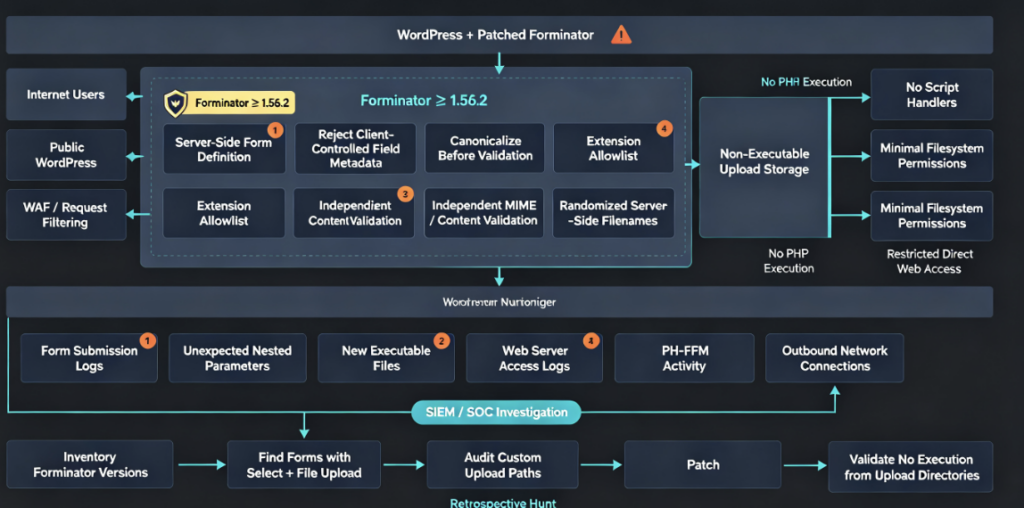
For WordPress administrators, the first action is inventory.
Check the installed Forminator version through the WordPress plugin administration interface or through an authorized command-line management workflow.
For example, on a system where WP-CLI is already installed and authorized:
wp plugin get forminator --fields=name,status,version
An affected result would contain a version at or below:
1.56.1
The security baseline should be:
1.56.2 or later
WordPress.org currently lists a newer Forminator release, 1.57.1, so administrators performing remediation today should generally deploy the latest compatible maintained version rather than selecting an older patch level merely because it was the first security fix. (WordPress.org)
Auditing Forminator Forms for the Vulnerable Configuration
Version inventory alone tells you whether vulnerable code is present. It does not tell you how exposed the site may have been before patching.
Administrators should review published Forminator forms and determine which contain both:
Select
+
File Upload
The presence of both does not prove compromise. It identifies forms meeting the prerequisite described by Wordfence for CVE-2026-15748 exploitation. (Wordfence)
Pay particular attention to public contact forms, application forms, support forms, recruitment forms, customer-document submission workflows, community forms, and any other page where unauthenticated visitors can submit files.
A form that has been unpublished for months presents a different historical risk from one that has been continuously exposed to the internet.
For incident-response purposes, defenders should determine not just the site’s current configuration but also whether vulnerable forms were publicly accessible during the period when an affected Forminator version was installed.
Inspect Custom Upload Storage
This is one of the most important CVE-specific checks.
Determine whether Forminator has been configured to use a custom file-upload storage root.
If so, inspect the effective execution policy of that directory.
The objective is not merely to see whether .htaccess exists. The objective is to establish whether arbitrary uploaded content could be interpreted by the web server or forwarded into PHP.
For an Apache deployment, defenders can review virtual-host configuration, directory overrides, handler mappings, and .htaccess rules.
For Nginx, inspect the relationship between location blocks and PHP-FPM forwarding rules.
A dangerous architecture is one where an arbitrary file created inside a writable upload directory can later match a rule that forwards it to a PHP interpreter.
A safer model is:
Internet
   ↓
WordPress
   ↓
Upload Handler
   ↓
Non-executable storage
   ↓
Application-controlled download endpoint
rather than:
Internet
   ↓
WordPress
   ↓
Web-accessible writable directory
   ↓
PHP interpreter
OWASP specifically recommends storing uploaded files outside the web root when possible, or placing them on a different system and exposing them through an application-controlled mapping rather than direct filesystem URLs. (Serie de hojas de trucos de OWASP)
Hunting for Possible Exploitation
Updating the plugin fixes future exploitation of the vulnerable code path, but patching does not determine whether a system was already compromised.
Sites that previously met the known prerequisites should therefore perform a retrospective review.
Start with filesystem changes inside WordPress upload locations and any Forminator-specific custom storage directories. Look for unexpected executable extensions, unfamiliar recently created files, filenames inconsistent with normal business uploads, or files containing server-side scripting syntax where only documents or images should exist.
The investigation should extend beyond obvious .php filenames.
Attackers frequently benefit from environments where alternate PHP-related extensions or unusual handler mappings are accepted. The correct inventory is therefore determined by the site’s actual web-server configuration, not by a hard-coded assumption that only one extension is executable.
Request logs are another valuable source.
Look for unusual POST traffic directed at pages hosting vulnerable Forminator forms, particularly requests containing unusually complex nested parameters or file-upload activity inconsistent with normal users.
Then correlate suspicious uploads with later requests to the resulting file paths.
A sequence resembling:
POST form submission
       ↓
new unexpected file created
       ↓
HTTP request to that file
       ↓
unexpected PHP/web-server child activity
       ↓
filesystem, account, plugin, or outbound-network changes
deserves investigation.
The appearance of a suspicious uploaded file does not automatically prove RCE. Conversely, deleting one suspicious file is not sufficient incident response if execution already occurred.
What to Look for After Possible PHP Execution
If defenders find evidence that attacker-controlled PHP may have executed, the scope should expand from vulnerability remediation to full WordPress incident response.
An attacker obtaining server-side PHP execution may potentially operate with the privileges of the web-server account. Depending on hosting architecture and permissions, that can expose WordPress configuration, database credentials, authentication secrets, plugin files, themes, uploaded content, and other data accessible to the application.
The important distinction is between:
Vulnerability present
and:
Code execution confirmed
Once the latter is plausible, merely updating Forminator does not remove persistence that may already have been introduced elsewhere.
Defenders should therefore inspect the broader web root, WordPress plugins and themes, scheduled tasks, privileged users, authentication tokens, database changes, web-server configuration, outbound connections, and any persistence mechanisms relevant to the hosting environment.
Credentials accessible to the compromised application should be treated according to the organization’s incident-response process.
Why File Upload Blocklists Are Fragile
CVE-2026-15748 also illustrates a broader application-security problem.
Blocklists attempt to enumerate everything an attacker should not be allowed to submit.
For a simple upload feature, administrators might try to reject PHP-related extensions while allowing everything else.
That sounds reasonable until different components interpret the same file differently.
The application may consider only the final extension.
The web server may recognize multiple extensions.
A framework may accept MIME aliases.
A user-controlled header may contain a misleading media type.
A parsing library may identify the content differently from the browser.
A configuration format may support alternatives separated by punctuation.
And filesystem case sensitivity can differ across platforms.
OWASP therefore recommends extension allowlisting based on actual business requirements and explicitly warns against trusting the request’s Tipo de contenido header as the sole validation mechanism because it can be spoofed. (Serie de hojas de trucos de OWASP)
If a recruiting form only needs PDF résumés, the security model should resemble:
Allow:
PDF

Reject:
everything else
rather than:
Allow:
everything except every dangerous
file type developers currently know about
The former has a dramatically smaller semantic attack surface.
Canonicalization Before Security Decisions
The pipe-alternative behavior involved in CVE-2026-15748 represents a general secure-coding principle: normalize first, validate second.
Suppose an application accepts multiple logically equivalent representations:
TYPE_A
type_a
TYPE-A
TYPE_A|MIME_A
TYPE_A | MIME_A
If the validation layer checks only one representation while downstream processing understands all five, the security boundary is inconsistent.
A robust pipeline should instead operate conceptually as:
Untrusted input
     ↓
Syntax validation
     ↓
Canonicalization
     ↓
Structural parsing
     ↓
Allowlist policy
     ↓
Content validation
     ↓
Storage policy
Security checks applied before canonicalization can create exactly the sort of parser disagreement that attackers exploit.
Never Trust Client-Supplied Field Definitions
The more distinctive engineering lesson from CVE-2026-15748 is arguably not the extension filtering bug.
It is the relationship between form values and form metadata.
Consider a server-defined form containing:
Field 1: name
Field 2: country
Field 3: attachment
The browser should be able to tell the server:
name = Alice
country = Canada
attachment = file
But it should not effectively be able to tell the server:
country is actually an upload field
and here is the security policy
you should use for it
Trusted metadata should be reconstructed from the server-side form definition using immutable identifiers.
A safer conceptual design is:
$submitted_value = request_value( $field_id );

$trusted_definition =
    load_field_definition_from_database( $form_id, $field_id );

validate(
    $submitted_value,
    $trusted_definition
);
rather than merging arbitrary nested client data into the internal field definition.
This principle applies far beyond WordPress plugins. Modern APIs, low-code platforms, workflow engines, payment systems, and AI-generated application backends frequently exchange deeply nested objects between browsers and servers. Developers need to distinguish between user-controlled values and server-authoritative policy metadata.
Defense in Depth for WordPress Uploads
Updating Forminator is the immediate remediation, but organizations operating important WordPress environments should reduce the consequences of future upload vulnerabilities as well.
OWASP’s file-upload guidance provides a useful architectural baseline: allow only business-required file types, validate file type independently of client-supplied MIME headers, generate filenames server-side, restrict size, apply authorization where appropriate, scan files where practical, and store uploads outside the application web root whenever possible. (Serie de hojas de trucos de OWASP)
For WordPress specifically, an upload directory should ideally be data storage, not an execution environment.
If business requirements do not require PHP execution inside an upload location, the server configuration should enforce that invariant independently of WordPress.
This turns a future application-layer arbitrary upload bug from:
Upload vulnerability
→ immediate server-side code execution
into something closer to:
Upload vulnerability
→ malicious file stored
→ additional security boundary still required
That does not make arbitrary uploads harmless, but it meaningfully reduces the blast radius.
Web Application Firewalls Are a Secondary Control
A WAF can provide useful defense in depth, particularly when dangerous file uploads exhibit recognizable content or request patterns.
Wordfence states that its firewall’s built-in malicious file upload protection covers exploitation targeting CVE-2026-15748. (Wordfence)
However, defenders should not interpret WAF protection as a replacement for updating Forminator.
The vulnerability originates in application logic. The deterministic fix is to remove the vulnerable code path by installing a patched release.
WAFs operate as compensating controls. They can reduce exposure during patch windows and block many known exploit patterns, but application-layer parsing bugs are precisely the sort of issue where unusual encodings or alternative request structures can challenge generic perimeter filtering.
Patch first. Use the WAF as another barrier, not as permission to leave the vulnerable plugin installed.
Why Disabling PHP in Upload Directories Matters
CVE-2026-15748 is a useful example of the difference between vulnerability prevention and exploit mitigation.
Fixing Forminator prevents the arbitrary-upload chain.
Disabling server-side script execution in writable upload locations addresses a different question:
What happens if some future vulnerability still allows an attacker to upload a dangerous file?
That second control is extremely valuable because WordPress ecosystems contain many independent components capable of accepting files: media uploads, forms, importers, backup plugins, migration tools, ecommerce systems, support portals, and custom application logic.
A server policy that separates writable content directories de executable application directories therefore reduces risk across more than one plugin.
Updating to Forminator 1.56.2 or Later
The direct remediation for CVE-2026-15748 is to upgrade Forminator.
Wordfence identifies 1.56.2 as the fully patched release. (Wordfence)
At the time of writing on August 19, 2026, WordPress.org lists Forminator 1.57.1, so the preferred operational approach is to install the latest compatible supported version. (WordPress.org)
A typical authorized WP-CLI workflow can include:
wp plugin update forminator
and verification:
wp plugin get forminator --fields=name,status,version
The important outcome is that the resulting version must be higher than the vulnerable range.
Sites that cannot immediately update should not treat temporary mitigations as equivalent to patching. Temporarily disabling affected public forms or disabling Forminator itself can reduce reachability, while enforcing non-executable upload storage adds another protective layer, but the vulnerable software should still be upgraded as soon as operationally possible.
Validate the Fix After Updating
Security remediation should include verification.
After the update, confirm the plugin version from the running WordPress instance rather than relying solely on deployment records.
Then re-review any custom upload storage paths.
The update eliminates CVE-2026-15748’s vulnerable application behavior, but insecure web-server execution policy remains an architectural weakness worth correcting independently.
Teams managing multiple WordPress properties should consider automating version inventory so they can answer questions such as:
Which sites have Forminator installed?
Which versions are running?
Which sites expose public upload forms?
Which installations use custom upload directories?
Which servers permit execution from writable paths?
Those answers are more operationally valuable than simply knowing that the CVE exists.
The Patch Also Highlights a Broader Forminator Security Boundary
CVE-2026-15748 was not the only Forminator security issue disclosed around this release family.
Wordfence’s vulnerability database lists several other 2026 Forminator issues, including separate stored cross-site scripting, authorization, file-read, and file-download vulnerabilities across earlier versions. (Wordfence)
These should not be conflated into one exploit chain.
CVE-2026-15748 specifically refers to the unauthenticated arbitrary-file-upload condition involving forged upload configuration.
The presence of multiple CVEs in the same plugin family does, however, reinforce why defenders should upgrade to a current maintained version rather than attempting to patch only one historical issue while retaining an older release.
CVE-2026-15748 and CWE-434
NVD maps CVE-2026-15748 to CWE-434: Unrestricted Upload of File with Dangerous Type. (NVD)
CWE-434 covers software that allows dangerous file types to be uploaded without sufficient restriction.
The resulting impact varies substantially depending on application architecture. A malicious file stored in an isolated object store behaves very differently from the same file placed into a public directory handled by a PHP interpreter.
For defenders, that means risk analysis should consider two questions separately:
Can an attacker control what is uploaded?
y
What can the environment do with the uploaded object afterward?
CVE-2026-15748 can affect the first boundary. Weak server-side storage configuration can transform the first failure into the second.
Practical Risk Prioritization
A Forminator installation running 1.56.1 or earlier should be patched regardless of its current configuration.
However, teams with large WordPress fleets can use the exploit prerequisites to prioritize incident investigation.
The highest-priority historical exposure is a site that ran an affected Forminator version, publicly exposed a form containing both a Select and File Upload field, used custom upload storage, and permitted server-side execution from that location.
A site running the vulnerable plugin but with no relevant public forms may have significantly lower immediate reachability.
A patched site can still deserve retrospective investigation if it previously exposed a vulnerable configuration before the update.
And a site whose upload directory blocks PHP execution should still be patched because arbitrary file upload remains a serious security violation even when one obvious path to RCE is blocked.
This is the difference between vulnerability management y attack-path analysis.
Frequently Asked Questions About CVE-2026-15748
What is CVE-2026-15748?
CVE-2026-15748 is a critical unauthenticated arbitrary file upload vulnerability in the Forminator Forms plugin for WordPress. It affects versions up to and including 1.56.1 and can allow attackers to upload potentially executable files by abusing Forminator’s form-data processing and file-type validation. (NVD)
What is the CVSS score?
The Wordfence CNA assigns CVE-2026-15748 a CVSS 3.1 score of 9.8 Critical. (Wordfence)
Which Forminator versions are vulnerable?
All versions through 1.56.1 are listed as affected. (NVD)
Which version fixes CVE-2026-15748?
Forminator 1.56.2 is the first fully patched version identified by Wordfence. (Wordfence)
Does CVE-2026-15748 require authentication?
No. The disclosed vulnerable path can be reached by an unauthenticated attacker when the necessary form configuration is present. (Wordfence)
Does every Forminator site have unauthenticated RCE?
No.
Wordfence states that successful exploitation requires a form containing both a File Upload field and a Select field. Furthermore, turning an arbitrary upload into direct PHP execution depends on how the uploaded file is stored and whether that location permits PHP execution. The default upload configuration includes .htaccess protection against PHP execution, while certain custom upload storage configurations may lack that protection. (Wordfence)
Does deleting the vulnerable form fix the problem?
Removing or disabling an exploitable form can reduce immediate reachability, but it is not a substitute for patching the vulnerable plugin.
Administrators should upgrade Forminator to 1.56.2 or later. (Wordfence)
Should I update only to 1.56.2?
Not necessarily.
Version 1.56.2 is the release that fixed CVE-2026-15748. WordPress.org currently lists a newer release, so production systems should generally use the latest compatible supported version. (WordPress.org)
Is CVE-2026-15748 actively exploited?
The public NVD record’s CISA ADP SSVC information listed exploitation as ninguno on August 18, 2026. That status should not be interpreted as a guarantee that exploitation has never occurred or will not begin following public disclosure. (NVD)
Final Assessment
CVE-2026-15748 is a genuine critical WordPress security issue, but describing it accurately matters.
The core vulnerability is an unauthenticated arbitrary file upload in Forminator Forms versions through 1.56.1. It emerges from a chain in which attacker-controlled data submitted through a Select field can influence internal upload-field metadata and reach handle_file_upload(), where insufficient normalization of file-type configuration allows dangerous upload restrictions to be bypassed. (NVD)
Successful exploitation requires a form containing both a Select field and a File Upload field. (Wordfence)
The leap from arbitrary upload to straightforward PHP RCE is configuration-dependent. Forminator’s default upload location receives .htaccess protection designed to block PHP execution, while custom upload storage can, under the condition documented by Wordfence, end up without that safeguard. In an environment where the web server executes uploaded PHP content, the attacker may be able to progress from unauthenticated form submission to remote code execution and potentially full site compromise. (Wordfence)
The immediate fix is uncomplicated: upgrade Forminator to version 1.56.2 or later, preferably the latest supported release. (Wordfence)
The longer-term lesson is broader.
Upload security cannot rely on a single extension blacklist. Applications need canonicalized server-side validation, trusted server-side field definitions, strict file-type allowlists, independent content checks, and storage that is structurally incapable of executing uploaded content. OWASP’s file-upload guidance explicitly recommends this layered approach, including allowlisting required extensions and keeping uploaded files outside the web root whenever possible. (Serie de hojas de trucos de OWASP)
CVE-2026-15748 is therefore not only another WordPress plugin vulnerability. It is a useful case study in how a seemingly minor inconsistency between untrusted form data, internal application metadata, validation logic, and web-server storage policy can combine into a critical attack path.


 Spanish
  English
  German
  French
  Portuguese
  Japanese
  Korean
  Hindi
Hindi  Arabic
  Turkish
  Hebrew