
ConsentFix is not classic password phishing. It does not need a fake Microsoft login page to collect a password, and it does not need a noisy malware download to start the compromise. The attacker’s goal is narrower and more dangerous: trick the user into handing over OAuth authorization material that can be exchanged for access to a Microsoft account session.
Push Security publicly described and named ConsentFix in December 2025 as a browser-native attack that combines OAuth consent phishing with a ClickFix-style prompt. In the campaign Push observed, the attacker targeted Microsoft accounts by abusing the Azure CLI OAuth application, causing a victim to generate an OAuth authorization code visible in a localhost callback URL and then paste that URL into an attacker-controlled page. The attacker could then complete the OAuth handshake from their own device. (Push Security)
That distinction matters. A user may not type a password into a fake form. The login prompt may look familiar. The user may already be signed in. MFA may not appear again. In some cases, the user’s mistake is not “I gave away my password” but “I copied, pasted, or dragged the wrong piece of a legitimate authorization flow.” BleepingComputer’s Huntress-sponsored article on July 2, 2026 framed the practical risk in plain language: a routine-looking action, such as dragging a localhost callback link into the browser, can give an attacker the tokens needed to take over a Microsoft 365 account. (BleepingComputer)
ConsentFix belongs to a broader shift in identity attacks. Attackers are moving from stealing credentials to stealing authorization artifacts. Passwords are still valuable, but OAuth access tokens, refresh tokens, device-code grants, service principals, and SaaS integration tokens can be just as useful. Sometimes they are more useful, because the API may treat the attacker as a legitimate app acting with already-approved permissions.
What ConsentFix really is
A ConsentFix attack is a social-engineered OAuth authorization-code hijack. The victim is guided through a flow that appears to be a normal login, verification, CAPTCHA, browser fix, document-access process, or Microsoft 365 authentication step. At the critical moment, the victim is asked to copy, paste, or drag a URL containing OAuth key material into a phishing page.
Mitiga describes the same pattern in Microsoft Entra ID terms: ConsentFix tricks users into providing an OAuth authorization code that can be redeemed for access and refresh tokens. Those tokens can then provide programmatic access to Microsoft resources depending on the app, scopes, user permissions, and tenant controls involved. (mitiga.io)
The attack name comes from two older ideas. The first is consent phishing, where users are tricked into granting permissions to a malicious or risky cloud application. Microsoft’s own documentation defines consent phishing as an attack in which users grant permissions to malicious cloud applications, allowing those applications to access legitimate cloud services and data. (Microsoft Aprende)
The second is ClickFix. ClickFix is a social engineering pattern where a fake prompt tells the user to “fix” a problem by copying and running a command. Proofpoint reported in November 2024 that ClickFix lures were increasingly used to get users to copy, paste, and run malicious PowerShell or similar commands on their own computers. Microsoft Threat Intelligence later described a typical ClickFix chain as one that begins with phishing emails, malvertisements, or compromised websites, then leads users to a visual lure that convinces them to execute a malicious command themselves. (Proofpoint)
ConsentFix keeps the psychology of ClickFix but changes the execution target. Instead of asking the user to run a local command, it asks the user to move authorization material from a legitimate browser flow into an attacker-controlled workflow. That makes the technique harder for traditional endpoint controls to see, because the most important action may happen entirely inside the browser and identity layer.
Why this is not just another phishing page
Traditional credential phishing has a familiar shape. A victim receives a lure, clicks a link, lands on a fake login page, enters credentials, and perhaps enters an MFA code. Defenders can hunt for lookalike domains, credential-posting endpoints, suspicious form submissions, impossible travel after login, and proxy infrastructure used by adversary-in-the-middle kits.
ConsentFix is different. The user may interact with the real Microsoft identity platform. The suspicious part is not necessarily the login page itself. The suspicious part is the instruction that follows: paste this URL, drag this callback, complete this verification step, fix this login issue, prove you are human.
That is why URL training alone is weak against this technique. Users have been trained to check whether the login domain is Microsoft. But in OAuth abuse, a real identity provider can be part of the attack chain. Microsoft warns in its consent-phishing guidance that because a legitimate provider such as the Microsoft identity platform hosts the application, unsuspecting users may accept the terms and grant the requested permissions. (Microsoft Aprende)
The security question becomes: what did the user authorize, which application or first-party client received the authorization, what resource was requested, what token was issued, where did that token get used, and how quickly can the tenant revoke or contain the access?
The OAuth mechanics behind ConsentFix
OAuth is not the vulnerability. OAuth is a delegation framework. It lets an application access a protected resource without asking the user to share their password with that application. That is why modern SaaS works. A calendar app can read calendar data. A command-line tool can manage cloud resources. A mobile app can call an API. A security platform can read logs. A collaboration tool can sync files.
Microsoft’s identity platform documentation describes the key access models clearly. An application can use delegated access, acting on behalf of a signed-in user, or app-only access, acting as the application’s own identity. Delegated access requires both the client application and the user to be authorized. (Microsoft Aprende)
Consent is the user or administrator decision that grants that access. Microsoft’s user and admin consent documentation says an application can request API permissions such as viewing a signed-in user’s profile or reading mailbox content, and a user may be directed to a consent prompt when signing in to an application for the first time if no previous consent record exists. (Microsoft Aprende)
In a normal OAuth authorization-code flow, a browser-capable user agent sends the user to the authorization server. After the user authenticates and authorizes the request, the authorization server redirects back to the application with an authorization code. Microsoft describes the authorization-code flow as a grant type that enables a client application to obtain authorized access to protected resources such as web APIs, using a user-agent that supports redirection back to the application. (Microsoft Aprende)
Native apps and command-line tools often use loopback redirect URIs. RFC 8252, the OAuth 2.0 Best Current Practice for Native Apps, says OAuth authorization requests from native apps should use external user-agents, primarily the user’s browser. It also discusses the loopback model used by native apps, where a local application receives the authorization response through localhost. (datatracker.ietf.org)
In the ConsentFix pattern reported by Push, the attacker abuses that design boundary. The victim’s browser receives a localhost callback URL containing authorization material intended for the legitimate native client flow. The user is then tricked into transferring that URL to the attacker. The attacker is not breaking Microsoft’s login page in the conventional sense. The attacker is socially engineering the handoff point.
A safe attack-chain model for defenders
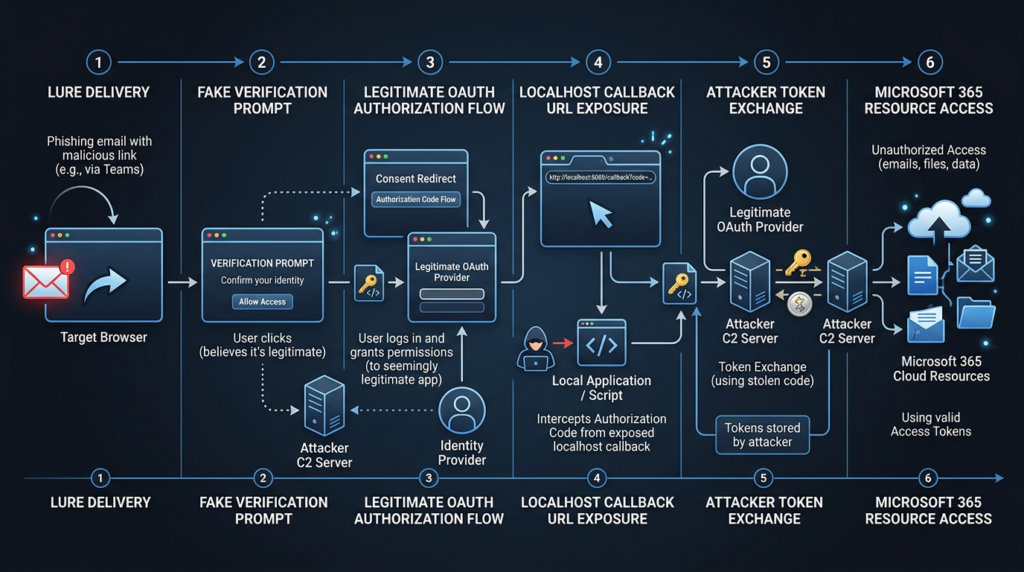
The following model is written for detection and response teams. It intentionally avoids copy-ready phishing URLs, token-exchange instructions, or deployment steps.
| Fase | ¿Qué ocurre? | Why it works | Defensive signal |
|---|---|---|---|
| Lure delivery | The victim lands on a malicious or compromised page through search, ads, email, document-sharing links, or a trusted-looking site. | The page inherits trust from the delivery channel or from a compromised high-reputation domain. | Referrer context, browser telemetry, user report, unusual access to compromised sites, search-ad click paths. |
| Fake verification | The page presents a CAPTCHA, Microsoft verification step, document-access prompt, or “fix this login” instruction. | The user is used to completing friction steps without examining them deeply. | Browser behavior, unusual prompt text, requests to paste URLs, drag links, or copy callback values. |
| OAuth initiation | The flow opens a legitimate Microsoft authorization experience for a trusted client or first-party app. | The sign-in experience may look normal because it may be normal. | Entra sign-in events for unexpected app/resource combinations. |
| Authorization material exposure | The victim copies, pastes, or drags a localhost callback URL or authorization-code material into a phishing page. | The user believes they are completing a routine verification step. | Browser telemetry is strongest; identity logs may only show normal-looking login events. |
| Token exchange and use | The attacker completes the flow and uses issued tokens to call Microsoft resources. | APIs accept valid tokens according to their audience, scope, and lifetime. | Non-interactive sign-ins, Graph or legacy API activity, resource access from unexpected networks, mailbox or file access anomalies. |
| Persistence and follow-on activity | The attacker reads mail, files, directory data, or cloud resources depending on the token and user permissions. | Refresh tokens or repeatable OAuth grants can extend access until revoked or blocked. | New mailbox rules, suspicious downloads, abnormal API volume, service principal activity, lateral movement attempts. |
Push’s original research observed several evasion layers, including compromised websites, fake Cloudflare Turnstile prompts, email/domain gating, synchronized IP blocking, and conditional page loading that made analysis harder. Push also reported that the campaign used Google Search as a delivery vector in observed cases, which can bypass defenses focused only on inbound email. (Push Security)
BleepingComputer’s Huntress-sponsored article described another delivery pattern: phishing lures delivered through trusted platforms such as Dropbox or DocSend, sometimes behind a password that makes automated inspection harder. (BleepingComputer)
These delivery details may change quickly. The more durable lesson is that modern identity phishing often hides in trusted surfaces: search results, document-sharing platforms, compromised CMS sites, genuine identity providers, OAuth clients, and browser workflows that users already understand just enough to trust.
Why MFA and passkeys are not enough
MFA is still necessary. Passkeys are still a major improvement over passwords. The mistake is treating either one as complete protection against token and authorization-code abuse.
MFA protects the authentication step. ConsentFix targets what happens around authorization. If a user is already signed in, the OAuth flow may not require a fresh password or MFA challenge. If the attacker obtains authorization material that can be redeemed for tokens, the later API activity can look like authorized app access.
Push’s original ConsentFix write-up states that if the user is already logged into the app in the browser, the user may not need to supply credentials or pass an MFA check, and that phishing-resistant authentication controls such as passkeys have no impact on that specific attack path because the technique sidesteps the authentication process. (Push Security)
This does not mean MFA failed. It means the control was aimed at a different point in the chain. A seatbelt does not stop someone from stealing the car key after the engine is running. It still matters, but it does not solve the whole problem.
Microsoft’s own consent-phishing documentation reinforces a similar token-lifecycle problem. When Microsoft Entra ID disables a malicious OAuth application, new token requests and refresh-token requests are denied, but existing access tokens remain valid until expiration. That is a critical incident-response detail: blocking a malicious app or revoking a grant may not instantly erase every short-lived access token already issued. (Microsoft Aprende)
ConsentFix compared with nearby attack types
ConsentFix is easier to understand when it is placed next to related techniques.
| Técnica | Main target | User action | Password stolen | MFA impact | Common blind spot |
|---|---|---|---|---|---|
| Credential phishing | Password and sometimes MFA code | User types credentials into a fake page | Sí | Often challenged or proxied | Lookalike pages may be detected, but users still fall for high-quality lures. |
| AiTM phishing | Session cookies or tokens through a proxy | User logs into a proxied real service | Usually not the final goal | Can capture post-MFA session | Real-time proxy infrastructure and session replay. |
| ClickFix | Local command execution | User copies/runs a command or hotkey sequence | No | Not the main control | Endpoint sees user-launched commands that may look user-initiated. |
| OAuth consent phishing | Permission grant to malicious app | User approves app permissions | No | Often bypassed because tokens follow authorization | Risky apps and overbroad permissions are not continuously reviewed. |
| OAuth device-code phishing | Device authorization grant | User enters attacker-provided code on real verification page | No | Victim may complete MFA for attacker’s session | Real Microsoft verification page makes the flow feel safe. |
| ConsentFix | Authorization-code or callback handoff | User pastes or drags OAuth callback material into attacker page | No | May not require fresh MFA if already signed in | Browser-only behavior and first-party app trust reduce visibility. |
OAuth device-code phishing is especially close in spirit. Microsoft’s April 2026 write-up on an AI-enabled device-code phishing campaign describes threat actors abusing the OAuth device-code flow so that victims authenticate the attacker’s session, resulting in valid access and refresh tokens without password theft. The FBI’s May 2026 PSA on Kali365 similarly warned that the phishing-as-a-service platform could help cyber threat actors obtain Microsoft 365 access tokens and bypass MFA without intercepting user credentials. (Microsoft)
Proofpoint also reported a rise in OAuth device-code phishing against Microsoft 365 accounts, including activity by TA2723 beginning in October 2025 and multiple state-aligned actors abusing device-code authorization for account takeover. (Proofpoint)
ConsentFix is not identical to device-code phishing, but both teach the same defensive lesson: real Microsoft pages and successful MFA do not automatically prove the resulting session belongs to the user’s intended device or app.
The first-party app problem
Most OAuth consent guidance focuses on malicious third-party apps. That is still important. Users can be tricked into authorizing a fake productivity tool, fake document viewer, or fake analytics app. Admins can reduce risk by disabling broad user consent, requiring verified publishers, and reviewing high-risk scopes.
ConsentFix raises a harder case: abuse of trusted first-party Microsoft apps.
Push’s original report said the campaign it detected appeared to target Microsoft accounts by abusing the Azure CLI OAuth app. The follow-up debrief said the attacker specifically targeted first-party Microsoft apps that cannot be restricted in the same way as third-party applications and are pre-consented in every tenant, meaning users can authenticate to them without admin approval. (Push Security)
That does not mean every tenant is equally exposed, or that every Microsoft first-party app gives the same access. It means defenders cannot rely only on the control model they use for third-party app consent. A first-party command-line or productivity app may be trusted by design, broadly available, and used legitimately by admins or developers. Blocking it everywhere may break operations. Allowing it everywhere may create an unnecessary phishing target.
The practical approach is not panic. It is scoping. Which first-party tools are actually needed by which users? Should Azure CLI be usable by every employee, or only administrators and developers? Should Azure PowerShell be allowed by default? Should service principals be created for relevant apps so assignment and Conditional Access controls can be applied? Push’s debrief recommends hunting for highlighted application IDs and resource IDs, creating service principals for vulnerable first-party apps, restricting authorized users, and blocking CLI tool access through Conditional Access with exclusions for approved groups. (Push Security)
What defenders should look for first
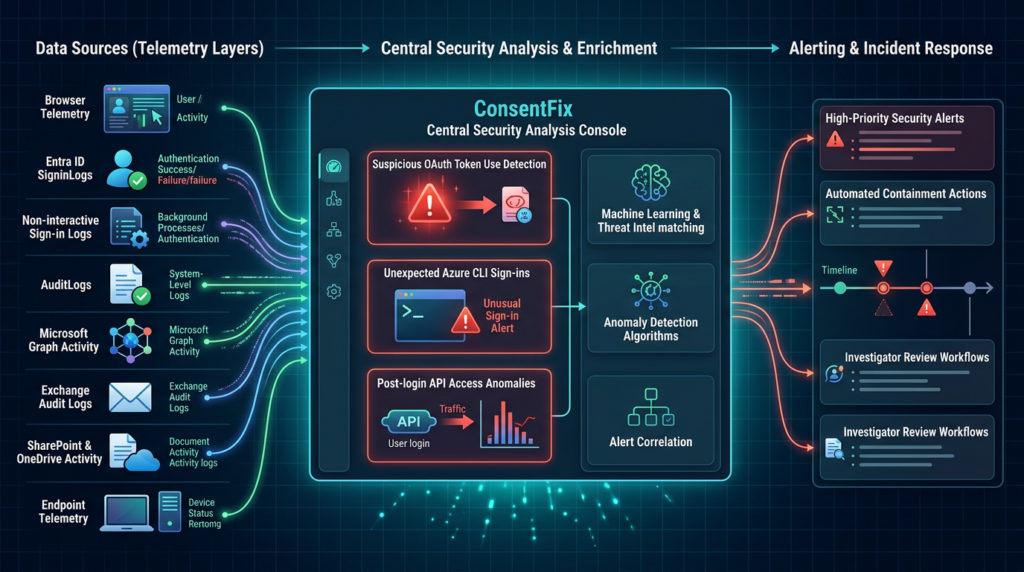
There is no single perfect indicator for ConsentFix. Interactive sign-ins may come from the victim’s own browser and normal IP address. That means “impossible travel” may miss the initial event. Push explicitly warns that for interactive logins, suspicious IP or location may not be enough because the login occurs from the victim’s browser directly to Microsoft. Push suggests looking at Azure CLI login events, resource differences, and non-interactive logins after compromise that may come from different IP addresses. (Push Security)
Start with these questions:
| Question | Por qué es importante | Data source |
|---|---|---|
| Did a non-admin user authenticate to Azure CLI, Azure PowerShell, or another first-party app they never use? | ConsentFix may produce legitimate-looking app sign-ins for tools that ordinary business users should not use. | SigninLogs, AADNonInteractiveUserSignInLogs. |
| What resource was requested? | Resource differences can help distinguish normal CLI use from suspicious flows, although this is not guaranteed. | SigninLogs, resource fields. |
| Did non-interactive access follow the initial sign-in from new infrastructure? | Token use after compromise may occur from attacker networks, hosting providers, or unexpected countries. | Non-interactive sign-in logs, Graph activity, AADGraphActivityLogs. |
| Were consent, service principal, or permission grant events created near the suspicious sign-in? | The account or app may have gained or used new authorization relationships. | AuditLogs, enterprise app audit logs. |
| Were mailbox rules, forwarding, file downloads, directory reads, or cloud-resource changes observed afterward? | Token access often turns into data access or persistence. | Exchange audit, Microsoft Graph activity, SharePoint/OneDrive audit, Azure Activity. |
| Are legacy API logs enabled? | Attackers may use legacy scopes or APIs that are not visible in default logging. | AADGraphActivityLogs, diagnostic settings. |
Microsoft’s Azure Monitor documentation for SigninLogs shows fields that are useful for this kind of investigation, including AppId, ServicePrincipalId, ResourceServicePrincipalId, IPAddress, Location, IsInteractive, ResultType, and risk-related fields. The same documentation states that non-interactive sign-ins occur when a client app uses a token or code to authenticate or access a resource on behalf of a user without the user providing an authentication factor at that moment. (Microsoft Aprende)
AuditLogs are also required. Azure Monitor describes the AuditLogs table as a record of Azure Active Directory system activity, including user and group management, managed applications, and directory activities. (Microsoft Aprende)
KQL hunting examples for Microsoft Entra ID
The following queries are defensive starting points. They are not universal detections. Field names, table availability, retention, and values can vary by tenant, licensing, connector, and log pipeline. Treat them as logic templates, test them against known-good admin and developer activity, and tune them before alerting.
Hunt for Azure CLI sign-ins by unexpected users
Push reported Azure CLI app ID 04b07795-8ddb-461a-bbee-02f9e1bf7b46 in the observed ConsentFix campaign. (Push Security)
let AzureCliAppId = "04b07795-8ddb-461a-bbee-02f9e1bf7b46";
let Lookback = 14d;
SigninLogs
| where TimeGenerated > ago(Lookback)
| where AppId == AzureCliAppId or AppDisplayName has "Azure CLI"
| project
    TimeGenerated,
    UserPrincipalName,
    Identity,
    AppDisplayName,
    AppId,
    ResourceDisplayName,
    ResourceServicePrincipalId,
    IPAddress,
    Location,
    IsInteractive,
    ResultType,
    ResultDescription,
    ConditionalAccessStatus,
    UserAgent
| order by TimeGenerated desc
A login to Azure CLI is not automatically malicious. Admins, cloud engineers, DevOps teams, and developers may use it every day. The suspicious case is a finance user, HR user, executive assistant, sales user, or normal Microsoft 365 user authenticating to Azure CLI for the first time, especially if followed by non-interactive access from unfamiliar infrastructure.
Find first-time or low-prevalence CLI usage
let Lookback = 30d;
let Recent = 3d;
let CliApps = dynamic([
  "04b07795-8ddb-461a-bbee-02f9e1bf7b46",  // Microsoft Azure CLI
  "1950a258-227b-4e31-a9cf-717495945fc2"   // Microsoft Azure PowerShell
]);
let Baseline =
SigninLogs
| where TimeGenerated between (ago(Lookback) .. ago(Recent))
| where AppId in (CliApps)
| summarize SeenBefore=count() by UserPrincipalName, AppId;
SigninLogs
| where TimeGenerated > ago(Recent)
| where AppId in (CliApps)
| join kind=leftanti Baseline on UserPrincipalName, AppId
| project
    TimeGenerated,
    UserPrincipalName,
    AppDisplayName,
    AppId,
    ResourceDisplayName,
    IPAddress,
    Location,
    IsInteractive,
    ConditionalAccessStatus,
    ResultType
| order by TimeGenerated desc
This query looks for users who recently used selected CLI apps but did not use them in the previous baseline window. The app list should be adapted to your tenant and to Microsoft first-party applications your security team decides to monitor.
Correlate interactive sign-ins with later non-interactive activity
let Lookback = 7d;
let SuspiciousApps = dynamic([
  "04b07795-8ddb-461a-bbee-02f9e1bf7b46",
  "1950a258-227b-4e31-a9cf-717495945fc2"
]);
let Interactive =
SigninLogs
| where TimeGenerated > ago(Lookback)
| where AppId in (SuspiciousApps)
| where IsInteractive == true
| project
    InteractiveTime = TimeGenerated,
    UserPrincipalName,
    AppId,
    AppDisplayName,
    InitialIP = IPAddress,
    InitialLocation = Location,
    InitialResource = ResourceDisplayName;
AADNonInteractiveUserSignInLogs
| where TimeGenerated > ago(Lookback)
| where AppId in (SuspiciousApps)
| project
    NonInteractiveTime = TimeGenerated,
    UserPrincipalName,
    AppId,
    FollowOnIP = IPAddress,
    FollowOnLocation = Location,
    FollowOnResource = ResourceDisplayName,
    ResultType,
    ResultDescription
| join kind=inner Interactive on UserPrincipalName, AppId
| where NonInteractiveTime between (InteractiveTime .. InteractiveTime + 6h)
| where FollowOnIP != InitialIP or FollowOnLocation != InitialLocation
| project
    UserPrincipalName,
    AppDisplayName,
    AppId,
    InteractiveTime,
    InitialIP,
    InitialLocation,
    InitialResource,
    NonInteractiveTime,
    FollowOnIP,
    FollowOnLocation,
    FollowOnResource,
    ResultType,
    ResultDescription
| order by NonInteractiveTime desc
The goal is not to prove ConsentFix from one mismatch. The goal is to find suspicious follow-on token use that deserves review. A legitimate user may move networks, use VPN, or trigger background app behavior. A compromised token may also produce new source infrastructure shortly after the initial login.
Search for application consent and permission changes
Microsoft’s Entra documentation recommends reviewing delegated and application permissions, audit logs, and sign-in activity when investigating suspicious or disabled OAuth applications. (Microsoft Aprende)
let Lookback = 30d;
AuditLogs
| where TimeGenerated > ago(Lookback)
| where Category =~ "ApplicationManagement"
| where OperationName has_any (
    "Consent",
    "permission",
    "service principal",
    "Add delegated permission grant",
    "Add app role assignment",
    "Add service principal"
)
| project
    TimeGenerated,
    OperationName,
    Result,
    ResultReason,
    InitiatedBy,
    TargetResources,
    AdditionalDetails
| order by TimeGenerated desc
This query intentionally casts a wide net. During triage, narrow it to suspicious users, suspicious app IDs, high-risk scopes, or the time window around a reported phishing event.
Watch legacy Azure AD Graph activity
Push’s debrief recommends enabling AADGraphActivityLogs and hunting legacy activity because attackers may use legacy scopes to evade visibility. Microsoft’s Azure Monitor reference says AADGraphActivityLogs provide details of legacy API requests made to Azure Active Directory Graph for tenant resources. (Push Security)
let Lookback = 14d;
AADGraphActivityLogs
| where TimeGenerated > ago(Lookback)
| summarize
    Requests=count(),
    FirstSeen=min(TimeGenerated),
    LastSeen=max(TimeGenerated)
    by AppId, ServicePrincipalId, UserPrincipalName, RequestUri, IPAddress
| order by Requests desc
If the table is missing, the first finding may be a logging gap rather than a clean bill of health. Confirm diagnostic settings and retention before concluding no legacy API activity occurred.
Defensive PowerShell for review and revocation
Microsoft’s guidance says administrators can review application permissions in the Entra admin center, and that some user-consent permissions cannot be revoked from the portal and require Microsoft Graph API calls or PowerShell. (Microsoft Aprende)
The following examples are defensive inventory patterns. Test in a controlled admin environment before running them in production.
Find the Azure CLI service principal if present
Connect-MgGraph -Scopes "Application.Read.All","Directory.Read.All"

$azureCliAppId = "04b07795-8ddb-461a-bbee-02f9e1bf7b46"

$sp = Get-MgServicePrincipal -Filter "appId eq '$azureCliAppId'" `
  -Property Id,AppId,DisplayName,AccountEnabled

$sp | Format-List Id, AppId, DisplayName, AccountEnabled
A missing service principal does not automatically mean the tenant is safe. Some first-party apps may appear differently depending on tenant state and usage. Treat this as one inventory step, not the whole assessment.
List delegated permission grants for a service principal
Connect-MgGraph -Scopes "Application.Read.All","DelegatedPermissionGrant.Read.All"

$azureCliAppId = "04b07795-8ddb-461a-bbee-02f9e1bf7b46"
$sp = Get-MgServicePrincipal -Filter "appId eq '$azureCliAppId'"

if ($sp) {
    Get-MgOauth2PermissionGrant -All |
      Where-Object { $_.ClientId -eq $sp.Id } |
      Select-Object Id, ClientId, ConsentType, PrincipalId, ResourceId, Scope
}
For a suspected compromise, export the results before changing anything. Evidence matters for incident timelines, insurance, customer notices, and root-cause analysis.
Revoke a delegated permission grant after approval
Connect-MgGraph -Scopes "DelegatedPermissionGrant.ReadWrite.All"

# Replace with a specific grant ID found during investigation.
$grantId = "<delegated-permission-grant-id>"

Remove-MgOauth2PermissionGrant -OAuth2PermissionGrantId $grantId
Revocation should be paired with user-session revocation, password reset where appropriate, mailbox-rule review, app inventory review, and follow-on log analysis. Removing one grant does not prove that every issued access token has disappeared instantly.
How to reduce exposure before an incident
The most effective defense is not one control. It is a set of controls that reduce who can authorize risky flows, which apps can be used, what logs exist, and how quickly token abuse can be contained.
Restrict user consent
Microsoft recommends controlling user consent settings to reduce the risk of malicious applications tricking users into granting access. Its documentation says admins can configure user consent settings in Microsoft Entra ID and recommends allowing user consent only for applications from verified publishers. (Microsoft Aprende)
For many organizations, a strong default is:
| Setting area | Safer direction | Tradeoff |
|---|---|---|
| User consent | Disable user consent or restrict it to verified publishers and selected low-risk permissions. | More admin review work and potential friction for legitimate SaaS adoption. |
| Admin consent workflow | Enable a managed workflow so users can request review instead of finding workarounds. | Requires ownership, review SLAs, and clear rejection criteria. |
| Permission classification | Keep the “low impact” list narrow. | Some low-risk apps may require admin review. |
| Verified publisher checks | Prefer verified publishers but still review requested permissions. | Verified does not mean harmless. |
| App governance | Monitor high-permission, low-prevalence, or mismatched-purpose apps. | Requires ongoing tuning and ownership mapping. |
Microsoft’s documentation also states that users can be prevented from granting new permissions on their own, while still allowing them to sign in to applications already consented to or granted by administrators. This gives admins a way to reduce new exposure without immediately breaking every existing app. (Microsoft Aprende)
Inventory first-party app usage
First-party apps require special handling. If ordinary employees never need Azure CLI, Azure PowerShell, SharePoint Online Management Shell, Visual Studio, or other administrative clients, those apps should not be available to every user by default.
Push’s follow-up debrief lists several first-party apps identified by the community as vulnerable to ConsentFix-style abuse in certain conditions, including Microsoft Azure CLI, Microsoft Azure PowerShell, Microsoft Teams, Visual Studio, Microsoft SharePoint Online Management Shell, and Visual Studio Code. Push also recommends creating service principals for vulnerable apps and restricting authorized users, plus blocking CLI tools through Conditional Access while issuing exclusions for authorized users and groups. (Push Security)
This should be implemented carefully. Some organizations depend on CLI access for engineering and operations. Break-glass accounts, automation identities, helpdesk tooling, developer workflows, and cloud administration all need review before enforcement.
Monitor risky OAuth apps
Microsoft Defender for Cloud Apps provides a risky OAuth app investigation workflow. Microsoft’s documentation recommends filtering for high-severity permission levels, uncommon community use, apps authorized by external users, apps authorized by a small number of users, and apps whose permissions do not match their purpose, such as a simple app requesting full mailbox access. (Microsoft Aprende)
That guidance is not limited to classic third-party consent phishing. The same mindset applies to ConsentFix response: build an inventory of app access, then ask whether the observed app/resource/scope/user combination makes business sense.
Preserve and expand logs
ConsentFix can leave weak evidence in some layers and strong evidence in others. If the browser interaction is not logged, the identity system may only show a normal login. If non-interactive token use is not retained long enough, the attacker’s follow-on activity may be gone before the security team receives a report.
Minimum useful coverage includes:
| Log source | Por qué es importante |
|---|---|
| SigninLogs | Initial interactive sign-ins, app IDs, resources, IP, device and CA state. |
| AADNonInteractiveUserSignInLogs | Token use after the interactive event. |
| AuditLogs | Consent, service principal, permission, and application management events. |
| AADGraphActivityLogs | Legacy Azure AD Graph API activity that may otherwise be missed. |
| Microsoft Graph activity logs where available | API-level evidence for resource access. |
| Exchange audit logs | Mailbox access, inbox rules, forwarding, delegate changes. |
| SharePoint and OneDrive audit logs | File access, downloads, sharing, sensitive document movement. |
| Endpoint telemetry | Still useful for ClickFix and hybrid attacks that combine OAuth abuse with local execution. |
| Browser telemetry | Often the best view of copy/paste, drag/drop, fake verification pages, and browser-native attack behavior. |
Incident response for suspected ConsentFix compromise
The first hour should not be spent arguing whether the user entered a password. Treat ConsentFix as an authorization compromise until proven otherwise.
A practical response flow:
- Preserve the user report, browser history, screenshots, email, document link, search result, or chat message that started the event.
- Identify the user, time window, browser, device, public IP, and Microsoft account involved.
- Query SigninLogs for Microsoft Azure CLI, Azure PowerShell, and other suspicious first-party app sign-ins around the time window.
- Query non-interactive sign-ins for follow-on activity from unexpected IPs, locations, or resources.
- Query AuditLogs for app consent, service principal, delegated permission grant, app-role assignment, and application-management changes.
- Review Microsoft 365 workload logs for mailbox rules, forwarding, SharePoint/OneDrive downloads, Teams activity, and Graph-driven access.
- Revoke suspicious grants and sessions using approved administrative procedures.
- Reset credentials or require reauthentication if policy requires it, while remembering that password reset alone may not remove every authorization artifact.
- Review the affected user’s roles, group memberships, app access, and recent privileged actions.
- Document what was authorized, what was accessed, what was revoked, and what control will be changed.
The most common mistake is stopping after password reset. A token-centric incident requires token-centric containment.
Why related CVEs still matter
ConsentFix itself is not a CVE. It is an abuse technique that uses legitimate OAuth behavior, user manipulation, and identity configuration gaps. There may be product changes, mitigations, and detection improvements over time, but the public reporting around ConsentFix is not a standard “vendor patched vulnerability X in version Y” story.
Related CVEs still help explain the ecosystem. CVE-2026-26980 in Ghost CMS is a strong example. NVD describes CVE-2026-26980 as a Ghost vulnerability affecting versions 3.24.0 through 6.19.0, allowing unauthenticated attackers to perform arbitrary reads from the database, fixed in version 6.19.1. (NVD)
That is a server-side SQL injection, not an OAuth phishing flaw. Its relevance is in the delivery chain. BleepingComputer and The Hacker News reported that attackers exploited CVE-2026-26980 to inject malicious JavaScript into Ghost sites and trigger ClickFix attack flows through fake CAPTCHA-style pages. (BleepingComputer)
The lesson is not “Ghost caused ConsentFix.” It did not. The lesson is that attackers increasingly turn trusted web surfaces into social-engineering infrastructure. A respected CMS site, a real document-sharing platform, a legitimate Microsoft login page, and a first-party OAuth client can all appear in one attack chain. Defenders who separate “web vulnerability,” “phishing,” “identity,” and “SaaS token governance” into unrelated queues will miss how the chain actually works.
A practical validation workflow
Defenders should test their controls before a real user reports a strange prompt. That does not mean running live phishing against employees without approval. It means building a controlled, authorized validation workflow around OAuth visibility, app restrictions, token revocation, and evidence capture.
A safe workflow looks like this:
| Fase | Objetivo | Evidence to collect |
|---|---|---|
| Inventory | Identify Microsoft first-party apps, third-party enterprise apps, service principals, delegated grants, and app-role assignments. | App list, owner, user count, scopes, last used date, business justification. |
| Policy review | Confirm user consent settings, admin consent workflow, verified publisher policy, low-risk permission classification, and Conditional Access exclusions. | Screenshots, exported policy JSON, change tickets. |
| Detection test | Generate approved test sign-ins for CLI tools and expected OAuth apps from known users and known locations. | SigninLogs, non-interactive logs, alerts, triage notes. |
| Revocation test | Confirm that app grant removal, user session revocation, and app blocking produce expected containment behavior. | Before/after token behavior, logs, helpdesk impact, documented time to contain. |
| Browser awareness test | Train users to report prompts that ask them to paste URLs, drag callback links, run commands, or bypass normal login steps. | Report rate, screenshots, SOC ticket quality, user feedback. |
| Tabletop exercise | Walk through a suspected ConsentFix compromise affecting an executive or admin. | Timeline, decision owners, communications flow, forensic gaps. |
Teams that already validate web, API, and SaaS attack paths should add OAuth authorization abuse to their test plan. Penligent’s public analysis of the SaaS OAuth attack surface is a useful companion for this topic because it treats OAuth grants, refresh tokens, connected apps, service principals, and SaaS integrations as one authorization chain rather than isolated settings. (Penligente)
For security teams that use agent-assisted validation, the key is evidence rather than automation for its own sake. The useful workflow is to map the attack surface, test realistic paths under authorization, drop unproven findings, capture reproducible evidence, and retest after remediation. Penligent’s public product page describes this evidence-first model for security engineers, pentesters, and red teams, including attack-surface mapping, verified findings, reproduction steps, remediation guidance, and reportable evidence. (Penligente)
The same principle applies to ConsentFix defense. Do not settle for a policy that looks good in the portal. Prove that risky users cannot authorize unnecessary first-party clients. Prove that the SOC can see the relevant sign-ins. Prove that revocation works. Prove that non-interactive token use creates an alert before the attacker has hours to read mail and files.
Common mistakes that keep tenants exposed
The first mistake is assuming MFA closes the case. MFA makes password theft harder. It does not automatically stop a user from authorizing the wrong flow, entering an attacker-provided device code, or handing over authorization material.
The second mistake is focusing only on third-party apps. Third-party OAuth governance is important, but ConsentFix showed why first-party app access must also be scoped and monitored. If a user has no business reason to use Azure CLI, an Azure CLI login should stand out.
The third mistake is relying on IP reputation for the initial event. ConsentFix can produce an interactive login from the user’s own browser and IP address. The attacker’s infrastructure may only appear later, when tokens are used non-interactively or APIs are called from somewhere else.
The fourth mistake is disabling user consent without enabling a workable admin consent process. Users still need apps to do their jobs. If the approval path is slow or opaque, they will pressure admins, reuse old grants, or look for unofficial workarounds. A blocked consent prompt should become a review ticket, not a dead end.
The fifth mistake is not knowing what normal looks like. A detection that says “Azure CLI login occurred” is useless if the SOC does not know which users should use Azure CLI. Build baselines by role. Developers are not finance. Cloud admins are not sales. Executives may be high-risk precisely because they should not be touching CLI tools.
The sixth mistake is keeping logs too short. OAuth incidents are often reported after the fact. If the suspicious sign-in happened two weeks ago and non-interactive logs are gone, the team may be left with speculation.
The seventh mistake is treating browser-only attacks as endpoint-only problems. EDR is essential for ClickFix cases where users run commands. But ConsentFix can happen without a local payload. Browser and identity telemetry matter.
Hardening checklist for Microsoft 365 and Entra ID teams
| Controlar | Acción | Por qué es importante |
|---|---|---|
| User consent | Disable user consent or restrict it to verified publishers and selected low-impact permissions. | Reduces the chance that users authorize risky apps without review. |
| Admin consent workflow | Enable review and approval with named reviewers and SLAs. | Keeps business workflows moving without allowing unmanaged grants. |
| First-party app scoping | Identify CLI and admin tools, create service principals where needed, restrict users and groups. | Limits the population that can be phished through tools they never need. |
| Conditional Access | Block or restrict CLI tools for broad user groups, with explicit exceptions for admins and developers. | Reduces abuse of first-party apps while preserving legitimate work. |
| Risky OAuth monitoring | Use Defender for Cloud Apps or equivalent app-governance tooling to review high-permission, low-use, mismatched-purpose apps. | Finds dangerous grants before they become incidents. |
| Sign-in monitoring | Alert on first-time or low-prevalence use of Azure CLI, Azure PowerShell, and other sensitive first-party apps. | Detects unusual app use by non-technical users. |
| Non-interactive token monitoring | Correlate interactive sign-in with later non-interactive access from new locations or infrastructure. | Finds post-compromise token use. |
| Audit logging | Retain AuditLogs, SigninLogs, AADNonInteractiveUserSignInLogs, and AADGraphActivityLogs where available. | Preserves evidence for authorization and API activity. |
| Workload review | Monitor Exchange, SharePoint, OneDrive, Teams, and Graph activity after suspicious token events. | Measures actual data access and persistence. |
| Revocation drills | Test grant removal, app blocking, session revocation, and user reauthentication before an incident. | Reduces containment uncertainty. |
| User training | Train users to report prompts asking them to paste URLs, drag links, enter unexpected codes, or run commands. | Targets the exact social-engineering action, not just “avoid suspicious links.” |
Microsoft’s consent-phishing guidance recommends routine audits of applications and consented permissions, validating the source of application domains rather than relying on names alone, configuring Defender for Cloud Apps policies, and allowing access to trusted applications that meet criteria such as verified publishers and selected low-risk permissions. (Microsoft Aprende)
PREGUNTAS FRECUENTES
What is a ConsentFix attack?
- ConsentFix is a browser-native OAuth phishing technique that tricks a user into giving an attacker OAuth authorization material, often through a copy-paste or drag-and-drop action.
- The attacker may use that material to obtain access or refresh tokens for Microsoft resources, depending on the app, resource, scope, and tenant controls.
- It combines ClickFix-style social engineering with OAuth authorization abuse.
- It is dangerous because the user may interact with a real identity provider and may not type a password into a fake login page.
Is ConsentFix a Microsoft vulnerability or a CVE?
- ConsentFix is best understood as an attack technique, not a conventional CVE.
- Public reporting describes abuse of legitimate OAuth flows, first-party app trust, browser behavior, and user manipulation.
- A specific product bug could still be discovered or patched in related areas, but the core defensive problem is authorization-chain abuse.
- Treat it like a tradecraft pattern that requires identity governance, logging, user training, browser visibility, and token-response planning.
Can MFA or passkeys stop ConsentFix?
- MFA and passkeys help protect authentication, especially against password theft.
- ConsentFix can bypass the need for a fresh authentication challenge if the user is already signed in and the flow does not require reauthentication.
- The attacker is trying to obtain authorization material or tokens, not necessarily the password.
- Keep MFA and passkeys, but pair them with app consent controls, first-party app restrictions, token monitoring, and revocation procedures.
What logs should defenders check first?
- Start with SigninLogs for suspicious app IDs, app names, resources, users, IP addresses, locations, and interactive sign-in state.
- Review AADNonInteractiveUserSignInLogs for token use after the initial event.
- Check AuditLogs for consent, service principal, delegated permission grant, app-role assignment, and application-management changes.
- Enable and review AADGraphActivityLogs where relevant, especially if legacy Azure AD Graph activity may be involved.
- Review Microsoft 365 workload logs such as Exchange, SharePoint, OneDrive, Teams, and Graph activity to understand actual data access.
How is ConsentFix different from device-code phishing?
- Device-code phishing tricks a user into entering an attacker-provided code on a legitimate verification page, authorizing the attacker’s device.
- ConsentFix tricks a user into transferring OAuth authorization material, such as a localhost callback URL containing an authorization code, into an attacker-controlled page.
- Both can avoid password theft and can involve real Microsoft authentication pages.
- Both require defenders to look beyond “was the password stolen?” and focus on token issuance, app use, and API behavior.
How can Microsoft 365 admins reduce ConsentFix exposure?
- Restrict or disable user consent for applications, especially broad permissions.
- Use verified publisher and low-risk permission policies where user consent remains allowed.
- Enable an admin consent workflow so legitimate app requests have a controlled review path.
- Restrict first-party CLI and admin tools to users who need them.
- Monitor Azure CLI, Azure PowerShell, and other sensitive app sign-ins by non-admin users.
- Retain and review non-interactive sign-in logs and application audit logs.
- Test token revocation, grant removal, and app blocking in advance.
What should a team do after suspected ConsentFix compromise?
- Preserve the user report, URL, screenshot, browser history, lure, and timestamps.
- Query sign-in and audit logs for the affected user and suspicious app/resource combinations.
- Review non-interactive token use, workload access, mailbox rules, forwarding, file downloads, and directory reads.
- Revoke suspicious OAuth grants and user sessions using approved admin procedures.
- Require reauthentication and reset credentials where policy requires it, but do not assume password reset alone solves token abuse.
- Document what was authorized, what was accessed, what was revoked, and what control changed afterward.
Closing judgment
ConsentFix changes the defender’s mental model. The security boundary is not just the login page. It is the authorization chain: browser interaction, identity provider, OAuth client, consent policy, token issuance, resource API, logging, and revocation.
The strongest Microsoft 365 environments will not be the ones that simply say “we have MFA.” They will be the ones that can prove which apps are authorized, which users can access first-party clients, which tokens are being used, which logs show the chain, and how fast access can be killed when trust is abused.
ConsentFix is a reminder that modern phishing does not always ask for a password. Sometimes it asks the user to complete a normal-looking workflow, then turns that workflow into account takeover.

 Spanish
  English
  German
  French
  Portuguese
  Japanese
  Korean
  Hindi
Hindi  Arabic
  Turkish
  Hebrew