
CVE-2026-106931 requires an unusual remediation order: preserve SiteGuard diagnostic information before applying the fix. Updating first may remove evidence needed to investigate an already exploited vulnerability. For an affected server, the immediate task is to establish the installed edition, release and statistics setting, preserve the available evidence, then remediate and investigate the host as separate workstreams.
This is a vulnerability in SiteGuard Server Edition, the host-based web application firewall. It should not be confused with a generic flaw in Apache, Nginx or IIS, or with a similarly named WordPress plugin. A server running one of those web servers is not affected merely because that web server is present.
Confirmed facts and the limits of the disclosure
JVN#88474777, published October 14, 2026, identifies OS command injection in the statistics feature and confirms exploitation. Its CVSS v4.0 score is 8.5, with a local attack vector and low privileges required; its CVSS v3.0 score is 7.8. Successful exploitation may execute commands as root or SYSTEM. Those prerequisites do not support describing the issue as an unauthenticated internet-facing RCE.
The public advisories reviewed for this article do not specify the exact vulnerable parameter, an exploit request, a complete initial-access chain or a reliable compromise signature. We have not reproduced the vulnerability. The steps below are an administrative response and evidence plan, not an exploit recipe or a claim that a scanner can determine whether a host was compromised.
Which SiteGuard versions need attention?
EG Secure Solutions lists the affected branches and fixes. The affected range starts at Ver2.20 and requires the statistics feature to be enabled; that feature is enabled by default. The table preserves the platform distinctions and the IIS exception rather than treating every release below a single number as identical.
| Edition or platform | Affected release range with statistics enabled | Published fixed release |
|---|---|---|
| Apache, Nginx and IIS outside the FreeBSD branch | Ver2.20 onward, before Ver8.00 Update5; apply the IIS exception below | Ver8.00 Update5 |
| FreeBSD Apache and Nginx | Ver2.20 onward, before Ver7.00 Update6 | Ver7.00 Update6 |
| IIS exception | Ver3.10 through Ver4.00 Update4 are excluded from this vulnerability | Confirm edition and exact update suffix before classifying |
| Upgrade-constrained installations | Request the vendor replacement-file patch for the applicable build | Record the vendor patch identity, not just the unchanged product version |
The vendor also offers a replacement-file patch for installations that cannot upgrade, including unsupported releases. Treat that as a specific remediation path, not an extension of the release support lifecycle. Obtain the correct instructions from the vendor or support channel and document which files and build the patch applies to.
Inventory the full update suffix. “Version 8” cannot distinguish a vulnerable build from Ver8.00 Update5, and the FreeBSD branch uses a different fixed release. If the edition or patch status is uncertain, leave the asset classification unresolved until the owner supplies evidence; do not turn missing inventory into an “unaffected” result.
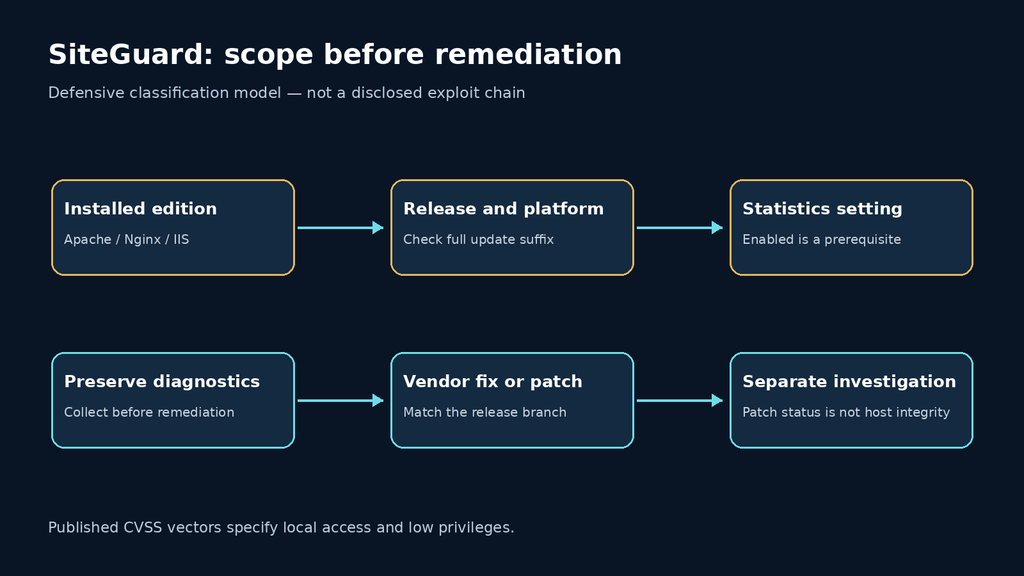
Preserve diagnostic information before changing the installation
JPCERT/CC recommends obtaining diagnostic information through the SiteGuard web management interface before updating, because the update can remove traces. It also identifies disabling the statistics function as a workaround, with implementation details to be checked against current vendor guidance. The workaround changes exposure; it does not establish whether earlier exploitation occurred.
Use the management interface’s diagnostic-information export, restrict access to the resulting archive, and record its collection time and originating asset. The export may contain sensitive operational information. Preserve the original, work from a copy, and avoid uploading it to a public malware-analysis service or pasting it into a public support thread.
For a Linux or macOS analyst workstation, the following command hashes an already exported file. Replace the placeholder path with the exact export filename. It neither gathers SiteGuard data nor detects exploitation, and it makes no network requests.
python3 - /secure-evidence/siteguard-diagnostics.zip <<'PY'
import hashlib
import sys
from pathlib import Path

path = Path(sys.argv[1])
if not path.is_file():
    raise SystemExit("Expected an existing exported diagnostic file")

digest = hashlib.sha256()
with path.open("rb") as handle:
    for chunk in iter(lambda: handle.read(1024 * 1024), b""):
        digest.update(chunk)
print(f"SHA256 {digest.hexdigest()}  {path.name}")
PY
Record the hash in the incident record with the collector, UTC timestamp, original filename, asset identifier and storage location. A matching hash demonstrates that two copies contain the same bytes. It does not prove that the file is complete, that collection happened before intrusion, or that the server was clean.
Choose the response path deliberately
| Observed condition | Immediate response | Evidence needed to close the action |
|---|---|---|
| Affected build; statistics enabled | Preserve diagnostics, then apply the correct vendor update or patch | Export record, change record, running release or patch evidence |
| Patch delayed by compatibility constraints | Use vendor instructions for the statistics workaround and arrange remediation | Effective setting, responsible owner and scheduled remediation |
| Statistics currently disabled | Record the setting and investigate when it changed | Configuration history; current state alone does not establish historical safety |
| Suspicious privileged activity | Contain and investigate alongside remediation | Incident timeline, affected identities and integrity assessment |
| Vendor file patch applied; version unchanged | Validate against the supplied patch procedure | Patch package provenance and installation verification |
Preservation should be a short, controlled step in an urgent response, not a reason to leave a suspicious server broadly accessible. If active malicious activity is suspected, coordinate isolation and evidence collection with the incident lead. Avoid making destructive changes simply to obtain a cleaner test result.
Do not assume the WAF can protect its own vulnerable processing path. A rule designed to block inbound application requests is not evidence that a local low-privilege attack prerequisite is prevented. Determine which process, account and management paths are relevant to the deployed product, using vendor information rather than an invented HTTP payload.
Patching and investigating are different completion criteria
A fixed release can close the vulnerable path while leaving consequences of earlier compromise unresolved. The privileged impact described by JVN makes it reasonable to review host integrity and exposed credentials if there is evidence or a credible suspicion of exploitation. That is a defensive investigation recommendation, not a claim that every affected host has been compromised.
Establish the exposure window from installation, configuration and change records. Correlate unexpected privileged process execution, scheduled-task changes, newly introduced accounts and unapproved file changes with the organization’s normal maintenance activity. None of these observations alone is a vulnerability-specific indicator. A quiet log is also weak evidence if retention is short, collection was interrupted or the relevant events were never recorded.
For credentials, follow actual access and permissions. Identify the service identities and secrets that the affected host could reach, then decide on revocation or rotation based on the investigation. Do not claim that changing the SiteGuard administrator password invalidates every token, application credential or session present elsewhere on the server.
If integrity cannot be established, the recovery decision may involve rebuilding from a known-good source rather than returning the same installation to service after a patch. Preserve the evidence needed for that decision before cleanup, and coordinate application availability and WAF coverage so recovery does not leave the protected service unintentionally exposed.
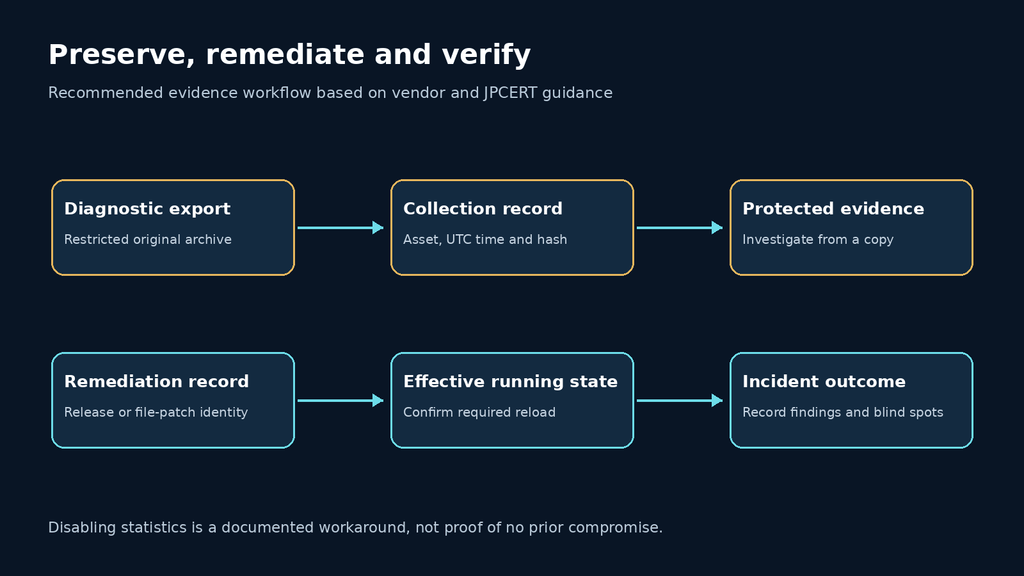
What a useful retest should prove
Close remediation with evidence of the effective running state. Record the platform, edition, full release, patch identity where applicable, statistics setting and verification time. If the procedure requires a restart or reload, confirm that the running component reflects the change; an installer success message is not the same as evidence of the active process state.
Use a vendor-supported verification method. A public banner or a negative result from an unspecified scanner cannot prove that the statistics implementation has been replaced. For a file-level patch, keep the supplied verification instructions with the result. Do not invent an exploit endpoint merely to make a retest look more technical.
The delivery should separate three conclusions: the asset is outside the affected scope, the vulnerable path has been remediated, and the investigation has found or ruled out particular compromise evidence. Those conclusions require different records. An assessor should state which one was established and where visibility remains incomplete.
For authorized testing of surrounding applications, ask for bounded scope, reproducible findings and reviewable retest evidence. The product demonstration below provides context for evaluating an automated workflow; it does not demonstrate a SiteGuard-specific detector or establish this host’s incident status.
Questions administrators need answered
Is this an Apache, Nginx or IIS vulnerability? It is a SiteGuard Server Edition statistics vulnerability. The web-server edition helps identify the applicable release branch; the web server alone does not establish exposure.
Does the score mean an anonymous attacker can execute commands remotely? No. The published vectors specify local access and low privileges. A broader attack chain would need its own supporting evidence.
Can disabling statistics be used while an update is prepared? JPCERT/CC documents that workaround. Follow the vendor’s current instructions, record the effective setting and continue the investigation and patch plan.
What should happen before upgrading? Preserve the diagnostic-information export and its collection record. The vendor warns that applying remediation may remove traces.
Does a clean diagnostic export prove there was no intrusion? No. An export is an evidence source, not a universal compromise test. Its coverage and the host’s wider telemetry determine what conclusions are supportable.
Should every affected server be rebuilt? The advisories do not impose that universal conclusion. Make the recovery decision from compromise evidence, the ability to establish integrity and organizational incident-response policy.
The response is complete when the affected path has a verified remediation state and the investigation has a defensible outcome. Keep those records separate, preserve evidence before changes, and resist the temptation to turn a fixed version number into an unsupported declaration that the entire host is clean.


 Spanish
  English
  German
  French
  Portuguese
  Japanese
  Korean
  Hindi
Hindi  Arabic
  Turkish
  Hebrew