
Firma web JSON (JWS) La descodificación es el proceso de analizar y verificar los componentes de un token JWS (encabezado, carga útil y firma) para extraer los datos firmados y comprobar su integridad. En contextos de seguridad y pruebas de penetración, la descodificación de un JWS ayuda a los analistas a comprender qué afirmaciones están incrustadas, detectar configuraciones erróneas e identificar prácticas de firma deficientes que pueden dar lugar a vulnerabilidades como la omisión de firmas o la falsificación de tokens.
Este artículo explica por qué es importante la descodificación JWSCómo descifrar y verificar firmas utilizando código real, errores comunes, implicaciones de seguridad y estrategias de defensa que debe conocer en 2025.
¿Qué es la firma web JSON (JWS)?
Firma web JSON (JWS) es una forma compacta y segura de representar un mensaje firmado. Se define en RFC 7515 y se utiliza habitualmente para garantizar la autenticidad e integridad de los datos transferidos a través de las API REST, el inicio de sesión único (SSO) y los flujos de autenticación de microservicios.
Una ficha JWS típica tiene este aspecto:
nginx
eyJhbGciOiJFUzI1NiIsInR5cCI6IkpXVCJ9. eyJzdWIiOiIxMjM0NTY3ODkwIiwibmFtZSI6IkpvZSJ9 . MEUCIQDh...
Cada segmento es Base64URL codificado:
- Cabecera - describe el algoritmo y el tipo de ficha
- Carga útil (reclamaciones) - los datos firmados
- Firma - prueba de integridad
Descifrar un JWS sin verificar la firma revela afirmaciones, pero sólo la verificación demuestra que proceden de una fuente de confianza.
Norma autorizada: RFC 7515 - https://tools.ietf.org/html/rfc7515
¿Por qué descodificar un JWS? Perspectivas de seguridad y pruebas
La descodificación de un JWS tiene varias finalidades:
- Comprender las reclamaciones incorporadas: ¿Quién es el usuario? ¿Qué son los permisos?
- Identificar el algoritmo de firma: Algoritmos débiles (por ejemplo,
ningunooHS256con claves predecibles) - Evaluar la integridad: Detectar fichas manipuladas
- Descubrir vulnerabilidades: Ataques de desviación de firma y de degradación de algoritmos
Desde el punto de vista de la seguridad ofensiva, el descubrimiento de prácticas de firma JWS deficientes puede conducir a exploits en los que los atacantes falsifican tokens y escalan privilegios.
Anatomía de una ficha JWS
He aquí el desglose de una ficha típica:
| Segmento | Significado | Ejemplo |
|---|---|---|
| Cabecera | Algoritmo y metadatos | { "alg": "RS256", "typ": "JWT" } |
| Carga útil | Reclamaciones | { "sub": "12345", "role": "admin" } |
| Firma | Resumen firmado | Base64URL de la cabecera encriptada+carga de pago |
Un JWS descodificado muestra JSON plano para la cabecera y la carga útil:
ini
HeaderJSON = base64url_decode(part1)PayloadJSON = base64url_decode(part2)
La descodificación no prueba la autenticidad, sólo la verificación de la firma.
Descodificación JWS simple (sin verificación)
En el triaje de seguridad, a menudo el primer paso es ver qué hay dentro:
Ejemplo en Python (sólo descodificación)
python
import base64import json def base64url_decode(cadena_entrada): rem = len(cadena_entrada) % 4 cadena_entrada += "=" * (4 - rem)return base64.urlsafe_b64decode(cadena_entrada) token = "eyJhbGciOiJSUzI1NiIsInR5cCI6IkpXVCJ9.eyJzdWIiOiIxMjMifQ.SflKxw... "header, payload, signature = token.split('.') header_json = json.loads(base64url_decode(header)) payload_json = json.loads(base64url_decode(payload)) print("Cabecera:", header_json)print("Carga:", payload_json)
Esto produce un JSON legible pero no valida si la firma es correcta.
Verificación de una firma JWS (seguridad crítica)
Para estar seguro de que el token es legítimo, debes verificar la firma utilizando el algoritmo y la clave esperados. He aquí cómo:
Ejemplo de uso de JavaScript (Node.js) jose
javaScript
import { jwtVerify } from "jose"; const token = "eyJ..."; const publicKey = /* carga la clave pública apropiada, por ejemplo, desde el endpoint JWKS */; async function verifyToken() {try {const { payload } = await jwtVerify(token, publicKey);console.log("Carga verificada:", payload); } catch (e) {console.error("Error de verificación:", e); } } verifyToken();
Esto garantiza que el token ha sido firmado por la clave privada correcta correspondiente a la clave pública.
Ejemplo del mundo real: Descodificación de un token OAuth
Muchas API emiten tokens JWS para controlar el acceso. La descodificación revela información sobre el usuario y la sesión:
json
{ "iss": "", "sub": "alice", "exp": 1700000000, "scope": "read write" }
Los equipos de seguridad revisan los tokens descodificados para auditar los ámbitos y las fechas de caducidad.
Vulnerabilidades comunes en las implementaciones de JWS
Descenso del algoritmo
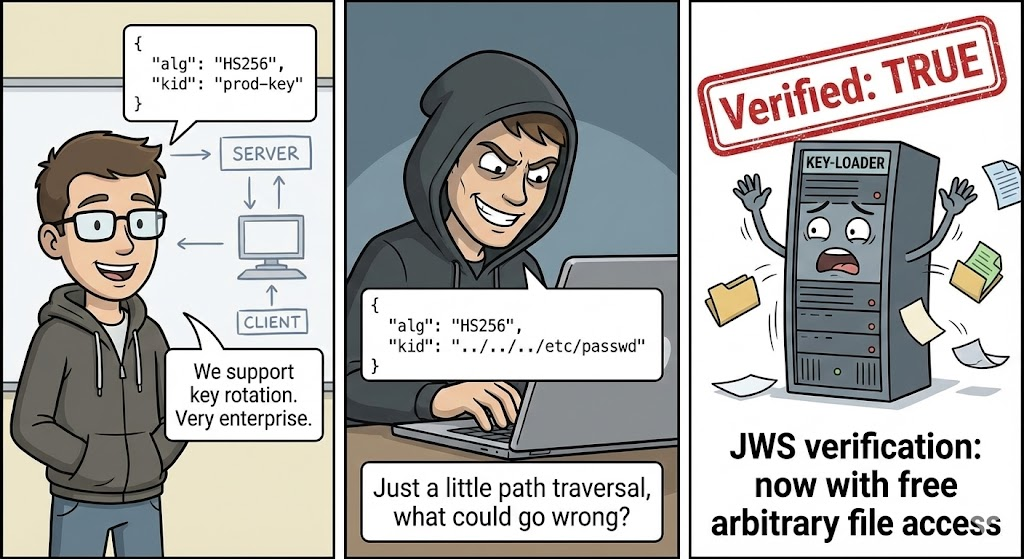
Algunas bibliotecas permiten incorrectamente cambiar alg a ningunopermitiendo a los atacantes eludir la verificación.
Ejemplo de cabecera insegura:
json
{"alg":"none","typ":"JWT"}
Ataque de defensa: Rechazar siempre las fichas con alg: ninguno a menos que sea explícitamente seguro en el contexto.
Claves simétricas débiles (HS256)
El uso de claves simétricas débiles o predecibles permite a los atacantes adivinar la clave y falsificar los tokens.
Mitigación:
- Utilizar claves secretas fuertes (≥ 256 bits).
- Prefiera algoritmos asimétricos (
RS256,ES256)
Herramientas CLI para la descodificación rápida de JWS
| Herramienta | Descripción | Oficial |
|---|---|---|
| jwt.io Depurador | Descodificación y verificación a través de Internet | https://jwt.io |
| jose CLI | Descodificación/verificación basada en nodos | https://github.com/panva/jose |
| jwt-cli | CLI multiplataforma | https://github.com/mike-engel/jwt-cli |
Ejemplo de decodificación CLI:
bash
jwt decode eyJhbGciOi...
Escenario de vulnerabilidad: Falsificación de un token (prueba de concepto)
Si un servidor acepta incorrectamente alg: ningunoun atacante puede falsificar:
css
Cabecera: {"alg":"none","typ":"JWT"} Carga útil: {"sub":"attacker","role":"admin"} Firma: ""
Script de prueba de concepto (Python):
python
import base64import json def b64url(x): return base64.urlsafe_b64encode(x).rstrip(b'=').decode() header = {"alg": "none", "typ": "JWT"} payload = {"sub": "attacker", "role": "admin"} token = f"{b64url(json.dumps(header).encode())}.{b64url(json.dumps(payload).encode())}. "print("Token falsificado:", token)
Defensa:
- Rechazar fichas en las que
algesningunoa menos que sea explícitamente seguro - Aplicar la lista blanca de algoritmos
Por qué es importante la verificación de firmas en 2025
En los microservicios modernos y las API distribuidas, los tokens dirigen las decisiones de acceso. Una verificación incorrecta puede dar lugar a:
- Escalada de privilegios
- Acceso no autorizado
- Secuestro de sesión
Los encargados de las pruebas de penetración y los defensores deben ser capaces de descodificar y validar los tokens mediante programación y a escala.
Detección de errores de verificación en las API
Los escáneres automatizados pueden comprobar si una API intenta aceptar firmas JWS no válidas.
Pseudocódigo Python (Control de seguridad)
python
def test_broken_verification(api_url, forged_token): headers = {"Authorization": f "Bearer {forged_token}"} response = requests.get(api_url, headers=headers)return response.status_code bad_api = test_broken_verification("", forged_token)if bad_api == 200:print("Potentially vulnerable to JWS forgery")
Si la API responde con 200 OKla lógica de aceptación de fichas puede ser errónea.
Buenas prácticas defensivas
| Defensa | Descripción |
|---|---|
| Utilizar claves asimétricas | Prefiera RS256, ES256 a las claves simétricas |
| Aplicar listas blancas de algoritmos | Rechazar valores alg inesperados |
| Fichas de corta duración | Minimizar el riesgo de repetición |
| Rotación de teclas | Actualice regularmente las claves de firma |
| Bibliotecas de fichas de auditoría | Mantener actualizadas las dependencias |
Integración de la descodificación de tokens en la seguridad CI/CD
En 2025, las canalizaciones de seguridad suelen validar automáticamente las prácticas del JWS:
- Linting automatizado de configuraciones JWT
- Prueba CI que rechaza librerías inseguras
- Supervisión en tiempo de ejecución de la aceptación de tokens erróneos
Ejemplo de fragmento de guión CI (Bash):
bash
#Reject si algún código usa "alg: none "grep -R '"alg": *"none"' ./src && exit 1
Conceptos relacionados: JWE vs JWS
| Plazo | Significado |
|---|---|
| JWS | Firma web JSON (sólo firmada) |
| JWE | JSON Web Encryption (cifrado) |
JWE protege la confidencialidad; JWS protege la integridad y la autenticidad. Muchos sistemas utilizan ambos a la vez.
Herramientas y bibliotecas (2025 Security Stack)
- Node.js
jose- Descodificación y verificación JWT/JWS - Python
python-jose- Soporte criptográfico flexible - OpenSSL - Verificación criptográfica de bajo nivel
- jwt.io - Descodificador web rápido
 Spanish
  English
  German
  French
  Portuguese
  Japanese
  Korean
  Hindi
Hindi  Arabic
  Turkish
  Hebrew