
Sansec disclosed an active supply chain attack on June 13, 2026 affecting WordPress sites that loaded scripts associated with OptinMonster, TrustPulse, and PushEngage. The critical detail is not that a WordPress site had an outdated plugin in the usual sense. The reported attack path ran through legitimate JavaScript files served from upstream Awesome Motive-controlled infrastructure and embedded by downstream customer sites. Sansec said the malicious code waited for a logged-in WordPress administrator, created a backdoor administrator account, installed a self-hiding backdoor plugin, and sent the new credentials to tidio.cc, a domain designed to resemble the legitimate tidio.com. (Sansec)
That makes the OptinMonster supply chain attack more than another “update your plugin” story. The vulnerable trust boundary was not only the PHP code installed under wp-content/plugins. It was the long-running relationship between a WordPress site, a conversion plugin, an upstream SaaS script, a browser session, and an authenticated administrator. A site could have a clean local filesystem at the beginning of the incident and still execute hostile JavaScript if it continued to load a compromised upstream file.
Sansec listed several script hosts associated with the affected services, including OptinMonster domains such as a.omappapi.com, a.opmnstr.comy a.optnmstr.com, TrustPulse’s a.trstplse.com, and PushEngage’s clientcdn.pushengage.com. Sansec also cautioned that it had confirmed compromise of OptinMonster, TrustPulse, and PushEngage code, while advising anyone running Awesome Motive plugins to stay alert rather than assuming the entire portfolio was confirmed compromised. (Sansec)
That distinction matters. Good incident analysis should not overclaim. Publicly available reporting supports the conclusion that the OptinMonster supply chain attack abused trusted third-party JavaScript and targeted logged-in WordPress administrators. It does not, by itself, prove that every Awesome Motive product was compromised, that every site using an Awesome Motive plugin was backdoored, or that all affected sites saw the same post-compromise activity. The right response is disciplined verification: identify exposure, preserve evidence, check for administrator and plugin persistence, rotate secrets where needed, and harden the runtime trust path that allowed the attack to matter.
What happened in the OptinMonster supply chain attack
The public facts are unusually concrete for an early supply chain incident report. Sansec said it discovered an active campaign affecting sites that use OptinMonster, TrustPulse, and PushEngage WordPress plugins, all operated in the Awesome Motive ecosystem. The attackers added malicious JavaScript to legitimate files served by Awesome Motive and loaded by customer sites. The malicious code was designed to wait for a logged-in administrator, not ordinary anonymous visitors. When the right context appeared, it attempted to create a backdoor administrator account and install a hidden backdoor plugin. (Sansec)
The affected products are not obscure. OptinMonster’s WordPress.org plugin page describes a popup and lead-generation tool that integrates with email marketing services, CRMs, eCommerce platforms, WooCommerce, analytics, and other conversion workflows. (WordPress.org) TrustPulse’s WordPress.org page describes a social proof and FOMO notification plugin that integrates with WordPress and WooCommerce flows. (WordPress.org) PushEngage’s WordPress.org page describes a push notification and WooCommerce automation plugin with installation steps that connect a WordPress site to the PushEngage service. (WordPress.org)
Those functions explain the blast-radius concern. Marketing, conversion, notification, analytics, and eCommerce plugins often need to run visible client-side logic on public pages, account pages, checkout pages, and sometimes admin-adjacent workflows. They are not passive dependencies. They introduce executable behavior into the browser and rely on upstream services that can change code outside the normal WordPress plugin update cycle.
| Question | Publicly supported answer | Defender impact | What not to overstate |
|---|---|---|---|
| Which incident is being discussed | Sansec’s June 13, 2026 report on OptinMonster, TrustPulse, and PushEngage script compromise | Treat affected script loading as exposure, even if local plugin files look unchanged | Do not assume every Awesome Motive plugin was confirmed compromised |
| Where the malicious code lived | Sansec says malicious JavaScript was added to legitimate upstream files served by Awesome Motive endpoints | Inspect network-loaded scripts and browser runtime behavior, not only local PHP files | Do not reduce the event to a normal vulnerable plugin version |
| Who triggered the payload | Sansec says the payload fired for logged-in administrators, not ordinary visitors | Anonymous scanners may miss it; test admin-context behavior carefully | Do not assume no visitor risk after site takeover |
| What persistence was reported | Backdoor admin account and hidden backdoor plugin | Check WordPress users, roles, plugin directories, file changes, and logs | Do not assume uninstalling the visible plugin removes all persistence |
| Known exfiltration destination | Sansec reported credentials sent to tidio.cc | Search logs, DNS, proxy, EDR, and browser telemetry for suspicious outbound traffic | Do not confuse the lookalike domain with the legitimate Tidio service |
The most important operational point is that the attack did not require attackers to compromise each victim server first. By polluting an upstream script used by many downstream sites, a single trust-path compromise could reach many WordPress installations. Sansec compared the pattern to the Polyfill supply chain attack it discovered in 2024, where tampering with an upstream JavaScript resource allowed malicious behavior to spread to downstream sites that loaded that resource. (Sansec)
Why this is not just another plugin bug
A normal WordPress plugin vulnerability usually starts inside code installed on the site. The plugin mishandles authorization, trusts user input, fails to validate a nonce, exposes a REST endpoint, allows unsafe file upload, or makes a database query unsafe. The fix is often version-specific: upgrade from vulnerable version X to fixed version Y, remove the plugin, or apply a vendor patch.
The OptinMonster supply chain attack is different because the dangerous code could arrive through a vendor-controlled script file loaded at runtime. The site’s local plugin code may only have been the loader. The browser then fetched executable JavaScript from the vendor’s infrastructure. If that upstream JavaScript changed, the downstream site’s behavior changed without a normal WordPress update prompt.
That is why “fully patched WordPress” is not a complete answer. WordPress core patching, plugin updates, and theme hygiene remain necessary. But a site can be patched and still execute a hostile third-party script if the trusted supplier’s delivery path is compromised. The attack surface includes the supplier’s account security, CDN controls, build process, deployment pipeline, DNS, script hosting, incident response speed, and the customer site’s decision to allow that script to run with broad authority.
WordPress makes this pattern common because plugins routinely add scripts to public pages and admin pages. The official plugin pages for OptinMonster, TrustPulse, and PushEngage describe features that depend on external services, account connections, campaigns, WooCommerce behavior, visitor targeting, and notification logic. Those product designs are normal for modern growth tooling. They are also exactly why defenders need to track third-party JavaScript as executable vendor risk rather than decorative website content. (WordPress.org)
A useful mental model is this:
| Traditional plugin vulnerability | Runtime third-party script compromise |
|---|---|
| Vulnerable code usually exists in local plugin files | Malicious behavior may arrive from an upstream CDN or SaaS endpoint |
| Exposure is often tied to installed version | Exposure may depend on whether the site loaded a specific remote script during a malicious window |
| Anonymous scanning may detect vulnerable paths | Admin-context payloads may stay dormant for anonymous scanners |
| Remediation often means update or remove plugin | Remediation also requires checking persistence, accounts, logs, external scripts, and secrets |
| CVE tracking may be central | There may be no CVE for the customer site, because the issue is a supplier trust-path compromise |
The phrase “supply chain attack” gets overused, but this incident fits the term in a practical security sense. The downstream site trusted upstream code delivery. The malicious code appeared in that trusted delivery path. The attack outcome occurred in environments that did not necessarily choose to install malicious code directly. That is supply chain risk at runtime.
The attack chain, from upstream JavaScript to WordPress admin control
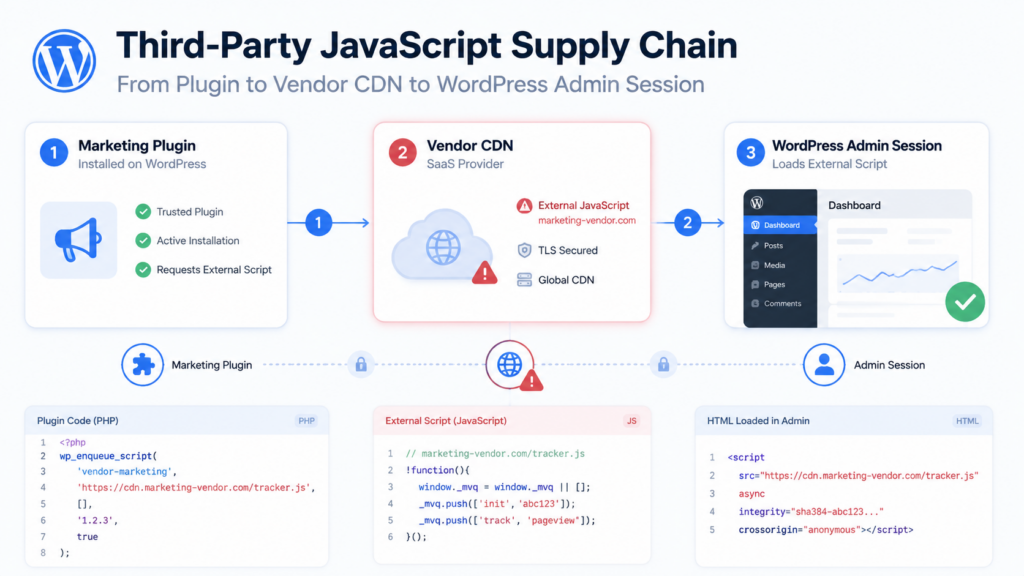
The attack chain reported by Sansec is easier to understand if it is broken into stages. The point is not that every affected site necessarily completed every stage. The point is that defenders need to check each stage because the absence of one artifact does not prove the absence of all exposure.
| Escenario | Attacker objective | Defensive evidence to collect | Common blind spot |
|---|---|---|---|
| Upstream script pollution | Insert malicious logic into a trusted script endpoint | Script URL, response body, hash, headers, timestamp, DNS resolution | Only checking local plugin files |
| Downstream loading | Reach many sites through normal script inclusion | HTML source, browser network capture, CSP reports, CDN logs | Assuming no update means no change |
| Admin-context detection | Avoid firing for ordinary visitors and wait for privileged session | Browser telemetry, authenticated test replay, admin access logs | Scanning only anonymous public pages |
| Privileged action | Use admin context to create persistence | WordPress user changes, role metadata, REST/admin activity | Looking only for malware on public pages |
| Backdoor installation | Maintain access after script cleanup | New plugin directories, hidden plugins, recent file writes | Removing the visible marketing plugin and stopping |
| Credential exfiltration | Send access details to attacker-controlled infrastructure | DNS/proxy logs, web server logs, endpoint telemetry for lookalike domains | Not logging outbound requests from web/admin clients |
| Post-compromise abuse | Monetize access or pivot | Spam, redirects, checkout manipulation, admin logins, new scheduled tasks | Treating the incident as over once the upstream service is fixed |
The logged-in administrator condition is especially important. Many website malware checks fetch public pages without authentication. Many uptime monitors and SEO crawlers behave like anonymous users. Some external scanners do not execute JavaScript fully, and fewer still simulate a real administrator session against a production site. A payload that waits for a logged-in administrator can stay invisible to a large portion of routine monitoring.
That does not make the attack harmless to ordinary visitors. It means ordinary visitors may not be the first trigger. Once a backdoor administrator account exists, the site can be modified in many ways: fake plugins, SEO spam, payment-page skimmers, malicious redirects, injected scripts, fake browser updates, phishing pages, or credential theft. The initial trigger path and the eventual business impact are not the same thing.
Why admin-session targeting changes the detection model
A WordPress administrator is not just another visitor. In many WordPress setups, an administrator session can install plugins, edit settings, change users, modify themes, configure WooCommerce extensions, access order data, create API credentials, and approve integrations. If malicious JavaScript can act in that browser context, it may not need a server-side RCE bug at the beginning of the chain. It can abuse the application’s own privileged workflows.
This is why admin-context attacks punish shallow validation. A defender may open the homepage in an incognito window, see nothing unusual, and conclude that the site is clean. A scanner may crawl public URLs and miss the trigger. A WAF may allow the upstream script because the domain is on a trusted allowlist. A security plugin may not flag anything until the backdoor account or plugin appears locally.
A better validation model asks more specific questions:
| Question | Por qué es importante |
|---|---|
| Did the site load any Sansec-listed script host during the exposure window | Exposure begins with runtime loading, not only local files |
| Did an administrator visit pages that loaded those scripts | The reported payload waited for administrator context |
| Were any new administrator users created | Sansec reported backdoor administrator creation |
| Were any new or hidden plugins installed | Sansec reported a self-hiding backdoor plugin |
Did browsers, proxies, or DNS logs contact tidio.cc | Sansec reported exfiltration to that lookalike domain |
| Were WooCommerce, account, checkout, or admin pages modified | Post-compromise monetization often targets sensitive flows |
| Were credentials rotated after potential admin compromise | Administrator-level access can expose more than WordPress itself |
For red teams and pentesters, the lesson is equally direct. Do not treat WordPress exposure as only a version-matching problem. The presence of a plugin may matter less than the scripts it loads, the privileges those scripts receive, and the browser contexts in which they execute. For blue teams, third-party JavaScript inventory becomes part of attack surface management.
Third-party JavaScript is executable vendor risk
A third-party script is not like a remote image. JavaScript can read and modify the DOM, observe form fields, create new network requests, load additional scripts, alter links, change page behavior, fingerprint browsers, and interact with application APIs exposed to the current session. Browser security boundaries still matter, but once a site intentionally includes a script, that script usually runs with meaningful access inside the page.
That is why the client-side supply chain deserves a different control model from ordinary content delivery. A marketing vendor’s script may be loaded on every page. An analytics vendor may observe user behavior across sessions. A chat widget may run on checkout pages. A social proof plugin may integrate with WooCommerce activity. A push-notification service may register service workers or interact with browser notification permissions. Each script has a business reason to exist, but each also becomes part of the executable trust base.
| Third-party script type | Common business purpose | Security risk if compromised | Practical control |
|---|---|---|---|
| Popup and lead generation | Email capture, promotions, exit intent | Form manipulation, credential capture, malicious redirects | Script inventory, CSP reporting, admin-context testing |
| Social proof notifications | Display purchases, signups, activity | DOM injection, fake trust signals, admin-session abuse | Limit page scope, monitor script changes |
| Push notifications | Re-engagement, cart recovery, campaigns | Service-worker abuse, notification spam, tracking | Review worker scope, permissions, vendor domains |
| Analytics and tags | Traffic measurement, attribution | Data leakage, additional script loading | Tag governance, allowlist review, CSP |
| A/B testing and personalization | Dynamic content changes | Content tampering, checkout manipulation | Restrict sensitive pages, monitor runtime changes |
| Chat and support widgets | Customer support, lead qualification | Phishing prompts, data capture, malicious links | Vendor review, page scoping, network monitoring |
The best question is not “Do we trust this vendor?” A business may reasonably trust a vendor and still need controls. The better question is “What can this vendor’s script do if the vendor’s delivery path is compromised tomorrow?” That question turns trust into engineering.
CSP and SRI help, but they do not erase the problem
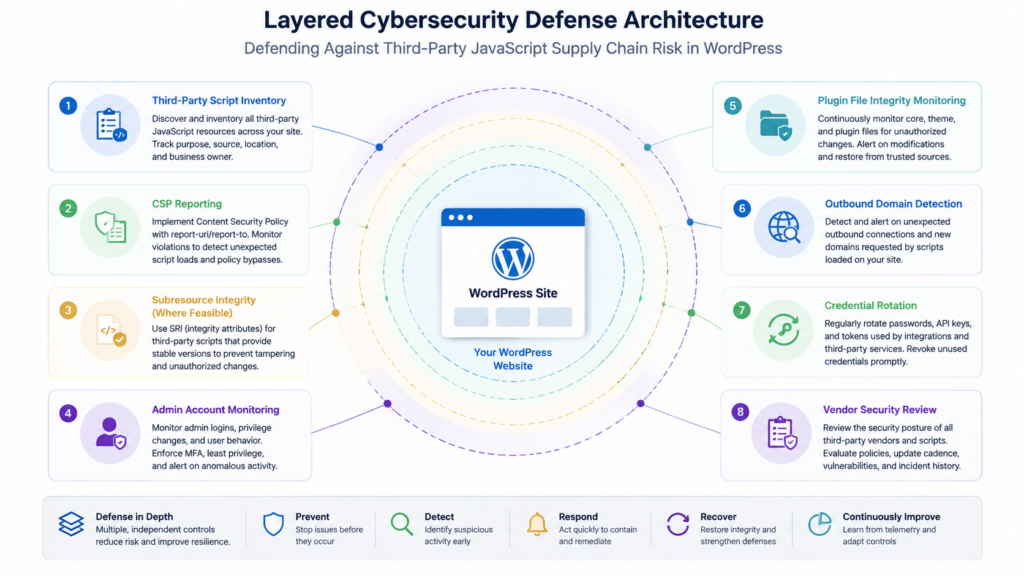
Subresource Integrity, or SRI, allows a browser to verify that a fetched script or stylesheet matches a cryptographic hash provided by the page. If the content does not match, the browser refuses to use it. MDN describes SRI as a browser security feature for checking that fetched resources are delivered without unexpected manipulation. (Documentos web MDN) OWASP similarly describes SRI as a mechanism that lets browsers check the integrity of resources fetched from external sources such as CDNs. (OWASP)
A simple SRI example looks like this:
<script
  src="https://cdn.example.com/vendor/widget.js"
  integrity="sha384-BASE64_ENCODED_HASH_HERE"
  crossorigin="anonymous">
</script>
That control is powerful when the script is expected to be stable. It is harder when the vendor intentionally changes the script frequently, personalizes it per customer, or uses the script as a live SaaS delivery mechanism. Many marketing and analytics tools rely on frequent upstream changes. If the hash changes every time the vendor updates the script, customers either need an automated safe update process or they abandon SRI because it breaks functionality.
Content Security Policy, or CSP, is also useful but often misunderstood. A CSP can restrict which script sources are allowed, block inline scripts, require nonces or hashes, and report policy violations. MDN documents script-src behavior, including dinámico-estricto, which propagates trust from a nonce- or hash-authorized root script to scripts that it loads dynamically. (Documentos web MDN) MDN also warns that dinámico-estricto can make a policy less secure if trusted scripts create script elements from unsafe sources. (Documentos web MDN) OWASP’s CSP Cheat Sheet describes dinámico-estricto as useful with hashes or nonces while noting how trust can propagate to dynamically created scripts. (cheatsheetseries.owasp.org)
A practical report-only CSP for initial visibility might look like this:
add_header Content-Security-Policy-Report-Only "
  default-src 'self';
  script-src 'self'
    https://a.omappapi.com
    https://a.opmnstr.com
    https://a.optnmstr.com
    https://a.trstplse.com
    https://clientcdn.pushengage.com;
  connect-src 'self' https:;
  img-src 'self' data: https:;
  style-src 'self' 'unsafe-inline' https:;
  report-uri https://csp-report.example.com/report;
" always;
That example is not a finished policy. It is a visibility step. It can help identify what scripts are actually loading, what domains they contact, and whether unexpected script sources appear. But a basic allowlist policy will not stop malicious code if the malicious code is served from an allowed vendor domain. CSP is still valuable because it can restrict secondary payloads, unknown exfiltration domains, inline script abuse, and unexpected script expansion. It is not a substitute for supplier security, script integrity, monitoring, and post-compromise checks.
For teams starting from no CSP, report-only mode is usually safer than jumping to enforcement. WordPress themes and plugins often rely on inline scripts, dynamic script insertion, and plugin-specific assets. A strict policy can break production if it is deployed without testing. The right path is inventory first, report-only telemetry second, enforcement on narrow surfaces third, and careful exceptions only where business function requires them.
What defenders should check immediately
The first task is to determine whether a site loaded any affected script hosts and whether administrator activity occurred during the exposure window. Do not begin by deleting everything. Preserve logs and evidence first. Once files are removed, accounts deleted, and caches purged, it becomes harder to determine whether the site was merely exposed or actually backdoored.
Start with script exposure. Search the WordPress filesystem, rendered page source, CDN configuration, tag manager configuration, and database content for the hosts Sansec listed.
#!/usr/bin/env bash
set -euo pipefail

ROOT="${1:-/var/www/html}"

grep -RInE \
  "a\.omappapi\.com|a\.opmnstr\.com|a\.optnmstr\.com|a\.trstplse\.com|clientcdn\.pushengage\.com|tidio\.cc" \
  "$ROOT" \
  --exclude-dir=node_modules \
  --exclude-dir=vendor \
  --exclude='*.log' || true
Then check server logs and proxy logs for suspicious outbound or inbound indicators. Depending on infrastructure, browser-to-third-party requests may not appear in web server logs because the visitor’s browser contacts the vendor directly. But WordPress admin actions, plugin installation requests, new user creation, and suspicious requests to local admin endpoints may still appear.
# Nginx or Apache access logs, adjust paths for your environment.
zgrep -hE \
  "tidio\.cc|wp-admin|admin-ajax\.php|wp-json|plugin-install|update\.php|user-new\.php" \
  /var/log/nginx/access.log* /var/log/apache2/access.log* 2>/dev/null | tail -n 200
Use WP-CLI where available to list administrators and plugins. The objective is not only to confirm whether OptinMonster, TrustPulse, or PushEngage is installed. It is also to detect unexpected administrators and unknown plugins that appeared after exposure.
# List administrator users.
wp user list --role=administrator --fields=ID,user_login,user_email,user_registered,roles

# List installed plugins and status.
wp plugin list --fields=name,status,version,update

# Show recently modified plugin directories.
find wp-content/plugins -maxdepth 2 -type f -printf '%TY-%Tm-%Td %TH:%TM %p\n' \
  | sort \
  | tail -n 100
If WP-CLI is not available, query the database carefully. The table prefix may not be wp_, so adjust it before running anything. Run read-only queries first.
SELECT ID, user_login, user_email, user_registered
FROM wp_users
ORDER BY user_registered DESC
LIMIT 20;

SELECT u.ID, u.user_login, u.user_email, m.meta_value
FROM wp_users u
JOIN wp_usermeta m ON u.ID = m.user_id
WHERE m.meta_key = 'wp_capabilities'
  AND m.meta_value LIKE '%administrator%';
Check for recently created files, especially under wp-content/plugins, wp-content/mu-plugins, wp-content/uploads, and theme directories. Attackers often prefer locations that survive normal plugin cleanup or blend into expected WordPress paths.
# Files modified in the last 7 days, adjust window as needed.
find wp-content -type f -mtime -7 -printf '%TY-%Tm-%Td %TH:%TM %p\n' \
  | sort \
  | tail -n 300
If the site runs WooCommerce or handles payments, treat the incident as higher impact. A backdoored administrator account can modify checkout templates, add scripts to order pages, change payment settings, create API keys, or install plugins that affect customer data. Even if the reported payload’s first action was administrator persistence, the downstream business risk can include payment skimming, fake checkout flows, customer-data exposure, SEO spam, or malware redirects.
Validate exposure without making the incident worse
A common mistake during JavaScript supply chain incidents is to investigate from the same production browser profile used by administrators. If the payload waits for a logged-in administrator, repeatedly visiting pages as an administrator can create new triggers, overwrite evidence, or accelerate attacker persistence.
Use a safer workflow:
| Paso | Safer approach | Por qué |
|---|---|---|
| Preserve evidence | Copy logs, database snapshot, suspicious scripts, plugin directories, and timestamps before cleanup | Cleanup can destroy the evidence needed to scope impact |
| Use isolation | Analyze scripts from a disposable VM or isolated browser profile | Avoid triggering payloads from a privileged session |
| Avoid online beautifiers | Deobfuscate suspicious JavaScript locally | Third-party tools may leak samples or customer data |
| Compare versions | Store response bodies and hashes from affected script URLs over time | Script changes can show whether the upstream payload changed |
| Test authenticated behavior carefully | Use staging, snapshots, or controlled accounts with minimal privileges | Avoid using real production admin sessions unnecessarily |
| Record uncertainty | Separate “loaded affected script” from “confirmed backdoor installed” | Exposure and compromise are different findings |
A simple script hash capture can help preserve evidence:
#!/usr/bin/env bash
set -euo pipefail

urls=(
  "https://a.omappapi.com/app/js/api.min.js"
  "https://a.opmnstr.com/app/js/api.min.js"
  "https://a.optnmstr.com/app/js/api.min.js"
  "https://a.trstplse.com/app/js/api.min.js"
  "https://clientcdn.pushengage.com/sdks/pushengage-web-sdk.js"
)

mkdir -p evidence-scripts

for url in "${urls[@]}"; do
  safe_name="$(echo "$url" | sed 's#https://##; s#[/:]#_#g')"
  curl -fsSL -D "evidence-scripts/${safe_name}.headers.txt" \
    "$url" \
    -o "evidence-scripts/${safe_name}.body.js" || true

  if [ -s "evidence-scripts/${safe_name}.body.js" ]; then
    shasum -a 256 "evidence-scripts/${safe_name}.body.js" \
      > "evidence-scripts/${safe_name}.sha256.txt"
  fi
done
This does not prove compromise by itself. It creates a time-stamped local record that can be compared against vendor statements, threat intelligence, and other sites’ captures. During active incidents, upstream files can change quickly. Evidence captured after remediation may not contain the malicious payload that existed earlier.
For authorized testing programs, the same principle applies at larger scale. A controlled agentic workflow can enumerate assets, identify script-loading paths, test authenticated behavior in scoped environments, collect browser and network evidence, and produce reproducible findings. Penligent’s public homepage describes operator-controlled agentic workflows, evidence-first results, CVE exploit generation, business-logic focus, and report generation for security engineers, pentesters, and red teams. (Penligente) Its writing on AI supply chain security also emphasizes evidence chains, upstream trust paths, and avoiding overconfident claims when public reporting is incomplete. (Penligente) In this incident class, that matters because the deliverable should not be “the scanner found a plugin.” It should be a defensible chain: which site loaded which script, under which context, what changed, what persistence was found, what was rotated, and what remains uncertain.
Related incidents and CVEs that explain the pattern
The OptinMonster supply chain attack should be understood alongside other supply chain and WordPress ecosystem events, but not flattened into them. Each case has a different mechanism. The useful comparison is the trust path.
| Incident or CVE | Why it is relevant | Key difference | Lección defensiva |
|---|---|---|---|
| OptinMonster, TrustPulse, PushEngage script compromise | Trusted upstream JavaScript reached downstream WordPress sites | Runtime SaaS/CDN script path, not necessarily local plugin code first | Monitor third-party scripts and admin-context behavior |
| Polyfill supply chain attack | Upstream JavaScript tampering reached many downstream sites | Broader web JavaScript dependency pattern | Do not treat external scripts as static assets |
| Gravity Forms 2025 supply chain incident | A WordPress plugin download path was reportedly compromised | Affected manual download and Composer paths were emphasized in later reporting | Verify acquisition channel, not only plugin brand |
| CVE-2024-3094, XZ Utils backdoor | Trusted upstream open-source release path was compromised | System-level Linux library/backdoor context, not WordPress JavaScript | Provenance and maintainer trust are security controls |
| CVE-2025-30066, tj-actions/changed-files | CI/CD automation trust path exposed secrets after malicious tag movement | GitHub Actions and workflow logs, not website runtime JavaScript | Pin actions, restrict secrets, audit automation |
| CVE-2025-24000, Post SMTP | WordPress plugin access-control flaw could enable account takeover via email logs | Conventional plugin vulnerability rather than upstream script compromise | Authorization bugs in popular plugins can become site-takeover paths |
CVE-2024-3094 is relevant because it showed how a trusted upstream release can become hostile before it reaches downstream systems. The XZ Utils case was not a WordPress issue and should not be used as a lazy analogy for every supply chain event. Its relevance is narrower and stronger: if a trusted release artifact changes maliciously, downstream consumers may execute attacker-controlled behavior because the artifact arrived through a channel they already trust.
CVE-2025-30066 is relevant for a similar reason in CI/CD. Penligent’s prior supply chain analysis notes that NVD describes tj-actions/changed-files before version 46 as allowing remote attackers to discover secrets by reading GitHub Actions logs after tags were modified by a threat actor to point at a malicious commit. The connection to WordPress runtime JavaScript is not technical identity; it is trust-path identity. Automation trusted a third-party action. WordPress sites trusted a third-party script. In both cases, the defender’s environment did what it was configured to do, and that configuration became the attacker’s route. (Penligente)
Gravity Forms is a useful WordPress-specific comparison because public reporting described a compromised plugin installation file, while the vendor disputed parts of the initial timeline and emphasized a narrower affected window and channel. TechRadar’s summary says Patchstack reported infected versions available on July 10 and 11, 2025, while Gravity Forms co-founder Carl Hancock said the main issue occurred for hours beginning on July 9 with a brief recurrence on July 10, and that the plugin’s licensing and automatic update API was not compromised. (TechRadar) The lesson is not “all timelines are unknowable.” The lesson is that early supply chain reporting can be incomplete, and defenders should preserve evidence rather than depend on a single broad headline.
CVE-2025-24000, affecting the Post SMTP WordPress plugin, illustrates a different but adjacent site-takeover pattern. Public reporting described a broken access-control issue in a REST API endpoint that allowed low-privileged users to access email logs, potentially use password-reset emails, and take over administrator accounts; the issue was fixed in version 3.3.0. (TechRadar) Unlike the OptinMonster supply chain attack, this is a conventional plugin vulnerability. But it reinforces the same operational point: WordPress administrator control is often the prize, and once attackers can create, access, or impersonate an administrator, the site’s business risk expands quickly.
Hardening WordPress against plugin and JavaScript supply chain risk
Hardening starts with inventory. Most teams can list installed plugins. Fewer can list every third-party script that runs on their public pages, checkout pages, logged-in user pages, and admin pages. Fewer still can answer which vendor controls each script, how often it changes, whether it is loaded through a tag manager, whether it can load fourth-party scripts, and whether it appears on sensitive pages.
A practical inventory should include:
| Asset | Minimum fields to track |
|---|---|
| WordPress plugins | Name, version, source, owner, business purpose, auto-update status, last review date |
| External scripts | URL, vendor, pages loaded on, business owner, data access, change frequency |
| Sensitive page scope | Login, admin, checkout, account, payment, order, forms, membership pages |
| Vendor trust path | CDN domains, account owners, MFA status, API keys, webhook permissions |
| Runtime controls | CSP status, SRI status where feasible, WAF/CDN rules, script monitoring |
| Recovery controls | Backups, restore process, admin account review, credential rotation plan |
Plugin minimization is still one of the highest-return controls for WordPress. Each plugin can add PHP code, JavaScript, database tables, scheduled tasks, REST routes, admin pages, and external dependencies. Removing unused plugins reduces both conventional vulnerability exposure and runtime trust exposure. Deactivating is not always enough; unused code should be removed after evidence is preserved and business owners confirm it is not needed.
Administrator hygiene is equally important. Use individual admin accounts, not shared accounts. Enforce MFA. Remove stale administrators. Restrict who can install plugins. Consider disabling file editing from the WordPress dashboard. Use least privilege for content editors and marketing users. A supply chain payload that waits for an administrator has fewer opportunities when administrator sessions are rare, protected, and monitored.
File integrity monitoring should cover wp-content/plugins, wp-content/mu-plugins, themes, uploads, and core files. The mu-plugins directory deserves attention because must-use plugins load automatically and can be overlooked by administrators who only check the standard plugin screen. Upload directories matter because attackers often hide PHP files where defenders expect media.
At the server layer, restrict write permissions. WordPress often needs to write uploads and update plugins, but production environments should not allow every process to modify every file indefinitely. Where possible, use deployment pipelines, immutable infrastructure, or controlled update windows. For smaller sites, even basic hosting-level file change alerts can make a difference.
At the browser and runtime layer, deploy CSP gradually. Begin with report-only mode. Identify the real script graph. Remove scripts from sensitive pages where they are not needed. Avoid loading marketing widgets on /wp-admin, checkout, payment, password reset, and account pages unless the business case is strong and the vendor risk is accepted.
At the vendor layer, ask harder questions. Does the vendor support MFA for all dashboard users? How are scripts built and deployed? Are production script changes reviewed? Are CDN credentials protected by hardware-backed authentication? Is there a public incident response channel? Are script changes signed, versioned, or auditable? Can customers pin versions? Can the script be self-hosted safely? Are there separate domains for admin, public, and customer-specific assets?
Not every small business can run a mature vendor-risk program. But even a lightweight version helps. The most dangerous posture is pretending that a third-party script is not part of the security boundary because it came from a familiar marketing tool.
Detection examples for security teams
The following examples are defensive checks, not proof of compromise. They help identify exposure and suspicious persistence.
Search rendered HTML for affected script hosts:
#!/usr/bin/env bash
set -euo pipefail

base_url="${1:-https://example.com}"

paths=(
  "/"
  "/shop/"
  "/cart/"
  "/checkout/"
  "/my-account/"
)

for path in "${paths[@]}"; do
  echo "=== ${base_url}${path} ==="
  curl -fsSL "${base_url}${path}" \
    | grep -Eo 'https?://[^"]+' \
    | grep -E 'omappapi|opmnstr|optnmstr|trstplse|pushengage|tidio\.cc' || true
done
Check administrator users with WP-CLI:
wp user list \
  --role=administrator \
  --fields=ID,user_login,user_email,user_registered,display_name
Check for users registered during the likely incident window:
wp db query "
SELECT ID, user_login, user_email, user_registered
FROM wp_users
WHERE user_registered >= '2026-06-13 00:00:00'
ORDER BY user_registered DESC;
"
Check administrator capability metadata:
wp db query "
SELECT u.ID, u.user_login, u.user_email, m.meta_key, m.meta_value
FROM wp_users u
JOIN wp_usermeta m ON u.ID = m.user_id
WHERE m.meta_key LIKE '%capabilities%'
  AND m.meta_value LIKE '%administrator%';
"
Look for recently modified plugin files:
find wp-content/plugins wp-content/mu-plugins -type f -mtime -14 \
  -printf '%TY-%Tm-%Td %TH:%TM %p\n' 2>/dev/null \
  | sort
Capture current script hashes for comparison:
for url in \
  "https://a.omappapi.com/app/js/api.min.js" \
  "https://a.opmnstr.com/app/js/api.min.js" \
  "https://a.optnmstr.com/app/js/api.min.js" \
  "https://a.trstplse.com/app/js/api.min.js" \
  "https://clientcdn.pushengage.com/sdks/pushengage-web-sdk.js"
do
  echo "=== $url ==="
  curl -fsSL "$url" | shasum -a 256
done
Search for suspicious outbound indicators in logs where available:
grep -RInE "tidio\.cc|omappapi|opmnstr|optnmstr|trstplse|pushengage" \
  /var/log 2>/dev/null | tail -n 200
A mature detection approach combines these checks with WAF logs, CDN logs, EDR telemetry, DNS logs, CSP reports, WordPress audit logs, and database snapshots. No single command can prove safety. The goal is to build a consistent picture: exposure, trigger opportunity, persistence, outbound communication, and post-compromise changes.
Common mistakes after a WordPress supply chain incident
The first mistake is treating the incident as solved by updating WordPress core. WordPress core may be unrelated. Core updates are good hygiene, but they do not remove a backdoor administrator account, a hidden plugin, a malicious must-use plugin, or a compromised external script path.
The second mistake is checking only anonymous pages. The reported OptinMonster supply chain attack targeted logged-in administrators. Anonymous checks may be clean while admin-context behavior remains dangerous. Use controlled, isolated, minimal-privilege testing rather than repeatedly browsing production as a real administrator.
The third mistake is deleting the visible plugin before preserving evidence. If the site was backdoored, removing the marketing plugin may not remove persistence. It may also destroy timestamps and artifacts that help determine whether the site was exposed or compromised.
The fourth mistake is ignoring credentials outside WordPress. Administrator compromise can expose API keys, SMTP credentials, WooCommerce integrations, payment settings, hosting panels, SFTP accounts, backup plugins, and third-party dashboards. Rotate secrets based on what the compromised administrator could access, not only what the original payload was reported to do.
The fifth mistake is overtrusting domain allowlists. A CSP that allows a vendor domain may still allow malicious code if that vendor domain serves the malicious code. Allowlists reduce unknown-source risk. They do not prove trusted-source integrity.
The sixth mistake is assuming “no CVE” means “no vulnerability.” Supply chain incidents often do not map cleanly to a CVE for every downstream customer. A polluted script, compromised release pipeline, or malicious package version may be more important than a traditional CVE entry during the first response window.
The seventh mistake is restoring from backup without understanding the timeline. If the backup already contains the backdoor account or plugin, restoration preserves compromise. If the attack path was upstream JavaScript, a clean backup can still become exposed again when it reloads the same third-party script.
PREGUNTAS FRECUENTES
What is the OptinMonster supply chain attack?
- Sansec disclosed an active supply chain attack on June 13, 2026 involving scripts associated with OptinMonster, TrustPulse, and PushEngage.
- The reported malicious JavaScript was added to legitimate upstream files served by Awesome Motive-related infrastructure and loaded by downstream WordPress sites.
- Sansec said the payload waited for a logged-in WordPress administrator, created a backdoor admin account, installed a hidden backdoor plugin, and sent credentials to
tidio.cc. - The incident is best understood as trusted third-party JavaScript compromise, not merely a local WordPress plugin bug.
Were all Awesome Motive plugins confirmed compromised?
- Public reporting from Sansec confirmed compromise of OptinMonster, TrustPulse, and PushEngage code.
- Sansec advised users of other Awesome Motive plugins to stay alert, but that is not the same as saying every Awesome Motive product was confirmed compromised.
- Defenders should avoid broad assumptions and verify actual script loading, administrator activity, new users, plugin changes, and outbound indicators.
- If a site uses other plugins from the same ecosystem, it is reasonable to increase monitoring until the vendor’s response is clear.
Is this the same as a normal WordPress plugin vulnerability?
- No. A normal plugin vulnerability usually involves vulnerable code installed locally on the WordPress server.
- The OptinMonster supply chain attack involved malicious JavaScript served from upstream script endpoints and loaded by customer sites.
- Local plugin version checks may not fully capture exposure if the dangerous behavior arrived through a dynamic remote script.
- The response must include runtime script inventory, admin-context validation, user review, plugin persistence checks, and credential rotation.
Can CSP or SRI stop this kind of attack?
- SRI can block unexpected changes to a script if the page pins a known-good cryptographic hash.
- SRI is harder to use with SaaS scripts that change frequently or are generated dynamically.
- CSP can restrict script sources, reduce secondary payload loading, and provide useful reports.
- A simple CSP allowlist may not stop malicious code served from an already allowed vendor domain.
- CSP and SRI are valuable controls, but they do not replace supplier security, monitoring, and post-compromise investigation.
How do I check whether my WordPress site was exposed?
- Check whether your site installed or loaded OptinMonster, TrustPulse, or PushEngage scripts during the relevant window.
- Search rendered pages, plugin files, database content, CDN configuration, and tag manager entries for the script hosts listed by Sansec.
- Review WordPress administrator users for unfamiliar accounts or accounts created during the incident window.
- Inspect
wp-content/pluginsywp-content/mu-pluginsfor unknown or recently modified plugins. - Search logs, DNS telemetry, proxy logs, and endpoint telemetry for
tidio.ccand other suspicious outbound behavior.
What should WooCommerce stores do after a third-party JavaScript compromise?
- Treat checkout, cart, account, payment, and order-management flows as sensitive.
- Check whether affected scripts loaded on checkout or account pages.
- Review payment settings, API keys, webhook configurations, admin users, and recently installed plugins.
- Inspect pages for injected scripts, suspicious redirects, fake payment prompts, or new tag-manager entries.
- Rotate credentials that a compromised WordPress administrator could access.
- Preserve evidence before cleanup if customer data or payment flow integrity may be affected.
Does uninstalling the plugin remove the risk?
- Uninstalling or disabling the plugin may stop future loading of the affected script.
- It does not automatically remove a backdoor administrator account created earlier.
- It does not automatically remove a hidden plugin, must-use plugin, modified theme file, malicious upload, or stolen credential.
- Cleanup should include user review, file integrity checks, plugin directory inspection, secret rotation, log review, and a fresh baseline.
Why does this incident matter even for sites that do not use OptinMonster?
- The pattern applies to many third-party scripts, not only one vendor.
- Marketing widgets, analytics tags, chat tools, A/B testing platforms, push notification services, and social proof plugins can all become executable supplier risk.
- A site’s security boundary includes code loaded at runtime from vendors.
- Defenders need a third-party script inventory, not only a WordPress plugin inventory.
The OptinMonster supply chain attack is not a reason to declare all WordPress marketing plugins unsafe. It is a reason to stop treating third-party JavaScript as harmless website decoration. If a script runs on your pages, especially pages visited by logged-in administrators or customers, it belongs in your security model.
The immediate priorities are practical: confirm whether affected scripts were loaded, determine whether administrators triggered the payload, check for new admin users and hidden plugins, preserve evidence, rotate credentials, and monitor sensitive pages for post-compromise abuse. The longer-term work is just as important: maintain a third-party script inventory, reduce unnecessary plugin and script exposure, deploy CSP reporting, use SRI where feasible, restrict administrator sessions, and demand better release-path security from vendors that run executable code inside your site.

 Spanish
  English
  German
  French
  Portuguese
  Japanese
  Korean
  Hindi
Hindi  Arabic
  Turkish
  Hebrew