
CVE-2026-26980 is a Ghost CMS vulnerability with a deceptively simple label: SQL injection in the Content API. The confirmed public record says Ghost versions 3.24.0 through 6.19.0 are affected, version 6.19.1 contains the fix, and unauthenticated attackers can use the flaw to read arbitrary data from the database. GitHub’s advisory rates the issue 9.4 Critical under CVSS 3.1, while NVD’s initial analysis lists it as 7.5 High, a difference that comes from how the two records score integrity and availability impact. (GitHub)
The operational risk is bigger than the phrase “database read” suggests. Ghost’s Content API is meant to expose public content. Its Content API key is designed for browser-side use and is not supposed to be treated as a secret. The Admin API key is different: it is used to sign authenticated requests for administrative operations. If a Content API SQL injection can read internal database rows that include Admin API material, a public read surface can become a control-plane compromise. Ghost’s own advisory tells administrators to review staff users and rotate keys after patching, because API keys may have been exposed. (GitHub)
That risk is no longer theoretical. In May 2026, security researchers and security media reported a large Ghost CMS poisoning campaign in which attackers exploited CVE-2026-26980, obtained Admin API keys, and used the Ghost Admin API to tamper with articles at scale. Public reporting described malicious JavaScript loaders, FakeCaptcha or ClickFix social engineering pages, cloaking, and more than 700 contaminated domains across universities, blockchain, AI and SaaS, security research, media, and fintech.
The right way to handle CVE-2026-26980 is not to treat it as a one-line upgrade task. Upgrade first, but assume that a vulnerable internet-facing Ghost instance may have already exposed secrets or been used as a malware delivery point. The response has to include patching, Admin API key rotation, integration review, content integrity checks, log review, visitor-facing cleanup, and retesting.
Confirmed facts at a glance
| Zone | What is currently confirmed | Pourquoi c'est important |
|---|---|---|
| Vulnérabilité | SQL injection in Ghost’s Content API, tracked as CVE-2026-26980 | The affected surface is public-facing and reachable without Ghost login. |
| Versions concernées | Ghost 3.24.0 through 6.19.0 | Long version range means old 3.x, 4.x, 5.x, and early 6.x deployments may be exposed. |
| Version corrigée | Ghost 6.19.1 | Release notes state that 6.19.1 fixed SQL injection in Content API slug filter ordering. (GitHub) |
| Attack requirement | Network access, low complexity, no privileges, no user interaction | Public Ghost sites should assume internet reachability unless isolated by design. |
| Impact primaire | Arbitrary database reads, with potential API key exposure | Database reads can lead to Admin API key disclosure and follow-on content tampering. |
| Scoring | GitHub CNA score 9.4 Critical, NVD initial score 7.5 High | The difference should not lower patch priority, because real-world exploitation has been reported. (GitHub) |
| Exploitation status | Public reporting in May 2026 described mass exploitation and content poisoning | Defenders should investigate historical compromise, not only current version status. |
| Temporary mitigation | Block suspicious filtre patterns such as slug:[ or its URL-encoded form at a WAF or reverse proxy | Ghost warns this is only a temporary measure and may break legitimate filtering behavior. (GitHub) |
| Required response | Upgrade, rotate keys, review staff and integrations, inspect content and logs | Patching alone does not invalidate keys that may already have been read. |
The Ghost API trust boundary that made the bug dangerous
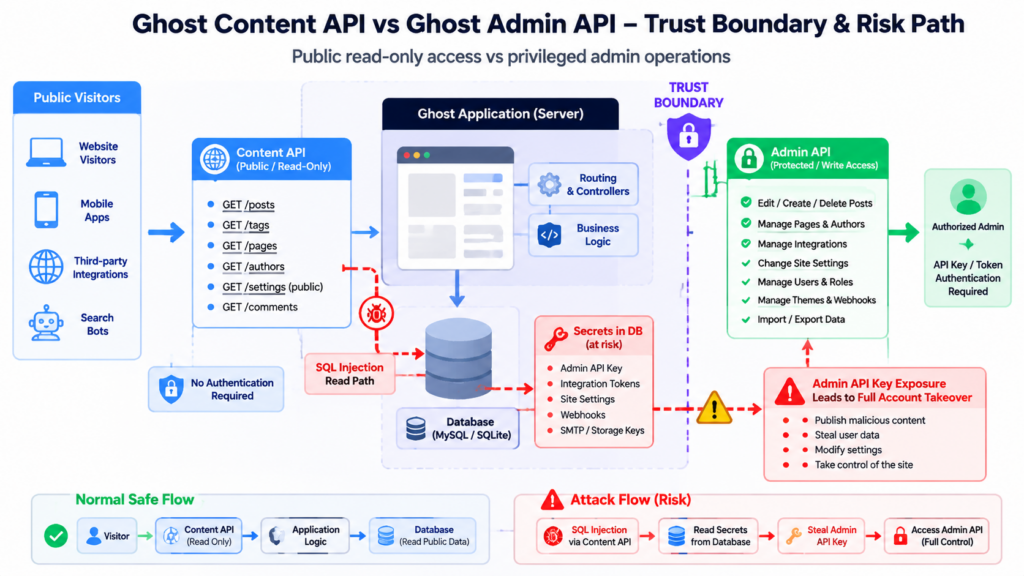
Ghost exposes different API surfaces for different jobs. The Content API is built for reading published content. The Admin API is built for managing the site. A vulnerability in the first surface becomes severe when it exposes secrets that allow access to the second.
Ghost’s Content API documentation describes Content API keys as safe for browsers and other insecure environments because they only provide access to public data. That design makes sense under normal conditions. A public website needs a way to fetch posts, tags, authors, pages, and other public content from JavaScript, mobile clients, front ends, or integrations. Treating the Content API key as a browser-safe identifier is not the same as saying the database behind it can be read arbitrarily. (Ghost Documentation)
The Admin API has a different trust model. Ghost’s Admin API key is represented as an id and secret, and the secret is used to sign a JWT that authorizes administrative requests. That is not a public browser key. If an attacker gets a valid Admin API key, the risk moves from content discovery to content control. Public reporting on the 2026 campaign described exactly that kind of escalation: attackers allegedly extracted Admin API keys and used them to modify site content at scale. (Ghost Documentation)
This distinction is the core of CVE-2026-26980. A vulnerable request does not need to look like an administrator logging into /ghost. It can begin as a public Content API request. The exploitability is tied to how Ghost built SQL for a Content API filter and ordering case, not to an attacker having a staff account.
That is why remediation cannot stop at “the Content API key is public anyway.” The Content API key itself being public is not the problem. The problem is that a SQL injection in a public API path can break the intended boundary between public content reads and internal database data.
Root cause, slug filter ordering and unsafe SQL construction
The most useful technical detail is in Ghost’s patch. Release 6.19.1 states that it fixed “SQL injection in Content API slug filter ordering.” The associated patch commit changed the code path that handled slug filter ordering so that user-controlled values were no longer interpolated directly into SQL strings. (GitHub)
The vulnerable pattern was not a simple SELECT * FROM posts WHERE id = '${id}' example from an old security training slide. It lived in a more subtle area: dynamic ordering logic. When application code builds a CASE expression to preserve the requested order of slugs, it can be tempting to generate fragments such as WHEN slug = 'value' THEN 0. That is still SQL construction. If value comes from a request and is placed into the SQL string without binding, the code is handling user input as SQL text.
The fix changed that model. The patched code builds CASE fragments with placeholders and pushes the slug and index values into bindings. In other words, the SQL structure stays SQL, while data stays data. The exact patch shows the important shift: slug values are passed through bindings rather than being embedded in the raw SQL fragment. (GitHub)
A simplified unsafe pattern looks like this:
// Unsafe pattern, simplified for explanation.
// Do not interpolate user-controlled slugs into SQL text.

function buildSlugOrderingUnsafe(tableName, slugs) {
  let order = "CASE";

  slugs.forEach((slug, index) => {
    order += ` WHEN \`${tableName}\`.\`slug\` = '${slug}' THEN ${index}`;
  });

  order += " END";
  return order;
}
A safer design keeps the SQL fragment and the data separate:
// Safer pattern, simplified for explanation.
// The SQL contains placeholders. User-controlled values go into bindings.

function buildSlugOrderingSafe(tableName, slugs) {
  const caseParts = [];
  const bindings = [];

  slugs.forEach((slug, index) => {
    caseParts.push(`WHEN \`${tableName}\`.\`slug\` = ? THEN ?`);
    bindings.push(slug.trim(), index);
  });

  return {
    sql: `CASE ${caseParts.join(" ")} END`,
    bindings
  };
}
The important lesson is not Ghost-specific. SQL injection often survives in modern codebases because developers assume an ORM or query builder removes the entire class of bugs. Query builders help, but raw fragments, dynamic ordering, custom filter DSLs, reporting queries, analytics search, and CASE expressions can still reintroduce string interpolation. OWASP’s SQL Injection Prevention Cheat Sheet recommends prepared statements and parameterized queries because they force developers to define SQL code first and pass each parameter separately. (cheatsheetseries.owasp.org)
CVE-2026-26980 is a good reminder that “read-only API” does not mean “low-risk SQL construction.” If the API endpoint can influence SQL structure, and the database contains secrets or administrative material, an unauthenticated read primitive can become an administrative compromise.
A defensive attack-chain model without exploit payloads
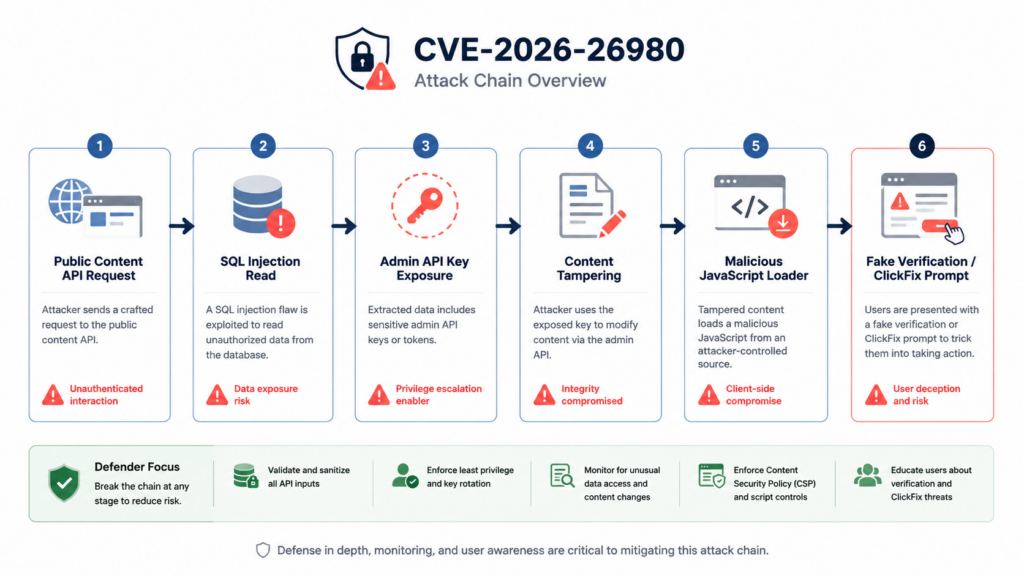
Defenders do not need a weaponized payload to understand the risk. They need a clear chain that maps public exposure to business impact.
A realistic chain for CVE-2026-26980 looks like this:
| Stade | Attacker objective | Defensive signal |
|---|---|---|
| Public probing | Identify Ghost instances and vulnerable version ranges | Requests to Ghost Content API endpoints, especially unusual filtre utilisation |
| SQLi trigger | Abuse slug filter ordering to read database data | Encoded or unusual filter syntax, abnormal response sizes, repeated tag or content queries |
| Secret extraction | Look for Admin API key material or integration data | Requests followed by administrative API activity from unfamiliar IPs |
| Control-plane use | Use Admin API to modify posts, pages, tags, themes, or injected code | Bulk content updates, suspicious integration use, unexpected staff or theme changes |
| Content poisoning | Insert JavaScript loaders into public content | New <script>, <iframe>, obfuscated JS, suspicious external domains |
| Visitor exploitation | Show fake verification prompts or ClickFix instructions | User reports of fake CAPTCHA, Cloudflare impersonation, PowerShell or Run prompt instructions |
| Persistence and rotation | Update payload URLs, use cloaking, avoid casual browsing detection | Conditional JS behavior by user-agent, geolocation, referrer, or developer tools detection |
That chain explains why CVE-2026-26980 received urgent attention from defenders. The first half happens server-side, through a public API and the database. The second half happens client-side, in the visitor’s browser. The handoff between the two is content integrity. Once attackers can write malicious scripts into trusted pages, the Ghost site becomes part of a social engineering delivery path.
The key is not that SQL injection automatically equals malware delivery. The key is that SQL injection can expose Admin API keys, and Admin API access can modify content. That changes the impact category from confidentiality-only to a broader operational and visitor-safety issue.
What the ClickFix campaign showed
In early May 2026, QiAnXin XLab reported a Ghost CMS poisoning incident tied to CVE-2026-26980. The researchers described attackers exploiting the vulnerability to obtain Admin API keys without authorization, then using the Ghost Admin API to tamper with articles in bulk. The injected code loaded malicious JavaScript and presented FakeCaptcha or ClickFix-style pages to visitors. XLab said it had identified more than 700 contaminated domains across universities, blockchain, AI and SaaS, security research, media, fintech, and other sectors.
BleepingComputer’s reporting described a similar chain. Attackers exploited vulnerable Ghost versions, stole Admin API keys, used elevated rights to inject JavaScript, and loaded second-stage code that presented a fake Cloudflare-style prompt. The visitor was asked to paste a command into Windows Run or PowerShell, a common ClickFix pattern. BleepingComputer also reported follow-on payloads such as DLL loaders, JavaScript droppers, and an Electron-based installer named UtilifySetup.exe. (BleepingComputer)
Malwarebytes described the visitor-facing impact: compromised Ghost-powered sites could silently inject malicious JavaScript into posts or pages, show fake verification prompts, and pressure users into copying and running commands. The same reporting emphasized that stolen Admin API keys may allow attackers to create, edit, delete, or tamper with public content and themes. (Malwarebytes)
The Hacker News and SecurityWeek also covered the campaign, citing XLab’s findings and noting the broad set of affected domains. SecurityWeek additionally reported that Ghost is used by more than 100,000 websites, based on the developer’s statement, which explains why even a modest compromise rate can create visible downstream risk. (The Hacker News)
There are two careful points to keep in mind. First, not every Ghost instance running an affected version was necessarily compromised. Exposure is not proof of exploitation. Second, not every compromised visitor necessarily executed the ClickFix command. Content poisoning creates a delivery surface; user execution still depends on social engineering. Those distinctions matter for incident communications, legal review, and customer notifications.
Still, the campaign changes the response threshold. A Ghost administrator who finds a site was vulnerable before patching should not simply upgrade and move on. The safer assumption is that keys and content may need review.
First-hour triage for Ghost administrators
The first hour should answer four questions:
| Question | Fastest useful check | Result that should raise urgency |
|---|---|---|
| Is the site in the affected version range | Check Ghost version through CLI, container metadata, package lock, or managed-hosting dashboard | Any Ghost version from 3.24.0 through 6.19.0 |
| Was the public Content API reachable | Review reverse proxy, CDN, WAF, and access logs for /ghost/api/content/ | Public requests to Content API endpoints with unusual filters |
| Did administrative content change unexpectedly | Review Ghost Admin logs, database timestamps, staff activity, integration activity | Bulk edits, unfamiliar IPs, new integration behavior, suspicious theme changes |
| Is public content poisoned | Search post, page, theme, and injection fields for suspicious scripts | External JS loaders, fake CAPTCHA text, iframe loaders, obfuscated code |
Version checks come first because patch status is unambiguous. If the instance is below 6.19.1 and was internet-facing, treat it as exposed.
Typical checks look like this:
# On a traditional Ghost-CLI install
ghost version

# If Ghost runs in a container
docker ps --format 'table {{.Names}}\t{{.Image}}\t{{.Status}}'
docker exec -it <ghost_container_name> ghost version

# If the app directory is available
node -p "require('./package.json').version" 2>/dev/null
grep '"ghost"' package.json package-lock.json yarn.lock pnpm-lock.yaml 2>/dev/null
Container tags and package files can be misleading if the deployment process copies code into an image or overrides runtime paths. Confirm the running application version, not only the source repository version. Managed Ghost hosting may expose version information differently; follow the provider’s administrative interface or support documentation.
After confirming version, upgrade to 6.19.1 or later. If the site is self-hosted and cannot be upgraded immediately, put a temporary reverse-proxy or WAF rule in place, restrict public access if business requirements allow, and schedule emergency patching. Ghost’s advisory says there is no application-level workaround. It also warns that blocking slug:[ or its URL-encoded equivalent in the filtre parameter may break legitimate slug-filter functionality, so this should be treated as a temporary control, not a fix. (GitHub)
Log review, what to look for
The vendor workaround hints at useful log indicators. You are not trying to prove exploitation with one string. You are trying to identify suspicious Content API filter behavior, then correlate it with administrative changes.
Start with public API paths:
# Nginx-style access logs
zgrep -Ei '/ghost/api/content/' /var/log/nginx/access.log* | head -n 50

# Look for content API calls involving filter parameters
zgrep -Ei '/ghost/api/content/.*filter=' /var/log/nginx/access.log* > /tmp/ghost-content-filter-requests.log

# Look for patterns specifically called out in public mitigation guidance
zgrep -Ei 'slug%3A%5B|slug:\[' /var/log/nginx/access.log* > /tmp/ghost-suspicious-slug-filter.log
Do not rely only on exact string matches. URLs can be encoded in more than one way, logs may store decoded paths, and attackers may test multiple request forms. If your access logs are JSON, parse them so the query string is visible:
# Example for JSON access logs with request fields
jq -r '
  select(.request_uri | test("/ghost/api/content/")) |
  [.time, .remote_addr, .method, .request_uri, .status, .body_bytes_sent] |
  @tsv
' /var/log/nginx/access.json > /tmp/ghost-content-api.tsv
Useful review pivots include:
| Log pivot | Pourquoi c'est important | Caution |
|---|---|---|
/ghost/api/content/tags/ | Some public writeups point to tag-related Content API paths during exploitation analysis | Endpoint alone is not proof |
filter= | The vulnerability involves Content API filtering and ordering behavior | Many legitimate Ghost front ends use filters |
slug:[ ou slug%3A%5B | Ghost advisory names this pattern for temporary WAF blocking | Attackers may encode or mutate syntax |
| High request volume from one IP | May indicate scanning or automated exploitation attempts | CDN logs may hide original client IP without proper headers |
| Large or unusual response sizes | Arbitrary reads may change response patterns | Requires baseline comparison |
| Content API requests followed by Admin API activity | Stronger signal of key theft and follow-on misuse | Needs Admin API or application logs |
A single suspicious request does not automatically prove compromise. A single clean grep also does not prove safety. The strongest evidence comes from correlation: suspicious Content API requests, followed by unknown administrative calls, followed by content modifications, followed by visitor reports or external script detection.
Admin API and content integrity review
If a site was vulnerable, the highest-value follow-up is to look for unauthorized administrative use and poisoned content. Public reporting on the May 2026 campaign described attackers using stolen Admin API keys to inject scripts into posts and pages, so content review is not optional. (奇安信 X 实验室)
Start with integration and staff review:
| Objet | What to check | Action if suspicious |
|---|---|---|
| Custom integrations | Unknown integrations, old integrations, exposed Admin API keys | Delete unused integrations and rotate remaining keys |
| Staff users | New users, unexpected role changes, stale admin accounts | Disable unknown accounts, force credential reset, review sessions |
| Themes | Modified theme files, unexpected script includes | Restore from known-good source or clean manually |
| Code injection settings | Header or footer scripts that were not approved | Remove, preserve evidence, identify source |
| Posts and pages | Unexpected external scripts, iframes, obfuscated JS, fake verification text | Revert from backup or clean after forensic copy |
| Webhooks | New destinations or modified automation | Disable and rotate downstream credentials |
Database-level content checks depend on the Ghost version and storage backend, but a defensive scan can look for suspicious HTML and script patterns. Run these only after taking a backup or snapshot.
For MySQL or MariaDB-style deployments:
-- Inspect recently updated posts and pages.
SELECT id, title, status, type, updated_at
FROM posts
ORDER BY updated_at DESC
LIMIT 50;

-- Search for common content-poisoning markers.
SELECT id, title, type, updated_at
FROM posts
WHERE html LIKE '%<script%'
   OR html LIKE '%<iframe%'
   OR html LIKE '%powershell%'
   OR html LIKE '%cmd.exe%'
   OR html LIKE '%Cloudflare%'
   OR html LIKE '%captcha%'
ORDER BY updated_at DESC
LIMIT 100;
For SQLite deployments:
sqlite3 content/data/ghost.db "
SELECT id, title, type, updated_at
FROM posts
WHERE html LIKE '%<script%'
   OR html LIKE '%<iframe%'
   OR html LIKE '%powershell%'
   OR html LIKE '%cmd.exe%'
   OR html LIKE '%Cloudflare%'
   OR html LIKE '%captcha%'
ORDER BY updated_at DESC
LIMIT 100;
"
These queries are not a complete malware detector. They are triage. Many legitimate sites use scripts, iframes, captcha text, and third-party embeds. What matters is whether the script is new, obfuscated, externally loaded from an unfamiliar domain, inserted across many posts at once, or connected to user reports of fake verification prompts.
Look beyond posts.html. Ghost content can exist in rich editor formats, theme files, site settings, header or footer injection fields, and integrations. Attackers with administrative access may choose the place that gives the widest coverage with the least obvious editorial footprint.
Temporary WAF controls
Ghost’s advisory mentions a temporary WAF or reverse-proxy rule blocking requests with filtre containing slug%3A%5B ou slug:[. That can reduce exposure while patching, but it may break legitimate slug filtering and should not be treated as a substitute for upgrading to 6.19.1 or later. (GitHub)
A minimal Nginx-style defensive rule might look like this:
# Temporary mitigation only.
# Test against legitimate Ghost routes before deployment.

set $ghost_block_suspicious_filter 0;

if ($arg_filter ~* "slug:\[") {
    set $ghost_block_suspicious_filter 1;
}

if ($query_string ~* "slug%3A%5B") {
    set $ghost_block_suspicious_filter 1;
}

if ($request_uri ~* "^/ghost/api/content/") {
    set $ghost_api_request 1;
}

if ($ghost_block_suspicious_filter = 1) {
    return 403;
}
Nginx si behavior has sharp edges in complex configurations. In production, many teams prefer map directives, WAF-managed rules, or CDN rules that are easier to test and roll back. The rule should be logged separately so defenders can see whether it is blocking active probes.
For Cloudflare-style controls, the idea is to block requests to Ghost Content API paths when the query string contains the risky filter pattern. For AWS WAF, the same logic maps to URI path and query-string match statements. The exact expression depends on the edge provider and whether logs store decoded or encoded values.
The control should have an expiration date. Once the application is upgraded and validated, keep detection if it is useful, but do not rely on a brittle string block as the main security boundary.
Patch, rotate, clean, validate
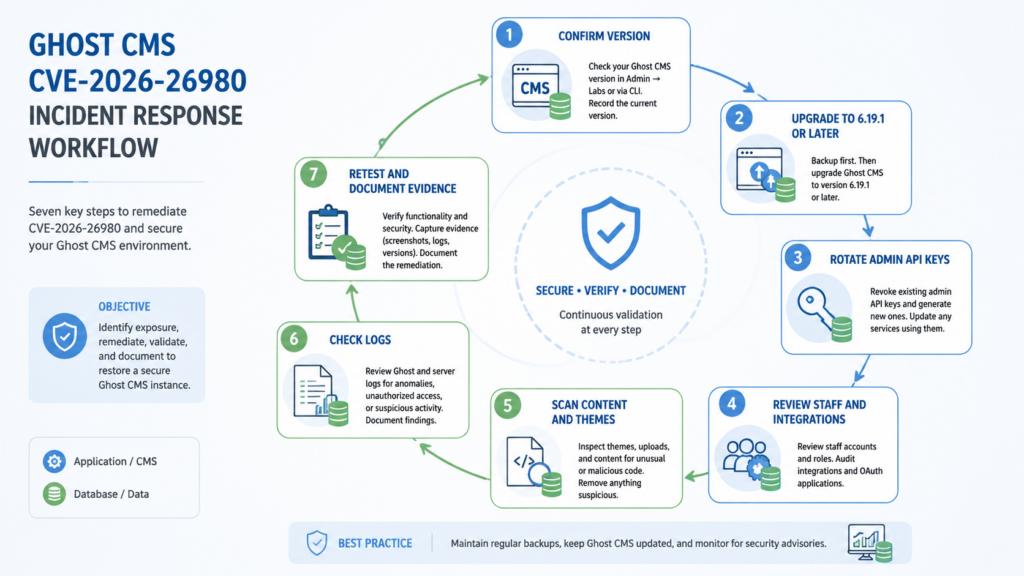
A safe remediation sequence for CVE-2026-26980 looks like this:
| Étape | Objectif | Notes |
|---|---|---|
| Snapshot first | Preserve evidence and create rollback path | Include database, content, theme files, logs, and configuration |
| Upgrade Ghost | Remove the vulnerable code path | Target 6.19.1 or a later maintained version |
| Rotate Admin API keys | Invalidate secrets that may have been read | Rotate keys for all custom integrations, not only obviously used ones |
| Review staff users | Detect unauthorized or stale administrative access | Remove unknown users and force resets where needed |
| Review integrations and webhooks | Reduce persistence and downstream abuse | Delete unused integrations and verify webhook targets |
| Scan content and themes | Remove malicious JavaScript or injected markup | Preserve samples for forensic review before deletion |
| Check visitor-facing behavior | Confirm no fake CAPTCHA or external loader remains | Test from clean browser profiles and multiple networks |
| Review logs | Build a timeline of exposure and possible compromise | Correlate Content API probes with content changes |
| Retest | Confirm the vulnerability is not reachable and content is clean | Use authorized, non-destructive validation only |
Key rotation deserves special attention. Ghost’s advisory explicitly warns that API keys may have been exposed and recommends reviewing staff users and rotating keys. (GitHub) If a key was read before patching, upgrading the code does not un-read the key. Attackers could still use a stolen Admin API key until it is rotated or the related integration is deleted.
Cleaning content is also not enough if the administrative access path remains valid. An attacker with a still-working Admin API key can reinject scripts after cleanup. Conversely, rotating keys is not enough if poisoned content remains live. The order matters less than completeness, but in active compromise, isolate or restrict administrative and public write paths as quickly as possible.
Safe validation without handing attackers a recipe
Validation should prove exposure and remediation without reproducing public exploitation against a production system. The safest checks are version-based, configuration-based, and log-based.
Start with version:
ghost version
Then verify that the application actually serves the patched build. If you use Docker, CI/CD, or managed infrastructure, confirm the live container or instance, not only the source repository.
Next, verify normal Content API behavior using benign requests already used by your front end. For example, a site that legitimately queries tags or posts should still return expected public content after the upgrade. Do not use public exploit strings against a production system unless you have a documented authorization scope and a safe test plan.
Then validate that temporary rules, if used, are visible in logs:
# Confirm that defensive blocks are logged.
zgrep -Ei 'ghost.*suspicious.*filter|slug%3A%5B|slug:\[' /var/log/nginx/*log*
Finally, validate the absence of known bad outcomes:
# Look for suspicious external script insertions after remediation.
sqlite3 content/data/ghost.db "
SELECT id, title, updated_at
FROM posts
WHERE updated_at > datetime('now', '-14 days')
  AND (
    html LIKE '%<script%'
    OR html LIKE '%<iframe%'
    OR html LIKE '%powershell%'
    OR html LIKE '%captcha%'
  )
ORDER BY updated_at DESC;
"
For teams that run repeated authorized security checks across many assets, the challenge is not one curl command. The challenge is producing consistent evidence: which Ghost instances were exposed, which were patched, which keys were rotated, which content was reviewed, and which residual signals remain. In that workflow, an agentic testing platform such as Penligent can be relevant when used for controlled asset discovery, benign API validation, evidence capture, retesting, and report generation. Penligent’s AI pentesting workflow describes verified findings, reproduction context, remediation guidance, human-in-the-loop control, browser verification, and instant retesting, which map naturally to the defensive validation and documentation steps around a CVE like this. (Penligent)
The key phrase is “authorized.” CVE-2026-26980 affects a public interface, but testing a third-party Ghost site without permission can still be illegal and harmful. Keep validation inside owned assets, customer-approved scopes, or lab replicas.
Incident response, from exposed API to visitor risk
If logs or content review suggest exploitation, treat the site as both a server-side incident and a visitor-facing security incident.
Server-side response should answer:
| Response question | Evidence source |
|---|---|
| When was the vulnerable version first internet-facing | Deployment history, CDN logs, server logs |
| When was the site patched | Package manager, Ghost CLI, release deployment logs |
| Were suspicious Content API requests received | Reverse proxy, WAF, CDN, access logs |
| Were Admin API keys possibly exposed | Vulnerable period, database contents, suspicious admin activity |
| Were Admin API keys used unexpectedly | Ghost logs, integration logs, IP address history |
| Was content modified in bulk | Post and page timestamps, audit trails, database diffs |
| Was malicious JavaScript served to visitors | HTML snapshots, CDN cache, user reports, threat intel |
| Which visitors may have been affected | Web analytics, server logs, campaign URL paths |
Visitor-facing response should answer a different set of questions:
| Visitor-risk question | Pourquoi c'est important |
|---|---|
| Did the site show fake verification prompts | ClickFix campaigns rely on user action, not only browser exploitation |
| Did pages instruct users to run PowerShell, Windows Run, Terminal, or command-line instructions | This is a high-confidence social engineering indicator |
| Did malicious JS load only for certain users | Cloaking may hide payloads from administrators or scanners |
| Were download links or installers served | Public reporting described follow-on payloads in some cases |
| Do users need notification | Depends on jurisdiction, organization policy, and confirmed exposure |
ClickFix is especially dangerous because it converts site trust into user execution. A visitor who would not download malware from an unknown domain may obey instructions that appear on a university blog, a SaaS product site, or a security research page. The compromised Ghost site acts as trust laundering.
If your investigation confirms that visitors were shown malicious prompts, cleanup is not just a CMS task. You may need user-facing warnings, support scripts, endpoint detection guidance, and coordination with domain registrars or hosting providers for payload infrastructure. Do not overstate what happened if the evidence is incomplete, but do not hide the visitor risk if malicious scripts were live.
Related Ghost CVEs that sharpen the risk model
CVE-2026-26980 is part of a broader pattern: modern CMS security problems often cross API boundaries, browser contexts, and administrative control planes. Two other Ghost CVEs from the same general period help explain why defenders should think in systems, not single endpoints.
| CVE | Zone affectée | Attack requirement | Real risk | Fix or mitigation | Why it is relevant |
|---|---|---|---|---|---|
| CVE-2026-26980 | Ghost Content API SQL injection | Unauthenticated network access | Arbitrary database reads, possible Admin API key exposure, content poisoning after key theft | Upgrade to 6.19.1 or later, rotate keys, review content and logs | Public read API can become an administrative compromise path |
| CVE-2026-22596 | Ghost Admin API SQL injection in member events | Admin API authentication credentials required | Arbitrary SQL execution by a user who already has Admin API credentials | Fixed in Ghost 5.130.6 and 6.11.0 | Shows why Admin API credentials are high-value and should be protected, minimized, and rotated after exposure (NVD) |
| CVE-2026-24778 | Ghost Portal cross-site scripting | A crafted link accessed by an authenticated staff user or member | JavaScript execution with victim permissions, with possible account takeover depending on context | Fixed in Ghost 5.121.0 and 6.15.0, Portal patches also documented | Shows how browser-context issues can bridge public pages, authenticated users, and privileged actions (NVD) |
The comparison matters because a CMS is not only a database-backed web app. It is a content supply chain. It stores secrets, renders public pages, hosts scripts, integrates with newsletters and payment systems, and gives trusted authors the ability to reach visitors. A vulnerability that starts in one layer can become a compromise in another.
CVE-2026-22596 is especially relevant because it involves SQL injection in the Admin API and requires Admin API credentials. On its own, that is a different precondition from CVE-2026-26980. Together, the two cases illustrate a hard rule: if Admin API credentials may have been exposed, treat them as powerful secrets, not harmless integration tokens.
CVE-2026-24778 is relevant for a different reason. It shows that a crafted browser interaction in the Ghost ecosystem can execute JavaScript with authenticated user permissions. That is not the same as CVE-2026-26980’s server-side SQL injection, but both vulnerabilities remind defenders that CMS security lives at the boundary of API design, authentication state, and rendered content.
Common mistakes that lead to incomplete remediation
The most common mistake is patch-only thinking. Upgrading to 6.19.1 or later removes the vulnerable code path, but it does not rotate an Admin API key that may already have been read, and it does not remove malicious JavaScript already inserted into content.
A second mistake is treating lack of visible defacement as proof of safety. The ClickFix campaign did not need to replace a homepage with an obvious banner. Silent JavaScript injection is more useful to attackers. It can be conditional, delayed, cloaked, and limited to specific visitors.
A third mistake is assuming that the Content API key being public makes key exposure irrelevant. That is true only for the Content API key itself under normal Ghost design. It is not true for Admin API keys, custom integration secrets, session material, or other database-backed values.
A fourth mistake is searching only for one malicious domain. Public reporting described loaders and updated payload infrastructure. Attackers can rotate domains quickly. Search for behavior and structure: external script loaders, obfuscated JavaScript, fake verification text, suspicious iframes, and bulk modifications.
A fifth mistake is relying on WAF signatures after the vulnerable version remains deployed. WAF controls can buy time, and Check Point published protection coverage for exploit attempts, but application patching remains the primary fix. (Check Point Software)
A sixth mistake is skipping downstream systems. Ghost integrations may push content into newsletters, webhooks, syndication systems, static caches, or social channels. If poisoned content was distributed or cached, cleaning only the Ghost database may not remove every copy.
Hardening Ghost after CVE-2026-26980
Once the emergency response is complete, reduce the chance that the next CMS bug turns into the same class of incident.
Keep Ghost and dependencies current. CVE-2026-26980 affected a wide range of versions, and the fix was released in 6.19.1. Release monitoring needs to include security advisories, not just feature updates. Self-hosted CMS deployments often lag because the site still works and content teams do not want downtime. That creates long exposure windows.
Reduce Admin API key sprawl. Every custom integration is a potential administrative secret. Delete unused integrations. Record the owner, purpose, creation date, rotation date, and expected source IP or system for each remaining integration. If an integration only needs to read public content, do not give it an administrative path.
Separate operational roles. Staff users who publish content do not all need full administrative access. Review roles regularly. Remove former employees, contractors, test users, and unused accounts.
Monitor content integrity. CMS monitoring should not only check uptime. It should detect unexpected script insertions, iframe additions, theme changes, and high-volume post updates. A simple baseline diff of rendered HTML can catch many content-poisoning attempts before visitors report them.
Use a strict Content Security Policy where possible. CSP will not fix SQL injection, and it may require tuning for legitimate Ghost themes and integrations. Still, a well-maintained CSP can reduce the blast radius of injected scripts by restricting where JavaScript can load from and where forms or frames can connect.
Log Content API and Admin API activity. Many sites keep web access logs but do not retain enough detail to investigate API misuse. At minimum, preserve request path, query string, status, response size, source IP after CDN forwarding, user agent, and timestamp. For administrative events, preserve actor, integration, IP address, object modified, and timestamp where available.
Test raw SQL and query-builder escape hatches. The Ghost patch is a useful engineering lesson. Places that call brut, build CASE expressions, construct dynamic order clauses, or implement custom filter languages deserve extra review. Add regression tests with inputs that include quotes, separators, encodings, unusual Unicode, long arrays, empty arrays, duplicate slugs, and malformed filter syntax. The goal is not only to block a known payload; it is to ensure user input cannot become SQL syntax.
Build an incident playbook for CMS poisoning. The playbook should include database snapshot commands, theme backup steps, key rotation instructions, content search queries, CDN purge procedures, user notification templates, and decision points for legal or compliance review. A prepared playbook saves hours when a public site is actively serving malicious content.
Engineering lessons from the patch
CVE-2026-26980 illustrates a class of bugs that appears when an application creates a user-friendly query language on top of SQL. Content APIs often support filters such as author, tag, slug, visibility, date, and ordering. Those features are useful, but they also create a parser-to-SQL translation layer. Every translation layer needs tests for injection, authorization, and resource usage.
The patched Ghost code moved user-controlled values into bindings. That is the correct direction. But the larger engineering principle is to treat dynamic SQL generation as a security boundary. Query builders reduce repetitive SQL, but they do not remove responsibility for raw fragments.
A practical secure-review checklist for similar code paths:
| Review item | Good sign | Red flag |
|---|---|---|
| User-controlled values | Passed as bindings or parameters | Interpolated into raw SQL strings |
| Dynamic ordering | Whitelisted columns and directions | Request values directly decide SQL fragments |
| Filter DSL parsing | Parsed into typed internal representation | Raw filter text partially copied into SQL |
| Array filters | Each element bound independently | Joined into quoted strings manually |
| Error behavior | Generic errors, no SQL details in responses | Database errors leak syntax or table names |
| Regression tests | Include malformed, encoded, and quote-containing inputs | Only test normal friendly slugs |
| Secret storage | Admin secrets minimized and rotated | Long-lived unused integrations accumulate |
| Contrôle | API abuse and content modifications logged | Only page views and uptime are tracked |
The most subtle review item is dynamic ordering. Developers often focus SQL injection review on OÙ clauses. But ordering, grouping, aggregation, CASE statements, JSON path expressions, and search ranking formulas can be just as dangerous when they embed request values.
A safe mental model is simple: any time user input changes SQL text, stop and redesign. If user input changes only bound values, the code is usually on safer ground, assuming identifiers and operators are separately whitelisted.
Detection logic for content poisoning
The campaign reporting around CVE-2026-26980 makes content-poisoning detection central. A Ghost site can be patched and still serve malicious content if injected code remains.
Useful detection signals include:
| Signal | Pourquoi c'est important | False positive risk |
|---|---|---|
New external <script> tags across many posts | Attackers often use loaders to fetch second-stage code | Analytics, ad networks, and legitimate embeds |
| Obfuscated JavaScript | Malware loaders commonly hide logic and domains | Some legitimate widgets are minified |
| Fake CAPTCHA or verification text | ClickFix campaigns use fake human verification prompts | Real anti-bot tools may use similar words |
PowerShell, cmd.exe, Windows Run instructions | Strong ClickFix indicator | Rare in normal CMS content |
| Hidden iframes | Can load remote content silently | Some embeds use iframes legitimately |
| Theme footer changes | One edit can affect the whole site | Legitimate theme customization |
| Code injection settings modified | Ghost supports header and footer injection features | Marketing tags may be legitimate |
| CDN cache serving old content | Poisoned pages can persist after database cleanup | Cache TTL and purge behavior vary |
A simple rendered-page scanner can help during triage:
#!/usr/bin/env bash
set -euo pipefail

DOMAIN="https://example.com"
OUT="/tmp/ghost-render-check"
mkdir -p "$OUT"

# Replace these with known high-traffic paths from your site.
paths=(
  "/"
  "/about/"
  "/tag/news/"
  "/rss/"
)

for path in "${paths[@]}"; do
  safe_name=$(echo "$path" | sed 's#[/^]#_#g')
  curl -fsSL "$DOMAIN$path" -o "$OUT/${safe_name}.html" || true
done

grep -RniE '<script|<iframe|powershell|cmd\.exe|captcha|cloudflare|verify you are human' "$OUT" || true
This is not a malware scanner. It is a quick way to collect suspicious page artifacts for manual review. Run it from more than one network if you suspect cloaking. Some malicious scripts behave differently for administrators, cloud provider IPs, search crawlers, or repeated visits.
For larger sites, compare current rendered HTML against a known-good snapshot. Differences in scripts, external domains, and hidden markup are often easier to review than raw database fields.
What to rotate after patching
At minimum, rotate Ghost Admin API keys for custom integrations. Ghost’s advisory specifically recommends key rotation because API keys may have been exposed. (GitHub) If you do not know whether a key was exposed, assume exposure if the instance was vulnerable and reachable.
Depending on the environment, also review or rotate:
| Secret or access path | Rotate or review | Reason |
|---|---|---|
| Ghost Admin API keys | Rotate | They may permit administrative content actions |
| Custom integration secrets | Rotate or recreate | Some integrations may store related secret material |
| Staff passwords | Reset if suspicious staff activity exists | Admin compromise may involve account manipulation |
| Staff sessions | Invalidate where possible | Reduces risk from active unauthorized sessions |
| Webhook tokens | Rotate if exposed or if webhooks changed | Prevents downstream abuse |
| Email service credentials | Review and rotate if stored or integrated | Compromised CMS often connects to mailing systems |
| CDN tokens | Review if available to CMS integrations | Prevents cache or edge configuration abuse |
| Database credentials | Rotate if evidence suggests broader server compromise | SQLi alone does not imply OS compromise, but incident evidence may |
Avoid rotating everything blindly before preserving evidence. Emergency rotation is sometimes necessary, but if you have a live incident and regulatory obligations, coordinate with incident response, legal, and operations so evidence is not destroyed unnecessarily. A snapshot before cleanup is often worth the few extra minutes.
Version management and exposure windows
One reason CVE-2026-26980 became widely relevant is the affected version range. A site running Ghost 5.x may feel modern but still be in scope. A site running early 6.x may also be in scope. The fixed version is 6.19.1. (GitHub)
Security teams should avoid vague inventory labels like “Ghost 6” or “current Ghost.” The actionable question is whether the running version is lower than 6.19.1.
A basic inventory record should include:
| Champ d'application | Exemple de valeur |
|---|---|
| Hostname | blog.example.com |
| Ghost version | 6.18.0 |
| Deployment type | Docker, Ghost-CLI, managed hosting, Kubernetes |
| Internet exposure | Public, private, VPN-only |
| Content API exposed | Yes or no |
| Admin path exposure | Public, restricted, VPN-only |
| Patch status | Upgraded to 6.19.1 or later |
| Key rotation status | Completed or pending |
| Content scan status | Clean, suspicious, confirmed poisoned |
| Evidence owner | Person or team responsible |
For organizations with many acquired brands, blogs, microsites, or developer portals, the hard part may be finding every Ghost instance. Search asset inventories, DNS records, HTTP titles, container registries, infrastructure-as-code repositories, and old marketing infrastructure. CMS systems often live outside the main application security program.
Why CVSS disagreement should not delay action
The public records show a notable scoring difference. GitHub’s CNA record scores CVE-2026-26980 as 9.4 Critical with high confidentiality and integrity impact and low availability impact. NVD’s initial analysis lists 7.5 High with high confidentiality impact but no integrity or availability impact. (GitHub)
This is not unusual for vulnerabilities where the direct technical primitive is narrower than the observed operational impact. A raw database read maps cleanly to confidentiality. If that read can expose Admin API keys that enable content modification, integrity impact becomes a serious concern. Scoring systems sometimes diverge on whether to count that follow-on effect directly.
Defenders do not need to settle the scoring debate before acting. The practical facts are enough:
- The vulnerable endpoint is unauthenticated.
- The affected versions span multiple major releases.
- The database read can expose sensitive material.
- Ghost’s advisory recommends key rotation.
- Real-world content poisoning tied to the CVE has been publicly reported.
Those facts justify emergency handling for internet-facing Ghost instances in the affected range.
False positives and limits in detection
Good detection work includes humility. Several indicators associated with CVE-2026-26980 can appear in legitimate traffic or content.
A site may use the Content API heavily for normal front-end rendering. Tag endpoints and filters may appear in ordinary page loads. Scripts and iframes are common in marketing sites. Captcha language can be legitimate. Minified JavaScript is not necessarily malicious. Even slug:[ may appear in legitimate filter use, which is why Ghost warned that blocking the pattern can break expected functionality. (GitHub)
The goal is not to declare compromise from one indicator. The goal is to combine weak signals into a timeline. A stronger case might look like this:
- The site ran Ghost 6.18.0 until May 2026.
- Access logs show unusual Content API filter requests from unfamiliar IP ranges.
- Soon after those requests, Admin API activity appears from a different unknown IP.
- Dozens or hundreds of posts show the same new external script.
- The script domain matches threat intelligence or user reports.
- Visitors report fake Cloudflare or CAPTCHA prompts.
- The suspicious script disappears when cleaned but returns until Admin API keys are rotated.
That timeline is much more meaningful than any single grep hit.
What developers should learn from CVE-2026-26980
CVE-2026-26980 is a useful case study for API developers, not only Ghost administrators.
First, public APIs still need strict backend isolation. A Content API can expose public content, but the query engine behind it must never allow public inputs to reach internal tables, secrets, or unbounded database behavior.
Second, filter languages are attack surfaces. Any API that accepts a flexible filter grammar should have security tests for parser abuse, injection, resource exhaustion, and authorization bypass. Convenience features such as filter=tag:news+status:published are valuable, but they create translation logic that must be treated as security-sensitive.
Third, ordering code deserves the same review as filtering code. Developers often assume injection happens in OÙ, pas ORDER BY. CVE-2026-26980 shows that dynamic ordering and CASE generation can be equally risky.
Fourth, secrets stored in application databases can turn read bugs into write bugs. If a database read can retrieve administrative tokens, the application’s real impact may include content modification, account abuse, or downstream service compromise.
Fifth, patch notes matter. The Ghost release note was short, but it pointed to the exact vulnerable area: Content API slug filter ordering. The patch showed the remediation principle clearly: move user-controlled values into bindings.
A concise secure pattern for dynamic filters is:
const allowedColumns = new Set(["title", "slug", "published_at"]);
const allowedDirections = new Set(["asc", "desc"]);

function buildOrderBy(column, direction) {
  if (!allowedColumns.has(column)) {
    throw new Error("Unsupported order column");
  }

  if (!allowedDirections.has(direction)) {
    throw new Error("Unsupported order direction");
  }

  // Identifiers cannot usually be bound like values.
  // They must be chosen from a strict allowlist.
  return { column, direction };
}

function buildWhereBySlug(queryBuilder, slug) {
  // Values should be bound through the query builder.
  return queryBuilder.where("slug", "=", slug);
}
Identifiers and values need different defenses. Values should be bound. Identifiers should be chosen from strict allowlists. SQL operators, sort directions, function names, and JSON paths should not come directly from request strings unless they are parsed into a safe internal representation.
FAQ
What is CVE-2026-26980?
- CVE-2026-26980 is a SQL injection vulnerability in Ghost CMS’s Content API.
- Public records state that it affects Ghost versions 3.24.0 through 6.19.0 and is fixed in 6.19.1.
- The vulnerability allows unauthenticated attackers to read arbitrary database data.
- Its practical risk is high because database reads may expose Admin API key material, which can then be used for content tampering.
Which Ghost versions are affected by CVE-2026-26980?
- Affected versions are Ghost 3.24.0 through 6.19.0.
- Ghost 6.19.1 contains the fix.
- Do not treat “Ghost 6” as safe unless the exact running version is 6.19.1 or later.
- Check the live running instance, not only a repository, package file, or container tag.
Does an attacker need to log in to exploit this Ghost SQL injection?
- Public advisory data describes the vulnerability as unauthenticated.
- The vulnerable surface is the Ghost Content API, not a staff-only admin page.
- A public Ghost site running an affected version should be treated as exposed unless network controls blocked access to the Content API.
- Admin login is not required for the initial database-read condition described in the advisory.
Why can a Content API bug expose Admin API risk?
- Ghost’s Content API is meant for public content reads, and its Content API key is designed to be browser-safe.
- The Admin API key is different because it authorizes administrative operations through signed requests.
- CVE-2026-26980 can turn a public Content API path into an arbitrary database-read primitive.
- If administrative secrets are read from the database, attackers may be able to move from public read access to content modification.
Is a WAF rule blocking slug:[ enough?
- No.
- Ghost’s advisory describes blocking
slug:[or its URL-encoded form as a temporary WAF or reverse-proxy measure. - The same advisory says there is no application-level workaround and that blocking this pattern may break legitimate slug-filter functionality.
- The primary fix is upgrading to Ghost 6.19.1 or later.
- WAF rules can reduce exposure during emergency patching, but they do not rotate exposed secrets or clean poisoned content.
What should I rotate after patching CVE-2026-26980?
- Rotate Ghost Admin API keys for custom integrations.
- Delete unused integrations rather than rotating keys that no longer need to exist.
- Review staff users and reset credentials if there is suspicious administrative activity.
- Review webhooks, email integrations, and downstream services connected to Ghost.
- Consider broader credential rotation if evidence suggests server-level compromise beyond the Ghost application.
How can I safely check whether my Ghost site was abused?
- Confirm whether the running version was in the affected range before patching.
- Review access logs for unusual
/ghost/api/content/requests, especially requests withfiltreand suspicious slug filter patterns. - Review Admin API activity for unfamiliar IPs, integrations, or bulk content changes.
- Search posts, pages, theme files, and code injection settings for unexpected scripts, iframes, obfuscated JavaScript, fake CAPTCHA text, or command-execution instructions.
- Preserve evidence before cleanup if visitor impact, legal review, or customer notification may be required.
What should visitors do if they saw a fake verification prompt on a Ghost-powered site?
- They should not paste commands into Windows Run, PowerShell, Terminal, or any command-line tool.
- If they already ran a command, they should disconnect from sensitive accounts, run endpoint protection, and contact their organization’s security team if using a work device.
- They should save the URL, time, screenshot, and any command text shown by the page.
- Site operators should treat such reports as high-signal indicators of content poisoning and investigate immediately.
CVE-2026-26980 deserves high priority because it connects a public API flaw to administrative secrets and visitor-facing content poisoning. The narrow technical bug is unsafe SQL construction in Ghost’s Content API slug filter ordering. The larger security lesson is about control planes: a CMS stores content, secrets, integrations, themes, and trust. Once a public read path can expose administrative keys, the incident stops being only a database issue.
The practical response is clear. Upgrade Ghost to 6.19.1 or later. Rotate Admin API keys. Review staff users and custom integrations. Search content and themes for injected JavaScript. Correlate Content API probes with administrative changes. Clean cached and rendered pages. Retest with evidence. Treat every public CMS as part of your software supply chain, because visitors will often trust what it serves before they trust what their browser or operating system tries to warn them about.

 French
  English
  German
  Spanish
  Portuguese
  Japanese
  Korean
  Hindi
Hindi  Arabic
  Turkish
  Hebrew