
CVE-2026-41089 is not dangerous merely because it is a remote code execution bug. It is dangerous because the vulnerable component sits close to the authentication fabric of Windows domains. Microsoft describes the issue as a stack-based buffer overflow in Windows Netlogon that allows an unauthorized attacker to execute code over a network. The MSRC record names the vulnerability “Windows Netlogon Remote Code Execution Vulnerability,” assigns it a Critical severity, maps it to CWE-121, and gives it a CVSS 3.1 base score of 9.8 with the vector AV:N/AC:L/PR:N/UI:N/S:U/C:H/I:H/A:H. (api.msrc.microsoft.com)
The timeline matters. Microsoft’s May 12, 2026 record listed the vulnerability as not publicly disclosed and not exploited at publication, with “Exploitation Less Likely” for the latest software release. That was the vendor state at release time, not a permanent statement about the life of the bug. On May 29, 2026, the Centre for Cybersecurity Belgium updated its Microsoft Patch Tuesday advisory and stated that CVE-2026-41089 was now actively exploited in the wild, recommending the highest-priority patching after testing and increased monitoring for suspicious activity. (api.msrc.microsoft.com)
For defenders, the most important phrase in Microsoft’s FAQ is “a Windows server that is acting as a domain controller.” Microsoft says an attacker could send a specially crafted network request to such a server; if successful, Netlogon could mishandle the request and allow the attacker to run code on the affected system without signing in or having prior access. CCB’s advisory uses the same operational framing and adds that exploitation does not require prior privileges or user interaction and can be performed remotely. (api.msrc.microsoft.com)
That combination changes the response posture. A vulnerable domain controller is not just another Windows Server asset. It is part of the identity control plane. If an attacker reaches code execution on a domain controller, the incident may move quickly toward credential access, directory reconnaissance, privileged group manipulation, Group Policy abuse, lateral movement, backup interference, and ransomware staging. Not every successful exploit automatically performs those steps, and public official material does not give enough detail to claim a fixed post-exploitation chain. The point is simpler: code execution on a domain controller gives an attacker a much more valuable starting position than code execution on a typical application host.
The facts defenders can rely on
The public record is clear enough to support emergency handling, but not detailed enough to support speculative exploit internals. Microsoft confirms the vulnerability type, component, impact, CVSS vector, CWE mapping, and domain-controller exploitation scenario. NVD mirrors the description and lists CWE-121 with Microsoft as the CNA source. CCB later adds the operational update that exploitation had been observed in the wild. Those are the stable facts worth building a response plan around. (api.msrc.microsoft.com)
| Champ d'application | Current public information |
|---|---|
| CVE | CVE-2026-41089 |
| Vendor title | Windows Netlogon Remote Code Execution Vulnerability |
| Composant | Windows Netlogon |
| Faiblesse | CWE-121, stack-based buffer overflow |
| Impact | Remote code execution |
| CVSS 3.1 | 9.8 Critical |
| Vecteur | AV:N/AC:L/PR:N/UI:N/S:U/C:H/I:H/A:H |
| Authentication needed | None, according to the CVSS vector |
| User interaction | None, according to the CVSS vector |
| Main target described in Microsoft FAQ | Windows server acting as a domain controller |
| Release date in MSRC API | May 12, 2026 |
| Exploitation status at Microsoft publication | Not exploited, not publicly disclosed |
| Later exploitation status | CCB Belgium updated on May 29, 2026 that the issue was actively exploited in the wild |
| Primary remediation | Install Microsoft security updates and verify patched builds |
The “no privileges” and “no user interaction” parts are especially important. Many severe Windows bugs still require a victim workflow: opening a document, connecting to a malicious server, joining a call, browsing to an attacker-controlled page, or running a local process. This issue is described as network-reachable against a domain controller, which means defenders should treat network path analysis and DC patch state as first-class evidence rather than afterthoughts.
CISA’s ADP change record in NVD also classified the issue with SSVC attributes showing “automatable: yes” and “technicalImpact: total” in a May 13 timestamped entry. That does not override the later CCB statement about exploitation, and it should not be read as a full threat-intelligence report. It does support the operational view that this is not a low-touch advisory to leave for the next regular maintenance cycle. (NVD)
What Netlogon does inside a Windows domain
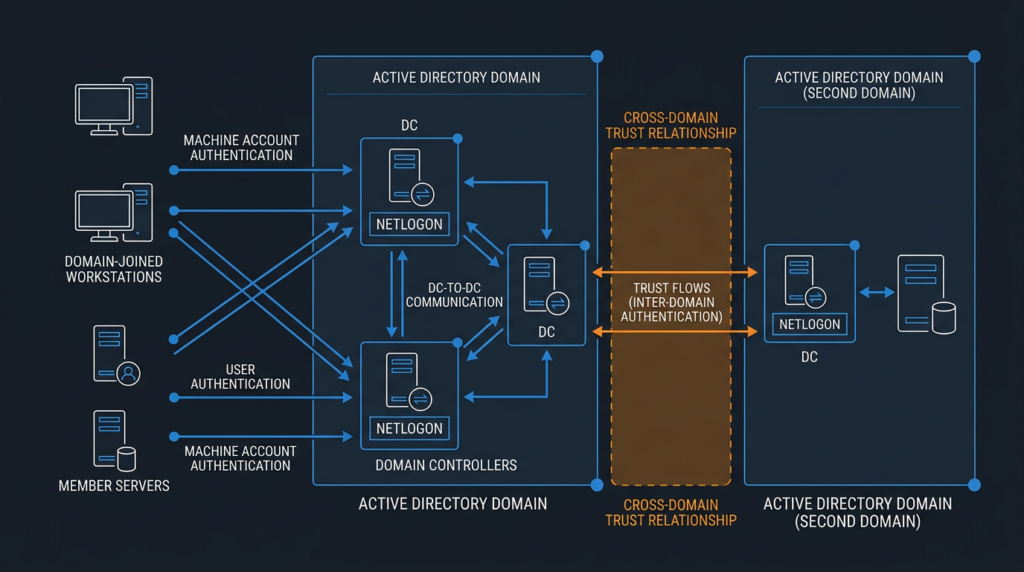
Netlogon is easy to underestimate because the name sounds like a background login helper. In Active Directory environments, it is much closer to the machinery of trust. Microsoft’s MS-NRPC specification describes Netlogon Remote Protocol as an RPC interface used for user and machine authentication on domain-based networks. It is also used to maintain relationships from domain members to domain controllers, among domain controllers in a domain, and between domain controllers across domains. (Microsoft Learn)
That matters because attacks against identity infrastructure rarely stop at the initial bug. A web server compromise often requires the attacker to find credentials, pivot, and build privilege over time. A domain-controller compromise starts much closer to the place where identity, policy, trust relationships, and authentication decisions are made. Even if the exploit primitive is “only” a memory corruption issue in one service path, the operational blast radius belongs to Active Directory.
Netlogon also lives in a network environment that is hard to lock down perfectly. Domain members must authenticate. Domain controllers must replicate. Administrative tools must query directory state. Legacy applications may depend on LDAP, SMB, Kerberos, RPC, or other AD-adjacent services. Microsoft’s Windows Server network port documentation explicitly frames its port list as a roadmap for administrators working with segmented networks, and it notes the modern default dynamic port range of 49152 through 65535 for Windows Server 2008 and later. (Microsoft Learn)
This is why “just block everything to the DCs” is not a realistic short-term answer for many companies. The better response is precise: identify every domain controller, patch them, verify the exact build, reduce unnecessary reachability, monitor for exploitation and post-exploitation behavior, and document exceptions with owners and deadlines.
What a stack-based buffer overflow means here
CVE-2026-41089 is mapped to CWE-121. MITRE defines CWE-121 as a stack-based buffer overflow condition where the buffer being overwritten is allocated on the stack, often as a local variable or parameter. MITRE’s consequences table includes crashes, memory modification, bypass of protection mechanisms, and execution of unauthorized code, depending on exploitability and context. (CWE)
For CVE-2026-41089, the official record says stack-based buffer overflow and remote code execution. It does not disclose enough public implementation detail to responsibly name an internal function, field, exact structure, or reliable exploit path. Security teams should be careful with blog posts that go far beyond the official record without showing evidence. A plausible memory-corruption explanation is useful; a confident claim about private Microsoft internals is not.
The safe conceptual model looks like this: a network request reaches a Netlogon handling path on a vulnerable server; a crafted value causes data to exceed the expected stack buffer boundary; memory adjacent to that buffer is overwritten; depending on protections, memory layout, and exploit reliability, the outcome may range from a service crash to code execution. That model aligns with the CWE class and the CVE description, but it should not be mistaken for a working exploit recipe. (api.msrc.microsoft.com)
A simplified C example can help explain the weakness class. This is not Microsoft code and not an exploit for CVE-2026-41089:
#include <stdio.h>
#include <string.h>

void handle_request_field(const char *network_value) {
    char response_name[64];

    /*
      Unsafe example only:
      if network_value is longer than response_name,
      strcpy writes past the end of the stack buffer.
    */
    strcpy(response_name, network_value);

    printf("Processed: %s\n", response_name);
}
The bug is not that the buffer is on the stack by itself. The bug is the missing boundary check between attacker-influenced input and fixed-size storage. Modern compilers, stack canaries, ASLR, DEP, Control Flow Guard, service isolation, and other mitigations can make exploitation harder, but they do not turn a confirmed RCE in a domain-controller component into a low-priority issue. MITRE explicitly treats compiler protections and ASLR as defense-in-depth rather than complete solutions for this weakness class. (CWE)
A safer version of the example would check length and force termination:
#include <stdio.h>
#include <string.h>

void handle_request_field_safely(const char *network_value) {
    char response_name[64];

    snprintf(response_name, sizeof(response_name), "%s", network_value);

    printf("Processed: %s\n", response_name);
}
This small example is useful for understanding the class, not for reverse-engineering the vulnerability. In production incident handling, defenders do not need the vulnerable function name to act. The confirmed component, severity, exploitability characteristics, affected builds, and later in-the-wild exploitation report are enough.
Why the domain controller target changes the risk
A domain controller is a security boundary, an authentication broker, a directory store, a policy distribution point, and often a privileged administrative dependency. Attackers who control a DC can often stop thinking in terms of one machine and start thinking in terms of the domain. That is why CVE-2026-41089 deserves different treatment from a Critical RCE on a non-privileged internal service.
The CVSS vector says network attack vector, low attack complexity, no privileges required, no user interaction, unchanged scope, and high impact to confidentiality, integrity, and availability. That vector is not a substitute for environment-specific analysis, but it is a useful warning: if the vulnerable path is reachable, the preconditions are not heavy. (NVD)
| Question | Practical answer |
|---|---|
| Does an attacker need domain credentials? | The CVSS vector is PR:N, and Microsoft’s FAQ describes exploitation without signing in or prior access. |
| Does a user need to click anything? | No. The vector is UI:N, and CCB says no user interaction is required. |
| Is network access needed? | Yes. Microsoft describes a specially crafted network request to a server acting as a domain controller. |
| Is internet exposure required? | No. Internal network reachability can be enough. VPN, compromised workstations, exposed management networks, partner networks, and flat internal VLANs matter. |
| Is this only a denial-of-service risk? | No. Microsoft and NVD classify it as remote code execution. Crashes may be one observable symptom, but RCE is the confirmed impact. |
| Does patching remove the need to investigate? | No. Patching prevents known vulnerable code paths from remaining exposed, but it does not prove the DC was not touched before the patch. |
The most likely real-world danger is not a single noisy exploit attempt against one isolated server. It is an attacker who already has a foothold somewhere inside the perimeter and needs a faster route to domain control. A phishing-compromised laptop, an unmanaged VPN client, a contractor system, an exposed lab host, or a vulnerable internal web app can become the position from which DC-reachable traffic is sent. Once the attacker has code execution on a DC, the rest of the incident becomes an identity incident.
That distinction changes what teams should monitor. Looking only for public exploit strings at the perimeter is too narrow. The better lens is “unexpected systems talking to DCs over sensitive protocols, followed by instability, suspicious process activity on DCs, credential access behavior, or directory changes.”
Affected Windows Server builds
NVD’s June 17, 2026 change record shows Microsoft-added affected product ranges for Windows Server 2012, Windows Server 2012 R2, Windows Server 2016, Windows Server 2019, Windows Server 2022, Windows Server 2022 23H2 Server Core, and Windows Server 2025, including Server Core variants where listed. The record expresses affected ranges as versions below specific build thresholds. (NVD)
| Product family | Affected versions shown in NVD change record | Minimum build to verify against |
|---|---|---|
| Windows Server 2012 | 6.2.9200.0 to below 6.2.9200.26079 | 6.2.9200.26079 |
| Windows Server 2012 Server Core | 6.2.9200.0 to below 6.2.9200.26079 | 6.2.9200.26079 |
| Windows Server 2012 R2 | 6.3.9600.0 to below 6.3.9600.23181 | 6.3.9600.23181 |
| Windows Server 2012 R2 Server Core | 6.3.9600.0 to below 6.3.9600.23181 | 6.3.9600.23181 |
| Windows Server 2016 | 10.0.14393.0 to below 10.0.14393.9140 | 10.0.14393.9140 |
| Windows Server 2016 Server Core | 10.0.14393.0 to below 10.0.14393.9140 | 10.0.14393.9140 |
| Windows Server 2019 | 10.0.17763.0 to below 10.0.17763.8755 | 10.0.17763.8755 |
| Windows Server 2019 Server Core | 10.0.17763.0 to below 10.0.17763.8755 | 10.0.17763.8755 |
| Serveur Windows 2022 | 10.0.20348.0 to below 10.0.20348.5139 | 10.0.20348.5139 |
| Windows Server 2022 23H2 Server Core | 10.0.25398.0 to below 10.0.25398.2330 | 10.0.25398.2330 |
| Serveur Windows 2025 | 10.0.26100.0 to below 10.0.26100.32860 | 10.0.26100.32860 |
| Windows Server 2025 Server Core | 10.0.26100.0 to below 10.0.26100.32860 | 10.0.26100.32860 |
Do not turn that table into a lazy “only these hosts matter” list. The first inventory should include writable DCs, read-only domain controllers, Server Core DCs, branch-office DCs, disaster-recovery DCs, lab DCs that still trust production, cloud-hosted DCs, and any domain controller used by acquired business units. Attackers do not need the most important DC. They need a reachable vulnerable one.
There is also an important interpretation issue. Some vulnerability databases and vendor-derived product lists may include broader Windows product families because Netlogon components exist beyond the narrow exploitation target described in Microsoft’s FAQ. For operational response, prioritize Windows Server systems acting as domain controllers because that is the exploitation scenario Microsoft and CCB call out. Still patch Windows fleets according to the May 2026 security updates because Patch Tuesday covered many Windows vulnerabilities, not only this one. (api.msrc.microsoft.com)
Safe verification beats exploit testing
The wrong way to respond is to download an unknown proof of concept and fire malformed traffic at production domain controllers. That may crash identity services, corrupt response data, create avoidable outages, or generate ambiguous results. A production DC is not a lab target. For CVE-2026-41089, safe validation should start with authenticated inventory and patch-state evidence.
| Verification task | Safe approach | Risky approach to avoid |
|---|---|---|
| Identify affected assets | Enumerate every DC from Active Directory and CMDB sources | Assume the scanner’s asset list is complete |
| Check patch state | Compare OS build and UBR against minimum fixed builds | Treat “no vulnerability finding” as proof |
| Confirm reboot | Check last boot time after update installation | Assume hotfix installation completed fully |
| Review reachability | Test allowed network paths from approved admin or scanner networks | Send malformed Netlogon traffic to production |
| Monitor exploitation | Hunt for DC instability and post-exploitation behavior | Rely only on one IDS signature |
| Preserve evidence | Export CSVs, logs, change tickets, screenshots, and SIEM queries | Keep conclusions in chat messages or memory |
Start with the AD module if available:
Import-Module ActiveDirectory

$controllers = Get-ADDomainController -Filter * |
    Select-Object HostName,
                  Site,
                  IPv4Address,
                  OperatingSystem,
                  OperatingSystemVersion,
                  IsReadOnly,
                  IsGlobalCatalog

$controllers | Sort-Object Site, HostName |
    Export-Csv ".\domain-controllers-inventory.csv" -NoTypeInformation

$controllers | Format-Table -AutoSize
Then collect build, UBR, last boot time, and recent hotfixes from each DC. This script is read-only. It does not send malformed protocol traffic or attempt exploitation.
Import-Module ActiveDirectory

$controllers = Get-ADDomainController -Filter * |
    Select-Object -ExpandProperty HostName

$results = foreach ($dc in $controllers) {
    try {
        Invoke-Command -ComputerName $dc -ScriptBlock {
            $cv = Get-ItemProperty "HKLM:\SOFTWARE\Microsoft\Windows NT\CurrentVersion"
            $os = Get-CimInstance Win32_OperatingSystem

            [PSCustomObject]@{
                ComputerName = $env:COMPUTERNAME
                ProductName  = $cv.ProductName
                CurrentBuild = $cv.CurrentBuild
                UBR          = $cv.UBR
                FullBuild    = "$($cv.CurrentBuild).$($cv.UBR)"
                LastBoot     = $os.LastBootUpTime
                HotFixes     = (Get-HotFix |
                                Sort-Object InstalledOn -Descending |
                                Select-Object -First 8 -ExpandProperty HotFixID) -join ","
            }
        }
    } catch {
        [PSCustomObject]@{
            ComputerName = $dc
            ProductName  = "ERROR"
            CurrentBuild = ""
            UBR          = ""
            FullBuild    = ""
            LastBoot     = ""
            HotFixes     = $_.Exception.Message
        }
    }
}

$results | Export-Csv ".\dc-build-and-hotfix-evidence.csv" -NoTypeInformation
$results | Format-Table -AutoSize
A build comparison script can help turn evidence into a first-pass status report. Adjust the mapping if Microsoft revises guidance or if your environment uses servicing channels with different update identifiers.
$minimumFixedBuilds = @{
    "6.2"         = [version]"6.2.9200.26079"       # Windows Server 2012
    "6.3"         = [version]"6.3.9600.23181"       # Windows Server 2012 R2
    "10.0.14393"  = [version]"10.0.14393.9140"      # Windows Server 2016
    "10.0.17763"  = [version]"10.0.17763.8755"      # Windows Server 2019
    "10.0.20348"  = [version]"10.0.20348.5139"      # Windows Server 2022
    "10.0.25398"  = [version]"10.0.25398.2330"      # Windows Server 2022 23H2 Server Core
    "10.0.26100"  = [version]"10.0.26100.32860"     # Windows Server 2025
}

$inventory = Import-Csv ".\dc-build-and-hotfix-evidence.csv"

$assessment = foreach ($row in $inventory) {
    if ($row.FullBuild -notmatch "^\d+\.\d+\.\d+\.\d+$") {
        [PSCustomObject]@{
            ComputerName = $row.ComputerName
            ProductName  = $row.ProductName
            FullBuild    = $row.FullBuild
            Status       = "Unknown, manual review required"
            MinimumFixed = ""
            LastBoot     = $row.LastBoot
        }
        continue
    }

    $actual = [version]$row.FullBuild
    $key = $minimumFixedBuilds.Keys |
        Where-Object { $row.FullBuild.StartsWith($_) } |
        Sort-Object Length -Descending |
        Select-Object -First 1

    if (-not $key) {
        $status = "Unknown product family, manual review required"
        $minimum = ""
    } else {
        $minimum = $minimumFixedBuilds[$key]
        $status = if ($actual -ge $minimum) {
            "Meets or exceeds minimum fixed build"
        } else {
            "Below minimum fixed build, prioritize patching"
        }
    }

    [PSCustomObject]@{
        ComputerName = $row.ComputerName
        ProductName  = $row.ProductName
        FullBuild    = $row.FullBuild
        Status       = $status
        MinimumFixed = $minimum
        LastBoot     = $row.LastBoot
    }
}

$assessment | Export-Csv ".\cve-2026-41089-dc-assessment.csv" -NoTypeInformation
$assessment | Sort-Object Status, ComputerName | Format-Table -AutoSize
This kind of evidence is more useful than a screenshot of a scanner dashboard. It can be reviewed by another engineer, attached to a change record, compared after reboot, and re-run after emergency patching.
For teams that use AI-assisted security workflows, the key is to keep the process evidence-first. Penligent’s public CVE-2026-41089 note is a relevant companion read for domain-controller blast-radius thinking, and the Penligent platform itself is positioned around authorized security testing, tool orchestration, evidence capture, and report generation rather than unapproved exploit firing. In this specific workflow, the useful role is not “prove RCE by crashing a DC.” It is maintaining scope, collecting reproducible patch-state evidence, recording reachability checks, and turning results into a reviewable report. (Penligent)
Network reachability review
Patching is the fix. Segmentation is the damage limiter. A DC should not be reachable over sensitive ports from every laptop, lab subnet, guest VLAN, contractor VPN pool, CI runner, build network, and DMZ host. Many AD environments are more open than their diagrams suggest, especially after years of acquisitions, emergency firewall exceptions, and “temporary” troubleshooting rules.
Microsoft’s port guidance is useful for understanding the services involved in segmented Windows networks. It notes that administrators can use the Windows service and port documentation as a roadmap for determining required connectivity, while also warning not to use that article directly as the Windows Firewall configuration guide. That distinction matters: port lists explain dependencies; firewall policy still needs environment-specific design. (Microsoft Learn)
A basic TCP reachability check from an approved administrative host can show whether unexpected paths exist:
$dcList = Import-Csv ".\domain-controllers-inventory.csv"

$ports = 135, 389, 445

$reachability = foreach ($dc in $dcList) {
    foreach ($port in $ports) {
        $test = Test-NetConnection -ComputerName $dc.HostName -Port $port -WarningAction SilentlyContinue

        [PSCustomObject]@{
            DomainController = $dc.HostName
            Site             = $dc.Site
            Port             = $port
            TcpReachable     = $test.TcpTestSucceeded
            SourceHost       = $env:COMPUTERNAME
        }
    }
}

$reachability | Export-Csv ".\dc-tcp-reachability.csv" -NoTypeInformation
$reachability | Format-Table -AutoSize
If your team uses Nmap, keep it boring and bounded. Do not run exploit scripts or malformed protocol tests against production DCs.
# TCP reachability only, from an approved scanning host
nmap -sT -Pn -p 135,139,389,445 <dc-ip-or-dc-hostname>

# If UDP LDAP reachability must be checked, keep retries low and scope tiny
nmap -sU -Pn -p 389 --max-retries 1 --host-timeout 30s <dc-ip-or-dc-hostname>
The result should feed a reachability matrix. The most important question is not “which ports are open?” It is “which source networks can reach DCs over protocols they do not need?” A user workstation VLAN may need DNS and Kerberos paths. A random developer subnet probably does not need broad RPC dynamic range to every DC. A contractor VPN pool almost certainly should not have the same DC reachability as a privileged admin jump host.
| Source network | DC reachability question | Priority if exposed |
|---|---|---|
| Internet | Are any DC services exposed directly or through NAT? | Emergency |
| VPN pools | Can all VPN users reach DC RPC, LDAP, SMB, or dynamic ports? | Haut |
| User workstation VLANs | Is reachability broader than authentication requires? | Haut |
| Developer and CI networks | Can build agents or test hosts reach DC administrative paths? | Haut |
| DMZ | Can externally facing servers reach DCs except through tightly controlled paths? | Haut |
| Branch networks | Are branch clients reaching central DCs over broad ports? | Moyenne à élevée |
| Admin jump hosts | Are they controlled, monitored, and limited to authorized users? | Required but tightly monitored |
| DC-to-DC networks | Are replication paths expected, documented, and monitored? | Required but high-value |
Network controls will not remove the vulnerability from the host. They can, however, decide whether a compromised workstation, unmanaged VPN device, or forgotten lab box has a direct shot at a vulnerable DC during the patch window.
Detection and threat hunting
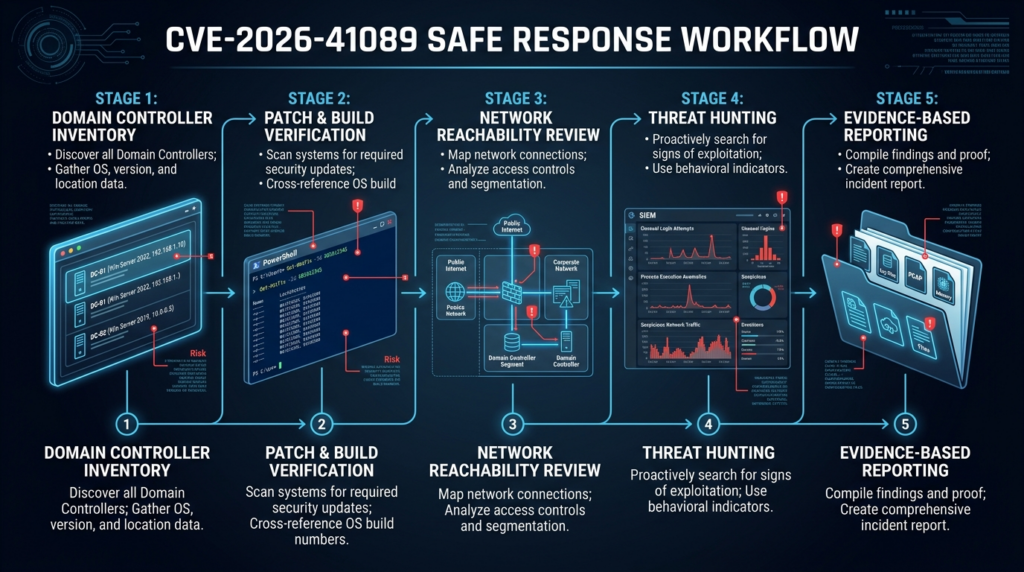
Detection for CVE-2026-41089 should cover two phases: possible exploitation and possible post-exploitation. The first is hard because official public material does not provide a stable packet signature. The second is more practical because DC compromise tends to produce behaviors defenders already understand: credential access, persistence, directory changes, suspicious authentication, and lateral movement.
| Couche | Signals worth hunting | Pourquoi c'est important | Limitation |
|---|---|---|---|
| Réseau | Unexpected RPC, LDAP, SMB, or Netlogon-adjacent traffic to DCs from non-DC or non-admin networks | May identify exploit staging or broad probing | Traffic alone does not prove exploitation |
| Host stability | Netlogon-related errors, service crashes, LSASS instability, Service Control Manager events | Memory corruption may crash services even when code execution fails | Crashes can have benign causes |
| Process activity | New or unusual process creation on DCs, especially command shells, LOLBins, dump tools, archivers | Post-exploitation on DCs often needs local execution | RCE may not spawn obvious children |
| Credential access | LSASS access, NTDS.dit access, VSS abuse, registry hive saves | DC compromise often leads to credential theft | Some admin and backup tools are noisy |
| Directory changes | New privileged users, group membership changes, GPO changes, ACL changes | Attackers often turn DC access into durable privilege | Requires good baseline and auditing |
| Authentification | Unusual 4624, 4672, 4768, 4769 patterns, odd source systems, abnormal admin logons | Helps detect lateral movement and misuse | Kerberos and NTLM logs require tuning |
Start with service instability and system errors around the exposure window. The exact event IDs depend on the failure mode and logging configuration, so treat this as a hunting starter, not a complete detector.
$start = (Get-Date).AddDays(-21)
$controllers = Import-Csv ".\domain-controllers-inventory.csv"

foreach ($dc in $controllers) {
    Get-WinEvent -ComputerName $dc.HostName -FilterHashtable @{
        LogName   = "System"
        Id        = 7031, 7034, 7023, 7024
        StartTime = $start
    } -ErrorAction SilentlyContinue |
    Select-Object @{n="DomainController";e={$dc.HostName}},
                  TimeCreated,
                  ProviderName,
                  Id,
                  LevelDisplayName,
                  Message
}
Then hunt for sensitive process behavior on DCs. This example assumes Microsoft Defender data in Advanced Hunting. Tune names, host lists, and approved administrative tools to your environment.
let DomainControllers = dynamic(["DC01", "DC02", "DC03"]);
DeviceProcessEvents
| where DeviceName in~ (DomainControllers)
| where Timestamp > ago(21d)
| where FileName in~ ("cmd.exe", "powershell.exe", "pwsh.exe", "wscript.exe", "cscript.exe",
                      "rundll32.exe", "reg.exe", "vssadmin.exe", "ntdsutil.exe",
                      "procdump.exe", "rclone.exe", "7z.exe", "rar.exe")
   or ProcessCommandLine has_any ("ntds.dit", "lsass", "sekurlsa", "MiniDump",
                                  "shadowcopy", "Volume Shadow Copy",
                                  "Domain Admins", "Enterprise Admins")
| project Timestamp, DeviceName, AccountName, FileName, ProcessCommandLine,
          InitiatingProcessFileName, InitiatingProcessCommandLine
| order by Timestamp desc
Look for privileged group changes. The exact event coverage depends on audit policy, but the following Windows Security event IDs are common starting points for group membership and account changes.
$start = (Get-Date).AddDays(-21)
$ids = 4720,4722,4728,4729,4732,4733,4756,4757,4738,4742

foreach ($dc in (Import-Csv ".\domain-controllers-inventory.csv")) {
    Get-WinEvent -ComputerName $dc.HostName -FilterHashtable @{
        LogName   = "Security"
        Id        = $ids
        StartTime = $start
    } -ErrorAction SilentlyContinue |
    Select-Object @{n="DomainController";e={$dc.HostName}},
                  TimeCreated,
                  Id,
                  ProviderName,
                  Message
}
A Splunk-style query for high-risk process behavior on domain controllers might look like this:
index=windows sourcetype=XmlWinEventLog:Microsoft-Windows-Sysmon/Operational
(host=DC01 OR host=DC02 OR host=DC03)
(EventCode=1 OR EventCode=10 OR EventCode=11)
(
  Image="*\\vssadmin.exe" OR
  Image="*\\ntdsutil.exe" OR
  Image="*\\procdump.exe" OR
  CommandLine="*ntds.dit*" OR
  CommandLine="*lsass*" OR
  CommandLine="*shadowcopy*" OR
  TargetImage="*\\lsass.exe"
)
| table _time host User Image CommandLine ParentImage TargetImage GrantedAccess
| sort - _time
Network telemetry is equally important. The following Defender-style query looks for non-DC systems reaching DCs over commonly sensitive ports. Replace the dynamic arrays with your asset data.
let DomainControllers = dynamic(["DC01.contoso.local", "DC02.contoso.local"]);
let ApprovedSources = dynamic(["JUMP01.contoso.local", "MGMT01.contoso.local"]);
DeviceNetworkEvents
| where Timestamp > ago(21d)
| where RemoteUrl in~ (DomainControllers) or RemoteDeviceName in~ (DomainControllers)
| where RemotePort in (135, 139, 389, 445, 464, 636, 3268, 3269)
| where DeviceName !in~ (ApprovedSources)
| summarize Count=count(),
            FirstSeen=min(Timestamp),
            LastSeen=max(Timestamp)
          by DeviceName, RemoteDeviceName, RemoteUrl, RemotePort, InitiatingProcessFileName
| order by Count desc
None of these queries is a magic CVE detector. They are a practical hunt pack for the kinds of behavior that matter if a DC-facing pre-authentication RCE is being probed or used. A clean result does not prove safety. A suspicious result should trigger deeper review, not immediate attribution to CVE-2026-41089.
Patching without breaking the domain
Microsoft has released security updates for CVE-2026-41089, and CCB says patches are available for Windows Server versions from 2012 onward. The first action is to patch domain controllers quickly after appropriate testing. The second action is to prove that the patch landed and the DC rebooted where required. The third action is to make sure domain services still work. (ccb.belgium.be)
A practical rollout plan should start with asset completeness. Compare AD-discovered DCs, CMDB records, EDR inventory, vulnerability scanner inventory, cloud inventory, virtualization inventory, and backup or disaster recovery documentation. Any DC that appears in only one source deserves attention. Forgotten DCs are common in branch offices, legacy forests, acquisitions, and lab environments that still hold trust relationships.
Patch in a sequence that respects replication and business requirements, but do not leave the forest half-remediated for longer than necessary. If an attacker only needs one vulnerable reachable DC, then a partially patched environment remains exposed. Prioritize DCs that are broadly reachable, internet-adjacent through misconfiguration, VPN-reachable, placed in flat networks, or responsible for high-volume authentication.
After each patch batch, verify more than Windows Update status. Confirm build, reboot time, Netlogon health, SYSVOL and NETLOGON shares, replication, Kerberos authentication, LDAP queries, GPO processing, time synchronization, and application authentication. A patch that installs but leaves a DC waiting for reboot is not enough.
# Basic post-patch DC health checks
dcdiag /e /c /v /f:dcdiag-after-cve-2026-41089.txt

repadmin /replsummary

repadmin /showrepl * /csv > repl-after-cve-2026-41089.csv

nltest /dclist:contoso.local

nltest /dsgetdc:contoso.local
A compact post-patch checklist can prevent missed steps:
| Vérifier | Evidence to keep | Failure meaning |
|---|---|---|
| Build meets minimum fixed version | CSV from registry build and UBR query | Patch missing or incomplete |
| Reboot completed | Last boot timestamp | Update may not be active |
| Replication healthy | repadmin /replsummary et repadmin /showrepl output | Domain state may diverge |
| DC locator works | nltest /dsgetdc output | Clients may fail to find DCs |
| SYSVOL and NETLOGON shares available | net view \\dc\ or equivalent evidence | GPO and scripts may break |
| Authentication works | Test logon and service authentication | Business disruption risk |
| Security logs retained | Exported relevant event windows | Incident review remains possible |
| Exceptions documented | Owner, reason, expiry, compensating control | Unowned risk becomes permanent |
Emergency patching often creates a second problem: undocumented exceptions. A DC that cannot be patched immediately should have a named owner, business reason, network restrictions, monitoring rule, and expiration date. “Pending vendor validation” is not enough unless it has a deadline.
Temporary controls during the patch window
Network controls are not a replacement for Microsoft’s update. They are a way to reduce the number of systems that can reach vulnerable DCs while patching is underway. The goal is not to break AD. The goal is to remove unnecessary paths.
A good temporary-control plan starts with source groups. Which networks truly need DC RPC reachability? Which need LDAP or LDAPS? Which only need DNS and Kerberos? Which are legacy exceptions nobody has reviewed in years? Which vendor-managed systems can talk to DCs but are not monitored by your EDR? CVE-2026-41089 should trigger those questions immediately.
Useful short-term controls include limiting DC reachability from VPN pools, blocking DC access from guest and unmanaged networks, tightening DMZ-to-DC rules, routing administrative access through hardened jump hosts, restricting broad dynamic RPC paths where feasible, and adding alerts for new DC-facing traffic from non-approved source networks. If a branch or legacy application needs a path, document it. Unknown exceptions are worse than explicit risk decisions.
Do not make firewall changes blindly. AD relies on multiple protocols, and Microsoft’s own documentation warns that blocking required ports can cause services to stop responding to client requests. The safest approach is staged enforcement: observe, identify approved dependencies, restrict high-risk sources first, then continue narrowing with application owners. (Microsoft Learn)
What to do if exploitation is suspected
If there are credible signs of exploitation against a domain controller, do not treat the response as a normal server rebuild. Treat it as a possible identity compromise. Patching remains necessary, but patching alone does not remove an attacker who already obtained privileged access, created persistence, extracted credentials, or modified directory policy.
The first move is evidence preservation. Capture volatile details where possible, export relevant event logs, preserve EDR telemetry, collect network flows, and document exact times. Coordinate with identity, incident response, infrastructure, legal, and business continuity teams. Avoid actions that destroy evidence before you understand whether the DC was compromised.
Then isolate carefully. Pulling a DC offline without planning can break authentication and replication. Leaving a compromised DC online can let an attacker continue operating. The right decision depends on the number of DCs, FSMO roles, replication state, business criticality, available backups, and evidence of active attacker control. In a serious case, bring in responders with Active Directory compromise experience.
The investigation should cover at least these areas:
| Zone | What to review |
|---|---|
| Process execution | Command shells, scripting engines, dump tools, archivers, remote admin tools, unknown binaries |
| Credential access | LSASS access, NTDS.dit access, SYSTEM and SECURITY hive exports, VSS activity |
| Persistance | New services, scheduled tasks, WMI subscriptions, startup paths, modified admin scripts |
| Directory privilege | Domain Admins, Enterprise Admins, Administrators, Account Operators, Backup Operators, DNSAdmins |
| GPO | Recently modified GPOs, logon scripts, startup scripts, security policy changes |
| Replication | Unexpected replication partners, DCSync indicators, abnormal directory replication metadata |
| Authentification | Unusual admin logons, impossible travel, odd source hosts, NTLM spikes |
| Trusts | New or modified domain trusts, SID filtering changes, external trust anomalies |
| Backups | Backup integrity, restore points, backup account misuse, ransomware staging indicators |
For many organizations, the hard question is not “was a packet sent?” It is “can we still trust the domain?” If attackers reached code execution on a DC and performed credential extraction, password resets alone may be insufficient. Golden Ticket risk, KRBTGT handling, privileged account rotation, service account review, certificate services abuse, and backup trust all come into scope.
How CVE-2026-41089 compares with other Netlogon and identity-plane bugs
CVE-2026-41089 is not Zerologon, but Zerologon is the right historical reference point for urgency. CVE-2020-1472 was a Netlogon Remote Protocol elevation-of-privilege vulnerability that could allow an unauthenticated attacker with network access to a domain controller to obtain domain administrator access. Microsoft addressed that vulnerability through changes in how Netlogon handled secure channels. (NVD)
CVE-2022-38023 is another useful comparison. Microsoft’s KB5021130 explains that Windows updates on or after November 8, 2022 addressed weaknesses in the Netlogon protocol when RPC signing was used instead of RPC sealing, and later enforcement phases required stronger behavior. That issue was about security bypass and protocol hardening, not the same memory-corruption class as CVE-2026-41089, but it reinforces the same lesson: Netlogon is a sensitive trust path, and small protocol weaknesses can have domain-level consequences. (Microsoft Support)
The May 2026 Microsoft patch context also included other high-priority issues. CCB highlighted CVE-2026-41096, a Windows DNS Client RCE involving specially crafted DNS responses, and CVE-2026-41103, a Microsoft SSO Plugin for Jira and Confluence elevation-of-privilege issue involving crafted SSO responses. These are not the same vulnerability class, but they belong in the same operational conversation because they affect core infrastructure or identity-adjacent workflows. (ccb.belgium.be)
| CVE | Why it is relevant | Exploitation condition | Main risk | Mitigation direction |
|---|---|---|---|---|
| CVE-2020-1472, Zerologon | Shows prior Netlogon domain-controller impact | Unauthenticated network access to a DC using MS-NRPC | Domain administrator access | Microsoft phased updates and secure Netlogon channel enforcement |
| CVE-2022-38023 | Shows Netlogon protocol hardening around RPC sealing | Weakness when RPC signing was used instead of sealing | Security bypass in domain trust/authentication paths | Windows updates and enforcement of RPC sealing |
| CVE-2026-41089 | Current Netlogon RCE with domain-controller focus | Specially crafted network request to a DC | Code execution on identity infrastructure | Patch DCs, verify builds, restrict reachability, hunt for compromise |
| CVE-2026-41096 | Same Patch Tuesday high-priority infrastructure risk | Crafted DNS response to a vulnerable Windows system | Potential RCE in certain configurations | Apply Microsoft updates, monitor DNS exposure and resolver behavior |
| CVE-2026-41103 | Identity-adjacent SSO plugin risk | Crafted SSO response during login flow | Forged identity and unauthorized access in Jira or Confluence context | Apply vendor updates, review SSO trust and logs |
The common thread is not “all Microsoft bugs are the same.” They are not. The common thread is that identity, directory, DNS, and SSO components convert technical flaws into enterprise-wide risk faster than ordinary application bugs.
Common mistakes during response
The first mistake is treating CVE-2026-41089 as a workstation problem. Workstations should receive Microsoft updates, but the public exploitation scenario centers on Windows servers acting as domain controllers. A DC-first response is the right priority. (api.msrc.microsoft.com)
The second mistake is relying only on scanner status. Vulnerability scanners are useful, but scanner coverage depends on credentials, plugins, network access, asset inventory, and detection logic. For this vulnerability, build verification on every DC is more defensible than “the dashboard is green.”
The third mistake is ignoring Server Core and branch DCs. Server Core systems are easy to miss because they do not look like ordinary managed servers. Branch DCs are easy to miss because they are owned by regional infrastructure teams or installed years earlier for latency reasons. Attackers do not care who owns the exception.
The fourth mistake is crash testing production. A proof of concept that causes a DC service crash is not a safe validation method. It may create an outage and still fail to prove whether code execution is possible. The safer path is authenticated patch-state validation, network reachability review, and controlled lab testing on isolated systems if exploit validation is truly required.
The fifth mistake is patching and walking away. CCB’s update says the issue is actively exploited in the wild. That means defenders should look backward as well as forward. Patching closes the known vulnerable path; it does not prove no one used it before patching. (ccb.belgium.be)
The sixth mistake is failing to preserve evidence. A Slack message saying “all DCs patched” is not evidence. A CSV with host, build, UBR, hotfixes, last boot, timestamp, and operator is evidence. A saved SIEM query with time range and results is evidence. A change ticket with exceptions, owners, and expiration dates is evidence.
A practical response plan
A good CVE-2026-41089 response can be organized into five workstreams: inventory, patching, reachability, monitoring, and evidence.
Inventory starts with Get-ADDomainController, but it should not end there. Compare AD results with EDR, CMDB, vulnerability management, cloud inventory, virtualization inventory, backup platforms, and disaster recovery runbooks. Identify writable DCs, RODCs, Server Core systems, branch DCs, cloud DCs, lab DCs, and decommissioned DCs that still appear in DNS or replication metadata.
Patching should prioritize broadly reachable DCs first, but the endpoint should be all DCs. Use Microsoft’s update guidance and the minimum fixed build table as the authority for build comparison. Confirm reboots. Confirm domain health after patching. Record every exception.
Reachability review should focus on unnecessary source networks. If a user subnet can reach DCs over broad RPC dynamic ports, ask why. If a CI runner can reach LDAP and SMB on every DC, ask why. If a contractor VPN pool can reach DCs like an internal admin host, fix it. Do not break required AD flows, but stop accepting flat-network exposure as normal.
Monitoring should cover the period before and after patching. Look for unexpected DC traffic, service instability, suspicious process execution, LSASS and NTDS access, privileged group changes, GPO changes, and unusual authentication. Prioritize signals from DCs that were patched late or had broad reachability.
Evidence should be reusable. Another engineer should be able to open the evidence folder and answer: which DCs exist, what builds they were on, when they were patched, when they rebooted, which network paths were exposed, what hunts were run, what exceptions remain, and who owns them.
FAQ
What is CVE-2026-41089 in plain English?
- CVE-2026-41089 is a critical Windows Netlogon remote code execution vulnerability.
- Microsoft describes it as a stack-based buffer overflow in Windows Netlogon.
- The most important target described in Microsoft’s FAQ is a Windows server acting as a domain controller.
- The concern is not only code execution; it is code execution near Active Directory identity infrastructure. (api.msrc.microsoft.com)
Is CVE-2026-41089 being exploited in the wild?
- Microsoft’s original May 12, 2026 MSRC record listed exploited as “No” and publicly disclosed as “No.”
- CCB Belgium updated its advisory on May 29, 2026 and stated that CVE-2026-41089 was actively exploited in the wild.
- Treat the later CCB update as the operationally relevant exploitation warning.
- The safest response is to patch quickly, verify build state, and hunt for signs of earlier compromise. (api.msrc.microsoft.com)
Does CVE-2026-41089 affect workstations or only domain controllers?
- The exploitation scenario Microsoft describes is a specially crafted network request to a Windows server acting as a domain controller.
- Your first priority should be all domain controllers, including writable DCs, RODCs, Server Core installations, branch DCs, cloud DCs, and recovery DCs.
- Workstations and non-DC servers should still receive Microsoft security updates because May 2026 Patch Tuesday included multiple Windows fixes.
- Do not let workstation patching distract from DC verification.
How do I verify whether my domain controllers are patched?
- Enumerate DCs with
Get-ADDomainController -Filter *. - Query each DC for product version, build, UBR, hotfixes, and last boot time.
- Compare the full build against Microsoft-added affected ranges in NVD.
- Confirm the DC rebooted after patch installation.
- Export CSV evidence so another engineer can review the result. (NVD)
Can I safely scan for CVE-2026-41089?
- Yes, if the scan checks patch state, build state, or controlled network reachability.
- Be careful with unauthenticated network checks that send malformed traffic to production DCs.
- Do not run untrusted exploit code against production domain controllers.
- Coordinate with identity and infrastructure teams before scanning DCs.
- Treat crashes or authentication instability during scanning as a potential incident signal.
What should I monitor after patching?
- Monitor DC-bound RPC, LDAP, SMB, Kerberos, and related traffic from unexpected source networks.
- Review Netlogon or service instability, especially crashes or restarts around suspicious traffic.
- Hunt for credential access behaviors such as LSASS access, NTDS.dit access, VSS abuse, and registry hive exports.
- Watch privileged group changes, new services, scheduled tasks, GPO changes, and unusual admin logons.
- Keep heightened monitoring after patching because patching does not prove the DC was not touched earlier.
How is CVE-2026-41089 different from Zerologon?
- Zerologon, CVE-2020-1472, was a Netlogon Remote Protocol elevation-of-privilege vulnerability involving domain controller access.
- CVE-2026-41089 is a Windows Netlogon remote code execution vulnerability mapped to stack-based buffer overflow.
- Both are severe because they involve domain controllers and Netlogon trust paths.
- The technical weakness and remediation details differ, but the operational priority is similar: patch DCs quickly, verify safely, and investigate suspicious identity activity. (NVD)
Arrêt de clôture
CVE-2026-41089 deserves controlled urgency. The right response is neither panic nor passive patching. The vulnerability combines network reachability, no required user interaction, no required privileges, a Critical CVSS score, and a domain-controller exploitation scenario. Microsoft’s original release-state data and CCB’s later exploitation warning describe different points in time, and defenders should respond to the later risk signal without losing the precision of the vendor record. (api.msrc.microsoft.com)
Patch every domain controller, verify exact builds, confirm reboots, reduce unnecessary DC reachability, hunt for exploitation and post-exploitation behavior, and preserve evidence. The worst response is unapproved exploit testing against production identity infrastructure. The strongest response is proof-driven remediation that another engineer can reproduce.
 French
  English
  German
  Spanish
  Portuguese
  Japanese
  Korean
  Hindi
Hindi  Arabic
  Turkish
  Hebrew