
CVE-2026-45659 is the kind of SharePoint bug that looks manageable until you map it against how SharePoint actually runs inside enterprises. The official record is clear enough to act on: Microsoft Office SharePoint contains a deserialization of untrusted data vulnerability that allows an authorized attacker to execute code over a network. NVD lists the Microsoft-supplied CVSS 3.1 score as 8.8 high, with a network attack vector, low attack complexity, low privileges required, no user interaction, unchanged scope, and high confidentiality, integrity, and availability impact. CISA later added the vulnerability to its Known Exploited Vulnerabilities catalog, changing the operational meaning from “patch soon” to “treat this as a real-world exposure.” (NVD)
That combination deserves attention. The weakness class is CWE-502, deserialization of untrusted data. The affected product family is on-premises Microsoft SharePoint Server, not a random edge application with no business context. The exploitation precondition is not administrator access. Public reporting based on Microsoft’s advisory describes the attacker as needing authentication with minimum Site Member permissions, and no user interaction is required. Microsoft initially assessed exploitation as less likely, but CISA’s KEV listing on July 1, 2026 means defenders should prioritize the vulnerability using exploitation evidence, not just the earlier vendor likelihood label. (The Hacker News)
The practical response is not complicated, but it has to be disciplined. Identify every on-premises SharePoint Server instance. Confirm whether it is Subscription Edition, 2019, or 2016. Verify the installed build against the fixed build numbers. Apply the May 2026 security updates if the server is below the fixed level. Then check whether the environment shows signs that SharePoint was already used as an execution surface. A patch ticket without version evidence, log review, and account-scope review is not enough for a KEV-listed SharePoint RCE.
What is confirmed about CVE-2026-45659
The public record for CVE-2026-45659 is useful, but it is not a full exploit writeup. That distinction matters. There is enough information to prioritize remediation, explain the risk, and design a safe validation workflow. There is not enough public evidence to responsibly claim a specific endpoint, payload format, exploit chain, threat actor, or post-exploitation sequence for this CVE unless those details come from private telemetry or a trusted incident investigation.
| Champ d'application | Confirmed public information | Pourquoi c'est important |
|---|---|---|
| CVE | CVE-2026-45659 | Common identifier for the SharePoint Server vulnerability. |
| Product family | Microsoft SharePoint Server Subscription Edition, SharePoint Server 2019, and SharePoint Enterprise Server 2016 | The exposed risk is tied to on-premises SharePoint Server product lines. |
| Weakness class | CWE-502, deserialization of untrusted data | This is a code-execution-prone class when attacker-controlled serialized data crosses a trust boundary. |
| Official description | Deserialization of untrusted data in Microsoft Office SharePoint allows an authorized attacker to execute code over a network | The impact is remote code execution, not merely information disclosure or spoofing. |
| CVSS 3.1 | 8.8 high, AV:N/AC:L/PR:L/UI:N/S:U/C:H/I:H/A:H | Network reachable, low complexity, low privilege, no user interaction, high impact. |
| NVD status | NVD shows the entry was modified after enrichment and includes CISA KEV metadata | The record evolved after initial publication, so teams should check current authoritative sources. |
| Statut de KEV | Added to CISA Known Exploited Vulnerabilities on July 1, 2026, with required action to apply vendor mitigations or discontinue use if mitigations are unavailable | KEV status is one of the strongest public signals that remediation should move ahead of ordinary patch queues. |
| Fixed SharePoint Server Subscription Edition build | 16.0.19725.20280 | Servers below this build should be treated as exposed until updated and verified. |
| Fixed SharePoint Server 2019 build | 16.0.10417.20128 | Same principle: confirm actual farm build, not just patch deployment intent. |
| Fixed SharePoint Enterprise Server 2016 build | 16.0.5552.1002 | Older supported SharePoint deployments still need explicit verification. |
| Public exploit detail | No responsible source should assume a complete public exploit chain from the basic CVE description alone | Response should focus on patching, exposure validation, and hunting for RCE-like behavior rather than repeating unverified payload claims. |
NVD’s change history lists Microsoft’s affected product ranges: SharePoint Enterprise Server 2016 below 16.0.5552.1002, SharePoint Server 2019 below 16.0.10417.20128, and SharePoint Server Subscription Edition below 16.0.19725.20280. The Cyber Security Agency of Singapore published the same fixed-build guidance in its May 29 alert and advised users and administrators to update immediately. (NVD)
The May 2026 Microsoft Support pages are also important because they give administrators update artifacts and build references. Microsoft’s SharePoint Server 2019 security update page for KB5002870 states that the package is build 16.0.10417.20128. The SharePoint Server Subscription Edition page for KB5002863 states build 16.0.19725.20280. The SharePoint Server 2016 page for KB5002868 states build 16.0.5552.1002. (Microsoft Support)
One nuance is easy to miss. Help Net Security reported that Microsoft updated the advisory to say CVE-2026-45659 was addressed by updates released in May 2026, but the CVE had been inadvertently omitted from the May 2026 Security Updates; according to that update, customers who already installed the May 2026 updates did not need further action for this specific issue. That does not mean administrators can skip validation. It means the validation question becomes simple: is every relevant SharePoint server actually at or above the fixed build level? (Help Net Security)
Why low privilege does not mean low risk
The privilege requirement is the detail most likely to mislead non-specialists. CVE-2026-45659 is not described as unauthenticated. That is materially better than a pre-authentication SharePoint RCE. But “authenticated low privilege” is still a dangerous condition in a SharePoint environment.
SharePoint is built for collaboration. Many organizations intentionally give large numbers of employees, contractors, vendors, project partners, and service identities some level of site access. A Site Member is not a domain admin. A Site Member is also not rare. In mature tenants and on-premises farms, low-privilege SharePoint access can be widely distributed across departments, projects, external collaboration areas, legacy sites, migrated intranets, and forgotten team spaces.
Attackers do not need to start with this CVE. They can start with credentials.
| Access path | Why it matters for CVE-2026-45659 |
|---|---|
| Phished employee credentials | A normal employee account may already have Site Member access to multiple SharePoint sites. |
| Password spraying against exposed identity systems | A single weak account can become enough if that account has the required SharePoint permission. |
| Stale contractor or partner account | External collaboration accounts often survive longer than the project that created them. |
| Compromised endpoint with browser sessions | The attacker may inherit SharePoint access from an already signed-in user. |
| Over-permissioned service or automation account | “Low privilege” in the CVE vector does not guarantee the account is harmless in the environment. |
| Insider misuse | The exploit precondition overlaps with ordinary internal access, which complicates monitoring. |
That is why CVE-2026-45659 belongs in both vulnerability management and identity review. Patching closes the software flaw. It does not answer whether the organization’s SharePoint permission model made exploitation easier before the patch, or whether low-privilege accounts were already being abused.
The blast radius also depends on SharePoint’s local deployment model. An on-premises farm often has web front ends, application servers, SQL Server dependencies, service accounts, custom solutions, scheduled jobs, document libraries, search components, workflow integrations, and reverse proxy paths. Remote code execution on a SharePoint server can become much more than a web application problem if the attacker can run code in the context of a privileged worker process or abuse local configuration secrets.
Deserialization is not just “bad input”
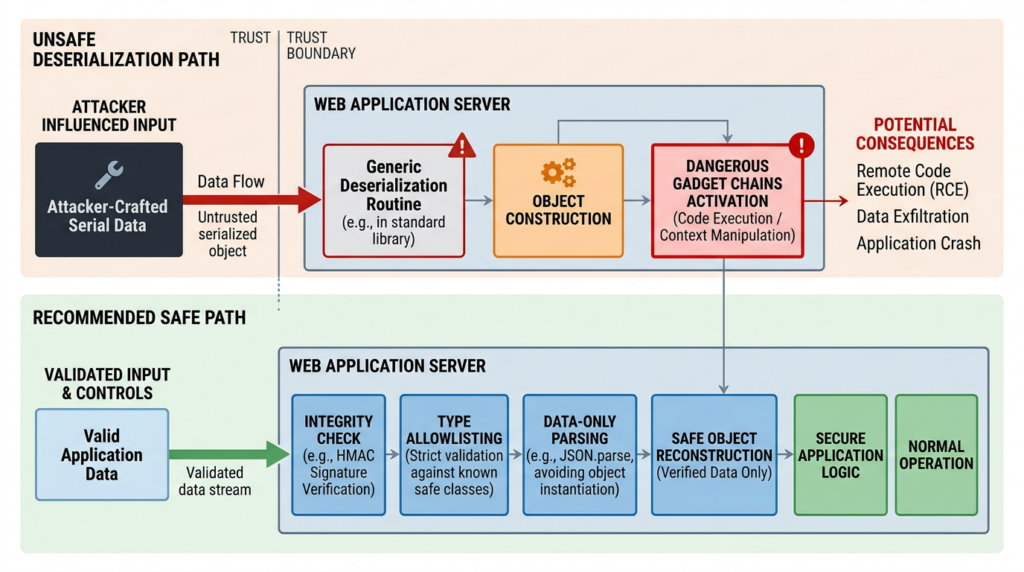
CWE-502 is often explained too casually. The short version is that a program accepts serialized data, rebuilds it into objects, and trusts too much about the result. MITRE defines CWE-502 as a case where a product deserializes untrusted data without sufficiently ensuring that the resulting data will be valid. OWASP similarly warns that malformed or unexpected data can abuse application logic, deny service, or execute arbitrary code when deserialized. (CWE)
Serialization itself is normal. Applications serialize objects for storage, messaging, caching, session state, remoting, workflows, and APIs. Deserialization is the reverse operation: take the stored or transmitted representation and reconstruct usable data or objects. The danger appears when the application accepts serialized data across a trust boundary and deserializes it with too much authority.
A safe deserialization path treats input as data. An unsafe path may let input influence types, object graphs, method execution, callbacks, file access, command execution, or privileged application logic. In many ecosystems, attackers look for “gadget” chains: existing classes and methods already present in the application that can be arranged into harmful behavior during or after deserialization. The vulnerable application does not need to contain an obvious exec() call in the endpoint handler. It may only need to deserialize a crafted object graph in a dangerous runtime context.
A simplified defensive model looks like this:
Untrusted client data
        |
        v
Trust boundary check
        |
        |-- reject unexpected format
        |-- enforce authentication and authorization
        |-- enforce type allowlist
        |-- verify integrity or signature where applicable
        |-- parse into data-only structure
        v
Application logic with least necessary privilege
The unsafe model looks more like this:
Untrusted client data
        |
        v
Generic object deserializer
        |
        |-- resolves attacker-influenced types
        |-- constructs complex object graph
        |-- invokes callbacks or dangerous methods
        |-- runs inside privileged application context
        v
Unexpected behavior, potentially code execution
That conceptual difference matters for SharePoint because SharePoint is not a small service with one JSON endpoint and one database table. It is an ASP.NET-based enterprise platform with deep integration into identity, content, workflows, service applications, custom code, and administrative surfaces. A deserialization issue inside that kind of platform may cross boundaries defenders normally treat as separate: user content, site permission, server-side execution, farm configuration, and Windows process behavior.
OWASP’s Deserialization Cheat Sheet recommends safe deserialization practices such as avoiding native object deserialization for untrusted data, using strict type constraints, and validating data before object creation where possible. Those recommendations are most useful for developers building systems. For defenders running SharePoint Server, the actionable translation is different: do not try to “configure around” CVE-2026-45659 unless Microsoft provides an explicit mitigation. Patch the product, reduce exposure, and watch for execution behavior. (Série d'aide-mémoire de l'OWASP)
The SharePoint-specific risk surface
SharePoint gets targeted because it sits at a privileged intersection of collaboration and infrastructure. It is a web application, but it is also a content platform. It stores documents, pages, lists, business context, metadata, and workflow state. It integrates with Windows authentication and enterprise identity. It often runs on servers with access to internal networks. It may be exposed through reverse proxies or placed behind VPNs that are weaker than defenders assume.
For CVE-2026-45659, the important question is not just “can an attacker reach the server.” It is “what kind of authenticated access paths exist, and what could code execution on this server reach next?”
A useful mental model is to divide the risk into five layers.
The first layer is exposure. Internet-facing SharePoint Server is higher risk than a server reachable only from a tightly controlled internal network. But internal-only does not mean safe. Many intrusions begin with a compromised endpoint or VPN account. If SharePoint is reachable by a broad employee population, a low-privilege authenticated vulnerability still matters.
The second layer is identity. CVE-2026-45659 requires authorization. That makes account hygiene central to remediation. MFA coverage, stale account cleanup, external sharing governance, group membership review, and least privilege are not side tasks. They reduce the pool of accounts that could satisfy the exploit precondition.
The third layer is SharePoint farm architecture. A farm with multiple web front ends needs consistent patching and validation on every node. A single updated server does not fix the farm if traffic can still reach another vulnerable node. Load balancers, warm standby servers, disaster recovery nodes, and older test farms must be included.
The fourth layer is server execution context. SharePoint code commonly runs through IIS worker processes such as w3wp.exe. If exploitation leads to code execution, defenders should look for child processes, suspicious file writes, new assemblies, scheduled tasks, service creation, registry changes, credential access, and outbound network connections.
The fifth layer is post-exploitation value. SharePoint may provide access to sensitive documents, internal URLs, credentials in files, service account context, configuration data, and paths into adjacent systems. Even if the initial exploit requires a low-privilege account, the result can be high-impact server-side execution.
Patch first, then prove it
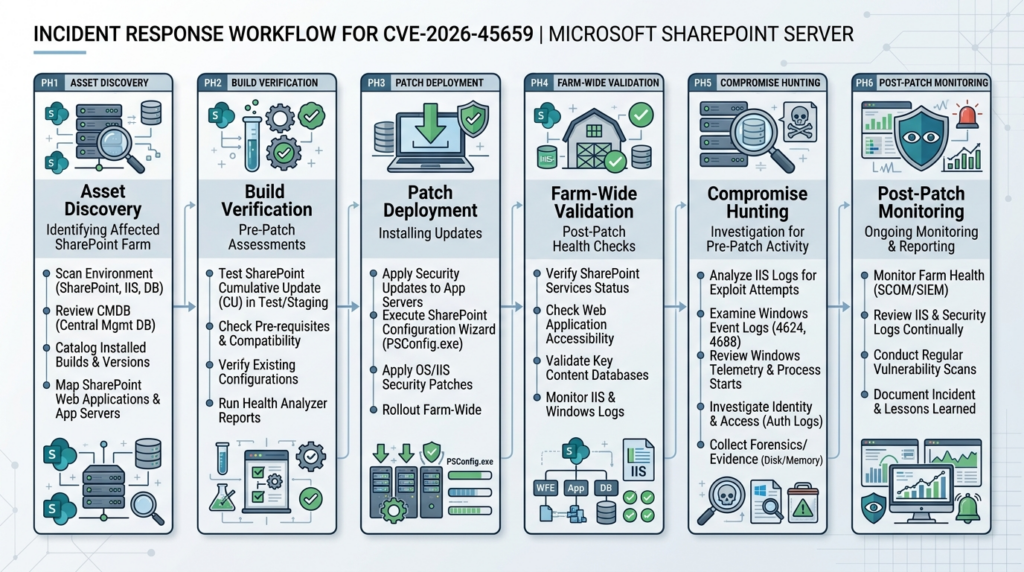
CVE-2026-45659 response starts with update verification. Do not stop at “the update was approved.” Confirm the actual build on every SharePoint server.
The fixed build references are:
| Produit | Fixed build to verify | Microsoft update reference |
|---|---|---|
| SharePoint Server Subscription Edition | 16.0.19725.20280 | KB5002863 |
| SharePoint Server 2019 | 16.0.10417.20128 | KB5002870 |
| SharePoint Enterprise Server 2016 | 16.0.5552.1002 | KB5002868 |
Microsoft’s support pages state those build numbers for the May 12, 2026 security updates. Administrators should use those as verification anchors, while also checking the current Microsoft Security Update Guide and support lifecycle guidance for their specific environment. (Microsoft Support)
On a SharePoint server, a basic farm build check can start from the SharePoint Management Shell:
# Run in SharePoint Management Shell with appropriate administrative rights.
# This checks the farm build version reported by SharePoint.

(Get-SPFarm).BuildVersion
For local product and patch visibility, use Windows inventory commands as supporting evidence:
# Show installed hotfixes that may include SharePoint security updates.
# Use this as supporting evidence, not the only proof of farm health.

Get-HotFix |
  Sort-Object InstalledOn -Descending |
  Select-Object InstalledOn, HotFixID, Description |
  Format-Table -AutoSize
On a multi-server farm, collect evidence from every SharePoint server, not just one web front end. The goal is to avoid the common “half-patched farm” problem:
# Example structure for collecting build evidence across known SharePoint servers.
# Replace the server names with your actual farm inventory.

$servers = @(
  "sp-wfe-01",
  "sp-wfe-02",
  "sp-app-01"
)

Invoke-Command -ComputerName $servers -ScriptBlock {
  $farm = Get-SPFarm
  [PSCustomObject]@{
    Server      = $env:COMPUTERNAME
    FarmBuild   = $farm.BuildVersion.ToString()
    CheckedAt   = (Get-Date).ToString("s")
  }
}
That command is not a substitute for change management. It is an evidence collection pattern. In regulated or large environments, keep the output with the ticket, the patch KB, screenshots or exported evidence from Central Administration where appropriate, and the list of servers included in the farm. A vulnerability manager who cannot prove which nodes were checked will struggle to defend the remediation decision later.
After patching SharePoint, run the SharePoint Products Configuration Wizard or the appropriate configuration steps required by your SharePoint version and patch process. Many SharePoint updates require farm-level configuration work after binaries are installed. Treat a pending configuration state as incomplete remediation until the farm is healthy.
Build a safe validation workflow
A responsible validation workflow for CVE-2026-45659 should not attempt exploit reproduction on production systems. The goal is to prove exposure status, patch status, and response completeness. If deeper exploit validation is required, do it only in a controlled lab or an explicitly authorized staging environment that mirrors the vulnerable build.
A safe workflow can be structured like this:
| Étape | Evidence to collect | Common failure |
|---|---|---|
| Asset discovery | Hostnames, IPs, URLs, farm role, internet exposure, owner | Old SharePoint test farms are missing from inventory. |
| Version check | SharePoint build, installed KBs, configuration state | Teams record Windows patch state but not SharePoint farm build. |
| Access review | Site Member groups, external users, service accounts, stale accounts | Low-privilege groups are treated as harmless and never reviewed. |
| Exposure control | Reverse proxy rules, VPN requirements, WAF logs, load balancer pools | One vulnerable node remains reachable through an alternate route. |
| Detection review | IIS logs, ULS logs, Windows events, EDR telemetry | Logs are not retained long enough to cover the exploitation window. |
| Post-patch monitoring | New process creation, file writes, suspicious outbound traffic | Teams stop looking after the patch completes. |
| Retest | Re-run build checks and confirm no vulnerable nodes remain | The ticket closes before evidence is attached. |
In large environments, the hard part is not knowing that SharePoint should be patched. The hard part is building a reliable loop across assets, authentication paths, logs, and proof. Tools can help, but the logic must remain defensible: identify, update, verify, hunt, document, and monitor.
For teams using AI-assisted security workflows, this is one of the practical areas where automation can reduce missed steps without replacing judgment. Penligent’s agentic pentesting workflow is designed around authorized validation, evidence collection, reproducible findings, and report output rather than simply listing CVEs. That is relevant when a team needs to turn a SharePoint advisory into a scoped checklist of exposed hosts, version evidence, identity preconditions, and retest artifacts across a real environment. (Penligent)
Penligent has also published related SharePoint analysis around CVE-2026-32201 and the problem of triaging SharePoint issues by CVSS alone. That piece is not a source of truth for CVE-2026-45659 facts, but it is a useful internal companion for the same operational theme: SharePoint risk depends on exploit status, exposure, privilege conditions, and verification evidence, not the score in isolation. (Penligent)
Detection logic without pretending the exploit chain is public
A good detection section for CVE-2026-45659 should be honest: public sources confirm a SharePoint deserialization RCE, but they do not provide a complete official exploit path for defenders to key on. That means teams should combine CVE-specific facts with SharePoint RCE hunting patterns.
Start with authentication. Because the vulnerability requires an authorized attacker, look for accounts that recently gained or used SharePoint access in unusual ways:
# Search Windows Security logs for successful logons on a SharePoint server.
# Tune the time window and account filters for your environment.

$start = (Get-Date).AddDays(-14)

Get-WinEvent -FilterHashtable @{
  LogName   = 'Security'
  Id        = 4624
  StartTime = $start
} |
Where-Object {
  $_.Properties[5].Value -notmatch '^(SYSTEM|LOCAL SERVICE|NETWORK SERVICE)$'
} |
Select-Object TimeCreated, Id, ProviderName, Message |
Out-File .\sharepoint-successful-logons-review.txt
Then review IIS logs. Without a confirmed public endpoint for CVE-2026-45659, do not overfit to one URL. Look for unusual authenticated request patterns, rare endpoints, bursts of POST requests, odd user agents, unexpected source IPs, and requests followed by server-side errors or process activity.
# Basic IIS log triage for POST-heavy activity and SharePoint layouts traffic.
# Adjust the log path for your IIS configuration.

$logPath = "C:\inetpub\logs\LogFiles"
$since = (Get-Date).AddDays(-14)

Get-ChildItem $logPath -Recurse -Filter *.log |
Where-Object { $_.LastWriteTime -ge $since } |
Select-String -Pattern "POST", "_layouts", "aspx", "PowerShell", "cmd.exe" |
Select-Object Path, LineNumber, Line |
Out-File .\sharepoint-iis-triage.txt
Review process behavior next. SharePoint exploitation that reaches server-side execution often leaves traces outside the web logs. A web worker process spawning shell or scripting tools is high-value telemetry.
In Microsoft Defender XDR, a generic hunting query can look for suspicious child processes from IIS or SharePoint-related parents:
DeviceProcessEvents
| where Timestamp > ago(14d)
| where InitiatingProcessFileName in~ ("w3wp.exe", "OWSTIMER.EXE")
| where FileName in~ ("cmd.exe", "powershell.exe", "pwsh.exe", "cscript.exe", "wscript.exe", "rundll32.exe", "regsvr32.exe", "certutil.exe", "bitsadmin.exe", "mshta.exe")
| project Timestamp, DeviceName, InitiatingProcessFileName, FileName, ProcessCommandLine, AccountName, ReportId
| order by Timestamp desc
Search for suspicious web-accessible file creation. This does not prove CVE-2026-45659, but it is relevant to SharePoint RCE response because web shells are a common persistence method after server-side compromise.
# Review recently modified ASPX and config files under common SharePoint web paths.
# Tune paths based on your farm layout.

$paths = @(
  "C:\inetpub\wwwroot",
  "C:\Program Files\Common Files\microsoft shared\Web Server Extensions\16\TEMPLATE\LAYOUTS"
)

$start = (Get-Date).AddDays(-14)

foreach ($path in $paths) {
  if (Test-Path $path) {
    Get-ChildItem $path -Recurse -Include *.aspx,*.ashx,*.asmx,web.config -ErrorAction SilentlyContinue |
      Where-Object { $_.LastWriteTime -ge $start } |
      Select-Object FullName, Length, LastWriteTime
  }
} | Export-Csv .\sharepoint-recent-web-files.csv -NoTypeInformation
Review scheduled tasks, services, and persistence points. Again, this is not a CVE-2026-45659 IOC claim. It is a reasonable post-RCE hunt pattern.
# Recently created scheduled tasks can indicate persistence.
# Run with appropriate permissions.

Get-ScheduledTask |
ForEach-Object {
  $task = $_
  try {
    $info = Get-ScheduledTaskInfo -TaskName $task.TaskName -TaskPath $task.TaskPath
    [PSCustomObject]@{
      TaskName  = $task.TaskName
      TaskPath  = $task.TaskPath
      Author    = $task.Author
      State     = $task.State
      LastRun   = $info.LastRunTime
      NextRun   = $info.NextRunTime
      Actions   = ($task.Actions | ForEach-Object { $_.Execute + " " + $_.Arguments }) -join "; "
    }
  } catch {}
} |
Sort-Object LastRun -Descending |
Export-Csv .\scheduled-task-review.csv -NoTypeInformation
The best detections combine signals. One odd POST is weak. A low-privilege account authenticating from an unusual source, sending rare SharePoint requests, followed by w3wp.exe spawning PowerShell and a new ASPX file appearing under a layouts path is much stronger. Good hunting is correlation, not string matching.
What to check after CVE-2026-45659 enters KEV
CISA’s KEV catalog is not a theoretical database. It is a list of vulnerabilities with evidence of active exploitation. NVD’s CVE-2026-45659 record includes CISA KEV metadata and required action language directing organizations to apply mitigations according to vendor instructions, follow BOD 26-04 guidance where applicable, and discontinue use if mitigations are unavailable. (NVD)
For federal civilian agencies, KEV status creates formal obligations. For private-sector teams, it should still influence priority. A SharePoint RCE with KEV status belongs ahead of routine severity-only backlog items because the risk is no longer just theoretical.
A KEV-driven response should answer these questions:
| Question | Good answer | Weak answer |
|---|---|---|
| Do we run affected SharePoint Server versions? | “Yes, here is the farm inventory and each server’s build.” | “We think SharePoint is patched.” |
| Is any instance internet-facing? | “These URLs resolve externally, these are VPN-only, these are retired.” | “It should be internal.” |
| Are all nodes at fixed build? | “Every WFE and app server is at or above the fixed build.” | “The main server is updated.” |
| Did we review relevant logs? | “IIS, ULS, Windows, EDR, and identity logs were checked for the window.” | “No alerts fired.” |
| Did we review accounts that could satisfy PR:L? | “Site Member groups, external users, stale accounts, and service identities were reviewed.” | “It requires authentication, so we lowered priority.” |
| Do we have post-patch monitoring? | “We are watching child processes, web file changes, unusual logons, and outbound connections.” | “The patch ticket is closed.” |
This is where many vulnerability programs fail. They treat KEV as a patch SLA only. For a remote code execution vulnerability on a collaboration server, KEV should also trigger a detection and exposure review. The patch removes the known flaw. It does not prove the flaw was never reached.
Relationship to ToolShell and earlier SharePoint exploitation
CVE-2026-45659 should not be confused with the 2025 ToolShell chain. It is a different CVE. But the 2025 SharePoint incidents are relevant because they show how SharePoint RCE behaves when it becomes operationally real.
Microsoft’s July 2025 security blog on active exploitation of on-premises SharePoint vulnerabilities stated that the attacks affected on-premises SharePoint servers only and did not affect SharePoint Online in Microsoft 365. Microsoft described activity involving named Chinese nation-state actors Linen Typhoon and Violet Typhoon, and another China-based actor tracked as Storm-2603, which Microsoft observed deploying ransomware through the SharePoint exploitation path. Microsoft’s mitigation guidance included applying updates, enabling AMSI in Full Mode, deploying Defender Antivirus or equivalent protection, rotating SharePoint Server ASP.NET machine keys, restarting IIS, and deploying Defender for Endpoint or equivalent solutions. (Microsoft)
That history does not prove that CVE-2026-45659 uses the same exploit mechanics. It does prove that SharePoint Server compromise can extend beyond patching. In the 2025 case, Microsoft and government guidance emphasized machine key rotation, IIS restart, web shell detection, and post-exploitation investigation because attackers could persist beyond the initial vulnerability if defenders only patched the software.
Singapore’s CSA made the same broader incident-response point in its ToolShell remediation guide: for compromised SharePoint environments, patching alone is not sufficient if the server has already been compromised; rotating keys, restarting IIS, and removing artifacts such as web shells are critical. (Cyber Security Agency of Singapore)
For CVE-2026-45659, the correct lesson is measured. Do not automatically apply ToolShell indicators to a different CVE and claim detection coverage. Do use the ToolShell incident to remind the team that SharePoint RCE response must include compromise assessment. If a vulnerable SharePoint server was exposed and had suspicious activity before patching, the team should investigate like it may have been used, not merely mark the patch as complete.
Related SharePoint CVEs that help frame the risk
SharePoint vulnerability response gets messy when teams collapse every SharePoint advisory into the same narrative. CVE-2026-45659 is best understood by comparing it with related SharePoint issues, not by pretending they are identical.
| CVE | Publicly described issue | Access condition | Why it matters to this response |
|---|---|---|---|
| CVE-2026-45659 | Deserialization of untrusted data in Microsoft Office SharePoint allows an authorized attacker to execute code over a network | Low privileges required, no user interaction | Current focus. KEV-listed SharePoint RCE with fixed builds available. |
| CVE-2026-32201 | Improper input validation in Microsoft Office SharePoint allows an unauthorized attacker to perform spoofing over a network | No privileges required, no user interaction in the NVD vector described by Penligent’s analysis | Shows why SharePoint triage cannot rely on the top-level severity label alone. |
| CVE-2026-20963 | Deserialization of untrusted data in Microsoft Office SharePoint allows an unauthorized attacker to execute code over a network | No privileges required in the NVD-based comparison from Penligent’s article | Demonstrates that SharePoint deserialization RCE had already appeared as a more direct emergency earlier in 2026. |
| CVE-2025-53770 | On-premises SharePoint deserialization RCE associated with active exploitation and ToolShell reporting | Unauthenticated in public ToolShell reporting | Shows why SharePoint RCE response must consider compromise, persistence, and key rotation. |
| CVE-2025-53771 | SharePoint spoofing or bypass component commonly discussed with ToolShell | Used in chain narratives with CVE-2025-53770 | Shows why chained SharePoint bugs can defeat simplistic “we patched one CVE” thinking. |
The point of the comparison is not to inflate CVE-2026-45659 into ToolShell. It is to prevent the opposite mistake: treating a KEV-listed SharePoint RCE as routine because it requires authentication. SharePoint has enough identity surface that “requires authentication” is not the same as “hard to reach.”
Remediation priorities for defenders
The response should be simple enough to execute under pressure.
First, identify every affected SharePoint Server deployment. Include production, disaster recovery, staging, test, archived intranet farms, and project-specific servers. Old SharePoint servers often survive because they host one workflow or document library nobody wants to migrate.
Second, determine exposure. Internet-facing servers should move first. Servers reachable through VPN, partner networks, or broad internal networks still matter, especially if identity compromise is plausible.
Third, patch to the fixed build. Use the Microsoft update references for the correct SharePoint version. Confirm the final farm build and configuration state.
Fourth, reduce authentication risk. Since CVE-2026-45659 requires authorized access, review Site Member groups, external users, stale accounts, service accounts, and recently changed permissions. Enforce MFA where possible. Disable accounts that no longer need access. Review risky external collaboration patterns.
Fifth, hunt for signs of compromise. Focus on server-side execution, not just web request strings. Look for suspicious process trees, new web files, abnormal authentication, unexpected PowerShell, scheduled tasks, service creation, registry changes, credential access attempts, and outbound connections.
Sixth, document evidence. A good remediation record should include the affected asset list, fixed build evidence, patch KBs, dates, owners, exposure status, log sources reviewed, suspicious findings, and retest results.
Seventh, monitor after closure. If CISA KEV status exists, the vulnerability may be used by attackers who move faster than internal change windows. Monitoring should continue after patching, especially for servers that were exposed before remediation.
Hardening SharePoint after the emergency
Emergency patching closes the immediate known issue. Hardening reduces the chance that the next SharePoint vulnerability becomes a breach.
Start with network exposure. Do not expose on-premises SharePoint directly to the internet unless there is a strong business reason and compensating controls. Use a reverse proxy, authentication gateway, VPN with strong MFA, and IP restrictions where appropriate. Make sure alternate hostnames, legacy URLs, and load balancer pools follow the same policy.
Review identity and permissions. Large SharePoint environments often accumulate permission drift. Remove stale users. Reduce broad Site Member groups. Review external sharing. Avoid giving service accounts interactive access. Separate admin accounts from daily-use accounts. Monitor new membership in sensitive SharePoint groups.
Harden the Windows and IIS layer. Enable EDR. Collect process creation logs. Turn on PowerShell Script Block Logging where feasible. Monitor web directories for unexpected file changes. Restrict outbound internet access from SharePoint servers unless needed. Apply application control or allowlisting where the operational model supports it.
Centralize logs. SharePoint response requires IIS logs, SharePoint ULS logs, Windows Security logs, PowerShell logs, Sysmon or EDR telemetry, identity provider logs, reverse proxy logs, and firewall logs. If those logs are scattered, overwritten after a few days, or not time-synchronized, incident response will be guesswork.
Build a farm patch runbook. SharePoint patching can be operationally sensitive, so many teams delay it. That makes runbooks essential. The runbook should include pre-checks, backups, service health checks, patch order, configuration wizard steps, rollback criteria, load balancer handling, validation commands, owner signoff, and post-patch monitoring.
Test recovery. If SharePoint stores sensitive or business-critical content, backup and restore must be proven. Ransomware operators care about collaboration platforms because they hold documents and business context. A server-side RCE that leads to ransomware is not a hypothetical pattern; Microsoft observed Storm-2603 deploying ransomware in the 2025 SharePoint exploitation activity. (Microsoft)
What not to do
Do not wait for a public proof of concept before patching. KEV status already means exploitation evidence exists. Public PoC availability is not the threshold for action.
Do not assume MFA eliminates the risk. MFA reduces credential abuse, but session theft, endpoint compromise, external collaboration mistakes, and over-permissioned accounts can still create authorized access paths.
Do not rely on a vulnerability scanner alone. Scanners can help identify versions, but SharePoint farm state, load-balanced nodes, configuration completion, and post-exploitation telemetry require deeper checks.
Do not claim exploitation from a generic error. Deserialization vulnerabilities can produce noisy server errors, but a suspicious error alone is not proof of compromise. Correlate with authentication, request pattern, process behavior, file writes, and EDR telemetry.
Do not run exploit payloads against production to “verify” the patch. Use fixed build checks, vendor guidance, safe configuration validation, and lab reproduction only where authorization and isolation are explicit.
Do not close the incident just because Windows Update says success. SharePoint updates require farm-aware validation.
Communicating the risk to leadership
Security teams often struggle to explain authenticated RCE. The executive summary should avoid jargon and avoid exaggeration.
A clear version sounds like this:
“CVE-2026-45659 is a remote code execution vulnerability in on-premises Microsoft SharePoint Server. It requires an authenticated user, but only low privileges are needed. Because SharePoint is widely used for internal collaboration and often has many low-privilege users, stolen or misused credentials could be enough to reach the vulnerable condition. CISA has added the vulnerability to its Known Exploited Vulnerabilities catalog, so we are treating it as an urgent remediation item. Our response is to identify all SharePoint servers, patch to the fixed builds, verify every node, review relevant accounts, and check logs for signs of exploitation.”
That message gives leadership what they need: business system, attacker condition, why it still matters, public risk signal, and concrete action.
FAQ
Does CVE-2026-45659 affect SharePoint Online
- The confirmed affected product lines in public records are on-premises SharePoint Server editions: Subscription Edition, SharePoint Server 2019, and SharePoint Enterprise Server 2016.
- Do not assume that a Microsoft 365 tenant is affected just because it uses SharePoint Online.
- Hybrid environments still need review because an organization can use SharePoint Online and also keep on-premises SharePoint Server farms for legacy workflows, intranet content, or compliance reasons.
- Inventory should distinguish SharePoint Online, on-premises SharePoint Server, test farms, disaster recovery systems, and externally reachable legacy servers.
Is CVE-2026-45659 critical if it requires authentication
- Yes, it can still be operationally critical.
- The CVSS score is 8.8 high, not 9.8 critical, because low privileges are required rather than no privileges.
- SharePoint often has many low-privilege users, contractors, service identities, and external collaborators.
- If attackers steal a normal account with Site Member-level access, the authentication requirement may not be a strong barrier.
- CISA KEV status means defenders should prioritize actual exploitation evidence over a simplistic “authenticated means lower priority” interpretation.
How do I know whether my SharePoint server is fixed
- Check the SharePoint Server version and farm build, not just Windows patch status.
- SharePoint Server Subscription Edition should be at or above 16.0.19725.20280.
- SharePoint Server 2019 should be at or above 16.0.10417.20128.
- SharePoint Enterprise Server 2016 should be at or above 16.0.5552.1002.
- Validate every server in the farm, including web front ends, application servers, standby nodes, and older non-production farms that may still be reachable.
Should I look for compromise even after patching
- Yes, especially if the server was exposed before patching or if logs show unusual authenticated activity.
- Patching prevents the known vulnerability path from remaining open, but it does not prove the server was never accessed.
- Review IIS logs, SharePoint ULS logs, Windows Security logs, PowerShell logs, EDR telemetry, file changes, scheduled tasks, and suspicious child processes from SharePoint worker processes.
- Prioritize servers that were internet-facing, had broad user access, or were patched after CISA KEV inclusion.
Are there official indicators of compromise for CVE-2026-45659
- Public sources confirm the vulnerability class and affected builds, but they do not provide a complete official exploit chain in the same way some later incident reports do for other SharePoint vulnerabilities.
- Avoid claiming a generic SharePoint anomaly is definitely CVE-2026-45659 exploitation without stronger evidence.
- Use behavior-based hunting: suspicious authentication, unusual SharePoint requests,
w3wp.exespawning command interpreters, new ASPX files, abnormal PowerShell, service creation, scheduled tasks, and unexpected outbound connections. - Correlate multiple signals before escalating to confirmed compromise.
Do we need to rotate ASP.NET machine keys for CVE-2026-45659
- Microsoft’s publicly cited CVE-2026-45659 remediation centers on applying the relevant SharePoint security updates.
- Machine key rotation is strongly associated with prior ToolShell response guidance for CVE-2025-53770 and CVE-2025-53771, where Microsoft and CSA emphasized key rotation after patching or enabling mitigations.
- If your investigation finds signs of SharePoint compromise, key rotation and IIS restart may become part of broader incident response even if the initial ticket is CVE-2026-45659.
- Do not rotate production keys casually without understanding operational impact. Follow Microsoft guidance and your incident response procedure.
Can a vulnerability scanner fully validate remediation
- A scanner can help identify exposed hosts and suspected vulnerable versions.
- It usually cannot prove that every SharePoint farm node completed post-update configuration correctly.
- It may miss disconnected, internal-only, disaster recovery, or legacy servers outside the scan scope.
- Pair scanning with SharePoint Management Shell checks, patch inventory, farm health review, load balancer inventory, and log validation.
What should a red team or pentester do with CVE-2026-45659
- Only test systems where explicit authorization exists.
- Start with safe validation: asset discovery, version fingerprinting, exposure mapping, account-scope review, and patch evidence.
- Do not run public or private exploit payloads against production unless the engagement scope explicitly allows controlled exploit validation and the target owner accepts the risk.
- Report the issue with build evidence, affected URLs or hosts, authentication preconditions, potential impact, and remediation steps.
- Include retest criteria so the customer can prove closure.
Arrêt de clôture
CVE-2026-45659 should be handled as a SharePoint Server execution risk with real exploitation priority, not as a routine authenticated bug to leave in the next maintenance cycle. The public facts are enough: deserialization of untrusted data, remote code execution, low privileges, no user interaction, affected on-premises SharePoint Server builds, fixed updates available, and CISA KEV inclusion. The right response is to patch quickly, verify the farm carefully, review the accounts that could satisfy the privilege condition, and hunt for server-side execution behavior before calling the work complete.


 French
  English
  German
  Spanish
  Portuguese
  Japanese
  Korean
  Hindi
Hindi  Arabic
  Turkish
  Hebrew