
CVE-2026-58052 is a Windows trust-control bypass in 7-Zip, not a classic memory-corruption bug and not a standalone “extract this archive and get instant remote code execution” issue. The vulnerability matters because it targets Mark-of-the-Web, the Windows metadata path that helps downstream controls decide whether a file came from the internet and should be treated with extra suspicion. In the public record, the affected product is 7-Zip for Windows through version 26.02. The vulnerable path is triggered by a crafted RAR5 archive whose stream records can interfere with Zone.Identifier propagation on NTFS. NVD describes the core issue as a failure to preserve Mark-of-the-Web because 7-Zip’s guard checks for the exact stream name Zone.Identifier, while a RAR5 STM record named :Zone.Identifier:$DATA is not matched by that guard and is later canonicalized by NTFS to the same alternate data stream. The result is that the propagated Internet-zone marker can be overwritten with ZoneId=0. NVD also records a second STM record named ::$DATA that can overwrite the extracted file’s default data stream, letting the attacker control visible file content as well as the MotW stream. (nvd.nist.gov)
That distinction is important. A MotW bypass usually does not win a system by itself. It removes friction. It can make a phishing chain cleaner, reduce warning prompts, weaken SmartScreen and Office Protected View decision points, and confuse forensic reasoning about where a file came from. Microsoft’s Attachment Manager documentation explains that Windows uses Mark of the Web to decide whether a file should show a warning before it opens, and that files downloaded from websites, email messages, or messaging apps may trigger warnings, blocking, or additional protections in applications such as Microsoft Office and Microsoft Edge. (Microsoft Support) Microsoft Defender SmartScreen adds another layer by checking downloaded apps, installers, URLs, file reputation, and certificate reputation, warning users when a download is unknown or unsafe. (Microsoft Learn) CVE-2026-58052 attacks the metadata that feeds that trust model.
The public scoring reflects that boundary. VulnCheck’s advisory labels the issue low severity, lists 7-Zip <= 26.02 as affected, maps it to CWE-693 Protection Mechanism Failure, and gives a CVSS v4 vector of CVSS:4.0/AV:L/AC:L/AT:N/PR:N/UI:P/VC:N/VI:L/VA:N/SC:N/SI:N/SA:N. (VulnCheck) NVD records the CVSS v3.1 vector as AV:L/AC:L/PR:N/UI:R/S:U/C:N/I:L/A:N, which captures the same practical shape: local attack vector, low attack complexity, no privileges required, user interaction required, and integrity impact without direct confidentiality or availability impact. (nvd.nist.gov) CISA-ADP’s SSVC data in NVD marks exploitation as poc, automatable as no, and technical impact as partial. (nvd.nist.gov) In plain English, this is not the loudest 7-Zip bug of the last two years, but it hits a security assumption defenders rely on every day.
At the time of writing, 7-Zip’s official homepage lists 7-Zip 26.02, dated June 25, 2026, as the current Windows download, while NVD lists versions up to and including 26.02 as affected. (7-Zip) That means the safest remediation language is careful: track the vendor’s next fixed release, apply official guidance as soon as it is available, and treat RAR5 archives from untrusted sources as hostile until the fix is deployed and verified. Do not write this up internally as “fixed by upgrading to 26.02.” Public vulnerability metadata says the opposite.
The short version security teams actually need
| Question | Practical answer |
|---|---|
| What is CVE-2026-58052? | A Mark-of-the-Web bypass in 7-Zip for Windows through 26.02 involving crafted RAR5 stream records and NTFS alternate data stream handling. |
| Is it direct RCE? | No public source supports calling it standalone RCE. It weakens Windows trust controls and can support execution chains. |
| What does an attacker need? | A crafted RAR5 archive and user interaction, usually extraction or processing by 7-Zip on Windows. |
| What is affected? | NVD lists 7-Zip versions up to and including 26.02. (nvd.nist.gov) |
| What security mechanism is bypassed? | Mark-of-the-Web, stored as a Zone.Identifier alternate data stream on NTFS. |
| What is the main impact? | Integrity impact: the extracted file may appear local or less risky because the Internet-zone marker can be overwritten. |
| Why does this matter if the score is low? | MotW is a phishing defense control, a SmartScreen input, an Office Protected View input, and a forensic signal. |
| What should defenders do now? | Restrict untrusted RAR/RAR5 handling, inventory 7-Zip copies, monitor Zone.Identifier stream behavior, and update when a fixed version is released. |
The most common mistake is to rank this only by CVSS and stop. A low-scored protection-mechanism failure can still be useful in a real intrusion chain when it removes the exact warning a user or downstream control would have relied on. MITRE ATT&CK treats Mark-of-the-Web bypass as a sub-technique under Subvert Trust Controls, noting that adversaries may abuse archive, compressed, and disk image formats so that files inside containers do not inherit MotW and are later treated as local files on disk. (MITRE ATT&CK) CVE-2026-58052 sits squarely in that family.
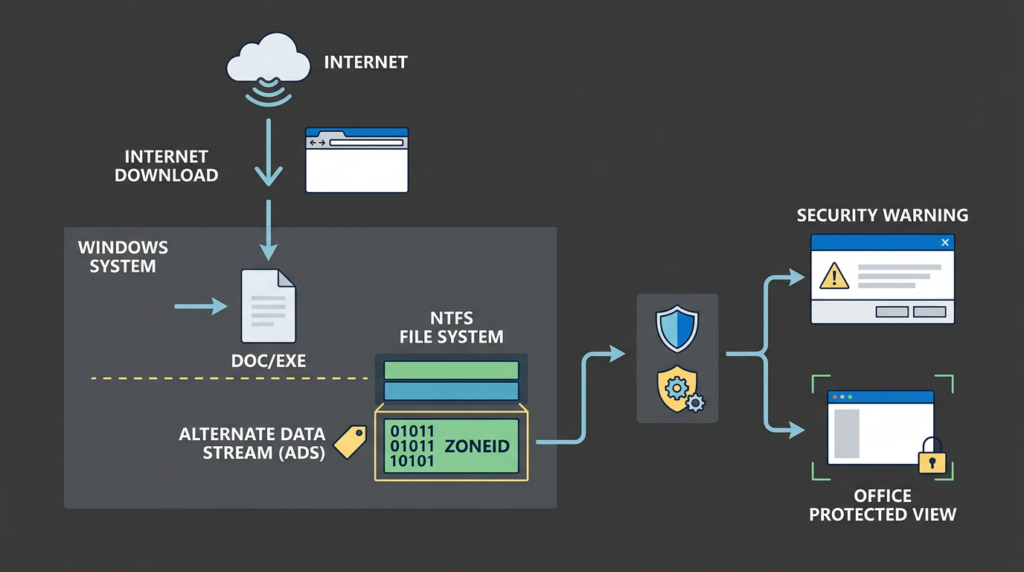
Mark-of-the-Web is not just a warning banner
Mark-of-the-Web is easy to underestimate because users usually notice only the visible warning: a SmartScreen prompt, an Office Protected View banner, a PowerShell execution warning, or a Properties dialog saying the file came from another computer. Under the hood, MotW is a small but important piece of metadata. On NTFS, Windows stores it in an alternate data stream named Zone.Identifier. Red Canary’s MotW analysis shows the typical PowerShell view of that stream, where ZoneId=3 indicates the Internet Zone. (Red Canary)
A normal downloaded file might carry metadata like this:
Get-Content -Path .\downloaded-file.docx -Stream Zone.Identifier
[ZoneTransfer]
ZoneId=3
HostUrl=https://example.com/downloaded-file.docx
ReferrerUrl=https://example.com/
That stream is not the file’s visible content. It is attached metadata. Many users never see it. Security tools, however, can use it. Windows can use it. Microsoft Office can use it. SmartScreen can use it. EDR and forensic workflows can use it. If the stream says the file came from the internet, downstream controls have a reason to add friction before execution or editing.
The basic zone values are worth keeping in mind:
| ZoneId | Common meaning | Practical effect |
|---|---|---|
| 0 | Local Machine | Treated as local. Many internet-origin warnings do not apply. |
| 1 | Local Intranet | Usually lower friction than Internet Zone. |
| 2 | Trusted Sites | Depends on configured Windows zone policy. |
| 3 | Internet | Common marker for browser, email, or messaging downloads. |
| 4 | Restricted Sites | Highest-risk zone category. |
The attacker goal in a MotW bypass is usually not “hide all maliciousness forever.” It is more modest and more realistic: make a file lose the internet-origin context that would otherwise trigger user-visible warnings or stricter application behavior. Microsoft’s Attachment Manager page states that Windows may display a warning before opening, block automatic opening, or apply extra protection in Office or Edge when a file is identified as downloaded from the internet or another unsafe location. (Microsoft Support) SmartScreen’s own documentation states that it checks downloaded apps and installers against lists of known unsafe and well-known files, warning users when a file lacks reputation. (Microsoft Learn) A file that wrongly looks local can slip past some of that decision context.
The vulnerability path in CVE-2026-58052
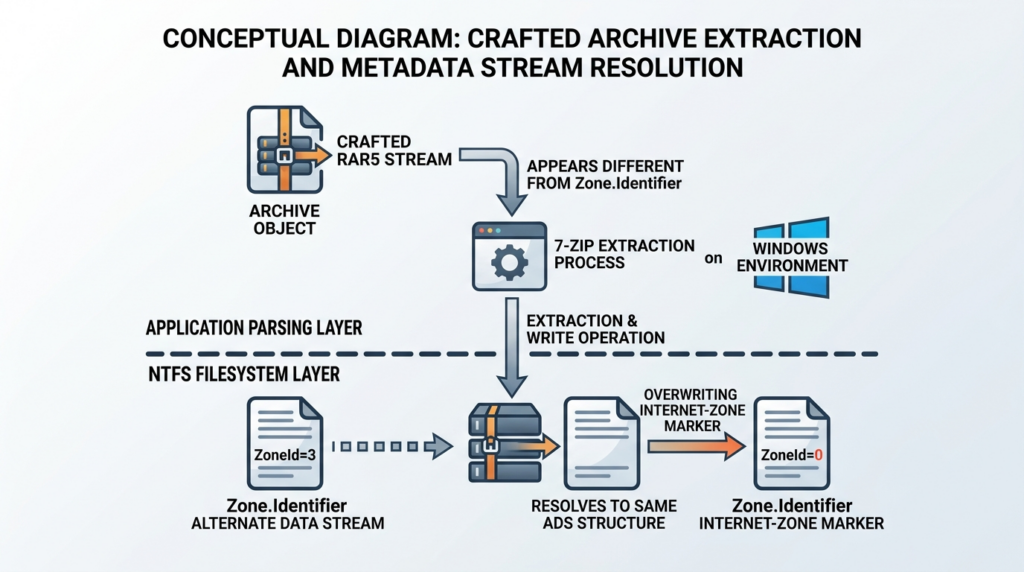
The key technical failure is a mismatch between string comparison and filesystem reality.
NVD’s description is precise enough to build a useful mental model. 7-Zip has a guard that suppresses an archive-supplied Zone.Identifier stream. That makes sense. If a downloaded archive has MotW, 7-Zip should propagate that marker to extracted files. It should not let the archive author provide their own Zone.Identifier stream and overwrite the safer Internet-zone value. The problem is that the guard matches the exact name Zone.Identifier. A crafted RAR5 STM record named :Zone.Identifier:$DATA is not the exact same string. NTFS, however, canonicalizes the stream name so that it resolves to the same alternate data stream on disk. (nvd.nist.gov)
The public proof-of-concept repository describes the same behavior from the validation side. It states that the crafted RAR5 archive contains a visible file entry plus two RAR5 STM service records: one changes the final visible bytes of the extracted file, and another changes the extracted file’s Mark-of-the-Web stream. The README explains that 7-Zip recognizes and suppresses an exact archive-provided Zone.Identifier alternate stream, but the crafted stream name uses the Windows stream type suffix Zone.Identifier:$DATA, which 7-Zip treats as a different stream name while NTFS resolves it to the same underlying stream. (GitHub)
A simplified flow looks like this:
| Étape | What happens | Security consequence |
|---|---|---|
| 1 | User receives or downloads a crafted RAR5 archive. | The archive itself may carry Internet-zone MotW. |
| 2 | User extracts it with affected 7-Zip for Windows. | 7-Zip attempts to propagate zone metadata to extracted files. |
| 3 | The archive contains an STM stream resembling :Zone.Identifier:$DATA. | 7-Zip’s exact-name guard does not treat it as the blocked Zone.Identifier flux. |
| 4 | NTFS canonicalizes the stream name. | The crafted stream writes to the same Zone.Identifier ADS. |
| 5 | The propagated Internet-zone marker is overwritten. | The extracted file may end with ZoneId=0, making it look local. |
| 6 | A second stream can affect visible file bytes. | The final extracted file may differ from the benign-looking main entry. |
This is a classic parser-to-platform mismatch. A security check occurs in one layer using string logic. The final write occurs in another layer using filesystem semantics. If those two layers disagree about equivalence, an attacker can sometimes find a name that looks different to the guard but resolves to the protected target later.
The dangerous part is not the string :$DATA by itself. NTFS named streams commonly use syntax of the form filename:streamname:$DATAoù $DATA is the stream type. The bug is that 7-Zip’s protection logic, as publicly described, failed to normalize or reject an equivalent stream name before writing it. That is why the vulnerability is categorized as CWE-693, Protection Mechanism Failure, rather than as a decompression memory corruption issue. (VulnCheck)
Pourquoi ZoneId=0 is security-relevant
ZoneId=0 corresponds to Local Machine. If a file that actually came from the internet is marked as local, security decisions built around internet-origin metadata can change. In a phishing chain, this may influence whether the user sees a warning, whether Office opens a document in Protected View, whether SmartScreen has the correct context for a downloaded executable, and whether defenders can reconstruct file origin from endpoint telemetry.
A small example makes the difference obvious:
# Internet-origin file
Get-Content .\invoice.docx -Stream Zone.Identifier

[ZoneTransfer]
ZoneId=3
HostUrl=https://example-attacker-site.invalid/invoice.rar
# Suspicious extracted file after a trust-control bypass
Get-Content .\invoice.docx -Stream Zone.Identifier

[ZoneTransfer]
ZoneId=0
That second output is not proof that the file is malicious. It is proof that the origin signal is no longer telling the truth. A file can be benign and still have MotW. A file can be malicious and lack MotW. But when an external archive produces a file with a local-zone marker, especially after extraction by a known affected tool, defenders should treat that as a meaningful anomaly.
This matters because MotW bypass is not a niche attacker idea. MITRE ATT&CK notes that adversaries may abuse container files such as archives, compressed formats, ISO images, VHD, and VHDX so that contained files may not inherit MotW after extraction or mounting. ATT&CK also maps the technique to Windows and includes detection guidance for extraction or mounting of internet-origin containers whose contained files lack Zone.Identifier tagging. (MITRE ATT&CK) CVE-2026-58052 is a product-specific path into the same broader attacker behavior.
CVE-2026-58052 versus CVE-2025-0411
CVE-2026-58052 is not the first 7-Zip MotW problem defenders have had to handle. CVE-2025-0411 was also a Mark-of-the-Web bypass in 7-Zip, but the trigger was different. ZDI described CVE-2025-0411 as a flaw in 7-Zip’s handling of archived files where, when extracting files from a crafted archive that itself bears MotW, 7-Zip did not propagate MotW to the extracted files. ZDI also noted that user interaction was required, either visiting a malicious page or opening a malicious file, and that an attacker could use the issue to execute code in the current user context. (Zero Day Initiative)
7-Zip’s changelog for 24.09 records the relevant fix in plain terms: 7-Zip File Manager did not propagate the Zone.Identifier stream for extracted files from nested archives when an open archive existed inside another open archive. (7-Zip) That earlier bug was about nested archive propagation. CVE-2026-58052 is about RAR5 alternate stream naming and NTFS canonicalization. The operational lesson is the same: archive extraction is not merely “copy bytes out of a compressed file.” It is a trust boundary where file metadata, path handling, stream handling, and platform-specific behavior all matter.
The difference is useful for defenders:
| Issue | Trigger shape | Security failure | Risque pratique |
|---|---|---|---|
| CVE-2025-0411 | Crafted or nested archive handling | MotW not propagated to extracted files | Extracted files may run or open without expected internet-origin warnings. |
| CVE-2026-58052 | Crafted RAR5 archive with STM stream name collision | Propagated MotW can be overwritten through NTFS ADS equivalence | Extracted files may carry attacker-controlled local-zone metadata. |
Both issues require user interaction in the scoring model. Both are more useful in a chain than alone. Both matter more where users or automated workflows routinely process untrusted archives.
The broader 7-Zip attack surface
7-Zip is often treated as a harmless desktop utility. In real environments, it is an input parser for hostile files. The official 7-Zip homepage lists unpacking support for many formats beyond ZIP and 7z, including APFS, CAB, CHM, CPIO, DMG, EXT, FAT, GPT, HFS, ISO, MBR, MSI, NSIS, NTFS, QCOW2, RAR, RPM, SquashFS, UDF, UEFI, VDI, VHD, VHDX, VMDK, XAR, and Z. (7-Zip) Each handler brings parsing logic and file-system semantics into the trust boundary.
That is why a single 7-Zip vulnerability should not be triaged in isolation. The last two years have produced a set of useful examples:
| CVE | Question centrale | Why it belongs in the same operational bucket | Fix threshold or affected range |
|---|---|---|---|
| CVE-2026-58052 | RAR5 MotW bypass through ADS name collision | Shows how archive stream metadata can subvert Windows trust controls. | NVD lists 7-Zip through 26.02 as affected. (nvd.nist.gov) |
| CVE-2026-48095 | Heap buffer overflow in the NTFS archive handler | Shows archive parsing can become memory-corruption attack surface, not just metadata handling. | 7-Zip changelog records the fix in 26.01. (7-Zip) |
| CVE-2025-0411 | MotW propagation failure with nested archives | Shows the same trust-control category in a different extraction path. | 7-Zip changelog records the Zone.Identifier propagation fix in 24.09. (7-Zip) |
| CVE-2025-11001 and CVE-2025-11002 | Symbolic-link processing issue during extraction | Shows filesystem semantics can turn extraction into unsafe writes. | 7-Zip changelog records fixes in 25.00. (7-Zip) |
| CVE-2024-11477 | Zstandard archive handling crash or vulnerability class | Shows decompression code itself can be security-relevant. | 7-Zip changelog records the ZSTD fix in 24.07. (7-Zip) |
| CVE-2018-10115 | RAR unpacking vulnerability | Older example showing RAR handling has had security impact before. | 7-Zip changelog records a RAR unpacking vulnerability fix in 18.05. (7-Zip) |
The pattern is not “7-Zip is unsafe.” The pattern is that archive tools sit at the boundary between untrusted external content and trusted local execution. That boundary is easy to ignore because extraction feels routine. A user right-clicks a file. A help desk technician unpacks a customer sample. A CI job extracts an artifact. A malware analyst opens a suspicious archive. A support portal unpacks uploads. In each case, the archive parser interprets attacker-controlled structure and writes files into a trusted context.
Penligent has a related technical write-up on 7-Zip CVE-2026-48095 that frames 7-Zip as a broad archive parser attack surface rather than only a right-click utility, and it maps recent 7-Zip CVEs across MotW bypass, NTFS parsing, symbolic-link handling, and decompression bugs. (Penligent) That is the right mental model for CVE-2026-58052 as well: even when the individual issue is a low-scored protection bypass, the affected component processes hostile file formats in places where users and services often trust the output too quickly.
Realistic attack chains
A realistic CVE-2026-58052 chain starts with delivery, not exploitation magic. The attacker sends a RAR5 archive through email, chat, a ticketing portal, a file-sharing link, or a compromised supplier account. The archive is crafted so that extraction with affected 7-Zip for Windows writes a final visible file and changes the Zone.Identifier stream. The user sees an expected-looking file after extraction. The file’s MotW metadata no longer reflects its internet origin.
One possible phishing flow looks like this:
- The attacker sends
invoice_update.rar. - The user downloads it, so the archive itself receives Internet-zone MotW.
- The user extracts it with affected 7-Zip.
- The extracted
invoice.docx,invoice.pdf.lnk,setup.exe, or script-like payload receives altered or missing trust metadata. - Windows and applications may treat the file with less suspicion than they would if
ZoneId=3were preserved. - The user opens the file, possibly seeing fewer warnings or less obvious friction.
- The attacker’s payload still needs its own execution path, exploit, macro, script, installer abuse, or social-engineering step.
That last point matters. MotW bypass is an enabler. It does not replace payload execution. It does not guarantee that SmartScreen, Defender, EDR, or Office will all fail. It does not make a malicious binary trusted. It can, however, remove a meaningful origin signal from a chain where the attacker already has a plausible lure.
A second scenario is help desk or customer support. Many organizations accept compressed files from customers because logs, crash dumps, exports, and screenshots often arrive in archives. Staff may use 7-Zip because it handles formats the native Windows shell does not. Portable copies are common. In that workflow, the threat is not only the help desk user double-clicking a file. It is also the normalization of extracting untrusted archives on a workstation that has access to tickets, email, internal systems, and perhaps customer data.
A third scenario is automated processing. CVSS says user interaction is required, but enterprise reality blurs that line. If a service account automatically extracts uploaded archives, the “user” is the automation. If a CI runner unpacks build artifacts, the “user” is a build process. If a SOC tool expands samples before scanning them, the “user” is a pipeline. CVE-2026-58052 is not marked automatable in CISA-ADP SSVC data, but defenders should still inspect automated RAR/RAR5 handling because the business workflow may create repeatable exposure even when the vulnerability itself is scored with user interaction. (nvd.nist.gov)
Why file content spoofing makes this more interesting
The second part of the public NVD change log should not be missed. It states that a second STM record named ::$DATA overwrites the extracted file’s default data stream, allowing an attacker to defeat SmartScreen/MotW warnings and spoof file content. (nvd.nist.gov) The proof-of-concept README describes this as one visible file entry plus stream records that alter both the visible file bytes and the MotW stream. (GitHub)
That can create a confusing validation gap. A scanner or human may inspect a benign-looking archive entry. The final file written to disk may not match the visible entry after stream processing. If the same archive also alters Zone.Identifier, the defender loses both content expectation and origin expectation at the same time.
A defensive validator should therefore ask two questions:
| Validation question | Pourquoi c'est important |
|---|---|
| Does the final file content on disk match the archive entry a user thinks they extracted? | Stream handling may change the final visible file bytes. |
| Does the final file carry the expected Internet-zone marker? | Trust controls depend on correct origin metadata. |
Do not rely only on the archive listing. Do not rely only on the extracted filename. Do not rely only on the file extension. The important object is the final file on disk after extraction, including its named streams.
Defensive triage priority
Not every environment should treat CVE-2026-58052 the same way. A developer laptop that rarely extracts RAR archives is not the same as a support center that receives hundreds of compressed uploads per week. A managed workstation with modern EDR and strict application control is not the same as an analyst VM with a folder full of portable tools.
A useful priority model is:
| Environnement | Priorité | Pourquoi |
|---|---|---|
| Help desk and support workstations | Haut | They process external archives as part of normal work and may trust file names or customer context. |
| SOC and malware triage systems | Haut | Analysts open suspicious archives intentionally, often with specialized tools and portable copies. |
| CI runners and artifact processors | High if RAR/RAR5 is accepted | Automated extraction can turn user interaction into service-account exposure. |
| Developer workstations | Moyenne à élevée | Developers often use portable tools and process third-party packages, installers, and attachments. |
| General employee workstations | Moyen | Phishing exposure exists, but risk depends on email controls, attachment policy, and 7-Zip prevalence. |
| Servers without 7-Zip or RAR handling | Faible | No affected parser, no realistic path. |
| Linux/macOS systems using different archive tooling | Context-dependent | The public issue is described as 7-Zip for Windows and depends on NTFS ADS behavior. |
The Windows and NTFS dependency matters. The vulnerability record is about 7-Zip for Windows through 26.02, and the root behavior depends on NTFS alternate data streams and stream-name canonicalization. (nvd.nist.gov) That does not mean Linux or macOS archive handling is automatically safe in every related workflow. It means defenders should not copy-paste Windows-specific conclusions onto other platforms. On non-Windows systems, look for bundled Windows 7-Zip binaries, cross-platform extraction workflows that later move files to Windows, and any pipeline that preserves or strips metadata in unexpected ways.
Inventory first, because 7-Zip is often unmanaged
The first practical problem is finding every copy. Many teams patch the installed copy under C:\Program Files\7-Zip and miss portable copies in user folders, admin tool directories, shared drives, build-agent folders, and vendor-bundled packages. 7-Zip’s official homepage emphasizes that it is free, open source, and usable in commercial organizations without registration or payment. (7-Zip) That convenience is one reason copies spread outside central software management.
Start with installed software, but do not stop there:
# Installed 7-Zip entries from common uninstall registry locations
$uninstallRoots = @(
  "HKLM:\Software\Microsoft\Windows\CurrentVersion\Uninstall\*",
  "HKLM:\Software\WOW6432Node\Microsoft\Windows\CurrentVersion\Uninstall\*",
  "HKCU:\Software\Microsoft\Windows\CurrentVersion\Uninstall\*"
)

Get-ItemProperty $uninstallRoots -ErrorAction SilentlyContinue |
  Where-Object { $_.DisplayName -match "7-Zip" } |
  Select-Object DisplayName, DisplayVersion, InstallLocation
Then search for portable binaries. Keep the search scoped; recursive scans across every drive can be expensive.
$roots = @(
  "C:\Program Files",
  "C:\Program Files (x86)",
  "C:\Users",
  "C:\Tools",
  "D:\Tools"
)

$names = @("7z.exe","7zFM.exe","7zg.exe","7za.exe","7zz.exe","7z.dll")

foreach ($root in $roots) {
  if (Test-Path $root) {
    Get-ChildItem -Path $root -Include $names -File -Recurse -ErrorAction SilentlyContinue |
      Select-Object FullName,
        @{Name="ProductVersion";Expression={$_.VersionInfo.ProductVersion}},
        @{Name="FileVersion";Expression={$_.VersionInfo.FileVersion}},
        Length,
        LastWriteTime
  }
}
Check the command-line version directly where possible:
& "C:\Program Files\7-Zip\7z.exe" | Select-Object -First 3
Example output might show:
7-Zip 26.02 (x64) : Copyright (c) 1999-2026 Igor Pavlov : 2026-06-25
Treat any version through 26.02 on Windows as affected unless and until your vendor, package manager, or internal security team confirms a backported fix. NVD’s affected CPE range includes versions up to and including 26.02. (nvd.nist.gov)
Inspect MotW safely
Defenders do not need to generate a malicious RAR5 archive to understand the defensive data model. You can inspect Zone.Identifier streams on ordinary downloaded files and on extracted files from controlled samples.
Check whether a file has any named streams:
Get-Item -Path .\sample.docx -Stream *
Check the Zone.Identifier stream:
Get-Content -Path .\sample.docx -Stream Zone.Identifier -ErrorAction SilentlyContinue
Check all files in an extraction directory and flag files missing Zone.Identifier:
$path = ".\extracted"

Get-ChildItem $path -File -Recurse | ForEach-Object {
  $streams = Get-Item -Path $_.FullName -Stream * -ErrorAction SilentlyContinue
  [PSCustomObject]@{
    Path = $_.FullName
    Extension = $_.Extension
    HasZoneIdentifier = ($streams.Stream -contains "Zone.Identifier")
  }
} | Sort-Object HasZoneIdentifier, Extension, Path
Flag suspicious local-zone markers on files that should have originated from external archives:
Get-ChildItem ".\extracted" -File -Recurse | ForEach-Object {
  $zone = $null
  try {
    $zone = Get-Content -Path $_.FullName -Stream Zone.Identifier -ErrorAction Stop
  } catch {}

  if ($zone -match "ZoneId=0") {
    [PSCustomObject]@{
      Path = $_.FullName
      Finding = "Zone.Identifier says Local Machine"
      Zone = ($zone -join "\n")
    }
  }
}
That last check is intentionally conservative. ZoneId=0 is not inherently malicious. It is suspicious when it appears on a file that should have inherited Internet-zone metadata from a downloaded archive. The context matters: source path, parent archive, extraction tool, user, timestamp, and subsequent execution.
Endpoint telemetry and detection
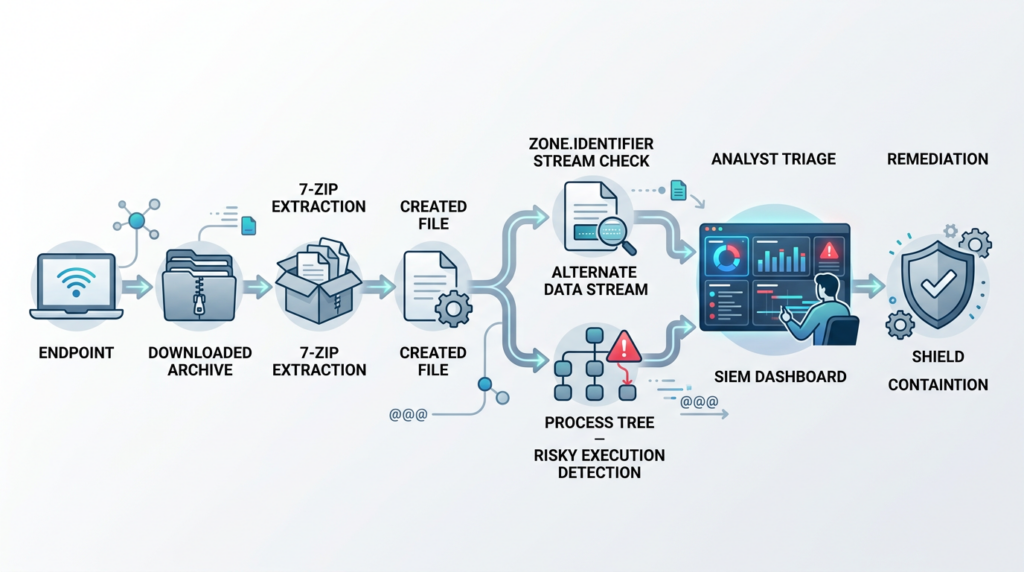
Detection should focus on behavior, not just CVE string matching. CVE-2026-58052 is about the relationship between an internet-origin archive, extraction by affected 7-Zip, resulting file streams, and later file execution. No single event will prove the full chain in every environment.
Useful telemetry includes:
| Data source | What to look for | Pourquoi c'est important |
|---|---|---|
| Process creation | 7z.exe, 7zFM.exe, 7zg.exe, 7za.exe, 7zz.exe manipulation .rar or unknown archives | Identifies extraction context. |
| File creation | New executable, script, LNK, CHM, MSI, Office macro document, or installer after archive extraction | Shows likely payload output. |
| Named stream creation | :Zone.Identifier stream creation, modification, or unexpected contents | Directly relevant to MotW. |
| Parent-child process chains | Extracted file launched shortly after extraction | Indicates the bypass may support execution. |
| Email or browser download telemetry | Archive source URL, sender, referrer, download path | Reconstructs origin. |
| EDR file reputation events | Unknown file executed without expected internet-origin warning | Shows downstream control impact. |
Sysmon is useful if configured properly. Microsoft’s Sysmon documentation states that Event ID 15, FileCreateStreamHash, logs when a named file stream is created and records hashes of the unnamed stream as well as contents of the named stream; the documentation specifically calls out the browser-created Zone.Identifier “mark of the web” stream. (Microsoft Learn) Microsoft’s Windows security Sysmon event reference also describes Event ID 15 as recording named alternate data streams, including Zone.Identifier streams, and notes its usefulness for detecting files originating from the internet and browser download activity. (Microsoft Learn)
A basic Sysmon XML include for Zone.Identifier streams can look like this:
<Sysmon schemaversion="4.90">
  <EventFiltering>
    <FileCreateStreamHash onmatch="include">
      <TargetFilename condition="end with">:Zone.Identifier</TargetFilename>
    </FileCreateStreamHash>
  </EventFiltering>
</Sysmon>
That is not enough by itself. In a mature environment, correlate it with extraction and execution:
downloaded archive has Zone.Identifier ZoneId=3
AND 7-Zip process extracts files from that archive
AND extracted executable/script/document is created
AND extracted file has no Zone.Identifier OR ZoneId=0
AND extracted file is executed or opened within a short time window
A Sigma-style detection idea might look like this:
title: Suspicious Execution After 7-Zip RAR Extraction Without Expected MotW
status: experimental
description: Detects execution of high-risk file types shortly after 7-Zip handles a RAR archive, where the resulting file may lack expected Zone.Identifier metadata.
logsource:
  product: windows
  category: process_creation
detection:
  selection_7zip:
    Image|endswith:
      - '\7z.exe'
      - '\7zFM.exe'
      - '\7zg.exe'
      - '\7za.exe'
      - '\7zz.exe'
    CommandLine|contains:
      - '.rar'
  selection_child_exec:
    Image|endswith:
      - '.exe'
      - '.msi'
      - '.hta'
      - '.js'
      - '.vbs'
      - '.ps1'
      - '.lnk'
  condition: selection_7zip or selection_child_exec
fields:
  - UtcTime
  - Image
  - CommandLine
  - ParentImage
  - ParentCommandLine
falsepositives:
  - Legitimate archive extraction followed by software installation
  - Developer build workflows
  - Help desk handling trusted customer packages
level: medium
That rule is deliberately incomplete because Sigma alone cannot express all temporal and stream-content correlations across telemetry sources. It is a starting point for a SIEM pipeline, not a complete CVE detector.
For Microsoft Defender-style advanced hunting, a correlation can begin with 7-Zip process execution and risky file creation:
let SevenZipProcesses =
DeviceProcessEvents
| where FileName in~ ("7z.exe", "7zFM.exe", "7zg.exe", "7za.exe", "7zz.exe")
| where ProcessCommandLine has_any (".rar", ".r00", ".part")
| project DeviceId, DeviceName, SevenZipTime=Timestamp, SevenZipProcessId=ProcessId,
          SevenZipCommandLine=ProcessCommandLine, InitiatingProcessAccountName;

let RiskyFiles =
DeviceFileEvents
| where FileName endswith ".exe"
   or FileName endswith ".msi"
   or FileName endswith ".hta"
   or FileName endswith ".js"
   or FileName endswith ".vbs"
   or FileName endswith ".ps1"
   or FileName endswith ".lnk"
   or FileName endswith ".chm"
| project DeviceId, DeviceName, FileTime=Timestamp, FolderPath, FileName,
          SHA256, InitiatingProcessFileName, InitiatingProcessCommandLine;

SevenZipProcesses
| join kind=inner RiskyFiles on DeviceId
| where FileTime between (SevenZipTime .. SevenZipTime + 10m)
| project DeviceName, SevenZipTime, SevenZipCommandLine,
          FileTime, FolderPath, FileName, SHA256,
          InitiatingProcessFileName, InitiatingProcessCommandLine,
          InitiatingProcessAccountName
| order by FileTime desc
If your telemetry captures alternate data stream contents, add a separate query for Zone.Identifier anomalies. The exact schema varies by EDR. The logical test is simple:
TargetFilename ends with ":Zone.Identifier"
AND Contents contains "ZoneId=0"
AND related file was created by 7-Zip
AND source archive had Internet-zone metadata OR arrived from browser/email/chat/ticketing path
Be careful with false positives. Some internal files legitimately have no MotW. Some users manually unblock files. Some software rewrites files and strips ADS. Some file transfers remove ADS because the destination file system does not preserve NTFS streams. The best detection correlates origin, extraction, stream behavior, and execution.
Containment and mitigation before a fixed release is deployed
The cleanest long-term fix is to install a vendor-fixed version when it is available and verified. The complication is timing. The official 7-Zip site currently lists 26.02 as the Windows download, dated June 25, 2026, while NVD lists through 26.02 as affected. (7-Zip) Until a fixed version and changelog entry are available, reduce exposure through workflow controls.
Start with the highest-risk workflows:
| Contrôle | Where to apply first | Reason |
|---|---|---|
| Block or quarantine untrusted RAR/RAR5 attachments | Email gateway, secure web gateway, ticketing uploads | Reduces delivery opportunities. |
| Extract untrusted archives only in isolated VMs | Help desk, SOC, malware triage | Limits blast radius if downstream execution happens. |
| Prevent execution from extraction directories | Downloads, Temp, ticket attachment folders, support work folders | Stops the bypass from becoming easy execution. |
| Remove portable 7-Zip copies | User profiles, tool shares, build agents | Prevents unmanaged vulnerable binaries from persisting. |
| Monitor Zone.Identifier stream writes | Windows endpoints with Sysmon or EDR | Gives visibility into MotW behavior. |
| Keep SmartScreen and Attachment Manager enabled | Windows workstations | Avoids weakening the control this CVE already targets. |
| Restrict script interpreters for normal users | PowerShell, WScript, CScript, MSHTA | Reduces value of payloads extracted from archives. |
| Require archive handling in controlled tooling | Support and triage teams | Makes evidence and isolation repeatable. |
Do not respond by disabling MotW preservation because it creates friction. Microsoft’s Attachment Manager exists to protect users from files downloaded from unsafe locations, and Microsoft’s guidance says users should only unblock files from trusted sources. (Microsoft Support) A policy that stops preserving zone information makes this class of bypass unnecessary for attackers.
A practical hardening package for Windows endpoints could include:
# Example: check policy value that can affect zone information preservation
$path = "HKCU:\Software\Microsoft\Windows\CurrentVersion\Policies\Attachments"
Get-ItemProperty -Path $path -Name SaveZoneInformation -ErrorAction SilentlyContinue
Interpretation depends on policy state and enterprise baseline, but the defensive goal is straightforward: do not broadly remove zone metadata from downloaded files. Preserve it, monitor it, and investigate cases where external-origin files unexpectedly appear local.
Application control can also help. A MotW bypass is less valuable if users cannot run scripts and executables from extraction paths. Consider blocking or alerting on execution from:
%USERPROFILE%\Downloads
%USERPROFILE%\Desktop
%TEMP%
ticket attachment directories
browser cache and messaging app download folders
shared support intake folders
For PowerShell, combine Constrained Language Mode, script block logging, and signed-script policy where appropriate. For Office, keep Protected View and macro restrictions aligned with Microsoft’s current hardening guidance. For email, strip or detonate suspicious archives and nested archives, especially if they contain executable content, shortcut files, CHM files, HTA files, scripts, or macro-enabled documents.
Safe validation workflow
Validation should prove exposure without distributing exploit archives around the organization. Keep the workflow controlled, isolated, and evidence-driven.
A safe validation plan:
- Identify Windows systems with 7-Zip through 26.02.
- Confirm whether the system uses NTFS extraction paths.
- Confirm whether the workflow handles RAR/RAR5 from untrusted sources.
- Inspect whether MotW is preserved for ordinary downloaded archives and extracted files.
- Use only approved internal test material or a controlled lab validation asset.
- Record version output, extraction path, stream contents, and process telemetry.
- Remove test artifacts and document results.
Use ordinary MotW checks to validate that telemetry works:
# Add a benign Zone.Identifier stream to a harmless text file in a lab
Set-Content -Path .\benign.txt -Value "test"
Set-Content -Path .\benign.txt -Stream Zone.Identifier -Value "[ZoneTransfer]`r`nZoneId=3"

# Confirm the stream exists
Get-Content -Path .\benign.txt -Stream Zone.Identifier
Then confirm Sysmon or EDR sees the stream creation. This does not prove CVE-2026-58052 exploitation. It proves your logging can see the class of metadata that the vulnerability targets.
For extraction workflows, compare expected and final state:
# List streams on all files after a controlled extraction test
Get-ChildItem .\lab-output -File -Recurse | ForEach-Object {
  $streams = Get-Item -Path $_.FullName -Stream * -ErrorAction SilentlyContinue
  [PSCustomObject]@{
    Path = $_.FullName
    Streams = ($streams.Stream -join ",")
  }
}
Hash final files after extraction:
Get-ChildItem .\lab-output -File -Recurse |
  Get-FileHash -Algorithm SHA256 |
  Select-Object Path, Hash
Record 7-Zip version:
& "C:\Program Files\7-Zip\7z.exe" | Select-Object -First 3
The output should be stored with the ticket or risk record. A useful evidence package includes:
| Preuves | Pourquoi c'est important |
|---|---|
| 7-Zip binary path and version | Confirms affected or remediated state. |
| Hash of 7-Zip binary | Detects portable or modified copies. |
| Source of archive workflow | Shows whether the archive came from email, browser, ticketing, or automation. |
| Extraction directory and account | Shows privilege and blast radius. |
| Zone.Identifier before and after extraction | Shows trust metadata behavior. |
| Process tree | Shows whether extraction was followed by execution. |
| Remediation action | Shows whether patching, isolation, or policy change was applied. |
For teams that run authorized validation across many endpoints or archive-handling workflows, the operational challenge is not only running a check once. It is keeping scope, evidence, retest notes, and reporting tied together. An agentic security testing workflow such as Penligent can be used in authorized environments to organize vulnerability validation steps, capture evidence, and turn repeatable checks into structured findings rather than one-off screenshots. (Penligent) The tool does not change the facts of CVE-2026-58052; it helps reduce the manual drift that often appears when teams must inventory tools, verify versions, retest after updates, and preserve evidence for security leadership or customer assurance.
Common mistakes in CVE-2026-58052 response
The first mistake is calling the issue RCE without context. A MotW bypass can support code execution when paired with a payload and user action, but the public description of CVE-2026-58052 is a protection mechanism failure with integrity impact. Overstating it can cause credibility problems with engineering teams.
The second mistake is ignoring it because the score is low. MotW bypasses are useful precisely because they change user and platform decision points. Security teams do not patch only memory corruption. They also patch trust-control bypasses, file-origin bypasses, signature bypasses, and path traversal bugs because those issues make real intrusions easier.
The third mistake is patching only the installed copy. Portable 7-Zip binaries are common. Developer workstations, build servers, admin shares, SOC VMs, and support folders often contain old copies that never appear in normal software inventory.
The fourth mistake is assuming all archive formats behave like ZIP. CVE-2026-58052 is RAR5-specific in the public record, but the lesson is broader: each archive format can carry its own metadata model, path rules, stream rules, and parser behavior.
The fifth mistake is treating MotW as the only control. Even perfect MotW propagation is not a complete defense. Users can click through warnings. Attackers can use signed payloads, trusted file formats, script abuse, or living-off-the-land binaries. MotW is one layer. Preserve it, but do not build the entire defense around it.
The sixth mistake is failing to test downstream execution policy. If extracted files cannot execute from Downloads, Temp, ticket folders, or support intake paths, the value of a MotW bypass drops sharply.
The seventh mistake is losing evidence. A CVE response without proof of affected versions, fixed versions, extraction workflows, and detection coverage becomes a recurring audit problem. Archive-tool vulnerabilities are especially prone to this because they reappear as bundled tools and portable downloads.
Detection engineering details for MotW bypass chains
The best detection logic treats MotW bypass as a relationship between objects:
Internet-origin container
  -> extraction or mounting tool
  -> created child file
  -> missing or altered Zone.Identifier
  -> risky open or execution
Each arrow can break. Some browsers or transfer methods may not write MotW. Some file systems do not preserve NTFS ADS. Some tools rewrite files and drop streams. Some EDR products do not expose stream contents. Some users extract to network shares where SmartScreen behavior differs. Microsoft’s SmartScreen documentation explicitly notes that SmartScreen protects against malicious files from the internet and does not protect against malicious files on internal locations or network shares such as UNC or SMB/CIFS paths. (Microsoft Learn) That distinction matters when teams extract archives to shared support folders.
A detection pipeline should therefore keep multiple weak signals and score them together:
| Signal | La force | Notes |
|---|---|---|
| 7-Zip through 26.02 present | Moyen | Exposure signal, not exploitation. |
7-Zip processes .rar from Downloads or email cache | Moyen | Workflow signal. |
| Extracted high-risk file lacks Zone.Identifier | Moyenne à élevée | Stronger if parent archive had ZoneId=3. |
Extracted file has ZoneId=0 after external-origin extraction | Haut | Suspicious if context proves external origin. |
| Extracted file executes within minutes | Haut | Behavior moved from bypass to possible compromise. |
| Parent archive came from new sender or suspicious URL | Haut | Adds phishing context. |
| Payload path is user-writable and unusual | Moyen | Common in initial access chains. |
| File is unsigned or low reputation | Moyenne à élevée | Depends on environment and tool. |
A practical triage query should return a story, not only a hit. Analysts need to see:
Who extracted the archive?
Where did the archive come from?
Which 7-Zip binary was used?
What version was it?
Which files were created?
Did those files have Zone.Identifier?
Were any high-risk file types opened or executed?
What happened next?
Without that sequence, alert quality will be poor.
Blocking RAR is a policy decision, not a universal answer
Some organizations can block RAR and RAR5 archives at email and upload boundaries. Others cannot. Engineering teams, support teams, security teams, legal teams, and customers may legitimately exchange compressed files. A blanket block can push users toward unsanctioned channels.
A more realistic policy splits archive handling into tiers:
| Archive source | Suggested policy |
|---|---|
| Unknown external email sender | Block, detonate, or require secure portal review. |
| Known customer ticket portal | Accept but extract only in isolated workflow. |
| Internal trusted repository | Allow with normal malware scanning and provenance checks. |
| Build artifacts from CI | Allow only from authenticated pipeline sources and verify checksums. |
| Security research samples | Handle only in malware-analysis or lab environment. |
| Personal messaging apps | Block or strongly restrict on managed workstations. |
For RAR/RAR5 specifically, add compensating controls until a fixed 7-Zip version is available. Do not let users extract unknown RAR files directly onto their Desktop or Downloads folder and then run whatever appears. Do not allow automated services to extract customer-supplied RAR files under privileged accounts. Do not rely on extension filtering alone; users and attackers can rename files, and archive tools may inspect signatures or content.
Que dire aux dirigeants ?
Leadership does not need RAR5 stream internals. They need a risk statement that is accurate and not alarmist:
CVE-2026-58052 affects 7-Zip for Windows through 26.02 and can let a crafted RAR5 archive overwrite Mark-of-the-Web metadata on extracted files. It does not appear to be standalone remote code execution based on current public information, but it can weaken Windows warnings and file-origin controls used to reduce phishing and unsafe execution risk. Systems that process untrusted archives, especially support, SOC, developer, and automation environments, should be prioritized for inventory, containment, monitoring, and upgrade when a fixed release becomes available.
A concise remediation statement:
| Action | Owner | Deadline logic |
|---|---|---|
| Identify all 7-Zip copies through 26.02 | Endpoint / IT | Immédiate |
| Restrict untrusted RAR/RAR5 extraction | Email, web, support platform owners | Immédiate |
| Add or verify Zone.Identifier telemetry | Detection engineering | Near term |
| Test extraction workflows in lab | Security engineering | Near term |
| Upgrade when fixed release is available | Endpoint / package management | As soon as verified |
| Re-scan for portable copies | Endpoint / IT | After patch and recurring |
That is the right level of urgency: controlled, evidence-driven, and focused on the workflows where the bypass has real value.
Liste de contrôle pratique du durcissement
Use this checklist for Windows environments:
| Vérifier | Command or evidence | Pass condition |
|---|---|---|
| 7-Zip installed version | 7z.exe version output or software inventory | Not through 26.02 once a fixed release exists |
| Portable copies | File search for 7z*.exe, 7z.dll | No unmanaged vulnerable copies |
| RAR/RAR5 handling | Email gateway, proxy, ticketing config | Untrusted archives blocked, sandboxed, or isolated |
| MotW preservation | Attachment Manager policy review | Zone information preserved |
| SmartScreen status | Defender/Intune/GPO settings | Enabled and enforced for users |
| Office Protected View | Office policy baseline | Enabled for internet-origin files |
| Script execution | PowerShell and Windows Script Host policy | Restricted for standard users |
| Extraction path control | AppLocker, WDAC, EDR controls | No execution from download/extraction folders |
| Stream telemetry | Sysmon Event ID 15 or EDR equivalent | Zone.Identifier creation visible |
| Retest evidence | Ticket artifacts | Version, stream, and execution-policy evidence attached |
This is also a good time to consolidate old 7-Zip risk. If a host is below 26.02, it may also be below earlier security thresholds. The 7-Zip changelog records CVE-2026-48095 fixed in 26.01, symbolic-link processing fixes for CVE-2025-11001 and CVE-2025-11002 in 25.00, a nested-archive Zone.Identifier propagation fix in 24.09, and CVE-2024-11477 in 24.07. (7-Zip) Do not run separate fire drills for each archive bug if one upgrade and one workflow review can address the broader class.
FAQ
Is CVE-2026-58052 a remote code execution vulnerability?
- No public authoritative source supports describing CVE-2026-58052 as standalone RCE.
- The public records describe it as a Mark-of-the-Web bypass and protection mechanism failure in 7-Zip for Windows through 26.02. (nvd.nist.gov)
- It can still support a code-execution chain if the extracted file is a script, executable, installer, macro document, shortcut, or another payload that the user later opens.
- The safer phrasing is: “CVE-2026-58052 weakens Windows file-origin protections and can reduce warning friction in phishing or archive-based delivery chains.”
Which 7-Zip versions are affected by CVE-2026-58052?
- NVD lists affected CPE configuration for 7-Zip versions up to and including 26.02. (nvd.nist.gov)
- VulnCheck’s advisory lists 7-Zip <= 26.02 as affected. (VulnCheck)
- 7-Zip’s official homepage currently lists 26.02 dated June 25, 2026 as the Windows download. (7-Zip)
- Track the official 7-Zip site and changelog for the fixed release, then verify the installed binary version on disk rather than relying only on software inventory.
Does CVE-2026-58052 affect Linux or macOS?
- The public vulnerability description is specific to 7-Zip for Windows and depends on NTFS alternate data stream behavior.
- Linux and macOS systems should not be assumed affected in the same way unless they run Windows 7-Zip binaries, process archives for Windows users, or participate in workflows that later move extracted files to NTFS.
- Cross-platform archive pipelines still need review because they may strip, fail to preserve, or incorrectly infer trust metadata.
- For Linux package exposure, rely on distribution security trackers and package maintainers rather than directly mapping Windows-only behavior to non-Windows systems.
Why does ZoneId=0 matter?
ZoneId=0represents Local Machine context, whileZoneId=3commonly represents Internet Zone.- If an internet-origin file is rewritten or extracted with
ZoneId=0, Windows and applications may treat it with less suspicion than they should. - That can affect warning prompts, Office Protected View behavior, SmartScreen decision context, and forensic reconstruction.
ZoneId=0is not malicious by itself. It is suspicious when it appears on files that should have inherited Internet-zone origin from an external archive.
How can defenders check whether a file has Mark-of-the-Web?
- Use PowerShell to list streams:
Get-Item -Path .\file.ext -Stream *. - Use PowerShell to read MotW:
Get-Content -Path .\file.ext -Stream Zone.Identifier. - Rechercher
[ZoneTransfer]etZoneId=3on internet-origin files. - Use Sysmon Event ID 15 or EDR stream telemetry to observe Zone.Identifier stream creation at scale.
- Correlate stream data with browser downloads, email attachments, archive extraction, and file execution.
Can EDR detect CVE-2026-58052 reliably?
- EDR can often detect parts of the chain, but a single universal alert is unlikely.
- Strong signals include affected 7-Zip execution, RAR/RAR5 extraction, creation of risky file types, missing or altered Zone.Identifier streams, and execution soon after extraction.
- Detection quality improves when the EDR captures alternate data stream events or integrates Sysmon Event ID 15.
- Expect false positives from legitimate extraction, internal archives, manual unblocking, file-system transfers that strip ADS, and developer workflows.
Should organizations block RAR files because of CVE-2026-58052?
- Blocking RAR/RAR5 from unknown external sources is reasonable for many organizations, especially over email.
- A blanket block may be impractical for support, legal, engineering, or security teams that receive compressed evidence or customer files.
- A safer policy is to isolate extraction, prevent execution from extraction folders, scan outputs, preserve MotW, and restrict untrusted archive handling to controlled workflows.
- High-risk teams such as help desk, SOC, malware triage, and CI artifact processing deserve stricter rules than ordinary low-exposure workstations.
What is the difference between CVE-2026-58052 and CVE-2025-0411?
- CVE-2026-58052 is a RAR5 alternate stream name collision issue involving
Zone.Identifier:$DATAand NTFS ADS canonicalization. - CVE-2025-0411 was a 7-Zip Mark-of-the-Web bypass involving failure to propagate MotW from crafted or nested archives to extracted files. ZDI described it as requiring user interaction and allowing attackers to execute code in the current user context when chained with a payload. (Zero Day Initiative)
- 7-Zip’s changelog records the nested-archive Zone.Identifier propagation fix in version 24.09. (7-Zip)
- Both issues belong to the broader class of archive-based trust-control bypasses, but the technical trigger is different.
Useful resources for deeper verification
NVD’s CVE-2026-58052 entry is the best starting point for affected versions, CVSS vectors, CPE configuration, CISA-ADP SSVC data, and official references. (nvd.nist.gov)
VulnCheck’s advisory is the concise third-party advisory that names the issue as a 7-Zip Mark-of-the-Web bypass via RAR5 alternate data stream name collision, lists 7-Zip <= 26.02 as affected, and maps the issue to CWE-693. (VulnCheck)
Microsoft’s Attachment Manager documentation explains the Windows behavior that makes MotW meaningful: downloaded files may show warnings, be blocked from automatic opening, or receive extra protection in Office and Edge. (Microsoft Support)
MITRE ATT&CK T1553.005 provides the broader attacker-behavior frame for MotW bypass, including archive and container formats that cause extracted or mounted files to lose internet-origin protections. (MITRE ATT&CK)
Arrêt de clôture
CVE-2026-58052 is a low-friction, low-noise vulnerability in a high-exposure component. The bug does not need to be a headline-grabbing RCE to deserve attention. It affects the trust label Windows uses to decide whether downloaded content should be treated as risky, and it lives in an archive tool that many organizations run outside strict patch management.
The right response is not panic. It is disciplined archive handling. Find every 7-Zip copy. Treat untrusted RAR5 archives as hostile input. Preserve and monitor Zone.Identifier metadata. Prevent execution from extraction paths. Prioritize help desk, SOC, developer, and automation workflows. Update when a fixed release is available and verify the binary actually changed. Most importantly, treat archive extraction as a security boundary, not a convenience function.


 French
  English
  German
  Spanish
  Portuguese
  Japanese
  Korean
  Hindi
Hindi  Arabic
  Turkish
  Hebrew