
ChocoPoC RAT is a warning shot for the people who normally read warnings for everyone else.
The campaign targets vulnerability researchers, pentesters, red teamers, bug bounty hunters, and scanning teams through fake GitHub proof-of-concept repositories. The visible exploit code can look clean enough to survive a quick review. The malicious logic sits somewhere more annoying: inside a Python dependency chain, then inside a native extension module, then behind runtime checks that only wake up when the full lure PoC is executed. YesWeHack and Sekoia described the campaign in a joint analysis published on July 1, 2026, and The Hacker News and BleepingComputer later summarized the same activity for a broader security audience. (yeswehack.com)
That design matters. A researcher reviewing only exploit.py might miss the real payload. A sandbox that imports a suspicious package outside the original PoC context might see nothing. A VM that still has browser cookies, SSH keys, API tokens, customer notes, scanner configs, and private reports may be “isolated” from the corporate laptop but still valuable enough for an attacker. ChocoPoC RAT turns a familiar workflow — clone, inspect, install requirements, reproduce — into a supply chain infection path.
The primary lesson is not that public PoCs are suddenly unsafe. Malicious PoCs have existed for years. The change is where the attacker places the behavior. In this case, the risk moves from the obvious exploit file into transitive Python dependencies, compiled extension modules, Python startup hooks, Mapbox-based dead drops, and data theft routines aimed at the exact artifacts security people tend to keep nearby.
What ChocoPoC RAT is
ChocoPoC RAT is a Python-based remote access trojan and information stealer delivered through trojanized proof-of-concept exploit repositories. YesWeHack and Sekoia describe it as a fully functional RAT used to exfiltrate files, execute commands, and harvest secrets, and they reported at least seven fake CVE PoC repositories using the same broad infection pattern. (yeswehack.com)
The malware is not simply a downloader. Once installed and triggered, it can collect browser data from Chrome, Brave, Edge, and Firefox, including saved passwords, cookies, autofill data, and browsing history. It can search user directories for text files, Markdown files, and local database files. It can collect shell history, network configuration, and process lists. It can execute arbitrary shell commands, run arbitrary Python code, upload files and folders, and adjust beacon intervals to reduce visibility. (yeswehack.com)
For a normal commodity malware victim, those capabilities are already bad. For a security researcher, they are worse. A researcher’s browser may hold authenticated access to bug bounty portals, vendor dashboards, GitHub, GitLab, Slack, Discord, Jira, cloud consoles, or customer environments. Shell history may reveal target hostnames, internal tooling, API endpoints, one-off tokens, SSH usage, local paths, and command sequences. Local notes may include private vulnerability findings or responsible disclosure drafts. A poisoned PoC does not need domain admin to create serious damage if it lands on the wrong research workstation.
| ChocoPoC RAT capability | Ce qu'il fait | Why it matters for researchers | Defensive signal |
|---|---|---|---|
| Browser data theft | Collects passwords, cookies, autofill data, and history from major browsers | Session cookies may bypass password rotation until revoked, and browser history can reveal active targets | Python process touching browser profile directories |
| File collection | Searches for text, Markdown, and local database files | Research notes, reports, target lists, and private PoC drafts often live in these formats | Unexpected archive creation or reads across home directories |
| Shell history collection | Reads shell history files such as Bash or Zsh history | Commands may expose targets, tokens, paths, cloud tools, and internal workflow details | Python process reading shell history files |
| System reconnaissance | Collects network settings and process lists | Helps the attacker understand whether the victim is a valuable researcher box, CI runner, or disposable lab | Native system commands spawned from Python |
| Remote command execution | Executes shell commands and Python code | Enables post-compromise discovery, persistence, lateral movement, and data staging | Python spawning shell, PowerShell, cmd, or unusual child processes |
| Exfiltration de données | Uploads files and directories, with larger uploads handled outside the Mapbox channel | Enables theft of reports, credentials, test output, and customer artifacts | Python network egress to cloud APIs or unusual external IPs |
The name ChocoPoC is useful because it gives defenders a shared label, but the underlying pattern is broader than one family name. The campaign abuses trust in the vulnerability research process: fast-moving CVE news, fresh GitHub repositories, copied PoC links in issue threads, package managers that install transitive dependencies, and the pressure to validate before someone else publishes a working scanner.
The infection chain, from fake exploit repo to Python RAT
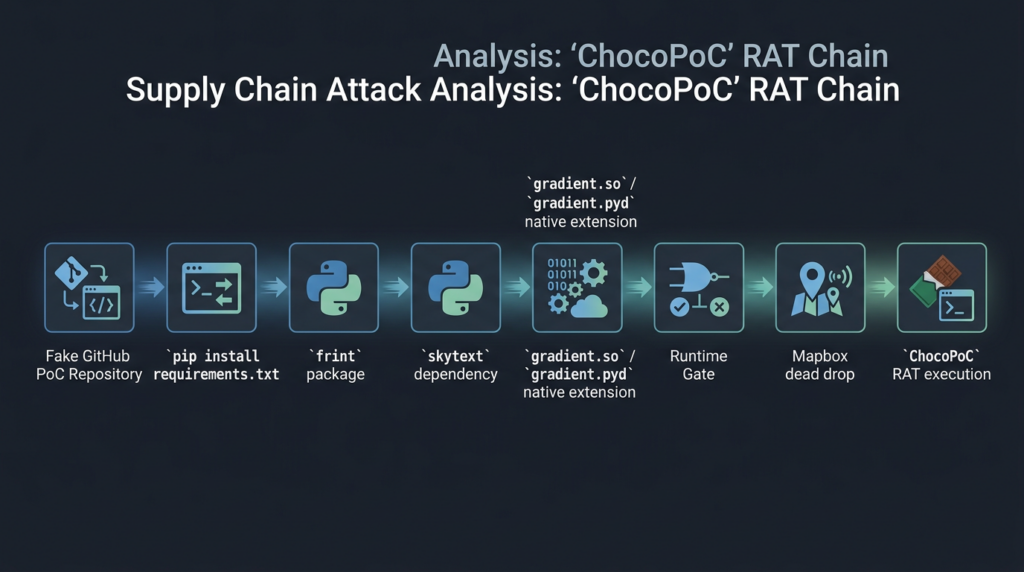
The reported 2026 infection chain starts with a fake GitHub PoC repository tied to a high-interest vulnerability. One example that triggered the YesWeHack/Sekoia investigation was a PoC claiming to exploit a Joomla SP Page Builder RCE, where the repository depended on a package named frint. The account that owned the repository was newly created, and frint itself had appeared recently on PyPI. More suspiciously, frint depended on another new package, skytext. (yeswehack.com)
The chain looks like this:
| Stade | What happens | Technical detail | What defenders can observe |
|---|---|---|---|
| Lure | Researcher finds a GitHub PoC for a fresh or high-interest CVE | Repository looks like exploit research and may contain a plausible README or exploit script | New GitHub account, private or sparse history, hot CVE timing |
| Dependency install | Researcher installs PoC requirements | frint is fetched as a direct dependency | New or low-reputation PyPI package in requirements.txt |
| Transitive dependency | frint pulls skytext | Malicious behavior is pushed one layer away from the visible PoC | Dependency tree includes a package not obvious from the main file |
| Native extension load | skytext ships gradient.so on Linux or gradient.pyd on Windows | Compiled Python extension loads into the interpreter | Wheel contains native binary extension instead of simple Python source |
| Runtime gate | Extension checks whether it is running inside the intended PoC context | Environment keying looks for loaded module filenames such as EXPLOIT_POC.py | Package may look inert when detonated alone |
| Persistence setup | Extension writes .pth et _distutils_hack-related files | Python startup hooks trigger later execution | New or modified files in site-packages |
| Downloader | choco.py retrieves the next stage from Mapbox | DoH resolution, Host/SNI behavior, Mapbox dataset feature retrieval | Python egress to Mapbox API and DoH endpoints |
| RAT loop | Final stage executes commands and steals data | ChocoPoC polls for commands and exfiltrates artifacts | Python process touching browser profiles, shell history, and external services |
The uncomfortable part is that each stage looks less suspicious when separated from the others. A PoC may look like a normal exploit script. A package that claims to provide terminal colors or logging can look harmless. A native extension may not be inspected by a researcher who expected pure Python. A sandbox run that imports the package without the full PoC module may not activate the malware. The full risk only appears when the entire dependency graph and runtime context are analyzed together.
Why the Python native extension trick works
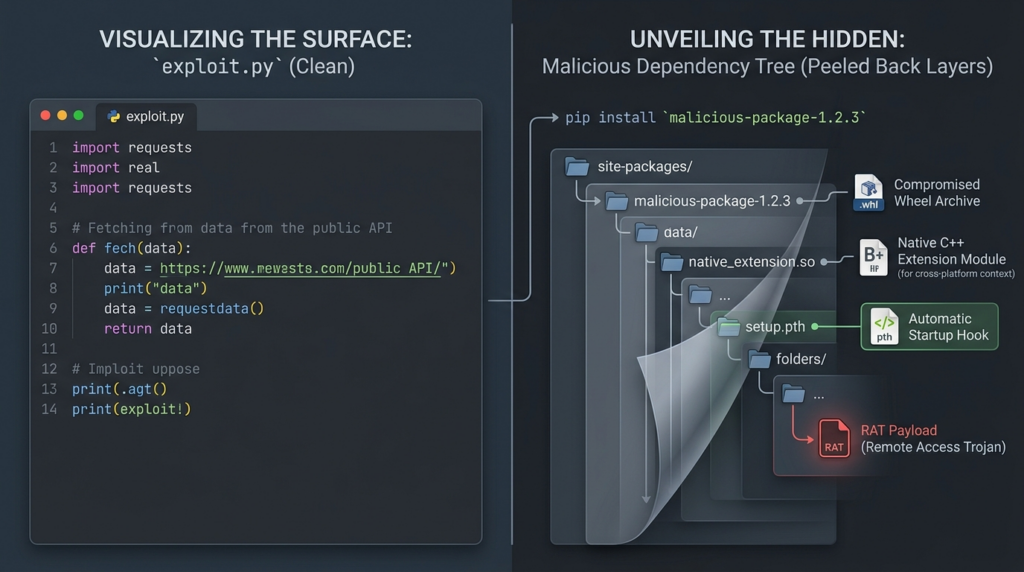
Python packages are not always readable .py files. They can include compiled extension modules, typically .donc files on Linux and .pyd files on Windows. Python’s own documentation states that extension modules are importable by default when the shared library is available on sys.path and named after the module plus an extension listed in importlib.machinery.EXTENSION_SUFFIXES. (Python documentation)
That is normal Python behavior. Scientific computing, cryptography, compression, parsing, performance-sensitive libraries, and many production packages use native extensions legitimately. The problem is that native extensions execute code at import time through the Python/C API. In the ChocoPoC chain, YesWeHack/Sekoia found that the compiled extension’s initialization entry point, PyInit_gradient, marks the beginning of malicious activity. (yeswehack.com)
The campaign also used a shadowing trick. YesWeHack/Sekoia noted that where a compiled module such as gradient.so and a Python source module such as gradient.py are present in the selected location, the compiled extension can take precedence and shadow the source file during import. That means the code a human quickly reads may not be the code the interpreter actually loads. (yeswehack.com)
The compiled library then adds anti-analysis and environment-gating behavior. The Windows sample analyzed by YesWeHack/Sekoia used dynamic API resolution, PEB walking, export hashing, debugger checks, and inspection of Python interpreter state. It enumerated loaded Python modules and hashed their __file__ basenames, proceeding only when a matching lure filename was present, such as EXPLOIT_POC.py. This explains why isolated package detonation may not trigger malicious behavior in a typical sandbox. (yeswehack.com)
That combination is exactly why this campaign should change PoC review habits. Looking at the exploit script is necessary, but not sufficient. Looking at direct dependencies is necessary, but not sufficient. Even scanning a package in isolation may be insufficient if the payload is keyed to the runtime environment created by the full fake PoC repository.
The lure CVEs and fake repositories reported so far
YesWeHack/Sekoia reported at least seven fake PoC repositories tied to high-profile vulnerability themes. The wording matters: the table below describes the reported lure themes and dependency chains. It should not be read as independent validation that every claimed exploit was functional or that every named CVE behaved exactly as the lure implied.
| Reported lure theme | CVE named in the lure | Reported malicious package chain | Why this attracts researchers |
|---|---|---|---|
| FortiWeb path traversal | CVE-2025-64446 | slogsec, logcrypt.cryptography | Fortinet edge products and management surfaces often attract rapid CVE validation interest |
| React2Shell | CVE-2025-55182 | slogsec, logcrypt.cryptography | JavaScript and React ecosystem RCE claims spread quickly among appsec and scanning teams |
| MongoBleed | CVE-2025-14847 | slogsec, logcrypt.cryptography | Database leak or memory disclosure themes draw pentesters and framework maintainers |
| PAN-OS auth bypass | CVE-2026-0257 | frint, skytext | Firewall and VPN auth bypass claims are high-priority for exposure validation |
| Ivanti Sentry command injection | CVE-2026-10520 | frint, skytext | Ivanti appliance vulnerabilities have repeatedly attracted urgent defender attention |
| Check Point VPN auth bypass | CVE-2026-50751 | frint, skytext | Remote access VPN bugs can imply broad external exposure |
| Joomla SP Page Builder RCE | CVE-2026-48908 | frint, skytext | CMS plugin RCE claims are attractive to web pentesters and template writers |
YesWeHack/Sekoia assessed with high confidence that the 2025 and 2026 waves were conducted by a single actor, citing shared operational markers such as a reused Mapbox feature ID, hash-based environment gates, anti-recursion environment variables, and similar code patterns, even though the GitHub, PyPI, and Mapbox accounts changed. (yeswehack.com)
The campaign also illustrates how quickly public exploit interest can become an attack surface. Security teams often need to understand whether a new CVE matters to their assets. Scanning vendors and template maintainers may race to convert community PoCs into detections. Bug bounty hunters may test newly disclosed issues as soon as a public write-up appears. That race creates the opening: if the attacker controls the PoC, the attacker controls the first thing many researchers run.
The Mapbox dead drop and C2 pattern
ChocoPoC RAT is notable for abusing a legitimate cloud service as part of its control path. YesWeHack/Sekoia reported that the downloader resolves api.mapbox.com through DNS-over-HTTPS, opens an HTTPS connection to the resolved IP, forces TLS SNI and hostname validation toward api.mapbox.com, and keeps the Hôte header aligned with Mapbox while retrieving a dataset feature that contains a Base64-encoded blob. That blob is decoded into Python source and executed to deliver the final stage. (yeswehack.com)
The final ChocoPoC stage also uses Mapbox datasets and features for instructions and status updates. For heavier data exfiltration, it falls back to a dedicated external HTTP server. The joint report listed a stage-three exfiltration endpoint at 91.132.163.78 on port 8001, using a JavaScript-like asset path as camouflage. (yeswehack.com)
This is not “advanced” because Mapbox itself is exotic. It is effective because many defensive controls are built around simple categories. A connection to a known cloud API may not be blocked. DNS-over-HTTPS can bypass visibility from traditional DNS logging. A Python process calling a mapping API may look odd only if the organization has enough process-level network telemetry to notice that Python should not be doing that from a PoC VM or CI runner.
A useful detection model should therefore combine several weak signals:
| Signal | Pourquoi c'est important | Caveat |
|---|---|---|
| Python process accesses Mapbox dataset APIs | The reported downloader and RAT use Mapbox datasets and features | Some legitimate geospatial tooling may use Mapbox |
| Python process uses DoH shortly after package install | The downloader uses DoH to resolve the Mapbox host | DoH alone is common in modern tools |
Fresh site-packages changes followed by cloud API egress | ChocoPoC writes Python startup hooks before later execution | Requires endpoint file telemetry |
| Python reads browser profile directories | ChocoPoC targets browser credentials and cookies | Developer tools may sometimes inspect profiles |
| Python spawns shell or PowerShell after PoC execution | RAT supports shell command execution | Some PoCs legitimately spawn subprocesses |
New .pth file appears in site-packages | .pth hooks can execute code on interpreter startup | Some packages use .pth legitimately |
| Direct connection to suspicious external IP for upload | Reported large exfil path uses a dedicated external server | IPs can rotate after publication |
Detection should not be written as “block Mapbox.” That will create noise and may break legitimate use. The stronger rule is contextual: a disposable exploit-analysis VM, a CI pipeline that tests scanner templates, or a pentest workstation running a public PoC rarely needs a Python interpreter to fetch Mapbox dataset features immediately after installing a new PyPI package.
Why researchers are the target
Security researchers are attractive because they hold assets that look boring from the outside and extremely useful from the inside. YesWeHack/Sekoia put it plainly: researchers and pentesters routinely execute untrusted code, often work with elevated privileges, and handle customer credentials, confidential reports, and sensitive infrastructure during engagements. Compromising one researcher can provide access beyond one workstation. (yeswehack.com)
The attacker does not need to compromise the final enterprise target directly. They can compromise the person validating whether that target is vulnerable. That person may have VPN access, test credentials, asset inventories, scanning results, triage notes, exploit drafts, and private communications with vendors. If the researcher also contributes to templates or tools used by others, the attacker may be able to pivot into a second supply chain layer.
That is why YesWeHack/Sekoia warn about a “double supply chain” risk: a primary package-based compromise could facilitate framework-level supply chain infection if a backdoored PoC or dependency is incorporated into tools such as MDUT, Nuclei templates, or similar community scanning workflows. (yeswehack.com)
The risk is not theoretical. The public security ecosystem already depends heavily on fast community signals. A GitHub issue may reference a PoC. A scanner maintainer may add a detection. A bug bounty hunter may test a target. A consultant may run a reproduction in a client environment. A junior researcher may trust a repository because it has stars, screenshots, a README, or a plausible CVE name. In each case, the attacker benefits from urgency.
Malicious PoCs are not new, but this delivery model is harder to review
There is a long history of attackers targeting security researchers. Google’s Threat Analysis Group reported in 2021 that a North Korea-backed campaign targeted vulnerability researchers using social media personas, research blogs, and malicious Visual Studio projects. (blog.google) Kaspersky reported in December 2025 that WebRAT spread through GitHub repositories masquerading as exploit code for high-CVSS vulnerabilities, with lures aimed at people interested in vulnerability exploitation. (Securelist)
Academic work has also measured the problem. A 2022 study of GitHub-hosted PoCs for known vulnerabilities found 899 malicious repositories among 47,285 checked repositories, about 1.9 percent of the studied set, using symptoms such as malicious IP calls, encoded code, and trojanized binaries. (arXiv) That does not mean every public PoC is suspicious, but it does mean “it is on GitHub” has never been a meaningful trust boundary.
ChocoPoC RAT adds a more subtle twist. The malware is not necessarily in the main file that everyone reviews. It is in a dependency. More specifically, it is in a transitive dependency with a compiled extension, then hidden behind runtime gating. That makes common review shortcuts fail:
| Common shortcut | Why it fails against this pattern |
|---|---|
| “I read the exploit file” | The visible exploit file may not contain the malicious behavior |
| “The package did nothing in my sandbox” | The native extension may only trigger inside the full lure PoC runtime |
| “VirusTotal had no detections” | YesWeHack/Sekoia noted that the skytext wheel had no detections when they inspected it |
| “It only imports a harmless helper” | Helper packages can hide transitive dependencies |
| “It is just a wheel” | Wheels can include native binaries and startup hooks |
| “It is a disposable VM” | A disposable VM can still contain target lists, test credentials, cookies, and report drafts |
The right mental model is not “never use public PoCs.” That is unrealistic for vulnerability research. The better model is to treat every public PoC as an untrusted software supply chain input. It enters through GitHub, PyPI, npm, Docker Hub, a gist, a paste, a vendor issue, or a Discord link. It deserves the same suspicion as any other code artifact that can execute inside an environment containing credentials.
Hot CVEs create the pressure attackers exploit
The ChocoPoC lure list is built around high-interest CVE themes because researchers move quickly when a vulnerability appears to matter. The pattern is easy to understand: a critical bug drops, defenders need detection, customers ask whether they are exposed, vendors publish incomplete advisories, and researchers search GitHub for early PoCs. That urgency can weaken review discipline.
Log4Shell, CVE-2021-44228, is not part of the ChocoPoC lure list, but it explains the pressure. CISA described CVE-2021-44228 as a critical remote code execution vulnerability in Apache Log4j versions 2.0-beta9 through 2.14.1, and the security industry responded with rapid scanning, triage, patch mapping, exploit verification, and long-tail remediation work. (cisa.gov) In that kind of environment, speed becomes operationally valuable. Attackers understand that.
This is where security teams need to separate two forms of speed. The first is reckless speed: clone a repository, install everything, run it from a workstation, and hope the PoC is what it claims to be. The second is disciplined speed: triage the repo, inspect dependencies, isolate execution, control egress, preserve telemetry, and run only what is necessary to answer a defined question. ChocoPoC punishes the first model.
Safe PoC handling starts before execution
A safer PoC workflow begins before pip install. The goal is to answer a basic question: “What will this repository cause my system to download, import, compile, execute, persist, or contact?”
Start with the repository, not the exploit. Check the account age, commit history, issue history, stars, forks, contributor identity, README quality, copied text, suspicious release timing, and whether the repo appeared immediately after a high-interest CVE. None of those signals proves malicious intent by itself. A real researcher can use a new account. A legitimate PoC can be rough. But several weak signals together should slow you down.
Then inspect dependencies. A Python PoC with requirements.txt, pyproject.toml, setup.py, or a lock file deserves dependency review before execution. GitHub’s own dependency review feature is designed to catch insecure dependencies before they enter an environment and can surface information such as license, dependents, and dependency age in supported repositories. (Docs GitHub) For one-off exploit research, you can apply the same principle manually.
A minimal safe review flow for Python PoCs looks like this:
# Work in a throwaway directory, not your normal workspace
mkdir -p ~/poc-review
cd ~/poc-review

# Inspect dependency declarations before installing anything
find /path/to/cloned-poc -maxdepth 3 -type f \
  \( -name "requirements*.txt" -o -name "pyproject.toml" -o -name "setup.py" -o -name "setup.cfg" \) \
  -print

# Print requirements without installing
sed -n '1,200p' /path/to/cloned-poc/requirements.txt
Do not let pip install -r requirements.txt be the first meaningful action. Download artifacts for inspection first. Use --no-deps when you want to inspect a named package without automatically pulling the rest of its dependency tree.
mkdir -p ~/poc-review/wheels
python -m pip download --no-deps -d ~/poc-review/wheels frint==0.1.2
python -m pip download --no-deps -d ~/poc-review/wheels skytext==1.1.0

# List wheel contents without importing the package
python - <<'PY'
import zipfile
from pathlib import Path

for wheel in Path.home().joinpath("poc-review", "wheels").glob("*.whl"):
    print(f"\n--- {wheel.name} ---")
    with zipfile.ZipFile(wheel) as z:
        for name in z.namelist():
            if name.endswith((".so", ".pyd", ".dll", ".dylib", ".pth", ".py", "METADATA", "RECORD")):
                print(name)
PY
Pinned and hashed installs can reduce accidental dependency drift, but they do not make an untrusted package safe. Pip supports hash-checking mode through --require-hashes, which can be useful for secure install scripts because all requirements must be pinned and hash-verified. (tuyau) That protects integrity relative to what you reviewed. It does not prove that the reviewed artifact is benign.
A stricter research workflow should include:
| Contrôle | Pourquoi c'est important |
|---|---|
| Disposable VM or container | Prevents long-lived workstation compromise |
| No personal browser profile | Reduces cookie, password, and history exposure |
| No real SSH keys or cloud tokens | Limits post-compromise pivoting |
| Network egress deny-by-default | Stops unexpected C2, callbacks, and exfiltration |
| Dependency download before install | Allows inspection of wheels and source distributions |
| Native extension review | Flags .donc, .pyd, .dllet .dylib dossiers |
| Filesystem diff | Shows .pth, startup hook, and persistence artifacts |
| Process and network capture | Preserves evidence for later triage |
| Destroy after use | Avoids accumulating secrets in “temporary” labs |
NIST SP 800-115 is older than ChocoPoC, but its structure still applies: technical security testing should involve planning, conducting tests, analyzing findings, and developing mitigation strategies rather than running tools without a controlled method. (Centre de ressources en sécurité informatique du NIST) A PoC reproduction is still a security test. It needs scope, environment control, evidence handling, and rollback.
How to inspect a Python PoC environment for ChocoPoC indicators
If you ran a PoC tied to the reported campaign, or you installed packages such as frint, skytext, slogsecou logcrypt.cryptography, treat the host as potentially compromised until you have evidence otherwise. YesWeHack/Sekoia published hashes for the reported malicious PyPI packages and native extensions, including skytext v1.1.0, frint v0.1.2, slogsec v1.1.0, gradient.pydet gradient.so. (yeswehack.com)
On Linux or macOS, start with package and file presence checks:
# Check installed Python packages across the active interpreter
python -m pip list --format=freeze | grep -Ei '^(frint|skytext|slogsec|logcrypt\.cryptography)=='

# Locate site-packages directories for this interpreter
python - <<'PY'
import site
for p in site.getsitepackages() + [site.getusersitepackages()]:
    print(p)
PY

# Search likely Python package paths for reported file names
python - <<'PY'
from pathlib import Path
import site

names = {
    "gradient.so",
    "gradient.pyd",
    "choco.py",
    "distutils-precedence.pth",
}

roots = set(site.getsitepackages())
roots.add(site.getusersitepackages())

for root in roots:
    path = Path(root)
    if not path.exists():
        continue
    print(f"\nScanning {path}")
    for item in path.rglob("*"):
        if item.name in names or item.name == "_distutils_hack":
            print(item)
PY
On Windows PowerShell, look for the same artifacts:
python -m pip list --format=freeze | Select-String -Pattern "^(frint|skytext|slogsec|logcrypt\.cryptography)=="

python - <<'PY'
import site
for p in site.getsitepackages() + [site.getusersitepackages()]:
    print(p)
PY

$roots = python - <<'PY'
import site
for p in site.getsitepackages() + [site.getusersitepackages()]:
    print(p)
PY

foreach ($root in $roots) {
    if (Test-Path $root) {
        Get-ChildItem -Path $root -Recurse -ErrorAction SilentlyContinue |
            Where-Object {
                $_.Name -in @("gradient.so","gradient.pyd","choco.py","distutils-precedence.pth") -or
                $_.Name -eq "_distutils_hack"
            } |
            Select-Object FullName, Length, LastWriteTime
    }
}
File presence alone is not enough to prove infection, because legitimate Python environments may contain _distutils_hack from setuptools. The suspicious pattern is a newly modified or trojanized _distutils_hack, an unexpected .pth hook, choco.py, gradient.so ou gradient.pyd from packages that should not need native code, and network telemetry matching the reported Mapbox or external upload behavior.
A simple YARA-style rule can help triage artifacts, but it should be treated as a local hunting aid, not a complete detection:
rule Suspicious_ChocoPoC_Related_Python_Artifacts
{
    meta:
        description = "Hunts for reported ChocoPoC-related strings and artifact names"
        purpose = "Defensive triage only"
    strings:
        $s1 = "dm370543acmdopk296nahbtua" ascii
        $s2 = "cmor0tcxf008i1mmpd7apt903" ascii
        $s3 = "ZEBUWIAKGPHOQAP006" ascii
        $s4 = "JKHWQVEKRASDF12" ascii
        $s5 = "api.mapbox.com" ascii
        $s6 = "EXPLOIT_POC.PY" ascii nocase
        $s7 = "browserdata" ascii
        $s8 = "dormir" ascii
    condition:
        2 of them
}
Because the actor can rotate tokens, dataset IDs, file names, and infrastructure, do not rely only on published strings. Add behavior-based hunting:
process.name in ("python", "python3", "python.exe")
AND network.destination.domain contains "api.mapbox.com"
AND command_line or parent_process.command_line contains one of:
  "requirements.txt"
  "exploit"
  "poc"
  "CVE-"
process.name in ("python", "python3", "python.exe")
AND file.path contains "site-packages"
AND file.name endswith one of ".pth", ".so", ".pyd"
AND file.creation_time within 30 minutes of a pip install event
process.name in ("python", "python3", "python.exe")
AND file.path contains one of:
  "Chrome/User Data"
  "BraveSoftware/Brave-Browser"
  "Microsoft/Edge/User Data"
  "Firefox/Profiles"
These examples are intentionally generic because every EDR and SIEM schema differs. The principle is more important than the syntax: tie package installation, Python startup modification, browser-profile access, suspicious cloud API traffic, and PoC execution together.
What to do if you ran one of the reported PoCs
Do not start by uninstalling the package and declaring the problem solved. If the RAT executed, it may already have stolen credentials, cookies, files, shell history, and environment details. A clean uninstall does not invalidate a stolen token.
A practical response plan should look like this:
| Étape | Action | Reason |
|---|---|---|
| 1 | Disconnect or isolate the host | Prevent further C2 and exfiltration while preserving evidence |
| 2 | Preserve volatile and file evidence if policy requires | Incident responders may need process, network, and filesystem artifacts |
| 3 | Check installed packages and site-packages artifacts | Confirms whether reported packages or persistence hooks exist |
| 4 | Review network logs for Mapbox, DoH, and reported external IPs | Helps determine whether downloader or RAT stages reached out |
| 5 | Assume browser sessions are exposed | Cookies may remain useful even after passwords are changed |
| 6 | Rotate SSH, GitHub, cloud, bug bounty, API, and customer tokens | Tokens and keys may be more important than local malware removal |
| 7 | Rebuild the host from a known-good image | Faster and safer than trying to surgically clean Python persistence |
| 8 | Audit repository, package registry, and scanner contributions | Checks whether compromise could have propagated into team tools |
| 9 | Notify affected parties when required | Customer or program rules may require disclosure if data was exposed |
| 10 | Fix the workflow that allowed the unsafe run | Prevents repeating the same mistake with the next fake PoC |
Credential rotation should include tokens that are easy to forget: GitHub personal access tokens, package registry tokens, cloud CLI credentials, SSH keys, VPN profiles, bug bounty platform sessions, browser-synced credentials, Slack or Discord tokens, and API keys stored in .env files. If the host was used for customer work, assume reports, screenshots, raw HTTP captures, and target notes may have been exposed until logs say otherwise.
Why disposable VMs are necessary but not sufficient
Disposable VMs are still one of the best controls for exploit research. They reduce blast radius and make rebuilds cheap. But ChocoPoC shows why “I ran it in a VM” is not the end of the conversation.
A VM can still contain:
| Asset inside the VM | Pourquoi c'est important |
|---|---|
| Browser cookies | Can provide authenticated access to portals and dashboards |
| Saved passwords | May unlock unrelated systems if reused |
| SSH keys | Can expose servers, lab boxes, or internal tools |
| Cloud CLI tokens | May allow data access or infrastructure changes |
| Bug bounty session data | Can expose private programs and active findings |
| Target lists | Reveals who is being tested and what may be vulnerable |
| Scanner templates | Could be poisoned and redistributed |
| Customer evidence | May trigger contractual or legal obligations if stolen |
| Shell history | Often reveals commands, endpoints, and secrets |
| Local notes | May contain private vulnerabilities not yet disclosed |
The safest disposable environment is boring. It has no personal browser profile. It has no long-lived credentials. It has no access to corporate VPN unless specifically needed and approved. It starts with egress blocked. It records process and network behavior. It is destroyed after use.
Containers are useful too, but containers are not magic. A Docker container with a mounted home directory, Docker socket, SSH agent, cloud credentials, or host network access can be more dangerous than a VM. If you run public PoCs in containers, avoid mounting sensitive paths, avoid passing host tokens, avoid privileged mode, and avoid access to the Docker socket.
Safer dependency review for exploit research
Dependency review for PoCs should be more aggressive than dependency review for ordinary application development because the code is intentionally adversarial and often rushed. A library used by a production application may have maintainers, history, tests, downloads, and community visibility. A brand-new package in a PoC for a just-disclosed CVE may have none of that.
Look for these dependency red flags:
| Red flag | Pourquoi c'est important |
|---|---|
| New package with little history | Attackers can publish disposable packages quickly |
| Package name unrelated to exploit function | Color, logging, or formatting packages are easy hiding places |
| Transitive dependency not obvious from README | Pushes malicious code away from manual review |
| Wheels only, no source distribution | Reduces readability |
| Native extension for trivial functionality | A terminal color package rarely needs opaque native code |
.pth dossiers | Can execute code at interpreter startup |
setup.py or build hooks with network calls | Installation becomes execution |
| Obfuscated strings or compressed blobs | Common malware concealment |
| Package author email not tied to known identity | Weak trust signal |
| Hidden or newly created GitHub account | Weak provenance |
| Sudden download spike after a CVE | May indicate lure-driven installation |
A stronger workflow is to separate “understanding the PoC” from “running the PoC.” First, read the vulnerability description from primary sources if available. Then inspect the exploit logic. Then inspect dependency declarations. Then download packages without installing. Then inspect wheels and source distributions. Then decide whether the dependency is necessary. Many PoCs can be modified to remove cosmetic dependencies, logging helpers, colored output, progress bars, or wrapper libraries.
If the PoC only needs demandes, ask why it depends on a new package. If the package claims to provide logging but ships a native binary, ask why. If the PoC imports a helper that does not affect exploit logic, remove it and run the minimum reproduction inside a controlled lab.
Guardrails for teams that maintain scanners, templates, or research tooling
ChocoPoC is especially relevant to teams that convert community PoCs into scanner templates, Nuclei templates, exploit modules, CI checks, or internal validation scripts. A poisoned PoC can travel farther when it enters a trusted framework.
For maintainers, the policy should be stricter than “does it work?” A contribution that adds a new CVE template should not be allowed to introduce arbitrary runtime dependencies without review. Pull requests should be evaluated for provenance, minimalism, reproducibility, and safe failure behavior. If a template references an external PoC, reviewers should treat that PoC as a source of threat intelligence, not a script to run in CI.
A practical maintainer checklist:
| Review area | Questions to ask |
|---|---|
| Provenance | Who published the PoC, when was the account created, and is there any trusted disclosure context? |
| Dependency scope | Does the contribution add new packages, binaries, Docker images, or scripts? |
| Runtime behavior | Does it require command execution, file writes, network callbacks, or credential use? |
| Safety | Can validation be done passively or with a benign probe instead of weaponized exploit code? |
| Reproducibility | Can the finding be verified with raw request and response evidence? |
| Isolation | Does CI execute untrusted code, or only lint and parse templates? |
| Evidence quality | Does the output prove vulnerability, or only version exposure? |
| Rollback | Can a bad template be removed quickly and downstream users notified? |
GitHub’s dependency review and Dependabot ecosystem can help with known vulnerable dependencies, but this campaign is a reminder that unknown malicious dependencies are a different problem. A package can be malicious before it appears in a vulnerability database. A dependency control that only checks CVEs will not catch a brand-new package designed for a one-week lure campaign.
Using automation without becoming a loose exploit bot
Automation is still necessary. The answer to malicious PoCs is not to make every researcher manually reverse every package forever. The answer is to automate the right parts: dependency inventory, artifact inspection, environment diffing, network capture, evidence preservation, and policy enforcement.
AI-assisted vulnerability validation is useful when it keeps the process controlled. It should help decide whether a CVE is relevant, which facts are missing, what official sources matter, which validation steps are safe, and what evidence is required. It should not blindly fire public PoC code because a repository name contains a CVE. Penligent’s own discussion of CVE-aware AI pentesting memory makes this distinction directly: CVE awareness should support triage, safe validation, patch mapping, and evidence quality rather than becoming a loose exploit bot. (Penligent)
That same principle applies to human teams. A disciplined workflow starts with authorization, scope, evidence, and control. Penligent’s public guidance on AI-assisted pentesting frames tool execution as part of a controlled workflow involving authorized targets, evidence capture, validation loops, and reportable findings rather than payload generation as the first step. (Penligent) The product category is relevant here only because ChocoPoC targets the exact moment where validation pressure can outrun control.
A safe automated workflow can do a lot before any exploit runs:
| Automated task | Safe value |
|---|---|
| Repository triage | Flags new accounts, copied READMEs, suspicious dependency additions |
| Dependency tree extraction | Shows direct and transitive packages before install |
| Wheel inspection | Detects native binaries, .pth files, entry points, and obfuscation |
| Static pattern matching | Hunts known indicators and suspicious install behavior |
| Network policy setup | Blocks egress until required destinations are approved |
| Filesystem baseline | Captures before-and-after changes |
| Process capture | Records Python child processes and shell execution |
| Evidence packaging | Saves commands, outputs, hashes, and network flows |
| Report drafting | Separates confirmed facts from tentative findings |
The automation should make it harder to do the reckless thing by default. If a PoC adds a brand-new PyPI package with a native extension, the workflow should pause. If a Python process touches browser profiles, the workflow should alert. If a package writes a .pth file, the workflow should record it. If the PoC needs internet access, the operator should know exactly why.
Network and endpoint detections that are worth building
A single IOC feed will age quickly. ChocoPoC indicators are valuable for immediate hunting, but resilient detection should focus on behavior.
Endpoint detections should watch for:
| Behavior | Pourquoi c'est important |
|---|---|
Python writing .pth files in site-packages after PoC install | Startup hooks are a persistence path |
Python modifying _distutils_hack unexpectedly | ChocoPoC used trojanized _distutils_hack behavior |
Python importing or creating choco.py | Reported downloader name |
| Python reading browser credential stores | RAT credential theft behavior |
| Python compressing broad user directories | Data staging behavior |
| Python spawning hidden interpreter processes | Reported spawner behavior uses hidden Python process |
| Python executing shell commands after importing a helper package | RAT command execution behavior |
| New native extension from low-reputation package | gradient.so et gradient.pyd are core indicators |
Network detections should watch for:
| Behavior | Pourquoi c'est important |
|---|---|
| Python process accessing Mapbox dataset API | Reported dead drop and C2 path |
| DoH queries from exploit-analysis VM | Downloader used public DoH resolvers |
| TLS to cloud API IP with unusual process context | Domain-fronting-style behavior may hide in normal TLS |
| Python upload to unusual HTTP server | Reported large exfil used external HTTP endpoint |
Egress immediately after pip install or PoC execution | Strong sequence signal |
| Cloud API traffic from CI template validation jobs | Scanner CI rarely needs mapping APIs |
The strongest detections chain events. For example:
A Python process installs a new package
THEN a native extension appears in site-packages
THEN a .pth file is created or modified
THEN a Python process contacts a cloud API not expected for the lab
THEN the same process reads browser profile data
Any one of those steps can be legitimate. Together, on a PoC analysis machine, they deserve immediate investigation.
Supply chain lessons for PyPI and GitHub users
ChocoPoC also illustrates a broader PyPI and GitHub problem: package ecosystems are optimized for speed and reuse, while exploit research often requires distrust and containment. That tension is not going away.
PyPI makes installation easy. GitHub makes sharing easy. That is good for research and bad for assumptions. A repository can be created quickly. A package can be published quickly. A dependency can be renamed or chained. A wheel can include native code. A README can look professional. A package can have a harmless public face and malicious behavior keyed to a specific runtime.
OpenSSF Scorecard is one example of a tool designed to assess open-source project security health and dependency risk using automated checks. (GitHub) Tools like that can support triage, but they do not replace judgment. A brand-new PoC for a fresh vulnerability may not have enough history for reputation systems to evaluate. The absence of known badness is not evidence of safety.
The safe policy is simple to state and hard to practice: public PoCs should be treated like hostile samples until reviewed. That does not mean every PoC is malicious. It means the environment, credentials, network, and evidence pipeline should assume the PoC could be malicious.
Practical lab pattern for vulnerability researchers
A mature PoC lab has layers. The goal is not to make compromise impossible; it is to make compromise cheap, contained, observable, and non-catastrophic.
A good default pattern:
- Use a dedicated VM image for PoC review.
- Start from a clean snapshot.
- Do not log into personal or corporate browser profiles.
- Do not mount your real home directory.
- Do not pass SSH agent sockets into containers.
- Do not store cloud tokens in the VM.
- Disable outbound network by default.
- Download dependencies for inspection before installing.
- Record filesystem, process, and network baselines.
- Run only the minimum code needed to answer the validation question.
- Export evidence.
- Destroy the VM.
A stricter pattern for high-risk PoCs:
| Couche | Contrôle |
|---|---|
| Identity | Use throwaway accounts and no personal sessions |
| Titres de compétences | Use short-lived, scoped, revocable tokens |
| Réseau | Default deny egress, allow only target and required update servers |
| DNS | Capture DNS and DoH attempts |
| Filesystem | Snapshot before and after |
| Browser | Use empty profiles only |
| Clipboard | Avoid copying secrets into the VM |
| Host integration | Disable shared folders, clipboard sharing, and drag-and-drop |
| Logging | Capture process trees, command lines, and network flows |
| Nettoyage | Revert or destroy after each run |
The reason for this discipline is not paranoia. It is speed with less regret. If the PoC is safe, the workflow still produces better evidence. If the PoC is malicious, the compromise is contained and observable.
A note on responsible validation
ChocoPoC should not push researchers toward unsafe behavior in the opposite direction. Do not respond to malicious PoCs by running them against random internet targets to see whether they work. Do not detonate suspected malware on a network where you lack authorization. Do not publish working exploit modifications simply to prove a point.
Responsible validation means separating these questions:
| Question | Safe approach |
|---|---|
| Is the PoC repository malicious? | Static review, dependency inspection, isolated detonation with no sensitive data |
| Is the named CVE real? | Vendor advisory, CVE record, NVD, CISA, official patch notes, trusted research |
| Is my asset exposed? | Authorized testing, version evidence, configuration review, safe behavior-based checks |
| Is exploitability confirmed? | Reproducible proof within scope, minimal payload, no data theft or destructive action |
| Is remediation complete? | Patch verification, configuration check, retest, evidence-backed report |
For many enterprise teams, the right answer is not to run a public PoC at all. It may be enough to confirm affected product presence, version range, configuration state, exposure path, vendor mitigation, and compensating controls. When exploit validation is necessary, it should be scoped, logged, and approved.
FAQ
What is ChocoPoC RAT?
- ChocoPoC RAT is a Python-based remote access trojan and infostealer reported by YesWeHack and Sekoia in July 2026.
- It is delivered through fake GitHub proof-of-concept exploit repositories aimed at vulnerability researchers and pentesters.
- Its reported capabilities include browser data theft, file collection, shell history collection, system reconnaissance, arbitrary command execution, Python code execution, and file upload.
- Its most important feature is not only what it steals, but where it hides: inside Python dependencies and native extension modules rather than only inside the visible PoC file.
How does ChocoPoC RAT infect vulnerability researchers?
- The victim clones a fake PoC repository tied to a high-interest CVE.
- The PoC dependency list pulls a malicious Python package such as
frint. - That package installs a transitive dependency such as
skytext. skytextcontains a native extension,gradient.soon Linux orgradient.pydon Windows.- The extension executes during import, checks whether it is running inside the intended PoC runtime, and then deploys persistence and a downloader.
- The downloader retrieves the final ChocoPoC RAT payload from a Mapbox dataset feature.
Is every GitHub PoC dangerous?
- No. Many public PoCs are legitimate and useful for defenders, researchers, and vendors.
- The safe assumption is not “all PoCs are malware.” The safe assumption is “any unfamiliar PoC can execute hostile code until reviewed.”
- GitHub reputation, stars, screenshots, or a professional README should not be treated as proof of safety.
- The main risk is running unreviewed code in an environment that contains credentials, browser sessions, customer data, or reusable research artifacts.
Why is hiding malware in Python dependencies so effective?
- Reviewers often focus on the main exploit file and miss transitive dependencies.
- New packages can be disguised as harmless helpers, such as logging, terminal colors, or formatting utilities.
- Python wheels can include native binaries that are harder to inspect than
.pyfiles. - Native extension modules can execute code during import.
- Runtime gating can prevent malware from activating unless the full fake PoC environment is present, which reduces sandbox visibility.
How can I check whether I installed frint or skytext?
- Exécuter
python -m pip list --format=freezeand search forfrint,skytext,slogsecoulogcrypt.cryptography. - Search Python
site-packagesdirectories forgradient.so,gradient.pyd,choco.py, suspicious.pthfiles, and unexpected_distutils_hackmodifications. - Review network logs for Python connections to Mapbox dataset APIs, DoH resolvers, and the reported external upload IP.
- If you find a match and you executed a related PoC, treat the host as potentially compromised rather than simply uninstalling the package.
Should I run PoCs inside Docker or a VM?
- A disposable VM is usually safer than running a PoC on your main workstation.
- Docker can help, but only if you avoid dangerous mounts, privileged mode, host networking, SSH agent forwarding, cloud credentials, and Docker socket exposure.
- A VM or container that contains real browser cookies, SSH keys, API tokens, reports, or customer data is still a valuable target.
- The safest setup combines isolation, no reusable credentials, network egress control, filesystem snapshots, process logging, and rebuild-after-use discipline.
What should I do if I ran one of the reported ChocoPoC PoCs?
- Isolate the host and preserve evidence if your incident response process requires it.
- Check for reported packages, native extensions,
.pthpersistence,choco.py, and suspicious_distutils_hackchanges. - Review endpoint and network telemetry for Mapbox dataset access, DoH, Python child processes, browser profile reads, and external uploads.
- Rotate credentials that may have been present on the host, including browser sessions, GitHub tokens, SSH keys, cloud credentials, VPN profiles, bug bounty platform sessions, and customer API keys.
- Rebuild the host from a known-good image instead of relying on manual cleanup.
- Audit any scanner templates, internal scripts, or framework contributions that may have been touched after the suspected compromise.
Closing thoughts
ChocoPoC RAT does not mean vulnerability researchers should stop using public research. It means public research has to be handled as executable supply chain input, not as text on a webpage.
The old quick check was “does the PoC file look suspicious?” The better check is broader: what does the repository install, what do its dependencies install, do any wheels contain native extensions, does Python startup behavior change, what network destinations appear, what files are touched, and what credentials are present in the lab?
The next fake PoC may not use frint, skytext, Mapbox, or the same filenames. The durable defense is a workflow: isolate first, inspect dependencies, control egress, preserve evidence, avoid reusable credentials, and rebuild often. Speed still matters in vulnerability research. ChocoPoC RAT shows why speed without containment is now part of the attack surface.

 French
  English
  German
  Spanish
  Portuguese
  Japanese
  Korean
  Hindi
Hindi  Arabic
  Turkish
  Hebrew