
Two vulnerabilities in Pegatron’s tdeio64.sys Windows kernel driver expose a dangerous boundary between ordinary user processes and privileged operating-system resources. CVE-2026-14961 allows an unprivileged local attacker to abuse an inadequately protected device interface for arbitrary kernel memory reads and writes, creating a path to NT AUTHORITY\SYSTEM. CVE-2026-14960 exposes privileged hardware I/O operations that can let a local attacker interact with hardware resources outside normal user-mode protections.
The CERT Coordination Center disclosed both issues in Vulnerability Note VU#529388 on July 15, 2026. At publication time, CERT/CC reported no vendor-supported fix and no vendor statement. That makes this a control and exposure-management problem as much as a patch-management problem. Organizations need to discover where the driver exists, determine whether it is loaded and required, preserve evidence, remove or disable it where possible, and enforce driver application control and virtualization-based protections.
These are local vulnerabilities. They do not, by themselves, give an attacker remote entry to a Windows system. An attacker first needs the ability to execute code locally in a low-privilege context or otherwise interact with the exposed device. That prerequisite is important, but it does not make the flaws minor. Modern intrusions often begin with a restricted process, a compromised user account, a malicious installer, or a browser or document sandbox. A vulnerable kernel driver can convert that initial foothold into complete operating-system control.
What defenders should do now
The immediate objective is to establish whether tdeio64.sys is present, whether Windows loads it, how it arrived, and whether any approved hardware or OEM software still depends on it. Do not begin by deleting files across a fleet. Kernel drivers can support firmware tools, diagnostics, hardware monitoring, or OEM utilities, and unplanned removal can affect stability or management. Begin with inventory and evidence, then apply a controlled remediation decision.
The first-response sequence is:
- Search endpoints, driver stores, software distribution systems, installation packages, golden images, and backups for
tdeio64.sysand plausible spelling or case variants. - Identify the corresponding Windows service or driver registration, full file path, load state, start type, hash, signer, certificate chain, compile metadata, file version, and originating software package.
- Determine whether the driver is required for an approved business function and whether it can be safely disabled or removed.
- Where the driver is unnecessary, prevent loading, stop the associated service using a change-controlled process, remove the software package, and reboot when required.
- Enforce Windows Defender Application Control or another driver allow policy, enable the Microsoft vulnerable driver blocklist where applicable, and enable Hypervisor-Protected Code Integrity, exposed in Windows Security as Memory Integrity, on compatible systems.
- Hunt for unexpected driver installation or loading, device-interface access from untrusted processes, privilege escalation, security-control impairment, credential access, and persistence.
- If evidence suggests exploitation or arbitrary kernel access, handle the endpoint as a suspected full compromise. Isolate it, preserve evidence, rotate exposed credentials, and rebuild when integrity cannot be established.
Because no vendor fix was available in the initial note, compensating controls must be verified rather than assumed. A policy may exist in management but remain in audit mode. Memory Integrity may be configured but disabled after a compatibility failure. The vulnerable driver blocklist may not be current or may not contain this newly disclosed file yet. Each control requires an observed enforcement result.
Confirmed facts from VU#529388
Les CERT/CC Vulnerability Note VU#529388 is the primary public source. It describes a Windows Driver Model driver distributed by Pegatron Corporation and a device interface named \\.\TdeIo. The driver processes privileged input/output control requests without adequate access control or validation of user-supplied memory addresses.
| Champ d'application | CVE-2026-14960 | CVE-2026-14961 |
|---|---|---|
| Composant | Pegatron tdeio64.sys driver |
Pegatron tdeio64.sys driver |
| Security boundary | User mode to privileged hardware I/O | User mode to kernel memory |
| Attacker position | Local, unprivileged | Local, unprivileged |
| Confirmed capability | Interaction with privileged hardware I/O ports | Arbitrary kernel memory read and write |
| Principal impact | Hardware manipulation and bypass of normal OS protections | Elevation to NT AUTHORITY\SYSTEM and full OS compromise |
| Vendor fix at publication | None reported | None reported |
| Vendor statement at publication | None received by CERT/CC | None received by CERT/CC |
CERT/CC states that CVE-2026-14961 can be used to overwrite the current process token with a SYSTEM process token. That description explains the privilege-escalation result, but defenders do not need to reproduce the operation. Arbitrary kernel memory write is already a loss of the operating system’s core integrity boundary. An attacker with that primitive may be able to alter credentials, security decisions, process state, or kernel structures in multiple ways.
For CVE-2026-14960, CERT/CC describes IOCTLs capable of interacting directly with hardware I/O ports. The note warns that the capability may let an attacker manipulate hardware resources beyond normal operating-system protections. The exact hardware effect depends on the platform and connected components. Public reporting should avoid inventing a specific firmware-persistence technique or device impact that has not been demonstrated by the authoritative source.
The associated CVE data identifies version 02-17-2025 and earlier as affected using a custom version scheme. That value may represent driver metadata rather than a familiar semantic software version. Asset teams should not rely on a product-version comparison alone. File hash, signature, package origin, driver service, and observed load state provide stronger fleet evidence.
Driver naming and search accuracy
The vulnerability note’s page title has appeared in some indexes as “Tdelo64.sys,” where a lowercase letter can be mistaken for another character. The body of the CERT/CC note identifies the file as tdeio64.sys and the device interface as \\.\TdeIo. Search systems, fonts, and copied summaries can blur the difference between a lowercase i, lowercase l, and the digit 1.
Defenders should search case-insensitively and include controlled variants, but they should not label unrelated files vulnerable merely because a name is similar. Useful discovery terms include:
tdeio64.sysTdeIo64.sysTdelo64.sysas an observed transcription variantTdeIoin service, symbolic-link, package, or telemetry fieldsCVE-2026-14960,CVE-2026-14961etVU#529388in vulnerability and software-management data
Once a candidate file is found, capture its SHA-256 hash and Authenticode signature before changing it. Compare those attributes with the package source and internal software catalog. Filename-only detection is easy to evade and may produce false positives. An attacker can rename a driver before installation, while unrelated vendors can reuse generic names.
Why kernel drivers are a high-value attack surface
Windows separates user mode from kernel mode to limit the impact of compromised applications. Ordinary processes cannot directly write arbitrary kernel memory, access every hardware port, or bypass access checks. Kernel drivers run with privileges needed to operate devices or provide low-level services. They extend the trusted computing base: a defect in a driver can weaken protections enforced by the rest of the operating system.
A hardware utility may legitimately need to read sensors, inspect registers, adjust device settings, or perform diagnostics. The driver provides a controlled bridge. User-mode software opens a device handle and sends an input/output control request. The I/O manager delivers that request to the driver’s dispatch routine. A secure driver verifies who opened the device, whether the caller is authorized for the requested operation, whether buffers and lengths are valid, and whether every address or value falls within a safe range.
When those checks are missing, the driver becomes a confused deputy. Windows trusts the driver to perform privileged actions, while the driver follows instructions from an untrusted process. The attacker does not need a new kernel vulnerability if a signed, legitimate driver already exposes the required primitive.
This pattern is particularly attractive for Bring Your Own Vulnerable Driver attacks. An attacker with enough rights to install a driver may load a legitimately signed but vulnerable component, then abuse its IOCTL interface to disable security tools or obtain kernel-level control. In the tdeio64.sys case, CERT/CC describes access by an unprivileged local attacker when the vulnerable driver and exposed device are already available. That can reduce the attacker’s prerequisite compared with a classic BYOVD scenario that requires administrative driver installation.
How a Windows IOCTL crosses the trust boundary
An IOCTL is a control request that a user-mode application sends to a device driver, usually through the Windows DeviceIoControl API. The request includes a control code and optional input and output buffers. The code encodes a device type, function, transfer method, and access bits. These fields help route and describe a request, but they are not a complete authorization system.
The effective flow is:
- A process obtains a handle to a device interface such as
\\.\TdeIo. - The process submits a control code and buffers.
- The Windows I/O manager creates an I/O request packet.
- The driver’s dispatch function receives the request.
- The driver validates the caller, control code, buffer sizes, memory model, and requested operation.
- The driver performs a privileged action and returns status and output.
Failures can occur at several layers. The device object may have a permissive security descriptor, allowing ordinary users to open it. The control code may specify broad access. The dispatch routine may omit a privilege check. Buffer lengths may be trusted. User-provided addresses may be dereferenced or used as kernel targets. A hardware address or port may be accepted without an allowlist. A successful request may return sensitive data.
No single generic fix covers every driver. Security begins with a restrictive device access control list and continues with per-operation validation. A driver should never assume that holding a handle proves the caller can perform every function. It should treat all request buffers, offsets, lengths, addresses, and identifiers as hostile.
CVE-2026-14961 and arbitrary kernel memory access
Kernel memory contains security-critical state: process tokens, access-control data, object metadata, driver state, code, and pointers. An arbitrary read primitive may reveal sensitive addresses and data. An arbitrary write primitive can change control flow or security state. Together they can defeat assumptions made by user-mode security software and operating-system components.
CERT/CC describes an unprivileged attacker sending a crafted DeviceIoControl request to obtain arbitrary kernel memory read and write through tdeio64.sys. The note says the capability can overwrite the current process token with the token of the SYSTEM process. Windows uses access tokens to represent a process’s security identity, groups, privileges, and restrictions. Substituting a more privileged token can cause subsequent operations to be authorized as SYSTEM.
That explanation should not be turned into a production exploit. Kernel layouts change between Windows builds, security features alter memory behavior, and incorrect writes can crash or corrupt a system. Publishing concrete control codes, offsets, symbol calculations, and write sequences would materially increase weaponization. Blue teams can make remediation decisions from presence, version, load state, and authoritative advisory data.
The impact extends beyond launching a SYSTEM shell. Kernel-level write access may let an attacker interfere with endpoint security callbacks, alter process protections, conceal objects, or facilitate credential theft. CERT/CC lists security-control bypass, extraction of credentials from protected processes such as LSASS, persistent rootkits, and kernel data manipulation as possible outcomes. These are impact categories, not proof that every exploitation attempt performs all of them.
From an incident-response perspective, arbitrary kernel write destroys confidence in local evidence. A compromised kernel can lie to user-mode collection tools, hide processes or drivers, and tamper with telemetry. When evidence supports exploitation, responders should prioritize external logs and offline acquisition and should consider rebuilding rather than attempting a narrow cleanup.
CVE-2026-14960 and hardware I/O access
Hardware I/O ports are a low-level communication mechanism used by the processor and devices. Access is normally restricted because incorrect or malicious operations can destabilize a system, alter device behavior, or bypass abstractions that the operating system uses to coordinate hardware safely. A kernel driver may legitimately expose a limited hardware diagnostic function, but it must constrain which operations, ports, values, and callers are permitted.
CERT/CC states that tdeio64.sys exposes IOCTLs capable of direct hardware I/O interaction. An attacker who can invoke those handlers may manipulate hardware resources beyond normal OS protections. The public note does not establish one universal post-exploitation outcome for all affected systems. Hardware differs across OEM models, firmware versions, chipsets, and attached devices.
Defenders should therefore avoid both extremes. Do not dismiss the issue as a harmless diagnostic interface merely because exploitation is local. Do not claim that every affected endpoint can be permanently implanted in firmware without case-specific proof. Treat unauthorized hardware access as a severe loss of isolation, remove the capability where possible, and investigate observed use.
Hardware-facing drivers also create operational risk during testing. Random or guessed port operations can hang a machine, corrupt device state, or cause data loss. A security assessment should never fuzz the real driver on production endpoints. Use a dedicated sacrificial lab with recoverable images and explicit owner approval if product-specific research is required.
Conceptual driver attack path
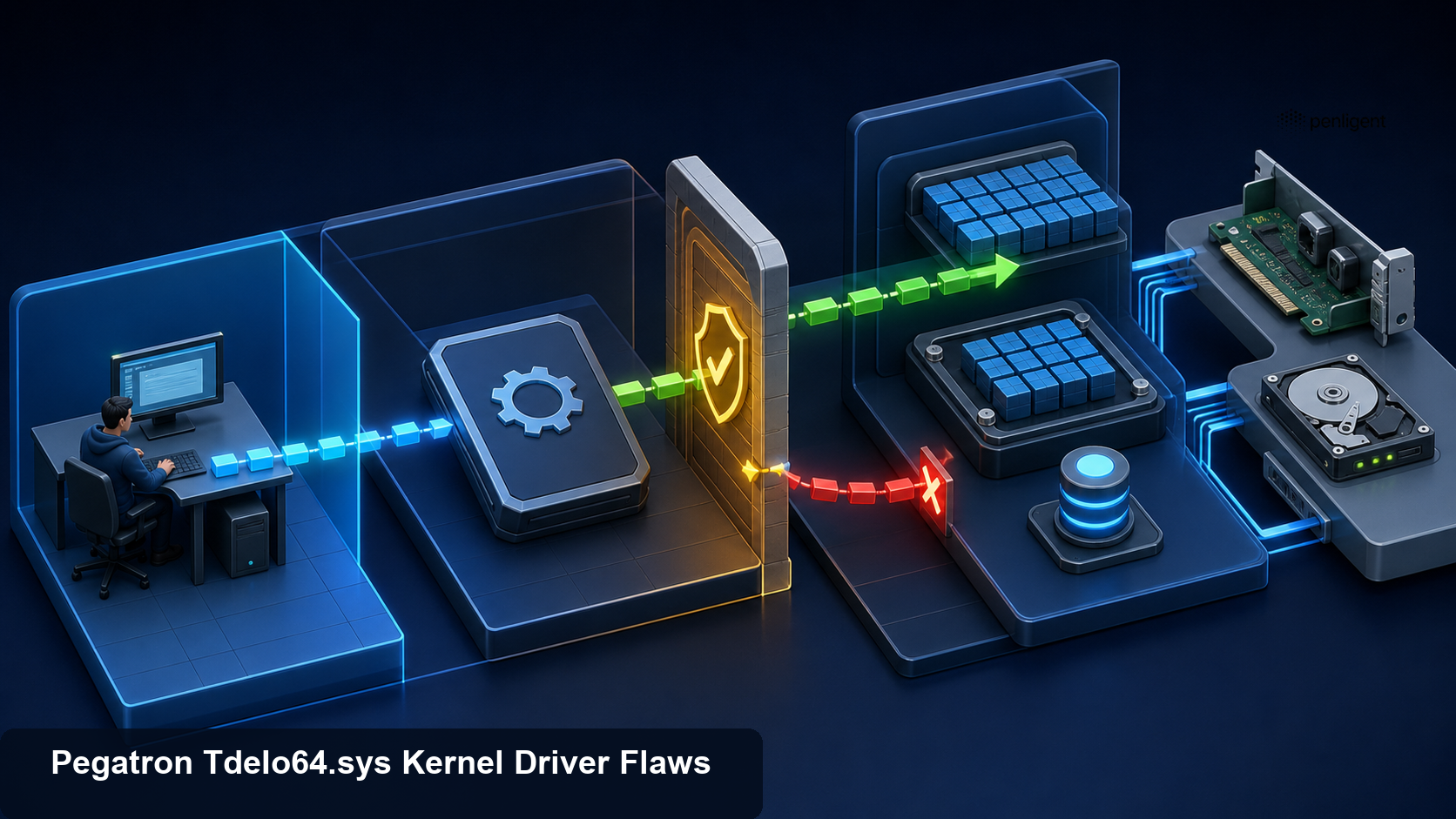
Validate driver and endpoint controls in authorized scope.
The defensible attack model has four stages:
| Stade | Required condition | Evidence opportunity | Defensive control |
|---|---|---|---|
| Initial foothold | Local code execution in a user context | Process, script, installer, browser, EDR, and identity telemetry | Application control, least privilege, attack-surface reduction |
| Driver availability | Vulnerable driver installed and exposed | File inventory, service registry, driver-load events, Code Integrity logs | Remove unused driver, driver allow policy, blocklist |
| IOCTL abuse | Process opens device and sends privileged requests | Kernel telemetry, EDR device access, unusual handle or driver interaction | Restrictive device ACL, per-request authorization, HVCI |
| Kernel or hardware impact | Vulnerable handler performs operation | Privilege change, security impairment, crash, hardware anomalies | Incident isolation, rebuild, credential response |
This model prevents a common prioritization mistake. The absence of remote reachability does not eliminate risk when local execution is a frequent outcome of phishing, software supply-chain compromise, browser exploitation, or stolen credentials. Conversely, the presence of the file does not prove exploitation. Response should combine exposure evidence with behavior.
A safe user-mode authorization lab
The following toy program illustrates the access-control design error without loading a driver, opening a device, using a real IOCTL, reading kernel memory, or changing privileges. It creates a local HTTP dispatcher with an unsafe route that accepts a privileged operation from any local process and a safer route that requires a short-lived lab token and an explicit operation allowlist.
Run it only on localhost. It is an application-layer analogy, not a Pegatron exploit.
# toy_dispatcher.py — user-mode localhost demonstration only
from flask import Flask, request, jsonify
import secrets

app = Flask(__name__)
LAB_TOKEN = secrets.token_urlsafe(24)
SAFE_OPERATIONS = {"read_temperature", "read_fan_state"}

@app.post("/unsafe-control")
def unsafe_control():
    body = request.get_json(silent=True) or {}
    operation = body.get("operation", "")
    # Deliberately unsafe pattern: no caller authorization and no allowlist.
    return jsonify(accepted=True, simulated_operation=operation)

@app.post("/safe-control")
def safe_control():
    if not secrets.compare_digest(request.headers.get("X-Lab-Token", ""), LAB_TOKEN):
        return jsonify(error="unauthorized"), 403
    body = request.get_json(silent=True) or {}
    operation = body.get("operation", "")
    if operation not in SAFE_OPERATIONS:
        return jsonify(error="operation denied"), 403
    return jsonify(accepted=True, simulated_operation=operation)

if __name__ == "__main__":
    print(f"Lab token: {LAB_TOKEN}")
    app.run(host="127.0.0.1", port=9080)
Start the lab in a disposable virtual environment:
python3 -m venv .venv
. .venv/bin/activate
python -m pip install flask
python toy_dispatcher.py
The unsafe route accepts an invented operation name from an unauthenticated localhost client:
curl -sS -X POST 'http://127.0.0.1:9080/unsafe-control' \
  -H 'Content-Type: application/json' \
  --data '{"operation":"arbitrary_privileged_action"}'
The safer route denies the same operation even when the correct lab token is supplied because it is not on the allowlist. Replace PASTE_LAB_TOKEN only with the token printed by your own local instance:
curl -sS -X POST 'http://127.0.0.1:9080/safe-control' \
  -H 'Content-Type: application/json' \
  -H 'X-Lab-Token: PASTE_LAB_TOKEN' \
  --data '{"operation":"arbitrary_privileged_action"}'
The analogy demonstrates two independent checks. The dispatcher must authenticate or authorize the caller, and it must validate the requested operation. A real Windows driver also needs secure device-object permissions, safe transfer methods, buffer validation, range checks, integer-overflow checks, lifetime management, and careful concurrency. A static token would not be a suitable kernel authorization mechanism; the toy token exists only to make the two checks visible.
Do not adapt this demonstration to \\.\TdeIo. Do not search for real control codes, guess handler values, or run third-party proof-of-concept binaries. Presence and load-state checks are sufficient to determine exposure while a vendor fix is unavailable.
Fleet discovery on Windows
Discovery should be read-only first. Search the filesystem, Driver Store, service registry, device inventory, software packages, and telemetry. Use enterprise tools where available because an endpoint-by-endpoint interactive search is slow and changes access timestamps.
The following PowerShell example searches common locations for filename variants and collects metadata. Run it in an authorized administrative inventory context. It does not load or invoke the driver.
$names = @('tdeio64.sys', 'tdelo64.sys')
$roots = @(
  "$env:windir\System32\drivers",
  "$env:windir\System32\DriverStore\FileRepository"
)

$found = foreach ($root in $roots) {
  foreach ($name in $names) {
    Get-ChildItem -Path $root -Filter $name -File -Recurse -ErrorAction SilentlyContinue
  }
}

$found | Sort-Object FullName -Unique | ForEach-Object {
  $signature = Get-AuthenticodeSignature -FilePath $_.FullName
  $hash = Get-FileHash -Algorithm SHA256 -Path $_.FullName
  [pscustomobject]@{
    Path = $_.FullName
    Size = $_.Length
    LastWriteTimeUtc = $_.LastWriteTimeUtc
    SHA256 = $hash.Hash
    SignatureStatus = $signature.Status
    Signer = $signature.SignerCertificate.Subject
    FileVersion = $_.VersionInfo.FileVersion
    ProductVersion = $_.VersionInfo.ProductVersion
  }
}
Filename variants are only the first pass. Query installed system drivers and services for image paths containing tdeio, then resolve environment variables and symbolic paths before comparing:
Get-CimInstance Win32_SystemDriver |
  Where-Object {
    $_.PathName -match '(?i)tde[iIl1o]o?64\.sys|tdeio'
  } |
  Select-Object Name, DisplayName, State, StartMode, PathName
The regular expression deliberately casts a wider net for visual transcription errors. An analyst must validate each result. Store results in the central inventory with endpoint identity and collection time. A hash found in a vendor package but never deployed has a different risk from a running boot-start driver on an employee workstation.
Search software distribution repositories and OEM tool packages as well. Vulnerable drivers often return after an endpoint is reimaged, a firmware utility runs, or an old support package is redeployed. Remove or supersede the source package, not only the installed file.
Build a driver exposure inventory
A useful inventory records:
- Device hostname, owner, business role, environment, and criticality.
- Windows edition, build, Secure Boot state, virtualization-based security state, and Memory Integrity state.
- Full driver path, SHA-256, file version, product version, signer, signature status, and certificate chain.
- Driver service name, display name, start type, current state, and installation timestamp if available.
- Parent software package, OEM image, updater, diagnostic tool, or deployment job.
- Whether the device interface is present and which security descriptor governs access, collected by an approved specialist tool.
- First-seen and last-seen times in EDR or software inventory.
- Whether WDAC, App Control for Business, or another driver policy would block the file in enforcement mode.
- Whether the Microsoft vulnerable driver blocklist is enabled and current.
- Approved exception owner and expiration date if the driver cannot yet be removed.
Inventory confidence matters. Mark fields as observed, inferred, or unknown. A service registration does not prove the driver loaded during the current boot. A file in the Driver Store does not prove a device can open its interface. EDR telemetry showing a successful image load provides stronger evidence of active exposure.
Detection opportunities
Detection should combine static indicators, driver-load behavior, installation events, device interaction, privilege changes, and post-exploitation activity. No single event is conclusive.
Driver installation and load
Monitor kernel-driver service creation, changes to service image paths, new files in driver directories, and Code Integrity events. Alert when tdeio64.sys, a known hash, or a validated signer-and-version combination loads. Also detect renamed copies by hash and signature metadata.
Windows event availability varies by version and audit configuration. Common sources include the System log, Service Control Manager events, Microsoft-Windows-CodeIntegrity operational logs, Microsoft-Windows-Kernel-PnP logs, Sysmon driver-load events when configured, and EDR kernel telemetry. Validate fields in the organization’s own environment before deploying queries.
An effective analytic includes context:
- Was the driver installed by an approved OEM updater?
- Did the endpoint recently receive a hardware support package?
- Is the path under the normal driver directory or a user-writable location?
- Is the signature valid, expired, revoked, or unexpectedly absent?
- Did a new kernel service appear shortly before the load?
- Did application-control policy allow, audit, or block it?
A legitimately signed driver can still be vulnerable. Signature success establishes publisher and file integrity relative to the signature; it does not establish that the code is safe.
Process and device access
Opening a device interface is lower-level behavior that many default logs do not capture. EDR products may expose device-handle or DeviceIoControl telemetry, but field names and coverage differ. Work with the vendor to determine whether it records the process, device path, control code, call count, and outcome without destabilizing the endpoint.
High-signal patterns include an unexpected browser child, scripting engine, document process, temporary executable, remote-management tool, or unsigned binary interacting with \\.\TdeIo; repeated control requests from a process not associated with the OEM utility; and device access shortly after driver service creation.
Do not publish or broadly distribute real IOCTL values merely to build a detection. A hash, device name, process relationship, load event, and behavior timeline may provide enough signal. If a research team derives control codes in a safe lab, handle them as sensitive detection content and validate false positives.
Privilege escalation and defense impairment
Hunt for a low-integrity or medium-integrity process that unexpectedly begins actions requiring SYSTEM, spawns a SYSTEM child without a normal service or installer path, accesses protected processes, changes security services, modifies EDR components, or creates persistence. Kernel exploitation may not produce a standard logon event, so absence of a new authentication session does not eliminate privilege escalation.
Look for security-product stoppage, driver unloading, callback or sensor failures, sudden telemetry gaps, altered exclusions, disabled Memory Integrity, changes to vulnerable-driver blocklist policy, and boot-configuration modifications. Correlate these with driver activity and the initiating user session.
Credential access and lateral movement are downstream signals. Review LSASS access, credential-dumping alerts, new service creation on remote systems, abnormal SMB or WinRM, privileged group changes, token use, and authentication from the affected host. CERT/CC identifies credential extraction as a possible impact of kernel compromise; an actual incident requires evidence.
Stability and hardware anomalies
Hardware I/O abuse or erroneous driver operations may produce crashes, bug checks, device resets, thermal or fan anomalies, storage errors, or firmware utility failures. These events have many benign causes, so they should enrich a correlated incident rather than trigger a CVE conclusion alone.
Preserve crash dumps before automated cleanup where policy permits. A kernel dump may contain evidence of the loaded driver and execution context, but it also contains sensitive memory. Handle it under the organization’s evidence and privacy procedures.
Mitigation when no vendor patch exists
CERT/CC recommends disabling or removing the vulnerable driver where it is not required, preventing untrusted users from loading or interacting with it, and using controls such as Windows Defender Application Control or Hypervisor-Protected Code Integrity to block known vulnerable drivers where supported.
Remove unnecessary software and driver packages
If the driver belongs to an obsolete diagnostic or hardware utility, uninstall the parent package through the supported method. Verify that the service registration, active driver, Driver Store package, scheduled updater, and installation cache no longer reintroduce it. Reboot if required and verify with driver-load telemetry.
Do not manually delete a loaded .sys file as the first action. Windows may retain the loaded image until reboot, the service may fail unpredictably, and the package may restore it. Unplanned changes can also destroy timestamps or other evidence.
Disable the driver through change control
When immediate package removal is not possible, a controlled service-disable decision may prevent loading. Test on representative hardware, document the rollback path, and confirm the affected business function. Some boot-start or hardware drivers can cause startup failures when mishandled. Use vendor or OEM guidance when available.
After disabling, reboot in a maintenance window if necessary and verify that the driver did not load. A configuration value alone is not proof. Confirm device health, security telemetry, and application function.
Enforce driver application control
WDAC, now commonly managed as App Control for Business, can restrict which kernel drivers load. A policy can deny a specific hash, file attribute, signer scope, or other rule while allowing approved drivers. Exact policy design depends on fleet compatibility and management tooling.
Begin with inventory and audit data, but do not leave an emergency deny rule in audit mode indefinitely. Test enforcement on representative systems, use staged deployment rings, and maintain recovery procedures. A broad publisher deny can block unrelated Pegatron-signed components; a narrow hash deny may miss another vulnerable build or a renamed but modified file. Combine rules with product and version intelligence.
Enable the vulnerable driver blocklist
Microsoft maintains a recommended blocklist for drivers with known security weaknesses and integrates it with several Windows protections. Confirm current Microsoft documentation for the organization’s Windows builds and management method. Newly disclosed drivers may not appear immediately, so blocklist enablement is a baseline, not proof that tdeio64.sys is denied.
Test by examining policy state and a safe enforcement event in a lab. Do not try to load the vulnerable driver on production merely to see whether it blocks.
Enable Memory Integrity
HVCI uses virtualization-based security to isolate code-integrity decisions and enforce stronger constraints on kernel code. In the Windows Security interface, the setting is commonly called Memory Integrity. It can prevent some incompatible or vulnerable drivers from loading and raises the cost of kernel compromise.
Compatibility matters. Inventory incompatible drivers, update or remove them, deploy in rings, and measure performance and stability. An organization should not disable Memory Integrity fleet-wide to preserve one legacy utility without a documented risk decision and compensating controls.
HVCI is defense in depth, not a claim that arbitrary kernel memory primitives are harmless. Verify whether the specific driver loads under the actual policy and Windows build.
Reduce local execution and installation opportunities
Application control, least privilege, attack-surface reduction rules, script controls, browser and document hardening, and protected administration reduce the chance that an attacker reaches the local prerequisite. Remove local administrator rights from ordinary users. Separate software deployment from interactive accounts. Monitor driver service creation by help-desk and management tools.
These controls do not fix an exposed device interface accessible to ordinary users, but they reduce the paths to attacker code and BYOVD installation.
Remediation and verification workflow
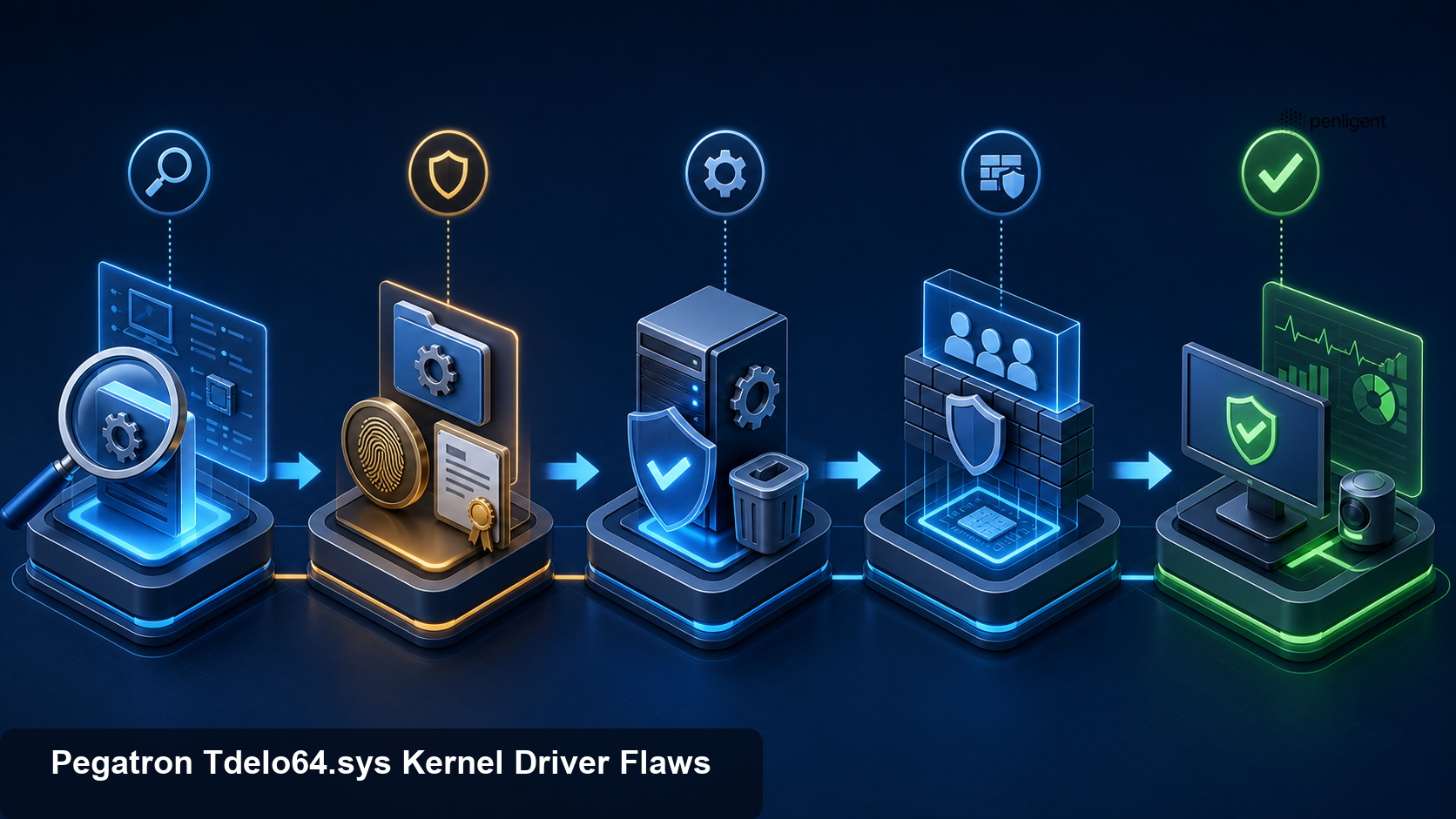
Validate driver and endpoint controls in authorized scope.
Use the following decision table:
| Condition | Decision | Required verification |
|---|---|---|
| File absent and no package or load history | Continue monitoring and validate golden images | Fleet search coverage and telemetry retention documented |
| File present but not loaded | Remove source package or block future load | File, package, service, and policy state checked after reboot |
| Driver loaded but business dependency unknown | Escalate to endpoint and hardware owner | Dependency test, hash and signature captured, temporary controls applied |
| Driver loaded and unnecessary | Disable or uninstall through controlled change | No load after reboot; dependent hardware and security monitoring healthy |
| Driver temporarily required | Create time-limited exception with compensating controls | WDAC scope, local privilege reduction, EDR monitoring, replacement deadline |
| Evidence of suspicious use or kernel impact | Treat as suspected full compromise | Isolation, external evidence, credential review, rebuild decision |
Verification must be independent of the change record. Confirm that the vulnerable file does not load, the associated device interface is not exposed, the parent package cannot reinstall it, and policy would deny reintroduction. Check every deployment ring and golden image.
Incident response when exploitation is suspected
An arbitrary kernel write primitive changes the response threshold. Once an attacker can modify kernel state, user-mode process listings, security tools, and local logs may be incomplete or deceptive. Isolate the endpoint using a network control that does not depend solely on the potentially compromised host.
Preserve external evidence first: identity-provider events, domain-controller logs, network flows, EDR backend telemetry already transmitted, software deployment history, driver policy events, email or web gateway records, and remote management logs. Record the time and scope of isolation. If memory acquisition is part of the organization’s process, use a trusted responder and understand that acquiring memory changes the system and depends on kernel components.
Collect the driver file, hash, signature, service configuration, registry state, relevant event logs, crash dumps, and parent package with chain-of-custody records. Do not execute a downloaded proof of concept to “confirm” compromise. That creates the same dangerous behavior being investigated and contaminates evidence.
Scope identities used on the endpoint. Kernel access may allow credential theft from protected processes, so rotate passwords, keys, tokens, and sessions according to evidence and risk. Prioritize privileged accounts, service accounts, cached administrative credentials, and users active during the suspected window. Coordinate rotation to avoid breaking services.
Hunt lateral movement and persistence across the environment. Search for the driver hash and related service names on other systems, remote service creation, administrative shares, scheduled tasks, new accounts, unusual authentication, and security-control changes. Determine whether the vulnerable driver arrived with legitimate OEM software, an attacker package, or an enterprise deployment.
Rebuild when system integrity cannot be established. Reinstall from a known-good image that does not contain the vulnerable package, apply current security controls, rotate exposed secrets, and verify monitoring before reconnecting. A local cleanup that merely removes tdeio64.sys cannot prove that kernel-level changes or downstream compromise are gone.
Safe validation for red teams and pentesters
The most useful assessment does not need to exploit the driver. An authorized team can answer high-value questions safely:
- Does the enterprise know which endpoints contain the file or parent package?
- Can the driver load under the current WDAC and HVCI policy?
- Are ordinary users allowed to install kernel services?
- Does EDR report the driver load, service creation, and policy decision?
- Will an alert reach an analyst with file hash, signer, endpoint, user, and process context?
- Can responders isolate and rebuild a test endpoint without losing required hardware functionality?
- Do golden images or software catalogs reintroduce the vulnerable driver?
Use a sacrificial virtual or physical lab representative of the target configuration. Test policy with a benign, organization-created driver test artifact or Microsoft-supported App Control tooling rather than the vulnerable driver when possible. Never fuzz hardware I/O handlers on production.
If an engagement needs to validate the exact vulnerable behavior for research, obtain explicit written authorization, isolate the system from production and sensitive networks, use disposable storage, prepare out-of-band recovery, and prevent distribution of weaponizable details. Stop after demonstrating the minimum primitive; do not extract credentials, disable security, or persist.
Evidence-first workflows are a natural fit for automated security validation. Penligent’s AI pentesting workflow can be used within owned scope to collect control evidence and retest fleet-facing exposure decisions, but it should not turn this driver advisory into an uncontrolled kernel exploitation task. The desired result is proof that vulnerable code cannot load and that suspicious driver behavior is visible.
Guidance for driver developers
VU#529388 also provides a durable design checklist for developers and reviewers of Windows drivers.
Secure the device object
Define a restrictive security descriptor when creating the device. Grant access only to the service identities or administrative groups that require it. Avoid broad permissions for Everyone, ordinary authenticated users, or low-integrity processes. Review symbolic links and interfaces exposed through Plug and Play.
Use Windows-supported secure device-creation APIs and INF security settings. Test effective permissions from standard-user, service, app-container, and administrator contexts. Device ACLs are the first boundary, not the only one.
Authorize every privileged operation
Do not assume that a process holding a device handle can invoke all IOCTLs. Define the minimum access bits in each control code and perform explicit authorization for sensitive functions. Separate read-only telemetry from state-changing or hardware-access functions. Avoid generic “read arbitrary address” or “write arbitrary address” operations entirely.
Tie authorization to a Windows security principal or a narrowly scoped service identity, not a secret static value passed in a buffer. Account for handle duplication and impersonation. Revalidate privileges at the time of the operation.
Validate buffers and address ranges
Validate input and output lengths before access. Use safe integer arithmetic to prevent overflow in offset-plus-length calculations. Treat embedded pointers as hostile. Prefer structured requests that identify a limited logical resource rather than accepting raw kernel addresses, physical addresses, or port numbers.
Understand the transfer method encoded in the IOCTL and the lifetime of each buffer. Probe and lock user buffers only through documented patterns and exception handling. Avoid time-of-check versus time-of-use races when another thread can modify user memory.
For hardware operations, implement strict allowlists of supported resources, widths, directions, and values. Confirm the device state and caller’s purpose. Do not expose a universal hardware access primitive for the convenience of a user-mode utility.
Minimize kernel functionality
Move parsing, policy, and nonessential logic to a lower-privilege user-mode service. Keep the kernel interface narrow and versioned. Remove diagnostic functions from production builds. Require a separate debug-signed or lab-only driver for engineering operations, and prevent it from shipping in OEM packages.
Use the Windows Driver Framework where appropriate to reduce manual request and lifetime errors. Adopt Static Driver Verifier, Driver Verifier in controlled testing, code analysis, fuzzing in isolated environments, and independent security review.
Design auditable behavior
Log security-relevant driver operations without exposing secrets or flooding the system. Make it possible for defenders to identify the driver version, service, device, and authorized client. Publish hashes, affected versions, fixed versions, removal instructions, and compatibility guidance during a security response.
Code signing should be paired with a revocation and update plan. A signed vulnerable driver can remain useful to attackers for years. Vendors should coordinate with Microsoft’s vulnerable driver blocklist process and communicate whether certificates or specific binaries will be revoked.
Common mistakes to avoid
Calling the issue remote code execution
The public note describes local unprivileged exploitation. A remote attacker needs a separate path to run code on the target first. Labeling it remote erases an important prerequisite and can mislead prioritization.
Dismissing it because exploitation is local
Local privilege escalation is a standard second stage in intrusions. Moving from a user process to SYSTEM and kernel control can enable defense impairment, credential theft, and persistence. Local does not mean low impact.
Trusting a valid signature
A digital signature does not prove the driver is free of vulnerabilities. BYOVD techniques rely on legitimate signed drivers with dangerous interfaces. Use signatures as identity evidence and combine them with allow policy and vulnerability intelligence.
Searching only one spelling
Index entries and fonts can confuse tdeio64.sys avec Tdelo64.sys. Search controlled variants, device name, hashes, services, and package metadata. Validate candidates before taking action.
Deleting the file without the package
The loaded driver may remain active, Windows servicing may restore the file, or an OEM updater may reinstall it. Remove or update the parent package, service, Driver Store entry, and deployment source through supported processes.
Assuming the blocklist already covers a new disclosure
Blocklists evolve. Verify an actual policy decision for the specific file. Add an organization-controlled deny rule when risk and compatibility testing support it.
Leaving WDAC in audit mode
Audit data is valuable for compatibility testing, but it does not block a driver. Emergency policy needs an enforcement timeline, rollback plan, and measured deployment.
Running a public PoC on production
Kernel memory writes and hardware I/O can crash or corrupt systems. Third-party binaries may be malicious. Presence and policy validation provide safer evidence.
Treating removal as incident closure
If exploitation occurred, removing the driver does not reverse stolen credentials, disabled controls, persistence, or lateral movement. Investigate the full timeline and rebuild when trust is lost.
A practical 24-hour response plan
First two hours
- Assign endpoint security, vulnerability management, desktop engineering, and incident-response owners.
- Add the filenames, device name, CVE identifiers, and VU number to discovery searches.
- Preserve the CERT/CC note and current internal evidence.
- Search high-value endpoints, administrator workstations, jump hosts, servers, and golden images first.
- Identify existing WDAC, vulnerable-driver blocklist, HVCI, and EDR coverage.
Hours two through six
- Collect hashes, signatures, versions, service state, and parent packages from discovered endpoints.
- Determine business dependency and isolate suspicious installations.
- Build a narrow deny policy for validated affected files and test it on representative hardware.
- Hunt for driver loads, new kernel services, unexpected installers, and security-control impairment.
- Disable or remove unnecessary instances through change control.
Hours six through twelve
- Expand discovery to all endpoints, software repositories, recovery images, and dormant assets.
- Deploy enforcement in rings where compatibility testing succeeds.
- Enable or repair Memory Integrity and the vulnerable driver blocklist on supported systems.
- Investigate any device access or post-escalation behavior.
- Remove the vulnerable source package from deployment systems.
Hours twelve through twenty-four
- Verify reboot state and driver-load absence.
- Document exceptions with owners, compensating controls, and near-term expiry.
- Rebuild endpoints with credible kernel compromise and rotate exposed credentials.
- Confirm alert routing and dashboards.
- Monitor CERT/CC, Pegatron, Microsoft, and OEM channels for updated remediation guidance.
The timeline should compress for evidence of exploitation and may expand for safety-critical hardware. A compensating-control exception is a risk decision, not a permanent substitute for removing the vulnerable component.
Frequently asked questions
What are CVE-2026-14960 and CVE-2026-14961?
- They are vulnerabilities in Pegatron’s
tdeio64.sysWindows kernel driver disclosed by CERT/CC in VU#529388. - CVE-2026-14961 concerns arbitrary kernel memory read and write through an inadequately protected device interface.
- CVE-2026-14960 concerns privileged hardware I/O port operations exposed through IOCTL handlers.
- Both require local interaction with the vulnerable driver rather than providing standalone remote entry.
Can an ordinary user become SYSTEM?
- CERT/CC states that an unprivileged local attacker can abuse the driver to obtain arbitrary kernel memory access.
- The note describes overwriting a process token with the SYSTEM process token as an elevation path.
- Defenders should not reproduce that operation on production; driver presence and load state are enough to establish exposure.
Is a vendor patch available?
- CERT/CC reported no vendor-supported fix and no vendor statement when it published the note on July 15, 2026.
- Organizations should monitor the primary note and official vendor or OEM channels for changes.
- Current mitigation centers on disabling or removing the driver, restricting loading and access, WDAC, the vulnerable driver blocklist, and HVCI where supported.
How do I find the driver?
- Search case-insensitively for
tdeio64.sysand validated transcription variants in driver directories and the Driver Store. - Query system driver services and EDR driver-load data for
TdeIoreferences. - Capture SHA-256, signature, version, path, service, parent package, first-seen time, and load state.
- Search golden images and software repositories so the file is not reintroduced.
Does a valid Pegatron signature make the driver safe?
- No. A signature helps establish publisher identity and file integrity, not absence of vulnerabilities.
- Signed vulnerable drivers are commonly valuable in BYOVD attacks.
- Use application control and vulnerability intelligence to decide what can load.
Will Memory Integrity completely stop exploitation?
- HVCI and Memory Integrity raise the security baseline and may block incompatible or vulnerable drivers.
- Actual enforcement depends on Windows build, policy, compatibility, and the driver.
- Verify that the file is denied or absent; do not assume a configured setting guarantees protection.
- Use layered controls including removal, WDAC, blocklists, least privilege, and monitoring.
Is it safe to test the real driver?
- Not on production. Kernel memory and hardware I/O testing can crash, corrupt, or destabilize systems.
- Use presence, version, load, policy, and telemetry checks for enterprise validation.
- Product-specific research belongs in an isolated sacrificial lab with explicit authorization and recovery plans.
- Do not download or execute unverified exploit binaries.
When should an endpoint be rebuilt?
- Rebuild when evidence indicates arbitrary kernel access, security-control impairment, credential theft, persistence, or when integrity cannot be established.
- Isolate first and preserve external and local evidence according to incident procedures.
- Rotate credentials and sessions exposed on the endpoint.
- Reimage from a known-good source that does not contain the vulnerable package and verify controls before reconnecting.
Final assessment
CVE-2026-14960 and CVE-2026-14961 demonstrate why a small OEM driver can carry enterprise-wide risk. tdeio64.sys sits below ordinary application defenses and exposes operations that user-mode callers should never control without strict authorization and validation. Arbitrary kernel memory access can turn a restricted foothold into SYSTEM and undermine trust in the endpoint. Hardware I/O exposure reaches beyond normal operating-system abstractions and can create platform-specific consequences.
The right response is measured but urgent. Discover the driver and its source package across endpoints and images. Preserve hashes, signatures, service metadata, and load evidence. Remove or disable it where the business does not require it. Enforce driver application control, the vulnerable driver blocklist, and Memory Integrity on compatible systems. Monitor for unexpected driver activity and downstream signs of privilege escalation.
Most importantly, separate vulnerability exposure from incident confidence. Finding the file does not prove exploitation, and removing it does not erase a prior kernel compromise. When behavior indicates abuse, isolate, investigate with external evidence, rotate exposed identities, and rebuild from a trusted image. That discipline turns a difficult no-patch driver disclosure into a defensible sequence of inventory, containment, prevention, and verified recovery.
 French
  English
  German
  Spanish
  Portuguese
  Japanese
  Korean
  Hindi
Hindi  Arabic
  Turkish
  Hebrew