
CVE-2024-21413 is a critical Microsoft Outlook vulnerability commonly known as MonikerLink. It abuses the way Outlook processes specially constructed file-based hyperlinks and passes attacker-controlled values into Windows Component Object Model, or COM, moniker functions.
The vulnerability creates several related but technically distinct risks. A crafted hyperlink can cause a Windows system to contact a remote Server Message Block resource and expose NTLM authentication material. The same parsing path can also cause another Office application, such as Microsoft Word, to process attacker-controlled content outside the expected Protected View boundary. When combined with a suitable malicious document, vulnerable COM server, or secondary application vulnerability, that delivery path can support remote code execution.
Microsoft classified CVE-2024-21413 as a Microsoft Outlook remote code execution vulnerability and assigned the CVSS 3.1 vector AV:N/AC:L/PR:N/UI:N/S:U/C:H/I:H/A:H, corresponding to a Critical score of 9.8. Microsoft released the associated security updates on February 13, 2024. (NVD)
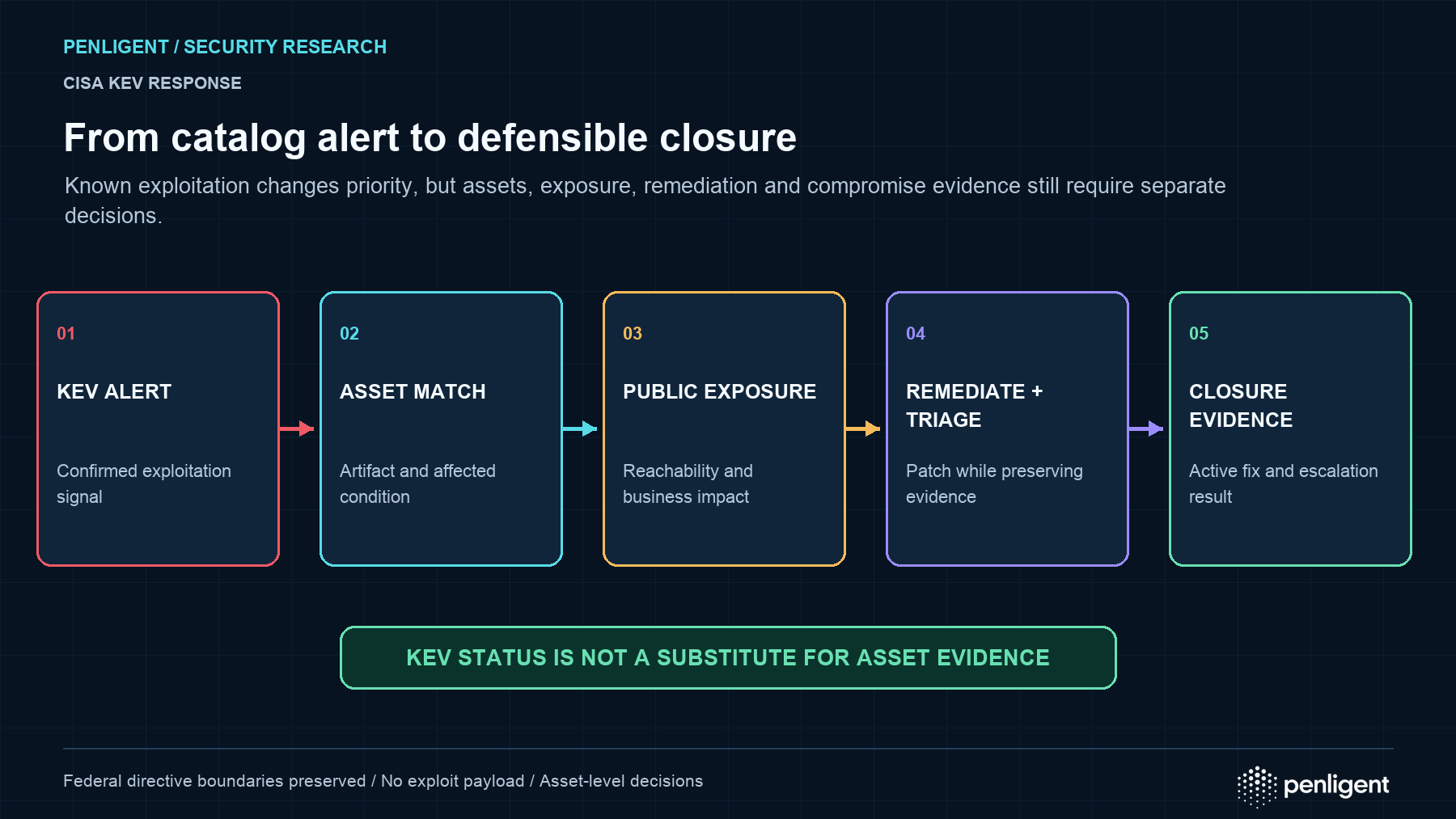
CISA added CVE-2024-21413 to the Known Exploited Vulnerabilities Catalog on February 6, 2025, with a remediation deadline of February 27, 2025 for organizations covered by Binding Operational Directive 22-01. The catalog identifies the issue as a Microsoft Outlook improper input validation vulnerability and directs organizations to apply vendor mitigations or discontinue the affected product when mitigations are unavailable. (NVD)
The KEV designation means CVE-2024-21413 should not be treated merely as an old Outlook research finding. It remains relevant to vulnerability management because Microsoft Office installations can fall behind their configured update channels, unmanaged endpoints may retain vulnerable builds, and security teams may still need to hunt for historical exploitation or credential exposure.
At the same time, technical accuracy matters. The public MonikerLink research did not demonstrate that a single exclamation mark automatically produces arbitrary code execution on every Outlook installation. It demonstrated a dangerous Outlook-to-COM attack path that leaks NTLM information, bypasses Protected View, and can deliver content to a COM server under more attacker-favorable conditions. A complete RCE chain generally depends on what the target COM application does with that content. (Check Point Research)
CVE-2024-21413 at a Glance
| Attribut | Détails |
|---|---|
| ID CVE | CVE-2024-21413 |
| Common name | MonikerLink |
| Affected component | Microsoft Outlook and affected Microsoft Office desktop installations |
| Faiblesse | Improper input validation |
| CWE | CWE-20 |
| CVSS score | 9.8 Critical |
| Primary risks | NTLM authentication leakage, Protected View bypass, remote content processing, potential RCE |
| Patch release | February 13, 2024 |
| CISA KEV addition | February 6, 2025 |
| KEV remediation deadline | February 27, 2025 |
| Researcher | Haifei Li of Check Point Research |
| Important network indicator | Unexpected outbound SMB traffic, commonly TCP port 445 |
| Primary remediation | Install a current supported Microsoft Office security build and verify deployment |
NVD currently identifies Microsoft Office 2019, Microsoft 365 Apps for Enterprise, Microsoft Office LTSC 2021, and Microsoft Office 2016 on 32-bit and x64 Windows platforms as affected product families. Microsoft’s updated affected-version data identifies Office 2016 versions below 16.0.5435.1001 and directs the other Office families to Microsoft’s Office security release information for their applicable fixed builds. (NVD)
What Is MonikerLink?
A moniker is a COM mechanism for naming, locating, and binding to an object. Windows applications can use monikers to refer to files, document components, application objects, or other resources that expose COM interfaces.
In the vulnerable Outlook behavior, a specially formatted hyperlink is not handled only as an ordinary link to a file. Outlook passes the resulting string into the Windows MkParseDisplayName function. That API attempts to interpret the supplied display name and resolve the COM object represented by it. (Check Point Research)
Check Point Research found that the relevant string could be treated as a composite moniker. The portion before an exclamation mark acted as a FileMoniker pointing to a remote file, while the content after the exclamation mark acted as an ItemMoniker. Outlook removed the fichier protocol prefix and passed the remaining attacker-controlled string to the COM parsing function. (Check Point Research)
That is the origin of the name MonikerLink: the email contains a hyperlink, but the important security behavior occurs because Outlook interprets the destination through COM moniker resolution.
The attack surface is broader than a typical browser URL. Once a value enters COM moniker processing, the security outcome depends on which COM server handles the referenced file type and how that application parses the content.
How an Ordinary Remote File Link Differs from MonikerLink
A normal HTTP or HTTPS link is generally passed to the default browser. A registered application protocol may cause Windows or Outlook to display a warning before launching another program. A remote file link can refer to a UNC resource that Windows may attempt to access over SMB.
Outlook included a protection that prevented certain remote-file links from simply opening the referenced content. Check Point found that adding an exclamation mark and trailing item value changed the parsing behavior, causing Outlook to treat the destination as a composite moniker rather than rejecting it through the normal remote-file restriction. (Check Point Research)
For defensive analysis, the important pattern is not merely “a link containing an exclamation mark.” The relevant sequence is:
- An HTML email contains a crafted file-based hyperlink.
- Outlook interprets the destination.
- The attacker-controlled value reaches
MkParseDisplayName. - COM resolves the composite moniker.
- Windows attempts to access a remote file resource.
- SMB authentication may be initiated.
- An Office application or another COM server may process the remote content.
- Protected View may not be applied.
- A secondary exploit may achieve code execution.
This sequence explains why CVE-2024-21413 affects several security layers at once. It is an email-delivery problem, a Windows authentication problem, a COM attack-surface problem, and potentially an Office exploitation problem.
How CVE-2024-21413 Leaks NTLM Authentication Material
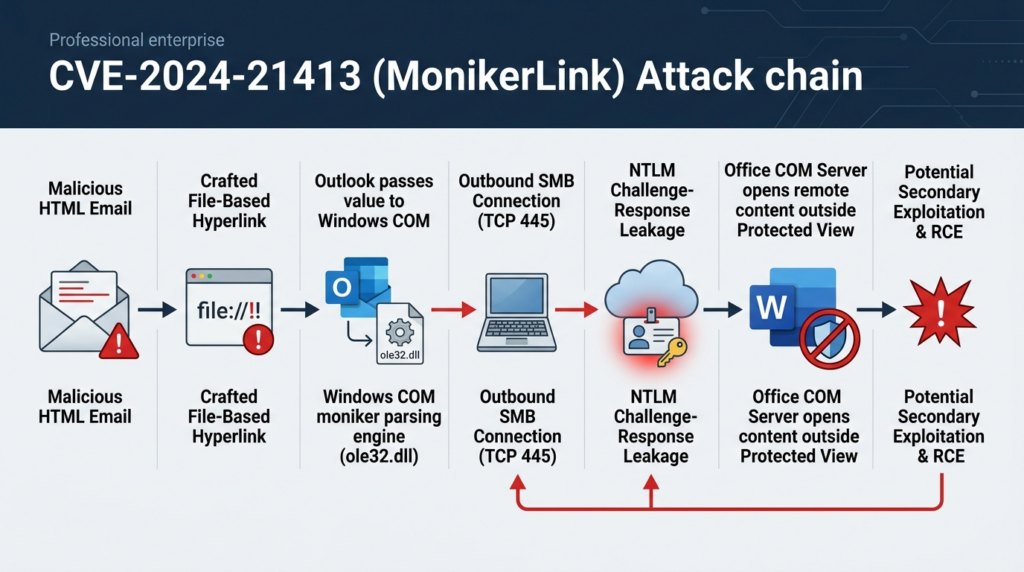
When a Windows client attempts to access an SMB share, it may automatically try to authenticate using the logged-in user’s Windows credentials. In an NTLM exchange, the system does not normally transmit the plaintext password. It sends challenge-response information derived from the account’s credential material.
Check Point observed the MonikerLink test case attempting to reach a remote RTF file over SMB on TCP port 445. During that process, the client exposed local NTLM authentication information to the remote server. (Check Point Research)
The distinction between a plaintext password and an NTLM response is important, but it should not lead defenders to underestimate the incident. Captured NetNTLM challenge-response data can still be valuable to an attacker.
Depending on the environment, the attacker may attempt to:
- Crack a weak password offline
- Relay the authentication exchange to another NTLM-enabled service
- Identify usernames and domain naming conventions
- Test recovered credentials against other services
- Target accounts with reused passwords
- Escalate access through an exposed internal service
- Use the compromised identity for lateral movement
The actual impact depends heavily on identity and network controls. A long, unique password makes offline cracking more difficult. SMB signing can prevent or constrain certain relay scenarios. Extended Protection for Authentication can reduce relay exposure for compatible services. Blocking outbound internet SMB can prevent a remote attacker from receiving the authentication exchange in the first place.
None of these controls repairs Outlook’s unsafe parsing behavior. They are compensating controls that reduce the consequences when an endpoint remains vulnerable or a user encounters a crafted message.
NTLM Leak Versus Credential Theft
Security reports sometimes describe MonikerLink as directly “stealing the user’s password.” That phrasing is imprecise.
The remote server receives an NTLM authentication exchange, not normally the original plaintext password. The attacker must still crack, relay, or otherwise abuse that material.
However, describing it merely as a harmless “hash leak” is also misleading. In a relay scenario, the attacker may not need to recover the password at all. If the captured authentication can be relayed to a service that accepts NTLM without adequate protections, the attacker may authenticate as the victim.
The safest incident-response assumption is therefore:
A confirmed NTLM exchange with attacker-controlled infrastructure represents potential credential compromise, even when the plaintext password has not been recovered.
The response should consider the value of the affected identity, password strength, relay exposure, session state, privileges, and evidence of follow-on authentication.
How MonikerLink Creates a Protected View Bypass
Protected View is designed to open untrusted Office documents in a restricted environment. Files originating from email or the internet are normally subject to additional restrictions, read-only handling, and visible warnings.
Check Point’s research showed that Outlook could cause Microsoft Word to run in the background as a COM server. Word then opened and parsed the remote RTF file referenced by the FileMoniker. The resulting process did not use Protected View and ran at Medium integrity. (Check Point Research)
This is significant because a traditional malicious Office attachment often faces several defensive barriers. The victim may need to open the attachment, leave Protected View, enable editing, or perform another action before attacker-controlled active content or an exploit reaches a useful execution context.
MonikerLink changes that delivery path. Instead of relying on the normal attachment workflow, Outlook asks a COM server to process the referenced file in the background. The target application may therefore encounter attacker-controlled content without the expected Protected View boundary.
The bypass does not guarantee that the file will successfully execute code. It creates a less restricted route through which an existing parser vulnerability, memory-corruption flaw, unsafe object handler, or malicious application behavior can be reached.
Does CVE-2024-21413 Automatically Achieve RCE?
Microsoft’s official classification is “Microsoft Outlook Remote Code Execution Vulnerability,” and the Microsoft CVSS vector assigns high confidentiality, integrity, and availability impacts. (NVD)
That official classification is valid, but the public technical demonstration requires careful explanation.
Check Point demonstrated that Outlook could cause Word to parse an attacker-controlled RTF file as a COM server outside Protected View. The researchers used a non-exploitable crash to prove that Word processed the remote document in the relevant mode. They explicitly stated that Word was an example and that the final impact depends on the security and behavior of the COM server receiving the content. (Check Point Research)
A realistic complete RCE chain may therefore require:
- A malicious document hosted on the attacker-controlled resource
- A vulnerability in Word or another reachable COM server
- Exploit code compatible with COM-server execution
- A target application installed and registered for the relevant object type
- Network access from the victim to the remote resource
- A payload compatible with the victim’s Office and Windows build
- Security controls that do not block the connection or secondary execution
The most accurate summary is:
CVE-2024-21413 directly creates a dangerous Outlook-to-COM delivery path. That path can leak NTLM authentication material and bypass Protected View. Arbitrary code execution becomes possible when the path reaches a malicious or vulnerable COM application capable of executing attacker-controlled code.
This distinction improves both vulnerability communication and incident response.
An outbound SMB authentication attempt is already a significant security event even when no code execution occurs. Conversely, the absence of a recovered credential does not rule out an attempted document exploitation chain.
User Interaction and the UI:N Rating
Microsoft’s CVSS vector records UI:N, meaning no user interaction. The public Check Point demonstration, however, shows a user clicking the crafted hyperlink before Outlook calls MkParseDisplayName. (NVD)
Publicly available research does not fully reconcile that difference. Microsoft may have evaluated additional Outlook processing conditions or exploitation paths that were not included in the public demonstration.
Security teams should therefore avoid making either of two unsupported claims:
- That every exploitation attempt requires a click
- That every delivered email automatically compromises the endpoint
Incident timelines should distinguish message delivery, preview or rendering, hyperlink activation, remote network access, authentication, COM-server launch, and secondary execution.
For prioritization, Microsoft’s Critical rating and the CISA KEV designation are stronger indicators than assumptions derived from one public proof of concept.
Why the Protected View Bypass Changes Exploitability
A vulnerability can be technically severe but difficult to exploit because the target parser runs inside a sandbox, restricted process, or protected document mode. Attackers often need an additional sandbox escape or user action before obtaining useful execution.
MonikerLink weakens that defensive assumption. The target Office application may process the remote content at normal user integrity rather than inside Protected View. Check Point specifically observed a background Word process running at Medium integrity. (Check Point Research)
That can make a secondary document vulnerability more useful because:
- The exploit does not necessarily need to escape Protected View
- Fewer user interactions may be required
- The malicious document may be processed in the background
- Expected Office warnings may not appear
- Security tools may see a legitimate Office executable rather than an unknown loader
- The attack can bridge email, SMB, COM, and document parsing in one chain
From a defensive perspective, this makes process and network correlation more important than reliance on visible Office warnings.
CVE-2024-21413 Attack Chain
| Stade | Attacker activity | Potential defender evidence |
|---|---|---|
| Livraison | Send an HTML email containing a crafted file-based hyperlink | Message headers, HTML body, URL extraction, sender reputation |
| Link processing | Outlook interprets the hyperlink | Outlook process activity, email interaction telemetry |
| COM parsing | Outlook calls moniker-resolution functionality | Limited direct visibility; process and API telemetry where available |
| Remote access | Windows contacts the referenced SMB resource | DNS, firewall, EDR and network events |
| Authentification | Windows sends NTLM challenge-response data | NTLM audit events, SMB session records, packet capture |
| COM-server launch | Word or another registered application starts | Outlook-to-Office process relationship |
| Protected View bypass | Remote document is processed outside expected isolation | Medium-integrity Office process, missing protected-mode behavior |
| Secondary exploitation | Malicious content targets the COM server | Crash, exploit-prevention alert, suspicious module load |
| Post-exploitation | Payload establishes execution or persistence | Script interpreter, LOLBin, credential access, lateral movement or C2 |
Not every attack reaches every stage. One campaign may stop after collecting NTLM material. Another may use MonikerLink primarily as a delivery route for an Office exploit.
Affected Microsoft Products
Microsoft’s affected-product information includes:
| Product family | Platforms |
|---|---|
| Microsoft 365 Apps for Enterprise | 32-bit and x64 Windows |
| Microsoft Office 2019 | 32-bit and x64 Windows |
| Microsoft Office LTSC 2021 | 32-bit and x64 Windows |
| Microsoft Office 2016 | 32-bit and x64 Windows |
Microsoft’s June 2026 CVE update lists Office 2016 builds below 16.0.5435.1001 as affected. For Microsoft 365 Apps, Office 2019, and Office LTSC 2021, Microsoft points administrators to the applicable Office security releases rather than providing one permanent universal version threshold. (NVD)
This is important because Microsoft 365 Apps uses channel-based servicing. Current Channel, Monthly Enterprise Channel, and other channels receive different version and build numbers on different schedules.
A device should not be assessed merely by asking whether it has “Office 365.” Administrators need to identify:
- The installed Office product
- Whether it is Click-to-Run or MSI-based
- Its architecture
- Its update channel
- Its exact version and build
- Whether that version is still supported
- Whether the patched binaries are active after restart
The affected-product list refers to Windows desktop Office products. It should not automatically be generalized to Outlook on the web, mobile Outlook applications, or unrelated mail clients because those products do not use the same Windows COM execution path.
Patch Timeline
| Date | Événement |
|---|---|
| October 25, 2023 | Check Point states that its email protection was deployed for customers |
| November 15, 2023 | Check Point states that its IPS protection was available |
| February 13, 2024 | Microsoft releases the security updates for CVE-2024-21413 |
| February 14, 2024 | Check Point publishes the MonikerLink technical analysis |
| February 6, 2025 | CISA adds CVE-2024-21413 to the KEV Catalog |
| February 27, 2025 | CISA remediation deadline for covered federal systems |
| June 17, 2026 | Microsoft and CISA-related CVE metadata is updated in NVD |
Check Point’s pre-disclosure dates describe protections in Check Point products and do not establish when exploitation began globally. Microsoft’s patch date, the public research date, and CISA’s later KEV designation should be treated as separate events. (Check Point Research)
Historical Microsoft 365 Apps Patch Baselines
Microsoft’s update history records the following builds on February 13, 2024:
| Update channel or servicing branch | February 13, 2024 version |
|---|---|
| Current Channel | Version 2401, Build 17231.20236 |
| Monthly Enterprise Channel | Version 2312, Build 17126.20190 |
| Semi-Annual Enterprise Channel Preview | Version 2311, Build 17029.20178 |
| Semi-Annual Enterprise Channel | Version 2308, Build 16731.20550 |
| Older supported Semi-Annual branch | Version 2302, Build 16130.20916 |
| Older supported servicing branch | Version 2208, Build 15601.20870 |
These numbers are useful as historical references for the February 2024 security release. They are not appropriate deployment targets today. A secure organization should use a current, supported build for its configured channel rather than attempting to remain permanently on the first version that contained the fix. (Microsoft Learn)
Microsoft explains that the Office update schedule depends on the configured channel and that administrators can identify the installed version by opening an Office application and selecting File > Account. (Microsoft Learn)
Why Checking for a Single KB Is Not Enough
A common validation method is to search for one KB number associated with the February 2024 release. That can provide useful evidence, especially for MSI-based Office installations, but it is not sufficient on its own.
A single package check may fail to establish that:
- All affected Office components were serviced
- The update completed successfully
- Outlook was restarted
- The running binary is the patched binary
- The Office branch remains supported
- The update was not rolled back
- Another Office installation is not present
- Click-to-Run and MSI inventory has not been confused
- A virtual desktop or golden image was not reverted
Build-level validation is generally stronger than checking one package identifier. File-level validation can provide additional assurance for high-risk systems.
How to Validate the CVE-2024-21413 Patch
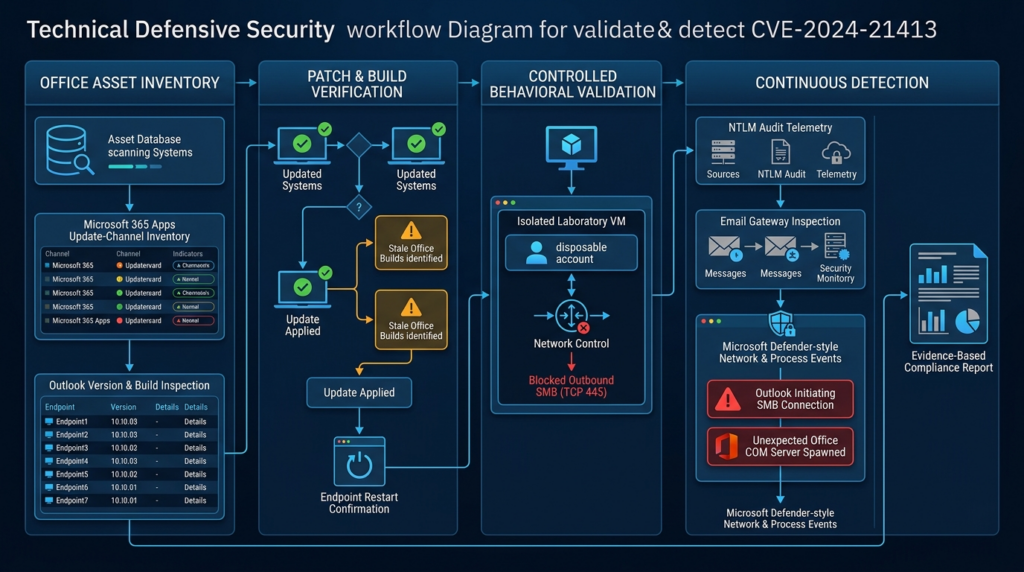
A reliable validation process should answer four questions:
- Which Office product and servicing model is installed?
- Which version and build are currently active?
- Is that build current and supported for the configured channel?
- Do network and endpoint controls prevent the vulnerable behavior from producing credential exposure?
Identify Click-to-Run Office Versions
Users can open Outlook, Word, or another Office application and navigate to:
File > Account > About Outlook
The Account page shows the product version and can also identify the update channel used by Microsoft 365 Apps. Microsoft documents this interface as the standard method for checking Office version and channel information. (Microsoft Learn)
Administrators can collect Click-to-Run information from the registry:
$path = "HKLM:\SOFTWARE\Microsoft\Office\ClickToRun\Configuration"

if (-not (Test-Path $path)) {
    Write-Warning "No Microsoft Office Click-to-Run configuration was found."
    return
}

$office = Get-ItemProperty -Path $path

[pscustomobject]@{
    VersionToReport       = $office.VersionToReport
    ClientVersionToReport = $office.ClientVersionToReport
    ProductReleaseIds     = $office.ProductReleaseIds
    UpdateChannel         = $office.UpdateChannel
    CDNBaseUrl            = $office.CDNBaseUrl
    Platform              = $office.Platform
}
The result should be compared with Microsoft’s update history for the device’s actual channel. Version numbers from different channels should not be compared as though they followed one identical sequence.
For example, a Monthly Enterprise Channel device may legitimately have a different build from a Current Channel device. The question is whether each device is compliant with the supported release for its own policy.
Inventory MSI-Based Office Installations
Older Office installations may use Windows Installer rather than Click-to-Run. Administrators can inspect the uninstall registry locations without using Win32_Product:
$uninstallPaths = @(
    "HKLM:\SOFTWARE\Microsoft\Windows\CurrentVersion\Uninstall\*",
    "HKLM:\SOFTWARE\WOW6432Node\Microsoft\Windows\CurrentVersion\Uninstall\*"
)

Get-ItemProperty -Path $uninstallPaths -ErrorAction SilentlyContinue |
    Where-Object {
        $_.DisplayName -match "Microsoft Office|Microsoft Outlook|Microsoft 365"
    } |
    Select-Object `
        DisplayName,
        DisplayVersion,
        Publisher,
        InstallDate,
        InstallLocation |
    Sort-Object DisplayName
Avoid relying on Win32_Product for routine inventory because querying that class can trigger Windows Installer consistency checks and unintended repair activity.
Compare Against Current Supported Builds
The correct compliance rule is not simply:
Build is newer than February 13, 2024.
The stronger rule is:
Build includes the February 2024 correction and remains supported under the organization’s current Office servicing channel.
A machine running an early 2024 build may contain the MonikerLink fix while still missing a large number of later Office security updates. It should not be considered healthy merely because it crossed the original minimum threshold.
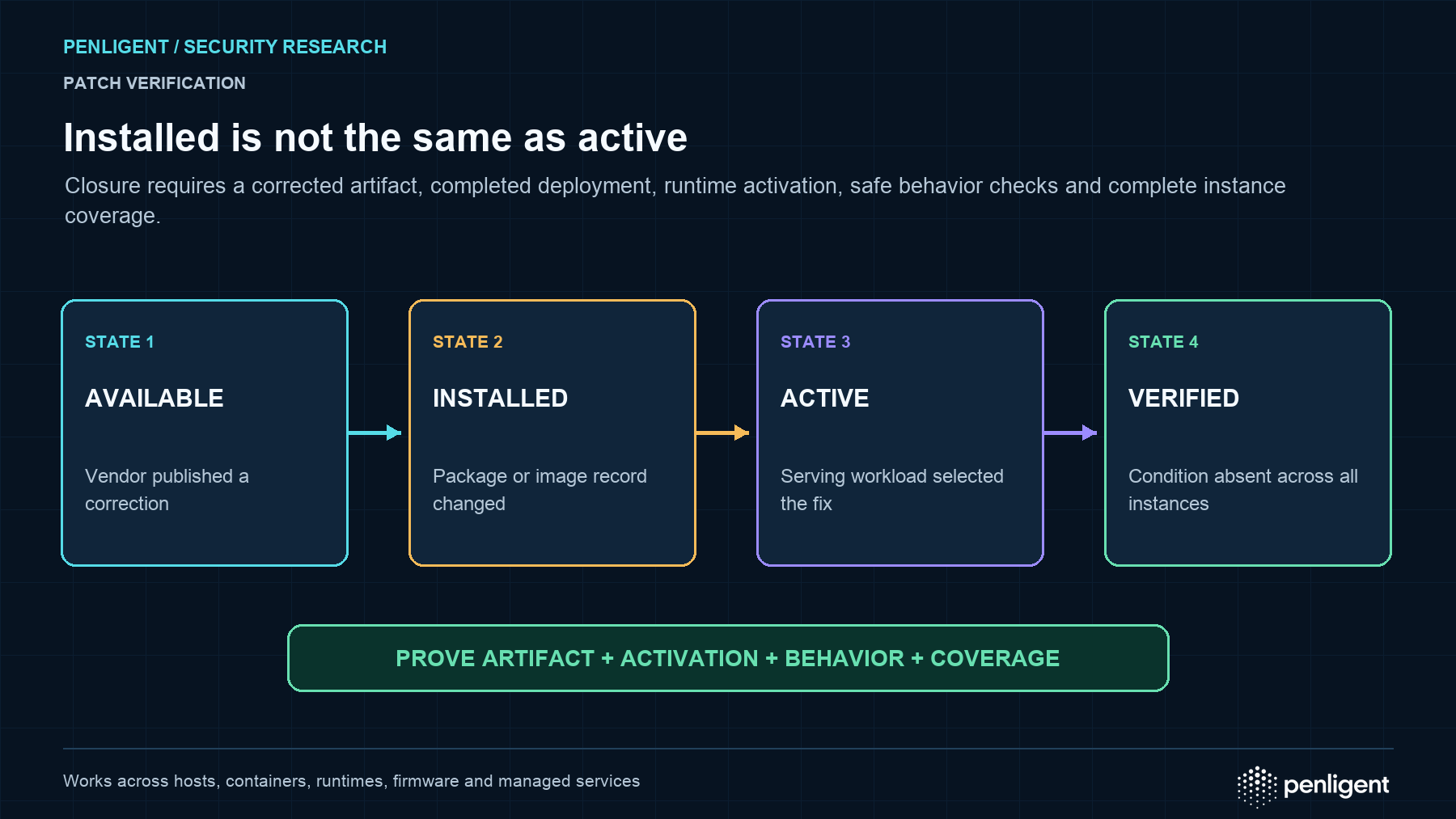
Verify That the Updated Binary Is Active
Office files may remain loaded while Outlook is open. After patch deployment:
- Close Outlook completely.
- Confirm that
OUTLOOK.EXEis no longer running. - Restart the device when required by the management platform or servicing state.
- Relaunch Outlook.
- Recheck the reported version.
- Confirm that update-management status no longer reports a pending restart.
A deployment console showing “installed” does not always prove that the patched executable is active in memory.
Investigate Stale or Failed Devices
Prioritize devices that:
- Have not reported Office version data recently
- Are several releases behind their configured channel
- Show failed Office update tasks
- Have updates paused
- Have insufficient disk space
- Spend long periods disconnected from the corporate network
- Use unsupported update channels
- Contain multiple Office installations
- Are restored repeatedly from an outdated virtual desktop image
- Are excluded from normal deployment rings
Microsoft’s update documentation confirms that Office servicing behavior depends on the configured update channel. This makes channel-aware compliance reporting essential. (Microsoft Learn)
Safe Behavioral Patch Validation
Version validation should be the primary method used in production. Behavioral testing should be limited to an isolated, authorized laboratory.
A safe MonikerLink validation environment should include:
- A disposable Windows virtual machine
- A supported test Office installation
- A nonprivileged test-only account
- No production credentials
- No trust relationship with the production domain
- A controlled SMB listener or network canary
- Packet capture on the client and test server
- A snapshot taken before testing
- A non-weaponized document
- Restricted network access
- Documented authorization
The objective should not be to execute code. The objective should be to determine whether the Outlook client still attempts to access a controlled remote resource when it encounters a benign test case representing the vulnerable parsing behavior.
Do not use a normal employee account. Even a non-malicious SMB listener can receive NTLM authentication material. A disposable account ensures that any accidental challenge-response exposure has no value outside the laboratory.
A useful validation record contains:
| Preuves | Expected patched-system result |
|---|---|
| Office product and build | Current and supported |
| Test message | Sanitized and retained |
| Outbound TCP 445 | No unexpected connection to the controlled host |
| SMB authentication | No NTLM exchange attributable to the test |
| Office child process | No unexpected COM-server launch |
| Protected View behavior | No silent processing outside the expected boundary |
| EDR telemetry | No suspicious exploit or process activity |
Behavioral testing should not be deployed as a phishing simulation against production employees. Doing so could unnecessarily expose real authentication material and create a difficult-to-distinguish security incident.
Detecting Suspicious MonikerLink Email Content
Email-security teams can hunt for HTML links that combine a fichier scheme with unusual moniker-related delimiters.
A broad retrospective pattern could be:
(?i)href\s*=\s*["']\s*file:[^"']*![^"']*["']
This should be treated as a hunting expression rather than a perfect blocking rule.
Attackers may vary the representation through:
- URL encoding
- HTML entity encoding
- Quoted-printable encoding
- MIME fragmentation
- Mixed slash and backslash formats
- Uppercase and lowercase variations
- Unicode lookalike characters
- Attached HTML files
- Nested email messages
- Redirectors
- Hidden display text
Legitimate enterprise workflows may also contain file links. A high-confidence rule should correlate the suspicious syntax with external sender status, a public destination, new infrastructure, or an outbound SMB event from the recipient.
Detecting Outbound SMB from Outlook
Outbound SMB is one of the strongest behavioral indicators associated with the NTLM-leak path.
Microsoft recommends controlling SMB carefully rather than leaving arbitrary outbound access available. Its guidance proposes blocking outbound TCP 445 on untrusted networks and allowing Domain or Private SMB only to approved domain controllers and file servers. Microsoft also warns that Windows clients require legitimate outbound SMB for Group Policy and file-server access, so indiscriminate internal blocking can disrupt business operations. (Microsoft Support)
Microsoft Defender XDR’s DeviceNetworkEvents table contains network events and includes fields such as RemoteIP, RemotePort, RemoteUrl, RemoteIPTypeet InitiatingProcessFileName. (Microsoft Learn)
The following query looks for Office applications connecting to TCP port 445:
DeviceNetworkEvents
| where Timestamp > ago(30d)
| where RemotePort == 445
| where InitiatingProcessFileName in~ (
    "OUTLOOK.EXE",
    "WINWORD.EXE",
    "EXCEL.EXE",
    "POWERPNT.EXE"
)
| project
    Timestamp,
    DeviceName,
    InitiatingProcessAccountName,
    InitiatingProcessFileName,
    InitiatingProcessCommandLine,
    RemoteIP,
    RemoteIPType,
    RemoteUrl,
    RemotePort,
    Protocol,
    ActionType
| order by Timestamp desc
Prioritize results where:
RemoteIPTypeis public- The destination is not an approved file service
- Outlook initiated the connection
- The destination was newly observed
- The connection followed delivery of an external email
- Multiple users contacted the same destination
- Word or another Office process launched around the same time
- Identity alerts followed the connection
- The user holds privileged access
Not every Office-to-SMB event is malicious. Internal document-management systems, file shares, and business workflows may legitimately cause Office applications to contact SMB resources. Baseline known destinations before turning this query into a high-severity detection.
Detecting Outlook Launching Other Office Applications
MonikerLink can cause Outlook to reach another Office application through COM. Process-creation telemetry can therefore help identify suspicious delivery paths.
Microsoft Defender XDR’s DeviceProcessEvents table records created processes and includes initiating-process fields, command lines, integrity levels, account information, signatures, and parent process details. (Microsoft Learn)
DeviceProcessEvents
| where Timestamp > ago(30d)
| where InitiatingProcessFileName =~ "OUTLOOK.EXE"
| where FileName in~ (
    "WINWORD.EXE",
    "EXCEL.EXE",
    "POWERPNT.EXE",
    "MSACCESS.EXE",
    "VISIO.EXE"
)
| project
    Timestamp,
    DeviceName,
    AccountName,
    InitiatingProcessFileName,
    InitiatingProcessCommandLine,
    FileName,
    ProcessCommandLine,
    ProcessIntegrityLevel,
    SHA1,
    FolderPath
| order by Timestamp desc
An Outlook-to-Word relationship is not automatically malicious. Outlook may legitimately launch Word when users open documents or perform other Office workflows.
Confidence increases when the process event is correlated with:
- A recently delivered external email
- A suspicious file-scheme hyperlink
- An outbound SMB connection
- A public or unknown destination
- Unusual Office command-line arguments
- An Office process running without visible user interaction
- A subsequent script interpreter
- Exploit-protection telemetry
- Unexpected DLL loading
- Executable creation in a user-writable directory
Detecting Secondary Execution
If MonikerLink delivers a document exploit successfully, the Office process may spawn or interact with post-exploitation tools.
Security teams should hunt for Office applications launching:
powershell.exepwsh.execmd.exemshta.exerundll32.exeregsvr32.exewscript.execscript.execertutil.exebitsadmin.exe- Unknown executables in temporary directories
An example query is:
DeviceProcessEvents
| where Timestamp > ago(30d)
| where InitiatingProcessFileName in~ (
    "OUTLOOK.EXE",
    "WINWORD.EXE",
    "EXCEL.EXE",
    "POWERPNT.EXE"
)
| where FileName in~ (
    "powershell.exe",
    "pwsh.exe",
    "cmd.exe",
    "mshta.exe",
    "rundll32.exe",
    "regsvr32.exe",
    "wscript.exe",
    "cscript.exe",
    "certutil.exe",
    "bitsadmin.exe"
)
| project
    Timestamp,
    DeviceName,
    AccountName,
    InitiatingProcessFileName,
    InitiatingProcessCommandLine,
    FileName,
    ProcessCommandLine,
    SHA1
| order by Timestamp desc
This analytic is broader than CVE-2024-21413. Its value comes from correlation with the email, SMB, and Office process events described above.
Building a High-Confidence Correlation
A useful MonikerLink detection strategy combines several weak or medium-confidence signals into one timeline.
A high-confidence chain may contain:
- An external HTML email is delivered.
- The message contains a suspicious
fichierhyperlink. - Outlook initiates or is associated with TCP 445 traffic.
- The destination is public or unapproved.
- Outlook launches Word or another Office application.
- The Office process runs at Medium integrity.
- The Office process spawns a script interpreter or unknown binary.
- The user account generates unusual authentication activity.
No single event proves the entire chain. Together, the events provide a much stronger basis for containment.
Security operations teams should preserve the original email and process tree before deleting the message or reimaging the endpoint.
Network Mitigation
Block Outbound SMB to the Internet
Blocking arbitrary outbound SMB is one of the most effective compensating controls for the NTLM-leak component.
Microsoft’s firewall guidance recommends blocking outbound SMB TCP 445 on Guest or Public networks. For trusted Domain or Private networks, Microsoft describes a model in which SMB is allowed only to approved domain controllers and file servers, with a broader block rule covering other destinations. (Microsoft Support)
A practical enterprise policy is:
- Allow SMB to approved domain controllers
- Allow SMB to approved file servers
- Allow required managed cloud-file endpoints through documented exceptions
- Block SMB to arbitrary internal workstations
- Block outbound internet SMB
- Log every denied Office-to-SMB event
- Alert when Outlook attempts external SMB
- Review exceptions regularly
Blocking outbound SMB does not fix CVE-2024-21413. It prevents or reduces one important consequence: the delivery of NTLM authentication material to an attacker-controlled SMB server.
A different COM target or network protocol may still present risk, so the Office patch remains mandatory.
Reduce NTLM Dependence
Organizations should audit where NTLM remains necessary and migrate compatible services toward Kerberos, certificate-based authentication, or other modern mechanisms.
A staged program should include:
- Enable NTLM auditing.
- Identify systems and applications that depend on NTLM.
- Classify each dependency by business owner and risk.
- Enable SMB signing where supported.
- Deploy Extended Protection for Authentication where compatible.
- Restrict privileged accounts from legacy authentication.
- Block NTLM authentication to untrusted destinations.
- Remove unnecessary NTLM dependencies.
- Enforce restrictions only after validating business impact.
Abruptly disabling NTLM without an inventory can break legacy applications and network devices. The objective is controlled reduction, not an untested global switch.
Separate Administrative and Productivity Accounts
Privileged administrators should not use their administrative identities for ordinary email reading.
If a privileged account activates a malicious MonikerLink and exposes NTLM material, the resulting authentication may be far more valuable than the authentication of a normal user.
Administrative tiering should separate:
- Email and web-browsing accounts
- Workstation administration accounts
- Server administration accounts
- Domain-level administrative identities
- Emergency access identities
The more privileged the identity, the more restrictive its allowed authentication destinations should be.
Email-Security Mitigation
Email gateways can reduce exposure by examining HTML bodies, rewriting risky links, blocking suspicious file schemes, and detonating messages in isolated environments.
Useful controls include:
- Blocking external
file:hyperlinks where business use is not required - Rewriting suspicious URLs through a secure redirector
- Extracting URLs from nested MIME content
- Inspecting attached HTML and EML files
- Flagging IP-address-based UNC paths
- Detecting exclamation-mark composite-moniker patterns
- Correlating suspicious links with sender reputation
- Retrospectively removing matching messages from mailboxes
Email controls should not be the only defense. A crafted message may evade static detection through encoding or formatting variations, and an endpoint may receive the content through another channel.
Incident Response for Suspected Exploitation
Preserve the Original Message
Collect the message in a native format that preserves:
- Complete MIME headers
- HTML body
- Plain-text alternative
- Embedded URLs
- Attachments
- Message identifiers
- Authentication results
- Sender infrastructure
- Delivery and interaction timestamps
Do not repeatedly open the message on analyst workstations. Static analysis and isolated detonation are safer.
Determine Whether SMB Was Attempted
Révision :
- EDR network telemetry
- Host firewall logs
- Perimeter firewall logs
- DNS queries
- Network detection alerts
- SMB server logs
- Packet captures
- VPN telemetry
A denied outbound connection is different from a completed SMB session. Both are relevant, but only the latter strongly suggests that authentication material reached the destination.
Determine Which Identity Was Exposed
Identify:
- The local or domain account running Outlook
- Whether automatic authentication occurred
- The privilege level of the account
- Whether the account is reused for administration
- Whether the user has access to sensitive applications
- Whether the password is weak or reused
- Whether the account later authenticated from unusual locations
- Whether active tokens or sessions remain valid
Investigate NTLM Relay Opportunities
A captured NTLM response may have been relayed rather than cracked.
Investigate whether the attacker could reach:
- SMB servers without required signing
- Web applications accepting Windows Integrated Authentication
- Certificate enrollment services
- LDAP or other services lacking relevant protections
- Management interfaces accepting NTLM
- Legacy internal applications
The absence of a plaintext password does not exclude successful authentication abuse.
Investigate Secondary Office Exploitation
Search the period after the suspected message interaction for:
- Word or another Office process launched by Outlook
- Application crashes
- Exploit-protection events
- Suspicious Office child processes
- Memory injection
- Unusual DLL loads
- Temporary executable creation
- PowerShell or command-shell execution
- Persistence mechanisms
- Credential dumping
- Lateral movement
- Command-and-control traffic
Contain the Incident
Depending on the evidence, containment may include:
- Isolating the endpoint
- Blocking the destination infrastructure
- Removing the message tenant-wide
- Updating Office
- Restarting Office applications
- Resetting the affected password
- Revoking active sessions
- Rotating privileged credentials
- Enforcing SMB restrictions
- Hunting for the same indicators across the environment
Credential resets should be evidence-based. An attempted connection that was blocked before authentication does not necessarily require the same response as a confirmed NTLM exchange with attacker infrastructure.
Common CVE-2024-21413 Validation Mistakes
Checking Only the Windows Version
CVE-2024-21413 is an Office servicing issue. A fully updated Windows operating system can still contain an outdated Office installation.
Assuming Microsoft 365 Apps Is Automatically Current
Microsoft 365 Apps is designed for channel-based updating, but devices can remain behind because of paused updates, broken tasks, policy conflicts, network restrictions, low disk space, or extended offline periods. Microsoft confirms that update timing depends on the configured channel. (Microsoft Learn)
Comparing Builds Across Different Channels
A lower build number does not automatically mean a device is vulnerable when the devices belong to different Office channels. Compliance must be evaluated against the correct channel’s supported release.
Checking Only One KB
One installed KB may prove that one package was installed. It may not prove that the complete Office installation is patched and active.
Ignoring Restarts
An update can be present on disk while the old Outlook process remains active. Verify that Outlook was closed and restarted.
Treating Port 445 Blocking as a Complete Fix
Blocking external SMB helps prevent NTLM leakage, but it does not repair Outlook’s COM parsing behavior or eliminate every potential MonikerLink delivery path.
Searching Only for Malware Execution
An attacker may use CVE-2024-21413 solely to capture NTLM authentication. The absence of malware does not mean the attempt was harmless.
Treating Every Outlook-to-Word Process as Exploitation
Outlook can legitimately interact with Word. Process relationships must be correlated with email, network, and identity evidence.
Testing with a Real Employee Account
A successful test may leak real authentication material. Always use a disposable identity in an isolated environment.
Evidence-Driven Validation with Penligent
CVE-2024-21413 illustrates why vulnerability verification should go beyond matching a CVE identifier to a software inventory record.
A meaningful verification workflow needs to determine the actual Office product, servicing channel, build, active binary state, outbound SMB exposure, identity protections, and endpoint behavior. Each conclusion should be tied to reproducible evidence rather than a scanner banner alone.
In an authorized Penligent CVE Verification workflow, a security team can provide the CVE context and a designated test environment. The agent can assist with version collection, security-control checks, network validation, detection review, and evidence organization.
For MonikerLink, the validation objective should remain defensive. The correct goal is to prove that the environment is patched and that compensating controls prevent credential leakage. Production verification should not involve sending weaponized Office content to employees or exposing real credentials to a test SMB server.
CVE-2024-21413 Remediation Checklist
| Zone | Required action |
|---|---|
| Inventaire des actifs | Identify Windows devices running affected Office desktop products |
| Product identification | Record Click-to-Run or MSI, architecture, product and channel |
| Version validation | Confirm a current supported Office build |
| Restart state | Restart Outlook or the device after servicing |
| Update health | Investigate stale, failed or paused Office updates |
| External SMB | Block arbitrary outbound TCP 445 |
| Internal SMB | Restrict SMB to approved domain controllers and file servers |
| NTLM | Audit and reduce unnecessary NTLM use |
| Privileged accounts | Separate email identities from administrative identities |
| Email security | Hunt for suspicious file-scheme composite-moniker links |
| Endpoint detection | Monitor Outlook and Office processes connecting to port 445 |
| Process monitoring | Correlate Outlook with unexpected COM-server application launches |
| Identity response | Reset credentials when exposure is confirmed or strongly suspected |
| Lab testing | Use disposable identities and non-weaponized content |
| Evidence retention | Preserve message, network, process and version evidence |
Frequently Asked Questions
What is CVE-2024-21413?
CVE-2024-21413 is a critical Microsoft Outlook improper input validation vulnerability known as MonikerLink. It allows a crafted hyperlink to reach Windows COM moniker functionality, potentially exposing NTLM authentication information, bypassing Office Protected View, and enabling remote code execution when paired with a suitable malicious component or secondary exploit. (NVD)
Why is it called MonikerLink?
It is called MonikerLink because Outlook treats the crafted hyperlink destination as a COM moniker. Outlook passes the attacker-controlled display name to MkParseDisplayName, which resolves the referenced COM object. (Check Point Research)
Is CVE-2024-21413 being exploited?
CISA added CVE-2024-21413 to its Known Exploited Vulnerabilities Catalog on February 6, 2025. The entry identifies active exploitation and required covered federal agencies to remediate it by February 27, 2025. (NVD)
Does MonikerLink expose the plaintext password?
Normally, no. The SMB authentication exchange exposes NTLM challenge-response material rather than the original plaintext password. That material may still be cracked or relayed.
Does the user need to click the link?
The public Check Point demonstration involved a user clicking the crafted hyperlink, while Microsoft’s CVSS vector records no user interaction. The public information does not fully explain the discrepancy. Defenders should not assume that every possible exploitation path has identical interaction requirements. (NVD)
Does the hyperlink alone execute arbitrary code?
Not necessarily. The hyperlink creates an attack path that can leak NTLM information and cause another application to process attacker-controlled content outside Protected View. Complete code execution generally requires a malicious or vulnerable COM server or another exploitable component. (Check Point Research)
Which Office products are affected?
Microsoft’s affected-product data includes Microsoft 365 Apps for Enterprise, Microsoft Office 2019, Microsoft Office LTSC 2021, and Microsoft Office 2016 on 32-bit and x64 Windows systems. (NVD)
When was CVE-2024-21413 patched?
Microsoft released the security update on February 13, 2024. Organizations should now install a current supported Office build instead of targeting only the original February 2024 version. (Microsoft Learn)
How can I verify the patch?
Identify the installed Office product, servicing model, update channel, and exact build. Compare that information against Microsoft’s current update history for the relevant channel, confirm Outlook has restarted, and investigate devices with failed or stale updates. (Microsoft Learn)
Does blocking TCP port 445 completely mitigate MonikerLink?
No. It reduces or blocks the external SMB and NTLM-leak path, but it does not repair Outlook’s vulnerable parsing behavior. The Microsoft Office update remains necessary. (Microsoft Support)
Should affected users change their passwords?
A password reset is appropriate when telemetry confirms or strongly suggests that NTLM authentication material reached attacker-controlled infrastructure. The organization should also review relay exposure, active sessions, account privileges, and signs of secondary exploitation.
Conclusion
CVE-2024-21413 demonstrates how an email hyperlink can cross several security boundaries at once.
A crafted Outlook link can enter Windows COM moniker processing, contact a remote SMB resource, expose NTLM authentication material, and cause another Office application to process remote content outside Protected View. When that path is combined with a suitable vulnerable COM server or malicious document, it can support remote code execution.
Microsoft rated the vulnerability Critical with a CVSS score of 9.8, and CISA later added it to the Known Exploited Vulnerabilities Catalog. (NVD)
Effective remediation requires more than confirming that Windows Update completed. Security teams need to inventory Office itself, identify the update channel, verify the active build, restart Outlook, investigate stale devices, block unauthorized outbound SMB, reduce NTLM exposure, and correlate email, network, process, and identity telemetry.
The strongest conclusion is evidence-based: the Office installation is current and supported, Outlook is running patched binaries, arbitrary outbound SMB is restricted, NTLM protections are in place, and controlled validation shows that the vulnerable behavior is no longer reachable.
 French
  English
  German
  Spanish
  Portuguese
  Japanese
  Korean
  Hindi
Hindi  Arabic
  Turkish
  Hebrew