
CVE-2026-110264 is a critical GitLab CE/EE regular-expression compiler integer overflow that can allow unauthenticated code execution under certain conditions. GitLab’s October 21, 2026 critical patch release rates it CVSS 10.0 and publishes fixes across seven branches. Self-managed operators should identify their running version and plan the supported update immediately.
Reviewed October 22, 2026. This guide focuses on patch selection, official detection references and deployment evidence. The public release summary does not provide a complete exploit chain. No production GitLab instance was attacked or upgraded for this article, and the commands below are operator examples rather than recorded results from your server.

Fixed GitLab versions for CVE-2026-110264
| Release family | First fixed release in this advisory | Action |
|---|---|---|
| 7.0 through older 18.x releases | 18.11.13 is the listed 18.11 fix | Plan a supported upgrade path; do not skip required stops |
| 19.0 | 19.0.10 | Apply the appropriate maintained update |
| 19.1 | 19.1.9 | Apply the appropriate maintained update |
| 19.2 | 19.2.9 | Verify the patch revision, not only the minor line |
| 19.3 | 19.3.6 | Review release-specific upgrade requirements |
| 19.4 | 19.4.3 | Review release-specific upgrade requirements |
| 19.5 | 19.5.1 | Confirm activation on the intended nodes |
Les GitLab advisory covers CE and EE, with affected history starting at 7.0 and branch-specific fixed boundaries shown above. GitLab.com is already patched. The notice also identifies fixed internal GitLab Dedicated releases. If you use a managed offering, verify that offering’s status rather than applying self-managed package instructions to it.
The first row is not permission to jump from an old major release directly to 18.11.13. It identifies a security boundary from the advisory. The operational route from an old installation can contain intermediate releases and migration requirements. Use the vendor’s upgrade-path guidance to determine the sequence for the version you actually run.
What is known about the regular-expression compiler flaw
Les vendor describes integer overflow while compiling a specially crafted regular expression. That establishes the affected operation and potential impact. It does not justify publishing an invented vulnerable endpoint, a guessed regex payload, or a claim that only one familiar GitLab feature matters. The public summary’s “under certain conditions” qualification belongs in any exposure statement.
Regex compilation is also different from a slow match against a long string. A team accustomed to regular-expression denial-of-service incidents may initially treat the problem as a timeout configuration issue. Here the stated impact is code execution and the stated operation is compilation. A matching timeout is not evidence that the compiler’s arithmetic was repaired.
Think of an integer used in a length, size or allocation decision as a boundary the implementation must preserve. If arithmetic wraps, the program may reason about a different size from the data it later processes. That is general background for this bug class, not a reconstruction of GitLab’s undisclosed implementation. The appropriate concrete remedy is the released GitLab update, not a homegrown arithmetic patch copied into production.
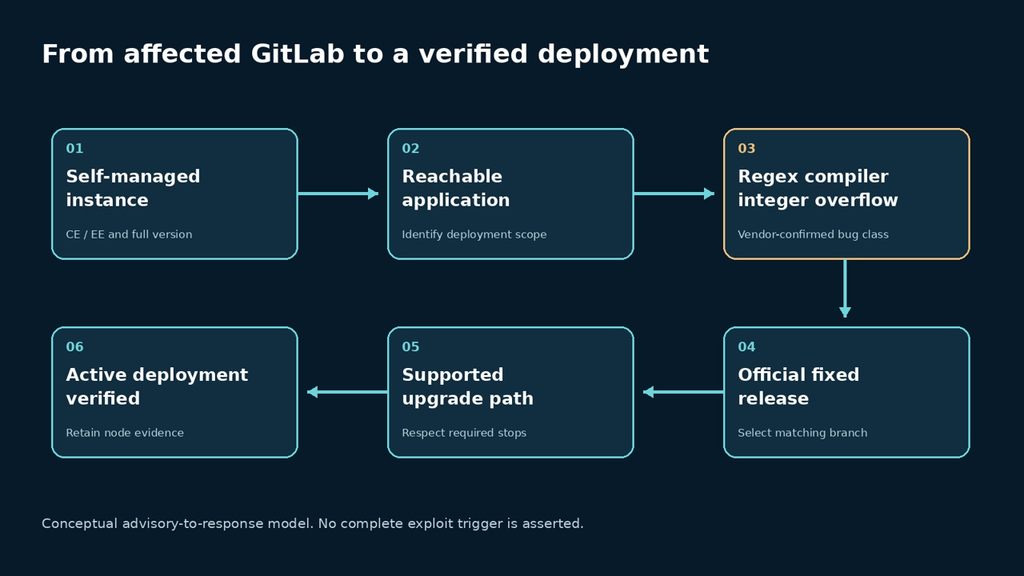
The practical exposure question is therefore deployment-specific: which instance is running an affected release, how is it reachable, and who owns its update? A login screen is not a sufficient reason to disregard a vulnerability described as unauthenticated. Similarly, an internal-only deployment may reduce who can reach it while still requiring the fixed software.
Inventory the instance before choosing an upgrade command
Record the edition, full GitLab version, installation method, node roles and recovery owner. Include a Geo secondary or externally operated component when it participates in your deployment. A screenshot from one web node is insufficient for an installation that can route requests elsewhere. Keep the intended node set explicit so a missed node cannot disappear inside an overall “updated” status.
GitLab’s maintenance-task documentation provides an environment-information task. The following example is for a Linux-package installation you administer. Use the documented equivalent for your installation method. Review the output locally and redact infrastructure details before sharing it; do not paste the complete record into public issue comments.
sudo gitlab-rake gitlab:env:infoUse that observation to select the vendor’s procedure for your installation. Do not turn a patch table into a universal apt, yum or Helm command. The distribution source, package edition, chart version and application version can be different identifiers. A change record should show how the selected artifact maps to the intended GitLab version.
| Deployment fact | Pourquoi c'est important | Evidence to retain |
|---|---|---|
| Full version and edition | Selects the security boundary and package family | Authenticated operational observation |
| Installation method | Determines the supported update procedure | Package, chart or maintained source-build record |
| Node roles and replicas | Defines the activation scope | Expected node inventory |
| Migration state | Can constrain the upgrade sequence | Preflight output and migration completion |
| Recovery plan | Makes failure handling executable | Backup identity and restoration procedure |
Use the official detection references without overstating them
GitLab links two detection documents in its CVE section: Onigmo native worker crash et Org mode render error burst. Obtain the current rule content from those references before adapting it to your log platform. The rule names alone do not supply a complete query or a definitive compromise verdict.
Preserve a time range that covers your affected deployment, not merely the period after a headline appeared. A useful triage record connects the event time, node, relevant application or worker log and the surrounding request context. Restrict access to raw logs that may contain private project paths, tokens or customer data. Copying them indiscriminately into an incident chat can create a second disclosure.
A crash can have several causes. Repeated errors can be meaningful without proving successful code execution. Conversely, an empty search can reflect missing retention, excluded sources or a query that does not match your log format. Use detection results to direct investigation and preserve uncertainty. They supplement the upgrade; they do not make it optional.
Plan the update around migrations and recovery
Les GitLab pre-upgrade guidance calls for reviewing compatibility, selecting required upgrade stops, completing background migrations and preparing a tested backup and rollback plan. It also distinguishes instance backups from secrets and configuration that must be preserved. Follow the requirements for your deployment, including each Geo site when applicable.
An urgent security release compresses the decision window, but it does not remove the dependency between application code and database state. Assign a person to approve the route and another to check the closeout evidence when the team size permits. For a solo operator, write the sequence down before starting so an interrupted maintenance session does not depend entirely on memory.
Keep recovery scope concrete. Record where the backup is, which version it belongs to and how configuration and secrets would be restored. Do not assume that a snapshot of one node captures an entire multi-node service. A rollback that restores availability may also restore vulnerable code; that security state must return to the incident decision immediately.
Verify health and activation after the change
For an owned Linux-package installation, GitLab documents configuration health checks before and after an upgrade. The command below is a maintenance example, not an exploitation test. Interpret its findings using the vendor’s health-check instructions and keep the output restricted to appropriate operators.
sudo gitlab-rake gitlab:checkThen verify the application paths your team depends on with dedicated test material: sign-in, visibility of the expected project, a harmless repository operation and a test CI job where applicable. For a read-only review, do not substitute a write test without authorization. Compare the observed result with the expected permission, node and version. A successful login alone does not exercise the repository or runner path.
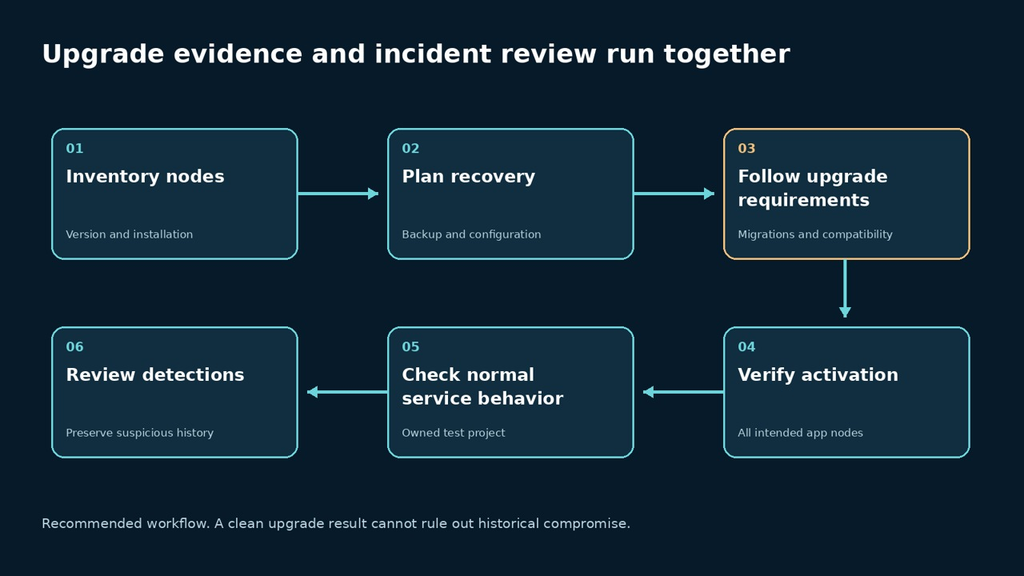
| Acceptance gate | Concrete result | Keep this limitation |
|---|---|---|
| Fixed software | Full version mapped to a listed fixed branch or verified later fix | An artifact on disk may not be active |
| Activation | Intended application nodes run the chosen deployment | One node does not establish the entire fleet |
| Service continuity | Approved repository and CI smoke tests pass | Normal behavior is not proof every exploit was rejected |
| Incident review | Suspicious events have an owner and preserved evidence | Patching cannot determine historical compromise |
Close unresolved nodes individually. If a secondary environment, forgotten test instance or fallback service still runs an affected version, name it and its owner. A concise incomplete record is better than a confident aggregate status that masks a known gap. This discipline also makes later verification possible without rerunning the whole maintenance exercise.
Where an application assessment belongs after the patch
For a team using GitLab to ship a SaaS application, the GitLab upgrade and a customer-application pentest are separate work items. After restoring the development platform, assess the application’s own role boundaries on authorized staging infrastructure. Penligent can be evaluated for that application workflow; this article does not establish a dedicated CVE-2026-110264 detector or claim that a broad scan proves the GitLab patch is active.
Request evidence that a developer can review: identity, expected access rule, request or action, observed result and a retest of the same condition. Keep source-platform incident investigation with the people responsible for its logs and credentials. A new application report cannot answer whether an earlier compromise of the development platform occurred.
CVE-2026-110264 questions
Which GitLab releases contain the fix?
The advisory lists 18.11.13, 19.0.10, 19.1.9, 19.2.9, 19.3.6, 19.4.3 and 19.5.1. Choose the supported route for your current installation and verify the running result.
Does a GitLab login screen block this vulnerability?
The vendor describes an unauthenticated attacker under certain conditions. Do not use the existence of a login page as evidence that the relevant path is protected.
Is this just regular-expression denial of service?
No. GitLab describes compiler integer overflow with potential arbitrary code execution. Do not substitute a regex timeout for the released fix.
Do the detection rules prove compromise?
They provide investigation leads. Validate the current rule content, log coverage and event context; treat a match or absence of matches according to its actual evidentiary limits.
Can an old GitLab instance jump directly to the fixed version?
The security boundary does not define the upgrade route. Consult required stops, migrations and compatibility requirements for the installed version.
The closeout should identify the fixed deployment that now serves your team, the application checks completed and any investigation still open. That gives the next operator something stronger than “the package upgrade finished.”


 French
  English
  German
  Spanish
  Portuguese
  Japanese
  Korean
  Hindi
Hindi  Arabic
  Turkish
  Hebrew