
A CVE tracker becomes useful when it can answer a specific question: which deployed systems still need work, who owns that work, and what evidence will let the team close it? A list of identifiers and severity scores cannot answer that on its own.
For a small development team, the practical starting point is a spreadsheet or CSV with one row per CVE and deployment. Add source references, an accountable owner, a review date and a closure test. Automate the collection later. The local Python example below catches three common bookkeeping failures before they turn into a misleading “all fixed” report.
Track the deployment, not just the CVE number
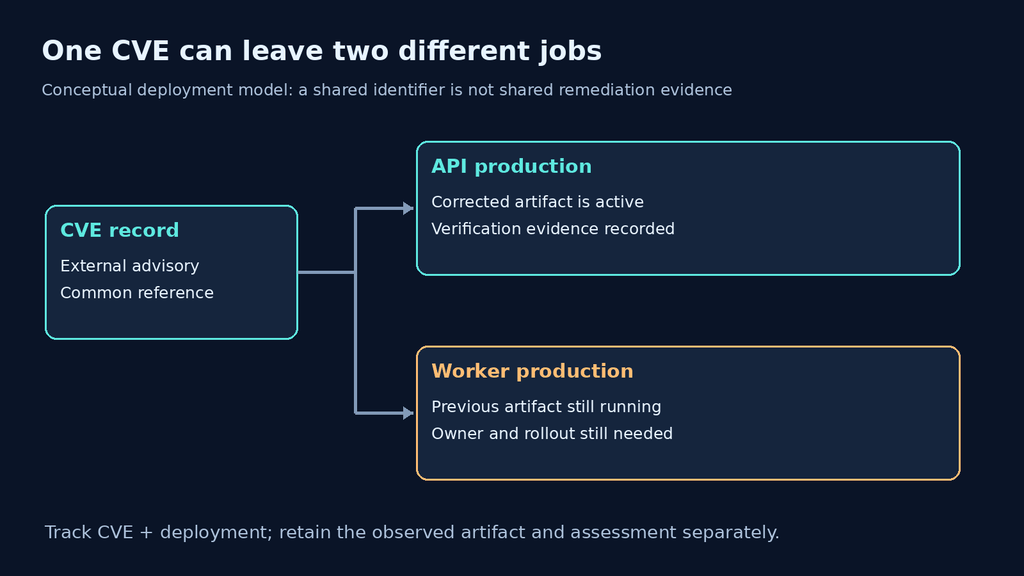
Consider an API service and a background worker built from the same vulnerable base image. The API receives a new image today; the worker keeps running yesterday’s build. A single row labeled “CVE fixed” erases that distinction. Two deployment rows preserve it. Even when both services share a repository, their rollout schedules and running artifacts can differ.
Use a stable deployment identifier rather than an ephemeral pod name as the work-item key. Keep the observed instance, image digest or package evidence in a separate field. In a larger system, a useful key might be CVE × service × environment × artifact. For the small example here, CVE × asset is enough. Do not combine production and staging merely because their package names match.
Les CVE Program’s official JSON record cache supplies vulnerability records. Those records provide a common reference; they are not an inventory of your deployments. Joining an external record to local evidence is a separate engineering task, and an uncertain join should remain visible as “untriaged.”
Give each information source a limited job
A tracker should preserve where a claim came from and when you last checked it. Otherwise an updated advisory can leave an old version range looking authoritative. Store the source URL beside the extracted decision and retain the snapshot or retrieval time used for that decision. The following is a suggested division of responsibilities, not a claim that every feed provides every field.
| Input | Useful question | What it cannot establish alone |
|---|---|---|
| CVE record | Which vulnerability are we discussing, and which references should we follow? | Whether a particular runtime contains the affected code. |
| Vendor advisory and release notes | Which prerequisites, fixes and upgrade constraints apply to this product? | Whether your rollout reached every serving instance. |
| CISA KEV | Is the vulnerability listed in CISA’s known-exploited catalog? | Whether this deployment was compromised, or whether an unlisted CVE is safe. |
| FIRST EPSS | How does the model estimate near-term exploitation likelihood? | The consequence of compromise for your application or proof of a specific attack. |
| Local inventory and deployment evidence | What artifact and configuration are actually present? | Whether an external vulnerability description was correctly interpreted. |
CISA publishes official KEV data in CSV and JSON through its repository. Its README describes the repository as a mirror updated after the main catalog changes. If you use the mirror, retain its retrieval time; a cached copy should not silently become a statement about the current catalog. This article does not present a newly downloaded KEV snapshot or identify today’s additions.
FIRST defines EPSS as the probability that a published CVE will be exploited in the wild in the next 30 days. The score is a probability between zero and one; the percentile is a ranking against other scores. Neither is your organization’s loss estimate. Use EPSS to help order investigation, then combine it with deployment evidence and the impact of the affected service.
Decide what must happen before a row can close
A patch being available, installed and active are three different observations. A release note can establish availability. A package inventory can establish installation on a host. Neither necessarily establishes that the application process now uses the corrected runtime. A restart, rollout or other product-specific activation step may still be required.
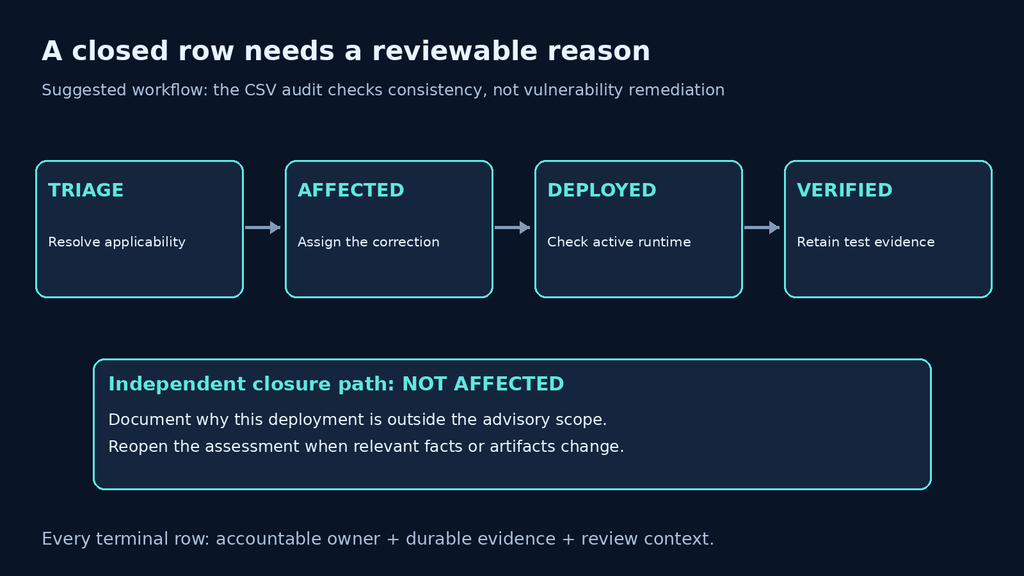
Write the closure condition before someone changes the deployment. For a runtime update, that could mean recording the corrected artifact, showing that the serving process uses it, and completing an approved functional check. For an exposure assessment, it could mean documenting why the advisory’s prerequisites do not apply. Keep the reasoning and evidence reference; a bare “not affected” label is difficult to review six weeks later.
| Suggested state | Required meaning | Next evidence to collect |
|---|---|---|
| untriaged | The match has not been resolved. | Exact artifact, configuration and applicable advisory. |
| affected | The team has a supported exposure assessment. | Owner, selected correction and deployment plan. |
| deployed | The intended correction has been rolled out. | Confirmation of active runtime and scoped checks. |
| vérifié | The agreed closure checks have passed. | Durable evidence reference and verification date. |
| not-affected | The team has documented why this deployment is outside scope. | Assessment evidence and the condition that would reopen review. |
This deliberately small state model is a workflow proposal. It is not a CVE Program or CISA status vocabulary. Real teams may need an additional risk-accepted state. If you add one, record the accountable approver, expiration date and reason; do not quietly treat acceptance as technical remediation. A compensating control also deserves its own evidence and review date.
Run a local audit before trusting the dashboard
The following self-contained Python script needs only the standard library. Save it as tracker_audit.py and run python3 tracker_audit.py. Its four CSV rows are synthetic, including the future-year CVE identifiers and evidence strings. It makes no network requests, checks no real vulnerability and changes no deployment.
The first fixture contains three intentional problems: a verified row without evidence, an affected deployment without an owner, and a duplicate CVE/asset pair. The same CVE on two different assets is allowed. That distinction is the point of the example: deduplicating solely by CVE would hide legitimate work.
import csv
import io

# Synthetic identifiers and evidence; no network requests or real CVE tests.
DATA = '''cve,asset,state,owner,evidence
CVE-2099-10001,api-prod,verified,api-team,
CVE-2099-10001,worker-prod,affected,,inventory:worker-image-a
CVE-2099-10001,api-prod,deployed,api-team,deploy:release-42
CVE-2099-10002,build-runner,not-affected,platform,review:package-absent
'''
ALLOWED = {'untriaged', 'affected', 'deployed', 'verified', 'not-affected'}
TERMINAL = {'verified', 'not-affected'}

def audit(text):
    seen, issues = set(), []
    for line, row in enumerate(csv.DictReader(io.StringIO(text)), 2):
        row = {k: (v or '').strip() for k, v in row.items()}
        key = (row['cve'], row['asset'])
        if not all(key):
            issues.append(f'line {line}: missing CVE or asset')
        if key in seen:
            issues.append(f'line {line}: duplicate CVE/asset pair')
        seen.add(key)
        if row['state'] not in ALLOWED:
            issues.append(f'line {line}: unknown state')
        if not row['owner']:
            issues.append(f'line {line}: missing owner')
        if row['state'] in TERMINAL and not row['evidence']:
            issues.append(f'line {line}: terminal state without evidence')
    return issues

if __name__ == '__main__':
    for issue in audit(DATA):
        print(issue)
    repaired = DATA.replace('api-team,\n', 'api-team,check:runtime-42\n')
    repaired = repaired.replace('affected,,', 'affected,worker-team,')
    repaired = repaired.replace('CVE-2099-10001,api-prod,deployed,api-team,deploy:release-42\n', '')
    print('repaired fixture issues:', len(audit(repaired)))
I ran this exact standard-library fixture locally on October 23, 2026. It produced the output below. The repaired fixture fills the missing fields and removes the duplicate row; it does not patch an application.
line 2: terminal state without evidence
line 3: missing owner
line 4: duplicate CVE/asset pair
repaired fixture issues: 0
The audit validates bookkeeping, not truth. An invented evidence string passes its presence check, and a wrong “not affected” conclusion can still look complete. The script also assumes the displayed CSV header and performs no version comparison, CVE format validation or advisory ingestion. Before adapting it to untrusted imports, validate the schema and decide how malformed or extra columns should be handled. Use a nonzero exit status if you want unresolved issues to block a CI job.
Prioritize the next investigation without inventing a risk score
Start with the service, not an arbitrary multiplication of scores. An exposed authentication service with credible evidence of applicability deserves a different response from an offline build tool whose package match is unresolved. Both may carry the same CVE. Record that context rather than hiding it inside a numeric formula nobody can explain.
For each unresolved item, ask whether the affected component is present, whether the required feature or configuration is enabled, how an attacker could reach it, and what the service can access. A KEV listing or elevated EPSS estimate can accelerate review. Lack of a listing should not close a row. When facts are missing, assign someone to collect them and set a review time; do not translate uncertainty into low risk.
Avoid automatic substring version matching as a closure rule. Distributor backports, bundled dependencies and application-specific builds can make an upstream-looking version misleading. Compare the applicable vendor or distributor advisory with the exact artifact in use. Preserve the basis of the decision so a changed image or newly clarified advisory can reopen it.
Keep evidence useful without exposing the application
A tracker often contains internal hostnames, package inventories and links to deployment logs. Keep it behind the same access controls as the engineering records it summarizes. Use evidence IDs or access-controlled links rather than copying credentials, customer records or complete request captures into a public issue. An exported dashboard should not become a map of reachable systems.
When a closure check requires authorized application testing, define the target and the expected observable result before running it. Penligent can be evaluated as an application-testing workflow alongside this process; the evaluation should check scope controls, reviewable evidence and reporting against the team’s own requirements. A product demonstration does not establish that it detects every tracked CVE or replaces vendor-specific remediation checks.
The video below is an introduction to AI-assisted pentesting. It is background for that separate validation step, not a demonstration of the CSV auditor or evidence that a particular CVE has been fixed.
Questions teams ask when setting up a CVE tracker
Can a spreadsheet be enough?
- Yes, when the team can maintain stable deployment rows, owners, review dates and evidence links. Migrate when concurrent edits, access controls or reconciliation become unreliable—not simply because a feed is large.
Should every CVE create an urgent ticket?
- Create work based on an assessed match and the evidence needed to resolve it. A low-confidence match can begin as triage rather than a confirmed remediation task.
Does a zero-issue audit mean the environment is secure?
- No. It means this narrow set of CSV consistency checks passed. It says nothing about undiscovered assets, advisory accuracy or whether the referenced evidence is valid.
When should a closed item reopen?
- When the deployment changes, the advisory changes in a way that affects the assessment, a compensating control expires, or later evidence contradicts closure. Retain the previous decision rather than overwriting its history.
What should the weekly report show?
- Separate unresolved assessments, confirmed affected deployments, deployed corrections awaiting verification and evidence-backed closures. Show age and owner so the report leads to a next action.
The useful outcome is a short list of deployment-specific decisions that another engineer can review. Start by auditing the rows you already have. Then fix the missing ownership, preserve the evidence and verify the corrected system that is actually serving users.

 French
  English
  German
  Spanish
  Portuguese
  Japanese
  Korean
  Hindi
Hindi  Arabic
  Turkish
  Hebrew