
CVE-2026-50661 is a Windows BitLocker security feature bypass fixed in Microsoft’s July 14, 2026 security updates. Microsoft describes the flaw as a protection mechanism failure that lets an unauthorized attacker bypass a security feature through a physical attack. The Microsoft-assigned CVSS 3.1 score is 6.1, with low attack complexity, no required privileges, no user interaction, high confidentiality impact, high integrity impact, and no direct availability impact. (NVD)
The physical-access requirement prevents CVE-2026-50661 from becoming the kind of remotely scalable vulnerability that can be sprayed across internet-facing systems. It does not make the vulnerability irrelevant. BitLocker exists in large part to protect information when a computer is lost, stolen, improperly decommissioned, removed from organizational control, or accessed while offline. A physical-access bypass therefore reaches directly into one of the security boundaries that full-volume encryption is supposed to defend. Microsoft’s own BitLocker documentation identifies lost and stolen devices as central threats addressed by the technology. (Microsoft Learn)
As of July 15, 2026, the official public description remains brief. Microsoft and the CVE record do not publicly document the vulnerable function, the exact recovery or boot workflow involved, the complete exploit chain, the forensic artifacts produced by exploitation, or the effect of every possible BitLocker protector configuration. Security teams should patch based on the confirmed impact while resisting the temptation to fill those gaps with unsupported technical claims.
That distinction is especially important because several security companies have suggested that CVE-2026-50661 may be connected to the publicly discussed GreatXML BitLocker bypass research. Microsoft has not publicly confirmed that association. It is reasonable to investigate recovery-environment exposure and GreatXML-related conditions as defensive context, but it is not accurate to present the GreatXML technique as the confirmed CVE-2026-50661 exploit chain. CrowdStrike explicitly characterized the connection as possible but unconfirmed. (CrowdStrike)
The immediate defensive action is straightforward: install the applicable July 2026 cumulative security update, verify that the device actually reached the fixed operating-system build, confirm that BitLocker protection is active rather than suspended, and prioritize devices whose loss would expose sensitive data or privileged access.
Verified Facts About CVE-2026-50661
The following table separates confirmed information from assumptions that should not be made.
| Champ d'application | Confirmed information |
|---|---|
| Vulnérabilité | Windows BitLocker security feature bypass |
| Faiblesse | CWE-693, Protection Mechanism Failure |
| Published | July 14, 2026 |
| CVSS 3.1 score | 6.1, Medium |
| Vecteur | CVSS:3.1/AV:P/AC:L/PR:N/UI:N/S:U/C:H/I:H/A:N |
| Vecteur d'attaque | Physical |
| Attack complexity | Faible |
| Privileges required | Aucun |
| User interaction | Aucun |
| Confidentiality impact | Haut |
| Integrity impact | Haut |
| Availability impact | Aucun |
| CISA SSVC exploitation status | None reported |
| CISA SSVC automatable status | Non |
| CISA SSVC technical impact | Total |
| Public disclosure | Oui |
| Confirmed exploitation in the wild | No public evidence as of July 15, 2026 |
| Microsoft exploitability assessment | Exploitation Less Likely |
| Complete technical root cause | Not publicly documented |
| Confirmed relationship to GreatXML | Not established publicly |
The CVE record identifies a physical attack, low complexity, no privileges, and no user interaction. CISA’s SSVC data records no known exploitation, considers the issue non-automatable, and assigns a total technical impact. Tenable reports that the issue was publicly disclosed before the patch and that Microsoft rated exploitation as less likely, while noting that public exploit material had been discussed and that physical access is required. CrowdStrike likewise reported no evidence of in-the-wild exploitation at publication time. (NVD)
“Exploitation none” in the SSVC record means that CISA was not identifying known exploitation at that time. It does not prove that no private exploit exists, that no lab has reproduced a bypass, or that an attempted physical compromise would generate an easily recognizable alert. Similarly, “automatable no” reflects the physical-access condition and limited scalability. It does not reduce the impact to the owner of a particular stolen or intercepted device.
The integrity impact also deserves attention. A BitLocker bypass is not necessarily limited to passive file reading. The assigned CVSS vector indicates that successful exploitation can affect both confidentiality and integrity. Depending on the actual mechanism and device state, integrity impact could matter because an attacker who reaches protected storage may be able to alter data, startup material, local configuration, or other content that will later be trusted by the legitimate user. The official public record does not yet provide enough detail to state exactly which modification paths are possible, so defenders should avoid describing a specific persistence method as part of CVE-2026-50661.
What Microsoft Has Not Publicly Disclosed
The official wording establishes the vulnerability class and outcome but leaves major implementation questions unanswered. Microsoft has not publicly identified the affected executable, driver, service, parser, recovery component, configuration file, or boot-stage function. It has not published a technical diagram or a step-by-step attack sequence. The CVE entry also does not say whether an attacker must remove the storage device, boot the original device into a recovery state, alter a recovery partition, prepare the system before shutdown, or satisfy another device-state prerequisite.
The public record does not answer several configuration-specific questions:
- Whether TPM-only protection is required for exploitation
- Whether TPM plus PIN blocks the exact CVE-2026-50661 path
- Whether a startup key changes exploitability
- Whether Windows Recovery Environment must be enabled
- Whether Defender Offline Scan must previously have been initiated
- Whether Secure Boot must be disabled or bypassed
- Whether the target must have a particular recovery configuration
- Whether the technique works against a clean shutdown, hibernation, or both
- Whether exploitation leaves stable events or disk artifacts
- Whether the operating-system volume must already have been unlocked during an earlier boot
These are not minor details. They determine whether a device is merely running a vulnerable build or is practically exposed under a specific attack model. Until Microsoft or a credible independent technical analysis maps those conditions to the CVE, vulnerability management should use operating-system version as the authoritative patch test and treat protector type, WinRE state, device role, and physical exposure as prioritization signals rather than proof of exploitability.
The absence of a detailed public exploit narrative also means that internet scanning cannot validate CVE-2026-50661. A remote scanner may identify the operating-system version through authenticated inventory, management telemetry, or endpoint agents, but it cannot prove that a physical bypass succeeds. Any tool claiming to confirm exploitation solely from an unauthenticated network probe should be treated skeptically.
Why a Physical BitLocker Bypass Matters
Security teams often rank physical vulnerabilities below remote-code-execution and privilege-escalation flaws. That ordering is reasonable when deciding which issue can produce the fastest organization-wide compromise. It becomes misleading when the affected security feature is disk encryption.
BitLocker is intended to make protected data inaccessible when an unauthorized person controls the storage media or the powered-off device. Microsoft describes the feature as protection against data theft or exposure from lost, stolen, or improperly decommissioned systems. It also notes that attackers may otherwise move a drive into another computer or use offline tools against it. (Microsoft Learn)
A physical-access prerequisite therefore describes the environment in which BitLocker is expected to provide value. The question is not only whether an attacker can remotely compromise thousands of systems. It is whether the encryption boundary continues to protect a laptop containing source code, credentials, regulated records, customer data, signing material, administrative scripts, browser sessions, cached tokens, or confidential communications after the laptop leaves the owner’s control.
Consider several realistic scenarios.
A Stolen Privileged Laptop
An engineer with production access loses a laptop during travel. The device is powered off and protected with BitLocker. The organization may initially classify the incident as low impact because full-volume encryption is enabled. If the device runs an affected build and an unauthorized person can bypass the protection mechanism, the assumption that the stored data remains inaccessible becomes weaker.
The potential exposure is not limited to documents. A developer workstation may contain source repositories, local configuration files, SSH material, cloud command history, browser data, cached packages, test credentials, internal hostnames, deployment scripts, VPN configuration, and architectural information. Some secrets may be separately protected, but disk encryption often forms the outer boundary protecting all of them at rest.
Temporary Access During Repair
A laptop is sent to an external repair provider. The organization leaves the encrypted drive installed because the provider is not expected to access its contents. A malicious technician, a compromised subcontractor, or a person with access during shipment may have sufficient time to manipulate the device.
This is a lower-frequency scenario than phishing, but the attacker may have uninterrupted physical access and the ability to reboot the system repeatedly. The defender may also have limited telemetry while the device is outside normal network and EDR coverage.
A Device Left in a Hotel or Conference Room
An attacker may have only minutes rather than permanent possession. Whether that is sufficient for CVE-2026-50661 is not established in the public advisory. The scenario nevertheless deserves consideration for executives, researchers, incident responders, government personnel, and administrators who travel with high-value devices.
The right response is not to claim that every brief unattended period results in compromise. The right response is to recognize that physical custody is part of the threat model and to combine patching with preboot authentication, travel procedures, tamper awareness, and credential-response playbooks.
Unattended Branch and Edge Systems
Windows Server appears in the affected-product record, including Server Core installations. Servers are usually protected by stronger physical controls than laptops, but that assumption is not universal. Branch-office servers, industrial workstations, retail systems, laboratory equipment, edge nodes, and small-office infrastructure may be accessible to contractors or local personnel without equivalent security oversight. The NVD change record lists supported Windows Server 2016, 2019, 2022, and 2025 branches among affected products below their fixed builds. (NVD)
Decommissioning and Asset Disposal
BitLocker is frequently treated as a compensating control during device disposal. If a drive remains encrypted, teams may assume that erasure failures or incomplete physical destruction present limited risk. An unpatched bypass weakens that assumption. Organizations should continue to use approved sanitization or destruction processes rather than treating encryption alone as a substitute for secure disposal.
Understanding the CVSS 6.1 Score
The score is internally consistent with a vulnerability that requires physical access and cannot directly affect availability. It should not be interpreted as a universal measure of business impact.
The vector is:
CVSS:3.1/AV:P/AC:L/PR:N/UI:N/S:U/C:H/I:H/A:N
Each component has operational meaning:
| Métrique | Valeur | Defensive meaning |
|---|---|---|
| Vecteur d'attaque | Physical | The attacker must physically interact with the target device or storage |
| Attack Complexity | Faible | Microsoft does not identify a special race, unpredictable condition, or unusually complex prerequisite in the base vector |
| Privilèges requis | Aucun | The attacker does not need an authorized Windows account |
| Interaction avec l'utilisateur | Aucun | The legitimate user does not need to open a file, approve a prompt, or perform another action |
| Champ d'application | Unchanged | The impact remains within the vulnerable security authority represented in the scoring |
| Confidentialité | Haut | Successful exploitation can seriously compromise protected information |
| Intégrité | Haut | Successful exploitation can seriously affect protected data or state |
| Availability | Aucun | The assigned impact does not include direct availability loss |
Physical access pulls the numerical score down because it limits reach and scale. No privileges, no user interaction, and low complexity pull the practical concern in the other direction. The high confidentiality and integrity metrics are the most important values for asset owners deciding whether a vulnerable laptop containing sensitive data can still be treated as securely encrypted after loss.
CISA’s SSVC entry captures the same tension in a different way: exploitation was recorded as none, automation as no, but technical impact as total. (NVD)
A useful prioritization formula is therefore:
Operational priority =
patch exposure
× probability of physical loss or access
× data sensitivity
× user privilege
× weakness of preboot controls
× recovery-key exposure
This is not a formal scoring standard. It is a practical way to prevent a medium base score from hiding severe asset-specific consequences.
How BitLocker Protects a Windows Volume
Understanding CVE-2026-50661 requires distinguishing disk encryption from ordinary Windows authentication.
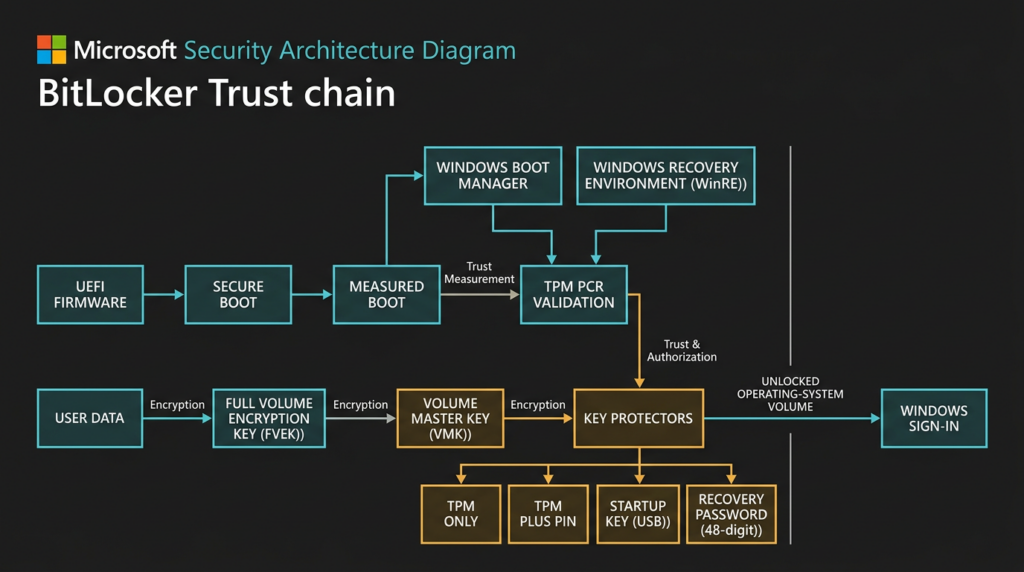
BitLocker encrypts raw volume data with a Full Volume Encryption Key. That key is protected by a Volume Master Key, and the Volume Master Key is protected by one or more key protectors. Microsoft documents this key hierarchy and notes that the selected authentication and recovery methods determine how the Volume Master Key is protected. (Microsoft Learn)
A simplified model looks like this:
User data
   encrypted by
Full Volume Encryption Key
   encrypted by
Volume Master Key
   protected by
TPM, PIN, startup key, recovery password, or another protector
The Windows account password is not automatically the same thing as the BitLocker preboot secret. On a TPM-only system, a user may reach the Windows sign-in screen without entering a BitLocker PIN because the TPM releases the necessary key material when expected platform measurements are satisfied. The user then authenticates to Windows separately.
This distinction explains why an attacker who bypasses a disk-encryption boundary may not need the victim’s Windows password to access files offline. It also explains why strengthening Windows password policy does not replace BitLocker protector design.
TPM Sealing and Platform Measurements
A Trusted Platform Module can seal a key to measurements representing an expected platform state. Microsoft explains that a sealed key can be unwrapped only when the relevant hardware or software measurements match the state to which it was bound. BitLocker uses that capability so that encryption keys are released only under trusted boot conditions. (Microsoft Learn)
Platform Configuration Registers hold measurements associated with firmware, boot components, and other platform state. Secure Boot and measured boot help establish whether the startup path has changed. Microsoft documents that BitLocker commonly uses PCR 7 with Secure Boot integrity measurements and that untrusted firmware or bootloaders should not be able to start and acquire the BitLocker key through the normal trusted path. (Microsoft Learn)
This design is stronger than simply storing a decryption password somewhere on the disk. It binds release of protected key material to the device and its expected startup state.
TPM-Only Protection
TPM-only unlock provides a transparent user experience. When platform validation succeeds, the machine reaches Windows sign-in without asking the user for a separate BitLocker factor. Microsoft describes TPM-only as more convenient but less secure than configurations requiring an additional authentication factor. (Microsoft Learn)
TPM-only is common because it reduces support costs and avoids preboot PIN problems. Its security depends heavily on the integrity of the measured startup and recovery paths. A flaw that causes an unsafe environment to be treated as trusted can therefore be more consequential for TPM-only devices.
That statement is architectural reasoning, not confirmation that CVE-2026-50661 specifically requires TPM-only protection. Microsoft has not publicly documented the protector prerequisites for this CVE.
TPM Plus PIN
With TPM plus PIN, the TPM’s platform checks are combined with a user-supplied preboot factor. Microsoft states that BitLocker loads encryption keys into memory only after preboot authentication completes, and that TPM plus PIN adds a factor that is not available merely from possession of the device. (Microsoft Learn)
TPM plus PIN generally improves resistance to several physical attack classes. It does not justify delaying the CVE-2026-50661 update. Microsoft has not publicly stated in the current CVE record that TPM plus PIN universally blocks this particular vulnerability.
There is a relevant but narrower precedent: for CVE-2026-45585, known as YellowKey, Microsoft’s published mitigation FAQ stated that the vulnerability was not exploitable when TPM plus PIN was used. That conclusion belongs to YellowKey and should not automatically be copied to CVE-2026-50661 without confirmation. (NVD)
Startup Keys and Combined Protectors
BitLocker can use a startup key stored on removable media, either with or without a TPM depending on policy and configuration. A combined TPM, PIN, and startup-key design increases the number of conditions an attacker must satisfy, but it also creates operational burdens. Users must retain the removable key, organizations must handle loss and replacement, and recovery workflows become more important.
The right protector depends on the asset’s threat model. A general office desktop in a controlled building may justify TPM-only. An administrator laptop carrying production credentials through airports may justify TPM plus PIN. A specialized system handling exceptionally sensitive data may require stronger combinations and stricter physical controls.
Recovery Passwords
A BitLocker recovery password is an alternate route to the protected volume. It exists so that legitimate administrators or users can regain access after TPM measurement changes, hardware replacement, firmware updates, policy changes, or other recovery conditions.
Because a recovery password can unlock the drive, it should be governed like a high-value credential. Microsoft’s recovery documentation emphasizes controlled storage and access to recovery information. (Microsoft Learn)
A technically strong disk-encryption configuration can still be undermined by weak recovery-key handling. Examples include saving the recovery key on the same laptop, allowing broad help-desk access, failing to audit key retrieval, sending keys through unprotected communications, or retaining stale copies after a device changes owners.
BitLocker Suspension
Suspension is frequently misunderstood. Suspending BitLocker does not necessarily decrypt the volume. Instead, an unsecured clear key can be stored so that the Volume Master Key is available without enforcing the normal protectors. Microsoft’s BitLocker FAQ describes this clear-key behavior, and the manage-bde documentation warns that disabling protectors makes the encryption key available unsecured on the drive. (Microsoft Learn)
That means the following two systems are not equivalent:
System A
Conversion Status: Fully Encrypted
Protection Status: Protection On
System B
Conversion Status: Fully Encrypted
Protection Status: Protection Off
Both volumes may report that the data is encrypted, but System B may not be enforcing the intended protection. Any CVE-2026-50661 validation process that checks only the encryption percentage is incomplete.
Windows Recovery Environment as a Security Boundary
Windows Recovery Environment provides repair, reset, troubleshooting, and recovery capabilities outside the ordinary Windows session. That makes it operationally valuable and security-sensitive.
Microsoft documents that WinRE can recover access to a BitLocker-protected drive. On systems supporting the relevant TPM and PCR 7 measurements, the TPM can validate that WinRE is trusted and unmodified. Under those conditions, an automatically launched recovery environment may access protected volumes as part of legitimate repair. If WinRE has been modified or manually started from external repair media, the drive should remain locked until a recovery key is supplied. (Microsoft Learn)
This creates a fundamental trust-boundary problem:
Recovery must be powerful enough to repair Windows
but constrained enough not to become an alternate unauthorized boot path
A recovery environment may need to inspect operating-system files, diagnose startup failures, repair boot configuration, remove problematic changes, or support reset operations. Those functions become dangerous if attacker-controlled state can be misclassified as trusted.
The cryptography can remain mathematically sound while the protection still fails. An attacker does not have to break AES or derive the Full Volume Encryption Key through cryptanalysis if a trusted workflow releases access under unsafe conditions. This is why “BitLocker bypass” should not be described as “BitLocker encryption cracked.” The more accurate concern is that an authentication, boot, recovery, or trust mechanism can expose data that remains encrypted at rest.
Automatic and Manual Recovery Are Not Identical
Microsoft distinguishes automatically launched startup repair from a recovery environment started manually through external media. An automatically invoked, trusted WinRE environment may receive access under the expected measured-boot conditions. A manually started repair environment should require the recovery key. (Microsoft Learn)
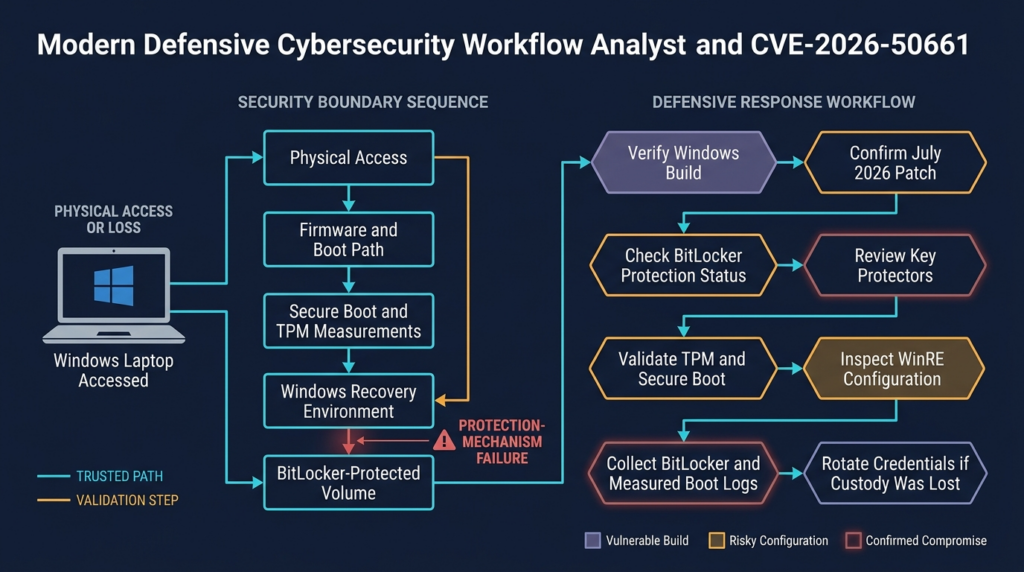
This distinction matters to defenders investigating a possible physical compromise. The questions should include:
- Was WinRE enabled?
- Was it registered to the expected recovery image?
- Did the device enter automatic recovery?
- Was external media used?
- Did the boot order change?
- Did Secure Boot remain enabled?
- Were PCR measurements altered?
- Was the recovery partition modified?
- Did BitLocker enter recovery?
- Was a recovery password retrieved?
- Was BitLocker protection suspended before the incident?
None of those conditions alone proves exploitation. Together, they can help reconstruct whether the device crossed an unexpected recovery boundary.
Recovery Functionality Cannot Be Treated as a Separate System
Organizations sometimes harden normal Windows while giving little attention to recovery partitions, boot configuration, offline scanning, deployment automation, or unattended setup behavior. That separation is artificial from a security perspective. Every environment capable of obtaining privileged access to the operating-system volume belongs to the disk-encryption threat model.
Recovery images should therefore be patched, registered correctly, protected from unauthorized modification, and included in integrity monitoring and incident-response procedures. The specific update mechanics vary by Windows version and servicing model, so administrators should rely on Microsoft’s update guidance rather than manually replacing recovery components without a supported procedure.
Is CVE-2026-50661 the GreatXML Vulnerability
The responsible answer is that the relationship has not been publicly confirmed by Microsoft as of July 15, 2026.
CrowdStrike reported that CVE-2026-50661 may be the patch for GreatXML but explicitly labeled the connection unconfirmed. Other public reporting has associated GreatXML with a BitLocker bypass claim involving Windows Recovery Environment, Microsoft Defender Offline Scan state, and unattended setup behavior. (CrowdStrike)
That context makes GreatXML relevant to defensive analysis. It does not establish identity between the two issues.
Several possibilities remain:
- CVE-2026-50661 could fully correspond to the GreatXML technique.
- The CVE could address one component or precondition used by GreatXML.
- The July update could harden a broader recovery boundary that also affects GreatXML.
- The similarity could be coincidental, with CVE-2026-50661 representing a different physical BitLocker bypass.
Without vendor confirmation or a patch-diff analysis tied reliably to the advisory, choosing one of those explanations as fact would be premature.
Security teams that need more context on the public recovery-boundary discussion can review Penligent’s analysis of GreatXML and the BitLocker recovery boundary. That material is useful as technical context, but official CVE scope, affected builds, and remediation should still be taken from Microsoft’s advisory and supported update records.
Defenders should not download and run public BitLocker bypass code on a production laptop to “verify” exposure. A successful experiment may expose real encrypted data, modify recovery state, change boot behavior, damage forensic evidence, or create a new security problem. A failed experiment also does not prove safety because the lab may not reproduce the required hardware, build, protector, recovery state, or timing.
Affected Windows Versions and Fixed Builds
Microsoft’s CVE data lists affected Windows client and server branches and defines each fixed boundary as a minimum operating-system build. Grouped for operational use, the affected versions are shown below. (NVD)
| Produit | Vulnerable builds | July 2026 update | Fixed build |
|---|---|---|---|
| Windows 10 version 1607 | Below 14393.9339 | KB5099535 | 14393.9339 |
| Windows Server 2016 | Below 14393.9339 | KB5099535 | 14393.9339 |
| Windows Server 2016 Core | Below 14393.9339 | KB5099535 | 14393.9339 |
| Windows 10 version 1809 | Below 17763.9020 | KB5099538 | 17763.9020 |
| Windows Server 2019 | Below 17763.9020 | KB5099538 | 17763.9020 |
| Windows Server 2019 Core | Below 17763.9020 | KB5099538 | 17763.9020 |
| Windows 10 version 21H2 | Below 19044.7548 | KB5099539 | 19044.7548 |
| Windows 10 version 22H2 | Below 19045.7548 | KB5099539 | 19045.7548 |
| Windows 11 version 24H2 | Below 26100.8875 | KB5101650 | 26100.8875 |
| Windows 11 version 25H2 | Below 26200.8875 | KB5101650 | 26200.8875 |
| Windows 11 version 26H1 | Below 28000.2525 | KB5101649 | 28000.2525 |
| Serveur Windows 2022 | Below 20348.5386 | KB5099540 | 20348.5386 |
| Serveur Windows 2025 | Below 26100.33158 | KB5099536 | 26100.33158 |
| Windows Server 2025 Core | Below 26100.33158 | KB5099536 | 26100.33158 |
Microsoft’s support pages confirm the July cumulative-update build numbers for Windows 11 24H2 and 25H2, Windows 11 26H1, Windows 10 21H2 and 22H2, Windows 10 1607 and Server 2016, Windows 10 1809 and Server 2019, Windows Server 2022, and Windows Server 2025. (Microsoft Support)
Architectures listed in the CVE record include x64, Arm64, and 32-bit systems where applicable. The precise architecture coverage differs by Windows branch. Administrators should compare each device against Microsoft’s product-specific record instead of assuming that an uncommon architecture is unaffected. (NVD)
Windows 10 Servicing Matters
The KB5099539 support page identifies the July update for Windows 10 21H2 and 22H2 as applying through the Windows 10 Extended Security Updates path or supported long-term servicing editions as applicable. A device can be technically capable of running a fixed build but fail to receive it because it is outside support, not enrolled correctly, or missing a licensing prerequisite. (Microsoft Support)
Vulnerability management should therefore separate three states:
Patched and verified
Eligible but not yet patched
Not eligible under the current servicing arrangement
The third state requires an operating-system upgrade, enrollment correction, replacement plan, or another supported remediation decision. “No updates available” does not necessarily mean “not vulnerable.”
Build Verification Is Stronger Than Update History Alone
An update-management console may report that a KB was approved or installed while the device still requires a restart, rolled back the update, failed during servicing, or has stale inventory. The fixed-build boundary is the clearest local verification point.
For example, a Windows 11 24H2 device should report build 26100.8875 or later. A Windows Server 2022 system should report 20348.5386 or later. A later cumulative update should also contain the fix because Windows cumulative servicing carries prior security corrections forward, unless Microsoft publishes an exceptional regression notice.
Prioritizing CVE-2026-50661 Across a Fleet
Patching every supported affected system is the end state. Prioritization determines which systems should move first when deployment must be staged.
Priority Zero
Treat an unpatched device as urgent when several of the following conditions are present:
- It is a laptop or tablet that frequently leaves controlled facilities.
- It belongs to an administrator, executive, developer, incident responder, finance employee, legal employee, or researcher.
- It stores regulated, confidential, export-controlled, or customer information.
- It carries reusable credentials or material that could lead to other systems.
- It uses TPM-only protection without a separate preboot factor.
- It has recently been lost, stolen, shipped, repaired, inspected, or outside a reliable chain of custody.
- BitLocker protection is suspended.
- Secure Boot is disabled or unhealthy.
- WinRE configuration is unexpected.
- Recovery-key access is broadly available or poorly audited.
- The organization cannot remotely wipe or rapidly revoke the device’s credentials.
A stolen unpatched laptop should not wait for a normal monthly deployment ring simply because the CVSS score is medium. The device is already in the exact physical-access state required by the vulnerability.
Priority One
General employee laptops should form the next major deployment group. Even when users have no administrative role, their devices may contain email, browser sessions, internal documents, cached collaboration data, customer communications, endpoint certificates, VPN configuration, or information useful for social engineering.
The aggregate probability of loss across a large mobile fleet also matters. A low-probability event per device becomes routine across tens of thousands of devices.
Priority Two
Physically controlled desktops, kiosks, workstations, and servers remain in scope. They may be staged after mobile high-value systems when physical access is genuinely restricted, the data is less sensitive, and BitLocker protection is active. Branch systems and contractor-accessible environments should not automatically be placed in this lower group.
Configuration Is a Multiplier, Not a Substitute
A TPM plus PIN configuration may reduce exposure to some physical attacks, but it should be used as a defense-in-depth factor rather than an exemption from patching. Conversely, TPM-only protection should increase priority but should not be described as proof that CVE-2026-50661 is exploitable on that device.
How to Check Local Exposure
A responsible validation process answers four separate questions:
- Is the operating-system branch listed as affected?
- Is the installed build below the fixed boundary?
- Is BitLocker actually protecting the operating-system volume?
- Which configuration and physical-risk factors change priority?
No single command answers all four.
Check the Exact Windows Build
The following PowerShell reads the Windows build and update revision directly from the registry:
$cv = Get-ItemProperty `
    'HKLM:\SOFTWARE\Microsoft\Windows NT\CurrentVersion'

$build = [int]$cv.CurrentBuildNumber
$ubr = [int]$cv.UBR

[pscustomobject]@{
    ProductName    = $cv.ProductName
    DisplayVersion = $cv.DisplayVersion
    EditionID      = $cv.EditionID
    Build          = "$build.$ubr"
}
Example output might look like:
ProductName    : Windows 11 Enterprise
DisplayVersion : 24H2
EditionID      : Enterprise
Build          : 26100.8875
For CVE-2026-50661, Windows 11 24H2 build 26100.8875 meets the initial fixed boundary. A result of 26100.8700 would remain below that boundary.
Do not compare only the major build number. Both systems in that example are on build family 26100, but the UBR differentiates the vulnerable and fixed servicing levels.
Check BitLocker Status
Microsoft documents that manage-bde -status reports conversion status, encryption percentage, encryption method, protection status, lock status, and key protectors. (Microsoft Learn)
Run:
manage-bde -status C:
The important fields include:
Conversion Status
Percentage Encrypted
Protection Status
Lock Status
Key Protectors
A healthy system volume normally shows full encryption and protection on. Investigate any of these states:
Protection Off
Encryption in progress
Decryption in progress
Unknown status
No key protectors found
A fully encrypted volume with protection off is not equivalent to a normally protected volume.
Enumerate the Key Protectors
Use:
manage-bde -protectors -get C:
Microsoft documents -get as the supported command for displaying the protection methods and identifiers configured on the drive. (Microsoft Learn)
Typical protector types include:
TPM
TPM And PIN
External Key
Numerical Password
Certificate
Do not publish protector identifiers or recovery passwords in ordinary vulnerability reports. Even when an identifier is not itself the secret, unnecessarily distributing recovery-related information creates avoidable risk.
Check the TPM
Run:
Get-Tpm | Select-Object `
    TpmPresent,
    TpmReady,
    TpmEnabled,
    TpmActivated,
    LockedOut,
    LockoutCount,
    LockoutMax
A missing or unhealthy TPM changes the security architecture. It does not automatically mean that the volume is unencrypted, because BitLocker can use other protectors. It does mean that TPM-based sealing and measured-boot assumptions may not apply as expected.
Check Secure Boot
Run in an elevated PowerShell session:
try {
    $secureBoot = Confirm-SecureBootUEFI
    "Secure Boot enabled: $secureBoot"
}
catch {
    "Secure Boot state could not be confirmed: $($_.Exception.Message)"
}
True indicates that Secure Boot is enabled on a supported UEFI system. False indicates that it is disabled. An exception may mean that the platform does not support the cmdlet, PowerShell is not elevated, or the system is not using the expected UEFI environment.
Secure Boot is part of the pre-Windows trust chain. Microsoft states that it blocks untrusted firmware and bootloaders and that BitLocker commonly uses PCR 7 to protect the startup path. (Microsoft Learn)
Check Windows Recovery Environment
Run:
reagentc /info
Record:
Windows RE status
Windows RE location
Boot Configuration Data identifier
Recovery image location
An enabled WinRE environment is not a vulnerability by itself. It is a standard Windows recovery capability. An unexpected location, registration failure, or unexplained configuration change should be investigated.
Check for Measured Boot Evidence
Microsoft documents that measured-boot logs are stored under:
C:\Windows\Logs\MeasuredBoot
The logs record PCR-related information that can help investigators understand boot measurement changes and why a system entered BitLocker recovery. Microsoft also documents TBSLogGenerator and PCPTool as tools for decoding those logs. (Microsoft Learn)
A missing log does not prove compromise. Retention, operating-system configuration, hardware support, cleanup, and collection timing can all affect availability.
Safe Defensive PoC for Local Exposure Classification
The following proof of concept is deliberately non-exploitative. It does not attempt to bypass BitLocker, enter WinRE, start Defender Offline Scan, modify the boot configuration, read recovery passwords, unlock a volume, suspend protection, write to the recovery partition, or interact with a remote system.
Its purpose is to demonstrate the defensive validation logic:
affected operating-system branch
plus build below the fixed boundary
plus BitLocker and platform configuration
plus physical-risk context
equals remediation priority
Run it only on a Windows device that you own or are authorized to administer. Use an elevated PowerShell session so that local status commands can return complete results.
# CVE-2026-50661 safe local exposure classifier
# Read-only defensive collection. No exploit actions are performed.

Set-StrictMode -Version Latest
$ErrorActionPreference = 'Stop'

function Get-LocalWindowsBuild {
    $cv = Get-ItemProperty `
        'HKLM:\SOFTWARE\Microsoft\Windows NT\CurrentVersion'

    [pscustomobject]@{
        ProductName    = [string]$cv.ProductName
        DisplayVersion = [string]$cv.DisplayVersion
        EditionID      = [string]$cv.EditionID
        BuildNumber    = [int]$cv.CurrentBuildNumber
        UBR            = [int]$cv.UBR
        FullBuild      = '{0}.{1}' -f `
            [int]$cv.CurrentBuildNumber,
            [int]$cv.UBR
    }
}

function Get-FixedBoundary {
    param(
        [Parameter(Mandatory)]
        [int]$BuildNumber
    )

    $boundaries = @{
        14393 = 9339
        17763 = 9020
        19044 = 7548
        19045 = 7548
        20348 = 5386
        26100 = 8875
        26200 = 8875
        28000 = 2525
    }

    if ($boundaries.ContainsKey($BuildNumber)) {
        return [int]$boundaries[$BuildNumber]
    }

    return $null
}

function Invoke-ReadOnlyCommand {
    param(
        [Parameter(Mandatory)]
        [string]$FilePath,

        [Parameter()]
        [string[]]$ArgumentList = @()
    )

    try {
        $output = & $FilePath @ArgumentList 2>&1
        return ($output | Out-String).Trim()
    }
    catch {
        return "Collection failed: $($_.Exception.Message)"
    }
}

$windows = Get-LocalWindowsBuild
$fixedUbr = Get-FixedBoundary `
    -BuildNumber $windows.BuildNumber

if ($null -eq $fixedUbr) {
    $patchState = 'Branch not mapped by this demonstration'
}
elseif ($windows.UBR -ge $fixedUbr) {
    $patchState = 'At or above initial fixed build'
}
else {
    $patchState = 'Below initial fixed build'
}

try {
    $tpm = Get-Tpm | Select-Object `
        TpmPresent,
        TpmReady,
        TpmEnabled,
        TpmActivated,
        LockedOut,
        LockoutCount,
        LockoutMax
}
catch {
    $tpm = [pscustomobject]@{
        CollectionError = $_.Exception.Message
    }
}

try {
    $secureBoot = Confirm-SecureBootUEFI
}
catch {
    $secureBoot = "Unknown: $($_.Exception.Message)"
}

$bitLockerStatus = Invoke-ReadOnlyCommand `
    -FilePath 'manage-bde.exe' `
    -ArgumentList @('-status', 'C:')

$bitLockerProtectors = Invoke-ReadOnlyCommand `
    -FilePath 'manage-bde.exe' `
    -ArgumentList @('-protectors', '-get', 'C:')

$winReStatus = Invoke-ReadOnlyCommand `
    -FilePath 'reagentc.exe' `
    -ArgumentList @('/info')

$result = [pscustomobject]@{
    TimestampUtc       = (Get-Date).ToUniversalTime()
    ProductName        = $windows.ProductName
    DisplayVersion     = $windows.DisplayVersion
    EditionID          = $windows.EditionID
    InstalledBuild     = $windows.FullBuild
    FixedUbrForBranch  = $fixedUbr
    PatchAssessment    = $patchState
    SecureBoot         = $secureBoot
    TpmState           = $tpm
    BitLockerStatus    = $bitLockerStatus
    BitLockerProtectors = $bitLockerProtectors
    WindowsRE          = $winReStatus
}

$result | Format-List
Why This PoC Is Safe
The script makes no change to the target. It uses documented local inventory and status interfaces. It cannot demonstrate that the underlying bypass works because doing so would require attack-specific behavior that Microsoft has not publicly documented in the CVE record and that could expose or modify protected data.
The script answers a narrower and defensible question:
Does this device appear to be below the initial fixed build,
and what controls should influence remediation priority?
It does not answer:
Can this exact device be successfully exploited?
That separation prevents an inventory finding from being misrepresented as a proven compromise.
Interpreting the Results
Use the following decision table.
| Patch assessment | Protection state | Protector | Recommended interpretation |
|---|---|---|---|
| Below fixed build | Protection on | TPM only | Vulnerable build with a common transparent-unlock design; patch promptly and prioritize mobile or sensitive assets |
| Below fixed build | Protection on | TPM plus PIN | Vulnerable build with stronger preboot defense; still patch because the current CVE does not document a universal configuration exemption |
| Below fixed build | Protection off | Any | Urgent configuration failure; resume protection after confirming the reason it was suspended |
| At or above fixed build | Protection on | Any supported design | Initial CVE remediation appears present; continue normal hardening and verify centralized inventory |
| At or above fixed build | Protection off | Any | CVE patch is present, but data-at-rest protection may still be ineffective |
| Branch not mapped | Unknown | Unknown | Check Microsoft’s product-specific advisory and support lifecycle manually |
| Any build | Unknown physical custody | Any | Treat custody loss as an incident and assess possible data and credential exposure |
The fixed-boundary mapping is intentionally limited to the affected branches in the initial Microsoft record. It should be updated when Microsoft revises the advisory or future Windows releases require new mappings.
Detection and Threat Hunting
CVE-2026-50661 is difficult to detect through ordinary network monitoring. The attacker must physically interact with the device, and the important activity may occur before normal Windows, EDR, VPN, and centralized logging services start.
Detection should therefore combine platform evidence, BitLocker events, recovery configuration, asset-custody information, credential telemetry, and forensic inspection.
BitLocker Event Logs
Microsoft recommends reviewing these logs when troubleshooting BitLocker:
Microsoft-Windows-BitLocker-API/Management
Microsoft-Windows-BitLocker-API/Operational
Microsoft-Windows-BitLocker-API/Tracing
Microsoft-Windows-BitLocker-DrivePreparationTool/Admin
Microsoft-Windows-BitLocker-DrivePreparationTool/Operational
Microsoft also recommends reviewing the System log for TPM and TPM-WMI events. (Microsoft Learn)
The following PowerShell exports recent BitLocker management and operational events:
$destination = 'C:\IR\BitLocker'
New-Item -Path $destination `
    -ItemType Directory `
    -Force | Out-Null

$logs = @(
    'Microsoft-Windows-BitLocker-API/Management',
    'Microsoft-Windows-BitLocker-API/Operational'
)

foreach ($log in $logs) {
    $safeName = $log -replace '[\\/]', '_'

    Get-WinEvent -FilterHashtable @{
        LogName   = $log
        StartTime = (Get-Date).AddDays(-30)
    } -ErrorAction SilentlyContinue |
        Select-Object `
            TimeCreated,
            Id,
            LevelDisplayName,
            ProviderName,
            MachineName,
            Message |
        Export-Csv `
            -Path "$destination\$safeName.csv" `
            -NoTypeInformation `
            -Encoding UTF8
}
Export relevant System events separately:
Get-WinEvent -FilterHashtable @{
    LogName   = 'System'
    StartTime = (Get-Date).AddDays(-30)
} -ErrorAction SilentlyContinue |
    Where-Object {
        $_.ProviderName -match 'TPM|TPM-WMI|Kernel-Boot|Kernel-General'
    } |
    Select-Object `
        TimeCreated,
        Id,
        LevelDisplayName,
        ProviderName,
        Message |
    Export-Csv `
        -Path 'C:\IR\BitLocker\System-Boot-TPM.csv' `
        -NoTypeInformation `
        -Encoding UTF8
These exports are evidence collection, not a CVE-specific detector. Microsoft has not published an event ID that uniquely identifies exploitation of CVE-2026-50661.
Events Worth Investigating
Investigators should look for changes or sequences involving:
- BitLocker protection being disabled, suspended, or resumed
- Key protectors being added, removed, or changed
- Unexpected BitLocker recovery
- TPM initialization or state changes
- Secure Boot changes
- Boot configuration changes
- Recovery-environment registration changes
- Repeated failed boots followed by recovery activity
- A recovery password being retrieved near a custody incident
- A device disappearing from management before unusual boot activity
- Re-enrollment or device-certificate changes after the device returns
- Unexpected local-account creation or credential changes
- File timestamps or startup configuration inconsistent with the known timeline
None of these is conclusive alone. Legitimate firmware updates, maintenance, motherboard replacement, operating-system deployment, troubleshooting, and policy migration can produce similar evidence.
Measured Boot Analysis
Measured-boot logs can help reconstruct PCR changes and platform state. Microsoft documents their location and decoding tools, including TBSLogGenerator and PCPTool. (Microsoft Learn)
This evidence is most useful when:
- The organization already collects measured-boot or attestation data.
- A known-good baseline exists for the device model.
- Investigators can compare logs from before and after the custody gap.
- Firmware and boot changes are documented.
- The logs were preserved before remediation or reimaging.
PCR changes are not automatically malicious. BIOS updates, bootloader updates, Secure Boot database updates, hardware changes, and legitimate recovery operations can alter measurements.
Recovery Partition Integrity
For a high-value incident, compare the recovery partition and registered WinRE image against:
- A known-good device with the same Windows release and servicing level
- A trusted enterprise image
- File hashes collected before the incident
- Microsoft-signed component expectations
- Deployment-system records
- The device’s update timeline
Avoid “repairing” the recovery partition before preserving evidence. A reset, feature update, cumulative update, or manual WinRE reconfiguration can overwrite artifacts needed to understand what happened.
Recovery-Key Access Logs
If recovery keys are stored in Microsoft Entra ID, Active Directory, an MDM platform, a privileged-access system, or another escrow service, audit who viewed the key and when.
A recovery-key retrieval near the loss or repair window may have a legitimate explanation. It can also indicate that the attacker bypassed organizational identity checks rather than exploiting a software vulnerability. Disk-encryption incident response must cover both technical bypasses and recovery-process abuse.
EDR Visibility Gaps
Many EDR agents cannot observe code running before Windows starts, inside an alternate recovery environment, or while the storage device is attached to another computer. A clean EDR timeline therefore does not prove that encrypted data was never accessed.
Look for secondary evidence after the device returns:
- Replayed or newly used credentials
- Cloud sessions from unfamiliar infrastructure
- Repository access
- Secret scanning alerts
- Certificate use
- VPN authentication
- New endpoint-management enrollment
- Security-tool tampering
- Unexpected file changes
- Source-code or document access patterns
These indicators may reveal consequences even when the original physical action was not logged.
Incident Response After Suspected Physical Access
A recovered laptop should not immediately return to normal use solely because it boots successfully and BitLocker reports protection on.
Preserve the Custody Timeline
Record:
- When the device was last known to be controlled
- When it was noticed missing
- Whether it was powered on, asleep, hibernating, or shut down
- Whether the user knows its battery state
- Who handled it during shipping, repair, recovery, or storage
- Whether external media or accessories were attached
- Whether the chassis or firmware settings appear changed
- Whether remote-management contact continued during the gap
- When and where it was recovered
- Who first powered it on after recovery
These details help determine what actions were physically possible.
Avoid Casual Reuse
For high-value assets, isolate the device and acquire evidence under the organization’s incident-response procedures. Rebooting, patching, resuming BitLocker, resetting WinRE, or reimaging may alter useful evidence.
The correct process depends on legal requirements, investigative capability, and data sensitivity. In some environments, rapid containment and credential rotation matter more than preserving every artifact. In others, forensic preservation is mandatory.
Rotate Exposed Credentials
Assume that any reusable credential stored or recoverable from the device may need review. This can include:
- Browser sessions
- VPN credentials
- SSH keys
- Source-control tokens
- Cloud CLI credentials
- Developer signing keys
- API keys
- Database connection strings
- Password-manager session material
- Device certificates
- Cached administrative credentials
- Remote-management credentials
- Recovery information stored locally
Do not rotate everything blindly without a plan. Start with credentials that provide privileged or externally reachable access, revoke active sessions, and monitor for use associated with the device or user.
Validate Device Identity
A physical attacker may alter firmware, boot configuration, local trust, or enrollment state. Confirm:
- Device serial number
- TPM identity
- Management enrollment
- Device certificate
- Secure Boot state
- Firmware version
- Boot order
- BitLocker protector inventory
- Recovery-key identifier
- EDR sensor identity
- Hostname and hardware identifiers
A device that looks normal at the Windows desktop may no longer be in the expected trust state.
Decide Whether to Rebuild
Reimaging is appropriate when the organization cannot establish confidence in the startup, recovery, firmware, and operating-system state. For high-impact systems, replacing or securely sanitizing the storage device may be simpler than proving that every possible modification has been removed.
Rebuilding does not undo past data exposure. Credential rotation, access review, legal analysis, and monitoring may still be required.
Patch Deployment Strategy
CVE-2026-50661 is fixed through the applicable July 2026 cumulative security update. Deployment should be treated as both a Windows servicing task and a data-protection task.
Stage by Physical Risk
A sensible deployment order is:
- Lost, recovered, repaired, or custody-uncertain devices
- Executive and privileged-user laptops
- Traveling and remote-work laptops
- Developer, finance, legal, and research endpoints
- General mobile devices
- Branch and physically exposed servers
- Controlled desktops and data-center servers
- Remaining supported systems
This ordering should be adjusted when another July vulnerability presents a more immediate remote or actively exploited threat. Patch orchestration normally deploys the cumulative update, not an individual CVE fix, so the same update can address multiple issues.
Require a Restart
A downloaded or staged cumulative update is not equivalent to an active fix. Track restart requirements and confirm the post-reboot build.
A useful compliance record should contain:
Device identifier
Operating-system edition
Display version
Full build and UBR
Update deployment time
Restart completion time
BitLocker protection status
Protector type
Secure Boot status
WinRE status
Collection time
Verify the Build Locally and Centrally
Use at least two evidence sources for high-value systems:
- Local registry build
- Endpoint-management inventory
- Update-management status
- EDR or vulnerability-management telemetry
- A signed script result
- Configuration-management data
Differences between sources should be investigated rather than averaged away. A stale management record may show an old build after successful patching, while a failed update may leave the console showing approval but not installation.
Watch for Update Failure and Rollback
Track:
- Download failures
- Servicing-stack errors
- Insufficient disk space
- Devices offline during the deployment window
- Restart loops
- Update rollback
- Recovery mode after patching
- Devices moved between servicing channels
- Unsupported editions
- Windows 10 ESU enrollment problems
- Servers intentionally excluded from reboot policies
The support page for KB5099539 specifically identifies Windows 10 ESU applicability, so organizations with remaining Windows 10 21H2 or 22H2 systems should verify servicing eligibility rather than assuming ordinary consumer support continues. (Microsoft Support)
Recheck BitLocker After Maintenance
Firmware, boot, deployment, and maintenance workflows sometimes suspend BitLocker to avoid unnecessary recovery prompts. Microsoft documents that protection can resume automatically after reboot, but administrators can also specify a reboot count. (Microsoft Learn)
After patching, verify:
manage-bde -status C:
manage-bde -protectors -get C:
Do not assume that a successful Windows update automatically restores an incorrectly suspended configuration.
Test Recovery Before Broad Changes
Before changing protector policies across a fleet, test:
- Preboot PIN entry on representative keyboards
- Accessibility requirements
- Docking and peripheral behavior
- Firmware-update workflows
- Help-desk recovery procedures
- Recovery-key escrow
- User identity verification
- Remote-worker support
- Device replacement
- Break-glass access
- Automation and reporting
A security control that causes widespread lockouts will be bypassed operationally. The goal is a design strong enough for the threat model and supportable enough to remain enabled.
Hardening BitLocker Against Physical Access
Patching removes the known vulnerable condition addressed by Microsoft. Hardening reduces the chance that another physical or recovery-path weakness will expose data.
Use Preboot Authentication for High-Risk Devices
Microsoft describes TPM-only as convenient but less secure than configurations requiring another factor. TPM plus PIN requires user input before protected key material becomes available through the normal startup process. (Microsoft Learn)
TPM plus PIN is particularly appropriate for:
- Domain administrators
- Cloud administrators
- Security engineers
- Developers with production access
- Executives
- Legal and finance personnel
- Journalists and researchers handling sensitive sources
- Employees traveling to higher-risk locations
- Devices containing regulated or strategically sensitive data
Use a PIN policy that balances resistance to guessing with usability. Microsoft notes that TPM anti-hammering mechanisms help slow brute-force attempts, although implementation details vary by manufacturer. (Microsoft Learn)
Do Not Treat TPM Plus PIN as a Patch Exemption
Preboot authentication is defense in depth. It can block attack paths that depend on transparent TPM-only unlock, but the exact CVE-2026-50661 prerequisites have not been fully published.
The safe operational rule is:
Patch every affected supported system.
Add stronger protectors where the physical threat model justifies them.
Keep Secure Boot Enabled
Secure Boot prevents untrusted firmware and bootloaders from entering the normal trusted startup path. BitLocker commonly incorporates Secure Boot state through PCR 7. (Microsoft Learn)
Organizations should monitor:
- Secure Boot enabled state
- Unauthorized firmware changes
- Changes to trusted signing databases
- Boot-order changes
- External boot enablement
- Legacy or compatibility boot modes
- Firmware administration passwords
- Unauthorized UEFI shell access
A firmware password does not replace Secure Boot, but it can make casual changes to boot configuration more difficult.
Restrict External Boot
Where operationally feasible:
- Disable boot from unapproved USB and network devices.
- Lock firmware configuration with managed credentials.
- Prevent ordinary users from changing boot order.
- Monitor firmware configuration through management tooling.
- Document approved recovery media.
- Store recovery media securely.
- Require authorization before external repair media is used.
These controls will not necessarily stop a sophisticated attacker with permanent possession and hardware-level capability. They raise the cost of opportunistic and temporary-access attacks.
Control Sleep and Hibernation
Disk encryption offers its clearest protection when the volume is locked and key material is not available in active memory. A powered-on or sleeping device may present a different threat from a fully shut-down device.
For high-risk travel or custody scenarios, organizations may require full shutdown rather than sleep. Hibernation behavior should be tested with the selected BitLocker protectors because TPM plus PIN configurations can require preboot authentication when resuming.
CVE-2026-50661’s official record does not state that a particular power state is required. Power-state policy remains valuable as general physical-security hardening.
Minimize BitLocker Suspension
Inventory devices where protection is off or suspended. Investigate:
- How long the state has persisted
- Which user or process initiated it
- Whether a firmware or operating-system task justified it
- Whether automatic resume failed
- Whether a broad deployment script suspended protection unnecessarily
- Whether the reboot count was misconfigured
- Whether a clear key remains available
Microsoft’s manage-bde documentation warns that disabling protectors makes the encryption key available unsecured on the drive until protection is enabled again. (Microsoft Learn)
Reconcile Policy With Existing Configuration
Microsoft notes that many BitLocker policies are enforced when encryption is initially enabled and that changing policy later does not automatically restart encryption or reconstruct the existing configuration. (Microsoft Learn)
A new policy requiring TPM plus PIN does not prove that every previously encrypted device now uses TPM plus PIN. Verify actual protectors with:
manage-bde -protectors -get C:
This is a common compliance gap: the policy object is correct, but the endpoint retains an older protector design.
Protect Recovery Keys
Apply least privilege to recovery-key retrieval. A mature process should include:
- Strong help-desk identity verification
- Role-based access
- Just-in-time privileges where possible
- Audit logging
- Business justification
- Alerting for unusual retrieval volume
- Rotation after recovery use
- Restrictions on exporting or copying keys
- Prohibition on storing the key with the device
- Procedures for departed users and transferred devices
- Periodic review of stale keys
- Separation between endpoint administrators and key custodians when warranted
Recovery-key abuse may be easier than exploiting a software vulnerability. Physical-security planning must include both.
Strengthen Repair and Logistics Procedures
Before sending a sensitive device for repair:
- Back up required business data.
- Remove or securely sanitize the storage device when possible.
- Use a replacement drive for hardware diagnostics.
- Record BitLocker and protector state.
- Revoke or rotate high-value credentials.
- Document chain of custody.
- Use an approved repair provider.
- Inspect and revalidate the device after return.
- Rebuild systems when trust cannot be restored.
Do not rely on a verbal assurance that the repair provider “will not access the drive.”
Treat Device Disposal as Data Destruction
Encryption reduces disposal risk but should not replace approved sanitization. Follow the organization’s data-destruction standard, validate the result, and retain evidence for regulated assets.
A device that is too damaged to boot may still contain recoverable storage. A device that is encrypted may later face a bypass, key exposure, or recovery-process failure. Layered disposal controls avoid making long-term confidentiality depend on a single implementation.
Related BitLocker Vulnerabilities in 2026
CVE-2026-50661 is part of a broader pattern of BitLocker and recovery-boundary findings disclosed during 2026. These vulnerabilities should not be merged into one generic issue. They have different weakness classifications, vectors, scores, affected builds, and public evidence.
| CVE | Public description | Vecteur | Score | Key distinction |
|---|---|---|---|---|
| CVE-2026-50661 | Protection mechanism failure enabling a physical BitLocker security feature bypass | Physical | 6.1 | July 2026 issue with high confidentiality and integrity impact but no direct availability impact |
| CVE-2026-50507 | Missing authentication for a critical BitLocker function enabling a physical bypass | Physical | 6.8 | June 2026 issue scored with high confidentiality, integrity, and availability impact |
| CVE-2026-45585 | Publicly named YellowKey BitLocker bypass with public proof of concept | Physical | 6.8 | Microsoft issued mitigation guidance and stated TPM plus PIN was not exploitable for this specific vulnerability |
| CVE-2026-27913 | Improper input validation enabling a local BitLocker security feature bypass | Local | 7.7 | Local rather than physical vector, with high confidentiality and integrity impact |
CVE-2026-50507
CVE-2026-50507 is another physical BitLocker bypass. Its current description identifies missing authentication for a critical function, and its CVSS 3.1 vector assigns high confidentiality, integrity, and availability impact. CISA recorded no known exploitation and no automation, with total technical impact. (NVD)
Its similarity to CVE-2026-50661 reinforces the need to treat BitLocker as an evolving implementation and trust-boundary system rather than a static encryption checkbox. It does not prove that the two vulnerabilities share a component or exploit method.
CVE-2026-45585 YellowKey
Microsoft’s CVE description for YellowKey acknowledged a publicly available proof of concept and provided mitigation guidance before a security update was available. The CVSS score was 6.8 with a physical vector and high impact across confidentiality, integrity, and availability. The record also states that TPM plus PIN prevented exploitation of YellowKey. (NVD)
YellowKey demonstrates why protector configuration can materially affect a physical bypass. It also demonstrates why the conclusion must remain vulnerability-specific. A control confirmed to block YellowKey should not be advertised as a confirmed CVE-2026-50661 mitigation unless Microsoft says so.
CVE-2026-27913
CVE-2026-27913 is an improper-input-validation issue allowing a local BitLocker security feature bypass. It received a CVSS score of 7.7, with high confidentiality and integrity impact and no availability impact. The attack vector is local rather than physical. (NVD)
A local vector generally assumes that the attacker can execute or interact through the local operating environment, while a physical vector represents direct interaction with the device. Those are different entry conditions and should produce different detection and prioritization strategies.
The Pattern Defenders Should Take From These CVEs
The important pattern is not that BitLocker encryption is cryptographically broken. The pattern is that disk protection depends on more than the cipher:
Encryption algorithm
Key hierarchy
Key protectors
TPM state
Secure Boot
Measured Boot
Recovery environment
Offline maintenance workflows
Update state
Recovery-key governance
Physical custody
A failure in any trusted transition can undermine the protection users expect from the encrypted volume.
Common Assessment Mistakes
Looking Only at the CVSS Number
CVSS measures technical characteristics under a standardized model. It does not know whether the affected device belongs to a domain administrator, contains merger documents, or has just been stolen.
Use the score as one input, not the final business decision.
Assuming Physical Access Is Unrealistic
Organizations lose laptops. Employees travel. Devices are repaired. Servers exist in branch locations. Contractors enter offices. Equipment is shipped and decommissioned.
Physical access is less scalable than remote exploitation, but it is not hypothetical.
Treating BitLocker Enabled as a Complete Finding
The statement “BitLocker is enabled” leaves major questions unanswered:
- Is the correct volume protected?
- Is encryption complete?
- Is protection on?
- Which protector is used?
- Is the operating system patched?
- Is Secure Boot active?
- Is the TPM healthy?
- Is WinRE registered correctly?
- Is the recovery key secure?
- Was protection recently suspended?
A valid assessment must answer those questions separately.
Confusing Windows Login With Disk Protection
A Windows password, Windows Hello credential, or domain login protects account access after the operating system reaches an authentication point. BitLocker protects storage before or outside that normal session.
A strong login password does not repair a disk-encryption bypass.
Checking Only Encryption Percentage
A drive can be fully encrypted while protection is suspended. Always inspect Protection Status and the key-protector list.
Assuming the July KB Installed Successfully
Verify the actual post-reboot build. Approval, download, installation attempt, and active remediation are different states.
Assuming a New Policy Reconfigured Existing Drives
Microsoft states that many BitLocker policies are applied when encryption is first enabled and that changing the policy does not automatically restart encryption. (Microsoft Learn)
Validate the endpoint, not merely the policy console.
Running Public Exploit Code on Production Devices
A BitLocker bypass experiment can expose confidential data, alter boot state, change recovery configuration, or damage evidence. Use isolated, non-sensitive lab systems only, with explicit authorization and a documented recovery plan.
For routine remediation, build and configuration validation are sufficient.
Calling CVE-2026-50661 GreatXML as a Confirmed Fact
The association is plausible enough to investigate but remains unconfirmed publicly. State the uncertainty directly.
Ignoring Recovery-Key Operations
An organization can patch the software and still lose the encryption boundary through weak key retrieval. Audit the people, processes, and systems that can obtain recovery passwords.
Assuming No EDR Alert Means No Access
Preboot, recovery, and offline activity may occur outside the sensor’s visibility. Investigate custody, platform evidence, credentials, and downstream access.
Automating Authorized Validation
Large fleets require more than a one-time command. Security teams can automate collection of full Windows build numbers, BitLocker protection status, protector types, TPM health, Secure Boot state, WinRE registration, recent BitLocker events, and patch evidence. The automation should remain read-only by default, preserve timestamps, redact recovery secrets, and produce evidence that a human can verify.
Authorized security-testing platforms such as Penligent can support evidence-oriented validation and retesting workflows when teams need to correlate endpoint configuration, patch status, security-control state, and remediation results. For CVE-2026-50661, automation should focus on inventory and defensive proof rather than attempting to reproduce a physical bypass across production endpoints.
A useful automated report should distinguish:
Vulnerable build detected
Potentially risky configuration detected
Patch verified
Protection suspended
Collection incomplete
Manual physical-security review required
Confirmed exploitation
The final category should not be assigned from version detection alone. Confirmed exploitation requires incident-specific evidence or an authorized, controlled reproduction tied reliably to the actual vulnerability.
A Practical Remediation Checklist
Within the First Day
- Identify affected Windows branches.
- Find devices below the fixed builds.
- Prioritize mobile and privileged assets.
- Locate devices currently outside management contact.
- Identify devices with protection off or suspended.
- Push the July 2026 cumulative update.
- Require restart on high-priority systems.
- Verify post-reboot build.
- Notify incident response about the physical-access condition.
- Review recently lost, stolen, shipped, or repaired devices.
Within the First Week
- Complete deployment to supported systems.
- Resolve Windows 10 ESU or lifecycle gaps.
- Audit TPM-only use among high-risk users.
- Confirm Secure Boot state.
- Review WinRE registration.
- Audit recovery-key access permissions.
- Test help-desk identity verification.
- Review BitLocker suspension duration.
- Collect exceptions and failed update evidence.
- Update lost-device playbooks.
Within the First Month
- Roll out preboot authentication where justified.
- Improve measured-boot or attestation coverage.
- Establish recovery-partition baselines.
- Review repair and disposal contracts.
- Test credential rotation after device loss.
- Include physical encryption bypasses in tabletop exercises.
- Validate that policy matches actual protectors.
- Reassess devices that cannot receive supported updates.
- Integrate BitLocker evidence into compliance reporting.
- Retest representative devices after configuration changes.
Frequently Asked Questions
What is CVE-2026-50661?
- It is a Windows BitLocker security feature bypass published on July 14, 2026.
- Microsoft classifies the weakness as CWE-693, Protection Mechanism Failure.
- Exploitation requires physical access to the target device.
- The attacker does not require an account, existing privileges, or user interaction.
- The Microsoft-assigned CVSS 3.1 score is 6.1.
- Successful exploitation can have high confidentiality and integrity impact.
- The applicable July 2026 cumulative update is the primary remediation. (NVD)
Can CVE-2026-50661 be exploited remotely?
- The official CVSS vector specifies a physical attack vector, not network, adjacent, or local.
- A remote internet scanner cannot directly reproduce the physical bypass.
- Authenticated endpoint tools can still identify vulnerable builds and risky configurations.
- Remote attackers could benefit from data obtained by someone with physical access, but that would be a broader attack chain rather than direct remote exploitation of this CVE.
- Claims that an unauthenticated network probe can prove CVE-2026-50661 exploitation should be treated skeptically.
Is CVE-2026-50661 the same vulnerability as GreatXML?
- Microsoft has not publicly confirmed that the two are identical as of July 15, 2026.
- CrowdStrike reported that the CVE may correspond to GreatXML but explicitly marked the connection unconfirmed.
- GreatXML-related recovery and offline-scan conditions are useful defensive context.
- They should not be presented as the official CVE-2026-50661 exploit chain.
- Patch status should be determined from Microsoft’s affected-build record, not from assumptions about GreatXML. (CrowdStrike)
How can I tell whether a Windows device is patched?
- Identify the Windows product, release, full build number, and UBR.
- Compare the complete build against Microsoft’s fixed boundary.
- For Windows 11 24H2, the initial fixed build is 26100.8875.
- For Windows 11 25H2, it is 26200.8875.
- For Windows 11 26H1, it is 28000.2525.
- For Windows Server 2022, it is 20348.5386.
- Verify the build after restart rather than relying only on update approval or installation history.
- A later cumulative build should contain the fix unless Microsoft publishes contrary servicing guidance. (NVD)
Does TPM plus PIN eliminate the risk?
- TPM plus PIN provides stronger preboot protection than TPM-only and is appropriate for many high-risk devices.
- Microsoft has not publicly stated that TPM plus PIN universally prevents CVE-2026-50661.
- TPM plus PIN was specifically identified as protective against CVE-2026-45585 YellowKey, but that conclusion cannot automatically be transferred to another CVE.
- Install the July update even when TPM plus PIN is enabled.
- Treat preboot authentication as defense in depth, not a substitute for patching. (Microsoft Learn)
What should I investigate after a stolen laptop is recovered?
- Preserve the custody timeline and avoid immediately returning the device to service.
- Record the installed build, BitLocker protection status, protectors, TPM state, Secure Boot state, and WinRE configuration.
- Review BitLocker, TPM, boot, and measured-boot evidence.
- Audit recovery-key retrieval.
- Revoke or rotate high-value credentials and active sessions.
- Review cloud, VPN, source-control, certificate, and administrative access after the loss.
- Consider forensic acquisition and device rebuild when trust cannot be re-established.
- Remember that BitLocker showing protection on after recovery does not prove that data was never accessed.
Does BitLocker compliance still count if the device was vulnerable?
- A device may still satisfy a narrow control that requires full-volume encryption to be enabled.
- That does not prove that the encryption control was effective against a known bypass during the vulnerable period.
- Compliance evidence should include patch level, protection status, protector type, recovery-key governance, and exception handling.
- A lost device below the fixed build may require incident-specific risk and disclosure analysis even if a dashboard previously marked it encrypted.
- Organizations should document the vulnerable interval, remediation date, physical-custody history, and any compensating controls.
- Legal or regulatory notification decisions should be based on the applicable rule, available evidence, and counsel rather than the CVSS score alone.
Final Assessment
CVE-2026-50661 is not a remotely scalable BitLocker break, and current public information does not show active exploitation in the wild. It is nevertheless a direct challenge to the data-at-rest assumptions organizations make when a Windows device leaves authorized custody.
The correct response is to install the applicable July 2026 cumulative update, verify the actual fixed build, confirm that BitLocker protection is on, and prioritize mobile, privileged, sensitive, repaired, stolen, or custody-uncertain devices. TPM plus PIN, Secure Boot, controlled external boot, secure recovery-key governance, and disciplined repair procedures provide meaningful additional protection, but none should be used as a reason to leave an affected build unpatched.
Until Microsoft publishes deeper technical detail, defenders should keep three statements separate:
The device runs a vulnerable build.
The device has configuration factors that may increase physical risk.
The device was successfully compromised.
The first can be established through version inventory. The second requires configuration and custody analysis. The third requires incident evidence or a controlled, authorized reproduction tied reliably to CVE-2026-50661. Maintaining that distinction produces faster remediation, more credible reporting, and fewer unsupported claims.

 French
  English
  German
  Spanish
  Portuguese
  Japanese
  Korean
  Hindi
Hindi  Arabic
  Turkish
  Hebrew