
CVE-2026-59108 is not a vulnerability where defenders should pretend the public record says more than it does. The current practical signal is narrower: MikroTik released RouterOS 7.23.2, 7.21.5 long-term, and 6.49.20 long-term or stable builds in early July 2026, and the public release notes describe a fix for a “service security issue” while recommending upgrades for all users. MikroTik’s forum release thread also includes staff guidance that users with services exposed to untrusted networks should upgrade as early as possible, while typical home users on default configurations should not panic but should still update. (MikroTik community forum)
That is enough to act. It is not enough to claim a CVSS score, exploit chain, exact CWE, affected code path, or reliable exploitability condition. Some community-visible release artifacts and discussion indicate that an earlier changelog line mentioned “ppp – fixed CVE-2026-59108,” but the current public release wording is broader and less specific. MikroTik staff also said the correction was made because the fix was broader than initially reported. (Reddit)
The right defensive posture is therefore exposure-driven. If a RouterOS device has open services reachable from the internet, from a customer network, from a shared management network, or from a less trusted VPN segment, treat the update as urgent. If the router is a PPPoE concentrator, L2TP or SSTP VPN endpoint, public WinBox host, API target, WebFig endpoint, SSH jump point, or ISP edge device, assume that the service boundary matters until better vendor detail proves otherwise. If the router is a home gateway running the default firewall with no public management or VPN services exposed, the urgency is lower, but the correct answer is still to upgrade and verify that the default protection has not been weakened.
The most useful sentence for security teams is this: CVE-2026-59108 should be handled as a RouterOS service exposure issue with limited public technical detail, not as a confirmed public exploit with known payloads. That keeps the response honest while still moving fast.
Current public signal
MikroTik’s RouterOS 7.23.2 stable release thread lists “fixed a service security issue, home user with default config not affected, but we recommend the upgrade for all users regardless” as the first item in the release notes. The same thread tells users to back up or export configuration before upgrading, ensure power will not be lost, and confirm enough free storage is available for packages. (MikroTik community forum)
The 7.21.5 long-term release thread carries the same first-line wording about a service security issue and the same upgrade recommendation. The 6.49.20 long-term or stable release thread also carries the same wording, which matters because RouterOS v6 still exists in real networks, especially where old hardware, conservative change windows, or long-term branches are used. (MikroTik community forum)
Community discussion around 7.23.2 shows why defenders are asking sharper questions. One user noted that they had received the CVE identifier in an email notification and then saw the changelog wording changed. Another asked whether WireGuard counted as an exposed service. Another asked which PPP service was affected, because many operators cannot upgrade hundreds of devices instantly without knowing the service and severity. MikroTik staff replied that people with exposed services are strongly suggested to upgrade as soon as possible. (MikroTik community forum)
That sequence creates a familiar problem for defenders: the vendor has shipped a security fix, but the available description does not yet support precise exploit claims. In that situation, do not fill the gap with rumors. Also do not wait for perfect information if your exposed service footprint is large.
| Champ d'application | Current defensible reading | What should not be claimed |
|---|---|---|
| CVE identifier | CVE-2026-59108 is publicly associated with a MikroTik RouterOS service security fix through release discussion and earlier changelog traces. | Do not claim a confirmed NVD CVSS score or CWE unless a public authoritative record appears. |
| Vendor wording | Current MikroTik release notes say “fixed a service security issue.” | Do not assume the current official wording proves only one protocol or only one port is affected. |
| PPP signal | Earlier visible changelog traces and community posts mention “ppp – fixed CVE-2026-59108.” | Do not claim all PPP services are exploitable, or that PPP is the only affected area, without vendor confirmation. |
| Upgrade guidance | MikroTik recommends the upgrade for all users and strongly recommends it for people with exposed or open services. | Do not tell default home users they are definitely compromised. |
| Exploit status | Public technical exploit details are not established in the cited official release notes. | Do not publish or use unverified exploit payloads against production routers. |
| Best immediate action | Upgrade, reduce exposed services, review firewall input rules, and collect evidence before and after patching. | Do not turn triage into destructive testing. |
This table may look conservative, but it is the difference between security work and speculation. For a boundary device, the fastest path to risk reduction is usually not arguing over an exploit that is not public. It is shrinking what an attacker can reach and applying the vendor-fixed build.
Why sparse RouterOS advisories still deserve urgency
A MikroTik router is not just another Linux server on a subnet. In many environments it is the device that defines the subnet. It may terminate PPPoE customers, connect branch offices, run L2TP or SSTP VPN, NAT internal clients, filter traffic, publish port forwards, run DNS cache, expose WinBox or WebFig to administrators, advertise routes, maintain BGP sessions, and act as the first system an internet packet touches.
That role changes vulnerability response. A web app bug may expose one application. A router service bug can expose the control point that decides what is reachable, who gets an address, which DNS server clients use, which route is preferred, and which traffic is silently allowed.
MikroTik’s own security guidance for older WinBox vulnerability CVE-2018-14847 makes this point clearly. The vendor said that if the WinBox port was open to untrusted networks, users should assume exposure, upgrade, change passwords, firewall the WinBox port, and inspect exported configuration for abnormalities such as SOCKS proxy settings and scripts. (MikroTik)
That historical guidance is directly relevant to CVE-2026-59108, even though the vulnerability is not the same. The shared lesson is not “every MikroTik service bug equals WinBox 2018.” The lesson is that edge services should not be reachable from untrusted networks unless there is a strong operational reason, and when a service security fix ships, public reachability becomes the first triage variable.
The VPNFilter incident also shows why old router vulnerabilities keep mattering after a patch exists. MikroTik said in 2018 that malware had been installed through a RouterOS vulnerability already patched in March 2017, and that upgrading RouterOS removed the malware and closed the vulnerability. The same thread noted that the original issue affected devices when the WebFig www port was open to untrusted networks. (MikroTik community forum)
For defenders, that history translates into three rules.
First, a patched vulnerability can still be operationally dangerous if devices remain unpatched. Second, a service does not need to be a management GUI to matter; any exposed parser or authentication surface on an edge device can become important. Third, containment should not rely on secrecy. If a router service is not meant for the internet, firewall it as if the next service bug already exists.
RouterOS service surfaces that matter for CVE-2026-59108 triage
MikroTik documentation says /ip service lists protocols and ports used by RouterOS services and containers, including incoming connections. The default configurable services include Telnet, FTP, WebFig HTTP, SSH, WebFig HTTPS, API, WinBox, API over SSL, and reverse proxy. The same documentation explains that the address parameter can restrict which source prefixes may access a service, but MikroTik recommends using the firewall to block access from external or untrusted networks. (MikroTik Help)
That distinction is important. /ip service address= is useful, but it is not a substitute for a clean input-chain policy. A firewall drop prevents unwanted sources from opening the socket in the first place. A service-level source restriction rejects the session later. For management services exposed to untrusted networks, earlier is better.
PPP deserves separate attention because of the earlier “ppp” changelog trace. MikroTik’s PPP AAA documentation says RouterOS provides scalable authentication, authorization, and accounting functionality, and that the RouterOS RADIUS client can authenticate PPP, PPPoE, PPTP, L2TP, OpenVPN, and ISDN connections. (MikroTik Help)
MikroTik’s current VPN documentation also places L2TP, PPPoE, PPTP, SSTP, OpenVPN, WireGuard, GRE, EoIP, IPIP, and ZeroTier under RouterOS virtual private networking. It describes PPTP as a legacy VPN protocol for encapsulating PPP traffic and SSTP as PPP over a TLS session, usually on TCP 443. (MikroTik Manual)
That does not prove CVE-2026-59108 affects all of those protocols. It does show why a PPP-related breadcrumb is operationally meaningful. PPP is not one small feature for many MikroTik deployments. It is often the authentication and session machinery behind customer access, remote access, and service-provider edge networks.
A practical review should cover these service families.
| Service family | RouterOS examples | Pourquoi c'est important | Safe first check |
|---|---|---|---|
| Management services | WinBox, SSH, WebFig, API, API-SSL, Telnet, FTP | Management services control the router. Exposure can support brute force, account abuse, information leaks, or exploitation of service bugs. | /ip service print and input-chain rules for WAN and management interfaces. |
| PPP and VPN services | PPPoE, PPTP, L2TP, SSTP, OpenVPN, PPP AAA, RADIUS-backed PPP | The early CVE wording reportedly mentioned PPP, and these services often face customers or remote users. | Server enablement state, listener reachability, RADIUS logs, PPP secrets, profiles, and accounting. |
| MAC and discovery services | MAC-Telnet, MAC-WinBox, MAC-Ping, neighbor discovery | These are convenient on trusted LANs but should not cross trust boundaries. | /tool mac-server, /tool mac-server mac-winbox, and neighbor discovery interface lists. |
| Auxiliary router services | DNS cache, bandwidth server, proxy, SOCKS, UPnP, cloud/DDNS | These can expand attack surface or create post-compromise utility for attackers. | Check whether each service is enabled and whether it is needed. |
| Containers and local listeners | RouterOS containers or internal web services | Container listeners may appear in service listings and can expose unexpected ports. | Service inventory plus firewall reachability testing from each trust zone. |
| IPv6 exposure | IPv6 input chain, services reachable over IPv6 | Teams often harden IPv4 and forget IPv6. | Review IPv6 firewall rules and service reachability separately. |
The point is not to panic over every enabled feature. The point is to map actual reachability. A disabled service is low risk. A service reachable only from a locked management subnet is different from a service reachable from the public internet. A PPPoE access concentrator on a provider access network is different from a PPP client inside a home LAN. Triage starts with those differences.
Exposure is the real severity multiplier
MikroTik’s first-time configuration documentation says the router becomes accessible worldwide when connected to the internet and should be protected from intruders. It advises users to set an administrator password, verify basic firewall rules, and disable management access from the internet; if remote access is needed, it recommends IPsec or WireGuard instead of opening ports. (MikroTik Help)
The same documentation says most home devices already have a firewall configured and warns users not to disable rules unless needed. It gives an input-chain pattern that accepts established and related traffic, drops invalid traffic, allows specific traffic, and drops everything else from the public interface. (MikroTik Help)
That is the right mental model for CVE-2026-59108. The vulnerable condition, once fully disclosed, may turn out to be narrow. It may require a specific service, configuration, authentication state, packet sequence, or RouterOS branch. But until that is known, exposure gives you a safe prioritization model.
| Environnement | Priorité | Reason | Action immédiate |
|---|---|---|---|
| Public WinBox, API, WebFig, SSH, Telnet, FTP, or reverse proxy on RouterOS | Critique | Management-plane exposure is high-value even without CVE-specific details. | Restrict or close access now, then upgrade. |
| ISP or WISP PPPoE, L2TP, PPTP, SSTP, or RADIUS-backed PPP deployment | Critical to high | PPP-related traces and customer-facing service exposure increase operational risk. | Upgrade in emergency windows, watch authentication and session logs. |
| Enterprise VPN or branch router with remote access services | Haut | Edge VPN and routing devices often sit between untrusted users and internal networks. | Patch, verify service reachability, check VPN user and route changes. |
| MSP-managed fleet with varied templates | Haut | One weak template can expose many routers. | Query fleet state, identify outliers, push standard firewall baseline. |
| Home router with default firewall, no public services | Moyen | MikroTik says typical default home users should not worry, but still recommends upgrade. | Upgrade during a safe window and confirm no unnecessary services are open. |
| Lab or offline RouterOS image | Low to medium | Not internet exposed, but may become vulnerable when reused. | Upgrade before connecting to production or shared networks. |
| Remote site that cannot be upgraded today | High if exposed | Delayed patching is acceptable only with containment. | Close unneeded services, restrict sources, log access, schedule upgrade. |
This model avoids two common mistakes. The first mistake is treating every RouterOS device as equally exposed. The second is treating “home default config not affected” as permission to ignore the release. A default firewall today does not guarantee the device still has a default firewall, and many routers accumulate exceptions over years.
Safe version and exposure checks
Every check below assumes the router is yours or you have explicit authorization. Do not scan or test third-party MikroTik devices. Do not run crash probes, exploit payloads, or unknown PoCs against production routers. For CVE-2026-59108, the useful evidence is version, configuration, service exposure, and upgrade state.
Start with version and package state.
/system/resource/print
/system/package/print
/system/routerboard/print
Record the RouterOS version, architecture, uptime, package list, and firmware information. Long uptime after a package update can mean the patched process is not active. RouterOS upgrades normally require a reboot, but in real operations you still want proof: version before, version after, reboot time, and service status after the upgrade.
Check for updates from the intended channel.
/system/package/update/print
/system/package/update/check-for-updates
Do not blindly jump branches during an incident if your environment has known compatibility constraints. A 7.21 long-term device may need a different decision than a 7.23 stable device. The July 2026 releases show that MikroTik published fixes on multiple branches, including 7.23.2 stable, 7.21.5 long-term, and 6.49.20 long-term or stable. (MikroTik community forum)
Export configuration before making changes.
/export hide-sensitive file=pre-cve-2026-59108-review
/system/backup/save name=pre-cve-2026-59108-backup
Treat backups carefully. Router backups and exports can contain sensitive topology, usernames, interface names, VPN definitions, and operational secrets depending on options. Store them in a secure location, not on a shared desktop or ticket attachment.
Review management services.
/ip/service/print detail
Look for enabled services, default ports, allowed source addresses, and services with no source restriction. Telnet, FTP, HTTP WebFig, and plain API deserve special scrutiny. SSH, WinBox, HTTPS WebFig, and API-SSL are safer than plaintext alternatives, but they should still not be reachable from untrusted networks unless the design explicitly requires it.
Review input-chain policy.
/ip/firewall/filter/print detail where chain=input
A safe input chain should make sense from top to bottom. Established and related traffic is typically accepted early. Invalid traffic is typically dropped. Explicit allow rules should be narrow. A final drop from untrusted interfaces should be present. MikroTik’s firewall documentation says rules are processed from top to bottom and, if a packet matches, the specified action is performed and no more rules are processed in that chain, except for special passthrough behavior. It also notes that if no rule matches, the packet is accepted. (MikroTik Help)
That last point is where many RouterOS configurations fail. If the input chain has no final drop, “not explicitly denied” can become “allowed.” Do not assume a firewall exists because the device is a router. Read the rules.
Check PPP and VPN services.
/interface/pppoe-server/server/print detail
/interface/pptp-server/server/print detail
/interface/l2tp-server/server/print detail
/interface/sstp-server/server/print detail
/interface/ovpn-server/server/print detail
/ppp/profile/print detail
/ppp/secret/print detail
/ppp/aaa/print
/radius/print detail
RouterOS syntax can vary by branch and package set. If a command path is not available, use the equivalent menu in WinBox or the current RouterOS manual for that release. The goal is not to run one perfect command; the goal is to answer which PPP or VPN services are enabled, who can reach them, how users are authenticated, and whether RADIUS or PPP secrets changed unexpectedly.
Check MAC access and discovery.
/tool/mac-server/print
/tool/mac-server/mac-winbox/print
/tool/mac-server/ping/print
/ip/neighbor/discovery-settings/print
MikroTik’s hardening documentation recommends shutting down MAC-Telnet, MAC-WinBox, and MAC-Ping on production networks, and disabling neighbor discovery on all interfaces when not needed. (MikroTik Help)
Check auxiliary services.
/tool/bandwidth-server/print
/ip/dns/print
/ip/proxy/print
/ip/socks/print
/ip/upnp/print
/ip/cloud/print
MikroTik recommends disabling the bandwidth server in production, disabling remote DNS requests when DNS cache is not required, and ensuring proxy, SOCKS, UPnP, and cloud services are not accidentally enabled. (MikroTik Help)
For external reachability testing, use only authorized IPs. A safe internal example might look like this, using a documentation address that you must replace with your own router address.
# Authorized lab or owned infrastructure only.
# Replace 192.0.2.10 with an IP you own or administer.
nmap -Pn -sT \
  -p 21,22,23,80,443,500,1701,1723,4500,8291,8728,8729 \
  192.0.2.10
This does not prove exploitability. It only proves that a TCP port accepts a connection or that a UDP port appears reachable under the test conditions. For RouterOS, pair external reachability with internal configuration evidence. If an internet scan sees TCP 8291 open and /ip service print shows WinBox enabled with no useful source restriction, that is actionable. If a CDN, NAT, upstream firewall, or carrier network changes the path, document the path.
A safe PoC for the underlying service-parser risk
There is no responsible public exploit PoC for CVE-2026-59108 in this article. The public technical record is too thin, and RouterOS is proprietary edge infrastructure. Publishing a real payload, fuzzing sequence, crash trigger, or batch scanner would create more risk than value.
The following PoC is a local toy example. It does not target RouterOS. It does not connect to a network service. It does not exploit a MikroTik device. It is useful because many service vulnerabilities begin with the same boring failure mode: a parser trusts a field, assumes state is valid, or handles malformed input inconsistently. PPP, VPN, management APIs, and router services all depend on strict parsing and state transitions. The defensive lesson is to reject malformed input safely and log enough context to investigate without leaking secrets.
Run it only on your own machine.
#!/usr/bin/env python3
"""
Safe local toy parser demonstration.

This is NOT a CVE-2026-59108 exploit.
It does not talk to RouterOS, PPP, MikroTik services, or any network target.
It demonstrates why service parsers must reject malformed length fields.
"""

from dataclasses import dataclass


@dataclass
class ParseResult:
    option_type: int
    value: bytes


def unsafe_parse_option(packet: bytes) -> ParseResult:
    """
    Toy unsafe parser.

    Format:
      byte 0: option type
      byte 1: declared value length
      bytes 2..: value

    The bug: it trusts the declared length but does not enforce that the
    packet actually contains that many bytes. In low-level languages, this
    class of mistake can become out-of-bounds reads, memory corruption,
    parser state confusion, or crash conditions.
    """
    option_type = packet[0]
    declared_len = packet[1]
    value = packet[2 : 2 + declared_len]
    return ParseResult(option_type=option_type, value=value)


def safe_parse_option(packet: bytes) -> ParseResult:
    """
    Toy safe parser.

    It rejects short packets, rejects trailing confusion, and enforces that
    the declared length equals the available value length.
    """
    if len(packet) < 2:
        raise ValueError("packet too short for option header")

    option_type = packet[0]
    declared_len = packet[1]
    actual_len = len(packet) - 2

    if declared_len != actual_len:
        raise ValueError(
            f"malformed option length: declared={declared_len}, actual={actual_len}"
        )

    value = packet[2:]
    return ParseResult(option_type=option_type, value=value)


def demo() -> None:
    valid = bytes([1, 3]) + b"abc"
    truncated = bytes([1, 10]) + b"abc"

    print("[valid packet]")
    print("unsafe:", unsafe_parse_option(valid))
    print("safe:  ", safe_parse_option(valid))

    print("\n[malformed packet]")
    print("unsafe accepts truncated value:", unsafe_parse_option(truncated))

    try:
        print("safe:", safe_parse_option(truncated))
    except ValueError as exc:
        print("safe rejects packet:", exc)


if __name__ == "__main__":
    demo()
Expected output:
[valid packet]
unsafe: ParseResult(option_type=1, value=b'abc')
safe:   ParseResult(option_type=1, value=b'abc')
[malformed packet]
unsafe accepts truncated value: ParseResult(option_type=1, value=b’abc’) safe rejects packet: malformed option length: declared=10, actual=3
This is intentionally simple. The unsafe Python slice does not crash because Python is memory-safe at this level. In C or C++, the same trust mistake can become much more serious depending on buffer handling, state reuse, allocation, and error paths. In network services, even “just a crash” can matter because a router service crash can break remote access, customer sessions, monitoring, or the ability to administer the device during an incident.
The safe defensive takeaway is not “CVE-2026-59108 is a length-field bug.” That is not publicly established. The takeaway is narrower: until a vendor publishes precise technical details, defenders should avoid exploit theater and focus on reducing reachability to service parsers, applying the fixed build, and collecting evidence that the affected service surface is no longer exposed.
Upgrade path and change safety
MikroTik’s release threads explicitly tell users to make backup or export files, ensure the device will not lose power during the upgrade, and ensure enough free storage exists for packages. That advice is mundane, but it matters. A failed edge router upgrade can be more disruptive than a delayed web server patch. (MikroTik community forum)
A safe upgrade workflow should produce evidence before and after the change.
Before the maintenance window:
/system/resource/print
/system/package/print
/system/routerboard/print
/export hide-sensitive file=before-routeros-service-security-fix
/system/backup/save name=before-routeros-service-security-fix
/log/print where topics~"system|account|critical|error|warning"
During the maintenance window:
/system/package/update/check-for-updates
/system/package/update/install
After reboot:
/system/resource/print
/system/package/print
/system/routerboard/print
/ip/service/print detail
/ip/firewall/filter/print detail where chain=input
/log/print where topics~"system|account|critical|error|warning"
If RouterBOARD firmware is older than the package version, follow your normal firmware upgrade policy. Do not improvise across a large fleet without testing hardware families. Some operators run old devices, specific wireless packages, or unusual routing combinations where a branch jump can create operational issues. The current CVE-2026-59108 response is urgent for exposed devices, but urgency does not remove the need for staged rollout, rollback plans, and out-of-band access where possible.
For a fleet, group devices by risk and similarity.
| Group | Upgrade strategy | Pourquoi |
|---|---|---|
| Internet-exposed management or PPP/VPN services | Emergency window, smallest safe batch first, then rapid rollout | Exposure is the severity multiplier. |
| Devices reachable only through trusted management network | Normal expedited patch window | Lower exposure but still important. |
| Remote sites without out-of-band access | Containment first, then scheduled maintenance | Avoid bricking unreachable locations. |
| ISP access concentrators | Lab test same hardware and config pattern, then rolling maintenance | Customer session impact may be high. |
| Home or small office default config | Upgrade through GUI or CLI during quiet hours | Lower risk, but update still recommended. |
| Unsupported or storage-constrained hardware | Confirm branch support and package size before action | Failed upgrades can create outages. |
A good change ticket should include the initial version, fixed target version, service exposure summary, backup location, upgrade time, reboot proof, post-upgrade service status, and any observed errors. That evidence matters for internal audit, customer communication, and later incident review.
Temporary containment when you cannot upgrade immediately
Temporary containment is not a replacement for patching. It buys time. For CVE-2026-59108, containment should focus on services that untrusted users can reach.
Disable services that are not required.
/ip/service/disable telnet,ftp,www,api
If SSH or WinBox must remain enabled, restrict where they can be reached from. MikroTik documentation says /ip service address can limit prefixes allowed to access a service, but it also says firewall is recommended for blocking external or untrusted networks. Use both where appropriate, but do not treat service-level filtering as your only boundary. (MikroTik Help)
/ip/service/set ssh address=198.51.100.10/32
/ip/service/set winbox address=198.51.100.10/32
/ip/service/set www-ssl address=198.51.100.10/32
Use documentation prefixes here only as examples. Replace them with your real trusted administrator IPs or management subnets. Avoid 0.0.0.0/0 and broad user networks.
Add or verify input-chain drops from untrusted interfaces. The following example assumes you already have interface lists named WAN et MGMT. Review carefully before applying. A wrong firewall rule can lock you out.
/ip/firewall/filter
add chain=input action=accept connection-state=established,related,untracked \
    comment="accept established related untracked"
add chain=input action=drop connection-state=invalid \
    comment="drop invalid"
add chain=input action=accept in-interface-list=MGMT \
    comment="allow router management from trusted management interfaces"
add chain=input action=accept protocol=icmp in-interface-list=WAN \
    comment="allow limited ICMP if required"
add chain=input action=drop in-interface-list=WAN \
    comment="drop all other traffic to router from WAN"
For PPP and VPN services, do not disable what your business needs without a migration plan. Instead, narrow reachability where possible, remove legacy protocols you no longer need, monitor authentication failures, and prefer modern remote access designs. MikroTik’s hardening documentation recommends using VPN such as WireGuard when remote access to the device is needed, instead of opening direct remote management to the internet. (MikroTik Help)
Disable MAC access outside trusted local segments.
/tool/mac-server/set allowed-interface-list=none
/tool/mac-server/mac-winbox/set allowed-interface-list=none
/tool/mac-server/ping/set enabled=no
/ip/neighbor/discovery-settings/set discover-interface-list=none
If your operations require MAC-WinBox on a trusted admin VLAN, set the allowed interface list to that VLAN or management list rather than aucun. The important rule is that MAC administration should not bleed into untrusted networks.
Disable auxiliary services unless they are required.
/tool/bandwidth-server/set enabled=no
/ip/dns/set allow-remote-requests=no
/ip/proxy/set enabled=no
/ip/socks/set enabled=no
/ip/upnp/set enabled=no
MikroTik’s securing guide recommends disabling bandwidth server in production, disabling remote DNS requests when DNS cache is not required, and disabling proxy, SOCKS, UPnP, and cloud services when not needed. (MikroTik Help)
Do not forget IPv6. An IPv4 input chain that looks tight does not protect an IPv6 listener. Review IPv6 firewall configuration, Router Advertisements, public prefixes, and services reachable over IPv6. Many security reviews miss IPv6 because the environment “does not use IPv6,” while the router still has IPv6 behavior enabled somewhere.
What to investigate after patching
Patching closes the known fixed code path. It does not prove the device was never touched. The level of investigation should match exposure. A home router on default firewall probably does not need a forensic marathon. A publicly reachable ISP PPP concentrator, remote access router, or management-plane device deserves more scrutiny.
Start with account and authentication evidence.
/user/print detail
/user/group/print detail
/log/print where topics~"account|system|critical|error|warning"
/ppp/active/print detail
/ppp/secret/print detail
/ppp/profile/print detail
/radius/print detail
Look for unknown users, unexpected admin groups, PPP secrets created outside change windows, RADIUS server changes, unexpected active sessions, or authentication bursts from unusual source networks.
Review scheduled and scripted behavior.
/system/script/print detail
/system/scheduler/print detail
/tool/fetch/print
Attackers who control routers often create persistence through scripts, scheduled tasks, fetched payloads, proxy settings, new users, or configuration changes that survive reboot. MikroTik’s older WinBox advisory specifically told users to inspect exported configuration for abnormalities such as unknown SOCKS proxy settings and scripts. (MikroTik)
Review proxy, DNS, NAT, firewall, and routing.
/ip/firewall/filter/print detail
/ip/firewall/nat/print detail
/ip/firewall/address-list/print detail
/ip/dns/print
/ip/proxy/print
/ip/socks/print
/ip/route/print detail
/interface/print detail
Pay special attention to rules that forward management ports, expose internal hosts, redirect DNS, allow unusual inbound sources, or create broad exceptions. A compromised router does not need malware to be dangerous if configuration changes give attackers durable access.
Review VPN and tunnel configuration.
/interface/wireguard/print detail
/interface/wireguard/peers/print detail
/interface/gre/print detail
/interface/eoip/print detail
/interface/ipip/print detail
/interface/l2tp-server/server/print detail
/interface/sstp-server/server/print detail
/interface/pptp-server/server/print detail
Unexpected tunnels, peers, routes, or interface comments can indicate persistence or unauthorized remote access. For ISPs and MSPs, compare against source-of-truth configuration rather than relying on memory.
Use upstream evidence. Router logs may be small, rotated, or incomplete. RADIUS accounting, NetFlow, firewall logs, VPN concentrator logs, SIEM events, and configuration backups can provide better timelines. Look for spikes in failed service connections, successful admin login from unusual networks, new PPP sessions, unusual outbound connections from the router, and configuration changes around the release date.
Good evidence for an internal ticket or bug bounty report
A weak report says, “CVE-2026-59108 exists and the target might be vulnerable.” That is not enough.
A strong report separates public facts from environment facts.
Title:
Possible MikroTik RouterOS service exposure pending CVE-2026-59108 upgrade

Scope:
Owned or authorized router: router-edge-01.example.internal
No exploit payloads, crash attempts, fuzzing, or destructive tests performed.

Public vendor signal:
MikroTik released RouterOS updates in July 2026 that fix a service security issue.
MikroTik recommends upgrading all users, especially users with exposed services.

Environment evidence:
RouterOS version before upgrade: 7.23.1
Publicly reachable services from approved scanner: TCP 8291 WinBox, TCP 22 SSH
RouterOS /ip service state: WinBox and SSH enabled, no narrow source restriction
Input chain: no final drop rule for WAN interface list
PPP services: L2TP server enabled, reachable only from approved partner sources
IPv6: no public service reachability observed from approved test host

Risk:
Because the router exposes management services to untrusted networks and is not yet on
the fixed RouterOS release, the device should be treated as high priority for upgrade
and management-plane restriction. Exploitability of CVE-2026-59108 is not claimed.

Recommended action:
1. Restrict management services to the management VPN or admin IPs.
2. Upgrade to the appropriate fixed RouterOS release branch.
3. Reboot and verify package version.
4. Review users, scripts, scheduler, SOCKS/proxy, DNS, NAT, firewall, and PPP configuration.
5. Preserve before and after configuration exports in the change ticket.
For bug bounty hunters, that distinction is especially important. If you only see an open port and a MikroTik banner, you do not know the RouterOS version, the branch, the service configuration, or whether the target is patched. Do not claim exploitation. Do not run an untrusted PoC. A responsible report can say that a MikroTik management or VPN service is exposed and that the asset owner should confirm patch state for CVE-2026-59108, but it should be explicit about what you did and did not test.
Common mistakes during CVE-2026-59108 response
The first mistake is assuming “no public exploit” means “no urgency.” Edge devices are frequently exploited after patch release, after details leak, or after attackers reverse engineer patches. The upgrade recommendation already exists. Waiting for a payload is not a strategy.
The second mistake is assuming “default home users not affected” applies to every device. MikroTik’s release language distinguishes typical home default configurations from exposed service scenarios. Many real deployments are not default. They have port forwards, remote management, PPP servers, VPN services, IPv6, customer access networks, or old exceptions.
The third mistake is checking only /ip service. If the earlier PPP breadcrumb is relevant, the affected surface may not appear only under management services. Check PPP/VPN configuration, RADIUS, active sessions, and access networks. At the same time, do not tunnel vision on PPP because the current release wording is broader.
The fourth mistake is trusting port changes as security. Moving SSH from 22 to 2200 may reduce random noise, but it is not a security boundary. MikroTik’s first-time configuration page mentions changing default ports as a way to stop many random brute-force attempts, but it also emphasizes firewall and source restriction. (MikroTik Help)
The fifth mistake is ignoring IPv6. If a router is reachable over IPv6, IPv4-only validation is incomplete.
The sixth mistake is forgetting post-patch review. If a router was exposed before the fix, review users, scripts, scheduler, proxy, SOCKS, DNS, firewall, routes, tunnels, and PPP secrets. Patching is necessary. It is not the same as compromise assessment.
The seventh mistake is allowing emergency exceptions to become permanent. If you open WinBox to fix an incident, create a ticket, set an expiration, log the change, and remove it. Router security failures often come from old “temporary” access.
Related MikroTik and edge-device CVEs worth understanding
CVE-2026-59108 is easier to prioritize when placed next to older RouterOS and edge-device issues. These are not the same vulnerability, but they show recurring risk patterns.
| CVE or event | Product area | Pourquoi c'est important ici | Defensive lesson |
|---|---|---|---|
| CVE-2018-14847 | MikroTik RouterOS WinBox | MikroTik said the vulnerability allowed a special tool to connect to WinBox and request the system user database file. | Management ports exposed to untrusted networks should be treated as high-risk. (MikroTik) |
| VPNFilter and older RouterOS web vulnerability | RouterOS WebFig www exposure | MikroTik said affected devices were vulnerable when the WebFig port was open to untrusted networks. | A patched issue can still be exploited in the field when devices remain outdated and exposed. (MikroTik community forum) |
| CVE-2025-10948 | RouterOS REST API and libjson.so | MikroTik’s security page describes a buffer overflow in RouterOS 7 triggered through a REST endpoint and recommends keeping management services restricted. | APIs on routers are management-plane surfaces, not ordinary web endpoints. (MikroTik) |
| CVE-2025-6443 | RouterOS VXLAN handling | MikroTik describes improper access control involving VXLAN source IP handling that could allow unauthorized internal network access. | Tunnel and overlay features can weaken segmentation if validation fails. (MikroTik) |
| CVE-2024-54952 | RouterOS SMB service | MikroTik describes a memory corruption vulnerability in SMB causing remote denial of service. | Unnecessary services on routers should be disabled, especially from untrusted networks. (MikroTik) |
| CVE-2024-54772 | RouterOS WinBox | MikroTik describes username enumeration through response-size differences in WinBox login attempts. | Even non-RCE management-plane bugs can aid brute force and targeted attacks. (MikroTik) |
CVE-2018-14847 is the most famous MikroTik comparison because it turned a management service into a serious exposure issue. MikroTik’s own remediation guidance included upgrading, changing passwords, firewalling WinBox from public and untrusted networks, and inspecting configuration for abnormalities. That maps well to today’s response discipline, even though CVE-2026-59108 is not publicly described as the same bug class. (MikroTik)
CVE-2025-10948 is relevant because it involved RouterOS 7 REST API exposure. MikroTik’s security page says the issue affected parse_json_element en libjson.so, was triggered through the /rest/ip/address/print endpoint, and could be exploited remotely; the same page recommends keeping REST API and management services available only from trusted networks. (MikroTik)
CVE-2025-6443 is relevant because it shows that RouterOS risk is not limited to classic login screens. The vendor describes it as an improper access control vulnerability in VXLAN source IP handling that could let remote attackers bypass access restrictions and gain unauthorized access to internal network resources. (MikroTik)
CVE-2024-54952 is relevant because SMB is a service many routers do not need exposed. MikroTik describes it as a memory corruption vulnerability in the SMB service where crafted packets can trigger a null pointer dereference and remote denial of service. (MikroTik)
CVE-2024-54772 is relevant because response differences in authentication workflows can still matter. MikroTik describes a WinBox discrepancy that could let attackers confirm whether user accounts exist, even though guessing the password would still be required. That is not as dramatic as RCE, but it lowers attacker cost against a management surface. (MikroTik)
Together, those cases support a simple rule: for edge devices, exposure control is vulnerability management. Patching fixes known code. Firewalls, service minimization, and management-plane isolation reduce the damage of the next unknown code path.
Automation should collect evidence, not invent exploit claims
For authorized teams managing many routers, the hard part is often not knowing that an upgrade exists. It is proving which devices are exposed, which branch they run, which services are reachable from which trust zones, which exceptions are justified, and whether remediation actually changed risk. That is where controlled automation can help.
A useful workflow collects RouterOS version evidence, open-service evidence, firewall rule evidence, PPP/VPN configuration evidence, before-and-after screenshots or exports, and a concise remediation report. Penligent describes an evidence-first agentic workflow in which findings include artifacts, steps, and traceable proof, and its firewall configuration material emphasizes that a vulnerable service not reachable by untrusted sources is usually less exposed than the same service open to the internet. (Penligent)
The same principle applies without any product. A good automation script should not try to “exploit CVE-2026-59108.” It should answer operational questions safely:
Which routers are below the fixed release branch?
Which routers expose management services to untrusted networks?
Which routers expose PPP or VPN services outside approved source ranges?
Which routers lack a final input-chain drop on WAN?
Which routers have Telnet, FTP, HTTP WebFig, plain API, SOCKS, proxy, UPnP, or remote DNS enabled?
Which routers changed users, PPP secrets, scripts, scheduler, NAT, DNS, or routes recently?
Which routers were upgraded, rebooted, and rechecked?
That is the evidence a security leader can act on. A screenshot of a scary CVE name is not.
Practical hardening baseline after the upgrade
After the upgrade, do not stop at “version fixed.” Use the incident as a chance to remove unnecessary exposure.
A strong RouterOS baseline should include named admin accounts, strong passwords, no shared administrator identity, source-restricted management, VPN or dedicated management paths, disabled plaintext services, disabled unused PPP/VPN services, clean input-chain defaults, IPv6 parity, centralized logs where possible, and periodic configuration export review.
MikroTik’s securing guide recommends changing the default admin username, using strong passwords, keeping RouterOS up to date, relying on the preconfigured firewall that blocks WAN connections, and using VPN such as WireGuard for remote access instead of opening direct router access. (MikroTik Help)
A production-oriented baseline might look like this.
| Contrôle | Good state | Bad state |
|---|---|---|
| RouterOS version | Current fixed branch appropriate for hardware and deployment | Old branch kept because “it still works” |
| Admin access | VPN, management subnet, bastion, or approved admin IPs only | WinBox, WebFig, API, or SSH open to the internet |
| Plaintext services | Telnet, FTP, HTTP WebFig, plain API disabled | Plaintext management enabled for convenience |
| PPP/VPN | Only required services enabled, reachable only where business requires | Legacy VPN protocols enabled but unused |
| Firewall input chain | Explicit allow, then default drop from untrusted interfaces | No final drop or broad accept near the top |
| IPv6 | Reviewed and filtered with the same discipline as IPv4 | IPv6 enabled but unmonitored |
| MAC services | Disabled or restricted to trusted local admin interfaces | MAC-WinBox or discovery visible beyond trusted LAN |
| Auxiliary services | Proxy, SOCKS, UPnP, remote DNS disabled unless required | Convenience features left enabled |
| Logging | Admin logins, config changes, VPN/PPP auth, and firewall drops available | Logs only on device, short retention, no review |
| Configuration review | Export compared to source of truth | No baseline, no change history |
For MSPs, the best improvement is template discipline. Build a known-good RouterOS template for each deployment class. Then compare live devices against the template. Do not start by asking whether every rule is bad. Start by asking what should exist. Anything extra needs a reason, an owner, and an expiration.
Defensive monitoring signals
CVE-2026-59108 does not currently have public indicators of compromise that can be reliably tied to exploitation. That means monitoring should focus on router behavior and service abuse, not magic strings.
High-value signals include:
| Signal | Pourquoi c'est important | Where to look |
|---|---|---|
| Successful admin login from unusual source | May indicate credential compromise or exposed management abuse | RouterOS logs, upstream firewall, VPN logs |
| Burst of failed WinBox, SSH, WebFig, or API attempts | May indicate scanning, brute force, or pre-exploit probing | RouterOS logs, SIEM, flow logs |
| New or modified users | Attackers often create durable admin access | /user print detail, config diffs |
| New PPP secrets or profile changes | Can create remote access paths | /ppp secret, /ppp profile, RADIUS logs |
| RADIUS server changes | Can redirect authentication or accounting trust | /radius print detail, AAA logs |
| New scripts or scheduler entries | Common persistence and automation mechanism | /system script, /system scheduler |
| SOCKS or proxy enabled | Can turn router into relay infrastructure | /ip socks, /ip proxy |
| DNS server or remote DNS changes | Can redirect clients or enable abuse | /ip dns print |
| NAT or firewall exceptions added | Can expose internal hosts or management paths | /ip firewall nat, /ip firewall filter |
| New tunnels or routes | Can create covert or unauthorized paths | interface and route tables |
| Unexpected outbound connections from router | May indicate beaconing, update abuse, or relay activity | NetFlow, firewall logs |
When logs are limited, configuration diffs become more important. Keep dated exports. Compare after incidents. Review new lines, changed interface lists, changed firewall rule order, new comments, disabled rules, and modified address lists. RouterOS configuration is compact enough that a disciplined diff often catches problems that dashboard views miss.
A clean internal response plan
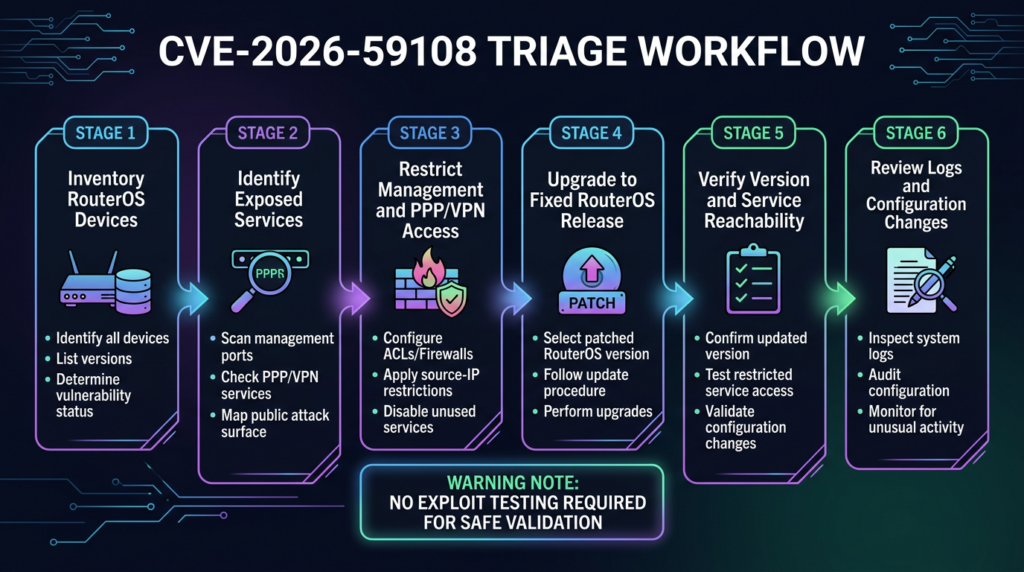
A mature response to CVE-2026-59108 can be executed in a few phases.
Phase one is inventory. Identify every RouterOS device, version, branch, hardware family, package set, role, owner, public IP, management path, and exposure state.
Phase two is exposure reduction. Close unnecessary public management services immediately. Restrict management sources. Disable unused plaintext services. Confirm WAN input drops. Review IPv6. If PPP/VPN services are required, confirm they are intentionally reachable and monitored.
Phase three is upgrade. Apply the fixed RouterOS release appropriate to the branch. For 7.23 stable environments, that points to 7.23.2. For 7.21 long-term environments, that points to 7.21.5. For RouterOS v6 long-term or stable environments, that points to 6.49.20. Validate against MikroTik’s current download and release channels before rollout. (MikroTik community forum)
Phase four is verification. Confirm version, reboot, service state, firewall state, reachability from approved test points, and absence of unexpected errors.
Phase five is investigation for exposed high-value devices. Review users, logs, scripts, scheduler, PPP secrets, RADIUS, DNS, proxy, SOCKS, UPnP, firewall, NAT, routes, tunnels, and configuration changes.
Phase six is prevention. Update templates, enforce management-plane isolation, document exceptions, and schedule recurring exposure checks.
That plan is deliberately boring. Boring is good in vulnerability response. It produces fewer outages and fewer false claims.
FAQ
What is CVE-2026-59108?
- CVE-2026-59108 is publicly associated with a MikroTik RouterOS service security fix in July 2026 release discussion and earlier changelog traces.
- Current MikroTik release notes for RouterOS 7.23.2, 7.21.5 long-term, and 6.49.20 describe the fix as a “service security issue.”
- Publicly cited MikroTik staff guidance says users with exposed services should upgrade as soon as possible.
- Public technical details are limited, so defenders should not invent CVSS, CWE, exploitability, or payload details.
Is CVE-2026-59108 confirmed to be a PPP vulnerability?
- Not precisely from the current official wording.
- Earlier visible changelog traces and community discussion mention “ppp – fixed CVE-2026-59108.”
- MikroTik’s current release wording is broader: “fixed a service security issue.”
- The safest operational approach is to review PPP/VPN exposure and all RouterOS service exposure, rather than assuming only one PPP subservice is relevant.
Which MikroTik RouterOS versions should be upgraded?
- Environments on the 7.23 stable branch should evaluate RouterOS 7.23.2 or later fixed releases.
- Environments on the 7.21 long-term branch should evaluate RouterOS 7.21.5 or later fixed releases.
- RouterOS v6 long-term or stable environments should evaluate 6.49.20 or later fixed releases.
- Always confirm the latest appropriate branch in MikroTik’s official download channel before upgrading production routers.
- Back up or export configuration, ensure power stability, and confirm enough storage before upgrade.
How can I safely check whether my router is exposed?
- Révision
/ip service print detailfor enabled management services and source restrictions. - Révision
/ip firewall filter print detail where chain=inputfor WAN input policy and final drop behavior. - Review PPP/VPN server state, PPP profiles, PPP secrets, and RADIUS configuration.
- Test reachability only from authorized scanners and only against devices you own or have permission to assess.
- Do not run crash probes, fuzzers, exploit payloads, or untrusted PoCs against production RouterOS devices.
What should I do if I cannot upgrade immediately?
- Close or restrict management services from untrusted networks.
- Disable Telnet, FTP, HTTP WebFig, plain API, proxy, SOCKS, UPnP, and remote DNS unless required.
- Restrict SSH, WinBox, HTTPS WebFig, and API-SSL to trusted management sources.
- Review IPv6 exposure separately from IPv4.
- Restrict or monitor PPP/VPN services that must remain reachable.
- Schedule an upgrade window as soon as practical because containment is not a patch.
Are default home MikroTik routers affected?
- MikroTik’s current release wording says home users with default configuration are not affected, but the vendor still recommends upgrading.
- That statement should not be applied to routers with changed firewall rules, public management access, VPN services, port forwards, IPv6 exposure, or non-default service settings.
- Home users should update during a safe window and verify that no unnecessary services are open to the internet.
- If the router was administered by many people over time, treat it as non-default until proven otherwise.
What evidence belongs in a bug bounty or internal report?
- RouterOS version and branch before remediation.
- Public or authorized reachability evidence for relevant services.
/ip service, firewall input-chain, PPP/VPN, and RADIUS configuration evidence where available.- Clear statement that no destructive testing, exploit payload, fuzzing, or crash attempt was performed.
- Remediation recommendation: upgrade, restrict services, review logs and configuration, and verify after patching.
- Avoid claiming confirmed exploitation unless you have direct, authorized, reproducible evidence.
Arrêt de clôture
CVE-2026-59108 is a case where disciplined uncertainty matters. The public record is strong enough to justify upgrading RouterOS and reducing exposed services. It is not strong enough to justify made-up exploit details.
For defenders, the action path is clear: identify RouterOS devices, prioritize those with services exposed to untrusted networks, upgrade to the fixed branch, verify the version and reboot state, close unnecessary management and PPP/VPN exposure, review configuration for signs of abuse, and keep evidence. The worst response is waiting for a polished exploit write-up while routers continue to expose services that were never meant to be public.

 French
  English
  German
  Spanish
  Portuguese
  Japanese
  Korean
  Hindi
Hindi  Arabic
  Turkish
  Hebrew