
Microsoft Excel remains one of the most attractive document-based attack surfaces in enterprise environments because spreadsheets routinely cross trust boundaries. Financial reports arrive from customers, procurement documents come from suppliers, analysts download workbooks from the web, and employees exchange Excel files through email, Teams, SharePoint, and other collaboration systems.
That makes CVE-2026-62870 particularly important.
CVE-2026-62870 is a Microsoft Excel remote code execution vulnerability caused by a use-after-free memory safety flaw. Microsoft classifies the weakness as CWE-416: Use After Free, and the CVE carries a CVSS v3.1 base score of 8.8, rated High. The published vector is:
CVSS:3.1/AV:N/AC:L/PR:N/UI:R/S:U/C:H/I:H/A:H
Microsoft’s CNA description states that the vulnerability can allow an unauthorized attacker to execute code over a network. Importantly, exploitation still requires user interaction, which is reflected by UI:R in the CVSS vector. (nvd.nist.gov)
The affected product set is broad. Current CVE records list Microsoft 365 Apps for Enterprise, Microsoft Excel 2016, Office 2019, Office LTSC 2021, and Office LTSC 2024 across applicable 32-bit and x64 environments. (NVD)
That combination makes CVE-2026-62870 more than another Office patching issue. In an enterprise where spreadsheets are treated as routine business documents, a memory-corruption vulnerability in Excel creates a plausible bridge between ordinary document delivery and endpoint compromise.
CVE-2026-62870 at a Glance
| Attribut | CVE-2026-62870 |
|---|---|
| CVE | CVE-2026-62870 |
| Produit | Microsoft Office Excel |
| Type de vulnérabilité | Utilisation après la fin de la période de gratuité |
| CWE | CWE-416 |
| Security impact | Exécution de code à distance |
| CVSS v3.1 | 8.8 High |
| Vecteur d'attaque | Réseau |
| Attack complexity | Faible |
| Privileges required | Aucun |
| User interaction | Required |
| Confidentiality impact | Haut |
| Integrity impact | Haut |
| Availability impact | Haut |
| Affected families | Microsoft 365 Apps, Excel 2016, Office 2019, Office LTSC 2021, Office LTSC 2024 |
| Vendor patch | Available |
The CVE was published in early August 2026, with Microsoft listed as the assigning authority. CISA’s initial SSVC enrichment recorded exploitation as aucun and automatable exploitation as no, while assigning a total technical impact. This means defenders should distinguish the vulnerability’s severe potential impact from evidence of active exploitation. (OpenCVE)
At the time of writing, there is not enough authoritative public information to justify claiming that a reliable public exploit or active in-the-wild campaign exists. That distinction matters: high exploit impact does not automatically mean observed exploitation.
What Is CVE-2026-62870?
Microsoft describes CVE-2026-62870 concisely:
Use after free in Microsoft Office Excel allows an unauthorized attacker to execute code over a network.
That short description contains three important technical signals.
First, this is a memory corruption vulnerability, not a macro security problem.
Second, the weakness exists within the Excel attack surface itself rather than requiring VBA macros as the primary execution mechanism.
Third, Microsoft calculates the vulnerability as network reachable in the CVSS sense while still requiring user interaction. (NVD)
This distinction is particularly important for defenders accustomed to treating malicious Excel files primarily as macro-delivery vehicles.
Blocking VBA macros from Internet-originated documents is an important security control, and Microsoft has hardened Office’s handling of Internet macros significantly. But macro blocking should not be confused with protection against a native memory corruption vulnerability inside Excel. Microsoft documents macro blocking separately as an Office security mechanism. (Microsoft Learn)
A malformed spreadsheet capable of exploiting a parser or object-lifetime error could theoretically trigger vulnerable native code without relying on the traditional sequence:
Open document → Enable Content → Run VBA
The relevant attack surface is instead closer to:
Receive malicious workbook → Excel parses crafted data → vulnerable object reaches unsafe state → memory corruption → potential code execution
The exact CVE-2026-62870 parser component, workbook record, function, memory object, or exploitation primitive has not been sufficiently documented in the authoritative public records available at the time of writing. Claims describing a specific Excel function, offset, heap layout, or instruction sequence should therefore be treated skeptically unless supported by new Microsoft documentation or independently validated vulnerability research.
Understanding the Use-After-Free Behind CVE-2026-62870
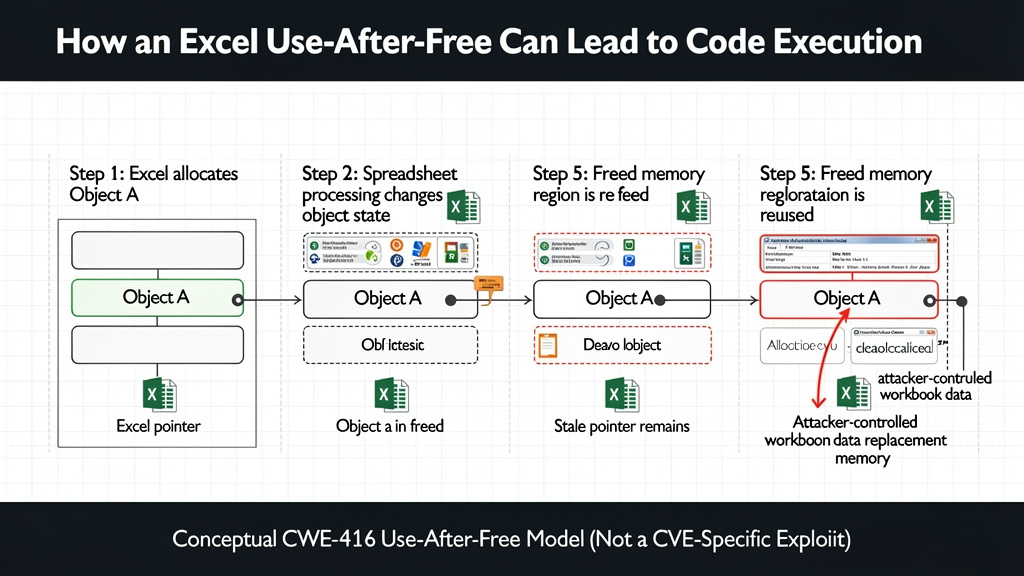
A use-after-free vulnerability occurs when a program continues accessing an object after the memory backing that object has already been released.
Conceptually, a program may perform operations like:
DocumentObject *obj = allocate_object();

process_object(obj);

free(obj);

/* obj is now a dangling pointer */

use_object(obj);
The vulnerability begins at the final operation.
Once free(obj) executes, obj should no longer be considered valid. If the program later dereferences it, its behavior depends on what happened to that memory region after it was released.
The simplest outcome is a crash.
The dangerous outcome occurs when an attacker can influence how the freed memory is reused.
A simplified conceptual flow might look like:
Excel allocates object A
        |
        v
Workbook processing changes object state
        |
        v
Object A is released
        |
        v
A stale reference remains
        |
        v
Freed memory becomes reusable
        |
        v
Attacker-controlled data influences replacement allocation
        |
        v
Excel accesses stale pointer
        |
        v
Memory corruption
        |
        v
Potential control-flow manipulation
This does pas describe Microsoft’s unpublished CVE-2026-62870 exploit implementation. It describes the generic security property of CWE-416 vulnerabilities.
CWE-416 is dangerous because the attacker may be able to transform what would otherwise be an invalid memory access into something more useful: corrupted object metadata, a manipulated function pointer, counterfeit object state, or another primitive that eventually affects execution flow.
Modern Windows and Office include multiple exploit mitigations, so reaching reliable arbitrary code execution from one memory error is often substantially more difficult than merely triggering a crash. Nevertheless, Microsoft’s own CVE classification explicitly identifies exécution de code à distance as the impact of CVE-2026-62870. (CVE)
Why CVE-2026-62870 Has a CVSS Score of 8.8
The CVSS vector is unusually useful for understanding this vulnerability:
AV:N / AC:L / PR:N / UI:R / S:U / C:H / I:H / A:H
AV:N — Network Attack Vector
An attacker does not necessarily need physical or authenticated local access to deliver the malicious content.
A weaponized workbook could potentially arrive through mechanisms such as email, a web download, a file-sharing service, an enterprise collaboration platform, or another network-delivered channel.
This does pas mean an unauthenticated Internet attacker can simply send packets to an Excel listening port and compromise the machine.
Excel is not being described here as a conventional remotely exposed network service.
The distinction is important.
For document-based RCE vulnerabilities, the attacker may be remote while the vulnerable application ultimately processes attacker-controlled content on the endpoint.
AC:L — Low Attack Complexity
Microsoft scores the attack complexity as low.
That indicates Microsoft does not require unusual environmental circumstances in the CVSS model for successful exploitation. It should not be interpreted as proof that developing a stable exploit from scratch is trivial.
Exploit development for modern memory corruption vulnerabilities can still involve considerable engineering.
PR:N — No Privileges Required
The attacker does not need an existing authenticated account or privilege on the victim computer before initiating the attack path. (NVD)
This increases the relevance of phishing and external document delivery scenarios.
UI:R — User Interaction Required
This is one of the most important qualifiers.
A user must perform some action for exploitation to occur.
For document vulnerabilities, that generally means interacting with malicious content, although Microsoft has not publicly documented every exact interaction condition for CVE-2026-62870.
This requirement materially differentiates CVE-2026-62870 from zero-click vulnerabilities.
C:H / I:H / A:H
Successful exploitation may have severe consequences across all three fundamental security properties:
Confidentiality: attacker-controlled code may gain access to information available to the compromised process or user.
Integrity: attacker-controlled execution may modify information or system state within available privileges.
Availability: exploitation could disrupt applications or systems.
That combination is one reason the vulnerability reaches an 8.8 CVSS score. (Rapid7)
CVE-2026-62870 Is Not a Traditional Macro Attack
This deserves special emphasis because macro controls remain a central component of Office security programs.
A traditional malicious Excel workflow frequently looks like:
Phishing email
     ↓
.xlsm attachment
     ↓
Victim opens workbook
     ↓
Macro disabled warning
     ↓
Victim enables content
     ↓
VBA executes
     ↓
PowerShell / script / payload
Microsoft has spent years making this attack path more difficult, including blocking macros from Internet-originated Office files by default in supported scenarios. (Microsoft Learn)
A native Excel use-after-free vulnerability represents a fundamentally different class of problem:
Malicious Excel document
       ↓
Excel native parsing / processing
       ↓
Memory lifecycle error
       ↓
Use-after-free
       ↓
Memory corruption
       ↓
Potential code execution
The distinction has several operational consequences.
An organization cannot look at its macro policy and conclude that it is protected against CVE-2026-62870.
A .xlsx document without VBA can still contain extensive structured data that Excel must parse. Excel workbooks may include formulas, styles, relationships, external references, drawing structures, pivot metadata, shared strings, embedded components, and other complex structures.
Again, Microsoft has not publicly identified which structure is responsible for CVE-2026-62870, so defenders should not narrow detections to one speculative workbook feature.
Which Microsoft Office Products Are Affected?
The Microsoft-issued CVE record identifies several affected product families.
Microsoft 365 Apps for Enterprise
Both 32-bit and x64 environments appear in the affected configuration data. Microsoft uses its Office security release mechanism rather than a single fixed version threshold for the continuously serviced Microsoft 365 Apps product. (NVD)
Microsoft Excel 2016
Excel 2016 is explicitly listed.
The CVE record describes affected Excel 2016 builds beginning at 16.0.0.0 and ending before the patched threshold represented by 16.0.5561.1001. (NVD)
Microsoft also published KB5002886, an Excel 2016 security update dated July 14, 2026. Microsoft’s support page states that the update resolves Microsoft Excel remote code execution and information disclosure vulnerabilities. (Microsoft Support)
Administrators running perpetual Excel 2016 deployments should therefore pay particularly close attention to actual installed update levels rather than assuming operating-system patching automatically covers Office.
Microsoft Office 2019
Both supported 32-bit and x64 variants are represented in the CVE’s affected-product data. (OpenCVE)
Microsoft Office LTSC 2021
Office LTSC 2021 is also affected according to Microsoft’s CVE data. (NVD)
Microsoft Office LTSC 2024
The current LTSC generation is not exempt. Office LTSC 2024 is included in the affected products, again across relevant architectures. (OpenCVE)
This is important operationally because LTSC deployments sometimes exist specifically in environments that update more slowly than ordinary Microsoft 365 endpoints.
Why an Excel RCE Is Particularly Dangerous in Enterprise Environments
The technical severity of a vulnerability is only part of actual risk.
Excel has several properties that make document vulnerabilities strategically attractive.
Excel Files Routinely Cross Organizational Boundaries
Users generally expect to receive spreadsheets from outside the company.
A security team would likely investigate an unexpected executable immediately.
A spreadsheet containing:
- a price quotation,
- invoice,
- payroll export,
- purchase order,
- quarterly forecast,
- supplier list,
- financial model,
- inventory report,
may receive substantially less scrutiny.
This makes Excel an attractive social-engineering format even before considering the vulnerability itself.
Spreadsheets Often Reach High-Value Users
Excel is especially common in finance, accounting, operations, procurement, sales, management, and administrative workflows.
Those users may have access to valuable information including:
Financial systems
CRM exports
Customer records
Vendor accounts
Corporate email
Cloud sessions
Internal file shares
Business intelligence systems
Payment workflows
A successful code execution vulnerability affecting Excel therefore has potentially significant downstream consequences.
User Interaction Does Not Make the Vulnerability Harmless
Organizations sometimes systematically deprioritize vulnerabilities containing UI:R.
That can be misleading.
For server vulnerabilities, user interaction requirements may drastically limit exposure.
For desktop document vulnerabilities, opening files is literally the application’s core function.
A user interaction requirement such as opening an attacker-controlled spreadsheet can therefore remain highly practical from an adversary’s perspective.
The right question is not:
Does exploitation require user interaction?
It is:
Is the required interaction behavior that users routinely perform?
For Excel, opening externally supplied spreadsheets frequently is.
A Plausible CVE-2026-62870 Attack Chain
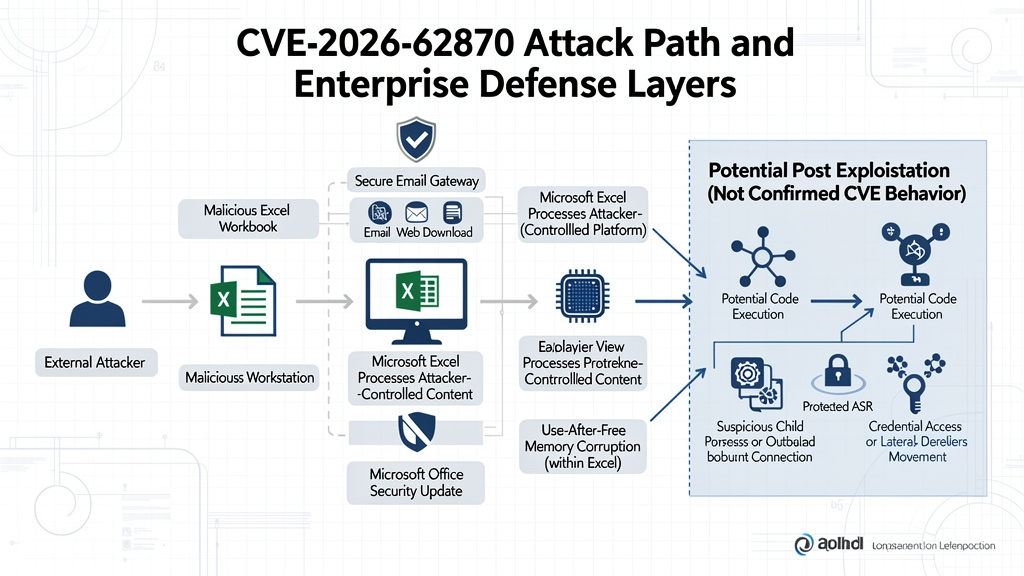
Because no authoritative technical PoC has been published in the sources examined here, the following should be understood as a threat model, not a reproduction of Microsoft’s exact vulnerability.
A realistic enterprise attack could conceptually develop as follows:
External attacker
      |
      v
Craft malicious Excel workbook
      |
      v
Deliver through email / web / collaboration platform
      |
      v
Victim receives business-themed spreadsheet
      |
      v
Victim opens document
      |
      v
Excel processes attacker-controlled structures
      |
      v
CVE-2026-62870 UAF condition triggered
      |
      v
Memory corruption
      |
      v
Potential arbitrary code execution
      |
      v
Execution in user's security context
      |
      v
Credential / browser / cloud-session access
      |
      v
Persistence or lateral movement
The latter stages are post-exploitation possibilities, not capabilities Microsoft specifically attributes to this CVE.
Still, they illustrate why document-based code execution vulnerabilities deserve attention. RCE is rarely the attacker’s final objective. It is a foothold.
What Does “Remote Code Execution” Mean Here?
The language around Office vulnerabilities can create confusion.
A classic server-side RCE may look like:
Attacker
   |
Internet
   |
   v
Vulnerable service
   |
   v
Immediate code execution
Document-based remote code execution more commonly looks like:
Attacker
   |
   | remotely delivers file
   v
Victim endpoint
   |
   | user interaction
   v
Excel
   |
   | vulnerable processing
   v
Code execution
That distinction explains why CVE-2026-62870 simultaneously has:
AV:N
UI:R
The attack originates remotely, but exploitation requires participation from the victim.
Does CVE-2026-62870 Have a Public PoC?
Security teams should be cautious here.
As of August 10, 2026, Microsoft’s CNA information and NVD data establish the vulnerability class, product impact, CVSS characteristics, and patch information. The initial CISA SSVC enrichment associated with the CVE records exploitation as aucun. (OpenCVE)
Some third-party pages make stronger statements about exploit availability than others, and those claims are not consistently supported by authoritative evidence.
Accordingly, it would be premature to state that a reliable public CVE-2026-62870 exploit exists unless a reproducible technical disclosure becomes available.
This matters for both defenders and researchers.
A GitHub repository titled:
CVE-2026-62870-PoC
is not evidence by itself.
Security teams should require actual validation such as:
- reproducible behavior against a vulnerable build,
- crash evidence connected to the vulnerable condition,
- debugger evidence,
- version comparison,
- patch-diff support,
- reliable technical documentation,
- confirmation by Microsoft or a reputable research organization.
Fake CVE exploit repositories are a recurring security problem of their own.
Patch CVE-2026-62870 First
The most important mitigation is straightforward:
Install Microsoft’s security updates for affected Office versions.
Microsoft’s official Excel 2016 update page for KB5002886 explicitly identifies the update as a security update addressing Excel remote code execution and information disclosure vulnerabilities. (Microsoft Support)
For Microsoft 365 Apps, organizations should verify that the configured Office update channel is actually receiving current security builds.
Microsoft documents that Microsoft 365 Apps can receive updates through the Office CDN or enterprise deployment workflows using Configuration Manager. Office update management should therefore be verified independently from Windows cumulative update status. (Microsoft Learn)
That distinction is operationally important.
A Windows endpoint may appear fully patched from an OS perspective while Office remains behind its expected security build.
How Enterprises Should Verify Microsoft 365 Apps Updates
Administrators should establish three facts:
1. Which Office product is installed?
2. Which update channel is configured?
3. Which build is actually running?
On an individual system, users can check Excel through:
Excel
→ File
→ Account
→ About Excel
For enterprise-scale environments, inventory should come from endpoint management rather than manual checks.
An organization should be able to answer:
Installed Office edition
Architecture
Update channel
Installed build
Last successful update
Device owner
Exposure to external documents
Without that inventory, patch coverage becomes difficult to prove.
Protected View Should Remain Enabled
Microsoft Office Protected View is another useful defensive layer.
Microsoft describes Protected View as a mechanism used for workbooks originating from potentially unsafe locations, including files opened from the Internet and Outlook attachments. (Microsoft Learn)
Microsoft’s Office security baseline also keeps protections around Internet-zone and unsafe-location files enabled by default rather than configuring Excel to bypass Protected View. (Microsoft Learn)
Organizations should therefore review whether Group Policy, registry modifications, or local user behavior has weakened these controls.
Particularly risky configurations include intentionally allowing Internet-originated documents to bypass Protected View because employees find security prompts inconvenient.
Protected View should still be regarded as defense in depth, not a substitute for installing the CVE-2026-62870 patch.
Microsoft Defender ASR Can Reduce Post-Exploitation Opportunities
Microsoft Defender Attack Surface Reduction rules can also help constrain common follow-on behavior after Office exploitation.
One particularly relevant rule is:
Block all Office applications from creating child processes.
Microsoft explicitly states that the rule applies to Office applications including Excel and blocks them from creating child processes. (Microsoft Learn)
This matters because many successful document attacks eventually attempt to transform application compromise into operating-system activity.
Par exemple :
EXCEL.EXE
   ↓
cmd.exe
or:
EXCEL.EXE
   ↓
powershell.exe
or:
EXCEL.EXE
   ↓
wscript.exe
or:
EXCEL.EXE
   ↓
rundll32.exe
None of those chains should be interpreted as the documented CVE-2026-62870 exploit sequence.
They are high-value behavioral patterns for defenders because legitimate spreadsheets do not normally need to spawn arbitrary command interpreters.
Microsoft also provides ASR controls around Office executable-content creation and process injection, among other risky behavior. (Microsoft Learn)
ASR deployment should nevertheless be tested against business-critical add-ins and workflows. Microsoft recommends using audit-mode testing and staged rollouts where compatibility issues are possible. (Microsoft Learn)
Detecting Suspicious Excel Exploitation
Detection for memory corruption vulnerabilities is different from detection for VBA malware.
There may be no simple string such as:
AutoOpen
Shell
WScript.Shell
powershell
inside the malicious document.
Instead, detection should combine several layers.
Monitor Excel Child Processes
A simple behavioral detection strategy is to investigate command interpreters or suspicious binaries launched by Excel.
Example Microsoft Defender XDR-style hunting logic:
DeviceProcessEvents
| where InitiatingProcessFileName =~ "excel.exe"
| where FileName in~ (
    "cmd.exe",
    "powershell.exe",
    "pwsh.exe",
    "wscript.exe",
    "cscript.exe",
    "mshta.exe",
    "rundll32.exe",
    "regsvr32.exe"
)
| project
    Timestamp,
    DeviceName,
    AccountName,
    InitiatingProcessFileName,
    FileName,
    ProcessCommandLine,
    InitiatingProcessCommandLine
| order by Timestamp desc
This is not a CVE-2026-62870 signature.
It is behavioral hunting designed to identify suspicious activity that could occur after Office compromise.
Microsoft confirms that Defender Advanced Hunting exposes endpoint events and that ASR-related activity can be investigated through Defender’s hunting and device telemetry. (Microsoft Learn)
Watch for Excel Followed by Network Activity
Security teams may also correlate an unusual Excel execution with subsequent outbound activity.
A hypothetical pattern might be:
User downloads spreadsheet
      ↓
EXCEL.EXE opens it
      ↓
Unexpected process starts
      ↓
New outbound connection
      ↓
Payload retrieval or C2
Again, this is a generalized post-exploitation model.
Detection confidence increases when several unusual events occur together.
Par exemple :
Excel opened Internet-originated file
+
Excel crash / anomalous behavior
+
Office child process
+
Script interpreter
+
Network connection
is far more interesting than:
Excel.exe executed
alone.
Monitor Excel Crashes During the Vulnerability Window
Memory corruption exploits frequently produce unstable behavior while being developed or when environmental assumptions fail.
Consequently, unexplained Excel crashes involving externally sourced files can deserve additional investigation.
Security teams might correlate:
EXCEL.EXE crash
+
recently downloaded workbook
+
email attachment
+
unusual file origin
+
endpoint telemetry
Crashes themselves are not proof of CVE-2026-62870 exploitation.
However, during a newly disclosed UAF vulnerability window, they may be useful hunting signals.
Email and Collaboration Controls Still Matter
Even though the vulnerability resides in Excel rather than the mail system, delivery controls can reduce exposure.
Organizations should prioritize inspection of unexpected spreadsheets arriving through:
- external email,
- guest collaboration,
- cloud storage links,
- newly registered domains,
- impersonated suppliers,
- invoice-themed messages,
- payment change requests,
- unsolicited financial documents.
The broader lesson is that Office memory corruption vulnerabilities undermine the simplistic distinction between:
Executable = dangerous
Document = safe
Documents can themselves be attack containers.
Should Organizations Block Excel Attachments?
Usually not universally.
Excel is too deeply embedded in many business workflows.
A more practical approach is layered:
Patch Office
        +
Maintain Protected View
        +
Filter suspicious attachments
        +
Preserve Mark-of-the-Web
        +
Enforce ASR rules
        +
Monitor Office child processes
        +
Use EDR
        +
Limit endpoint privileges
This is considerably more sustainable than trying to ban spreadsheets throughout an organization.
For high-risk user populations, temporary restrictions on externally supplied Office documents may still be justified during an active exploitation campaign. However, current public authoritative data does not establish CVE-2026-62870 as an active in-the-wild campaign.
Safe Validation of CVE-2026-62870
Security teams often face a difficult question:
How do we prove our organization is protected without running an actual RCE exploit?
For CVE-2026-62870, the safest answer is generally configuration and patch verification, not exploit reproduction.
A responsible validation workflow can follow:
Asset discovery
     ↓
Office product identification
     ↓
Architecture identification
     ↓
Version/build collection
     ↓
Update-channel verification
     ↓
Security-update comparison
     ↓
Protected View validation
     ↓
ASR validation
     ↓
EDR telemetry verification
     ↓
Exposure report
This proves substantially more than simply sending a suspicious workbook to random endpoints.
Step 1: Discover Office Installations
Identify devices running affected Office products.
The inventory should distinguish:
Microsoft 365 Apps for Enterprise
Excel 2016
Office 2019
Office LTSC 2021
Office LTSC 2024
Both 32-bit and x64 variants are relevant according to Microsoft’s current affected-product metadata. (NVD)
Step 2: Collect the Actual Excel Version
From a Windows system, defenders can inspect Office Click-to-Run configuration where applicable.
Par exemple :
$path = "HKLM:\SOFTWARE\Microsoft\Office\ClickToRun\Configuration"

Get-ItemProperty $path |
Select-Object ProductReleaseIds, ClientVersionToReport, Platform, UpdateChannel
This is an inventory command rather than an exploit.
Organizations can run similar collection through their endpoint-management platform.
Step 3: Verify Update Deployment
Confirm that the patched build is installed.
Do not infer this purely from:
Windows Update succeeded
because Office servicing may use its own Click-to-Run and enterprise management workflows.
Microsoft documents separate Microsoft 365 Apps updating mechanisms and Configuration Manager integration. (Microsoft Learn)
Step 4: Validate Protected View
Check that security baselines have not disabled protections for Internet-originated Office files.
Microsoft’s published Office baseline indicates that policies which would bypass Protected View for Internet-zone or unsafe-location documents are disabled by default. (Microsoft Learn)
This means administrators should be particularly cautious about local exceptions created merely to reduce user friction.
Step 5: Validate ASR Coverage
Check whether Office applications are allowed to create unrestricted child processes.
Microsoft documents the relevant ASR rule specifically for Excel and other Office applications. (Microsoft Learn)
For organizations that have not yet deployed these controls, Microsoft’s own guidance favors staged evaluation using audit mode before wider enforcement. (Microsoft Learn)
Step 6: Verify Detection
Security controls should be tested using benign simulations rather than an untrusted CVE PoC.
For example, a controlled security team can verify whether:
Excel → child-process event
is:
- blocked,
- logged,
- visible in EDR,
- alertable,
- linked to the initiating user,
- retained for investigation.
Microsoft provides ASR demonstration procedures specifically so organizations can test rule behavior safely. (Microsoft Learn)
Why Scanning Alone Is Not Enough
Traditional vulnerability management often stops after discovering:
CVE-2026-62870 detected
But an actionable security assessment needs to answer more.
Par exemple :
Is the device actually vulnerable?

Is the vulnerable Excel version still installed?

Can external Excel files reach the endpoint?

Does Protected View apply?

Can Excel create child processes?

Does Defender observe those events?

Can SOC analysts correlate the workbook with execution?

Was the correct Office update installed?
These questions move the exercise from vulnerability identification to attack-path validation.
That distinction increasingly matters as organizations adopt AI-assisted penetration testing and automated security validation systems. A good validation workflow should not blindly execute a newly uploaded PoC simply because it claims to target the right CVE. It should reason about the vulnerability, validate prerequisites, preserve evidence, and avoid dangerous exploitation when patch-state confirmation provides the necessary answer.
Exploit Validation vs. Vulnerability Validation
These concepts are frequently confused.
Exploit validation asks:
Can I execute arbitrary code through this vulnerability?
Vulnerability validation asks:
Is this asset currently susceptible to the vulnerability?
For CVE-2026-62870, defenders usually need the second answer.
If an organization can establish:
Installed build
<
required security version
then it already has evidence of exposure.
There is rarely a defensible business reason to weaponize a use-after-free against a production finance workstation simply to prove what inventory already shows.
Why CVE-2026-62870 Matters for AI Pentesting
Document vulnerabilities also expose an important distinction between naïve automated exploitation and agentic security validation.
An unsophisticated automation pipeline may behave like:
Find CVE
→ Search GitHub
→ Download PoC
→ Execute PoC
That is unsafe.
A security-aware autonomous system should instead reason:
Identify CVE
      ↓
Retrieve authoritative vulnerability metadata
      ↓
Determine affected products
      ↓
Determine exact target product/version
      ↓
Assess whether exploit validation is necessary
      ↓
Prefer non-destructive verification
      ↓
Check mitigations
      ↓
Collect evidence
      ↓
Escalate to controlled exploitation only when justified
For memory safety vulnerabilities such as CVE-2026-62870, this approach is particularly important because unreliable PoCs can crash applications, corrupt data, or simply be unrelated malware masquerading as exploit code.
CVE-2026-62870 vs. Earlier Excel Memory-Safety Vulnerabilities
CVE-2026-62870 should also be viewed in the context of recurring memory-safety issues affecting Excel.
For example, Microsoft disclosed CVE-2026-40359 earlier in 2026 as another Excel use-after-free vulnerability. That CVE was also classified under CWE-416, although its published CVSS vector used a local attack vector rather than the network vector associated with CVE-2026-62870. (NVD)
Other Excel remote code execution vulnerabilities appeared during Microsoft’s June 2026 security cycle as well, demonstrating that Excel continues to receive significant native-code security fixes. (Zero Day Initiative)
This does not mean the vulnerabilities share the same root cause.
It does mean defenders should treat Office patching as continuous attack-surface management rather than an occasional administrative task.
CVE-2026-62870 and the Patch Window Problem
One of the most important periods for defenders occurs immediately after vulnerability disclosure.
Before disclosure:
Few attackers know the vulnerability
↓
Defenders may not know it either
After disclosure:
CVE becomes public
↓
Affected versions become identifiable
↓
Researchers analyze updates
↓
Attackers can study patch differences
↓
Exploit knowledge can improve
Organizations that delay patching therefore enter an increasingly unfavorable environment.
This does not prove that CVE-2026-62870 exploitation will emerge.
It explains why patch prioritization should not depend exclusively on waiting for a public exploit.
Patch Prioritization for CVE-2026-62870
A useful enterprise prioritization model could consider:
Technical severity
        ×
Asset exposure
        ×
User behavior
        ×
Business importance
        ×
Control coverage
A finance laptop receiving dozens of external spreadsheets every week may represent greater practical exposure than a workstation where Excel is installed but never used.
Priority should therefore increase for users in:
- finance,
- procurement,
- accounting,
- sales operations,
- customer support,
- executive functions,
- supply-chain management,
- externally facing administrative teams.
Those roles routinely handle untrusted documents.
CVSS Is Not the Same as Real-World Risk
CVE-2026-62870 demonstrates why vulnerability prioritization cannot rely on CVSS alone.
CVSS tells us important facts:
8.8
Network reachable
Low complexity
No privileges
User interaction
High CIA impact
But it does not tell us:
How many vulnerable devices do we have?

How quickly can we patch them?

Do they receive external spreadsheets?

Do our controls block post-exploitation activity?

Is exploitation happening against our industry?

Is a working exploit available?

Which users are most exposed?
Those questions belong to vulnerability management and threat-informed defense.
Incident Response Considerations
If an organization suspects CVE-2026-62870 exploitation, investigators should avoid focusing solely on the workbook.
The incident timeline should reconstruct:
Initial document delivery
        ↓
File download
        ↓
Excel execution
        ↓
Crash or anomalous activity
        ↓
Child processes
        ↓
Network communication
        ↓
File creation
        ↓
Credential access
        ↓
Persistence
        ↓
Lateral movement
Relevant evidence may include:
- email delivery logs,
- browser download records,
- file hashes,
- Mark-of-the-Web information,
- EDR process trees,
- Windows event logs,
- Defender telemetry,
- proxy logs,
- DNS logs,
- newly created files,
- authentication events,
- cloud session activity.
The original workbook should be preserved for controlled forensic analysis rather than casually reopened.
What Security Teams Should Do Now
Organizations using affected Microsoft Office versions should treat CVE-2026-62870 as a priority patching issue.
The immediate operational sequence should be:
Inventory Office installations
        ↓
Identify affected versions
        ↓
Deploy Microsoft security updates
        ↓
Confirm successful installation
        ↓
Maintain Protected View
        ↓
Review ASR policies
        ↓
Monitor suspicious Excel process behavior
        ↓
Investigate unusual external spreadsheets
The key word is confirm.
Deploying an update is not the same as confirming every endpoint successfully received it.
Enterprise patching failures commonly arise from offline machines, stale devices, broken Office update channels, servicing errors, legacy installations, and unmanaged endpoints.
FAQ
What is CVE-2026-62870?
CVE-2026-62870 is a Microsoft Excel remote code execution vulnerability caused by a use-after-free memory safety issue classified as CWE-416. Microsoft’s CVE record states that an unauthorized attacker may execute code over a network. (CVE)
What is the CVSS score for CVE-2026-62870?
CVE-2026-62870 has a CVSS v3.1 base score of 8.8, High, with the vector:
AV:N/AC:L/PR:N/UI:R/S:U/C:H/I:H/A:H. (NVD)
Does CVE-2026-62870 require authentication?
No prior privileges are required according to the published CVSS vector.
Cependant, user interaction is required. (NVD)
Is CVE-2026-62870 zero-click?
The current CVSS data says UI:R, meaning user interaction is required. It should therefore not be described as a zero-click vulnerability. (Mondoo)
Is CVE-2026-62870 a macro vulnerability?
No. Microsoft classifies CVE-2026-62870 as CWE-416 Use After Free, a native memory-management vulnerability. Macro security controls should therefore not be considered a complete mitigation. (CVE)
Which Microsoft products are affected?
Current Microsoft CVE data lists Microsoft 365 Apps for Enterprise, Excel 2016, Office 2019, Office LTSC 2021, and Office LTSC 2024 across applicable 32-bit and x64 platforms. (NVD)
Is there a CVE-2026-62870 patch?
Yes. Microsoft references security updates for affected Office products. Excel 2016 is associated with Microsoft’s July 14, 2026 security update KB5002886, which Microsoft states resolves Excel remote code execution and information disclosure vulnerabilities. (Microsoft Support)
Is CVE-2026-62870 being actively exploited?
The authoritative data examined for this article does not establish active exploitation. CISA’s initial SSVC enrichment for the CVE recorded exploitation as aucun. That status can change, so vulnerability teams should continue monitoring Microsoft and CISA updates. (OpenCVE)
Should companies disable Excel?
For most organizations, completely disabling Excel would cause excessive operational disruption. Rapid patching combined with Protected View, attachment controls, ASR policies, EDR monitoring, and least privilege is usually a more practical defense-in-depth strategy.
Final Assessment
CVE-2026-62870 deserves priority because it combines a common enterprise application, a native memory-corruption flaw, network-deliverable attacker-controlled content, no privilege requirement, low CVSS attack complexity, and potentially complete confidentiality, integrity, and availability impact.
The user-interaction requirement prevents it from being equivalent to an unauthenticated zero-click server RCE. But it should not provide much comfort to organizations whose users open external spreadsheets every day.
The most important lesson is also broader than this single CVE.
Office security cannot be reduced to macro blocking.
An Excel workbook is a complex input consumed by a large native application. Vulnerabilities in parsers, object lifetimes, memory management, rendering, and document-processing components can create attack paths that exist below the macro layer entirely.
For CVE-2026-62870, Microsoft has already provided the most important defensive answer: update affected Office products. Enterprises should then verify that updates actually reached every endpoint, preserve Protected View, constrain dangerous Office behaviors with ASR where operationally appropriate, and use endpoint telemetry to detect suspicious execution originating from Excel.
Until stronger technical disclosure appears, defenders and researchers should also resist filling the information gap with speculative exploit details. The confirmed facts are already enough to justify action: CVE-2026-62870 is a High-severity Microsoft Excel use-after-free RCE vulnerability with a CVSS score of 8.8, affecting several widely deployed Office generations, and security updates are available. (NVD)

 French
  English
  German
  Spanish
  Portuguese
  Japanese
  Korean
  Hindi
Hindi  Arabic
  Turkish
  Hebrew