
On August 25, 2026, the Next.js project disclosed CVE-2026-75604, a critical vulnerability that can result in unauthenticated remote code execution on affected Next.js applications running on Windows filesystems.
The vulnerability is tracked by GitHub as GHSA-p293-qw3h-jr36 and carries a CVSS 3.1 score of 9.0. The official advisory classifies the underlying weakness as CWE-22: Improper Limitation of a Pathname to a Restricted Directory, commonly known as path traversal. No authentication or user interaction is required. (GitHub)
The affected stable Next.js versions are:
| Branche | Vulnerable versions | Version corrigée |
|---|---|---|
| Next.js 13–15 | >= 13.4 < 15.5.24 | 15.5.24 |
| Next.js 16 | >= 16.0 < 16.3.3 | 16.3.3 |
Next.js states that there is no known workaround for affected Windows-hosted applications and recommends upgrading immediately. (GitHub)
The interesting part of CVE-2026-75604 is not simply that Next.js had a path traversal bug. It is why the traversal existed only under Windows filesystem semantics and how a seemingly small discrepancy between / et \ crossed a security boundary inside Next.js’s incremental cache implementation.
The patch provides an unusually useful window into that failure.
What Is CVE-2026-75604?
CVE-2026-75604 is a server-side vulnerability in Next.js applications using the Pages Router or App Router without Cache Components when the application is hosted on a machine using a Windows filesystem.
According to the Next.js advisory:
- the vulnerability is remotely reachable;
- authentication is not required;
- user interaction is not required;
- affected deployments can ultimately experience remote code execution;
- Windows-hosted applications are specifically affected;
- there is no supported workaround other than updating the affected Next.js installation. (GitHub)
The vulnerability received the following CVSS v3.1 vector:
CVSS:3.1/AV:N/AC:H/PR:N/UI:N/S:C/C:H/I:H/A:H
That translates to:
| Métrique | Valeur |
|---|---|
| Vecteur d'attaque | Réseau |
| Attack Complexity | Haut |
| Privilèges requis | Aucun |
| Interaction avec l'utilisateur | Aucun |
| Champ d'application | Changed |
| Confidentialité | Haut |
| Intégrité | Haut |
| Availability | Haut |
| Base Score | 9.0 Critical |
Les AC:H rating is worth noticing. CVE-2026-75604 is not necessarily a trivial one-request command injection primitive. Exploitation depends on specific application and runtime conditions. But those conditions do not change the consequence: once the vulnerable state exists, an external unauthenticated attacker can cross a server-side filesystem security boundary, and Next.js rates the resulting impact as RCE. (GitHub)
The Root Cause Is a Windows Path Separator Problem
The patch for CVE-2026-75604 is particularly revealing.
Next.js commit 09f9c8a758a6b20f248b0e90e539bba8225c73bb is titled:
“Fix ISR misses with backslashes in segments when deployed on Windows”
More importantly, the commit changes two security-sensitive areas of Next.js.
Le premier est escape-path-delimiters.ts.
Before the patch, Next.js escaped characters including /, #et ?, along with several percent-encoded equivalents.
After the patch, the regular expression also explicitly includes the backslash character.
Conceptually, the change is:
Before:
escape / # ?

After:
escape / # ? \
The actual patch also adds stronger validation around filesystem cache paths. (GitHub)
This small change matters enormously on Windows.
Slash and Backslash Do Not Mean the Same Thing Everywhere
Most web applications are developed around URL semantics.
URLs use forward slashes:
/products/123
/api/users
/blog/security
Linux and other Unix-like operating systems also use / as their filesystem directory separator.
That makes code such as this superficially reasonable:
if (input.includes("../")) {
  reject()
}
But Windows recognizes \ as its primary path separator.
A Windows filesystem path therefore looks like:
C:\app\.next\server\pages
rather than:
/app/.next/server/pages
The security problem appears when application validation understands one representation while the operating system’s path resolver understands another.
An input may pass through a web-oriented sanitizer because it does not contain the expected Unix-style delimiter, only to become meaningful after Node.js resolves that input using Windows path semantics.
That is a classic canonicalization mismatch.
Why Canonicalization Bugs Are Dangerous
Suppose an application intends to store or retrieve files only from:
C:\application\.next\server\pages
It receives a cache key and combines it with the root directory:
path.join(rootDir, key)
The security assumption is:
resulting path ⊆ rootDir
But that assumption is only safe if the attacker-controlled key cannot introduce filesystem semantics that cause the resulting path to leave the intended directory.
The old Next.js implementation effectively relied too heavily on upstream path escaping.
The patched code introduces a much stronger invariant.
Conceptually:
const filePath = path.join(rootDir, key)

if (
  !(filePath.startsWith(rootDir + path.sep) ||
    filePath === rootDir)
) {
  throw new Error("Invalid file path")
}
This check happens after the filesystem path has been constructed.
That difference is important.
Rather than merely asking:
“Does the original string look dangerous?”
the patched implementation asks:
“Where does the filesystem say this path actually points?”
The official fix performs exactly this kind of containment validation inside Next.js’s filesystem-backed incremental cache. (GitHub)
Where the Vulnerability Lives in Next.js
The patch modifies:
packages/next/src/server/lib/incremental-cache/file-system-cache.ts
Next.js uses this component to map different kinds of cached application data onto directories beneath the server’s .next build output.
The relevant cache categories include:
FETCH
PAGES
IMAGE
APP_PAGE
APP_ROUTE
Before the patch, different cache kinds were effectively combined directly with an attacker-influenced pathname.
For example, Pages cache data ultimately maps beneath a location similar to:
.next/server/pages/
while App Router data maps beneath:
.next/server/app/
The fix restructures this logic so Next.js first calculates a trusted rootDir, then joins the supplied cache key, and finally verifies that the resulting filesystem path still lives beneath that root. (GitHub)
This is a much stronger security boundary than merely escaping particular characters.
Incremental Cache Is the Important Attack Surface
Understanding CVE-2026-75604 also requires understanding Next.js incremental rendering.
Next.js supports features such as static generation and Incremental Static Regeneration, where page data may be generated and persisted on the server.
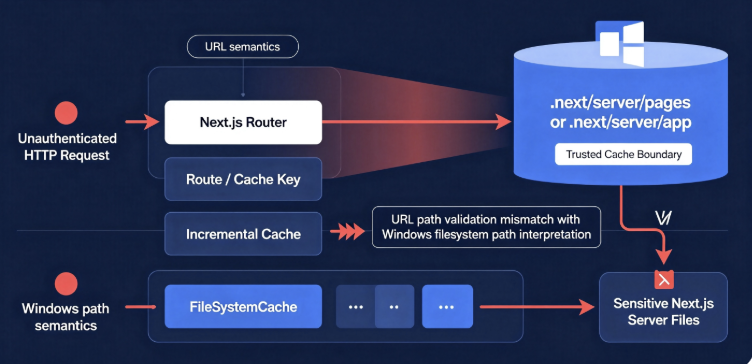
A simplified architecture looks like this:
HTTP Request
     |
     v
Next.js Router
     |
     v
Route / Cache Key
     |
     v
Incremental Cache
     |
     v
FileSystemCache
     |
     v
.next/server/...
Normally the last step should remain strictly inside a Next.js-managed cache directory.
CVE-2026-75604 breaks this assumption on vulnerable Windows deployments.
The critical trust boundary is therefore:
HTTP-derived routing information
          |
          v
     cache key
          |
          v
filesystem pathname
Whenever remotely influenced information crosses from URL semantics into filesystem semantics, path normalization must be treated as a security operation.
CVE-2026-75604 demonstrates exactly why.
The Patch’s Regression Test Reveals More Than the Advisory
The official security advisory intentionally provides only a short impact description. The patch, however, contains a dedicated test directory named:
incremental-cache-path-traversal
and adds Windows CI coverage for the test. (GitHub)
The regression test is particularly interesting because its goal is described as:
serves arbitrary json files
The test creates both an App Router route and a Pages Router route and verifies behavior around an internal file named:
server-reference-manifest
The test’s comments explicitly describe the manifest as private and note that it contains an encryptionKey. (GitHub)
That tells us something important about the security impact.
This was not merely a harmless case where a cache miss could reference the wrong static page.
The path confusion could cross the intended cache directory boundary and expose internal Next.js server metadata.
From Path Traversal to RCE
It is tempting to describe CVE-2026-75604 as simply:
Path Traversal → RCE
but that compresses several security boundaries into one sentence.
A more useful conceptual model is:
Unauthenticated HTTP Request
          |
          v
Attacker-controlled route/cache state
          |
          v
Windows path separator confusion
          |
          v
Incremental cache path escapes expected directory
          |
          v
Internal server-side data becomes reachable
          |
          v
Application security boundary is compromised
          |
          v
Further framework-specific exploitation
          |
          v
Remote Code Execution
The first half of this chain is strongly visible in the public patch.
The final impact—remote code execution—is explicitly confirmed by the Next.js security advisory. (GitHub)
What the vendor advisory does pas provide is a complete, production-ready weaponized exploit chain showing every step required to turn the file traversal primitive into arbitrary command execution across arbitrary applications.
That distinction matters.
Security analysis should not fill disclosure gaps with speculation simply because the final CVSS impact says RCE.
The defensible conclusion is:
Next.js confirms unauthenticated RCE. The public patch demonstrates the underlying Windows-specific incremental-cache path traversal and guards against access outside trusted cache roots.
Why the Server Reference Manifest Matters
Modern Next.js applications can contain Server Actions and other server-side references.
During builds, Next.js generates internal metadata that maps server references and provides runtime information necessary for those mechanisms to operate.
These files are not intended to become ordinary unauthenticated web resources.
The regression test added during the fix explicitly builds an application containing a harmless "use server" action so that Next.js generates the server reference manifest. The test then confirms that the cache traversal condition cannot be used to cross the intended security boundary. (GitHub)
This highlights a broader lesson for modern JavaScript frameworks:
Build artifacts are part of the application security boundary.
Les .next directory can contain considerably more than disposable static assets. Depending on the application and Next.js version, build output can contain routing metadata, server manifests, prerendering information and server-side application state.
A vulnerability exposing arbitrary build artifacts can therefore have consequences far beyond ordinary directory listing.
Why CVE-2026-75604 Only Affects Windows Servers
The Windows restriction initially makes the vulnerability sound unusual.
Next.js is heavily deployed on Linux-based infrastructure, including containers and managed platforms. So why would the same JavaScript framework become vulnerable only when executed on Windows?
The answer is filesystem interpretation.
Consider the conceptual input:
segment\another-segment
On a Unix-style filesystem, \ generally does not behave as the normal path separator.
On Windows, it does.
That means a sanitizer can believe it is handling:
one literal segment
while Windows later interprets the same string as:
segment
   |
   └── another-segment
This kind of bug frequently appears when validation happens before canonicalization.
The application validates representation A.
The filesystem consumes representation B.
The two components disagree about what the string means.
Checkmarx independently analyzed the patch and similarly identified the missing handling of Windows backslashes as the critical discrepancy between Windows and Linux path behavior. (Checkmarx)
This Is Not a Windows Security Flaw
It is important not to misinterpret the issue.
Windows itself is not behaving incorrectly.
Neither is Node.js wrong for treating \ according to Windows path rules.
The security failure occurs because application validation failed to account for the semantics of the platform on which the validated value would eventually be used.
This distinction matters for secure software engineering.
A correct security model cannot simply say:
Remove "../"
or:
Escape "/"
A safer model is:
1. Parse according to the destination's semantics.
2. Canonicalize.
3. Resolve against a trusted root.
4. Verify containment.
5. Only then access the filesystem.
The CVE-2026-75604 patch moves Next.js much closer to that model.
Pages Router and App Router Are Both Relevant
The official GitHub advisory states that applications using Pages and App Router without Cache Component can be affected. The fix’s regression tests exercise both routing systems. (GitHub)
That means organizations should not dismiss the vulnerability simply because they migrated from the legacy Pages Router to the App Router.
The relevant question is not:
Do we still use pages/?
Instead, defenders need to evaluate:
Are we running an affected Next.js release?
        +
Is the application running on Windows?
        +
Does its routing/cache configuration reach the vulnerable behavior?
Organizations with mixed routing architectures should be especially careful because large Next.js applications frequently retain legacy Pages Router endpoints during gradual migrations.
What About Cache Components?
The advisory excludes configurations using Cache Components from the vulnerable condition.
That is useful for understanding exposure, but it should pas be treated as the preferred mitigation.
The vendor explicitly says:
there is no known workaround
for affected Windows-hosted applications and tells users to upgrade. (GitHub)
Changing a framework-level caching architecture purely to avoid a critical vulnerability is also much harder to validate than installing the vendor patch.
The security decision should therefore be:
Patch first.
Validate configuration second.
not:
Attempt to reconfigure the application instead of patching.
Affected Next.js Versions
For stable releases, the vendor advisory lists:
>= 13.4 < 15.5.24
>= 16.0 < 16.3.3
Patched releases are:
15.5.24
16.3.3
(GitHub)
Checkmarx also identified affected pre-release branches during its analysis, including relevant Next.js 15.6 and 16.4 canary releases, while identifying 16.4.0-canary.7 as containing the fix. Production defenders should nevertheless use the vendor-supported stable patched branches unless they have a specific requirement to run a canary build. (Checkmarx)
How to Check Your Next.js Version
From the application directory:
npm list next
or:
npm ls next --depth=0
For pnpm:
pnpm list next
For Yarn:
yarn list --pattern next
You can also inspect package.json:
{
  "dependencies": {
    "next": "16.3.2"
  }
}
But checking only package.json is not sufficient in every environment.
Par exemple :
"next": "^16.2.0"
does not tell you exactly which version is installed in the deployed workload.
Inspect the lockfile and the actual running artifact.
A useful verification is:
node -p "require('next/package.json').version"
Run it inside the same runtime/container/VM used by production, rather than assuming your developer workstation represents the deployed application.
A Simple Exposure Decision Tree
A defender can perform initial triage using the following logic:
Is this a server-side Next.js application?
              |
             Yes
              |
              v
Is the deployed version vulnerable?
              |
             Yes
              |
              v
Is the Next.js server running against
a Windows filesystem?
              |
             Yes
              |
              v
Does the application use a relevant
Pages/App Router cache configuration?
              |
             Yes
              |
              v
Treat as potentially vulnerable
and patch immediately.
Because the official workaround guidance is simply to upgrade, detailed exploit reproduction is unnecessary for patch prioritization.
Are Vercel Deployments Vulnerable?
The Windows-specific CVE does not apply to Vercel-hosted applications in the same way as a self-hosted Windows Next.js server because Vercel does not expose the vulnerable Windows filesystem environment described by CVE-2026-75604.
The August 2026 Next.js release is particularly notable because the Windows RCE was disclosed alongside another critical vulnerability involving AVIF image processing.
Those two issues should not be conflated.
CVE-2026-75604:
Windows filesystem
        +
Next.js incremental cache/path handling
        =
Windows-specific RCE condition
The separate Image Optimization advisory:
Attacker-controlled AVIF
        +
affected image processing stack
        =
separate RCE risk
Organizations therefore need to assess both issues independently.
What About Netlify?
Netlify explicitly states that its hosted Next.js sites are not affected by CVE-2026-75604 because its Functions and Edge Functions execute on Linux rather than Windows.
Netlify nevertheless recommends upgrading to 15.5.24 ou 16.3.3 because the August 2026 release also addresses the separate Image Optimization vulnerability. (Netlify)
This distinction is a useful example of correct vulnerability triage.
A vulnerable software version alone does not always establish exploitability.
You need:
Software version
+
Platform
+
Configuration
+
Reachable execution path
=
Actual exposure
Self-Hosted Windows Deployments Deserve Immediate Attention
The environments that deserve the highest priority include self-managed Next.js servers running through Node.js on:
- Windows Server VMs;
- Windows Server physical hosts;
- Windows development environments inadvertently exposed to external networks;
- Windows-based CI preview environments;
- Windows containers where the affected filesystem semantics remain relevant;
- internal enterprise Next.js services deployed through IIS reverse proxies to Node.js;
- legacy corporate environments where Node.js processes are managed as Windows services.
Running IIS in front of Next.js does not automatically remove the problem.
Par exemple :
Internet
   |
   v
IIS / Reverse Proxy
   |
   v
Node.js
   |
   v
Next.js
   |
   v
Windows NTFS
If the malicious request still reaches the vulnerable Next.js processing path, the reverse proxy does not repair Next.js’s filesystem validation.
Why CVSS 9.0 Is Appropriate
CVE-2026-75604 received:
CVSS:3.1/AV:N/AC:H/PR:N/UI:N/S:C/C:H/I:H/A:H
(GitHub)
AV:N — Network
The attack can originate across a network boundary.
The attacker does not need local filesystem access to begin attacking the affected application.
AC:H — High Attack Complexity
Successful exploitation depends on additional conditions.
This prevents the vulnerability from receiving the maximum attack-complexity rating.
But high complexity should not be confused with low severity.
PR:N — No Privileges Required
The vulnerability is pre-authentication.
An attacker does not need an ordinary application account, administrator privileges, API keys or another pre-existing application identity.
UI:N — No User Interaction
A victim does not need to click a link, open a malicious document or approve an action.
The server itself processes the malicious input.
S:C — Scope Changed
Successful exploitation crosses the original application security boundary.
C:H / I:H / A:H
The advisory considers potential impact to confidentiality, integrity and availability to all be high.
That combination is consistent with remote code execution.
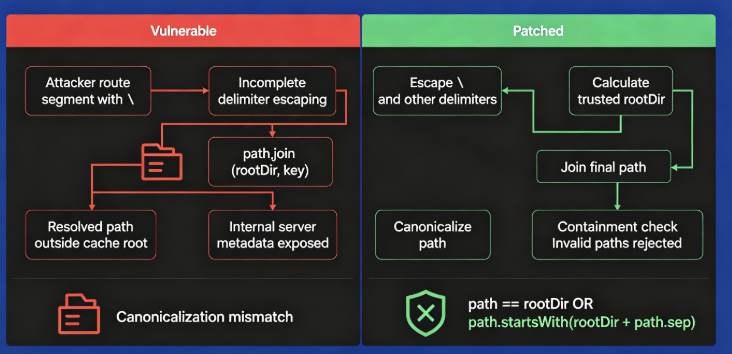
How the Patch Fixes CVE-2026-75604
The official patch uses two complementary protections.
Protection 1: Escape the Windows Path Delimiter
Next.js modifies the path-delimiter escaping logic so the backslash is handled together with other path-sensitive characters.
Conceptually:
segment.replace(
  /[\/#?\\]/g,
  encodeURIComponent
)
The important addition is:
\
(GitHub)
This closes the immediate Windows normalization discrepancy.
Protection 2: Verify the Final Path Remains Beneath Its Root
The more structurally important fix occurs in file-system-cache.ts.
Instead of directly returning something equivalent to:
path.join(rootDir, attackerInfluencedKey)
the patched implementation resolves the complete path and checks:
filePath.startsWith(rootDir + path.sep)
or whether the result equals the root itself.
If neither condition holds, it throws an error. (GitHub)
This is defense in depth.
Even if another encoded separator or unexpected normalization behavior reaches the filesystem layer in the future, the resulting path must still satisfy the trusted-root invariant.
Why the Second Fix Is More Important Architecturally
Blacklisting dangerous strings is fragile.
For example, developers may attempt filters such as:
input.replace("../", "")
Attackers then search for:
alternative encodings
alternate separators
double decoding
Unicode normalization
platform-specific syntax
nested normalization
The strongest question is not:
Does the string contain a known bad sequence?
It is:
After the operating system interprets the path,
is the file still under the directory I intended?
That is the security property Next.js now enforces.
Detection: Start With Version and Platform Inventory
For CVE-2026-75604, the highest-confidence detection method is configuration and dependency analysis.
A defensive inventory script might perform checks like:
const os = require("os");
const nextVersion = require("next/package.json").version;

console.log({
  platform: os.platform(),
  nextVersion
});
A vulnerable environment will generally require:
platform: win32
plus an affected Next.js release and relevant application configuration.
Do not use this simple script as a vulnerability scanner. Its purpose is asset triage.
PowerShell Inventory for Windows Fleets
Organizations running many Windows Node.js workloads can search for Next.js projects and inspect package metadata.
For example, defenders can identify Node.js processes:
Get-Process node -ErrorAction SilentlyContinue |
    Select-Object Id, ProcessName, Path
Then inspect service configuration:
Get-CimInstance Win32_Service |
    Where-Object {
        $_.PathName -match "node|npm|next"
    } |
    Select-Object Name, State, PathName
The objective is to answer:
Where are Node.js services running?
Which of those services run Next.js?
What versions are deployed?
Which are internet reachable?
This is usually far more valuable during emergency patching than immediately trying to reproduce RCE.
SCA and SBOM Detection
Because vulnerable Next.js versions are known precisely, Software Composition Analysis is effective for the first stage of detection.
An SBOM entry might contain:
pkg:npm/next@16.3.2
which should immediately generate remediation work for a Windows deployment.
But SCA alone cannot establish practical exploitability.
A useful prioritization equation is:
Vulnerable dependency
× Windows runtime
× reachable Next.js server
× relevant application configuration
=
high-priority exposure
Checkmarx reported that its SCA vulnerability database had already incorporated CVE-2026-75604 shortly after disclosure. (Checkmarx)
Network Detection and WAF Coverage
Cloudflare issued an emergency WAF release on August 26, 2026 updating its Next.js RCE rule metadata to explicitly identify CVE-2026-75604.
Cloudflare’s changelog says the managed rule is configured to block the associated Next.js RCE pattern. (Docs Cloudflare)
That is useful additional protection, particularly during emergency patch rollout.
However:
WAF ≠ patch
The Next.js vendor guidance remains to upgrade.
WAF rules may help detect or block known request forms, but path canonicalization vulnerabilities frequently have multiple representations. Treat perimeter detection as compensating control and telemetry, not as the permanent fix.
What Defenders Should Hunt For
Because CVE-2026-75604 involves anomalous path semantics, HTTP logs should be reviewed for suspicious requests containing unexpected path-encoding behavior.
Useful hunting categories include:
encoded path separators
unexpected backslash representations
repeated traversal-like route segments
requests toward unusual Next.js data paths
abnormally encoded dynamic route parameters
clusters of 4xx/5xx responses followed by successful requests
Avoid relying on a single literal signature.
Different layers may transform the same request:
Client
  ↓
CDN
  ↓
WAF
  ↓
Reverse proxy
  ↓
Node HTTP parser
  ↓
Next.js router
A payload logged at the edge may not look identical by the time Next.js processes it.
Investigating Possible Compromise
If an exposed Windows-hosted Next.js application was running a vulnerable release, upgrading addresses the software defect but does not answer whether exploitation already occurred.
Incident response should therefore examine the host separately.
Révision :
Windows event logs
process creation telemetry
Node.js child processes
PowerShell activity
cmd.exe execution
unexpected outbound network connections
new scheduled tasks
new Windows services
filesystem modifications
new local users
credential access
changes to application files
changes to startup directories
EDR telemetry is especially valuable.
A typical Next.js production process should not unexpectedly produce execution trees such as:
node.exe
   |
   +-- powershell.exe
or:
node.exe
   |
   +-- cmd.exe
unless the application legitimately invokes those tools.
Such behavior is not proof of CVE-2026-75604 exploitation, but it deserves investigation.
Check for Secret Exposure Too
Do not limit incident response to command execution.
The public regression test demonstrates why internal Next.js build data matters. (GitHub)
If you believe filesystem traversal occurred, rotate potentially exposed secrets according to the application’s deployment model, including:
application secrets
API credentials
database credentials
cloud credentials
session secrets
signing secrets
deployment tokens
third-party service credentials
The exact set depends on where secrets are stored.
Do not assume every secret was exposed merely because the server was vulnerable. But after confirmed exploitation, credential rotation is considerably safer than assuming the attacker stopped after reconnaissance.
How to Patch CVE-2026-75604
For Next.js 15:
npm install next@15.5.24
For Next.js 16:
npm install next@16.3.3
Equivalent pnpm commands are:
pnpm add next@15.5.24
or:
pnpm add next@16.3.3
Then rebuild the application.
Par exemple :
npm run build
and redeploy it.
The crucial word here is redeploy.
Updating a developer laptop or modifying package-lock.json in Git does not fix a production process that is still executing an older build.
After deployment, verify:
node -p "require('next/package.json').version"
inside the actual production runtime.
The official advisory identifies 15.5.24 et 16.3.3 as the patched stable releases. (GitHub)
Containers Need to Be Rebuilt
Even when the application deployment process uses immutable containers, changing the dependency declaration is not enough.
A vulnerable image may remain in:
container registry
Kubernetes nodes
old ReplicaSets
rollback versions
preview environments
disaster recovery infrastructure
A sensible response is:
Update dependency
      ↓
Regenerate lockfile
      ↓
Build new container
      ↓
Deploy new container
      ↓
Verify running version
      ↓
Remove vulnerable replicas
      ↓
Review rollback images
This becomes especially important when emergency rollback procedures can accidentally restore the vulnerable image later.
Do Not Forget Development and Staging Servers
Production servers get most of the attention during a critical CVE.
But Next.js development systems frequently have something production does not:
developer credentials.
A publicly reachable Windows staging system might contain access to:
GitHub tokens
cloud development credentials
internal APIs
test databases
CI/CD credentials
package registries
debug configuration
source maps
Even if its customer data exposure is limited, compromise can provide an attacker with a bridge into the software supply chain.
Patch externally reachable staging and development systems as part of the same incident.
CVE-2026-75604 and the August 2026 Next.js Security Release
CVE-2026-75604 was not the only critical issue addressed in the August 2026 Next.js release.
The release also included a critical vulnerability associated with the Next.js Image Optimization pipeline and AVIF processing.
That second issue is tracked separately as:
GHSA-2xp9-vwfh-vxw4
and is associated with libheif through the image-processing dependency chain.
Netlify describes both issues as unauthenticated RCE vulnerabilities and recommends upgrading to the same patched Next.js releases. (Netlify)
Cloudflare likewise issued an emergency WAF update covering CVE-2026-75604 and the AVIF-related Next.js RCE condition. (Docs Cloudflare)
The operational lesson is important:
Linux-hosted organizations should not ignore the August 2026 Next.js update simply because CVE-2026-75604 itself is Windows-specific.
CVE-2026-75604 vs the AVIF RCE
The two vulnerabilities can easily become confused because they were addressed simultaneously.
| Characteristic | CVE-2026-75604 | AVIF Image Optimization advisory |
|---|---|---|
| Produit | Next.js | Next.js / image-processing dependency chain |
| Authentification | Aucun | Aucun |
| Main condition | Windows filesystem | AVIF optimization |
| Root issue | Path traversal | Image decoding vulnerability |
| Windows only | Oui | Non |
| Stable fix | 15.5.24 / 16.3.3 | 15.5.24 / 16.3.3 |
| Sévérité | Critique | Critique |
Keeping them separated is useful when triaging infrastructure.
Par exemple :
Linux + vulnerable Next.js version
may not satisfy CVE-2026-75604’s Windows precondition, but it does not automatically eliminate exposure to the other August 2026 vulnerability.
Why Windows-Specific Vulnerabilities Are Easy to Miss
Modern JavaScript infrastructure is heavily Linux-centric.
CI frequently runs:
ubuntu-latest
Developers use macOS.
Production uses Linux containers.
As a result, security tests can accidentally exercise only POSIX filesystem semantics.
The CVE-2026-75604 patch is notable because Next.js explicitly adds its new incremental-cache traversal regression test to a Windows test workflow. (GitHub)
This is exactly what platform-sensitive security bugs require.
A unit test that passes on Linux does not prove that path validation behaves correctly on Windows.
Secure Path Handling After CVE-2026-75604
Developers building filesystem-facing APIs can extract several reusable lessons from the vulnerability.
Normalize With the Destination Platform in Mind
Do not implement filesystem security based exclusively on URL syntax.
These domains overlap, but they are not equivalent:
URL path
filesystem path
framework route
archive entry name
object-storage key
database identifier
Each has its own parsing rules.
Prefer Allowlists Over Separator Blacklists
If an identifier should contain only:
[a-zA-Z0-9_-]
then validate that property directly.
Do not try to enumerate every strange filesystem character an attacker might use.
Resolve and Verify Containment
For operations intended to stay beneath a root:
const candidate = path.resolve(root, userComponent);
then independently verify that candidate remains inside the trusted root.
Be careful with naive prefix comparisons as well; path-boundary semantics matter.
Par exemple :
C:\app\data
and:
C:\app\data-backup
share a textual prefix but are different directories.
The Next.js patch handles this by checking the trusted root followed by path.sep, or equality with the root itself. (GitHub)
Test Windows and Unix Separately
Security regression tests should include:
/
\
encoded separators
multiple decoding stages
mixed separators
absolute paths
relative paths
drive prefixes
UNC paths where relevant
The purpose is not merely input fuzzing.
It is to verify that the final normalized resource never crosses the intended security boundary.
Broader Lesson: Cache Keys Are Security-Sensitive Input
Cache keys are often treated as internal plumbing.
That assumption is dangerous when they are derived from HTTP requests.
In a framework such as Next.js, request information can influence:
routing
prerendering
incremental regeneration
cache lookup
filesystem layout
server metadata
Therefore:
user input → cache key
should be treated as carefully as:
user input → SQL query
or:
user input → shell command
when the cache key eventually becomes a filesystem path.
CVE-2026-75604 is a strong example of why internal framework abstractions still form exploitable security boundaries.
Why Framework-Level RCEs Are Particularly Dangerous
When a vulnerability exists inside application code, defenders often need to determine which specific application implemented the vulnerable pattern.
Framework vulnerabilities invert that equation.
Hundreds or thousands of applications can inherit the same defect automatically.
The risk becomes:
one framework bug
×
many applications
×
internet exposure
=
large attack surface
In addition, Next.js often sits at the public HTTP boundary of an application.
There may be no vulnerable plugin, obscure admin panel or authenticated feature to discover first.
The framework is already processing requests.
This is why unauthenticated framework RCEs receive such aggressive patch recommendations even when their exploitation complexity is not rated Low.
Should You Wait for Exploitation Evidence?
No.
The vendor describes the issue as Critical, confirms unauthenticated RCE and states that affected Windows deployments have no known workaround. (GitHub)
That is enough information to justify patching.
Waiting for confirmed exploitation introduces an unnecessary asymmetry:
Defender waits for PoC
       |
       v
Researchers publish more details
       |
       v
Attack automation improves
       |
       v
Defender begins patching
A safer response is:
Vendor confirms critical pre-auth RCE
       |
       v
Patch immediately
       |
       v
Investigate exposure
       |
       v
Monitor exploitation intelligence
Patch decisions and incident-attribution decisions do not need to happen in that order.
Is CVE-2026-75604 Being Actively Exploited?
As of August 27, 2026, public technical discussion and proof-of-concept activity appeared quickly after disclosure. Checkmarx reported on August 26 that multiple PoCs were already appearing publicly and argued that exploitation was therefore plausible. (Checkmarx)
That is not equivalent to authoritative confirmation of widespread in-the-wild exploitation.
Those two claims should remain separate.
At the time of writing, organizations should make remediation decisions based on the vendor-confirmed pre-authentication RCE impact rather than waiting for definitive telemetry showing mass exploitation.
Cloudflare’s Emergency WAF Update Is Another Signal
Cloudflare’s response is also operationally significant.
On August 26, one day after the public advisory, Cloudflare issued an emergency WAF update explicitly identifying CVE-2026-75604 in its Next.js RCE protection. (Docs Cloudflare)
A WAF vendor shipping an emergency detection update does not prove successful exploitation.
It does, however, demonstrate that the vulnerability was considered important enough to justify immediate edge-layer protection.
For organizations behind Cloudflare, managed-rule telemetry may therefore provide useful additional hunting data during remediation.
Recommended Response Checklist
Security teams dealing with CVE-2026-75604 should prioritize the following sequence.
| Priorité | Action |
|---|---|
| Critique | Identify externally reachable Windows-hosted Next.js applications |
| Critique | Find deployments running vulnerable Next.js releases |
| Critique | Upgrade to 15.5.24 or 16.3.3 or newer supported versions |
| Critique | Rebuild and redeploy production artifacts |
| Haut | Verify the package version inside the active runtime |
| Haut | Remove vulnerable replicas and old deployment images |
| Haut | Review reverse-proxy and HTTP logs for suspicious path activity |
| Haut | Review EDR telemetry for anomalous Node.js child processes |
| Haut | Investigate unexpected access to Next.js internal resources |
| Moyen | Rotate relevant secrets if compromise is suspected or confirmed |
| Moyen | Confirm staging, preview and DR environments are patched |
| Moyen | Update SBOM/SCA policies and dependency gates |
| Long term | Add cross-platform path traversal security tests |
Frequently Asked Questions
What is CVE-2026-75604?
CVE-2026-75604 is a critical Next.js vulnerability that can result in unauthenticated remote code execution on affected applications hosted on Windows filesystems. The underlying weakness is classified as CWE-22 path traversal. (GitHub)
What is the CVSS score?
The vulnerability has a CVSS 3.1 base score of 9.0 Critical.
The vector is:
CVSS:3.1/AV:N/AC:H/PR:N/UI:N/S:C/C:H/I:H/A:H
(GitHub)
Does CVE-2026-75604 require authentication?
No.
The official score assigns:
PR:N
meaning no application privileges are required. (GitHub)
Is user interaction required?
No.
The CVSS vector specifies:
UI:N
Which Next.js versions are vulnerable?
The official stable-version ranges are:
>= 13.4 < 15.5.24
>= 16.0 < 16.3.3
(GitHub)
Which Next.js versions fix CVE-2026-75604?
Upgrade to:
15.5.24
or:
16.3.3
depending on your release branch. (GitHub)
Is Linux affected by CVE-2026-75604?
The vulnerability described by CVE-2026-75604 specifically affects applications running on Windows filesystems.
The root cause exposed by the patch involves Windows backslash path semantics. Netlify, for example, explicitly states its Linux-based hosted Next.js environments are not affected by this particular CVE. (GitHub)
Is macOS affected?
The vendor advisory specifically identifies Windows-hosted servers as affected.
There is no basis in the advisory for classifying normal macOS-hosted Next.js deployments as vulnerable to CVE-2026-75604.
Can a WAF fully mitigate CVE-2026-75604?
A WAF can provide useful protection and detection. Cloudflare has shipped a managed rule covering CVE-2026-75604. (Docs Cloudflare)
But Next.js says there is no known workaround for affected Windows applications.
Upgrade the framework.
Is disabling a vulnerable route enough?
It should not be considered the official fix.
Because this is a framework-level filesystem security issue and the complete reachable attack surface may vary with routing and caching configuration, patching is substantially more reliable than attempting to block individual application routes.
Does using the App Router protect me?
Not inherently.
The vendor advisory and regression tests cover App Router behavior as well as Pages Router behavior. (GitHub)
Is CVE-2026-75604 the same as the AVIF Next.js RCE?
No.
They were addressed in the same August 2026 Next.js security release but are separate vulnerabilities.
CVE-2026-75604 is the Windows-specific path traversal/RCE issue.
GHSA-2xp9-vwfh-vxw4 concerns the Image Optimization pipeline and AVIF processing. (Netlify)
Final Assessment
CVE-2026-75604 is a particularly instructive Next.js vulnerability because its root cause is so small and its security consequence is so large.
At the code level, one important difference was a character:
\
At the architectural level, however, the failure was much deeper.
A value originating in web routing crossed into a filesystem-backed incremental cache. The input-validation layer and the Windows filesystem did not agree about what constituted a directory separator. Once Windows normalized the path according to its own rules, the security assumption made earlier in the request pipeline was no longer valid.
The official repair therefore does more than add backslash escaping.
It creates a trusted cache root, constructs the final filesystem path and validates that the resolved path remains underneath that root. The accompanying regression test explicitly exercises the Windows deployment path and protects internal Next.js server artifacts from cache traversal. (GitHub)
That is the central lesson of CVE-2026-75604:
Validation before canonicalization is not enough.

Security decisions must be made against
the resource representation that the operating
system will actually consume.
For defenders, however, the response is much simpler.
If a Next.js application is self-hosted on Windows and runs an affected version, do not spend the initial response window trying to prove exploitability. Next.js has already classified the vulnerability as Critical unauthenticated RCE, assigned it CVSS 9.0 and stated that there is no known workaround for affected Windows deployments. Upgrade to Next.js 15.5.24, 16.3.3, or an appropriate newer supported release, redeploy the application, verify the running dependency, and then investigate historical exposure. (GitHub)
The timing also increases the urgency. The advisory was published on August 25, Cloudflare issued an emergency WAF update on August 26, and independent researchers were already reporting public PoC activity by August 26. (Docs Cloudflare)
For security teams, CVE-2026-75604 should therefore be treated not merely as another framework dependency finding, but as an internet-facing framework vulnerability where Windows-hosted Next.js assets should move to the front of the remediation queue immediately.


 French
  English
  German
  Spanish
  Portuguese
  Japanese
  Korean
  Hindi
Hindi  Arabic
  Turkish
  Hebrew