
The uncomfortable truth behind “root access”
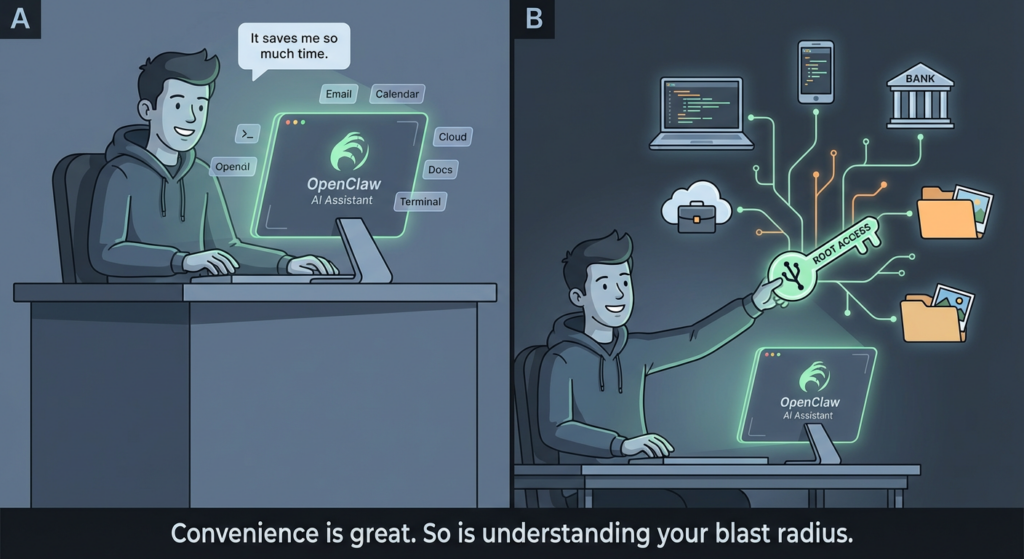
Calling it “root access” sounds dramatic—until you map what modern agentic tools actually hold.
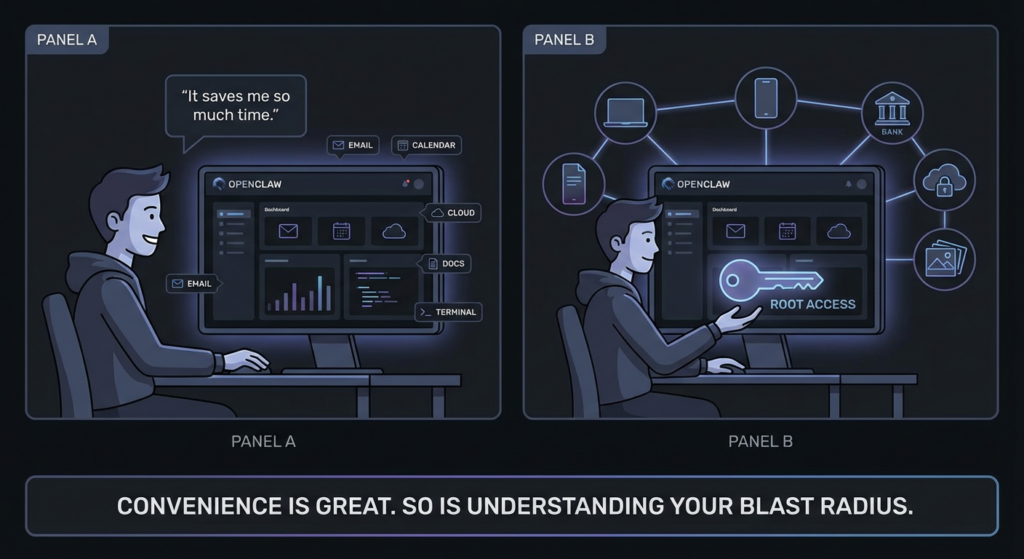
An OpenClaw-style agent can (1) see your world (files, mail, calendars, docs, chats), (2) act in your world (send messages, move money-adjacent workflows, change configs, run commands), and (3) remember the secrets that make those actions possible (API keys, OAuth tokens, session cookies, SSH creds). When those three overlap, you’ve effectively created a single compromise point for your life-admin surface.
This is why multiple security teams treat OpenClaw not as “another app,” but as an identity and execution substrate that can be hijacked if misconfigured, exposed, or tricked. WIRED’s reporting captured the core concern from operators: if it gets onto a developer machine, it can become a bridge into cloud services and sensitive systems.
Threat model: what attackers actually want from an agent
Attackers rarely care about “the agent” as a novelty. They care about what it concentrates:
The prize assets
- OAuth tokens for mail, calendars, chat tools, cloud dashboards
- API keys for AI model providers, automation platforms, CI/CD, third-party SaaS
- Credentials stored in configs, env files, local keychains, browser password stores
- High-trust action channels (your Slack, email, ticketing tools) to run social engineering at scale
- Execution on a trusted host (developer workstation, ops box, “automation server”)
The attacker’s win condition
A hijacked agent is a “quiet operator”: it can do things that look like normal user automation—searching, exporting, summarizing, posting—while bleeding secrets out of band.
That’s why endpoint and EASM vendors emphasize visibility first: you can’t mitigate what you can’t inventory, especially when the agent may be running on employee laptops and cloud VMs.
Four real-world attack paths you should assume are happening
Internet-exposed instances: the fastest way to lose control
The most common failure mode is simple: someone binds a gateway to 0.0.0.0, forwards a port, or drops it behind a permissive security group “just to test.”
Bitsight reported finding more than 30,000 exposed instances, and described a honeypot on a common OpenClaw port receiving probes within minutes—ranging from prompt injection attempts to direct WebSocket/API probing and downgrade tricks.
CrowdStrike similarly warns that misconfigured, unsecured deployments can be commandeered as a backdoor agent that takes adversary orders, including through externally exposed services.
Why exposure is uniquely dangerous for agents
Even a “read-only” compromise doesn’t stay read-only when the system you compromise can act.
Skills marketplace supply-chain: when markdown becomes an installer
If you let an ecosystem accept user-submitted skills, you are effectively running a package manager—except many users don’t treat it like one.
The Verge reported that OpenClaw’s skill extensions became “a security nightmare,” with hundreds of malicious skills delivering infostealers targeting sensitive data like API credentials and passwords, often by instructing users to run commands.
Penligent’s analysis of ClawHub poisoning frames it plainly: “setup instructions” and obfuscated steps can turn a skill’s documentation into an execution path.
Core issue: humans trust “README-shaped” text far more than they should.
Prompt injection: direct and indirect, and indirect is the enterprise killer
Direct prompt injection is obvious: attacker talks to the agent.
Indirect prompt injection is worse: attacker hides instructions inside something the agent consumes—emails, webpages, documents, tickets—so the “data layer” becomes the control plane.
This is not speculative. CrowdStrike explicitly calls out both direct and indirect instruction paths, including embedding malicious instructions in emails or webpages the agent ingests.
Penligent’s OpenClaw coverage goes deep on why indirect injection is powerful: the agent’s ability to browse, read, and summarize becomes an “Achilles’ heel” when untrusted content is treated as instructions.
Token and config theft: infostealers don’t need to “understand” OpenClaw
A lot of compromises won’t look like “agent hacking.” They’ll look like normal commodity malware doing what it always does: raiding configs, session stores, and tokens.
TechRadar, citing Hudson Rock, describes an infostealer infection extracting OpenClaw configuration data—without the malware being purpose-built for OpenClaw. That’s the point: if your agent stores valuable tokens, commodity theft scales effortlessly.
CVEs that matter: high-impact issues tied to OpenClaw deployments
Below is a practical, security-team-friendly view: what breaks, what it gives attackers, and why it still matters after patches.
SecurityScorecard summarized three high-severity advisories, including a 1-click RCE style issue leading to token theft and control, an SSH command injection vector in a macOS app, and a Docker escape via PATH manipulation, noting they were patched in a January 29 release but many instances run older versions.
| CVE | Reported impact | Why it’s high leverage | What to do now |
|---|---|---|---|
| CVE-2026-25253 | 1-click RCE style flow with token theft leading to full control | Turns “user interaction” into account takeover of the agent | Patch, rotate tokens, treat as incident if exposed |
| CVE-2026-25157 | SSH command injection in macOS app via crafted path | Local injection becomes code execution on operator workstation | Patch, restrict project paths, run as non-admin |
| CVE-2026-24763 | Docker sandbox escape via PATH manipulation | Collapses container isolation assumptions | Patch, harden runtime, AppArmor/SELinux, least privilege |
Two hard truths about CVEs in agent ecosystems
- Patch adoption lags, especially when deployments are “just a test instance” that became permanent.
- Even fully patched software is still vulnerable to exposure, supply-chainet token theft paths that are configuration and ecosystem problems, not single bugs.
Risk matrix: “root access” decomposed into what you can actually control
| Capability | What it enables | Common failure mode | Highest ROI control |
|---|---|---|---|
| Reads sensitive data | Exfil of secrets, IP, personal records | Agent runs on primary device with full home directory access | Dedicated account + scoped folders + OS sandboxing |
| Acts on your behalf | Fraud, unauthorized sharing, destructive changes | Tokens grant broad scopes; no approval gates | Scope minimization + step-up approval for high-risk actions |
| Stores long-lived tokens | Persistent takeover | Tokens in plaintext configs; no rotation | Secrets manager + encryption + short-lived tokens |
| Runs skills/scripts | Remote execution through “setup steps” | Users run unvetted commands | Allowlist + signed skills + “no shell in setup” policy |
| Internet reachable | Remote control and exploitation | Bind to 0.0.0.0 + weak auth | VPN-only access + inbound firewall deny by default |
Hardening OpenClaw without killing productivity
Never expose the control plane to the public internet
If you remember one rule, make it this:
- Loopback by default
- VPN/Tailscale for remote access Bitsight explicitly calls VPN-restricted access the safest approach compared with direct exposure.
Defensive example: host firewall deny-by-default
# Deny inbound by default, allow only from your VPN subnet (example: 100.64.0.0/10)
sudo ufw default deny incoming
sudo ufw default allow outgoing
sudo ufw allow from100.64.0.0/10 to any port18789 proto tcp
sudo ufw enable
sudo ufw status verbose
Run it like a privileged service, not a casual app
- Dedicated OS user, no admin rights
- Dedicated machine or VM for any workflow that touches production credentials
- Separate browser profile with minimal saved passwords/cookies
- Constrain filesystem scope (mount only what it needs)
Defensive example: dedicated Linux user
sudo adduser--disabled-password--gecos"" openclaw
sudo usermod-aG docker openclaw# only if unavoidable; prefer rootless containers
# Run agent processes under this account, not your daily driver user
Treat tokens as radioactive material
- Prefer short-lived credentials
- Rotate on a schedule, and rotate immediately after any suspected exposure
- Store secrets in a secrets manager rather than flat config files whenever possible
- Separate “read” scopes from “write” scopes
Rule of thumb: if the agent can post messages and export data, it can also become your best social-engineering coworker—for the attacker.
Lock down skills: allowlist beats “trust me”
Given the supply-chain reality around skills and “setup instructions,” your policy should be:
- Only allow skills from vetted publishers
- No “run this curl | bash” style installs
- Prefer reproducible packages with signatures/hashes
- Audit skill behavior and network destinations
This recommendation is directly aligned with the emerging reports of malicious skill content used to deliver infostealers.
Put guardrails on high-risk actions
If the agent can do everything, it will eventually do the wrong thing—either due to manipulation or misinterpretation.
High-risk actions to gate behind explicit approval:
- Sending outbound email to non-contacts
- Sharing files externally
- Creating API keys, changing OAuth grants
- Running shell commands
- Initiating financial-adjacent flows like invoices, refunds, gift cards
Detection ideas that work in real environments
Log and alert on the behaviors that indicate “agent hijack”
You’re looking for a combination:
- New outbound connections to unfamiliar domains right after skill install
- Sudden token refresh failures or bursts (often follow theft)
- Agent process spawning shell utilities unexpectedly
- Large exports from email/docs APIs outside normal hours
Defensive example: simple process-tree hunting concept
Alert when: openclaw_agent_process
  spawns: /bin/bash OR powershell.exe OR cmd.exe
  AND network connections: to rare domains (first-seen < 7 days)
  AND file access: reads from ~/.ssh, browser profile directories, or credential stores
External attack surface checks
CrowdStrike highlights that exposure management can enumerate publicly reachable OpenClaw services caused by misconfiguration.
Whether you use an EASM platform or your own scanning, you need continuous confirmation that nothing drifted open.
A pragmatic checklist: before you deploy, after you deploy, when you suspect compromise
| Phase | Must-do items | “Nice to have” |
|---|---|---|
| Before | VPN-only access, strong auth, dedicated OS user, minimal OAuth scopes | AppArmor/SELinux profiles, mTLS |
| After | Inventory instances, monitor ports, skill allowlist, token rotation schedule | EDR rules for agent process trees |
| Incident | Cut network, revoke tokens, rotate keys, snapshot for forensics, rebuild from clean | Notify affected SaaS, audit outbound actions |
If your team is using OpenClaw (or any agentic automation) in real workflows, the hardest operational gap is not “writing a policy.” It’s vérifiant that:
- nothing is internet-exposed,
- authentication cannot be bypassed through drifted configs,
- sensitive actions are no longer reachable through the same paths attackers use.
That’s the kind of gap Penligent is designed to close: treat your agent deployment like an attack surface, then validate fixes by attempting the same classes of reachability and workflow-abuse paths an attacker would—so you end up with preuve, not reassurance.
Penligent has already published multiple OpenClaw deep dives—including prompt injection, zero-click/RCE style chains, and skill ecosystem poisoning—so if you want, you can cross-link this article to those for readers who need hands-on validation patterns and defensive test ideas.
The bottom line: “agent root” is governable if you decompose it
You don’t need to panic-ban OpenClaw everywhere. You do need to stop treating it like a note-taking app.
If an agent can read your data, act as you, and store your tokens, then your job is to:
- remove public reachability,
- isolate the runtime,
- minimize and rotate secrets,
- govern extensions like a supply chain,
- monitor behavior like a privileged service.
That’s how you keep the productivity upside without donating your digital identity to the first scanner that finds your port.
Links
- https://www.bitsight.com/blog/openclaw-ai-security-risks-exposed-instances
- https://www.crowdstrike.com/en-us/blog/what-security-teams-need-to-know-about-openclaw-ai-super-agent/
- https://securityscorecard.com/blog/beyond-the-hype-moltbots-real-risk-is-exposed-infrastructure-not-ai-superintelligence/
- https://www.wired.com/story/openclaw-banned-by-tech-companies-as-security-concerns-mount/
- https://www.theverge.com/news/874011/openclaw-ai-skill-clawhub-extensions-security-nightmare
- https://www.techradar.com/pro/security/openclaw-ai-agents-targeted-by-infostealer-malware-for-the-first-time
- https://www.penligent.ai/hackinglabs/openclaw-ai-vulnerability-a-step-by-step-guide-to-zero-click-rce-and-indirect-injection/
- https://www.penligent.ai/hackinglabs/openclaw-ai-the-unbound-agent-security-engineering-for-openclaw-ai/
- https://www.penligent.ai/hackinglabs/when-skill-md-becomes-an-installer-the-openclaw-clawhub-poisoning-playbook/
- https://www.penligent.ai/hackinglabs/openclaw-multi-user-session-isolation-failure-authorization-bypass-and-privilege-escalation/
- https://www.penligent.ai/hackinglabs/ar/the-openclaw-prompt-injection-problem-persistence-tool-hijack-and-the-security-boundary-that-doesnt-exist/
 French
  English
  German
  Spanish
  Portuguese
  Japanese
  Korean
  Hindi
Hindi  Arabic
  Turkish
  Hebrew