
On Plesk, a PHP2Shell response has two separate targets: the PHP handlers serving your websites and the PHP engine used by the control panel. Updating one does not establish that the other received its fix. Before closing the change, match each website to its handler and record the panel’s exact update level.
There is another trap for older Linux installations: a repaired PHP package can keep the same PHP version number. Plesk’s security notice distinguishes those packages by build date. A spreadsheet that stores only “8.1.34” cannot resolve that case.
If you only manage a website subscription, ask your hosting provider to confirm both the domain’s active handler and the panel update. You do not need to guess at a server-wide command you lack permission to run. The checks below are for an administrator’s own Plesk environment; no Plesk server or vulnerable PHP runtime was tested for this article.
The Plesk fix matrix has three parts
Les Plesk security notice updated October 22, 2026 covers CVE-2026-109618 and CVE-2026-109619. It lists repaired website PHP releases, Linux legacy builds, and separate sw-engine panel updates. Use the current notice if your deployment differs from the snapshot below.
| Component and platform | Affected listing | Listed fix |
|---|---|---|
| Website PHP 8.5, Linux and Windows | 8.5.11 and earlier | 8.5.12 |
| Website PHP 8.4, Linux and Windows | 8.4.26 and earlier | 8.4.27 |
| Website PHP 8.3, Linux and Windows | 8.3.35 and earlier | 8.3.36 |
| Website PHP 8.2, Linux and Windows | 8.2.34 and earlier | 8.2.35 |
| Legacy PHP, Plesk for Linux | 8.1.34 / 8.0.30 / 7.4.33 built before October 21 | Same version numbers, builds dated October 21, 2026 |
| Panel sw-engine, Linux and Windows, 18.0.80 line | 18.0.80 Update 10 and earlier | 18.0.80 Update 11 |
| Panel sw-engine, Linux and Windows, 18.0.81 line | 18.0.81 through Update 3 | 18.0.81 Update 4 |
These are the product-specific values in Plesk’s affected and patched version tables. Its legacy build-date guidance applies to the listed Plesk for Linux packages; do not transfer it to a random PHP download or assume the same legacy option exists on Windows. For still older branches such as 5.6, 7.2 and 7.3, the notice points to extended lifecycle support. Confirm coverage with the provider rather than treating an old branch as fixed by default.
PHP’s October 21 security advisory confirms upstream fixes in 8.5.12, 8.4.27, 8.3.36 and 8.2.35 for unauthenticated remote code execution. It distinguishes upstream end-of-life branches from vendor backports. A Plesk legacy security rebuild therefore does not mean the PHP project has resumed normal support for that branch.
Map websites to handlers before touching the default PHP command
Consider a server with two sites: one uses a Plesk PHP 8.3 FPM handler and another uses PHP 8.4. An administrator runs php -v and sees a repaired 8.4 release. That observation does not identify the binary serving the first site, or the engine behind the panel. This is a deployment example, not an observation from a customer server.
Start in Tools & Settings → PHP Settings, the location named in the Plesk advisory. Then inspect the PHP settings for each domain you administer. Plesk supports different PHP version-and-handler combinations per domain, as its domain PHP settings documentation explains. The useful inventory unit is the domain-to-handler assignment, not just the server name.
On Plesk for Linux, these documented commands inspect registered handlers and usage. Replace the example handler ID with one returned by your own inventory:
plesk bin php_handler --list
plesk bin php_handler --get-usage -id plesk-php83-fpm
/opt/plesk/php/8.3/bin/php -v
Les Plesk Linux CLI reference documents --list et --get-usage; the security notice supplies the version-specific binary check. These commands are inspection examples, not commands executed here. The explicit binary reports that installation’s CLI version. Pair it with the domain assignment and a controlled application request before attributing the result to a website worker.
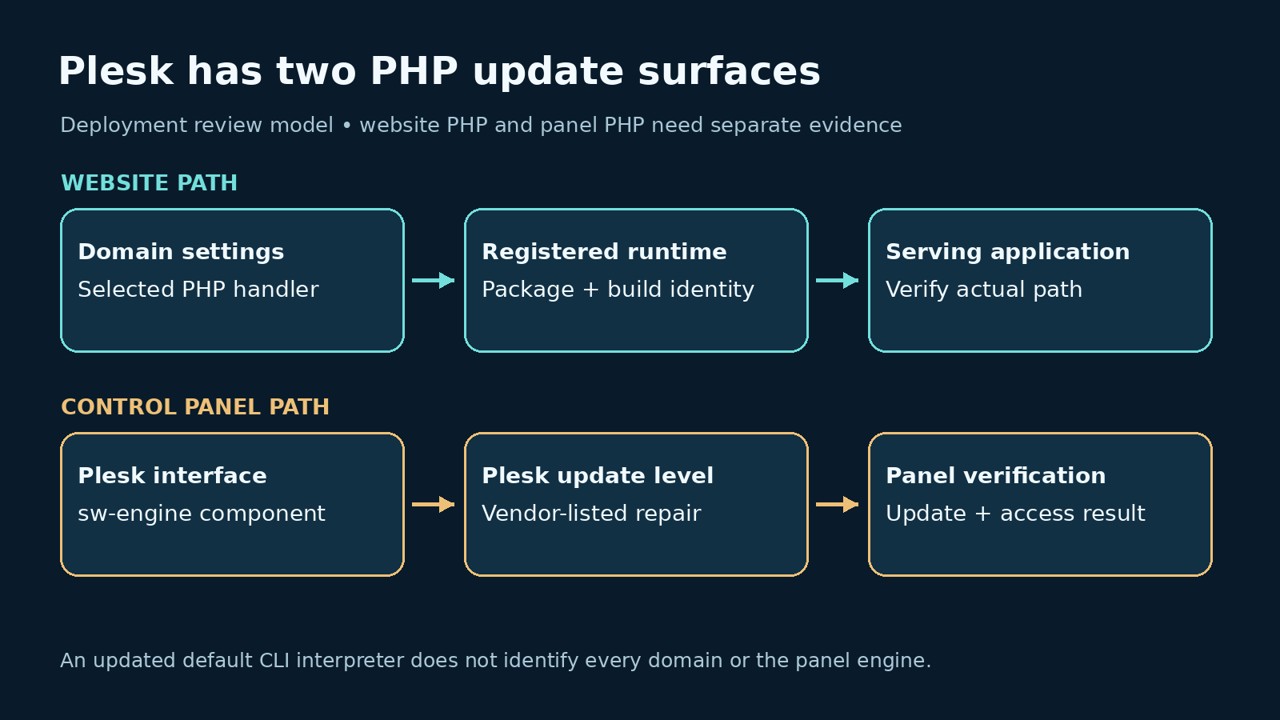
Keep custom handlers visible in the inventory. A familiar display name is weaker evidence than the registered path and package provenance. If a handler points outside the Plesk-managed PHP installation, establish its maintainer and update channel. Do the same for scheduled jobs and application workers that use a separate interpreter: they may not follow a website’s handler selection.
Do not use a bulk handler replacement as a shortcut to inventory. Moving every site to another branch combines a security update with a compatibility migration. Separate those decisions so a broken extension, application dependency, or service-plan setting does not obscure whether the intended security package was installed.
Update the panel and website components, then confirm activation
Plesk’s documented update procedure uses Tools & Settings → Updates → Update Components, followed by confirmation. It also documents plesk installer update for administrators using the command line. Review the offered components and completion result through that supported workflow. This article does not recommend an unreviewed package command across every Plesk operating system.
Capture the before-and-after panel version. The official version-check instructions include Tools & Settings → About Plesk et plesk version. If your account cannot see the build or update level, ask the host to supply it. “Plesk Obsidian 18.0.81” without its update level leaves the panel row unresolved.
plesk versionPlan for the maintenance behavior described by Plesk’s update documentation: the panel may briefly go offline if a restart is required, and an updated service component is restarted. After completion, check the actual website path and panel access. A successful installer message is valuable deployment evidence, but it does not show that every domain was mapped to the component you updated.
If handler information remains stale after binary upgrades, the CLI reference provides --reread to refresh it. That operation refreshes Plesk’s handler information; it is not a PHP patch and should not be described as restarting every website worker. Follow the applicable component’s operational instructions for activation rather than guessing a universal service name.
An offline helper that refuses to pass legacy builds by version alone
A quick version comparison is useful for sorting work, provided it does not overstate its result. The following small helper uses the supported-branch minimums from the current advisory. Legacy branches always go to vendor-build review. It deliberately rejects suffixed version strings rather than silently interpreting packaging conventions it does not understand.
import re

minimums = {(8, 2): 35, (8, 3): 36, (8, 4): 27, (8, 5): 12}
legacy = {(7, 4), (8, 0), (8, 1)}

def triage(value):
    match = re.fullmatch(r"(\d+)\.(\d+)\.(\d+)", value)
    if not match:
        return "unrecognized-version"
    major, minor, patch = map(int, match.groups())
    branch = (major, minor)
    if branch in legacy:
        return "check-linux-vendor-build"
    if branch not in minimums:
        return "vendor-guidance-required"
    if patch < minimums[branch]:
        return "below-listed-fix"
    return "version-meets-listed-minimum"

# Synthetic strings only: no server, package, service or network access.
fixtures = ["8.4.26", "8.4.27", "8.2.35", "8.1.34", "7.4.33", "5.6.40", "8.4.27-custom"]
for value in fixtures:
    print(f"{value}: {triage(value)}")
We executed this code locally against those seven synthetic inputs. The actual output was:
8.4.26: below-listed-fix
8.4.27: version-meets-listed-minimum
8.2.35: version-meets-listed-minimum
8.1.34: check-linux-vendor-build
7.4.33: check-linux-vendor-build
5.6.40: vendor-guidance-required
8.4.27-custom: unrecognized-version
The phrase version-meets-listed-minimum describes only that numeric comparison. It is not a “safe server” verdict. The helper does not connect to Plesk, inspect a package, prove a build’s origin, query the panel update, or test a worker. Its useful behavior is refusing to collapse a same-number legacy rebuild into a false pass.
For legacy packages, obtain the complete installed package/build identity and the vendor’s matching security record. A file’s modification time or the day you downloaded it is not the build date in the advisory. If the provider cannot map the installed package to its repaired build, leave that item open and arrange a supported update or migration.
What a website owner should accept as completion evidence
| Item to resolve | Specific evidence to request | Insufficient substitute |
|---|---|---|
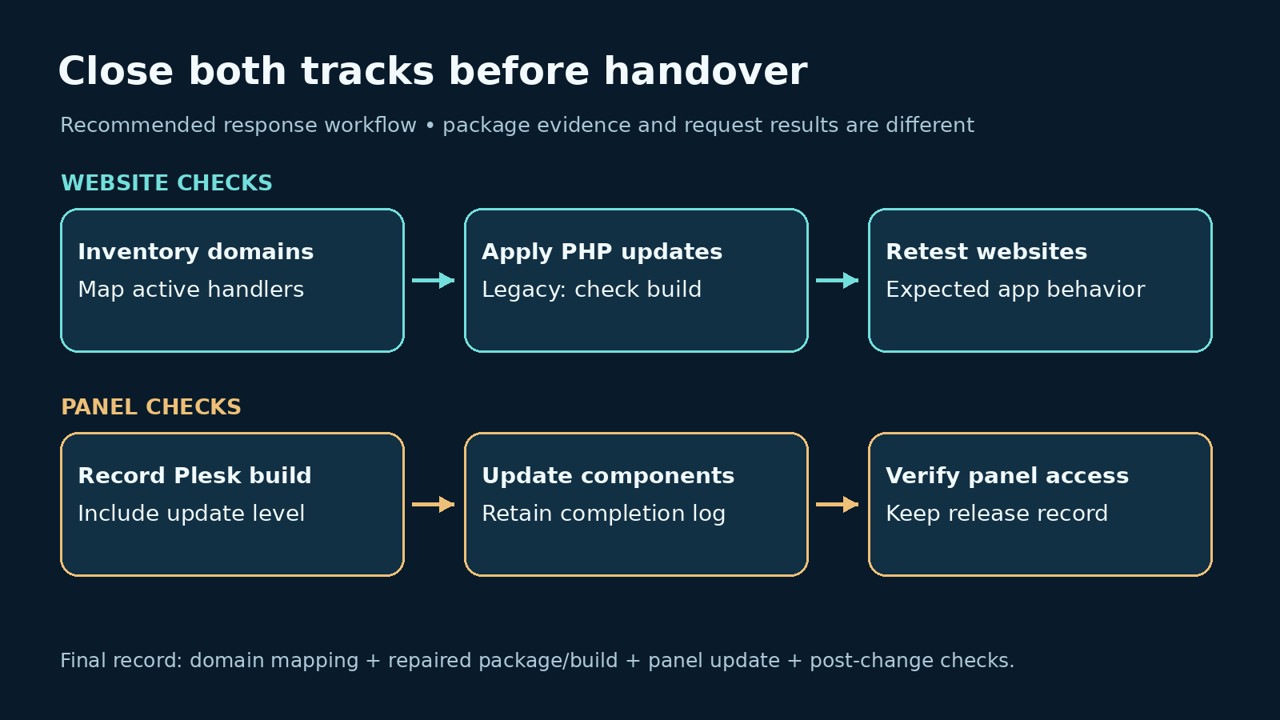
| Each production domain | Domain, selected handler, package/build and update result | One shell screenshot for the whole server |
| Panel sw-engine | Plesk release plus exact update level matching vendor guidance | “The websites now use PHP 8.4” |
| Same-number legacy package | Complete package identity matched to the vendor’s repaired build | Version number or file modification date alone |
| Running application | Post-maintenance request through the real domain and handler | An unrelated CLI interpreter’s version |
| Compatibility | Expected application behavior and error review after maintenance | A successful static home page only |
| Possible earlier compromise | Separate investigation disposition and evidence coverage | A clean update result |
For a WordPress site, choose a small set of authorized checks that reflects the site’s purpose: the public page, an authenticated administrative action, and a staging or otherwise safe form flow. For a shop, use the application’s approved payment sandbox rather than making a live charge. Keep expected outcomes explicit; a 200 response from a cached page may say little about the PHP path you intended to exercise.
If the administrator needs a temporary runtime diagnostic, expose only the minimum information in an access-controlled staging or maintenance context. Avoid leaving a public phpinfo() page behind. The following PHP snippet reports only the version and SAPI; it is an unexecuted example here, and its output is still operational information:
<?php
header('Content-Type: application/json');
header('Cache-Control: no-store');
echo json_encode([
    'version' => PHP_VERSION,
    'sapi' => PHP_SAPI
]);
Remove the diagnostic after collection and verify it is no longer reachable. Record the domain, collection time and handler mapping beside the result. This checks runtime identity and ordinary request handling; it does not reproduce either memory-corruption flaw or establish that a crafted exploit would fail.
If you use Penligent for a separate authorized website assessment, agree on the target, permitted authentication, evidence and retest scope first. Keep its application findings alongside the host’s update records. A remote application test should not be treated as proof of a private Plesk package build or panel patch level unless that evidence was actually made available.
When an update stalls or a site stops working
If the update is absent, first compare the operating system, component and branch with the vendor’s notice. Ask the hosting provider about repository availability and the supported update route. Do not disable package-signature verification to force installation. A download or repository error needs resolution; it does not turn an unverified binary into an acceptable security fix.
If a site fails after maintenance, preserve the error and its handler assignment before switching branches. Check the interpreter selected for that domain, extension availability, application compatibility and the component update result. Change one variable at a time. A rollback that restores an affected binary also restores the unresolved security condition, so make that tradeoff visible and time-bound with the responsible operator.
Unexpected files, account changes, scheduled tasks or process activity require a separate investigation. Preserve relevant logs and artifacts under the incident procedure before cleanup. Successful patching addresses the software defect; it does not explain actions taken before the fix. Equally, a service restart or a normal deployment file is not automatically evidence of compromise.
Plesk PHP2Shell questions
Does updating WordPress fix PHP2Shell on Plesk?
- No. WordPress and the PHP runtime are different components. Confirm the website’s handler update and the separate Plesk panel update with the administrator.
My Plesk server shows PHP 8.1.34. Is it fixed?
- The number alone is inconclusive. Plesk lists repaired Linux builds with that same number dated October 21, 2026. Match the installed package to the vendor’s build guidance.
Which Plesk updates contain the sw-engine repair?
- The advisory lists Obsidian 18.0.80 Update 11 and 18.0.81 Update 4 for Linux and Windows. Check the complete update level or newer applicable vendor guidance.
Does a repaired PHP CLI version prove every site is repaired?
- No. Inventory the domains using each handler and verify the intended running website path. The panel engine and custom interpreters need separate records.
Can the version helper verify my Plesk server?
- No. It sorts supplied version strings offline. Our test used synthetic data; no real Plesk installation or exploit was exercised.
The video below introduces an authorized application-testing workflow. It is not a Plesk patch installation walkthrough or a PHP2Shell exploit demonstration.
The useful handover is a domain-and-panel record another administrator can verify. Keep the handler mapping, repaired package identity, panel update level and post-maintenance result together. That resolves the Plesk-specific gaps that a single “PHP updated” message leaves unanswered.

 French
  English
  German
  Spanish
  Portuguese
  Japanese
  Korean
  Hindi
Hindi  Arabic
  Turkish
  Hebrew