
CVE-2026-20230 is not a routine “check the version and move on” advisory. It affects Cisco Unified Communications Manager and Cisco Unified Communications Manager Session Management Edition when the Cisco WebDialer service is enabled. Cisco describes it as a server-side request forgery vulnerability caused by improper input validation for specific HTTP requests. A remote, unauthenticated attacker could send a crafted request to an affected device, write files to the underlying operating system, and use that condition later to elevate privileges to root. Cisco assigned the advisory a Critical Security Impact Rating even though the CVSS v3.1 base score is 8.6 High, because the downstream privilege impact can reach root. (Cisco)
That last detail changes the verification standard. A safe verification workflow for CVE-2026-20230 should not mean “run a public exploit and see whether a file appears.” Public proof-of-concept code exists, independent reporting has described exploitation attempts, and CISA has added the CVE to its Known Exploited Vulnerabilities catalog. Verification should therefore answer four practical questions: whether the product and version are in scope, whether WebDialer is enabled, whether a reachable path exists from a hostile or low-trust network, and whether there are signs that someone already tried to use the bug. (Cisco)
CVE-2026-20230 at a glance
| Champ d'application | Current public information |
|---|---|
| CVE | CVE-2026-20230 |
| Vendor and products | Cisco Unified Communications Manager and Cisco Unified Communications Manager Session Management Edition |
| Classe de vulnérabilité | Server-side request forgery with file-write consequences |
| CWE | CWE-918, Server-Side Request Forgery |
| Authentication required | None, according to Cisco and NVD |
| Interaction avec l'utilisateur requise | Aucun |
| Main prerequisite | Cisco WebDialer service must be enabled |
| Default WebDialer state | Disabled by default, according to Cisco |
| CVSS v3.1 | 8.6 High, vector AV:N/AC:L/PR:N/UI:N/S:C/C:N/I:H/A:N |
| Cisco advisory severity | Critical Security Impact Rating |
| Main impact | File write to the underlying operating system, later usable for root privilege escalation |
| Cisco fixed releases | Release 14: 14SU6. Release 15: 15SU5 or a version-specific COP path |
| Workaround | Cisco says there are no workarounds that address the vulnerability |
| Temporary mitigation | Disable Cisco WebDialer Web Service if operationally acceptable |
| Known exploitation | CISA KEV entry and public reporting indicate active exploitation signals after disclosure |
Cisco’s official advisory is the source of truth for the affected product family, severity, WebDialer prerequisite, mitigation guidance, and fixed-release table. NVD repeats the core description and shows the CVSS vector contributed by Cisco, while CISA’s KEV metadata in the NVD record marks the issue as known exploited and lists a short remediation deadline for covered federal systems. (Cisco)
What makes this SSRF different
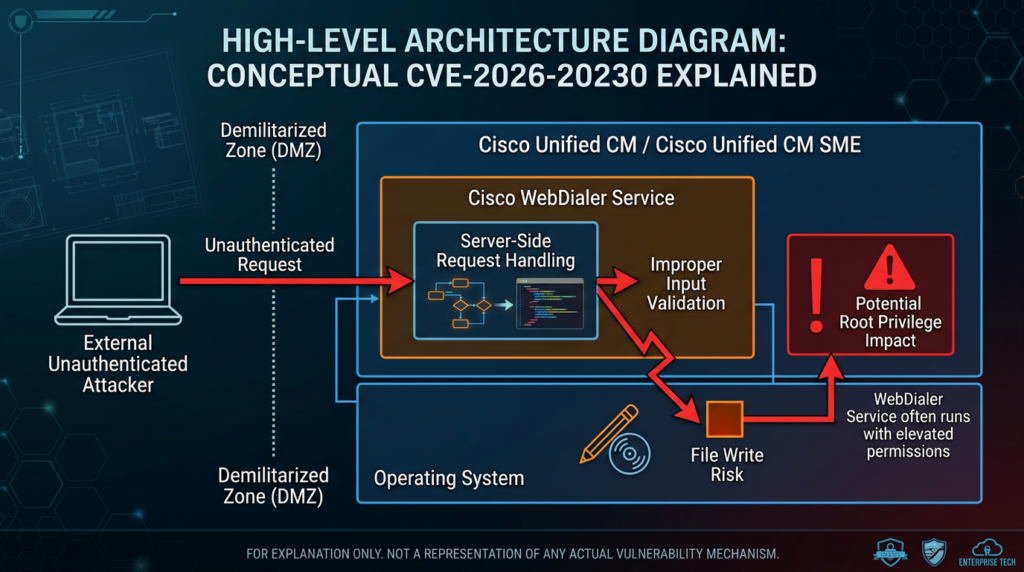
Most SSRF explanations start with a simple model: an attacker supplies a URL, host, path, or resource identifier; the server fetches something on the attacker’s behalf; and the attacker uses the server’s network position to reach something they could not reach directly. OWASP describes SSRF as a condition where a web application fetches a remote resource without validating a user-supplied URL, allowing an attacker to coerce the application into sending a request to an unexpected destination even when network controls such as firewalls or VPNs would otherwise block direct access. (owasp.org)
CVE-2026-20230 is more serious than the lowest-impact version of that pattern. Cisco does not merely say that an attacker can make the Cisco Unified CM server request an internal URL. The official advisory says successful exploitation can allow file writes to the underlying operating system, and those files can later be used to elevate privileges to root. That is why Cisco’s Security Impact Rating is Critical even though the numerical CVSS base score is High. (Cisco)
The WebDialer requirement is equally important. Cisco WebDialer is a Unified CM service that provides click-to-dial functionality through web services-based and browser-based interfaces. Cisco’s developer documentation describes SOAP and URL implementations and notes that 8443 is the secure HTTPS port while 8080 is the insecure HTTP port and is not recommended. (Cisco DevNet)
The operational takeaway is simple: the vulnerability is not a generic Cisco Unified CM exposure that affects every deployment regardless of configuration. It affects Cisco Unified CM and Unified CM SME deployments where WebDialer is enabled. However, “disabled by default” is not a defense by itself. Many production systems have been modified from defaults to support call-control integrations, internal directories, click-to-dial workflows, or older collaboration tooling.
Safe verification starts with evidence, not exploitation
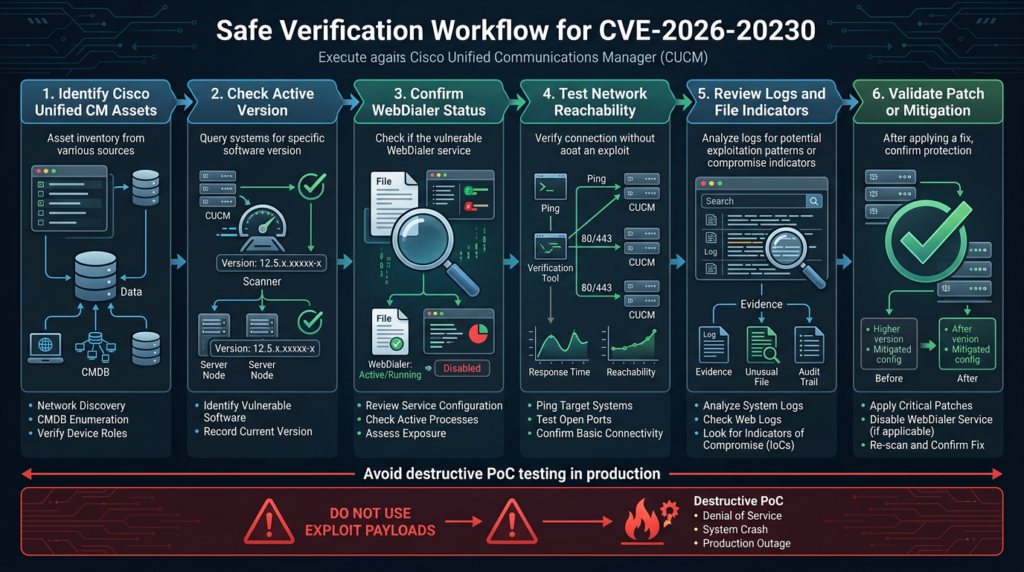
For a vulnerability with public exploit material and active exploitation signals, a responsible verification plan should be evidence-driven and non-destructive. The goal is to prove exposure or non-exposure with the least invasive method that produces a reliable answer.
A good verification record for CVE-2026-20230 contains at least these artifacts:
| Evidence type | What it proves | Pourquoi c'est important |
|---|---|---|
| Product inventory | The asset is Cisco Unified CM or Unified CM SME | Prevents wasting time on unrelated Cisco collaboration products |
| Active software version | The running release is older than, equal to, or newer than the fixed release | Determines whether software remediation is required |
| WebDialer service status | The required vulnerable service is Started or Not Running | Distinguishes vulnerable-by-version from actually exposed-by-service |
| Network reachability | The service can or cannot be reached from relevant network zones | Converts a software issue into a real attack-path decision |
| Patch or COP record | The correct fixed release or package has been applied | Prevents “we installed something” from replacing actual remediation evidence |
| Logs and file review | There are or are not signs of exploit attempts or suspicious file writes | Matters because KEV status changes the problem from patching to possible incident review |
| Post-change validation | The system remains functional and the vulnerable path is closed or fixed | Confirms remediation rather than assuming it |
Running a public exploit against production is not a clean shortcut. It may write a file, change service state, pollute forensic evidence, trigger incident alarms, break support assumptions, or leave behind artifacts that later responders mistake for attacker activity. A lab reproduction can be valuable for research teams with authorization and isolation. Production verification should be based on Cisco’s version and service-state checks, controlled network tests, scanner corroboration, and forensic review.
Step 1, confirm the Cisco Unified CM asset set
Start by building the asset list. CVE-2026-20230 can only be handled well if the organization knows which Cisco Unified CM and Unified CM SME systems exist, which nodes are active, which nodes are subscribers, which systems are test or disaster-recovery systems, and which services sit behind a load balancer, reverse proxy, NAT rule, or vendor access path.
Common sources include CMDB entries, DNS records, TLS certificate inventory, Cisco administration records, network firewall objects, load-balancer pools, vulnerability scanner results, VoIP engineering documentation, and change tickets. Do not assume the primary Publisher node is the only system that matters. Unified communications estates often include Subscriber nodes, SME deployments, legacy lab systems, regional nodes, staging environments, and temporary migration systems that remain reachable long after a project ends.
A non-invasive network discovery pass can help identify candidates, but it should not be treated as proof of vulnerability. The following example only looks for HTTPS services and basic service metadata on owned address ranges. It does not send exploit parameters.
# Use only on authorized address ranges.
# This identifies candidate HTTPS services and saves service metadata.
nmap -sV -Pn -p 443,8443,8080 \
  --version-light \
  -oA cucm_candidate_services \
  10.20.0.0/16
A more conservative first pass is to check only whether common web ports are open:
# Low-noise port reachability check for owned networks.
nmap -Pn -p 443,8443,8080 \
  --open \
  -oA cucm_open_web_ports \
  10.20.0.0/16
When the asset list is small, a simple TLS and HTTP reachability script can help triage candidates without touching vulnerability-specific endpoints.
#!/usr/bin/env python3
"""
Non-destructive Cisco Unified CM candidate reachability check.

Input:
  assets.txt, one hostname or IP per line

Output:
  CSV rows showing host, port, TCP reachability, TLS subject if available,
  and the first HTTP status line if a basic request succeeds.

This script does not send exploit payloads and does not request CVE-specific paths.
Use only on systems you own or are authorized to assess.
"""

import csv
import socket
import ssl
from pathlib import Path

PORTS = [443, 8443, 8080]
TIMEOUT = 4

def tcp_connect(host: str, port: int) -> bool:
    try:
        with socket.create_connection((host, port), timeout=TIMEOUT):
            return True
    except OSError:
        return False

def get_tls_subject(host: str, port: int) -> str:
    if port == 8080:
        return ""
    context = ssl.create_default_context()
    context.check_hostname = False
    context.verify_mode = ssl.CERT_NONE
    try:
        with socket.create_connection((host, port), timeout=TIMEOUT) as sock:
            with context.wrap_socket(sock, server_hostname=host) as ssock:
                cert = ssock.getpeercert()
                subject = cert.get("subject", [])
                flattened = []
                for item in subject:
                    for key, value in item:
                        flattened.append(f"{key}={value}")
                return "; ".join(flattened)
    except Exception as exc:
        return f"TLS_ERROR: {exc.__class__.__name__}"

def get_http_status(host: str, port: int) -> str:
    scheme = "https" if port in (443, 8443) else "http"
    request = (
        f"HEAD / HTTP/1.1\r\n"
        f"Host: {host}\r\n"
        f"User-Agent: exposure-check/1.0\r\n"
        f"Connection: close\r\n\r\n"
    ).encode()

    try:
        raw_sock = socket.create_connection((host, port), timeout=TIMEOUT)
        if scheme == "https":
            context = ssl.create_default_context()
            context.check_hostname = False
            context.verify_mode = ssl.CERT_NONE
            sock = context.wrap_socket(raw_sock, server_hostname=host)
        else:
            sock = raw_sock

        with sock:
            sock.settimeout(TIMEOUT)
            sock.sendall(request)
            data = sock.recv(256)
            first_line = data.split(b"\r\n", 1)[0].decode(errors="replace")
            return first_line
    except Exception as exc:
        return f"HTTP_ERROR: {exc.__class__.__name__}"

def main() -> None:
    hosts = [
        line.strip()
        for line in Path("assets.txt").read_text().splitlines()
        if line.strip() and not line.strip().startswith("#")
    ]

    with open("cucm_candidates.csv", "w", newline="") as handle:
        writer = csv.writer(handle)
        writer.writerow(["host", "port", "tcp_open", "tls_subject", "http_status"])

        for host in hosts:
            for port in PORTS:
                open_state = tcp_connect(host, port)
                tls_subject = get_tls_subject(host, port) if open_state else ""
                http_status = get_http_status(host, port) if open_state else ""
                writer.writerow([host, port, open_state, tls_subject, http_status])

if __name__ == "__main__":
    main()
This script can help build an exposure map, but it does not determine whether CVE-2026-20230 is exploitable. It only answers a narrower question: which candidate systems have reachable web services that deserve deeper authorized review.
Step 2, confirm the active software version
After identifying candidate systems, confirm the active Cisco software version from the system itself. Cisco’s CLI reference for Unified Communications Solutions documents show version active as the command that displays the software version on the active partition, and it applies to Unified Communications Manager, IM and Presence Service on Unified Communications Manager, and Cisco Unity Connection. (Cisco)
admin:show version active
The output should be recorded in the change ticket or vulnerability record. If the system has an inactive partition with a different version, record that as well, but do not confuse the inactive partition with the running version. For remediation decisions, the active version is the version serving the current workload.
Cisco’s fixed-release table for CVE-2026-20230 is direct: Cisco Unified CM and Unified CM SME Release 14 are fixed in 14SU6. Release 15 is fixed in 15SU5, listed by Cisco with a September 2026 note, or by applying the relevant version-specific COP path. Cisco also warns that patches are version-specific and that customers should consult the README attached to the patch. (Cisco)
| Branche | Cisco fixed path | Verification decision |
|---|---|---|
| Release 14 before 14SU6 | Upgrade to 14SU6 | Treat as vulnerable if WebDialer is enabled until upgraded or mitigated |
| Release 14 at 14SU6 or later fixed build | Fixed for this advisory | Still verify WebDialer exposure and check for past exploitation if previously exposed |
| Release 15 before 15SU5 without the correct COP | Not fully remediated for this advisory | Apply Cisco’s fixed path or version-specific COP guidance |
| Release 15 with the correct Cisco COP | Temporarily remediated according to Cisco’s fixed path | Preserve COP evidence, README, install record, and post-install verification |
| Unknown version | Unknown risk | Do not close the ticket until version is confirmed from the system or Cisco tooling |
Version checks are necessary but not sufficient. Tenable’s Nessus plugin 318849, for example, describes the issue as a self-reported version finding and recommends upgrading to the relevant fixed version. That is useful at scale, but it does not replace direct confirmation of WebDialer state, network exposure, and actual remediation on the system. (Tenable®)
Step 3, determine whether WebDialer is enabled
Cisco’s advisory provides the most important operational test: WebDialer status. To determine whether WebDialer is enabled, Cisco instructs administrators to log in to the Cisco Unified CM Administration interface, switch to Cisco Unified Serviceability, open Control Center – Feature Services, and check the CTI Services section for Cisco WebDialer Web Service. If the status is Started, WebDialer is enabled. (Cisco)
This is the key distinction that many quick summaries miss. A system may be on an affected version but not exploitable through this CVE if WebDialer is not running. Conversely, a system may appear “internal only” but still represent serious risk if WebDialer is enabled and reachable from a broad VPN, vendor support network, flat internal network, or exposed reverse proxy.
| WebDialer status | Risk interpretation | Action |
|---|---|---|
| Started | The required service condition exists | Patch immediately or disable WebDialer if not needed; check exposure and logs |
| Not Running | The required service condition is not currently present | Still patch if the version is affected, because services can be re-enabled later |
| Unknown | Verification incomplete | Do not close the finding; get admin confirmation or console evidence |
| Started but business-critical | Immediate disablement may break workflows | Patch or apply Cisco’s fixed path, restrict access, increase monitoring, plan a controlled change |
| Recently disabled after exposure | Current exposure is reduced | Still review logs and file indicators from the period when it was enabled |
If WebDialer is not operationally required, Cisco says administrators may disable the Cisco WebDialer Web Service until a patch can be applied. Cisco also states that there are no workarounds that address the vulnerability, so disabling WebDialer should be treated as a mitigation, not a complete substitute for applying fixed software. (Cisco)
Cisco’s own WebDialer feature documentation reinforces why service-state confirmation matters. WebDialer is an optional feature that must be activated through Cisco Unified Serviceability by selecting Service Activation, choosing the relevant server, and checking Cisco WebDialer Web Service under CTI Services. The same Cisco documentation also describes WebDialer tracing and log collection paths, which become useful during incident review. (Cisco)
Step 4, verify network reachability without exploit traffic
Once version and WebDialer state are known, test reachability from the network zones that matter. A Cisco Unified CM node that is vulnerable by version and has WebDialer enabled is not equally risky in every environment. Reachability determines who can attempt the bug.
Do not limit reachability testing to “internet or not internet.” For many enterprise systems, the meaningful question is whether a low-trust user, contractor VPN, compromised workstation, branch network, guest-adjacent network, partner connection, or vendor support path can reach the service. CVE-2026-20230 is unauthenticated, so the lack of user credentials is not a meaningful barrier once the vulnerable service is reachable.
A safe reachability check can use basic TLS and HTTP requests that do not include vulnerability parameters:
# Replace hostnames with authorized Cisco Unified CM nodes.
# This checks basic HTTPS reachability only.
for host in cucm01.example.com cucm02.example.com; do
  echo "=== $host:8443 ==="
  curl -k -I --max-time 5 "https://${host}:8443/" || true
done
If your organization has a segmented environment, repeat the same test from representative source zones:
Source zone                         Test result to record
---------------------------------------------------------
Internet monitoring node             Should normally fail
Corporate VPN standard user subnet    Should fail unless explicitly justified
Voice engineering admin subnet        May succeed if documented
Jump host subnet                      May succeed if access controlled
Vendor remote support path            Should be time-bound and logged
Branch office user subnet             Should normally fail
EDR-isolated test host                Should fail
The objective is not to prove the exploit works. The objective is to prove whether an unauthenticated attacker in a given network position can reach the vulnerable service condition. That answer drives urgency, containment, and monitoring.
Step 5, use scanners as corroboration, not final authority
Commercial scanner checks are useful for scale. Tenable’s Nessus plugin 318849 identifies Cisco Unified Communications Manager 14.x before 14SU6 and 15.x before 15SU5 as affected by the SSRF advisory, and its description mirrors the Cisco advisory’s core impact statement. Tenable also notes that WebDialer must be enabled and is disabled by default. (Tenable®)
Qualys ThreatPROTECT similarly summarizes the vulnerability and describes the WebDialer status check through Cisco Unified CM Administration and Cisco Unified Serviceability. It also lists the remediation paths as Release 14SU6 and Release 15SU5 or COP. (threatprotect.qualys.com)
Scanners are strongest when they answer inventory and version questions at scale. They are weaker when the real decision depends on internal service state, temporary COP installation, nonstandard access controls, or the difference between “reachable from scanner network” and “reachable from a hostile path.”
| Scanner result | Direct evidence | Practical interpretation |
|---|---|---|
| Vulnerable by version | show version active confirms affected branch | Treat seriously, then check WebDialer and exposure |
| Not vulnerable by version | Active version is fixed or COP is installed | Verify patch evidence and service exposure anyway |
| Scanner cannot authenticate | No reliable version | Do not assume safe; use admin CLI or Cisco tooling |
| Scanner sees web service | Network path exists from scanner location | Repeat from relevant attacker-like source zones |
| Scanner reports false positive after COP | COP record and Cisco README confirm fix | Document the exception and tune scanner evidence |
| Scanner reports clean but WebDialer is enabled on old version | Direct service and version evidence conflict with scan | Treat direct Cisco evidence as higher priority |
A mature vulnerability record should include both automated scanner output and system-native evidence. If they disagree, the record should explain why.
Step 6, do not use a public PoC against production
Public technical write-ups can be useful for defenders, but CVE-2026-20230 is a case where the public exploit path includes file-write behavior and webshell-oriented consequences. SSD Secure Disclosure’s technical write-up states that the vulnerability can let unauthenticated attackers write arbitrary files and use that to run arbitrary commands or code on the server. It also credits an independent researcher and links back to Cisco’s fix. (SSD Secure Disclosure)
That information helps defenders understand why the issue is urgent. It should not become the default validation method in production.
A destructive proof creates multiple problems:
| Problème | Pourquoi c'est important |
|---|---|
| It writes to a production system | You may create the same type of artifact you are trying to detect |
| It can change forensic evidence | Incident responders may be unable to distinguish your test from attacker activity |
| It may break support assumptions | Vendor support may need a clean state for troubleshooting |
| It can trigger downstream tooling | EDR, SIEM, WAF, and SOAR may escalate the test as a real incident |
| It may leave residue | Even a “test file” can become a policy violation on regulated systems |
| It proves too much in the wrong way | Version, service state, and reachability can prove exposure without changing the host |
Use the exploit narrative to design detections and prioritize remediation. Use non-destructive verification to close the vulnerability record.
Step 7, check for exploitation attempts
CVE-2026-20230 cannot be treated as a patch-only issue once a system has been exposed. Cisco’s advisory initially said Cisco PSIRT was aware of proof-of-concept code but not aware of malicious use as of the advisory version. Later public reporting cited Defused observations of exploitation attempts, and NVD’s CISA-linked metadata now shows the CVE in the KEV catalog with active exploitation status. These statements are not identical because they come from different times and sources; defenders should read them chronologically rather than treating them as a contradiction. (Cisco)
BleepingComputer reported on June 23, 2026, that Defused observed exploitation attempts against Cisco Unified CM WebDialer, including file-write payload activity against decoys. The same report said the observed activity appeared reconnaissance-oriented at that point, but it also noted that SSD had published a technical write-up and proof-of-concept material. (BleepingComputer)
Start by defining the exposure window:
Exposure window worksheet

1. First date the affected version was deployed:
2. First date WebDialer was enabled:
3. First date the service became reachable from each source zone:
4. Date Cisco advisory was published:
5. Date public PoC became available:
6. Date WebDialer was disabled, if applicable:
7. Date fixed release or COP was applied:
8. Date post-patch validation was completed:
Then search logs and file systems for indicators of suspicious behavior. The exact log locations and collection process vary by deployment and support workflow, but Cisco’s WebDialer feature documentation says WebDialer trace files can be accessed with CLI commands such as file get activelog tomcat/logs/webdialer/log4j et file get activelog tomcat/logs/redirector/log4j. (Cisco)
admin:file get activelog tomcat/logs/webdialer/log4j
admin:file get activelog tomcat/logs/redirector/log4j
Useful investigation pivots include:
| Signal | Pourquoi c'est important |
|---|---|
| Requests to WebDialer endpoints from unusual IPs | May indicate probing or exploitation attempts |
| Access to cluster status or installation-status paths from non-admin paths | Public research linked the vulnerable flow to cluster-install status behavior |
| Encoded traversal patterns | File-write exploit attempts often require path manipulation |
| Suspicious references to file URI behavior | Public reporting described file-oriented payloads in observed attempts |
| Unexpected JSP or web application files | Arbitrary file write can become webshell staging |
| New or modified files under web-accessible Tomcat paths | A high-value persistence signal |
| Unknown services or handlers exposed after suspicious requests | Could indicate service manipulation |
| WebDialer trace anomalies | Helps correlate request paths and timing |
| Reverse proxy or load-balancer logs | May preserve evidence missing from the application host |
| NetFlow to or from unusual sources | Useful when HTTP logs are incomplete |
Avoid publishing or spreading live exploit strings inside internal tickets unless necessary for detection engineering. A safer SIEM query can look for suspicious path categories and encoding patterns rather than full payload replication.
Example detection logic, adapt to your SIEM

source = web_proxy OR source = load_balancer OR source = cucm_tomcat
AND (
  uri_path CONTAINS "/webdialer/"
  OR uri_path CONTAINS "/cmplatform/"
  OR uri_path CONTAINS "installClusterStatus"
)
AND (
  uri_query CONTAINS "%2f"
  OR uri_query CONTAINS "%2e"
  OR uri_query CONTAINS "../"
  OR uri_query CONTAINS "file:"
  OR uri_query CONTAINS "LogHandler"
  OR uri_query CONTAINS ".jsp"
)
This query is intentionally broad. It should generate leads for review, not automatic compromise declarations. Tune it against normal WebDialer use, known monitoring systems, admin subnets, and Cisco support activity.
Step 8, validate remediation
A remediation is not complete when someone says “we patched it.” It is complete when the team can show that the affected software path has been removed or fixed, that WebDialer state is intentional, that network exposure is reduced, and that any prior exposure period has been reviewed for compromise.
For Release 14, Cisco’s first fixed release is 14SU6. For Release 15, Cisco lists 15SU5 or a version-specific COP path, with the advisory noting that patches are version-specific and that administrators should consult the README attached to the patch. (Cisco)
A post-remediation checklist should look like this:
| Contrôle | Evidence to save | Failure signal |
|---|---|---|
| Active version | show version active output | Still on affected branch |
| COP installation, if used | Cisco package name, README, install log, change ticket | COP does not match the active version |
| WebDialer status | Screenshot or export showing Started or Not Running | Status unknown or changed without approval |
| Network access | Test results from internet, VPN, admin, and branch zones | Low-trust zones can still reach the service |
| Scanner result | Updated Tenable, Qualys, or internal scanner evidence | Scanner still reports vulnerable and no exception is documented |
| Logs reviewed | Search time range, sources, query, analyst notes | Suspicious hits unresolved |
| Business owner sign-off | Voice/collaboration owner approval | WebDialer disabled without business validation or enabled without security approval |
| Contrôle | Alert logic for suspicious WebDialer and file-write patterns | No detection coverage after exposure |
If WebDialer must remain enabled, the system should be patched first, then restricted. A common mistake is treating patching and segmentation as alternatives. They are not. Patch the vulnerable code path, then reduce who can reach the service.
Step 9, reduce the attack surface around WebDialer
Cisco states that WebDialer is disabled by default and required for exploitation. That makes WebDialer status one of the most important security levers for this CVE. If the feature is not needed, disable it. If the feature is needed, restrict who can reach it and monitor its use.
Cisco’s advisory gives a mitigation path for disabling WebDialer: open Cisco Unified Serviceability, go to Service Activation, and uncheck Cisco WebDialer Web Service under CTI Services. Cisco cautions that customers should evaluate the effect of any mitigation on their environment before deployment. (Cisco)
Practical hardening should include:
| Zone | Action recommandée |
|---|---|
| WebDialer service | Disable if not required; otherwise document owner and business reason |
| HTTPS exposure | Prefer secure access paths; avoid insecure HTTP exposure where possible |
| Source restrictions | Limit access to known application servers and admin networks |
| VPN segmentation | Do not allow broad VPN user pools to reach Unified CM web services by default |
| Vendor access | Make support access time-bound, logged, and approved |
| Load balancers | Confirm WebDialer paths are not unintentionally published |
| Reverse proxies | Remove stale forwarding rules and legacy URL mappings |
| Logging | Keep WebDialer, Tomcat, proxy, firewall, and NetFlow records long enough for incident review |
| File integrity | Monitor web-accessible application directories and high-risk log/webapp paths |
| Change control | Treat WebDialer enablement as a security-relevant change |
OWASP’s SSRF prevention guidance is written for developers, but the defensive principles still translate to vendor-product operations. Where you cannot change Cisco’s code, apply the controls you do own: restrict destinations and sources, reduce unnecessary service exposure, block low-trust access paths, and monitor unusual server-side request behavior. (cheatsheetseries.owasp.org)
Step 10, understand what related CVEs teach
CVE-2026-20230 belongs to a broader family of high-impact infrastructure vulnerabilities where the initial bug class does not fully describe the business risk. Three comparisons help frame the issue without overstating it.
CVE-2019-0227, Apache Axis SSRF and legacy web services
NVD describes CVE-2019-0227 as an SSRF vulnerability affecting Apache Axis 1.4, a distribution last released in 2006. The successor Axis2 was not affected, and legacy users were encouraged to build from source. (nvd.nist.gov)
The relevance is not that CVE-2019-0227 and CVE-2026-20230 are the same bug. They are not. The relevance is architectural. Web-service stacks, SOAP-era components, XML service endpoints, and legacy integration surfaces often survive inside enterprise systems long after the security team stops paying attention to them. Cisco’s WebDialer documentation itself describes SOAP and URL implementations for click-to-dial workflows. That kind of interface may be business-useful, but it should not be broadly reachable without scrutiny. (Cisco DevNet)
Mitigation lessons from the Axis comparison are practical: inventory old service endpoints, restrict who can reach them, remove unused integrations, and avoid assuming that an internal web-service interface is harmless because ordinary users never browse to it.
CVE-2026-20131, Cisco management-plane compromise
A closely related operational lesson comes from Cisco management-plane vulnerabilities. Penligent’s analysis of CVE-2026-20131, a Cisco Secure Firewall Management Center issue, focuses on the risk of treating administrative and control systems as ordinary web assets. The product and vulnerability class differ from CVE-2026-20230, but the security lesson is similar: when a system controls communications, security policy, routing, visibility, or administration, compromise of that management plane has consequences beyond a single service. (Penligent)
Cisco Unified CM is a communications control plane. It may not be a firewall manager, but it still coordinates enterprise voice and collaboration functions. A root-level path on such a system deserves more urgency than a generic web finding with the same numeric score.
File-write CVEs and the gap between “impact summary” and exploit reality
Arbitrary file write is often understated in executive summaries. A file write may become webshell placement, service manipulation, persistence, configuration tampering, or a staging point for privilege escalation. Cisco’s advisory explicitly links successful exploitation of CVE-2026-20230 to file writes that could later be used to elevate to root. (Cisco)
That is why safe verification must separate “can we prove exposure?” from “can we reproduce impact?” In most production environments, proving the first is enough to justify urgent remediation. Proving the second by writing files is usually unnecessary and often irresponsible.
Building a repeatable verification workflow
CVE-2026-20230 is a good example of why vulnerability management teams need repeatable verification workflows rather than one-off screenshots. A useful workflow receives a target list, enriches it with product and version evidence, checks the relevant service condition, maps reachability from multiple network zones, attaches scanner evidence, searches logs for known suspicious paths, records remediation, and then retests after change.
A lightweight workflow can be organized like this:
CVE-2026-20230 verification workflow

1. Import candidate Cisco Unified CM and Unified CM SME assets.
2. Confirm active software version from the device.
3. Check whether Cisco WebDialer Web Service is Started.
4. Test reachability from internet, VPN, admin, and internal low-trust zones.
5. Compare version to Cisco fixed-release table.
6. Apply fixed release, COP, or WebDialer mitigation as appropriate.
7. Search WebDialer, Tomcat, proxy, firewall, and NetFlow logs.
8. Review suspicious file creation or web-accessible file changes.
9. Retest version, service state, and network reachability.
10. Produce a report with evidence, exceptions, and remaining risk.
For teams that already use AI-assisted validation, this is where automation can reduce friction without replacing operator judgment. Penligent, for example, is built around authorized AI-assisted penetration testing and evidence-driven reporting workflows at https://penligent.ai/. In a CVE verification workflow like this one, the useful role for an automated platform is not to spray a public exploit at production systems. It is to help organize scoped assets, preserve command output, rerun safe checks after remediation, separate scanner evidence from system-native evidence, and produce a report that a security owner can audit later.
The same principle applies to management-plane issues beyond Unified CM. Penligent’s Cisco FMC management-plane analysis at https://www.penligent.ai/hackinglabs/cve-2026-20131-when-the-firewall-management-plane-becomes-the-breach-point/ is relevant because it treats infrastructure control systems as high-consequence assets rather than ordinary web applications. That mindset fits CVE-2026-20230: the target is not just a web endpoint, but a communications platform that often sits in a trusted operational zone.
Common verification mistakes
The most common mistakes are not exotic. They are process failures.
| Mistake | Why it causes bad decisions |
|---|---|
| Closing the ticket because WebDialer is disabled by default | Defaults do not prove current configuration |
| Checking only the Publisher node | Subscriber, SME, lab, and migration nodes may still be exposed |
| Treating a scanner result as final truth | Version, service state, and reachability must be confirmed |
| Ignoring Release 15 COP details | A branch number alone may not prove remediation |
| Running public PoC in production | File writes and webshell artifacts can pollute systems and evidence |
| Patching but not hunting | KEV status means exposed systems deserve compromise review |
| Disabling WebDialer without business review | Click-to-dial and integrations may break unexpectedly |
| Leaving broad VPN access open | Unauthenticated vulnerabilities are dangerous inside flat internal networks |
| Forgetting insecure HTTP paths | Cisco documents 8080 as the insecure, not-recommended WebDialer port |
| Failing to save evidence | A future audit needs more than “fixed” in a ticket comment |
The fix is disciplined evidence collection. Every status decision should tie back to one or more artifacts: Cisco command output, Cisco service-state screenshots, scanner results, firewall tests, log queries, or file integrity review.
A practical triage matrix
Not every Cisco Unified CM environment will land in the same priority bucket. The matrix below helps separate emergency actions from planned remediation.
| Condition | Priorité | Action recommandée |
|---|---|---|
| Affected version, WebDialer Started, internet reachable | Emergency | Patch or mitigate immediately, isolate path, hunt for exploitation |
| Affected version, WebDialer Started, reachable from broad VPN or user networks | Critique | Patch or mitigate immediately, restrict access, review logs |
| Affected version, WebDialer Started, reachable only from admin subnet | Haut | Patch quickly, verify admin subnet controls, review logs |
| Affected version, WebDialer Not Running | Moyenne à élevée | Patch during urgent change window; prevent unauthorized re-enablement |
| Fixed version, WebDialer Started, broad reachability | Moyen | Reduce exposure; monitor service use |
| Fixed version, WebDialer Not Running | Lower residual risk | Document evidence and keep in normal patch governance |
| Unknown version or unknown WebDialer state | Cannot close | Gather evidence before assigning risk closure |
This matrix does not override Cisco or CISA guidance. It helps security teams decide what to do first when there are many assets and limited change windows.
Detection ideas for defenders
Detection should cover three phases: probing, exploitation attempt, and post-exploitation artifact.
Probing may appear as requests to WebDialer paths from unusual sources, sudden spikes in HTTP errors, or requests from IPs with no business relationship to the voice environment. Exploitation attempts may include encoded path traversal, suspicious file-oriented parameters, requests to unexpected Cisco platform paths, or patterns that do not match normal click-to-dial workflows. Post-exploitation artifacts may include unexpected JSP files, new web-accessible files, service registration anomalies, unusual Tomcat behavior, unknown processes, or outbound connections from the Unified CM host to unusual destinations.
A conservative file-review checklist:
File and host review checklist

1. Identify web-accessible application directories relevant to Unified CM and Tomcat.
2. Compare current file listings against a known-good baseline or recent backup.
3. Look for recently modified JSP, XML, WSDD, class, or script-like files.
4. Review file timestamps around known probing windows.
5. Check for files with names that look like tests, random strings, or attacker tooling.
6. Correlate suspicious files with WebDialer, Tomcat, proxy, and firewall logs.
7. Preserve copies and metadata before deletion if incident response may be required.
8. Engage Cisco TAC or your incident response team before making destructive changes.
A simple timeline table can help responders avoid confusion:
| L'heure | Preuves | Interpretation | Next action |
|---|---|---|---|
| Advisory publication | Cisco advisory released | Public awareness begins | Start version and WebDialer checks |
| PoC availability | Cisco confirms public PoC | Exploitability risk rises | Avoid production PoC; increase monitoring |
| First suspicious request | Proxy or Tomcat log | Possible probing | Preserve logs and correlate source |
| File anomaly found | Host review | Possible compromise | Preserve evidence and escalate |
| Patch applied | Change record | Remediation started | Verify active version |
| WebDialer disabled | Service-state record | Exposure reduced | Confirm business impact |
| Post-patch scan clean | Scanner result | Corroborating evidence | Close only after logs and reachability are reviewed |
Remediation playbook
A good remediation plan for CVE-2026-20230 should be written as a playbook, not as a vague instruction to “patch Cisco.”
CVE-2026-20230 remediation playbook

Owner:
  Voice/collaboration engineering, security engineering, network security

Scope:
  Cisco Unified CM and Cisco Unified CM SME nodes, including Publisher,
  Subscriber, SME, DR, lab, and migration systems.

Immediate actions:
  1. Identify affected versions.
  2. Check WebDialer service status.
  3. Restrict access to WebDialer and Unified CM web services.
  4. Disable WebDialer if it is not required.
  5. Apply Cisco fixed release or correct version-specific COP.
  6. Preserve pre-change logs if exposure existed.

Validation:
  1. Capture active version after change.
  2. Capture WebDialer status after change.
  3. Retest reachability from relevant source zones.
  4. Run authenticated scanner check if available.
  5. Search logs for suspicious WebDialer and file-write patterns.
  6. Review file-system anomalies where operationally possible.

Closure:
  1. Attach all evidence to the vulnerability ticket.
  2. Document remaining exceptions.
  3. Add monitoring for WebDialer re-enablement.
  4. Schedule follow-up review for segmentation and service exposure.
If WebDialer is business-critical, the playbook should include the business owner, integration owner, and rollback owner. If WebDialer is not business-critical, disabling it is often the fastest exposure-reduction step while patching is scheduled.
What CISA KEV changes
CISA’s Known Exploited Vulnerabilities catalog is not just a list of “important CVEs.” It is a signal that exploitation has been observed or accepted as known exploited for operational purposes. NVD’s CVE-2026-20230 record shows the CVE in CISA KEV with a June 25, 2026 date added and a required action to apply mitigations according to vendor instructions under CISA’s risk-based update guidance. (nvd.nist.gov)
For U.S. federal civilian executive branch agencies, KEV entries drive binding remediation timelines. For private organizations, KEV status should still change prioritization. A KEV-listed Unified CM issue with unauthenticated reachability and possible root-level consequences should not sit in a routine monthly patch queue.
KEV status also changes the post-patch question. Before KEV, a team might reasonably focus on exposure reduction. After KEV, an exposed system needs at least a focused review for signs of exploitation. The review does not need to become a full incident response engagement in every case, but it should be more than a scanner rescan.
FAQ
Does CVE-2026-20230 require WebDialer to be enabled?
- Yes. Cisco states that the WebDialer service must be enabled for exploitation and that WebDialer is disabled by default. (Cisco)
- Do not assume your deployment uses the default. Check Cisco Unified Serviceability and confirm whether Cisco WebDialer Web Service is Started.
- If WebDialer is not needed, disable it and still apply the fixed software path when practical.
- If WebDialer is needed, patch first and restrict network access to trusted systems.
What is the safest way to verify CVE-2026-20230?
- Confirm the product is Cisco Unified CM or Cisco Unified CM SME.
- Exécuter
show version activeor use Cisco-supported administrative methods to confirm the active software version. - Check whether Cisco WebDialer Web Service is Started in Cisco Unified Serviceability.
- Test whether the service is reachable from internet, VPN, internal user, branch, vendor, and admin network zones.
- Review logs and file changes if the system was exposed before patching.
- Avoid file-write PoC validation in production.
Should I run the public PoC to prove exposure?
- No, not in production.
- A public PoC may write files or create artifacts that resemble attacker behavior.
- Version evidence, WebDialer service state, and reachability are enough to justify remediation.
- Use exploit reproduction only in an isolated lab with authorization and no production data.
- Preserve production systems for clean remediation and forensic review.
Which Cisco versions fix CVE-2026-20230?
- Cisco lists Cisco Unified CM and Unified CM SME Release 14 as fixed in 14SU6.
- Cisco lists Release 15 as fixed in 15SU5 or a version-specific COP path.
- Cisco notes that patches are version-specific, so administrators should consult the README attached to the patch. (Cisco)
- Always verify the active version after the upgrade, not just the downloaded package or change ticket.
What should I do if WebDialer is required for business?
- Patch or apply Cisco’s correct fixed path as the primary remediation.
- Limit WebDialer reachability to specific application servers, admin networks, or other documented trusted sources.
- Remove broad access from VPN user pools, branch user networks, and vendor paths unless justified.
- Monitor WebDialer and Tomcat logs for abnormal paths, encoded traversal, and unexpected file-write indicators.
- Document the business owner and integration owner so WebDialer is not silently re-enabled later without security review.
How do I know whether the system has already been attacked?
- Review WebDialer, Redirector, Tomcat, proxy, load-balancer, firewall, and NetFlow logs for suspicious access during the exposure window.
- Look for unusual requests to WebDialer and platform paths, encoded traversal, file-oriented patterns, and unexpected HTTP clients.
- Review web-accessible directories and relevant application paths for recently created or modified JSP, XML, service-definition, or script-like files.
- Correlate suspicious files with request logs before deleting anything.
- If evidence suggests compromise, preserve logs and files and escalate to incident response or Cisco TAC.
Why is the score 8.6 if Cisco calls it Critical?
- The CVSS v3.1 base score is 8.6 High, with network attack vector, low complexity, no privileges, and no user interaction.
- Cisco assigned a Critical Security Impact Rating because successful exploitation could lead to root privilege escalation through file-write consequences. (Cisco)
- Security teams should prioritize based on exploitability, business exposure, KEV status, and asset criticality, not only the numeric CVSS label.
What if my scanner and Cisco evidence disagree?
- Treat direct Cisco system evidence as higher priority than unauthenticated or self-reported scanner output.
- Confirm the active version, WebDialer status, and COP installation record.
- Check whether the scanner has the latest plugin and whether authenticated checks are enabled.
- If a COP fixes the issue but the scanner still reports vulnerable, document the Cisco package, README, install log, and exception rationale.
- If the scanner reports clean but the system is on an affected version with WebDialer Started, keep the finding open until the discrepancy is resolved.
Dernière prise de position
CVE-2026-20230 is dangerous because the verification path can tempt teams into doing the wrong thing. The public exploit narrative is technically interesting, but production defenders do not need to write files to prove risk. They need to know whether Cisco Unified CM or Unified CM SME is present, whether the active version is fixed, whether WebDialer is running, whether the service is reachable from low-trust paths, and whether the system shows signs of prior exploitation.
The cleanest outcome is not a dramatic exploit screenshot. It is a defensible record showing that affected nodes were identified, WebDialer state was confirmed, Cisco’s fixed path was applied or the service was disabled as a temporary mitigation, reachability was reduced, logs were reviewed, and post-remediation checks matched the evidence. That is how to verify CVE-2026-20230 without turning verification into a second incident.

 French
  English
  German
  Spanish
  Portuguese
  Japanese
  Korean
  Hindi
Hindi  Arabic
  Turkish
  Hebrew