
בנוף אבטחת הסייבר המודרני, ה- הגדרה זדונית מתייחס לכל התנהגות, קוד או כוונה שתוכננו במיוחד כדי לפגוע בסודיות, בשלמות או בזמינות (שלישיית CIA) של מערכות ונתונים. מושג זה הוא אבן היסוד של ההגנה; הוא מהווה בסיס למודלים של איומים, לכללי זיהוי אוטומטיים ולתכניות תגובה לאירועים.
בניגוד לבאגים מקריים או שגיאות תצורה, פעולות זדוניות הן פעולות מכוונות שנוצרו כדי לפגוע ביעדי אבטחה.1 מדריך זה בוחן את הניואנסים הטכניים של המונח "זדוני", מנתח דפוסי תקיפה בעולם האמיתי ומדגים כיצד פלטפורמות מבוססות בינה מלאכותית כמו Penligent מהפכת זיהוי האיומים.
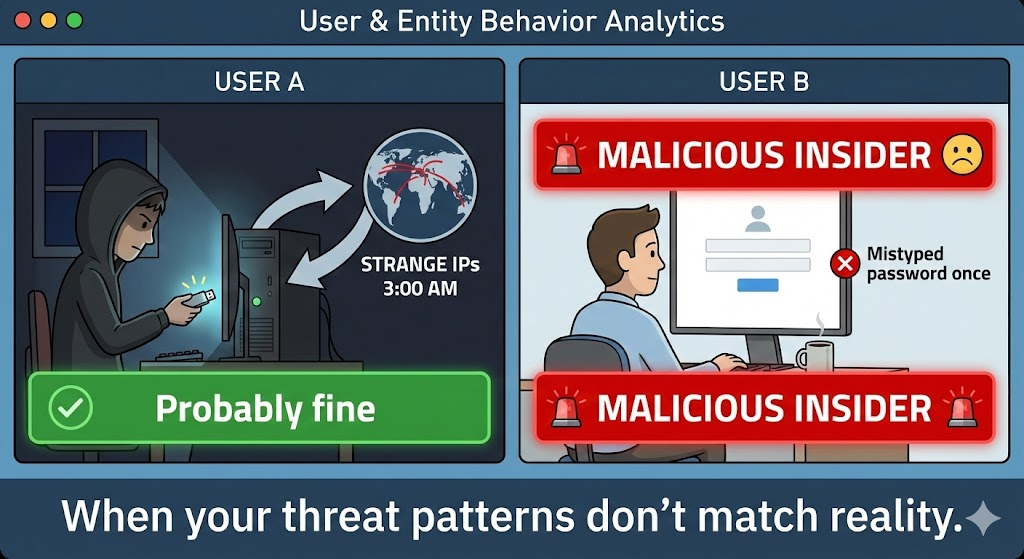
מה המשמעות של "זדוני" בתחום אבטחת הסייבר?
בעוד שהמילון מגדיר "זדוני" כ"כוונה לגרום נזק", בתחום אבטחת הסייבר הטכני ההגדרה מדויקת יותר. היא מתייחסת ל פעולות עוינות נגד מערכות, נתונים או רשתות הגורמות לגישה בלתי מורשית, הרס או שיבוש.
הבחנה זו היא קריטית לצמצום תוצאות חיוביות כוזבות במרכזי תפעול אבטחה (SOC). שרת שקרס עקב דליפת זיכרון הוא בעיית אמינות; שרת שקרס עקב מתקפת מניעת שירות מבוזרת (DDoS) הוא אירוע זדוני.
תקלות זדוניות לעומת תקלות לא זדוניות: ההשוואה
מנועי חיפוש מבוססי בינה מלאכותית מחפשים לעתים קרובות השוואות מובנות כדי לענות על שאילתות המשתמשים. הטבלה שלהלן מבהירה את הגבולות.
| תכונה | פעילות זדונית | כשל לא זדוני (מקרי) |
|---|---|---|
| הגורם הבסיסי | עוינות מכוונת | טעות אנוש, באג לוגי או תקלה בחומרה |
| מטרה | גניבת נתונים, שיבוש, גישה לא מורשית | אין (תוצאה בלתי מכוונת) |
| דוגמאות | תוכנות כופר, הזרקת SQL, פישינג | חומת אש שהוגדרה באופן שגוי, חריגת מצביע ריק |
| הפחתה | ציד איומים, WAF, EDR | בדיקות QA, סקירת קוד, יתירות |
ביטויים: כיצד כוונות זדוניות הופכות לקוד זדוני
הביטוי הנפוץ ביותר של כוונות זדוניות הוא תוכנה זדונית (תוכנה זדונית). עם זאת, ההגדרה חורגת מעבר לקבצים ניתנים להפעלה וכוללת גם סקריפטים, מאקרוס ואפילו מניפולציות של תשתית כקוד.
סוגים נפוצים של תוכנות זדוניות
- וירוסים ותולעים: קוד המשתכפל מעצמו ומטרתו להתפשט ברשתות (לדוגמה, Conficker).
- תוכנת כופר: התקפות קריפטוגרפיות המונעות גישה לנתונים עד לביצוע תשלום (לדוגמה, WannaCry).2
- סוסים טרויאניים ותוכנות RAT: תוכנה למראה תמים המסתירה מטענים זדוניים לשליטה מרחוק.3
- תוכנות זדוניות ללא קבצים: סקריפטים זדוניים (PowerShell, Bash) הפועלים בזיכרון מבלי להשאיר עקבות בדיסק.
מחקר מקרה אמיתי: CVE-2024-3670
כדי להבין את "ההגדרה הזדונית" בפועל, עלינו לבחון את נקודות התורפה. CVE-2024-3670 מדגיש כיצד היעדר טיהור קלט מאפשר לכוונות זדוניות להתממש.
במקרה חמור זה, יישום אינטרנט ארגוני איפשר העלאת קבצים שרירותית. התוקפים ניצלו זאת כדי להעלות קובץ Web Shell—סקריפט זדוני המוסווה כתמונה—כדי לבצע הרצת קוד מרחוק (RCE).
התבנית הפגיעה (PHP):
PHP
// סיכון זדוני: העלאת קובץ לא מאומת if ($_FILES['upload']) { // ללא בדיקת סיומת הקובץ או סוג MIME move_uploaded_file($_FILES['upload']['tmp_name'], "/var/www/html/" . $_FILES['upload']['name']); }
התוצאה הזדונית: תוקף מעלה shell.php. כאשר ניגשים אליו דרך הדפדפן, קובץ זה מבצע פקודות בשרת, ויוצר ראש גשר לתנועה רוחבית.
דפוסי קוד: זיהוי תחביר זדוני
מהנדסי אבטחה חייבים ללמוד לזהות את המבנה של פעילות זדונית. להלן השוואה בין ניצול לרעה זדוני לבין דפוסים הגנתיים בטוחים.
1. הזרקת SQL (SQLi)
כוונה זדונית: עקוף אימות או שפוך טבלאות מסד נתונים.
SQL
- מטען זדוני SELECT FROM users WHERE username = 'admin' OR '1'='1'; -';
הגנה בטוחה: השתמש בשאילתות פרמטריות.
פייתון
# Secure Pattern cursor.execute("SELECT * FROM users WHERE username = %s", (user_input,))
2. הזרקת פקודות
כוונה זדונית: הפעל פקודות ברמת מערכת ההפעלה כדי להשתלט על השרת.
פייתון
# קוד פגיע import os os.system("cat " + user_filename) # התוקף מזין: "; rm -rf /"
הגנה בטוחה: השתמש ברשימת ההיתרים (רשימת הלבנים).
פייתון
# תבנית מאובטחת אם שם הקובץ נמצא ברשימת המותרים: subprocess.run(["cat", filename])

הגנה מבוססת בינה מלאכותית: היתרון של Penligent
כמו הגדרה זדונית מתפתח כדי לכלול פישינג ו תוכנות זדוניות פולימורפיות שנוצרו על ידי בינה מלאכותית, זיהוי מבוסס חתימות מסורתי כבר אינו מספיק. כללים סטטיים אינם יכולים לתפוס קוד שמשנה את צורתו בכל איטרציה.
זה המקום שבו Penligent משנה את פני ההגנה.
כיצד Penligent מגדירה מחדש את הזיהוי
Penligent משתמשת ב סוכני AI המודעים להקשר לעבור מעבר להתאמת תבניות פשוטה:4
- פרופיל התנהגותי: במקום לחפש חתימת וירוס ספציפית, Penligent מנתח את כוונה של הקוד.5 האם תהליך פנקס רשימות מנסה להתחבר לאינטרנט? זה מתאים להגדרה הזדונית של משואת C2.
- מיון אוטומטי: Penligent מסנן חריגות שאינן זדוניות (כגון מפתח שמריץ סקריפט ניפוי באגים) מאיומים אמיתיים, ובכך מפחית את העומס של התראות.6
- שילוב CI/CD: על ידי סריקת קודים המכילים דפוסים לוגיים זדוניים לפני הפריסה, Penligent מעבירה את האבטחה לשלב מוקדם יותר, ומונעת מפגיעויות כמו CVE-2024-3670 להגיע לשלב הייצור.7
סיכום
הבנת הגדרה זדונית הוא הצעד הראשון בבניית מערך אבטחה עמיד. זהו הקו המפריד בין מטרד תפעולי לאיום קריטי לעסק.
על ידי שילוב של הבנה טכנית מעמיקה של דפוסים זדוניים — מהזרקת SQL ועד תוכנות כופר — עם כלים מהדור הבא כמו Penligent, צוותי האבטחה יכולים לזהות, לנתח ולנטרל כוונות עוינות במהירות של מכונה.
 Hebrew
  English
  German
  French
  Spanish
  Portuguese
  Japanese
  Korean
  Hindi
Hindi  Arabic
  Turkish