
CVE-2026-45585 is a Windows BitLocker security feature bypass publicly known as YellowKey. The core risk is not that BitLocker’s encryption algorithm has been publicly broken. The core risk is that a physical attacker may be able to abuse Windows Recovery Environment behavior to reach data that BitLocker was expected to keep protected at rest. Microsoft’s public description says the proof of concept was made public, that Microsoft issued the CVE to provide mitigation guidance before a security update is available, and that the vulnerability is tied to a physical attack vector. NVD lists the CVSS 3.1 score as 6.8 Medium with the vector AV:P/AC:L/PR:N/UI:N/S:U/C:H/I:H/A:H, which means physical access, low attack complexity, no privileges, no user interaction, and high confidentiality, integrity, and availability impact. (NVD)
That combination deserves careful language. CVE-2026-45585 is not a remote Windows takeover. It is not a generic “encryption is dead” event. It is also not something security teams should dismiss because the attack requires hands-on access. BitLocker exists largely to protect data when a laptop is lost, stolen, unattended, shipped, repaired, decommissioned, inspected, or otherwise outside normal user control. A flaw that depends on physical access may be irrelevant to an internet-facing web server, but it is directly relevant to endpoint theft, executive travel, developer laptops, legal and finance workstations, field devices, and any system where local data matters.
The strongest defensive response is not to reproduce the public YellowKey proof of concept on production hardware. The useful response is to understand the trust boundary, identify devices in scope, verify BitLocker and WinRE state, apply Microsoft’s mitigation, assess whether TPM-only is acceptable for high-risk devices, harden physical and firmware controls, and keep evidence that another engineer can review.
Fast facts for defenders
| שדה | Current public position |
|---|---|
| CVE | CVE-2026-45585 |
| Public name | YellowKey |
| Product area | Microsoft Windows BitLocker and Windows Recovery Environment |
| סוג הפגיעות | Security feature bypass |
| וקטור התקפה | Physical access |
| CVSS 3.1 | 6.8 Medium, AV:P/AC:L/PR:N/UI:N/S:U/C:H/I:H/A:H |
| Public PoC | Yes, NVD lists the GitHub repository as an exploit reference |
| Known affected configurations visible in NVD | Windows Server 2025 and Windows 11 24H2, 25H2, and 26H1 on x64 |
| Microsoft mitigation theme | Prevent autofstx.exe, the FsTx Auto Recovery Utility, from automatically starting when WinRE launches |
| TPM+PIN position | Microsoft’s current advisory text says TPM+PIN makes the vulnerability not exploitable |
| What not to say | “BitLocker encryption is broken” or “this is remotely exploitable” |
| What to say | “CVE-2026-45585 is a physical-access BitLocker security feature bypass involving WinRE trust behavior” |
NVD’s change history shows the affected CPE configurations for Windows Server 2025 and Windows 11 24H2, 25H2, and 26H1 on x64. The same record lists Microsoft’s advisory as the vendor mitigation reference and the public YellowKey repository as an exploit reference. It also records CWE-77, Improper Neutralization of Special Elements used in a Command, as the weakness classification supplied by Microsoft. (NVD)
The “Medium” severity label can be misleading if a team reads it without the vector. CVSS correctly discounts network reachability because the attack is physical. It does not make the data impact small. The high CIA impact in the vector is the part endpoint teams should not ignore. If a stolen laptop contains source code, browser session artifacts, cached cloud tokens, local SSH keys, legal documents, financial exports, offline mail, database dumps, or customer data, physical access is not a theoretical condition.
What happened
The public record around CVE-2026-45585 is unusually sensitive because the PoC was released publicly before a full vendor security update was available. Microsoft’s description says it is aware of a Windows security feature bypass publicly referred to as YellowKey, states that the PoC was made public in violation of coordinated vulnerability disclosure best practices, and says the CVE was issued so defenders could apply mitigation guidance until a security update is made available. (NVD)
SecurityWeek summarized the exploit path at a high level: an attacker with physical access uses a USB drive containing the public exploit code and boots into recovery mode; instead of the normal WinRE experience, the exploit results in a shell that can access contents of the underlying partition that BitLocker would otherwise protect. SecurityWeek also reported that Microsoft’s mitigation process involves mounting the WinRE image, modifying the image’s registry hive, removing autofstx.exe from the relevant value, and reestablishing BitLocker trust for WinRE. (שבוע האבטחה)
Help Net Security captured an important distinction from NCSC Netherlands: the vulnerability is not in BitLocker encryption itself, but in the recovery environment around it. That distinction is not cosmetic. If the encryption algorithm were broken, the remediation story would be completely different. Here, the practical defense centers on recovery environment behavior, boot policy, protector type, and physical custody. (עזרה ברשת אבטחה)
Eclypsium’s technical analysis describes YellowKey as a BitLocker bypass disclosed in May 2026 by a researcher using the Chaotic Eclipse and Nightmare-Eclipse handles. Its analysis points to WinRE behavior and the System Volume Information\FsTx primitive, explaining that the attack abuses recovery behavior so that the system ends up spawning an unlocked command shell instead of the intended locked-down recovery interface. (Eclypsium)
That is the key idea: a physical attacker does not need to defeat AES. They need the trusted recovery path to hand them the wrong execution context at the wrong time.
Why YellowKey is about the trust chain
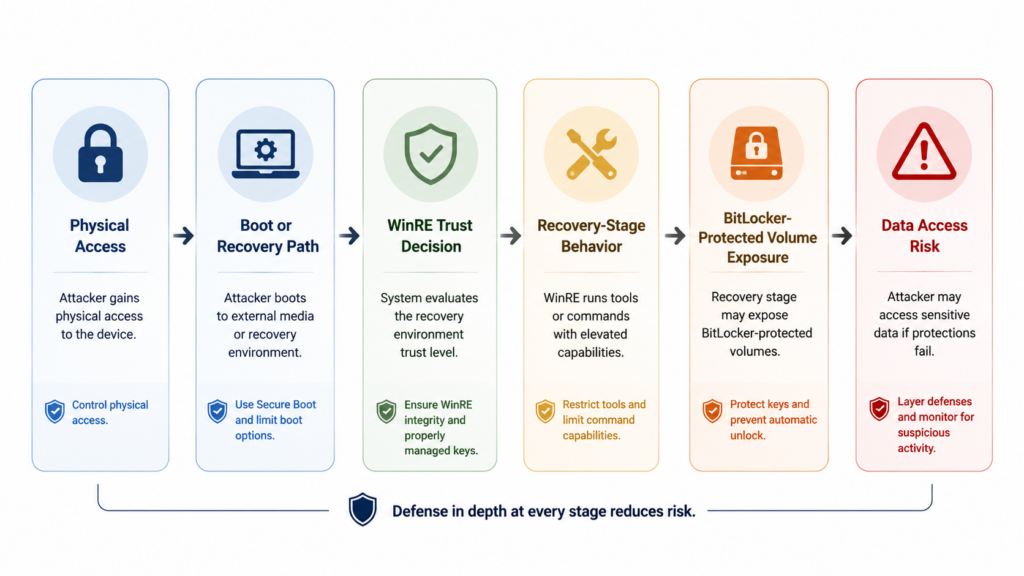
BitLocker is often discussed as full-disk encryption, but operationally it is a trust chain. The encryption algorithm is only one part. The real chain includes firmware configuration, Secure Boot state, TPM measurements, boot manager behavior, recovery environment design, key protector type, recovery key storage, preboot authentication, user behavior, endpoint management, and physical custody.
Microsoft’s BitLocker documentation says BitLocker provides maximum protection when used with a Trusted Platform Module, and that the TPM works with BitLocker to help ensure a device has not been tampered with while the system is offline. (Microsoft Learn) Microsoft’s WinRE technical reference describes Windows Recovery Environment as a recovery environment that can repair common causes of unbootable operating systems, based on Windows PE, and preloaded by default in Windows desktop and server installations. (Microsoft Learn)
Those two statements explain why the boundary is delicate. WinRE must be powerful enough to repair a broken system. BitLocker must be flexible enough to support recovery. TPM-backed unlocking must be convenient enough for fleets to use at scale. But when a recovery environment is trusted to operate on a protected system volume, it becomes part of the security boundary.
A simplified defensive model looks like this:
| שכבה | Security role | What CVE-2026-45585 teaches |
|---|---|---|
| Physical custody | Prevents hands-on manipulation | Lost, stolen, repaired, or unattended devices need stronger controls |
| Firmware and boot settings | Controls boot order and preboot paths | Unauthorized recovery or removable-media paths should be restricted |
| TPM | Releases secrets only under expected platform state | TPM-only convenience can be risky for high-value mobile devices |
| BitLocker protector | Decides what must be present before unlock | TPM+PIN changes the risk profile by adding user-supplied preboot input |
| WinRE | Repairs systems before normal Windows loads | Recovery images are not passive files; they are privileged execution environments |
| Endpoint management | Applies policy and captures state | A mitigation is incomplete without inventory, rollout evidence, and retest |
| SOC and IR process | Detects and responds to suspicious device events | Many useful signals are operational, not just EDR telemetry |
The practical lesson is not “never trust recovery.” Recovery is necessary. The lesson is that recovery code runs in a sensitive state, sometimes before the normal endpoint controls that defenders depend on. That makes WinRE a privileged attack surface rather than a background operating system feature.
Why physical access still matters
Security teams sometimes treat physical access as a footnote because it does not look like a typical SOC alert. CVE-2026-45585 is a case where that habit fails. The purpose of full-disk encryption is not mainly to stop a remote exploit against a running browser. It is to keep data protected when an attacker has the device but should not have the keys.
| תרחיש | Why YellowKey matters | Priority signal |
|---|---|---|
| Lost employee laptop | BitLocker may be the primary barrier between a thief and local data | High if local data is sensitive or the device uses TPM-only |
| Executive travel device | Physical access risk rises during travel, border checks, conferences, and hotel handling | High because impact is often disproportionate |
| Developer workstation | Local source, SSH keys, cloud tokens, package registry credentials, and build secrets may exist | High for engineering and DevOps devices |
| Finance or legal endpoint | Cached documents may trigger regulatory, contractual, or litigation risk | High for data classification reasons |
| Shared workstation | Physical access may be easier to obtain than remote access | Medium to high depending on location |
| Repair depot handoff | Custody moves outside normal organizational control | High if devices are not wiped or protected before handoff |
| Endpoint decommissioning | Devices can pass through logistics, resale, or recycling paths | High if lifecycle controls are weak |
| Server with local access exposure | Server disks may hold secrets, logs, configs, and cached credentials | Depends on facility controls and boot restrictions |
Microsoft’s own mitigation FAQ text recommends considering mitigation when devices or data are at risk of being compromised or stolen, and gives work devices taken home or on business travel as examples. (NVD) That is the right framing. The risk is strongest where devices leave controlled environments.
What is affected and what is still uncertain
NVD’s visible affected configurations for CVE-2026-45585 include Windows Server 2025 and Windows 11 24H2, 25H2, and 26H1 on x64. (NVD) Help Net Security says the issue affects various Windows 11 and Windows Server 2025 versions. (עזרה ברשת אבטחה) Security Affairs reports Windows 11 24H2, 25H2, 26H1 on x64, plus Windows Server 2025 and Server Core installations. (ענייני ביטחון)
Some third-party reporting has mentioned Windows Server 2022 or claims that Windows 10 is not affected, but defenders should separate three categories: confirmed vendor or NVD scope, third-party reporting, and researcher claims. When writing risk summaries for an enterprise, use Microsoft and NVD as the primary source of truth, then add a review bucket for other systems only if your fleet, threat model, or vendor updates justify it.
A useful scoping rule is:
| Device group | Initial action |
|---|---|
| Windows 11 24H2 x64 | Inventory, check BitLocker protector type, validate WinRE state, prioritize mitigation |
| Windows 11 25H2 x64 | Inventory, check BitLocker protector type, validate WinRE state, prioritize mitigation |
| Windows 11 26H1 x64 | Inventory, check BitLocker protector type, validate WinRE state, prioritize mitigation |
| Windows Server 2025 | Include in scope, especially if physical or console access is plausible |
| Windows Server 2025 Server Core | Include in scope based on vendor and security media reporting |
| Windows 10 | Do not assume exposure to this CVE from NVD’s visible CPE list, but continue applying normal BitLocker and WinRE security updates |
| Windows Server 2022 | Treat as a watch item if third-party reports or vendor updates change the scope |
| Non-Windows systems | Not in scope for this CVE, but review full-disk encryption and recovery workflows separately |
This is also where teams should avoid “CVE slop” in either direction. Understatement is dangerous: a public PoC against a data-at-rest protection boundary deserves action. Overstatement is also dangerous: claiming that all BitLocker deployments are dead, that remote attackers can unlock laptops over the network, or that every Windows version is affected will make the response less credible.
The technical root, explained without turning it into an exploit recipe
Public technical analysis points to WinRE behavior involving the FsTx Auto Recovery Utility, autofstx.exe, and transaction replay behavior associated with System Volume Information\FsTx. Eclypsium describes the exploit primitive as a directory WinRE looks for on attached storage, with transaction replay deleting winpeshl.ini and causing the recovery environment to fall back to a command shell. (Eclypsium) SecurityWeek similarly summarizes the issue as transaction replay deleting winpeshl.ini, which controls WinRE behavior, resulting in a command prompt with BitLocker unlocked instead of the normal recovery mode. (שבוע האבטחה)
A safe conceptual sequence is:
- A physical attacker reaches a vulnerable device.
- The attacker influences a recovery-stage path rather than a normal Windows login path.
- WinRE enters a trusted recovery context.
- A recovery-stage component acts on attacker-controlled state.
- The intended locked-down recovery interface is replaced by a more powerful shell.
- The protected operating system volume is available in a state that defeats the expected data-at-rest boundary.
That is enough for defenders to understand the risk. It is not necessary, and not appropriate in a production hardening article, to provide copy-paste exploit steps. Security teams need to know what to validate and mitigate, not how to turn a public PoC into an internal incident.
Why the CVSS score can mislead triage
A CVSS 3.1 score of 6.8 Medium often lands below remote code execution, internet-facing deserialization, identity provider bypass, or VPN appliance bugs in a vulnerability management queue. That may be acceptable for some environments. It is not acceptable as a universal rule.
The vector tells the real story:
| CVSS element | ערך | Practical meaning |
|---|---|---|
| AV:P | Physical attack vector | The attacker needs hands-on access to the target device |
| AC:L | Low attack complexity | Once physical access is available, the public path is not described as highly complex |
| PR:N | No privileges required | The attacker does not need a valid local account |
| UI:N | No user interaction | The victim does not need to click or open anything |
| S:U | Unchanged scope | The impact remains within the affected security authority |
| C:H | High confidentiality impact | Protected data can be exposed |
| I:H | High integrity impact | Local data or system state may be modified |
| A:H | High availability impact | System availability may be affected |
The correct triage question is not “Is this Critical?” It is “Which devices rely on BitLocker as the main control against physical loss, and how sensitive is the data on those devices?” For a kiosk with no sensitive local data and strong physical controls, the priority may be moderate. For a developer laptop holding signing material, production configuration fragments, SSH keys, or cached cloud credentials, a Medium CVSS label should not slow the response.
TPM-only, TPM+PIN, and the uncomfortable tradeoff
Many enterprise BitLocker deployments use TPM-only because it is silent, scalable, and user-friendly. That convenience is why it became common. But a TPM-only design can unlock a device without requiring a human secret at boot if the platform measurements match policy. In ordinary theft scenarios, TPM-only still raises the bar compared with an unencrypted drive. Against a recovery-environment trust flaw, the absence of preboot user input matters.
Microsoft’s BitLocker countermeasures documentation says TPM with PIN requires the user to enter a PIN in addition to TPM protection and that data on the encrypted volume cannot be accessed without entering the PIN. It also notes TPM anti-hammering protection for brute-force attempts. (Microsoft Learn) Microsoft’s CVE-2026-45585 text says that if TPM+PIN is used, the vulnerability is not exploitable. (NVD)
There is a wrinkle. Some reporting notes that the researcher claimed a follow-on attack may affect TPM+PIN, but public, independently verifiable technical detail for that variant has not been provided. Help Net Security reported the claim while also noting Microsoft’s mitigation and TPM+PIN guidance. (עזרה ברשת אבטחה) The safe way to write and operate is to separate confirmed vendor guidance from unverified claims.
| Statement | Confidence | פעולה |
|---|---|---|
| The public YellowKey PoC exists | גבוה | Treat CVE-2026-45585 as public PoC available |
| Microsoft says TPM+PIN blocks exploitation of the known vulnerability | High for Microsoft’s known scenario | Consider TPM+PIN for high-risk devices |
| A researcher claims an unpublished TPM+PIN-capable variant exists | Unverified from public technical detail | Do not rely on TPM+PIN alone if Microsoft’s WinRE mitigation is available |
Microsoft’s WinRE mitigation targets autofstx.exe launch behavior | גבוה | Apply through controlled rollout |
| Physical controls remain relevant | גבוה | Harden boot order, firmware access, removable media, custody, and lost-device response |
The operational answer is not “TPM+PIN or mitigation.” It is mitigation first, then risk-based preboot authentication and physical hardening.
Safe validation, not production exploit reproduction
A defensive validation workflow for CVE-2026-45585 should answer four questions:
- Is the device in the affected OS family or a watch group?
- Is BitLocker enabled on the operating system volume?
- Which key protectors are used, especially TPM-only versus TPM+PIN?
- Is WinRE enabled, and has Microsoft’s mitigation been applied successfully?
The following checks are designed for state validation. They do not reproduce YellowKey.
Check WinRE state:
reagentc /info
Useful fields include whether Windows RE is enabled and the Windows RE location. A disabled WinRE state does not automatically mean the device is safely managed; it may indicate an operational issue or a nonstandard configuration. Record the state before and after mitigation.
Check BitLocker status for the operating system volume:
manage-bde -status C:
Useful fields include conversion status, percentage encrypted, protection status, lock status, key protectors, and whether protection is on.
Check BitLocker volume state with PowerShell:
Get-BitLockerVolume -MountPoint "C:" |
  Select-Object MountPoint,
                VolumeStatus,
                ProtectionStatus,
                LockStatus,
                EncryptionPercentage,
                KeyProtector
Inventory OS version and architecture:
Get-ComputerInfo |
  Select-Object CsName,
                WindowsProductName,
                WindowsVersion,
                OsHardwareAbstractionLayer,
                OsArchitecture
Produce a lightweight CSV for endpoint review:
$os = Get-ComputerInfo
$bl = Get-BitLockerVolume -MountPoint "C:"
$reagent = (reagentc /info) -join "`n"

[PSCustomObject]@{
    Hostname          = $env:COMPUTERNAME
    ProductName       = $os.WindowsProductName
    WindowsVersion    = $os.WindowsVersion
    OSArchitecture    = $os.OsArchitecture
    BitLockerStatus   = $bl.VolumeStatus
    ProtectionStatus  = $bl.ProtectionStatus
    LockStatus        = $bl.LockStatus
    KeyProtectors     = ($bl.KeyProtector | ForEach-Object { $_.KeyProtectorType }) -join ";"
    WinREEnabledText  = if ($reagent -match "Windows RE status:\s+Enabled") { "Enabled" } else { "Not confirmed enabled" }
    CollectedAtUtc    = (Get-Date).ToUniversalTime().ToString("s") + "Z"
} | Export-Csv ".\cve-2026-45585-endpoint-state.csv" -NoTypeInformation
For fleet-scale work, the same fields can be collected through endpoint management, Intune reporting, EDR asset inventory, osquery, PowerShell remoting, or an internal device management agent. The point is not the specific tool. The point is that every device should end with a defensible state: affected or not affected, BitLocker state known, protector type known, WinRE state known, mitigation state known, exception reason documented.
Verification table for enterprise teams
| Verification goal | Safe data source | Good signal | Bad or uncertain signal | הערות |
|---|---|---|---|---|
| Identify affected OS | OS inventory, MDM, Get-ComputerInfo | Windows 11 24H2, 25H2, 26H1 x64 and Windows Server 2025 flagged | Missing build, stale inventory, unmanaged device | Use NVD and Microsoft as source of truth for scope |
| Confirm BitLocker is active | manage-bde, Get-BitLockerVolume, MDM encryption reports | OS volume encrypted and protection on | Protection off, suspended, unknown, partially encrypted | Suspended protection may create separate exposure |
| Identify protector type | BitLocker key protector output | TPM+PIN for high-risk devices, or documented exception | TPM-only on high-risk mobile systems | TPM-only is not automatically wrong, but needs risk review |
| Check WinRE state | reagentc /info | Enabled and under management, or intentionally disabled with approval | Unknown, broken, unmanaged, stale image | Do not assume disabled WinRE equals secure |
| Apply mitigation | Microsoft’s latest guidance or script | Script succeeds, WinRE resealed, device retested | Manual edits without evidence, failed mount, broken recovery | Test in rings before broad rollout |
| Preserve evidence | Ticket, CSV, MDM report, change record | Timestamped before and after state | “Ran script” with no proof | Evidence matters for audit and incident response |
| Reassess after patch | Microsoft update status, vulnerability scan, device record | Security update applied and mitigation behavior retained | No post-patch verification | Microsoft says the security update will maintain mitigation behavior |
Microsoft’s updated guidance, as summarized by Help Net Security, includes a script that mounts the WinRE image, edits the offline SYSTEM registry to remove the entry if present, commits changes, and reseals WinRE so BitLocker trust remains intact. Help Net Security also reports Microsoft’s statement that the script exits without changes if the autofstx.exe entry is not present. (עזרה ברשת אבטחה)
Mitigation, what to do without breaking recovery
The mitigation target is narrow: prevent the FsTx Auto Recovery Utility from automatically starting when WinRE launches. SecurityWeek reports that Will Dormann described Microsoft’s mitigation as preventing autofstx.exe from automatically running during WinRE image initiation. (שבוע האבטחה) Security Affairs describes Microsoft’s manual mitigation path as mounting the WinRE image, loading the offline SYSTEM hive, removing autofstx.exe from BootExecute under Session Manager, saving and unloading the hive, committing the WinRE image, and reestablishing BitLocker trust for WinRE. (ענייני ביטחון)
In production, the safest wording is simple: use Microsoft’s latest mitigation script or guidance rather than hand-rolling a registry edit across the fleet. Recovery partitions are operationally sensitive. A broken WinRE image may not show up until the device needs recovery, wipe, reset, or repair. A rushed mitigation that cannot be rolled back or verified can create its own incident.
A controlled rollout should look like this:
| שלב | מטרה | Actions | ראיות |
|---|---|---|---|
| Lab | Confirm the process does not break recovery workflows | Test on representative Windows 11 and Server 2025 builds | Screenshots or logs of pre-state, mitigation result, WinRE status |
| Pilot | Validate endpoint management deployment | Deploy to IT-owned devices and a small sample of user hardware | Script exit codes, device inventory, help desk feedback |
| High-risk fleet | Protect assets where physical exposure matters most | Deploy to executives, developers, legal, finance, field laptops, travel devices | Device-level records and exception list |
| Broad fleet | Reduce residual exposure | Expand deployment by device group | MDM or endpoint management compliance report |
| Retest | Prove the state changed | Re-run BitLocker and WinRE checks | Before and after evidence |
| Post-update | Confirm future patch behavior | Apply Microsoft security update when available and verify mitigation behavior remains | Patch status and recovery validation |
Microsoft’s FAQ text says implementing the mitigations will not affect service availability or management operations, and that customers do not need to revert the changes after the security update becomes available because the security update will maintain the mitigation behavior. (NVD) Even so, enterprise teams should still test their own recovery, wipe, reset, and repair workflows. “No expected impact” is not the same as “no environment-specific failure mode.”
A practical response playbook
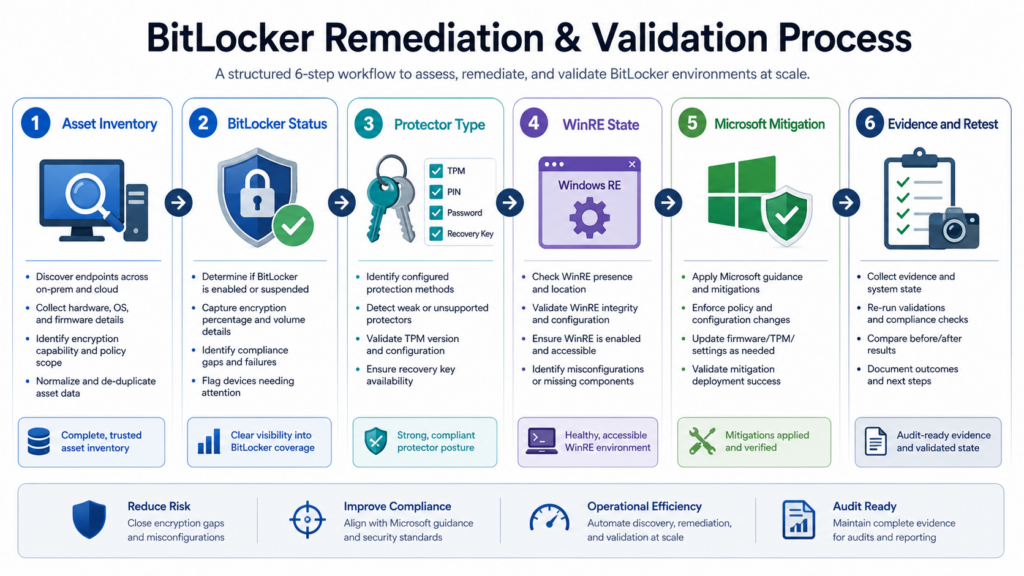
A good response to CVE-2026-45585 is evidence-driven. It should not begin with panic and should not end with a vague statement that devices were “checked.”
Step 1, scope the fleet
Start with the confirmed affected configurations: Windows 11 24H2, Windows 11 25H2, Windows 11 26H1 on x64, and Windows Server 2025. Use Microsoft and NVD as the primary source. Create separate watch groups for systems mentioned only in third-party reporting or internal risk discussions.
Minimum inventory fields:
asset_id: LAPTOP-042
hostname: ENG-LAPTOP-042
owner_group: engineering
device_type: mobile_workstation
os_name: Windows 11 Enterprise
os_version: 25H2
architecture: x64
bitlocker:
  os_volume: C
  protection_status: unknown
  protector_type: unknown
winre:
  status: unknown
risk:
  physical_exposure: high
  data_sensitivity: high
  priority: P1
Step 2, classify physical exposure
CVE-2026-45585 should be prioritized by real-world custody risk. A desktop in a locked office with no sensitive local data is not the same as a laptop carried by a salesperson through airports. Ask direct questions:
| Question | מדוע זה חשוב |
|---|---|
| Does the device regularly leave company-controlled locations? | Physical access becomes more plausible |
| Does the device store source code, tokens, or regulated data locally? | Impact rises if encryption is bypassed |
| Is the user an executive, developer, finance, legal, sales, or field employee? | Local data and travel exposure may be higher |
| Does the device pass through third-party repair or logistics? | Custody gaps become attack windows |
| Is boot order locked, and is firmware protected by password? | Physical attackers often target preboot controls |
| Are USB storage controls enforced before and after normal OS boot? | Removable media can be part of physical attack paths |
Step 3, validate BitLocker and protector type
Record whether the operating system volume is encrypted and which protectors exist. A device that is not encrypted has a broader and simpler risk. A device using TPM-only may be convenient but should be reviewed if it belongs to a high-risk group. A device using TPM+PIN may have lower exposure for the known public CVE scenario according to Microsoft, but should still receive the WinRE mitigation if it is in scope.
Step 4, validate WinRE state
שימוש reagentc /info, endpoint inventory, or an equivalent management data source. WinRE can be enabled, disabled, customized, broken, stale, or missing from expected inventory. CVE-2026-45585 makes that state security-relevant, not merely a support detail.
Step 5, apply Microsoft mitigation
Use the latest Microsoft guidance. Do not copy a third-party script into production without review. If your endpoint tooling wraps Microsoft’s script, keep the original script hash, version, deployment method, and output.
Step 6, improve preboot and physical controls
For high-risk devices, evaluate TPM+PIN, firmware passwords, locked boot order, Secure Boot validation, removable media restrictions, recovery key access controls, repair depot handling, and lost-device procedures. Microsoft’s BitLocker FAQ describes enhanced PINs as allowing a larger character set for startup PINs when policy permits it. (Microsoft Learn) Use that policy carefully because stronger preboot authentication can increase help desk load, travel friction, and recovery calls.
Step 7, preserve evidence
A mitigation without evidence is a rumor. Keep device-level records.
cve: CVE-2026-45585
public_name: YellowKey
asset_id: LAPTOP-042
hostname: ENG-LAPTOP-042
owner_group: engineering
risk_tier: P1
os:
  name: Windows 11 Enterprise
  version: 25H2
  architecture: x64
bitlocker_before:
  protection_status: On
  key_protectors:
    - TPM
winre_before:
  status: Enabled
mitigation:
  source: Microsoft MSRC guidance
  deployment_method: endpoint_management
  applied_at_utc: "2026-05-27T04:20:00Z"
  result: success
bitlocker_after:
  protection_status: On
winre_after:
  status: Enabled
follow_up:
  tpm_pin_review_required: true
  exception: none
  retest_due: "2026-06-10"
This is the kind of record that helps security, IT, compliance, and incident response speak the same language.
Detection signals and their limits
CVE-2026-45585 is not a normal malware execution pattern inside a fully booted Windows session. That makes detection tricky. Traditional EDR may not see the most important part of the activity because recovery-stage behavior can happen before normal user-mode telemetry is available. ThreatLocker’s commentary on YellowKey and related Windows zero-days makes the broader point that recovery environments, removable media, and boot workflows often do not fit neatly into SOC dashboards, even though they are part of the attack surface. (ThreatLocker)
Still, defenders are not blind. They should combine technical and operational signals.
| אות | מקור | ערך | הגבלה | Response |
|---|---|---|---|---|
| Unexpected WinRE boot or recovery activity | Endpoint logs, MDM, support records | May indicate recovery path use | Logging varies by configuration | Investigate device custody and user report |
| BitLocker recovery key access | Entra ID, Active Directory, help desk tooling, MDM | Shows someone requested recovery material | Legitimate support events are common | Correlate with ticket, user, device location |
| Device lost or stolen report | ITSM, HR, physical security | Directly relevant to physical access | Often reported late | Treat as data exposure until proven otherwise |
| USB storage policy exception | Device control logs | Removable media may matter in physical attacks | OS-level logs may not capture preboot use | Review policy and exception scope |
| Firmware or boot order drift | Endpoint firmware management, manual audit | Physical attack paths often depend on boot control | Coverage may be incomplete | Lock boot order and require firmware password |
| WinRE mitigation failure | Endpoint management output | Identifies devices still exposed | Script errors need triage | Retry, repair WinRE, or document exception |
| TPM-only on high-risk devices | BitLocker inventory | Key risk factor for mobile sensitive endpoints | Not every TPM-only device is high risk | Prioritize by data sensitivity and physical exposure |
The most important detection rule is not a signature. It is a process: any lost, stolen, repaired, or unexpectedly recovered device in the affected scope should trigger a CVE-2026-45585-aware review.
The role of AI-assisted validation without unsafe automation
For teams already using AI-assisted security workflows, CVE-2026-45585 is a useful boundary test. AI should not be used to turn a public physical-access PoC into a production exploitation checklist. It can be useful for safer tasks: normalizing advisory facts, mapping affected assets, generating non-destructive validation commands, comparing before and after evidence, drafting exception records, and producing reports that a human can review. Penligent positions its platform around authorized AI-powered penetration testing and explicitly warns that testing must be authorized by the target owner. (Penligent)
Penligent also has a focused Hacking Labs analysis of CVE-2026-45585 that frames YellowKey as a WinRE attack-surface issue rather than a BitLocker cryptography failure. That kind of framing is useful when teams need to avoid both panic and under-response. (Penligent) The practical standard is the same with or without an AI tool: collect facts, avoid unsafe reproduction on production systems, preserve evidence, and escalate uncertain findings to humans.
Common mistakes that create bad decisions
Calling it a remote Windows exploit
CVE-2026-45585 uses a physical attack vector in the Microsoft and NVD scoring. Treating it as remotely exploitable distorts prioritization and damages credibility. (NVD)
Saying BitLocker encryption is broken
Public sources support a recovery-environment bypass narrative, not a cryptographic break. Help Net Security’s reporting of NCSC Netherlands’ observation is the cleanest phrasing: the issue is in the recovery environment around BitLocker, not the encryption itself. (עזרה ברשת אבטחה)
Ignoring it because the score is Medium
The CVSS score is 6.8 because the attack is physical, not because the data impact is low. The vector records high confidentiality, integrity, and availability impact. (NVD)
Running the public PoC on production devices
That is unnecessary for exposure management and may create operational damage. Safer validation checks OS scope, BitLocker state, protector type, WinRE state, mitigation status, and device custody risk.
Treating TPM+PIN as a complete replacement for mitigation
Microsoft says TPM+PIN blocks exploitation of the known CVE-2026-45585 scenario, but Microsoft also provides a WinRE mitigation. High-risk devices should not be forced into a false choice when both controls can be evaluated.
Forgetting WinRE after normal patching
CVE-2022-41099 already showed that WinRE can require special update handling. Microsoft published a support article with a sample PowerShell script to update the WinRE partition on deployed devices for CVE-2022-41099. (Microsoft Support) Recovery images are not automatically made safe simply because the running OS looks current.
Failing to keep proof
A ticket that says “mitigated” is weaker than a device-level record showing pre-state, mitigation source, timestamp, result, post-state, and exception status.
Related CVEs that help frame the risk
CVE-2026-45585 is easier to understand when compared with other BitLocker, WinRE, and Windows endpoint issues. The goal is not to build a long CVE list. The goal is to separate similar-looking risk signals.
| CVE | Product area | Why it is relevant | Attack condition | Defender lesson |
|---|---|---|---|---|
| CVE-2022-41099 | BitLocker and WinRE | Microsoft published a WinRE update process for deployed devices | Physical access to a vulnerable recovery path | Recovery images are part of the security boundary |
| CVE-2024-38058 | BitLocker | NVD lists it as a protection mechanism failure tied to BitLocker | Physical-access style security feature bypass | Medium or physical-vector BitLocker issues can still be business-critical |
| CVE-2026-33825 | Microsoft Defender | NVD describes a local privilege escalation in Defender caused by insufficient granularity of access control | Local authenticated attacker | Public Windows endpoint bugs need careful distinction between local, physical, and known-exploited risk |
| CVE-2026-45585 | BitLocker and WinRE | Public YellowKey PoC against recovery trust behavior | Physical access, no privileges, no user interaction | Validate WinRE, protector type, physical custody, and mitigation evidence |
CVE-2022-41099 is especially relevant because it involved BitLocker and WinRE handling. Microsoft’s KB5025175 states that it developed a sample PowerShell script to automate updating the Windows Recovery Environment on deployed devices to address CVE-2022-41099. (Microsoft Support) SCRT’s later technical analysis of CVE-2022-41099 noted that a security update had to be applied to WinRE and that the issue pointed to the recovery image as the relevant attack surface. (SCRT Team Blog)
CVE-2024-38058 is another useful comparison point because NVD records it as a BitLocker protection mechanism failure, with Microsoft as the source for CWE-693. (NVD) It reinforces the same operational lesson: physical-access security feature bypasses are not just academic if the asset is a mobile endpoint containing sensitive data.
CVE-2026-33825 is different. NVD describes it as Microsoft Defender insufficient granularity of access control that allows an authorized attacker to elevate privileges locally. (NVD) It is useful here because it sits in the same broader cluster of Windows endpoint security discussions, but it should not be confused with YellowKey. CVE-2026-33825 is a local privilege escalation issue in Defender. CVE-2026-45585 is a physical-access BitLocker and WinRE security feature bypass. A mature program keeps those distinctions clear.
Hardening beyond the immediate mitigation
Applying Microsoft’s mitigation is the first concrete step, but it should not be the only one. CVE-2026-45585 exposes a broader endpoint design question: how much risk is acceptable when a device is outside normal custody?
Review TPM-only defaults
TPM-only may remain acceptable for low-risk devices where user friction must be low and local data sensitivity is limited. For high-value laptops, TPM+PIN deserves a fresh look. Microsoft’s BitLocker documentation describes TPM+PIN as requiring user input before data can be accessed, which materially changes the attacker’s problem. (Microsoft Learn)
Lock boot paths
Firmware settings should prevent arbitrary boot order changes. Require UEFI passwords where appropriate. Confirm Secure Boot state. Disable or restrict external boot where business workflows allow. If external boot is needed for IT operations, document who can authorize it and how it is logged.
Restrict removable media
A policy that blocks USB storage only after Windows is fully loaded may not address preboot and recovery-stage risk. Device control, firmware policy, and physical controls should be reviewed together.
Protect recovery keys
Recovery keys should not be casually accessible. Review who can retrieve them, how retrieval is logged, whether help desk identity checks are strong enough, and whether emergency retrieval creates a second path around BitLocker.
Fix the custody process
The highest-risk moments often happen outside the SOC: travel, repair, loaner swaps, employee offboarding, shipping, lease returns, conference demos, and executive support. CVE-2026-45585 is a good reason to connect endpoint encryption policy with physical asset handling.
Validate WinRE as a managed component
Treat WinRE as a managed security component, not merely a support tool. Track its status, update state, customizations, and mitigation status. A stale or broken recovery partition should not be invisible to security.
A sample executive risk summary
Security teams often need a short version for leadership that does not distort the facts. A good summary is calm, concrete, and action-oriented:
CVE-2026-45585, also known as YellowKey, is a Windows BitLocker security feature bypass involving the Windows Recovery Environment. It is not a remote code execution vulnerability and does not show that BitLocker’s encryption algorithm has been broken. The risk applies when an attacker has physical access to a vulnerable Windows device, which matters most for lost, stolen, traveling, repaired, or high-value laptops.

We are prioritizing Windows 11 24H2, 25H2, 26H1 x64 and Windows Server 2025 systems, validating BitLocker protector type and WinRE state, applying Microsoft’s mitigation, and reviewing TPM+PIN for high-risk devices. We are not running the public proof of concept on production systems. We are preserving device-level evidence for audit and incident response.
That summary avoids the two most common failures: panic and minimization.
A sample technical ticket
A good engineering ticket should be specific enough to execute and verify.
Title:
Mitigate CVE-2026-45585 YellowKey exposure on affected Windows endpoints

Scope:
Windows 11 24H2, 25H2, 26H1 x64
Windows Server 2025
Watch group for additional systems if vendor scope changes

Pre-checks:
- Record OS name, version, build, and architecture
- Run reagentc /info and record WinRE status
- Run manage-bde -status C: and record BitLocker protection status
- Record BitLocker key protector type, especially TPM-only versus TPM+PIN
- Classify device physical exposure and data sensitivity

Action:
- Apply Microsoft’s latest CVE-2026-45585 mitigation guidance or script
- Do not run public exploit code on production systems
- Use staged rollout: lab, IT pilot, high-risk laptops, broad fleet

Post-checks:
- Confirm WinRE remains in expected state
- Confirm BitLocker protection remains on
- Confirm endpoint management recorded successful mitigation
- Preserve logs, timestamp, script source, and result

Exceptions:
- Document reason, owner, compensating controls, and expiry date
This type of ticket helps keep the work boring. Boring is good when the alternative is an uncontrolled physical-access bypass response.
שאלות נפוצות
Is CVE-2026-45585 remotely exploitable?
- No. Microsoft’s CVSS vector for CVE-2026-45585 uses
AV:P, which means the attack vector is physical. - A realistic attack requires hands-on access to the device or an equivalent custody failure.
- The risk still matters because BitLocker is meant to protect data when a device is lost, stolen, unattended, repaired, or outside normal control.
- Treat it as an endpoint physical-access and recovery-environment risk, not as a network-facing Windows RCE. (NVD)
Does YellowKey break BitLocker encryption?
- No public source shows that the BitLocker encryption algorithm itself has been broken.
- The better framing is a BitLocker security feature bypass involving Windows Recovery Environment behavior.
- Help Net Security reported NCSC Netherlands’ point that the weakness is in the recovery environment around BitLocker, not the encryption itself.
- That distinction matters because mitigation focuses on WinRE behavior, protector policy, and physical controls rather than changing encryption algorithms. (עזרה ברשת אבטחה)
Which systems should defenders check first?
- Start with Windows 11 24H2, 25H2, and 26H1 on x64.
- Include Windows Server 2025 based on NVD’s visible affected configurations.
- Prioritize high-risk laptops before low-sensitivity desktops.
- Rank devices by physical exposure, local data sensitivity, and protector type.
- Keep watch groups for systems mentioned in third-party reporting, but do not present those as confirmed by NVD unless the official scope changes. (NVD)
Does TPM+PIN stop CVE-2026-45585?
- Microsoft’s current CVE text says that if TPM+PIN is used, the vulnerability is not exploitable.
- Microsoft’s BitLocker documentation describes TPM+PIN as requiring user input before data on the encrypted volume can be accessed.
- Some reporting notes a researcher claim about an unpublished TPM+PIN-capable variant, but public technical detail for independent verification is not available.
- A conservative enterprise response is to apply Microsoft’s WinRE mitigation and evaluate TPM+PIN for high-risk devices. (NVD)
Should defenders run the public YellowKey PoC?
- Not on production systems.
- Production validation should use safe state checks: OS scope, BitLocker status, protector type, WinRE status, mitigation result, and custody risk.
- Exploit reproduction belongs only in an isolated, authorized lab with non-production hardware and no real user data.
- A public PoC changes urgency, but it does not require unsafe testing.
What evidence should security teams keep after mitigation?
- Asset ID, hostname, owner group, OS version, build, and architecture.
- BitLocker status and key protector type before and after mitigation.
- WinRE status before and after mitigation.
- Microsoft mitigation source, deployment method, timestamp, and result.
- TPM+PIN decision or exception reason.
- Recovery key access review if the device was lost, stolen, repaired, or otherwise outside normal custody.
- Retest date and exception expiry.
Is CVE-2026-45585 similar to CVE-2022-41099?
- They are separate CVEs.
- They are related in the broader operational sense that both involve BitLocker and Windows Recovery Environment security boundaries.
- Microsoft published a WinRE update process for CVE-2022-41099, which is a reminder that recovery images require direct management.
- CVE-2026-45585 is the YellowKey public PoC event, with mitigation focused on preventing
autofstx.exefrom automatically starting in WinRE. (Microsoft Support)
What should a bug bounty or red team report say about this issue?
- State that CVE-2026-45585 is a physical-access BitLocker security feature bypass involving WinRE.
- Do not claim remote exploitability.
- Do not claim BitLocker cryptography is broken.
- Provide non-destructive evidence: affected OS version, BitLocker state, protector type, WinRE state, and missing mitigation.
- Avoid including working exploit steps unless the program explicitly authorizes physical-access testing and destructive recovery-environment testing in a lab.
Closing judgment
CVE-2026-45585 is a reminder that full-disk encryption is a system, not a checkbox. The encryption algorithm can remain sound while the trust chain around it fails. Firmware settings, TPM policy, WinRE behavior, preboot authentication, recovery keys, removable media, custody, endpoint management, and evidence all decide whether data-at-rest protection survives real-world conditions.
The right response is precise and practical. Scope the affected Windows fleet. Prioritize devices with real physical exposure and sensitive local data. Apply Microsoft’s mitigation. Review TPM-only defaults for high-risk endpoints. Lock down boot paths and recovery-key access. Keep proof that the work was done. Do not turn a public PoC into unsafe production testing.
YellowKey does not mean every BitLocker deployment should be abandoned. It means the recovery environment belongs in the security model.


 Hebrew
  English
  German
  French
  Spanish
  Portuguese
  Japanese
  Korean
  Hindi
Hindi  Arabic
  Turkish