
CVE-2026-44963 is not just another “internal” enterprise vulnerability. It is a critical remote code execution issue in Veeam Backup & Replication that allows an authenticated domain user to execute code on a vulnerable Backup Server. Veeam fixed it in Veeam Backup & Replication 12.3.2.4854, and the company states that version 13.x builds are not affected because of architectural changes starting in version 13. The affected line is Veeam Backup & Replication 12.x, specifically 12.3.2.4465 and earlier version 12 builds, and Veeam’s advisory adds a crucial deployment condition: the vulnerability only impacts domain-joined backup servers. (Veeam Software)
That last condition is the part many teams will misread. “Authenticated domain user” sounds less urgent than unauthenticated remote code execution, but it is a dangerous phrase when the target is the system that controls backup, recovery, replication, restore operations, and access to protected workloads. Veeam Backup & Replication is a data protection and disaster recovery product used to create image-level backups of virtual, physical, and cloud machines and restore them when needed. (Veeam Software) If an attacker with a low-privileged domain account can run code on the Backup Server, the problem is no longer confined to one Windows host. It reaches into the recovery layer.
The public technical details are limited. NVD lists CVE-2026-44963 as “Awaiting Enrichment,” shows no NVD-assigned CVSS assessment yet, and reflects the CNA-provided CVSS v4 base score of 9.4 with the vector AV:N/AC:L/AT:N/PR:L/UI:N/VC:H/VI:H/VA:H/SC:H/SI:H/SA:H. NVD also maps the weakness to CWE-502, Deserialization of Untrusted Data. (NVD) That is enough to frame the risk, but not enough to justify invented exploit internals. A careful defender should treat the issue as a confirmed critical RCE, patch it quickly, review domain exposure, and avoid assuming anything about the payload format, gadget chain, protocol path, or specific service entry point unless Veeam or the reporting researcher later publishes more detail.
Confirmed facts for CVE-2026-44963
| שדה | Confirmed detail | Operational meaning |
|---|---|---|
| CVE | CVE-2026-44963 | Publicly tracked vulnerability in Veeam Backup & Replication |
| מוצר | Veeam Backup & Replication | Backup and disaster recovery control plane |
| Affected builds | 12.3.2.4465 and earlier version 12 builds | Any v12 system at or below that build should be treated as affected unless proven otherwise |
| Fixed build | 12.3.2.4854 | Upgrade to this build or later on the v12 line |
| v13 impact | Veeam says version 13.x is not affected because of architectural changes | v13 still deserves hardening review, but this CVE is not listed as affecting v13 |
| Attack precondition | Authenticated domain user | A normal compromised domain account may be enough if the backup server is reachable and vulnerable |
| Deployment condition | Domain-joined backup servers | Domain membership is central to the risk model |
| CVSS | CVSS v4 base score 9.4, Critical | High urgency even though the attacker needs low privileges |
| CWE | CWE-502, Deserialization of Untrusted Data | Public records identify the weakness category, not the full exploit path |
| Disclosure source | Reported by Sina Kheirkhah of watchTowr, according to Veeam | Researcher attribution is public, but exploit details were not published in the advisory |
Veeam’s KB4869 is the primary source for the version and remediation baseline. It states that all vulnerabilities documented in the article were resolved in Veeam Backup & Replication 12.3.2.4854, that the issue affects Veeam Backup & Replication 12.3.2.4465 and all earlier version 12 builds, and that version 13.x builds are not affected due to architectural changes starting in version 13. (Veeam Software) NVD independently reflects the core description, the CNA CVSS v4 vector, the CWE-502 mapping, the HackerOne source, and the affected version range as Veeam Backup & Replication versions below 12.3.2. (NVD)
The practical conclusion is direct: if a Veeam Backup & Replication server is running the affected v12 branch and is joined to a domain, it should be patched before routine maintenance windows. If patching cannot happen immediately, network access to the Backup Server should be narrowed aggressively while the upgrade is scheduled. There is no safe reason for ordinary domain workstations, broad user VLANs, or unmanaged internal hosts to reach backup management services.
Why a low-privileged domain user can still be enough
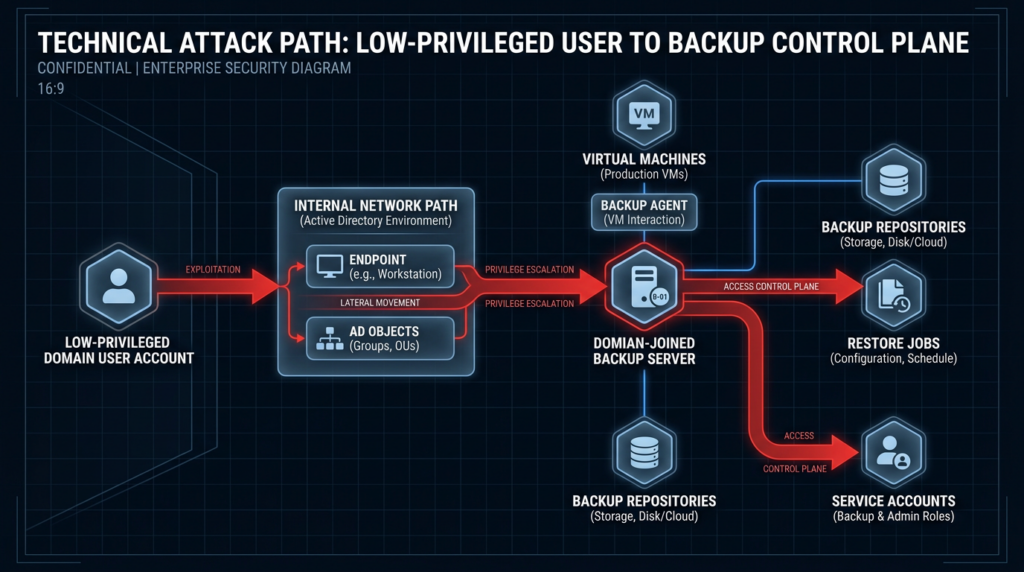
Privilege requirement is not the same thing as business impact. CVE-2026-44963 requires an authenticated domain user, but domain user compromise is one of the most common starting points in real intrusions. Phishing, password reuse, credential dumping, VPN compromise, malicious OAuth consent, helpdesk social engineering, and stale accounts can all put an attacker inside the identity boundary long before they touch the backup platform.
In many organizations, “domain user” is treated as a low-risk identity tier. That is a mistake when a service trusts the domain too broadly. If a vulnerability accepts that domain identity as the starting condition for remote code execution against a backup server, the attacker’s initial foothold may no longer need to be privileged. The backup server becomes the privilege amplifier.
The risk is amplified by the role of Veeam Backup & Replication itself. The product coordinates backup and restore activity across virtual, physical, and cloud machines. It interacts with repositories, proxies, gateway servers, hypervisors, guest systems, credentials, file shares, and recovery workflows. Veeam’s own documentation describes a broad port surface across gateway servers and repositories, including Veeam Transport Service communication over TCP 6162 and failover ranges such as 2500 to 3300, repository deployment over ports such as 6160, SMB-related ports for Windows repositories, SSH for Linux repositories, and other service-specific connections. (Veeam Software) A vulnerability in the backup control plane therefore deserves a different kind of urgency than a vulnerability on a normal member server.
The correct way to think about CVE-2026-44963 is not “a domain user can compromise one server.” It is “a domain identity may be able to reach the system that mediates recovery.” That is why the severity score is high and why defenders should combine patching with trust-boundary review.
The domain-joined condition is the architectural clue
Veeam’s note that CVE-2026-44963 only impacts domain-joined backup servers is not a footnote. It is the core architectural clue. Veeam’s security best-practice guidance has long argued that data protection infrastructure should not rely on the production environment it is meant to protect. The guidance explains that if the production environment and domain controllers go down, dependency on those same domain controllers can affect restore operations. It also warns that production domains contain more users and more potential social-engineering targets, and that intruders who compromise the production domain can use high privileges on a Veeam Backup & Replication server to learn about protected infrastructure. (Veeam Best Practices)
The same guide lays out the deployment choices from more secure to less secure: place Veeam components in a management domain in a separate Active Directory forest, place them in a separate workgroup and separate network where applicable, or place them in the production domain with protected administrative accounts. The guide’s stated best practice is to use a management workgroup or a management domain in a separate Active Directory forest, protected with multi-factor authentication, so that the Veeam infrastructure does not rely on the environment it protects. (Veeam Best Practices)
That advice is directly relevant to CVE-2026-44963. If a vulnerable backup server is joined to the production domain, the attacker’s identity precondition becomes easier to satisfy after a normal internal compromise. If the backup server sits in an isolated management domain or workgroup with tight network controls, the same vulnerability may be much harder to reach even before patching. Patching removes the known flaw. Architecture reduces the chance that the next domain-user-to-backup-server flaw has the same blast radius.
| Deployment model | Security value | Operational tradeoff | CVE-2026-44963 relevance |
|---|---|---|---|
| Production-domain joined backup server | Easier identity and policy management | Broad dependency on the same domain being protected | Highest concern because a compromised production-domain user may satisfy the attack precondition |
| Separate workgroup | Reduces dependency on production AD and separates accounts | More local-account management and documentation overhead | Stronger isolation against domain-user attack paths |
| Separate management domain or forest | Centralized management with a distinct trust boundary | Requires additional infrastructure and design discipline | Best fit for larger environments that need domain-style administration without trusting production AD |
| Same network as general user systems | Operationally simple | Expands reachability from compromised endpoints | Poor fit for critical backup infrastructure |
| Segmented backup network | Reduces attack paths | Requires firewall design and operational exceptions | Helps contain both known and future backup-plane vulnerabilities |
The lesson is not that every organization must use exactly the same architecture. The lesson is that backup identity and network placement are security decisions, not just infrastructure preferences.
What CWE-502 tells us, and what it does not
NVD maps CVE-2026-44963 to CWE-502, Deserialization of Untrusted Data. MITRE defines CWE-502 as a product deserializing untrusted data without sufficiently ensuring that the resulting data will be valid. MITRE also notes that consequences can vary widely depending on which objects or methods are deserialized and how they are used, including the possibility of attackers using gadget chains to perform unauthorized actions such as generating a shell. (cwe.mitre.org)
That mapping is important, but it should be handled carefully. A CWE mapping does not automatically reveal the exploit path. It does not say which Veeam service parses the data, which protocol carries it, what authentication path is involved, what object graph is reachable, or whether public exploit code exists. In the case of CVE-2026-44963, the public advisory does not publish that level of detail.
The safe way to explain the risk is to separate category from exploit mechanics. Deserialization bugs become dangerous when software reconstructs objects or structured data from attacker-controlled or semi-trusted input and then allows those reconstructed objects to influence execution, state transitions, file operations, method invocation, or privileged workflow logic. In enterprise backup software, those workflows may run under service contexts that have enough access to perform recovery operations, manage repositories, communicate with infrastructure components, or interact with stored configuration.
MITRE’s mitigation guidance for CWE-502 includes using signing or sealing mechanisms where available, deserializing into safe new objects rather than blindly reconstructing application objects, avoiding unnecessary gadgets and types, using allowlists for acceptable classes, and recognizing that application firewalls are only a moderate emergency control because they may not cover every input vector. (cwe.mitre.org) For a third-party product like Veeam Backup & Replication, customers cannot patch internal deserialization code themselves. Their controls are version upgrades, exposure reduction, identity isolation, network segmentation, monitoring, and vendor-supported hardening.
A concise rule for defenders: do not wait for a public gadget chain to take CVE-2026-44963 seriously. The confirmed facts already justify urgent remediation.
Why backup servers attract attackers
Attackers care about backup systems because backup systems care about everything else. A backup platform often knows where the important workloads live, which repositories contain sensitive data, which service accounts can access protected systems, which hypervisors can be controlled, which restore paths are available, and which data matters enough to recover.
BleepingComputer reported that ransomware gangs have previously said they target Veeam backup servers because doing so can help them steal sensitive data, move inside breached networks, and block restoration by deleting backups. The same report noted that CISA had flagged multiple Veeam Backup & Replication flaws as actively exploited in attacks, and that Sophos X-Ops reported ransomware operations including Akira, Fog, and Frag weaponizing CVE-2024-40711. (BleepingComputer)
That history matters for CVE-2026-44963 even if there were no confirmed active exploitation reports at the time of early public coverage. BleepingComputer’s June 9, 2026 report stated that there were no reports of active exploitation at that time, while also citing Veeam’s warning that attackers often try to reverse-engineer patches after disclosure. (BleepingComputer) The absence of confirmed exploitation at disclosure should not become a reason to wait. Backup software has already been a useful target class for ransomware crews, and patch-diffing high-impact enterprise software is a predictable attacker behavior after public advisories.
There is also a business reason attackers target backup infrastructure. If backups remain intact, tested, isolated, and recoverable, destructive malware loses much of its leverage. If attackers can delete backup chains, poison restore points, steal backup data, or disable recovery operations, the victim’s options shrink. That is why backup servers should be treated as a privileged recovery control plane, not as ordinary infrastructure.
The version check should be boring and exact
The first task is to identify every Veeam Backup & Replication server and confirm the installed build. The second task is to determine whether it is domain joined. The third task is to confirm whether ordinary domain users or broad internal segments can reach it.
On a Windows-based Veeam server, an administrator can start with local inventory commands like these:
# Check installed Veeam products from the registry
Get-ItemProperty HKLM:\Software\Microsoft\Windows\CurrentVersion\Uninstall\* |
  Where-Object { $_.DisplayName -like "*Veeam Backup*" } |
  Select-Object DisplayName, DisplayVersion, Publisher, InstallDate

# Check Veeam services
Get-Service |
  Where-Object { $_.DisplayName -like "*Veeam*" -or $_.Name -like "*Veeam*" } |
  Sort-Object Status, Name |
  Select-Object Status, Name, DisplayName

# Check whether the server is joined to a domain
(Get-CimInstance Win32_ComputerSystem) |
  Select-Object Name, Domain, PartOfDomain

# Capture OS and hostname context for evidence
Get-ComputerInfo |
  Select-Object CsName, WindowsProductName, WindowsVersion, OsBuildNumber
If the installed Veeam Backup & Replication build is 12.3.2.4465 or earlier on the v12 line, the system should be scheduled for immediate upgrade to 12.3.2.4854 or later. Veeam’s official KB states that the fixed build is 12.3.2.4854, and RunZero’s vulnerability summary expresses the same practical baseline as “Veeam Backup & Replication 12.x: versions prior to 12.3.2.4854.” (Veeam Software)
Large environments should avoid relying on manual server checks. Use endpoint management, EDR inventory, CMDB records, asset discovery, and vulnerability management data. RunZero suggests locating potentially impacted assets through software inventory with a query matching Veeam as the vendor and Backup & Replication as the product. (runZero) In a generic asset platform, the same idea looks like this:
vendor contains "Veeam"
AND product contains "Backup"
AND product contains "Replication"
AND version < "12.3.2.4854"
Asset queries should be validated against reality. Product names differ between data sources, version fields are sometimes missing, and servers may have components installed without being the primary Backup Server. Treat automated inventory as a starting point, not as proof of safety.
Reachability matters as much as version
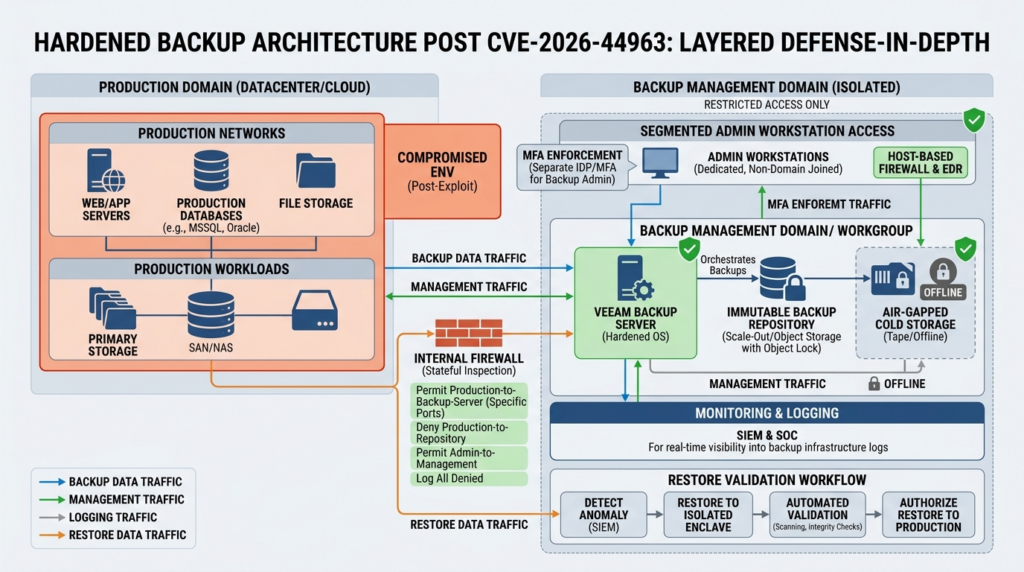
A patched build is the first control. Network reachability is the second. CVE-2026-44963 is described as network exploitable in the CVSS v4 vector and requires low privileges, so defenders should ask a basic question: from where can a normal compromised domain identity reach the Backup Server?
You do not need exploit traffic to answer that question. Start with firewall rules, local listening ports, and network connection data:
# Show listening TCP ports and owning process IDs
Get-NetTCPConnection -State Listen |
  Sort-Object LocalPort |
  Select-Object LocalAddress, LocalPort, OwningProcess

# Map listening ports to process names
Get-NetTCPConnection -State Listen |
  ForEach-Object {
    $proc = Get-Process -Id $_.OwningProcess -ErrorAction SilentlyContinue
    [PSCustomObject]@{
      LocalAddress = $_.LocalAddress
      LocalPort    = $_.LocalPort
      ProcessId    = $_.OwningProcess
      ProcessName  = $proc.ProcessName
    }
  } |
  Sort-Object LocalPort

# Review enabled inbound firewall rules mentioning Veeam
Get-NetFirewallRule -Enabled True -Direction Inbound |
  Where-Object { $_.DisplayName -match "Veeam|Backup|Replication" } |
  Select-Object DisplayName, Profile, Action, Enabled
Veeam environments require multiple ports for legitimate backup and restore operations, so the goal is not to block everything blindly. The goal is to limit management and service reachability to the systems and identities that need it. Veeam’s official ports documentation shows that backup infrastructure communication can involve many component-specific paths, including transport, repository, gateway, SMB, SSH, and restore-related ports. (Veeam Software) That complexity is exactly why backup segmentation should be designed deliberately rather than left to flat internal routing.
A useful internal review question is simple: can a compromised laptop on the general user network initiate connections to the backup server? If the answer is yes, CVE-2026-44963 is only one example of a larger design problem.
Detection logic after disclosure
Detection for CVE-2026-44963 is hard because public exploit details are limited. There is no reliable public payload signature that defenders should trust as complete. Good detection therefore starts from behavior and exposure rather than a narrow signature.
Useful hunting questions include:
| Detection question | מדוע זה חשוב | Example signals |
|---|---|---|
| Did a low-privileged domain user authenticate to the backup server unexpectedly | The vulnerability requires an authenticated domain user | Windows logon events, network logons, Kerberos activity |
| Did a Veeam-related service spawn unusual child processes | RCE often turns into shell, script, or LOLBin execution | cmd.exe, powershell.exe, wscript.exe, rundll32.exe, regsvr32.exe, certutil.exe |
| Did the backup server contact unusual internal or external hosts | Post-exploitation may involve staging, C2, or lateral movement | New outbound connections, DNS anomalies, proxy logs |
| Did Veeam service accounts access systems outside normal backup windows | Compromise may reuse backup credentials or service contexts | EDR identity telemetry, file access, remote logons |
| Did repository content, retention settings, or backup jobs change unexpectedly | Attackers may try to weaken recovery | Veeam job changes, deleted restore points, repository writes |
| Did normal domain users reach backup management ports | Broad reachability increases exploitability | Firewall logs, NetFlow, Zeek, Windows Filtering Platform events |
For Microsoft Defender-style telemetry, the following KQL examples can help build a first-pass hunt. They are intentionally behavior-based and should be tuned to local naming conventions.
// Unusual process creation on servers with Veeam-related services or naming
DeviceProcessEvents
| where DeviceName has_any ("veeam", "backup", "vbr")
   or InitiatingProcessFileName has "veeam"
| where FileName in~ ("cmd.exe", "powershell.exe", "pwsh.exe", "wscript.exe", "cscript.exe", "rundll32.exe", "regsvr32.exe", "certutil.exe", "bitsadmin.exe")
| project Timestamp, DeviceName, AccountName, FileName, ProcessCommandLine,
          InitiatingProcessFileName, InitiatingProcessCommandLine
| order by Timestamp desc
// Domain users logging into backup-related servers
DeviceLogonEvents
| where DeviceName has_any ("veeam", "backup", "vbr")
| where AccountDomain !in ("NT AUTHORITY", "Window Manager")
| summarize FirstSeen=min(Timestamp), LastSeen=max(Timestamp), Count=count(),
            LogonTypes=make_set(LogonType), Devices=make_set(DeviceName)
            by AccountName, AccountDomain
| order by LastSeen desc
// Suspicious outbound connections from backup servers
DeviceNetworkEvents
| where DeviceName has_any ("veeam", "backup", "vbr")
| where RemoteUrl !endswith ".microsoft.com"
| where RemoteIPType == "Public" or RemotePort in (22, 80, 443, 445, 3389, 5985, 5986)
| summarize Count=count(), FirstSeen=min(Timestamp), LastSeen=max(Timestamp),
            RemotePorts=make_set(RemotePort), RemoteIPs=make_set(RemoteIP), RemoteUrls=make_set(RemoteUrl)
            by DeviceName, InitiatingProcessFileName, InitiatingProcessCommandLine
| order by LastSeen desc
A Sigma-style rule for unusual child processes from Veeam-related parents might look like this:
title: Suspicious Child Process From Veeam Related Process
id: 8b4b0f64-9b2f-4f2a-a0d8-veeam-rce-hunt
status: experimental
description: Detects command interpreters and common LOLBins spawned by Veeam-related processes on backup servers.
logsource:
  product: windows
  category: process_creation
detection:
  selection_parent:
    ParentImage|contains:
      - '\Veeam'
  selection_child:
    Image|endswith:
      - '\cmd.exe'
      - '\powershell.exe'
      - '\pwsh.exe'
      - '\wscript.exe'
      - '\cscript.exe'
      - '\rundll32.exe'
      - '\regsvr32.exe'
      - '\certutil.exe'
      - '\bitsadmin.exe'
  condition: selection_parent and selection_child
fields:
  - UtcTime
  - Computer
  - User
  - ParentImage
  - ParentCommandLine
  - Image
  - CommandLine
falsepositives:
  - Veeam support activity
  - Backup maintenance scripts
  - Administrator troubleshooting
level: high
This rule is not a CVE-specific detector. It is a post-exploitation behavior detector. That is the right expectation when exploit details are limited. It can catch suspicious execution patterns, but it cannot prove the presence or absence of CVE-2026-44963 exploitation.
Patch first, then prove the control worked
The primary remediation is to upgrade affected Veeam Backup & Replication v12 deployments to 12.3.2.4854 or later. Veeam’s advisory gives that fixed build explicitly. (Veeam Software) After the upgrade, security teams should retain evidence showing the old build, new build, server domain status, maintenance window, change ticket, and validation checks.
A practical post-patch validation package should include:
# Capture installed Veeam version after patching
Get-ItemProperty HKLM:\Software\Microsoft\Windows\CurrentVersion\Uninstall\* |
  Where-Object { $_.DisplayName -like "*Veeam Backup*" } |
  Select-Object DisplayName, DisplayVersion, Publisher, InstallDate |
  Format-List

# Confirm services are running after upgrade
Get-Service |
  Where-Object { $_.DisplayName -like "*Veeam*" -or $_.Name -like "*Veeam*" } |
  Sort-Object Name |
  Select-Object Name, Status, StartType

# Confirm domain join state for risk tracking
Get-CimInstance Win32_ComputerSystem |
  Select-Object Name, Domain, PartOfDomain
The patch should not be treated as the finish line. For CVE-2026-44963, the conditions that made the bug dangerous are also the conditions that will make future bugs dangerous: production-domain membership, broad internal reachability, over-granted roles, insufficient monitoring, weak service-account hygiene, and recovery systems that depend too heavily on the same identity plane they are meant to restore.
Hardening priorities that matter after CVE-2026-44963
The following hardening sequence is deliberately practical. It starts with the controls most likely to reduce near-term risk and moves toward longer-term architecture.
| עדיפות | בקרה | מדוע זה חשוב |
|---|---|---|
| 1 | Upgrade affected v12 servers to 12.3.2.4854 or later | Removes the confirmed known vulnerability |
| 2 | Identify all domain-joined Veeam Backup Servers | The vulnerability condition depends on domain-joined backup servers |
| 3 | Restrict network access to backup servers | Low-privileged credentials are less useful if the host is unreachable |
| 4 | Remove general user VLAN access to backup management paths | Prevents ordinary endpoint compromise from becoming backup-plane compromise |
| 5 | Move backup infrastructure out of the production domain where feasible | Aligns with Veeam’s best-practice guidance for reducing dependency on the protected environment |
| 6 | Enforce MFA for backup administrative accounts | Reduces impact of stolen credentials |
| 7 | Review Veeam roles and service accounts | Backup operator roles should be treated as privileged |
| 8 | Monitor Veeam servers as high-value assets | Backup hosts need EDR, log retention, and alerting comparable to domain controllers and hypervisors |
| 9 | Test restores after patching | Recovery must be proven, not assumed |
| 10 | Validate immutable or offline backup copies | Limits the impact of backup-plane compromise |
Veeam’s best-practice guide explicitly frames the most secure deployment as a management workgroup or a separate Active Directory forest with protected administrative accounts. (Veeam Best Practices) That should become a design target, especially for organizations that currently run Veeam Backup & Replication inside the same production domain used by ordinary employee accounts.
Related Veeam CVEs that explain the bigger pattern
CVE-2026-44963 is easier to understand when placed inside the recent Veeam vulnerability pattern. The point is not to imply that all of these bugs share the same root cause. They do not. The point is that they repeatedly touch the same high-value recovery plane.
| CVE | Year | Core issue | Why it matters for CVE-2026-44963 |
|---|---|---|---|
| CVE-2023-27532 | 2023 | Credential exposure from Veeam Backup & Replication | Shows why access to the backup infrastructure perimeter can expose secrets and pivot material |
| CVE-2024-40711 | 2024 | Critical VBR RCE later tied to ransomware reporting | Shows that Veeam flaws have been operationally useful to ransomware actors |
| CVE-2025-23120 | 2025 | Authenticated domain-user RCE on VBR Backup Server | Directly reinforces the danger of domain-joined backup servers |
| CVE-2025-48983 and CVE-2025-48984 | 2025 | Critical RCE issues involving domain-joined backup infrastructure | Shows that domain trust has been a repeated Veeam risk theme |
| CVE-2026-21666 and CVE-2026-21667 | 2026 | Authenticated domain-user RCE on VBR Backup Server | Closely related attacker model, low-privileged domain user to backup-server code execution |
| CVE-2026-21668 | 2026 | Arbitrary file manipulation on backup repository | Shows that repository integrity belongs in the same risk discussion |
| CVE-2026-21672 | 2026 | Local privilege escalation on Windows-based VBR servers | Shows how host-level compromise can amplify recovery-plane risk |
| CVE-2026-21708 | 2026 | Backup Viewer to postgres RCE | Shows that low product roles can have dangerous outcomes in backup platforms |
RunZero’s Veeam vulnerability summary documents the March 2026 cluster, including CVE-2026-21666 and CVE-2026-21667 as critical RCE issues for a low-privileged authenticated domain user, CVE-2026-21668 as arbitrary file manipulation on a Backup Repository, CVE-2026-21672 as local privilege escalation on Windows-based Backup Servers, and CVE-2026-21708 as RCE as postgres for a Backup Viewer. (runZero) That cluster is not CVE-2026-44963, but it explains the same operational problem: backup platforms often contain more privilege, reach, and recovery leverage than their day-to-day administration model suggests.
The Hacker News also noted that Veeam had resolved multiple critical Backup & Replication vulnerabilities in March 2026 before the June CVE-2026-44963 advisory, and emphasized that prior vulnerabilities in the product had been exploited by bad actors, including ransomware groups. (חדשות ההאקרים) The strongest security takeaway is architectural. Backup infrastructure is no longer just an operations asset. It is part of the attack path.
A safe validation workflow for authorized teams
A good validation workflow for CVE-2026-44963 should not attempt to reproduce remote code execution in production. Public exploit details are limited, and backup servers are too important for careless testing. The right validation goal is to prove exposure status, patch status, access control status, and monitoring readiness.
A safe workflow looks like this:
| שלב | Evidence to collect | Pass condition |
|---|---|---|
| Asset discovery | List of all Veeam Backup & Replication servers | No unknown VBR servers remain |
| Version check | Installed build for each server | v12 servers are 12.3.2.4854 or later, or v13 with documented exception |
| Domain status | PartOfDomain and domain name | Domain-joined v12 servers are either patched or isolated pending patch |
| Reachability | Firewall, route, and connection testing from user segments | Ordinary user networks cannot reach backup management paths |
| Role review | Veeam administrators, operators, viewers, service accounts | No unnecessary standing privileges |
| Logging review | Windows logs, Veeam logs, EDR coverage, SIEM ingestion | Backup servers generate useful telemetry |
| Recovery validation | Restore test evidence | Backup recoverability remains intact after patching |
| Post-change monitoring | Alerts for suspicious logons, child processes, repository changes | Backup plane is monitored as a high-value target |
For authorized security teams, this kind of validation can be organized through AI-assisted workflows as long as the tool remains evidence-driven and scoped. Penligent provides an agentic AI pentesting workflow for authorized testing, with features around CVE scanning, guided validation, evidence collection, and report generation. (Penligent) For this Veeam scenario, the useful role of automation is not to guess at a private exploit path. It is to keep the work disciplined: find assets, confirm versions, check domain state, verify reachability, collect logs, document remediation, and retest after change control.
Penligent has also published a Veeam-focused security article that frames backup infrastructure as a privileged recovery plane rather than a routine operations system. That piece is a relevant internal follow-up for readers who want a broader Veeam CVE pattern view, including prior issues around credential exposure, domain-joined RCE, repository risk, and backup-plane trust boundaries. (Penligent) The official Veeam and NVD records should still remain the source of truth for CVE-2026-44963 itself.
Common mistakes in CVE-2026-44963 response
The first mistake is treating “authenticated” as reassuring. Authenticated does not mean safe. It means the attacker needs some identity inside the domain. In a mature intrusion, that is often one of the first things they obtain.
The second mistake is treating a backup server like a normal application server. A normal member server may hold one workload. A backup server often touches many workloads. It may know about hypervisors, repositories, credentials, recovery points, file shares, and cloud or virtual infrastructure. Its compromise can have recovery consequences beyond the host itself.
The third mistake is relying only on vulnerability scanner output. Scanners can miss software inventory, version parsing, network segmentation, domain membership, role assignments, and compensating controls. A “not detected” result should not override direct version evidence from the host.
The fourth mistake is patching without testing recovery. Security teams sometimes patch backup infrastructure quickly, then fail to validate restore operations. That creates a different kind of risk. The right sequence is patch, verify service health, validate job execution, test a restore path, and document the outcome.
The fifth mistake is leaving the server in the production domain without revisiting architecture. If business constraints require domain membership for now, at least reduce network exposure, restrict administrative roles, add MFA, monitor access, and build a migration plan toward a safer trust model.
The sixth mistake is assuming v13.x needs no attention. Veeam says v13.x is not affected by CVE-2026-44963 because of architectural changes, but v13 environments still need hardening, monitoring, role review, and current patching. “Not affected by this CVE” is not the same as “secure by default.”
Incident response if compromise is suspected
If suspicious activity appears on a vulnerable or recently vulnerable backup server, treat the system as a high-value incident. Do not jump straight to wiping the server without preserving evidence, and do not assume a patched build means prior exploitation did not occur.
A practical response sequence:
- Isolate carefully. Limit network access to the backup server while preserving administrative access for responders. Avoid breaking all recovery capability unless containment requires it.
- Preserve volatile and log evidence. Capture Windows event logs, Veeam logs, service states, running processes, scheduled tasks, network connections, firewall rules, recent file writes, and EDR timeline data.
- Identify the identity path. Determine which domain accounts authenticated to the server, from which hosts, and whether those accounts were expected.
- Review process execution. Look for suspicious child processes from Veeam-related services, command interpreters, script engines, credential tools, archivers, network tools, or unusual binaries.
- Check repository integrity. Look for deleted restore points, changed retention settings, disabled jobs, repository permission changes, unexpected immutability changes, or failed backup chains.
- Rotate sensitive credentials. If compromise is credible, rotate Veeam service accounts, repository credentials, hypervisor credentials, local administrator passwords, and any secrets stored or used by backup workflows.
- Validate clean recovery. Confirm that restore points are usable and that at least one recovery path is isolated from the suspected compromise path.
- Rebuild if trust is lost. If the backup server itself is compromised, consider a clean rebuild from trusted media and reattach only validated backup repositories according to vendor guidance.
The central question in response is not only “was CVE-2026-44963 exploited.” It is “can we still trust the recovery plane.” That is the question ransomware operators want victims to be unable to answer.
Practical hardening commands and checks
The following examples are defensive checks, not exploit steps. They help administrators gather evidence and reduce exposure.
Check domain membership and local administrators:
# Domain membership
Get-CimInstance Win32_ComputerSystem |
  Select-Object Name, Domain, PartOfDomain

# Local Administrators group membership
Get-LocalGroupMember -Group "Administrators" |
  Select-Object Name, ObjectClass, PrincipalSource
Review recent logons on the backup server:
# Recent successful logons
Get-WinEvent -FilterHashtable @{LogName='Security'; Id=4624; StartTime=(Get-Date).AddDays(-7)} |
  Select-Object TimeCreated,
                @{Name='Account';Expression={$_.Properties[5].Value}},
                @{Name='LogonType';Expression={$_.Properties[8].Value}},
                @{Name='SourceIP';Expression={$_.Properties[18].Value}} |
  Sort-Object TimeCreated -Descending |
  Select-Object -First 100
Look for suspicious process creation if command-line auditing is available:
# Requires process creation logging with command line visibility
Get-WinEvent -FilterHashtable @{LogName='Security'; Id=4688; StartTime=(Get-Date).AddDays(-7)} |
  Where-Object {
    $_.Properties[5].Value -match "cmd.exe|powershell.exe|rundll32.exe|regsvr32.exe|certutil.exe|bitsadmin.exe"
  } |
  Select-Object TimeCreated,
                @{Name='NewProcess';Expression={$_.Properties[5].Value}},
                @{Name='CommandLine';Expression={$_.Properties[8].Value}},
                @{Name='ParentProcess';Expression={$_.Properties[13].Value}} |
  Sort-Object TimeCreated -Descending
List inbound firewall rules that may expose backup services broadly:
Get-NetFirewallRule -Enabled True -Direction Inbound |
  Get-NetFirewallPortFilter |
  Where-Object { $_.Protocol -eq "TCP" } |
  Select-Object InstanceID, Protocol, LocalPort |
  Sort-Object LocalPort
Review local listening services and correlate with process names:
Get-NetTCPConnection -State Listen |
  ForEach-Object {
    $p = Get-Process -Id $_.OwningProcess -ErrorAction SilentlyContinue
    [PSCustomObject]@{
      LocalAddress = $_.LocalAddress
      LocalPort = $_.LocalPort
      PID = $_.OwningProcess
      Process = $p.ProcessName
    }
  } |
  Sort-Object LocalPort |
  Format-Table -AutoSize
These checks do not prove exploitation. They help build a defensible remediation record and identify unsafe exposure patterns.
Patch management is not enough for backup security
CVE-2026-44963 has a clear patch answer: upgrade affected v12 deployments to Veeam Backup & Replication 12.3.2.4854 or later. But backup security cannot stop at the version number. The version number tells you whether the known flaw is fixed. It does not tell you whether the backup server is overexposed, overtrusted, overprivileged, or under-monitored.
A stronger backup security program should include:
| Control area | Minimum expectation |
|---|---|
| זהות | Separate backup administrative identities from ordinary production-domain users |
| MFA | Enforce MFA for backup administration and management-domain access |
| Network | Restrict backup server access to admin workstations, required infrastructure components, and controlled service paths |
| Privilege | Review Veeam roles as privileged roles, not convenience groups |
| Repository protection | Use immutability, offline copies, or storage-level controls where appropriate |
| ניטור | Treat backup servers like domain controllers, hypervisors, and privileged access management systems |
| Recovery testing | Regularly prove restores work under realistic conditions |
| Change control | Document backup server upgrades and configuration changes as security-sensitive operations |
| Incident readiness | Maintain a plan for rebuilding backup control infrastructure without destroying trusted recovery data |
The uncomfortable truth is that many organizations have stronger controls around production web applications than around backup platforms. Attackers know that. CVE-2026-44963 is one more reason to correct the imbalance.
Questions security teams are asking about CVE-2026-44963
What is CVE-2026-44963?
- CVE-2026-44963 is a critical remote code execution vulnerability in Veeam Backup & Replication.
- Veeam describes it as allowing RCE on the Backup Server by an authenticated domain user.
- Public records list a CVSS v4 base score of 9.4 and map the issue to CWE-502.
- The affected line is Veeam Backup & Replication v12, specifically 12.3.2.4465 and earlier v12 builds. (Veeam Software)
Which Veeam versions are affected?
- Affected: Veeam Backup & Replication 12.3.2.4465 and earlier version 12 builds.
- Fixed: Veeam Backup & Replication 12.3.2.4854 or later.
- Not affected by this CVE according to Veeam: version 13.x builds, because of architectural changes starting in version 13.
- Unsupported versions were not tested by Veeam but should not be assumed safe. (Veeam Software)
Why does domain membership matter?
- Veeam states that CVE-2026-44963 only impacts domain-joined backup servers.
- A domain-joined backup server may trust identities from the production domain.
- If an attacker compromises a normal domain account, the attacker may satisfy the vulnerability’s low-privilege authentication condition.
- Veeam’s best-practice guidance recommends using a management workgroup or a separate management domain or forest for stronger separation. (Veeam Best Practices)
Is there public exploit code for CVE-2026-44963?
- The official Veeam advisory does not publish exploit mechanics.
- NVD was still marked “Awaiting Enrichment” in the public record checked for this article.
- Publicly confirmed facts are enough to require urgent patching, but not enough to responsibly describe a payload, gadget chain, or exploit path.
- Defenders should focus on patching, exposure reduction, and behavior monitoring rather than waiting for exploit code.
How should I check whether my environment is exposed?
- Inventory all Veeam Backup & Replication servers.
- Confirm installed build numbers locally or through asset management.
- Check whether each server is domain joined.
- Confirm whether user networks or broad internal segments can reach backup services.
- Review Veeam roles, local administrators, service accounts, and remote access paths.
- Keep evidence of the version check and remediation state for audit and incident readiness.
What should I monitor after patching?
- Unexpected domain-user logons to backup servers.
- Veeam-related processes spawning command shells, script engines, or LOLBins.
- New outbound connections from backup servers to unusual destinations.
- Changes to backup jobs, repositories, retention settings, or restore points.
- Service-account activity outside normal backup windows.
- Failed or disabled backup jobs after the patch window.
Is upgrading enough?
- Upgrading to 12.3.2.4854 or later is the primary remediation for affected v12 systems.
- It is not enough as a long-term backup-security strategy.
- Teams should also reduce domain dependency, restrict network reachability, enforce MFA, review Veeam roles, harden repositories, and test restore paths.
- Backup systems should be treated as privileged recovery infrastructure.
Should v13 users ignore this advisory?
- Veeam states that v13.x builds are not affected by CVE-2026-44963.
- v13 users should still confirm their version, review hardening, restrict access, monitor privileged roles, and keep current with Veeam security updates.
- “Not affected by this specific CVE” does not mean the backup platform needs no security review.
The real lesson
CVE-2026-44963 has a simple immediate answer: patch Veeam Backup & Replication v12 to 12.3.2.4854 or later, especially if the Backup Server is joined to a domain. The deeper lesson is not simple at all. Backup infrastructure has become one of the most important control planes in the enterprise. It can preserve recovery, or it can become the place where an attacker destroys recovery.
A low-privileged domain account should not have a practical path to code execution on a backup server. A general user network should not be able to casually reach backup management surfaces. A backup administrator role should not be treated like a routine operations account. A restore system should not fully depend on the same production identity boundary it may need to rescue.
Treat CVE-2026-44963 as both a patching event and a design review. The patch closes the known flaw. The design review reduces the chance that the next backup-server vulnerability becomes the same emergency with a different CVE number.

 Hebrew
  English
  German
  French
  Spanish
  Portuguese
  Japanese
  Korean
  Hindi
Hindi  Arabic
  Turkish