
CVE-2025-47981 is a critical remote code execution vulnerability in the Windows SPNEGO Extended Negotiation security mechanism, commonly called NEGOEX. Microsoft describes the underlying weakness as a heap-based buffer overflow that allows an unauthorized attacker to execute code over a network. The Microsoft-assigned CVSS 3.1 score is 9.8, with a vector of AV:N/AC:L/PR:N/UI:N/S:U/C:H/I:H/A:H: network reachable, low attack complexity, no required privileges, no user interaction, and potentially high impact to confidentiality, integrity, and availability. (NVD)
Those properties justify urgent patching, but several claims surrounding the vulnerability require careful qualification.
CVE-2025-47981 is not merely an “SMB bug,” even though SMB may carry Windows authentication negotiation. It is not accurate to say that every machine listening on TCP 445 or TCP 3389 is automatically exploitable. Microsoft has not publicly documented the exact vulnerable message field, the most reliable carrier protocol, the affected parser function, the required authentication scheme, or a complete exploitation sequence.
It is also important to separate wormable conditions from a confirmed worm. A network-reachable, unauthenticated, no-interaction RCE may provide the conditions needed for automated propagation. That does not prove that reliable code execution, target discovery, payload transfer, and self-propagation have been combined into working malware.
The most useful response is therefore controlled urgency: patch affected Windows systems, identify where PKU2U and NEGOEX are reachable, verify actual build numbers, reduce unnecessary authentication exposure, and monitor for abnormal negotiation behavior. Do not wait for weaponized exploit code before acting, and do not manufacture certainty where Microsoft’s public record remains limited.
CVE-2025-47981 at a Glance
| שדה | Confirmed information | Defensive meaning |
|---|---|---|
| פגיעות | CVE-2025-47981 | A distinct Windows security issue published on July 8, 2025 |
| רכיב | Windows SPNEGO Extended Negotiation, NEGOEX | The weakness is in the authentication negotiation surface rather than one ordinary application feature |
| חולשה | Heap-based buffer overflow, CWE-122 | Malformed input can cause a write beyond an allocated heap buffer |
| השפעה | Remote code execution | Successful exploitation may allow attacker-controlled code to run on the target |
| CVSS 3.1 | 9.8 Critical | The vendor considers the combination of reachability and impact severe |
| וקטור | AV:N/AC:L/PR:N/UI:N/S:U/C:H/I:H/A:H | Network attack, low complexity, no privileges, no user action |
| Microsoft exploitability assessment | Exploitation More Likely | Microsoft considered practical exploitation more plausible than for many other vulnerabilities |
| Public disclosure at release | Not publicly disclosed according to July 2025 summaries | The vulnerability was not treated as a known zero-day at release |
| Exploitation status in CISA SSVC data | exploitation: none in the assessment embedded in NVD | The cited CISA assessment did not record observed exploitation at its timestamp |
| Automation assessment | automatable: yes | The attack characteristics were considered compatible with automation |
| Technical impact | total | Successful exploitation could cause complete technical impact |
| Initial patch date | July 8, 2025 | July 2025 Windows security updates introduced the fix |
| Configuration factor | PKU2U policy and the reachable authentication surface | Default or administrator-enabled policy can influence whether relevant negotiation paths are available |
| Primary response | Install a fixed cumulative update | Configuration changes are secondary controls, not a replacement for patching |
The NVD change history currently shows CISA-ADP SSVC data with exploitation: none, automatable: yes, ו technicalImpact: total. The assessment timestamp inside that data is July 8, 2025, even though the record was incorporated into NVD’s visible change history in June 2026. It should not be misrepresented as a permanent guarantee that exploitation can never occur. It does, however, demonstrate why “Exploitation More Likely” and “exploitation detected” are different statements. (NVD)
Rapid7’s July 2025 Patch Tuesday summary likewise listed CVE-2025-47981 as neither publicly disclosed nor exploited at release. Microsoft and major security vendors still prioritized it because its technical properties made future exploitation credible. (Rapid7)
SPNEGO Is a Negotiator, Not the Final Authentication Protocol
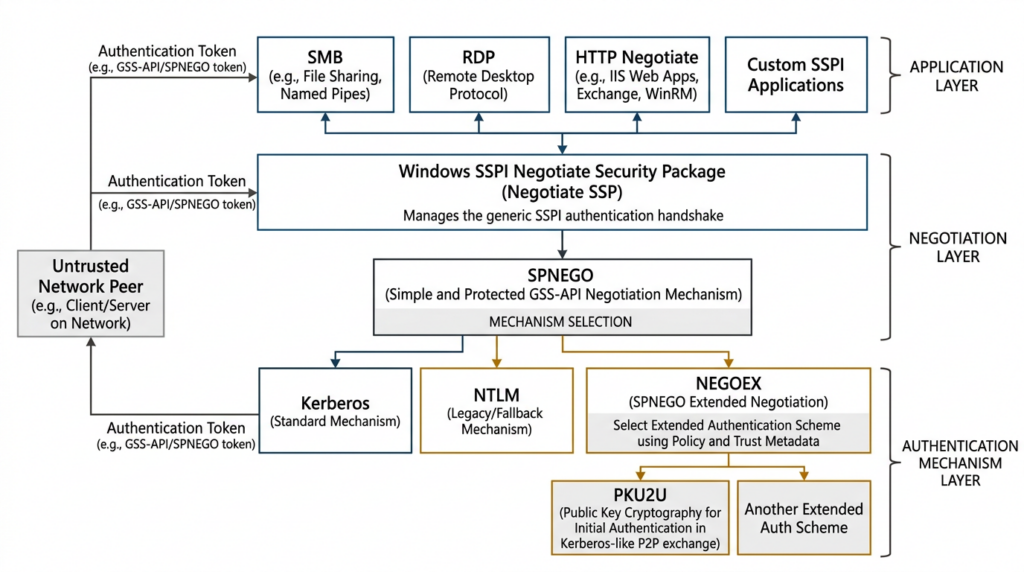
Understanding the vulnerability starts with understanding what SPNEGO does.
Applications frequently need authentication without hard-coding one credential protocol. A Windows application may be able to use Kerberos in one environment, NTLM in another, or an extended authentication mechanism under a different trust model. The Generic Security Service Application Program Interface gives applications a common interface for establishing security contexts, but the two peers still need a way to agree on a mechanism they both support.
RFC 4178 defines the Simple and Protected GSS-API Negotiation Mechanism. SPNEGO is a pseudo-mechanism that lets an initiator propose one or more supported security mechanisms in preference order. The accepting peer selects a compatible mechanism, after which the chosen mechanism establishes the real security context. SPNEGO can protect the negotiation against an attacker forcing an undesirable mechanism when the selected mechanism provides the required integrity properties. (מעקב נתונים של IETF)
A simplified stack looks like this:
Application protocol
SMB, RDP, HTTP Negotiate, custom SSPI application, or another service
        |
        v
Windows SSPI or GSS-style authentication interface
        |
        v
Negotiate security package
        |
        v
SPNEGO mechanism selection
        |
        +--------------------+
        |                    |
        v                    v
Kerberos or NTLM          NEGOEX
                               |
                               v
                  Extended authentication selection
                               |
                    +----------+----------+
                    |                     |
                    v                     v
                  PKU2U          Other supported scheme
The diagram is conceptual. It does not mean that every listed application protocol necessarily exposes CVE-2025-47981 in every Windows configuration. It shows why a vulnerability in negotiation code can sit beneath several application protocols rather than belonging exclusively to one port or server role.
Microsoft’s NEGOEX specification says the extension enhances SPNEGO by allowing the peers to select a common authentication protocol using metadata such as trust configuration. NEGOEX is negotiated through SPNEGO, while the application calling the authentication interface may remain unaware that additional negotiation messages are being exchanged. (Microsoft Learn)
This layering matters operationally. A perimeter inventory that asks only “Is SMB enabled?” is incomplete. Defenders also need to ask:
- Which applications invoke the Windows Negotiate security package?
- Which systems permit PKU2U or other extended authentication schemes?
- From which networks can an untrusted peer initiate authentication?
- Are custom applications using SSPI with
Negotiate? - Are RDP, file sharing, management, web, database, mail, or middleware services accepting integrated Windows authentication?
- Are remote workstations able to authenticate directly to peer systems?
- Do reverse proxies or gateways terminate the transport before a token reaches Windows, or do they pass integrated authentication to the host?
These questions identify the reachable authentication surface. They still do not replace patch-state verification.
How NEGOEX Extends the Authentication State Machine
Traditional SPNEGO allows peers to select a mutually supported mechanism. NEGOEX adds a richer negotiation model. Microsoft describes it as addressing limitations in the original SPNEGO design, allowing mechanism selection based on policy and trust metadata while preserving an optimistic-token model that can avoid an extra round trip when the initial choice is accepted. (Microsoft Learn)
The protocol contains state that must remain consistent across multiple messages. A negotiation can involve:
- An initiator and an acceptor.
- A conversation identifier.
- A sequence number.
- A list of authentication schemes.
- Mechanism-specific metadata.
- Mechanism tokens.
- Verification or checksum messages.
- More than one NEGOEX message concatenated inside a context token.
Microsoft’s abstract data model explicitly states that one NEGOEX GSS-API context token may contain one or more NEGOEX messages and that multiple messages are concatenated. It also identifies a NEGOEX message as the smallest unit used when computing negotiation-protection checksums. (Microsoft Learn)
The published protocol example begins with the ASCII signature NEGOEXTS. The message header includes a message type, sequence number, header length, message length, and conversation identifier. The example then carries fields used by an initiator negotiation message, including protocol information and authentication scheme identifiers. (Microsoft Learn)
These structures create several classes of parser responsibility:
- The implementation must confirm that the token contains enough bytes for a fixed header.
- The declared header length must not be smaller than required fixed fields.
- The declared message length must not exceed the remaining token.
- Offset-plus-length calculations must not wrap an integer type.
- A count of authentication schemes must fit inside the associated vector.
- Concatenated messages must advance the cursor without overlap or truncation.
- Message sequence and conversation identifiers must match the active negotiation state.
- Metadata copied into heap allocations must remain within the allocated size.
- Mechanism-specific content must not be trusted merely because the outer message passed basic checks.
- Checksum validation must operate over the correct message boundaries.
CVE-2025-47981 is mapped to CWE-122, Heap-based Buffer Overflow. At a high level, that means data written into a heap allocation can exceed the allocation’s boundary. The public record does not disclose which of the preceding parser responsibilities failed. It would therefore be speculative to claim that the bug is specifically an integer overflow, an authentication-scheme count error, a malformed checksum vector, or a particular cbMessageLength validation defect.
A trustworthy analysis stops at the boundary of the public evidence: a crafted NEGOEX message can reach a heap overflow in affected Windows code, and successful exploitation may produce remote code execution. The exact corrupting field and exploit primitives remain undisclosed in the authoritative sources cited here. (NVD)
What Microsoft Has Confirmed and What Remains Unknown
The public facts are serious enough without embellishment.
Microsoft’s CVE record and NVD entry confirm that an unauthorized attacker can execute code over a network by exploiting a heap-based buffer overflow in Windows SPNEGO Extended Negotiation. Microsoft assigned the maximum practical CVSS 3.1 combination for a scope-unchanged network RCE: low complexity, no privileges, no user interaction, and high impact across the CIA triad. (NVD)
Microsoft’s July 2025 guidance, as summarized by Cisco Talos and Tenable, also classified exploitation as more likely. Both sources report that the attacker sends a specially crafted message to a vulnerable system and that successful exploitation may result in remote code execution. (בלוג Cisco Talos)
The following details are not established by the public vendor record:
| Question | Publicly confirmed answer |
|---|---|
| Which NEGOEX message type contains the vulnerable field? | Not disclosed |
| Which field, count, offset, or length causes the overflow? | Not disclosed |
| Which Windows binary contains the vulnerable function? | Not disclosed in the cited advisory |
| Which function performs the faulty allocation or copy? | Not disclosed |
| Is a particular authentication scheme required? | Not disclosed |
| Is PKU2U the only route to the vulnerable code? | Not established |
| Is SMB the preferred or only carrier? | Not established |
| Is RDP the preferred or only carrier? | Not established |
| Can HTTP Negotiate reliably expose this exact CVE? | Not established for every configuration |
| Does a malformed message first cause a crash or immediate code execution? | Not disclosed |
| What heap grooming is required? | Not disclosed |
| What mitigations must be bypassed for reliable code execution? | Not disclosed |
| Under which exact process identity would exploit code run? | Not disclosed in the public CVE record |
| Is a reliable, independently verified exploit publicly available? | Not confirmed by the authoritative sources cited here |
| Has a self-propagating worm been observed? | Not confirmed |
This distinction is especially important when evaluating repositories or posts labeled “PoC.” A script that reads the Windows version, checks a registry value, or prints “vulnerable” is an exposure checker, not a remote code execution proof of concept. NVD links to third-party detection and mitigation scripts for CVE-2025-47981, but the referenced detection material is described as inspecting operating system build and exposure indicators. That does not demonstrate the memory corruption or prove code execution. (vicarius.io)
Security teams should treat random exploit repositories with additional caution. CVE-themed repositories can contain nonfunctional code, generic buffer-overflow samples, credential theft, malware, or unrelated binaries. A repository name that includes the CVE number is not evidence that its author reproduced the vulnerability.
Why the Authentication Surface May Be Wormable
The word “wormable” is useful only when its conditions are made explicit.
A vulnerability becomes a practical worm platform when an attacker can combine several capabilities:
- Remote reachability
The vulnerable parser must be reachable from another machine. - No prior authentication
The attack must reach the parser before valid credentials are required. - No user interaction
No victim needs to open a file, click a link, or approve a prompt. - Reliable memory corruption
A crafted message must produce repeatable control of execution rather than an occasional crash. - Useful execution context
The resulting process identity and privileges must permit payload execution and network activity. - Target discovery
The compromised host must be able to identify other reachable systems. - Payload propagation
The malware must deliver or reconstruct itself on the next target. - Repeatability across builds
Differences in Windows versions, mitigations, heap behavior, and service configuration must not make exploitation too unreliable. - Network paths
Firewalls, endpoint isolation, VLAN boundaries, VPN policy, host-based controls, and authentication gateways must permit movement.
CVE-2025-47981 clearly satisfies several prerequisite properties in Microsoft’s scoring model: network attack vector, no required privileges, no user interaction, and low attack complexity. CISA’s SSVC enrichment also labels the issue automatable with total technical impact. (NVD)
That is enough to take wormable risk seriously. It is not enough to declare that a working worm exists.
“Attack complexity low” is a CVSS metric, not a published exploit-development report. It means Microsoft did not identify specialized conditions outside the attacker’s control as necessary for exploitation under the scoring model. It does not tell defenders how reliable the heap corruption is across all affected builds, whether modern memory mitigations complicate control-flow hijacking, or whether one payload works across every reachable protocol.
Similarly, “automatable” indicates that the attack steps are considered capable of automation. It does not prove self-propagation. A vulnerability scanner is automated. A denial-of-service loop is automated. A remote exploit can be automated without containing any target discovery or worm logic.
The best operational conclusion is:
CVE-2025-47981 has properties that could support automated, unauthenticated lateral propagation if reliable exploitation is developed, so defenders should patch before public weaponization rather than waiting for proof of a worm.
That conclusion is strong, accurate, and sufficient to justify emergency treatment.
SPNEGO Exposure Is Broader Than One Port
Previous NEGOEX research demonstrates why defenders pay attention to the authentication layer.
In 2022, Microsoft patched CVE-2022-37958, another SPNEGO NEGOEX vulnerability. It was initially treated as information disclosure, but Microsoft later reclassified it as critical after IBM X-Force research showed that it could lead to pre-authentication remote code execution. IBM explained that NEGOEX could be reached through Windows application protocols that authenticate, including SMB and RDP by default, with other uses possible where SPNEGO authentication is enabled. IBM described that earlier vulnerability as having the potential to be wormable. (Security Intelligence)
That history supports a broad threat-modeling approach to CVE-2025-47981, but it does not prove identical reachability.
The safe inference is that a weakness in NEGOEX deserves investigation wherever an application passes attacker-controlled authentication tokens into the Windows negotiation stack. The unsafe inference is that every protocol affected by CVE-2022-37958 is automatically and identically exploitable through CVE-2025-47981.
Transport reachability, authentication configuration, Windows policy, application behavior, token encapsulation, and the exact vulnerable code path all matter.
A practical review should cover at least these service classes:
| Service class | Why it belongs in the review | What must be verified |
|---|---|---|
| SMB file sharing | Windows integrated authentication commonly appears in SMB sessions | Whether the target is reachable, patched, and invoking relevant negotiation paths |
| Remote Desktop | RDP authentication can use Windows security packages and may depend on PKU2U in some Entra scenarios | RDP exposure, Network Level Authentication design, PKU2U dependency, and patch state |
| HTTP integrated authentication | IIS or another Windows application may use Negotiate | Whether untrusted users can reach the endpoint and whether tokens terminate on the affected host |
| Management services | Enterprise management tools often use integrated authentication | Network scope, service account context, gateways, and host patching |
| Custom SSPI applications | Developers may request the Negotiate package without understanding the selected mechanism | Application code path, accepted mechanisms, and external reachability |
| Peer-to-peer or workgroup authentication | PKU2U was designed for peer authentication using online identities | Whether the policy is enabled and peers are accessible from untrusted segments |
| Middleware and proxies | A proxy may relay or terminate authentication | Whether malformed tokens reach Windows or are rejected upstream |
Do not convert this table into a blind port scan. A listener only proves that a service exists. It does not prove that NEGOEX is enabled, that the relevant token reaches vulnerable code, or that the host lacks the patch.
PKU2U and the Default Configuration Question
PKU2U is central to Microsoft’s explanation of the default client exposure.
Microsoft documents the security policy as:
Network security: Allow PKU2U authentication requests to this computer to use online identities
The policy controls whether online identities may authenticate to the computer in a peer-to-peer relationship. Microsoft explains that the Negotiate Security Support Provider can use the Negoexts.dll extension, which supports additional security support providers including PKU2U. When online-identity authentication is accepted, the PKU2U provider obtains a local certificate, exchanges policy between the peers, validates the peer’s certificate, and associates the identity with a security token. (Microsoft Learn)
Microsoft’s documentation states that the policy is enabled by default in Windows 10 version 1607 and later. It also states that PKU2U is disabled by default on Windows Server. For on-premises-only environments, Microsoft recommends disabling or not configuring the setting, while hybrid and Microsoft Entra joined environments may require it. (Microsoft Learn)
This creates an important distinction.
Code affected
The current CVE record includes a wider set of Windows products, including Windows 10 version 1507, later Windows 10 and Windows 11 releases, and multiple Windows Server generations. The affected-product data therefore should not be reduced to “Windows 10 1607 and newer only.” (NVD)
Exposed by default
Microsoft’s 1607-and-later statement explains a default policy condition that increases the likelihood that relevant PKU2U authentication requests will be accepted on those client systems. Talos and Tenable both highlighted this default policy when summarizing Microsoft’s advisory. (בלוג Cisco Talos)
Administrator-enabled exposure
A Windows Server may have PKU2U disabled by default but enabled by an administrator, security template, management product, troubleshooting change, Entra authentication requirement, or inherited configuration. Conversely, a Windows client may have the setting disabled through Group Policy or a security baseline.
Patch requirement
A disabled policy may reduce a particular attack path. It does not remove the vulnerable code from the operating system. Systems listed as affected should still receive the security update.
This is the rule defenders should use:
Policy state changes reachability. Patch state changes whether the known vulnerability remains present.
Affected Windows Builds
The CVE record currently identifies the following minimum fixed builds for modern Windows branches. A later cumulative update on the same servicing branch should also contain the fix because Windows cumulative updates supersede earlier fixes.
| Windows build family | Representative products | Minimum fixed build |
|---|---|---|
| 10240 | Windows 10 Version 1507 | 10.0.10240.21073 |
| 14393 | Windows 10 Version 1607, Windows Server 2016 | 10.0.14393.8246 |
| 17763 | Windows 10 Version 1809, Windows Server 2019 | 10.0.17763.7558 |
| 19044 | Windows 10 Version 21H2 | 10.0.19044.6093 |
| 19045 | Windows 10 Version 22H2 | 10.0.19045.6093 |
| 20348 | Windows Server 2022 | 10.0.20348.3932 |
| 22621 | Windows 11 Version 22H2 | 10.0.22621.5624 |
| 22631 | Windows 11 Version 23H2 and associated 22631 branches | 10.0.22631.5624 |
| 25398 | Windows Server 2022 Version 23H2 | 10.0.25398.1732 |
| 26100 | Windows 11 Version 24H2, Windows Server 2025 | 10.0.26100.4652 |
NVD also lists Windows Server 2008 R2, Windows Server 2012, and Windows Server 2012 R2 among affected configurations. Organizations operating legacy systems must use the applicable Microsoft security update channel, Extended Security Updates arrangement, or supported migration path rather than assuming that the absence of a modern build threshold means the products are safe. (NVD)
The table is a minimum-build check, not a complete lifecycle assessment. It does not answer whether the operating system edition remains supported, whether a servicing stack problem prevented correct installation, whether an update was later removed, or whether an appliance vendor permits ordinary Windows updates.
How to Read the PKU2U Policy Safely
The Group Policy location is:
Computer Configuration
  Windows Settings
    Security Settings
      Local Policies
        Security Options
          Network security:
          Allow PKU2U authentication requests to this computer
          to use online identities
The corresponding registry location is:
HKEY_LOCAL_MACHINE\SYSTEM\CurrentControlSet\Control\Lsa\pku2u
The value is:
AllowOnlineID
Microsoft’s Windows security baseline documentation identifies AllowOnlineID as a REG_DWORD value under this path. A value of 1 represents enabled and a value of 0 represents disabled. (Microsoft Learn)
A missing value requires contextual interpretation. It may mean that the system is using the operating system default rather than an explicitly configured local or domain policy. Because defaults differ by Windows product and deployment context, a script should report a missing value as not explicitly configured, not automatically convert it to “disabled.”
Use the following local check:
$Pku2uPath = 'HKLM:\SYSTEM\CurrentControlSet\Control\Lsa\pku2u'

if (Test-Path $Pku2uPath) {
    $Value = Get-ItemPropertyValue `
        -Path $Pku2uPath `
        -Name 'AllowOnlineID' `
        -ErrorAction SilentlyContinue

    switch ($Value) {
        0 { 'PKU2U is explicitly disabled' }
        1 { 'PKU2U is explicitly enabled' }
        default { 'PKU2U registry path exists, but AllowOnlineID is not explicitly set' }
    }
}
else {
    'PKU2U is not explicitly configured in this registry location; evaluate the effective policy and OS default'
}
For managed fleets, also review Resultant Set of Policy, MDM configuration, Intune settings, security baselines, configuration management, and local exceptions. Reading one registry value remotely may miss a policy that has not yet refreshed or a configuration conflict.
Why Disabling PKU2U Can Break Legitimate Authentication
Disabling PKU2U is not universally harmless.
Microsoft states that PKU2U is disabled by default on Windows Server, but also warns that Remote Desktop connections from a Microsoft Entra hybrid joined server to a Microsoft Entra joined Windows device, or to certain hybrid joined domain members, can fail when PKU2U is disabled. Microsoft recommends enabling it on the server and client where that authentication design requires it. (Microsoft Learn)
That means the correct mitigation decision depends on the environment:
| סביבה | Likely PKU2U requirement | Recommended approach |
|---|---|---|
| Traditional on-premises domain using domain accounts | Often unnecessary | Test disabling and enforce centrally if no application dependency exists |
| Workgroup systems using online identities | May be required | Patch first, reduce peer reachability, and test alternatives before disabling |
| Microsoft Entra joined RDP scenario | May be required | Do not disable globally without testing sign-in paths |
| Hybrid joined administrative environment | Depends on connection direction and identity design | Map RDP and management workflows before changing policy |
| Internet-facing Windows service | PKU2U should not justify broad exposure | Patch and restrict the service to trusted access paths |
| Unsupported legacy appliance | Unknown | Isolate, consult the vendor, and plan migration |
A temporary mitigation that breaks administrative access can create a different security problem. Administrators may respond by disabling Network Level Authentication, opening broader firewall rules, sharing local administrator credentials, or introducing unmanaged remote-control software. Those compensating behaviors may be worse than the original configuration.
The preferred order is:
- Patch.
- Verify the fixed build.
- Determine whether PKU2U is required.
- Disable it where unnecessary.
- Restrict network access regardless of the policy state.
- Retest legitimate authentication workflows.
Prioritizing Systems for CVE-2025-47981
A CVSS score is not an asset priority list. Organizations need to combine vulnerability severity with actual exposure and business impact.
Priority one
Patch and investigate immediately when several of the following are true:
- The system is below its fixed build.
- PKU2U is explicitly enabled or likely enabled by default.
- An untrusted network can reach SMB, RDP, HTTP integrated authentication, or another service using Windows Negotiate.
- The host is a privileged administrator workstation.
- The host is a jump server, bastion, VDI broker, remote support endpoint, or management server.
- The host can reach many other Windows systems.
- Local firewall policy permits broad peer-to-peer authentication.
- The host operates in a flat network.
- The system processes authentication from unmanaged devices.
- Endpoint monitoring is weak or absent.
Priority two
Treat the system as high priority when:
- It is unpatched but reachable only from internal networks.
- PKU2U state is unknown.
- The host runs custom applications using SSPI Negotiate.
- Network segmentation exists but allows broad east-west Windows authentication.
- The system is a server on which PKU2U was enabled to support an Entra or RDP workflow.
- The system cannot be updated during the ordinary maintenance window.
Priority three
Risk may be reduced, but patching is still required, when:
- The affected host is strongly segmented.
- Host firewalls permit authentication only from specific management systems.
- PKU2U is explicitly disabled.
- No application accepting untrusted authentication is reachable.
- The system is offline or used only in a controlled laboratory.
A disabled policy and a blocked port are valuable controls. Neither should be documented as “not affected” when the installed Windows build remains vulnerable.
Safe Local Inventory and Patch Verification
The following PowerShell script performs a local, non-exploitative assessment. It reads the operating system build, update revision, PKU2U policy, and recent hotfix information. It does not send network packets, invoke NEGOEX directly, or attempt to trigger memory corruption.
Set-StrictMode -Version Latest
$ErrorActionPreference = 'Stop'

$FixedUbrByBuild = @{
    10240 = 21073
    14393 = 8246
    17763 = 7558
    19044 = 6093
    19045 = 6093
    20348 = 3932
    22621 = 5624
    22631 = 5624
    25398 = 1732
    26100 = 4652
}

$CurrentVersionPath = 'HKLM:\SOFTWARE\Microsoft\Windows NT\CurrentVersion'
$VersionData = Get-ItemProperty -Path $CurrentVersionPath

$Build = [int]$VersionData.CurrentBuildNumber
$Ubr = [int]$VersionData.UBR
$FullBuild = '{0}.{1}' -f $Build, $Ubr

$MinimumFixedUbr = $FixedUbrByBuild[$Build]

if ($null -eq $MinimumFixedUbr) {
    $PatchAssessment = 'Build family not included in this local table. Review the Microsoft CVE record and applicable servicing channel.'
}
elseif ($Ubr -ge $MinimumFixedUbr) {
    $PatchAssessment = "At or above the minimum July 2025 fixed build for branch $Build."
}
else {
    $PatchAssessment = "Below the minimum fixed build $Build.$MinimumFixedUbr."
}

$Pku2uPath = 'HKLM:\SYSTEM\CurrentControlSet\Control\Lsa\pku2u'
$Pku2uValue = $null
$Pku2uAssessment = 'Not explicitly configured in the inspected registry location.'

if (Test-Path $Pku2uPath) {
    try {
        $Pku2uValue = Get-ItemPropertyValue `
            -Path $Pku2uPath `
            -Name 'AllowOnlineID' `
            -ErrorAction Stop

        $Pku2uAssessment = switch ($Pku2uValue) {
            0 { 'Explicitly disabled' }
            1 { 'Explicitly enabled' }
            default { "Unexpected value: $Pku2uValue" }
        }
    }
    catch {
        $Pku2uAssessment = 'Registry path exists, but AllowOnlineID is not explicitly configured.'
    }
}

$RecentHotfixes = @(
    Get-HotFix |
        Sort-Object InstalledOn -Descending |
        Select-Object -First 10 HotFixID, InstalledOn, Description
)

[pscustomobject]@{
    ComputerName          = $env:COMPUTERNAME
    ProductName           = $VersionData.ProductName
    DisplayVersion        = $VersionData.DisplayVersion
    EditionId             = $VersionData.EditionID
    FullBuild             = $FullBuild
    MinimumFixedBuild     = if ($null -ne $MinimumFixedUbr) {
                                "$Build.$MinimumFixedUbr"
                            }
                            else {
                                'Review vendor guidance'
                            }
    PatchAssessment       = $PatchAssessment
    Pku2uAllowOnlineID    = $Pku2uValue
    Pku2uAssessment       = $Pku2uAssessment
    RecentHotfixes        = $RecentHotfixes
}
For fleet collection, export the result as JSON or flatten it into CSV:
$Result = & .\Test-CVE-2025-47981Exposure.ps1

$Result |
    Select-Object `
        ComputerName,
        ProductName,
        DisplayVersion,
        EditionId,
        FullBuild,
        MinimumFixedBuild,
        PatchAssessment,
        Pku2uAllowOnlineID,
        Pku2uAssessment |
    Export-Csv `
        -Path '.\CVE-2025-47981-inventory.csv' `
        -NoTypeInformation `
        -Encoding UTF8
The minimum build table is derived from the current CVE affected-version record. Future servicing changes, unusual editions, embedded systems, disconnected images, and legacy ESU products may require additional logic. (NVD)
What this script proves
- The local Windows build and update revision.
- Whether that build is above a known minimum fixed threshold in the table.
- Whether the inspected PKU2U registry value is explicitly enabled or disabled.
- Which hotfixes Windows reports as recently installed.
What this script does not prove
- That a system below the threshold is remotely exploitable from a specific network.
- That a system above the threshold has not been compromised previously.
- That missing PKU2U registry data means the effective policy is disabled.
- That an application is or is not invoking NEGOEX.
- That a third-party appliance image can safely accept ordinary Windows updates.
- That one KB identifier is the only valid update path.
- That the vulnerable parser can be reached through a particular port.
Safe PoC for Length Validation
A responsible demonstration should explain the class of bug without producing a real NEGOEX exploit.
The following Python program implements a toy message format inspired by several public NEGOEX field names. It is deliberately not wire compatible with Microsoft’s protocol. It does not use Windows authentication, does not open a socket, and does not contain the CVE trigger.
Its purpose is to show how a parser should reject a message whose declared length exceeds the actual buffer.
from __future__ import annotations

import struct
from dataclasses import dataclass

TOY_MAGIC = b"NEGOEXTS"
TOY_HEADER = struct.Struct("<8sIIII16s")
MAX_TOY_MESSAGE = 64 * 1024


class ToyParseError(ValueError):
    """Raised when a synthetic negotiation message is structurally invalid."""


@dataclass(frozen=True)
class ToyHeader:
    message_type: int
    sequence_number: int
    header_length: int
    message_length: int
    conversation_id: bytes


def parse_toy_message(data: bytes) -> ToyHeader:
    """
    Parse a local synthetic message.

    This is not a NEGOEX implementation and cannot be used to test
    CVE-2025-47981.
    """
    if len(data) < TOY_HEADER.size:
        raise ToyParseError("Buffer is shorter than the fixed toy header")

    (
        magic,
        message_type,
        sequence_number,
        header_length,
        message_length,
        conversation_id,
    ) = TOY_HEADER.unpack_from(data)

    if magic != TOY_MAGIC:
        raise ToyParseError("Unexpected toy message signature")

    if header_length < TOY_HEADER.size:
        raise ToyParseError("Declared header length is too small")

    if message_length < header_length:
        raise ToyParseError("Message length is smaller than header length")

    if message_length > MAX_TOY_MESSAGE:
        raise ToyParseError("Message exceeds the local demonstration limit")

    if message_length > len(data):
        raise ToyParseError(
            "Declared message length exceeds the available buffer"
        )

    return ToyHeader(
        message_type=message_type,
        sequence_number=sequence_number,
        header_length=header_length,
        message_length=message_length,
        conversation_id=conversation_id,
    )


def build_toy_message(payload: bytes, declared_length: int | None = None) -> bytes:
    conversation_id = bytes.fromhex(
        "00112233445566778899aabbccddeeff"
    )

    actual_length = TOY_HEADER.size + len(payload)
    message_length = (
        actual_length if declared_length is None else declared_length
    )

    header = TOY_HEADER.pack(
        TOY_MAGIC,
        0,
        0,
        TOY_HEADER.size,
        message_length,
        conversation_id,
    )

    return header + payload


def main() -> None:
    valid = build_toy_message(b"safe-local-payload")
    print("Valid:", parse_toy_message(valid))

    malformed = build_toy_message(
        b"short",
        declared_length=4096,
    )

    try:
        parse_toy_message(malformed)
    except ToyParseError as exc:
        print("Malformed message rejected:", exc)


if __name__ == "__main__":
    main()
Expected output:
Valid: ToyHeader(message_type=0, sequence_number=0, ...)
Malformed message rejected: Declared message length exceeds the available buffer
This demonstration teaches four defensive principles:
- Never allocate or copy based only on an untrusted declared length.
- Confirm that every declared region lies inside the received buffer.
- Validate relationships between header length, message length, offset, and count.
- Apply an upper bound before memory allocation or iteration.
A vulnerable native parser may perform a copy using the declared length even though the network buffer contains fewer bytes, or it may allocate one size and later copy another. The exact CVE-2025-47981 programming error has not been published, so the toy parser should not be described as reproducing Microsoft’s defect.
Why a Real Network PoC Is the Wrong Production Test
Sending malformed authentication messages to production Windows systems creates unnecessary risk.
Even when exploit code does not achieve remote execution, malformed native-protocol input may:
- Crash an authentication process.
- Interrupt RDP, SMB, web, or management access.
- Trigger automatic service recovery.
- Corrupt in-memory authentication state.
- Disconnect legitimate users.
- Cause a server reboot.
- Generate incomplete evidence.
- Be mistaken for an actual attack.
- Interfere with incident-response data.
- Execute untrusted code embedded in a fake PoC repository.
The safer validation sequence is:
- Confirm the exact Windows product and build.
- Compare the build with the fixed threshold.
- Review cumulative-update installation and servicing health.
- Determine the effective PKU2U policy.
- Identify reachable services using Windows Negotiate.
- Review firewall and segmentation controls.
- Patch the host.
- Verify the new build.
- Retest legitimate authentication.
- Hunt for evidence of abnormal pre-patch activity.
Exploit reproduction belongs in an isolated laboratory with disposable snapshots, explicit authorization, controlled packet capture, debuggers, symbols, crash dumps, and no routing to production. Even there, researchers should distrust unreviewed binaries and scripts.
Network Detection for NEGOEX Abuse
Network detection is possible in principle but difficult to make CVE-specific without the missing exploit details.
Microsoft’s published protocol example shows the NEGOEXTS signature at the beginning of a NEGOEX message. A parser can use this value to recognize candidate NEGOEX content after correctly decoding the containing application protocol. (Microsoft Learn)
A defensive sensor could then evaluate structural invariants:
if decoded_authentication_token_contains_negoex:
    for each concatenated_negoex_message:
        require fixed_header_is_present
        require declared_header_length >= required_minimum
        require declared_message_length >= declared_header_length
        require declared_message_length <= remaining_token_length
        require offsets_and_counts_fit_inside_message
        require sequence_and_conversation_state_are_consistent

        if a required invariant fails:
            raise malformed_negoex_alert
This pseudocode is intentionally not a deployable exploit signature. It describes protocol validation, not a byte pattern unique to CVE-2025-47981.
Why a simple content rule is insufficient
A rule that alerts whenever it sees NEGOEXTS will detect legitimate authentication negotiation. It will produce noise and may encourage analysts to misclassify normal traffic as exploitation.
A rule that looks for a large token also has limitations:
- Legitimate mechanism tokens can vary in size.
- The token may be fragmented across transport records.
- The application protocol may encode or wrap the token.
- TLS may hide HTTP Negotiate traffic.
- RDP and SMB have their own framing.
- A malicious message may not be unusually large.
- The vulnerable inconsistency may involve an internal offset or count rather than total length.
Higher-value network signals
More useful signals include:
- A malformed NEGOEX message that violates published length relationships.
- Repeated negotiation failures from one source to many Windows hosts.
- The same unusual token structure appearing across several destination protocols.
- Authentication attempts against hosts that do not normally accept peer authentication.
- Sudden east-west connection bursts involving RDP, SMB, or integrated Windows authentication.
- A source that cycles through address ranges while sending nearly identical initial authentication tokens.
- Authentication negotiation immediately followed by endpoint crashes or resets.
- An internal workstation attempting to authenticate to many peers after exhibiting suspicious process activity.
No single signal proves exploitation. Correlation provides the value.
Endpoint Detection and Crash Analysis
A memory-corruption exploit may produce one of several outcomes:
- The message is rejected before reaching the vulnerable path.
- The process encounters an access violation.
- A heap-integrity check terminates the process.
- A service restarts.
- The host becomes unstable.
- Control-flow protection blocks execution.
- The attacker obtains code execution.
- The attempt succeeds only on a subset of builds.
Defenders should preserve:
- Windows Error Reporting artifacts.
- Application and system crash records.
- Relevant process dumps.
- EDR memory-protection detections.
- Service restart timelines.
- Network connections preceding the crash.
- Authentication telemetry from the source and target.
- Process creation following the suspected event.
- Service creation, scheduled tasks, persistence, or credential access after the event.
- Firewall logs showing follow-on lateral movement.
Avoid hard-coding one process name into the detection strategy unless Microsoft or reliable reverse engineering identifies the exact vulnerable host process for the relevant Windows release. Authentication packages can be loaded and invoked through different service paths, and an over-specific rule may miss valid evidence.
High-confidence incident pattern
A high-confidence investigation pattern would look like this:
- An untrusted source sends an abnormal authentication token.
- The target’s Windows authentication component crashes or raises a memory-protection alert.
- The same source repeats the message against additional systems.
- One target creates an unexpected high-privilege process or network connection.
- That target begins connecting to peers using the same authentication pattern.
That sequence would justify immediate containment even before complete exploit attribution.
Low-confidence pattern
The following is not enough by itself:
- One failed RDP login.
- One SMB negotiation error.
- One appearance of the string
NEGOEXTS. - One system reboot after patching.
- A scanner saying “CVE detected” based only on product name.
- A generic heap-corruption alert with no network correlation.
- A machine below the fixed build but isolated from all untrusted paths.
Low-confidence evidence should trigger validation, not a public claim of exploitation.
Patch Verification Is More Reliable Than Exploit Verification
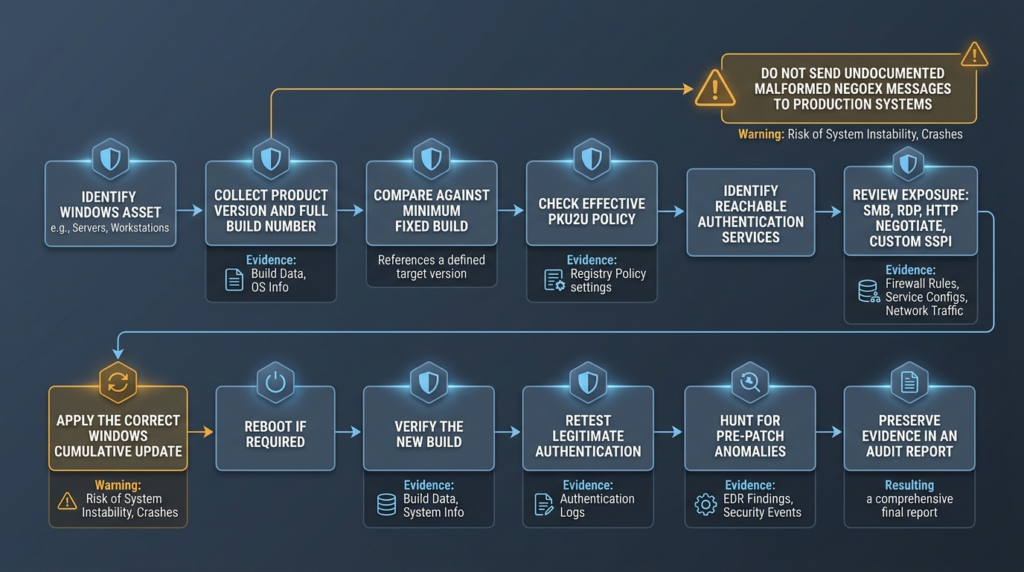
For CVE-2025-47981, version evidence is the most reliable primary control.
The vulnerability was addressed through Windows security updates released in July 2025. Cisco Talos, Tenable, Singapore’s Cyber Security Agency, and other security authorities advised affected users to install the relevant Windows updates. (בלוג Cisco Talos)
A mature patch verification process should collect four layers of evidence.
| Evidence layer | Question | Example evidence | הגבלה |
|---|---|---|---|
| Product evidence | Is the OS listed as affected? | Product name, edition, architecture, servicing branch | Product name alone does not establish patch status |
| Build evidence | Is the installed build at or above the fixed threshold? | Current build and UBR | A servicing anomaly may still require investigation |
| Update evidence | Did the intended cumulative update install successfully? | Update history, servicing logs, management status | Management success can be stale or inaccurate |
| Exposure evidence | Can untrusted systems reach a relevant authentication path? | Firewall, service, route, and policy data | Reduced exposure does not remove the need to patch |
The remediation ticket should not close merely because an endpoint-management console reports that a deployment job succeeded. Confirm the resulting build on the endpoint.
For high-value systems, also verify:
DISM.exe /Online /Cleanup-Image /ScanHealth
sfc.exe /scannow
These commands do not test CVE-2025-47981 directly. They help identify Windows component-store or system-file problems that might interfere with reliable servicing.
Review the effective build afterward:
$Version = Get-ItemProperty `
    'HKLM:\SOFTWARE\Microsoft\Windows NT\CurrentVersion'

'{0}.{1}' -f $Version.CurrentBuildNumber, $Version.UBR
Remediation and Hardening
Install a fixed Windows update
Patching is the only control that removes the known vulnerable implementation.
Use a July 2025 or later cumulative update applicable to the Windows branch. For legacy systems, use the appropriate Microsoft servicing channel or supported vendor image. Do not apply a random KB intended for a different product simply because it was released in the same month.
Verify the final build
Compare the installed build against the minimum fixed build. A newer cumulative update is normally acceptable on the same servicing branch because cumulative updates include prior security fixes.
Disable PKU2U where it is not required
In traditional on-premises environments using domain accounts, Microsoft recommends disabling or not configuring online-identity authentication. Test the policy before broad rollout. (Microsoft Learn)
An explicit registry configuration can be applied as follows:
$Pku2uPath = 'HKLM:\SYSTEM\CurrentControlSet\Control\Lsa\pku2u'

New-Item `
    -Path $Pku2uPath `
    -Force |
    Out-Null

New-ItemProperty `
    -Path $Pku2uPath `
    -Name 'AllowOnlineID' `
    -PropertyType DWord `
    -Value 0 `
    -Force |
    Out-Null
In enterprise environments, use Group Policy or MDM rather than an unmanaged local script. Record the business owner, test population, deployment date, rollback plan, and RDP validation results.
Restrict authentication reachability
- Block internet access to SMB and RDP.
- Require VPN, zero-trust access, or a hardened gateway for remote administration.
- Permit management protocols only from designated administration networks.
- Use Windows Firewall rules scoped to known source ranges.
- Segment client subnets from one another where peer authentication is unnecessary.
- Restrict workgroup devices and unmanaged endpoints.
- Review HTTP endpoints using Windows integrated authentication.
- Audit custom applications that request the Negotiate security package.
- Remove obsolete file shares and remote-management listeners.
- Limit lateral access from VDI and remote-work devices.
Protect privileged systems
Administrator workstations and jump hosts are unusually important. An authentication-layer RCE on a privileged workstation could expose tokens, credentials, management sessions, and routes to critical infrastructure even if the affected machine is not a server.
Apply tighter controls:
- Dedicated privileged access workstations.
- Restricted outbound connections.
- No routine email or web browsing.
- Separate administrative accounts.
- Application control.
- Credential Guard where compatible.
- EDR tamper protection.
- Host firewall restrictions.
- Rapid isolation capability.
- Frequent build and policy attestation.
Preserve telemetry
Do not disable crash collection or erase logs immediately after an authentication-service failure. Preserve evidence before rebooting repeatedly or redeploying the machine.
A Practical Enterprise Rollout
Large organizations should avoid both extremes: waiting for a public exploit and deploying untested configuration changes across every Windows endpoint.
Phase one — Inventory
Collect:
- Product and edition.
- Full build number.
- Architecture.
- Device role.
- Domain, workgroup, Entra joined, or hybrid joined state.
- Effective PKU2U policy.
- RDP configuration.
- SMB server and client exposure.
- Integrated authentication services.
- Firewall profile.
- Network segment.
- Management criticality.
- Patch-management owner.
Phase two — Classify exposure
Assign each host to one of four categories:
| קטגוריה | תיאור | פעולה |
|---|---|---|
| Exposed and unpatched | Untrusted network can reach a relevant authentication service | Patch or isolate immediately |
| Internally reachable and unpatched | East-west access exists | Prioritize by privilege and network reach |
| Configuration-reduced but unpatched | PKU2U disabled or service blocked | Patch promptly and retain the control |
| מתוקן | Fixed build confirmed | Retest services and monitor for pre-patch compromise |
Phase three — Test patches and policy
A representative test group should include:
- Windows 10 and Windows 11 clients.
- Windows Server versions in use.
- Server Core.
- Entra joined endpoints.
- Hybrid joined endpoints.
- RDP jump hosts.
- File servers.
- IIS servers using integrated authentication.
- Appliances built on Windows.
- Custom SSPI applications.
- Remote-office devices.
Phase four — Deploy by blast radius
Patch first:
- Privileged workstations.
- Remote-access infrastructure.
- Jump hosts and VDI.
- Broadly reachable clients.
- Management servers.
- File servers.
- Web and application servers using integrated authentication.
- Remaining internal systems.
- Isolated or legacy exceptions under compensating controls.
Phase five — Verify
After deployment:
- Confirm the new build locally.
- Confirm the device checked in after reboot.
- Test RDP and integrated authentication.
- Test file sharing.
- Test Entra or hybrid authentication workflows.
- Confirm PKU2U policy is still in the intended state.
- Confirm firewall rules remain active.
- Investigate failed installations.
- Re-scan through authenticated version checks.
- Export evidence for audit.
Phase six — Hunt
Review the period between initial exposure and patch completion for:
- Repeated malformed authentication activity.
- Unexplained authentication-service crashes.
- Unexpected lateral connections.
- New services or scheduled tasks.
- Suspicious high-privilege process creation.
- Credential dumping alerts.
- Remote administration from unusual clients.
- Multiple hosts failing authentication at the same time.
Patching prevents future exploitation of the known flaw. It does not erase a compromise that happened before patch deployment.
CVE-2025-47981 Compared With Earlier NEGOEX Vulnerabilities
CVE-2025-47981 is not the first serious memory-safety issue in the same negotiation surface.
| CVE | Year | רכיב | חולשה | CVSS characteristics | Key lesson |
|---|---|---|---|---|---|
| CVE-2022-37958 | 2022 | SPNEGO NEGOEX | Initially treated as information disclosure, later shown capable of RCE | Network, no privileges, no interaction, high complexity | Authentication-layer impact may be broader than the original classification |
| CVE-2025-21295 | 2025 | SPNEGO NEGOEX | Use after free, CWE-416 | Network, no privileges, no interaction, high complexity | Object lifetime bugs in negotiation code can create pre-authentication RCE risk |
| CVE-2025-47981 | 2025 | SPNEGO NEGOEX | Heap-based buffer overflow, CWE-122 | Network, low complexity, no privileges, no interaction | Length and memory-safety defects in a shared authentication layer deserve rapid patching |
NVD identifies CVE-2025-21295 as a SPNEGO NEGOEX remote code execution vulnerability caused by use after free. Its CVSS vector uses high attack complexity, distinguishing it from the low-complexity assessment applied to CVE-2025-47981. (NVD)
CVE-2022-37958 provides the more important historical lesson. IBM researchers demonstrated that a vulnerability originally presented as information disclosure could support pre-authentication RCE. Microsoft reclassified the issue, and IBM warned that the broad authentication surface gave it wormable potential. (Security Intelligence)
These vulnerabilities should not share exploit code, detection signatures, or patch checks. They affect the same broad mechanism but involve different memory-safety failures and different Windows updates.
Why EternalBlue comparisons need restraint
EternalBlue, CVE-2017-0144, is frequently invoked whenever a Windows RCE is described as wormable. The comparison can help executives understand the consequences of unauthenticated lateral propagation, but it can also mislead technical teams.
EternalBlue targeted SMBv1. A NEGOEX vulnerability exists in an authentication negotiation layer that may be reached through more than one application protocol. IBM used that breadth to explain why the potential impact of CVE-2022-37958 deserved attention. (CCB Belgium)
The similarities are limited to risk characteristics:
- Remote reachability.
- No required user interaction.
- Potential for lateral movement.
- Windows fleet exposure.
- Serious consequences if reliably weaponized.
The vulnerable components, packet formats, exploit primitives, patches, mitigations, and historical exploitation are different. Calling CVE-2025-47981 “the next EternalBlue” presents a prediction as a fact.
Four Exposure Scenarios
Scenario one — Non-domain Windows 11 workstation
A Windows 11 workstation is used by a remote employee. It is not joined to an on-premises domain. Local firewall rules permit file sharing and RDP from the employee’s home subnet. The device is below build 26100.4652, and PKU2U is not explicitly configured.
The correct assessment is:
- The Windows branch is listed as affected.
- PKU2U may follow the client default because no explicit policy is present.
- Peer devices on the local subnet may be able to initiate authentication.
- Port exposure increases reachability but does not prove exploitability.
- The endpoint should be patched immediately.
- File sharing and RDP should be limited to trusted sources.
- The home network should be treated as untrusted.
- The organization should verify whether the endpoint had unexplained crashes before patching.
The wrong assessment is:
It is a Windows 11 client, so it is definitely exploitable through TCP 445.
The first statement is evidence-driven. The second skips several unknowns.
Scenario two — Entra joined RDP endpoint
A Windows 11 device accepts RDP using Microsoft Entra credentials. PKU2U is explicitly enabled to support the authentication workflow.
The correct response is not to disable PKU2U blindly. Microsoft documents scenarios in which disabling PKU2U breaks RDP between hybrid and Entra joined devices. (Microsoft Learn)
The team should:
- Patch before changing authentication design.
- Restrict RDP to a gateway or approved administration network.
- Verify the fixed build.
- Test Entra authentication after patching.
- Keep PKU2U only where the business workflow requires it.
- Document the dependency.
- Monitor the endpoint for abnormal RDP negotiation and lateral activity.
Scenario three — Domain-joined Windows Server
A Windows Server 2022 member server has PKU2U explicitly disabled. It is below build 20348.3932 but accepts SMB connections from the entire corporate client network.
The disabled policy may reduce a PKU2U-specific path, but the server is still an affected, unpatched product. The organization should not close the vulnerability based on policy alone.
The team should:
- Patch the server.
- Reduce SMB reachability.
- Confirm which authentication mechanisms the server accepts.
- Review whether custom applications invoke Negotiate.
- Validate file sharing after the update.
- Retain the disabled PKU2U policy if it is operationally appropriate.
Scenario four — Legacy Windows appliance
A vendor appliance runs Windows Server 2012 R2. Administrators cannot apply ordinary monthly updates without vendor approval.
The correct response is:
- Confirm whether the appliance vendor has issued an updated image or advisory.
- Verify whether the organization has an applicable security-update channel.
- Restrict all unnecessary inbound authentication.
- Isolate the appliance from general user subnets.
- Allow management only through a controlled jump host.
- Monitor for crashes and abnormal network behavior.
- Obtain a replacement or migration date.
- Record the temporary exception with an owner and expiration.
“Vendor-managed” does not mean “not vulnerable.” It means patch authority and validation require coordination.
Detection Engineering Without False Certainty
A useful detection program separates vulnerability evidence, attempt evidence, ו compromise evidence.
Vulnerability evidence
- Affected Windows product.
- Build below the fixed threshold.
- Relevant authentication policy enabled.
- Reachable Windows authentication services.
- Broad east-west access.
Attempt evidence
- Malformed negotiation structure.
- Repeated negotiation failures.
- One source sending similar authentication messages to multiple targets.
- Authentication followed by a target-side crash.
- Tokens violating published length relationships.
- Unusual NEGOEX traffic in a segment where it is normally absent.
Compromise evidence
- Unexpected code execution.
- A new high-privilege child process.
- Service creation.
- Credential-access activity.
- New persistence.
- Outbound command-and-control traffic.
- The host repeating the suspicious authentication pattern against peers.
This separation prevents two opposite errors.
The first error is underreaction: “There is no public exploit, so we can wait.”
The second is overstatement: “The system is below the fixed build, so the attack already happened.”
A vulnerable state should trigger remediation. An exploit attempt should trigger investigation. Compromise evidence should trigger containment and incident response.
Safe Automation and Evidence Collection
Automated validation is most valuable when it organizes evidence rather than manufacturing exploit traffic. An authorized workflow can collect build numbers, PKU2U policy, update history, reachable authentication services, network segmentation, and post-remediation results, then preserve those findings in an auditable report.
Penligent supports authorized AI-assisted penetration-testing workflows, while its Windows RCE safe-validation example illustrates the broader patch-first principle: confirm affected builds, collect configuration evidence, and avoid treating production exploit execution as the default validation method. The same discipline applies here. An agent should not send undocumented malformed NEGOEX messages to production merely because a task is labeled “CVE verification.” (Penligent)
Human approval remains essential for any action that could interrupt authentication, crash a service, create credentials, modify policy, or cross a network boundary.
טעויות נפוצות
Mistake one — Treating CVSS 9.8 as exploitation evidence
CVSS describes technical severity. It does not state that attackers are using the vulnerability.
Mistake two — Treating “Exploitation More Likely” as a confirmed incident
Microsoft’s exploitability assessment is a prioritization signal. It is not the same as “Exploitation Detected.”
Mistake three — Assuming Windows Server is safe because PKU2U is disabled by default
Default policy and affected code are different questions. The CVE record includes Windows Server products. Patch them.
Mistake four — Claiming every SMB or RDP listener is exploitable
A port proves service reachability, not the exact vulnerable authentication path.
Mistake five — Downloading a CVE-named repository and running it as administrator
The repository may be unrelated, nonfunctional, destructive, or malicious.
Mistake six — Using a generic heap-overflow program as proof of the Windows CVE
A generic memory-corruption example explains CWE-122. It does not reproduce Microsoft’s implementation.
Mistake seven — Checking only KB identifiers
Use the final installed build and servicing state. Update names and deployment-console status can be misleading.
Mistake eight — Disabling PKU2U without testing RDP and Entra workflows
The change may break legitimate remote authentication and drive administrators toward less secure workarounds.
Mistake nine — Disabling SPNEGO or Negotiate globally
Negotiate is deeply integrated into Windows enterprise authentication. Broad removal can break Kerberos-based services and single sign-on. Use targeted policy and network controls.
Mistake ten — Closing the issue after patching without hunting
If a high-value system was exposed before the update, review pre-patch telemetry for crashes, malformed authentication, lateral movement, and unexpected privileged execution.
Frequently Asked Questions
Has CVE-2025-47981 been exploited in the wild?
- Microsoft classified exploitation as more likely when the vulnerability was released.
- Rapid7’s July 2025 summary listed it as not exploited and not publicly disclosed at release.
- The CISA SSVC data embedded in NVD records
exploitation: noneat its July 8, 2025 assessment timestamp. - Those records do not guarantee that exploitation can never emerge later.
- Do not treat unofficial exploit claims as confirmed unless Microsoft, CISA, a reputable incident-response firm, or another authoritative source provides evidence. (Rapid7)
Is CVE-2025-47981 really wormable?
- It has several worm-friendly properties: network reachability, no required privileges, no user interaction, low attack complexity, and potentially complete impact.
- CISA’s SSVC enrichment marks the issue automatable.
- A practical worm would still require reliable code execution, target discovery, payload propagation, and repeatability across real Windows environments.
- No authoritative source cited here confirms that a self-propagating CVE-2025-47981 worm has been observed.
- “Potentially wormable” is more accurate than “a worm exists.”
Does Windows Server need the patch when PKU2U is disabled?
- Yes, if the server product is listed as affected.
- PKU2U being disabled may reduce one exposure path.
- It does not remove the vulnerable Windows code.
- Administrators may also have enabled the policy intentionally or through inherited configuration.
- Patch the server and retain the disabled policy where it is operationally appropriate.
How can I verify that a system is patched?
- Read the full Windows build and UBR from the endpoint.
- Compare it with the minimum fixed build for that servicing branch.
- Confirm that the cumulative update completed successfully.
- Reboot when required.
- Verify the build again after reboot.
- Test RDP, SMB, integrated authentication, and Entra workflows.
- Use authenticated version checks rather than malformed exploit traffic.
Can a port scanner confirm CVE-2025-47981?
- לא.
- A scanner can show that SMB, RDP, HTTP, or another service is reachable.
- Reachability does not prove that NEGOEX is selected.
- It does not prove that PKU2U is enabled.
- It does not prove that the host is unpatched.
- A reliable assessment combines authenticated build checks, policy data, service configuration, and network reachability.
Should organizations disable PKU2U immediately?
- Disable it where the organization does not require online-identity peer authentication.
- Test first in Microsoft Entra and hybrid environments.
- Microsoft documents RDP scenarios that may fail when PKU2U is disabled.
- Do not use the policy change as a substitute for patching.
- Apply the setting through managed Group Policy or MDM with a rollback plan. (Microsoft Learn)
Why not verify the vulnerability with a public PoC?
- The authoritative sources do not provide a safe, complete production exploit.
- CVE-named repositories may be fake, unrelated, incomplete, or malicious.
- Native authentication fuzzing can crash production systems even when code execution fails.
- Version and configuration evidence are safer and more reproducible.
- Exploit research should occur only in a disposable, isolated lab with explicit authorization.
What should a SOC monitor?
- Abnormal authentication negotiation from one source to many Windows systems.
- Malformed NEGOEX structures identified by a protocol-aware parser.
- Authentication-service crashes correlated with inbound network activity.
- Unusual RDP, SMB, or integrated-authentication bursts.
- Unexpected privileged process creation after authentication failures.
- Service creation, credential access, persistence, and lateral movement.
- Repeated activity across systems below the fixed build.
- Do not alert on the
NEGOEXTSstring alone.
Final Assessment
CVE-2025-47981 deserves priority because it combines a heap-based buffer overflow with a network-accessible authentication surface, no required privileges, no user interaction, low attack complexity, and potentially complete impact. Microsoft’s exploitability assessment and CISA’s automatable classification reinforce the urgency. (NVD)
The response should remain technically disciplined.
The PKU2U default explains why some Windows clients may expose the relevant authentication path without administrator action. It does not define the complete affected-product list. A disabled policy may reduce reachability, but it does not replace the security update. Open SMB or RDP ports may deserve investigation, but they are not proof that the exact vulnerable path is available. A script labeled “PoC” may be only a version checker—or something actively dangerous.
Patch affected systems, verify the resulting build, map the effective PKU2U policy, restrict untrusted authentication paths, test Entra and RDP dependencies, and correlate network anomalies with endpoint behavior. The absence of a publicly verified weaponized exploit is not a reason to delay. It is the patch window defenders should use before the authentication surface becomes an incident.
 Hebrew
  English
  German
  French
  Spanish
  Portuguese
  Japanese
  Korean
  Hindi
Hindi  Arabic
  Turkish