
CVE-2026-59309 is a critical authentication bypass in VMware Directory Service, a component used by VMware vCenter Server. Broadcom disclosed the vulnerability on July 29, 2026, assigned it a CVSS 3.1 score of 9.8, and stated that an attacker with network access to vCenter may bypass authentication and obtain unauthorized access to the system.
The attack requirements are severe from a defensive perspective: network reachability, low attack complexity, no existing privileges, and no user interaction. Broadcom has not provided a temporary workaround. The vendor recommends updating affected deployments to a fixed release and describes the response as an emergency change rather than an update that should wait for a normal maintenance cycle. (support.broadcom.com)
The public description is intentionally limited. Broadcom has not disclosed the vulnerable request, endpoint, protocol operation, token format, parsing defect, or exact condition that causes authentication to be bypassed. It has also not stated which identity or privilege level an attacker receives after a successful bypass. The phrase “unauthorized access” must not be silently expanded into “full vCenter administrator access” without evidence.
That uncertainty does not reduce the need to patch. It changes how defenders should describe, detect, and safely validate the issue. The correct response is to rely on version and build evidence, determine whether attackers can reach the management plane, preserve relevant logs, apply the vendor update, and investigate suspicious identity or administrative activity. It is not necessary or appropriate to wait for a weaponized proof of concept before acting.
Confirmed facts about CVE-2026-59309
| שדה | Confirmed information |
|---|---|
| פגיעות | עקיפת אימות |
| Affected component | VMware Directory Service |
| Primary affected platform | VMware vCenter Server and products containing affected vCenter builds |
| Vendor advisory | VMSA-2026-0006 |
| Disclosure date | July 29, 2026 |
| חומרה | קריטי |
| CVSS 3.1 score | 9.8 |
| CVSS vector | AV:N/AC:L/PR:N/UI:N/S:U/C:H/I:H/A:H |
| Required attacker position | Network access to vCenter |
| Existing credentials required | לא |
| User interaction required | לא |
| Official impact statement | Authentication may be bypassed, leading to unauthorized system access |
| Official workaround | אף אחד |
| Fixed releases available | כן |
| Publicly confirmed exploitation at disclosure | Broadcom stated that it had no information suggesting in-the-wild exploitation |
| Credited researchers | Phil Brass and Matt South of Atredis |
These facts come from Broadcom’s advisory and supplemental FAQ. The advisory should remain the source of truth because Broadcom may revise affected-version information, patch guidance, or exploitation status after the initial disclosure. (support.broadcom.com)
The CVSS vector explains why Broadcom assigned a near-maximum severity score:
- AV:N means the vulnerable condition can be reached over a network.
- AC:L means Broadcom does not consider exploitation to require an unusually complex condition.
- PR:N means an attacker does not need an existing authenticated account.
- UI:N means a victim does not need to click a link, open a file, or approve an action.
- S:U means the scored security impact remains within the affected security authority rather than crossing a separately scored scope boundary.
- C:H, I:H, and A:H indicate that Broadcom assessed potentially high effects on confidentiality, integrity, and availability.
The last three metrics are impact ratings, not a public technical account of what an attacker can do. They support urgent remediation, but they do not reveal whether exploitation creates a session, impersonates an identity, alters a directory object, skips a credential check, or reaches another authentication state. Those implementation details remain undisclosed.
What Broadcom has disclosed and what remains unknown
A disciplined reading of CVE-2026-59309 separates vendor-confirmed information from assumptions.
Confirmed by the vendor
Broadcom has confirmed that:
- The weakness is an authentication bypass.
- The affected component is VMware Directory Service.
- The attacker needs network access to vCenter.
- No prior privileges are required.
- No user interaction is required.
- Successful exploitation may result in unauthorized access.
- Supported affected branches have fixed releases.
- There is no official workaround.
- The vulnerability should be handled as an emergency change.
- Broadcom had no information suggesting exploitation in the wild when the advisory was published. (support.broadcom.com)
Not publicly disclosed
The available official material does not identify:
- A vulnerable TCP or UDP port.
- A vulnerable URL or API method.
- A specific LDAP bind operation.
- A particular RPC interface.
- A malformed SAML assertion.
- A Security Token Service defect.
- A certificate-validation failure.
- A parser discrepancy.
- A username or tenant-selection edge case.
- A session cookie or token that can be forged.
- The identity assigned after authentication is bypassed.
- The effective vCenter role assigned to that identity.
- Whether the attack creates a persistent directory change.
- Whether exploitation necessarily leaves a recognizable error.
- A vendor-provided IOC, YARA rule, Sigma rule, Suricata signature, or request fingerprint.
- A confirmed chain between CVE-2026-59309 and any other issue in VMSA-2026-0006.
This distinction matters because speculative vulnerability descriptions often become operational folklore. A defender may read an unsupported claim that the issue is “an LDAP bypass on port 389,” check only that port, find it blocked, and incorrectly conclude that the environment is safe. Another team may assume that MFA eliminates the risk, even though the vulnerable authentication path has not been publicly identified.
The absence of a disclosed port means reachability analysis must cover the actual vCenter management exposure and all authorized routes into it. The absence of a known request signature means detection must use behavioral correlation rather than a single network pattern. The absence of a public post-bypass privilege description means impact statements should remain conditional.
A precise description is therefore:
CVE-2026-59309 allows an unauthenticated network attacker to bypass authentication in VMware Directory Service and obtain unauthorized access to an affected vCenter system. Broadcom has not publicly described the exact bypass mechanism or the resulting privilege level.
That statement is serious enough to justify emergency remediation and narrow enough to avoid inventing an exploit.
VMware Directory Service and the vCenter identity boundary
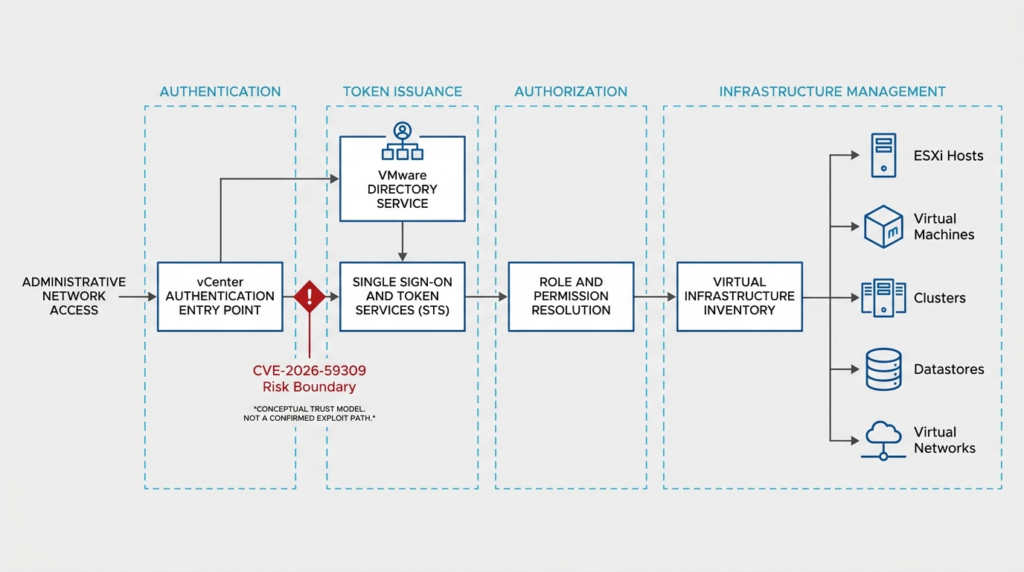
VMware Directory Service is commonly referred to as vmdir in VMware documentation and log paths. It participates in the vCenter Single Sign-On environment and stores directory information needed by VMware identity services. A vCenter deployment may also use external identity sources, including Active Directory or LDAP-based services, but external identity integration does not eliminate the local vCenter SSO trust boundary.
Several identity layers should be kept separate during analysis:
- The vCenter Single Sign-On domain maintains identities, groups, and identity-related configuration used by the vSphere environment.
- External identity sources may authenticate enterprise users or make directory identities available to vCenter.
- Web SSO and token services participate in converting an authentication decision into a session or security token used by vSphere services.
- vCenter roles and permissions decide which inventory objects and operations an authenticated identity can access.
- The VCSA operating system root account controls the underlying appliance and is distinct from an SSO administrator or a vCenter inventory administrator.
Broadcom documentation distinguishes the SSO administrative boundary from vCenter inventory authorization. Membership in an SSO administrative group allows management of identity-related settings, while vCenter global or object permissions govern access to virtual infrastructure inventory. The appliance’s root account is another separate identity plane. (Support Portal)
These distinctions prevent two analytical errors.
First, an authentication bypass does not automatically tell defenders which authorization role is obtained. Authentication answers who the service believes the requester is. Authorization decides what that identity can do. A flaw may collapse both boundaries in practice, but the public CVE description does not say that CVE-2026-59309 does so.
Second, external Active Directory or identity-provider integration does not necessarily place every authentication decision outside vCenter. Broadcom’s supplemental FAQ specifically states that Integrated Windows Authentication and Active Directory integration are not the issue described by this advisory. Enhanced Linked Mode also does not protect a deployment against the vulnerability. (GitHub)
A simplified identity chain looks like this:
| שלב | Normal security question | Defensive evidence |
|---|---|---|
| Network access | Is this source allowed to reach the management interface? | Firewall, VPN, flow, load-balancer, and jump-host logs |
| Authentication request | Which component received the request, and which method was used? | vmdir, Web SSO, identity-provider, and service logs |
| Authentication decision | Was the claimed identity actually verified? | Success and failure events correlated across systems |
| Token or session creation | Was a security token or session issued? | SSO, token-service, API, and session records |
| Role resolution | Which groups and roles applied to the identity? | SSO group membership and vCenter permission records |
| Object authorization | Which inventory objects could the identity access? | Global permissions and object-level assignments |
| Management action | What task or API operation was performed? | vCenter tasks, events, API logs, and downstream host evidence |
CVE-2026-59309 is known to affect the authentication boundary, but the public record does not identify which transition in this chain fails. Defenders should preserve evidence from every stage rather than searching for a single unconfirmed indicator.
Why a vCenter authentication bypass is a management-plane emergency
vCenter is not an ordinary application server. It is a centralized management system for virtual infrastructure. Depending on architecture and assigned permissions, it can expose information about ESXi hosts, clusters, virtual machines, templates, storage, networks, resource pools, alarms, tags, permissions, and operational tasks.
That concentration creates a different risk profile from an authentication bypass in a low-value application.
A successful unauthorized session with only limited visibility could disclose:
- Hostnames and naming conventions.
- Cluster and data-center structure.
- Virtual machine inventory.
- Network and port-group names.
- Data-store relationships.
- Operating-system descriptions and guest metadata.
- Resource allocation and availability information.
- Tags that reveal business roles or environment classifications.
- Information useful for selecting later targets.
A session with broader privileges could, depending on the resulting identity and assigned rights, create more serious risks:
- Changes to roles or permissions.
- Creation or modification of accounts or groups.
- Reconfiguration of virtual machines.
- Changes to virtual networking.
- Snapshot, clone, migration, power, or console operations.
- Access to files or data exposed through permitted management functions.
- Modification of logging, alarms, or integrations.
- Disruption of administrative availability.
These are conditional management-plane consequences, not vendor-confirmed post-exploitation actions for CVE-2026-59309. Broadcom has not said that the bypass grants any particular role. The reason to discuss them is to explain why defenders must determine the privilege associated with any suspicious session rather than assuming that every successful bypass has identical impact.
The management plane also has unusually broad dependency paths. Administrators may access it through VPNs, bastion hosts, privileged access systems, automation servers, monitoring tools, backup products, orchestration platforms, and OEM-integrated appliances. A vCenter interface that is not reachable from the public internet may still be reachable from:
- A compromised administrator workstation.
- A general corporate network segment.
- A shared operations subnet.
- A site-to-site VPN.
- A managed service provider network.
- A backup or monitoring server.
- A cloud management network.
- A jump host with weak access controls.
- A third-party support connection.
For that reason, “not internet-facing” lowers one class of exposure but does not make an unpatched deployment safe. The official prerequisite is network access, not public-internet access.
Affected products and fixed versions
Broadcom’s initial VMSA-2026-0006 matrix identifies the following fixed releases for products affected by CVE-2026-59309.
| Product branch | Fixed release or required action |
|---|---|
| VMware Cloud Foundation and vSphere Foundation 9.1.x | 9.1.0.0300 |
| VMware Cloud Foundation and vSphere Foundation 9.0.x | 9.0.2.0100 |
| VMware vCenter Server 8.0 | 8.0 Update 3k |
| VMware Cloud Foundation 5.x | Apply the asynchronous patch aligned with vCenter 8.0 Update 3k |
| VMware Telco Cloud Platform 3.0 | Follow the product-specific Broadcom remediation guidance |
| VMware Telco Cloud Platform 4.x | Follow the product-specific Broadcom remediation guidance |
| VMware Telco Cloud Platform 5.0.x | Follow the product-specific Broadcom remediation guidance |
| VMware Telco Cloud Platform 5.1.x | Follow the product-specific Broadcom remediation guidance |
| VMware Telco Cloud Infrastructure 3.0 | Follow the product-specific Broadcom remediation guidance |
Broadcom notes that the vulnerability was first addressed in the 9.1 branch by version 9.1.0.0200, but 9.1.0.0300 is the current fixed release listed in the advisory. Administrators should use the currently recommended fixed build rather than stopping at the earliest build that happened to contain the correction. (Support Portal)
The version table requires several operational qualifications.
vSphere 8 deployments
Broadcom’s FAQ states that vSphere 8 environments must be on the Update 3 branch to consume the applicable security update. Teams running an earlier vSphere 8 update should examine the supported upgrade path, interoperability requirements, and release notes rather than assuming that a small patch can be installed directly on any 8.x build. (GitHub)
vSphere 7 deployments
vSphere 7 reached the end of general support on October 2, 2025. Broadcom’s supplemental FAQ nevertheless says that vSphere 7 should be considered affected and indicates that an offline patch may become available through the support portal. Organizations should verify current support-portal guidance, contractual eligibility, and the long-term migration plan. (GitHub)
An offline patch, when available, may address the immediate vulnerability. It does not reverse the strategic risk of operating an end-of-support management platform. Security teams should document both the emergency remediation and the supported-version migration.
vSphere 6.5 and 6.7 deployments
Broadcom no longer performs normal security evaluation for products that are beyond the applicable support lifecycle. Its FAQ advises organizations to presume that vSphere 6.5 and 6.7 are affected. (GitHub)
For these environments, defenders should not interpret the absence of a current fixed-build row as evidence of safety. The practical options are:
- Upgrade to a supported fixed release.
- Obtain any contractually available extended-support guidance.
- Apply strict network isolation while migration is underway.
- Reduce administrative paths and standing credentials.
- Increase logging and review.
- Prepare a documented exception with a deadline and accountable owner.
Network restrictions are compensating controls, not a repair for the vulnerable code.
VMware Cloud Foundation
VMware Cloud Foundation environments may require asynchronous patching or lifecycle-manager-specific procedures. A vCenter build embedded in a larger software-defined data-center stack should not be updated through an improvised method that leaves the platform in an unsupported state. Administrators should follow the VCF-specific instructions associated with the advisory.
Integrated and engineered systems
Systems such as VxRail, SimpliVity, or other vendor-engineered platforms may package or tightly integrate vCenter. Broadcom’s FAQ directs customers to the relevant hardware or platform vendor for compatible remediation instructions. (GitHub)
The security deadline remains urgent, but the installation procedure may differ. The infrastructure owner should open a support case promptly rather than waiting passively for a routine advisory email.
VMSA-2026-0006 contains five different vulnerabilities
CVE-2026-59309 is one of five vulnerabilities addressed by VMSA-2026-0006. Treating the advisory as if it described one universal exploit path leads to poor detection and incomplete remediation.
| CVE | Affected area | Attacker position | Confirmed impact | Maximum severity |
|---|---|---|---|---|
| CVE-2026-59309 | VMware Directory Service in vCenter | Network access to vCenter, no credentials | Authentication bypass and unauthorized access | Critical, 9.8 |
| CVE-2026-59310 | vCenter syslog server | Network access, no credentials | Directory traversal that may lead to arbitrary code execution | Critical, 9.8 |
| CVE-2026-47876 | ESX VMXNET3 implementation | Local administrative access inside a VM using VMXNET3 | Out-of-bounds write and possible code execution on the host | Critical, 9.3 |
| CVE-2026-41703 | ESX, Workstation, and Fusion | Privileges to deploy or control a relevant VM | Out-of-bounds read, with information disclosure or denial-of-service consequences depending on product | Important |
| CVE-2026-41709 | ESX logging | Malicious administrator | Certain operations may be performed without expected logging | Low, 2.7 |
Broadcom’s advisory provides the definitive product and version matrix for each issue. (Support Portal)
CVE-2026-59310 is separate from the authentication bypass
CVE-2026-59310 affects the vCenter syslog server and may allow an unauthenticated network attacker to execute arbitrary code through a directory-traversal condition. It shares the same maximum CVSS score as CVE-2026-59309, but the flaws have different components and different technical descriptions.
The coexistence of two pre-authentication critical vCenter vulnerabilities increases the urgency of the update. It does not prove that they can be chained. Broadcom has not published a combined attack sequence in which the authentication bypass enables the syslog flaw or the syslog flaw enables the authentication bypass.
Defenders should therefore:
- Patch both issues through the applicable cumulative vCenter update.
- Preserve evidence from identity services and the syslog-related service.
- Avoid writing detections that assume one CVE must precede the other.
- Track any later vendor or researcher disclosure that clarifies interaction.
The ESX issues require separate host planning
CVE-2026-47876, CVE-2026-41703, and CVE-2026-41709 affect ESX or desktop virtualization products rather than only vCenter. Patching vCenter does not update ESXi hosts.
CVE-2026-47876 is especially important because Broadcom describes a possible host code-execution condition for an attacker who already has local administrative access in a virtual machine using the VMXNET3 virtual network adapter. The precondition is very different from the unauthenticated vCenter flaws, but the potential host-boundary impact warrants its own remediation plan.
An organization that updates only vCenter can still remain exposed to the ESX vulnerabilities in the same advisory. The change record should identify which components have been completed and which remain pending.
Realistic exposure scenarios
Because the exact exploit mechanics are private, realistic analysis should focus on confirmed prerequisites and observable architecture.
Internet-reachable vCenter
A vCenter interface reachable from the public internet has the most direct exposure. An unauthenticated remote actor does not first need to compromise an employee account or internal workstation to reach the management plane.
Immediate actions should include:
- Confirming the exposure through firewall, load-balancer, DNS, and flow data.
- Removing public reachability unless it is strictly required.
- Preserving inbound connection records for a period that predates disclosure.
- Applying the fixed build urgently.
- Reviewing identity and administrative events for unfamiliar source addresses.
- Investigating whether any reverse proxy, VPN, or access gateway changes the observable source information.
Removing internet exposure is valuable, but it does not replace the update. A compromised internal system may still reach the same vulnerable service.
Reachable from a general corporate network
Many vCenter deployments are private but accessible from broad internal address ranges. In that model, an attacker who compromises a normal employee endpoint may gain the network position needed to attempt the vulnerability.
The security team should determine:
- Whether ordinary workstation VLANs can open sessions to vCenter.
- Whether east-west firewalls enforce a management-zone boundary.
- Whether DNS and certificates reveal the vCenter endpoint to all internal clients.
- Whether endpoint telemetry shows connections from non-administrative systems.
- Whether service accounts or automation systems access vCenter from shared servers.
The proper target state is not merely “internal.” It is “reachable only from identified management systems and administrators through controlled paths.”
Access through a jump host or privileged workstation
A bastion host can reduce exposure, but it becomes a high-value dependency. If many administrators share a jump host, an attacker may compromise one operating-system account, browser profile, token cache, or remote-access session and obtain a path to vCenter.
ביקורת:
- Who can log in to the jump host.
- Whether access requires phishing-resistant MFA.
- Whether administrators use separate privileged identities.
- Whether clipboard, file transfer, browser extensions, and credential storage are restricted.
- Whether sessions are recorded.
- Whether the jump host can access other management systems.
- Whether EDR and operating-system logs are retained long enough for investigation.
The presence of a jump host is a control, not proof that the vCenter service was unreachable to an attacker.
Managed service provider or shared operations network
An MSP may manage several customer environments from a shared operations plane. A single compromised access system could provide network paths to multiple vCenter deployments.
The immediate inventory should map:
- Each customer vCenter.
- The source ranges allowed to connect.
- Shared credentials and service accounts.
- Remote monitoring and management infrastructure.
- Cross-customer segmentation.
- Logging boundaries and customer notification requirements.
- Patch ownership and maintenance authority.
A critical vulnerability in a centralized management interface can turn ambiguous ownership into delay. Each instance needs an explicit technical owner, business owner, patch status, and escalation path.
Enhanced Linked Mode environments
Enhanced Linked Mode can connect multiple vCenter instances within a shared SSO domain and administrative experience. Broadcom states that ELM does not protect against CVE-2026-59309. (GitHub)
Defenders should not assume that patching one node secures all linked nodes. Each vCenter build must be inventoried and brought to a fixed release using a supported sequence. Logs should be collected from every node because suspicious identity or administrative activity may appear on a different system from the initial network connection.
The exact effect of a successful bypass in an ELM deployment has not been publicly described. It would be speculative to claim that exploitation of one node automatically compromises all linked nodes. The shared identity and administrative context nevertheless justifies treating the environment as a coordinated response unit.
Legacy vSphere deployments
An end-of-support deployment may lack a straightforward patch path. It may also be more likely to contain accumulated operational debt:
- Broad network rules.
- Shared administrator credentials.
- Expired or manually replaced certificates.
- Incomplete centralized logging.
- Unsupported plug-ins.
- Old backup processes.
- Unverified restoration procedures.
- Unclear ownership.
The emergency response should not become an indefinite exception. Establish a dated migration plan, isolate the current system, reduce access, and document why continued operation is necessary.
Critical infrastructure with narrow maintenance windows
Some organizations cannot interrupt management availability without coordination. Broadcom’s FAQ notes that updating vCenter briefly affects the management interface, while running virtual machines and containers continue operating. (GitHub)
That distinction helps teams schedule an urgent change. It does not mean the update is operationally risk-free. Administrators still need to consider:
- Backup and restore readiness.
- ELM topology.
- Integrated backup and monitoring tools.
- Automation that depends on vCenter APIs.
- Certificate and DNS health.
- Available disk space.
- Change freezes and regulated approval processes.
- Emergency rollback criteria.
The correct risk comparison is not “patching causes no disruption.” It is “a controlled period of management-plane unavailability may be preferable to leaving a pre-authentication critical flaw exposed.”
A conceptual attack-path model
The following model explains the security boundary without claiming to reproduce CVE-2026-59309.
Stage one — Network reachability
The attacker must be able to send traffic to an affected vCenter service. Possible paths include direct public exposure, VPN access, internal lateral movement, a compromised jump host, or a trusted third-party network.
Defensive questions:
- Which source ranges can reach vCenter?
- Is access enforced at the host, firewall, proxy, or network-segmentation layer?
- Are there unmonitored routes?
- Do NAT or proxies obscure the original source?
- Are IPv6 and secondary interfaces covered by policy?
Stage two — Contact with an identity-related component
The request reaches VMware Directory Service or an associated pathway. The exact entry point for this CVE is not public.
Defensive questions:
- Which vCenter services accept connections from the reachable network?
- Which logs record new connections, authentication attempts, or service errors?
- Is there a normal baseline for source systems and request volume?
- Did service behavior change before or after a suspicious session?
Stage three — Authentication decision is bypassed
The vulnerable condition causes the service to treat a request as authorized or otherwise grants access without the required authentication.
The public advisory does not establish whether this occurs by:
- Accepting an invalid assertion.
- Misinterpreting an identity state.
- Skipping a credential check.
- Reusing a session.
- Trusting unverified directory data.
- Failing open after an error.
- Reaching an unintended internal method.
Any specific claim in this list would require later vendor or researcher disclosure.
Stage four — An identity or access context is established
The attacker receives some form of unauthorized access. The identity and privilege are unknown.
Defensive questions:
- Was a new session issued?
- Which subject or principal was associated with it?
- Was the identity local to the SSO domain or mapped from another source?
- Which groups and roles applied?
- Was there a corresponding successful event in the external identity provider?
- Was MFA completed?
- Did the session originate from a recognized administrative system?
Stage five — Authorization controls effective actions
The resulting role and object permissions determine what can be viewed or changed. This is where impact may range from limited access to serious management-plane control.
Defensive questions:
- Which inventory objects were accessed?
- Which tasks were submitted?
- Were permissions or group memberships changed?
- Were API calls made outside the normal automation pattern?
- Were virtual machines, networks, hosts, or data stores modified?
Stage six — Persistence, lateral movement, or disruption may follow
Any later activity depends on obtained privileges, environment configuration, and attacker objectives. It is not part of the confirmed vulnerability description.
Potential investigative areas include:
- New SSO users or groups.
- New global permissions.
- Changes to service accounts.
- New API integrations.
- Unusual console or file access.
- Virtual machine configuration changes.
- Snapshot or clone activity.
- Altered logging or alarm settings.
- Connections from vCenter-adjacent systems to ESXi hosts.
The purpose of the model is to organize evidence. It is not a substitute for a technical exploit disclosure.
Safe PoC — Modeling an untrusted directory assertion
The following laboratory exercise demonstrates a generic authentication trust failure. It is deliberately separated from VMware technology.
It has four safety properties:
- It binds only to
127.0.0.1. - It does not connect to a vCenter instance.
- It contains no VMware protocol, endpoint, payload, or exploit code.
- It does not claim to reproduce the undisclosed root cause of CVE-2026-59309.
The unsafe endpoint accepts a client-supplied JSON object that says the user is already authenticated. The safe endpoint requires an HMAC signature before trusting the same assertion. The demonstration uses only a harmless inventory.read scope.
Save the following as toy_directory_assertion.py:
#!/usr/bin/env python3

from http.server import BaseHTTPRequestHandler, HTTPServer
import hashlib
import hmac
import json
from typing import Any

HOST = "127.0.0.1"
PORT = 8088

# Local laboratory key only. Never use hard-coded secrets in production.
LAB_KEY = b"local-lab-key-for-demonstration-only"


def canonical_json(value: dict[str, Any]) -> bytes:
    """Create a stable byte representation for integrity validation."""
    return json.dumps(
        value,
        sort_keys=True,
        separators=(",", ":"),
    ).encode("utf-8")


def expected_signature(assertion: dict[str, Any]) -> str:
    """Return the expected HMAC for a laboratory assertion."""
    return hmac.new(
        LAB_KEY,
        canonical_json(assertion),
        hashlib.sha256,
    ).hexdigest()


class LabHandler(BaseHTTPRequestHandler):
    server_version = "LocalAssertionLab/1.0"

    def send_json(self, status: int, payload: dict[str, Any]) -> None:
        body = json.dumps(payload, indent=2).encode("utf-8")
        self.send_response(status)
        self.send_header("Content-Type", "application/json")
        self.send_header("Content-Length", str(len(body)))
        self.end_headers()
        self.wfile.write(body)

    def read_json(self) -> dict[str, Any]:
        try:
            length = int(self.headers.get("Content-Length", "0"))
            raw = self.rfile.read(length)
            value = json.loads(raw.decode("utf-8"))
            if not isinstance(value, dict):
                raise ValueError("JSON body must be an object")
            return value
        except Exception as exc:
            raise ValueError(f"Invalid request body: {exc}") from exc

    def do_POST(self) -> None:
        try:
            assertion = self.read_json()
        except ValueError as exc:
            self.send_json(400, {"allowed": False, "error": str(exc)})
            return

        if self.path == "/unsafe":
            # Dangerous pattern:
            # The service trusts an authentication decision supplied by
            # an untrusted client.
            if assertion.get("authenticated") is True:
                self.send_json(
                    200,
                    {
                        "allowed": True,
                        "subject": assertion.get("subject", "unknown"),
                        "scope": assertion.get("scope", "none"),
                        "reason": "Client-supplied authentication state was trusted",
                    },
                )
            else:
                self.send_json(
                    401,
                    {
                        "allowed": False,
                        "reason": "Assertion did not claim authentication",
                    },
                )
            return

        if self.path == "/safe":
            supplied_signature = self.headers.get("X-Lab-Signature", "")
            valid_signature = hmac.compare_digest(
                supplied_signature,
                expected_signature(assertion),
            )

            if not valid_signature:
                self.send_json(
                    401,
                    {
                        "allowed": False,
                        "reason": "Assertion integrity could not be verified",
                    },
                )
                return

            if assertion.get("authenticated") is not True:
                self.send_json(
                    401,
                    {
                        "allowed": False,
                        "reason": "Verified assertion did not authenticate a subject",
                    },
                )
                return

            self.send_json(
                200,
                {
                    "allowed": True,
                    "subject": assertion.get("subject", "unknown"),
                    "scope": assertion.get("scope", "none"),
                    "reason": "Assertion integrity was verified",
                },
            )
            return

        self.send_json(404, {"error": "Use /unsafe or /safe"})

    def log_message(self, format_string: str, *args: Any) -> None:
        print(
            json.dumps(
                {
                    "client": self.client_address[0],
                    "request": format_string % args,
                }
            )
        )


if __name__ == "__main__":
    print(f"Laboratory service listening on http://{HOST}:{PORT}")
    print("This service is local-only and is not a VMware vulnerability test.")
    HTTPServer((HOST, PORT), LabHandler).serve_forever()
Start the local service:
python3 toy_directory_assertion.py
In another terminal, send an unsigned assertion to the unsafe endpoint:
curl --silent \
  --request POST \
  --header 'Content-Type: application/json' \
  --data '{"authenticated":true,"subject":"lab-user","scope":"inventory.read"}' \
  http://127.0.0.1:8088/unsafe
The unsafe service returns an allowed decision because it trusts a security-sensitive statement supplied by the requester:
{
  "allowed": true,
  "subject": "lab-user",
  "scope": "inventory.read",
  "reason": "Client-supplied authentication state was trusted"
}
Send the same unsigned assertion to the safe endpoint:
curl --silent \
  --request POST \
  --header 'Content-Type: application/json' \
  --data '{"authenticated":true,"subject":"lab-user","scope":"inventory.read"}' \
  http://127.0.0.1:8088/safe
The safe endpoint rejects it:
{
  "allowed": false,
  "reason": "Assertion integrity could not be verified"
}
Generate a valid signature for the controlled laboratory assertion:
SIGNATURE="$(
python3 - <<'PY'
import hashlib
import hmac
import json

key = b"local-lab-key-for-demonstration-only"
assertion = {
    "authenticated": True,
    "subject": "lab-user",
    "scope": "inventory.read",
}
body = json.dumps(
    assertion,
    sort_keys=True,
    separators=(",", ":"),
).encode()

print(hmac.new(key, body, hashlib.sha256).hexdigest())
PY
)"
Submit the signed assertion:
curl --silent \
  --request POST \
  --header 'Content-Type: application/json' \
  --header "X-Lab-Signature: ${SIGNATURE}" \
  --data '{"authenticated":true,"subject":"lab-user","scope":"inventory.read"}' \
  http://127.0.0.1:8088/safe
The safe endpoint now accepts the assertion because its integrity can be validated with the laboratory trust key.
This example illustrates three defensive principles:
- An authentication result must not be accepted merely because a requester labels it as authenticated.
- The service must validate the integrity, issuer, audience, lifetime, and intended use of any identity assertion.
- Logs should make the source, verification result, subject, and resulting authorization decision observable.
The example does לא show that CVE-2026-59309 involves HMAC, JSON, client-supplied assertions, or any comparable implementation. Those details are fictional laboratory mechanics used to explain a class of trust-boundary failure. Running the example against localhost cannot determine whether a real vCenter deployment is vulnerable.
For production environments, version and build verification against Broadcom’s fixed-release matrix is the safe and authoritative validation method.
The first four hours of response
A practical response begins with asset truth, not exploit hunting.
Identify every vCenter-related asset
The inventory should include:
- Standalone vCenter Server Appliance instances.
- vCenter instances embedded in VMware Cloud Foundation.
- Enhanced Linked Mode members.
- Disaster-recovery and standby instances.
- Lab or test vCenters that can reach production networks.
- Telco Cloud Platform and Telco Cloud Infrastructure deployments.
- OEM-engineered systems containing vCenter.
- Management appliances retained for migration or rollback.
- Internet DNS names, private DNS names, IP addresses, and virtual IPs.
- Load balancers or reverse proxies placed in front of management services.
Do not assume that a CMDB entry represents the currently running build. Query the system directly and reconcile the result with inventory records.
Record version and build evidence
For every instance, record:
- Product edition.
- Version.
- Build.
- Deployment type.
- SSO domain.
- ELM membership.
- Business owner.
- Technical owner.
- Support contract.
- Network zone.
- External and internal reachability.
- Backup status.
- Target maintenance window.
- Patch decision.
- Completion evidence.
A version such as “8.0” is not enough. The fixed branch is 8.0 Update 3k, so the exact update and build matter.
Determine network reachability
Map every path that can reach the vCenter management plane:
- Public internet.
- Partner or customer networks.
- Site-to-site VPN.
- Remote-access VPN.
- Corporate workstation networks.
- Administrative VLANs.
- Jump hosts.
- Backup systems.
- Monitoring systems.
- Automation runners.
- Cloud management networks.
- OEM support connections.
- IPv6 paths.
- Secondary interfaces.
A network team may report that “vCenter is behind the firewall,” but that statement has little security value without source and destination rules.
Preserve evidence before disruptive changes
Before patching, collect or protect:
- Relevant vCenter logs.
- Firewall and flow records.
- VPN authentication logs.
- Jump-host logs.
- Identity-provider and MFA records.
- Privileged access management records.
- EDR telemetry from administrative workstations.
- Current SSO users and groups.
- Current vCenter global and object permissions.
- Recent vCenter tasks and events.
- API and service-account activity.
- System health and service status.
Patching closes the known vulnerable code path, but it can restart services and alter volatile evidence. Evidence preservation should not cause a long patch delay; the two activities should proceed in parallel when staffing allows.
Establish an emergency change
Broadcom explicitly recommends treating the advisory as an emergency change. (GitHub)
The change record should state:
- The affected CVE.
- The current and target build.
- The reason normal scheduling is insufficient.
- The expected management-plane interruption.
- Backup and rollback readiness.
- Application and infrastructure dependencies.
- Validation steps.
- Responsible approvers.
- Incident-response escalation criteria.
Avoid unsafe validation
Do not download an unaudited exploit from a public repository and run it against production. For an authentication bypass, a failed or partially successful request may:
- Create an identity or session.
- Alter directory state.
- Trigger service instability.
- Expose credentials or tokens.
- Produce ambiguous evidence.
- Violate authorization or compliance requirements.
- Contaminate a later incident investigation.
A login page returning HTTP 200, 302, 401, or 403 is not a valid vulnerability test. Those status codes can result from ordinary routing, redirects, health checks, proxy behavior, or application logic.
Safe version verification
Broadcom’s FAQ recommends checking the build through the vSphere Client summary view or through PowerCLI. (GitHub)
A non-destructive PowerCLI check can use a reserved .invalid example hostname:
$server = "vcsa.example.invalid"

Connect-VIServer -Server $server

$global:DefaultVIServer |
    Select-Object Name, Version, Build

Disconnect-VIServer -Server $server -Confirm:$false
For several authorized instances:
$servers = @(
    "vcsa-a.example.invalid",
    "vcsa-b.example.invalid",
    "vcsa-dr.example.invalid"
)

$results = foreach ($server in $servers) {
    try {
        $connection = Connect-VIServer -Server $server -ErrorAction Stop

        [PSCustomObject]@{
            Server  = $connection.Name
            Version = $connection.Version
            Build   = $connection.Build
            Status  = "Queried"
            Error   = ""
        }

        Disconnect-VIServer -Server $connection -Confirm:$false
    }
    catch {
        [PSCustomObject]@{
            Server  = $server
            Version = ""
            Build   = ""
            Status  = "Failed"
            Error   = $_.Exception.Message
        }
    }
}

$results | Export-Csv \
    -Path "./vcenter-build-inventory.csv" \
    -NoTypeInformation

$results | Format-Table -AutoSize
The script does not determine vulnerability by itself. Its output must be compared with the current VMSA-2026-0006 matrix and any product-specific Broadcom guidance.
A useful classification is:
| Classification | משמעות | פעולה |
|---|---|---|
| Fixed | Build is at or above the vendor-listed fixed release in a supported upgrade path | Preserve evidence and complete post-update validation |
| Affected | Build precedes the fixed release | Schedule emergency update |
| Presumed affected | Product is beyond normal evaluation or lacks a supported fixed row | Isolate, obtain vendor guidance, and upgrade |
| Pending verification | Version or build cannot be confirmed | Treat as affected until verified |
| OEM-controlled | vCenter is packaged in an engineered system | Obtain compatible instructions from the system vendor |
| Decommissioned but reachable | Asset is believed unused but still accessible | Isolate and remove it through a controlled process |
The safest vulnerability check is evidence that the installed build contains the vendor correction. Active exploitation is neither necessary nor desirable for routine exposure validation.
Teams using authorized security-validation workflows should preserve the same evidence discipline: asset identity, build, reachable paths, logs, remediation state, and retest result. Platforms such as Penligent may be used within an approved validation process, but automation does not replace vendor patching, explicit scope, or human review of management-plane changes.
Network exposure validation without assuming a vulnerable port
Broadcom says the attacker needs network access to vCenter. It does not publicly identify one vulnerable port for CVE-2026-59309.
A sound exposure review therefore combines configuration and observed traffic.
Review firewall policy
Extract rules whose destination includes:
- vCenter IP addresses.
- Management virtual IPs.
- Load balancer pools.
- VCF management networks.
- ELM members.
- Disaster-recovery vCenter instances.
For each rule, record:
- Source ranges.
- Destination ranges.
- Services and ports.
- Direction.
- Rule owner.
- Business justification.
- Last-hit time.
- Expiration date.
- Whether the rule permits IPv6.
- Whether another route bypasses the firewall.
Rules such as any internal to management deserve immediate scrutiny.
Review flow and connection data
Flow records can answer questions that policy alone cannot:
- Which sources actually connected?
- Were there sources outside the administrator baseline?
- Did connection volume spike?
- Did a previously unseen subnet contact vCenter?
- Was traffic proxied through a shared system?
- Did a source connect immediately before a suspicious administrative task?
- Did a system continue connecting after its access should have been removed?
Historical flow review should extend before the disclosure date. A vulnerability may exist before public disclosure, and the absence of publicly confirmed exploitation does not prove that no private exploitation occurred.
Review remote-access paths
Map the chain from a remote administrator to vCenter:
Administrator device
        |
        v
Identity provider and MFA
        |
        v
Remote-access VPN
        |
        v
Privileged jump host
        |
        v
Management firewall
        |
        v
vCenter Server
At every transition, ask whether authentication, device posture, segmentation, logging, and session attribution are enforced.
Review reverse proxies and load balancers carefully
Broadcom documentation notes that some URL-masking and reverse-proxy patterns can interfere with vCenter SSO and token trust because vCenter relies on expected names and certificate relationships. (Support Portal)
A reverse proxy should not be assumed to fix CVE-2026-59309. It may reduce direct exposure if it strictly authenticates and filters all traffic, but the vendor has not published it as a workaround. Misconfiguration may also create alternate paths that bypass the proxy.
Do not rely on a single scan result
A port scan from one network location proves only what that source could reach at that moment. It does not cover:
- VPN users.
- Internal compromised hosts.
- Trusted third parties.
- IPv6.
- Secondary interfaces.
- Load-balancer backends.
- Management networks.
- Temporary firewall rules.
- Disaster-recovery sites.
Exposure is a graph, not a checkbox.
Detection and threat hunting
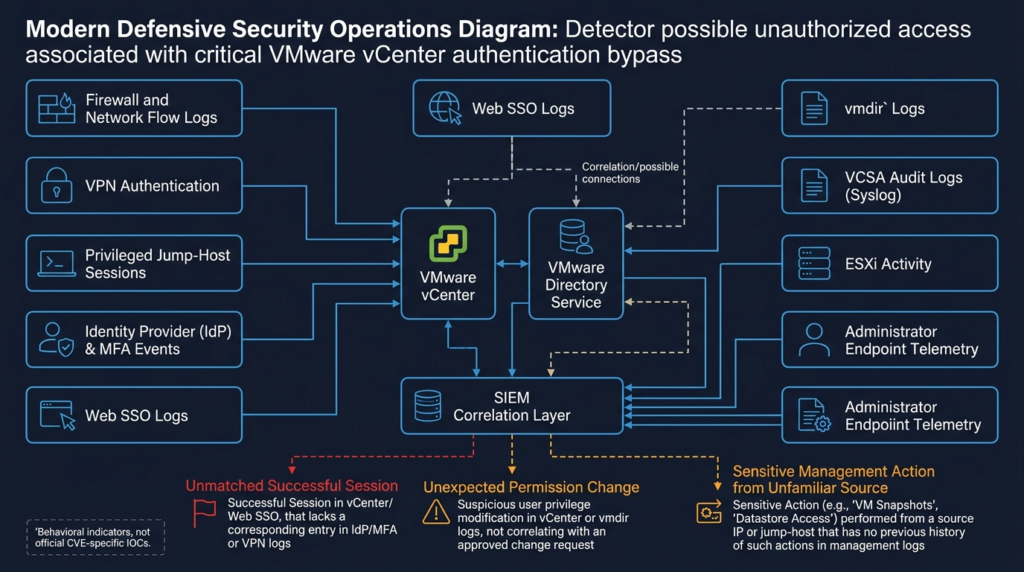
Broadcom had no information suggesting in-the-wild exploitation when it published the advisory. That statement is time-bounded and is not a guarantee that exploitation will never occur. (GitHub)
No official CVE-specific IOC or request signature was included in the initial advisory. Defenders should therefore hunt for inconsistent identity decisions and unusual management activity.
Relevant vCenter logs
Broadcom documentation places VCSA service logs under /var/log/vmware, with service-specific subdirectories. VMware Directory Service logs are associated with the vmdird directory, and commonly documented files include paths such as:
/var/log/vmware/vmdird/vmdird.log
/var/log/vmware/vmdird/vmdird-syslog.log
/var/log/vmware/sso/websso.log
/var/log/vmware/vpxd/vpxd.log
Exact files, rotation patterns, and field formats vary by version. Administrators should consult the documentation for their deployed release and collect a vCenter support bundle when deeper investigation is required.
A safe file-discovery command on an authorized VCSA shell is:
sudo find /var/log/vmware \
  -maxdepth 3 \
  -type f \
  \( -name '*vmdir*' -o \
     -name 'websso.log*' -o \
     -name 'vpxd.log*' -o \
     -name '*audit*' \) \
  -print
Before running large recursive searches, consider appliance load, log volume, and the organization’s forensic process. Copying logs to an analysis system may be preferable to repeatedly scanning the management appliance.
Correlate vCenter sessions with upstream identity evidence
A useful hypothesis is:
A successful vCenter session should normally have a coherent authentication history.
For each successful administrative session, attempt to correlate:
- Source address.
- Username or subject.
- Authentication method.
- Identity-provider success.
- MFA completion.
- VPN session.
- Jump-host session.
- Session issuance time.
- vCenter task activity.
- Session termination.
A session with no corresponding upstream authentication event may be suspicious, but it is not automatically malicious. Local SSO accounts, service accounts, cached sessions, certificate-based integrations, and API clients may not appear in the same identity-provider data.
Create an inventory of legitimate exceptions before escalating every unmatched session.
Review SSO users and group membership
חפשו:
- Newly created SSO identities.
- New members of SSO administrator groups.
- Changes to identity sources.
- Modified password or lockout settings.
- Unexpected service accounts.
- Accounts created and removed within a short interval.
- Accounts whose names imitate established automation identities.
- Changes performed outside approved maintenance windows.
The exact event names vary. Export current state and compare it with a known baseline rather than depending only on keyword searches.
Review vCenter permissions
בדוק:
- New global permissions.
- Permissions assigned at the root inventory level.
- New custom roles.
- Existing roles granted to new principals.
- Permissions with propagation enabled.
- Direct assignments that bypass normal group-based access.
- Temporary emergency privileges that were never removed.
- Changes made by unusual accounts or source addresses.
An authentication bypass may produce access without persistent permission changes. The absence of a new role does not prove that no unauthorized session occurred. Permission review is one part of the hunt.
Review tasks and events
High-value vCenter activities include:
- User, group, role, or permission changes.
- Virtual machine power operations.
- Console or remote access.
- Snapshot creation, deletion, or consolidation.
- Clone, template, and deployment operations.
- Virtual disk attachment or configuration changes.
- Network adapter and port-group changes.
- Host maintenance-mode changes.
- Host addition or removal.
- Migration and vMotion activity.
- Data-store browsing or file operations.
- Alarm, logging, or integration changes.
- API activity from a new client.
- Repeated failed tasks followed by a successful privileged action.
These activities can be entirely legitimate. Prioritize combinations of anomalies: an unfamiliar source, an unusual identity, no corresponding change ticket, and a sensitive task.
Review service behavior
Authentication-component anomalies may include:
- Unexpected service restarts.
- vmdird crashes or repeated health failures.
- Large increases in new connections.
- Unusual bind or directory-operation errors.
- Token or SSO errors from unfamiliar sources.
- Authentication failures followed by a successful management session.
- Time gaps in logs.
- Log rotation or deletion inconsistent with policy.
- Certificate or time-synchronization errors appearing near suspicious activity.
Broadcom has documented that vmdird logs may include connection and SSL-related messages, but such messages are generic. They are not CVE-2026-59309 indicators.
Correlate network and management activity
A generic SIEM investigation can follow this logic:
1. Identify all connections to vCenter from sources outside the approved baseline.
2. Join those connections to VPN, jump-host, and identity-provider events.
3. Identify vCenter sessions and tasks within the same time window.
4. Highlight sessions without an expected identity event.
5. Increase severity when sensitive tasks, permission changes, or log gaps occur.
6. Exclude documented service accounts and approved maintenance activity.
7. Preserve the raw records before normal retention deletes them.
A vendor-neutral pseudo-query might look like:
vcenter_sessions
| where timestamp >= review_start
| lookup approved_management_sources on source_ip
| where approved_management_sources.match == false
| join kind=leftouter identity_successes
    on normalized_user, time_window
| join kind=leftouter vcenter_sensitive_tasks
    on session_id
| project
    timestamp,
    source_ip,
    normalized_user,
    identity_match,
    task_name,
    object_name,
    session_id
| order by timestamp asc
The query must be adapted to the actual log schema. It is not a detection signature for the vulnerability.
Detection signal and false-positive table
| אות | מדוע זה חשוב | Common legitimate explanation | Recommended validation |
|---|---|---|---|
| Successful vCenter session with no IdP success | May indicate an alternate or bypassed authentication path | Local SSO account, service account, cached token | Identify authentication method and correlate SSO logs |
| New SSO administrator member | Can expand identity-control privileges | Approved emergency access | Check ticket, actor, source, and removal date |
| New root-level global permission | Can grant broad inventory access | Platform deployment or delegated administration | Compare with permission baseline and approval |
| Administrative task from a new source | May reflect unauthorized access | New jump host or automation runner | Validate asset ownership and change record |
| Large vmdird connection increase | May reflect probing or service abuse | Monitoring change, health check, outage recovery | Compare source distribution and normal volume |
| Authentication failures followed by sensitive tasks | May show successful transition after probing | Administrator password correction | Correlate session identity, source, and MFA |
| Service restart or log gap | May reduce visibility or indicate instability | Patching, backup, maintenance | Check lifecycle events and change window |
| New API client or user agent | May indicate attacker tooling | New integration | Validate certificate, account, owner, and deployment date |
| Snapshot or clone outside maintenance | May enable data access or staging | Backup or DR process | Correlate with backup platform and schedule |
| Permission change followed by account deletion | May indicate short-lived persistence | Temporary emergency account | Verify approver and retained audit trail |
No single row confirms exploitation. The strongest cases combine multiple independent signals.
Patching strategy
Broadcom provides no workaround for CVE-2026-59309. The durable corrective action is installation of a fixed release. (support.broadcom.com)
Prepare a valid backup
Broadcom documents both file-based and image-based backup approaches for supported vCenter versions and recommends using the VCSA management interface for supported file-based backup and restore workflows. (Support Portal)
Before the emergency update:
- Confirm that a recent backup completed successfully.
- Verify the backup destination is reachable.
- Confirm that credentials for the backup repository are available.
- Record encryption passwords or keys through an approved secret-management process.
- Review the documented restore procedure.
- Confirm DNS, NTP, certificates, and networking required for restoration.
- Identify whether ELM or external Platform Services Controller history affects the procedure.
- Ensure that a backup is not the only copy on storage controlled by the same management plane.
- Record the recovery owner and decision authority.
A snapshot may be operationally useful in some supported procedures, but it should not be treated as a universal substitute for a tested vCenter backup. Snapshot handling in linked or replicated identity environments requires particular care.
Check appliance health
Before updating, examine:
- File-system utilization.
- Database health.
- vCenter service status.
- Certificate validity.
- DNS forward and reverse resolution.
- NTP synchronization.
- Backup health.
- Current alarms.
- ELM replication health.
- Pending reboots.
- Update repository access.
- Interoperability with integrated products.
A security update installed on an already unhealthy appliance can turn a manageable patch into a difficult recovery.
Use a supported update mechanism
Broadcom’s FAQ states that the standard VCSA management interface can be used for the update. (GitHub)
Organizations should follow:
- The VMSA.
- The release notes for the target build.
- VCF-specific lifecycle instructions where applicable.
- OEM guidance for engineered systems.
- Internal emergency-change requirements.
- Broadcom support guidance for unusual topologies.
Do not manually replace individual binaries or copy files from another vCenter unless Broadcom explicitly directs that procedure.
Understand the expected service impact
Broadcom states that updating vCenter causes temporary management-interface unavailability, while running virtual machines and containers continue operating. (GitHub)
During the vCenter interruption:
- Existing workloads generally continue on ESXi hosts.
- New management tasks may be unavailable.
- Monitoring and automation that depend on vCenter APIs may report failures.
- Backup jobs may need rescheduling.
- Administrators may temporarily need host-level emergency procedures.
- Cluster management functions may not be available through vCenter.
- Operational teams should avoid unrelated changes.
This separation between workload runtime and centralized management helps justify an urgent patch window, but organizations should validate their own dependencies.
Plan ELM updates as a coordinated change
For Enhanced Linked Mode:
- Inventory every member and build.
- Review the supported update order.
- Check replication health.
- Preserve current topology and certificate information.
- Update each member through the supported procedure.
- Confirm that no member remains on an affected build.
- Validate SSO login and inventory visibility across the group.
- Review logs from every node.
ELM is not a mitigation for the vulnerability. (GitHub)
Handle ESXi updates separately
The ESX vulnerabilities in VMSA-2026-0006 require host remediation. Broadcom notes that ESX updates generally require a restart, though some releases and environments may support Live Patch or Quick Patch capabilities. Eligibility depends on the exact release and documented constraints. (GitHub)
A typical rolling host plan may include:
- Confirming cluster capacity.
- Migrating workloads with vMotion.
- Placing one host into maintenance mode.
- Applying the supported image or patch.
- Restarting when required.
- Validating host health.
- Returning the host to service.
- Repeating the process for remaining hosts.
Do not assume that a vCenter update covers ESXi, Workstation, Fusion, or VMware Tools.
Compensating controls when immediate patching is impossible
Broadcom states that there is no official workaround. It also notes that compensating controls are organization-specific. (GitHub)
Temporary controls may reduce exposure:
- Restrict vCenter access to dedicated management subnets.
- Deny access from ordinary workstation networks.
- Remove public routes and public DNS exposure.
- Require a hardened jump host.
- Restrict VPN groups that can reach management networks.
- Disable unused third-party access paths.
- Require phishing-resistant MFA at remote access and bastion layers.
- Block unmanaged devices.
- Increase logging and alerting.
- Review administrative sessions daily.
- Reduce standing privileged accounts.
- Pause nonessential integrations.
- Establish an accelerated patch deadline.
These controls do not remove the vulnerable code. They may also fail if:
- An approved management system is compromised.
- A privileged user’s session is stolen.
- An alternate network path exists.
- A service account is abused.
- Segmentation policy differs from observed routing.
- The vulnerable service is reachable through an integration.
Document compensating controls with an expiration date. A temporary restriction that remains for months often becomes an undocumented permanent exception.
Post-patch validation
A successful installation message is not the end of the response.
Confirm the fixed build
Query the version and build again and compare the result with the current advisory. Save:
- Before and after version.
- Before and after build.
- Installation timestamp.
- Update logs.
- Change ticket.
- Operator.
- Approval.
- Any warnings or retries.
Validate service health
Confirm:
- VCSA management interface health.
- vCenter Server service health.
- VMware Directory Service health.
- SSO login.
- Identity-source access.
- vSphere Client access.
- API access.
- Inventory visibility.
- Cluster and host connectivity.
- Data-store visibility.
- Network inventory.
- Alarm processing.
- Time synchronization.
- Certificate status.
- ELM replication where applicable.
Test least-privilege access
Use approved test accounts to verify that:
- A read-only user remains read-only.
- A delegated administrator can access only assigned objects.
- A disabled account cannot log in.
- A user removed from a group loses the associated access.
- A service account can perform only required API operations.
- Global permissions have not changed unexpectedly.
Validate integrations
בדוק:
- Backup platforms.
- Monitoring systems.
- Automation tools.
- Infrastructure-as-code workflows.
- CMDB synchronization.
- Security scanners.
- Disaster-recovery orchestration.
- OEM management appliances.
- Log forwarding.
- Privileged access systems.
An integration failure can create operational pressure to roll back a security update. Testing high-value dependencies quickly reduces that pressure.
Continue retrospective hunting
Patching prevents use of the corrected vulnerability path going forward. It does not answer whether the system was accessed before the patch.
Continue reviewing:
- Historical network connections.
- Identity and session records.
- Permission changes.
- Administrative tasks.
- New accounts.
- API activity.
- Service restarts.
- Log gaps.
- ESXi and virtual machine changes.
- Related security alerts.
The investigation window should reflect log retention and the organization’s risk tolerance, not only the public disclosure date.
Incident response when compromise is suspected
If evidence suggests unauthorized access, move from vulnerability management to incident response.
Preserve the management appliance
Collect:
- A vCenter support bundle.
- Relevant service logs.
- Tasks and events.
- Current users, groups, roles, and permissions.
- Network connections.
- Service status.
- Update history.
- Certificate inventory.
- Configuration and integration details.
- External firewall, VPN, IdP, MFA, bastion, and EDR records.
Coordinate collection with Broadcom support when possible. Avoid unplanned reboots or aggressive cleanup before evidence is preserved.
Contain access without causing unnecessary workload impact
Possible containment actions include:
- Restricting network access to a minimal incident-response source set.
- Removing public and partner routes.
- Disabling suspicious SSO identities.
- Revoking suspicious sessions where supported.
- Suspending compromised service accounts.
- Blocking identified source addresses.
- Isolating a compromised jump host.
- Pausing risky automation.
- Requiring emergency reauthentication.
Do not power off ESXi hosts or large groups of virtual machines merely because vCenter is suspected. Workload containment decisions require evidence and service-owner coordination.
Review identity changes
Examine:
- SSO accounts created or modified.
- SSO administrator group membership.
- External identity-source changes.
- Global permissions.
- Root-level inventory permissions.
- Custom roles.
- API users.
- Certificate-based identities.
- Password and lockout policy changes.
- Deleted identities that may remain in historical logs.
Export the current state and compare it with a trusted baseline or earlier configuration record.
Rotate exposed credentials
Based on evidence and architecture, rotation may include:
- SSO administrator credentials.
- Privileged service accounts.
- Automation API credentials.
- Backup integration credentials.
- Monitoring credentials.
- OEM integration credentials.
- VCSA root credentials.
- ESXi administrative credentials.
- Secrets stored on compromised jump hosts.
- Tokens or certificates associated with suspicious clients.
Rotation must be sequenced carefully. Changing a credential without updating dependent services can create outages and obscure which systems still use the old secret.
Review certificates and trust
Authentication compromise can raise questions about trust material even when the CVE’s precise mechanism is unknown.
ביקורת:
- Machine and solution-user certificates.
- Trusted roots.
- STS-related certificate health.
- Newly added certificates.
- Certificate replacement events.
- Unexpected certificate issuance.
- Integrated-product trust relationships.
Do not replace the entire certificate hierarchy without a supported plan. Unnecessary certificate changes can cause extensive service failures.
Examine downstream infrastructure
If a suspicious session had meaningful permissions, review:
- ESXi authentication and configuration changes.
- Virtual machine settings.
- Console access.
- Snapshot and clone activity.
- Virtual disk attachment.
- Network changes.
- New virtual machines or appliances.
- Changes to templates.
- Data-store file activity.
- Guest operating-system alerts.
- Backup and recovery systems.
- Secrets accessible from management servers.
The investigation scope should follow observed privileges and actions rather than assuming every part of the environment was compromised.
Decide between repair and restoration
A patched system may still contain attacker-created identities, permissions, integrations, or configuration changes.
Restoration from a known-good backup may be appropriate when:
- Administrative integrity cannot be established.
- Critical logs are missing.
- Unauthorized identity changes are confirmed.
- Service binaries or configuration were modified.
- The response team cannot confidently enumerate persistence.
- Broadcom support recommends restoration.
A backup should be treated as known-good only after considering when compromise may have occurred and whether the backup contains the same unauthorized changes.
Long-term vCenter management-plane hardening
CVE-2026-59309 is an immediate patching event, but the incident also exposes architectural weaknesses that should be corrected.
Remove direct internet exposure
vCenter should generally not be directly reachable from the public internet. Remote administration should pass through a controlled access path with:
- Strong identity verification.
- Phishing-resistant MFA.
- Device posture checks.
- A hardened bastion.
- Session logging.
- Narrow network policy.
- Explicit administrative authorization.
Build a dedicated management network
Separate management systems from user and application networks.
The management segment should include only systems with a documented operational need, such as:
- Hardened administrator workstations.
- Jump hosts.
- Backup servers.
- Monitoring platforms.
- Automation runners.
- Approved security tools.
- Required OEM appliances.
Default-deny policy should govern traffic into the segment.
Separate privileged identities
Administrators should not use ordinary email and browsing accounts for vCenter administration. Maintain separate privileged identities with:
- No general web browsing.
- No routine email use.
- Strong MFA.
- Limited workstation access.
- Short session lifetime.
- Just-in-time activation where possible.
- Individual accountability.
- No shared passwords.
Separate SSO administration from inventory administration
The ability to manage identity sources and SSO groups is not identical to the ability to administer all virtual infrastructure objects. Separating these responsibilities reduces the impact of one compromised role and improves audit clarity. (Support Portal)
Reduce standing global permissions
Review root-level and global permissions regularly.
Remove:
- Former employees.
- Old vendor accounts.
- Temporary migration accounts.
- Duplicate group assignments.
- Direct user permissions that should use groups.
- Service accounts with interactive login.
- Roles broader than the documented task.
Protect service accounts
For every service account, document:
- Owner.
- Purpose.
- Allowed source.
- Required API methods.
- Assigned role.
- Credential type.
- Rotation process.
- Expiration or review date.
- Expected activity pattern.
A service account that can log in from any source and has a non-expiring password creates a durable attack path.
Centralize and protect logs
Forward management-plane logs to a system that vCenter administrators cannot silently erase.
Retain:
- vCenter tasks and events.
- vmdir and SSO logs.
- VCSA audit and service logs.
- Firewall and flow records.
- VPN and bastion logs.
- Identity-provider and MFA events.
- PAM session records.
- Administrative endpoint telemetry.
- ESXi logs.
Retention should support retrospective investigation after a vulnerability is disclosed, not only immediate troubleshooting.
Baseline permissions and identities
Create recurring exports of:
- SSO users and groups.
- SSO administrator membership.
- Identity sources.
- vCenter roles.
- Global permissions.
- Object-level high-risk permissions.
- API service accounts.
- Trusted certificates.
- Management network rules.
Diff the exports and require approval for material changes.
Test restoration
A backup that has never been restored is an assumption.
Restoration exercises should validate:
- Backup completeness.
- Encryption keys and passwords.
- DNS dependencies.
- Network configuration.
- Certificate handling.
- SSO and ELM behavior.
- Inventory recovery.
- Integration recovery.
- Recovery time.
- Responsible personnel.
Validate continuously without weaponizing the vulnerability
Authorized validation should answer defensible questions:
- Are all instances known?
- Are their builds fixed?
- Can unapproved networks reach them?
- Are permissions consistent with policy?
- Are logs complete and centralized?
- Did remediation change the attack surface?
- Can the organization produce evidence for each conclusion?
Automation and AI-assisted analysis can help correlate inventories, build data, network paths, and evidence, but they should not transform an undisclosed critical authentication flaw into uncontrolled exploit testing. For a related example of how another management-plane authentication weakness can be analyzed without replacing primary vendor evidence, see this CVE-2026-16232 management-plane analysis.
Related vCenter vulnerabilities and recurring lessons
CVE-2026-59309 is not the first critical issue to affect a vCenter trust boundary. Earlier vulnerabilities show why management interfaces receive rapid attacker attention and why unsupported assumptions about compensating controls are dangerous.
| CVE | פגיעות | Attack condition | Relevance to CVE-2026-59309 | Primary lesson |
|---|---|---|---|---|
| CVE-2020-3952 | vmdir access-control defect | Network access to vmdir on affected upgraded vCenter 6.7 deployments | Another directory-service security failure with severe identity consequences | Directory state and upgrade history matter |
| CVE-2021-21985 | vSphere Client plug-in RCE | Network access to port 443 on affected systems | Shows that a management Web interface can expose pre-authentication critical risk | Disable unnecessary exposure and patch quickly |
| CVE-2021-21986 | vSphere Client plug-in authentication weakness | Unauthenticated network access | Directly relevant as an earlier vCenter authentication-control failure | Authentication boundaries can fail below normal login workflows |
| CVE-2023-34048 | DCERPC out-of-bounds write | Network access to affected vCenter | Another critical network-reachable vCenter flaw later confirmed exploited | Lack of an initial public exploit does not justify delay |
| CVE-2024-38812 | DCERPC heap overflow | Crafted network packet to affected vCenter | Critical vCenter RCE with incomplete initial patches | Verify the final corrected build, not merely that an update was installed |
| CVE-2024-38813 | vCenter privilege escalation | Crafted network packet | Shows the importance of post-authentication privilege boundaries | Investigate effective privilege and downstream activity |
CVE-2020-3952
CVE-2020-3952 affected VMware Directory Service in certain upgraded vCenter Server 6.7 deployments. VMware described an access-control problem that could allow a network attacker reaching the service to obtain sensitive information, including information with serious identity consequences, or create an administrator-controlled account under affected conditions. It received a CVSS score of 10.0 and had no workaround. (Support Portal)
Its relevance is architectural, not proof that CVE-2026-59309 has the same mechanism. Both involve vmdir, but defenders should not reuse the older exploit assumptions, affected-port conclusions, or detection logic for the new CVE without evidence.
The lesson is that directory-service configuration and historical upgrade state can matter. Asset records should include deployment history and not only the current marketing version.
CVE-2021-21985
CVE-2021-21985 was a critical remote code-execution vulnerability in a vSphere Client plug-in. VMware stated that a network attacker reaching port 443 could execute commands with unrestricted privileges on the underlying operating system in affected configurations. The affected plug-in was enabled by default in relevant vCenter installations. (Support Portal)
The vulnerability demonstrates why limiting vCenter access is important even when the normal login interface appears protected. A pre-authentication flaw may exist in a service or plug-in reachable before ordinary authorization controls are applied.
CVE-2021-21986
CVE-2021-21986 involved an authentication mechanism used by vCenter plug-ins. VMware stated that an unauthenticated network attacker could perform actions allowed by affected plug-ins. (Support Portal)
The issue is conceptually close to CVE-2026-59309 because both concern an authentication boundary, but the components and mechanics should not be conflated. The recurring lesson is that defenders must consider the identity assumptions made by internal plug-ins and services, not only the visible login form.
CVE-2023-34048
CVE-2023-34048 was a critical out-of-bounds write in vCenter’s DCERPC implementation. VMware described a network-reachable remote code-execution risk and provided no viable workaround. The vendor later confirmed that exploitation had occurred in the wild. (Support Portal)
This history is important when interpreting the July 2026 statement that Broadcom had no information suggesting exploitation of CVE-2026-59309. An initial absence of known exploitation is useful intelligence, but it is not a reason to postpone remediation of a pre-authentication 9.8 vulnerability.
CVE-2024-38812 and CVE-2024-38813
CVE-2024-38812 was a critical heap-overflow vulnerability in vCenter’s DCERPC protocol implementation. CVE-2024-38813 was a privilege-escalation vulnerability. VMware later reported that the original September 2024 patches did not fully address the vulnerabilities and published updated fixes in October. The vendor also confirmed exploitation in the wild. (Support Portal)
The operational lesson is direct: record the final build, monitor advisory revisions, and do not close a vulnerability ticket merely because an earlier update was installed. VMSA-2026-0006 was marked open at initial publication, so teams should continue tracking changes after emergency deployment. (Support Portal)
Common response mistakes
Waiting for a public exploit
A public exploit is not required to establish exposure. The vendor has already identified affected and fixed releases and assigned a critical score.
Waiting creates several problems:
- Attackers can privately reproduce vulnerabilities.
- Public disclosure may appear without warning.
- Patching capacity becomes constrained when exploitation begins.
- Evidence may expire from short-retention systems.
- Emergency changes become more disruptive under active attack.
Treating private addressing as isolation
An RFC 1918 address does not prevent access from compromised internal systems, VPN users, partners, or management tools. Validate routing and policy.
Assuming MFA blocks the flaw
MFA protects normal authentication workflows. Broadcom describes CVE-2026-59309 as an authentication bypass and provides no workaround.
Without the root cause, defenders cannot assume that the vulnerable path requires or invokes the normal MFA step. MFA remains essential for legitimate administration, but it is not a substitute for the fixed build.
Assuming Active Directory integration is the vulnerable component
Broadcom states that Integrated Windows Authentication and Active Directory integration are not involved in the issue. (GitHub)
Changing the external identity source does not repair VMware Directory Service.
Assuming ELM provides protection
Broadcom explicitly says that Enhanced Linked Mode does not protect affected systems. (GitHub)
Each linked vCenter must be evaluated and updated.
Recording only the major version
“vCenter 8” is not sufficient evidence. Record the full update and build, and compare it with the fixed-release matrix.
Patching vCenter but ignoring ESXi
VMSA-2026-0006 contains both vCenter and ESX vulnerabilities. Maintain separate remediation status for the appliance and every host.
Treating a network block as a permanent fix
Network restrictions reduce reachable attack paths but do not remove the defect. They may fail when a permitted source is compromised.
Running an exploit against production
An authentication-bypass test can create sessions, change state, cause instability, or contaminate forensic evidence. Use build verification for ordinary validation.
Closing the incident after patching
Patching answers “Is the known code path fixed now?” It does not answer “Was the system previously accessed?” Complete retrospective hunting.
Remediation priority matrix
Every affected instance should be patched. The matrix below determines sequence, not whether remediation is required.
| Environment condition | עדיפות | פעולה מיידית |
|---|---|---|
| Internet-reachable and below fixed build | Emergency | Restrict exposure, preserve logs, patch immediately, and begin incident review |
| Reachable from broad corporate or partner networks | Emergency | Narrow access, patch immediately, review unfamiliar sources |
| Suspicious sessions, permission changes, or administrative tasks observed | Incident response | Preserve evidence, contain, patch, and investigate as potential compromise |
| ELM or centralized environment controlling many clusters | הגבוה ביותר | Coordinate all members and validate every build |
| MSP platform connecting multiple customer environments | הגבוה ביותר | Patch shared access paths and all customer instances with explicit ownership |
| End-of-support version | הגבוה ביותר | Isolate, seek vendor guidance, and accelerate supported-version migration |
| OEM-engineered system awaiting vendor procedure | הגבוה ביותר | Open support case, apply temporary restrictions, preserve evidence |
| Strictly isolated management network with verified source policy | גבוה | Patch urgently and confirm isolation through flow data |
| Fixed build with no suspicious evidence | צג | Preserve completion evidence and continue advisory tracking |
| Version cannot be verified | Treat as affected | Resolve inventory gap immediately |
Frequently asked questions
What is CVE-2026-59309?
- It is a critical authentication-bypass vulnerability in VMware Directory Service.
- It affects VMware vCenter Server and products containing vulnerable vCenter builds.
- An attacker needs network access but does not need an existing account or user interaction.
- Broadcom says successful exploitation may produce unauthorized system access.
- The CVSS 3.1 score is 9.8.
- The exact bypass mechanism and resulting privilege have not been publicly disclosed. (Support Portal)
Which VMware vCenter versions are affected?
- Supported affected branches include vCenter 8.0 and vCenter components in VMware Cloud Foundation or vSphere Foundation 9.x.
- Broadcom lists 8.0 Update 3k, 9.0.2.0100, and 9.1.0.0300 among the applicable fixed releases.
- VMware Cloud Foundation 5.x requires the corresponding asynchronous update.
- Telco products require product-specific remediation guidance.
- vSphere 7 should be considered affected despite reaching end of general support.
- vSphere 6.5 and 6.7 should be presumed affected because normal security evaluation is no longer performed for those releases.
- Administrators should compare the exact build with the current VMSA, not rely only on the major version. (support.broadcom.com)
Is CVE-2026-59309 being exploited in the wild?
- Broadcom stated on July 29, 2026 that it had no information suggesting exploitation in the wild.
- That statement describes what the vendor knew at publication time.
- It does not prove that private exploitation is impossible or that the status will not change.
- Teams should monitor revisions to VMSA-2026-0006 and trusted threat-intelligence sources.
- The absence of known exploitation should not delay an emergency update. (GitHub)
Does the vulnerability provide vCenter administrator access?
- Broadcom has not publicly stated which identity or role is obtained.
- The official wording is “unauthorized access to the system.”
- The CVSS impact metrics indicate potentially high confidentiality, integrity, and availability consequences.
- Those metrics do not establish that every successful exploit grants the vCenter Administrator role, SSO administration, VCSA root, or ESXi root.
- Investigation should determine the effective role, accessible objects, and tasks associated with any suspicious session.
Can MFA, ELM, or Active Directory integration stop the bypass?
- MFA remains important for protecting legitimate administrative logins.
- Broadcom has not identified MFA as a workaround for this vulnerability.
- Because the issue is an authentication bypass, defenders should not assume that the normal MFA path is always invoked.
- Broadcom states that Enhanced Linked Mode does not protect affected deployments.
- Broadcom also states that Integrated Windows Authentication and Active Directory integration are not the component at issue.
- Installing a fixed version is the required corrective action. (GitHub)
How can a team verify exposure without running an exploit?
- Inventory every vCenter, VCF, ELM, telco, disaster-recovery, and OEM-integrated instance.
- Retrieve the exact version and build from the vSphere Client or PowerCLI.
- Compare each build with the current Broadcom advisory.
- Treat unknown builds as affected until confirmed.
- Map all network paths that can reach the management plane.
- Preserve relevant identity, vCenter, network, VPN, and bastion logs.
- Do not use a weaponized PoC merely to confirm a version condition that the vendor has already documented.
What logs should defenders review?
- VMware Directory Service logs under the applicable
vmdirdlog directory. - Web SSO and token-related logs.
- vCenter Server service logs.
- vCenter tasks and events.
- VCSA audit and service-health logs.
- Identity-provider and MFA events.
- VPN and privileged jump-host logs.
- Firewall and network-flow records.
- EDR telemetry from administrator systems.
- ESXi and virtual machine evidence when suspicious management tasks occurred.
These sources should be correlated. No single log string has been published as an official CVE-2026-59309 IOC.
What should teams do with vSphere 7, 6.7, or integrated systems?
- Treat vSphere 7 as affected and check the Broadcom support portal for applicable offline patch guidance.
- Plan migration because vSphere 7 reached end of general support on October 2, 2025.
- Presume vSphere 6.5 and 6.7 are affected and prioritize migration to a supported fixed release.
- Apply strict network isolation while an unsupported system remains in operation.
- For VxRail, SimpliVity, and other engineered platforms, obtain the compatible procedure from the system vendor.
- Do not install an unsupported standalone vCenter update into an integrated platform without vendor approval. (GitHub)
The decision that matters
CVE-2026-59309 combines the characteristics defenders least want in a management-plane vulnerability: network reachability, low complexity, no credentials, no user interaction, and potentially high impact across confidentiality, integrity, and availability.
The public technical detail is limited. That is a reason to avoid invented exploit narratives, not a reason to wait. Broadcom has identified the affected component, published fixed releases, provided no workaround, and advised emergency treatment.
The defensible sequence is clear: identify every instance, record the exact build, map reachable paths, preserve logs, install the supported update, validate identity and management functions, hunt retrospectively for inconsistent sessions or administrative activity, and reduce future access to the vCenter management plane.
 Hebrew
  English
  German
  French
  Spanish
  Portuguese
  Japanese
  Korean
  Hindi
Hindi  Arabic
  Turkish