
A seemingly harmless HTML coverage report became the entry point for a high-severity vulnerability in Claude Code Desktop, exposing a dangerous security assumption in AI-assisted development: content that an AI agent previews is not necessarily safe to execute. The vulnerability, named SneakPeek, allowed attacker-controlled HTML to cross the application’s preview isolation boundary, execute JavaScript, read sensitive local files, and transmit credentials to an external server.
Disclosed by Noma Labs on October 14, 2026, the Claude Code SneakPeek vulnerability received a CVSS 4.0 score of 8.7, classified as High severity. Its exploitation did not require the victim to deliberately execute a malicious program or install a suspicious dependency. In the demonstrated scenario, a developer could clone an apparently ordinary repository, ask Claude Code Desktop to inspect an HTML coverage report, and unknowingly trigger an attack through the application’s embedded preview functionality.
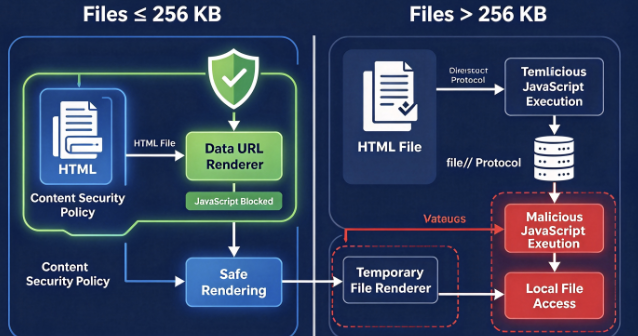
The most technically revealing detail was a 256KB HTML file-size threshold. Smaller files were rendered using a restricted נתונים: URL mechanism, while larger files were loaded through a file:// URL. That implementation difference created an exploitable security gap: the larger-file rendering path did not inherit the same script restrictions, and local-file request filtering did not protect the static HTML preview in the way the application expected.
Although Anthropic ultimately resolved the reported exploit chain, SneakPeek is more than a historical vulnerability in a single desktop application. It illustrates how AI coding assistants can introduce security risks outside the language model itself, particularly where repository content, local filesystem access, embedded browsers, automation, and developer credentials interact.
For organizations integrating autonomous coding agents into software development, the incident raises an immediate architectural question: what prevents a document that an agent is authorized to inspect from becoming executable content with access to the developer’s machine?
What Is the Claude Code SneakPeek Vulnerability?
SneakPeek is an exploit chain affecting the HTML preview functionality of Claude Code Desktop, the coding environment integrated into Anthropic’s Claude Desktop application. The vulnerability originated in the way the desktop application’s Chromium-based preview renderer handled untrusted HTML files, particularly files larger than 256KB.
The essential failure was a trust-boundary violation. The application was intended to display project files while preventing those files from executing JavaScript capable of accessing sensitive host resources. However, researchers found that the protections applied to one rendering path were not consistently enforced across another. An attacker-controlled file could therefore run JavaScript inside a context that allowed access to local filesystem resources and network-based exfiltration.
Noma Labs demonstrated the vulnerability with a malicious HTML file disguised as a software test coverage report. Coverage reports are especially plausible attack carriers because they frequently contain substantial HTML, CSS, JavaScript, embedded assets, and source-code information. A file exceeding several hundred kilobytes is therefore not inherently unusual or suspicious in a development repository.
Once the malicious file was rendered through the vulnerable preview path, embedded JavaScript could access sensitive local data. According to the researchers, potentially exposed resources included SSH private keys, AWS credentials, GitHub and npm authentication tokens, Kubernetes configuration files, Docker registry credentials, and Claude authentication material. Those resources could subsequently be transmitted to attacker-controlled infrastructure without a separate permission prompt for the preview’s JavaScript activity.
It is important to distinguish the proven technical impact from broader descriptions of the vulnerability. SneakPeek demonstrated arbitrary local-file reading and credential exfiltration through JavaScript execution in the preview renderer. Noma Labs reported that Anthropic assessed its impact as equivalent to host code execution, but this does not mean the public research established an independent capability to execute arbitrary native operating-system commands in every affected environment.
The distinction matters for incident response. Credential theft alone can be sufficient for a severe organizational compromise. An attacker who obtains reusable cloud credentials, repository tokens, or SSH identities may be able to move from a developer workstation into cloud infrastructure, source-code repositories, CI/CD pipelines, or production services, subject to the privileges and restrictions associated with those credentials.
Claude Code SneakPeek Vulnerability: Key Facts and Patch Status
| תכונה | Verified information |
|---|---|
| Vulnerability name | SneakPeek |
| Affected component | Claude Code Desktop HTML preview renderer |
| Discovered by | Noma Labs, Noma Security |
| Public disclosure | October 14, 2026 |
| חומרה | CVSS 4.0: 8.7, High |
| Primary weakness | Inconsistent preview isolation and local-file access controls |
| Trigger condition | Rendering attacker-controlled HTML through the vulnerable preview path |
| Important threshold | HTML files larger than 256KB |
| Demonstrated impact | Local-file reading and credential exfiltration |
| First reported | July 4, 2026 |
| Reported fixed release | Claude Desktop 1.30096.1, August 17, 2026 |
| CVE status | Not publicly assigned in the research disclosure as of October 15, 2026 |
| Public exploitation | No independently verified in-the-wild campaign established by the cited reporting |
The timeline and fixed-version information above come from the original Noma Labs disclosure. Teams should verify their installed desktop application version rather than treating the terminal-based Claude Code CLI version as an equivalent indicator.
How the SneakPeek Attack Works: From an HTML Report to Credential Theft
The SneakPeek attack is significant because its individual components resemble ordinary developer activity. Cloning repositories, reviewing test coverage, rendering HTML reports, and using AI assistants to inspect project files are normal software engineering operations. The attacker did not need to invent an unfamiliar workflow. Instead, the exploit transformed a routine preview operation into an opportunity to access the developer’s local environment.
In the scenario demonstrated by Noma Labs, the attacker controlled content inside a public repository. The repository contained believable application source files, test artifacts, and a coverage report. The malicious JavaScript was embedded in that HTML report, and the file was constructed to exceed the rendering threshold that changed Claude Code Desktop’s behavior.
The victim’s legitimate objective was to understand or modify the report. Once the application rendered the attacker-controlled file through the vulnerable preview mechanism, the embedded script could execute with capabilities that should not have been available to untrusted repository content.
SneakPeek exploit chain — architectural reconstructionConceptual reconstruction from Noma Labs’ published findings. The graphic is not an executable proof of concept.
The initial compromise did not depend on convincing the language model to disobey its instructions. The model could be performing exactly the task the developer requested. The problem emerged when the surrounding application interpreted untrusted content as something that could be safely rendered in a privileged environment.
This distinction separates SneakPeek from many conventional prompt injection attacks. In an indirect prompt injection scenario, attacker-controlled text manipulates an agent’s decisions or tool calls. In SneakPeek, the attacker-controlled HTML was dangerous because of how the desktop application rendered it. The model’s ordinary interaction with a malicious artifact helped deliver the payload to the vulnerable component, but the underlying exploit was a renderer isolation failure.
The result was a cross-boundary attack involving repository content, desktop application privileges, local credentials, and external network communication. The attacker did not necessarily gain direct control of Claude’s reasoning process. Instead, the attacker exploited the assumption that a preview pane would safely handle potentially hostile files.
The 256KB Threshold: Why HTML File Size Became a Security Boundary
The most unusual aspect of the Claude Code SneakPeek vulnerability was that the application’s security behavior depended on the size of the file being displayed.
According to the researchers, Claude Code Desktop used two different mechanisms to display HTML content. Files below approximately 256KB were loaded through נתונים: URLs, while files exceeding that threshold were written to temporary files and loaded through file:// URLs. This distinction was presumably designed to support efficient rendering of both small documents and larger artifacts, but the two execution paths did not provide equivalent security guarantees.
For the smaller-file path, the application used a Content Security Policy that included script-src 'none'. This directive prevents JavaScript from executing in the protected document. The נתונים: URL mechanism also provided an opaque origin, limiting the document’s ability to interact with other resources as if they belonged to the same origin.
The larger-file path behaved differently. Once an HTML document exceeded the threshold, the application rendered it from a temporary file using the file:// scheme. Noma Labs found that this path did not receive the same CSP restrictions. Consequently, embedded JavaScript could execute, while local-file access controls were not enforced consistently.
The problem was not simply that large HTML files were allowed. It was that file size became a switch between two different security models. The content being rendered remained equally untrusted, yet the protections applied to it changed based on a characteristic the attacker could control.
A security boundary must not depend on whether untrusted input happens to be 200KB or 500KB. An attacker capable of controlling an HTML document can usually increase its size without changing its visible appearance. Comments, embedded resources, generated markup, or other ordinary HTML content can make a document larger while preserving a convincing user-facing report.
A more robust design would ensure that every untrusted preview receives the same underlying restrictions, regardless of whether the content is loaded from memory, a temporary file, a local development server, or another resource provider.
Why the file:// Protocol Matters in Electron Applications
ה file:// URL scheme is fundamentally different from ordinary HTTPS-based web content in an Electron desktop environment.
A conventional website is usually confined by browser security mechanisms that separate one origin from another. Local desktop applications, however, often need greater access to files, operating-system services, and application resources. Electron provides those capabilities by combining Chromium-based rendering with desktop application functionality.
That flexibility also creates risk. Electron’s official security documentation explicitly recommends avoiding the file:// protocol for untrusted content and using carefully designed custom protocols instead. The documentation explains that local-file pages receive privileges that differ from standard web pages and that script injection in a privileged local-file context can expose other files on the machine.
This is particularly relevant to developer tools. A coding assistant may handle HTML reports, Markdown files, documentation, generated dashboards, screenshots, build artifacts, and application previews. Some of those resources are created locally, while others originate from repositories controlled by external contributors.
Their presence on the filesystem does not make them trustworthy. A file cloned from a public GitHub repository remains untrusted even after it has been copied into a local project directory.
Electron applications therefore need to distinguish between the authority of the application itself and the authority of individual documents displayed inside it. A preview renderer should receive only the permissions necessary to display the selected artifact. It should not inherit broad access to the developer’s home directory, authentication material, or unrelated project files.
ה Electron security checklist recommends process sandboxing, context isolation, restrictive CSPs, careful protocol handling, and limited exposure of privileged APIs to untrusted content. These recommendations provide useful context for understanding why SneakPeek was an architectural vulnerability rather than a minor HTML-processing bug.
The Three Security Controls That Failed
SneakPeek exploited gaps across multiple layers of the preview architecture. Understanding the interaction between those layers is more useful than treating the incident as a generic JavaScript injection vulnerability.
Content Security Policy Was Not Enforced Across Both Rendering Paths
Content Security Policy is intended to limit what an HTML document can execute and which resources it can access. The most important directive in the original restricted preview path was:
Content-Security-Policy: script-src 'none'When properly applied, this directive prevents the document from executing JavaScript. For a static HTML coverage report, disabling script execution may be a reasonable default unless interactive behavior is explicitly required.
The underlying weakness was not an inherently ineffective CSP. Instead, the protective policy was absent from the larger-file rendering path. A restriction that was effective for one type of preview did not govern all ways of loading the same content.
This created a classic enforcement inconsistency. The application appeared to have a rule preventing untrusted HTML from executing scripts, but that rule was not applied at every point where potentially malicious HTML entered the renderer.
Origin Isolation Changed When Large Files Used file://
The second failure involved the security origin assigned to the document.
The smaller-file path used נתונים: URLs, which generally receive opaque origins. The larger-file path used file://, placing the document in an environment with different local-resource semantics.
Noma Labs found that, in the affected Electron renderer, the larger-file path allowed JavaScript to read local resources through web APIs such as fetch() ו XMLHttpRequest.
This did not require the malicious document to request ordinary filesystem access from the user. The application had already placed it in a context where its requests could reach resources that should have been outside the preview’s authority.
It is important not to generalize this result to every modern web browser. Handling of file:// origins and local-file requests varies across browsers and application configurations. The exploitability demonstrated by SneakPeek depended on Claude Code Desktop’s affected Electron environment and the specific protections that were missing or bypassed.
Request Filtering Did Not Cover the Static HTML Preview
The third failure concerned the request-filtering mechanism.
The researchers reported that Claude Code Desktop applied filtering when a preview communicated through the application’s development-server proxy. This mechanism could block certain requests for local files in that workflow.
However, the same filtering did not engage when a static HTML file was rendered directly from the local filesystem. An attacker could therefore avoid the protected proxy route entirely by using a static HTML artifact.
The result was a gap between intended policy and actual enforcement. The application had a mechanism to restrict dangerous requests, but the path used by the malicious coverage report did not pass through the relevant enforcement point.
These failures combined into a particularly serious condition: scripts could execute, local resources could be accessed, and the resulting information could leave the machine. Preventing any one of those operations could have materially reduced the attack’s impact, but relying on a single partial filter proved insufficient.
Why SneakPeek Was More Dangerous Than a Typical Malicious HTML File
A malicious HTML document is not a new security concept. Browsers and desktop applications have defended against script injection, unsafe resource loading, and local-file access for many years. What made SneakPeek notable was the context in which the document was opened.
The application was an AI coding assistant operating inside a developer workflow. The document was not necessarily opened because the user chose to trust a website. It could be rendered as part of inspecting a repository or reviewing changes that Claude had made. That automation reduced the visibility of the transition from data inspection to executable content.
In traditional application security, a developer might notice that an unfamiliar HTML report was opening in a browser. In an AI-assisted development environment, previews can be routine background artifacts generated or displayed while the agent works on another task. A malicious report may appear to be nothing more than the visual representation of an ordinary test result.
The attack also targeted a workstation likely to contain valuable credentials. Software developers often have authenticated access to source-code platforms, package registries, cloud services, container infrastructure, and internal development systems. These credentials make developer endpoints attractive targets even when the attacker has no direct access to production infrastructure.
The overall risk arises from the relationship between automation and privilege. AI coding agents make it easier to consume and transform unfamiliar content, while desktop coding environments frequently operate close to highly privileged development resources. When an attacker can move data from the first category into the authority of the second, an apparently low-risk preview becomes a high-value intrusion path.
The Coverage Report Attack: A Realistic Supply-Chain Entry Point
The repository-based delivery mechanism was one of the most practical aspects of the research.
A coverage report is a plausible file for a coding assistant to examine. Developers routinely generate reports from JavaScript, TypeScript, Python, Java, and other language ecosystems. HTML coverage tools can produce complex reports containing navigational elements, styling, embedded source snippets, statistics, and supporting assets.
An attacker preparing a malicious repository does not need the report to look obviously suspicious. The repository can contain working source code, normal directory structures, conventional testing tools, and credible documentation. The malicious content can remain concealed within an artifact that the user has a legitimate reason to inspect.
Noma Labs demonstrated a scenario involving a public repository, an oversized HTML coverage report, and a developer asking Claude Code Desktop to review the file. The dangerous action occurred when the preview rendered the report, not when the repository was merely downloaded.
This distinction helps define the exposure conditions. Cloning a repository alone was not established as sufficient to trigger SneakPeek. The attacker needed the vulnerable preview functionality to process the malicious HTML. Likewise, simply possessing a large HTML file does not prove exploitation. The relevant conditions include the vulnerable application version, the rendering path, and whether malicious content was actually displayed.
A realistic enterprise threat model should therefore consider repositories received during vendor evaluations, open-source investigations, recruitment exercises, code-review requests, security research, and routine collaboration. Developers frequently interact with code that comes from outside their own organization, and those interactions may be mediated by AI assistants.
Supply-chain security has traditionally concentrated on dependency installation, build scripts, malicious packages, and CI/CD execution. SneakPeek expands that perspective. It demonstrates how inspection of a development artifact can itself become an execution boundary, even when the user is not installing a dependency or running the project’s build process.
Credential Exfiltration: What Could an Attacker Steal?
The impact of SneakPeek depended on which local files the vulnerable renderer could read and which credentials were available in those files.
The researchers identified several categories of development-related secrets that could be targeted. These included cloud access keys, SSH private keys, package registry authentication material, source-code platform tokens, Kubernetes access configurations, Docker credentials, and Claude authentication material.
These resources differ in format, scope, and privilege, but they have one important characteristic in common: they can grant access to systems outside the compromised workstation.
An exposed SSH private key might allow an attacker to authenticate to remote hosts if corresponding server-side controls permit its use. Cloud credentials could provide access to storage, infrastructure management, logs, or other API operations. Repository and package registry tokens might allow source-code access or modification, depending on permissions. Kubernetes credentials could expose clusters if network reachability and role-based access controls allow it.
The same credential exposure can have different outcomes in different organizations. A short-lived, narrowly scoped development token may present limited risk. A reusable administrative credential with access to production infrastructure can create a much broader incident.
For this reason, the impact of a SneakPeek exposure should be assessed based on credential authority rather than the number of files accessed.
How the Data Was Transmitted
The researchers reported that the malicious JavaScript used standard web APIs to transmit the collected information to attacker-controlled infrastructure.
In the demonstrated attack, navigator.sendBeacon() provided a convenient outbound transmission mechanism. The API is designed to send small amounts of data asynchronously, commonly for analytics or telemetry. In a malicious context, the same behavior can be used to transmit sensitive information without requiring a visible navigation event.
The critical failure was not the existence of sendBeacon() itself. It was that an untrusted document could access sensitive local content and then communicate outside the expected preview boundary.
Even blocking sendBeacon() alone would not necessarily provide a complete solution. Depending on the execution environment, JavaScript may have multiple communication mechanisms, including fetch(), XMLHttpRequest, image requests, WebSockets, navigation, and other browser-supported APIs.
Secure preview architecture should therefore enforce restrictions on both resource acquisition and outbound communication, ideally below the individual JavaScript API layer.
A strong containment model assumes an attacker will choose whichever communication primitive remains available. The system must prevent untrusted content from obtaining secrets in the first place, while additional egress restrictions reduce the damage if that first control fails.
The Web Worker Bypass: Why Anthropic’s First Fix Was Not Enough
The disclosure also documented an important episode in the vulnerability’s remediation process.
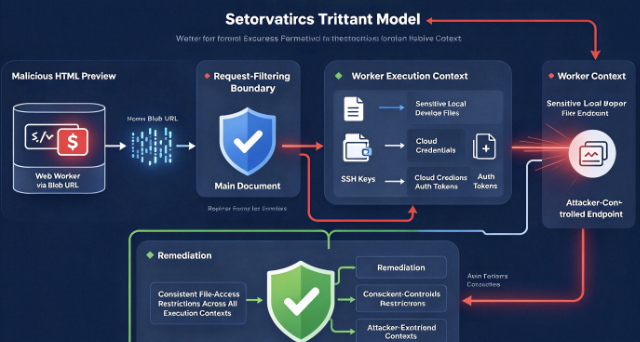
After receiving the initial report, Anthropic implemented restrictions intended to block local-file reads using fetch() ו XMLHttpRequest from the main preview context. The researchers then tested the proposed protection and discovered another route around it.
The bypass relied on a JavaScript Web Worker created through a blob: URL. A Web Worker executes JavaScript in a separate execution context, allowing work to be performed outside the main page’s execution thread.
In the affected application, the original filtering logic did not adequately cover requests originating from that worker context. The malicious script could therefore transfer file-reading operations into the worker while maintaining communication with the main document.
The worker could return the collected data to the main context through message passing, after which the information could be transmitted externally.
This was a significant finding because it showed that the initial patch addressed specific request APIs in one context rather than consistently enforcing the intended security invariant across every relevant context.
A developer examining the patch might reasonably believe that blocking direct file requests solved the problem. However, the ability to create additional execution contexts meant that the dangerous behavior could reappear through another route.
This is why security engineering must consider capabilities rather than individual API names. If the intended requirement is that untrusted HTML must never read arbitrary host files, then enforcement needs to remain effective whether code runs in the main document, a worker, an embedded frame, or another supported execution environment.
ה MDN documentation for the worker-src CSP directive describes how applications can restrict sources used to create workers. Such restrictions are useful, but they are only one part of a broader security design. Application-level request filtering, origin isolation, renderer sandboxing, and filesystem restrictions must also be applied consistently.
SneakPeek illustrates why regression tests should cover equivalent operations from multiple execution contexts. A security patch that prevents local-file access from one JavaScript call site but permits it through another does not fully restore the original trust boundary.
SneakPeek Disclosure Timeline and Anthropic’s Security Response
The remediation process unfolded over several weeks before the vulnerability was publicly disclosed.
Noma Labs reported the initial finding to Anthropic on July 4, 2026, including a proof of concept demonstrating sensitive-file access and credential exfiltration through the HTML preview. Anthropic triaged the report on July 9 and assigned the vulnerability a CVSS 4.0 severity score of 8.7.
On July 24, Anthropic provided an initial fix and requested a retest. The researchers reported a bypass on the same date, demonstrating that a worker created through a blob: URL could circumvent the new restrictions.
On August 3, Anthropic confirmed that the first mitigation was incomplete and returned the issue to triage. Noma Labs subsequently reported that the final fix was released on August 17, 2026, in Claude Desktop version 1.30096.1 and later.
The research became public on October 14, 2026. At publication time, the researchers stated that an associated GitHub Security Advisory and CVE publication were still pending.
The full chronology is documented in the Noma Labs technical report. Additional coverage from קריאה אפלה ו CSO Online discusses the security impact and the significance of the first patch being bypassed.
The reported final resolution is important. SneakPeek should not be presented as an unpatched zero-day in October 2026. The publicly disclosed exploit chain had already been addressed according to the researchers. Organizations should nevertheless verify their deployed versions, identify outdated installations, and assess whether vulnerable systems processed untrusted content before being updated.
The incident also provides a useful lesson in coordinated disclosure. The first patch was not assumed to be sufficient merely because a particular proof of concept stopped working. Independent retesting identified a bypass, giving the vendor an opportunity to address the broader security problem before the public release of the research.
How to Check Whether Your Claude Code Installation Is Vulnerable
The first step in assessing exposure is to identify the actual Claude Desktop application version installed on the workstation. This is particularly important because Claude Desktop and the standalone Claude Code command-line interface can maintain different version numbers and update independently.
על פי Anthropic’s desktop documentation, macOS users can open the Claude menu and select About Claude to view their installed desktop version. Windows users can open Help and select About Claude. To check for updates, use Claude → Check for Updates on macOS or Help → Check for Updates on Windows.
The researchers identified Claude Desktop version 1.30096.1 as the release containing the final SneakPeek fix. Organizations should verify that affected workstations have this release or a later compatible version, preferably the latest supported version distributed by Anthropic.
Running claude --version in a terminal is not sufficient for this assessment. That command reports the standalone CLI version, which does not establish whether the desktop preview renderer has received the relevant security update.
A successful update also does not prove that a workstation was never exposed. Organizations that used older builds before August 17, 2026, should determine whether those systems rendered externally sourced HTML during the period when the vulnerability was present.
Understanding the Exposure Conditions
The likelihood of exploitation depends on several factors. A workstation must have used an affected desktop application, encountered attacker-controlled or otherwise malicious HTML, and caused that content to be rendered through the vulnerable preview path.
The attacker also needed to take advantage of the execution and file-access capabilities exposed by that renderer. The presence of a large HTML file by itself is not evidence of compromise.
These conditions provide a practical way to prioritize investigation. Systems running the affected application and frequently reviewing external repositories deserve greater attention than systems that never used the desktop preview functionality.
However, organizations should avoid using the absence of a known malicious repository as proof that no exposure occurred. The public demonstration relied on a coverage report, but other attacker-controlled HTML artifacts could potentially have exercised the same vulnerable code path.
Detecting Suspicious HTML Artifacts Associated With SneakPeek
Because SneakPeek used attacker-controlled HTML as its entry point, repository inspection can provide useful supporting evidence during an investigation.
Security teams can examine HTML artifacts that exceed 256KB, particularly generated reports and other files originating from repositories outside the organization’s control. Suspicious patterns may include embedded JavaScript, unexpected external endpoints, worker creation, or network transmission APIs that have no clear relationship to the document’s legitimate purpose.
These indicators are not definitive. Many legitimate coverage reports include JavaScript for navigation, filtering, syntax highlighting, and interactive visualization. Large file size is common in generated documentation, and even worker creation can be legitimate.
A useful detection strategy therefore combines static indicators with provenance, execution context, application version, and endpoint telemetry.
A Safe Python Script for Repository Inspection
The following Python script performs a read-only inspection of HTML files within a directory. It highlights files exceeding 256KB and reports potentially interesting JavaScript constructs. It does not execute HTML, access credentials, or communicate with external systems.
from pathlib import Pathimport reimport sysTHRESHOLD = 256 * 1024PATTERNS = { "script_tag": r"<script\b", "web_worker": r"\bnew\s+Worker\s*\(", "blob_url": r"\bcreateObjectURL\s*\(", "file_scheme": r"file\s*:", "fetch_api": r"\bfetch\s*\(", "xhr_api": r"\bXMLHttpRequest\b", "beacon_api": r"\bsendBeacon\s*\(",}def inspect_html(path): try: size = path.stat().st_size if size <= THRESHOLD: return None content = path.read_text( encoding="utf-8", errors="replace" ) matches = [ name for name, pattern in PATTERNS.items() if re.search( pattern, content, flags=re.IGNORECASE ) ] return { "path": str(path), "size_kb": round(size / 1024, 2), "indicators": matches, } except (OSError, UnicodeError) as error: print(f"Cannot inspect {path}: {error}") return Nonedef scan_repository(root): for path in root.rglob("*"): if not path.is_file(): continue if path.suffix.lower() not in {".html", ".htm"}: continue result = inspect_html(path) if result is None: continue print(f"\nFile: {result['path']}") print(f"Size: {result['size_kb']} KB") print( "Indicators: " + ( ", ".join(result["indicators"]) if result["indicators"] else "none" ) )if __name__ == "__main__": root = Path( sys.argv[1] if len(sys.argv) > 1 else "." ) if not root.is_dir(): raise SystemExit("Directory not found") scan_repository(root)Save the script as scan_html_previews.py and run it against a local repository directory:
python3 scan_html_previews.py /path/to/repositoryThe output identifies oversized HTML files and summarizes potentially relevant features. A report containing Web Worker creation, file-oriented requests, and outbound communication mechanisms deserves manual investigation, especially when those features are unexpected for the type of artifact being inspected.
This script is a triage aid, not a SneakPeek exploit detector. It does not establish whether a file was rendered, whether the installed Claude Desktop version was vulnerable, or whether any data was transmitted. It can also miss obfuscated payloads, dynamically generated code, JavaScript loaded from separate files, and alternate browser APIs.
Detection quality improves when artifact inspection is correlated with filesystem access logs, application activity, network telemetry, and the provenance of the repositories developers were working with.
How Security Teams Can Validate the SneakPeek Fix Safely
Patch verification should distinguish between confirming installation of the corrected application and testing whether the vulnerable behavior is still possible.
Version verification is the primary immediate control for organizations consuming Anthropic’s distributed desktop application. Security teams can record the installed version, confirm the expected update channel, and check whether centrally managed devices have received the relevant package.
Technical regression testing provides additional assurance for security researchers and organizations developing comparable preview mechanisms. Such testing should occur only in an isolated laboratory environment using synthetic data. There is no need to use real SSH keys, production tokens, or cloud credentials to determine whether an HTML preview improperly executes JavaScript or accesses files outside its intended scope.
A useful test environment can contain a benign HTML document, a harmless marker file created specifically for the test, and a network destination controlled by the testing team. The test should determine whether untrusted preview content can execute scripts, read the marker through a prohibited file-access path, or establish a connection that violates the preview’s intended network policy.
The file-size threshold should be tested on both sides of the boundary. A security mechanism that behaves correctly for a small document must provide equivalent protection when the same content becomes larger.
Testing should also cover main-document execution and secondary execution contexts. The initial SneakPeek patch bypass demonstrated that a restriction effective against one API call could fail when similar behavior originated from a worker. The appropriate regression objective is therefore to establish that untrusted preview content cannot obtain prohibited capabilities, regardless of which supported execution context attempts the operation.
For vendors building similar functionality, this type of testing should form part of automated security regression suites. A patch is stronger when its tests express the underlying policy rather than merely reproduce a previously observed exploit.
Incident Response: What to Do If a Vulnerable Preview Was Used
Organizations investigating possible SneakPeek exposure should treat the incident as a potential credential compromise when there is credible evidence that malicious HTML executed in the vulnerable preview.
The first priority is to preserve relevant evidence while preventing further exposure. Security teams should identify the affected workstation, the desktop application version, the repository or artifact being inspected, and the approximate time of rendering. Endpoint and network telemetry covering that period may help determine whether the application accessed unusual local resources or communicated with unexpected external destinations.
A suspicious coverage report should be preserved for analysis, including its original bytes and a cryptographic hash. Analysts should avoid opening the file in another privileged preview environment. A static text inspection or execution inside an isolated analysis environment is more appropriate.
Next, investigators should identify the scope of credentials potentially accessible to the affected application. This requires more than checking whether obvious SSH key files were present. Developer workstations may contain credentials in environment files, package manager configurations, cloud SDK profiles, container tooling, project directories, keychains, credential helpers, and temporary files.
The exact exposure depends on what the renderer could read. Investigators should not assume that every credential stored on the machine was compromised, but they should also avoid narrowing the assessment to the handful of file types listed in the original proof of concept.
Credential Rotation and Session Revocation
When the evidence supports possible credential theft, organizations should rotate or revoke relevant secrets according to their sensitivity and scope.
Cloud access keys and API tokens should be evaluated for unauthorized use, with attention to activity that occurred after the suspected preview execution. Repository access tokens may require revocation and replacement. Package registry credentials may justify reviewing publication history, release integrity, and package ownership changes.
Exposed SSH identities should be addressed through replacement and removal of affected public keys from authorized destinations where applicable. Rotating a private key on the workstation is insufficient if the corresponding old public key remains authorized on sensitive systems.
OAuth tokens and other session credentials may require revocation through the identity provider or service that issued them. Simply changing a local file or reinstalling the desktop application does not necessarily invalidate an already stolen token.
Kubernetes and cloud credentials require particularly careful investigation because the effective permissions may extend far beyond a developer’s immediate project. Review of identity permissions, service-account access, cloud audit events, and relevant authentication logs can help establish whether an exposed secret was subsequently abused.
An incident involving credential exfiltration should not be closed merely because the vulnerable application has been updated. The software patch prevents the reported exploit path in corrected versions, while credential revocation addresses the separate risk that authentication material may already have left the device.
Network and Endpoint Evidence
Endpoint detection and response telemetry can help reconstruct what occurred during a suspicious preview session. Analysts can look for unusual file reads associated with the desktop application and outbound connections to unfamiliar destinations during the same interval.
Network investigation should consider that a malicious script may use ordinary HTTPS traffic. A connection does not need to use an exotic protocol or visibly malicious port to carry stolen information.
The use of navigator.sendBeacon() in the original research is an important behavioral clue, but a network appliance generally observes the resulting HTTP request rather than the JavaScript function that created it. Detection rules should therefore correlate network activity with the application process, destination reputation, request characteristics where visible, and other incident evidence.
Telemetry availability will vary across operating systems, endpoint products, browser isolation mechanisms, and enterprise configurations. If historical file-access or network logs are unavailable, investigators should state that limitation explicitly rather than claim that the absence of alerts proves no exploitation took place.
Why Normal Claude Code Permission Prompts Were Not Sufficient
A common misunderstanding about AI coding assistants is that permission prompts automatically protect the user from every dangerous operation.
Claude Code includes permission controls governing activities such as modifying files and executing commands. Those controls are important for limiting unintended agent behavior, but the original SneakPeek issue occurred in the rendering environment, where malicious JavaScript could execute without receiving the same type of explicit permission decision.
The developer might have authorized Claude to inspect a file, and the application might have treated that action as ordinary project exploration. The resulting HTML preview nevertheless created a separate opportunity for malicious execution.
The security problem is therefore not solved merely by requiring the user to approve shell commands. A renderer vulnerability may be exploitable even when the agent does not issue an unauthorized shell command.
Similarly, requiring manual approval of an edit does not guarantee that the resulting HTML is safe. In the demonstrated scenario, the dangerous content could already exist inside the report. A legitimate-looking file modification could cause the preview to display that content without requiring the user to examine every embedded script.
Permission systems should account for actions performed by the application on behalf of the agent, including rendering, navigation, network requests, file access, and interactions with privileged application services.
This reinforces the importance of separating agent authorization from resource isolation. The model may correctly understand the task and obtain legitimate approval while a lower-level component still violates the intended security boundary.
SneakPeek and Prompt Injection: Similar Attack Surfaces, Different Root Causes
SneakPeek is often discussed alongside prompt injection, agent hijacking, and AI-assisted supply-chain attacks. These categories are related, but they should not be treated as interchangeable.
Prompt injection occurs when untrusted content attempts to influence an AI system’s instructions or behavior. An attacker might place malicious instructions in a repository README, issue description, webpage, or document and attempt to convince an agent to perform actions outside the user’s authorized objective.
SneakPeek did not require the model to interpret malicious instructions as legitimate commands. The attack exploited the desktop application’s handling of rendered HTML. The malicious content was executable JavaScript, and the security failure occurred in the renderer’s isolation and resource-access mechanisms.
Both categories demonstrate the danger of crossing a trust boundary, but the enforcement requirements differ.
Prompt injection defenses address issues such as instruction hierarchy, tool authorization, untrusted input handling, and decision-making constraints. Renderer vulnerabilities require controls such as sandboxing, restrictive resource access, safe protocol handling, CSP enforcement, and isolation of executable content.
A secure AI development platform needs both sets of protections. Improving the language model’s resistance to malicious instructions does not automatically eliminate dangerous permissions in the surrounding application. Conversely, a well-isolated renderer does not prevent every form of agent manipulation.
This distinction has significant consequences for security testing. Testing only malicious prompts will miss weaknesses in artifact handling, while conventional application scanning may miss agent-mediated workflows that make those weaknesses reachable.
The broader relationship between these two security domains is explored in AI Agent Security After the Goalposts Moved, which examines how agent permissions, supply-chain behavior, tool execution, and untrusted content can interact within modern AI-assisted workflows.
What SneakPeek Means for AI Coding Agent Security
The larger lesson from SneakPeek is that AI coding assistants must be assessed as complete software systems, not merely as language-model interfaces.
A modern coding agent may combine a model, a conversation interface, local filesystem tools, a terminal, an embedded browser, development-server integration, repository access, authentication services, and third-party connectors.
Each component has its own permissions and security assumptions. Vulnerabilities emerge when information or authority crosses between these components without appropriate restrictions.
In a traditional IDE, a developer may consciously select a file and open it in a specific viewer. An AI coding assistant can add automation that selects, transforms, and displays artifacts as part of a larger task. That automation creates new ways for attacker-controlled content to reach sensitive application components.
SneakPeek illustrates a particularly important failure mode: the application treated a developer-facing preview as a convenience feature while the renderer’s effective authority included capabilities beyond what the preview required.
A safer architectural principle is to treat every generated or externally sourced artifact as untrusted until a separate security boundary has established what it may access.
For HTML previews, this means the renderer should not be allowed to read arbitrary host files. Interactive content should execute only when required, and even then within a strictly limited execution environment. Network access should be constrained according to the preview’s legitimate function.
Temporary files deserve particular attention. Writing an artifact into a temporary directory does not automatically make it safe, and reading a file from the local filesystem should not automatically grant that document access to neighboring resources.
The fundamental objective is to preserve the separation between the authority of the development application and the authority of the content it displays.
Secure Design Principles for Electron-Based AI Development Tools
Electron remains a practical framework for creating cross-platform desktop applications, but its flexibility requires deliberate security boundaries.
Applications that display externally sourced or AI-generated HTML should use restricted renderer configurations with context isolation and process sandboxing enabled. Node.js integration should not be exposed to untrusted content unless there is an exceptional and carefully justified requirement.
ה official Electron security guidance recommends custom protocols instead of unrestricted file:// loading, allowing developers to define exactly which resources a renderer can access. A custom protocol should enforce path validation and resource authorization rather than simply reproducing unrestricted local filesystem behavior under a different scheme.
Content Security Policy should be applied consistently across every supported content-loading path. A policy that protects memory-backed documents but not temporary-file previews does not provide a reliable application-wide guarantee.
Worker creation, navigation, embedded content, and secondary request contexts must be included in the security model. It is not enough to prevent the main document from reading sensitive files if another renderer context can perform the same operation.
For applications that support interactive previews, the safest design is often to separate visual rendering from privileged application functionality. The preview should operate with narrowly defined capabilities, and communication with the parent application should pass through an explicitly controlled interface.
Such an interface should validate the origin and identity of the sender, restrict permitted operations, and refuse access to resources unrelated to the artifact being displayed.
These controls also need to be tested under realistic conditions. Large documents, unusual file encodings, nested frames, worker creation, redirects, temporary files, and different operating systems can expose inconsistencies that simple happy-path tests will not detect.
Security engineering becomes more reliable when the application’s protected boundary is defined in terms of capabilities: which files can be read, which endpoints can be contacted, which commands can run, and which privileged operations can be requested.
Building a Practical Security Testing Strategy for AI Coding Environments
SneakPeek demonstrates why a complete security assessment of an AI coding environment requires several complementary testing approaches.
Source-code analysis can identify dangerous rendering configurations, inconsistent CSP application, unsafe filesystem protocols, and request handlers that are applied only to selected code paths. However, identifying a suspicious implementation does not automatically establish exploitability in the distributed application.
Runtime testing can evaluate how the application behaves when it receives untrusted artifacts. This is where differences between intended and actual enforcement become visible. A properly designed test suite can check whether an oversized HTML document, a worker context, or a static-file preview unexpectedly gains access to resources outside its intended scope.
Agent workflow testing adds another dimension. The investigator needs to determine whether the assistant’s normal operations can bring untrusted content into a sensitive renderer or tool context without sufficient inspection or isolation.
These layers should be treated as complementary rather than competing methods.
At Penligent, a relevant approach is to connect vulnerability hypotheses with controlled validation and reproducible security evidence. The article Claude Code Security ו-Penligent: מממצאי בדיקת "קופסה לבנה" להוכחת "קופסה שחורה" explains how code-level findings, practical testing, remediation, and regression verification can form a continuous security workflow.
For a vulnerability like SneakPeek, the same principle applies: identifying an unsafe preview design is the beginning of the assessment, while controlled testing should establish whether the protected boundary can actually be crossed. Endpoint-specific Electron renderer testing would still require appropriate instrumentation and an isolated desktop test environment; a generic web application scan is not a substitute.
For enterprise security teams, the goal should be a repeatable assurance process that covers both the agent’s behavior and the underlying tools and interfaces that execute on its behalf.
Why Credential Isolation Matters More Than Developer Convenience
The severity of SneakPeek was amplified by the possibility that the desktop application could access credentials associated with the developer’s broader environment.
Development workstations often accumulate long-lived authentication material because persistent credentials make routine tasks easier. A developer may authenticate once to a cloud platform, repository service, or package registry and then reuse that identity across multiple projects.
When an application handling untrusted content can read those credentials, the attacker may not need to compromise the underlying cloud or repository service directly. Instead, the workstation becomes an indirect route to the same resources.
Reducing this risk requires limiting both credential lifetime and credential scope.
Short-lived access tokens reduce the period during which a stolen credential remains useful. Project-specific identities reduce the number of resources that a compromise can expose. Strong identity controls, scoped access policies, and secondary authorization for sensitive operations can further restrict the consequences.
Hardware-backed or non-exportable credentials may reduce exposure to attacks based on reading credential files, although they do not eliminate every possibility of session abuse or misuse of an already authenticated application.
Separating high-trust administrative work from untrusted repository inspection is another important control. Developers investigating unfamiliar code should not unnecessarily expose production administrative credentials to the same environment.
This is particularly relevant as AI coding agents become more autonomous. The more work an agent can perform without direct human intervention, the more important it becomes to ensure that its effective permissions remain limited to the task it has been authorized to complete.
Frequently Asked Questions About the Claude Code SneakPeek Vulnerability
Is the Claude Code SneakPeek vulnerability fixed?
Yes, according to the public disclosure by Noma Labs, Anthropic resolved the reported exploit chain in Claude Desktop version 1.30096.1, released on August 17, 2026. The researchers confirmed that the final remediation followed additional testing that exposed a bypass of the initial patch. Users should install the latest supported Claude Desktop version and verify the actual desktop application version, rather than assuming that updating the standalone CLI is sufficient.
Does SneakPeek have a CVE number?
As of October 15, 2026, the original Noma Labs disclosure still listed the associated CVE and GitHub Security Advisory as pending publication. Consequently, SneakPeek should not be assigned an unverified CVE identifier. Security teams should monitor the original research and Anthropic’s official vulnerability disclosure channels for any subsequent advisory publication.
Is SneakPeek a zero-click vulnerability?
The attack has been described as zero-click because, once the vulnerable preview processed malicious HTML, its JavaScript could execute and access resources without an additional explicit approval action. However, the demonstrated attack still involved a user or agent workflow that caused the malicious artifact to be opened or rendered. It is therefore more precise to describe the exploit as requiring no additional click or permission grant at the execution stage, rather than suggesting that every vulnerable installation could be compromised without any interaction or exposure to attacker-controlled content.
Can SneakPeek steal SSH keys and AWS credentials?
The researchers demonstrated local-file access and described credential theft involving SSH keys, AWS credentials, developer authentication tokens, and other sensitive resources. The practical impact depends on which files were readable and what privileges the exposed credentials carried. A stolen credential does not automatically grant unrestricted access to every associated system, but it can provide an attacker with a powerful starting point for further compromise.
Does SneakPeek affect the Claude Code CLI?
The public research specifically identified the HTML preview functionality in Claude Code Desktop. It should not be assumed that the same exploit chain affects every Claude Code deployment, including the standalone terminal-based CLI. Different interfaces may use different rendering architectures and isolation mechanisms, and their security properties must be assessed separately.
Is SneakPeek a prompt injection attack?
Not in the conventional sense. The documented root cause involved an HTML preview isolation failure that allowed embedded JavaScript to execute and access local resources. The model could follow the user’s legitimate request while the surrounding application mishandled untrusted content. SneakPeek is therefore best understood as an application security vulnerability involving an AI-assisted workflow, rather than a case where malicious natural-language instructions successfully redirected the model.
Can antivirus software or EDR prevent SneakPeek?
Endpoint security controls may detect suspicious network activity, unauthorized file access, or subsequent credential misuse, depending on the visibility and detection capabilities available. However, those tools should not be treated as a substitute for fixing the vulnerable application. SneakPeek exploited ordinary browser and desktop application functionality, meaning that malicious behavior could resemble legitimate application activity unless the relevant security boundary was enforced.
Has SneakPeek been exploited in the wild?
The original disclosure describes a working research proof of concept and a coordinated remediation process. The reviewed public reporting did not establish a confirmed campaign exploiting SneakPeek against real-world victims. That distinction matters: demonstrated exploitability supports a serious security assessment, but it is not equivalent to verified widespread exploitation.
Conclusion: SneakPeek Exposed a New Class of Risk in AI-Assisted Development
The Claude Code SneakPeek vulnerability shows how a security weakness in a seemingly ordinary application feature can become a serious credential exposure risk when that feature is integrated into an AI-assisted development workflow.
The exploit did not depend on advanced malware, a complicated social-engineering campaign, or successful manipulation of the language model’s instructions. It exploited an inconsistency in the way HTML previews were rendered and protected. A document larger than 256KB entered a different rendering path, lost important script restrictions, and could access local resources that should have remained outside the document’s authority.
The subsequent Web Worker bypass made the underlying lesson even clearer. Blocking a specific API call is not enough when the architecture still provides alternative routes to the same prohibited capability. Effective remediation requires restoring the security invariant across every relevant execution context.
Anthropic’s reported final fix addressed the disclosed attack chain, but the security implications extend beyond Claude Code Desktop. As coding assistants gain deeper integration with repositories, local development environments, cloud resources, and autonomous workflows, the line separating untrusted content from privileged application behavior becomes increasingly important.
For individual developers, the immediate priorities are to verify that Claude Desktop is updated, treat externally sourced artifacts as untrusted, and avoid keeping unnecessarily powerful credentials accessible within routine development environments.
For security teams, the longer-term priority is to test how AI-enabled applications handle untrusted content across their complete execution architecture. That includes model behavior, file previews, embedded browsers, local resource access, credentials, background execution contexts, and outbound network communication.
The central security lesson of SneakPeek is straightforward: an AI assistant can perform the correct task while the application executing that task still violates a critical security boundary. Protecting AI-assisted development therefore requires more than trustworthy model behavior. It requires secure application architecture, least-privilege execution, consistent isolation, and independent verification that untrusted content cannot acquire capabilities it was never intended to possess.

 Hebrew
  English
  German
  French
  Spanish
  Portuguese
  Japanese
  Korean
  Hindi
Hindi  Arabic
  Turkish