
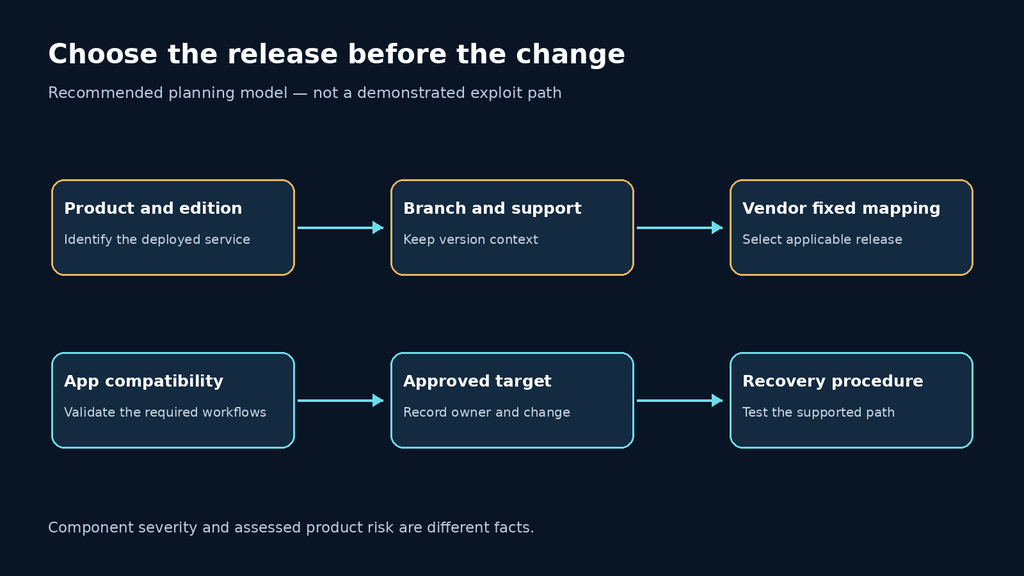
The Atlassian October 2026 security update is a release-selection problem before it is a scanning problem. Identify the self-managed product and running branch, select an applicable fixed release, and prove that every serving node reached the intended build. A headline CVE count cannot do those jobs, and a downloaded installer cannot establish that a cluster has been updated.
For administrators managing Jira and Confluence, the decision is usually whether to take a supported security maintenance release in the current branch or plan a larger upgrade. Make that choice from the product advisory, support status, app compatibility and tested recovery path. Do not let a generic dependency scanner silently choose a platform upgrade for you.
What the October 20 bulletin says
ה official October 20, 2026 bulletin lists 162 high-severity vulnerabilities and 14 critical-severity third-party vulnerabilities. Atlassian assesses the monthly bulletin issues as presenting non-critical risk in its products, distinguishing component severity from the way the components are used. It recommends the applicable fixed releases or latest versions and notes that its version list is a publication-date snapshot.
That qualification should survive every internal handoff. “A critical component vulnerability is listed” and “this Jira deployment exposes an unauthenticated critical exploit path” are different claims. Neither the count nor a library name establishes the latter. The monthly bulletin also should not replace the separate advisory and remediation record for CVE-2026-21589.
Fixed-release examples for Jira and Confluence
These examples are taken from the bulletin reviewed on October 22. They are selected release targets, not a complete affected-version matrix and not a universal minimum-version rule. Consult the linked bulletin for exact affected branches and the current product release documentation before choosing a change.
| מוצר | Selected published fixed releases | Planning consequence |
|---|---|---|
| Jira Data Center | 11.3.12 LTS, recommended; 10.3.26 LTS | Match the intended branch and approved upgrade path |
| Confluence Data Center | 11.0.0; 10.2.19 LTS, recommended; 9.2.26 LTS | Do not infer that one version number is suitable for every installation |
| Bitbucket Data Center | 10.5.1; 10.2.8 LTS, recommended; 9.4.26 LTS | Evaluate the product independently from Jira and Confluence |
| Bamboo Data Center | 12.1.12 LTS, recommended; 10.2.24 LTS | Keep controller and dependent build workflows in the change plan |
A release newer than one of these examples is not automatically a bad choice, but its suitability needs its own evidence. A lower number on a different supported branch is not automatically vulnerable to every issue in the list either. Keep the vendor mapping, product identity and branch together; discarding any of the three makes a spreadsheet comparison unreliable.
Atlassian’s Confluence download archive explains that LTS releases receive backported security fixes and critical bug fixes during their support window, and warns that older downloadable releases may no longer be supported. Availability of an installer is therefore not evidence of ongoing support. Check support status independently before treating an old branch as an acceptable long-term destination.
Turn inventory into a decision, not a list of hostnames
Create one record per actual serving node, with product, edition, full version, branch, deployment owner, exposure and approved target. Include non-production systems that hold production-like data or credentials, but distinguish them from production when scheduling. If an inventory entry only says “Jira 11,” it is not precise enough to close this update.
Discover the effective version through an authorized administrative source for the deployment. A reverse proxy banner may describe the proxy. A container image tag may describe the desired image rather than the running workload. A configuration-management record may be stale. Where the sources disagree, record the disagreement and resolve it before making the asset green.
| ראיות | What it establishes | What it does not establish |
|---|---|---|
| Approved change target | A chosen product release and owner | That deployment happened |
| Artifact identity | Which package or image was prepared | That every node serves it |
| Per-node running version | The effective build at collection time | That all required workflows still operate |
| Authenticated functional check | Specific application paths still work | Absence of all vulnerabilities |
| Retest record | The stated issue or control was checked | Historical absence of compromise |
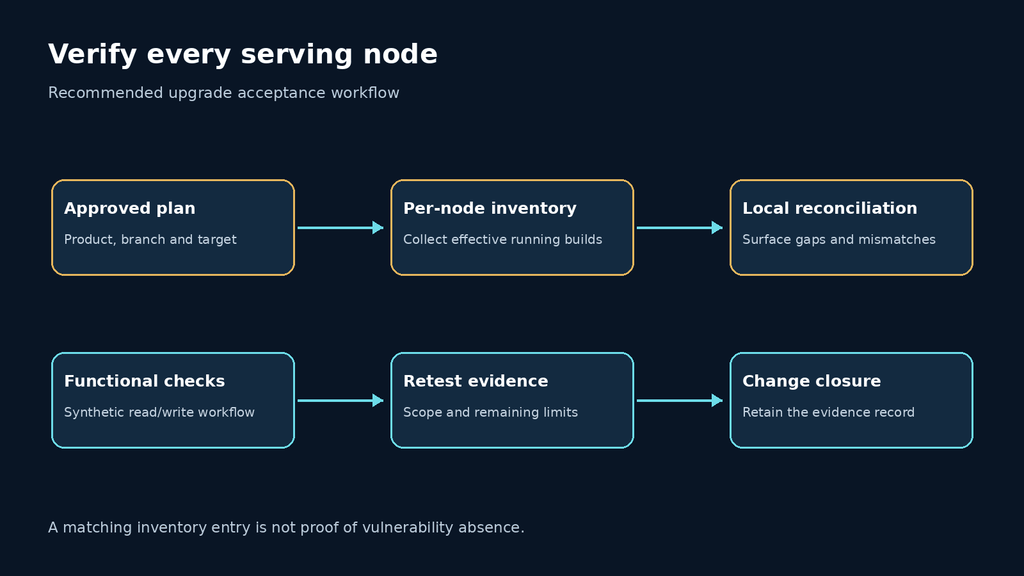
For a cluster, make the node list explicit before maintenance. A health endpoint passing through a load balancer can repeatedly hit one updated node while another node still serves an older build. Use the supported operational view to confirm the version and membership of every node; do not rely on repeated random browser refreshes as proof of coverage.
A local reconciliation script for an approved release plan
The following example checks an exported inventory against an operator-approved release plan. It makes no network requests, does not identify affected CVEs and does not decide which release is safe. Its purpose is narrower: expose missing targets, unknown versions and nodes that have not reached the exact target selected by the change owner.
Save an inventory as inventory.csv with columns asset,product,version. Save the change plan as targets.csv with columns asset,target_version. Use one row per asset in each file. A blank or duplicate asset is an input error, so the script stops instead of silently overwriting a record.
import csv
import sys

def read_unique(path):
    rows = {}
    with open(path, newline="", encoding="utf-8-sig") as handle:
        for row in csv.DictReader(handle):
            asset = (row.get("asset") or "").strip()
            if not asset or asset in rows:
                raise ValueError(f"Blank or duplicate asset in {path}")
            rows[asset] = row
    return rows

inventory = read_unique("inventory.csv")
targets = read_unique("targets.csv")
writer = csv.writer(sys.stdout)
writer.writerow(["asset", "product", "observed", "target", "result"])
for asset in sorted(set(inventory) | set(targets)):
    current = inventory.get(asset, {})
    plan = targets.get(asset, {})
    observed = (current.get("version") or "").strip()
    target = (plan.get("target_version") or "").strip()
    if not current:
        result = "MISSING_INVENTORY"
    elif not target:
        result = "NO_APPROVED_TARGET"
    elif not observed:
        result = "UNKNOWN_RUNNING_VERSION"
    elif observed == target:
        result = "MATCHES_PLAN"
    else:
        result = "REVIEW_VERSION_MISMATCH"
    writer.writerow([asset, current.get("product", ""), observed, target, result])
Run it locally with python3 reconcile.py > reconciliation.csv. Inspect that CSV in a text editor; if it is opened in spreadsheet software, handle untrusted cell values according to your organization’s import policy. The files should contain inventory metadata, never passwords, tokens or database connection strings.
Exact matching is intentional. This is not a semantic-version vulnerability scanner. A later release will be marked for review until the plan is updated, which prevents a surprise upgrade from being silently accepted. Likewise, “MATCHES_PLAN” means only that the reported version matches the selected target. It does not prove the inventory is fresh, the target is appropriate or the node is healthy.
Plan application verification around the work users actually perform
Before maintenance, select a small set of reversible checks covering authentication, ordinary read access, restricted content and one disposable write workflow. For Jira, that might mean viewing a test project and creating and deleting a synthetic issue under a designated test account. For Confluence, it might mean reading a permitted test space, confirming denial to a restricted space and editing a disposable page. These are proposed acceptance checks, not undocumented product requirements.
Include the integrations the deployment actually uses. A successful login does not validate SSO provisioning, outbound notifications, application links, document processing or a custom app. Each check should have an owner and an expected result. Use synthetic content and designated test resources so the verification does not modify customer records or send unexpected messages.
The recovery plan must fit the change. Before starting, identify what will be restored together if the upgrade fails: application state, database state, shared files and configuration as applicable to the supported product procedure. Do not assume that replacing an application binary reverses any schema or state changes already performed. Follow the exact vendor upgrade and restore instructions for the chosen path.
A dependency finding needs context before it becomes an exploit claim
When a scanner reports a library after an update, preserve its evidence: file location, component coordinates, detected version, rule and scan time. Then establish whether the file belongs to the active product, an app, a retired installation directory or a container layer that is not serving traffic. These are investigation possibilities, not explanations to apply automatically to every finding.
If the scanner and product advisory disagree, document the discrepancy and request clarification through the appropriate support channel. Do not delete a bundled library merely to clear a dashboard: that can break a supported installation while leaving the underlying question unanswered. A product upgrade and an independently modified dependency are different changes with different compatibility evidence.
An authorized retest should remain tied to the finding being assessed. Version verification can establish remediation against a published mapping. It cannot prove an undisclosed exploit is impossible. A harmless functional test can validate an application path. It cannot establish that a denial-of-service condition is absent under every workload. State the scope of each result so the final report does not promise more than was tested.
For teams evaluating an automated assessment workflow, ask whether it retains the affected asset, supporting evidence, limits and retest result. The demonstration below is product context; it is not a benchmark of this bulletin or a claim that Penligent detects every dependency issue listed by Atlassian.
What to include in the completed change record
The useful deliverable is compact but traceable: the advisory snapshot used for the decision, selected product and branch, approved target, complete node inventory, installation evidence, running-version checks, functional results and unresolved findings. Record the timestamps and configuration revision so a later reviewer can distinguish the state before maintenance from the state after it.
Keep incident investigation separate. If the environment has signs of suspicious activity, upgrading is still useful, but an updated version does not explain how an unexpected account appeared or whether earlier resource access was authorized. Preserve relevant records and involve the incident owner rather than closing that question under a successful patch ticket.
Questions administrators ask about the October update
Is this the same issue as CVE-2026-21589? No. The monthly bulletin and the earlier arbitrary-file-access advisory require separate scope checks. Do not assume closing one ticket automatically closes the other.
Do fourteen critical dependencies mean fourteen critical exploit paths in my server? No. The bulletin explicitly distinguishes dependency severity from Atlassian’s assessed product risk. Determine applicability and follow the fixed-release guidance without inventing a confirmed attack chain.
Can I use the newest release instead of an LTS example? Choose a supported, compatible target using the current release documentation and your upgrade path. The examples above are a dated snapshot, not a restriction to those exact builds forever.
Does the local script tell me whether a version is vulnerable? No. It reconciles inventory with a target you approved. It intentionally cannot classify CVE exposure or replace the vendor mapping.
Is one healthy node enough to close a cluster update? No. Verify the complete serving-node inventory and the effective build of each member, then confirm the relevant user workflows.
Should an old dependency file be manually deleted? Not simply to silence a scanner. Identify its role and follow supported remediation or vendor guidance before modifying the installation.
Close the update when the intended release is demonstrably running across the serving fleet and the required workflows pass. Keep the dependency findings and any incident questions visible until their own evidence supports closure.
 Hebrew
  English
  German
  French
  Spanish
  Portuguese
  Japanese
  Korean
  Hindi
Hindi  Arabic
  Turkish