
CVE-2026-112900 concerns Pillow’s EPS-to-Ghostscript boundary. An attacker-influenced filename can become a command-line instruction rather than remain an input path. The maintainer advisory lists Pillow 2.6.0–12.3.0 as affected and 13.0.0 as fixed, with Moderate severity. It was published October 17, 2026. Read the official Pillow advisory.
For an image-processing service, the first useful question is where the stored filename comes from. Trace a real upload through storage, queue messages and the rendering worker. A dependency match deserves remediation, but it does not establish that an external user can reach this particular execution path. This guide separates the published mechanism from our proposed defensive checks; it does not claim a successful Penligent exploitation test.
What is confirmed, and what must be established locally?
| Question | Published fact or operational decision |
|---|---|
| Affected component | Pillow EPS rendering through Ghostscript; not every Pillow decoder. |
| Version boundary | Affected 2.6.0–12.3.0; patched 13.0.0. Check vendor backports separately. |
| RCE qualification | The advisory describes an additional attacker-controlled argument file for the command-execution chain. Do not equate every upload with RCE. |
| עדיפות | Investigate internet-reachable conversion jobs that retain user-controlled path names first; record uncertain paths rather than marking them safe. |
| Scope of this article | Documentation analysis, an executed offline path model and suggested staging checks. No production exploitation or dedicated product detection claim. |
Why a subprocess argument list can still be unsafe
There are two parsers to consider: the shell, when one is used, and the program that receives the arguments. Python’s subprocess security guidance explains the shell boundary. Passing a list without a shell avoids shell expansion, but the receiving program still interprets its own options. Treating these as the same guarantee leaves a gap in code review.
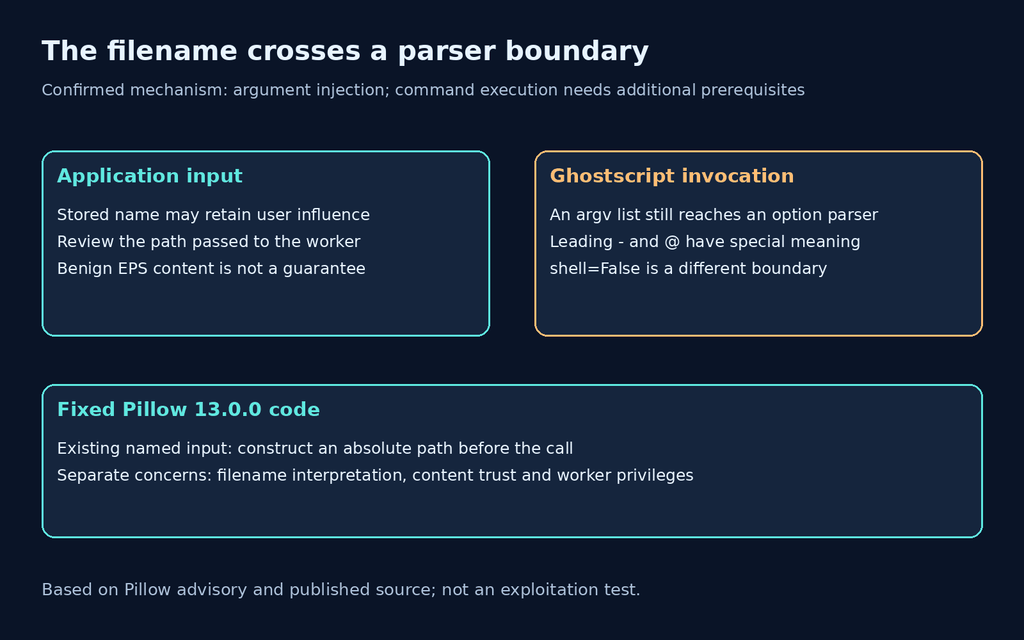
In the reported Pillow path, the filename follows -f in the Ghostscript arguments. Names beginning with a dash can be interpreted as options; a leading @ invokes argument-file syntax. The report demonstrates argument injection with the default -dSAFER present. The issue is the filename, not a requirement for hostile PostScript contents. Mechanism and prerequisites in the advisory.
The practical review target is therefore the value immediately before process creation. A storage layer might rename a file safely, then a worker might reconstruct a relative path from the original display name. Conversely, retaining the original name in database metadata does not necessarily mean that name reaches the renderer. Capture the actual data flow before assigning a reachability conclusion.
Explore Penligent for your authorized security workflow
What the fixed code changes
ה documented Pillow 13.0.0 implementation converts an existing named input to an absolute path with os.path.abspath(fp.name). Its alternate path copies input into a generated temporary file. The source therefore addresses the leading-token interpretation where the command is built, rather than relying on every application to reject particular upload names.
This is a narrow and useful property: the path handed to the subprocess no longer begins with the option or argument-file marker. It is not a general guarantee about the file’s contents, filesystem ownership or the privileges of the rendering process. Those are separate controls. Keep them in your review, especially if the same worker handles documents from multiple customers.
Do not paste a one-line workaround into a running container and consider the dependency upgraded. A local edit can disappear during the next deployment, while an older background worker continues serving jobs. Prefer a supported fixed release or an explicitly documented distributor backport, then rebuild the artifact and replace the processes that load it.
Check the interpreter that actually renders images
Run the following read-only inventory inside the same environment and under the same Python interpreter as the rendering worker. It prints package provenance and whether the usual Ghostscript executable names are discoverable. Finding an executable is a lead for investigation, not proof that the worker invokes it; an application may configure a different executable or disable that integration.
import sys
import shutil
from importlib.metadata import version
import PIL

print("python:", sys.executable)
print("Pillow:", version("Pillow"))
print("PIL location:", PIL.__file__)
for name in ("gs", "gswin32c", "gswin64c"):
    print(name + ":", shutil.which(name) or "not on PATH")
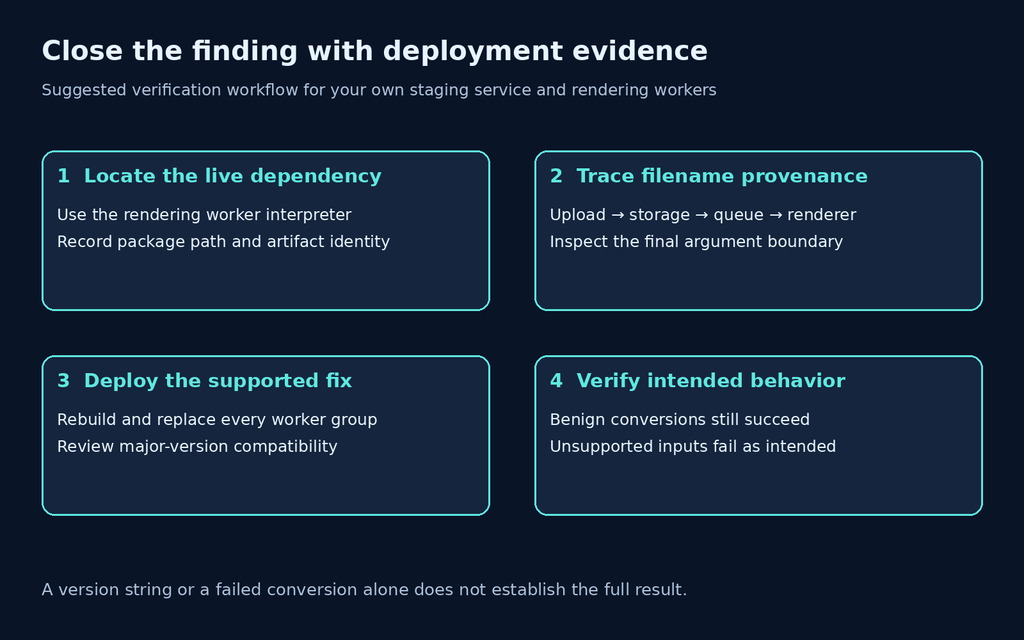
A shell on a web server may use a different environment from a queue consumer. Collect the result separately for web processes, asynchronous workers, scheduled conversion jobs and any third-party document service under your control. Record the image digest or deployment identifier beside each result so that the evidence survives a later rolling deployment.
| Deployment observation | How to interpret it | Next check |
|---|---|---|
| Old Pillow is installed | Dependency exposure is confirmed; external reachability remains a separate question. | Identify rendering jobs and their actual process environment. |
| Ghostscript is not on PATH | The basic lookup did not find it; that is not a complete application configuration audit. | Review executable overrides and separate worker images. |
| Uploads are renamed | Potentially useful defense, provided the generated path survives every handoff. | Inspect queued job fields and the path delivered to Pillow. |
| Only raster formats are required | EPS handling may be unnecessary business functionality. | Use a decoder-level allowlist and test rejection behavior, rather than trusting the extension. |
| Fixed package is deployed | Necessary evidence for closure, but stale processes can remain. | Verify live worker identity, restart/redeploy and retest normal conversion. |
An offline demonstration of the filename property
This small example models only the leading-character condition. It creates no files, imports neither Pillow nor Ghostscript, and starts no subprocess. We executed it locally: all three synthetic names lost their leading special marker after absolute-path construction. That result demonstrates a path-string property; it is not a reproduction of CVE-2026-112900 or evidence about your deployment.
from pathlib import PurePosixPath

root = PurePosixPath("/srv/render-input")
names = ("-preview.eps", "@preview.eps", "ordinary.eps")
for name in names:
    before = name.startswith(("-", "@"))
    normalized = str(root / name)
    after = normalized.startswith(("-", "@"))
    assert not after
    print(f"{name}: marker before={before}, after={after}")
-preview.eps: marker before=True, after=False
@preview.eps: marker before=True, after=False
ordinary.eps: marker before=False, after=FalseThe fixed root is deliberate. This example does not validate arbitrary user paths or prevent directory traversal. A production upload service should generate its own storage identifier, constrain the storage directory and retain a user’s original filename as metadata when needed. Do not turn this illustrative join into a general-purpose upload handler.
Contain the exposed workflow while deploying the fix
If your product does not require EPS conversion, remove that path from the accepted workflow while the update is deployed. Pillow’s EPS documentation describes Ghostscript-backed rendering and documents EpsImagePlugin.gs_binary = False to prevent Ghostscript use. Apply any such setting in the processes that actually perform rendering and test the resulting user-visible failure. It can break legitimate conversions; it does not patch the package.
If EPS is required, isolate its worker from ordinary web requests. Recommended controls include a low-privilege service identity, a dedicated temporary directory, explicit CPU and memory budgets, restricted outbound access and a narrowly scoped queue contract. These recommendations limit consequences and reduce accidental cross-job access; they are not claims that a sandbox neutralizes this CVE.
Temporary filename filtering is a fragile primary control. A gateway may validate one name while a downstream archive extractor, storage adapter or task consumer supplies another. If emergency filtering is used, document its enforcement point and expiry, and retain the supported package update as the remediation target. Filtering a suspicious prefix is also not a substitute for safe path handling generally.
Explore Penligent for your authorized security workflow
Upgrade without losing track of compatibility
ה Pillow 13.0.0 release notes, dated October 16, 2026 describe a major release with backwards-incompatible changes. Check the project’s supported Python version and dependency constraints before changing a production lockfile. A security fix that never reaches a successfully built worker does not close the finding.
A useful deployment record contains the resolved Pillow version, Python version, lockfile change, application artifact identity and a named rendering service owner. If your operating-system distributor supplies a backport, retain the distributor advisory and package revision instead of assuming the upstream version string alone decides the result. This article does not assert that a specific distributor has shipped such a backport.
After rebuilding, replace every affected worker group and inspect the runtime again. A mixed deployment needs a mixed status: migrated workers can be verified while remaining old consumers stay open. Avoid a single green checkbox for a fleet that is still draining long-lived jobs.
Suggested staging regression checks
Use only an owned staging environment with synthetic files and no production secrets. Start with one known-good EPS fixture already approved for your test suite, plus a normal raster image used by the product. Give the fixture a conventional storage name first, then exercise unusual display names through the normal upload interface while the service generates its own stored paths. The objective is to verify the intended input boundary and successful conversion, not execute arbitrary commands.
For each case, record the incoming display name, server-assigned storage identifier, worker artifact and outcome. In a controlled instrumented test, inspect the argument boundaries at the subprocess invocation without invoking a hostile command. Redact private file paths from shared reports. A log line reconstructed as a shell command can obscure argument boundaries, so preserve structured argument elements where feasible.
Include negative tests for unsupported formats and positive tests for legitimate conversion. A failed job is ambiguous: it may indicate policy rejection, missing Ghostscript, a malformed fixture, resource exhaustion or an application regression. Require the expected reason, then confirm that authorized users can still complete the supported workflow. Treat silent fallback to a different converter as another path to review.
What to preserve if suspicious conversion activity is found
Keep the upload record, queue message, stored filename, timestamps, worker identity and relevant process events under your incident-handling process. Look for inconsistencies between the name the user supplied and the name the renderer received. A leading dash or at-sign alone is an investigative indicator, not proof of exploitation or attacker intent.
If there is evidence of unexpected child processes or unauthorized file access, escalate according to your incident procedure rather than limiting the response to a dependency bump. Preserve relevant evidence before replacing disposable workers where operationally possible. We have not independently established active exploitation for this specific CVE, and this article makes no claim about compromise of a particular service.
Using an authorized testing workflow
For a scoped assessment, make the evidence requirement explicit: which upload endpoint is authorized, which worker handles it, what observation would confirm the boundary and how the owner will retest after deployment. Evaluate any testing product on the artifacts it actually produces for your environment. This article does not claim that Penligent has a dedicated Pillow detector or has reproduced this advisory.
The following Penligent video introduces a general AI-assisted pentesting workflow. It is not a Pillow exploit demonstration and does not establish coverage for this CVE.
Frequently asked questions
Is every Pillow image upload affected?
No. An installed affected version and a reachable vulnerable processing path are different findings. Review the actual renderer, filename provenance and worker configuration before asserting external exploitability.
Does shell=False fix this issue?
It addresses the shell boundary, not every option parser inside the called program. Continue using safe subprocess practices, but verify how the receiving program interprets untrusted argument values.
Can I fix it just by renaming uploads?
Server-generated storage names are useful defense in depth. Confirm that later processing never restores the original name as a renderer path, and still deploy the supported package fix.
Should I test with a command-execution payload?
The defensive checks here do not require one. Inventory the live dependency, inspect the input boundary in an owned test environment and verify supported rendering after the upgrade.
What evidence closes the finding?
Retain a fixed upstream release or documented backport, the deployed worker identity and a passing regression record. If reachability remains uncertain, record that uncertainty separately instead of converting it into a claim of safety.
 Hebrew
  English
  German
  French
  Spanish
  Portuguese
  Japanese
  Korean
  Hindi
Hindi  Arabic
  Turkish