
CVE-2026-103903 is a MikroTik RouterOS WinBox authorization flaw that requires an authenticated, low-privilege account with WinBox access. The useful response is to match your RouterOS release channel to a documented fix, restrict management access and review account privileges. An exposed management port alone does not demonstrate the credential prerequisite or a successful compromise.
Reviewed October 25, 2026. BR²SEC’s original research describes a mismatch between the identity proved during authentication and the account whose policy is attached to the session. This article uses that report and MikroTik release notes; it does not reproduce an exploit against RouterOS.

Choose the fixed release by channel, not by a single numeric cutoff
MikroTik’s 7.24.5 stable announcement explicitly includes CVE-2026-103903 in its change list. The 7.23.8 long-term announcement also lists the CVE. A rule that flags every version below 7.24.5 would therefore misclassify that documented long-term fix.
| Channel or source | Confirmed repair evidence | How to use it |
|---|---|---|
| Stable | 7.24.5 release notes name this CVE | Select a currently supported, approved release carrying the fix. |
| Long-term | 7.23.8 release notes name this CVE | Retain the channel-specific notice; do not compare only with the stable version. |
| בדיקות | The researcher lists 7.25rc1 | A testing-channel build is not automatically the right production choice. |
| Other builds or branches | Not established by the two notices above | Obtain vendor evidence rather than guessing a universal cutoff. |
The researcher’s affected-version wording leaves an awkward boundary around 7.24.4. Do not interpret that gap as proof of safety. For an inventory exception, ask for a release-specific vendor answer or move to an approved documented fix. Keep the full version, channel, device architecture and source of the update together in the change record.
Both manufacturer announcements advise preparing an off-device backup, reliable power and sufficient storage before upgrade. Follow the device’s supported upgrade procedure. An unattended change to the router that carries your administrative connection needs a recovery plan; this page deliberately does not provide a one-line fleet upgrade command.
The trust boundary is the identity-to-policy binding
על פי BR²SEC, the first authentication stage verifies one account while a separately supplied later username selects another account’s authorization policy. The reported outcome is an administrative session without that account’s password. This is authenticated privilege escalation, not evidence that an anonymous internet client can skip every login requirement.
The engineering lesson is precise: the authorization decision must remain attached to the principal whose credentials were verified. Successful cryptography cannot protect a session if subsequent code chooses privileges from an independently supplied identity. Checking that both usernames exist is insufficient; the association between them is the security property.
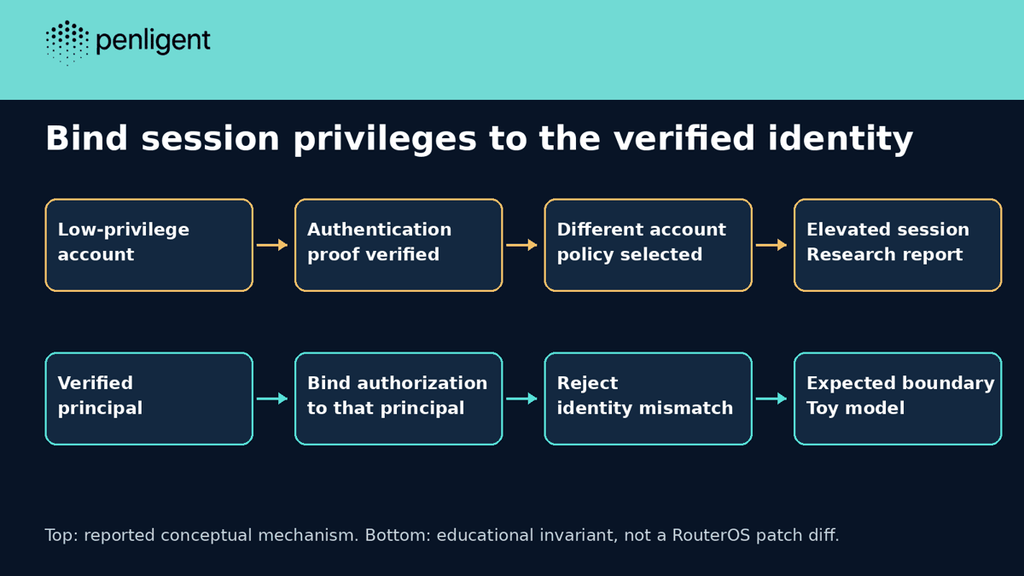
A four-case offline model of the binding failure
The Python example below is a deliberately small authorization model. It starts after an assumed authentication step and contains no password processing, network traffic, WinBox packet format or RouterOS code. It cannot establish whether a router is affected. Its purpose is to make the binding invariant and the test expectations inspectable.
# Offline identity-binding model. Not a WinBox implementation or exploit.
policies = {'reader': 'read', 'operator': 'full'}
def broken(verified, requested):
    return policies[requested]
def corrected(verified, requested):
    if verified != requested:
        raise PermissionError('principal mismatch')
    return policies[verified]
cases = [('reader','reader','read'),('operator','operator','full'),('reader','operator',None),('operator','reader',None)]
for name, fn in [('broken',broken),('corrected',corrected)]:
    passed=0
    for verified, requested, expected in cases:
        try: result=fn(verified,requested)
        except PermissionError: result=None
        passed += result == expected
    print(f'{name}: {passed}/{len(cases)} expected outcomes')
assert corrected('reader','reader')=='read'
try: corrected('reader','operator')
except PermissionError: print('mismatched principal rejected')
else: raise AssertionError('mismatch accepted')
We executed this exact standard-library model locally. The output was:
broken: 2/4 expected outcomes
corrected: 4/4 expected outcomes
mismatched principal rejected
The broken function passes both ordinary same-account cases. That makes those positive tests poor evidence for the security boundary. The two mismatch cases expose the missing invariant; the corrected function rejects them before policy selection. Its behavior is intentionally stricter than legitimate delegated administration. A real delegation feature needs its own explicit authorization decision, rather than silently treating every mismatch as delegation.
This experiment verifies only the model. It does not validate MikroTik’s patch, demonstrate an exploit or measure the product. Keep that distinction if you reuse the example in an internal review: a unit test for your own identity-binding code cannot certify an unrelated appliance’s implementation.
Decide which devices need attention first
Use three separate inventory questions: which build is active, who can reach the management service and which accounts can use it. Unknown answers should stay unknown until collected. A maintenance spreadsheet that converts a missing service observation into “disabled” hides the very device that needs follow-up.
| Observation | What it supports | What remains unresolved |
|---|---|---|
| Documented fixed build is active | Software repair evidence for this CVE | Historical account abuse and unrelated vulnerabilities |
| WinBox restricted to a management network | Reduced access from other paths | Authorized or compromised accounts inside that boundary |
| Low-privilege accounts have WinBox permission | Relevant account prerequisite deserves review | Whether credentials were abused or a vulnerable build was reachable |
| No suspicious entries in retained logs | No matching evidence in the retained window | Events before retention, incomplete logging and other paths |
MikroTik’s user documentation distinguishes the WinBox login policy from configuration and user-management rights. It also warns that the default read group includes important permissions such as sensitive and reboot. Review the actual policy list, not the friendly group name. A custom restricted group can be appropriate, but changing its membership requires an operational review of legitimate workflows.
For a device you administer, these read-only inventory commands are examples based on RouterOS menus. They were not run on a MikroTik device for this article. Results can contain private device names, addresses or account identities; retain them in the approved administrative record rather than pasting a full export into a public ticket.
/system resource print
/system package print
/ip service print where name=winbox
/user group print
The first two observations describe the device and installed packages. The service observation helps identify whether WinBox is enabled and its configured listener. Group policy output requires interpretation against the accounts actually assigned to those groups. None of these commands exercises the flaw or proves that a past administrative session was legitimate.
Restrict the management path without confusing containment with repair
MikroTik’s service documentation documents WinBox under IP services and distinguishes service address restrictions from network-level firewall filtering. It recommends a firewall for external or untrusted networks. Review the actual management route before changing rules, including the path needed to recover access.
A management VPN or source restriction narrows who can reach the vulnerable service. It does not repair an identity-binding error for an account that is still allowed through. Conversely, patching the binding error does not justify leaving unnecessary management exposure in place. Record these as separate tasks with separate evidence and owners.
Avoid copying generic disable or firewall commands into a remote router session. A misplaced rule can interrupt the connection or affect traffic unrelated to WinBox. Prepare an approved change, confirm out-of-band recovery where required, and verify intended administrators retain access after the change. The absence of an internet connection to the port is only an observation about the route tested.
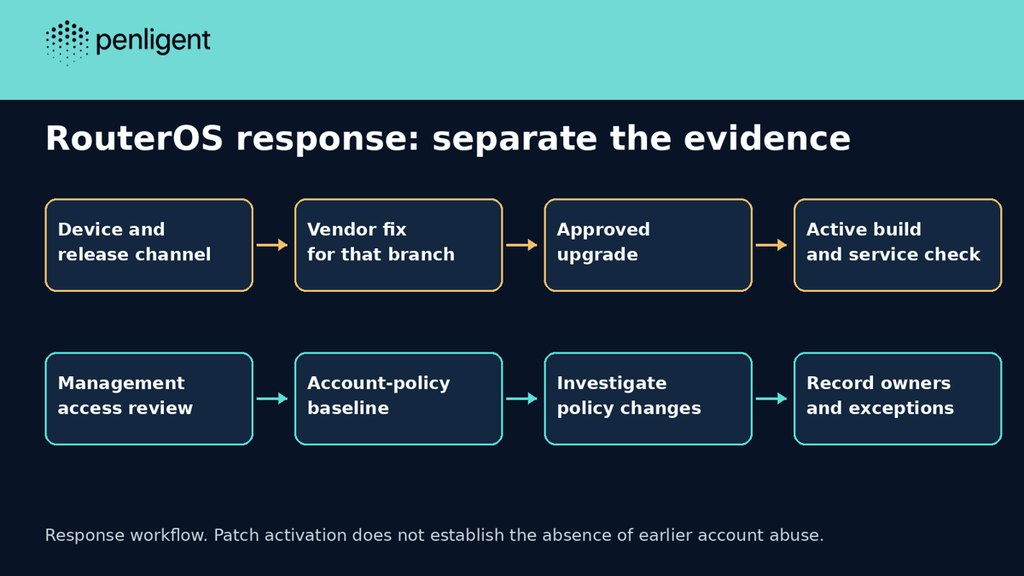
Review account changes separately from patch deployment
A fixed build does not reverse an earlier unauthorized policy change. If the device has suspicious account activity, preserve the available configuration and logs through your incident process before routine cleanup. Compare accounts, group policies and management access with an approved baseline. Give unexplained differences an investigator rather than automatically attributing them to this CVE.
The original research describes possible persistence through privilege changes, but this review has not established an in-the-wild exploitation campaign. Do not turn a vulnerability match into a compromise count. A changed group can also reflect legitimate administration; the task is to correlate it with the authorized change record and available session history.
If credentials require replacement, coordinate the work from a trusted administrative context after containment. Account for automation and dependent services. A password change alone cannot repair the vulnerable build, and disabling an account alone cannot settle whether another account or configuration item was modified.
Close the change with evidence that can be reviewed
A useful closeout records the device, previous and active builds, release channel, vendor notice, rollout time and management-access check. Include service owners and operational smoke tests appropriate to that device. Preserve failures and exceptions instead of forcing every row to green because the package installer finished.
For an authorized application assessment using Penligent, keep the evidence tied to the access and target actually granted. This article does not demonstrate a WinBox-specific Penligent detector or claim the product inventories private router policy automatically. Appliance maintenance evidence and application-testing evidence answer different questions.
Questions about CVE-2026-103903
Does this require the administrator password?
The research reports escalation without the target administrator password, but it requires a low-privilege account permitted to use WinBox.
Is every RouterOS build below 7.24.5 vulnerable?
Do not use that blanket rule: MikroTik separately lists the fix in long-term 7.23.8. Match the vendor notice to the branch.
Does changing the WinBox port fix the flaw?
A listener change does not establish repair of the authentication-to-authorization binding. Use a documented software fix and review management reachability separately.
Did this article reproduce the router exploit?
No. The executed code is an offline identity-binding model with four expected outcomes. No RouterOS target was tested.
Does a successful upgrade rule out prior compromise?
No. Patch state and historical account integrity need separate evidence. Keep unexplained account or policy changes open for investigation.


 Hebrew
  English
  German
  French
  Spanish
  Portuguese
  Japanese
  Korean
  Hindi
Hindi  Arabic
  Turkish