
CVE-2026-20841 became one of those vulnerabilities that spreads fast across security teams not because the product is obscure, but because it is painfully familiar. Notepad is supposed to be boring. That is exactly why a high-severity code execution issue in Notepad changed how people looked at it.
The vulnerability is tracked as CVE-2026-20841 and described by NVD as an improper neutralization of special elements used in a command (CWE-77) in the Windows Notepad App, allowing an unauthorized attacker to execute code locally. NVD also records a description change from an earlier “over a network” wording to “locally,” plus a CVSS v3.1 vector that includes UI:R (user interaction required) and a local attack vector (AV:L) in the revised entry. (NVD)
That wording matters, but the deeper lesson matters more: once Notepad gained Markdown rendering and clickable link handling, it stopped being just a text surface in practical threat modeling. ZDI’s analysis explains that the issue is tied to improper validation of links in Markdown files, including how Notepad detects .md files, tokenizes them for rendering, and routes clicked links through ShellExecuteExW(). ZDI further notes insufficient filtering that can allow protocol URI abuse depending on system configuration. (zerodayinitiative.com)
This article is written for security engineers, vulnerability managers, SOC teams, endpoint defenders, and automated validation/pentest teams who need more than a headline. It is a direct, publish-ready SEO article built for real search intent around CVE-2026-20841, with technical context, operational guidance, detection templates, safe validation approaches, and a practical enterprise response workflow.
What CVE-2026-20841 Is, in Canonical Terms
Before discussing exploit narratives or social amplification, lock the baseline facts.
NVD lists CVE-2026-20841 with the following key details:
- Product: Windows Notepad App
- Weakness: CWE-77 (Improper Neutralization of Special Elements used in a Command / command injection)
- Description (current): unauthorized attacker can execute code locally
- מקור: Microsoft Corporation
- Published: February 10, 2026
- Modified: February 12, 2026
- Vendor reference: MSRC Security Update Guide entry for CVE-2026-20841 (NVD)
The NVD change history is especially important because it documents a meaningful correction:
- Initial wording described code execution “over a network.”
- Later wording changed this to code execution “locally.”
- The CVSS vector was also updated from an AV:N representation to an AV:L representation in the record history visible on NVD. (NVD)
This is not just metadata trivia. It affects how teams classify the risk, who owns it operationally, and how patch urgency gets communicated.
The CVE.org record preview (as indexed in search) also reflects the affected version scope as affected from 11.0.0 before 11.2510, which aligns with community and vendor-adjacent reporting. (CVE)
Why This Vulnerability Blew Up in Search and Security News
The keyword CVE-2026-20841 took off because it intersects multiple high-interest search themes at once:
- Windows 11
- Notepad
- Markdown links
- Code execution / RCE
- Patch Tuesday
- “silent” execution or reduced warning friction
- protocol handlers / unverified protocols
Major coverage used nearly identical framing. BleepingComputer summarized Microsoft’s advisory language around a user being tricked into clicking a malicious Markdown link in Notepad, causing the application to launch unverified protocols that load and execute remote files in the user’s security context. (BleepingComputer) The Verge similarly highlighted Microsoft’s statement that clicking a malicious link could launch unverified protocols and allow malicious files to be loaded and executed, while also noting no known in-the-wild exploitation at the time of its reporting. (The Verge)
Which “high-CTR” phrases are actually driving clicks?
No public source gives exact Google CTR by keyword for this topic, so any claim of “the single highest CTR keyword” would be invented. What יכול be stated responsibly is that the repeated headline patterns across top coverage strongly indicate high click interest around combinations like:
- Windows Notepad flaw
- Markdown links
- execute silently
- remote code execution / RCE
- CVE-2026-20841
That pattern is visible in BleepingComputer’s headline and article wording, which became one of the most-cited summaries in secondary discussions. (BleepingComputer)
For SEO and GEO purposes, this means the intent is not just “lookup a CVE,” but “understand how a boring built-in app suddenly became an attack path.”
Summary of the Highest-Visibility Coverage and the Useful Takeaways
The user asked for a synthesis of the highest-visibility article(s) and their观点(core viewpoint)into the final piece. Based on broad security reach and repeated re-citation, BleepingComputer and The Verge are the two most influential mainstream explainers for non-research audiences, while ZDI is the most useful technical analysis source.
BleepingComputer’s practical framing
BleepingComputer focuses on the exploitation scenario and user workflow: a malicious Markdown file in Notepad, a malicious link, and execution behavior tied to protocol handling and Ctrl+click interaction. It also echoes Microsoft’s explanation that code runs with the permissions of the user who opened the file. (BleepingComputer)
What that contributes to this article:
It anchors the operational risk in a realistic phishing/social-engineering path instead of abstract CWE language.
The Verge’s mainstream translation
The Verge translates the issue into stakeholder-friendly language and emphasizes that Microsoft fixed it in Patch Tuesday, that the flaw affected Markdown files in Notepad, and that there was no evidence of in-the-wild exploitation at reporting time. It also notes Markdown support was added to Notepad in Windows 11 in May, which helps explain why this attack surface exists now. (The Verge)
What that contributes to this article:
It clarifies product evolution as the root of the trust-boundary change, which is often missed in internal risk summaries.
ZDI’s technical value
ZDI provides the detailed mechanics that defenders and researchers need: .md extension-triggered Markdown rendering, tokenization, link click handling, the ShellExecuteExW() call path, and insufficient filtering that can permit malicious protocol URIs such as file:// ו ms-appinstaller:// depending on configuration. (zerodayinitiative.com)
What that contributes to this article:
It explains why this is not “just a Notepad bug,” but a content-rendering and handler-validation problem.
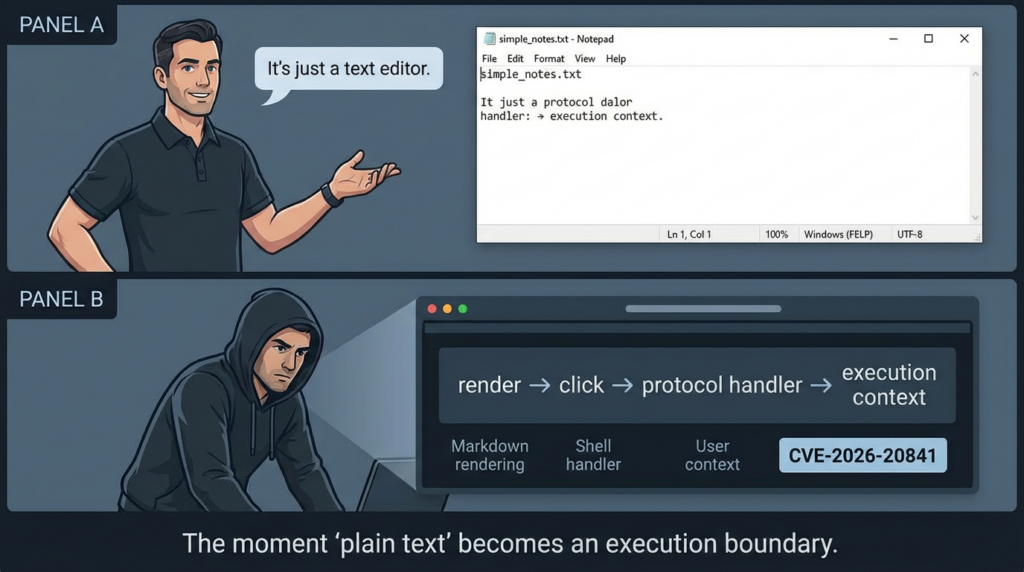
Why CVE-2026-20841 Matters More Than “Notepad Had a Bug”
The immediate story is a vulnerability in Notepad. The enduring lesson is about software capability drift ו trust-boundary drift.
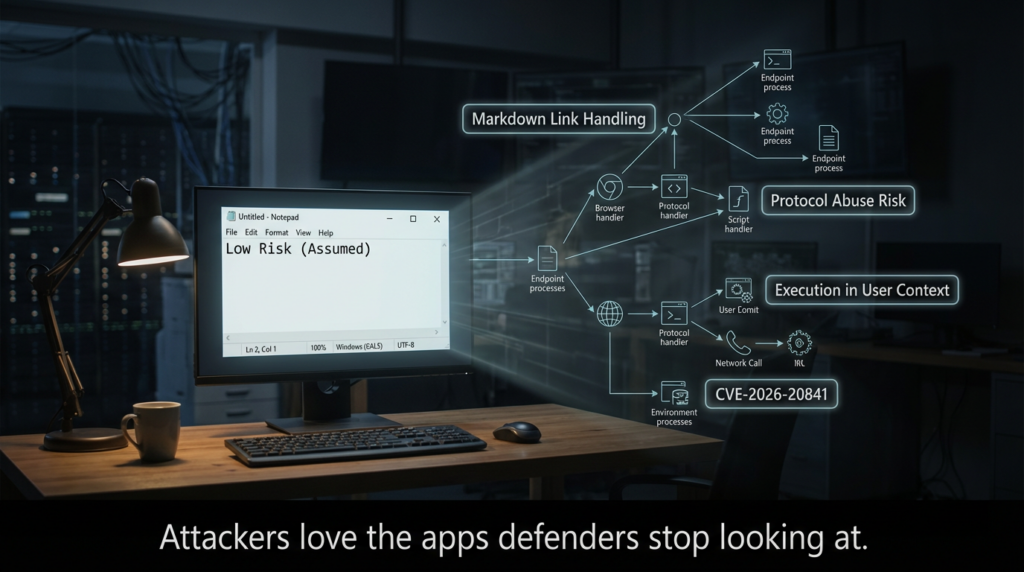
Security teams often treat applications according to their historical role:
- Notepad = plain text editor
- plain text editor = low-risk utility
- low-risk utility = not a likely execution launch point
That chain breaks once Markdown rendering and link activation are introduced.
ZDI’s analysis makes this concrete: Notepad detects .md files, tokenizes the content, renders Markdown, handles clicked links in a specific function path, and passes filtered values into ShellExecuteExW(). (zerodayinitiative.com) The moment a “viewer/editor” starts invoking system protocol handlers based on content and user interaction, it has entered a different security class in practice—even if nobody updated the policy labels.
The pattern behind the CVE
This vulnerability belongs to a broader and increasingly common pattern:
- A familiar client app adds richer parsing/rendering features.
- Rich content introduces clickable or executable-like pathways.
- Handler invocation crosses into OS-level execution decisions.
- Security assumptions remain frozen in the app’s old role.
- A vulnerability appears where teams were not looking.
That pattern is exactly why CVE-2026-20841 drew so much attention. It compresses modern endpoint risk into a product everyone thinks they already understand.
Attack Path Anatomy Without Weaponization Details
This article does not provide exploit code or offensive instructions. It does provide a defender’s view of the exploit chain, because that is necessary for detection and remediation.
The likely exploitation flow
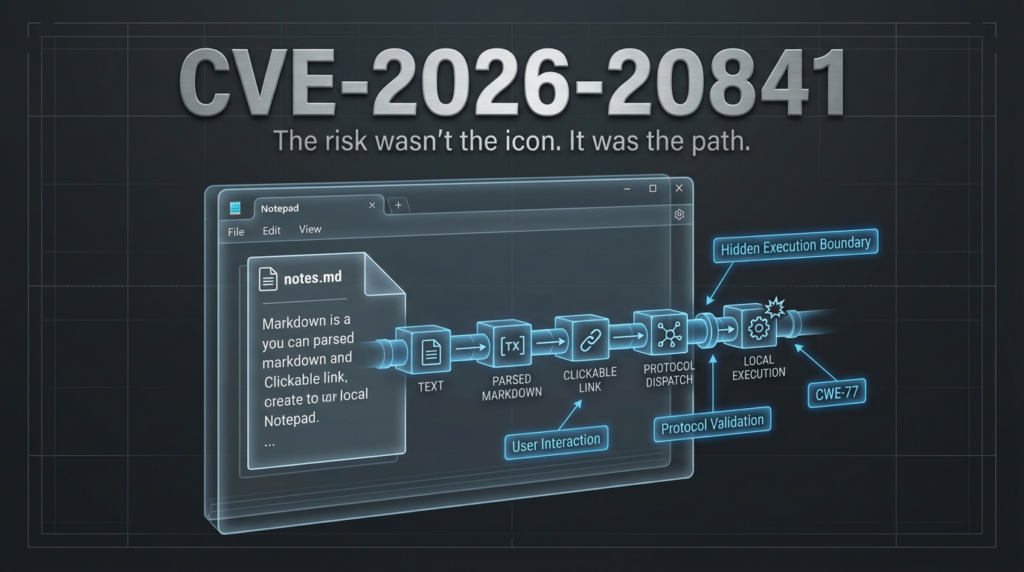
A realistic abuse path for CVE-2026-20841 looks like this:
- Initial lure / delivery
- Email attachment
- Chat attachment
- Ticketing system upload
- Downloaded README/archive content
- Shared documentation file
- User opens
.mdfile in Windows Notepad App- Notepad detects
.mdand enables Markdown rendering behavior (per ZDI’s analysis). (zerodayinitiative.com)
- Notepad detects
- User interacts with a malicious link
- Public reporting and Microsoft’s advisory language (quoted by BleepingComputer / The Verge) describe a crafted Markdown link and user click path. (BleepingComputer)
- Protocol / handler invocation
- ZDI notes the role of
ShellExecuteExW()and insufficient filtering for certain protocols, which is the key execution boundary. (zerodayinitiative.com)
- ZDI notes the role of
- Code runs in the user’s security context
- Microsoft’s advisory language, as reported by BleepingComputer, states the code executes with the permissions of the user who opened the Markdown file. (BleepingComputer)
What “local execution” means here
NVD’s revised wording says “execute code locally.” That does לא mean remote delivery is irrelevant. It means the execution context is the local user session. The distinction is operationally important:
- Delivery channel can be remote.
- הדק is user interaction.
- Execution context is local user permissions.
NVD’s change history is a strong reminder to separate these concepts in internal communication. (NVD)
Root Cause: Markdown Link Handling, Protocol Validation, and Shell Execution Boundaries
The technical heart of CVE-2026-20841 is not “Markdown is insecure.” The issue is how Notepad handled links in Markdown under certain conditions.
ZDI’s analysis provides a clear path-level explanation:
- Notepad recognizes
.mdfiles and renders them as Markdown. - Rendering involves tokenization.
- Clicking a Markdown link eventually routes through a link-handling function.
- The link value is filtered, then passed to
ShellExecuteExW(). - Filtering is insufficient, allowing maliciously crafted protocol URIs in some cases. (zerodayinitiative.com)
ZDI specifically mentions the risk of protocol URIs like file:// ו ms-appinstaller://, and notes that ShellExecuteExW() uses configured protocol handlers, meaning the actual exploitability surface can vary by system configuration. (zerodayinitiative.com)
Why this is a security architecture lesson
There are two execution boundaries here:
- Application-level rendering boundary (raw
.mdtext becomes interpreted clickable content) - OS-level dispatch boundary (
ShellExecuteExW()+ protocol handler resolution)
Security bugs get especially dangerous when user-controlled content crosses both boundaries in one interaction path.
Affected Versions and the Store App Operational Problem
The structured CVE metadata and related reporting identify the vulnerable scope as Windows Notepad App versions from 11.0.0 before 11.2510. (CVE)
This is more than a version number. It points to a governance problem many enterprises still have: modern app components (including Microsoft Store-delivered apps) may not be tracked as tightly as OS patches or traditionally installed software.
Why this creates real risk in enterprises
A common pattern looks like this:
- OS patching dashboard says “healthy”
- Endpoint AV/EDR is deployed everywhere
- But Microsoft Store app updates are inconsistent or disabled
- Version compliance for built-in modern apps is not audited
- Teams assume “Notepad is part of Windows, so OS patching covers it”
That assumption can fail. Several vendor and community writeups emphasize that the modern Notepad app build is the affected component and that remediation requires updating Notepad to a remediated version (11.2510 or later). (SOC Prime)
Inventory reality check
If your vulnerability program cannot answer “What percentage of endpoints are running Windows Notepad App <11.2510?” within hours, CVE-2026-20841 is the signal to fix that measurement gap.
Risk Assessment for Security Teams: How to Prioritize CVE-2026-20841 Correctly
CVE-2026-20841 is easy to mis-prioritize in both directions.
Why some teams under-prioritize it
- “It’s just Notepad.”
- “User interaction required.”
- “Not network-facing.”
- “No active exploitation reported in the wild.”
The Verge notes Microsoft said there was no evidence of active exploitation at the time of its reporting. (The Verge) That is useful context, but it is not a reason to downgrade the issue operationally.
Why some teams overhype it
- “RCE” gets treated as universally wormable.
- “Remote files” language gets flattened into “internet-exposed service vulnerability.”
- Headlines outrun the actual exploit preconditions.
Balanced prioritization
A mature classification is:
- High severity endpoint/client-side code execution risk
- User interaction required
- Phishing/social engineering compatible
- Runs in current user’s context
- Potentially significant impact in enterprises where users have broad access, elevated local rights, or privileged toolchains
This framing matches the NVD / ZDI / Microsoft-advisory-derived descriptions without turning the CVE into mythology. (NVD)
Enterprise Exposure Mapping: Who Is Actually at Risk?
Not every endpoint has the same exposure profile. CVE-2026-20841 should be prioritized by user population and workflow, not only by raw endpoint count.
Higher-risk endpoint populations
- IT admins and helpdesk endpoints (broader privileges, more tool access)
- Developers (frequent README/Markdown workflows, package links, installer links)
- Security analysts and researchers (open lots of artifacts, PoCs, reports, snippets)
- Finance and operations staff (targeted phishing risk)
- Executive assistants / high-value communication nodes
Risk-amplifying conditions
- Users with local admin rights
- Broad access to network shares
- Weak protocol handler controls
- Lax attachment filtering for
.md - Inconsistent Microsoft Store app update enforcement
- Limited endpoint telemetry or poor process-tree visibility
Risk-reducing conditions
- Strong least-privilege enforcement
- WDAC/AppLocker/ASR hardening
- Managed app version compliance
- Good EDR correlation (parent-child + network)
- User training that explicitly covers Markdown and link handling in non-browser apps
Detection and Telemetry Strategy for CVE-2026-20841
The best defensive move is to detect behavioral patterns, not chase a brittle signature.
What to look for
Since the vulnerability centers on a content-to-link-to-handler execution path, useful telemetry questions include:
- Did a user open a Markdown file in Notepad shortly before suspicious process execution?
- Did Notepad-related activity precede a shell, script interpreter, or LOLBin spawn?
- Were unusual protocol handlers invoked?
- Did a new process immediately fetch content from the network?
- Did execution occur without the expected warning/prompt patterns in your environment?
- Did EDR/ASR/WDAC policies alert, block, or miss the behavior entirely?
High-signal behavior patterns
The following patterns are useful even if the exact exploit syntax changes:
- Notepad-to-child-process anomaly
- User-driven link click followed by protocol handler invocation
- Notepad context + LOLBin child process
- Notepad context + suspicious outbound connection
- Repeated testing-like behavior on endpoints during patch lag
This is exactly the kind of CVE where SOC teams should collaborate with endpoint engineering and vulnerability management instead of working in separate threads.
Detection Table: Practical Signal Types and What They Mean
| Signal Category | Example Signal | Why It Matters for CVE-2026-20841 | Tuning Notes |
|---|---|---|---|
| Process Creation | notepad.exe followed by cmd.exe, powershell.exe, mshta.exe, rundll32.exe | Indicates unusual execution chain from a low-risk app context | Exclude admin/dev labs; tag validation endpoints |
| Parent-Child Lineage | Notepad-related parent process spawning installers or script interpreters | Matches content-to-handler-to-execution hypothesis | Validate EDR naming for modern Notepad App |
| URL / Protocol Events | Rare URI schemes launched after Markdown interaction | Root cause is link/protocol handling | Correlate with process events and user action |
| Network Connections | New outbound fetch immediately after Notepad link click | Possible follow-on payload staging | Correlate by device + short time window |
| EDR Alerts / Blocks | ASR, WDAC, SmartScreen, AppLocker events | Confirms control-path effectiveness | Preserve logs as remediation evidence |
| User Behavior Context | Markdown files from email/chat/downloads | Helps separate benign local docs from suspicious lures | Combine with file origin metadata when available |
Sigma Rule Template for Early Hunting and Detection Tuning
This is a behavioral starter template for blue teams. It is not a perfect or complete production rule, and it should be adapted to your telemetry schema and normal environment noise.
title: Suspicious Child Process Spawn from Notepad (Possible Markdown Link Abuse)
id: 3c7d2c8e-4e42-4d7f-b6ab-cve202620841-notepad-childproc
status: experimental
description: Detects unusual child process launches associated with Windows Notepad that may indicate abuse of Markdown link handling or protocol invocation.
references:
  - https://nvd.nist.gov/vuln/detail/CVE-2026-20841
  - https://www.zerodayinitiative.com/blog/2026/2/19/cve-2026-20841-arbitrary-code-execution-in-the-windows-notepad
  - https://www.bleepingcomputer.com/news/microsoft/windows-11-notepad-flaw-let-files-execute-silently-via-markdown-links/
logsource:
  category: process_creation
  product: windows
detection:
  selection_parent:
    ParentImage|contains:
      - '\Notepad.exe'
      - '\Notepad'   # adapt for EDR-specific naming of modern app processes
  selection_child:
    Image|endswith:
      - '\cmd.exe'
      - '\powershell.exe'
      - '\wscript.exe'
      - '\cscript.exe'
      - '\mshta.exe'
      - '\rundll32.exe'
      - '\regsvr32.exe'
  condition: selection_parent and selection_child
falsepositives:
  - administrative troubleshooting
  - developer local workflows
  - approved security validation exercises
level: high
tags:
  - attack.execution
  - attack.t1204
  - detection.hunting
Why this helps: it encodes the shape of the CVE’s risk path without depending on exploit-specific strings.
KQL Hunting Example for Microsoft Defender Environments
This KQL is a hunt query, not a final detection. Use it to quickly surface suspicious process lineage patterns during patch rollout and validation windows.
let lookback = 14d;
let suspiciousChildren = dynamic([
  "powershell.exe","pwsh.exe","cmd.exe","wscript.exe","cscript.exe",
  "mshta.exe","rundll32.exe","regsvr32.exe"
]);

let notepadActivity =
DeviceProcessEvents
| where Timestamp > ago(lookback)
| where FileName =~ "notepad.exe" or InitiatingProcessFileName =~ "notepad.exe"
| project NPTime=Timestamp, DeviceId, DeviceName, AccountName,
          NPFileName=FileName, NPCommandLine=ProcessCommandLine,
          NPInitiatingFile=InitiatingProcessFileName, NPInitiatingCmd=InitiatingProcessCommandLine,
          NPReportId=ReportId;

DeviceProcessEvents
| where Timestamp > ago(lookback)
| where FileName in~ (suspiciousChildren)
| project ChildTime=Timestamp, DeviceId, DeviceName, AccountName,
          ChildFileName=FileName, ChildCommandLine=ProcessCommandLine,
          ChildInitiatingFile=InitiatingProcessFileName, ChildInitiatingCmd=InitiatingProcessCommandLine,
          ChildReportId=ReportId
| join kind=inner (notepadActivity) on DeviceId
| where ChildTime between (NPTime .. NPTime + 2m)
| project DeviceName, AccountName, NPTime, NPFileName, NPCommandLine,
          ChildTime, ChildFileName, ChildCommandLine, ChildInitiatingFile, ChildInitiatingCmd
| order by ChildTime desc
Tuning recommendations
- Add exclusions for build pipelines, admin automation, or known IT workflows.
- Correlate with
DeviceNetworkEventsfor outbound connections shortly after child process launch. - Pivot on users with high-value access first.
- Tag lab validation devices so your own safe tests do not trigger high-priority triage.
Splunk and Elastic Hunting Concepts
If you are not using MDE, the same behavioral logic still works.
Splunk search (process creation focus)
index=edr OR index=sysmon
(EventCode=1 OR sourcetype=*process*)
(
  ParentImage="*\\Notepad.exe" OR parent_process_name="*notepad*"
)
(
  Image="*\\cmd.exe" OR Image="*\\powershell.exe" OR Image="*\\pwsh.exe" OR
  Image="*\\wscript.exe" OR Image="*\\cscript.exe" OR Image="*\\mshta.exe" OR
  Image="*\\rundll32.exe" OR Image="*\\regsvr32.exe" OR
  process_name IN ("cmd.exe","powershell.exe","pwsh.exe","wscript.exe","cscript.exe","mshta.exe","rundll32.exe","regsvr32.exe")
)
| stats earliest(_time) as first_seen latest(_time) as last_seen count by host user ParentImage Image CommandLine ParentCommandLine
| sort - last_seen
Elastic EQL concept (parent-child relationship)
process where
  process.parent.name : ("notepad.exe", "Notepad.exe", "*notepad*") and
  process.name : ("cmd.exe","powershell.exe","pwsh.exe","wscript.exe","cscript.exe","mshta.exe","rundll32.exe","regsvr32.exe")
These are not final answers. They are useful starting points during the 24–72 hour response window when you need to determine if the behavior is happening in your environment at all.
Patching CVE-2026-20841: What “Done” Should Actually Mean
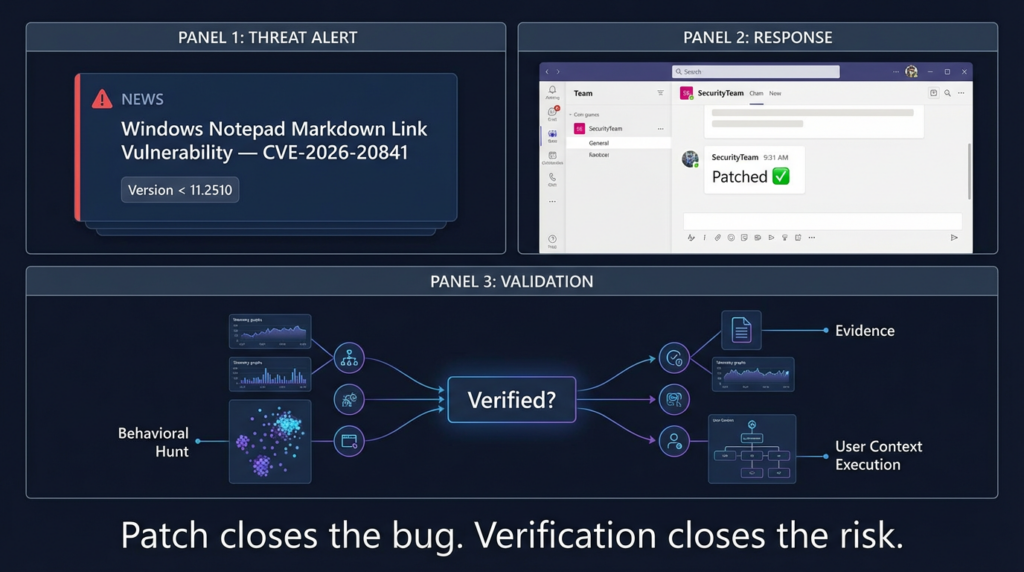
A lot of teams stop at “patch applied.” For CVE-2026-20841, that is not enough.
What must be true for a credible closure
- Affected Notepad App versions are upgraded
- Version scope before 11.2510 is the practical patch target based on CVE record previews and multiple security writeups. (CVE)
- Endpoint controls are validated
- EDR visibility, AppLocker/WDAC/ASR behavior, and protocol restrictions should be tested, not assumed.
- Behavioral regression checks are performed
- Use a benign Markdown validation artifact and verify no suspicious execution chains occur.
- Evidence is preserved
- Version reports, SIEM hunt results, and validation logs should be attached to the remediation ticket.
Why this matters
CVE-2026-20841 is exactly the kind of bug that can be “fixed” on paper while still leaving exposure in practice if:
- some endpoints missed Store app updates,
- telemetry is incomplete,
- or policy exceptions make follow-on execution easy.
Safe Validation Workflow for Security Teams
You do not need exploit code to verify remediation. You need a controlled test that exercises the relevant decision points:
- Markdown rendering path
- Link interaction path
- telemetry collection
- process/network correlation
- enforcement behavior of endpoint controls
Benign Markdown validation file generator (Python)
This script creates a harmless .md file for internal validation workflows.
from pathlib import Path
from datetime import datetime, timezone

timestamp = datetime.now(timezone.utc).isoformat()

markdown = f"""# Benign CVE-2026-20841 Validation Artifact

Generated: {timestamp}

Purpose:
This file is for controlled security validation only.
It is intended to test Markdown rendering, user-click telemetry,
and correlation in endpoint monitoring for Windows Notepad App.

Benign links:
- [Security Validation Portal](https://example.com/security/validation)
- [Internal Documentation](https://example.com/docs/notepad-md-test)
- <https://example.com/reference>

Validation steps:
1. Open this file in Windows Notepad App on a test endpoint.
2. Confirm Markdown rendering behavior.
3. Interact with links only in an approved test environment.
4. Review process, protocol, and network telemetry.
5. Verify no unexpected child process execution occurs.

Ticket: SEC-VALID-20841
Owner: Security Engineering
"""

out_path = Path("benign_cve_2026_20841_validation.md")
out_path.write_text(markdown, encoding="utf-8")
print(f"Wrote {out_path.resolve()}")
What to document during the test
- Endpoint hostname / device ID
- User context
- Notepad App version
- Timestamp of open + click actions
- EDR process tree snapshot
- Network events (if any)
- Policy prompts / blocks / allow decisions
- Screenshots and SIEM query results
This turns a patch into an evidence-backed remediation, which is the standard mature security teams should aim for.
PowerShell Examples for Version Discovery and Fleet Validation
A big part of CVE-2026-20841 response is simply knowing which endpoints are still vulnerable.
Local package discovery (modern Notepad app)
# Enumerate the Microsoft Windows Notepad app package and version
Get-AppxPackage -Name *Microsoft.WindowsNotepad* -AllUsers |
    Select-Object Name, PackageFullName, Version, InstallLocation
Basic version flagging logic (example)
$threshold = [version]"11.2510.0.0"

Get-AppxPackage -Name *Microsoft.WindowsNotepad* -AllUsers | ForEach-Object {
    $ver = [version]$_.Version
    [PSCustomObject]@{
        ComputerName    = $env:COMPUTERNAME
        AppName         = $_.Name
        Version         = $ver
        IsPotentiallyVulnerable = ($ver -lt $threshold)
        PackageFullName = $_.PackageFullName
    }
}
Export for centralized review
$results = Get-AppxPackage -Name *Microsoft.WindowsNotepad* -AllUsers | ForEach-Object {
    $ver = [version]$_.Version
    [PSCustomObject]@{
        ComputerName    = $env:COMPUTERNAME
        Version         = $ver.ToString()
        VulnerableRange = ($ver -lt [version]"11.2510.0.0")
        PackageFullName = $_.PackageFullName
    }
}

$results | Export-Csv -Path ".\notepad_cve_2026_20841_inventory.csv" -NoTypeInformation -Encoding UTF8
These scripts are examples, not a replacement for proper endpoint management tooling. The point is to build a habit of app version verification, especially for modern, frequently updated components.
Recommended Mitigations Beyond Patching
Patching is the primary fix, but CVE-2026-20841 is a good opportunity to harden the entire class of “content-to-handler” risk.
1) Enforce least privilege
Since the reported impact runs in the user’s context, reducing user privileges directly reduces blast radius. BleepingComputer’s advisory summary explicitly notes that execution occurs with the same permissions as the user. (BleepingComputer)
2) Review protocol handler exposure
ZDI emphasizes that handler behavior depends on configured protocols and system configuration. (zerodayinitiative.com) That means protocol handler governance is a real control surface, not a footnote.
3) Strengthen endpoint execution controls
- WDAC / AppLocker where feasible
- ASR rules for suspicious child processes or script execution
- EDR policies that alert on user-app-to-LOLBin chains
4) Improve attachment and content handling policies
Many organizations filter “obvious” risky file types but treat .md as harmless. CVE-2026-20841 is a reminder that low-friction file types can still be execution-adjacent.
5) Update awareness training
User education should not only say “don’t click links in email.” It should also cover:
- links inside downloaded docs,
- local viewers/editors with rendering modes,
- and “safe-looking” file types like Markdown.
Common Mistakes in Internal Communication About CVE-2026-20841
The way a security team describes a CVE often determines whether the organization responds efficiently.
Mistake 1: Calling it just “a Notepad bug”
That wording loses the key risk pattern: Markdown rendering + link handling + protocol invocation + user context execution.
Mistake 2: Calling it “wormable RCE”
NVD’s revised wording and vector indicate a local execution context and user interaction requirement, which is not the same as a network service RCE. (NVD)
Mistake 3: Saying “Patch Tuesday fixed it, no action needed”
The presence of a vendor fix does not prove your fleet is remediated, especially when Store app update coverage is inconsistent.
Mistake 4: Relying only on vulnerability scanner output
Version checks are useful, but they do not prove:
- handler restrictions,
- EDR visibility,
- or control-path effectiveness.
Better internal summary template
Use something like:
CVE-2026-20841 is a high-severity Windows Notepad App vulnerability (CWE-77) affecting versions before 11.2510. It requires user interaction with a crafted Markdown link and can lead to local code execution in the current user’s context via protocol/handler invocation. Remediation requires app version updates plus telemetry-based verification of control behavior. (NVD)
That sentence is precise, defensible, and operationally useful.
Related CVEs and Why This Pattern Will Keep Returning
CVE-2026-20841 is not an isolated “weird Notepad story.” It reflects a recurring problem in modern software:
Features expand faster than security classifications.
The same pattern appears when:
- browsers add powerful integrations,
- collaboration apps render richer content,
- local tools gain plugin ecosystems,
- “simple” utilities start invoking protocol handlers,
- AI-assisted apps ingest untrusted content and route actions automatically.
The lesson for defenders is to stop classifying risk only by app brand or legacy role. Instead, classify by current capabilities:
- Does it parse?
- Does it render?
- Does it transform?
- Does it call handlers?
- Does it launch child processes?
- Does it make network requests?
- Can user-controlled content influence any of those steps?
CVE-2026-20841 is an excellent training case for this mindset because the answer is now visibly “yes” in a product many teams still model as plain text only.
Turning CVE-2026-20841 Into a Repeatable Security Workflow
Many organizations still handle major CVEs as a burst of Slack messages and a patch reminder. That does not scale, and it does not produce evidence.
A stronger workflow looks like this:
Standardized CVE intake
- Canonical facts from NVD / CVE.org
- Technical cause from research source (e.g., ZDI)
- Practical risk narrative from mainstream coverage (e.g., BleepingComputer / The Verge)
Exposure mapping
- Product and version inventory
- User populations and privilege profiles
- Endpoint hardening posture
- Protocol handler / app control configuration
Detection and hunting
- Behavioral hypotheses
- SIEM/EDR hunts
- Alert tuning
- Validation exclusions for lab testing
Remediation and verification
- App version updates
- Policy reviews
- Safe validation artifact execution
- לכידת ראיות
Post-remediation learning
- Update asset inventory practices
- Update app classification logic
- Add detection coverage for user-app execution pivots
This is the difference between “CVE awareness” and real vulnerability operations.
This article should not force a product mention where it does not belong. Here, the fit is real—but specific.
CVE-2026-20841 is exactly the kind of vulnerability where teams know what happened but struggle to prove their environment is no longer exposed. That is a workflow and verification problem, not just a patching problem.
An AI-driven security validation platform like Penligent can be useful here in two practical ways:
First, it can help turn a trending CVE into a structured internal response task: canonical fact extraction, asset mapping, detection checklist generation, and validation planning. That reduces the time between “we saw the news” and “we have an actual remediation plan.”
Second, it can support evidence-backed verification workflows after patching. For cases like CVE-2026-20841, the real value is not hype around exploitation—it is proving that endpoint controls, app versions, and detection logic behave the way the team expects in a controlled test.
If you want examples of Penligent’s prior coverage and internal-link targets for topical authority clustering, these two pages are directly relevant:
- Windows Notepad CVE-2026-20841 PoC: When Markdown Links Turn a Text Editor Into an Execution Boundary (Penligent) (Penligent)
- Bleeping Computer CVE-2026-20841: Why Everyone’s Searching It — and How to Turn a News Habit Into a Security Workflow (Penligent) (Penligent)
The clean positioning is simple: patching fixes the software flaw; validation proves your rollout and controls actually reduced risk.
FAQ: CVE-2026-20841 Questions Security Teams Actually As
Is CVE-2026-20841 a “remote” or “local” code execution vulnerability?
NVD’s current description says code execution locally, and its change history shows the wording was revised from “over a network” to “locally.” In practical terms, the common abuse scenario involves remote delivery of a crafted Markdown file, user interaction, ו local execution in the user’s context. (NVD)
Does the vulnerability require user interaction?
Yes. Public reporting and NVD’s updated CVSS vector indicate user interaction is part of the exploitation path. ZDI and BleepingComputer both describe a user opening a malicious .md file and clicking a link. (NVD)
Which Notepad versions are affected?
The CVE record preview and multiple security writeups indicate the affected range is 11.0.0 before 11.2510 for the Windows Notepad App. (CVE)
Why is Markdown support relevant?
ZDI explains that the issue is tied to link validation in Markdown files, including .md detection, tokenization, and link click handling routed to ShellExecuteExW(). (zerodayinitiative.com)
If Microsoft says no active exploitation was seen, can this wait?
Not necessarily. The Verge reported Microsoft had no evidence of in-the-wild exploitation at the time, but the vulnerability still supports a practical user-targeted attack chain and should be prioritized as a high-severity endpoint/client-side issue. (The Verge)
Final Take: What CVE-2026-20841 Teaches About Modern Endpoint Risk
CVE-2026-20841 matters because it exposes a security blind spot that exists in many organizations: they classify software by reputation and history, not by current behavior.
The modern Windows Notepad App is not just a dumb text editor in the threat-model sense once it renders Markdown and routes clicks through OS protocol handlers. ZDI’s technical analysis explains the mechanics. NVD provides the formal classification and change history. Mainstream coverage explains why the issue spread quickly through security teams and why user interaction matters in real-world scenarios. (zerodayinitiative.com)
The best response to CVE-2026-20841 is not panic and not complacency. It is disciplined security engineering:
- patch the affected app versions,
- hunt for abnormal behavior during patch lag,
- validate remediation with safe test artifacts,
- and preserve evidence that the risk was actually reduced.
That is what strong vulnerability operations look like in 2026.
הפניות
- NVD — CVE-2026-20841 (description, CWE-77, change history, CVSS vector changes, vendor reference):
https://nvd.nist.gov/vuln/detail/CVE-2026-20841 (NVD) - Zero Day Initiative — CVE-2026-20841: Arbitrary Code Execution in the Windows Notepad (Markdown handling and link validation technical analysis):
https://www.zerodayinitiative.com/blog/2026/2/19/cve-2026-20841-arbitrary-code-execution-in-the-windows-notepad (zerodayinitiative.com) - BleepingComputer — Windows 11 Notepad flaw let files execute silently via Markdown links (practical risk framing and advisory quote coverage):
https://www.bleepingcomputer.com/news/microsoft/windows-11-notepad-flaw-let-files-execute-silently-via-markdown-links/ (BleepingComputer) - The Verge — Microsoft fixes Notepad flaw that could trick users into clicking malicious Markdown links (stakeholder-friendly summary and Patch Tuesday context):
https://www.theverge.com/tech/877295/microsoft-notepad-markdown-security-vulnerability-remote-code-execution (The Verge) - CVE.org record preview (affected version scope indexed):
https://www.cve.org/CVERecord?id=CVE-2026-20841 (CVE) - Tenable Nessus plugin page (version-oriented operational language and “upgrade to 11.2510 or later” guidance):
https://www.tenable.com/plugins/nessus/298646 (Tenable®) - Windows Notepad CVE-2026-20841 PoC — When Markdown Links Turn a Text Editor Into an Execution Boundary
https://www.penligent.ai/hackinglabs/windows-notepad-cve-2026-20841-poc-when-markdown-links-turn-a-text-editor-into-an-execution-boundary/ (Penligent) - Bleeping Computer CVE-2026-20841 — Why Everyone’s Searching It and How to Turn a News Habit Into a Security Workflow
https://www.penligent.ai/hackinglabs/bleeping-computer-cve-2026-20841-why-everyones-searching-it-and-how-to-turn-a-news-habit-into-a-security-workflow/ (Penligent)

 Hebrew
  English
  German
  French
  Spanish
  Portuguese
  Japanese
  Korean
  Hindi
Hindi  Arabic
  Turkish